
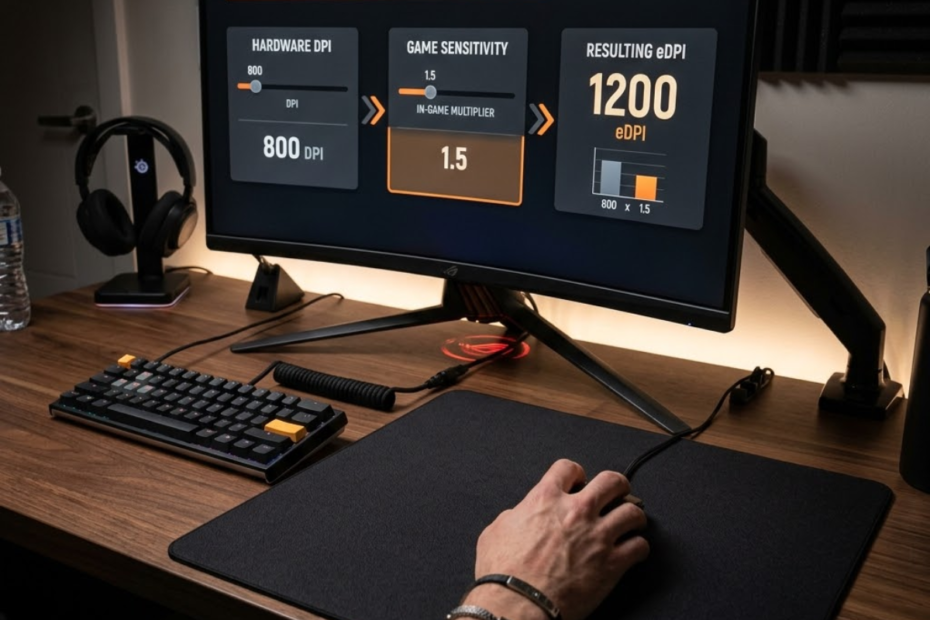
eDPI is an effective sensitivity measurement that combines mouse DPI and in-game sensitivity, helping FPS players compare aiming speed more accurately across different settings. While DPI only describes how sensitive your mouse is at the hardware level, eDPI shows how fast your aim actually feels inside a specific game.
This matters because two players can use different DPI and sensitivity values but still end up with the same effective sensitivity. For FPS games like Valorant, Counter-Strike 2, Apex Legends, and Overwatch 2, eDPI gives players a cleaner way to compare settings without getting confused by raw DPI numbers alone.
In this guide, you will learn what eDPI means, how to calculate it, how it differs from DPI, and why it matters when comparing mouse sensitivity for FPS games.
What Is eDPI?
eDPI is a combined sensitivity value that multiplies mouse DPI by in-game sensitivity, helping FPS players understand their actual aiming speed inside a game. It is more useful than DPI alone because it includes both the mouse hardware setting and the sensitivity setting controlled by the game.
Many new FPS players hear about DPI first and assume it explains everything about mouse speed. That is only partly true. DPI affects how the mouse sensor reports movement, but the game sensitivity changes how that movement is translated inside the game.
For example, 800 DPI can feel slow in one game profile and fast in another if the in-game sensitivity is different. eDPI solves this problem by combining both values into one number. That makes it easier to understand, compare, and discuss sensitivity settings with other players. If you are learning how mouse settings affect FPS performance overall, this guide to gaming mouse for FPS games explains the key factors that influence aim consistency and control.
What Does eDPI Mean in FPS Gaming?
eDPI means Effective Dots Per Inch and is a sensitivity metric that combines mouse DPI and in-game sensitivity, helping FPS players compare aim speed with a single number. The word “effective” means the number reflects the final sensitivity you actually feel in-game.
This is important because raw DPI does not show the full picture. A player using 400 DPI can still have fast aim if their in-game sensitivity is high. Another player using 1600 DPI can still have slow aim if their in-game sensitivity is low.
In FPS gaming, eDPI is useful because it gives players a shared language. Instead of saying only “I use 800 DPI,” a player can share their eDPI and make their sensitivity easier to understand.
That is why eDPI is common in competitive settings discussions, pro player setup pages, and FPS aiming guides.
Why Was eDPI Created?
eDPI is a standardized sensitivity reference created to combine different mouse and game settings, helping players compare setups without relying on DPI alone. It exists because DPI by itself can be misleading when players use different in-game sensitivity values.
Before eDPI became commonly used, many players compared only DPI. This caused confusion because 800 DPI in one setup could feel completely different from 800 DPI in another setup. The missing piece was in-game sensitivity.
eDPI makes the comparison more complete. It does not tell you whether a setting is perfect, but it does show how fast a player’s sensitivity is in practical terms.
This makes eDPI especially helpful for beginners who are trying to understand why professional FPS players often use different DPI numbers but still stay within similar effective sensitivity ranges.
A Simple Example of eDPI in Real Gameplay
eDPI is easy to understand through examples because it turns DPI and sensitivity into one final number, helping players see when different settings produce the same effective speed. This is one reason eDPI is easier to compare than raw sensitivity.
For example, a player using 800 DPI and 0.40 in-game sensitivity has an eDPI of 320. Another player using 1600 DPI and 0.20 sensitivity also has an eDPI of 320. Their settings look different, but their effective sensitivity is mathematically the same.
This does not always mean the mouse will feel identical in every way. DPI steps, sensor behavior, game engine behavior, mouse weight, mousepad surface, and grip style can still affect the final feel. However, eDPI gives both players a shared sensitivity baseline.
That baseline is what makes eDPI valuable for FPS players who want to compare settings clearly instead of guessing based on DPI alone.
Understanding what eDPI means gives players a stronger foundation before changing mouse settings. Once the definition is clear, the next step is learning how the number is calculated.
How Is eDPI Calculated?
eDPI is calculated by multiplying mouse DPI by in-game sensitivity, helping players turn two separate sensitivity settings into one easy comparison value. The formula is simple, but it is one of the most useful calculations for understanding FPS mouse sensitivity.
The basic formula is:
eDPI = DPI × In-Game Sensitivity
The image below shows how mouse DPI and in-game sensitivity work together to create an eDPI value:
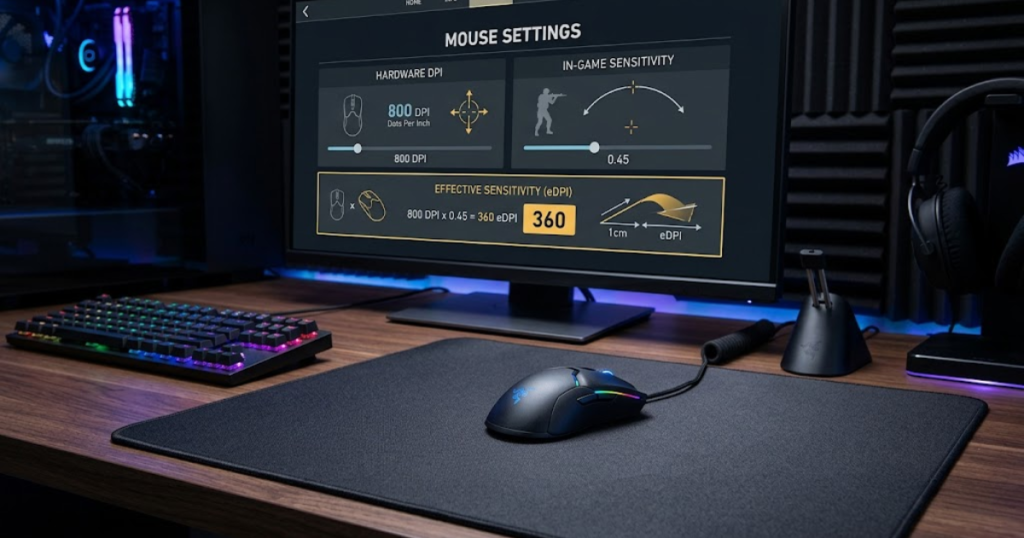
If your mouse is set to 800 DPI and your in-game sensitivity is 0.35, your eDPI is 280. This means your effective sensitivity is not just 800 or 0.35. It is the combination of both values.
The Basic eDPI Formula Explained
The eDPI formula is DPI multiplied by in-game sensitivity, helping players calculate effective sensitivity without needing advanced tools. This makes it simple enough for beginners while still useful for competitive players.
The formula works because DPI and in-game sensitivity both affect how far your crosshair moves when you move your mouse. DPI controls the input from the mouse. In-game sensitivity controls how strongly the game responds to that input.
For example:
800 DPI × 0.35 sensitivity = 280 eDPI
This number helps you compare your sensitivity with another player more accurately. If another player uses 400 DPI and 0.70 sensitivity, their eDPI is also 280. Even though the settings are different, the calculated effective sensitivity is the same.
The formula does not replace real testing, but it gives you a reliable starting point for understanding your mouse setup. If you want a more detailed walkthrough, check our guide on how to calculate eDPI.
How DPI Contributes to eDPI
DPI is the mouse hardware sensitivity value used in the eDPI formula, helping determine how much input your mouse sends before the game sensitivity is applied. A higher DPI usually means the mouse reports more movement for the same physical motion.
If you keep the same in-game sensitivity but increase DPI, your eDPI increases. For example, 400 DPI at 0.50 sensitivity equals 200 eDPI, while 800 DPI at 0.50 sensitivity equals 400 eDPI. The sensitivity value inside the game did not change, but the effective result doubled.
This is why changing DPI without adjusting in-game sensitivity can make your aim feel much faster or slower than expected. DPI is not just a background setting. It directly changes the final eDPI number.
However, DPI should not be treated as the only setting that matters. It is only one part of the final sensitivity equation. If you want a deeper explanation of how DPI works at the hardware level, this guide on what DPI is in a gaming mouse covers how DPI affects mouse movement and FPS aiming.
How In-Game Sensitivity Affects eDPI
In-game sensitivity is the software multiplier used in the eDPI formula, helping control how strongly the game responds to your mouse DPI. Even a small sensitivity change can noticeably affect your final eDPI.
If your DPI stays the same but your in-game sensitivity increases, your eDPI also increases. For example, 800 DPI at 0.25 sensitivity equals 200 eDPI, while 800 DPI at 0.50 sensitivity equals 400 eDPI. The mouse DPI did not change, but the effective sensitivity doubled.
This is why FPS players should track both values when adjusting their aim. Changing only sensitivity without calculating eDPI can make it harder to understand how much your setup actually changed.
For beginners, keeping a note of DPI, sensitivity, and eDPI can make testing much more organized. It helps you avoid random changes and gives you a clearer path toward a stable setting.
The following process can help you calculate your eDPI accurately:
- Find your DPI: Open your mouse software or check the DPI button setting on your gaming mouse.
- Find your in-game sensitivity: Open the mouse or controls section inside your FPS game settings.
- Multiply both values: Use the formula DPI × in-game sensitivity to calculate your eDPI.
- Write the number down: Save your eDPI so you can compare future changes more easily.
Completing these steps gives you a clear sensitivity reference that is easier to compare than DPI or in-game sensitivity alone.
Knowing how to calculate eDPI helps players make cleaner setting changes. Instead of guessing whether a new sensitivity is faster or slower, you can compare the actual effective value.
eDPI vs DPI: What Is the Difference?
DPI is a mouse hardware setting, while eDPI is the final sensitivity value created by combining DPI with in-game sensitivity, helping FPS players understand the difference between raw input and actual in-game aim speed. DPI explains only part of the setup, but eDPI explains the effective result.
The image below shows why DPI alone does not explain the full sensitivity experience:
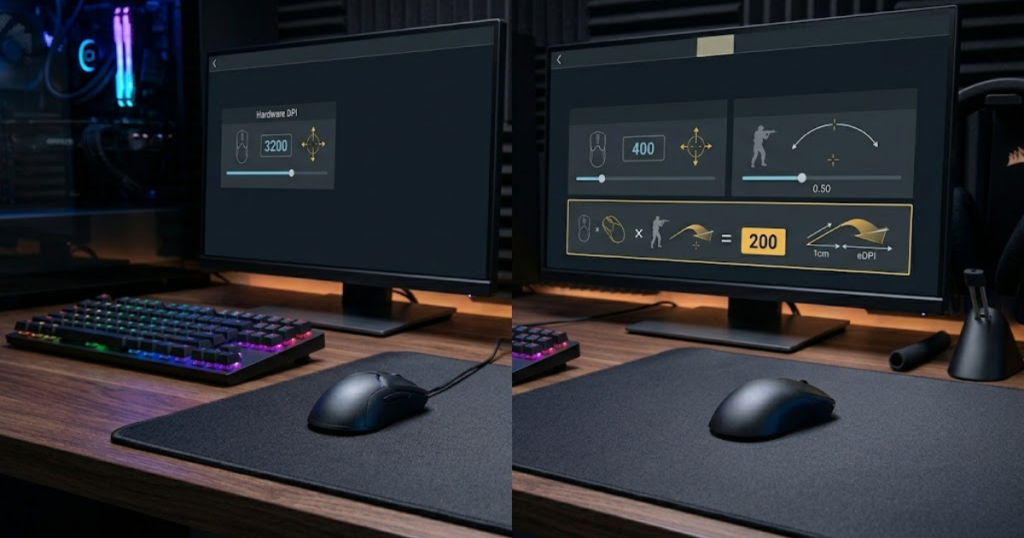
This difference matters because many players misunderstand DPI when they first start learning FPS settings. If you want a more detailed breakdown of both measurements, this guide on DPI vs eDPI compares when each metric is useful and how they affect sensitivity discussions in FPS games.
What DPI Actually Measures
DPI is a mouse sensitivity measurement that describes how much movement the sensor reports, helping define the hardware side of your aiming setup. It is usually adjusted through mouse software or physical DPI buttons on the mouse.
A higher DPI setting makes the cursor or crosshair respond more strongly to physical movement when all other settings stay the same. A lower DPI setting makes movement slower under the same condition.
However, DPI does not include your game sensitivity. That means two players with the same DPI can still have completely different aiming speeds if their in-game sensitivity settings are different.
This is why DPI alone is not enough for accurate FPS sensitivity comparison.
What eDPI Actually Measures
eDPI is an effective sensitivity measurement that includes both DPI and in-game sensitivity, helping players understand how fast their aim behaves inside a specific game. It gives a more complete picture than DPI alone.
For example, 800 DPI with 0.30 sensitivity produces a different eDPI than 800 DPI with 0.60 sensitivity. The DPI is identical, but the effective speed is not. eDPI captures that difference.
This makes eDPI especially useful when looking at player settings, sensitivity guides, or professional FPS setup lists. It allows you to compare the final sensitivity value instead of only comparing hardware settings.
That is why FPS players usually talk about eDPI when the goal is meaningful sensitivity comparison.
Why FPS Players Prefer Comparing eDPI
FPS players prefer comparing eDPI because it combines the two most important sensitivity numbers, helping them understand real aiming speed more clearly than DPI alone. This makes eDPI more practical for evaluating settings.
When players compare only DPI, the comparison can be incomplete. One player using 400 DPI may actually have a higher eDPI than another player using 1600 DPI if their in-game sensitivity is much higher. To better understand the relationship between these two settings, this guide on DPI vs sensitivity explains how each one contributes to overall aiming speed.
eDPI removes this confusion by showing the final combined value. It is not perfect, but it is a much stronger reference than DPI by itself.
The table below explains the key differences between DPI and eDPI:
| Factor | DPI | eDPI |
|---|---|---|
| Basic meaning | Mouse hardware sensitivity | Effective in-game sensitivity |
| Includes in-game sensitivity | No | Yes |
| Best used for | Setting mouse input level | Comparing FPS sensitivity |
| Can compare players accurately | Limited | More useful |
| Example | 800 DPI | 800 DPI × 0.35 = 280 eDPI |
Understanding the difference between DPI and eDPI helps players avoid one of the most common FPS setting mistakes: judging sensitivity by mouse DPI only.
Why Is eDPI Important for FPS Games?
eDPI is a practical sensitivity reference that combines DPI and in-game sensitivity, helping FPS players compare settings more accurately across different setups. While DPI and sensitivity individually affect aim speed, eDPI provides a single value that is easier to understand and communicate.
Competitive FPS games require consistency. Whether you are adjusting your settings, comparing your aim to professional players, or switching between different mice, eDPI creates a common measurement that simplifies the process. If you are also looking for hardware recommendations, our guide to the best gaming mouse for FPS games in 2026 highlights popular options used by competitive players.
Comparing Sensitivity Between Different Players
eDPI is a shared sensitivity measurement that combines multiple settings, helping players compare aiming speed without being confused by different DPI values. This is one of the main reasons eDPI became popular in competitive FPS communities.
Imagine two players discussing their settings. One uses 400 DPI while another uses 1600 DPI. At first glance, the settings appear dramatically different. However, once eDPI is calculated, both players may actually be using similar effective sensitivity ranges.
Without eDPI, comparing sensitivity often leads to incorrect conclusions because DPI alone does not reveal the complete setup.
Using a common reference makes discussions about aim settings much more meaningful and accurate.
Understanding Professional Player Settings
eDPI is a useful comparison tool that combines hardware and software sensitivity, helping players understand professional settings more clearly. Many FPS players look at pro setups for reference, but copying only DPI often creates confusion.
A professional player may use 1600 DPI, while another uses 800 DPI. These values appear very different until their in-game sensitivity is included. Once eDPI is calculated, their effective sensitivity may fall into a surprisingly similar range.
This is why most modern sensitivity databases include eDPI alongside DPI and sensitivity values. Many of those databases also show that a large percentage of competitive players prefer 800 DPI, which we explain in our guide on why pros use 800 DPI.
Understanding eDPI helps players interpret pro settings more accurately instead of focusing on isolated numbers.
Creating a Consistent Sensitivity Reference
eDPI is a stable sensitivity benchmark that combines multiple settings, helping players track changes and maintain consistency over time. This becomes especially useful when experimenting with new configurations.
If you change DPI, switch games, or test different sensitivity values, eDPI gives you a reference point that remains easy to compare. Rather than relying on memory, you can use eDPI to see exactly how much your sensitivity changed.
This makes testing more organized and reduces the likelihood of making random adjustments that are difficult to evaluate later.
A consistent reference system allows players to approach sensitivity changes with more confidence and structure.
The factors below explain why eDPI is important in FPS games:
- Player Comparison: Helps compare sensitivity fairly across different setups.
- Professional Research: Makes pro player settings easier to understand.
- Consistency Tracking: Provides a stable reference when testing settings.
- Communication: Creates a common language for discussing sensitivity.
- Organization: Makes sensitivity adjustments easier to document and evaluate.
These advantages explain why eDPI remains one of the most commonly referenced sensitivity metrics in FPS communities.
By simplifying comparisons and reducing confusion, eDPI helps players make more informed decisions about their settings.
What Is Considered a Low, Medium, or High eDPI?
eDPI is commonly grouped into low, medium, and high ranges, helping FPS players understand how sensitive a setup feels relative to other players. These categories are not strict rules, but they provide useful context when evaluating settings.
Different FPS games have different average sensitivity ranges. However, most competitive players still fall into recognizable eDPI categories that make comparisons easier.
Low eDPI and Its Characteristics
Low eDPI is a sensitivity range with slower cursor movement, helping players achieve greater control and precision during aiming. This category is commonly associated with arm aiming and larger mouse movements.
Players using low eDPI often benefit from improved stability during tracking and micro-adjustments. However, larger physical mouse movements are usually required to turn quickly.
Many professional tactical FPS players prefer lower eDPI because accuracy is often prioritized over rapid camera movement.
Low eDPI emphasizes control and consistency over speed.
Medium eDPI and Its Characteristics
Medium eDPI is a balanced sensitivity range that combines reasonable speed and control, helping players maintain flexibility across different situations. Many players naturally settle within this category.
This range often allows comfortable flicks without requiring extremely large mouse movements. At the same time, it usually maintains enough precision for accurate micro-corrections.
Because it balances multiple strengths, medium eDPI is commonly recommended for players still discovering their preferences.
It serves as a practical middle ground between speed and control.
High eDPI and Its Characteristics
High eDPI is a sensitivity range with faster cursor movement, helping players perform quick turns and reactions using smaller mouse movements. It is often associated with wrist aiming and limited desk space.
Higher sensitivity can feel responsive and efficient, especially in games requiring constant movement. However, the increased speed may make precision more difficult for some players.
Success with high eDPI often depends on personal comfort, aiming habits, and game requirements rather than the number itself.
High eDPI prioritizes responsiveness while requiring greater control to maintain accuracy.
The table below explains common eDPI categories used by FPS players:
| eDPI Range | Category | Typical Feel |
|---|---|---|
| Under 200 | Low | Maximum control, larger movements |
| 200–400 | Medium | Balanced speed and precision |
| Over 400 | High | Faster movement, smaller motions |
These ranges should be treated as reference points rather than strict recommendations. Individual preferences, game mechanics, and playstyles can influence what feels comfortable.
Understanding these categories makes it easier to interpret sensitivity discussions and compare your settings with other players.
How eDPI Helps Compare Different FPS Games
eDPI is a cross-game sensitivity reference that combines DPI and in-game sensitivity, helping FPS players compare settings between different titles more effectively. Because every game uses its own sensitivity scale, raw sensitivity numbers are often difficult to compare directly.
eDPI creates a common measurement that simplifies comparisons across games. While it does not make every game’s sensitivity system identical, it provides a useful starting point.
Using eDPI in Valorant
eDPI is a widely used sensitivity reference in Valorant, helping players compare settings regardless of their DPI configuration. Many Valorant discussions focus on eDPI because the game emphasizes precise aiming and consistency.
Professional Valorant players often operate within relatively controlled eDPI ranges, making the metric useful when researching competitive settings.
Rather than focusing only on DPI, Valorant players frequently use eDPI to understand overall sensitivity behavior.
This makes eDPI one of the most recognized sensitivity measurements within the Valorant community.
Using eDPI in Counter-Strike 2
eDPI is a useful comparison tool in Counter-Strike 2, helping players evaluate effective sensitivity despite the game’s unique sensitivity scale. Because CS2 uses different sensitivity values than Valorant, direct comparisons can be misleading.
Many players transitioning between games use eDPI to estimate how their settings compare. While additional conversion considerations may exist, eDPI still provides valuable context.
Using a shared measurement reduces confusion when discussing settings across communities.
This makes eDPI a practical reference even when sensitivity systems differ.
Using eDPI Across Multiple FPS Titles
eDPI is a general sensitivity reference that combines DPI and game sensitivity, helping players establish consistency when moving between FPS games. Although every title handles sensitivity differently, eDPI remains a useful benchmark.
Players who enjoy multiple FPS games often use eDPI as a starting point when configuring new settings. It helps create familiarity while reducing the amount of guesswork involved.
This does not guarantee identical aiming feel across all games, but it does provide a structured comparison method.
A shared reference system makes transitioning between games significantly easier.
The table below compares example eDPI values across different FPS games:
| Game | DPI | Sensitivity | eDPI |
|---|---|---|---|
| Valorant | 800 | 0.35 | 280 |
| Counter-Strike 2 | 800 | 1.20 | 960 |
| Apex Legends | 800 | 1.50 | 1200 |
The purpose of this comparison is not to recommend specific values but to demonstrate how eDPI provides a common reference despite different sensitivity scales.
Using eDPI as a comparison tool makes sensitivity discussions across multiple FPS titles much easier to understand.
Can Different Settings Produce the Same eDPI?
Different DPI and sensitivity combinations can produce the same eDPI, helping players achieve identical effective sensitivity values through multiple configurations. This is one of the most important concepts for understanding how eDPI works.
The image below shows how different mouse settings can still produce the same effective sensitivity:
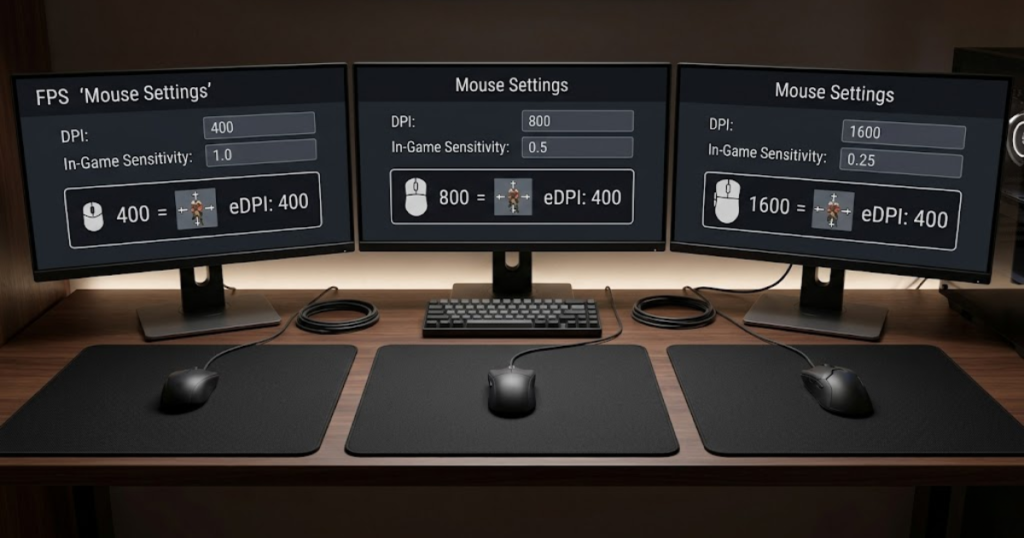
Many players assume that changing DPI automatically creates a completely different sensitivity experience. In reality, adjustments to in-game sensitivity can offset DPI changes and produce the same final eDPI.
Different DPI Values With the Same eDPI
Different DPI values can create the same eDPI when sensitivity is adjusted accordingly, helping players maintain a consistent effective sensitivity. This demonstrates why DPI alone is not enough for meaningful comparison.
A player using 400 DPI can achieve the same eDPI as a player using 1600 DPI if their sensitivity values compensate for the difference.
This relationship is one of the main reasons FPS communities prefer discussing eDPI instead of only discussing DPI.
Looking at the final eDPI value provides a more complete understanding of sensitivity.
Different Sensitivity Values With the Same eDPI
Different sensitivity values can create the same eDPI when DPI changes proportionally, helping players preserve effective aim speed across multiple configurations. This flexibility allows players to customize settings while maintaining similar sensitivity.
Because DPI and sensitivity influence the same formula, changing one value does not automatically change the final result if the other value is adjusted accordingly.
This makes eDPI particularly useful when experimenting with new mouse settings.
Understanding this relationship helps players make intentional adjustments instead of random changes.
Why Equal eDPI Does Not Always Feel Identical
Equal eDPI values can still feel slightly different because other variables influence aiming, helping explain why identical calculations do not always create identical experiences. eDPI measures effective sensitivity, but it does not measure every factor that affects mouse feel.
Polling rate, mouse weight, sensor implementation, skates, mousepad surface, grip style, and personal preference can all influence how a setup feels.
This is why eDPI should be treated as a comparison tool rather than a guarantee of identical performance.
Understanding the limitations of eDPI creates more realistic expectations when adjusting settings.
The table below explains how different settings can create the same eDPI:
| DPI | Sensitivity | eDPI |
|---|---|---|
| 400 | 0.80 | 320 |
| 800 | 0.40 | 320 |
| 1600 | 0.20 | 320 |
This comparison demonstrates why evaluating only DPI can be misleading. Multiple configurations can produce the same final eDPI.
Recognizing this flexibility helps players understand sensitivity more accurately and avoid common misconceptions.
Does a Lower eDPI Improve Aim?
Lower eDPI is a sensitivity approach that reduces effective aim speed, helping many FPS players improve control and precision during aiming. However, lower eDPI does not automatically make someone a better player because aiming performance depends on multiple factors beyond sensitivity.
Many FPS discussions suggest that lower sensitivity is always superior. While lower eDPI often provides advantages for precision, the relationship between sensitivity and aim is more complex than a single number.
Why Many Professional Players Use Lower eDPI
Lower eDPI is a sensitivity choice that promotes controlled mouse movement, helping professional players achieve greater consistency during tracking and micro-adjustments. This is one reason lower sensitivity is common in tactical FPS games.
Professional players often value precision more than extreme movement speed. A lower eDPI can reduce accidental overcorrections and make crosshair placement easier to control during high-pressure situations.
Because competitive matches frequently reward accuracy over rapid camera movement, lower sensitivity remains popular among elite players.
This explains why many professional FPS setups fall within relatively controlled eDPI ranges.
Situations Where Higher eDPI Can Still Work
Higher eDPI is a faster sensitivity approach that reduces required mouse movement, helping some players react quickly and play comfortably within limited space. High sensitivity is not automatically bad.
Players with smaller desks, wrist-focused aiming styles, or preferences for faster movement may perform extremely well using higher eDPI values. Success depends on consistency rather than simply choosing the lowest sensitivity possible.
Many skilled FPS players have reached high competitive levels while using sensitivity settings that differ significantly from professional averages.
This shows that comfort and repeatability remain important parts of sensitivity selection.
Why Aim Skill Depends on More Than eDPI
Aim skill is a performance outcome influenced by multiple factors, helping explain why eDPI alone cannot determine player accuracy. Sensitivity is only one part of a much larger aiming system.
Crosshair placement, reaction time, game knowledge, movement control, positioning, and practice habits all contribute to aiming performance. Even a perfectly optimized eDPI cannot compensate for weaknesses in these areas.
This is why many experienced players focus on developing repeatable mechanics instead of endlessly chasing new sensitivity numbers.
eDPI should be viewed as a tool that supports aiming development rather than a shortcut to better aim.
The factors below explain why lower eDPI does not automatically improve aim:
- Mechanics: Fundamental aiming skill matters more than sensitivity alone.
- Practice: Consistent training often produces larger improvements than setting changes.
- Comfort: An uncomfortable sensitivity can reduce performance regardless of its eDPI value.
- Playstyle: Different players may perform better within different sensitivity ranges.
- Experience: Muscle memory and familiarity influence aim consistency.
These factors demonstrate why sensitivity should be treated as a supporting variable rather than a guaranteed solution.
Finding a comfortable and repeatable eDPI is usually more important than simply choosing the lowest possible value.
Common eDPI Mistakes New FPS Players Make
eDPI is a sensitivity reference that helps compare settings, but many new FPS players misunderstand how it should be used. These misunderstandings often lead to unnecessary setting changes and inconsistent aiming habits.
Learning what eDPI can and cannot tell you is just as important as learning how to calculate it. Many of the same misunderstandings appear in our guide covering common DPI mistakes beginners make.
Focusing Only on DPI Numbers
DPI is a hardware setting that affects eDPI, helping determine sensitivity but not fully explaining it. One of the most common mistakes is assuming DPI alone reveals how fast a player’s aim feels.
Many beginners compare only DPI values and ignore in-game sensitivity. This often creates inaccurate comparisons because two players with identical DPI can still have completely different eDPI values.
Understanding the relationship between DPI and sensitivity prevents this misunderstanding.
Evaluating the full eDPI value provides a much more accurate picture.
Copying Professional eDPI Without Context
Professional eDPI values are reference points that help players understand sensitivity ranges, but they do not guarantee similar performance. Copying a professional player’s settings without considering personal preferences can create frustration.
Professional players often have different mousepads, desk sizes, aiming styles, experience levels, and practice routines. A setting that works perfectly for one player may feel uncomfortable for another.
This is why eDPI should be used as a learning reference rather than an exact prescription.
Personal comfort remains a critical part of sensitivity selection.
Constantly Changing eDPI Settings
eDPI adjustments are useful when made intentionally, helping players test improvements without creating unnecessary inconsistency. Frequent random changes are a common beginner mistake.
Constantly changing sensitivity makes it difficult to build muscle memory and evaluate performance accurately. Many players blame their settings after a bad match and immediately make adjustments without enough evidence.
A better approach is to test changes methodically and give each setting enough time before making another adjustment.
Consistency often contributes more to improvement than endless experimentation.
The factors below explain common eDPI mistakes among new FPS players:
- DPI Obsession: Judging sensitivity using DPI alone.
- Blind Copying: Using professional settings without considering personal comfort.
- Constant Changes: Switching sensitivity too frequently.
- Ignoring Practice: Expecting settings to solve mechanical weaknesses.
- Misinterpreting Data: Treating eDPI as a perfect performance predictor.
These mistakes often create unnecessary confusion and slow improvement.
Using eDPI correctly requires both understanding the metric and recognizing its limitations.
How to Find Your Current eDPI
eDPI is a calculated sensitivity value that combines DPI and in-game sensitivity, helping players identify their current effective sensitivity with a simple process. Knowing your eDPI makes future adjustments easier to track and compare.
Finding Your Mouse DPI
DPI is a hardware sensitivity setting that contributes to eDPI, helping determine the amount of mouse input sent to the game. Most gaming mice allow DPI adjustments through software.
Open your mouse software and locate the active DPI profile. If your mouse supports multiple DPI stages, verify which stage you actually use while gaming.
Accurate DPI information is essential because incorrect values will produce incorrect eDPI calculations.
Verifying DPI is the first step in finding your effective sensitivity.
Finding Your In-Game Sensitivity
In-game sensitivity is a software multiplier that contributes to eDPI, helping determine how strongly your game responds to mouse movement. This value is usually found within mouse or control settings.
Locate the sensitivity setting used for your primary FPS game. Make sure the value reflects your actual gameplay profile rather than a default or unused configuration.
Both DPI and sensitivity must be accurate for eDPI calculations to be meaningful.
Collecting both numbers prepares you for the final calculation.
Calculating Your eDPI Step by Step
eDPI is calculated by multiplying DPI and in-game sensitivity, helping players convert separate settings into a single sensitivity value. The process requires only basic multiplication.
Once both numbers are known, apply the formula and record the result for future reference.
This simple calculation creates a sensitivity benchmark that is easier to compare and track over time.
Understanding your current eDPI provides a useful foundation for future adjustments.
The following process can help you determine your current eDPI:
- Open Mouse Software: Verify your active DPI setting.
- Open Game Settings: Find your current sensitivity value.
- Multiply Both Values: Use DPI × sensitivity.
- Record the Result: Save the eDPI value for future comparisons.
Following these steps provides an accurate eDPI reference for your current setup.
Having a documented eDPI makes future testing and sensitivity comparisons much easier.
When Should You Use eDPI Instead of DPI?
eDPI is a sensitivity comparison metric that combines DPI and in-game sensitivity, helping players evaluate effective aim speed more accurately than DPI alone. While DPI remains important, there are situations where eDPI provides significantly better context.
Comparing Your Setup With Other Players
eDPI is a comparison tool that combines multiple sensitivity variables, helping players evaluate setups fairly across different configurations. This is one of the most common uses of eDPI.
Because players often use different DPI values, comparing sensitivity through DPI alone can be misleading. eDPI provides a more complete reference.
Using eDPI allows comparisons to focus on effective sensitivity rather than hardware settings.
This creates more meaningful discussions about aim and performance.
Tracking Sensitivity Adjustments Over Time
eDPI is a tracking metric that combines DPI and sensitivity, helping players measure changes more precisely over time. This makes it useful when testing new configurations.
Instead of relying on memory, players can compare previous and current eDPI values to understand how much their settings changed.
This improves organization and reduces guesswork during experimentation.
Tracking eDPI helps create a more structured approach to sensitivity testing.
Evaluating New Mouse Configurations
eDPI is an evaluation tool that combines sensitivity variables, helping players maintain consistency when changing mice or settings. New hardware often introduces configuration changes that can affect aim.
By comparing eDPI values before and after changes, players can preserve familiar sensitivity ranges more easily.
This helps reduce adjustment time when testing new setups.
Maintaining a reference point simplifies hardware transitions.
The factors below explain when eDPI is more useful than DPI:
- Player Comparison: Provides a more complete sensitivity reference.
- Sensitivity Tracking: Makes setting changes easier to measure.
- Hardware Changes: Helps maintain consistency across setups.
- Research: Simplifies professional setting analysis.
- Organization: Creates a structured sensitivity record.
These situations demonstrate why eDPI has become a preferred sensitivity reference in FPS communities.
Although DPI remains important, eDPI often provides the more useful comparison value.
Is eDPI the Best Way to Measure Sensitivity?
eDPI is a useful sensitivity measurement that combines DPI and in-game sensitivity, helping players compare setups more accurately than using either value alone. However, it is not a perfect measurement of overall aiming performance.
Like any metric, eDPI provides valuable information while also having limitations that players should understand.
The Main Advantages of Using eDPI
eDPI is a standardized sensitivity metric that simplifies comparison, helping FPS players evaluate settings more efficiently. This is its greatest strength.
By combining multiple variables into a single number, eDPI reduces confusion and creates a common reference used across FPS communities.
It also makes sensitivity discussions more accessible for beginners.
These advantages explain why eDPI remains widely used.
The Main Limitations of Using eDPI
eDPI is a mathematical sensitivity measurement that simplifies comparisons, helping players understand settings but not fully explain performance. Many important variables exist outside the formula.
eDPI does not measure comfort, grip style, mouse weight, mousepad friction, reaction time, or aiming technique. These factors can significantly influence performance.
As a result, identical eDPI values do not guarantee identical experiences.
Understanding these limitations prevents unrealistic expectations.
Other Factors That Affect Mouse Feel
Mouse feel is a gameplay experience influenced by many variables, helping explain why eDPI alone cannot define a complete setup. Hardware and personal preferences both play important roles.
Polling rate, sensor implementation, skates, mouse shape, hand size, mousepad surface, and posture can all affect aiming feel independently of eDPI.
This means eDPI should be viewed as one important measurement rather than the only measurement that matters.
A complete understanding of sensitivity requires considering the broader setup as well.
The table below compares the strengths and limitations of eDPI:
| Advantages | Limitations |
|---|---|
| Easy to calculate | Does not measure comfort |
| Useful for comparisons | Does not include hardware feel |
| Widely used by FPS communities | Cannot predict player skill |
| Helps organize sensitivity testing | Does not account for technique |
| Provides a common reference | Cannot guarantee identical experiences |
This comparison highlights why eDPI is useful but should not be treated as a complete explanation of aiming performance.
Using eDPI alongside practical testing provides a more balanced approach to sensitivity optimization.
Frequently Asked Questions About eDPI
eDPI is one of the most discussed sensitivity metrics in FPS gaming because it helps players compare settings more effectively. The questions below answer some of the most common concerns about eDPI, sensitivity, and aiming performance.
What is eDPI in gaming?
eDPI is an effective sensitivity measurement that combines mouse DPI and in-game sensitivity, helping players compare actual aiming speed more accurately than DPI alone.
How do you calculate eDPI?
eDPI is calculated by multiplying mouse DPI by in-game sensitivity, helping players convert two separate settings into one effective sensitivity value.
Is eDPI more important than DPI?
eDPI is a more complete sensitivity reference that includes DPI and in-game sensitivity, helping players understand effective aim speed more accurately than DPI by itself.
What is a good eDPI for Valorant?
A good eDPI for Valorant is typically within a controlled sensitivity range that balances precision and comfort, helping players maintain consistent aim during competitive matches.
What is a good eDPI for Counter-Strike 2?
A good eDPI for Counter-Strike 2 is usually one that allows accurate crosshair placement and repeatable mouse control, helping players perform consistently during gunfights.
Can two players have the same eDPI?
Yes, two players can have the same eDPI through different DPI and sensitivity combinations, helping them achieve the same effective sensitivity mathematically.
Does higher DPI mean higher eDPI?
No, higher DPI does not automatically mean higher eDPI because in-game sensitivity also affects the final calculation, helping determine the effective sensitivity value.
Why do professional FPS players use eDPI?
Professional FPS players use eDPI because it is a standardized sensitivity reference that helps compare settings more accurately across different hardware and game configurations.
Is lower eDPI always better for aim?
No, lower eDPI is not always better because aiming performance depends on comfort, mechanics, experience, and consistency, helping explain why different players succeed with different settings.
Should I copy a professional player’s eDPI?
No, professional eDPI values should be treated as reference points that help guide experimentation rather than exact settings that guarantee similar results.
Can eDPI be used across different FPS games?
Yes, eDPI can be used as a cross-game comparison metric that helps players estimate sensitivity relationships between different FPS titles.
Is eDPI enough to optimize mouse sensitivity?
No, eDPI is a useful measurement that helps compare sensitivity settings, but hardware, mouse shape, grip style, mousepad surface, and personal preference also affect aiming performance.
Final Thoughts on eDPI for FPS Players
eDPI is an effective sensitivity measurement that combines DPI and in-game sensitivity, helping FPS players compare aim speed more accurately than either value alone. It simplifies sensitivity discussions and provides a practical reference for evaluating settings.
Although eDPI is extremely useful for comparison, it should not be viewed as a magic number that determines aiming skill. Comfort, consistency, hardware, practice habits, and individual preferences all influence performance.
For most players, the goal is not finding a perfect eDPI. The goal is finding a sensitivity that feels comfortable, repeatable, and effective during real gameplay. Understanding eDPI simply makes that process easier and more structured.
Thank you for taking the time to read this guide. We hope this explanation helps you understand eDPI more clearly and make more informed sensitivity decisions for your FPS games.