
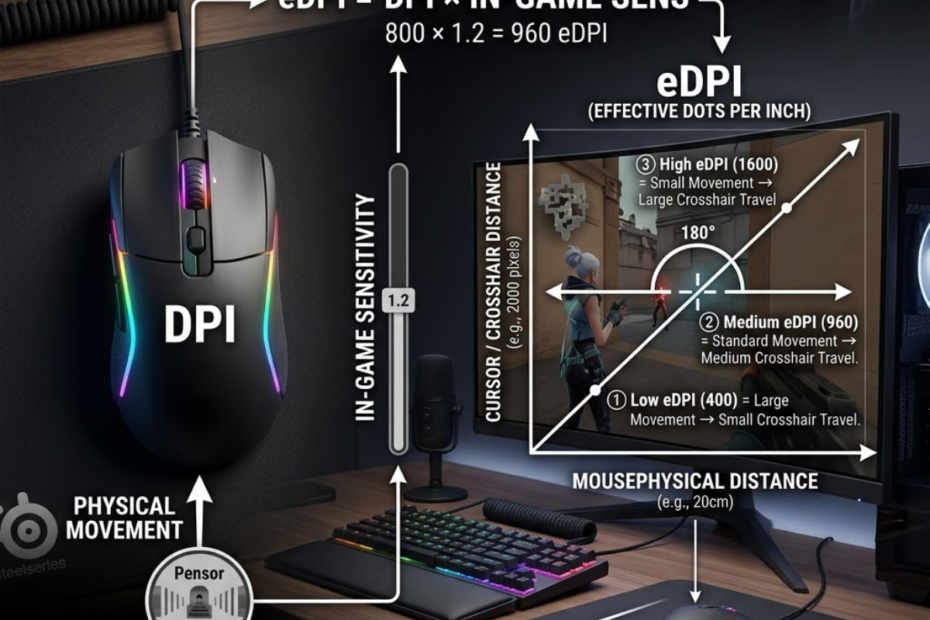
DPI vs eDPI is the difference between mouse hardware sensitivity and actual in-game aiming sensitivity. DPI is a mouse setting that helps control how far your cursor moves from physical mouse movement, while eDPI is a calculated value that helps FPS players compare real sensitivity across different DPI and in-game sensitivity settings.
This matters because two players can use different DPI numbers but still have the same effective aim speed. A player using 800 DPI with 0.40 sensitivity can end up with the same eDPI as a player using 1600 DPI with 0.20 sensitivity. Looking at DPI alone can make those settings seem different, even when the final aiming speed is nearly the same.
For FPS games like Valorant, Counter-Strike 2, Apex Legends, and similar shooters, understanding DPI vs eDPI helps you avoid copying settings blindly. It also helps you adjust sensitivity with a clearer reason instead of changing random numbers after every bad match.
What Is DPI in Gaming Mice?
DPI is a hardware sensitivity measurement that helps determine how far the cursor moves for every inch of physical mouse movement. In simple terms, higher DPI makes the cursor move farther with the same hand movement, while lower DPI makes the cursor move a shorter distance.
DPI stands for dots per inch. In gaming mice, DPI represents the sensitivity level reported by the sensor. When a mouse is set to 800 DPI, the cursor moves 800 counts for every inch of movement across the mousepad. If the DPI increases to 1600, the cursor moves twice as far using the same physical movement.
Many FPS players encounter DPI settings long before they learn about sensitivity or eDPI. Because DPI is visible inside mouse software and often marketed heavily by manufacturers, it is commonly assumed to be the most important sensitivity setting. However, DPI is only one part of the overall aiming equation. To understand how DPI fits into the bigger picture, this guide to gaming mouse for FPS games explains the key factors that influence aiming performance and mouse control.
How DPI Translates Physical Movement Into Cursor Movement
DPI is a measurement that helps convert physical mouse movement into digital cursor movement on a screen. Every time the sensor detects movement, it sends information to the computer based on the selected DPI value.
A lower DPI requires more hand movement to move the cursor across the display. A higher DPI requires less physical movement to achieve the same cursor travel distance. This relationship affects both desktop navigation and gaming sensitivity.
Understanding this conversion process makes it easier to see why DPI changes can significantly alter how a mouse feels before any in-game sensitivity settings are adjusted. If you want a deeper explanation of sensor sensitivity and how DPI works, read our guide on what DPI is in a gaming mouse.
Why Gaming Mice Allow Multiple DPI Settings
Multiple DPI settings are available because they help users adapt cursor sensitivity to different tasks and preferences. Some players prefer lower DPI values for greater control, while others prefer higher DPI values for faster cursor movement.
Modern gaming mice often support several DPI presets that can be switched instantly through dedicated buttons. This feature was originally designed to support different applications, screen resolutions, and user preferences rather than competitive FPS aiming alone.
Although having multiple DPI options increases flexibility, most competitive FPS players eventually choose one stable DPI value and leave it unchanged for long periods.
What DPI Influences Outside FPS Games
DPI is a sensitivity setting that helps affect many computer activities outside competitive gaming. Cursor navigation, productivity work, web browsing, and menu interaction all respond directly to DPI changes.
The factors below explain where DPI has the greatest impact outside FPS games:
- Desktop Navigation: Higher DPI can move the cursor across the screen with less physical effort.
- Multi-Monitor Use: Large display setups often feel faster and more comfortable with higher DPI values.
- Menu Interaction: Inventory systems and game menus respond directly to cursor sensitivity.
- Productivity Tasks: Design work, spreadsheets, and general computer use are influenced by DPI behavior.
These situations show that DPI affects far more than aiming performance inside games.
For this reason, DPI should be viewed as a general mouse sensitivity setting rather than a direct measurement of FPS aim speed.
What Is eDPI and Why Do FPS Players Use It?
eDPI is a combined sensitivity value that helps FPS players measure actual aiming speed by combining DPI and in-game sensitivity. Unlike DPI, eDPI reflects how fast a player’s crosshair moves inside a game.
The visual example below shows how DPI and in-game sensitivity combine to create eDPI:
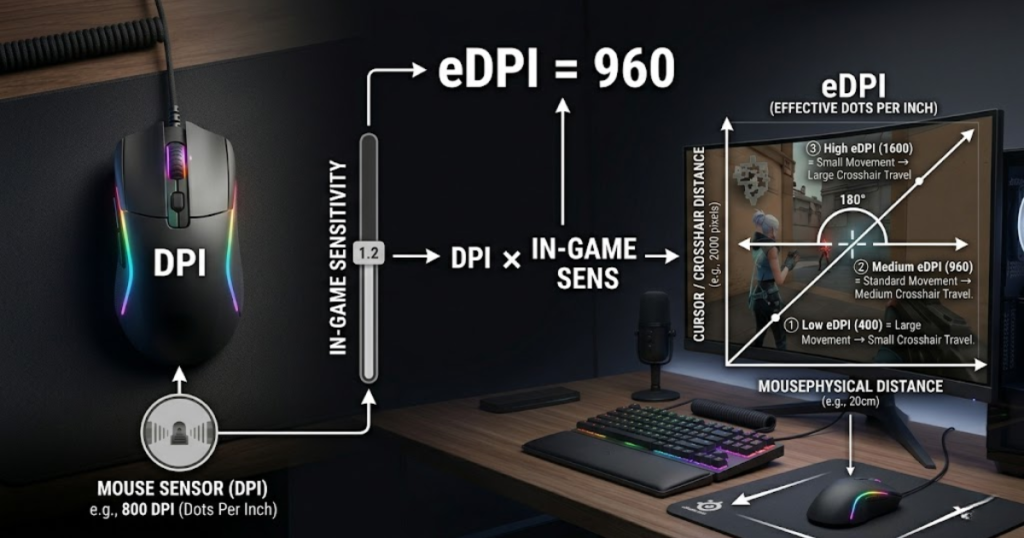
The term eDPI stands for effective DPI. It was created because comparing DPI alone often produces misleading conclusions. Two players may use completely different DPI values while maintaining nearly identical aiming speeds through different sensitivity settings.
By combining both variables into a single number, eDPI creates a standardized way to compare sensitivity across players, teams, and games. If you are new to the concept, this guide explaining what eDPI is covers the calculation process and why FPS players use it as a sensitivity benchmark.
How eDPI Combines Hardware and Game Settings
eDPI is a calculated metric that helps combine mouse hardware sensitivity and in-game sensitivity into one value. Instead of looking at DPI and sensitivity separately, eDPI evaluates their combined effect.
This approach eliminates much of the confusion that occurs when players compare settings online. Rather than focusing on isolated numbers, eDPI reflects the final result produced by both settings working together.
As a result, eDPI provides a clearer picture of how sensitive a player’s aiming setup actually is.
Why eDPI Reflects Real In-Game Sensitivity
eDPI is a practical measurement that helps represent the effective aiming speed experienced during gameplay. While DPI influences movement input, sensitivity determines how that input is translated inside the game.
Because both factors contribute directly to crosshair movement, neither one can fully explain aiming speed alone. eDPI solves this problem by combining both variables into a single reference point.
This makes eDPI far more useful when discussing FPS sensitivity than looking at DPI in isolation.
Why eDPI Became a Standard FPS Measurement
eDPI is a standardized value that helps players compare sensitivity settings accurately across the FPS community. Competitive players, coaches, analysts, and content creators frequently use eDPI because it simplifies sensitivity comparisons.
Without eDPI, comparing player settings would require examining both DPI and sensitivity separately every time. This process becomes inefficient when reviewing dozens or hundreds of setups.
By reducing sensitivity information into a single number, eDPI has become one of the most widely used measurements in modern FPS gaming.
How Is eDPI Calculated?
eDPI is a calculated value that helps players compare sensitivity settings by multiplying DPI and in-game sensitivity. Unlike DPI, which only reflects mouse hardware sensitivity, eDPI combines both hardware and game settings into a single measurement.
This calculation is widely used in FPS games because it creates a consistent way to compare sensitivity between players. Without eDPI, two setups might appear completely different even though they produce nearly identical aiming speeds.
Learning how to calculate eDPI is one of the easiest ways to better understand your own sensitivity settings and evaluate other players’ configurations.
The Basic eDPI Formula Explained
The eDPI formula is a simple calculation that helps convert DPI and in-game sensitivity into one comparable value. The formula is straightforward, and our guide on how to calculate eDPI walks through additional examples and practical scenarios:
eDPI = DPI × In-Game Sensitivity
If a player uses 800 DPI and 0.40 sensitivity, the resulting eDPI is 320. If another player uses 1600 DPI and 0.20 sensitivity, the result is also 320 eDPI.
This formula creates a common language for discussing sensitivity because it focuses on the final aiming speed rather than individual settings.
Step-by-Step Example of an eDPI Calculation
Calculating eDPI is a simple process that helps determine your effective aiming sensitivity. Only two numbers are required to complete the calculation.
The following process can help calculate your own eDPI accurately:
- Find Your DPI: Open your mouse software and locate the active DPI setting.
- Find Your Sensitivity: Open your game settings and identify your current sensitivity value.
- Multiply Both Values: Multiply DPI by sensitivity using a calculator.
- Record The Result: Save the final eDPI value for future comparisons.
This process takes less than a minute and provides a far more useful reference point than DPI alone.
Once you know your eDPI, comparing your setup with other FPS players becomes much easier.
Common Calculation Mistakes New Players Make
Many new players make calculation mistakes that help create confusion when comparing sensitivity settings. Most errors occur because players focus on DPI alone and ignore sensitivity.
The factors below explain the most common eDPI calculation mistakes:
- Ignoring Sensitivity: Comparing DPI values without checking in-game sensitivity.
- Mixing Games: Assuming sensitivity values transfer directly between different FPS titles.
- Using Old Settings: Calculating eDPI with outdated DPI or sensitivity values.
- Comparing DPI Only: Believing identical DPI automatically means identical aim speed.
These mistakes often lead players to misunderstand professional settings and copy configurations incorrectly.
Using the complete eDPI calculation avoids these issues and creates more accurate comparisons.
The examples below demonstrate how different DPI and sensitivity combinations can still produce the same effective sensitivity:
The table below compares several DPI and sensitivity combinations that result in identical eDPI values:
| DPI | Sensitivity | eDPI |
|---|---|---|
| 400 | 0.80 | 320 |
| 800 | 0.40 | 320 |
| 1600 | 0.20 | 320 |
The table shows that multiple settings can create the exact same effective sensitivity.
This is one of the main reasons FPS players rely on eDPI instead of comparing DPI values alone.
DPI vs eDPI: What Is the Actual Difference?
DPI is a hardware setting that helps control mouse sensitivity, while eDPI is a gameplay metric that helps measure effective aiming speed. Although the terms are often used together, they represent different parts of the sensitivity system.
DPI describes how the mouse sensor reports movement, while eDPI describes how that movement ultimately behaves inside the game. Understanding this distinction is essential when comparing player settings.
The difference becomes especially important when evaluating professional setups or adjusting your own sensitivity.
DPI Measures Mouse Hardware Behavior
DPI is a hardware specification that helps define how sensitive a mouse sensor is to physical movement. It exists independently of any game settings and affects cursor movement across the operating system.
Changing DPI directly alters how much cursor movement is generated from a given amount of hand movement. This effect is visible on the desktop, in menus, and inside games.
Because DPI belongs to the mouse itself, it remains consistent regardless of which game is being played.
eDPI Measures Effective Aim Speed
eDPI is a gameplay measurement that helps describe the final aiming sensitivity experienced inside a game. It takes both DPI and sensitivity into account to represent actual crosshair movement speed.
This makes eDPI much more useful for evaluating aiming performance than DPI alone. Players with identical eDPI values typically experience very similar overall sensitivity levels.
As a result, eDPI has become one of the most trusted methods for comparing FPS sensitivity settings.
Why They Should Not Be Treated as Identical Metrics
DPI and eDPI are separate measurements that help describe different aspects of sensitivity. Treating them as interchangeable often leads to incorrect assumptions about player setups.
The comparison below highlights the different roles that DPI and eDPI play in FPS sensitivity settings:
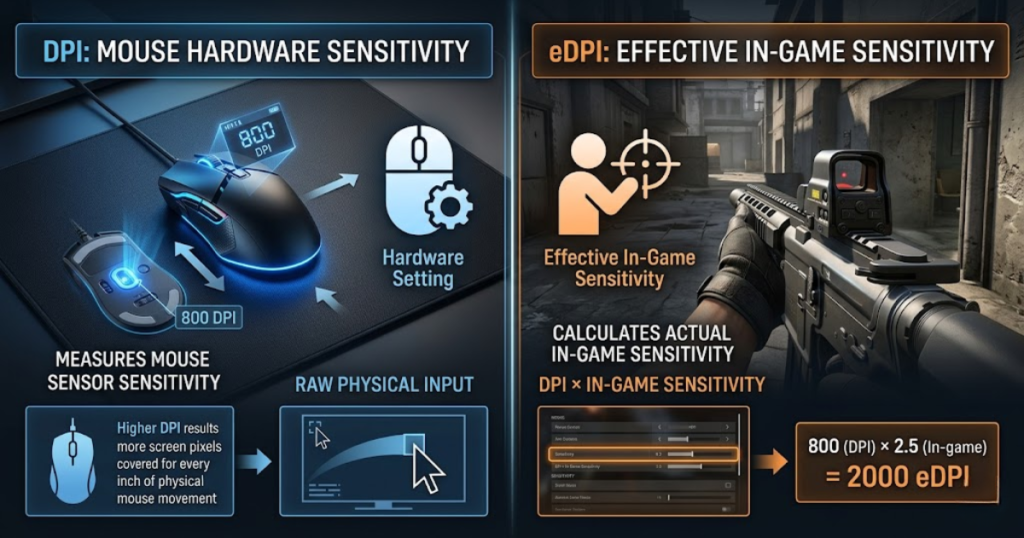
A player using 1600 DPI is not automatically using a faster sensitivity than a player using 800 DPI. The final result depends heavily on the sensitivity setting applied inside the game.
Recognizing the difference between these measurements prevents many common sensitivity misconceptions.
Looking at their characteristics side by side makes the distinction easier to understand:
The table below compares the fundamental differences between DPI and eDPI:
| Factor | DPI | eDPI |
|---|---|---|
| Measurement Type | Hardware Sensitivity | Effective Sensitivity |
| Includes Game Sensitivity | No | Yes |
| Useful For Aim Comparisons | Limited | Yes |
| Changes With Game Settings | No | Yes |
| Commonly Used By FPS Players | Less Often | Frequently |
The comparison highlights that DPI and eDPI serve different purposes rather than competing against each other.
Understanding which measurement to use in different situations helps players make more informed sensitivity decisions.
Why Comparing DPI Alone Can Be Misleading
Comparing DPI alone is misleading because it helps describe mouse sensitivity but does not reveal actual in-game aiming speed. Many players assume DPI tells the entire sensitivity story when it only represents one variable.
This misunderstanding often appears when players look at professional settings. Seeing a high DPI value can create the impression that a player uses extremely fast sensitivity even when their effective sensitivity is relatively low.
To understand aiming speed accurately, DPI must be viewed alongside in-game sensitivity rather than in isolation.
Why Identical DPI Values Can Feel Completely Different
Identical DPI values can produce different aiming experiences because sensitivity settings help determine the final result. Two players may both use 800 DPI while using completely different sensitivity values.
In this situation, their actual aiming speeds can vary dramatically despite sharing the same DPI. The DPI number alone provides only part of the picture.
This is why FPS communities rarely compare sensitivity using DPI by itself.
Why Professional Settings Cannot Be Compared Using DPI Alone
Professional settings cannot be compared accurately using DPI alone because eDPI helps determine effective aim speed. Looking only at DPI removes half of the information required to understand sensitivity.
A professional player using 1600 DPI may actually have a lower effective sensitivity than someone using 800 DPI. The determining factor is how in-game sensitivity modifies the DPI value.
Without eDPI, comparing professional setups becomes unreliable and often misleading.
Why Sensitivity Creates Most of the Difference
In-game sensitivity is a setting that helps create major differences in effective aim speed even when DPI remains unchanged. Small sensitivity adjustments can significantly alter crosshair movement.
This is why two players with identical DPI settings can have completely different aiming experiences. Sensitivity acts as a multiplier that changes how DPI behaves inside the game. For a deeper breakdown of this relationship, our guide on DPI vs sensitivity explains how both settings work together to determine final aiming speed.
Understanding this relationship explains why eDPI is considered a more complete sensitivity measurement than DPI alone.
Can Different DPI Settings Produce the Same eDPI?
Different DPI settings can produce the same eDPI and help create nearly identical effective aiming speeds. This is one of the most important concepts FPS players learn when comparing sensitivity settings.
Many players assume that changing DPI automatically changes how fast they aim. In reality, DPI is only one part of the equation. If sensitivity is adjusted accordingly, different DPI values can generate the same overall aiming speed.
This is why experienced FPS players often focus on eDPI rather than individual DPI values.
400 DPI and High Sensitivity Example
A 400 DPI setup can create the same eDPI as higher DPI configurations when paired with a higher sensitivity value. Increasing sensitivity compensates for the lower DPI setting.
Although the hardware sensitivity remains lower, the final aiming speed can still match other setups. The player experiences similar overall crosshair movement despite using a different DPI.
This demonstrates why DPI alone does not fully describe aiming sensitivity.
800 DPI and Medium Sensitivity Example
An 800 DPI setup can achieve identical eDPI values while maintaining a balanced relationship between DPI and sensitivity. This configuration is commonly used throughout competitive FPS games.
Many players choose 800 DPI because it provides a familiar baseline while allowing practical sensitivity adjustments. Our article on why pros use 800 DPI explains why this setting remains popular among competitive FPS players.
As a result, identical eDPI values can be achieved across many different configurations.
1600 DPI and Low Sensitivity Example
A 1600 DPI setup can produce the same eDPI when paired with proportionally lower sensitivity values. Reducing sensitivity offsets the higher DPI and preserves similar aim speed.
The example below demonstrates how different DPI settings can still produce the same effective sensitivity:
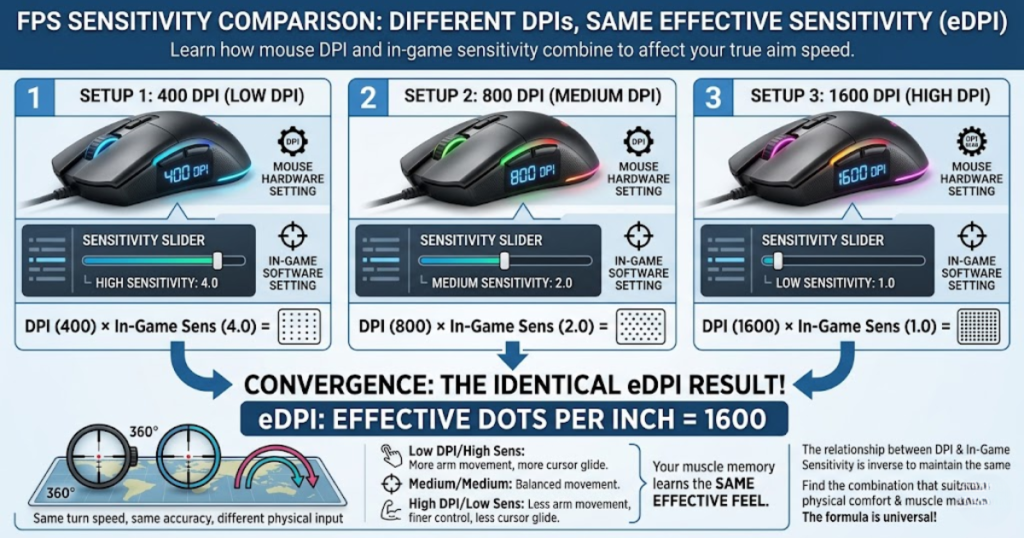
This setup may appear dramatically different on paper, but the effective sensitivity can remain nearly unchanged. The crosshair still travels a comparable distance for the same physical movement.
These examples illustrate why eDPI provides a more reliable comparison method than DPI alone.
The examples below show how different configurations can reach the same effective sensitivity:
The table below compares multiple setups that produce identical eDPI values:
| Setup | DPI | Sensitivity | eDPI |
|---|---|---|---|
| Setup A | 400 | 0.80 | 320 |
| Setup B | 800 | 0.40 | 320 |
| Setup C | 1600 | 0.20 | 320 |
The table highlights how different hardware settings can still create identical effective sensitivity.
For FPS players, this reinforces the importance of evaluating eDPI rather than focusing exclusively on DPI.
When Does DPI Matter More Than eDPI?
DPI matters more when players evaluate mouse behavior outside sensitivity comparisons and inside general computer usage. While eDPI dominates FPS sensitivity discussions, DPI still plays an important role in several situations.
DPI directly affects cursor movement throughout the operating system and influences how the mouse behaves beyond competitive gameplay.
Understanding these situations helps clarify where DPI remains valuable.
Desktop Productivity and Everyday Navigation
DPI is a hardware setting that helps determine cursor movement during everyday computer use. Tasks such as browsing, editing documents, and navigating software depend directly on DPI.
Higher DPI values can reduce physical movement when working across large screens, while lower DPI values may provide more controlled cursor movement.
These benefits exist independently of gaming sensitivity discussions.
Cursor Speed Across Different Displays
DPI helps influence cursor travel distance across displays with different sizes and resolutions. Large monitors often feel different from smaller displays even when using identical sensitivity settings.
Players and professionals frequently adjust DPI preferences to match their workspace requirements. These adjustments affect cursor behavior rather than FPS aim performance.
This is one area where DPI remains more relevant than eDPI.
DPI Preferences Beyond Competitive Gaming
DPI helps support personal cursor movement preferences that extend beyond FPS games. Some users prefer faster navigation while others prefer more controlled movement.
These preferences often influence DPI selection regardless of gaming performance. Two users with identical eDPI values may still choose completely different DPI settings for everyday comfort.
As a result, DPI remains important even when eDPI is used for FPS sensitivity comparisons.
The factors below explain situations where DPI becomes more important than eDPI:
- Desktop Navigation: Cursor movement depends directly on DPI settings.
- Multi-Monitor Setups: Larger display areas often benefit from different DPI preferences.
- Productivity Work: Software interaction is affected by cursor sensitivity.
- Personal Comfort: Users may prefer specific DPI values for non-gaming tasks.
These scenarios focus on cursor behavior rather than competitive aiming performance.
In these situations, DPI provides more useful information than eDPI.
When Does eDPI Matter More Than DPI?
eDPI matters more when players evaluate aiming speed, sensitivity consistency, and overall FPS performance. Because eDPI combines DPI and sensitivity, it represents the final result experienced during gameplay.
This makes eDPI the preferred measurement for comparing player setups and adjusting aim settings.
Whenever effective sensitivity becomes the priority, eDPI usually provides the more useful reference point. If you are also looking for hardware recommendations that support competitive FPS aiming, our guide to the best gaming mouse for FPS games in 2026 highlights several popular options used by FPS players.
Sensitivity Testing and Aim Training
eDPI is a measurement that helps players evaluate aiming performance during sensitivity testing. Tracking eDPI makes it easier to identify meaningful sensitivity changes.
Instead of focusing on individual settings, players can monitor the final sensitivity value that influences their aiming experience.
This approach creates a more consistent testing process.
Tracking Personal Sensitivity Changes
eDPI helps track sensitivity adjustments more accurately than DPI alone. Players frequently experiment with settings while trying to improve performance.
Recording eDPI values allows these changes to be measured consistently. This creates a clear history of sensitivity adjustments over time.
Without eDPI, comparing changes becomes significantly more difficult.
Maintaining Consistency Across Updates
eDPI helps maintain aiming consistency when settings are modified or transferred between environments. Using a stable eDPI reference reduces the likelihood of accidental sensitivity changes.
This consistency is especially important for competitive players who rely on repeatable aiming behavior.
As a result, eDPI serves as a valuable sensitivity management tool.
The factors below explain situations where eDPI becomes more important than DPI:
- Aim Training: eDPI reflects actual aiming sensitivity.
- Sensitivity Comparisons: Players can compare setups more accurately.
- Performance Tracking: eDPI provides a consistent reference value.
- Muscle Memory Development: Stable eDPI supports repeatable aiming behavior.
These situations focus on effective gameplay sensitivity rather than hardware settings alone.
For most FPS sensitivity discussions, eDPI offers greater practical value than DPI.
Common Misunderstandings About DPI and eDPI
Many FPS players misunderstand DPI and eDPI because both affect sensitivity but serve different purposes. These misconceptions often lead to unnecessary setting changes and incorrect comparisons.
Understanding what DPI and eDPI actually measure helps eliminate much of this confusion.
Several myths continue to appear repeatedly across FPS communities.
Higher DPI Does Not Automatically Improve Aim
Higher DPI is not a setting that automatically helps improve aiming performance. Understanding the difference between highest DPI vs usable DPI can help players avoid focusing on marketing specifications instead of real aiming performance.
Better aim depends on control, consistency, and comfort rather than a specific DPI number.
This is why many professional players succeed using a wide range of DPI settings.
Lower DPI Does Not Guarantee Better Accuracy
Lower DPI is not a setting that automatically helps create better accuracy. While some players prefer lower DPI values, accuracy depends on the complete sensitivity setup.
Comfort, technique, mouse control, and practice all contribute to aiming performance.
Focusing exclusively on lower DPI often oversimplifies a much larger topic.
eDPI Is Not a Measurement of Skill
eDPI is a sensitivity measurement that helps describe aim speed, not player skill. Two players using identical eDPI values can perform at completely different levels.
Game sense, mechanics, positioning, and decision-making remain far more important than any sensitivity number.
eDPI should be viewed as a tool for comparison rather than a predictor of success.
The factors below explain common myths about DPI and eDPI:
- Higher DPI Equals Better Aim: Aim quality depends on far more than DPI.
- Lower DPI Is Always Superior: Comfort and consistency matter more.
- eDPI Determines Skill: Sensitivity does not measure player ability.
- Pro Settings Work For Everyone: Personal preferences remain important.
These misconceptions often cause players to chase numbers instead of focusing on performance. Many of these myths are discussed in our guide covering common DPI mistakes beginners make.
Understanding the real purpose of DPI and eDPI leads to better sensitivity decisions.
Frequently Asked Questions About DPI vs eDPI
DPI and eDPI often create confusion because both influence mouse sensitivity but measure different aspects of aiming performance. The frequently asked questions below address the most common concerns FPS players have when comparing sensitivity settings.
What is the difference between DPI and eDPI?
The difference between DPI and eDPI is that DPI is a hardware sensitivity measurement, while eDPI is a combined value that helps represent actual in-game aiming sensitivity. DPI controls how the mouse sensor reports movement, whereas eDPI combines DPI and sensitivity to show effective aim speed.
Why do FPS players use eDPI instead of DPI?
FPS players use eDPI because it helps compare sensitivity settings more accurately than DPI alone. Since eDPI includes both DPI and in-game sensitivity, it reflects the final aiming speed experienced during gameplay.
How do I calculate my eDPI?
Calculating eDPI is a simple process that helps determine your effective sensitivity. Multiply your DPI by your in-game sensitivity value to find your eDPI.
Can two players have the same eDPI?
Two players can have the same eDPI even when using different DPI and sensitivity settings. As long as the final calculation produces the same value, the effective aiming speed will be very similar.
Does higher DPI improve aiming accuracy?
Higher DPI does not automatically improve aiming accuracy because accuracy depends on overall control and consistency. DPI is only one part of the sensitivity system and should not be viewed as a direct performance upgrade.
Does lower DPI provide better control?
Lower DPI can feel more controlled for some players, but it does not guarantee better performance. The ideal setup depends on the combination of DPI, sensitivity, comfort, and personal preference.
Is eDPI the same across all FPS games?
eDPI is not always identical across every FPS game because sensitivity systems can differ between titles. The concept remains useful, but direct comparisons may require game-specific conversion methods.
Why do professional players often mention eDPI?
Professional players mention eDPI because it helps standardize sensitivity discussions. Using eDPI makes it easier to compare setups without analyzing DPI and sensitivity separately.
What is considered a low eDPI?
A low eDPI is generally a value that helps create slower and more controlled crosshair movement. Exact ranges vary by game, but lower eDPI setups usually require more physical mouse movement.
What is considered a high eDPI?
A high eDPI is generally a value that helps create faster crosshair movement with less physical effort. Higher eDPI setups often feel more responsive but may be harder to control precisely.
Should I change DPI or sensitivity first?
Most FPS players should adjust sensitivity first because it helps fine-tune aim speed while keeping a stable DPI baseline. Constantly changing both settings can make sensitivity testing more difficult.
Which matters more for FPS games, DPI or eDPI?
For most FPS players, eDPI matters more because it helps represent actual aiming sensitivity inside the game. DPI remains important for mouse behavior, but eDPI is usually the better measurement for sensitivity comparisons.
Understanding DPI vs eDPI Helps You Compare Sensitivity Correctly
DPI is a hardware sensitivity measurement that helps determine how mouse movement is detected, while eDPI is a combined sensitivity value that helps represent actual aiming speed inside FPS games. Although the two terms are closely related, they serve different purposes and should not be treated as interchangeable measurements.
Throughout this guide, you have seen that DPI alone cannot accurately describe how sensitive a player’s setup feels in-game. Two players may use completely different DPI values yet achieve nearly identical effective sensitivity through different in-game sensitivity settings. This is why eDPI has become the preferred metric for comparing FPS sensitivity setups.
Understanding the relationship between DPI and eDPI helps remove much of the confusion surrounding sensitivity discussions. Instead of focusing on individual numbers, players can evaluate how their complete setup influences aiming speed, consistency, and overall comfort.
For most FPS players, the practical approach is simple. Choose a stable DPI value that feels comfortable for everyday use, then use eDPI as the primary reference when adjusting sensitivity and comparing settings. This approach creates a more consistent foundation for aim training and long-term improvement.
Ultimately, neither DPI nor eDPI will improve mechanics on their own. However, understanding what each measurement represents helps you make more informed sensitivity decisions and avoid many of the common mistakes FPS players make when optimizing their aim.
Thank you for taking the time to read this DPI vs eDPI guide. We hope the explanations, comparisons, and examples have helped you better understand how sensitivity settings work in FPS games and how to compare them more accurately. With a clear understanding of both DPI and eDPI, you’ll be able to make more informed adjustments and build a setup that feels consistent, comfortable, and reliable for your aiming style.