
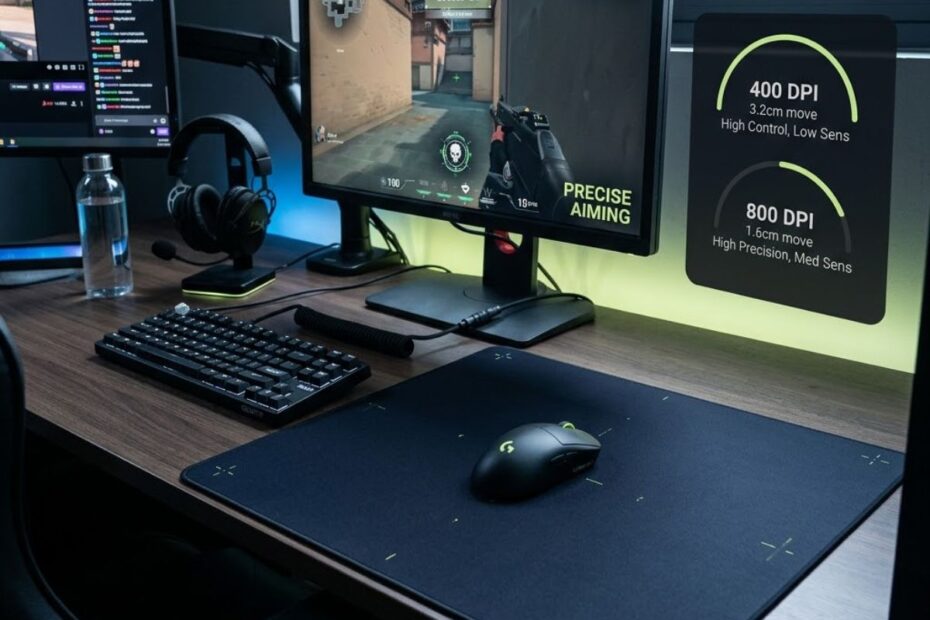
The best DPI for Valorant is usually 800 DPI for most players because it helps create a balanced mix of control, responsiveness, and stable crosshair movement, while 400 DPI is better for players who prefer slower and more controlled precision. Both settings work well in Valorant because the game rewards clean first-shot accuracy, stable crosshair placement, and consistent micro-adjustments more than raw mouse speed. If you are unsure where to start, use 800 DPI with low in-game sensitivity, then adjust gradually based on how your aim feels during real matches.
Valorant is a tactical FPS game that helps disciplined and controlled aiming perform better than overly fast mouse movement. Most gunfights are decided by how well you clear corners, hold angles, stop your crosshair on the enemy’s head, and make small corrections before shooting. This is why DPI should be treated as a control setting that helps your aim feel predictable and stable instead of a number that simply needs to be maximized.
This guide explains how DPI works in Valorant, how it connects with sensitivity and eDPI, and why many players prefer 400 or 800 DPI. It also helps you choose a setting based on your aiming style, mousepad space, and mouse control. If your full setup is still not locked in, your DPI choice will make more sense after you understand how your mouse shape, weight, and sensor affect aim in the Best Gaming Mouse for Valorant guide.
What Is DPI in Valorant?
DPI in Valorant is the sensitivity setting of your mouse sensor and helps determine how fast, responsive, and controllable your crosshair movement feels during gameplay.
DPI stands for dots per inch (DPI), which measures how much movement your mouse registers from one inch of physical mouse travel before Valorant applies its own in-game sensitivity.
Higher DPI settings make the crosshair move farther with the same hand movement, while lower DPI settings create slower and more controlled aiming for better precision and crosshair control.
The illustration below compares low DPI and high DPI settings in Valorant, showing how DPI affects crosshair movement and aiming control.
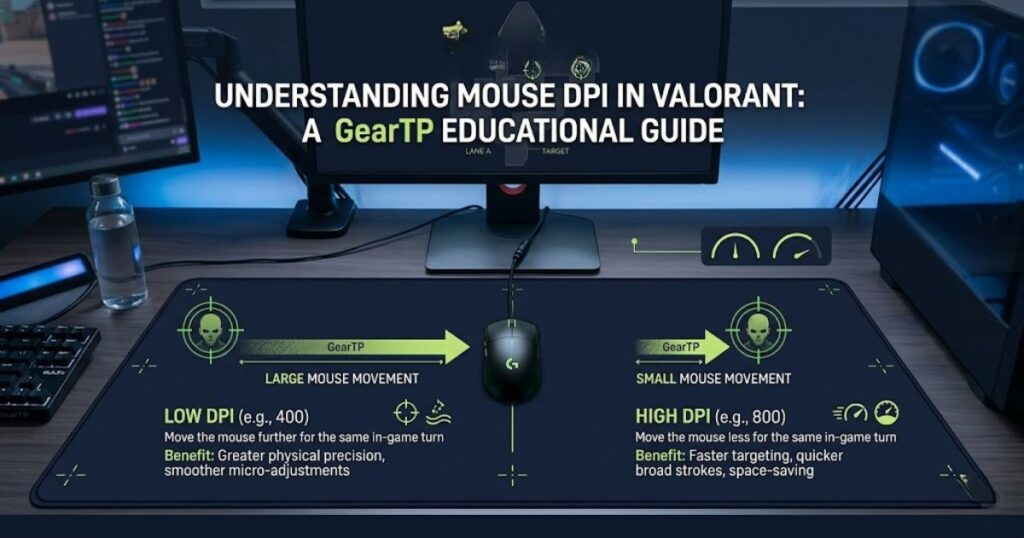
For example, 1600 DPI moves much farther than 400 DPI if your Valorant sensitivity stays the same. That can make high DPI feel fast and responsive, but it can also make your aim harder to control during tiny corrections. Valorant often punishes small aiming errors, so raw speed can become a weakness when your crosshair does not stop cleanly.
DPI is only the first layer of your aim setup. Your final aiming speed depends on DPI and in-game sensitivity working together. If you want a deeper explanation of the mouse hardware side, the full DPI in a gaming mouse guide explains how sensor sensitivity affects FPS aiming across games like Valorant and CS2.
The table below compares common Valorant DPI settings and how each one affects aiming speed, control, and overall mouse feel:
| DPI Setting | Mouse Feel | Control Level | Best Use Case |
|---|---|---|---|
| 400 DPI | Slow and stable | Very high | Precision aim, arm aiming, large mousepads |
| 800 DPI | Balanced and responsive | High | Most Valorant players and ranked setups |
| 1600 DPI | Fast and light | Medium | Wrist aimers or very low in-game sensitivity |
| 3200 DPI and above | Very fast | Low | Usually not ideal for tactical FPS aiming |
Note: Higher DPI does not automatically improve your Valorant aim because stable crosshair control and consistent micro-adjustments are usually more important than raw mouse speed in tactical FPS gameplay.
Why 400 and 800 DPI Are So Common in Valorant
400 DPI and 800 DPI are common in Valorant because they are balanced sensitivity settings that help players maintain better crosshair control under pressure. Since Valorant rewards precision and first-shot accuracy, a controlled DPI setting often performs better than excessive mouse speed. This makes it easier to stop the crosshair precisely on an enemy instead of sliding past the target.
Most Valorant fights happen around tight angles, short exposure windows, and head-level crosshair placement. You usually do not need extreme mouse speed if your crosshair is already placed near the correct position. This is why many players build their settings around control, consistency, and small corrections rather than fast camera movement.
Another reason these DPI values are popular is muscle memory. Lower and moderate DPI settings make it easier to repeat the same hand movement over time. When your aim feels the same every day, your practice becomes more useful and your mechanics become more reliable.
The table below highlights the main reasons why 400 DPI and 800 DPI are the most popular DPI settings in Valorant:
| Aim Benefit | Why It Matters in Valorant | Recommended DPI |
|---|---|---|
| Crosshair stability | Helps keep aim steady while holding angles | 400 to 800 DPI |
| Micro-adjustments | Makes small headshot corrections easier | 400 to 800 DPI |
| Flick consistency | Reduces overflicking during sudden fights | 400 to 800 DPI |
| Muscle memory | Creates repeatable movement patterns | 400 to 800 DPI |
Consistent DPI settings help Valorant players build more reliable aim because stable crosshair movement is easier to repeat during real ranked matches and tactical gunfights.
How DPI, Sensitivity, and eDPI Work Together in Valorant
DPI, sensitivity, and eDPI are three connected aiming settings that help determine your final mouse speed and overall aiming feel in Valorant. DPI comes from your mouse sensor, sensitivity comes from Valorant, and eDPI combines both values to show your true effective aim speed. Understanding how these settings work together makes it easier to build a consistent setup instead of changing DPI or sensitivity randomly.
The visual guide below explains how DPI and sensitivity combine to create eDPI, allowing different settings to produce the same effective aiming speed in Valorant.
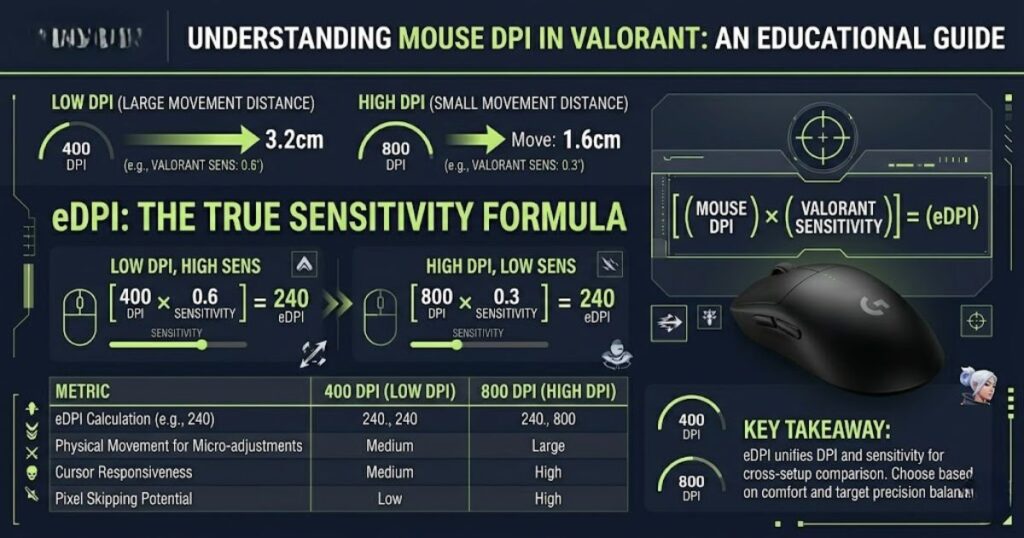
The formula is simple: eDPI equals DPI multiplied by Valorant sensitivity. For example, 800 DPI with 0.25 sensitivity equals 200 eDPI, while 400 DPI with 0.50 sensitivity also equals 200 eDPI. Although the DPI and sensitivity values are different, both setups create a similar final aiming speed.
This is why eDPI matters more than DPI alone. Two players can use different DPI settings but still achieve a nearly identical aiming feel if their sensitivity is adjusted correctly. When optimizing your Valorant settings, focus on your final eDPI rather than copying a specific DPI number.
The table below shows how different DPI and sensitivity combinations can produce the same eDPI and a similar aiming experience in Valorant:
| DPI | Valorant Sensitivity | eDPI | Final Feel |
|---|---|---|---|
| 400 | 0.50 | 200 | Controlled and stable |
| 800 | 0.25 | 200 | Controlled and stable |
| 1600 | 0.125 | 200 | Controlled if sensitivity is low enough |
| 800 | 0.35 | 280 | Faster but still usable |
Note: Players with the same eDPI often experience a similar overall aiming speed, even when their DPI and sensitivity settings are completely different.
Many players struggle because they change DPI without adjusting sensitivity properly. If your current aim feels too fast, you may not need a new mouse or a completely different setup. You may only need to lower your in-game sensitivity and use the same DPI more intelligently, which is why the full Best Mouse Settings for Valorant guide focuses on DPI, sensitivity, and Windows settings together.
DPI tells you how your mouse behaves, but eDPI tells you how your aim actually feels inside Valorant. A good setup needs both values to work together. This is why 400 DPI, 800 DPI, and even 1600 DPI can all work when sensitivity is tuned correctly.
Best DPI for Valorant by Player Type
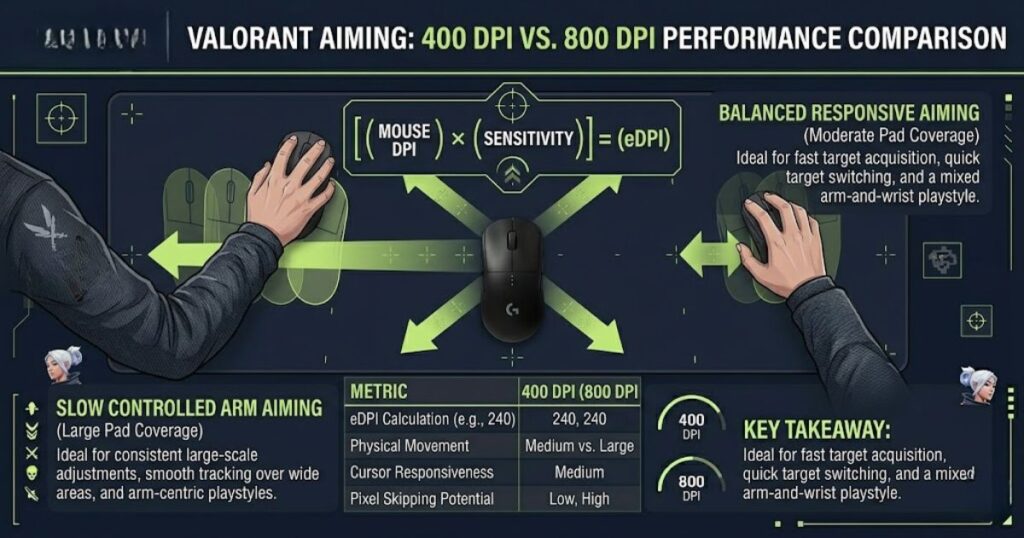
The best DPI for Valorant depends on your aiming style, desk space, and comfort level. A low-sensitivity arm aimer may perform better at 400 DPI, while a balanced player may feel more comfortable at 800 DPI. A wrist aimer may prefer 1600 DPI, but only if in-game sensitivity is low enough to keep the final eDPI under control.
The visual guide below compares common Valorant player types and shows why 400 DPI and 800 DPI remain the most popular choices for competitive aiming.
Many players lower their DPI to improve precision, but the mouse itself also changes how stable your aim feels during flicks and tracking. Lightweight shapes, sensor quality, and skate control can all influence consistency in Valorant. If you are considering an upgrade, here are some of the top best gaming mice for FPS games in 2026 used for competitive tactical shooters.
You should not choose DPI only because a professional player uses it. Pro players usually have large mousepads, stable desks, lightweight mice, and thousands of hours of experience with their settings. If your physical setup is different, the same DPI can feel completely different in your hand.
Before choosing a setting, think about how you naturally move your mouse. Some players aim mostly with their wrist, while others use larger arm movements across the mousepad. The sections below break down which DPI range makes the most sense for each type of Valorant player.
400 DPI for Precision Players
400 DPI is a low-sensitivity mouse setting that helps precision-focused Valorant players achieve more controlled crosshair movement and stable aim. This setting works especially well for players who rely on arm aiming and large mousepad movement. It can make flick shots feel more deliberate because your crosshair does not fly past the target as easily.
The main benefit of 400 DPI is stability. Small hand shakes are less likely to move your crosshair too much, which helps during long-range fights and tight angle holds. This can be useful in Valorant because many duels are decided by one small adjustment before the first bullet.
The downside is that 400 DPI needs more physical space. If your mousepad is small, you may lift your mouse too often or struggle to clear wide angles. If 400 DPI feels too heavy, 800 DPI may give you a better balance without sacrificing too much control.
800 DPI for Balanced Players
800 DPI is a balanced mouse sensitivity setting that helps most Valorant players combine reliable crosshair control with responsive movement. It feels faster than 400 DPI but is still easy to manage when paired with low in-game sensitivity. This makes it a strong option for ranked players who want one setting that works across many situations.
800 DPI is also comfortable outside the game because desktop movement does not feel painfully slow. Inside Valorant, you can lower sensitivity enough to keep eDPI controlled. This flexibility is one reason 800 DPI remains one of the most practical choices for competitive players.
If your aim feels shaky at 800 DPI, the problem is usually not the DPI itself. Your in-game sensitivity may simply be too high. Lowering sensitivity slightly can keep the responsive feel of 800 DPI while making crosshair movement more stable.
1600 DPI for Wrist Aimers
1600 DPI is a high-sensitivity mouse setting that helps wrist aimers achieve faster cursor movement with less physical mouse travel in Valorant. This setting feels highly responsive and can be comfortable for players with limited desk space or those who prefer smaller hand movements. However, it usually requires lower in-game sensitivity to maintain stable crosshair control.
The risk is that 1600 DPI can become unstable if sensitivity is not reduced enough. Small hand movements can turn into large crosshair movement, which makes micro-adjustments harder. This is especially noticeable during long-range rifle duels where tiny corrections decide the fight.
If you use 1600 DPI, calculate your eDPI before judging the setup. A low sensitivity can make 1600 DPI controlled, but high sensitivity can make it too fast for Valorant. Players who feel shaky at 1600 DPI should test 800 DPI before assuming their mechanics are the problem.
The table below summarizes which DPI settings work best for different aiming styles and play preferences in Valorant:
| Player Type | Recommended DPI | Why It Works | Possible Problem |
|---|---|---|---|
| Precision aimer | 400 DPI | Stable, slow, and controlled | Needs more mousepad space |
| Balanced ranked player | 800 DPI | Strong mix of control and responsiveness | Still needs sensitivity tuning |
| Wrist aimer | 800 to 1600 DPI | Allows faster movement with less hand travel | Can feel shaky if eDPI is too high |
| Arm aimer | 400 to 800 DPI | Supports wide and smooth movement | Requires a larger mousepad |
Note: The best DPI is not the same for every player because aiming style, mousepad size, and sensitivity settings all influence overall control and comfort.
Your DPI should match how you physically move the mouse. If you want a balanced choice, start with 800 DPI. If you want slower control and have enough space, 400 DPI is also an excellent option.
Low DPI vs High DPI in Valorant
Low DPI provides greater aiming control, while high DPI provides faster cursor movement with less physical mouse travel in Valorant. Because Valorant rewards precision, crosshair placement, and micro-adjustments, most competitive players prefer low to moderate DPI settings over extremely high DPI values. Choosing the right DPI depends on your aiming style, available mousepad space, and overall comfort.
Low DPI encourages larger hand movements, which can feel smoother and more repeatable. This is especially helpful for players who use arm aiming or hybrid aiming. It also reduces the chance of tiny hand shakes moving the crosshair too far.
High DPI can feel more responsive, but it can make precision harder if your eDPI becomes too fast. Small hand movements become more noticeable, which can make micro-adjustments feel jumpy. High DPI is not wrong by itself, but it demands better sensitivity control.
The table below compares the key differences between low DPI and high DPI, including their impact on precision, speed, mouse movement, and overall aiming control in Valorant:
| Comparison Area | Low DPI | High DPI |
|---|---|---|
| Precision | Usually better | Can be harder to control |
| Speed | Slower | Faster |
| Mousepad space | Needs more space | Needs less space |
| Micro-adjustments | More stable | Can feel shaky |
| Best fit for Valorant | Most competitive players | Some wrist aimers |
Note: Low DPI generally offers better control and consistency for tactical FPS games, while high DPI requires more careful sensitivity tuning to avoid unstable aim.
Low DPI is usually easier to control in Valorant because it supports stable aiming habits. High DPI can still work if your sensitivity is low enough, but it is easier to lose control when your final eDPI becomes too fast. If you want the safer route, stay between 400 and 800 DPI.
How DPI Affects Flick Shots, Tracking, and Micro-Adjustments
DPI is a mouse sensitivity setting that helps determine how consistently you can perform flick shots, tracking, and micro-adjustments in Valorant. Lower DPI typically improves stopping control and aiming precision, while higher DPI increases movement speed and responsiveness. Because Valorant rewards accurate crosshair placement, a controlled DPI setting is often more valuable than maximum speed.
Flick shots need speed, but they also need stopping control. A fast flick does not help if your crosshair passes the target and forces another correction. Lower DPI often helps players reduce overflicking because each movement is less exaggerated.
DPI also affects tracking and micro-adjustments, even though Valorant is not mainly a tracking-heavy game. When your crosshair is close to the enemy but not perfectly aligned, your setting determines how easily you can make a tiny correction. That is where a stable DPI can make gunfights feel much cleaner.
Flick Shots
Lower or moderate DPI is a controlled aiming setup that helps players perform more consistent flick shots in Valorant. A flick is not only about moving quickly toward the target but also about stopping accurately before shooting.
If your DPI is too high, your flicks may look fast but land past the target. This creates extra correction time, which can lose the duel. A more controlled DPI helps you make aggressive movements without losing the ability to stop cleanly.
This is why many players improve after lowering their final eDPI. Their aim may feel slower at first, but their shot placement often becomes more stable. Over time, that stability is more valuable than flashy flick speed.
Tracking
Tracking is the ability to follow a moving target with your crosshair, and a moderate DPI setting helps keep that movement smooth and controllable in Valorant. Valorant does not require constant tracking like some faster shooters, but tracking still matters when enemies strafe, wide swing, or reposition during close fights. Your DPI should allow you to follow movement without overcorrecting.
If your DPI is too low, tracking can feel heavy when an enemy moves quickly across your screen. If your DPI is too high, tracking can feel twitchy and inconsistent. A balanced setup makes it easier to follow movement while keeping your crosshair under control.
For most players, 800 DPI with controlled sensitivity is easier to track with than extremely low or extremely high setups. It gives enough responsiveness for movement without making small corrections too jumpy. This is another reason 800 DPI is such a practical default.
Micro-Adjustments
Micro-adjustments are small aiming corrections that help players align their crosshair precisely on target, and a controlled DPI setting helps make these movements more accurate in Valorant. Many fights are not won by huge flicks but by tiny adjustments from chest level to head level or from shoulder to head. If your settings are too fast, these small corrections become harder to control.
Lower eDPI makes micro-adjustments feel more deliberate. You can move the crosshair a small distance without accidentally overshooting. This helps especially with Vandal and Guardian fights where first-shot accuracy matters heavily.
This is also why DPI connects directly with tactical aim. The cleaner your small corrections become, the less you need to rely on desperate flicking. When your goal is consistent gunfights instead of highlight clips, the Tactical Aiming in Valorant guide pairs naturally with DPI optimization because both focus on reducing unnecessary mouse movement.
The list below summarizes how DPI influences the most important aiming mechanics in Valorant:
- Flick shots: Lower DPI can reduce overflicking and improve stopping accuracy.
- Tracking: Moderate DPI keeps movement smooth without making the crosshair too slow.
- Micro-adjustments: Controlled eDPI makes small headshot corrections easier.
- Spray recovery: Stable movement helps reset aim after missed shots.
DPI affects more than raw aiming speed because it influences how consistently you perform flicks, tracking movements, micro-adjustments, and recoil recovery during real gunfights.
DPI changes how your aim behaves in the moments that matter most. If you miss because your crosshair moves past targets, your setup may be too fast. If you miss because you cannot move comfortably enough, your setup may be too slow.
Best DPI and Sensitivity Combos for Valorant
The best DPI and sensitivity combo for Valorant is a balanced eDPI setup that helps players maintain both aiming precision and consistent crosshair control during gunfights. A low to moderate eDPI range usually provides enough speed to clear angles while preserving the control needed for accurate headshots. Most players should avoid extremely high eDPI because it can make micro-adjustments more difficult during real matches.
The visual guide below highlights common eDPI ranges and shows how different DPI and sensitivity combinations can create balanced aiming performance in Valorant.
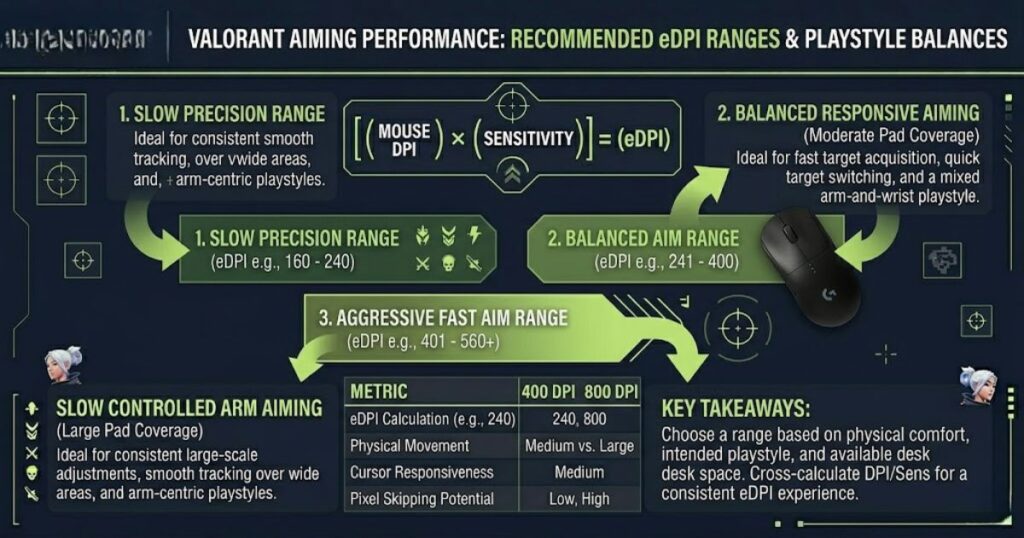
A good beginner-friendly setup is 800 DPI with 0.25 to 0.35 Valorant sensitivity. This creates a controlled range that works for many ranked players. If you prefer slower precision, 400 DPI with 0.45 to 0.60 sensitivity can also feel very strong.
The best combo is not the one with the lowest number or the highest number. It is the one you can repeat consistently under pressure. If your aim feels stable in Deathmatch and real matches, the setting is probably close to correct.
The table below compares common DPI and sensitivity combinations that create effective eDPI ranges for different Valorant playstyles:
| DPI | Valorant Sensitivity | eDPI | Best For |
|---|---|---|---|
| 400 | 0.45 | 180 | Slow precision aim |
| 400 | 0.55 | 220 | Controlled ranked play |
| 800 | 0.25 | 200 | Balanced tactical aim |
| 800 | 0.30 | 240 | Most players |
| 800 | 0.35 | 280 | Faster aggressive aim |
Note: Different DPI and sensitivity combinations can feel very similar if they produce a comparable eDPI. Focus on your overall aiming comfort rather than chasing a specific DPI number.
The best DPI combo should make your aim feel stable, not flashy. Start with a common range, test it honestly, and adjust in small steps. For most players, 800 DPI with 0.25 to 0.35 sensitivity is the easiest starting point.
How to Find Your Perfect DPI for Valorant
The best way to find your perfect DPI for Valorant is to start with a proven DPI setting and test it consistently through real gameplay. Avoid changing your settings after every missed shot or lost match because muscle memory needs time to adapt. A stable testing process will produce more reliable results than constantly switching between different DPI values.
Start with either 400 or 800 DPI. Then choose a sensitivity that gives you a controlled eDPI. After that, test your setup in the Range, Deathmatch, and normal matches before making any changes.
When testing, pay attention to how you miss. If you overshoot enemies, your setup is probably too fast. If you cannot clear corners or keep lifting your mouse, your setup may be too slow.
Follow the steps below to identify a DPI setting that feels comfortable, controllable, and consistent in Valorant:
- Choose a baseline: Start with 400 or 800 DPI because both are proven options.
- Set a reasonable sensitivity: Aim for a controlled eDPI instead of extreme speed.
- Practice in the Range: Test flicks, bots, strafing targets, and recoil recovery.
- Play Deathmatch: Watch for overflicking, undershooting, and shaky corrections.
- Test in ranked or unrated: See if the setup still feels stable under pressure.
- Adjust slowly: Change sensitivity in small steps instead of resetting everything.
Note: Test each DPI setting for several days before making changes so your aim has enough time to adapt and build consistent muscle memory.
Your perfect DPI should feel reliable across many situations, not just one practice drill. Give each setup enough time before judging it. Consistency is more important than constantly searching for a magic number.
Common DPI Mistakes Valorant Players Should Avoid
The most common DPI mistake in Valorant is changing settings too frequently instead of giving your aim time to adapt. Many players blame every missed shot on sensitivity and immediately switch DPI after a bad session. This slows improvement because muscle memory needs consistency to develop.
Another common mistake is using high DPI because it feels fast and exciting. Fast aim can feel good at first, but it often becomes unstable during long-range fights and tight angle holds. Valorant usually rewards clean corrections more than dramatic flicks.
Players also make the mistake of copying pro settings without checking the full context. A pro player may use a different mouse shape, mousepad size, grip style, and desk setup. If your setup is different, the same settings may not feel the same for you.
The list below highlights the most common DPI mistakes that prevent players from building consistent aim in Valorant:
- Do not change DPI after every bad match.
- Do not use high DPI just because it feels faster.
- Do not copy pro settings without checking eDPI.
- Do not ignore mousepad size and desk space.
- Do not use a poor mouse shape and blame DPI for every issue.
- Do not assume expensive hardware can replace consistent practice.
Note: Most DPI problems come from inconsistent settings rather than choosing the wrong DPI number. Stability and repetition are usually more important than constant experimentation.
Avoiding bad DPI habits is just as important as choosing a good number. A stable setup gives your aim time to improve. If your DPI and eDPI are reasonable, your next focus should be crosshair placement, movement, and decision-making.
How Your Gaming Mouse Affects DPI Consistency
A gaming mouse is the hardware that translates your hand movement into cursor movement and helps determine how consistent your DPI feels in Valorant. Sensor quality, weight, shape, and latency all influence aiming control. While a better mouse does not automatically improve skill, it can make your movements more predictable and your chosen DPI easier to control.
Sensor quality matters because Valorant requires small and repeatable corrections. A stable sensor tracks your hand movement accurately without random skipping or acceleration. This helps your chosen DPI feel the same during flicks, slow peeks, and recoil recovery.
Mouse shape also matters because your hand needs to stay relaxed during aim corrections. If the shape does not fit your grip, you may tense up and make your aim shaky. That problem can look like a DPI issue, but the real cause may be comfort and control.
The table below shows the key mouse features that can influence DPI consistency and overall aiming performance in Valorant:
| Mouse Feature | Why It Matters | Impact on Valorant Aim |
|---|---|---|
| Accurate sensor | Tracks movement consistently | More reliable flicks and corrections |
| Lightweight shell | Makes movement easier to start and stop | Better control for low sensitivity |
| Comfortable shape | Reduces hand tension | More stable aim over long sessions |
| Low latency | Improves response between movement and input | Cleaner timing and faster reactions |
Note: Even the best DPI settings can feel inconsistent if your mouse sensor, shape, or weight does not match your aiming style.
DPI feels best when your hardware is consistent and comfortable. Before blaming your settings, make sure your mouse shape, weight, and sensor are not creating the problem. If your current mouse feels heavy, unstable, or uncomfortable, comparing broader options in the Gaming Mouse for FPS Games guide can help you separate hardware problems from sensitivity problems.
Should You Use 400, 800, or 1600 DPI for Valorant?
If you are unsure which DPI to use in Valorant, start with 800 DPI, choose 400 DPI for maximum control, and consider 1600 DPI only if you use a low in-game sensitivity. This approach gives you a simple decision framework without overcomplicating your setup. The goal is not to find the highest DPI, but to find the most repeatable and controllable aiming experience.
Choose 400 DPI if you have a large mousepad and want slower movement. Choose 800 DPI if you want a balanced setting that works for most setups. Choose 1600 DPI only if you prefer a faster sensor feel and are willing to keep your in-game sensitivity low.
If you keep missing because your crosshair moves too far, lower your sensitivity or DPI. If you keep missing because your mouse movement feels too limited, raise your sensitivity slightly. Always change one thing at a time so you know what actually improved or worsened your aim.
The table below compares the strengths, ideal users, and potential drawbacks of 400 DPI, 800 DPI, and 1600 DPI in Valorant:
| DPI Choice | Best For | Main Benefit | Main Risk |
|---|---|---|---|
| 400 DPI | Precision players and arm aimers | Maximum control | May feel too slow |
| 800 DPI | Most Valorant players | Best balance | Still needs sensitivity tuning |
| 1600 DPI | Wrist aimers or players using very low sensitivity | Responsive movement | Can feel shaky if eDPI is too high |
Note: DPI alone does not determine aiming performance. Your final experience depends on DPI, in-game sensitivity, mousepad space, and overall aiming style working together.
If you want the safest answer, use 800 DPI. If you want slower and more precise aim, use 400 DPI. If you use 1600 DPI, make sure your Valorant sensitivity is low enough to keep your final aim speed controlled.
Best DPI for Valorant Final Recommendation
The best DPI for Valorant is 800 DPI for most players because it provides the best balance of control and responsiveness, while 400 DPI is a strong option for players who prefer slower and more precise aim. Both settings are widely used in competitive play and are easy to fine-tune with Valorant sensitivity. The most important goal is maintaining a consistent and controllable eDPI.
If you are new to Valorant, start with 800 DPI and a sensitivity between 0.25 and 0.35. This range provides a balanced starting point that supports both precision and comfortable movement. If your aim feels too fast, lower your sensitivity slightly before changing your DPI.
If you already use a large mousepad and prefer arm aiming, start with 400 DPI and test sensitivity around 0.45 to 0.60. This setup feels slower but can create excellent stability once you adapt. Keep the setting long enough to build muscle memory before making another change.
DPI will not instantly fix your aim, but it gives your mechanics a stable foundation. Once your setting feels controlled, focus on crosshair placement, movement discipline, and tactical aiming habits. A consistent setup plus better practice will improve your Valorant aim much more than constantly changing numbers.
FAQ About the Best DPI for Valorant
These frequently asked questions answer the most common problems players have when choosing DPI for Valorant. Use this section to quickly compare 400 DPI, 800 DPI, 1600 DPI, eDPI, sensitivity, and mouse control before changing your settings. The goal is to help you avoid random tweaking and choose a setup that actually feels stable in real matches.
What is the best DPI for Valorant?
The best DPI for Valorant is usually 800 DPI for most players, while 400 DPI is best for slower precision control. Both settings are strong because they support stable crosshair movement and controlled micro-adjustments. If you are unsure, start with 800 DPI and tune your sensitivity from there.
Is 400 DPI better than 800 DPI in Valorant?
400 DPI is better for players who want slower and more controlled aiming, while 800 DPI is better for balanced responsiveness. Neither setting is automatically better for every player. Your best option depends on your mousepad size, aiming style, and comfort.
Do Valorant pros use 400 DPI?
Many Valorant pros use 400 DPI, but many also use 800 DPI or 1600 DPI with low sensitivity. The more important number is eDPI because it shows final aim speed. Copying only DPI without checking sensitivity can be misleading.
Is 1600 DPI too high for Valorant?
1600 DPI is not too high if your Valorant sensitivity is low enough. It becomes a problem when both DPI and sensitivity are high. If your aim feels shaky at 1600 DPI, lower your in-game sensitivity or switch to 800 DPI.
What eDPI is good for Valorant?
A good Valorant eDPI is usually low to moderate, often around 160 to 320 for many competitive players. This range gives enough speed for clearing angles while keeping aim controlled. You should still test based on comfort and physical space.
Should beginners use 400 or 800 DPI?
Beginners should usually start with 800 DPI because it is easier to tune and more comfortable for general use. It provides a strong balance between speed and control. After gaining experience, beginners can test 400 DPI if they want slower precision.
Does DPI affect recoil control in Valorant?
DPI affects recoil control because it changes how easily you can make small mouse corrections. If your DPI or eDPI is too high, recoil control may feel shaky. A controlled setting makes it easier to reset your aim after shots.
Does a better mouse improve DPI accuracy?
A better gaming mouse can improve DPI consistency because it usually has a more accurate sensor and better tracking stability. It will not replace practice, but it can make your movement feel more reliable. Shape, weight, and sensor quality all affect how your DPI feels.
Should I change DPI or sensitivity first?
You should usually choose your DPI first, then adjust Valorant sensitivity around it. Pick 400 or 800 DPI as your baseline. After that, tune sensitivity slowly until your crosshair feels stable.
Why does my aim feel shaky in Valorant?
Your aim may feel shaky because your DPI, sensitivity, or eDPI is too high. It can also happen if your mouse shape does not fit your grip or your hand is tense. Lowering sensitivity slightly is often the easiest first fix.
How long should I test a DPI setting?
You should test a DPI setting for several days before changing it again. One bad match is not enough evidence that your setting is wrong. Your hand needs time to build muscle memory around a stable setup.
Can DPI alone make me aim better?
DPI alone cannot make you aim better, but the right DPI can make practice more effective. Good aim still comes from crosshair placement, movement, recoil control, and decision-making. DPI simply gives those skills a stable foundation.
Final Thoughts
The best DPI for Valorant is the one that helps you maintain consistent crosshair control and repeatable aim under pressure. For most players, 800 DPI is the safest starting point, while 400 DPI remains an excellent option for slower and more deliberate aiming styles. Rather than chasing a specific number, focus on finding a setup that feels stable across real matches.
Once your settings feel comfortable, stop making constant changes and allow your muscle memory to develop. Strong crosshair placement, disciplined movement, and consistent practice will have a much bigger impact on your Valorant performance than endlessly adjusting DPI values.
Thanks for reading this GearTP guide, and good luck finding the DPI setting that makes your Valorant aim feel smoother, calmer, and more reliable.