
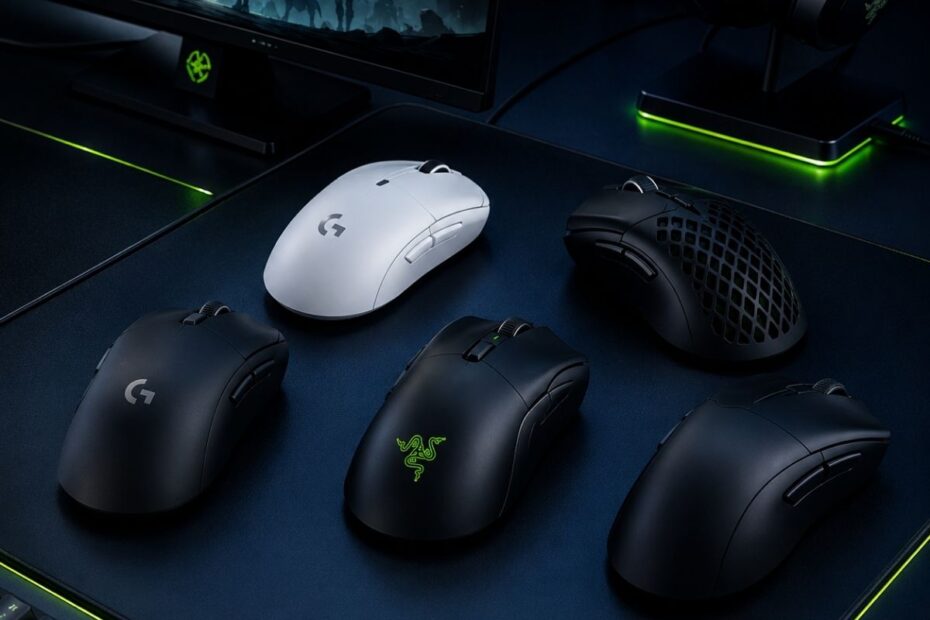
If you are searching for the best gaming mouse for Valorant in 2026, the most important factors are lightweight design, low click latency, stable sensor tracking, and a shape that matches your grip style. Competitive tactical FPS players often prefer lightweight wireless mice because they improve flick speed, micro-adjustments, and long-session comfort during ranked matches. Compared to standard office or casual gaming mice, a dedicated Gaming Mouse for FPS Games is specifically optimized for precision aiming, stopping accuracy, and consistent tracking performance in fast competitive shooters like Valorant.
Modern Valorant mice now focus heavily on esports-grade technologies such as high polling rates, optical switches, ultra-light shells, and low-latency wireless connectivity. Popular models including the Logitech G Pro X Superlight 2, Razer DeathAdder V3 Pro, Pulsar X2, and Lamzu Atlantis continue to dominate both ranked competitive play and professional VCT tournaments because they balance speed, control, comfort, and reliability extremely well.
Whether you are a low-sensitivity aimer, aggressive entry fragger, claw grip player, or simply looking for a budget-friendly competitive mouse, choosing the right Valorant gaming mouse can noticeably improve aim consistency, reaction speed, and overall gameplay performance.
Why Mouse Choice Matters More in Valorant Than Other FPS Games
Valorant is one of the few competitive FPS games where small aiming inconsistencies become immediately noticeable during real matches. Because the game focuses heavily on headshots, crosshair discipline, and first-shot accuracy, players rely more on precise mouse control than raw movement speed alone. This is why many competitive players treat their gaming mouse as one of the most important parts of their entire Valorant setup.
Unlike casual shooters that allow players to recover through movement spam or heavy spraying, Valorant punishes unstable aim much more aggressively. A mouse that feels inconsistent during angle clearing, target switching, or stopping accuracy can directly affect duel performance over time. Players still optimizing sensitivity and aiming consistency can also check our best mouse settings for Valorant guide for more detailed setup recommendations. For serious ranked players, choosing the right gaming mouse is often less about flashy specifications and more about achieving predictable and repeatable aim.
Recommended Guide
Need a broader FPS mouse comparison?
If you want to compare Valorant picks with mice built for CS2, Apex Legends, Warzone, and other tactical shooters, start with our full Gaming Mouse for FPS Games guide before choosing your final mouse.
Valorant Rewards Precision Over Raw Tracking
Many FPS games prioritize continuous tracking because players constantly follow moving targets while spraying at high speed. Valorant works differently because most fights are decided through fast precision shots, controlled bursts, and accurate crosshair placement rather than extended tracking sequences. This creates a gameplay environment where aiming consistency matters more than pure movement speed.
Several gameplay mechanics make mouse control especially important in Valorant:
- Low time-to-kill gunfights
- Heavy emphasis on headshot accuracy
- Counter-strafing mechanics
- Tight angle clearing
- Small crosshair adjustments during peeking
Because Valorant rewards precision so heavily, even small inconsistencies in mouse feel become easier to notice during competitive play. Issues such as unstable stopping control, uncomfortable grip positioning, or inconsistent click response may seem minor at first, but they can slowly affect confidence and muscle memory across long ranked sessions. These factors also play a major role in tactical aiming in Valorant because stable crosshair control becomes increasingly important during angle clearing and first-shot engagements. This is one of the biggest reasons why many competitive Valorant players choose to upgrade their gaming mouse earlier than other peripherals.
For most players, the goal of upgrading is not simply to buy a more expensive mouse. The real objective is to find a shape, weight, and movement feel that stays comfortable and predictable during repeated competitive gameplay. A gaming mouse that feels natural over several hours of ranked play will usually provide more long-term value than one that only looks impressive on a specification sheet.
Compare Before Buying
Not sure if a Valorant mouse is the right FPS mouse for you?
Valorant rewards control, but other FPS games may need different weight, shape, and sensor priorities. Before you choose, compare the full Gaming Mouse for FPS Games guide to see which mouse fits your wider FPS setup.
How Mouse Weight Impacts Flick Shots and Reaction Time
Mouse weight directly affects how quickly Valorant players can move, stop, and re-adjust their aim during competitive matches. In tactical FPS games, fast flick shots and small micro-corrections happen constantly, so a mouse that feels too heavy may reduce aiming speed and overall movement fluidity. This is one of the main reasons why lightweight gaming mice have become increasingly popular among professional and high-ranked Valorant players.
However, lighter does not always mean better for every player. Some users perform more consistently with slightly heavier mice because additional weight can create a more controlled and stable aiming feel during slow precision shots. The ideal mouse weight depends on grip style, sensitivity, aiming behavior, and personal comfort rather than marketing claims alone.
The table below compares common gaming mouse weight ranges and explains how each category typically performs in competitive Valorant gameplay. Instead of focusing only on raw weight numbers, players should understand how different weight classes influence flick speed, stopping control, and long-session comfort. This makes it easier to choose a gaming mouse that actually matches real competitive playstyles.
| Mouse Weight Range | Movement Feel in Valorant | Best For | Competitive FPS Insight |
|---|---|---|---|
| Under 50g | Extremely fast movement with very low physical resistance during flick shots and quick target switching. | Flick-heavy duelists, fingertip grip users, and players who prioritize maximum speed. | Great for reactive aim, but some players may overshoot targets if they lack stopping control. |
| 50g–65g | Fast, controlled, and balanced enough for both flick shots and small micro-adjustments. | Most competitive Valorant players, claw grip users, and low-sensitivity aimers. | Best overall range for speed, control, and long-session comfort. |
| 65g–80g | More stable and planted feel, but slightly slower during repeated fast movement. | Palm grip players, hybrid FPS gamers, and users who prefer extra control. | Good for stability, but may feel slower for aggressive entry fragging or wide flicks. |
| Over 80g | Heavy movement feel with more resistance during large swipes and quick corrections. | Casual users, office use, or players who care more about comfort than competitive speed. | Usually not ideal for competitive Valorant because fatigue can build up faster. |
For most Valorant players, the safest and most balanced weight range is usually between 50g and 65g because it provides strong flick speed without sacrificing too much stopping control. Players who prefer highly reactive aiming may enjoy ultra-light mice under 50g, while users who value stability may feel more comfortable with slightly heavier options. Rather than chasing the lightest possible mouse, competitive players should focus on finding a weight that feels consistent, controllable, and comfortable during real ranked gameplay.
What Makes a Gaming Mouse Good for Valorant?
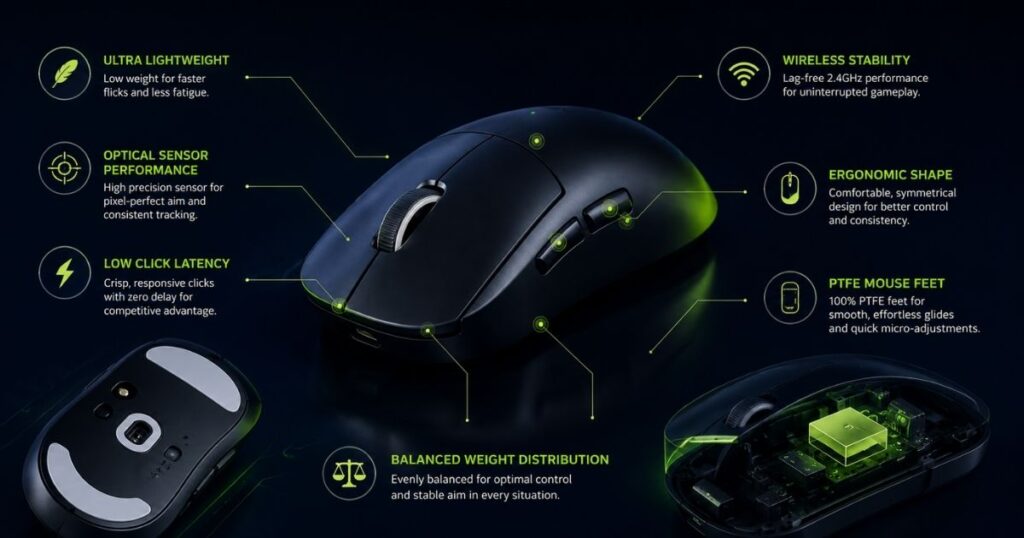
A good Valorant gaming mouse should feel consistent, responsive, and comfortable during repeated competitive matches. Instead of focusing only on marketing specifications, players should evaluate how well a mouse supports aiming control, shot timing, and long-session stability. The best competitive mice usually balance sensor reliability, click responsiveness, shape comfort, and movement control without adding unnecessary gimmicks.
Different players may prefer different shapes or weight ranges, but several core characteristics appear consistently across most high-level Valorant setups. These features directly affect how stable the mouse feels during flick shots, crosshair corrections, and repeated angle clearing throughout a match.
Sensor Accuracy and Motion Stability
Sensor quality determines how accurately the mouse translates hand movement into crosshair movement inside the game. In Valorant, players constantly switch between fast swipes and tiny aim corrections, so stable tracking becomes far more important than extremely high DPI numbers. A good sensor should feel predictable during both fast movement and slow precision aiming.
Modern esports mice now use advanced optical sensors that minimize problems such as jitter, acceleration, or inconsistent tracking behavior. While many premium sensors already perform well today, the implementation quality still matters because poor tuning can make movement feel unstable during repeated competitive play. This is why experienced FPS players usually prioritize tracking consistency over marketing-heavy specifications.
Important sensor-related features to look for include:
- Optical sensor rated above 400 IPS
- Native tracking without hardware smoothing
- No built-in acceleration
- Stable 1000Hz polling rate support or higher
- Reliable lift-off distance tuning
- Consistent tracking across cloth mousepads
For competitive Valorant, the goal is not maximum sensitivity but reliable movement translation. A sensor that feels natural and repeatable during long ranked sessions will usually perform better than one that simply advertises extreme numbers.
Want to compare beyond Valorant?
A good Gaming Mouse should fit your hand, sensitivity, and FPS habits across more than one game. Use the main FPS mouse guide if you also play CS2, Apex Legends, Warzone, or other shooters.
Click Responsiveness and Shot Timing
Click responsiveness affects how immediate and controlled each shot feels during gameplay. In tactical FPS games like Valorant, players rely heavily on first-shot timing, burst accuracy, and fast reactions during short engagements. Even small inconsistencies in click feel can affect confidence during repeated gunfights.
Many modern esports mice now use optical switches or highly refined mechanical switch implementations to improve responsiveness and long-term durability. However, the overall click experience still depends heavily on button design, shell structure, and tension tuning rather than switch branding alone. A good Valorant mouse should feel crisp, predictable, and easy to spam repeatedly without accidental inputs.
Competitive players often look for:
- Optical switches with low debounce delay
- Independent left and right click button design
- Minimal pre-travel and post-travel
- Consistent button tension
- Low click latency implementation
- Stable switch feel during rapid firing
The best click implementation is usually the one that stays consistent across thousands of repeated shots. Players should focus more on reliability and control rather than simply choosing the mouse with the loudest switch marketing.
Shape Comfort and Grip Compatibility
Shape is one of the most important parts of choosing a gaming mouse because it directly affects comfort, stability, and movement control. A mouse with excellent specifications may still perform poorly if the shape does not match the player’s hand size or grip style. This is why many experienced Valorant players prioritize shape compatibility before almost every other hardware feature.
Different grip styles usually benefit from different shell designs. Claw grip players often prefer symmetrical shapes with rear palm support, while fingertip grip users typically lean toward smaller shells that feel easier to reposition quickly. Palm grip players may prefer ergonomic curves that reduce fatigue during longer gaming sessions.
Important shape-related factors include:
- Symmetrical or ergonomic shell design
- Rear hump height and palm support
- Side curve comfort for grip stability
- Shell width relative to hand size
- Lightweight coating with anti-slip texture
- Easy lift-off and repositioning feel
Comfort matters because poor shape compatibility can slowly create tension and inconsistent aim during extended gameplay. A mouse that feels natural after several hours of ranked play will usually provide better long-term consistency than one that only feels impressive during short testing sessions.
Compare your Valorant pick against other FPS mouse options
A mouse that feels great in Valorant can also be a strong choice for tactical FPS games, but only if the shape, weight, and grip match your wider play style.
Gaming Mouse for FPSWeight Balance and Movement Control
Mouse weight changes how movement feels during aiming, repositioning, and repeated flick shots. Lighter mice usually feel faster and easier to move, while slightly heavier mice may provide a more controlled and stable experience for some players. The ideal balance depends on aiming style, sensitivity, and movement preference rather than a single “perfect” weight number.
Most competitive Valorant players currently prefer lightweight mice because they reduce movement resistance during rapid directional changes. However, overall balance matters just as much as raw weight because poor internal weight distribution can make a mouse feel awkward even if it is technically lightweight. A well-balanced mouse should feel stable during both fast flicks and small crosshair corrections.
Key movement-related factors players often evaluate include:
- Centered internal weight balance
- PTFE feet for smoother glide
- Lightweight shell without flexing
- Balanced battery placement in wireless mice
- Stable lift-off feel during repositioning
- Controlled glide across cloth surfaces
The goal is to find a mouse that feels easy to control without creating unnecessary fatigue during long ranked sessions. A strong weight balance should improve consistency and movement comfort rather than simply maximizing raw speed.
A strong Valorant gaming mouse is built around consistency rather than gimmicks. Stable tracking, responsive clicks, comfortable shape design, and balanced movement all contribute to more reliable aim during competitive matches. Instead of chasing the highest specifications, players should focus on choosing a mouse that feels predictable, comfortable, and easy to control under pressure.
Best Overall Gaming Mouse for Valorant in 2026
The best gaming mouse for Valorant should feel stable, responsive, and easy to control during repeated competitive matches. Instead of focusing only on extreme specifications or flashy designs, the strongest all-around mice usually combine reliable tracking, strong shape design, and movement consistency across different aiming styles. This is why a small group of esports-focused mice continues to dominate both ranked play and professional Valorant tournaments.
Different players may prefer different shapes or grip styles, but the mice below consistently perform well because they balance comfort, control, and reliable competitive performance. If you want to compare these Valorant-focused picks with broader FPS options, our best FPS gaming mice in 2026 guide covers more competitive choices across multiple shooter genres. Rather than chasing trends, these models have built strong reputations through actual long-term use in tactical FPS environments.
Final Check Before You Buy
Make sure your next mouse fits more than one shooter
Valorant is a great starting point, but your final pick should still work for your grip, sensitivity, desk space, and other FPS games. Use the full guide before you lock in your choice.
FPS Mouse Compare shape, weight, grip style, and FPS use case before buying.Logitech G Pro X Superlight 2
The Logitech G Pro X Superlight 2 remains one of the safest all-around choices for competitive Valorant players because of its neutral shape and highly consistent movement feel. Instead of forcing an aggressive ergonomic design, the mouse focuses on predictable control that works across multiple grip styles and sensitivity preferences. This is one of the main reasons why it continues to appear heavily in professional Valorant setups.
Key specs:
- Weight: 60g
- Sensor: HERO 2
- Polling Rate: Up to 4KHz
- Switch: LIGHTFORCE Hybrid
- Shape: Symmetrical
- Best Grip: Claw / Fingertip
- Connection: Wireless
The Superlight 2 performs especially well for players who prefer a balanced aiming experience without overly reactive movement. The shell feels stable during small crosshair corrections while still remaining easy to reposition during low-sensitivity gameplay. Its shape also adapts well to a wide range of hand sizes compared to more specialized esports mice.
One downside is that the shape may feel too safe for players who prefer stronger rear hump support or more aggressive ergonomic contouring. The pricing is also noticeably higher than many newer lightweight competitors currently available.
Razer DeathAdder V3 Pro
The Razer DeathAdder V3 Pro is one of the strongest ergonomic gaming mice for Valorant players who prefer more palm support and a fuller hand feel. Unlike smaller symmetrical esports mice, the DeathAdder V3 Pro focuses heavily on comfort and controlled movement without feeling bulky during fast directional adjustments. The redesigned shell also feels much lighter and more refined compared to older DeathAdder generations.
Key specs:
- Weight: 63g
- Sensor: Razer Focus Pro 30K
- Polling Rate: Up to 4KHz
- Switch: Optical Gen 3
- Shape: Ergonomic right-handed
- Best Grip: Palm / Relaxed Claw
- Connection: Wireless
The DeathAdder V3 Pro works especially well for players who dislike extremely flat or compact esports mice. The larger shape creates a more supported hand position during long ranked sessions while still allowing smooth movement during quick flicks and angle clearing. Many players also prefer its more natural grip posture during extended competitive play.
However, the larger ergonomic shape may feel awkward for fingertip grip users or players with smaller hands. Some users who prefer compact symmetrical shells may also find the mouse slightly less agile during rapid repositioning.
Pulsar X2 Wireless
The Pulsar X2 Wireless became highly popular among FPS players because of its compact shape and highly agile movement feel. Instead of emphasizing oversized comfort, the X2 focuses more on fast repositioning and direct finger control, making it especially appealing for claw grip and fingertip grip users. The shape feels quick during crosshair corrections while still maintaining enough stability for tactical FPS gameplay.
Key specs:
- Weight: 56g
- Sensor: PAW3395
- Polling Rate: Up to 4KHz
- Switch: Optical Switches
- Shape: Compact symmetrical
- Best Grip: Claw / Fingertip
- Connection: Wireless
The X2 performs particularly well for players who prefer reactive movement and lower-friction aiming behavior. Its compact shell makes lift-offs feel easier during low-sensitivity gameplay, while the flatter sides allow stronger finger control during small adjustments. Many players who dislike larger ergonomic mice often prefer the X2 because it feels more agile during repeated movement.
One limitation is that the smaller shell may feel less supportive during very long sessions, especially for palm grip users. Players with larger hands may also prefer shapes with more rear palm contact.
Lamzu Atlantis
The Lamzu Atlantis stands out because it combines fast movement with a more supportive claw grip shape. Unlike extremely flat esports mice, the Atlantis includes a more noticeable rear hump that creates stronger palm contact and a more locked-in movement feel. This makes it especially appealing for players who want both mobility and stopping control during tactical gameplay.
Key specs:
- Weight: 55g
- Sensor: PAW3395
- Polling Rate: Up to 4KHz
- Switch: Huano Blue Shell Pink Dot
- Shape: Symmetrical with rear hump
- Best Grip: Claw Grip
- Connection: Wireless
The Atlantis feels particularly stable during repeated directional changes because the rear support helps maintain grip consistency under pressure. Many claw grip players prefer this shape because it creates a stronger sense of control during flick shots and micro-adjustments. The movement still feels quick, but the mouse provides more hand contact compared to flatter lightweight designs.
The biggest limitation is that the shape can feel very grip-specific. Players who prefer fingertip grip or flatter shells may find the rear hump too aggressive for their aiming style.
RAWM ES21PRO
The RAWM ES21PRO has recently gained attention because it delivers strong FPS-focused hardware at a more aggressive price point than many mainstream flagship mice. Instead of relying heavily on RGB or cosmetic features, the mouse focuses more directly on practical competitive performance. This makes it an increasingly interesting option for players who want strong specifications without paying premium flagship pricing.
Key specs:
- Weight: 59g
- Sensor: PAW3395
- Polling Rate: 1KHz / 4KHz compatible
- Switch: Optical Switches
- Shape: Symmetrical
- Best Grip: Claw / Fingertip
- Connection: Wireless
The ES21PRO feels responsive during fast directional movement while still maintaining stable control during slower crosshair adjustments. The shell design also remains relatively safe and adaptable across multiple grip styles, which helps make the mouse easier to transition into for many players. For competitive users focused primarily on performance-per-dollar value, it offers surprisingly strong hardware for the price category.
One downside is that newer brands like RAWM still do not have the same long-term reputation or software ecosystem maturity as companies like Logitech or Razer. Availability and support may also vary more depending on region.
The best overall gaming mouse for Valorant depends heavily on grip style, comfort preference, and aiming behavior rather than marketing hype alone. Some players perform better with compact symmetrical shapes, while others prefer stronger ergonomic support during long sessions. Instead of blindly copying pro player setups, players should focus on choosing a mouse that feels stable, predictable, and comfortable during repeated competitive gameplay.
Which Valorant Mouse Is Best for Different Types of Players?
Not every gaming mouse fits the same type of Valorant player. Some mice are designed for safer all-around control, while others focus more heavily on claw grip support, compact movement, or ergonomic comfort during long ranked sessions. This is why choosing a mouse based only on popularity can sometimes lead to poor grip compatibility or inconsistent aim behavior.
Instead of asking which mouse is objectively “best,” players should focus on which model best matches their hand size, grip style, movement preference, and aiming behavior. The comparison table below highlights the strengths, weaknesses, and ideal user profile for each of the most popular Valorant gaming mice currently available.
| Mouse | Best For | Main Strength | Potential Weakness | Recommended Player Type |
|---|---|---|---|---|
| Logitech G Pro X Superlight 2 | Safe all-around competitive play | Extremely balanced shape with highly consistent movement feel. | Shape may feel too neutral for users wanting stronger palm support. | Players who want a reliable esports mouse that adapts easily across different grip styles. |
| Razer DeathAdder V3 Pro | Ergonomic comfort and controlled aim | Excellent palm support with stable hand positioning during long sessions. | Larger shell may feel awkward for smaller hands or fingertip grip users. | Palm grip players and users who prioritize comfort during extended ranked grinding. |
| Pulsar X2 Wireless | Agile claw and fingertip gameplay | Compact shell allows fast repositioning and direct finger control. | Less supportive for users who prefer stronger palm contact. | Players who prefer reactive aim adjustments and lightweight movement feel. |
| Lamzu Atlantis | Locked-in claw grip control | Rear hump creates stable hand support during flick shots and stopping control. | Shape can feel too aggressive for fingertip grip users. | Claw grip players who want stronger movement stability during tactical gameplay. |
| RAWM ES21PRO | Performance-per-dollar value | Strong competitive hardware at a lower price compared to flagship brands. | Software ecosystem and long-term reputation are still developing. | Budget-conscious competitive players who still want modern esports-level specifications. |
Each mouse above targets a slightly different type of Valorant player rather than solving the exact same problem. Some prioritize neutral control, while others focus more heavily on ergonomic support, claw grip stability, or aggressive lightweight movement. Choosing the right model becomes much easier when players compare real gameplay feel and grip compatibility instead of relying only on raw specifications or popularity alone.
Best Lightweight Gaming Mouse for Valorant Players
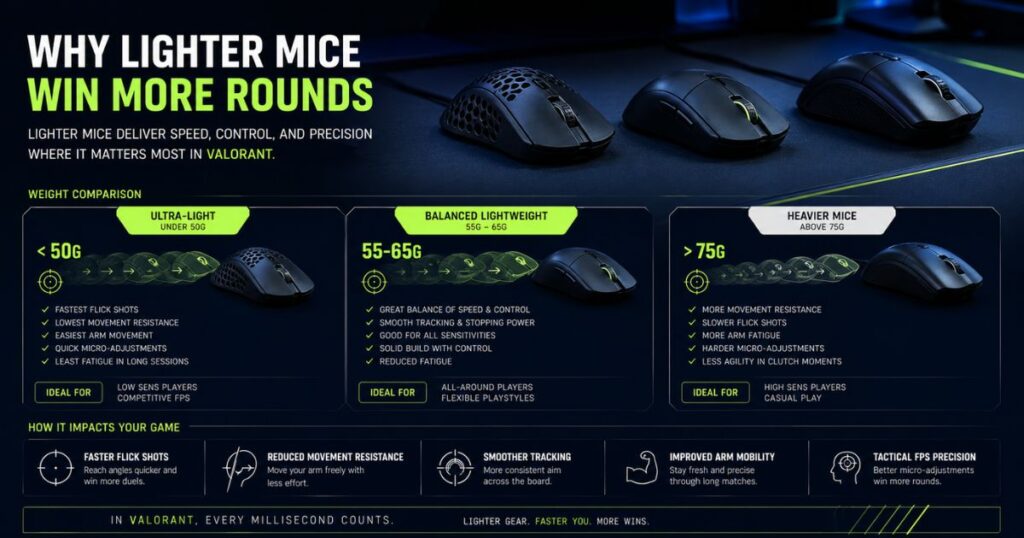
Lightweight gaming mice became extremely popular in Valorant because they reduce movement resistance during fast directional aiming and repeated repositioning. For low-sensitivity players especially, a lighter shell can make wide swipes, fast flicks, and rapid resets feel more effortless during long ranked sessions. However, the real advantage of lightweight mice is not just speed alone, but how easily players can maintain consistent movement over time without excessive fatigue.
Most competitive Valorant players now prefer mice under 65g, but the ultra-light category below 55g has become particularly popular among aggressive aim-focused players. These mice often feel more reactive during rapid crosshair corrections and low-friction movement, especially when combined with modern cloth speed pads. At the same time, extremely low weight also changes stopping behavior, which means not every player immediately performs better with ultra-light designs.
Why Ultra-Light Mice Feel Faster During Competitive Gameplay
Ultra-light gaming mice usually feel more responsive because lower mass requires less force to start and stop movement. During tactical FPS gameplay, this becomes noticeable when players repeatedly perform fast peeks, flick shots, and rapid repositioning across large areas of the mousepad. For low-sensitivity players especially, reducing movement resistance can make aim feel more fluid during long sessions.
Modern ultra-light mice also improved significantly compared to earlier lightweight designs. Instead of relying on fragile honeycomb shells or heavily compromised structures, newer models now use stronger materials, improved internal layouts, and better wireless battery efficiency. As a result, many lightweight esports mice now feel both solid and agile at the same time.
This category tends to work especially well for:
- Claw grip players
- Fingertip grip users
- Low-sensitivity aim styles
- Fast reactive flicking
- Players who frequently reposition their mouse
The biggest advantage is not simply faster movement speed, but reduced physical effort during repeated aiming motions across multiple competitive matches.
The Hidden Trade-Offs of Extremely Lightweight Mice
Ultra-light mice can feel incredibly fast during the first few matches, but lower movement resistance also changes stopping behavior in subtle ways. Some players initially experience overshooting, shakier micro-adjustments, or inconsistent crosshair control because the mouse reacts more aggressively to small hand movements. This becomes especially noticeable for players transitioning directly from heavier mice.
The problem is not necessarily the weight itself, but the overall setup balance. Extremely lightweight mice paired with very fast mousepads can sometimes create a slippery aiming feel that becomes difficult to stabilize during precision shots. This is why many competitive players using ultra-light mice prefer control-focused cloth mousepads that add slightly more stopping friction.
Players who may struggle more with ultra-light designs include:
- Palm grip users who prefer stronger hand contact
- Very high-sensitivity players
- Users with unstable wrist control
- Players transitioning from heavy ergonomic mice
For many competitive players, the best lightweight setup is not the lightest possible mouse combined with the fastest possible pad. The stronger approach is usually balancing movement freedom with enough stopping control to maintain stable crosshair placement under pressure.
Lightweight gaming mice remain highly effective for Valorant because they reduce fatigue and improve movement efficiency during repeated competitive gameplay. However, the biggest performance difference usually comes from how well the mouse weight matches the player’s aiming style, grip behavior, and overall setup balance. Instead of chasing the lowest number possible, players should focus on finding a lightweight mouse that still feels controlled and predictable during real ranked matches.
Best Wireless Gaming Mouse for Valorant Competitive Play
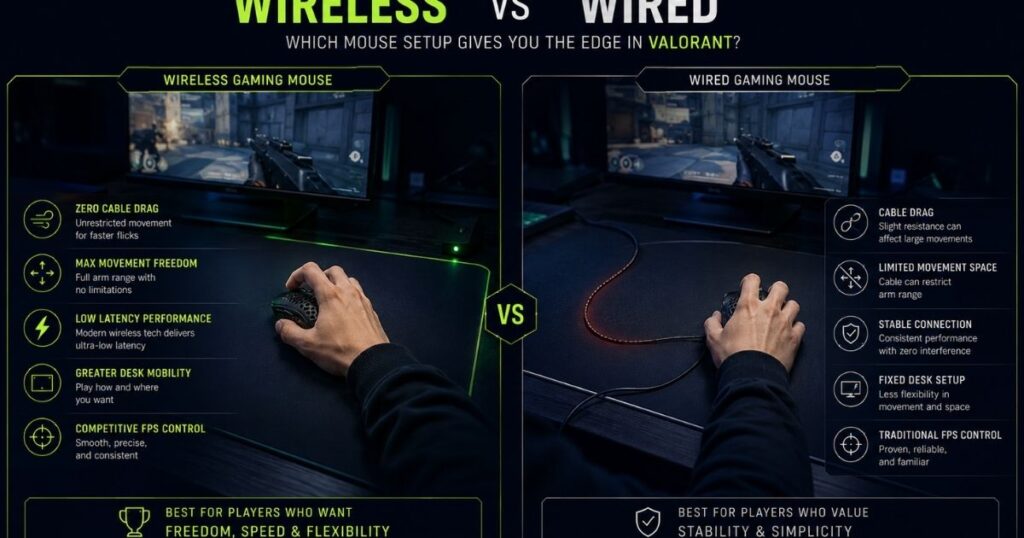
Wireless gaming mice are now fully accepted in competitive Valorant because modern low-latency wireless technology performs nearly as fast as wired connections in real gameplay. Years ago, many FPS players avoided wireless mice due to signal instability, input delay, or battery concerns. However, current esports-focused wireless mice have improved enough that even professional Valorant players regularly use them during tournaments.
The biggest advantage of wireless gaming mice is movement freedom. Removing cable drag allows players to reposition more naturally during large swipes, especially when using low sensitivity settings. For tactical FPS games where repeated arm movement and angle clearing happen constantly, smoother movement can noticeably improve comfort and aiming consistency over time.
Why Most Competitive Valorant Players Now Prefer Wireless Mice
Modern wireless gaming mice no longer suffer from the heavy latency penalties that older generations struggled with. Current flagship wireless implementations are designed specifically for esports performance, with highly stable 2.4GHz connections and optimized click latency. In many cases, the real-world difference between wired and wireless performance is now almost impossible to notice during gameplay.
Wireless setups also remove one physical problem that many FPS players dislike: cable resistance. Even lightweight paracord cables can still create subtle drag or inconsistent movement angles during large swipes across the mousepad. Once players become accustomed to unrestricted movement, many find it difficult to return to wired setups again.
Modern wireless mice also became significantly better because manufacturers improved several internal hardware components simultaneously. More efficient batteries, stronger shell materials, and newer wireless chipsets now allow many competitive mice to stay below 65g without sacrificing connection stability or battery life. This is why wireless esports mice are no longer viewed as casual convenience products, but as serious tournament-ready hardware.
What Actually Matters in a Competitive Wireless Mouse
Not every wireless gaming mouse performs equally well in competitive Valorant. A strong wireless implementation depends heavily on internal hardware quality rather than marketing alone. Two mice may advertise the same polling rate or sensor model, yet still feel very different in actual gameplay because of firmware tuning, MCU quality, battery balance, or wireless optimization.
Competitive players usually pay attention to several practical hardware standards when evaluating wireless FPS mice. Instead of focusing only on DPI numbers or RGB features, experienced players often look deeper into wireless architecture, signal consistency, and internal component quality because these factors directly affect real gameplay feel.
The table below highlights the most important hardware checkpoints when choosing a competitive wireless gaming mouse for Valorant.
| Hardware Component | Recommended Standard | Why It Matters in Valorant |
|---|---|---|
| MCU (Signal Processor) | Nordic 52840 or equivalent high-end controller | Helps maintain low-latency wireless communication and stable polling behavior during fast movement. |
| Connection Type | Dedicated 2.4GHz wireless dongle | Provides significantly lower latency and better stability compared to Bluetooth connections. |
| Polling Rate | Stable 1000Hz minimum, optional 4KHz support | Improves input update frequency and movement responsiveness during competitive gameplay. |
| Battery Capacity | 250mAh–300mAh range | Creates a strong balance between lightweight movement and multi-day battery life. |
| Wireless Stability | Consistent signal without dropouts | Prevents tracking interruptions or inconsistent movement feel during ranked matches. |
| Weight Distribution | Centered internal balance | Helps maintain more stable flick shots and smoother directional movement. |
The overall implementation matters more than individual specifications alone. A wireless mouse can advertise high polling rates or premium sensors, but poor firmware tuning or unstable weight balance can still make the movement feel inconsistent during actual gameplay. For competitive Valorant players, the best wireless mouse is usually the one that feels predictable during repeated ranked sessions rather than the one with the longest specification sheet.
Most experienced FPS players eventually prioritize signal stability, balanced internals, and movement consistency over flashy marketing features. A well-built wireless mouse should disappear in the hand during gameplay, allowing players to focus entirely on crosshair placement and decision-making instead of worrying about connection quality or movement irregularities.
Wireless vs Wired for Low-Sensitivity Valorant Players
Low-sensitivity Valorant players usually benefit the most from wireless setups because they perform larger arm movements during gameplay. Repeated wide swipes, rapid angle clearing, and constant mouse repositioning can make even flexible cables feel slightly restrictive over time. During long ranked sessions, removing cable drag often helps movement feel smoother and less physically demanding.
This becomes especially noticeable for players using large cloth mousepads and lower eDPI settings, where arm movement plays a major role in overall aiming mechanics. Wireless movement allows the mouse to glide more naturally across the surface without the subtle resistance or shifting cable tension that sometimes appears during aggressive directional changes. While wired mice still remain completely viable for competitive play, many low-sensitivity users eventually prefer wireless simply because movement feels cleaner and more consistent during repeated gameplay.
The comparison below summarizes the practical differences most Valorant players notice between modern wired and wireless gaming mice.
| Category | Wireless Gaming Mouse | Wired Gaming Mouse |
|---|---|---|
| Movement Feel | Smoother large swipes without cable resistance | Can develop subtle drag during repeated repositioning |
| Low-Sensitivity Gameplay | Excellent for wide arm movement and fast resets | Still effective, but cable management matters more |
| Latency | Nearly identical to modern wired performance | Traditionally consistent and reliable |
| Weight Balance | Depends heavily on battery placement quality | Usually easier to keep front-to-back balanced |
| Maintenance | Requires charging and battery management | No charging required |
| Best For | Competitive low-sensitivity FPS players | Budget-focused users or players who prefer simpler setups |
Wireless gaming mice have evolved from casual convenience products into legitimate esports-level competitive hardware. Modern wireless implementations now offer stable latency, reliable tracking, and smooth movement freedom that works extremely well for tactical FPS gameplay. Instead of worrying about whether wireless is “fast enough,” players should focus more on choosing a mouse with strong shape compatibility, balanced internals, and reliable long-term performance.
Best Budget Gaming Mouse for Valorant Under Different Price Ranges
A good Valorant gaming mouse does not always need to cost over $150 to deliver strong competitive performance. In recent years, many budget and mid-range gaming mice have improved dramatically, offering modern sensors, lightweight shells, and responsive switches at much lower prices than traditional flagship esports models. For most players, shape compatibility and aiming consistency matter far more than simply buying the most expensive mouse available.
The budget gaming mouse market has also become much more competitive because newer brands now focus heavily on practical FPS performance instead of oversized RGB-heavy designs. As a result, many affordable mice today already provide enough tracking quality and responsiveness for serious ranked Valorant gameplay.
Best Budget Gaming Mouse Under $50
The under-$50 category now includes several surprisingly capable FPS gaming mice that perform far better than older budget models from a few years ago. While these mice may not offer ultra-premium coatings or advanced wireless ecosystems, many already include modern optical sensors, low-latency switches, and lightweight structures suitable for competitive play.
Two of the strongest budget-friendly Valorant options currently include:
- VGN Dragonfly F1 Pro
- Attack Shark X3
The VGN Dragonfly F1 Pro became popular because it delivers strong lightweight performance at an unusually aggressive price point. Its compact symmetrical shell works especially well for claw grip users, while the low overall weight helps movement feel fast and responsive during repeated flick shots.
Key specs for the VGN Dragonfly F1 Pro:
- Weight: 49g
- Sensor: PAW3395
- Polling Rate: Up to 4KHz
- Switch: Huano Pink Dot
- Best Grip: Claw / Fingertip
- Connection: Wireless
Meanwhile, the Attack Shark X3 gained attention for offering flagship-level hardware specifications at an entry-level price range. It performs especially well for players transitioning away from heavier office mice or older budget gaming mice.
Key specs for the Attack Shark X3:
- Weight: 49g
- Sensor: PAW3395
- Polling Rate: 1KHz
- Switch: Kailh GM 8.0
- Best Grip: Claw / Fingertip
- Connection: Wireless
The biggest trade-off in this category is usually software refinement and long-term quality control consistency rather than raw gaming performance. However, for players who mainly care about competitive aiming feel, these newer budget mice provide surprisingly strong value.
Best Mid-Range Gaming Mouse Around $70–$100
The mid-range category is currently one of the strongest price segments for Valorant players because many mice here already deliver near-flagship gaming performance. Instead of sacrificing major hardware features, most mid-range esports mice now focus on balancing weight, shape refinement, wireless quality, and long-term comfort without pushing pricing into the premium enthusiast range.
Two standout mid-range Valorant mice currently include:
- Lamzu Atlantis OG V2
- Pulsar X2H
The Lamzu Atlantis OG V2 became extremely popular among claw grip FPS players because of its stable rear hump support and highly controlled movement feel. The shape feels especially strong during repeated directional flicks and tactical crosshair corrections.
Key specs for the Lamzu Atlantis OG V2:
- Weight: 55g
- Sensor: PAW3395
- Polling Rate: Up to 4KHz
- Switch: Huano Blue Shell Pink Dot
- Best Grip: Claw Grip
- Connection: Wireless
The Pulsar X2H focuses more heavily on compact agility while still providing stronger rear support compared to the original X2. Many players prefer it because the higher hump improves hand stability without making the shell feel bulky.
Key specs for the Pulsar X2H:
- Weight: 54g
- Sensor: PAW3395
- Polling Rate: Up to 4KHz
- Switch: Optical Switches
- Best Grip: Claw / Fingertip
- Connection: Wireless
For most competitive Valorant players, this price range often delivers the strongest balance between performance, refinement, and long-term usability. Many mice here already feel extremely close to flagship products during real gameplay.
Budget vs Flagship Gaming Mice: What Actually Changes?
The difference between budget and flagship gaming mice is no longer raw tracking performance alone because many affordable models already use excellent sensors and competitive polling rates. The bigger differences now appear in refinement, build consistency, software quality, and long-term implementation polish.
While budget mice can already feel extremely good during gameplay, flagship models usually invest more heavily into shell engineering, click tuning, wireless optimization, and quality control consistency. These differences may feel small initially, but they often become more noticeable after months of repeated competitive use.
The table below highlights the biggest practical differences players usually notice between budget and premium gaming mice.
| Category | Budget Gaming Mouse | Flagship Gaming Mouse |
|---|---|---|
| Sensor Quality | Often already excellent with modern PAW3395-class sensors | Usually similar raw tracking performance |
| Shell Construction | Good overall, but sometimes less rigid | More refined structural consistency and finish quality |
| Wireless Optimization | Strong performance, but firmware may vary more | More stable long-term signal and battery optimization |
| Click Feel | Can feel excellent, but less consistent unit-to-unit | Usually more refined tension tuning and click consistency |
| Software Ecosystem | Basic customization and firmware support | More polished software and long-term updates |
| Price | Excellent value-per-dollar | Higher cost for refinement and ecosystem quality |
Modern budget gaming mice are now far more capable than many players realize. Strong sensors, lightweight structures, and responsive switches are no longer limited only to premium flagship products. Instead of focusing purely on price, Valorant players should prioritize shape compatibility, movement consistency, and long-term comfort when choosing the best gaming mouse for their setup.
Hand Size and Grip Style Guide for Valorant Players
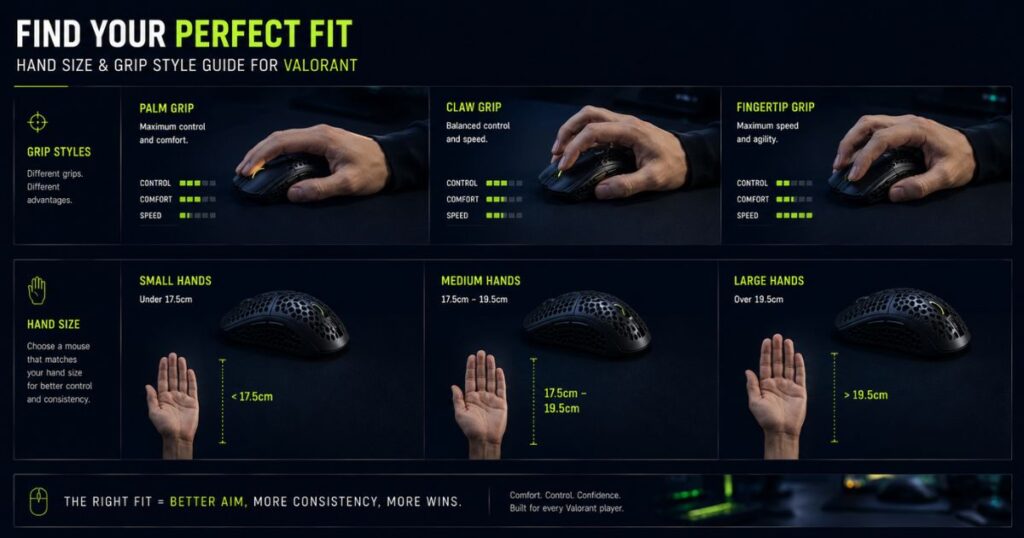
Choosing the right gaming mouse is not only about sensor quality or weight. Hand size and grip style heavily affect how stable the mouse feels during flick shots, crosshair adjustments, and long ranked sessions. A mouse that feels excellent for one player may feel awkward or uncontrollable for another simply because the shape does not match their hand positioning.
This is one of the biggest reasons why copying professional player setups does not always work well. Many Valorant players focus too heavily on specifications while ignoring how grip compatibility influences movement control and long-term comfort. In practice, shape fit often affects aiming consistency more than small differences in hardware generation.
Small Hands vs Large Hands: What Changes?
Hand size directly changes how players control the mouse during competitive gameplay. Smaller hands usually benefit from narrower shells and shorter button reach because oversized mice can make repositioning feel slower or less precise. Larger hands, meanwhile, often require wider grip support and stronger palm contact to maintain stable control during repeated flicking.
The table below provides a general hand size guideline commonly used within the gaming mouse community.
| Hand Size | Hand Length | Recommended Mouse Shape | Typical Grip Match |
|---|---|---|---|
| Small Hands | Under 17cm | Compact symmetrical shells | Fingertip / Claw Grip |
| Medium Hands | 17cm–19cm | Balanced esports shapes | Claw / Hybrid Grip |
| Large Hands | Over 19cm | Larger symmetrical or ergonomic mice | Palm / Relaxed Claw |
Players should also pay attention to hump positioning and grip width instead of focusing only on overall mouse length. In many cases, shape proportions affect aiming comfort more than raw size measurements alone.
Best Mouse Shapes for Claw Grip Players
Claw grip remains one of the most popular grip styles among competitive Valorant players because it balances fast movement with strong stopping control. Players using claw grip typically arch their fingers while maintaining partial palm contact toward the rear of the mouse. This creates a controlled yet reactive aiming style that works especially well for tactical FPS gameplay.
Claw grip players usually perform best with shapes that include moderate rear hump support and stable side curves. These features help maintain better palm contact during repeated flick shots without making the mouse feel bulky during repositioning. Many competitive claw grip users also prefer symmetrical shells because they provide more flexible finger placement during rapid directional movement.
Popular claw grip shapes often include:
- Rear-focused hump support
- Medium shell width
- Slight inward side curves
- Lower front button height
- Easy lift-off positioning
Mice such as the Lamzu Atlantis, Pulsar X2H, and Logitech G Pro X Superlight 2 became especially popular among claw grip users because their shell designs create strong movement control without sacrificing agility.
Fingertip Grip vs Palm Grip for Valorant
Fingertip grip and palm grip create very different aiming behavior in Valorant. Fingertip grip focuses more heavily on finger-based movement and rapid repositioning, while palm grip relies more on arm stability and broader hand contact across the shell. Neither style is objectively superior, but each one benefits from very different mouse shapes and movement characteristics.
The comparison below highlights the biggest practical differences between fingertip grip and palm grip setups.
| Category | Fingertip Grip | Palm Grip |
|---|---|---|
| Mouse Size Preference | Smaller and lower-profile shells | Larger shells with fuller support |
| Palm Contact | Minimal palm contact | Full palm support |
| Movement Feel | Fast and highly reactive | Stable and controlled |
| Best For | Rapid micro-adjustments and flicks | Controlled tracking and comfort |
| Common Mouse Shape | Compact symmetrical designs | Ergonomic or larger symmetrical shells |
| Potential Weakness | Can feel tiring during long sessions | Less agile during fast repositioning |
Most Valorant players eventually perform best when their mouse shape naturally supports their grip style instead of forcing uncomfortable hand positioning. Choosing the correct shape often improves long-term consistency more effectively than simply upgrading to newer hardware generations.
How Mouse Geometry (Hump & Width) Affects Aim Stability
The physical shape of a mouse, particularly the height of the rear hump and the width of the sides, directly impacts stopping control and how stable a player’s aim feels during repeated flicks and micro-adjustments. A well-balanced geometry can help reduce overshooting and improve consistency across long ranked sessions.
| Mouse Feature | Effect on Aim Stability | Recommended Player Type |
|---|---|---|
| Rear Hump Height | Higher rear hump increases palm contact and stopping control; lower hump allows faster lift-offs and repositioning | Claw grip or hybrid grip players benefit from mid-to-high hump; fingertip grip prefers lower hump |
| Side Width | Wider sides provide more lateral stability during precision shots; narrower sides allow faster finger adjustments | Players with larger hands or palm grip prefer wider sides; claw and fingertip users often prefer narrower profiles |
| Shell Shape Balance | Combined effect of hump and width influences overall grip comfort and micro-adjustment control | All competitive players should consider shell proportion relative to their hand size and grip style |
A mouse with the right hump and width will usually feel easier to control than a mouse that only looks good on paper. For Valorant players, shape geometry should be checked together with hand size and grip style because these details directly affect comfort, stopping control, and long-term aim consistency.
DPI and Polling Rate Settings for Valorant
DPI and polling rate settings can heavily influence how responsive and controllable a gaming mouse feels in Valorant. While modern sensors are already extremely accurate, incorrect sensitivity configuration can still make aim feel unstable, overly reactive, or inconsistent during competitive matches. This is why many experienced FPS players spend significant time refining sensitivity settings instead of constantly changing hardware.
One important thing many newer players misunderstand is that higher numbers do not automatically create better performance. Extremely high DPI or aggressive polling settings may sound impressive on paper, but tactical FPS games usually reward consistency and stopping control far more than raw cursor speed.
Why Most Valorant Pros Use 400 or 800 DPI
Most professional Valorant players use either 400 DPI or 800 DPI because these settings provide a strong balance between precision and controllable movement. Lower DPI values make small crosshair adjustments feel steadier, especially during long-range gunfights where tiny aiming errors become very noticeable.
The difference between 400 DPI and 800 DPI is usually less about raw accuracy and more about movement preference. Many players feel 400 DPI provides slightly smoother control, while 800 DPI often feels more responsive during general desktop movement and faster directional adjustments.
Common competitive DPI ranges usually look like this:
| DPI Setting | Typical Feel | Most Common User Type |
|---|---|---|
| 400 DPI | Slower and more controlled movement | Precision-focused tactical FPS players |
| 800 DPI | Balanced speed and responsiveness | Most modern competitive Valorant players |
| 1600 DPI+ | Very fast cursor movement | High-sensitivity or mixed-use players |
For most players, the best DPI setting is the one that allows stable crosshair placement without creating unnecessary tension during repeated aiming adjustments.
Does Higher Polling Rate Actually Improve Aim?
Polling rate determines how frequently the mouse reports movement data to the PC every second. A standard 1000Hz polling rate sends updates every 1 millisecond, while newer 4KHz and 8KHz mice report information significantly faster. Higher polling rates can make cursor movement appear smoother, especially on high refresh rate monitors.
However, the practical gameplay difference in Valorant is usually much smaller than marketing suggests. Most players already achieve excellent competitive performance at 1000Hz, especially if their aim fundamentals and sensitivity settings are stable.
Higher polling rates tend to create the most noticeable difference for low-sensitivity players using 240Hz or 360Hz monitors alongside high-performance PC setups capable of handling increased signal processing consistently. In these situations, higher polling rates can make movement feel slightly smoother during rapid directional flicks and small crosshair corrections. However, on weaker systems, aggressive polling configurations may sometimes increase CPU usage or create inconsistent frame pacing during gameplay.
This is one reason many professional Valorant players still continue using standard 1000Hz configurations even when newer 4KHz and 8KHz hardware is available. For most competitive players, stability and consistency remain more important than chasing minimal theoretical latency improvements.
The table below highlights the practical differences between modern polling rate settings.
| Polling Rate | Update Speed | Practical Competitive Benefit |
|---|---|---|
| 1000Hz | 1ms response interval | Industry standard for stable competitive gameplay |
| 4000Hz | 0.25ms response interval | Slightly smoother movement on high refresh setups |
| 8000Hz | 0.125ms response interval | Marginal improvement for highly optimized systems |
For most Valorant players, stable settings matter far more than chasing extreme numbers. A well-balanced DPI and polling configuration that feels natural during repeated ranked matches will almost always outperform overly aggressive sensitivity experimentation.
What Gaming Mouse Do Valorant Pros Use?
Professional Valorant players often use gaming mice that prioritize consistency, predictable movement, and shape comfort over flashy features or extreme specifications. While many casual players assume pros constantly chase the newest hardware releases, most competitive players actually stick with shapes that feel reliable over thousands of hours of practice. This is why certain esports mice continue appearing repeatedly across major Valorant tournaments.
One important thing to understand is that professional players do not all use the same type of mouse. Some prefer compact symmetrical shells for aggressive flick-heavy aim, while others choose larger ergonomic shapes for stability and long-session comfort. The common factor is usually movement consistency rather than one universal “best” mouse.
Why the Logitech G Pro X Superlight Series Dominates Pro Play
The Logitech G Pro X Superlight series became one of the most common mice in professional Valorant because of its extremely safe shape and highly adaptable movement feel. Instead of forcing aggressive ergonomic curves or unusual shell geometry, the mouse focuses on neutral comfort that works across a wide range of hand sizes and grip styles. This flexibility makes it easier for players to maintain long-term muscle memory consistency during repeated competitive gameplay.
Many professional players also prefer the Superlight series because the shell feels stable without becoming restrictive during fast directional movement. The mouse adapts well to claw grip and fingertip grip styles while still remaining predictable during micro-adjustments and stopping movements. Rather than trying to create a highly specialized experience, the Superlight lineup succeeds because it feels familiar and controllable under pressure.
Key reasons many pros continue using the Superlight series include:
- Weight: Around 60g
- Shape: Neutral symmetrical shell
- Best Grip: Claw / Fingertip
- Movement Feel: Stable and predictable
- Wireless Performance: Extremely reliable for tournament play
- Main Advantage: Easy transition across different aiming styles
The biggest strength of the Superlight lineup is not raw innovation, but consistency. Many professional players describe the mouse as something that “disappears” during gameplay because the shape rarely interferes with movement or grip adjustments. This is one of the main reasons the Superlight series continues to dominate competitive FPS environments despite constant new hardware releases.
Why Some Pros Still Prefer Ergonomic Mice
Although symmetrical mice dominate professional Valorant environments, some players still strongly prefer ergonomic shapes because of the additional palm support and more natural wrist positioning they provide. Ergonomic mice can feel especially stable during long scrim blocks, ranked grinding, or aim training sessions where hand fatigue slowly becomes more noticeable over time.
Modern ergonomic esports mice such as the Razer DeathAdder V3 Pro helped change the reputation of ergonomic FPS mice because they combine fuller hand support with much lighter overall weight than older generations. Instead of feeling bulky or sluggish during fast directional movement, newer ergonomic designs now maintain strong mobility while still preserving the comfort advantages that many players prefer.
Professional players who choose ergonomic mice usually value the stronger palm contact, more relaxed grip posture, and smoother stopping control these shapes provide during repeated competitive gameplay. For some users, the additional hand support also helps reduce wrist tension and maintain more stable aim consistency across long sessions. This becomes particularly important for players who rely heavily on controlled crosshair placement rather than extremely reactive fingertip-style movement.
The main trade-off is that larger ergonomic shells sometimes feel less flexible during aggressive repositioning compared to smaller symmetrical mice. Fingertip grip users especially may find ergonomic shapes more restrictive because the shell naturally encourages greater palm contact and a more grounded movement style. However, for players who prioritize stability and comfort during tactical FPS gameplay, ergonomic mice still remain an extremely strong option in the modern Valorant scene.
Most Popular Mouse Shapes in Professional Valorant
Professional Valorant players tend to favor shapes that balance fast repositioning with stable stopping control. Extremely experimental shell designs rarely dominate the competitive scene because players generally avoid shapes that interfere with muscle memory consistency.
The table below highlights the most common shape categories currently seen across professional Valorant setups.
| Shape Category | Typical Characteristics | Most Common User Type |
|---|---|---|
| Neutral Symmetrical | Balanced shell with flexible grip positioning | Claw grip and fingertip grip players |
| Rear-Hump Symmetrical | More palm support and stopping stability | Claw grip tactical FPS players |
| Lightweight Ergonomic | Fuller palm contact with controlled movement | Palm grip and relaxed claw users |
| Compact Symmetrical | Smaller shell focused on agility and fast repositioning | Fingertip grip and low-sensitivity players |
Most professional Valorant players eventually settle on shapes that feel natural during repeated competitive gameplay rather than constantly changing hardware. While pro setups can provide useful reference points, the best gaming mouse is still the one that matches the player’s own grip style, hand size, and aiming behavior consistently over time.
Gaming Mouse Software and Customization for Valorant
Gaming mouse software can improve the overall Valorant experience when used correctly, but many players overcomplicate their settings with unnecessary tweaks and aggressive macros. In tactical FPS games, the goal of software customization is usually consistency and comfort rather than creating flashy effects or constantly changing sensitivity profiles.
Modern gaming mouse software mainly exists to manage DPI settings, polling rates, firmware updates, and onboard profiles. Once these core settings are configured properly, most competitive players rarely change them again because stable muscle memory matters far more than constant experimentation.
Which Mouse Software Features Actually Matter for Valorant?
Most competitive Valorant players only use a small number of software features regularly. Many advanced customization tools sound impressive on paper, but in practice, tactical FPS gameplay rewards simplicity and stability much more than excessive tuning. Instead of constantly changing settings between matches, experienced players usually focus on building one consistent configuration that feels predictable during long-term gameplay.
Software quality also matters more than many players initially realize. A clean and stable software ecosystem can improve wireless reliability, reduce firmware issues, and maintain more consistent sensor behavior over time. Meanwhile, poorly optimized software may create unnecessary background processes, unstable updates, or configuration problems that negatively affect the overall experience.
The table below highlights the most useful software-related features for competitive Valorant players.
| Software Feature | Why It Matters | Competitive Importance |
|---|---|---|
| Onboard Memory | Saves settings directly to the mouse | Prevents software dependency during gameplay |
| Firmware Updates | Improves stability and hardware optimization | Important for wireless performance and bug fixes |
| DPI Customization | Allows precise sensitivity configuration | Essential for muscle memory consistency |
| Polling Rate Control | Adjusts report frequency to the PC | Useful for balancing smoothness and system load |
| Lift-Off Distance Settings | Controls tracking behavior during mouse lift-offs | Helpful for low-sensitivity players |
| Lightweight Software Design | Reduces unnecessary background resource usage | Preferred for stable competitive environments |
For most Valorant players, the strongest software setup is usually one stable profile that never changes. Once sensitivity, polling rate, and lift-off settings feel natural, consistency becomes far more valuable than endlessly tweaking configurations.
Why Most Pros Avoid Complex Macros and RGB Profiles
Professional Valorant players typically keep their software configuration extremely simple. Most tournament setups avoid complicated macros, aggressive RGB synchronization, or constantly changing profiles because these features rarely improve actual competitive consistency during gameplay.
Overcomplicated macro systems can sometimes introduce input inconsistency, accidental activations, or unnecessary software instability during matches. Heavy RGB ecosystems may also create additional background processes that consume system resources or interfere with other gaming utilities. While these effects are usually small on modern PCs, professional players generally prefer minimizing anything that could potentially disrupt stable performance during competitive play.
This is one reason many esports-focused gaming mice now include onboard memory support. Once the ideal competitive settings are configured, players can often save the profile directly to the mouse and uninstall the software entirely. For tactical FPS gameplay, simplicity and reliability almost always outperform excessive customization.
Good gaming mouse software should quietly improve stability and usability without constantly getting in the way during gameplay. For most Valorant players, the best setup is usually a clean configuration with stable sensitivity settings, reliable firmware, and minimal background interference.
Common Mistakes When Buying a Gaming Mouse for Valorant
Many Valorant players spend too much time chasing specifications while overlooking the factors that actually affect long-term aiming consistency. Modern gaming mice are already extremely advanced, which means poor buying decisions today usually come from choosing the wrong shape, weight balance, or setup combination rather than buying a mouse with a weak sensor.
This is why some players upgrade repeatedly but still feel uncomfortable during ranked gameplay. Instead of improving aim consistency, they constantly switch hardware searching for a “perfect” solution while ignoring grip compatibility, comfort, and long-term muscle memory stability.
Buying a Mouse Only Because a Pro Player Uses It
One of the most common mistakes is copying a professional player’s mouse without considering hand size, grip style, or personal movement habits. While pro setups can provide useful references, they are heavily influenced by individual preference developed through thousands of hours of practice.
A mouse that feels incredible for a professional fingertip grip player may feel completely unstable for someone using palm grip or larger hands. This is especially true with smaller symmetrical esports mice that prioritize agility over comfort.
Instead of blindly copying professional setups, players should focus more heavily on practical factors such as hand size compatibility, grip support, movement comfort, and how stable the mouse feels during long ranked sessions. In many cases, long-term aiming consistency improves far more from choosing the correct shape than from buying the exact hardware used by professional players.
Professional players succeed because of mechanics, repetition, and muscle memory development rather than because a specific mouse automatically improves aim performance by itself.
Chasing Extreme Specs Instead of Better Shape Compatibility
Many players assume newer hardware automatically creates better performance. Because of this, some users constantly chase higher DPI numbers, 8K polling rates, or the lightest possible shell designs while ignoring whether the mouse actually feels controllable during gameplay.
In reality, modern flagship sensors already perform at an extremely high level. Once a mouse reaches a strong competitive baseline, shape comfort and movement consistency usually affect gameplay far more than small hardware specification differences.
The table below highlights several common buying mistakes competitive Valorant players make when choosing a gaming mouse.
| Common Mistake | Why It Causes Problems | Better Approach |
|---|---|---|
| Copying Pro Setups Blindly | Different hand sizes and grip styles create different comfort needs | Choose shapes based on personal fit first |
| Buying Only by Specs | High-end hardware does not guarantee comfort or control | Prioritize shape and movement feel |
| Choosing Extremely Light Mice Too Early | Can create unstable stopping behavior for inexperienced users | Start with balanced lightweight designs |
| Ignoring Mousepad Pairing | Poor surface balance can ruin movement consistency | Match mouse weight with suitable pad control |
| Constantly Changing Sensitivity | Disrupts muscle memory and long-term consistency | Build stable settings and stick with them |
Most experienced Valorant players eventually realize that consistency matters more than endlessly upgrading hardware. A comfortable mouse with stable settings and good shape compatibility will usually outperform expensive gear that feels awkward or constantly changes the player’s muscle memory.
FAQ About the Best Gaming Mouse for Valorant
Choosing the best gaming mouse for Valorant depends heavily on shape compatibility, grip style, movement preference, and overall aiming consistency rather than simply buying the newest hardware available. While modern esports mice already provide excellent sensor performance, factors such as comfort, stopping control, and long-session stability usually affect gameplay far more during competitive matches.
The FAQ section below answers the most common beginner, technical, and buying-related questions Valorant players ask when researching competitive gaming mice.
What Is the Best Mouse Shape for Valorant?
Most competitive Valorant players prefer symmetrical mouse shapes because they support flexible grip positioning and easier repositioning during flick shots. Neutral symmetrical shells also work especially well for claw grip and fingertip grip users, which remain the most common grip styles in tactical FPS games.
However, the ideal shape still depends heavily on hand size and personal comfort. Some players perform more consistently with ergonomic mice because additional palm support can improve stopping control during longer sessions.
Is a Lightweight Mouse Better for Valorant?
Lightweight gaming mice are generally preferred in Valorant because they reduce movement resistance during repeated flicks and low-sensitivity swipes. Many players feel lighter mice improve movement fluidity and reduce wrist fatigue during long ranked sessions.
That said, extremely lightweight mice are not automatically better for everyone. Some players maintain more stable crosshair control using slightly heavier mice with stronger stopping feel and more grounded movement.
Are Wireless Gaming Mice Good for Competitive FPS Games?
Modern wireless gaming mice are now fully viable for competitive Valorant gameplay. Current esports-grade wireless technology delivers extremely low latency while also removing cable drag during large arm movements.
This is one reason many professional FPS players now prefer wireless setups over wired alternatives. For most competitive players today, wireless performance is no longer considered a disadvantage.
What Grip Style Is Best for Valorant Players?
Claw grip remains one of the most popular grip styles among competitive Valorant players because it balances fast flicking with strong stopping control. Fingertip grip is also common among players who prefer highly reactive movement and fast repositioning.
Palm grip still works extremely well for players who prioritize comfort and smoother tracking during longer sessions. The best grip style ultimately depends on hand size, aiming behavior, and personal comfort preference.
What Mouse Weight Is Best for Tactical FPS Games?
Most competitive Valorant players prefer mice between 50g and 65g because this range usually balances movement speed with aiming stability. Ultra-light mice below 50g may feel extremely agile, but some players struggle with stopping precision if the setup becomes too reactive.
The ideal weight is usually the one that feels controllable during repeated competitive matches rather than simply choosing the lightest mouse possible.
What DPI Do Most Valorant Pros Use?
Most professional Valorant players use either 400 DPI or 800 DPI. These settings provide strong precision and stable crosshair control without making movement feel overly sensitive during tactical gunfights.
The exact sensitivity still varies depending on personal preference, mousepad choice, and overall eDPI configuration.
Does Polling Rate Affect Aim Performance?
Polling rate can slightly affect cursor smoothness and responsiveness, especially on high refresh rate monitors. However, for most players, 1000Hz already provides excellent competitive performance and remains the standard configuration used by many professional players.
Higher polling rates such as 4KHz and 8KHz tend to create smaller real-world improvements than marketing often suggests.
Is 8K Polling Rate Worth It for Valorant?
8K polling rate can feel slightly smoother on very high-end systems paired with 240Hz or 360Hz monitors, but the practical gameplay improvement is usually minor for most players. It may also increase CPU usage depending on system configuration.
For the majority of Valorant players, stable 1000Hz or 4KHz performance is already more than sufficient for competitive gameplay.
Do Expensive Gaming Mice Actually Improve Aim?
Expensive gaming mice can improve comfort, build quality, wireless optimization, and overall movement consistency, but they do not automatically improve raw aiming skill by themselves. Once a gaming mouse reaches a strong modern hardware baseline, shape compatibility and muscle memory become much more important than extreme specifications.
A well-fitted mid-range mouse will usually outperform a premium flagship mouse that feels uncomfortable during gameplay.
Is 800 DPI Better Than 400 DPI for Valorant?
Neither setting is objectively superior. Many players prefer 400 DPI because it feels slightly smoother and more controlled, while others prefer 800 DPI because desktop movement and micro-adjustments feel more responsive.The practical gameplay difference is usually very small once overall sensitivity is adjusted correctly.
What Is the Best Overall Gaming Mouse for Valorant in 2026?
The Logitech G Pro X Superlight 2 remains one of the safest overall recommendations because of its balanced symmetrical shape, strong wireless performance, and highly consistent movement feel. However, players with different grip styles or hand sizes may prefer alternatives such as the Razer DeathAdder V3 Pro or Lamzu Atlantis.
There is no universal “perfect” gaming mouse because shape compatibility affects gameplay far more than raw specifications alone.
What Is the Best Budget Gaming Mouse for Valorant in 2026?
Several modern budget gaming mice now deliver excellent competitive performance at far lower prices than traditional flagship models. Options such as the VGN Dragonfly F1 Pro and Attack Shark X3 provide lightweight designs, strong sensors, and reliable wireless performance without entering premium pricing territory.
For most players, shape comfort and movement consistency matter far more than buying the most expensive mouse available.
Conclusion — Choosing the Best Gaming Mouse for Valorant
The best gaming mouse for Valorant ultimately depends more on shape compatibility, grip comfort, and movement consistency than extreme specifications alone. A lightweight mouse with stable control, balanced wireless performance, and a shape that naturally fits your hand will almost always perform better than blindly chasing pro setups or marketing numbers.
For most players, the strongest setup is simply one that feels comfortable and predictable during long ranked sessions. Once the mouse disappears in your hand during gameplay, improving aim becomes far more about practice and consistency than constantly changing hardware.
Thanks