
DPI is a gaming mouse sensitivity measurement that helps determine how far the cursor or crosshair moves when the mouse moves one inch across a surface. In FPS games, DPI affects aiming speed, cursor responsiveness, and the amount of physical movement required to control your aim.
Many new players assume higher DPI automatically means better performance because gaming mouse brands often advertise very large DPI numbers. In real gameplay, DPI is only useful when it helps your aim feel stable, predictable, and comfortable across long sessions.
Understanding DPI also helps you make better decisions when choosing a gaming mouse, adjusting sensitivity, or comparing FPS settings. If you are still learning how mouse hardware affects aim, our complete Gaming Mouse for FPS Games explains the core features that matter for competitive players.
What Is DPI in a Gaming Mouse?
DPI is a gaming mouse sensitivity measurement that helps determine how far your cursor or crosshair moves when the mouse travels one physical inch. A higher DPI setting creates faster cursor movement, while a lower DPI setting creates slower and more controlled movement.
DPI stands for Dots Per Inch. Although the phrase originally comes from print measurement, gaming mice use DPI to describe how sensitive the mouse sensor feels during physical movement. The number does not automatically tell you whether a mouse is good or bad.
For example, if one player uses 400 DPI and another player uses 800 DPI, the 800 DPI setup will usually move the cursor farther from the same physical mouse movement. This difference changes how much arm or wrist movement is needed to aim, track targets, and stop the crosshair accurately.
What DPI Changes During Gameplay
DPI is a movement scaling setting that helps change how quickly your hand movement becomes cursor or crosshair movement on screen. It affects speed, control, tracking feel, flick response, and small aim corrections during gameplay.
In FPS games, DPI is felt most clearly when you try to follow a moving enemy, flick to a target, or make a small correction toward the head. A setting that feels too fast may cause overflicking, while a setting that feels too slow may require too much mousepad space.
The main gameplay elements affected by DPI include:
- Crosshair speed: DPI affects how fast the crosshair moves when your hand moves the mouse.
- Tracking feel: DPI affects how smoothly you can follow a moving target.
- Flick responsiveness: DPI affects how quickly the crosshair reacts to sudden aiming movements.
- Micro-adjustment control: DPI affects how easy it feels to make tiny corrections during precision shots.
- Physical movement distance: DPI affects how much desk space and mousepad room your aim needs.
These elements explain why DPI can dramatically change aiming feel even when the gaming mouse, mousepad, and game stay the same.
Lower DPI usually helps players who want steadier aim and more room for correction. Higher DPI usually helps players who want faster movement with less physical effort, but it can become harder to control if the final sensitivity is too high.
This heading matters because DPI is not just a number in mouse software. It directly changes the relationship between your hand movement and what happens on screen during real gameplay.
Common DPI Ranges in Gaming
Common DPI ranges are sensitivity groups that help players choose a practical starting point based on how much speed or control they need. Competitive FPS players usually stay within moderate DPI ranges because controlled movement is easier to repeat under pressure.
Different games can reward different movement styles. Tactical shooters usually favor lower DPI and steadier crosshair placement, while desktop use and some casual games may feel better with higher DPI because quick cursor movement is more convenient.
The table below shows the most common DPI ranges used across gaming and desktop scenarios:
| DPI Range | Typical Use Case | Common User Type |
|---|---|---|
| 400 DPI | Tactical FPS precision | Competitive FPS players |
| 800 DPI | Balanced gaming performance | Most professional FPS players |
| 1600 DPI | General gaming and desktop use | Mixed-use gamers |
| 3200+ DPI | Fast cursor movement | Desktop-focused users |
The table above shows that 400 DPI and 800 DPI are the most common practical starting points for FPS players. These settings usually provide enough speed for gameplay while still allowing controlled tracking, flicking, and micro-adjustments.
To understand why different DPI values create different aiming experiences, look at how the same physical mouse movement can produce different cursor movement:
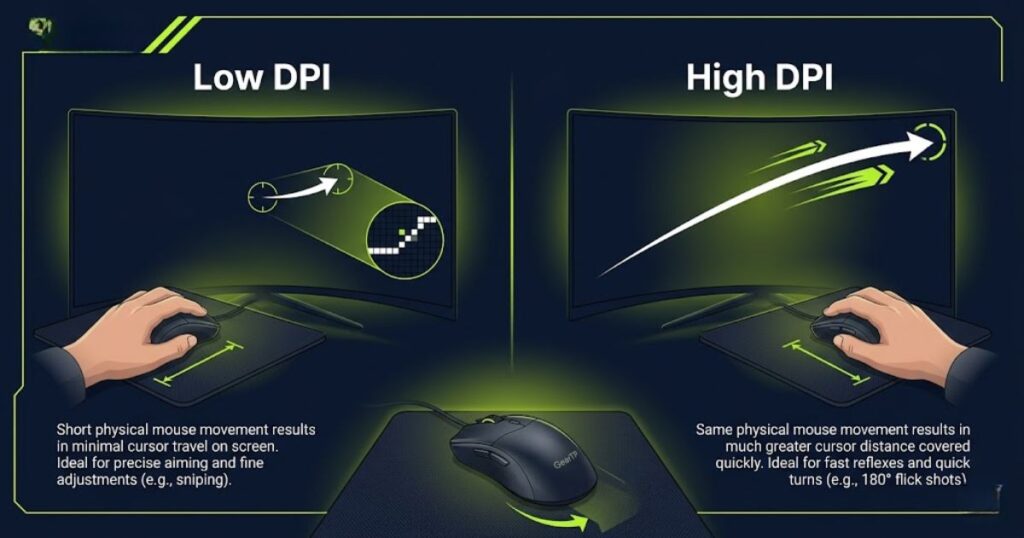
The image shows that DPI changes the amount of on-screen movement created from the same physical hand movement. This is why a high DPI setting can feel fast and reactive, while a low DPI setting can feel slower and easier to control.
Because of these differences, the best starting point for most FPS players is usually a moderate DPI range rather than the highest possible setting. DPI should support consistent aim, not make the mouse feel fast just for the sake of speed.
Common DPI ranges are useful for orientation, but they are not final rules. The right DPI still depends on in-game sensitivity, mousepad size, grip style, monitor setup, and how naturally the setting feels during long FPS sessions.
How DPI Works on a Gaming Mouse
DPI is a movement scaling system that helps convert physical mouse movement into digital cursor movement on screen. When a gaming mouse sensor detects movement, the DPI setting determines how much cursor movement is generated from that physical motion.
Many players think DPI changes the sensor itself, but that is not how it works. The sensor tracks movement while DPI changes how sensitive that tracked movement feels once it reaches the computer.
A lower DPI setting creates slower cursor movement and usually requires more arm or wrist movement. A higher DPI setting creates faster cursor movement and requires less physical movement to cover the same distance on screen.
How Gaming Mouse Sensors Track Movement
A gaming mouse sensor is a tracking system that helps detect movement across a surface and translate that movement into digital input. Modern optical sensors perform this process thousands of times every second to keep cursor movement accurate and responsive.
Although the process happens instantly during gameplay, several steps occur behind the scenes every time the mouse moves. Understanding these steps helps explain why sensor quality and DPI work together rather than acting as separate features.
The following process explains how gaming mouse sensors track movement:
- Surface scanning: The sensor continuously scans the mousepad surface underneath the mouse.
- Movement detection: The sensor identifies changes in position, direction, and speed.
- DPI scaling: The DPI setting determines how much cursor movement should be created from that physical motion.
- Signal transmission: The mouse sends movement information to the computer.
- Cursor movement: The operating system displays the final cursor or crosshair movement on screen.
This process helps transform physical hand movement into digital cursor movement that players can use for aiming, tracking, navigation, and general gameplay.
To visualize how sensor tracking and DPI work together, consider the movement path shown below:
The image illustrates that the sensor collects movement information while DPI determines the sensitivity of the final output. This relationship explains why two players can use the same mouse but experience very different aiming speeds.
Understanding how sensors track movement provides important context for choosing DPI settings. It also explains why raw DPI numbers alone do not determine gaming performance.
Why Sensor Quality Matters More Than Maximum DPI
Sensor quality is a gaming mouse performance factor that helps determine tracking accuracy, consistency, and reliability during gameplay. A high-quality sensor often improves aiming performance more than extremely high DPI values.
Gaming mouse marketing frequently highlights maximum DPI numbers because they are easy to advertise. However, professional FPS players usually care far more about stable tracking than whether a mouse supports 26,000 DPI or 35,000 DPI.
High-quality sensors typically provide:
- Accurate tracking: Sensor movement stays closer to actual hand movement.
- Lower jitter: Small unwanted cursor movements are reduced.
- Better consistency: Tracking remains reliable during repeated aim movements.
- Improved high-speed performance: Fast flicks remain stable and predictable.
- More reliable crosshair control: Cursor behavior feels easier to trust during gunfights.
These benefits help competitive players maintain confidence in their aim because the mouse behaves predictably under pressure.
The table below compares sensor quality factors against maximum DPI specifications:
| Feature | Impact on FPS Gameplay | Importance Level |
|---|---|---|
| Tracking Accuracy | Directly affects aim precision | Very High |
| Movement Consistency | Improves repeatable aim | Very High |
| Jitter Control | Reduces unwanted movement | High |
| Maximum DPI | Mostly affects sensitivity range | Moderate |
The table above shows why many competitive players focus on tracking quality rather than chasing the highest advertised DPI numbers. Reliable movement behavior is usually more valuable than sensitivity ranges most players never use.
Sensor performance is also closely connected to how frequently movement data reaches the computer. If you want to learn about another important responsiveness setting, read our guide on what polling rate is in a gaming mouse.
Understanding sensor quality creates a stronger foundation for the next topic, because DPI becomes much easier to understand once you know how movement data is captured, processed, and delivered to the game.
DPI vs Sensitivity vs eDPI
DPI, sensitivity, and eDPI are different sensitivity measurements that help determine overall aiming speed and mouse control. While these terms are closely related, each one controls a different part of the aiming system.
Many FPS players confuse these settings because changing any of them can make the crosshair move faster or slower. Understanding the differences helps players adjust settings more intelligently and compare setups more accurately.
What Is the Difference Between DPI and Sensitivity?
DPI is a hardware sensitivity setting that helps control how far the cursor moves from physical mouse movement, while in-game sensitivity is a software setting that helps adjust how that movement feels inside a specific game. Both settings affect aim speed, but they control different parts of the aiming process.
Many FPS players assume DPI and sensitivity are the same thing because changing either setting can make the crosshair move faster or slower. In reality, DPI vs sensitivity comes down to hardware movement versus in-game movement interpretation.
The table below compares DPI and in-game sensitivity:
| Setting | Controlled By | Main Purpose |
|---|---|---|
| DPI | Mouse Hardware | Controls base movement speed |
| In-Game Sensitivity | Game Software | Controls final crosshair speed |
| Combined Result | DPI + Sensitivity | Creates total aim speed |
The table above shows that DPI and sensitivity work together rather than replacing one another. This is why two players can use different DPI values and still end up with very similar aim speeds.
For example, a player using 1600 DPI with 0.5 sensitivity can create a similar aim speed to a player using 800 DPI with 1.0 sensitivity. Although the settings look different, the final crosshair movement can feel remarkably similar.
Many FPS players eventually discover that comparing DPI alone is not enough. Because DPI and sensitivity work together, competitive players often use a combined measurement called eDPI to compare overall aim speed more accurately.
If you want a deeper breakdown of these settings, read our guide on DPI vs Sensitivity.
Why FPS Players Use eDPI Instead of DPI Alone
eDPI is a combined sensitivity value that helps FPS players compare total aim speed more accurately than DPI alone. It combines mouse DPI and in-game sensitivity into a single number that represents effective aiming speed.
Professional players often use different DPI settings, different sensitivity settings, and even different games. Comparing eDPI allows players to evaluate total aim speed without worrying about individual configuration differences.
For example, two players can use completely different DPI values but still have nearly identical eDPI values. In those situations, their overall aiming speed may feel much closer than the raw DPI numbers suggest.
If you are comparing professional settings, eDPI is usually a more useful measurement than DPI because it reflects the final sensitivity result rather than only one part of the equation.
Understanding eDPI helps players avoid one of the most common mistakes in FPS gaming, which is copying DPI values without understanding how sensitivity affects the final outcome.
If you want a complete explanation of how this measurement works, read our dedicated guide on What Is eDPI.
eDPI Calculation Examples for FPS Players
eDPI is a simple calculation that helps combine DPI and in-game sensitivity into one comparable value. This calculation makes it easier to compare aiming speeds across different setups.
The formula is straightforward, and you can also use our full guide on how to calculate eDPI if you want a cleaner step-by-step breakdown:
eDPI = DPI × In-Game Sensitivity
Different DPI and sensitivity combinations can produce the same eDPI value, which means they can create very similar overall aim speeds.
The table below shows common eDPI calculation examples:
| DPI | Sensitivity | eDPI |
|---|---|---|
| 400 | 1.0 | 400 |
| 800 | 0.5 | 400 |
| 1600 | 0.25 | 400 |
| 800 | 1.0 | 800 |
The table above demonstrates why DPI vs eDPI matters when comparing player settings. Looking only at DPI can be misleading because sensitivity changes the final result.
Players who understand eDPI can compare configurations more intelligently, troubleshoot sensitivity problems more effectively, and avoid copying settings without context.
If you want to compare these measurements directly, our DPI vs eDPI guide explains when each metric is most useful.
Now that the relationship between DPI, sensitivity, and eDPI is clear, the next step is understanding how DPI directly influences tracking, flick shots, and aiming precision in FPS games.
How DPI Affects Aim in FPS Games
DPI is a sensitivity factor that helps influence tracking precision, flick speed, and micro-adjustment control during FPS gameplay. While DPI does not determine skill, it changes how aiming feels and behaves during combat situations.
The way DPI affects aim becomes most noticeable during target tracking, flick shots, and precision corrections. Understanding these effects helps players choose settings that support their preferred aiming style instead of simply copying someone else’s configuration.
How DPI Influences Tracking Precision
DPI is a sensitivity factor that helps influence tracking precision by changing how much cursor movement is created from physical mouse movement. The right DPI can make following moving targets feel smoother, more predictable, and easier to control.
Tracking is one of the most important aiming skills in FPS games because players often need to keep their crosshair attached to a moving opponent for several seconds. DPI affects how stable that tracking feels during both slow and fast movement.
Tracking precision is commonly influenced by:
- Crosshair stability: Moderate DPI settings can make target tracking feel more controlled.
- Movement smoothness: DPI affects how naturally the crosshair follows moving targets.
- Correction accuracy: DPI influences how easily players can adjust when a target changes direction.
- Physical movement requirements: Different DPI values require different amounts of arm and wrist movement.
These factors explain why many competitive FPS players prefer moderate DPI settings instead of extremely high values. Consistent tracking is often easier when movement feels predictable rather than overly sensitive.
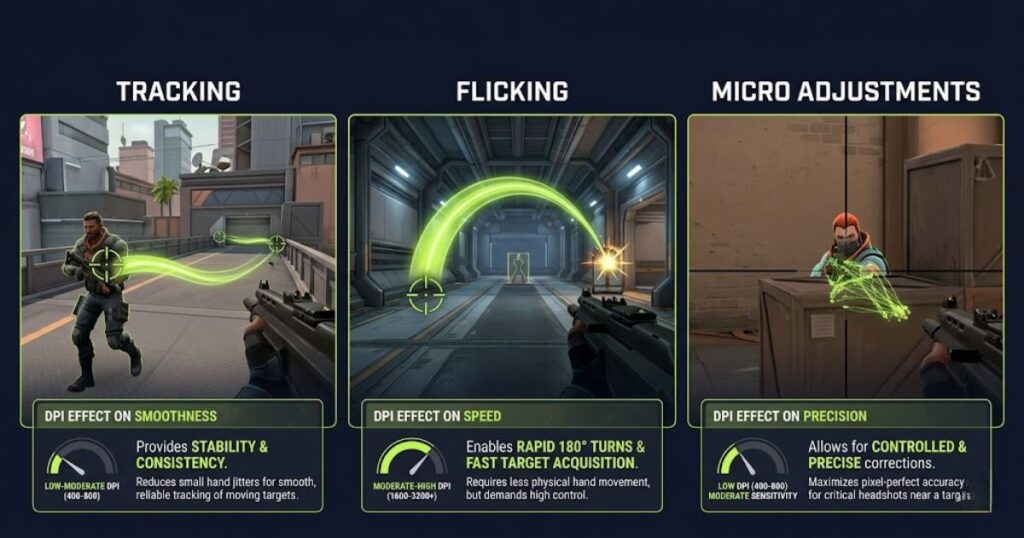
The relationship between DPI and tracking becomes easier to visualize when looking at how aiming movement behaves during gameplay:
The image highlights how DPI affects different aiming scenarios. A setting that feels comfortable during tracking may feel very different during flick shots or precision corrections.
Because tracking requires constant control rather than sudden movement, many FPS players prioritize consistency over maximum sensitivity.
How DPI Influences Flick Shots
DPI is a movement sensitivity setting that helps influence how quickly the crosshair travels during flick shots. Different DPI values can make large aiming movements feel either faster or more controlled.
Flick shots occur when players rapidly move their crosshair toward a target before firing. These movements often happen within fractions of a second, making sensitivity selection especially important.
DPI can affect flick shots in several ways:
- Turning speed: Higher DPI can reduce the physical distance needed to reach a target.
- Stopping accuracy: Lower DPI can make it easier to stop the crosshair precisely.
- Overflick risk: Extremely high DPI may increase the chance of overshooting targets.
- Consistency: Moderate DPI often provides a balance between speed and control.
These differences explain why professional FPS players rarely choose DPI solely based on speed. The ability to stop accurately is often more valuable than moving quickly.
Successful flick aiming usually depends on muscle memory, repetition, and consistent settings. Changing DPI frequently can make those movements harder to repeat accurately.
How DPI Influences Micro Adjustments
DPI is a precision sensitivity factor that helps influence micro adjustments during aiming. Small corrections become especially important when lining up headshots or making final crosshair refinements before firing.
Micro adjustments occur after the crosshair is already close to the target. Instead of large movements, players rely on tiny corrections to achieve precise alignment.
Micro-adjustment performance is commonly affected by:
- Small movement control: DPI affects how sensitive tiny hand movements feel.
- Headshot precision: DPI influences the ease of final aiming corrections.
- Crosshair stability: Extremely high DPI may make small movements feel overly reactive.
- Target refinement: DPI affects how smoothly players can fine-tune aim.
These characteristics explain why many tactical FPS players avoid excessively high DPI settings. Small aiming corrections are often easier when movement feels controlled and predictable.
Tracking, flicking, and micro adjustments all respond differently to sensitivity changes. Because of this, there is no universal DPI value that works best for every player or every game.
Is Higher DPI Better for Gaming?
Higher DPI is a sensitivity setting that helps reduce the amount of physical movement needed to move the cursor, but it does not automatically improve gaming performance. A higher number is not always a better number when it comes to FPS aiming.
Many gaming mouse advertisements focus heavily on maximum DPI because large specifications look impressive. However, most professional FPS players use relatively moderate DPI settings despite having access to mice capable of extremely high sensitivity levels.
High DPI vs Low DPI in FPS Gaming
High DPI and low DPI are different sensitivity approaches that help create different aiming experiences. Each approach offers advantages and tradeoffs depending on the player’s preferences, setup, and aiming style.
The table below compares high DPI and low DPI settings for FPS gaming:
| Factor | Low DPI | High DPI |
|---|---|---|
| Cursor Speed | Slower | Faster |
| Physical Movement | More Required | Less Required |
| Tracking Control | Often Easier | Can Feel More Sensitive |
| Micro Adjustments | More Controlled | More Reactive |
| Desk Space Needed | More | Less |
The table above shows that neither option is universally superior. The best choice depends on how comfortably a player can track, flick, and perform precise corrections using a particular sensitivity range.
Many competitive players choose moderate DPI values because they provide a practical balance between speed and control without pushing either extreme.
Why Most FPS Players Avoid Extremely High DPI
Extremely high DPI is a sensitivity setting that helps create very fast cursor movement, but many FPS players avoid it because excessive sensitivity can make aiming harder to control consistently.
While modern gaming mice may support 26,000 DPI, 30,000 DPI, or even higher values, very few competitive players actually use those settings during gameplay.
Most FPS players avoid extremely high DPI because it can:
- Increase overflicking
- Reduce aiming consistency
- Make micro adjustments harder
- Create unstable crosshair movement
- Require excessive sensitivity reduction in-game
These drawbacks often outweigh the benefits of faster cursor movement. For most players, moderate sensitivity ranges provide better long-term aiming performance.
The goal of DPI selection is not to maximize speed. The goal is to understand the difference between highest DPI vs usable DPI so your setting stays fast enough without destroying control.
Common DPI Myths FPS Players Still Believe
DPI myths are common misconceptions that help create confusion about gaming mouse sensitivity and aiming performance. Many of these beliefs come from marketing claims rather than actual gameplay experience.
The following myths continue to appear in FPS communities:
- Higher DPI always means better aim.
- Professional players use maximum DPI settings.
- DPI alone determines aiming skill.
- Higher DPI automatically reduces latency.
- Every FPS game requires a completely different DPI.
These misconceptions often lead players toward unnecessary sensitivity changes and unrealistic expectations. In practice, aiming performance depends on many factors beyond DPI alone.
Understanding these myths helps players focus on meaningful improvements rather than chasing specifications that may not improve gameplay. For a more practical breakdown, read our guide on DPI mistakes beginners make.
Now that the differences between high DPI and low DPI are clear, the next step is identifying the DPI ranges most commonly used in competitive FPS games.
Best DPI Settings for FPS Games
The best DPI settings for FPS games are usually moderate sensitivity ranges that help balance aiming precision, tracking consistency, and comfortable movement. Most competitive players prefer settings that support reliable muscle memory rather than maximum speed.
Best DPI for Valorant
The best DPI for Valorant is typically a moderate sensitivity range that helps support precise crosshair placement, accurate micro adjustments, and consistent tracking during tactical gunfights. Most competitive players prioritize control over raw movement speed.
Valorant rewards precision more than rapid camera movement because a single well-placed shot can decide an engagement. As a result, many players choose DPI settings that allow comfortable head-level crosshair placement and reliable corrections.
The table below shows common DPI ranges used by Valorant players:
| DPI Range | Common Usage | Typical Goal |
|---|---|---|
| 400 DPI | Very Common | Maximum control |
| 800 DPI | Very Common | Balanced precision and speed |
| 1600 DPI | Less Common | Used with lower sensitivity |
The table above shows that 400 DPI and 800 DPI remain the most popular starting points for tactical FPS players. These settings allow consistent aim while still providing enough movement speed for normal gameplay situations.
To better understand why lower and moderate DPI settings remain popular in tactical shooters, consider the type of setup commonly used by competitive players:
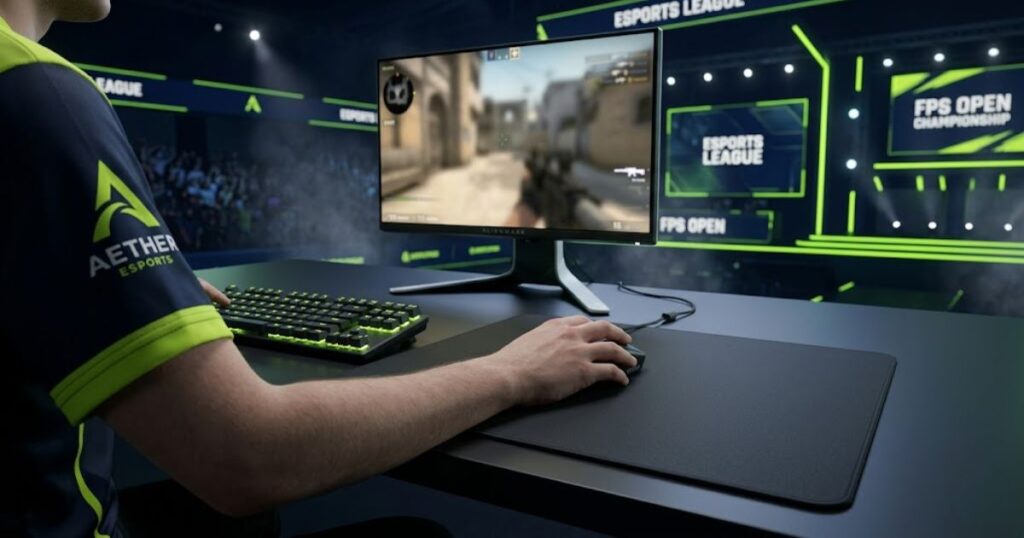
The image highlights a common competitive setup where players use larger mousepads to compensate for lower sensitivity. This approach allows more precise arm movement and consistent crosshair control.
If you want practical sensitivity examples, our guide on Best Mouse Settings for Valorant explains how DPI and sensitivity are commonly combined.
Best DPI for Counter-Strike 2
The best DPI for Counter-Strike 2 is generally a moderate sensitivity range that helps support precision aiming, controlled tracking, and predictable crosshair movement. Like Valorant, Counter-Strike rewards accuracy more than excessive movement speed.
Counter-Strike players often develop strong muscle memory because the game places heavy emphasis on positioning, crosshair placement, and first-shot accuracy. Stable sensitivity settings help reinforce those habits over time.
Common Counter-Strike 2 DPI preferences include:
- 400 DPI: Popular among players who prefer maximum control.
- 800 DPI: Common among players seeking a balance between speed and precision.
- 1600 DPI: Occasionally used with reduced in-game sensitivity.
- Consistent settings: Many players prioritize stability over frequent changes.
These preferences show that there is no single correct DPI value. What matters most is choosing a setting that remains comfortable and repeatable during thousands of rounds of practice.
Counter-Strike and Valorant may have different mechanics, but both games reward consistency far more than extreme sensitivity values.
Common DPI Settings Used by Pro Players
Professional player DPI settings are practical sensitivity choices that help balance aiming precision, movement efficiency, and long-term consistency. While individual preferences vary, most professionals stay within relatively moderate DPI ranges.
Professional settings are useful reference points because they demonstrate what experienced players trust during high-pressure competition. However, copying professional settings does not automatically improve performance.
The table below summarizes common DPI ranges used by professional FPS players:
| Player Group | Common DPI Range | Typical Preference |
|---|---|---|
| Valorant Professionals | 400–800 DPI | Precision-focused |
| CS2 Professionals | 400–800 DPI | Control-focused |
| Mixed FPS Players | 800–1600 DPI | Balanced sensitivity |
The table above shows a clear trend. Professional players rarely rely on extremely high DPI because predictable movement and repeatable aim are more valuable than raw cursor speed.
Rather than copying a professional player’s exact settings, it is usually more effective to understand the principles behind their choices. If you want the deeper reason behind one of the most common settings, read our guide on why many pros use 800 DPI.
How to Choose the Right DPI for Your Setup
The right DPI is a personal sensitivity setting that helps match your grip style, mousepad size, aiming habits, and comfort preferences. The goal is not finding the highest or lowest DPI, but finding the setting that feels most natural and repeatable.
Because every player uses different equipment and movement habits, choosing DPI should be based on practical factors rather than internet recommendations alone.
Choose DPI Based on Grip Style
Grip style is a hand positioning method that helps influence how players control mouse movement during gameplay. Different grip styles often benefit from different sensitivity preferences.
The table below shows common DPI preferences by grip style:
| Grip Style | Common DPI Preference | Main Benefit |
|---|---|---|
| Palm Grip | Lower DPI | Stable control |
| Claw Grip | Moderate DPI | Balanced flexibility |
| Fingertip Grip | Moderate to Higher DPI | Fast adjustments |
The table above demonstrates that comfort often matters more than strict rules. A DPI setting should complement the way your hand naturally controls the mouse.
To better understand how grip style changes mouse control, consider the common grip positions shown below:
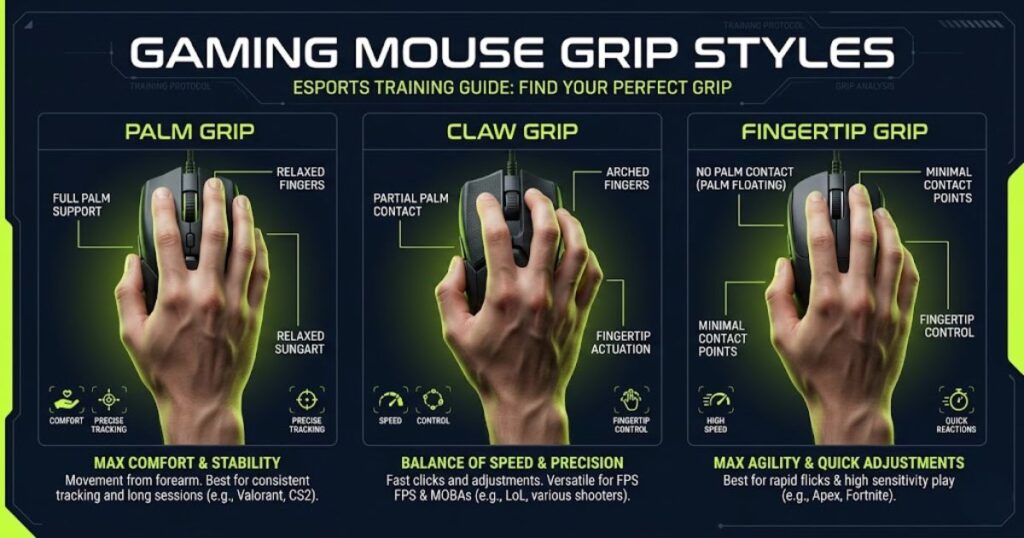
The image illustrates why grip style can influence sensitivity choices. Different hand positions create different movement characteristics during aiming.
Choose DPI Based on Mousepad Size
Mousepad size is a physical setup factor that helps determine how much movement space is available for aiming. Larger mousepads generally support lower sensitivity settings, while smaller mousepads often require more efficient movement.
Players who use low DPI settings typically rely on larger arm movements. Without enough mousepad space, those movements can become uncomfortable or inconsistent during gameplay.
The table below shows common DPI recommendations based on mousepad size:
| Mousepad Size | Common DPI Range | Typical Benefit |
|---|---|---|
| Small | 800–1600 DPI | Efficient movement |
| Medium | 400–1200 DPI | Balanced flexibility |
| Large / XL | 400–800 DPI | Maximum control |
The table above shows why many competitive FPS players prefer large mousepads. Additional movement space allows lower sensitivity settings without limiting turning capability.
Mousepad size alone should not determine DPI, but it can influence how practical a particular sensitivity range feels during long gaming sessions.
Choose DPI Based on Your Aim Style
Aim style is a movement preference that helps determine how players track targets, perform flick shots, and make aiming corrections. Different styles often feel more comfortable with different sensitivity ranges.
Some players rely heavily on smooth tracking, while others depend on aggressive flick shots. Understanding your natural aiming habits can make DPI selection easier and more effective.
Common aiming styles include:
- Tracking-focused players: Often prefer stable and predictable sensitivity settings.
- Flick-focused players: May prefer slightly faster movement for rapid target acquisition.
- Hybrid aimers: Usually seek a balance between speed and control.
- Arm aim users: Frequently use lower DPI and larger mouse movements.
- Wrist aim users: Often prefer higher sensitivity and shorter movements.
These categories are not strict rules. Many players naturally combine multiple aiming styles depending on the game, situation, and personal preference.
The most effective DPI setting is usually the one that feels repeatable across tracking, flicking, and precision corrections rather than one that excels at only a single task.
Grip style, mousepad size, and aim style all contribute to DPI selection. Together, they create a more complete picture of what sensitivity range is likely to feel comfortable.
Should You Change Your DPI Often?
DPI consistency is an aiming habit that helps build stronger muscle memory, more predictable movement patterns, and better long-term crosshair control. Most FPS players benefit from keeping their DPI stable rather than changing it frequently.
Many players blame their settings after a bad match and immediately adjust DPI. While this reaction is understandable, constant changes often make aiming less consistent rather than more effective.
Why Frequent DPI Changes Hurt Consistency
Frequent DPI changes are sensitivity adjustments that help alter aiming speed, but they can also disrupt muscle memory and reduce movement consistency. Every major DPI change forces the brain to adapt to a different aiming environment.
Muscle memory develops through repetition. When DPI changes too often, the relationship between hand movement and crosshair movement changes as well, making it harder to build reliable habits.
Frequent DPI changes can create:
- Inconsistent tracking
- Unstable flick timing
- Reduced confidence
- Longer adjustment periods
- More sensitivity confusion
These issues often slow improvement because players spend more time adapting to settings than practicing actual aiming skills.
Consistency is one of the reasons many professional players keep the same sensitivity settings for months or even years.
When You Should Change DPI
DPI changes are sensitivity adjustments that help solve specific comfort or performance problems. While constant changes are usually unnecessary, there are situations where adjusting DPI can be beneficial.
The situations below are reasonable reasons to consider changing DPI:
- Your current sensitivity feels uncomfortable.
- You changed to a significantly different mousepad size.
- You changed from wrist aiming to arm aiming.
- You upgraded to a new monitor setup.
- You have tested your settings extensively and still feel limited.
These situations involve meaningful changes to equipment, movement habits, or comfort. In those cases, adjusting DPI may help create a better long-term setup.
Outside of these situations, frequent experimentation often causes more problems than it solves.
How Long Should You Stay With One DPI?
DPI stability is a practice habit that helps players develop reliable muscle memory and more predictable aiming performance. Most FPS players should spend enough time with one DPI setting before deciding whether it truly works.
Short testing periods can be misleading because unfamiliar settings often feel uncomfortable at first. Players frequently abandon potentially good settings before giving themselves time to adapt.
When evaluating a DPI setting, players should focus on:
- Comfort during long sessions
- Tracking consistency
- Flick accuracy
- Micro-adjustment control
- Overall confidence during gameplay
These factors provide a more reliable measurement of performance than a single match or a short testing session.
Giving a DPI setting adequate time allows players to evaluate its strengths and weaknesses more accurately before making additional changes.
Key Takeaways About Gaming Mouse DPI
Gaming mouse DPI is a sensitivity measurement that helps determine how far cursor movement travels from physical mouse movement. Understanding DPI allows players to make more informed decisions about aiming performance and mouse configuration.
The most important points from this guide include:
- DPI controls base mouse sensitivity.
- Higher DPI does not automatically improve aim.
- DPI and sensitivity work together.
- eDPI provides a more complete sensitivity comparison.
- Most FPS players prefer moderate DPI ranges.
- Consistency usually matters more than constant adjustment.
- The best DPI is the one that feels comfortable and repeatable.
These principles provide a practical foundation for choosing, testing, and refining DPI settings across different FPS games.
Once you understand DPI, the next step is choosing hardware that matches your aiming style. Our guide to the best gaming mice for FPS games in 2026 compares some of the most popular options used by competitive players today.
Frequently Asked Questions About DPI
DPI is a gaming mouse sensitivity setting that helps influence cursor movement, aiming precision, and overall control in FPS games. The frequently asked questions below cover common topics related to DPI settings, eDPI, sensitivity, professional player preferences, and practical setup recommendations.
What DPI do most FPS players use?
Most FPS players use 400 DPI or 800 DPI because these settings help provide a balance between aiming precision, tracking control, and consistent muscle memory. These values are especially common in tactical shooters such as Valorant and Counter-Strike 2.
Is 800 DPI better than 400 DPI?
800 DPI is not automatically better than 400 DPI. Both settings can perform extremely well depending on sensitivity, mousepad size, and personal preference. The better option is the one that feels more comfortable and repeatable during gameplay.
Is higher DPI more accurate?
Higher DPI is not automatically more accurate. Accuracy depends on how well a player can control movement, perform micro adjustments, and maintain consistent tracking rather than simply using a larger DPI number.
Does DPI affect FPS performance?
DPI affects aiming behavior and cursor movement, but it does not directly increase frame rates or graphical performance. FPS performance is determined by hardware such as the CPU, GPU, memory, and game optimization.
Should I use 400 DPI or 800 DPI for Valorant?
Both 400 DPI and 800 DPI are popular choices in Valorant. Many players start with 800 DPI because it provides flexibility while still maintaining strong aiming control when combined with reasonable in-game sensitivity.
Can two players use different DPI settings and have the same aim speed?
Yes. Two players can use different DPI settings and still have similar aim speeds if their in-game sensitivity settings create the same eDPI value. This is one reason eDPI is commonly used when comparing player configurations.
What is a good DPI for beginners?
A good starting point for beginners is usually 800 DPI because it works well for both gaming and desktop use. New players can then adjust in-game sensitivity to find a comfortable overall aiming speed.
Does DPI affect mouse latency?
DPI does not directly reduce mouse latency. Mouse latency is more closely related to sensor performance, polling rate, wireless technology, and system responsiveness than to DPI alone.
Why do professional players use relatively low DPI?
Many professional players use moderate DPI settings because they help create more controlled aiming behavior, better tracking consistency, and easier micro adjustments during competitive matches.
Should I change my DPI if my aim feels inconsistent?
Not necessarily. Inconsistent aim can be caused by practice habits, sensitivity settings, grip style, mousepad size, or movement technique. Testing and evaluating the entire setup is often more effective than immediately changing DPI.
Can DPI improve flick shots?
DPI can influence how flick shots feel, but successful flicking depends more on muscle memory, timing, and consistency than on a specific DPI value. The right sensitivity should support controlled and repeatable movement.
What is the best DPI for all FPS games?
There is no universal DPI that works perfectly for every player or every FPS game. Most competitive players stay between 400 DPI and 800 DPI, but the ideal setting depends on personal preference, equipment, and aiming style.
Conclusion
DPI is a gaming mouse sensitivity measurement that helps determine how far cursor movement travels from physical mouse movement. While DPI affects aiming feel, tracking behavior, and movement speed, it is only one part of a complete sensitivity setup.
Understanding how DPI interacts with sensitivity, eDPI, grip style, mousepad size, and aiming habits allows players to make smarter decisions instead of chasing marketing specifications or copying settings without context.
For most FPS players, the goal is not finding the highest DPI possible. The goal is finding a sensitivity setting that feels comfortable, repeatable, and easy to control during real gameplay situations.
Whether you choose 400 DPI, 800 DPI, or another value entirely, long-term consistency and practice will usually have a greater impact on performance than any single sensitivity number.
Thank you for taking the time to read this guide. We hope this explanation helps you understand gaming mouse DPI more clearly and make more confident sensitivity decisions for your FPS games.