
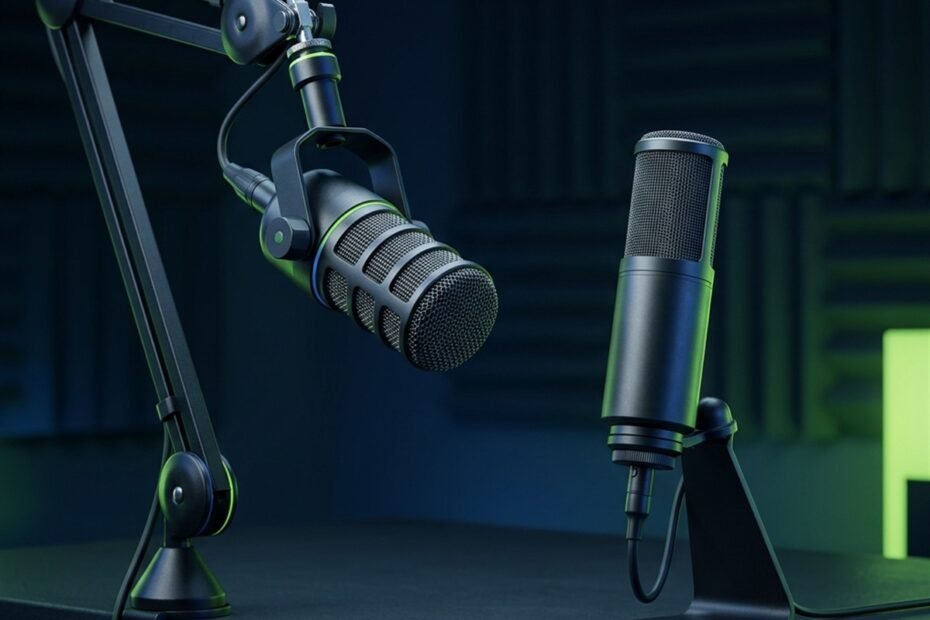
Navigating the diverse types of gaming microphones is essential for competitive players seeking crisp in-game callouts without background clatter. While default headset mics often transmit muffled, compressed audio, dedicated transducers isolate vocal frequencies and elevate team communication in fast-paced tactical shooters like Valorant and Counter-Strike 2.
From dynamic broadcast capsules that passively reject mechanical switch noise to ultra-sensitive condensers capturing delicate vocal nuances, understanding hardware architecture prevents costly buying mistakes. This comprehensive breakdown explores transducer physics, connectivity interfaces, and mounting form factors, expanding on our foundational gaming microphones pillar guide to help you configure an optimal voice setup.
Acoustic Transducer Types: Dynamic vs Condenser Gaming Microphones
Dynamic microphones use heavy voice-coil diaphragms to passively reject background room noise, making them ideal for untreated gaming rooms, while sensitive condenser microphones capture wider frequency detail, requiring quiet, acoustically controlled studio spaces.
Dynamic Microphones: Natural Noise Isolation for Untreated Gaming Rooms
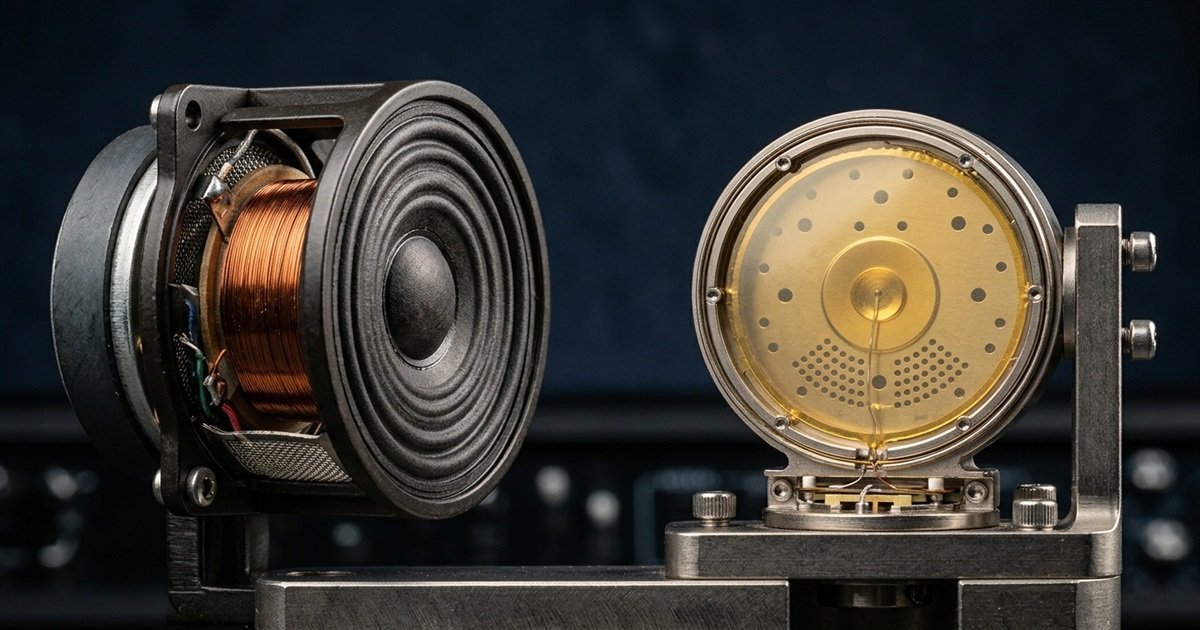
Dynamic microphones operate via electromagnetic induction, utilizing a durable Mylar diaphragm attached to a copper voice coil suspended within a magnetic field. When sound waves hit the diaphragm, physical movement induces an electrical audio signal. Because this moving-coil assembly possesses significant physical mass, low-energy sound waves such as distant computer fan whines, keyboard clicks, and ambient room reverberations fail to generate sufficient force to move the capsule.
For competitive gamers playing in typical bedrooms or untreated home offices, dynamic transducers provide built-in acoustic protection. You must position a dynamic capsule close to your mouth (typically within 5 to 10 centimeters), which delivers a rich broadcast tone while naturally rejecting the hollow room echo that plagues sensitive recording equipment.
Technical internal comparison between dynamic voice coil and condenser electrostatic transducer architectures:
Condenser Microphones: High-Frequency Vocal Nuance for Studio Broadcasts
Condenser microphones utilize an electrostatic capacitor capsule consisting of an ultra-thin, gold-sputtered membrane positioned parallel to a conductive metal backplate. Because the membrane has virtually zero physical mass, it reacts instantaneously to delicate acoustic transients, capturing pristine high-frequency air, vocal articulation, and extended bass depth across a broad 20 Hz to 20,000 Hz spectrum.
However, this extreme acoustic sensitivity presents significant challenges in competitive gaming setups. Condenser capsules readily register high-pitched mechanical keyboard clatter, mouse clicks against hard pads, and reflective desk slapback. Players opting for condenser capsules must utilize physical boom arms, custom shock mounts, and software noise suppression to maintain clean Discord audio streams.
Core acoustic differences between dynamic and condenser transducers in competitive gaming environments:
| Transducer Architecture | Operating Principle | Sensitivity Level | Room Noise Rejection | Ideal Competitive Scenario |
|---|---|---|---|---|
| Dynamic (Moving Coil) | Electromagnetic Induction | Low (-50 to -60 dBV) | High Passive Isolation | Untreated rooms, loud mechanical keyboards, close-proximity talkers |
| Condenser (Electrostatic) | Capacitive Membrane Charge | High (-30 to -40 dBV) | Low (Picks up room reflections) | Quiet studio rooms, dedicated streaming setups, podcast narration |
Selecting the appropriate transducer architecture dictates your entire audio baseline, as detailed in our comprehensive guide to dynamic vs condenser microphones. Gamers prioritizing zero keyboard bleed without aggressive software filtering gain immediate competitive advantages from dynamic capsules, whereas content creators focused on vocal intimacy thrive with condenser fidelity.
Connectivity Interfaces: USB Plug-and-Play vs XLR Studio Audio Chains
USB microphones integrate onboard analog-to-digital converters for effortless plug-and-play gaming convenience, whereas XLR setups require external audio interfaces, delivering superior analog preamps, modular upgradeability, and zero-latency hardware monitoring.
USB Gaming Microphones: Integrated DAC and Direct Driverless Convenience
A USB gaming microphone houses an entire recording signal chain inside its physical chassis, combining an acoustic capsule, an analog preamplifier, and an analog-to-digital converter (ADC) onto a single internal circuit board. Connecting directly via USB-C to PC, Mac, or PlayStation consoles, these microphones operate using standard USB Audio Class drivers without requiring external hardware or dedicated power supplies.
Modern 24-bit USB transducers deliver studio-grade vocal intelligibility that exceeds the compression limits of gaming communication platforms like Discord or TeamSpeak. Furthermore, many USB models feature built-in 3.5mm zero-latency headphone monitoring jacks, integrated hardware gain potentiometers, and capacitive tap-to-mute sensors right on the shell.
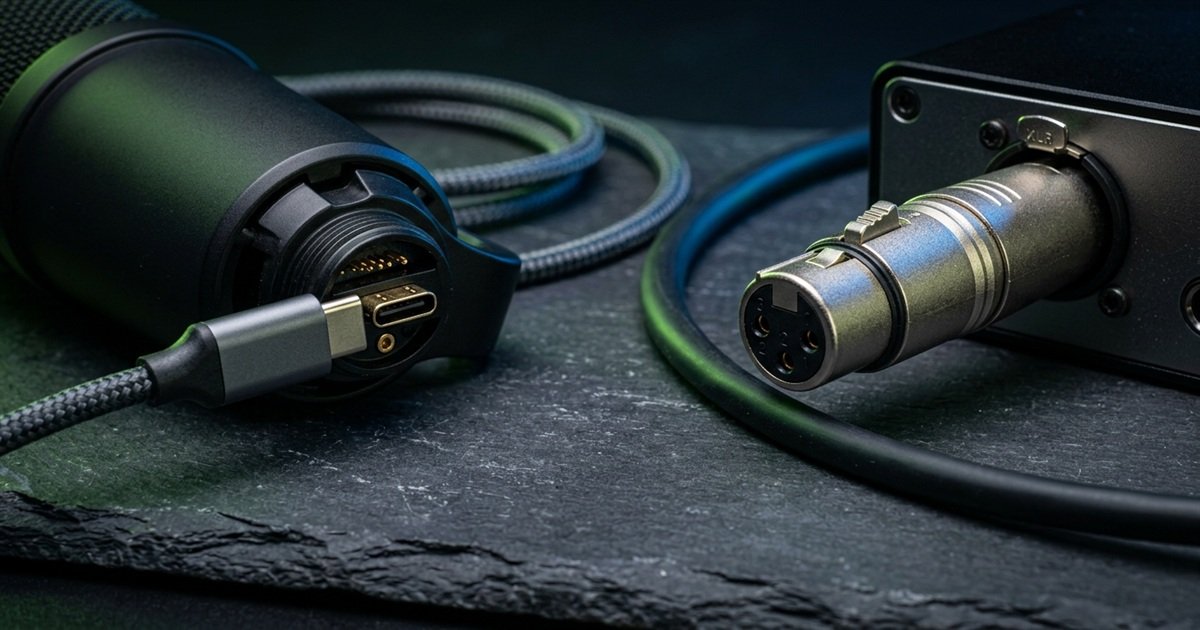
Physical interface comparison between digital USB-C and balanced professional XLR audio connectors:
XLR Professional Setups: Analog Preamps, Audio Interfaces, and Modular Scalability
Professional XLR microphones output a pure balanced analog electrical signal through a standardized three-pin connector. To communicate with a computer, an XLR microphone must connect to an external audio interface or mixer via balanced cables, which supply clean analog gain and necessary 48-volt phantom power to charge condenser plates.
For dedicated enthusiasts seeking long-term hardware flexibility, our detailed USB vs XLR microphone comparison outlines how discrete studio preamps eliminate electrical interference while allowing independent upgrades of microphones, cables, and converters over time.
Hardware Form Factors: Standalone Desktop, Headset Boom, and Wearable Transducers
Standalone desktop microphones deliver larger acoustic diaphragms and superior broadcast resonance, while headset boom microphones guarantee constant mouth-to-capsule proximity and maximum desk mouse-flick clearance.
Standalone Desktop Microphones: Large Diaphragm Fidelity and Shock Mount Isolation
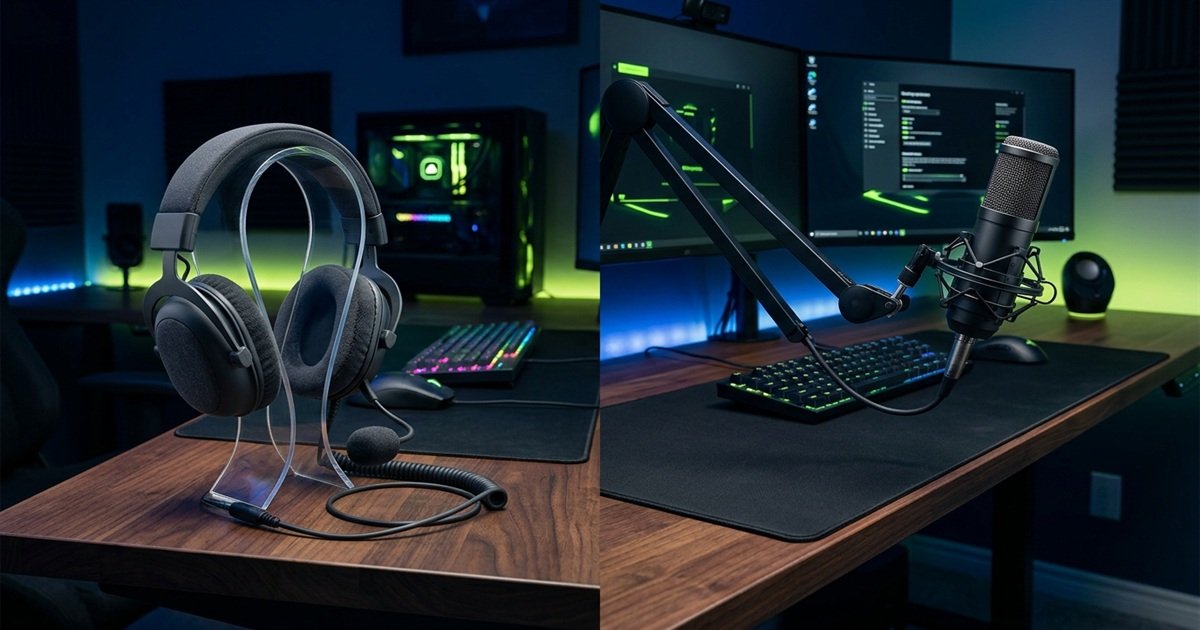
Standalone microphones feature enlarged capsules ranging from 14mm to 25mm in diameter. Suspended within dedicated shock mounts on articulated scissor boom arms, these microphones isolate your voice from heavy desk vibrations caused by frantic keyboard inputs and aggressive mouse swipes during intense clutch rounds.
Floating a desktop microphone 10 to 15 centimeters from your mouth provides exceptional vocal body and warmth. However, desktop setups demand dedicated mounting clamps, cable routing management, and sufficient spatial clearance above your monitors to prevent visual obstruction.
Competitive desk layout comparing dedicated boom arm microphone positioning with integrated headset audio:
Integrated Headset Boom Microphones: Zero Desk Footprint and Fixed Mouth Proximity
Integrated headset boom microphones utilize miniature 4mm to 6mm electret capsules attached directly to the headphone earcup via a flexible gooseneck arm. Because the capsule travels with your head movements, your voice volume remains perfectly constant regardless of posture shifts during prolonged gaming sessions.
When comparing a usb mic vs 3.5mm mic for gaming headsets, digital USB connections bypass noisy motherboard sound cards, while compact analog boom capsules free up 100 percent of your mouse pad surface for low-DPI arm aiming.
Clip-on Lavalier Transducers: Minimalist Portability for Casual Matchmaking
Lavalier microphones clip directly to clothing collars or shirts, offering an ultra-lightweight solution for gamers who dislike wearing bulky headsets or mounting heavy desk boom arms. Operating primarily with omnidirectional or wide-cardioid patterns, lavaliers provide natural speech reproduction for casual voice chat and console gaming.
However, because lavaliers sit on your chest rather than directly in front of your mouth, they capture significant rustling sounds from fabric movement and exhibit higher vulnerability to keyboard reflections bouncing off computer monitors.
Physical form factor trade-offs between standalone desktop and wearable microphones:
| Physical Form Factor | Diaphragm Diameter | Desk Clearance | Mechanical Vibration Isolation | Primary Advantage |
|---|---|---|---|---|
| Standalone Desktop Boom | 14mm to 25mm | Requires boom arm or stand space | High (When paired with elastic shock mount) | Uncompromising broadcast richness and warmth |
| Headset Boom Mic | 4mm to 10mm | Zero desk footprint (100% mouse clearance) | Moderate (Integrated inside flexible boom arm) | Fixed mouth-to-capsule proximity during head movement |
| Clip-on Lavalier | 3mm to 6mm | Zero desk footprint (Worn on shirt collar) | Low (Susceptible to chest friction) | Minimalist portability and zero head clamping pressure |
Balancing acoustic fidelity against desk ergonomics remains an individual decision. Low-sensitivity competitive FPS players requiring unobstructed 50-centimeter mouse tracking zones frequently favor headset boom mics or high-clearance overhead boom arms, while streamers favor large-diaphragm standalone presentation.
Acoustic Polar Patterns: Directional Sensitivity in Competitive Gaming Environments
Cardioid polar patterns represent the universal competitive gaming standard by capturing sound strictly in front of the capsule while establishing an acoustic dead zone behind it to silence mechanical keyboard clatter.
Cardioid Pattern: The Universal Standard for Rear Keyboard Noise Rejection
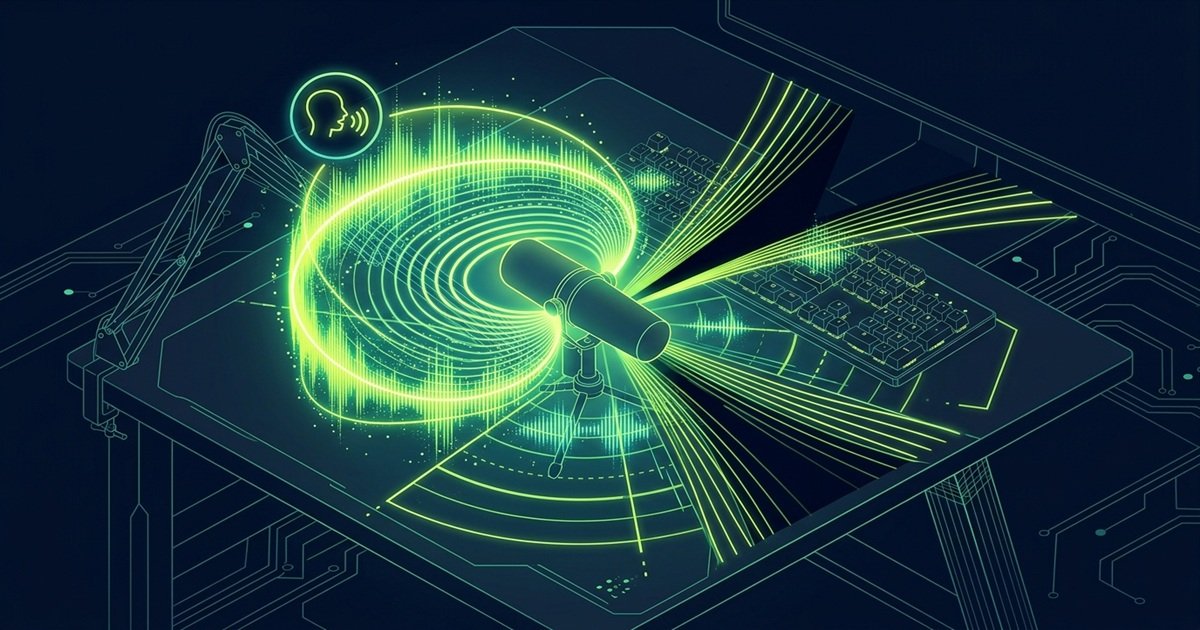
A microphone polar pattern maps its three-dimensional directional sensitivity. The cardioid pattern derives its name from its heart-shaped acoustic response, as detailed in our guide to what is a cardioid microphone, maintaining peak sensitivity directly on-axis (0 degrees) while tapering off smoothly along the sides (90 and 270 degrees).
Most importantly, cardioid capsules feature a sharp acoustic null point directly behind the microphone body (180 degrees). Per international directional polar pattern acoustic standards, a well-engineered cardioid capsule achieves between 15 and 25 decibels of passive rear attenuation, allowing you to position the back of the microphone directly facing your keyboard switches to suppress keystroke chatter passively.
Acoustic soundwave diagram illustrating directional cardioid sensitivity and 180-degree rear cancellation:
Supercardioid and Hypercardioid: Tighter Front Capture with Rear Sensitivity Lobes
Supercardioid and hypercardioid patterns feature narrower front pickup angles, providing superior side-axis noise rejection compared to standard cardioid designs. For gamers seeking extreme directional isolation, deploying a dedicated shotgun microphone for gaming uses an acoustic interference tube to narrow pickup further into an ultra-tight lobar corridor.
However, hypercardioid geometry introduces a small secondary sensitivity lobe extending directly out the rear of the capsule. If you point the back of a hypercardioid microphone flat against a mechanical keyboard, keystroke sounds will enter this rear lobe directly. Gamers using hypercardioid microphones must angle the rear capsule at 120 or 150 degrees away from desktop sound sources.
Omnidirectional and Bidirectional: Environmental Sensitivity vs Multi-Voice Utility
Omnidirectional microphones record audio equally from all 360 degrees around the capsule. In our detailed cardioid vs omnidirectional microphone comparison, we analyze how directional capsules isolate player voice while omnidirectional patterns capture room echo, air conditioner hum, and mouse clicks indiscriminately, rendering them impractical for competitive multiplayer gaming.
Bidirectional (Figure-8) patterns capture sound exclusively from the front and rear while completely silencing the sides. While useful for face-to-face tabletop podcast interviews, bidirectional patterns are unsuitable for solo desk gaming because the rear lobe sits directly in line with desk acoustics.
Room Acoustics Decision Framework: Selecting Your Ideal Gaming Microphone Type
Follow this structured 4-step decision hierarchy to evaluate room reverberation, desk mouse clearance, audio connectivity, and polar pickup geometry before investing in dedicated gaming voice hardware.
Sequential 4-step decision framework for selecting your optimal gaming microphone type:
- Evaluate Room Acoustic Treatment: If your gaming space features hard bare walls, laminate flooring, and reflective glass windows without acoustic foam panels, select a dynamic cardioid microphone to passively suppress room reverberation. Only choose condenser microphones if your room possesses soft carpeting, heavy curtains, or dedicated acoustic absorption.
- Calculate Mouse Tracking Clearance: Measure your available desk width and mouse pad dimensions. Low-sensitivity tactical FPS players who execute wide 40-centimeter arm flicks should utilize an articulated scissor boom arm clamped to the rear desk edge or opt for an integrated headset boom mic to prevent physical mouse collisions.
- Select Connection Architecture: Choose a USB-C digital microphone if you prioritize plug-and-play driverless operation across PC and consoles with minimal cable clutter. Choose an XLR analog setup if you require hardware multi-track routing, physical audio interface faders, or modular component upgrading.
- Configure Proper Polar Directionality: Ensure your hardware switch or software suite locks the capsule into cardioid mode. Align the back of the microphone directly toward your primary noise source (mechanical keyboard and PC fans) while positioning the front grille 10 to 15 centimeters from your mouth.
Executing this decision protocol guarantees that your microphone investment directly matches your physical room acoustics and competitive playstyle, eliminating vocal distortion and team callout confusion.
Capsule physics always triumphs over software processing. Aggressive digital noise suppression algorithms often clip word syllables and introduce robotic distortion into your voice. Choosing a dynamic cardioid capsule positioned close to your mouth eliminates background noise mechanically at the acoustic source, delivering crystal-clear comms naturally.
Frequently Asked Questions About Gaming Microphone Types
Explore verified technical answers to the most common hardware, acoustic, and connectivity questions regarding competitive gaming microphones:
What is a dynamic gaming microphone?
A dynamic gaming microphone is an acoustic transducer that converts sound into electrical signals via electromagnetic induction using a moving voice coil. Its heavy diaphragm requires strong acoustic energy to move, naturally ignoring distant room reflections and mechanical keyboard clicks.
What is a condenser gaming microphone?
A condenser gaming microphone utilizes an electrostatic capacitor capsule with an ultra-thin conductive membrane. It captures extended high-frequency vocal detail and rapid transients, but readily registers background room echo and keyboard clicks unless used in treated studio environments.
What is a cardioid polar pattern in gaming microphones?
A cardioid polar pattern is a heart-shaped directional sensitivity response that captures sound primarily from the front while providing maximum acoustic null rejection at 180 degrees directly behind the capsule, dampening desk keystrokes before they enter voice chat.
What is the difference between USB and XLR microphone connections?
A USB microphone integrates internal preamps and analog-to-digital converters for direct plug-and-play computer operation. An XLR microphone outputs balanced analog signals requiring an external audio interface with preamps and 48-volt phantom power to connect to a PC.
Why do dynamic microphones perform better in untreated gaming rooms?
Dynamic capsules feature heavier voice-coil diaphragms with lower sensitivity, requiring voice sources to be within 5 to 10 centimeters. Distant acoustic reflections bouncing off hard bedroom walls lack the energy to move the diaphragm, eliminating hollow room echo naturally.
How does capsule diaphragm size affect gaming voice communication?
Larger diaphragms (14mm to 25mm) capture deeper low-frequency warmth and provide superior signal-to-noise ratios, producing rich broadcast vocal resonance. Smaller diaphragms (4mm to 6mm) fit inside headset boom arms, offering consistent speech intelligibility with zero desk footprint.
What causes mechanical keyboard clatter to bleed into cardioid microphones?
High-frequency switch clicks reflect off computer monitors, walls, and hard desk surfaces directly into the sensitive front arc of the capsule. Furthermore, rigid metal desk stands transmit mechanical keystroke vibrations through the desk structure into the microphone body.
Why do XLR microphones require dedicated audio interfaces and phantom power?
XLR microphones output raw balanced mic-level analog signals measuring only a few millivolts. External audio interfaces provide high-gain preamplifiers to boost the signal to line level, while supplying 48-volt DC phantom power required by active condenser capsules.
Which microphone type is best for competitive FPS gaming comms?
A dynamic cardioid microphone on an articulated boom arm is the best choice. It delivers optimal voice intelligibility, isolates ambient mechanical switch noise mechanically, and clears desk space for unrestricted low-DPI mouse movement.
Does a USB microphone introduce audio latency during gameplay?
No. Standard USB Audio Class drivers consume negligible CPU processing capacity (less than 0.1 percent) and communicate over asynchronous USB endpoints independent of GPU graphics pipelines, introducing zero input lag or frame drops in competitive games.
Can a pop filter replace directional cardioid noise rejection?
No. Pop filters and foam windscreens solely disperse explosive plosive air blasts from consonant letters like P and B. They do not alter acoustic polar sensitivity or reduce background mechanical keyboard noise entering the capsule.
Is a boom arm necessary for all desktop gaming microphones?
A boom arm is strongly recommended. Elevating the microphone off the desk surface decouples the capsule from mechanical vibrations, positions the grille close to your mouth for optimal signal-to-noise ratio, and keeps your mouse pad entirely clear.
Final Verdict: Matching Transducer Physics to Your Competitive Gaming Setup
Selecting the right gaming microphone comes down to evaluating your physical acoustic environment and desk clearance: choose dynamic cardioid capsules for noisy untreated rooms, and standalone boom arms to ensure uninhibited mouse flick mobility.
Every gaming microphone represents an engineering compromise between acoustic sensitivity, mechanical noise suppression, and desk ergonomics. By aligning transducer physics with your specific room acoustics and tactical communication needs, you ensure your callouts remain crystal-clear during every competitive clutch.