
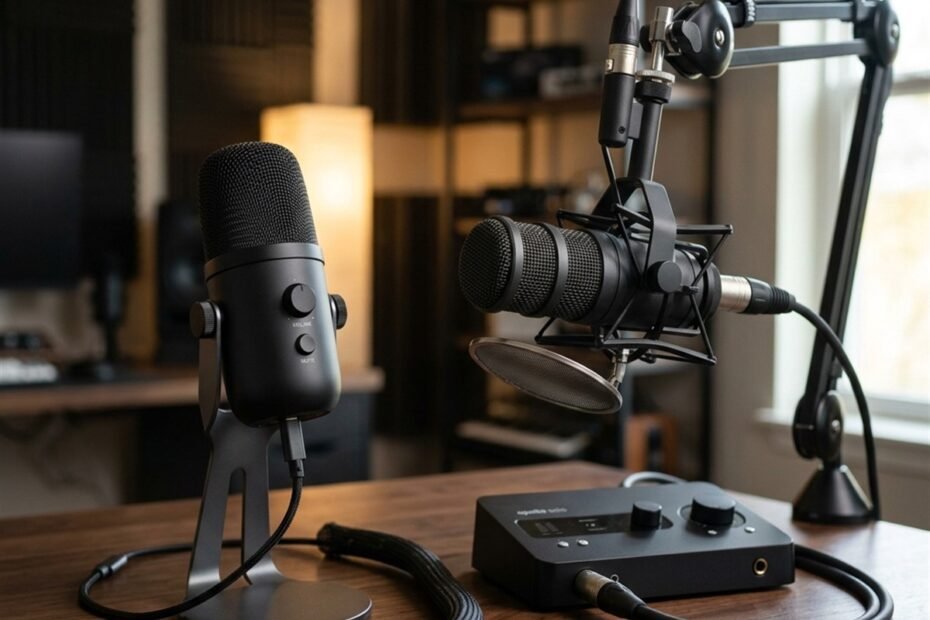
Navigating the debate between a USB vs XLR microphone is one of the most critical hardware decisions for competitive gamers and content creators seeking pristine voice communication. While default gaming headsets often introduce compressed audio artifacts and nasal distortion, upgrading to a dedicated microphone isolates vocal frequencies and eliminates mechanical keyboard clatter during fast-paced tactical callouts in Counter-Strike 2 and Valorant.
Understanding the architectural divide between an all-in-one digital USB converter and a balanced analog XLR signal chain ensures you invest in the right audio gear without overspending. This comprehensive comparative analysis explores internal converter latency, analog preamp noise floors, desk ergonomics, and modular longevity, expanding upon our foundational guide to types of gaming microphones to help you configure an optimal voice setup.
The Core Architectural Difference: Onboard ADC vs Balanced Analog Signal Chains
USB microphones integrate an analog-to-digital converter inside the microphone chassis for driverless plug-and-play operation, whereas XLR microphones output pure analog signals requiring an external audio interface with preamplifiers and physical analog-to-digital conversion.
USB Microphones: All-in-One Digital Audio Converters in a Single Shell
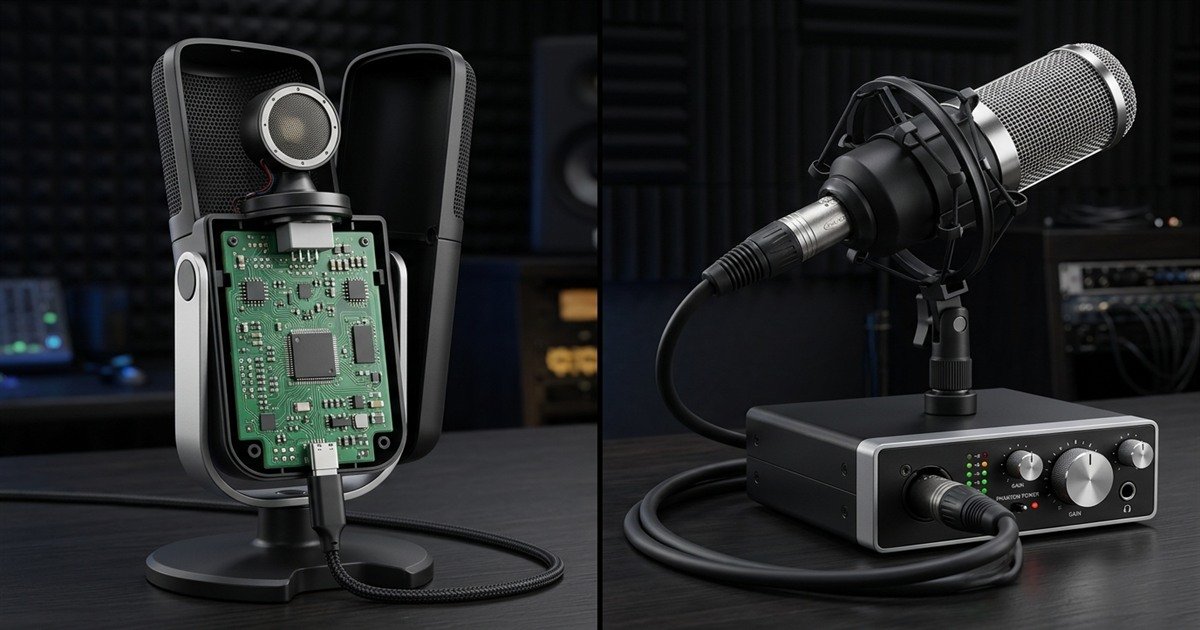
A USB gaming microphone houses an entire digital recording signal chain inside a single metal housing. Inside the body, sound waves strike the acoustic capsule, generating microscopic voltage fluctuations. This tiny analog signal travels directly into an integrated preamplifier circuit, which boosts the electrical voltage before routing it through an onboard analog-to-digital converter (ADC) chip.
The integrated ADC chip digitizes the continuous analog sound wave into standard pulse-code modulation (PCM) digital packets, which transmit over a single USB-C cable to your computer motherboard. Because operating systems recognize USB microphones via standardized USB Audio Class drivers, they require zero external hardware boxes, proprietary drivers, or complex audio routing software to function immediately in Discord, OBS Studio, and in-game voice chat.
Internal architecture comparison showing integrated USB digital processing versus an external analog XLR signal chain:
XLR Microphones: Pure Balanced Analog Output Requiring External Preamp and Interface
Professional XLR microphones omit internal digital conversion entirely. When sound pressure moves the capsule diaphragm, the resulting microvolt electrical signal exits straight out of a standardized three-pin metal connector as a raw analog waveform. To communicate with a PC, an XLR microphone must connect via a balanced cable to an external USB audio interface or hardware mixer.
The external audio interface serves as a high-performance external sound card. It houses discrete low-noise analog preamplifiers, physical potentiometer gain controls, analog-to-digital converter chips, and a 48-volt phantom power supply necessary for electrostatic condenser capsules. By keeping electromagnetic conversion outside your computer chassis, XLR systems maintain complete signal purity across long cable runs.
Technical Comparison Matrix: USB vs XLR Microphones for Competitive Gaming
USB microphones offer lower entry costs and streamlined single-cable convenience, while XLR setups provide superior preamplification headroom, physical hardware controls, zero electrical bus interference, and indefinite modular upgradeability.
Technical hardware specification and performance comparison between USB and XLR microphone systems:
| Technical Parameter | USB Gaming Microphone | XLR Audio Interface Setup | Competitive Aim Impact |
|---|---|---|---|
| Signal Conversion Point | Internal onboard ADC chip | External desktop audio interface | Zero impact on mouse input latency |
| Cable Interface | USB-C or USB-A (Digital Data) | Balanced 3-Pin XLR (Analog Signal) | USB offers thinner, flexible cable routing |
| Hardware Gain Control | Digital potentiometer or software slider | Dedicated analog high-gain dial | XLR enables instant physical gain adjustments mid-match |
| Direct Sidetone Monitoring | Onboard 3.5mm jack (Model dependent) | Hardware direct monitor toggle on interface | XLR guarantees true 0 ms analog vocal feedback |
| Motherboard Electrical Noise | Susceptible to USB bus ground loops | Immune via balanced common-mode rejection | XLR eliminates GPU coil whine hum in Discord comms |
| Modular Upgradeability | Fixed unit (Must replace entire mic) | Fully modular (Replace mic, cable, or DAC separately) | XLR hardware lasts 10 to 15 years without obsolescence |
| Typical Setup Cost | 50 to 150 USD | 150 to 350 USD (Mic plus interface and cable) | USB saves budget for high-refresh gaming monitors |
This technical breakdown illustrates the clear trade-offs between convenience and hardware control. While USB models satisfy 90 percent of casual voice chat demands, competitive players who stream or produce content benefit substantially from the electrical isolation and tactile controls of an XLR interface.
Latency and Digital Processing: Hardware Direct Monitoring vs Operating System Buffers
Both USB and XLR microphones transmit vocal callouts to Discord with zero perceptible gaming latency, but XLR interfaces excel in delivering true zero-millisecond analog sidetone monitoring directly to your headphones.
USB Audio Latency: OS Buffer Sizes, DSP Overhead, and Sidetone Delay
A common misconception among competitive gamers is that USB microphones introduce input lag or delay in-game voice callouts. In reality, standard USB Audio Class 2.0 drivers operate with buffer latencies between 3 and 7 milliseconds. Because human speech recognition thresholds operate around 15 to 20 milliseconds, your teammates receive callouts instantaneously regardless of connection type.
However, latency issues can arise when gamers monitor their own voice through operating system software playback. Routing digital microphone audio through Windows audio subsystems, Discord, or OBS introduces 30 to 80 milliseconds of round-trip delay, causing an irritating slapback echo that disorients vocal speech. High-end USB microphones circumvent this by including a physical 3.5mm headphone jack directly on the shell for hardware sidetone routing.
XLR Audio Interface Latency: Direct Zero-Latency Hardware Monitoring and ASIO Drivers
XLR audio interfaces provide true analog zero-latency hardware monitoring. When you engage the Direct Monitor button on an external interface, the analog vocal signal splits directly into the built-in headphone amplifier before undergoing digital conversion. This delivers instantaneous, speed-of-light voice feedback to your ears with absolute 0.0 ms delay.
Hearing your own voice clearly through closed-back gaming headsets prevents vocal strain and shouting during high-stress tournament rounds. Furthermore, professional audio interfaces utilize dedicated ASIO (Audio Stream Input/Output) drivers, bypassing Windows audio processing layers to deliver lightning-fast digital transmission directly to streaming software like OBS Studio.
Noise Floor, Ground Loops, and Preamplification Performance
XLR cables utilize balanced three-pin wiring to cancel out electromagnetic interference and GPU coil whine, whereas USB microphones share power lines with computer motherboards, occasionally introducing low-level electrical buzzing.
Common USB Electrical Noise: Motherboard USB Bus Interference and Coil Whine
Because USB microphones draw 5-volt electrical operating power directly from your computer motherboard, they share physical ground planes with power-hungry components like high-wattage graphics cards and CPU voltage regulator modules (VRMs). During demanding graphical loads in games like Cyberpunk 2077 or Apex Legends, GPU coil whine and power fluctuations can induce high-frequency electrical hum into the microphone circuitry.
While premium USB microphones incorporate filtered power chokes and isolated PCB grounds to minimize this issue, budget USB models plugged into front-panel PC ports frequently transmit faint buzzing or static into voice channels. Connecting USB microphones exclusively to rear motherboard ports eliminates many of these ground loop artifacts.
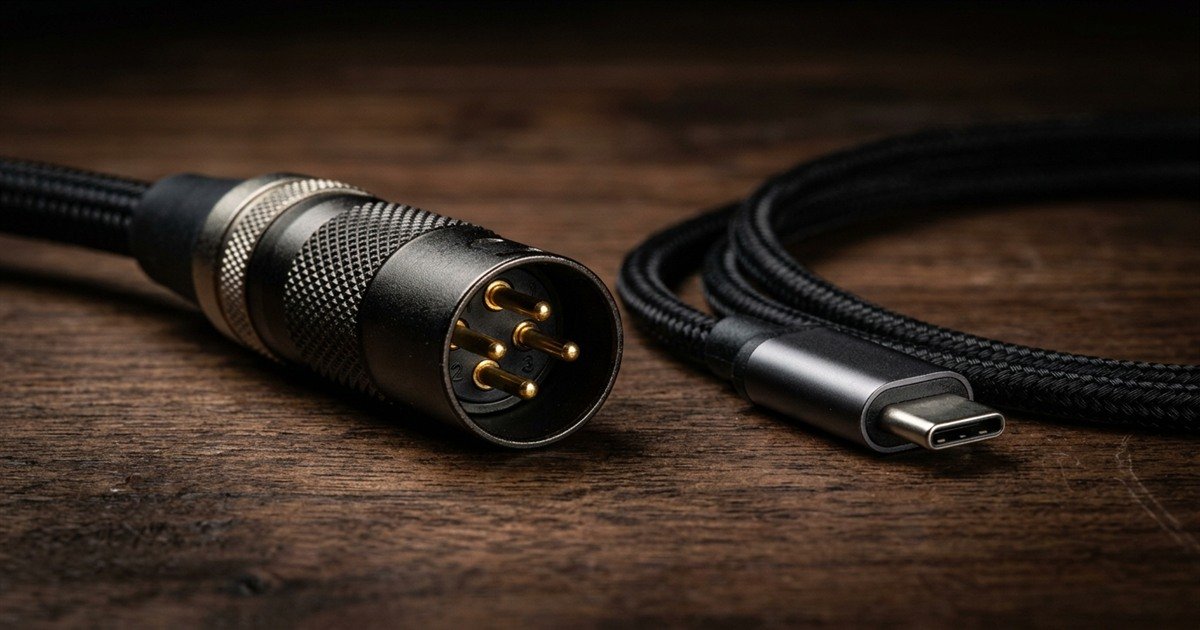
Close-up product comparison between a gold-plated balanced 3-pin XLR audio connector and a digital USB-C data cable:
XLR Common-Mode Rejection: Balanced 3-Pin Shielding and Clean Gain Delivery
Professional XLR connections eliminate electrical noise through an ingenious physical design known as balanced audio transmission. Standard XLR cables contain three conductors: a ground shield (Pin 1), a positive hot signal wire (Pin 2), and an inverted negative cold signal wire (Pin 3). When audio transmits down the cable, the sound wave travels through both signal wires in opposite polarity.
Any electromagnetic interference radiating from power supplies, Wi-Fi routers, or computer cases bleeds into both internal wires equally with identical polarity. When the signal enters the differential preamplifier inside the audio interface, the negative wire is flipped 180 degrees and combined with the positive wire. This physical phase inversion sums the vocal signal to double its volume while mathematically cancelling 100 percent of the induced noise, a phenomenon defined by the Audio Engineering Society as Common-Mode Rejection.
Desk Ergonomics, Cable Routing, and Hardware Complexity
USB microphones maintain a minimalist battlestation footprint with a single lightweight cable, while XLR systems demand dedicated desk space for an audio interface box and rigid balanced cabling.
USB Simplicity: Single Cable Management and Plug-and-Play Portability
For gamers with compact desks or minimalist aesthetic setups, USB microphones offer unbeatable ergonomic simplicity. A single flexible USB-C cable supplies power, transmits digitized audio, and carries headphone playback directly between the microphone and your PC. There are no secondary boxes, external power bricks, or bulky wire looms crowding your mouse pad perimeter.
Furthermore, USB microphones provide effortless portability for LAN tournaments and multi-device setups. Moving your microphone from a primary gaming desktop to a gaming laptop or PlayStation 5 console requires simply unplugging one cable and reconnecting it without adjusting driver sample rates or gain stages.
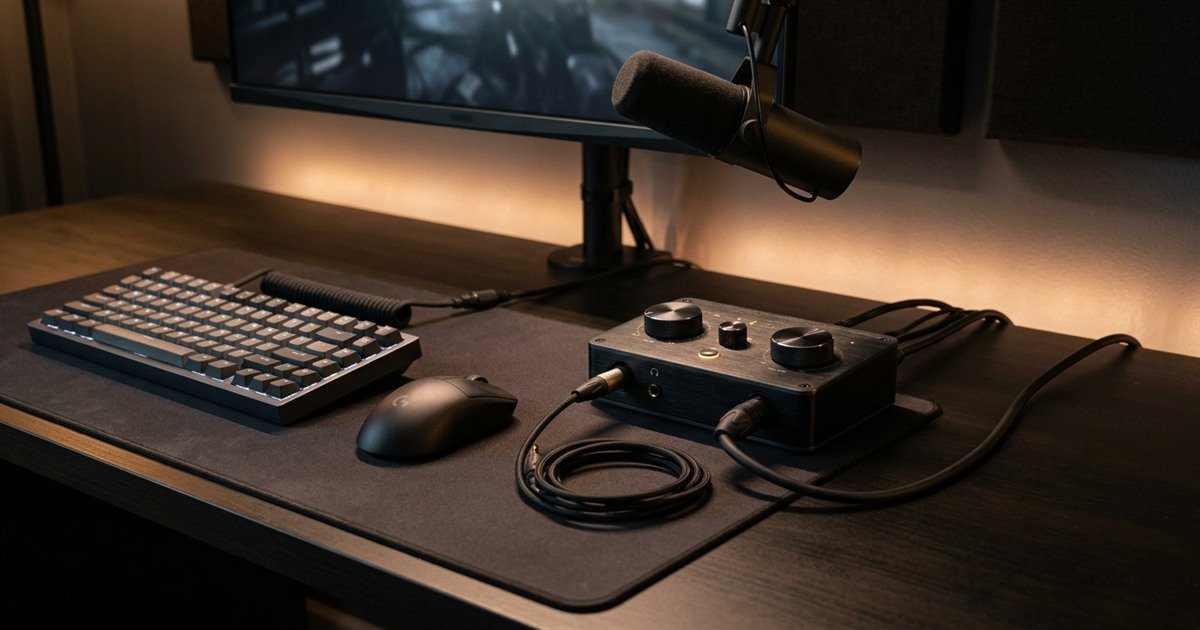
Minimalist competitive gaming battlestation demonstrating audio interface placement, gain knobs, and cable routing:
XLR Hardware Stack: Mounting Audio Interfaces, Cable Routing, and Desk Real Estate
In contrast, an XLR audio setup introduces a multi-piece hardware stack to your gaming environment. In addition to clamping an articulated boom arm to your desk, you must allocate desk surface area for a tabletop audio interface. The interface requires its own USB connection to the computer, an XLR input cable running from the microphone, and a 6.35mm headphone cable running to your monitors.
Thick balanced XLR cables are less pliable than lightweight USB cords, requiring deliberate cable clips and velcro wraps along your boom arm channels. However, having an audio interface positioned within arm reach provides invaluable tactile utility: large tactile gain dials, physical mute toggles, and independent headphone volume potentiometers allow instant adjustments mid-round without opening desktop software.
Upgrade Paths and Modular Longevity for Content Creators and FPS Players
XLR ecosystems offer modular component longevity spanning decades without obsolescence, whereas USB microphones represent closed hardware units where capsule degradation or connector failure requires replacing the entire device.
USB Obsolescence Risk: Fixed Electronics and Non-Replaceable Transducer Elements
A USB microphone represents a closed proprietary system. If the integrated USB-C connector loosens over years of use, if the internal analog-to-digital converter develops digital jitter, or if the capsule diaphragm sustains acoustic damage, the entire microphone becomes non-functional e-waste. You cannot upgrade just the preamplifier to gain cleaner headroom or swap the capsule for a warmer broadcast tone.
Additionally, operating system updates occasionally phase out legacy driver classes or introduce firmware incompatibilities across five-to-seven-year lifecycles. While USB microphones deliver exceptional value during their active lifespan, they are fundamentally consumer electronic appliances with finite operational horizons.
XLR Component Modularity: Independent Mic, Cable, Preamp, and DAC Lifecycles
XLR audio equipment follows professional broadcast standards established over sixty years ago. Because the microphone capsule, XLR cable, preamplifier, and digital interface remain entirely decoupled, you can upgrade or replace individual components independently as your gaming budget expands.
You can begin with an affordable dynamic XLR microphone and entry-level interface, then upgrade to a legendary broadcast microphone like the Shure SM7B years later without replacing your cabling or audio interface. Professional analog dynamic capsules contain no sensitive onboard microchips, allowing them to deliver flawless vocal clarity across 10 to 20 years of daily competitive matchmaking.
Step-by-Step Decision Framework: When to Buy USB vs When to Invest in XLR
Follow this structured 4-step decision sequence to evaluate your available budget, desk surface area, technical expertise, and long-term content creation goals before choosing between USB and XLR audio hardware.
Sequential 4-step hardware decision protocol for competitive gamers choosing between USB and XLR microphones:
- Audit Total Audio Budget: If your total equipment budget is under 120 USD, purchase a dedicated dynamic USB microphone. If your budget spans 200 to 350 USD, invest in an XLR starter bundle comprising a dynamic XLR capsule, a reliable desktop audio interface, and a balanced cable.
- Evaluate Desk Real Estate and Mouse Clearance: Measure your available desk width. If you utilize low mouse sensitivity requiring 50 centimeters of unobstructed tracking space and possess a compact desk, choose a USB microphone on a slim boom arm. If you have ample desk space to house an external audio interface within arm reach, proceed with XLR.
- Assess Electrical Noise Environment: If your PC setup exhibits noticeable electrical hum, coil whine through front-panel audio jacks, or ground loop buzzing through ungrounded outlets, opt for an XLR balanced interface to leverage 100 percent common-mode noise cancellation.
- Determine Long-Term Content Ambitions: If your sole objective is crisp tactical voice comms in Discord and in-game matchmaking, USB microphones satisfy every requirement. If you plan to stream on Twitch, produce YouTube content, incorporate dual-PC audio routing, or use professional studio headphones, choose XLR for its modular expandability.
Capsule proximity and room acoustics outweigh connection interfaces. A 70 USD dynamic USB microphone positioned 10 centimeters from your mouth delivers cleaner, more intelligible in-game callouts than a 400 USD XLR condenser microphone sitting 60 centimeters away across a reflective room. Master microphone positioning first before expanding your hardware budget.
Frequently Asked Questions About USB vs XLR Microphones
Explore verified technical answers to the most common hardware, connectivity, latency, and noise questions regarding USB and XLR gaming microphones:
What is the main difference between a USB and an XLR gaming microphone?
A USB microphone integrates internal preamps and analog-to-digital converters into a single chassis for direct plug-and-play computer operation. An XLR microphone outputs balanced analog signals requiring an external audio interface with preamps and phantom power to connect to a PC.
Does an XLR microphone work directly when plugged into a PC?
No. Standard computers lack 3-pin XLR input ports and built-in microphone preamplifiers. Connecting an XLR microphone to a PC requires a dedicated external USB audio interface or mixer to amplify the analog signal and convert it into digital data.
What is an audio interface in an XLR microphone setup?
An audio interface is an external hardware sound card that connects to your PC via USB. It houses high-gain analog preamplifiers to boost raw microphone signals, supplies 48-volt phantom power, and executes high-resolution analog-to-digital audio conversion.
What is phantom power, and do all XLR microphones need it?
Phantom power is a constant 48-volt DC electrical current transmitted down balanced XLR cables to power active circuitry inside condenser microphones. Passive dynamic XLR microphones do not require phantom power to operate.
Is voice latency noticeable in Discord when using a USB microphone compared to XLR?
No. Standard USB Audio Class drivers transmit digitized speech packets with 3 to 7 milliseconds of buffer delay, which is entirely imperceptible in voice chat. Discord compresses both USB and XLR voice streams identically at 48 kHz Opus.
Why do some USB microphones pick up computer electrical buzzing or motherboard noise?
USB microphones draw 5V power directly from the computer motherboard, sharing electrical grounds with graphics cards and power supplies. GPU coil whine and unshielded motherboard traces can induce electrical ground loop hum into unshielded USB circuits.
How does balanced audio in XLR cables eliminate electromagnetic interference?
Balanced XLR cables transmit two identical copies of the vocal signal in opposite polarity across separate pins. When the signal enters an audio interface preamp, the inverted signal is flipped, combining vocal audio while mathematically cancelling external electromagnetic noise.
Can a USB microphone match the audio quality of an XLR microphone for gaming comms?
Yes. For Discord voice chat and in-game callouts, modern 24-bit USB microphones deliver vocal fidelity that matches XLR setups. Audio quality differences only become noticeable in uncompressed studio music recordings and professional voiceover broadcasts.
Is an XLR setup worth the extra cost purely for competitive FPS voice chat?
No. If your primary goal is crisp callouts in games like CS2 or Valorant, a dedicated dynamic USB microphone delivers optimal voice intelligibility at half the cost. XLR setups are primarily worthwhile for streamers, content creators, and audio enthusiasts.
Can you convert a USB microphone to an XLR interface later?
No. Standard USB microphones cannot output balanced analog signals into an XLR interface because their capsule wires connect permanently to internal digital circuit boards. You must purchase a dedicated XLR microphone to use an audio interface.
What are hybrid USB/XLR microphones, and are they good for gaming?
Hybrid microphones feature both a USB-C digital port and a standard 3-pin XLR connector on the same chassis. They offer exceptional versatility, allowing gamers to start with plug-and-play USB convenience and upgrade to an external audio interface later without buying a new microphone.
How much gain does a dynamic XLR microphone require for clear gaming comms?
Dynamic XLR microphones feature heavy voice-coil diaphragms with low sensitivity (-50 to -60 dBV), requiring 55 to 65 decibels of clean analog preamplifier gain to reach standard broadcast voice levels (-18 to -12 dBFS) without digital noise.
Final Verdict: Selecting Your Optimal Gaming Microphone Connection
Choose a dynamic USB microphone if you prioritize plug-and-play simplicity, lower costs, and minimalist desk ergonomics; invest in an XLR setup if you demand zero electrical bus noise, physical hardware dials, and lifetime modular upgradeability.
Every gaming audio setup represents a balance between hardware investment and operational simplicity. By understanding the physical differences between integrated USB digital conversion and balanced XLR analog chains, you can equip your battlestation with the exact hardware necessary to deliver crystal-clear team callouts in every competitive clutch.
Thank you for reading GearTP. We hope this comprehensive comparison between USB and XLR microphones empowers you to make a precise, confident decision for your competitive gaming audio setup.