
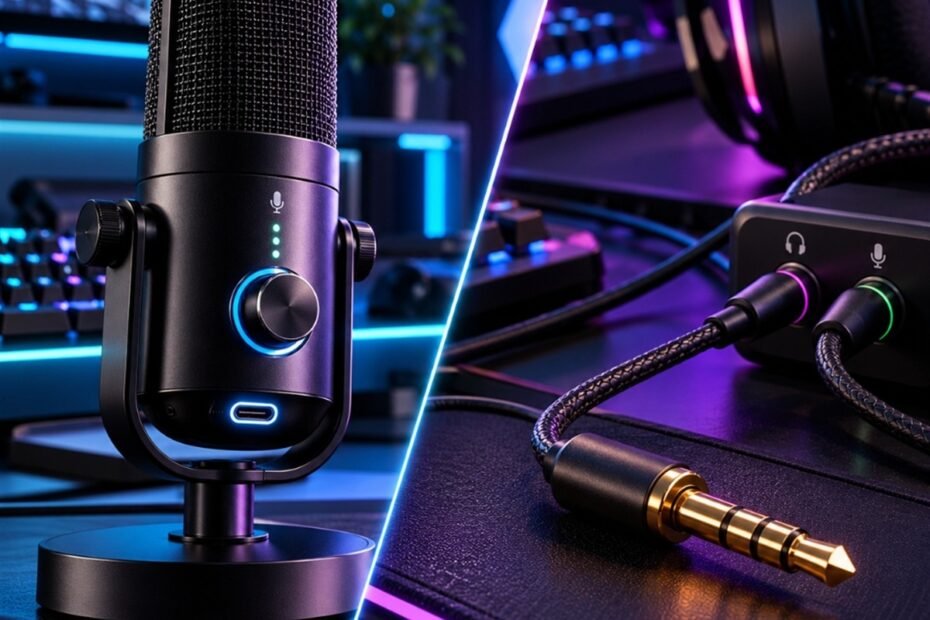
Evaluating a usb mic vs 3.5mm mic is a critical hardware decision for gamers, streamers, and remote teammates seeking reliable voice communication. In high-stakes tactical shooters like Valorant, Counter-Strike 2, and Rainbow Six Siege, delivering instant, articulate callouts without irritating background hiss, electrical buzz, or muffled volume is essential for competitive coordination.
While 3.5mm analog connections remain a legacy staple of budget gaming headsets, modern USB digital microphones have transformed desktop audio with integrated preamps and clean signal conversion. Building upon our comprehensive guide to types of gaming microphones, this technical comparison analyzes signal conversion architecture, electromagnetic interference, microphone boost noise floors, and console compatibility to help you select the ideal voice setup.
Signal Architecture: Digital USB Data vs Analog 3.5mm Voltage Transmission
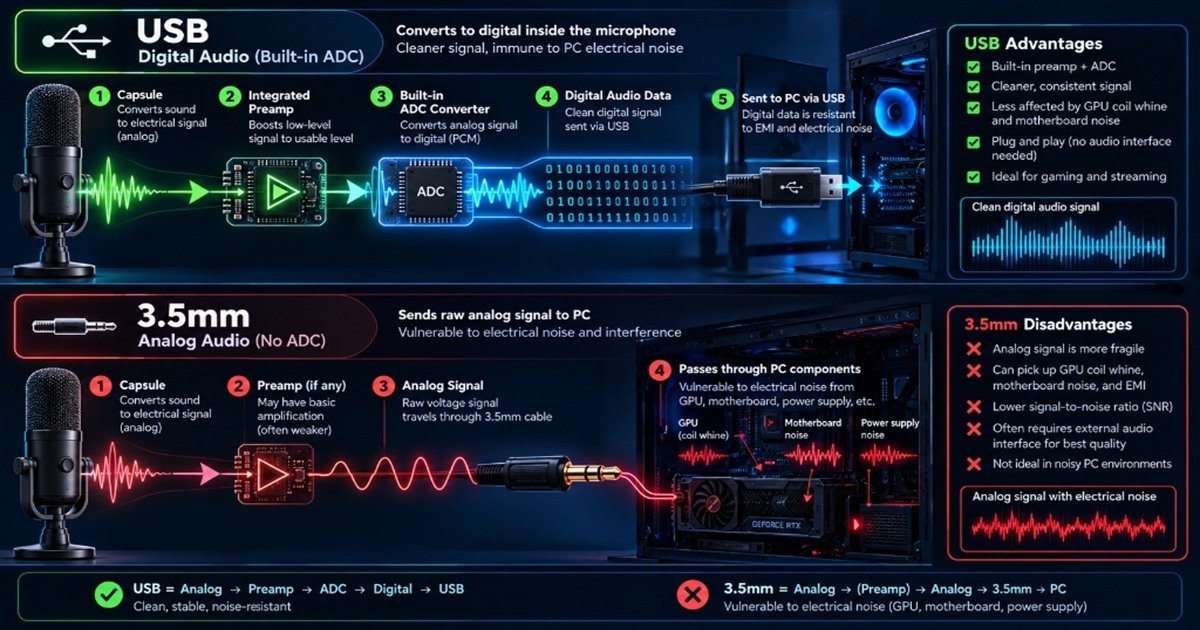
USB microphones process and convert acoustic audio into digital data packets inside the microphone body, whereas 3.5mm microphones transmit fragile raw analog voltage directly to your computer motherboard sound card.
Integrated Analog-to-Digital Conversion Inside USB Microphones
A USB microphone contains an entire self-contained audio signal chain within its chassis. When your vocal cords vibrate the internal condenser or dynamic capsule, the resulting microscopic voltage passes immediately into an onboard analog preamplifier and an integrated Analog-to-Digital Converter (ADC).
This internal ADC converts continuous analog sound waves into a clean, uncompressed digital data stream at standard studio sample rates such as 24-bit/48kHz or 24-bit/96kHz. Because the signal is digitized millimeters away from the capsule, the digital audio packets travel along the USB cable completely immune to external electrical interference, delivering identical vocal clarity across every desktop computer, laptop, or console.
Raw Analog Voltage and Motherboard Sound Card Dependency in 3.5mm Mics
In contrast, a 3.5mm microphone relies on a bare-bones electret capsule that outputs minute millivolt electrical charges without internal processing. This fragile analog voltage must travel along an unshielded or lightly shielded headphone cable, pass through the front-panel PC audio jack, and navigate internal chassis wiring before reaching your motherboard audio chipset.
Consequently, the audio quality of a 3.5mm microphone is entirely beholden to the quality of your computer integrated Realtek sound card. If your motherboard features cheap audio capacitors, poor digital ground isolation, or weak microphone preamplification, your voice will sound thin, noisy, and under-amplified regardless of how expensive your headset is.
Electrical Interference and Motherboard Noise Floors
USB microphones maintain near-silent noise floors through digital isolation, while 3.5mm microphones frequently suffer from electromagnetic interference, GPU coil whine, and motherboard electrical buzz.
Electromagnetic Interference (EMI) and GPU Coil Whine in 3.5mm Jacks
Modern gaming PCs are intense sources of electromagnetic radiation. High-wattage power supplies, high-frequency GDDR6 VRAM, and high-current VRM chokes on graphics cards generate substantial electromagnetic fields (EMI) during intense 3D rendering in gaming titles.
Because 3.5mm microphone cables and internal front-panel audio cables act like antennas, they readily absorb this stray electromagnetic energy. When your graphics card hits 99% utilization during an intense firefight, the high-pitched buzzing of GPU coil whine frequently bleeds directly into 3.5mm microphone inputs, injecting an unbearable electrical squeal into your team Discord voice channel.
Ground Loop Hum and Shielded Digital USB Audio Routing
A secondary acoustic vulnerability of 3.5mm audio jacks is ground loop hum. When your PC, external monitor, and peripheral devices share varying ground potentials, low-frequency 50Hz or 60Hz alternating current hum circulates through the analog ground conductor, adding continuous low-end rumble to your speech.
USB microphones eliminate ground loop hum and EMI vulnerability through balanced digital packet transmission. Because USB cables carry digital ones and zeroes wrapped in error-checked USB Audio Class protocols, stray electromagnetic fields cannot distort the numeric audio data. Your voice callouts remain pristine and silent between spoken words.
The Front-Panel Audio Jack Trap: Connecting a 3.5mm microphone to the front audio port of your PC chassis routes analog signals directly past the power supply cables and GPU PCIe slots via an unshielded header cable. This configuration guarantees severe EMI noise bleed. If you must use 3.5mm audio, always connect directly to the rear I/O plate of your motherboard.
Voice Communication Fidelity: Preamp Gain, Bit Depth, and Dynamic Range
USB microphones feature dedicated hardware gain controls that provide clean vocal amplification, whereas 3.5mm microphones rely on noisy Windows digital boost that introduces severe audible hiss.
Dedicated Onboard Preamp Gain vs Noisy Windows Microphone Boost
Because miniature electret capsules in 3.5mm microphones produce very low output voltage, Windows audio settings often require enabling the plus-10dB, plus-20dB, or plus-30dB “Microphone Boost” feature to make your voice audible on Discord. However, this software boost does not clean the signal; it indiscriminately multiplies the motherboard internal noise floor, producing a persistent ocean of white noise and background hiss.
USB microphones solve this fundamental amplification challenge by housing a dedicated analog preamplifier tuned specifically to the capsule impedance. Users adjust a physical hardware gain dial on the microphone body to achieve robust signal levels without digital distortion, maintaining a signal-to-noise ratio typically exceeding 80 to 90 decibels.
Frequency Response Consistency Across Different PC Hardware
When you plug a 3.5mm microphone into five different computers, it will produce five distinct acoustic signatures. Low-tier motherboards choke bass frequencies and introduce high-frequency roll-off, while high-end motherboards with dedicated DACs deliver slightly better clarity.
A USB microphone delivers 100% consistent frequency response regardless of what system it is plugged into. Whether connected to a high-end gaming desktop, a budget laptop, or a PlayStation 5 console, the internal digital converter ensures your vocal tone, low-end warmth, and high-end clarity remain identical everywhere.
Technical Specification Matrix: USB vs 3.5mm Gaming Microphones
Comparing electroacoustic metrics illustrates why digital USB microphones dominate voice clarity, while 3.5mm analog connections prioritize ultra-low latency and legacy hardware compatibility.
Technical architecture and performance comparison between USB and 3.5mm microphone connections:
| Feature Specification | USB Digital Microphone | 3.5mm Analog Microphone (TRS/TRRS) |
|---|---|---|
| Signal Transmission | Digital Packets (USB Audio Class) | Raw Continuous Analog Voltage |
| ADC Conversion Location | Internal (Inside Microphone Chassis) | External (Motherboard Audio Codec) |
| Electrical Noise Sensitivity | Immune to Chassis EMI and GPU Buzz | Highly Vulnerable to PC Noise and Coil Whine |
| Signal-to-Noise Ratio (SNR) | High (Typically 80 dB to 95 dB) | Low to Moderate (50 dB to 70 dB) |
| Amplification Method | Hardware Onboard Preamp Gain Dial | Windows Software Microphone Boost |
| Hardware Controls | Physical Mute, Gain, Sidetone Knobs | Inline Cable Roller or Mute Switch |
| Audio Latency | Negligible (3 to 7 milliseconds) | Zero Physical Latency (True Analog) |
| Cross-Platform Compatibility | PC, Mac, PS4, PS5, Switch (Docked) | PC, Mobile, Xbox, PlayStation Controllers |
This technical breakdown highlights that while 3.5mm connections offer zero-latency simplicity and universal controller connectivity, USB microphones provide vastly superior noise isolation, preamp headroom, and vocal intelligibility.
Headset Boom Microphones vs Dedicated Desktop Transducers
Dedicated USB desktop microphones feature large condenser diaphragms with superior vocal richness, while 3.5mm headset microphones are prone to electrical audio crosstalk across shared ground wires.
TRRS 4-Pole Splitters and Microphone Crosstalk in 3.5mm Headsets
Most modern gaming headsets combine headphone audio and microphone signals into a single 3.5mm TRRS (Tip-Ring-Ring-Sleeve) 4-pole connector. To connect this to a PC, gamers must use a Y-splitter cable that separates headphone output from microphone input.
Because both headphone drivers and the microphone capsule share a single common ground wire inside the thin headset cable, a phenomenon known as audio crosstalk occurs. When listening to loud gameplay explosions, music, or Discord voices, the electrical signal from the headphone channels bleeds directly into the microphone channel, causing your teammates to hear their own voices echoing back through your mic.
Large-Diaphragm USB Desktop Microphones for Dedicated Voice Clarity
Dedicated USB microphones avoid crosstalk entirely because their electrical circuits are completely decoupled from your headphones. Furthermore, while headset boom mics must use tiny 4mm to 6mm electret capsules to keep weight low, standalone USB desktop microphones accommodate professional 14mm to 25mm large-diaphragm condenser capsules.
These larger diaphragms capture a significantly wider frequency spectrum (typically 20 Hz to 20,000 Hz) with authentic bass resonance and crisp high-frequency air, elevating your voice chat from a muffled walkie-talkie tone to professional studio broadcast presence.
The Shared Ground Echo Bug: If teammates constantly complain that they can hear your in-game gunshots or their own voices repeating through your Discord, your 3.5mm headset cable or PC front audio jack is suffering from resistive ground crosstalk. Switching to a dedicated USB microphone completely separates audio output from vocal input, permanently eliminating Discord echo.
Console Compatibility, Portability, and Hardware Controls
USB microphones offer seamless plug-and-play operation across PC and PlayStation systems with integrated mute and monitoring controls, while 3.5mm jacks remain essential for Xbox wireless controllers.
Plug-and-Play USB Integration Across PC, PS5, and Nintendo Switch
Standard USB microphones conform to universal USB Audio Class specifications, requiring no proprietary driver installations. Plugging a USB microphone into a Windows PC, macOS workstation, PlayStation 4, PlayStation 5, or docked Nintendo Switch results in immediate recognition.
Furthermore, USB microphones provide tactile physical controls on the microphone body, such as capacitive tap-to-mute sensors with LED status indicators, headphone sidetone zero-latency monitoring, and physical polar pattern selection switches that enhance user convenience during tense gaming sessions.
3.5mm Controller Jack Convenience on Xbox and Mobile Platforms
Despite the acoustic superiority of USB microphones, the 3.5mm analog connection retains one major advantage: universal controller integration. Microsoft Xbox Wireless Controllers feature a 3.5mm headset jack on their bottom edge, allowing console gamers to connect a lightweight headset directly to their controller without tethering a long USB cable to the console chassis across the living room.
Because Xbox consoles do not natively support standard generic USB audio input devices due to proprietary security handshakes, competitive console players using Xbox systems must rely on 3.5mm controller connections or officially licensed proprietary wireless headsets.
Frequently Asked Questions About USB vs 3.5mm Gaming Microphones
Direct answers to crucial questions regarding signal conversion, noise suppression, and voice chat clarity when choosing between USB and 3.5mm microphones:
What is the fundamental difference between a USB mic and a 3.5mm mic?
A USB mic converts sound into digital data inside the microphone chassis, whereas a 3.5mm mic sends raw analog voltage to your computer motherboard sound card.
This internal digital conversion protects USB audio from electrical interference, whereas 3.5mm microphones rely heavily on motherboard audio hardware quality.
Why do 3.5mm microphones frequently pick up buzzing or static noise?
3.5mm microphones pick up static noise because analog cables act as antennas, absorbing electromagnetic interference from PC power supplies and GPU graphics cards.
Connecting analog cables to front-panel PC ports routes fragile voice signals past noisy internal PC components, causing severe electrical hum.
How does an integrated ADC benefit USB gaming microphones?
An integrated Analog-to-Digital Converter converts sound into digital data millimeters from the capsule, preventing signal degradation over the cable length.
This ensures 100% consistent vocal clarity and zero background hum regardless of what computer hardware or motherboard you connect to.
Why does Windows microphone boost introduce background hiss on 3.5mm mics?
Windows microphone boost uses digital multiplication to amplify quiet analog signals, which increases the motherboard background noise floor alongside your voice.
Because weak 3.5mm electret capsules output low voltage, boosting the signal creates an overwhelming ocean of white noise and background hiss.
Can a cheap USB audio adapter fix 3.5mm microphone static?
Yes, an external USB audio adapter moves digital conversion outside your PC chassis, bypassing noisy motherboard sound cards and reducing electrical static.
While an inexpensive USB sound dongle reduces buzzing, it cannot match the vocal richness of a dedicated large-diaphragm USB desktop microphone.
What causes audio crosstalk in 3.5mm gaming headsets?
Audio crosstalk occurs when headphone output and microphone input share a common ground wire inside a 3.5mm TRRS cable, causing game audio to bleed into your mic.
This electrical bleed causes teammates on Discord to hear in-game gunshots and their own voices echoing back through your communication channel.
Do USB microphones introduce audio latency during competitive gaming?
No, modern USB microphones introduce negligible digital processing latency of 3 to 7 milliseconds, which is completely imperceptible in voice chat.
Many USB microphones also provide direct hardware 3.5mm headphone jacks for true zero-latency sidetone vocal monitoring.
Which microphone connection type works best for Discord voice chat?
A USB microphone works significantly better for Discord because its clean digital signal, high signal-to-noise ratio, and onboard gain prevent noise gate clipping.
Crisp vocal frequencies ensure callouts remain intelligible without requiring aggressive software noise suppression filters like Krisp.
Can a 3.5mm microphone match the audio quality of a USB microphone?
A 3.5mm microphone can only approach USB quality if connected to an expensive dedicated sound card or high-end external analog audio interface.
However, when plugged directly into standard PC motherboard audio jacks, 3.5mm microphones are consistently outclassed by entry-level USB microphones.
Why do Xbox controllers require 3.5mm connections instead of standard USB mics?
Xbox consoles utilize proprietary wireless audio protocols and restrict generic USB Audio Class drivers, requiring microphones to plug directly into the 3.5mm controller port.
PlayStation 5 and PC consoles support universal USB microphones natively without proprietary restrictions.
Does a USB microphone require dedicated software drivers to function?
No, USB microphones operate on universal USB Audio Class specifications, functioning immediately as driverless plug-and-play devices on Windows, Mac, and consoles.
Optional manufacturer software suites provide additional features like digital EQ, compression, and RGB lighting management.
Is a USB microphone worth the extra cost over a 3.5mm headset microphone?
Yes, a dedicated USB microphone is well worth the investment for any gamer seeking crystal-clear callouts, zero electrical buzz, and elimination of headset crosstalk.
Upgrading to a USB microphone elevates overall communication clarity while allowing you to use high-fidelity studio headphones for superior gaming positional audio.
Final Verdict: Selecting Your Optimal Gaming Voice Connection
Choose a USB microphone for pristine, buzz-free vocal clarity, dedicated preamp gain, and elimination of headset crosstalk on PC and PlayStation; rely on 3.5mm connections primarily for Xbox controller convenience.
For competitive gamers on PC and PS5, a dedicated USB microphone delivers an overwhelming audio performance upgrade over standard 3.5mm motherboard connections. If you later decide to expand into professional multi-track studio mixing, exploring our detailed comparison of USB vs XLR microphones or evaluating acoustic capsules in our guide to dynamic vs condenser microphones will ensure your battlestation voice setup remains broadcast-ready.