
Gaming mouse for FPS games in 2026 is a category of mice that helps players achieve more consistent aim through reliable sensors, comfortable shapes, responsive clicks, and low-latency performance. The best options this year include the Razer Viper V3 Pro, Logitech G PRO X Superlight 2, ASUS ROG Harpe Ace Extreme, Pulsar X2H V3, and Endgame Gear OP1 8K because they balance performance, comfort, and competitive reliability across multiple FPS games.
Modern gaming mouse for FPS games options have reached a point where raw sensor performance is rarely the limiting factor. Instead, shape, weight, click implementation, wireless stability, and overall comfort often determine whether a mouse feels natural during competitive play.
This guide focuses on the best FPS gaming mice available in 2026, highlights which models stand out in different categories, and helps players identify which option fits their game, grip style, and budget. GearTP is built to help gamers make better buying decisions through research, practical guidance, and performance-focused recommendations. Players who are completely new to the category may also benefit from learning what a gaming mouse for FPS games actually is before comparing products.
Best Gaming Mouse for FPS Games in 2026
The best FPS gaming mice of 2026 are models that help players maintain consistent aim, reliable tracking, and comfortable control across a wide variety of competitive shooters. While many gaming mice offer excellent specifications, only a handful consistently stand out because of their combination of shape design, weight optimization, sensor performance, and long-term user satisfaction.
Rather than focusing solely on specifications, the selections below prioritize real-world FPS performance. These mice are frequently recommended because they perform well across tactical shooters such as Valorant and CS2 while also remaining highly capable in faster tracking-focused games like Apex Legends and Warzone.
The table below provides a quick comparison of the leading FPS gaming mice in 2026:
| Rank | Gaming Mouse | Weight | Connection | Best For |
|---|---|---|---|---|
| 1 | Razer Viper V3 Pro | 54g | Wireless | Overall Competitive FPS |
| 2 | Logitech G PRO X Superlight 2 | 60g | Wireless | Esports Reliability |
| 3 | ASUS ROG Harpe Ace Extreme | 47g | Wireless | Ultra-Lightweight Performance |
| 4 | Pulsar X2H V3 | 52g | Wireless | Claw Grip Players |
| 5 | Endgame Gear OP1 8K | 51g | Wired | Maximum Value and Precision |
This comparison highlights how modern FPS mice have become significantly lighter while maintaining strong sensor performance and low-latency connectivity. Each model serves a slightly different audience, making it important to consider individual preferences rather than focusing only on ranking positions.
Quick Product Picks for FPS Players
These five gaming mice match the main buying needs in this guide: overall performance, wireless reliability, lightweight speed, budget value, and ergonomic comfort.
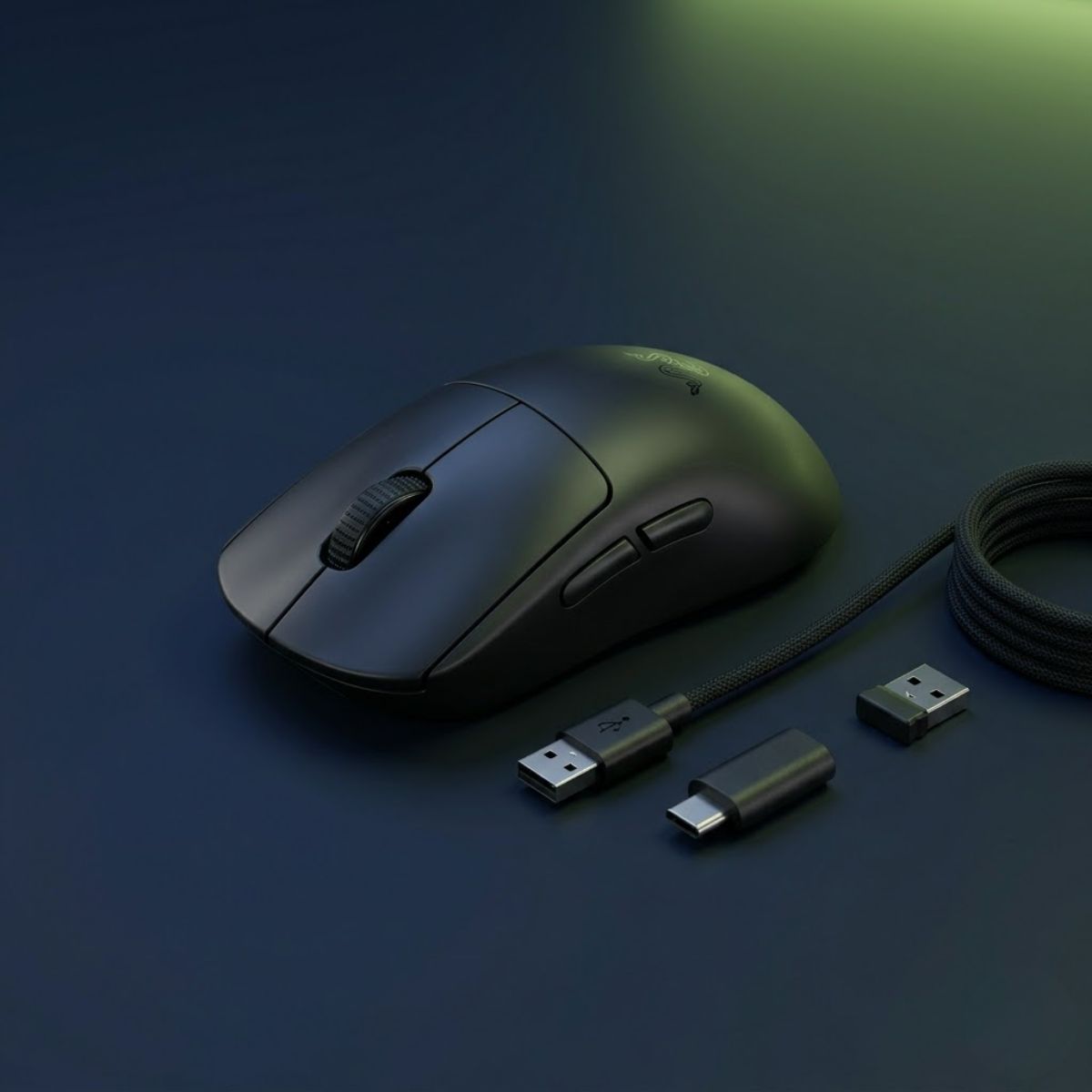
Razer Viper V3 Pro
Best for competitive FPS players who want a lightweight symmetrical mouse with strong all-around performance.
Check Price on Amazon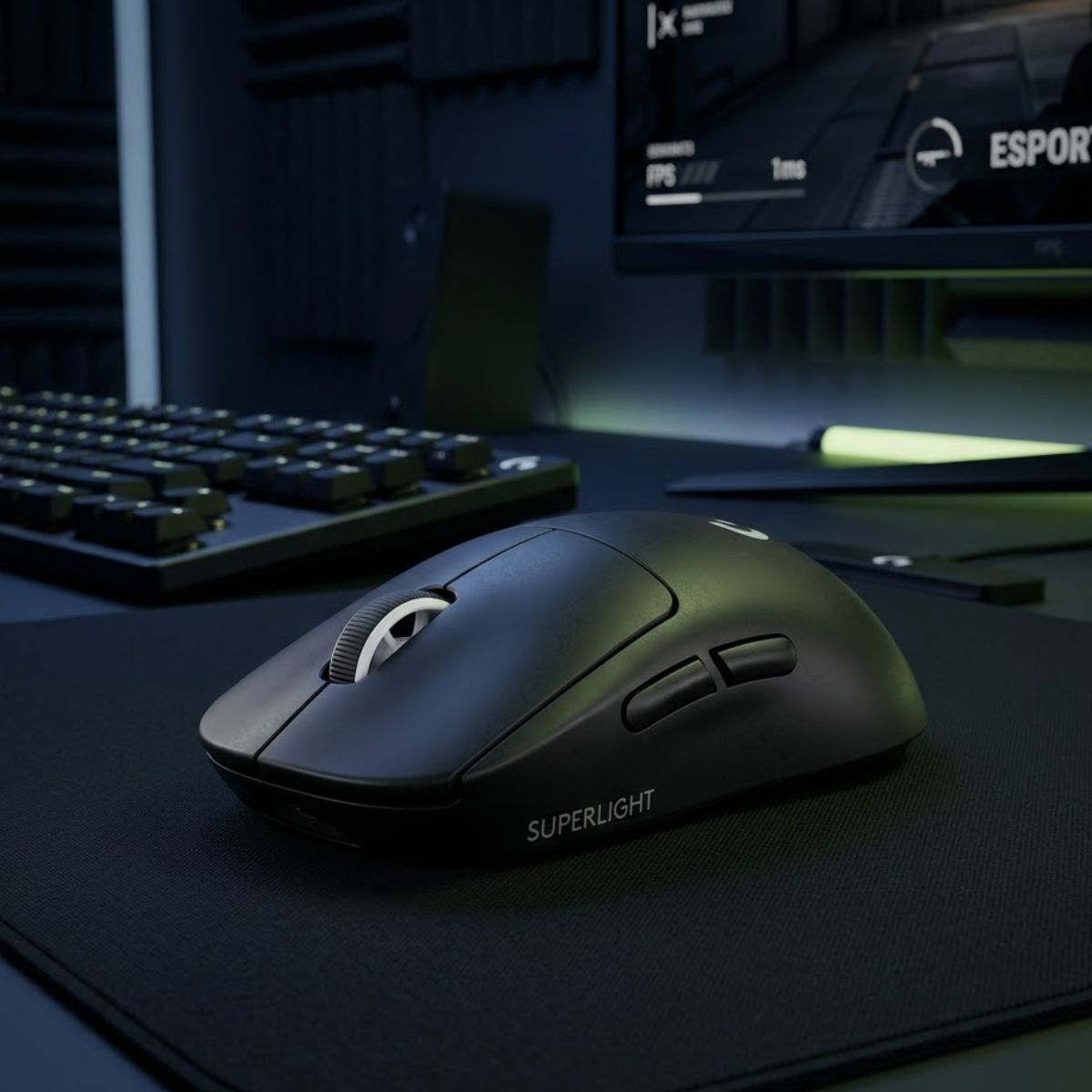
Logitech G PRO X Superlight 2
Best for players who want proven esports reliability, a familiar shape, and dependable wireless performance.
Check Price on Amazon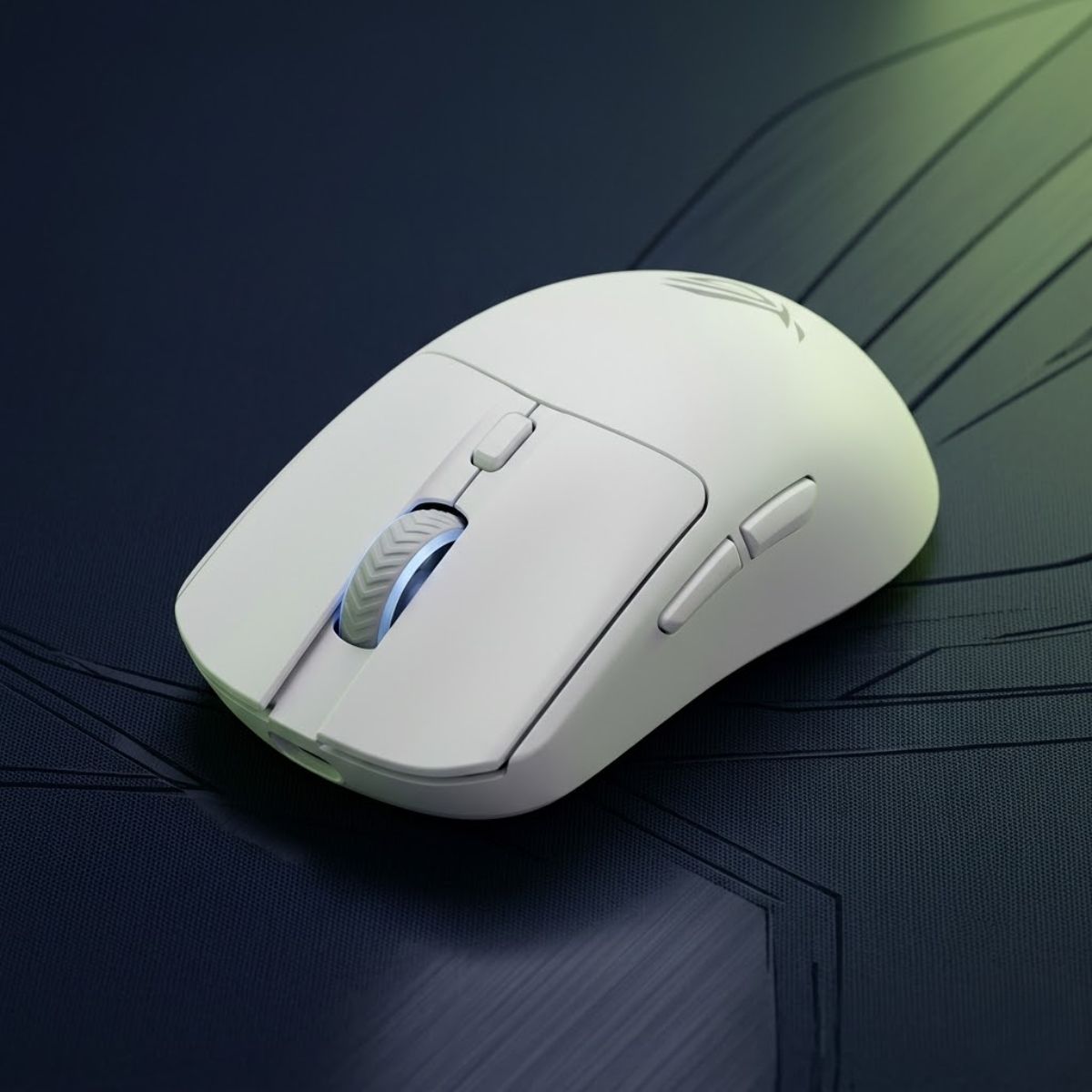
ASUS ROG Harpe II Ace
Best for players who prioritize fast movement, quick repositioning, and ultra-light wireless performance.
Check Price on Amazon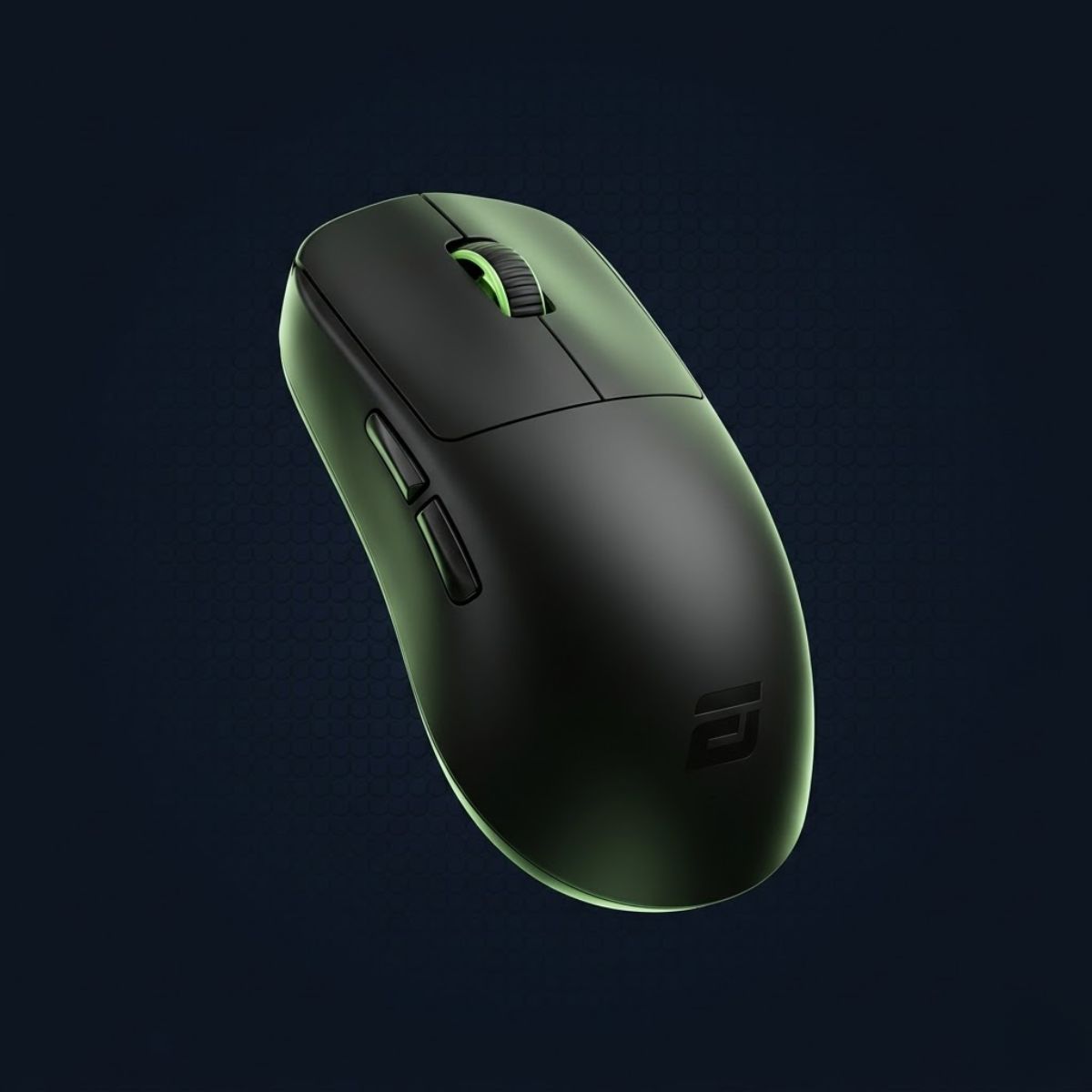
ENDGAME GEAR OP1 8K
Best for players who want strong wired FPS performance, low latency feel, and excellent value.
Check Price on Amazon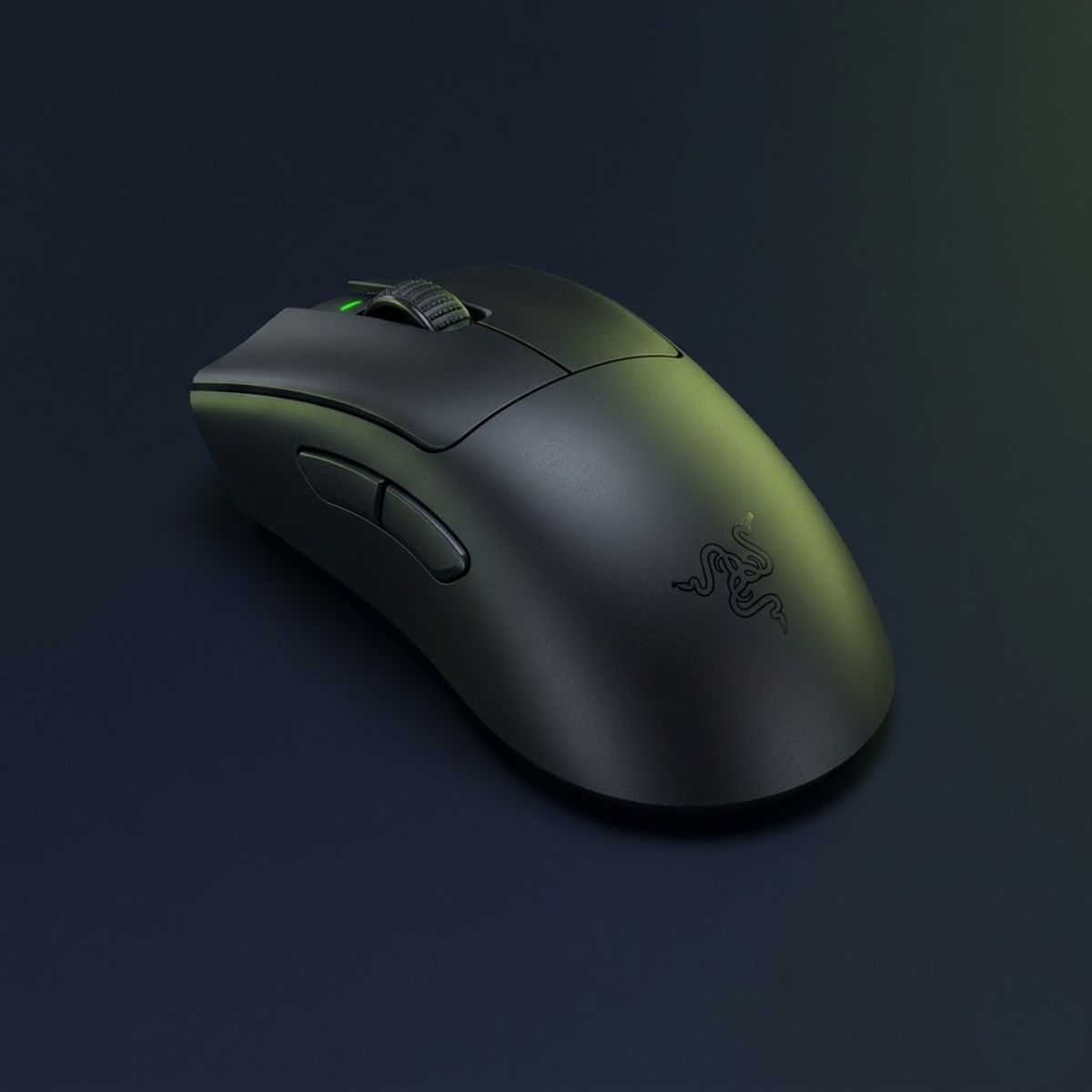
Razer DeathAdder V3 Pro
Best for FPS players who want ergonomic hand support, long-session comfort, and competitive wireless performance.
Check Price on AmazonThe sections below explain why each mouse earned its place among the top FPS gaming mice of 2026.
Razer Viper V3 Pro
The Razer Viper V3 Pro is a gaming mouse that helps FPS players achieve an excellent balance of speed, control, and comfort through its lightweight symmetrical shape and highly refined wireless implementation. It is widely considered one of the strongest all-around choices available for competitive FPS games.
At approximately 54 grams, the Viper V3 Pro feels extremely agile without becoming difficult to control. The symmetrical shape works well for a variety of grip styles, making it accessible to a broad range of players rather than only serving a narrow audience.
Its strong sensor performance, responsive buttons, and dependable wireless connection allow it to perform consistently across both tactical shooters and tracking-heavy games. This versatility is one of the biggest reasons it frequently appears at the top of FPS mouse recommendation lists.
- Extremely lightweight design.
- Comfortable symmetrical shape.
- Strong wireless performance.
- Reliable tracking behavior.
- Suitable for multiple FPS genres.
The Viper V3 Pro stands out because it avoids major weaknesses. While some mice specialize in a particular area, this model performs at a very high level across nearly every category that FPS players care about.
Logitech G PRO X Superlight 2
The Logitech G PRO X Superlight 2 is a gaming mouse that helps competitive players prioritize reliability, familiarity, and proven esports performance. It remains one of the most trusted choices among professional FPS players because of its consistent overall experience.
Although the shape appears simple, that simplicity is part of its strength. Many players adapt to it quickly, which reduces the risk of shape-related discomfort. Combined with its lightweight design and dependable wireless technology, it continues to maintain a strong reputation within competitive gaming communities.
The Superlight 2 does not attempt to be flashy. Instead, it focuses on delivering predictable performance that players can rely on during practice, ranked play, and tournaments.
- Widely used in professional esports.
- Comfortable neutral shape.
- Reliable wireless performance.
- Strong battery life.
- Consistent long-term usability.
Players who value proven competitive reliability often place the Superlight 2 near the top of their shortlist because of its long track record of success across multiple FPS titles.
ASUS ROG Harpe Ace Extreme
The ASUS ROG Harpe Ace Extreme is a gaming mouse that helps players maximize speed and mobility through one of the lightest premium FPS designs currently available. Its extremely low weight makes it particularly attractive to players who prefer fast directional changes and rapid repositioning.
The lightweight construction creates a highly agile feel without sacrificing structural quality. This allows players to perform quick movements with minimal resistance while still maintaining confidence in the overall build.
Its shape also supports competitive play by providing a balanced design that works well across several grip styles. Combined with strong wireless performance, it offers a premium experience for players seeking the lightest possible setup.
- Ultra-lightweight construction.
- Fast movement feel.
- Premium build quality.
- Strong competitive focus.
- Excellent mobility during gameplay.
The Harpe Ace Extreme is an excellent choice for players who place a high priority on lightweight performance and want one of the most agile gaming mice available in 2026.
Pulsar X2H V3
The Pulsar X2H V3 is a gaming mouse that helps claw grip players achieve greater hand stability through its distinctive rear hump design. It is particularly popular among users who prefer additional palm support while maintaining a lightweight overall feel.
Unlike many flatter symmetrical mice, the X2H V3 provides more rear contact, which some players find beneficial during controlled aim adjustments and repeated mouse repositioning. This creates a different feel that can be especially attractive to dedicated claw grip users.
The lightweight design keeps movement responsive while the shape provides a more locked-in feeling than some competing options.
- Excellent for claw grip users.
- Supportive rear hump design.
- Lightweight construction.
- Strong competitive usability.
- Comfortable long-session performance.
The X2H V3 demonstrates how shape can sometimes matter more than specifications because the right shape can significantly improve comfort and confidence during gameplay.
Endgame Gear OP1 8K
The Endgame Gear OP1 8K is a gaming mouse that helps players achieve exceptional value and responsiveness through its lightweight wired design and highly focused competitive performance. It is often recommended for players who want premium-level gameplay without paying flagship wireless prices.
While wireless mice dominate much of the current market, the OP1 8K shows that wired gaming mice can still compete at a very high level. Its lightweight body, responsive implementation, and competitive-oriented shape allow it to remain relevant even against more expensive alternatives.
The smaller overall design also appeals to players who prefer compact mice and precise control.
- Outstanding value proposition.
- Lightweight wired design.
- Highly responsive performance.
- Competitive-focused shape.
- Strong precision-oriented feel.
The OP1 8K proves that players do not necessarily need a premium wireless flagship to enjoy high-level FPS performance.
These five gaming mice represent some of the strongest FPS-focused options available in 2026. However, different players prioritize different characteristics, which is why the next section examines the best gaming mice by category rather than relying on a single overall ranking.
Best Gaming Mouse for Different FPS Games
The best gaming mouse for FPS games can vary depending on the shooter you play most often. Different FPS titles emphasize different aiming mechanics, movement styles, engagement distances, and combat pacing, which means the ideal mouse for one game may not always be the ideal choice for another.
Tactical shooters often reward stability and precise crosshair placement, while movement-heavy games place greater emphasis on tracking, rapid directional changes, and continuous target acquisition. Understanding these differences helps players choose a gaming mouse that better supports their primary game.
The sections below highlight which mouse characteristics work best in several of the most popular FPS games in 2026.
Best Gaming Mouse for Valorant in 2026
The best gaming mouse for Valorant is a mouse that helps players achieve consistent flick accuracy, precise crosshair placement, and comfortable control during long competitive matches. Because Valorant is a tactical shooter, precision and stopping power usually matter more than extremely fast movement.
Most Valorant players spend a large portion of each round holding angles, clearing corners, and making controlled flick shots. Players looking to optimize their overall setup should also review these best mouse settings for Valorant.
Mice such as the Razer Viper V3 Pro and Logitech G PRO X Superlight 2 remain popular because they balance low weight with predictable control. Their shapes also work well across multiple grip styles, which helps many players maintain consistency during extended sessions.
- Prioritizes flick accuracy.
- Rewards crosshair discipline.
- Benefits from lightweight designs.
- Works well with symmetrical shapes.
- Emphasizes consistency over speed.
The table below highlights the characteristics that matter most in Valorant:
| Factor | Importance | Reason |
|---|---|---|
| Shape Comfort | Very High | Supports long competitive sessions |
| Weight | High | Improves flick responsiveness |
| Tracking Performance | High | Supports precision aiming |
| Wireless Performance | Medium | Improves movement freedom |
| Extra Buttons | Low | Rarely used in gameplay |
Valorant rewards consistency more than raw speed, which is why many top players prioritize comfortable shapes and predictable control over aggressive specifications. Choosing an appropriate DPI for Valorant is often part of building that consistency.
For most players, a lightweight symmetrical mouse remains one of the safest choices for competitive Valorant play.
Razer Viper V3 Pro
The Razer Viper V3 Pro is a strong Valorant pick for players who want a lightweight symmetrical shape, stable wireless performance, and controlled flick accuracy during tactical FPS matches.
- Great fit for controlled flicks and angle clearing.
- Lightweight 54g design helps fast repositioning.
- Symmetrical shape works well for claw and fingertip grip users.
Best Gaming Mouse for CS2 in 2026
The best gaming mouse for CS2 is a mouse that helps players maintain precise crosshair placement, smooth spray control, and reliable flick accuracy. Like Valorant, CS2 emphasizes tactical decision-making, but it often involves longer spray patterns and more dynamic movement during engagements.
Because players frequently transition between tapping, bursting, and spraying, a stable and predictable mouse is often more valuable than an extremely aggressive lightweight design.
Many professional CS2 players continue to use familiar shapes because long-term comfort and muscle memory play a major role in maintaining consistent performance.
- Prioritizes spray control.
- Rewards predictable movement.
- Benefits from comfortable shapes.
- Values long-term consistency.
- Supports both flicking and tracking.
The table below highlights the characteristics that matter most in CS2:
| Factor | Importance | Reason |
|---|---|---|
| Shape Comfort | Very High | Supports long-term consistency |
| Tracking Stability | High | Helps maintain spray control |
| Weight Balance | High | Supports multiple aiming styles |
| Button Feel | Medium | Supports repeated firing |
| Wireless Freedom | Medium | Improves overall comfort |
CS2 places slightly greater emphasis on stability and repeatability than many faster-paced shooters, making comfort and consistency particularly valuable.
Logitech G PRO X Superlight 2
The Logitech G PRO X Superlight 2 remains one of the safest choices for Counter-Strike 2 players who value a proven esports shape, reliable wireless performance, and consistent precision during tactical aim duels.
- Widely used across professional Counter-Strike competition.
- Lightweight design supports fast target transitions.
- Familiar symmetrical shape fits a wide range of grip styles.
Players who already perform well with a familiar shape should rarely switch purely because a newer model becomes available.
Best Gaming Mouse for Apex Legends in 2026
The best gaming mouse for Apex Legends is a mouse that helps players maintain smooth tracking, rapid directional control, and consistent target acquisition during fast-paced engagements. Unlike tactical shooters, Apex Legends places greater emphasis on movement, continuous tracking, and quick reactions during extended fights.
Players frequently engage targets while strafing, sliding, climbing, and repositioning across large areas of the map. Because of this, many Apex players prefer lightweight gaming mice that feel agile and responsive during constant movement.
A mouse that feels excellent for slow, deliberate flick shots may not feel as effective when tracking opponents who are constantly changing direction. This is why Apex players often prioritize mobility, comfort, and tracking confidence over maximum stability.
- Prioritizes continuous tracking.
- Rewards lightweight movement.
- Benefits from fast directional changes.
- Supports aggressive gameplay styles.
- Values mobility during combat.
The table below highlights the characteristics that matter most in Apex Legends:
| Factor | Importance | Reason |
|---|---|---|
| Weight | Very High | Supports rapid movement and tracking |
| Shape Comfort | High | Improves control during long fights |
| Tracking Performance | Very High | Helps follow moving targets accurately |
| Wireless Freedom | High | Supports unrestricted movement |
| Button Feel | Medium | Supports ability usage and weapon swaps |
This comparison shows that Apex Legends rewards agility more than most tactical shooters. Players often benefit from lightweight mice that remain easy to control during constant repositioning.
For many Apex players, a lightweight wireless gaming mouse provides the best balance between speed, comfort, and tracking consistency.
ASUS ROG Harpe II Ace
The ASUS ROG Harpe II Ace is an excellent choice for Apex Legends players who value rapid tracking, lightweight movement, and quick directional adjustments during high-speed engagements.
- Ultra-lightweight design supports fast tracking movement.
- Wireless performance helps maintain freedom of movement.
- Well suited for players who frequently track moving targets.
Best Gaming Mouse for Call of Duty Warzone in 2026
The best gaming mouse for Call of Duty Warzone is a mouse that helps players balance tracking accuracy, rapid target switching, and overall comfort during long gaming sessions. Warzone combines elements of tactical aiming, continuous tracking, and large-scale engagements, creating different requirements than many traditional arena shooters.
Combat encounters can occur at multiple distances, requiring players to transition between close-range tracking and longer-range precision. Because of this variety, many Warzone players prefer versatile gaming mice that perform well across several aiming styles rather than excelling in only one area.
Wireless gaming mice are especially popular in Warzone because unrestricted movement can feel beneficial during extended gameplay sessions that involve frequent repositioning and large arm movements.
- Balances tracking and precision.
- Supports multiple engagement distances.
- Benefits from versatile shapes.
- Works well with lightweight wireless designs.
- Prioritizes comfort during long sessions.
The table below highlights the characteristics that matter most in Call of Duty Warzone:
| Factor | Importance | Reason |
|---|---|---|
| Versatility | Very High | Supports different combat situations |
| Tracking Performance | High | Helps maintain accuracy during movement |
| Shape Comfort | High | Improves long-session usability |
| Wireless Performance | High | Supports unrestricted movement |
| Weight | Medium to High | Influences overall movement feel |
This table demonstrates why versatile gaming mice often perform well in Warzone. The game rewards players who can transition smoothly between multiple aiming situations rather than focusing exclusively on a single mechanic.
Players who enjoy a mixture of tracking, flicking, and large-scale movement generally benefit from balanced gaming mice that remain comfortable throughout extended sessions.
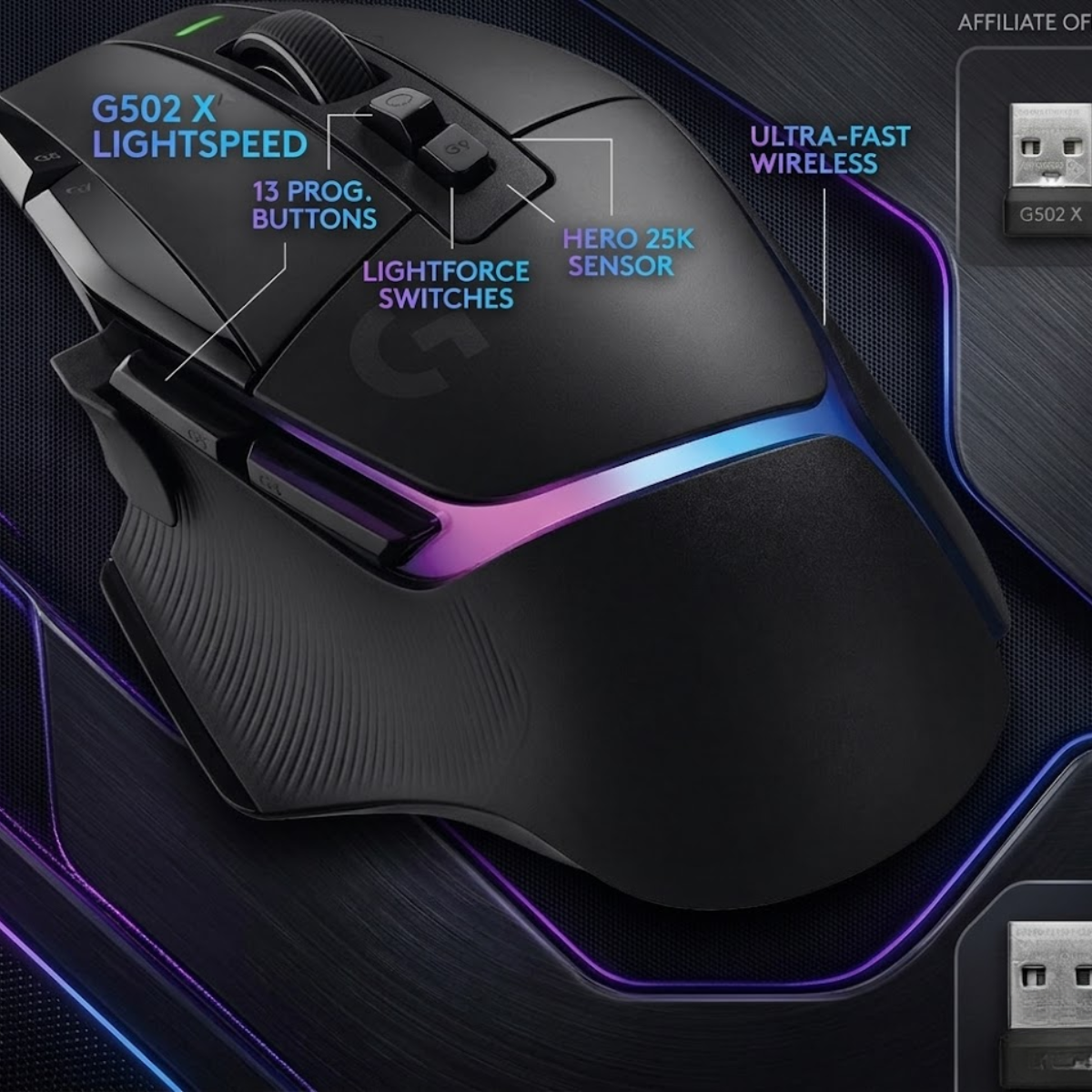
Logitech G502 X Lightspeed
The Logitech G502 X Lightspeed is a strong choice for Warzone players who want excellent comfort, versatile controls, and reliable tracking performance during extended battle royale sessions.
- Comfortable ergonomic shape for long gaming sessions.
- Additional buttons provide useful flexibility for Warzone actions.
- Reliable wireless performance combined with accurate sensor tracking.
Different FPS games emphasize different mechanics, but they all require a mouse that feels natural and reliable. Once players understand how game requirements influence mouse selection, the next step is comparing gaming mice by category to identify which type of mouse best matches their individual preferences and priorities.
Best Gaming Mouse by Category
The best gaming mouse category depends on what a player values most during gameplay. Some players prioritize lightweight movement, while others focus on wireless freedom, comfort, affordability, or overall versatility.
Rather than assuming one gaming mouse is perfect for everyone, category-based recommendations help narrow the decision-making process by matching products to specific priorities. This approach often leads to better long-term satisfaction because players choose a mouse based on actual needs instead of popularity alone.
The table below provides a quick overview of the strongest FPS gaming mouse recommendations by category:
| Category | Recommended Mouse | Primary Strength | Best For |
|---|---|---|---|
| Best Overall | Razer Viper V3 Pro | Balanced performance | Most FPS players |
| Best Lightweight | ASUS ROG Harpe Ace Extreme | Ultra-lightweight design | Fast aim styles |
| Best Wireless | Logitech G PRO X Superlight 2 | Wireless reliability | Competitive players |
| Best Budget | Endgame Gear OP1 8K | Performance value | Cost-conscious buyers |
| Best Ergonomic | Razer DeathAdder V3 Pro | Comfort and support | Palm grip users |
This overview shows that different mice excel in different areas. The best purchase often depends more on personal priorities than on overall rankings.
The sections below explain why each category winner stands out and which players are most likely to benefit from choosing it.
Best Overall Gaming Mouse for FPS Games
The Razer Viper V3 Pro is a gaming mouse that helps FPS players achieve a strong balance of comfort, speed, tracking performance, and versatility. It consistently performs at a high level across multiple FPS genres without forcing players to make major compromises.
Its lightweight construction allows movement to feel quick and responsive, while the symmetrical shape remains comfortable for a wide range of grip styles. This combination makes it one of the safest recommendations for players who want a high-end gaming mouse without specializing in a single niche.
Unlike some mice that focus entirely on weight reduction or shape experimentation, the Viper V3 Pro succeeds because it performs well across nearly every category that competitive players care about.
- Excellent all-around performance.
- Comfortable symmetrical shape.
- Strong wireless implementation.
- Lightweight construction.
- Suitable for multiple FPS games.
The table below highlights why the Viper V3 Pro performs so well as an overall recommendation:
| Strength | Benefit |
|---|---|
| Balanced Shape | Supports multiple grip styles |
| Low Weight | Improves movement agility |
| Reliable Wireless Performance | Provides competitive responsiveness |
| Versatile Design | Works across multiple FPS genres |
For players who want a premium gaming mouse that performs well in nearly every situation, the Viper V3 Pro remains one of the strongest choices available in 2026.
Razer Viper V3 Pro
The Razer Viper V3 Pro is the strongest overall FPS pick for players who want balanced speed, control, wireless reliability, and a safe symmetrical shape across multiple shooters.
- Best fit for players who want one mouse for multiple FPS games.
- Lightweight 54g design supports fast movement without feeling unstable.
- Symmetrical shape works well across claw, fingertip, and hybrid grip styles.
Best Lightweight Gaming Mouse for FPS Games
The ASUS ROG Harpe Ace Extreme is a gaming mouse that helps players maximize movement speed through an extremely lightweight design. It appeals to users who prefer fast directional changes, rapid flicks, and minimal movement resistance.
Reducing weight can make a mouse feel easier to accelerate and stop, which is why lightweight designs have become increasingly popular among competitive FPS players. The Harpe Ace Extreme pushes this concept further by combining an ultra-light shell with premium-level performance.
While weight alone does not improve aiming skill, many players enjoy the increased freedom that a lighter mouse provides during fast-paced gameplay.
- Ultra-lightweight construction.
- Quick movement feel.
- Excellent agility.
- Strong competitive focus.
- Premium build quality.
The table below explains why the Harpe Ace Extreme excels in the lightweight category:
| Feature | Advantage |
|---|---|
| Very Low Weight | Reduces movement resistance |
| Balanced Shape | Supports competitive aiming |
| Premium Construction | Maintains structural confidence |
| Wireless Freedom | Improves overall mobility |
Players who prioritize movement speed and agility often prefer lightweight mice because they can feel easier to reposition during fast engagements.
ASUS ROG Harpe II Ace
The ASUS ROG Harpe II Ace is an excellent choice for players who prioritize ultra-lightweight handling, fast target transitions, and effortless movement during competitive FPS gameplay.
- Extremely lightweight design supports rapid mouse movement.
- Ideal for players who frequently flick and reposition.
- Wireless freedom without adding noticeable weight.
Best Wireless Gaming Mouse for FPS Games
The Logitech G PRO X Superlight 2 is a gaming mouse that helps players prioritize dependable wireless performance and long-term competitive reliability. It remains one of the most trusted wireless options in professional esports.
Wireless gaming technology has improved significantly over the past decade. Modern flagship wireless mice now deliver responsiveness that is fully capable of supporting competitive FPS play. Because of this, many professional players no longer see wired connections as necessary for performance.
The Superlight 2 continues to stand out because it combines strong wireless performance with a familiar shape that many players adapt to quickly.
- Trusted by competitive players.
- Reliable wireless implementation.
- Comfortable neutral shape.
- Strong battery performance.
- Long-term usability.
The table below highlights the strengths that make the Superlight 2 a leading wireless recommendation:
| Feature | Advantage |
|---|---|
| Wireless Reliability | Supports competitive gameplay |
| Stable Performance | Improves consistency |
| Comfortable Shape | Works for many users |
| Strong Battery Life | Reduces charging concerns |
The success of the Superlight 2 demonstrates that modern wireless gaming mice can deliver excellent competitive performance without sacrificing reliability.
Logitech G PRO X Superlight 2
The Logitech G PRO X Superlight 2 remains one of the strongest wireless FPS gaming mice for players who want reliable latency performance, proven esports adoption, and a shape trusted across multiple competitive titles.
- Trusted by professional FPS players worldwide.
- Reliable wireless performance for competitive gaming.
- Lightweight design combined with long-term comfort.
Best Budget Gaming Mouse for FPS Games
The Endgame Gear OP1 8K is a gaming mouse that helps players achieve excellent FPS performance without paying flagship wireless prices. It delivers competitive-level responsiveness, strong build quality, and a focused design that prioritizes gameplay performance over unnecessary extras.
Many players assume they must spend premium-level money to obtain a capable FPS gaming mouse. In reality, several budget-friendly options now offer sensor performance and responsiveness that can easily support competitive play. The difference often comes down to features, materials, and convenience rather than raw aiming capability.
The OP1 8K stands out because it focuses heavily on the factors that matter most for FPS games. Instead of investing resources into RGB systems or complex software ecosystems, it prioritizes responsiveness, shape quality, and overall gaming performance.
- Excellent performance-per-dollar value.
- Competitive-grade responsiveness.
- Lightweight construction.
- Focused FPS-oriented design.
- Strong overall reliability.
The table below highlights why the OP1 8K performs so well as a value-focused FPS gaming mouse:
| Feature | Benefit |
|---|---|
| Competitive Performance | Supports serious FPS gameplay |
| Lower Price | Improves overall value |
| Lightweight Design | Enhances movement control |
| Focused Feature Set | Prioritizes performance over extras |
This comparison demonstrates that strong FPS performance does not always require a premium budget. Many players can achieve excellent results by prioritizing shape, comfort, and responsiveness instead of chasing the most expensive model available.
The OP1 8K remains one of the best examples of how a performance-focused design can compete with significantly more expensive gaming mice.
ENDGAME GEAR OP1 8K
The ENDGAME GEAR OP1 8K proves that players do not need to spend premium prices to achieve excellent FPS performance. Its lightweight design, responsive clicks, and performance-focused approach make it one of the strongest value options available.
- Outstanding value for competitive FPS players.
- Lightweight wired design with strong responsiveness.
- Focuses on performance rather than unnecessary features.
Best Ergonomic Gaming Mouse for FPS Games
The Razer DeathAdder V3 Pro is a gaming mouse that helps players maximize comfort through an ergonomic shape designed to support the hand naturally during long gaming sessions. It is one of the most popular ergonomic FPS gaming mice available because it combines comfort with strong competitive performance.
Unlike symmetrical designs that focus on versatility, ergonomic mice are shaped specifically to support the natural contours of the hand. This can reduce tension and create a more relaxed grip, particularly for players who spend many hours practicing or competing.
The DeathAdder V3 Pro succeeds because it combines ergonomic comfort with modern FPS-focused performance. Players do not need to sacrifice responsiveness or tracking quality in exchange for a more supportive shape.
- Comfortable ergonomic shell.
- Excellent palm support.
- Strong competitive performance.
- Suitable for long sessions.
- Popular among FPS players.
The table below highlights why the DeathAdder V3 Pro remains a leading ergonomic recommendation:
| Feature | Advantage |
|---|---|
| Ergonomic Shape | Supports natural hand positioning |
| Palm Comfort | Reduces long-session fatigue |
| Modern Performance | Maintains competitive capability |
| Balanced Design | Combines comfort and control |
This table highlights how ergonomic design can improve comfort without compromising competitive usability. Many players perform better when their mouse feels natural throughout long sessions rather than simply focusing on specifications.
The DeathAdder V3 Pro remains an excellent option for players who prioritize comfort, palm support, and long-term usability alongside strong FPS performance.
Razer DeathAdder V3 Pro
The Razer DeathAdder V3 Pro is a strong ergonomic FPS mouse for players who want natural hand support, long-session comfort, and competitive wireless performance without switching to a flat symmetrical shape.
- Ergonomic shell supports relaxed hand positioning.
- Excellent for palm grip and comfort-focused FPS players.
- Strong wireless performance for competitive gameplay.
Each category winner excels in a different area, which shows that there is no single perfect gaming mouse for every FPS player. The best choice ultimately depends on whether a player values overall balance, lightweight movement, wireless freedom, affordability, or ergonomic comfort most.
While category recommendations help narrow the field, game-specific requirements can influence the decision even further. Different FPS titles reward different aiming styles, which is why the next step is understanding how individual games affect gaming mouse selection.
How to Choose a Gaming Mouse for FPS Games
Choosing a gaming mouse for FPS games is a process that helps players find a model that matches their hand size, grip style, movement preferences, and overall gaming goals. The best choice is rarely determined by a single specification because multiple factors work together to influence comfort and performance.
Many players focus heavily on sensor names, DPI numbers, or marketing claims. However, shape, weight, and overall usability often have a greater impact on long-term satisfaction. Understanding the gaming mouse features that matter for FPS can help separate meaningful performance factors from marketing claims.
The following sections explain the most important considerations when selecting a gaming mouse for FPS games in 2026.
How Mouse Shape Influences Comfort and Aim Consistency
Mouse shape is the design factor that helps determine whether a gaming mouse feels natural, stable, and comfortable during FPS gameplay. A strong shape allows players to hold the mouse consistently without constantly adjusting their grip during matches.
Shape is often more important than raw specifications because the player touches and controls the shell every second while playing. A mouse with excellent hardware can still feel wrong if the sides, hump, width, or length do not match the player’s hand and grip style.
For FPS games, the right shape should support quick aim adjustments without creating hand tension. Some players perform better with symmetrical mice because they feel more flexible, while others prefer ergonomic mice because they provide stronger palm support.
The shape factors below help players choose a more comfortable FPS gaming mouse:
- Shell length: Affects how much finger and palm space the mouse provides during movement.
- Mouse width: Influences grip security during fast directional changes.
- Hump position: Changes how much support the back of the hand receives.
- Side curvature: Helps the thumb and fingers hold the mouse more naturally.
- Button placement: Affects finger comfort during repeated clicking and aiming.
These shape factors help players avoid choosing a mouse that looks impressive on paper but feels uncomfortable in real matches.
The table below compares the two most common FPS mouse shape types:
| Shape Type | Main Advantage | Best Fit |
|---|---|---|
| Symmetrical Shape | Provides flexible grip positioning and quick movement control. | Claw grip, fingertip grip, and fast aim styles. |
| Ergonomic Shape | Provides stronger palm support and relaxed hand positioning. | Palm grip, larger hands, and comfort-focused players. |
This table shows that symmetrical mice usually favor flexibility, while ergonomic mice usually favor comfort and hand support. Neither shape is automatically better for every FPS player.
Mouse shape should be chosen based on how naturally the hand rests on the mouse during gameplay. A comfortable shape helps players build consistency because the grip feels repeatable from match to match.
How Mouse Weight Changes Speed, Control, and Movement Feel
Mouse weight is a performance factor that helps determine how fast, stable, or controlled a gaming mouse feels during FPS gameplay. The right weight allows players to move and stop the mouse comfortably without creating unnecessary fatigue.
Lightweight gaming mice are popular because they reduce movement resistance during fast swipes and repeated aim adjustments. This can help low-sensitivity players move across larger mousepads more easily, especially during flick shots or wide tracking situations.
However, lighter is not always better for every player. Some players prefer slightly heavier mice because they feel more grounded during slower tracking, recoil control, or precise crosshair placement. The ideal weight depends on sensitivity, grip style, mousepad surface, and personal movement preference.
The weight factors below help explain how mouse weight affects FPS gameplay:
- Movement speed: Lighter mice usually feel easier to accelerate during fast aim adjustments.
- Stopping control: Slightly heavier mice may feel more stable for some controlled aim styles.
- Fatigue level: Lower weight can reduce strain during long sessions with frequent swiping.
- Sensitivity preference: Low-sensitivity players often benefit more from lightweight movement.
- Mousepad friction: A fast or slow mousepad can change how heavy the mouse feels in practice.
Weight should be treated as a feel preference, not a universal ranking system.
The table below compares common FPS gaming mouse weight ranges:
| Weight Range | Typical Feel | Best For |
|---|---|---|
| Under 55g | Very fast and extremely agile. | Aggressive flick players and ultra-lightweight fans. |
| 55g to 70g | Balanced speed and control. | Most competitive FPS players. |
| 70g to 90g | More stable and grounded. | Players who prefer controlled tracking. |
| Over 90g | Heavy and slower to reposition. | Casual use or players who prefer strong resistance. |
This table shows why most modern FPS mice now sit below 70g. That range usually gives players enough speed for competitive play while still keeping enough control for consistent aim.
Mouse weight should support the way a player naturally moves. The best weight is the one that feels controllable after several hours of real gameplay, not just the one that looks best in a specification sheet.
What Sensor Performance Actually Matters for FPS Games
Sensor performance is a technical factor that helps a gaming mouse track hand movement accurately and consistently during FPS games. A reliable sensor helps players maintain predictable crosshair movement during flicks, tracking, and micro-adjustments.
Most modern FPS gaming mice already use strong optical sensors, so the difference between good models is often smaller than beginners expect. The real concern is not only the sensor name, but also how well the mouse handles tracking stability, motion latency, lift-off distance, and firmware tuning.
For FPS players, maximum DPI is usually less important than consistent movement behavior. A mouse with extreme DPI numbers is not automatically better if it feels unstable, uncomfortable, or poorly tuned during real gameplay.
The sensor factors below help identify reliable FPS mouse performance:
- Tracking stability: Helps crosshair movement remain smooth and predictable.
- Motion latency: Helps movement feel more responsive during fast aim changes.
- Lift-off distance: Helps players reset the mouse without unwanted cursor movement.
- Firmware tuning: Helps the sensor behave consistently under different movement speeds.
- Surface compatibility: Helps the mouse track properly on common gaming mousepads.
These factors matter more than choosing a mouse based only on the highest DPI number.
The table below explains which sensor specifications matter most for FPS players:
| Sensor Factor | Why It Matters | Priority |
|---|---|---|
| Tracking Stability | Helps maintain predictable aim movement. | Very High |
| Motion Latency | Helps movement feel more immediate. | High |
| Lift-Off Distance | Helps with mouse repositioning and resets. | High |
| Surface Compatibility | Helps maintain clean tracking on mousepads. | Medium to High |
| Maximum DPI | Rarely improves practical FPS performance by itself. | Low |
This table shows that consistency is more important than exaggerated specification numbers. Most players will gain more value from reliable tracking than from extremely high DPI settings.
Sensor performance is still important, but it should not be evaluated in isolation. A strong sensor works best when paired with a comfortable shape, suitable weight, and responsive button feel.
How Grip Style Affects Gaming Mouse Selection
Grip style is the way a player holds the mouse, and it helps determine which shape feels most stable during FPS gameplay. The right mouse should support the player’s natural grip instead of forcing the hand into an uncomfortable position.
Most FPS players use some variation of palm grip, claw grip, or fingertip grip. Each grip style changes how the hand controls the mouse, how much palm contact is needed, and how quickly the player can make directional adjustments.
A mouse that fits the wrong grip style can feel unstable even if it has excellent specifications. For example, a large ergonomic mouse may feel comfortable for palm grip, but it can feel restrictive for fingertip players who need more freedom to move the mouse with their fingers.
The grip style factors below help players match mouse shape to hand control:
- Palm grip: Uses more hand contact and usually benefits from ergonomic or larger shapes.
- Claw grip: Uses arched fingers and often works well with symmetrical mice and rear hump support.
- Fingertip grip: Uses minimal palm contact and usually benefits from compact lightweight mice.
- Hybrid grip: Combines multiple grip styles and often needs a balanced shape.
- Grip pressure: Affects how stable or tense the hand feels during long sessions.
Grip style should be checked before buying because it strongly affects long-term comfort and movement consistency.
The table below compares common FPS grip styles and their usual mouse preferences:
| Grip Style | Recommended Mouse Type | Best Gameplay Benefit |
|---|---|---|
| Palm Grip | Ergonomic or larger mouse | Better comfort and hand support during long sessions. |
| Claw Grip | Symmetrical mouse with rear support | Strong balance between control and fast movement. |
| Fingertip Grip | Compact lightweight mouse | Faster finger-based adjustments and high mobility. |
| Hybrid Grip | Medium balanced shape | Flexible control across different aiming situations. |
This table shows that grip style changes what “comfortable” means for each player. A mouse that feels perfect for palm grip may feel too large or restrictive for fingertip grip.
Grip style helps narrow the buying decision because it connects the player’s hand control method to the mouse shape. Once grip style is clear, budget becomes the next practical filter for choosing the best FPS gaming mouse.
How to Set a Realistic Budget for an FPS Gaming Mouse
Budget planning is the process that helps players choose a gaming mouse with the right performance level without overspending on features they do not need. A smart budget helps separate useful FPS performance from premium extras that may not improve aim.
Gaming mice in 2026 are strong across many price ranges. Budget models can already provide reliable sensors and solid click performance, while premium models often add lighter shells, better wireless systems, improved build quality, and more refined shapes.
The right budget depends on how seriously the player competes, how often they play, and which features matter most. A casual FPS player may not need a flagship mouse, while a ranked grinder may benefit from better comfort, lower weight, and stronger wireless reliability.
The budget factors below help players avoid overspending or underbuying:
- Under $50: Works best for beginners, casual players, or buyers who want basic FPS performance.
- $50 to $100: Offers strong value with better sensors, lighter bodies, and more reliable build quality.
- $100 to $150: Usually provides premium wireless performance, lower weight, and stronger competitive features.
- Above $150: Fits enthusiasts who want the lightest designs, premium materials, or flagship refinement.
- Long-term use: A more comfortable and durable mouse can be worth more if it is used daily.
Budget should be matched to real usage instead of hype. Paying more only makes sense when the extra features solve a real problem for the player.
The following process can help players choose the right FPS mouse budget:
- Define your main game: Choose based on the FPS title you play most often.
- Identify your grip style: Use grip style to narrow down shape options before comparing prices.
- Set a realistic price range: Decide how much you can spend before looking at premium models.
- Compare useful features: Focus on shape, weight, wireless quality, and build quality instead of RGB or extreme DPI.
- Choose long-term comfort: Prioritize the mouse you can use comfortably for months, not only the one with the best spec sheet.
This process helps keep the buying decision practical and prevents players from choosing a mouse only because it is popular or expensive.
The table below compares common FPS gaming mouse budget ranges:
| Budget Range | What You Usually Get | Best For |
|---|---|---|
| Under $50 | Basic gaming performance with fewer premium features. | Beginners and casual FPS players. |
| $50 to $100 | Strong value, reliable sensors, and better overall comfort. | Most value-focused FPS players. |
| $100 to $150 | Premium wireless performance, lower weight, and refined shapes. | Competitive ranked players. |
| Above $150 | Flagship materials, ultra-light designs, and enthusiast-level refinement. | Hardware enthusiasts and serious competitive players. |
This table shows that strong FPS performance is available across multiple price levels. The best budget is the one that matches the player’s needs, not the one that simply buys the most expensive mouse.
Choosing a gaming mouse for FPS games becomes easier when players filter options by shape, weight, sensor performance, grip style, and budget. These factors help turn a crowded market into a clear buying decision based on actual gameplay needs.
Wireless vs Wired Gaming Mouse for FPS Games
Wireless vs wired gaming mouse is a comparison that helps FPS players decide whether movement freedom or simple plug-and-play reliability matters more for their setup. Modern wireless mice are now strong enough for competitive FPS gaming, but wired mice still remain useful for players who want lower cost and zero charging concerns.
In older gaming setups, wired mice were often considered the safer choice because wireless models had more noticeable latency, heavier batteries, and less reliable connections. In 2026, that gap is much smaller because many wireless gaming mice now offer excellent responsiveness and stable performance.
The better choice depends on the player’s budget, desk setup, movement style, and willingness to manage battery life.
Common Mistakes When Buying an FPS Gaming Mouse
Common FPS gaming mouse buying mistakes are decisions that help explain why many players end up with a mouse that feels uncomfortable, inconsistent, or disappointing despite having strong specifications. Avoiding these mistakes can make the buying process easier and increase the chances of choosing a mouse that remains enjoyable long after the initial purchase.
Many buyers focus heavily on marketing claims, professional player setups, or specification sheets without considering how the mouse will actually feel during daily gameplay. While hardware performance matters, comfort and personal compatibility often have a greater impact on long-term satisfaction.
The mistakes below are among the most common issues FPS players encounter when choosing a gaming mouse.
Choosing a Gaming Mouse Based Only on Specifications
Choosing a gaming mouse based only on specifications is a mistake that helps create unrealistic expectations because specifications alone do not determine how comfortable or effective a mouse feels during gameplay. Numbers such as DPI, polling rate, and sensor names provide useful information, but they do not guarantee a better user experience.
Many players assume that a mouse with higher specifications must automatically perform better. In reality, a mouse with a comfortable shape and reliable implementation often feels better than a technically impressive mouse that does not fit the user’s hand.
Specification comparisons are useful, but they should support the buying decision rather than control it completely.
- Shape influences comfort more than most specifications.
- Tracking consistency matters more than extreme DPI values.
- Build quality affects long-term satisfaction.
- Comfort impacts every gaming session.
- Real-world usability often matters more than marketing numbers.
The table below shows why specifications should be balanced with practical usability:
| Buying Focus | Potential Problem | Better Approach |
|---|---|---|
| DPI Numbers | Overemphasizing sensitivity ranges | Focus on comfort and consistency |
| Polling Rate | Ignoring shape and fit | Evaluate the full user experience |
| Sensor Name | Assuming all implementations feel identical | Consider reviews and real usage |
This comparison highlights that specifications should complement the buying process rather than replace practical evaluation.
A gaming mouse should be judged by how well it performs in your hand, not only by how impressive it looks on a product page.
Ignoring Shape and Hand Comfort During the Buying Process
Ignoring shape and hand comfort is a mistake that helps increase the risk of discomfort, grip instability, and inconsistent aim. Even a highly rated gaming mouse can feel difficult to control if the shape does not suit the player’s hand size or grip style.
Comfort affects every aspect of FPS gameplay because the hand remains in constant contact with the mouse. Small issues that seem insignificant during the first few minutes can become noticeable after several hours of gaming.
Many players discover too late that shape compatibility matters more than expected. This is why experienced FPS players often discuss shape before discussing sensor specifications.
- Comfort affects long-session performance.
- Grip stability influences consistency.
- Shape impacts movement confidence.
- Hand fatigue can affect accuracy.
- Personal fit matters more than popularity.
The table below explains the risks of overlooking shape compatibility:
| Issue | Possible Result |
|---|---|
| Mouse Too Large | Reduced movement freedom |
| Mouse Too Small | Reduced stability and support |
| Wrong Shape Type | Uncomfortable grip positioning |
| Poor Palm Support | Increased fatigue over time |
This table shows that shape compatibility directly influences comfort and consistency. A comfortable mouse is often easier to control than a technically superior mouse with poor ergonomics.
Shape should always be treated as one of the most important factors during the buying process.
Copying Professional Players Without Considering Personal Fit
Copying professional players is a mistake that helps create unrealistic expectations because professional setups are built around individual preferences, years of experience, and highly specific requirements. A mouse that works perfectly for a professional player may not be the best choice for another user.
Professional players often choose equipment based on familiarity and long-term comfort rather than chasing the newest hardware. Many continue using shapes they have trusted for years because consistency is more valuable than constant experimentation.
Using professional recommendations as research is useful, but blindly copying every hardware choice can lead to disappointment.
- Use professional setups as inspiration, not instructions.
- Consider your own hand size and grip style.
- Evaluate personal comfort before popularity.
- Focus on long-term usability.
- Choose what feels natural during gameplay.
The process above helps players learn from professionals without ignoring their own preferences and needs.
Overspending on Features That Do Not Improve FPS Performance
Overspending on unnecessary features is a mistake that helps increase costs without providing meaningful improvements to FPS gameplay. Many gaming mice include premium features that look impressive on product pages but have little impact on aiming consistency, comfort, or control.
Features such as excessive RGB zones, interchangeable accessories, or extremely high DPI ranges can increase product prices without significantly changing how the mouse performs during actual FPS matches. While these features may appeal to some users, they should not replace the core priorities of shape, comfort, weight, and tracking reliability.
The goal should be to pay for features that directly improve the gaming experience rather than features that mainly exist for marketing purposes.
- High price does not guarantee better aim.
- Premium features may not improve gameplay.
- Comfort often provides greater value than aesthetics.
- Reliable performance matters more than feature quantity.
- Long-term usability should remain a priority.
The table below highlights features that often matter less than players expect:
| Feature | Common Expectation | Practical FPS Impact |
|---|---|---|
| Extreme DPI Values | Better aiming performance | Usually minimal |
| Extensive RGB Systems | Premium experience | No aiming benefit |
| Large Software Suites | More customization | Varies by user |
| Luxury Materials | Better performance | Mostly aesthetic |
This comparison shows that spending more money does not always result in a better gaming experience. Players often gain more value from choosing the right shape and weight than from purchasing the most expensive model available.
Smart buying decisions focus on practical performance rather than feature inflation.
Changing Gaming Mice Too Frequently Without Adaptation Time
Changing gaming mice too frequently is a mistake that helps disrupt consistency because players never spend enough time adapting to a single shape, weight, or movement feel. Constant hardware changes can make it difficult to build stable muscle memory and long-term confidence.
Many players assume new hardware will immediately solve performance issues. In reality, adaptation often requires time. Even a well-designed gaming mouse may initially feel unfamiliar before becoming comfortable during extended use.
Switching mice repeatedly can make it harder to determine whether performance changes come from the hardware itself or from the lack of adaptation.
The following practices help create more reliable evaluations:
- Use a new mouse for multiple gaming sessions before judging it.
- Avoid changing mice after every bad match.
- Focus on long-term comfort rather than first impressions.
- Allow time for grip and movement adjustments.
- Compare performance over several weeks instead of several hours.
These habits help players make more informed decisions and reduce unnecessary hardware changes.
The table below explains how adaptation time can influence mouse evaluation:
| Evaluation Period | Typical Experience |
|---|---|
| First Few Hours | Unfamiliar feeling and adjustment period |
| Several Days | Improved comfort and movement confidence |
| One to Two Weeks | More reliable long-term evaluation |
| Several Weeks | Clear understanding of strengths and weaknesses |
This table demonstrates why immediate judgments can sometimes be misleading. Many gaming mice feel significantly different after a proper adjustment period.
Allowing time for adaptation helps players evaluate gaming mice more accurately and make decisions based on long-term usability rather than short-term impressions.
Avoiding these common mistakes can save money, reduce frustration, and improve the overall buying experience. Players interested in additional examples can explore other common gaming mouse mistakes that frequently affect FPS performance. Once players understand what to avoid, the final step is using a simple checklist to narrow the remaining options and make a confident purchasing decision.
Quick FPS Gaming Mouse Buying Checklist for 2026
A gaming mouse buying checklist is a tool that helps FPS players simplify the decision-making process by focusing on the factors that matter most. Instead of comparing dozens of products randomly, players can use a structured approach to identify which options best fit their needs.
The checklist below combines the most important lessons from this guide into a practical buying framework. Following these steps can help reduce confusion and make it easier to find a gaming mouse that feels comfortable, reliable, and suitable for long-term use.
The goal is not to find the most expensive mouse, but to find the right mouse for your specific FPS gaming habits.
The checklist below helps narrow the buying decision quickly and effectively:
- Identify the FPS game you play most often.
- Determine your preferred grip style.
- Choose a shape that fits your hand comfortably.
- Select a weight range that matches your movement style.
- Decide whether wireless or wired better suits your setup.
- Set a realistic budget before comparing products.
- Prioritize comfort and consistency over marketing features.
- Allow time to adapt before evaluating a new mouse.
This checklist helps eliminate many of the mistakes that commonly lead to disappointing purchases.
The table below summarizes the key buying factors and their relative importance:
| Buying Factor | Importance Level | Why It Matters |
|---|---|---|
| Shape | Very High | Directly affects comfort and control |
| Grip Compatibility | Very High | Influences movement consistency |
| Weight | High | Changes movement feel |
| Sensor Reliability | High | Supports predictable tracking |
| Wireless vs Wired | Medium | Depends on personal preference |
| Price | Medium | Should match actual needs |
This table shows that shape, grip compatibility, and overall comfort remain the most influential factors in long-term satisfaction. Technical specifications matter, but they work best when paired with a mouse that feels natural in the hand.
Using this checklist can help players move from research to decision with greater confidence and a clearer understanding of what truly matters in an FPS gaming mouse.
Frequently Asked Questions About Gaming Mice for FPS Games
Gaming mouse buyers often have similar questions when comparing products, understanding specifications, and deciding which features actually matter for FPS performance. The answers below address some of the most common concerns players have before purchasing a gaming mouse.
What Is the Best Gaming Mouse for FPS Games in 2026?
The best gaming mouse for FPS games in 2026 is a mouse that helps players achieve consistent aim, comfortable control, and reliable performance across different FPS titles. Popular choices include the Razer Viper V3 Pro, Logitech G PRO X Superlight 2, ASUS ROG Harpe Ace Extreme, Pulsar X2H V3, and Endgame Gear OP1 8K because they offer strong competitive performance and broad usability.
Do Gaming Mice Improve Aim in FPS Games?
Gaming mice help create a more consistent aiming experience through reliable tracking, comfortable shapes, and responsive inputs. However, they do not automatically improve skill. Good hardware supports better execution, but practice, positioning, game sense, and mechanics remain the most important factors.
Is a Wireless Gaming Mouse Good for Competitive FPS Gaming?
Modern wireless gaming mice are fully capable of supporting competitive FPS gaming. Many professional players now use wireless mice because they provide movement freedom while maintaining excellent responsiveness and reliability.
What Mouse Weight Is Best for FPS Games?
The best mouse weight for FPS games depends on personal preference and aiming style. Many competitive players prefer mice between 55g and 70g because they provide a strong balance between movement speed and control.
What Mouse Shape Do Most FPS Players Prefer?
Many FPS players prefer symmetrical shapes because they support multiple grip styles and offer flexible control. However, ergonomic shapes remain popular among players who prioritize palm support and long-session comfort.
Does DPI Matter When Choosing an FPS Gaming Mouse?
DPI matters because it influences sensitivity, but extremely high DPI values rarely improve FPS performance on their own. Players who want a deeper explanation can read this complete guide to DPI in a gaming mouse.
What Sensor Features Matter Most for FPS Games?
The most important sensor features are tracking stability, motion consistency, lift-off behavior, and reliable responsiveness. These characteristics help create predictable crosshair movement during gameplay.
Are Expensive Gaming Mice Always Better?
Expensive gaming mice often include premium materials, lighter designs, and refined wireless performance, but they are not automatically better for every player. Shape compatibility and comfort usually have a greater impact on satisfaction than price alone.
Should Beginners Buy a Premium FPS Gaming Mouse?
Beginners do not necessarily need a premium gaming mouse. Many mid-range and budget models already provide strong FPS performance. New players often benefit more from finding a comfortable shape than from purchasing the most expensive option available. If you are buying your first FPS mouse, this guide to choosing a first gaming mouse for FPS beginners can help simplify the decision.
How Long Does a Gaming Mouse Typically Last?
A quality gaming mouse can last several years when used and maintained properly. Actual lifespan depends on build quality, switch durability, usage frequency, and general care.
Can Hand Size Affect Gaming Mouse Performance?
Hand size affects comfort, grip stability, and overall control. A mouse that fits the hand properly usually feels easier to use consistently than a mouse that is significantly too large or too small.
How Do I Know Which Gaming Mouse Is Right for Me?
The right gaming mouse is the one that matches your hand size, grip style, preferred FPS games, movement preferences, and budget. Players should focus on overall fit and usability rather than chasing specifications alone.
The questions above cover the concerns most FPS players encounter when choosing a gaming mouse. While specifications and features are important, the final decision should always be based on comfort, consistency, and how well the mouse supports your individual play style.
Final Verdict: Which Gaming Mouse for FPS Games Should You Buy in 2026?
The best gaming mouse for FPS games in 2026 is a mouse that helps you play comfortably, aim consistently, and perform confidently across your favorite shooters. While many excellent options are available, the ideal choice depends on how you play rather than simply which mouse has the highest specifications.
Players looking for the strongest overall recommendation will find the Razer Viper V3 Pro difficult to beat because of its combination of lightweight design, strong wireless performance, and broad compatibility across FPS genres. Those seeking proven competitive reliability may prefer the Logitech G PRO X Superlight 2, while players focused on comfort may gravitate toward the Razer DeathAdder V3 Pro.
Budget-conscious buyers still have excellent choices available, proving that competitive FPS performance no longer requires flagship-level spending. Modern gaming mice provide strong performance across multiple price ranges, making shape, comfort, and overall fit more important than ever.
Before making a purchase, take time to evaluate your grip style, hand size, preferred games, movement preferences, and budget. A gaming mouse that matches these factors will usually provide a better experience than simply buying the most popular model on the market.
Ultimately, the best gaming mouse for FPS games in 2026 is the one that feels natural every time you place your hand on it and allows you to focus on playing the game instead of thinking about the hardware.
Thank you for reading this guide. We hope it helps you find the right gaming mouse for your FPS journey in 2026 and beyond.