
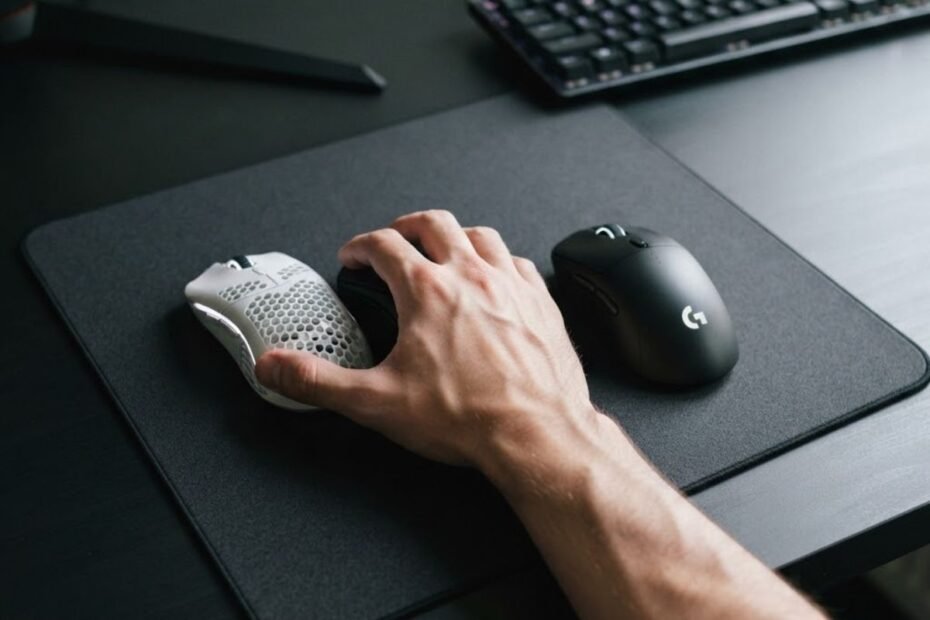
Mouse weight can influence hand and arm fatigue, but it is not the only factor. A heavier gaming mouse generally requires more force to start, stop, and reposition during gameplay, while an extremely lightweight mouse may demand greater muscle control for precise movements. In practice, fatigue results from the interaction between mouse weight, grip style, sensitivity, mouse shape, and session length rather than weight alone.
Many FPS players assume buying the lightest mouse available will immediately eliminate fatigue. Although reducing weight often lowers physical effort, long-term comfort depends on whether the mouse matches the player’s natural grip, aiming technique, and overall setup. Choosing the wrong combination can still lead to tired fingers, a strained wrist, or a fatigued forearm after several hours of play.
This guide explains how mouse weight affects muscle workload during FPS gaming, why players experience fatigue differently, and what weight range typically provides the best balance between comfort, control, and aiming consistency.
Does Mouse Weight Really Affect Hand and Arm Fatigue During Gaming?
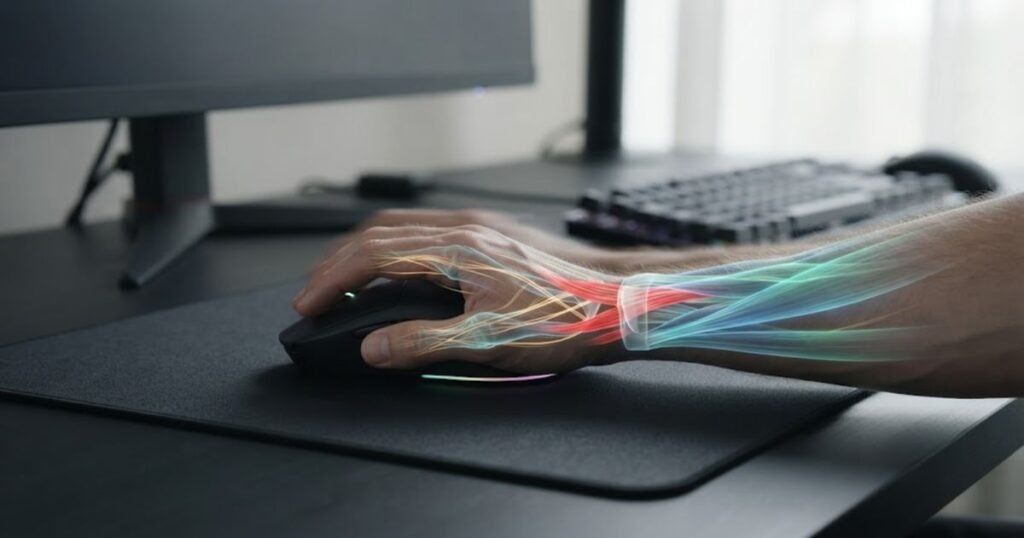
Yes, mouse weight affects hand and arm fatigue because it changes how much work your muscles perform throughout every movement. Every swipe, flick, and correction requires your fingers, wrist, and forearm muscles to overcome the mouse’s inertia. Over hundreds or even thousands of repeated movements during a gaming session, even small differences in required effort can accumulate into noticeable fatigue.
The illustration below shows how repeated mouse movement increases muscular workload during long gaming sessions:
However, weight should not be viewed as the direct cause of discomfort. Two players using the same 75 g mouse may report completely different experiences because their grip styles, mouse sensitivity, desk posture, muscle endurance, and movement habits are different. Weight simply changes the amount of physical effort required, while the overall setup determines whether that effort becomes fatigue.
The table below summarizes how mouse weight influences physical effort during extended gaming sessions:
| Mouse Weight | Physical Effort | Potential Effect on Fatigue |
|---|---|---|
| Ultra-light (Under 60 g) | Very low | Reduces muscular effort but may require greater movement control. |
| Lightweight (60–75 g) | Low | Often provides the best balance between comfort and stability for FPS players. |
| Medium (76–90 g) | Moderate | Comfort depends heavily on grip style and mouse shape. |
| Heavy (Over 90 g) | Higher | Requires more force during repeated movements, increasing the likelihood of muscle fatigue over long sessions. |
The table shows that heavier mice generally increase physical workload, but fatigue depends on the entire gaming setup rather than weight alone. For many players, the ideal mouse is not necessarily the lightest one, but the one that minimizes unnecessary muscle effort while maintaining consistent control.
Understanding this distinction is important because it shifts the focus away from chasing the lowest possible weight and toward optimizing the factors that actually influence long-term comfort. The following sections examine how mouse weight changes muscle workload during real FPS gameplay and why different players respond differently to the same mouse.
How Does Mouse Weight Change Muscle Effort During FPS Gameplay?
Mouse weight changes muscle effort by altering the amount of force required to accelerate, stop, and reposition the mouse during every movement. Although the difference between a 60 g and a 95 g mouse may seem small on paper, that additional mass becomes noticeable after thousands of flicks, tracking movements, and micro-adjustments in a competitive FPS match. Instead of thinking about weight as a number, it is more useful to think about how much work your hand must repeat throughout an entire gaming session.
Different mouse weights also shift how your muscles are used. A heavier mouse generally demands more physical force, while a lighter mouse reduces resistance but often requires finer motor control. Neither approach is automatically better because comfort depends on balancing physical effort with movement precision.
Why Heavy Mice Require More Physical Effort
Heavy gaming mice require more physical effort because greater mass creates more inertia, forcing your muscles to generate additional force whenever you start or stop a movement. This extra workload becomes most noticeable during low-sensitivity FPS games where large arm movements are repeated continuously. Every flick shot, wide tracking motion, or rapid target switch requires stronger acceleration followed by stronger braking to stop accurately on the target.
This added resistance is not always a disadvantage. Some players appreciate the controlled feeling that comes from additional mass, which explains why certain gamers still prefer the characteristics discussed in heavy gaming mice. However, over several hours of continuous play, the repeated force required to move a heavier mouse may gradually increase muscle fatigue, particularly in the wrist and forearm.
The comparison below illustrates how mouse weight changes the amount of force needed during movement:
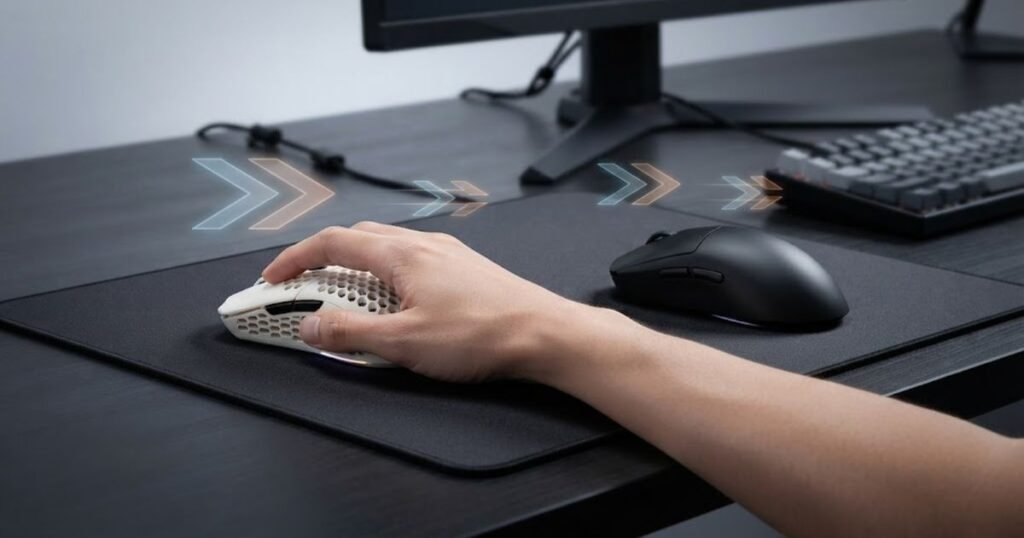
As physical effort increases, muscular fatigue accumulates more quickly, especially for players who perform hundreds of aggressive flicks every match. This explains why heavier mice often feel comfortable at first but become more demanding during extended gaming sessions.
Why Lightweight Mice Reduce Workload but Increase Control Demands
Lightweight gaming mice reduce muscular workload because less force is needed for every movement, but they also require more precise control from the player’s hand. Lower mass allows the mouse to accelerate almost instantly, making rapid flicks and direction changes feel easier. The reduction in resistance also decreases the overall workload placed on the fingers, wrist, and forearm during long gaming sessions.
However, lower resistance means the mouse responds to even the smallest movement. Players who are unfamiliar with a lightweight gaming mouse often discover that smoother movements demand finer muscle control rather than greater physical strength. Small aiming errors become more noticeable because there is less momentum to naturally stabilize the mouse.
The table below compares how different mouse weights influence muscle effort during FPS gameplay:
| Characteristic | Lightweight Mouse | Heavy Mouse |
|---|---|---|
| Force Required to Move | Lower | Higher |
| Acceleration | Very quick | Slower |
| Stopping Effort | Low | High |
| Muscle Workload | Reduced | Greater |
| Movement Precision Requirement | Higher | Moderate |
| Long Session Fatigue Potential | Generally lower* | Generally higher* |
The comparison shows that lighter mice primarily reduce physical effort, while heavier mice require greater muscular force but may feel more stable for some players. Neither design guarantees better comfort because muscle workload is only one part of the overall fatigue equation.
Understanding these mechanical differences helps explain why two players can report completely different experiences with the same mouse weight. The next section examines the individual factors that determine why fatigue varies from one player to another, even when both use identical hardware.
Why Do Some Players Feel More Fatigue Than Others With the Same Mouse?
Players experience different levels of fatigue with the same mouse because muscle workload is influenced by personal biomechanics, gaming habits, and overall setup rather than mouse weight alone. Two FPS players can use an identical 70 g gaming mouse for the same amount of time yet finish a match with completely different levels of discomfort. One player may feel relaxed after several hours, while another develops tired fingers or a sore forearm within a single session.
The image below highlights how different grip styles activate different muscles:
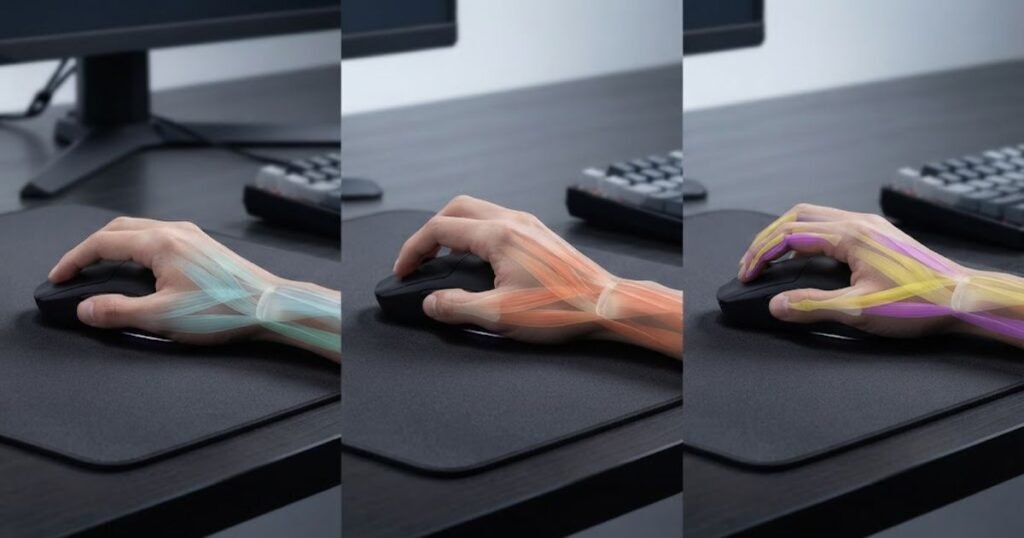
This difference exists because fatigue develops from the interaction of multiple factors. Grip style determines which muscles remain active throughout gameplay, while sensitivity, mousepad friction, desk height, and movement technique all influence how much work those muscles perform. Mouse weight changes part of the equation, but it rarely explains the entire experience.
Grip Style Changes Which Muscles Work Hardest
Grip style changes fatigue because each grip distributes muscular effort across different parts of the hand and forearm. Even when using the same mouse, changing from one grip style to another alters which muscles generate movement and maintain stability. As a result, two players using identical hardware may experience fatigue in completely different areas of the hand.
Palm grip spreads contact across the entire hand, allowing the palm and forearm to share much of the workload. This often reduces finger strain during long gaming sessions but may require larger arm movements. Claw grip shifts more responsibility toward the fingers while maintaining support from the palm, creating a balance between speed and stability. Fingertip grip relies almost entirely on finger control, making it highly responsive but also more demanding for the small muscles responsible for constant micro-adjustments.
The table below compares how common grip styles distribute muscular effort during FPS gameplay:
| Grip Style | Primary Muscle Usage | Common Fatigue Area | Long Session Comfort |
|---|---|---|---|
| Palm Grip | Palm and forearm | Forearm | Generally high |
| Claw Grip | Fingers and wrist | Fingers and wrist | Moderate to high |
| Fingertip Grip | Finger muscles | Fingertips and hand | Varies with endurance |
The comparison shows that fatigue often depends on which muscles stay active throughout gameplay rather than the mouse itself. Matching mouse weight with a natural grip style generally produces better comfort than changing weight alone.
Understanding which muscles your grip relies on makes it easier to identify why fatigue develops in specific parts of your hand instead of assuming that weight is always the cause.
Sensitivity and Mousepad Friction Also Influence Fatigue
Mouse sensitivity and mousepad friction often have a greater impact on fatigue than small differences in mouse weight because they directly affect movement distance and resistance. Players using low sensitivity usually move the mouse farther across the pad, increasing the number of large arm movements performed during every match. High sensitivity reduces travel distance but often increases the amount of precise wrist and finger corrections needed to maintain accuracy.
Mousepad friction changes this workload even further. A fast surface allows the mouse to glide with less resistance, reducing physical effort but requiring finer stopping control. A slower control pad creates more friction, increasing muscular effort while making movements easier to stabilize. These differences explain why changing only the mousepad can noticeably alter comfort, even when the mouse itself remains unchanged.
The table below compares several factors that influence fatigue beyond mouse weight:
| Factor | Higher Value | Typical Effect on Fatigue |
|---|---|---|
| Mouse Sensitivity | High | Less arm movement but more precise wrist control. |
| Mouse Sensitivity | Low | More arm movement with greater overall physical workload. |
| Mousepad Friction | Fast Surface | Lower resistance but increased stopping precision. |
| Mousepad Friction | Control Surface | Greater resistance with improved movement stability. |
| Session Length | Long | Fatigue accumulates regardless of mouse weight. |
The comparison highlights that fatigue develops from the combined effects of movement distance, surface resistance, and playing habits. Mouse weight contributes to comfort, but optimizing sensitivity and mousepad characteristics often produces a larger improvement than changing weight alone.
Recognizing these variables helps explain why no single mouse weight works perfectly for everyone. The next section focuses on situations where even an ultralight mouse can still lead to fatigue despite requiring less physical effort.
When Can a Lightweight Mouse Still Cause Fatigue?
A lightweight mouse can still cause fatigue when it increases muscle tension instead of reducing physical effort. Lower weight decreases the force required to move the mouse, but it also removes some of the natural resistance that helps stabilize movements. As a result, players may unconsciously grip the mouse harder, overcorrect their aim, or rely on constant finger adjustments. In these situations, muscle fatigue develops from excessive control rather than excessive weight.
The illustration below demonstrates why even an ultralight mouse can still lead to fatigue:
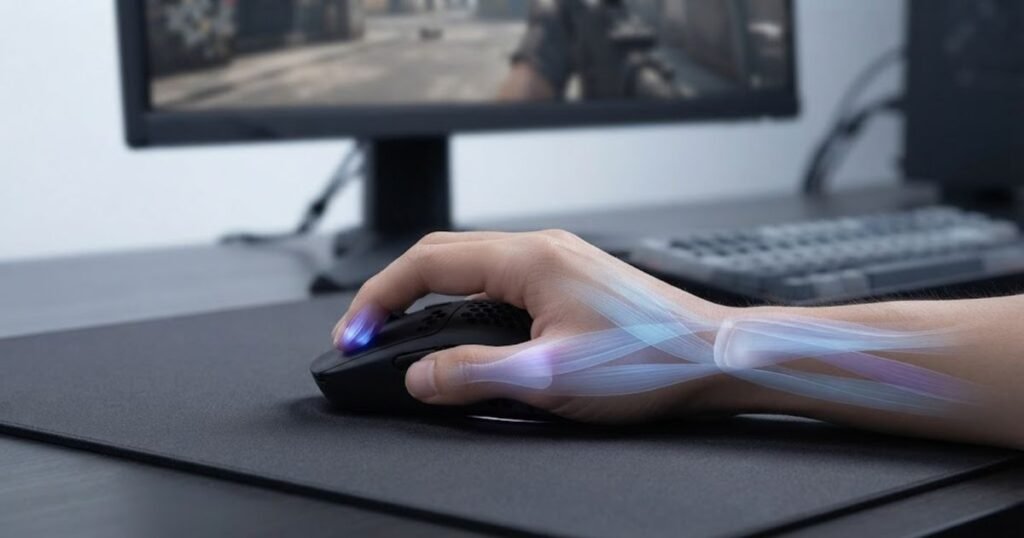
This is one of the biggest misconceptions surrounding lightweight gaming mice. While reducing weight often improves comfort, it does not eliminate poor movement habits or an unsuitable mouse fit. Fatigue can still appear if the hand remains under continuous tension throughout a gaming session.
Overcorrecting Every Movement Increases Finger Fatigue
Constant overcorrection increases fatigue because the small muscles controlling the fingers remain active throughout every aiming adjustment. An ultralight mouse responds immediately to tiny inputs, making precise aiming easier but also exposing unnecessary hand movements. Players who repeatedly make small corrections instead of moving smoothly often keep their fingers under continuous tension.
Unlike the larger muscles in the forearm, the small muscles responsible for fingertip control fatigue more quickly when they remain engaged for extended periods. This is especially common among players who constantly readjust their crosshair instead of allowing natural arm movement to guide larger directional changes.
Reducing unnecessary corrections usually improves comfort more than changing mouse weight by a few grams. Developing smoother mouse control allows the hand to relax between movements, reducing accumulated fatigue during long FPS sessions.
Using a Mouse That Is Too Small Can Increase Grip Tension
A mouse that is too small often increases fatigue because the hand must squeeze harder to maintain stability. Even an ultralight design becomes uncomfortable if it does not properly support the natural position of the fingers and palm. Instead of resting comfortably, the hand continuously generates gripping force to prevent the mouse from shifting during fast movements.
This explains why some players experience greater fatigue after switching to an extremely light mouse. The reduction in weight may improve movement speed, but if the size or shape no longer matches the hand, the muscles responsible for gripping remain active throughout every flick and tracking movement. Selecting an appropriate mouse shape is just as important as choosing the right weight, regardless of how popular lightweight gaming mice have become among competitive FPS players.
Comfort improves when the mouse naturally fills the hand without requiring constant gripping pressure. A properly fitted shape allows the muscles to relax whenever active movement is not required.
Poor Grip Habits Create Continuous Muscle Tension
Poor grip habits can cause fatigue regardless of mouse weight because unnecessary muscle tension remains present throughout the entire gaming session. Many players unintentionally squeeze the mouse during stressful moments, lift it more often than necessary, or keep their fingers rigid while tracking opponents. These habits increase muscular workload even when using one of the lightest gaming mice available.
The factors below explain why lightweight mice do not always eliminate fatigue:
- Excessive Grip Pressure: Holding the mouse too tightly keeps the hand muscles under constant tension.
- Frequent Micro-Corrections: Small continuous adjustments prevent the fingers from relaxing between movements.
- Poor Mouse Fit: An undersized mouse forces the hand to stabilize the shape instead of resting naturally.
- Repeated Mouse Lifting: Frequent repositioning increases workload for the fingers and wrist.
- Rigid Wrist Position: Limited wrist mobility transfers more strain to smaller hand muscles.
These habits often contribute more to fatigue than mouse weight itself, making movement technique an important part of long-term comfort.
Improving ergonomics does not always require replacing your mouse. In many cases, reducing grip tension and allowing smoother, more relaxed movements provides a greater improvement than chasing the lightest model available.
What Mouse Weight Is Best for Long FPS Gaming Sessions?
The best mouse weight for long FPS gaming sessions is the one that balances comfort, control, and endurance rather than simply being the lightest available. Most competitive FPS players perform best with a mouse that feels effortless to move without becoming difficult to stabilize. Instead of focusing on a specific number, choosing the right weight should account for grip style, aiming technique, sensitivity, and how long you typically play.
There is no universal weight that works for every player. Someone using a low sensitivity with large arm movements may prefer a lighter mouse to reduce physical effort, while another player using higher sensitivity may benefit from slightly more mass to improve stopping control. The goal is to find a weight that minimizes unnecessary muscular effort while maintaining reliable aim throughout an extended gaming session.
Recommended Mouse Weight Ranges for Different Grip Styles
Different grip styles benefit from different weight ranges because each grip distributes muscular effort in a unique way. Palm grip generally tolerates slightly heavier mice thanks to greater support from the hand and forearm. Claw grip often benefits from moderate weights that balance speed and stability, while fingertip grip usually performs best with lighter designs because the fingers handle nearly all movement and control.
The table below compares recommended mouse weight ranges based on common FPS grip styles:
| Grip Style | Recommended Weight | Reason |
|---|---|---|
| Palm Grip | 65–85 g | Provides stability while distributing workload across the hand and forearm. |
| Claw Grip | 60–75 g | Balances rapid movement with controlled stopping. |
| Fingertip Grip | 50–65 g | Reduces finger workload during continuous micro-adjustments. |
The comparison illustrates that the ideal weight depends on how the mouse is controlled rather than a single universal recommendation. Matching weight to your natural grip usually improves comfort more than selecting the lightest mouse available.
Choosing an appropriate weight becomes much easier when it is evaluated alongside sensor performance, shape, and overall build quality, which are all considered in our guide to the best gaming mice for FPS games.
Recommended Mouse Weight Ranges by Playing Style
Playing style also influences the ideal mouse weight because different aiming techniques place different demands on the hand and arm. Fast-paced entry fraggers often perform frequent flick shots and large directional changes, making lighter mice feel less demanding over time. Players who rely on deliberate tracking or controlled positioning may prefer a slightly heavier mouse that provides additional stability without becoming tiring.
The table below compares recommended mouse weights for different FPS playing styles:
| Playing Style | Recommended Weight | Primary Benefit |
|---|---|---|
| Fast Flicking | 50–65 g | Lower effort during repeated acceleration and rapid direction changes. |
| Balanced Aim | 60–75 g | Combines speed with predictable control. |
| Precision Tracking | 65–80 g | Provides smoother stopping control for continuous tracking. |
| Long Casual Sessions | 60–75 g | Maintains comfort while reducing accumulated muscle workload. |
The table demonstrates that ideal weight changes according to how the mouse is used rather than the game alone. Players who perform aggressive movements generally benefit from reducing unnecessary workload, while those emphasizing control may appreciate a slightly heavier design.
Ultimately, the best mouse weight is the one you stop noticing during gameplay. When weight, grip style, and movement technique work together naturally, muscle fatigue becomes less distracting and aiming consistency is easier to maintain throughout long FPS sessions.
How Can You Reduce Mouse Fatigue Without Buying a New Mouse?
You can reduce mouse fatigue without replacing your mouse by improving your movement technique, optimizing your setup, and allowing your muscles to recover during long gaming sessions. Many players assume discomfort means they need a lighter mouse, but fatigue is often caused by unnecessary muscle tension rather than the hardware itself. Small adjustments to posture, grip pressure, and sensitivity frequently produce greater improvements than changing mouse weight alone.
The image below shows an ergonomic gaming setup designed to reduce hand fatigue:
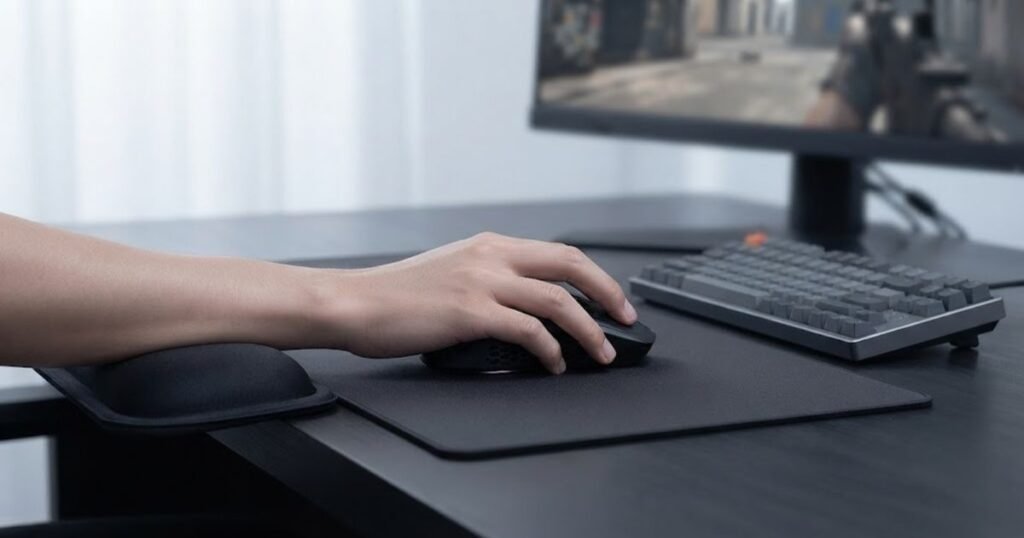
The objective is to reduce unnecessary workload while maintaining consistent aim. Instead of forcing your muscles to work harder than necessary, an efficient setup allows the mouse to move naturally with minimal effort throughout every match.
Optimize Your Sensitivity and Desk Setup
An optimized sensitivity and desk setup reduce fatigue by encouraging smoother, more natural arm and wrist movements. Extremely low sensitivity increases the number of large arm movements required during gameplay, while excessively high sensitivity often creates constant wrist and finger corrections. Finding a balanced sensitivity allows larger muscles to share the workload without sacrificing aiming precision.
Desk ergonomics also play an important role. Sitting at an appropriate height, keeping the forearm supported, and allowing enough mousepad space help reduce unnecessary strain. A comfortable setup lets the arm move freely instead of forcing the wrist to compensate for awkward positioning.
Small ergonomic adjustments may seem insignificant individually, but together they often reduce fatigue far more effectively than changing mouse weight by only a few grams.
Reduce Grip Pressure Instead of Holding the Mouse Tightly
Reducing grip pressure allows your hand muscles to relax between movements, preventing unnecessary fatigue from building throughout a gaming session. Many FPS players instinctively squeeze the mouse during intense situations without realizing it. This continuous muscle tension remains active even when the mouse is not moving, gradually exhausting the fingers, hand, and wrist.
A relaxed grip keeps the mouse secure without requiring constant force. The mouse should feel stable enough for accurate aiming while still allowing your fingers to move freely during flicks, tracking, and micro-adjustments. Players who learn to reduce gripping tension often notice improved comfort without changing any hardware.
Relaxed control is generally more sustainable than relying on muscular force, making long gaming sessions feel noticeably less demanding.
Take Short Recovery Breaks During Long Gaming Sessions
Short recovery breaks help prevent fatigue by allowing muscles to relax before tension accumulates into discomfort. Even with an ideal mouse weight and a well-balanced setup, muscles become tired after continuous repetitive movement. Brief recovery periods restore circulation, reduce muscle stiffness, and maintain consistent performance during extended play.
The following process can help reduce mouse fatigue during long FPS sessions:
- Adjust Your Sitting Position: Keep your shoulders relaxed, your forearm supported, and your wrist in a neutral position.
- Use Comfortable Sensitivity: Choose a sensitivity that allows natural movement without excessive arm travel or constant wrist corrections.
- Relax Your Grip: Hold the mouse firmly enough for control but avoid squeezing it throughout gameplay.
- Pause Every 45–60 Minutes: Rest your hand, stretch your fingers, and gently move your wrist before continuing.
- Monitor Early Signs of Fatigue: If movements become tense or inconsistent, take a short break before discomfort becomes pain.
These habits reduce accumulated muscular stress while helping maintain consistent aim over longer gaming sessions.
Players looking to optimize every aspect of their setup, including mouse shape, sensor performance, ergonomics, and weight, should evaluate these factors together when selecting a gaming mouse for FPS games instead of focusing on weight alone.
Developing efficient movement habits produces long-term improvements that no single hardware upgrade can fully replace. When posture, grip, sensitivity, and recovery work together, mouse fatigue becomes significantly easier to manage, regardless of whether your mouse weighs 55 g or 75 g.
Frequently Asked Questions About Mouse Weight and Fatigue
The questions below answer common concerns that FPS players have about mouse weight and fatigue. These answers expand on practical situations that have not been covered in detail throughout the guide, helping you make better decisions based on your own gaming habits rather than following general recommendations.
Can a heavy mouse cause wrist pain?
A heavy mouse can contribute to wrist pain, but it is rarely the sole cause. Wrist discomfort usually develops when higher physical effort is combined with poor posture, excessive grip pressure, or long gaming sessions without adequate breaks.
Reducing muscle tension and improving ergonomics are often more effective than simply switching to a lighter mouse.
Is a lighter mouse always better for FPS games?
No, a lighter mouse is not automatically better. While reducing weight lowers physical effort, some players achieve better control and consistency with a slightly heavier mouse that matches their grip style and aiming technique.
The best choice is the one that allows comfortable movement without sacrificing accuracy.
Does mouse weight affect aim consistency?
Yes, mouse weight can influence aim consistency because it changes how easily the mouse accelerates and stops. However, consistency is also heavily influenced by practice, sensitivity, mouse shape, and movement technique.
Weight should be considered alongside the rest of your setup rather than in isolation.
Is a 60 g gaming mouse too light?
For most FPS players, a 60 g gaming mouse is not too light. This weight range is commonly used because it balances low physical effort with reliable control, although personal preference still plays an important role.
Comfort ultimately depends on how naturally the mouse fits your hand and play style.
Is a 100 g gaming mouse too heavy?
A 100 g gaming mouse may feel heavy for many modern FPS players, especially during long sessions. However, some users still prefer this weight because the additional mass creates a more stable feeling during controlled movements.
Whether it feels too heavy depends on your sensitivity, grip, and physical endurance.
Does DPI affect hand fatigue?
DPI itself does not directly cause fatigue. Fatigue is more closely related to your effective sensitivity, movement distance, and aiming habits than the DPI setting alone.
Finding a comfortable overall sensitivity is usually more important than changing DPI values.
Does polling rate affect mouse fatigue?
No, polling rate has little direct effect on physical fatigue. Higher polling rates improve cursor responsiveness but do not significantly change the muscular effort required to move the mouse.
Most differences are related to responsiveness rather than comfort.
Can mouse shape matter more than mouse weight?
Yes, mouse shape often has a greater impact on comfort than weight. A well-shaped mouse supports a natural grip, reducing unnecessary muscle tension even if it weighs slightly more than another model.
Proper hand support is one of the most important factors for long-term comfort.
Why do my fingers get tired before my wrist?
Finger fatigue usually occurs when the fingers perform most of the movement and stabilization. This is common with fingertip grip, excessive grip pressure, or constant micro-adjustments during aiming.
Reducing unnecessary finger tension often improves comfort more effectively than reducing mouse weight.
Can a larger mouse reduce fatigue?
Yes, a larger mouse can reduce fatigue if it better matches your hand size. Better support allows the hand to relax naturally instead of continuously gripping the mouse for stability.
The right shape often improves comfort even when overall mouse weight remains unchanged.
Can changing my mousepad reduce fatigue?
Yes, changing your mousepad can influence fatigue because surface friction changes how much force is required to move the mouse. Faster pads generally reduce resistance, while control pads increase stopping stability.
The ideal surface depends on your sensitivity, aiming style, and preferred level of control.
Should I replace my mouse because of fatigue?
Not necessarily. Before buying a new mouse, evaluate your grip pressure, posture, sensitivity, desk setup, and gaming habits. Many cases of fatigue improve through better ergonomics rather than new hardware.
If discomfort continues after optimizing your setup, choosing a mouse with a more suitable weight and shape may be worthwhile.
Conclusion
Mouse weight influences fatigue, but it is only one part of a much larger picture. While a lighter mouse generally reduces the physical effort required for repeated movements, long-term comfort depends just as much on grip style, mouse shape, sensitivity, movement technique, and ergonomics. Focusing on weight alone often overlooks the factors that have the greatest impact on muscle fatigue.
The most comfortable gaming mouse is not simply the lightest or the heaviest. It is the one that allows natural movement with minimal muscular effort while maintaining consistent control throughout long FPS gaming sessions. Evaluating your entire setup instead of chasing a specific weight will usually produce better comfort and more consistent aiming performance over time.
Thank you for reading this guide. We hope it helps you find a gaming setup that keeps you comfortable and performing at your best.