
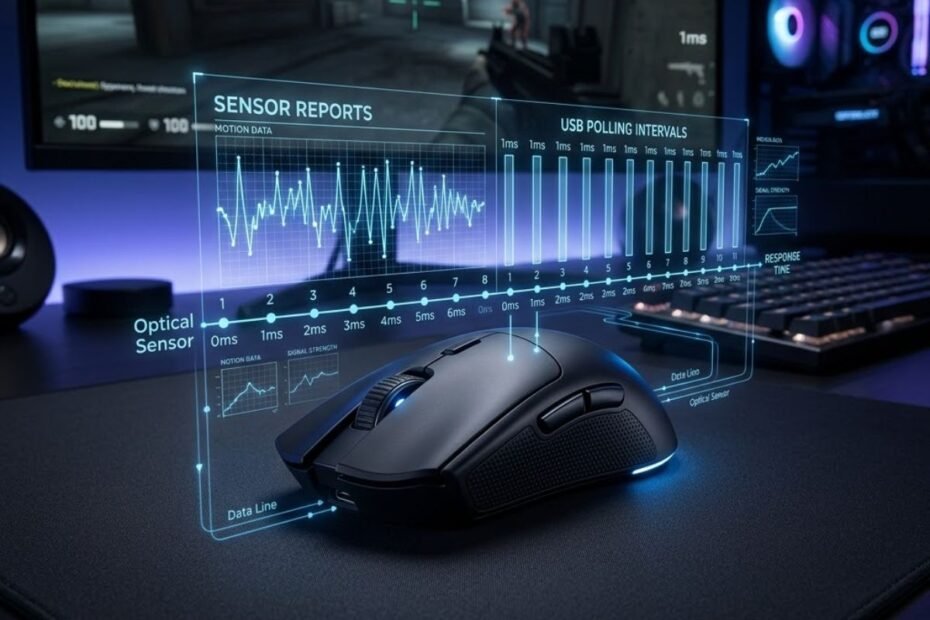
Motion Sync is a gaming mouse sensor feature designed to synchronize movement data with the mouse’s USB polling intervals before each report is sent to your PC. Although many modern gaming mice advertise Motion Sync as an advanced feature, its purpose is often misunderstood. Some players believe it improves sensor accuracy, while others assume it reduces input latency. Neither explanation is entirely correct.
This guide explains what Motion Sync actually does, why some gaming mouse sensors support it, and whether it has any meaningful impact on FPS gameplay. Rather than relying on marketing claims, you’ll learn how Motion Sync fits into the sensor reporting process and when it may or may not make a noticeable difference.
What Is Motion Sync on a Gaming Mouse and What Does It Actually Do?
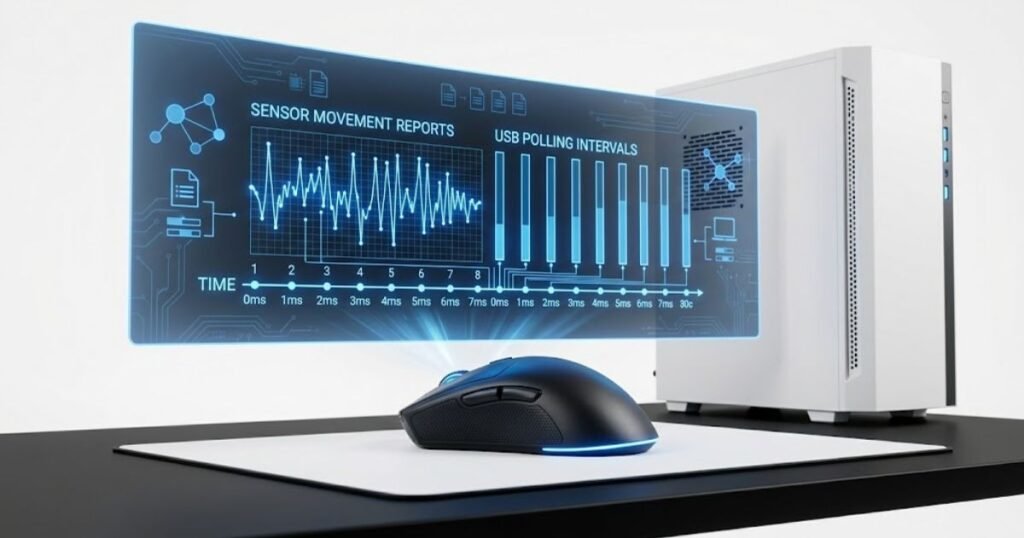
Motion Sync is a feature that synchronizes a gaming mouse sensor’s movement reports with USB polling intervals, creating more consistent report timing rather than improving the sensor’s tracking accuracy. Instead of transmitting movement data immediately after it is captured, the sensor briefly aligns that data with the next scheduled USB report. The result is a more consistent stream of movement reports without changing how accurately the sensor tracks the surface.
To understand why Motion Sync exists, it helps to know that a gaming mouse sensor captures movement continuously, while your computer only receives updates at fixed polling intervals such as 1000 Hz, 2000 Hz, 4000 Hz, or 8000 Hz. Motion Sync attempts to coordinate these two processes so each USB report contains a complete and synchronized movement sample instead of one generated at a slightly inconsistent moment.
The illustration below shows how Motion Sync synchronizes sensor reports with USB polling intervals:
This also explains why Motion Sync is considered a sensor-level feature instead of a software optimization. If you’d like to understand the role of the sensor itself before diving deeper into Motion Sync, learning about a gaming mouse sensor provides helpful background for the concepts discussed throughout this guide.
Why Was Motion Sync Introduced in Modern Gaming Mouse Sensors?
Motion Sync was introduced to improve the consistency of movement reports between the sensor and the PC, especially as polling rates and sensor performance continued to increase. Modern optical sensors generate movement data extremely quickly, often producing information faster than the USB interface delivers reports to the operating system. Without synchronization, some reports may be generated at slightly different moments within each polling cycle.
Although these timing differences are already very small, sensor manufacturers developed Motion Sync to make report intervals more uniform. Instead of prioritizing the fastest possible transmission, Motion Sync prioritizes consistency by ensuring each USB report is delivered in a predictable rhythm. For many players, the difference is too subtle to notice directly, but it represents an engineering refinement rather than a dramatic gameplay feature.
This design philosophy reflects the broader evolution of gaming mouse technology, where manufacturers focus on eliminating tiny inconsistencies that become more relevant as sensor precision, polling rates, and competitive expectations continue to improve.
Which Gaming Mice and Sensors Support Motion Sync?
Motion Sync is typically found in modern high-end optical sensors, although not every manufacturer enables the feature by default. Support depends on both the sensor hardware and the firmware implementation provided by the mouse manufacturer. As a result, two gaming mice using similar sensors may expose Motion Sync differently or choose not to offer a user-controlled toggle at all.
Recent flagship sensors from PixArt have made Motion Sync increasingly common across competitive gaming mice. Brands such as Pulsar, Lamzu, Ninjutso, Endgame Gear, and several custom firmware implementations may include the feature, while other manufacturers leave it permanently enabled or disabled behind the scenes without exposing the setting to users.
Regardless of brand, Motion Sync should not be viewed as a standalone measure of mouse quality. Overall sensor performance still depends on hardware implementation, firmware tuning, wireless stability, click latency, and tracking performance working together rather than on a single feature alone.
Understanding what Motion Sync actually does makes it easier to evaluate the rest of this guide. Rather than treating it as a performance upgrade, it’s more accurate to view Motion Sync as a timing optimization that changes how movement reports are delivered, setting the foundation for understanding exactly how the synchronization process works inside a modern gaming mouse.
How Does Motion Sync Work Inside a Gaming Mouse Sensor?
Motion Sync works by synchronizing the sensor’s movement data with scheduled USB polling intervals before each report is transmitted to the computer. Rather than changing how the sensor detects movement, Motion Sync adjusts when that movement data is delivered. This creates more consistent report timing while leaving the sensor’s tracking accuracy, DPI performance, and surface detection unchanged.
To understand the process, it’s important to separate two independent systems inside a gaming mouse. The optical sensor continuously captures movement information, while the USB interface sends reports to the operating system at fixed intervals based on the selected polling rate. Motion Sync simply coordinates these two systems so the timing of each report becomes more predictable.
How a Gaming Mouse Sensor Captures Movement Data
A gaming mouse sensor continuously captures images of the surface beneath the mouse and compares those images to calculate movement. Every tiny change detected between consecutive images is converted into movement data that the mouse firmware processes before preparing a USB report.
This entire process happens thousands of times every second. The sensor never waits for a polling interval before tracking movement. Instead, it constantly measures position changes regardless of whether the computer is ready to receive another report. If you’re interested in the complete imaging and tracking process, this guide on how gaming mouse sensors work explains each stage in greater technical detail.
Because movement detection operates independently from USB communication, there is naturally a small difference between the moment movement is detected and the moment that information is transmitted to the PC. Motion Sync is designed to organize that timing more consistently rather than altering how movement itself is measured.
How Motion Sync Aligns Sensor Reports with USB Polling Intervals
Motion Sync waits for the next scheduled USB polling interval before sending a synchronized movement report to the computer. Instead of transmitting data immediately after the sensor finishes processing it, the firmware briefly holds that information so it can be delivered at a predictable point within the polling cycle.
The following diagram illustrates the Motion Sync synchronization process:
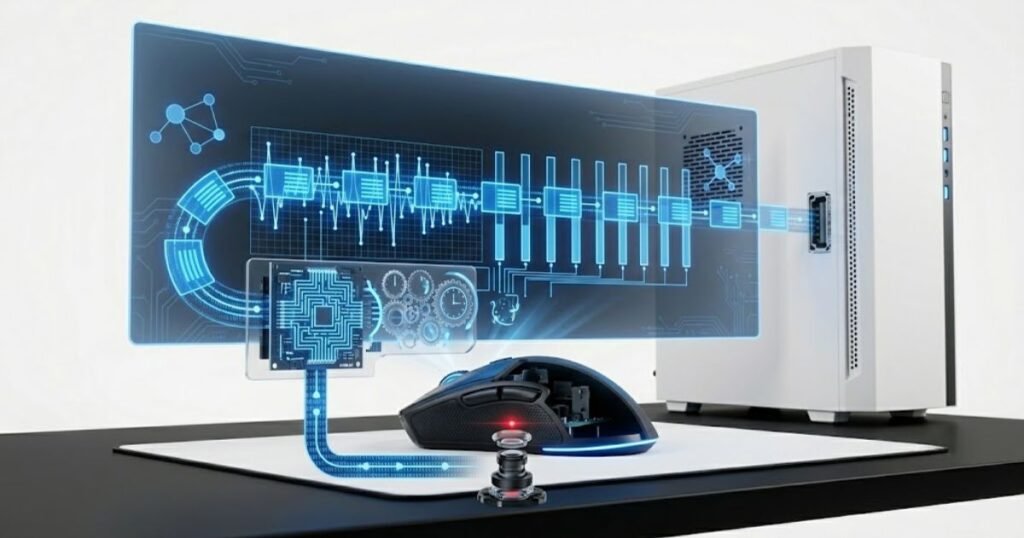
Without Motion Sync, movement reports may be generated at slightly different moments relative to each USB polling interval. These variations are extremely small, but they can produce minor differences in report timing from one update to the next. Motion Sync reduces these timing variations by ensuring each report follows a more consistent delivery schedule.
The table below compares standard sensor reporting with Motion Sync:
| Feature | Standard Sensor Reporting | Motion Sync Enabled |
|---|---|---|
| Report timing | Sent as data becomes available | Synchronized with USB polling intervals |
| Movement detection | Continuous | Continuous |
| Tracking accuracy | Unchanged | Unchanged |
| Report consistency | Slightly variable | More consistent |
| Primary objective | Immediate reporting | Consistent report timing |
The comparison shows that Motion Sync changes the timing of report delivery instead of modifying how the sensor tracks movement. Its purpose is to make communication between the mouse and the PC more consistent rather than increasing sensor precision.
Understanding this synchronization process provides the technical foundation for evaluating Motion Sync in real gameplay. The next question is whether this more consistent report timing produces any meaningful advantage for FPS players or whether the difference remains too small for most people to notice.
Does Motion Sync Improve FPS Gaming Performance?
Motion Sync can improve the consistency of movement reports, but it does not automatically make a gaming mouse more responsive or more accurate. For most FPS players, the practical impact is subtle. Whether the feature feels beneficial depends on the mouse hardware, polling rate, game engine, and the player’s own sensitivity to minor differences in mouse feel.
Because Motion Sync focuses on report timing instead of raw tracking performance, it should be viewed as a refinement rather than a performance upgrade. It is one of many technologies that contribute to the overall experience instead of a feature that dramatically changes aiming performance on its own.
Does Motion Sync Improve Mouse Tracking Consistency?
Yes, Motion Sync is designed to improve tracking consistency by making movement reports arrive at more regular intervals. Consistent report timing can produce smoother motion data, especially during continuous swipes where the mouse generates a large number of movement updates.
This does not mean the cursor becomes more accurate or the sensor suddenly tracks better. The sensor already measures movement with the same precision regardless of whether Motion Sync is enabled. The improvement comes from presenting that movement data to the operating system in a more predictable sequence rather than changing the quality of the data itself.
Does Motion Sync Increase Input Latency?
Motion Sync may introduce a very small amount of additional latency because movement data is synchronized with the next USB polling interval before transmission. However, the added delay is typically measured in fractions of a millisecond and is often too small to distinguish during normal gameplay.
For modern gaming mice with high-quality firmware, the trade-off is generally considered negligible. Many competitive players are unlikely to perceive any measurable difference outside of controlled latency testing, while others may simply prefer the subjective feel of one configuration over another.
Can Most FPS Players Actually Notice the Difference?
Most players are unlikely to notice a dramatic difference between Motion Sync being enabled or disabled during regular gameplay. Improvements are generally subtle and become harder to isolate because aiming performance is influenced by many other variables, including mouse shape, weight, sensor implementation, wireless stability, display latency, and individual technique.
The table below summarizes the primary benefits and trade-offs of Motion Sync:
| Aspect | Potential Benefit | Possible Trade-off |
|---|---|---|
| Report timing | More consistent delivery | Requires synchronization before transmission |
| Tracking feel | Smoother movement reporting | Difference may be difficult to notice |
| Sensor accuracy | No change | No improvement |
| Input latency | Generally negligible impact | Slight theoretical increase |
| Competitive gameplay | May improve consistency for some players | Not universally preferred |
This comparison highlights why Motion Sync is best viewed as a refinement to report timing instead of a feature that directly improves aiming accuracy or gaming performance. Understanding these practical effects makes it easier to compare Motion Sync with other sensor technologies that are often confused with it.
Motion Sync vs Sensor Smoothing: What Is the Difference?
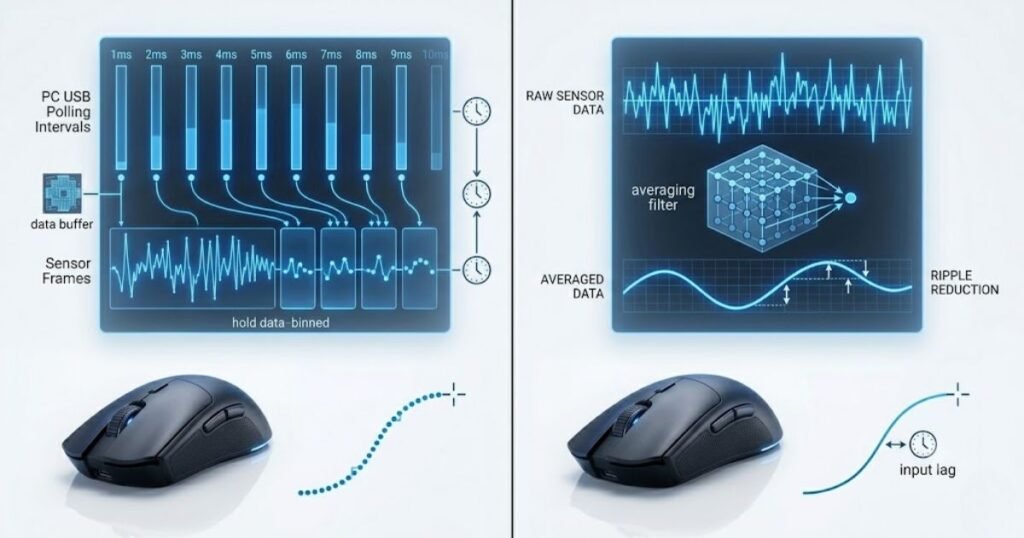
Motion Sync and Sensor Smoothing are different technologies that solve different problems inside a gaming mouse sensor. Motion Sync synchronizes when movement reports are sent to the PC, while Sensor Smoothing processes movement data before it is reported. Although both operate at the sensor level, they affect different parts of the data pipeline and should never be considered interchangeable features.
Many FPS players confuse these technologies because both are discussed alongside modern optical sensors. However, understanding the distinction is important when evaluating gaming mouse performance. Motion Sync focuses on report timing, whereas Sensor Smoothing focuses on modifying raw movement data.
How Motion Sync Affects Report Timing
Motion Sync improves consistency by synchronizing completed movement reports with USB polling intervals. It does not analyze or modify the movement data produced by the sensor. Instead, it simply determines the most consistent time to deliver that information to the operating system.
Because the underlying tracking data remains unchanged, Motion Sync does not increase DPI accuracy, eliminate jitter, or make a sensor inherently more precise. Its contribution is limited to producing a steadier flow of movement reports throughout gameplay.
How Sensor Smoothing Changes Movement Data
Sensor Smoothing modifies movement data before it reaches the computer by averaging multiple sensor samples together. This processing can reduce unwanted noise at extremely high DPI settings, but it also changes the original movement information produced by the sensor.
The comparison below highlights how Motion Sync differs from Sensor Smoothing:
Modern flagship sensors require much less smoothing than older generations, yet the technology still exists in certain implementations depending on DPI levels and firmware design. If you’d like to understand how this processing works in greater detail, this guide explains sensor smoothing and why it can influence overall mouse feel.
Which Feature Has a Greater Impact on Competitive FPS Gaming?
Sensor Smoothing generally produces a more noticeable change because it directly affects movement data, while Motion Sync primarily refines report timing. Both technologies may influence the overall experience, but they do so through completely different mechanisms.
For competitive players seeking the most natural tracking experience, understanding this difference helps prevent the common misconception that enabling Motion Sync automatically applies movement filtering. In reality, Motion Sync leaves the sensor’s measurements intact and simply organizes when those measurements are delivered.
The table below compares Motion Sync with Sensor Smoothing:
| Feature | Motion Sync | Sensor Smoothing |
|---|---|---|
| Primary purpose | Synchronize report timing | Filter movement data |
| Changes sensor data | No | Yes |
| Affects USB report timing | Yes | No |
| Main benefit | More consistent report delivery | Reduced sensor noise at high DPI |
| Typical gameplay effect | Usually subtle | Depends on implementation and DPI |
The comparison shows that Motion Sync and Sensor Smoothing improve different aspects of mouse performance. Knowing which technology affects report timing and which alters movement data makes it much easier to evaluate gaming mouse specifications accurately.
Should You Enable Motion Sync on Your Gaming Mouse?
For most modern FPS players, enabling Motion Sync is a reasonable default because it provides more consistent report timing without changing sensor accuracy. However, there is no universally correct setting. The best choice ultimately depends on how the feature feels on your specific mouse, firmware, and preferred play style.
Instead of assuming Motion Sync is always better or always worse, it is more useful to evaluate whether the synchronization improves your overall mouse feel during extended gameplay. Since the feature focuses on consistency rather than raw performance, personal preference remains an important factor.
When Should You Leave Motion Sync Enabled?
Leaving Motion Sync enabled is generally recommended if you want the most consistent report timing and your mouse firmware is well optimized. Most recent gaming mice that include the feature are designed to balance synchronization with extremely low latency, making the trade-off negligible for many players.
The factors below explain when enabling Motion Sync is most appropriate:
- Modern gaming mouse: New flagship sensors are designed to support synchronized report timing efficiently.
- Stable firmware: Well-optimized firmware minimizes any practical drawbacks.
- Consistent tracking preference: Some players value predictable report timing during long tracking movements.
- Default manufacturer tuning: Many gaming mice are tested and validated with Motion Sync enabled.
These situations demonstrate why many players simply leave Motion Sync enabled throughout normal gameplay.
When Might Disabling Motion Sync Be a Better Choice?
Disabling Motion Sync may be worthwhile if you prefer the feel of immediate report delivery or simply cannot detect any benefit from synchronization. Because the feature does not improve tracking accuracy, turning it off does not reduce the quality of the underlying sensor.
Some experienced competitive players prefer maintaining the exact mouse behavior they have practiced with for years. In these situations, consistency with existing muscle memory may be more valuable than adopting a slightly different report timing strategy.
Which Motion Sync Setting Is Best for Different FPS Players?
There is no single Motion Sync setting that is ideal for everyone, but different player profiles can benefit from different approaches. The recommendation should be based on experience, familiarity with the mouse, and whether the player prioritizes consistent report timing or preserving an established mouse feel.
The table below recommends Motion Sync settings for different types of FPS players:
| Player Type | Recommendation | Reason |
|---|---|---|
| New FPS players | Enable | Matches the default tuning of many modern gaming mice. |
| Competitive ranked players | Test both settings | Personal preference often determines the better choice. |
| Professional players | Keep your established setup | Consistency with long-term muscle memory is usually the priority. |
| Players upgrading to a new mouse | Start enabled, then compare | Provides a consistent baseline before making adjustments. |
The recommendations show that Motion Sync should be treated as a preference-based feature rather than a mandatory competitive setting. Testing both configurations under identical conditions remains the most reliable way to determine which option feels best for your own gameplay.
Common Motion Sync Myths That Often Confuse FPS Players
Motion Sync is frequently misunderstood because it is often grouped with other gaming mouse technologies that serve completely different purposes. Marketing materials, forum discussions, and social media posts sometimes exaggerate its impact, leading players to believe it dramatically improves aim, eliminates latency, or increases sensor accuracy. In reality, Motion Sync has a much narrower purpose centered on report timing.
Separating facts from misconceptions allows players to make better decisions when configuring their gaming mouse. Rather than expecting Motion Sync to transform performance, it should be evaluated based on what it was actually designed to accomplish.
Motion Sync Does Not Increase Sensor Accuracy
Motion Sync does not make a gaming mouse sensor more accurate because it never changes how movement is measured. Sensor accuracy depends on the optical sensor, lens quality, firmware tuning, and surface tracking performance. Motion Sync simply determines when completed movement reports are transmitted to the PC.
This distinction is important because many players assume smoother cursor movement automatically means more accurate tracking. In reality, Motion Sync leaves the original movement data untouched, meaning the sensor’s ability to detect movement remains exactly the same whether the feature is enabled or disabled.
Motion Sync Does Not Change DPI or Polling Rate
Motion Sync has no effect on DPI, polling rate, or sensitivity settings. These settings control different aspects of mouse performance and continue to operate independently regardless of whether Motion Sync is enabled.
The image below illustrates what Motion Sync does and does not affect:
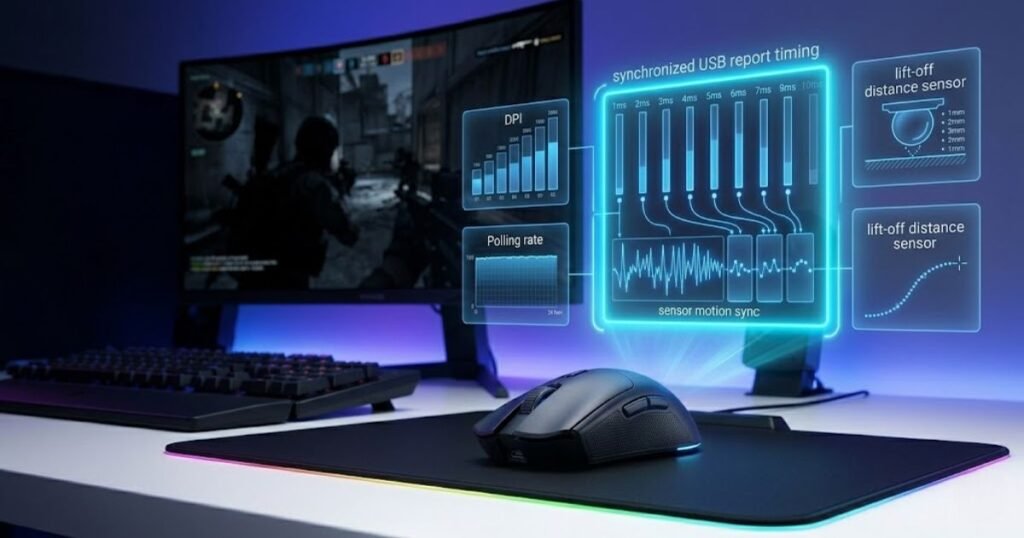
DPI determines how far the cursor moves relative to physical mouse movement, while polling rate determines how frequently reports are sent to the computer. Motion Sync simply synchronizes those reports with the existing polling schedule instead of modifying either setting.
Motion Sync Is Not Related to Lift-Off Distance
Motion Sync does not influence lift-off distance because the two technologies address completely different sensor behaviors. Lift-off distance determines how high a mouse can be lifted before tracking stops, whereas Motion Sync only affects report timing during normal tracking.
If you’re interested in understanding how lift-off distance impacts gameplay and why manufacturers tune it differently, this guide explains lift-off distance in greater detail. Understanding these independent sensor characteristics makes it easier to evaluate gaming mouse specifications without confusing unrelated features.
The table below separates common Motion Sync myths from verified facts:
| Common Myth | Reality |
|---|---|
| Motion Sync improves sensor accuracy. | It only synchronizes report timing. |
| Motion Sync increases DPI performance. | DPI behavior remains completely unchanged. |
| Motion Sync reduces all input latency. | Its goal is consistent report timing, not lower latency. |
| Motion Sync changes lift-off distance. | Lift-off distance is an independent sensor characteristic. |
| Every competitive player should enable Motion Sync. | The preferred setting depends on personal preference and firmware implementation. |
Recognizing these misconceptions helps players evaluate Motion Sync based on its actual function instead of unrealistic expectations. This also makes it easier to interpret manufacturer specifications and community discussions more accurately.
How to Test Whether Motion Sync Makes a Difference on Your Mouse
The most reliable way to evaluate Motion Sync is to compare both settings under identical conditions using the same mouse, game, and sensitivity. Because the differences are often subtle, changing multiple settings at the same time makes it difficult to determine whether Motion Sync is responsible for any perceived improvement.
Testing should focus on consistency over multiple gaming sessions rather than making a decision after only a few minutes. Small differences in report timing are easier to evaluate during repeated tracking movements and normal gameplay than during isolated benchmark tests.
How to Perform a Fair Motion Sync Comparison
Testing Motion Sync correctly requires changing only one setting while keeping every other variable identical. This approach minimizes bias and allows you to evaluate whether the feature genuinely affects your preferred mouse feel.
The following process can help you compare Motion Sync consistently:
- Use your normal setup: Keep the same mouse, mouse pad, DPI, polling rate, sensitivity, and monitor throughout the test.
- Enable Motion Sync: Play several matches without changing any other settings.
- Disable Motion Sync: Repeat the same routine using identical game conditions whenever possible.
- Focus on tracking consistency: Pay attention to long tracking movements and overall cursor behavior instead of isolated flick shots.
- Choose the setting that feels most consistent: Select the configuration that gives you greater confidence during extended gameplay rather than relying on theoretical specifications.
Following a consistent testing process provides a much more reliable result than relying on expectations or marketing claims alone.
At this point, you’ve learned what Motion Sync is, how it works, how it differs from other sensor technologies, and how to evaluate it yourself. The remaining section answers the most common questions players still have before deciding whether Motion Sync is worth using on their own gaming mouse.
Frequently Asked Questions About Motion Sync on Gaming Mice
The questions below answer common concerns that FPS players still have after learning how Motion Sync works. These FAQs expand on practical situations that were not covered in detail above, helping you decide whether Motion Sync is relevant for your own gaming setup.
Does Motion Sync improve mouse accuracy?
No. Motion Sync does not improve sensor accuracy. It only synchronizes when movement reports are delivered to the computer. The sensor’s ability to detect movement remains exactly the same regardless of whether Motion Sync is enabled.
Does Motion Sync reduce input latency?
No. Motion Sync is not designed to reduce input latency. Its goal is to create more consistent report timing, and depending on implementation, synchronization may introduce a negligible amount of additional delay that is generally imperceptible during gameplay.
Is Motion Sync useful for Valorant?
Motion Sync can be useful for Valorant players who prefer consistent mouse movement. However, there is no competitive evidence that enabling the feature provides a measurable aiming advantage over leaving it disabled.
Should CS2 players enable Motion Sync?
Most CS2 players can safely test Motion Sync with their normal settings. If the synchronized report timing feels more consistent, leaving it enabled is a reasonable choice. Otherwise, disabling it is equally acceptable.
Does Motion Sync work at every polling rate?
Yes. Motion Sync works with different polling rates because it synchronizes reports with whichever polling interval is currently selected. The feature is not limited to 1000 Hz or high polling rate gaming mice.
Can Motion Sync improve flick shots?
No. Motion Sync does not directly improve flick shots. Flick accuracy depends primarily on player mechanics, muscle memory, and overall system responsiveness rather than report synchronization.
Does Motion Sync affect wireless gaming mice differently?
No. Motion Sync follows the same synchronization principle on both wired and wireless gaming mice. The overall experience depends more on firmware quality than on the connection type itself.
Should beginners leave Motion Sync enabled?
Yes. Beginners can usually leave Motion Sync enabled and simply use the manufacturer’s default configuration. As experience grows, they can compare both settings to determine which one feels more natural.
Does Motion Sync increase CPU usage?
No. Motion Sync does not create any meaningful increase in CPU usage. The synchronization process occurs within the mouse firmware before reports are transmitted to the operating system.
Can firmware updates change how Motion Sync behaves?
Yes. Manufacturers can refine Motion Sync through firmware updates. Depending on the mouse model, firmware improvements may optimize report timing, stability, or overall implementation.
Should every competitive player use Motion Sync?
No. Motion Sync is ultimately a preference-based feature. Some competitive players prefer synchronized report timing, while others continue using standard reporting because it matches their long-established muscle memory.
Is Motion Sync worth using on a modern gaming mouse?
For most modern gaming mice, Motion Sync is worth trying because it offers more consistent report timing with very few practical drawbacks. The best approach is to test both settings under identical conditions and keep the one that feels most comfortable during extended gameplay.
Conclusion
Motion Sync is best understood as a report timing optimization rather than a performance upgrade. It synchronizes movement reports with USB polling intervals to create more consistent communication between the mouse and the computer, but it does not improve tracking accuracy, increase DPI precision, or dramatically reduce input latency.
Whether Motion Sync should remain enabled ultimately depends on personal preference and your mouse’s firmware implementation. For most FPS players, the feature is worth testing because it offers a subtle refinement to report consistency with minimal downside. The most reliable way to choose the right setting is to compare both configurations using your normal gaming setup and keep the one that feels most natural over extended play sessions.
Thank you for reading this GearTP guide.