

Wireless mouse battery life can range from days to many months depending on the mouse design, battery system, wireless mode, polling rate, lighting, power management, and how the mouse is used. Basic wireless mice often prioritize long battery life, while wireless gaming mice may use more power to support higher performance and more features.
How Long Does a Wireless Mouse Battery Last?
A wireless mouse can last anywhere from several days to many months on a single charge or set of batteries, depending on the model and how it is used. There is no single battery-life standard that applies to every wireless mouse.
These examples illustrate why wireless mouse battery life varies across different types of use:
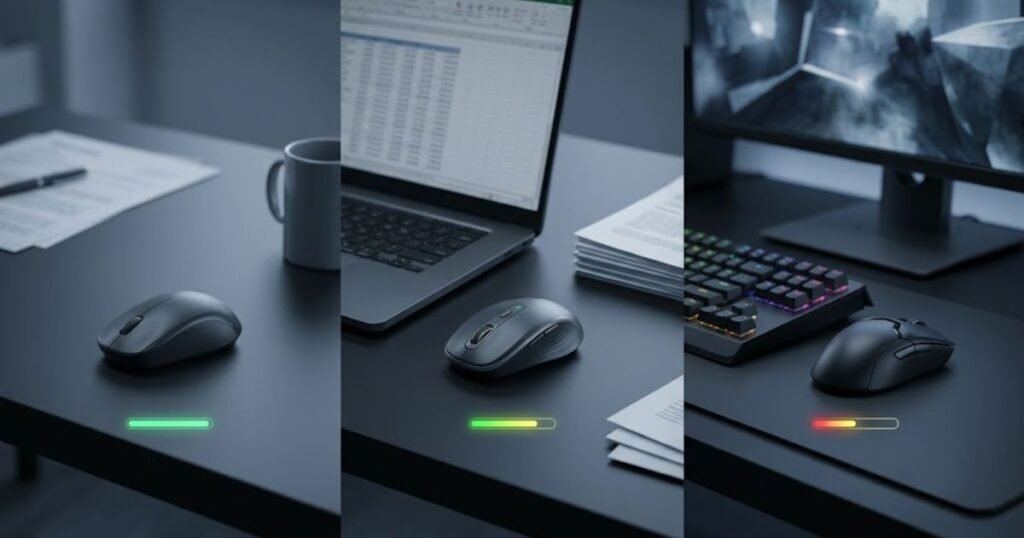
Basic wireless and office mice are generally designed around low power consumption and long periods between battery changes or charges. Wireless gaming mice have different priorities because they may combine higher polling rates, gaming-focused wireless systems, RGB lighting, and other performance features. As a result, their battery life can be considerably different from that of a basic wireless mouse.
The advertised runtime also needs to be read in context. A manufacturer’s battery-life figure may be measured under a specific wireless mode, lighting setting, polling rate, or usage condition. Two mice with different advertised runtimes therefore cannot always be compared simply by choosing the larger number.
The table below shows how battery-life expectations can differ by wireless mouse type:
| Wireless Mouse Type | Typical Battery-Life Pattern | Main Reason for the Difference |
|---|---|---|
| Basic wireless mouse | Often designed for long periods between battery changes or charges | Lower power requirements and fewer performance-focused features |
| Office wireless mouse | Often designed for extended everyday use | Power efficiency is usually prioritized over high reporting performance |
| Wireless gaming mouse | Often measured in days or weeks depending on the model | Higher performance requirements can increase power consumption |
| High-polling-rate wireless gaming mouse | Can have shorter runtime at higher polling settings | More frequent reporting can increase power demands |
| Replaceable-battery gaming mouse | Can provide long periods of use before the battery needs replacement | Runtime depends on the battery type, capacity, and mouse power consumption |
The most useful way to judge wireless mouse battery life is to look beyond the headline number. A mouse that lasts longer under one manufacturer’s test conditions may not provide the same advantage during your own gaming or everyday use. For that reason, battery life should be evaluated together with the conditions behind the advertised runtime.
For wireless gaming mice in particular, battery life is only one part of the overall design. The way the mouse handles wireless performance, polling rate, lighting, and power management can all change how often it needs to be charged or have its battery replaced.
What Factors Affect Wireless Mouse Battery Life?
Wireless mouse battery life is mainly affected by the amount of energy available and how much power the mouse consumes during use. Battery type and capacity, wireless mode, polling rate, and lighting can all change how long a mouse operates before it needs to be charged or have its battery replaced.
These factors do not work independently. A mouse with a large battery can still have shorter runtime if it uses more power, while a smaller battery can last longer when the mouse is designed for lower power consumption. This is why battery capacity or a single feature should not be used to predict runtime by itself.
How Does Battery Type and Capacity Affect Runtime?
Battery type and available capacity determine how much energy a wireless mouse has available, but capacity alone does not determine how long the mouse will run. Actual runtime also depends on how efficiently the mouse uses that energy.
The main battery-related factors are:
- Battery type: Wireless mice may use an internal rechargeable battery or replaceable AA or AAA batteries, depending on the design.
- Battery capacity: A battery with more available energy can support longer runtime when power consumption remains comparable.
- Power consumption: The mouse’s sensor, wireless system, lighting, and other electronics determine how quickly available energy is used.
- Usage pattern: A mouse that remains active for many hours each day will generally use its available energy faster than one that spends more time idle.
In other words, battery capacity is only one part of the equation. Comparing capacity numbers without considering power consumption can give a misleading impression of which wireless mouse will last longer.
Does Wireless Mode Affect Battery Life?
Yes. A wireless mouse can have different battery-life results depending on whether it is operating through Bluetooth or a 2.4GHz wireless connection. The difference depends on the implementation of the mouse, so Bluetooth should not automatically be assumed to provide longer battery life on every model.
Wireless connection mode can change the conditions under which battery life is measured:
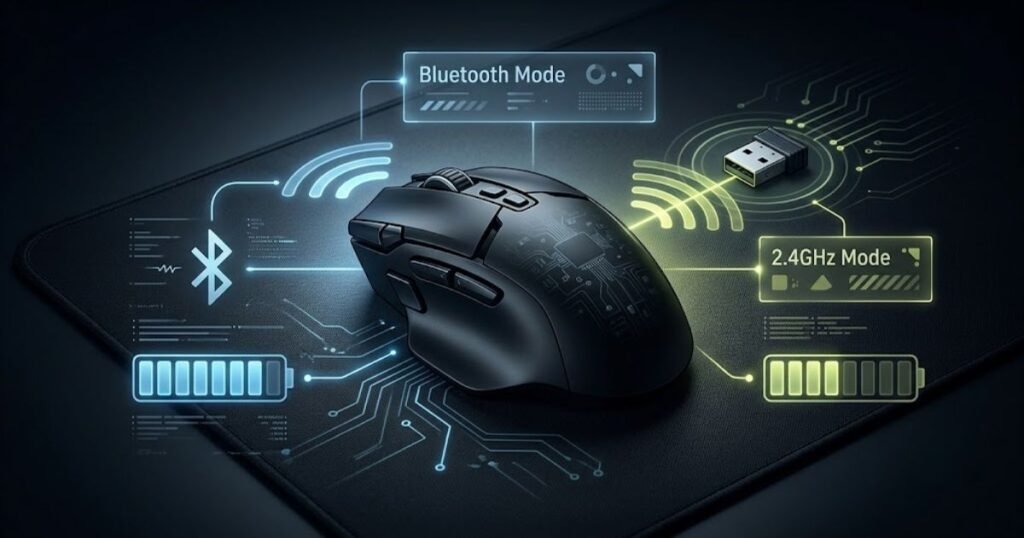
Razer’s current product specifications for the Orochi V2 illustrate this difference clearly. The manufacturer rates the mouse for up to 1,100 hours over Bluetooth and up to 445 hours using Razer HyperSpeed Wireless when measured with an AA lithium battery.
The important point is not that one wireless mode is always more efficient than the other. Instead, the example shows why the wireless mode and the manufacturer’s testing conditions need to be considered when comparing battery-life claims.
For that reason, a battery-life figure without its corresponding wireless mode can be difficult to interpret accurately.
Source for the Razer Orochi V2 battery-life figures: Razer’s current product specifications list the Bluetooth and HyperSpeed Wireless battery-life claims under the stated AA lithium battery condition.
Wireless mode is therefore part of the context behind a battery-life number. Comparing two mice is more meaningful when their wireless modes and test conditions are reasonably similar.
Does Polling Rate Affect Wireless Mouse Battery Life?
Yes, polling rate can affect wireless mouse battery life because a higher polling rate means the mouse reports its position to the computer more frequently. That increased reporting activity can increase power demands, although the actual effect depends on the mouse’s hardware and firmware.
The relationship between polling rate and battery use can be visualized through reporting frequency:
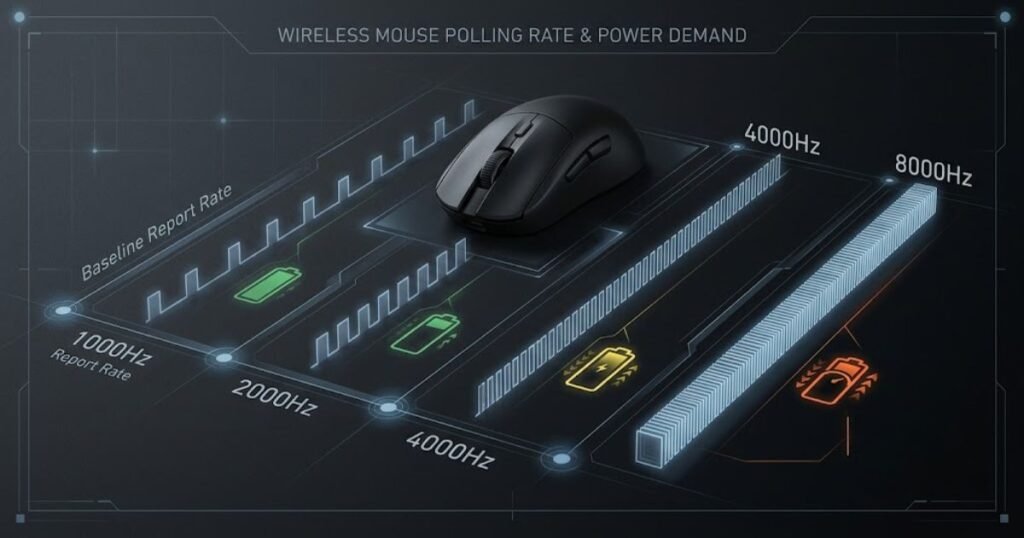
A 1,000Hz polling rate reports up to 1,000 times per second, while higher settings such as 2,000Hz, 4,000Hz, and 8,000Hz increase the reporting frequency further. This does not mean that every mouse will lose a fixed percentage of battery life when the polling rate is increased.
Battery consumption at different polling rates depends on the particular wireless implementation. For that reason, a universal formula for how much battery life is lost at 4,000Hz or 8,000Hz would be misleading without testing data for the specific mouse.
The practical takeaway is that polling rate should be considered alongside battery life rather than treated as a separate specification. A higher setting may provide a performance benefit for some users, but it can also increase the power demands of a wireless mouse.
Polling rate is therefore an important battery-life variable, but the size of its effect should be based on manufacturer information or reliable testing rather than a generic percentage.
Does RGB Lighting Reduce Battery Life?
Yes. RGB lighting consumes additional power, so keeping lighting enabled can reduce the amount of time a wireless mouse operates between charges. The size of the reduction depends on the mouse, lighting configuration, and the conditions used to measure battery life.
Manufacturer specifications can demonstrate this difference more reliably than a general assumption. For example, ASUS lists the ROG Keris Wireless AimPoint at 119 hours without lighting and 86 hours with its default breathing lighting in the stated test conditions.
That difference does not mean every RGB wireless mouse will experience the same reduction. It shows that lighting can be a meaningful variable when a manufacturer provides separate battery-life figures for different lighting conditions.
ASUS’s technical specifications for the ROG Keris Wireless AimPoint list up to 119 hours of battery life without lighting and up to 86 hours with default breathing lighting.
RGB should therefore be treated as one variable within the overall power budget. Turning lighting off can extend runtime on some mice, but the actual benefit depends on the design and implementation of that specific model.
Overall, wireless mouse battery life is shaped by a combination of battery capacity, power consumption, wireless mode, polling rate, and lighting. No single specification can accurately predict runtime on its own, which is why manufacturer test conditions become important when comparing different models.
Why Do Wireless Gaming Mice Have Different Battery Life?
Wireless gaming mice can have very different battery life because manufacturers make different trade-offs between runtime, weight, wireless performance, and everyday convenience. A mouse designed to be extremely light may approach its battery system differently from one designed around longer runtime, while performance-focused features can also affect how the overall design manages power.
This means battery life should not be treated as an isolated specification. Two wireless gaming mice can have different runtimes even when they are designed for the same type of gaming because their physical design, internal components, and performance priorities may differ.
Battery Capacity vs Mouse Weight
Battery capacity and mouse weight can influence each other because the battery is part of the physical hardware that has to fit inside the mouse. A manufacturer targeting a lightweight design may have less flexibility to add battery capacity, while a mouse designed around longer runtime may allocate more of its internal space and weight to the battery system.
However, a heavier wireless mouse does not automatically have longer battery life. Overall runtime also depends on how efficiently the mouse uses available power, so weight alone cannot predict how long a wireless gaming mouse will operate.
For gaming mice, this creates a design trade-off between runtime and physical design. Some players may prioritize a lighter mouse for fast and repeated movements, while others may prefer longer runtime to reduce charging or battery replacement interruptions. Neither priority automatically makes one design better because the appropriate balance depends on how the mouse is used.
The important distinction is that battery capacity is a hardware resource, while battery life is the result of that resource being used by the complete mouse design.
Battery capacity and mouse weight can therefore be related, but they should not be treated as direct indicators of one another. A mouse’s actual battery life still depends on the complete hardware and power-management design.
Battery Life vs Wireless Performance
Wireless gaming mice also have to balance battery life with the responsiveness and consistency expected during gaming. The wireless system, sensor, reporting behavior, and other electronics all operate within the mouse’s available power budget.
This matters particularly for FPS players because wireless performance is not defined by battery life alone. A mouse can have long advertised runtime while still needing to be evaluated for connection stability and latency when responsive input is important.
Wireless latency is therefore a separate performance consideration from battery life. Players evaluating a wireless gaming mouse should distinguish how long the mouse can operate from how quickly and consistently it communicates input with the computer. The difference between these concepts is explained in wireless mouse latency.
Battery life and wireless performance can influence the overall design of a gaming mouse, but they describe different aspects of the experience. Battery life concerns operating time between charges or battery replacements, while wireless performance concerns the responsiveness and consistency of the connection during use.
A longer battery-life claim therefore does not automatically indicate better wireless performance. These characteristics should be evaluated separately when choosing a wireless gaming mouse.
Battery Life vs Convenience
Battery life also affects how convenient a wireless gaming mouse is to use. A mouse with shorter runtime may still be practical when it has a convenient charging system, clear battery indicators, or a design that allows the user to continue using it while connected to a charging cable.
Conversely, a mouse with very long battery life may be less convenient for a particular user if its battery system requires a replacement process they do not want to manage. The practical value of battery life therefore depends on how often the mouse is used and how easily its battery can be restored.
For someone who plays for several hours every day, predictable battery status and an easy charging routine can matter more than maximizing the advertised runtime. For a user who wants to avoid charging as often as possible, longer runtime may be the more important characteristic.
This is why battery life should be evaluated in terms of interruptions rather than hours alone. The more easily a user can maintain the mouse’s available power, the less likely battery management is to interfere with normal use.
Battery life is ultimately a design trade-off rather than a standalone measure of quality. Weight, wireless performance, and convenience can all influence how manufacturers approach runtime, so the best balance depends on the user’s priorities and usage pattern.
How Much Does Polling Rate Matter for Wireless Mouse Battery Life?
Polling rate matters to wireless mouse battery life because it determines how frequently the mouse reports its position and movement data to the computer. A higher polling rate increases the number of reports sent each second, which can increase power demands. However, the actual effect on battery life varies by mouse and should not be reduced to a fixed percentage.
For wireless gaming mice, polling rate is therefore a trade-off between reporting frequency and power consumption. Higher settings can be useful when a player wants more frequent input updates, but they may also require the mouse to use more power. The practical battery impact depends on how the manufacturer has designed and optimized the mouse.
What Changes Between 1000Hz, 2000Hz, 4000Hz, and 8000Hz?
The main difference between these polling rates is how frequently the mouse reports its position to the computer. A 1000Hz polling rate allows up to 1,000 reports per second, while 8000Hz allows up to 8,000 reports per second. The higher settings therefore increase reporting frequency substantially.
That higher reporting frequency does not automatically translate into a specific battery-life reduction across every wireless mouse. Power consumption depends on the mouse’s sensor, wireless system, firmware, processor, and other hardware. As a result, the same polling-rate setting can have different battery implications on different models.
The table below compares the reporting frequency and general battery consideration of common polling-rate settings:
| Polling Rate | Reports per Second | Battery Consideration |
|---|---|---|
| 1000Hz | 1,000 | Common baseline for wireless gaming mice and generally less demanding than higher polling rates |
| 2000Hz | 2,000 | Higher reporting frequency can increase power demands compared with 1000Hz |
| 4000Hz | 4,000 | Higher reporting frequency may require more power than lower polling settings |
| 8000Hz | 8,000 | Highest reporting frequency in this comparison and potentially more demanding on battery resources |
The table should not be interpreted as a universal battery-drain ranking. It shows the relationship between polling frequency and the potential power demand created by more frequent reporting. Actual battery runtime still depends on the specific mouse and its power-management design.
For this reason, a wireless mouse advertised with 8000Hz polling should not automatically be assumed to have a specific battery-life penalty compared with a 1000Hz model. The manufacturer’s battery figures and test conditions are more reliable than applying a generic formula.
Should You Lower Polling Rate to Save Battery?
Lowering the polling rate can be a practical way to reduce power demands when the highest available setting is not necessary for the way you use the mouse. This can be particularly relevant for users who prioritize longer runtime over the maximum possible reporting frequency.
However, lowering polling rate is not automatically the right choice for every player. Competitive FPS users may prefer a higher polling rate when their mouse and system support it, while other users may place greater value on extending the time between charges.
The decision should therefore be based on the performance benefit that the higher setting provides in the user’s setup. If the difference is not meaningful for a particular use case, reducing the polling rate can provide a reasonable way to manage power consumption without changing the physical mouse or battery system.
It is also important to avoid assuming that the lowest polling rate will always provide the longest possible battery life. Other power-consuming components and firmware behavior continue to affect runtime, so polling rate is only one part of the overall power budget.
Ultimately, the best polling rate is the highest setting that provides a useful performance benefit without creating an unacceptable battery-life trade-off. Wireless gaming mice should be evaluated according to both their performance requirements and the amount of charging or battery replacement the user is willing to manage.
Does RGB Make a Significant Difference to Wireless Mouse Battery Life?
RGB lighting can make a measurable difference to wireless mouse battery life, but the size of that difference depends on the mouse and the lighting conditions used during testing. Manufacturer specifications are more useful than a general assumption because they can show how the same mouse performs with lighting enabled and disabled.
This distinction matters when evaluating battery-life claims. Rather than assuming that RGB will always cause a large reduction in runtime, compare the manufacturer’s figures under clearly stated lighting conditions.
What Manufacturer Battery Tests Show
Manufacturer specifications can provide a direct comparison when the same mouse has separate battery-life figures for different lighting conditions. ASUS provides an example with the ROG Keris Wireless AimPoint, listing up to 119 hours of battery life without lighting and up to 86 hours with default breathing lighting under its stated specifications.
The same wireless mouse can produce different battery-life results under different lighting conditions:
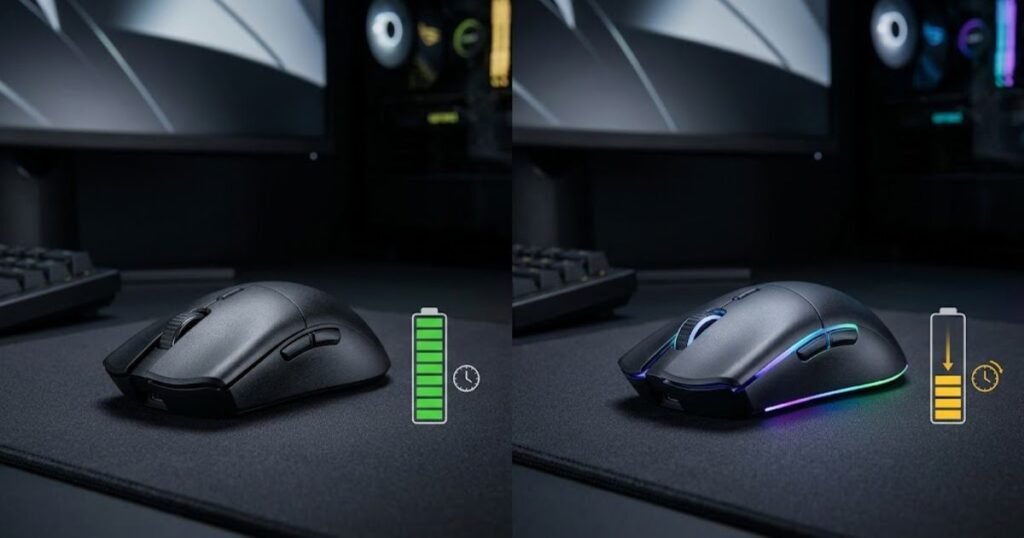
The difference between these figures shows that lighting can affect runtime on a wireless gaming mouse. However, it should not be treated as a universal percentage that applies to every RGB mouse because lighting systems, power management, battery capacity, and other hardware can differ between models.
ASUS lists the following battery-life figures for the ROG Keris Wireless AimPoint in its technical specifications:
| Lighting Condition | Advertised Battery Life |
|---|---|
| Lighting off | Up to 119 hours |
| Default breathing lighting | Up to 86 hours |
The example demonstrates why lighting should be included when comparing battery-life claims. A higher runtime figure with lighting disabled does not necessarily represent the runtime a user will experience when RGB is enabled throughout regular use.
It is also important to keep the manufacturer’s wording and test conditions intact. The figures above describe the battery-life claims provided by ASUS for this specific mouse and should not be generalized to every wireless gaming mouse.
RGB can therefore be a meaningful part of a wireless mouse’s power budget, but its actual effect should be judged from model-specific specifications or testing rather than from a fixed rule.
Rechargeable vs Replaceable Batteries: Which Is Better for Battery Life?
Rechargeable and replaceable battery systems can both provide practical battery life, but they handle depleted power differently. A rechargeable mouse restores its internal battery through charging, while a mouse with replaceable batteries restores operation by changing the battery.
The better system depends less on the battery label itself and more on how the user handles charging, replacement, and interruptions during everyday use.
How Rechargeable Wireless Mouse Batteries Work in Everyday Use
A rechargeable wireless mouse uses an internal battery that is restored by connecting the mouse to a power source. This makes battery management part of the regular charging routine rather than requiring the user to keep replacement batteries available.
The main practical advantage is consistency. Users can recharge the same battery instead of replacing a disposable cell whenever the available power is depleted. For someone who uses the same mouse every day, this can make battery management easier to integrate into a normal routine.
However, rechargeable operation still requires the user to monitor battery level and charge the mouse when necessary. A long advertised runtime can reduce how often charging is required, but it does not eliminate the need for a charging routine.
Rechargeable batteries are therefore most convenient when the user is comfortable maintaining a regular charging habit and wants to avoid handling replacement batteries.
How AA and AAA Wireless Mice Differ in Everyday Use
Wireless mice that use AA or AAA batteries restore their available power by replacing the depleted battery. This removes the need to wait for an internal battery to recharge, provided that a suitable replacement battery is available.
This can be useful for users who want to restore battery power immediately. Keeping a spare battery available can reduce the interruption caused by a depleted battery, although it also means managing additional batteries outside the mouse itself.
Replaceable-battery designs can also behave differently from rechargeable designs in terms of long-term maintenance. The user is responsible for replacing the battery when necessary, while a rechargeable mouse requires repeated charging of its internal battery.
The practical difference is therefore not simply about which battery type lasts longer. It is about how each system fits into the user’s normal routine and how easily the user can restore power when the mouse needs it.
Which Battery System Fits Different Usage Patterns?
Neither rechargeable nor replaceable batteries are automatically better for every user. The better option depends on whether the priority is charging convenience, easy battery replacement, predictable maintenance, or minimizing interruptions during use.
The main practical differences between the two battery systems are:
| Factor | Rechargeable Battery | Replaceable Battery |
|---|---|---|
| Charging routine | Requires periodic charging | Does not require charging the mouse itself |
| Battery replacement | Usually not part of normal day-to-day use | Part of normal operation when the battery is depleted |
| Restoring power | Requires access to a suitable charging setup | Can be restored quickly when a suitable replacement battery is available |
| Maintenance | Monitor battery level and maintain a charging routine | Keep suitable replacement batteries available when needed |
| Everyday convenience | Convenient for users who prefer charging one device | Convenient for users who prefer immediate battery replacement |
The comparison also shows why battery type should not be treated as a simple indicator of battery life. A rechargeable mouse may offer a convenient charging routine, while a replaceable-battery mouse may make it easier to restore power immediately. Both approaches can work well when they match the user’s usage pattern.
For users who spend long periods gaming or working at the same desk, the most important consideration may be how easily the battery can be maintained without interrupting their routine. For users who prefer immediate replacement, a replaceable-battery design may offer a different kind of convenience.
Ultimately, battery system choice is a practical decision rather than a universal ranking. Rechargeable and replaceable batteries solve the same basic problem in different ways, so the better option is the one that fits the user’s charging habits, availability of replacement batteries, and tolerance for interruptions.
How Can You Extend Wireless Mouse Battery Life?
You can extend wireless mouse battery life by reducing unnecessary power consumption and managing the mouse’s available power before it becomes a problem. Adjusting settings such as polling rate and lighting, using power-saving features, and maintaining a simple charging or battery-replacement routine can help reduce unnecessary interruptions.
The goal is not to disable every feature that uses power. Instead, battery management should focus on settings that do not provide enough practical benefit to justify the additional power consumption for your particular use case.
Reduce Unnecessary Power Consumption
Reducing unnecessary power consumption is one of the simplest ways to make a wireless mouse operate longer between charges or battery replacements. The most useful adjustments depend on which features are enabled and how the mouse is normally used.
A higher polling rate can be useful when frequent input reporting is important, but users who do not need the highest available setting can consider a lower rate. Similarly, RGB lighting can be disabled when appearance is less important than maximizing runtime.
Power-saving features are also useful when the mouse is not actively being used. Sleep or idle settings can prevent the mouse from continuing to consume power unnecessarily while it is sitting unused between gaming sessions or work periods.
These adjustments should be treated as practical options rather than mandatory settings. A user who values maximum polling performance or RGB lighting may reasonably accept shorter battery life in exchange for those features.
The most effective approach is therefore to identify which power-consuming features actually matter to your routine and reduce the ones that provide little benefit.
Build a Charging or Battery-Replacement Routine
A consistent battery routine can prevent a depleted wireless mouse from interrupting a gaming session or work period. Instead of waiting until the battery is nearly empty, check its status regularly and restore power before a long session when necessary.
Follow these steps to avoid unnecessary battery interruptions:
- Check the battery level: Check the remaining battery before starting a long gaming session or extended period of use.
- Review the polling rate: Use a polling rate that provides the performance you actually need instead of automatically using the highest available setting.
- Disable unnecessary lighting: Turn off RGB lighting when the additional visual effect is less important than extending battery runtime.
- Use power-saving features: Allow the mouse to enter its low-power state when it remains idle for an extended period.
- Charge or replace the battery: Restore available power before the battery becomes critically low and risks interrupting your next session.
This routine does not require constantly monitoring the battery. The purpose is simply to make battery management predictable enough that charging or battery replacement does not become an unexpected interruption.
Extending wireless mouse battery life is therefore less about eliminating every power-consuming feature and more about managing the settings and habits that have the greatest practical effect. A simple routine can help maintain reliable runtime without unnecessarily compromising the features that matter to you.
How Should You Read a Wireless Mouse Battery-Life Claim?
A wireless mouse battery-life claim should be treated as a test result rather than a guarantee of everyday runtime. The advertised figure only becomes useful when you understand the conditions behind it, including the wireless mode, lighting state, polling rate, battery type, and testing method.
This matters because manufacturers may measure battery life under conditions that are different from how you normally use the mouse. A maximum runtime measured with lighting disabled, for example, should not be treated as equivalent to the runtime you would get while gaming with lighting enabled and a higher polling rate.
Battery-life claims are therefore most useful when the conditions behind different figures are comparable. Looking only at the largest number can make one mouse appear better than another without accounting for how those numbers were produced.
What Conditions Should You Check in the Manufacturer’s Test?
The most useful battery-life claims identify the conditions under which the manufacturer measured the runtime. These conditions help explain why two wireless mice with similar battery systems can have substantially different advertised battery life.
The most important conditions to check are:
- Wireless mode: Check whether the battery-life figure applies to Bluetooth, 2.4GHz wireless, or another connection mode.
- Lighting: Check whether RGB or other lighting is enabled, disabled, or measured under a specific lighting effect.
- Polling rate: Check whether the stated runtime applies to a particular polling-rate setting.
- Battery type: Check whether the claim uses a specific rechargeable battery, AA battery, AAA battery, or another battery configuration.
- Test condition: Check whether the manufacturer describes how the mouse was operated and under what conditions the runtime was measured.
These details provide the context needed to interpret the headline number. Without them, a battery-life figure can be difficult to compare with another manufacturer’s claim because the two numbers may represent different usage conditions.
For example, a mouse measured with lighting disabled should not be compared directly with another mouse measured with lighting enabled unless the difference in test conditions is taken into account.
The same principle applies to wireless mode and polling rate. If two manufacturers use different connection modes or reporting settings for their published figures, the larger number does not necessarily indicate better real-world battery performance.
Battery-life specifications are therefore most useful when the testing conditions are visible and sufficiently clear to understand what the advertised runtime actually represents.
Why “Up to” Battery Life Is Not the Same as Everyday Runtime
An “up to” battery-life figure describes the maximum runtime stated by the manufacturer under specified conditions. It should not automatically be interpreted as the amount of battery life every user will experience during normal gaming or everyday use.
Real-world runtime can be lower when the mouse is used under conditions that consume more power than the manufacturer’s maximum-runtime test. Extended active use, higher performance settings, lighting, and different wireless modes can all make the user’s experience differ from the headline figure.
This does not make an “up to” claim misleading by itself. The number can still be useful when the manufacturer clearly states the conditions behind it. The important distinction is between a maximum test result and an expected everyday result.
When comparing wireless mice, the phrase “up to” should therefore encourage you to look for the conditions behind the number rather than treating the number as a fixed runtime guarantee.
How Should You Compare Battery-Life Claims Between Mice?
Battery-life claims are easiest to compare when the tested conditions are similar. If the conditions differ, the comparison should focus on why the numbers differ instead of simply ranking the mice by their advertised hours.
Use the following conditions when comparing battery-life claims between wireless mice:
| Condition | Why It Matters |
|---|---|
| Wireless mode | Different connection modes can produce different battery-life results. |
| Lighting | Lighting settings can change how much power the mouse consumes. |
| Polling rate | Higher reporting frequencies can change power demands. |
| Battery type | Different battery configurations provide different available energy. |
| Test method | Different testing conditions can produce different advertised runtimes. |
| Usage pattern | Actual runtime depends on how frequently and actively the mouse is used. |
For FPS players, this distinction is particularly important because a mouse may be used for long gaming sessions with performance-oriented settings rather than under the lowest-power conditions used for a maximum-runtime claim.
Battery life should also be considered as one part of the overall gaming mouse decision. Weight, sensor performance, wireless responsiveness, shape, and other characteristics can matter depending on the user’s priorities. Players comparing the broader requirements of a gaming mouse for FPS games can use gaming mouse for FPS games as the broader topic context.
The best comparison is therefore not simply the mouse with the highest advertised battery-life number. It is the mouse whose battery-life claim is measured under conditions that are closest to the way you actually intend to use it.
Reading the conditions behind a battery-life claim also makes manufacturer specifications more useful. Instead of treating battery life as a single marketing number, you can evaluate what the figure actually represents and whether it is relevant to your own usage pattern.
In short, a wireless mouse battery-life claim is most valuable when you understand its testing conditions. Comparing those conditions first makes it easier to distinguish a genuinely useful runtime advantage from a difference created mainly by different test settings.
What Wireless Mouse Battery Life Should You Look For?
The right wireless mouse battery life depends on how often you use the mouse and how much battery management you are willing to handle. Casual users may be comfortable with a shorter runtime if charging is convenient, while daily FPS players may prefer predictable battery life that minimizes interruptions during longer gaming sessions.
There is no single battery-life number that makes a wireless mouse suitable for everyone. The better approach is to match the expected runtime and battery system to your actual usage pattern rather than choosing a mouse based only on its largest advertised number.
What Battery Life Makes Sense for Casual Gaming?
Casual gamers can usually prioritize convenience and predictable battery management instead of maximizing advertised runtime. If gaming sessions are relatively short or infrequent, a mouse that requires occasional charging may be perfectly practical.
For this type of use, battery status is often more important than achieving the longest possible runtime. A clear battery indicator and an easy charging routine can make a shorter-runtime mouse easier to live with than a model that lasts longer but provides less convenient battery management.
Casual users should therefore consider how frequently they actually use the mouse before deciding that a particular battery-life figure is too short. A mouse that comfortably covers several sessions between charges may already provide enough runtime for an occasional player.
The priority is simple: choose enough battery life to fit your routine without paying extra attention to runtime that you are unlikely to use.
What Should Daily FPS Players Prioritize?
Daily FPS players should prioritize reliable runtime, predictable battery status, and a battery system that does not regularly interrupt gaming sessions. Because the mouse may be used for several hours at a time, battery management becomes more important when compared with occasional gaming.
Battery life is also one of the practical trade-offs between wireless and wired gaming mice. Wireless models remove the physical cable from the setup but introduce the need to manage available battery power, while wired models avoid routine battery management during use. The broader trade-off is covered in wireless vs wired gaming mouse.
For a daily FPS player, the most useful battery-life target is therefore not necessarily the highest number available. It is a runtime that comfortably covers normal gaming sessions while leaving enough margin to avoid unexpected interruptions.
Daily players should also consider how quickly the mouse can return to normal operation when its battery becomes low. A convenient charging method or an easily replaceable battery can be just as relevant as the advertised runtime itself.
In practice, consistent battery management is more valuable than chasing a maximum runtime figure that may have been measured under conditions that do not match regular FPS use.
When Does Longer Battery Life Actually Matter?
Longer battery life matters most when charging or battery replacement would regularly interrupt the way you use the mouse. The benefit becomes more noticeable for users who spend long periods gaming, frequently move between setups, or simply prefer to minimize device maintenance.
For someone who rarely uses the mouse for extended sessions, additional battery capacity may provide little practical benefit. A convenient charging routine can make a shorter-runtime mouse perfectly suitable.
For users who spend many hours gaming each week, however, longer runtime can reduce how often battery management becomes part of the routine. This can be particularly useful when choosing among gaming mice with different combinations of weight, performance, features, and battery systems.
When battery life becomes one of several factors in choosing a gaming mouse for FPS games, it should be evaluated alongside the other characteristics that affect how the mouse fits the intended setup.
Once you have established the battery life that fits your usage pattern, the next decision is which gaming mouse best matches those requirements. The best gaming mouse for FPS games depends on more than battery life alone, so runtime should be treated as one part of the overall decision.
The practical value of longer battery life ultimately comes down to interruptions. If a mouse already lasts comfortably through your normal use, additional runtime may not change the experience very much. If battery management repeatedly interrupts your routine, longer runtime can provide a more meaningful benefit.
Wireless Mouse Battery Life FAQ
These wireless mouse battery life questions cover the most common concerns about runtime, charging, battery drain, polling rate, RGB lighting, and choosing a battery system for everyday gaming.
How long does a wireless mouse battery last?
Wireless mouse battery life varies by model and usage. Some mice are designed to operate for extended periods between battery changes or charges, while wireless gaming mice can require more frequent charging depending on their settings and hardware.
How long does a wireless gaming mouse battery last?
A wireless gaming mouse can last from several days to much longer depending on its battery system, wireless mode, polling rate, lighting, and usage. The manufacturer’s stated runtime should always be interpreted together with its testing conditions.
Does polling rate affect wireless mouse battery life?
Yes. Higher polling rates increase the frequency at which the mouse reports movement data, which can increase power demands. The actual effect on battery life varies by mouse and should not be assumed to follow a universal percentage.
Does 8000Hz polling use more battery?
8000Hz polling can require more power because the mouse reports its position more frequently than it does at lower polling rates. However, the actual battery impact depends on the mouse’s hardware, firmware, and power-management design.
Does RGB reduce wireless mouse battery life?
RGB lighting can reduce battery life because the lighting system consumes additional power. The size of the effect depends on the mouse and the lighting conditions used during operation.
Does Bluetooth last longer than 2.4GHz on a wireless mouse?
Not necessarily. Battery life can differ between Bluetooth and 2.4GHz wireless modes, but the result depends on the specific mouse and its wireless implementation. Manufacturer specifications should be checked for the relevant mode.
Why does my wireless mouse battery drain so fast?
Fast battery drain can result from extended active use, higher polling rates, RGB lighting, wireless settings, or other power-consuming features. Battery condition and the mouse’s power-management design can also affect how long the available charge lasts.
How often should I charge a wireless gaming mouse?
You should charge a rechargeable wireless gaming mouse often enough to prevent its battery from becoming a disruption during normal use. The appropriate schedule depends on the mouse’s runtime and how many hours you use it each day.
Is rechargeable or replaceable battery better?
Neither battery system is universally better. Rechargeable batteries can make routine charging convenient, while replaceable batteries allow users to restore power quickly when a spare battery is available. The better choice depends on the user’s preferred maintenance routine.
Can you use a wireless mouse while charging?
Some rechargeable wireless mice can continue operating while connected to a charging cable, but this depends on the specific model. Check the manufacturer’s documentation before assuming that a particular mouse supports wired use while charging.
What battery life is good for FPS gaming?
A good battery life for FPS gaming is one that comfortably covers your normal gaming sessions without frequent charging or battery replacement interruptions. The right target depends on how many hours you play and how convenient the mouse’s charging or battery system is.
How can I make my wireless mouse battery last longer?
You can extend battery life by reducing unnecessary power consumption, using a polling rate that matches your needs, disabling lighting when it is not important, enabling power-saving features, and maintaining a regular charging or battery-replacement routine.
Final Takeaway
Wireless mouse battery life is best judged by how well the advertised runtime matches your actual usage conditions. Battery type, wireless mode, polling rate, lighting, and power management can all influence runtime, but the most useful comparison is the one that accounts for the conditions behind the manufacturer’s battery-life claim.
For casual users, convenient battery management may matter more than maximum runtime. For daily FPS players, predictable battery life and fewer charging interruptions can become more important. The goal is not to find the wireless mouse with the biggest battery-life number, but to find a battery system and runtime that fit the way you actually use the mouse.
In the end, a wireless mouse does not need to last as long as possible. It needs to last long enough to stay out of the way of your gaming and everyday routine.
Thanks for reading GearTP.