
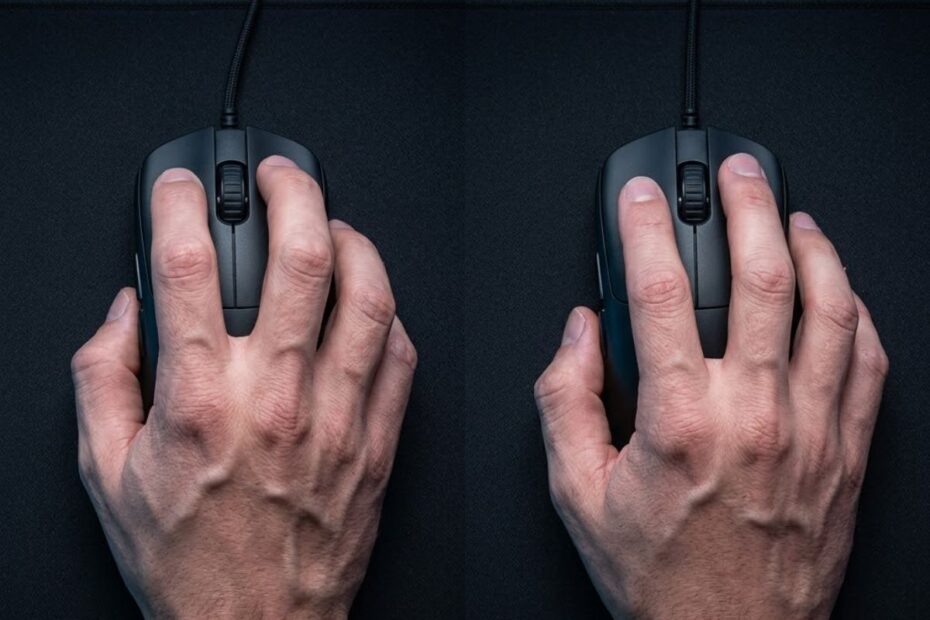
Claw Grip delivers superior stopping stability for flick shots by anchoring the palm against the rear hump, while Fingertip Grip maximizes micro-adjustment speed by relying exclusively on finger articulation with zero palm contact. Choosing between them depends on whether your competitive playstyle prioritizes crosshair stability in tactical shooters or raw vertical agility in fast-paced tracking titles.
Claw Grip vs Fingertip Grip: Biomechanical Differences at a Glance
The fundamental difference between Claw Grip and Fingertip Grip centers on palm contact: Claw Grip anchors the lower palm against the mouse shell for stability, whereas Fingertip Grip leaves the palm completely unsupported for speed. This mechanical distinction dictates how your hand controls recoil, flicks, and fine motor adjustments.
In competitive first-person shooters, your grip style determines which muscles and joints initiate crosshair movement. Claw Grip utilizes the base of the palm (the thenar and hypothenar eminences) as a physical stabilizer against the mouse’s rear hump, while the index and middle fingers arch upward to press the primary switches from a steep angle. In contrast, Fingertip Grip eliminates all palm contact, suspending the mouse chassis solely between the fleshy pads of your five fingers.
Because Fingertip Grip removes the palm anchor, the mouse moves freely within the open space beneath your hand. Conversely, Claw Grip creates a rigid three-point contact structure between your rear palm, thumb, and pinky. Understanding this anatomical tradeoff between locked-in stability and decoupled agility is essential before adjusting your sensitivity or purchasing a specialized gaming mouse.
To understand how these two competitive styles fit into the broader FPS aiming spectrum alongside full-palm styles, review our comprehensive guide to mouse grip styles for FPS gaming.
The side-by-side technical image below illustrates the contrasting hand postures and palm contact boundaries between Claw Grip and Fingertip Grip:

The table below summarizes the core mechanical attributes and functional tradeoffs of Claw Grip and Fingertip Grip:
| Biomechanical Factor | Claw Grip Mechanics | Fingertip Grip Mechanics | Competitive Impact |
|---|---|---|---|
| Palm Contact Point | Lower palm / thenar eminence braced on rear hump | Zero palm contact; completely floating | Claw delivers higher stopping power; Fingertip maximizes range of motion |
| Finger Joint Posture | Arched at proximal and distal interphalangeal joints | Extended or slightly curved pads contacting sides | Claw enables perpendicular click force; Fingertip enables subtle nudges |
| Primary Aiming Pivot | Wrist and forearm with subtle finger assistance | Fingers and wrist; forearm for broad swipes | Claw excels at consistent horizontal sweeps; Fingertip excels at rapid micro-tracking |
| Vertical Recoil Range | Limited by palm contact on rear hump | Extensive; pulls deep into empty palm cavity | Fingertip allows larger vertical pull-downs without moving the wrist |
| Hand Fatigue Profile | Moderate; tension shared across palm and tendons | Higher; continuous isometric pinch grip tension | Claw sustains stability in long sessions; Fingertip demands conditioned fingers |
| Esports Tournament Adoption | Approximately 65 percent of FPS professionals | Approximately 5 to 10 percent of FPS professionals | Claw dominates tactical shooters; Fingertip remains a high-skill tracking niche |
As outlined in the comparison, choosing between these styles is not a matter of which is universally faster, but rather whether your aiming technique benefits more from anchored stability or decoupled mobility.
Palm Contact and Shell Anchoring: Stability vs Dynamic Mobility
Palm contact acts as a mechanical brake that stabilizes violent mouse swipes and establishes repeatable crosshair placement under high-pressure competitive conditions. Without palm contact, fingertip aimers gain unmatched agile freedom but sacrifice passive stopping friction.
When executing rapid flick shots across wide angles, decelerating the mouse precisely on a target requires immense stopping power. In Claw Grip, the rear hump of the mouse presses firmly against the base of your palm. This contact surface creates natural physical resistance that arrests momentum instantly when your forearm muscles relax, preventing overshooting.
In Fingertip Grip, there is no rear contact point. Deceleration relies entirely on the opposing muscular force of your thumb, ring finger, and pinky squeezing against the side walls. While this allows elite players with exceptional motor control to execute lightning-fast micro-corrections, it introduces a higher margin of error during intense tournament moments when adrenaline induces hand tremors.
If your playstyle values maximum palm surface friction and complete hand relaxation rather than finger clawing, explore our breakdown comparing claw grip vs palm grip stability and tracking differences.
BIOMECHANICAL PRINCIPLE: THE PALM FRICTION ANCHOR
Every physical contact point between your hand and the mouse shell adds braking friction but subtracts rotational agility. Claw Grip leverages palm contact as a physical backstop for consistent crosshair resets. Fingertip Grip removes this backstop, demanding superior active tendon control to achieve comparable shot repeatability.
Micro-Adjustments and Finger Articulation: Precision in Small Ranges
Fingertip Grip offers unmatched micro-adjustment range because your fingers can push, pull, and rotate the mouse shell independently of wrist and arm position. Claw Grip provides tighter, more controlled micro-adjustments with a narrower physical movement envelope.
In tactical shooters and aim trainers, micro-adjustments represent tiny corrections made within a 5-to-15 pixel radius to align your crosshair with an opponent’s head. In Fingertip Grip, your fingers act as independent suspension struts. Contracting your thumb and pinky tilts the mouse angle; flexing your index and middle fingers pulls the shell backward smoothly.
In Claw Grip, micro-adjustments are performed through a blend of wrist flexion and subtle finger curling. Because the rear hump remains anchored against the palm heel, vertical finger retraction is restricted. Claw aimers compensate by using high-precision wrist micro-swipes, which provide exceptional horizontal accuracy along head-height sightlines.
The visual breakdown below shows how finger actuation and wrist pivots interact differently across both grip styles:

Vertical Aiming Mechanics and Recoil Control Capabilities
Fingertip Grip provides superior vertical aiming freedom by allowing the mouse shell to retract deep into the hollow palm cavity without moving your forearm. Claw Grip requires subtle arm repositioning to control steep vertical recoil patterns.
Vertical crosshair control is a decisive factor in titles with steep spray patterns or dynamic elevation changes. When controlling vertical recoil with an assault rifle, a fingertip aimer simply flexes all five fingers, drawing the mouse rearward into the open space beneath the palm. The wrist and forearm do not need to slide across the mouse pad, maintaining perfect ergonomic alignment.
In Claw Grip, the presence of the rear hump limits how far the mouse can travel backward before pressing uncomfortably into the thenar eminence. To pull down during extended spray transfers, claw aimers must slide their forearm or wrist backward across the pad surface. While this arm-driven pull-down is highly consistent for predictable weapon recoil patterns, it can feel less agile during vertical tracking against airborne targets.
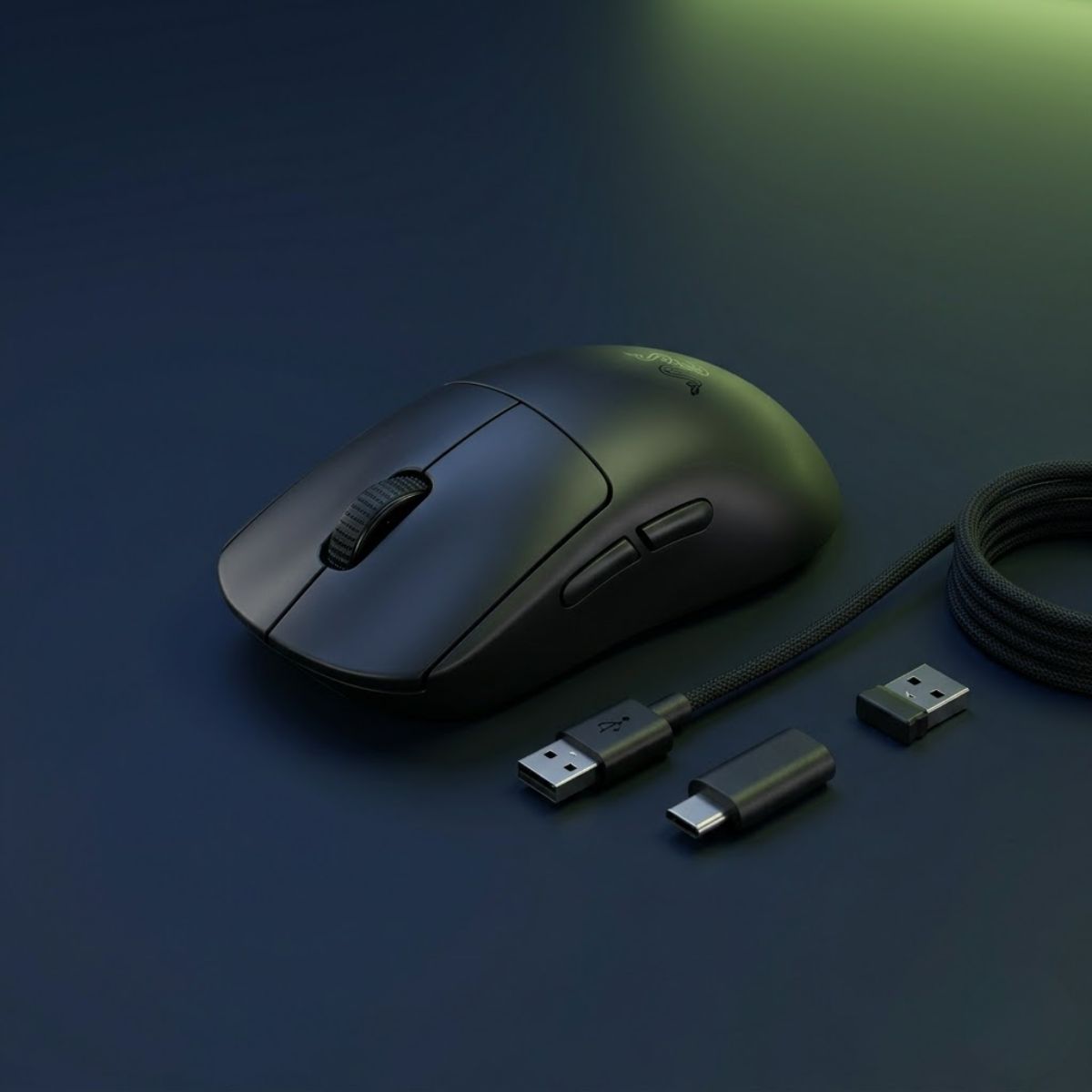
Razer Viper V3 Pro
At 54 grams with a balanced low-profile symmetrical shape and flawless Focus Pro 35K Gen-2 optical tracking, the Viper V3 Pro offers maximum palm clearance for fingertip micro-adjustments while providing sufficient mid-back support for relaxed claw grip stability.
FPS Aim Discipline Breakdown: Flicks, Tracking, and Target Switching
Claw Grip dominates static flick shots and angle-holding consistency in tactical shooters, while Fingertip Grip excels in dynamic tracking and rapid multi-target switching. Choosing the right grip depends directly on the mechanical demands of your primary game.
Competitive shooters place distinct mechanical demands on aimers. Tactical titles require holding static angles with disciplined crosshair placement, where overshooting by two millimeters results in an eliminated round. Fast-paced arena shooters and hero shooters demand continuous tracking against erratic, high-speed movement trajectories.
For players specializing in tactical shooters like Riot Games’ competitive title, read our dedicated tactical guide on the best grip style for Valorant crosshair placement.
The image below highlights how both grip postures perform during live competitive FPS gunfights:

The table below evaluates Claw Grip and Fingertip Grip performance across primary FPS combat scenarios:
| Aiming Challenge | Claw Grip Rating | Fingertip Grip Rating | Mechanical Explanation |
|---|---|---|---|
| Static First-Shot Flicks | Exceptional | Very Good | Claw palm anchor eliminates overshooting on crisp headshot snaps |
| Dynamic Angle Clearing | Exceptional | Good | Predictable wrist glide keeps crosshairs locked at head level |
| Smooth Linear Tracking | Very Good | Good | Forearm synchronization in Claw prevents erratic high-frequency jitters |
| Rapid Target Switching | Very Good | Exceptional | Fingertip’s lightweight inertia allows instant multi-directional direction snaps |
| Vertical Elevated Tracking | Good | Exceptional | Unrestricted palm cavity lets fingertip aimers track jumping targets effortlessly |
| Rapid Semi-Auto Tapping | Exceptional | Very Good | Arched claw finger posture strikes switches with maximum leverage and reset speed |
This performance distribution explains why esports competitors gravitating toward tactical shooters predominantly favor Claw Grip, while arena shooter and battle royale specialists frequently experiment with Fingertip hybrid variations.
Hand Sizing and Geometric Fit: Finding Your Biological Match
Hand size directly dictates whether a mouse shell accommodates Claw Grip or Fingertip Grip comfortably without causing tendon fatigue. Using an improperly sized shell forces unnatural finger arching and degrades aiming consistency.
To determine your grip compatibility, measure your hand length from the base wrist crease to the tip of your middle finger, and measure hand width across the palm including the thumb. A player with small hands can easily claw a compact mouse that a large-handed player could only manipulate with a pure fingertip grip.
The table below outlines hand size classifications and corresponding mouse shell dimensions for both grip styles:
| Hand Size Tier | Hand Length & Width | Claw Grip Shell Dimensions | Fingertip Grip Shell Dimensions |
|---|---|---|---|
| Small Hands | Length under 17.0 cm, width under 8.5 cm | Length 114 mm to 118 mm, rear hump height 37 mm to 38 mm | Length under 112 mm, low profile under 35 mm |
| Medium Hands | Length 17.0 cm to 19.5 cm, width 8.5 cm to 10.0 cm | Length 118 mm to 122 mm, rear hump height 38 mm to 40 mm | Length 112 mm to 116 mm, low profile under 36 mm |
| Large Hands | Length over 19.5 cm, width over 10.0 cm | Length 122 mm to 126 mm, rear hump height 39 mm to 42 mm | Length 115 mm to 120 mm, low profile under 37 mm |
Applying these dimensions prevents the common mistake of buying a mouse that is physically too long for your intended grip, which causes the rear shell to constantly strike your palm when trying to fingertip.
Mouse Shell Geometry: Rear Hump Support vs Flat Low-Profile Clearance
Claw Grip requires a pronounced rear-positioned hump with tapered side waists for palm bracing, whereas Fingertip Grip demands a flat, low-profile shell with neutral sides. Using the wrong shell geometry directly sabotages both grip styles.
Mouse geometry is defined by three critical spatial variables: apex hump position, overall height, and side grip curvature. For Claw Grip, the shell must feature a rear hump that fills the lower palm pocket, providing tactile feedback during forceful swipes. In addition, aggressive inward side curvature (waist taper) gives the curled thumb and pinky fingers a natural ledge to lift and maneuver the chassis.
For Fingertip Grip, hump volume is detrimental. Any pronounced rear hump creates physical interference, blocking vertical finger retraction. Fingertip aimers require a symmetrical shape with flat side walls and a maximum height under 37 mm, ensuring complete mobility within the hand cavity.
To find a dedicated shell built specifically for arched finger postures, explore our curated recommendations for the best gaming mouse for claw grip FPS players.
The visual comparison below demonstrates how rear-hump, centered-hump, and low-profile shells alter palm contact:

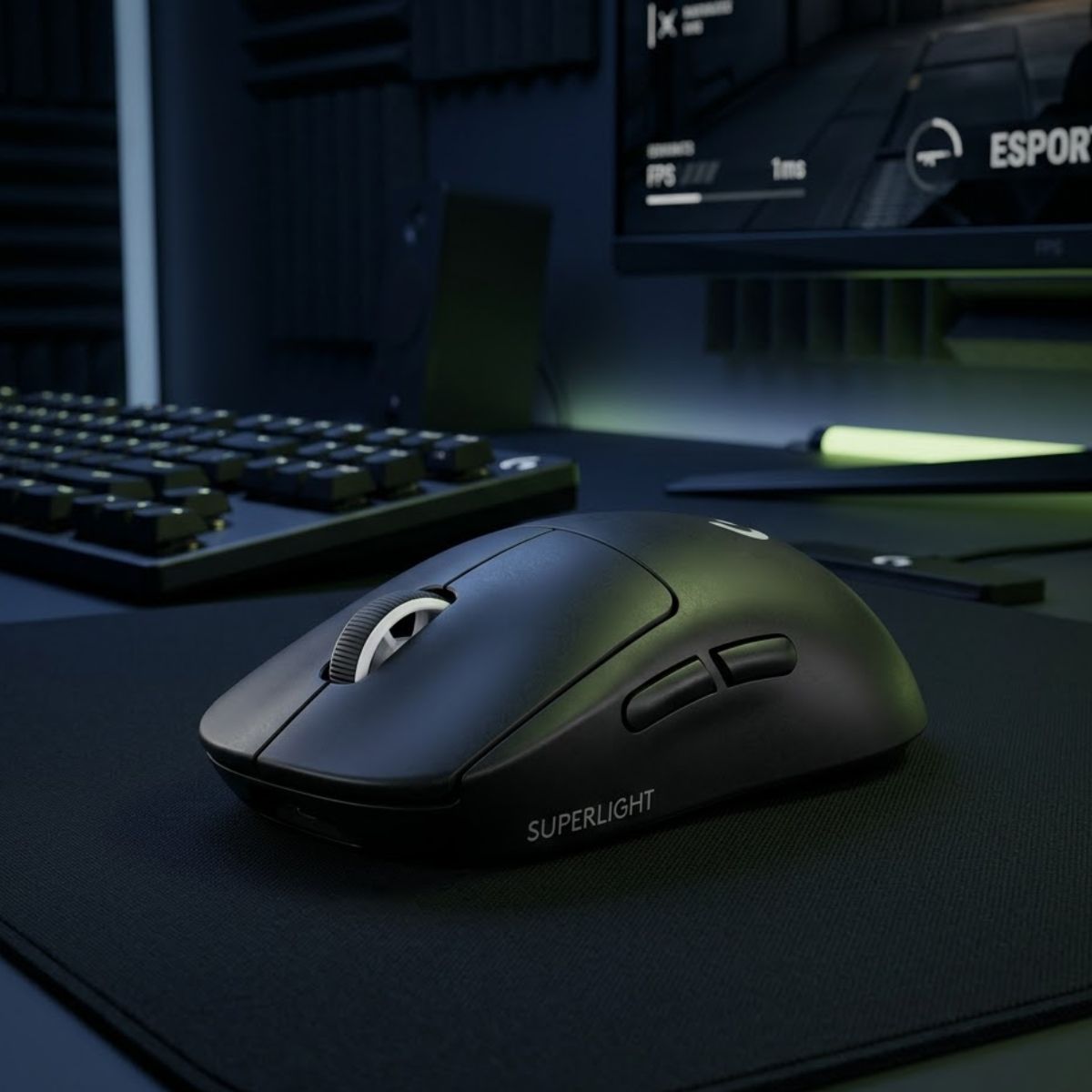
Logitech G PRO X Superlight 2
Featuring a safe, neutral symmetrical hump that supports standard and aggressive claw grips, the 60g Superlight 2 remains the most reliable tournament benchmark for tactical FPS players seeking consistent palm-anchored stability.
Fatigue, Muscular Strain, and Long-Session Health Considerations
Fingertip Grip imposes greater muscular strain on fine finger tendons due to constant pinch grip tension, whereas Claw Grip distributes mechanical stress across the palm and wrist. Managing grip tension is critical to prevent hand cramping and repetitive strain.
Prolonged gaming sessions highlight distinct ergonomic challenges for each style. In Fingertip Grip, your hand maintains continuous isometric tension to clamp the mouse between your thumb and outer fingers. Because there is no palm support to absorb stopping impact, deceleration shock transfers directly into the small intrinsic muscles of your hand, increasing fatigue over multiple competitive matches.
Claw Grip reduces finger pinch fatigue by distributing physical load between the palm heel and finger pads. However, maintaining aggressively curled finger arches can strain the extensor tendons along the top of your hand and forearm. Players adopting Claw Grip should opt for a relaxed claw posture rather than an extreme claw angle to protect long-term tendon health.
Apply these ergonomic practices to sustain precision and minimize hand strain across extended sessions:
- Avoid the White-Knuckle Pinch: Grip the mouse shell with only enough force to prevent slipping; excessive tension causes hand tremors and rapid tendon exhaustion.
- Select an Ultra-Lightweight Shell: If using Fingertip Grip, ensure your mouse weighs under 55 grams to minimize the pinch force required to arrest momentum.
- Implement Micro-Breaks Between Rounds: Stretch your fingers and flex your wrist backward between rounds to restore blood circulation and release tendon tension.
- Position Your Forearm Level With the Desk: Keep your elbow and forearm parallel to the desk surface to avoid excessive wrist dorsiflexion and carpal tunnel compression.
Step-by-Step Diagnostic Test: How to Choose Your Natural Grip
Determining your optimal grip style requires testing natural hand posture, vertical finger retraction clearance, and aiming stability under high-pressure competitive conditions. Following a structured diagnostic process eliminates costly guesswork.
Many players force an unnatural grip style simply because an esports professional uses it, resulting in inconsistent aim and physical discomfort. Your optimal grip is the configuration your hand adopts naturally when relaxed.
Follow these four sequential diagnostic steps to determine your true competitive grip:
- Perform the Relaxed Pick-Up Test: Place your mouse in the center of your mouse pad. Stand up, shake out your arms and fingers to eliminate muscle tension, then sit down and grab your mouse naturally without overthinking. Check whether the lower part of your palm rests against the rear shell or if daylight remains visible beneath your entire hand.
- Test Vertical Finger Recoil Clearance: With your hand in its default position, attempt to pull the mouse backward toward your wrist using only your fingers while keeping your forearm still. If the mouse immediately bumps into your palm and stops, your anatomy favors Claw Grip. If the mouse glides smoothly into an empty palm pocket for two or more centimeters, your hand mechanics support Fingertip Grip.
- Execute the Micro-Target Tracking Test: Load into an aim trainer scenario featuring small, moving targets. Attempt to track smoothly for two minutes using only fingertip adjustments, then repeat the drill using wrist-supported claw anchoring. Evaluate which style produces smoother crosshair paths without jittery overcorrections.
- Monitor Hand Posture in Clutch Rounds: Jump into a competitive ranked match. Observe your hand posture during high-stress 1v1 clutch gunfights. If you instinctively curl your fingers and wedge the mouse into your palm under pressure, Claw Grip is your true biological default.
Frequently Asked Questions About Claw Grip vs Fingertip Grip
Comparing Claw Grip and Fingertip Grip frequently creates confusion around sensitivity pairings, mouse weight requirements, and long-term skill ceilings. The categorized frequently asked questions below address core technical and practical inquiries.
What is the main difference between Claw Grip and Fingertip Grip?
Claw Grip anchors the lower palm against the rear hump of the mouse with arched fingers, while Fingertip Grip holds the mouse exclusively with the five finger pads, leaving the palm completely detached.
Which grip style is better for tactical FPS games like CS2 and Valorant?
Claw Grip is generally superior for tactical FPS games because palm contact provides stopping stability on flick shots and maintains disciplined crosshair placement along horizontal head-level sightlines.
Is Fingertip Grip faster than Claw Grip?
Yes, Fingertip Grip allows for faster raw micro-adjustments and dynamic target acquisition because the mouse is manipulated solely by small, agile finger muscles without palm friction.
Can you switch from Claw Grip to Fingertip Grip easily?
Transitioning takes two to three weeks of deliberate aim training. Players must develop finger pinch endurance and unlearn the habit of resting the palm on the mouse shell.
Does Fingertip Grip require a lightweight gaming mouse?
Yes. Fingertip Grip works best with mice weighing under 55 grams, as heavier shells require excessive finger pinch force to decelerate, causing premature muscle fatigue and tremors.
Why does Claw Grip feel more stable during flick shots?
Claw Grip utilizes the mouse’s rear hump as a physical backstop against the palm heel, allowing forearm and wrist momentum to arrest instantly without overshooting targets.
Does mouse weight affect Claw Grip as much as Fingertip Grip?
No. Because Claw Grip utilizes larger palm contact and forearm muscle groups, it accommodates slightly heavier mice (up to 65 grams) without significantly degrading aim control.
What mouse shape is best suited for Claw Grip?
Symmetrical or semi-ergonomic mice with a wide rear hump, tapered side waists, and a length between 118 mm and 122 mm provide the ideal contact surface for claw aimers.
Can small hands use Claw Grip effectively?
Yes, small hands under 17 cm can claw effectively provided they choose a compact mouse under 116 mm in length with an appropriately scaled rear hump under 38 mm.
Which grip causes more hand fatigue during extended gaming sessions?
Fingertip Grip generally induces greater fatigue because finger tendons maintain continuous pinch grip tension, whereas Claw Grip distributes physical load across the palm heel.
Does sensitivity tuning differ between Claw Grip and Fingertip Grip?
Yes. Claw aimers frequently utilize lower sensitivities paired with arm swipes, while fingertip aimers often benefit from medium-to-high sensitivities to maximize wrist and finger efficiency.
Do professional FPS players use Fingertip Grip?
A small minority of professionals (approximately 5 to 10 percent) use pure Fingertip Grip or hybrid variations, whereas over 65 percent of tournament competitors rely on Claw Grip for consistent stability.
Final Strategic Verdict: Choosing the Right Grip for Your Playstyle
Choose Claw Grip if your primary goal is locked-in stopping stability, repeatable first-shot accuracy, and tournament consistency in tactical shooters. The palm contact against the rear hump provides a reliable mechanical baseline that holds up under extreme competitive pressure, making it the statistically proven choice for the vast majority of FPS players.
Choose Fingertip Grip if you prioritize maximum micro-adjustment agility, rapid vertical tracking, and multi-directional target switching in fast-paced shooters. When paired with an ultra-lightweight, low-profile mouse, Fingertip Grip unlocks unparalleled speed for players willing to master the demanding finger control required to tame its higher instability margin.
Decide Your Next Gear Step: Choosing between claw and fingertip grip defines which mouse shell geometry will elevate your mechanical aim. Players who commit to curled finger postures require arched rear humps for stopping stability, whereas fingertip aimers demand ultralight, low-profile symmetrical bodies with zero rear-shell interference.
To evaluate tournament-proven peripherals engineered across all competitive grip styles, hand dimensions, and sensor architectures, review our comprehensive rankings in the top best gaming mouse for FPS games in 2026.