
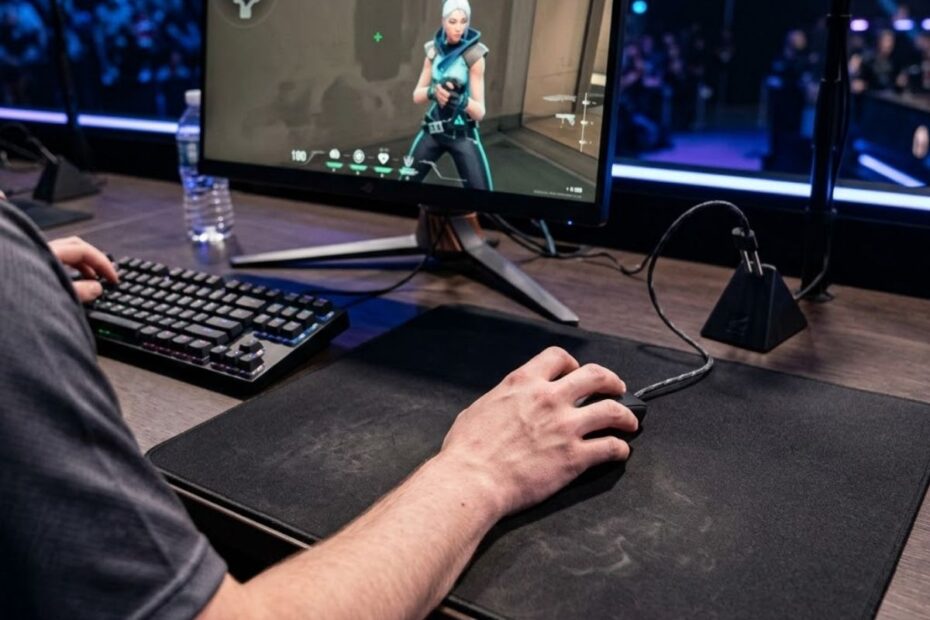
The best grip style for Valorant is usually relaxed claw grip because it is a balanced grip style for control, speed, and comfort. It helps players maintain stable crosshair control, perform fast micro-adjustments, and stay comfortable during long matches.
Palm grip is a grip style that provides more hand support and helps low sensitivity players maintain smoother, more controlled aim. Fingertip grip provides greater movement freedom and helps aggressive players make faster corrections with lightweight mice.
The right grip style depends on your hand size, mouse shape, sensitivity, and overall aiming mechanics. A grip that feels stable and repeatable under pressure will usually perform better than copying another player’s setup.
The best mouse grip style for Valorant is the one that provides stable crosshair control while allowing comfortable micro-adjustments during real matches.
Why Grip Style Matters in Valorant
Grip style is an important part of mouse control in Valorant because it affects stability, precision, and consistency. It helps players maintain steady crosshair placement, perform cleaner micro-adjustments, and stay comfortable during long competitive matches.
Valorant rewards precision more than raw speed because most fights are decided by positioning and first-shot accuracy. Your grip style influences how calmly you can hold angles, correct small aiming errors, and reset the mouse after larger movements.
When the grip is wrong, players often experience shaky aim, overflicking, awkward mouse lifts, or unnecessary fatigue. Many of these problems are mistaken for sensitivity issues when the real cause is inconsistent hand contact with the mouse.
Grip style affects how stable your crosshair feels before, during, and after a duel.
Key aiming mechanics influenced by grip style:
| Valorant Aim Factor | How Grip Style Affects It | Why It Matters |
|---|---|---|
| Crosshair stability | Controls how steady your hand feels while holding angles | Reduces unnecessary corrections before shooting |
| Micro-adjustments | Changes how fingers and wrist make small corrections | Improves headshot accuracy in close duels |
| Flick control | Affects how quickly you can move and stop the mouse | Helps prevent overflicking past targets |
| Recoil control | Influences grip pressure during sprays | Reduces stiff and shaky mouse movement |
| Long-session comfort | Determines hand and wrist fatigue | Supports consistent aim across multiple matches |
Note: A grip style that feels stable and predictable often improves confidence because your aim becomes easier to trust under pressure.
Grip style is not only about comfort. It is part of the mechanical foundation that connects your hand, mouse, and aiming performance in Valorant. Players who want a deeper understanding of mouse control fundamentals should also explore the gaming mouse for FPS games guide.
The Three Main Mouse Grip Styles for Valorant
The three main mouse grip styles for Valorant are palm grip, claw grip, and fingertip grip. Each grip style helps players control the mouse differently, affecting crosshair stability, movement speed, and aiming consistency.
Many players naturally use hybrid variations such as relaxed claw or palm-claw grip. Understanding the strengths and weaknesses of each grip style makes it easier to identify which one best matches your aiming mechanics.
These three grip styles create distinct hand positions and movement patterns during Valorant gameplay:
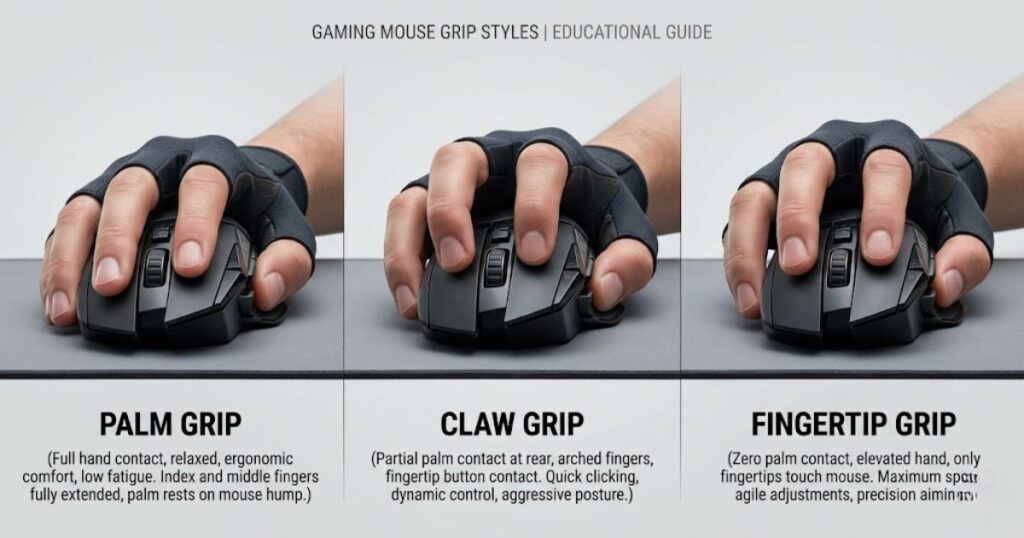
Each grip style offers different advantages depending on your sensitivity, mouse shape, and aiming habits. Understanding these differences can help you choose a grip that supports consistent performance rather than forcing unnecessary adjustments.
What Is Palm Grip and How Does It Help in Valorant?
Palm grip is a mouse grip style where most of the palm rests on the mouse. It helps players achieve better stability, smoother control, and greater comfort during long Valorant sessions.
Palm grip is commonly used by low sensitivity players because it supports larger arm movements and steady crosshair control. While it may feel slower for rapid flicks, it often provides excellent consistency during angle holding and controlled engagements.
Key strengths and limitations of palm grip:
| Palm Grip Trait | Valorant Benefit | Possible Limitation |
|---|---|---|
| Full palm contact | Creates stable control while holding angles | Can feel slower for fast flicks |
| Relaxed hand posture | Reduces fatigue during long ranked sessions | May limit finger mobility |
| Arm-focused movement | Works well with low sensitivity aiming | Requires more desk and mousepad space |
Palm grip advantages and tradeoffs for Valorant aiming performance.
Note: Palm grip is often a strong choice for players who prioritize stability, comfort, and controlled aiming over maximum movement speed.
Claw Grip for Valorant
Claw grip is a mouse grip style where the fingers arch while part of the palm remains in contact with the mouse. It helps players balance crosshair stability, fast micro-adjustments, and responsive mouse control in Valorant.
Claw grip is one of the most popular grip styles in tactical FPS games because it combines the stability of palm grip with the agility of fingertip grip. This balance makes it effective for holding angles, correcting aim quickly, and reacting to sudden engagements.
Claw grip is popular in tactical FPS games because it lets players react quickly without fully losing control. The arched fingers make clicking and small corrections feel more responsive, while the palm contact keeps the mouse from feeling completely loose. This is why many Valorant players naturally settle into relaxed claw after experimenting with different shapes and sensitivities.
Key strengths and limitations of claw grip:
| Claw Grip Trait | Valorant Benefit | Possible Limitation |
|---|---|---|
| Arched fingers | Improves fast clicking and small aim corrections | Can create finger tension if forced too hard |
| Partial palm contact | Balances stability and movement freedom | Depends heavily on mouse hump shape |
| Hybrid wrist and finger control | Works well for flicks and micro-adjustments | May feel tiring with a mouse that is too large |
Note: Claw grip is often the best starting point for Valorant players because it offers a balanced mix of stability, speed, and aiming flexibility.
Fingertip Grip for Valorant
Fingertip grip is a mouse grip style where only the fingertips touch the mouse with little or no palm contact. It helps players maximize movement freedom, perform quick micro-adjustments, and make fast aim corrections in Valorant.
Because the mouse has less contact with the hand, fingertip grip can feel extremely responsive during fast engagements. It is commonly preferred by players who use lightweight mice, rely on finger control, and favor quick repositioning during fights.
However, the same freedom that makes fingertip grip fast can also make it less stable. Players who struggle with grip tension or shaky aim may find it harder to maintain consistent crosshair control during high-pressure situations.
Key strengths and limitations of fingertip grip:
| Fingertip Grip Trait | Valorant Benefit | Possible Limitation |
|---|---|---|
| Minimal mouse contact | Allows very fast repositioning | Can feel unstable during pressure |
| Finger-led movement | Supports quick micro-flicks | Requires strong tension control |
| Best with small lightweight mice | Makes quick corrections easier | May feel uncomfortable with large mice |
Note: Fingertip grip offers exceptional speed and freedom, but it requires strong mouse control to maintain consistent accuracy under pressure.
Which Grip Style Is Best for Valorant?
Relaxed claw grip is usually the best grip style for Valorant because it balances stability, speed, and comfort. It helps players maintain consistent crosshair control, perform quick micro-adjustments, and adapt to different combat situations.
Palm grip is often better for players who prioritize stability and low sensitivity aiming, while fingertip grip is better suited to players who prefer maximum agility and fast mouse movement. The best choice ultimately depends on your aiming habits and overall comfort.
Each grip style offers a different balance between control, speed, and consistency during Valorant matches:
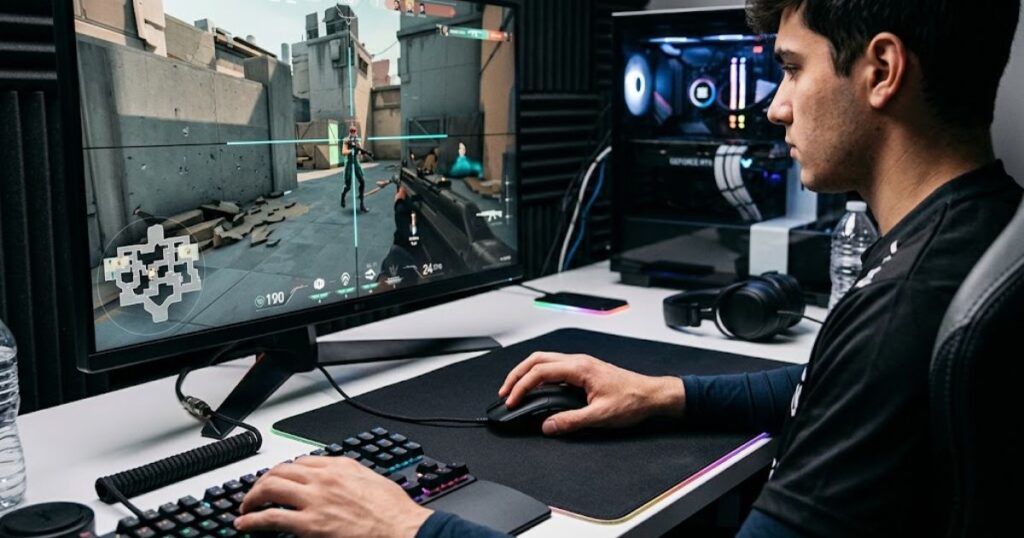
Valorant requires more than one type of mouse control. You need to hold angles without shaking, make tiny corrections when enemies swing, flick when your crosshair is slightly off, and reset your position after each movement. A grip style that only helps one of those actions but hurts the others may not be ideal for ranked play.
Relaxed claw grip usually performs well because it handles these mixed demands naturally. It gives enough palm support to stop the mouse cleanly, enough finger mobility for corrections, and enough wrist freedom for quick adjustments. That is why it often feels strong for players who are still developing their aim fundamentals.
How each grip style fits different Valorant players:
| Grip Style | Best Valorant Fit | Player Type | Overall Difficulty |
|---|---|---|---|
| Palm grip | Stable angle holding and low sensitivity | Controlled players who value comfort | Easy to learn |
| Relaxed claw grip | Balanced flicks, micro-adjustments, and stability | Most competitive ranked players | Moderate |
| Fingertip grip | Fast corrections and lightweight mouse control | Aggressive players with strong finger control | Harder to master |
Note: Relaxed claw grip is usually the safest starting point, but the best grip is always the one that keeps your aim comfortable and consistent.
How Grip Style Affects Crosshair Placement
Grip style affects crosshair placement because it influences mouse stability and aiming consistency. It helps players keep the crosshair at head level, make smoother corrections, and reduce unnecessary movement before a duel begins.
When your grip is unstable, the crosshair can drift slightly while moving, peeking, or holding angles. These small positioning errors become costly because many Valorant fights are decided by first-shot accuracy. A stable grip allows you to place the crosshair closer to the target before the duel starts, reducing the need for panic flicks and last-second corrections.
Palm grip often provides the most stable pre-aiming experience because more of the hand remains in contact with the mouse. Claw grip also performs well by combining stability with faster correction speed. Fingertip grip can still be effective, but it requires stronger control because small finger movements can create unintended crosshair movement.
This is why crosshair placement should be studied together with physical mouse control. If your crosshair placement looks good in theory but becomes inconsistent during real matches, your grip style may be contributing to the problem. You can connect this topic with crosshair placement in Valorant to better understand how hand stability and head-level pre-aiming work together.
How different grip styles affect crosshair placement:
| Grip Style | Crosshair Placement Strength | Common Risk |
|---|---|---|
| Palm grip | Very stable during angle holding | May feel slower when correcting wide swings |
| Claw grip | Stable with good correction speed | Can become tense if fingers are overarched |
| Fingertip grip | Fast correction freedom | Can create small unwanted movements |
Note: Stable crosshair placement often starts with stable mouse control. A grip that keeps the mouse calm can reduce unnecessary corrections and improve first-shot accuracy.
How Grip Style Affects Flick Shots and Micro-Adjustments
Grip style affects flick shots and micro-adjustments because it changes how quickly the mouse can move and how accurately it can stop. It helps players control fast corrections, improve stopping precision, and maintain consistency during Valorant gunfights.
Flicking is not only about movement speed. The ability to stop accurately is just as important. Micro-adjustments are even more demanding because small wrist and finger corrections must land precisely on the target. A grip that supports both movement and control will usually produce more reliable results.
Claw grip often performs very well for flick shots because it combines responsive finger movement with enough palm contact to maintain control. This balance makes it effective when the crosshair is close to the target but still requires a quick correction.
Fingertip grip can make flicks feel faster because the mouse moves with very little resistance. However, increased freedom can sometimes lead to overshooting, especially during stressful situations. Palm grip may feel slower, but it often provides more predictable stopping control because more of the hand remains connected to the mouse.
If you frequently overflick or underflick, sensitivity may not be the only factor. Your grip style may be creating too much freedom or too much resistance. A strong flick should feel controlled and deliberate rather than rushed and unpredictable.
Players who want to improve flick mechanics should also read the Valorant flick shot aiming guide. Understanding the relationship between grip style, flick correction, and mouse control can help identify the real cause of missed shots.
Best grip styles for different flicking and correction scenarios:
| Aim Action | Best Grip Fit | Reason |
|---|---|---|
| Small correction near the head | Claw grip | Finger mobility and palm support work together |
| Large emergency flick | Claw or fingertip grip | Both allow quick direction changes |
| Controlled stop after movement | Palm or claw grip | More contact improves braking control |
| Fast target switching | Fingertip or claw grip | Less resistance helps quick repositioning |
Note: Effective flicking depends on both speed and stopping control. A grip that feels fast but difficult to stop accurately can reduce overall aiming consistency.
How Sensitivity Changes the Best Grip Style
Sensitivity changes the best grip style because it affects how much your arm, wrist, and fingers control the mouse. Low sensitivity often works better with palm or relaxed claw grip, while higher sensitivity often fits claw or fingertip grip.
Low sensitivity usually relies more on arm movement, while higher sensitivity depends more on wrist and finger control:
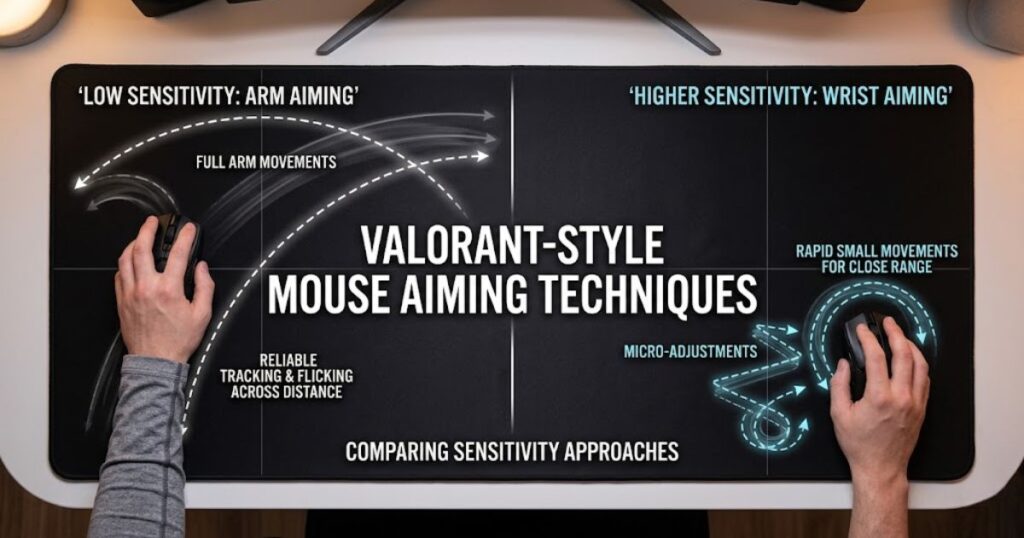
This does not mean every low sensitivity player must use palm grip or every high sensitivity player must use fingertip grip. The main difference is physical demand. Low sensitivity needs more comfort and stable reset mechanics, while high sensitivity needs stronger tension control because tiny movements create larger in-game changes.
Valorant players often copy pro sensitivity without checking whether their grip style supports that movement pattern. A sensitivity that feels natural with relaxed claw may feel unstable with full palm or pure fingertip. That is why sensitivity and grip style should be tested together instead of treated as separate choices.
How sensitivity changes grip style fit:
| Sensitivity Style | Likely Grip Fit | Movement Source | Risk to Watch |
|---|---|---|---|
| Low sensitivity | Palm or relaxed claw | Forearm and shoulder | Running out of mousepad space |
| Medium sensitivity | Relaxed claw | Arm, wrist, and fingers | Overchanging settings too often |
| High sensitivity | Claw or fingertip | Wrist and fingers | Shaky micro-adjustments |
Note: Sensitivity should support your grip mechanics. If your grip and sensitivity fight each other, your aim will feel harder to repeat under pressure.
For a deeper setup path, compare this guide with best sensitivity for Valorant. The conclusion is that sensitivity should match your grip mechanics, not fight against them. When both feel aligned, your aim becomes easier to repeat across different maps, agents, and pressure situations.
How Mouse Shape Affects Your Grip Style
Mouse shape affects grip style because it determines where your fingers, palm, and thumb naturally rest on the mouse. It helps players maintain better comfort, control, and consistency by supporting a grip style that feels natural instead of forced.
Different mouse shapes naturally encourage different grip styles based on hand contact, shell height, and overall mouse dimensions:
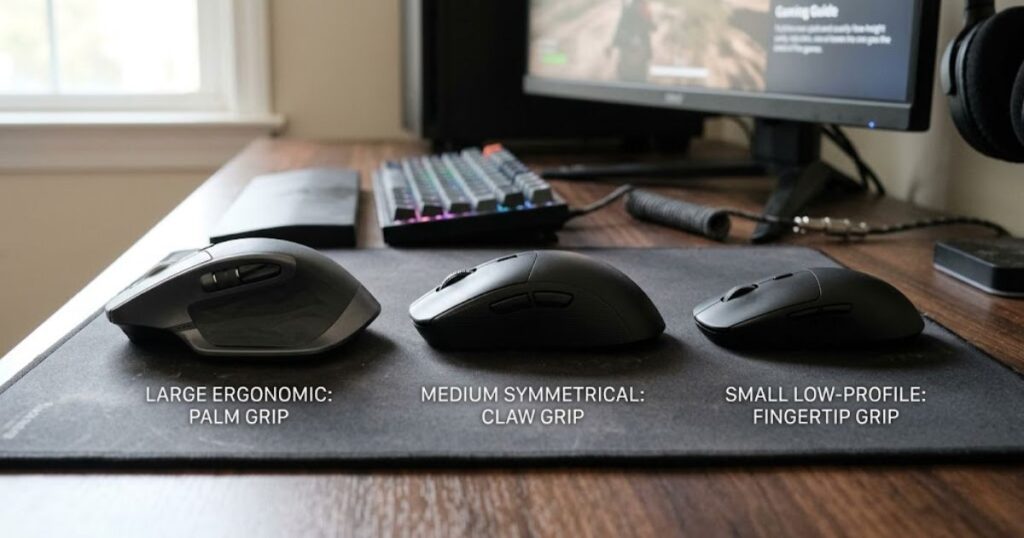
Palm grip usually feels best with larger ergonomic mice because the hand can rest naturally across the shell. Claw grip often works well with medium-sized symmetrical mice that provide support without restricting finger movement. Fingertip grip is commonly paired with smaller mice because the reduced size makes quick repositioning easier.
The same grip can feel completely different on another mouse shape. A high rear hump may provide better palm support for claw grip, while a flatter profile can improve fingertip mobility. This is why choosing a grip style without considering mouse shape often leads to inconsistent comfort and control.
How mouse shape characteristics influence grip style fit:
| Mouse Shape Feature | Best Grip Match | Why It Helps |
|---|---|---|
| Large ergonomic shell | Palm grip | Supports more hand contact and comfort |
| Medium symmetrical shell | Claw grip | Balances support and movement freedom |
| Small low-profile shell | Fingertip grip | Allows faster finger-led repositioning |
| Rear hump support | Claw grip | Gives the palm a stable anchor point |
| Narrow waist | Claw or fingertip grip | Makes lifting and small adjustments easier |
Mouse shape features and the grip styles they commonly support.
If your current mouse feels awkward, do not assume your grip style is wrong immediately. The shape may be forcing your fingers into an uncomfortable angle or leaving your palm unsupported. A better way to troubleshoot is to ask whether the mouse shape supports your natural hand posture.
You can explore this further in best mouse shape for Valorant, especially if your aim feels inconsistent despite stable settings. The conclusion is that grip style and mouse shape must be chosen together. A strong Valorant setup starts when the mouse feels like a natural extension of your hand.
How Mouse Weight Affects Grip Style
Mouse weight affects grip style because it changes how easily the mouse moves and stops during aiming. It helps determine how much effort your fingers, wrist, and arm need to control movement in Valorant.
Lighter mice are generally easier to reposition and reset, which is why they are often preferred by fingertip and claw grip players. These grip styles rely more on finger mobility and quick corrections, making lightweight designs feel faster and more responsive during gunfights.
However, lighter does not automatically mean better. An ultra-light mouse can sometimes make aim feel shaky because small hand movements become more noticeable. Players who struggle with overcorrections may benefit from slightly more weight if it improves stability and confidence.
Heavier mice can feel more planted, especially for palm grip users who prioritize control and comfort. The additional resistance may reduce accidental movement, but it can also increase fatigue during long sessions, particularly for low sensitivity players who use large arm movements.
How mouse weight typically fits different grip styles:
| Mouse Weight | Grip Style Fit | Valorant Feel |
|---|---|---|
| Under 60g | Fingertip and aggressive claw | Very fast and easy to reposition |
| 60g to 80g | Claw and hybrid grips | Balanced speed and control |
| 80g to 95g | Palm and relaxed claw | Stable but still manageable |
| Above 95g | Palm grip for some users | Planted feel but higher fatigue risk |
Note: The best mouse weight is the one that supports your grip without creating extra tension or unnecessary effort.
Mouse weight also influences grip pressure. With a heavier mouse, some players squeeze harder to move quickly. With a very light mouse, others squeeze harder to stabilize movement. Both habits can create tension and reduce aiming consistency if they become excessive.
The goal is to find a weight that allows your hand to stay relaxed during real matches. Fingertip players often prefer lighter mice, claw players usually benefit from balanced lightweight designs, and palm grip users can focus more on comfort and stability. If you are still comparing different lightweight and control-focused options, explore our guide to the top best gaming mouse for FPS games in 2026.
Signs Your Current Grip Style Is Hurting Your Aim
Your current grip style may be hurting your aim if it causes discomfort, shaky mouse control, inconsistent flicks, or frequent hand repositioning. A good grip should feel stable and repeatable, allowing you to focus on gameplay instead of constantly adjusting your hand.
One of the clearest warning signs is discomfort. Your hand should not feel cramped, locked, or sore after normal play. While some fatigue is expected during long sessions, recurring pain or tension often indicates that your grip, mouse shape, or setup is working against you.
Another common sign is repeated inconsistency during the same type of engagement. If you regularly overflick close targets, struggle with small corrections, or lose control when tracking wide swings, the problem may come from how your hand interacts with the mouse rather than your sensitivity settings.
Common signs that your grip style may be limiting your performance:
- Your wrist feels sore after one or two ranked matches.
- Your fingers remain tense even when you are not actively fighting.
- Your crosshair shakes while holding simple angles.
- Your flicks frequently travel beyond the target.
- You keep adjusting your hand position throughout the match.
- Your mouse lifts feel inconsistent after large movements.
- You grip the mouse harder during clutch situations and lose precision.
- Your aim feels good in warmup but becomes unstable in real games.
Note: Repeated mechanical issues often point to a grip problem rather than an aiming problem.
These signs do not automatically mean you need a completely different grip style. In many cases, the solution may be relaxing your hand, improving posture, adjusting desk height, or choosing a mouse shape that better supports your natural grip. The goal is to identify the root cause instead of making random changes that create new problems.
Should You Change Your Grip Style for Valorant?
You should change your grip style only if your current grip causes discomfort, unstable aim, or repeated mechanical problems that do not improve with practice. A grip change can help solve specific issues, but it should be based on a clear problem rather than curiosity or trends.
If your aim is already consistent and your hand feels comfortable, there is usually no reason to switch. Many Valorant players lose progress by constantly changing settings, grips, and equipment instead of refining what already works. Consistency is a competitive advantage, and unnecessary changes can temporarily reduce performance.
However, if your grip causes pain, excessive tension, or recurring aiming issues, a change may be worthwhile. Comfort and performance are closely connected because fatigue affects mouse control, reaction speed, and precision during longer matches. A grip that feels good for a few rounds but becomes uncomfortable later may not be sustainable in competitive play.
When should you consider changing your grip style?
| Situation | Should You Change Grip? | Recommended Action |
|---|---|---|
| Your aim is stable and comfortable | No | Keep practicing with your current grip |
| Your hand feels painful or cramped | Yes | Adjust grip, posture, or mouse shape |
| Your aim is shaky on tiny corrections | Maybe | Test more palm support or lower tension |
| Your flicks feel too slow | Maybe | Test relaxed claw or a lighter mouse |
| You bought a new mouse shape | Maybe | Allow your grip to adapt naturally for a week |
Note: A grip change should solve a specific problem, not create new inconsistency.
The safest approach is to make gradual adjustments rather than switching to a completely different grip overnight. For example, moving from palm grip to relaxed claw is often easier than jumping directly to fingertip grip. Small changes give your muscle memory time to adapt while reducing the risk of disrupting established aiming habits.
In most cases, the best grip style is not the one used by professional players. It is the one that allows you to stay comfortable, maintain consistent mouse control, and perform reliably across long Valorant sessions.
How to Find Your Best Grip Style for Valorant
The best way to find your grip style for Valorant is to test comfort, control, and consistency during real gameplay. A grip that feels comfortable for a few seconds may not perform well during peeks, sprays, micro-adjustments, or high-pressure situations.
Start by identifying your natural grip instead of forcing a completely new one. Place your hand on the mouse without thinking and observe where your palm, fingers, and thumb make contact. In many cases, this natural position provides a better starting point than copying a professional player’s setup.
After identifying your grip, test it in different scenarios. Use the practice range, deathmatch, and real matches to evaluate whether the grip remains comfortable and repeatable. The goal is not to find the grip that feels best for five minutes, but the one that continues working after long sessions and stressful rounds.
Follow these steps to evaluate your grip style:
- Place your hand naturally on the mouse and identify your current grip.
- Play ten minutes in the practice range while focusing on relaxed grip pressure.
- Test small head-level corrections on bots without rushing shots.
- Play several deathmatch rounds and monitor whether your hand becomes tense.
- Review whether your misses come from overshooting, undershooting, or shaky aim.
- Keep the same grip for at least one week before judging the results.
Note: Consistent testing is more valuable than making frequent grip changes.
During this process, avoid changing sensitivity, crosshair settings, mousepad, and grip style at the same time. Too many adjustments make it difficult to identify what actually improved or worsened your aim. Testing one variable at a time produces more reliable results.
The best grip style is not always the fastest or the most popular. It is the grip that allows you to stay comfortable, maintain stable mouse control, and repeat the same aiming mechanics consistently across different Valorant situations.
Best Grip Style by Valorant Player Type
The best grip style depends on your playstyle because different Valorant roles create different aiming demands. A grip that works well for aggressive entry fights may not be ideal for players who spend more time holding angles and controlling space.
Duelists often benefit from claw or fingertip grip because they frequently take aggressive peeks, switch targets quickly, and react to unpredictable situations. Players who prefer fast engagements usually value the additional agility these grip styles provide.
Controllers and sentinels often prefer palm grip or relaxed claw because their gameplay revolves around positioning, patience, and controlled engagements. A more stable grip can make holding angles and taking disciplined shots feel more comfortable and consistent.
Initiators can perform well with almost any grip style because their fights vary depending on utility timing, team coordination, and map position. In many cases, comfort and mouse control matter more than role-specific recommendations.
Recommended grip styles based on player type:
| Player Type | Recommended Grip | Reason |
|---|---|---|
| Aggressive duelist | Claw or fingertip | Supports fast corrections and target switching |
| Passive sentinel | Palm or relaxed claw | Supports stable angle holding and controlled shots |
| Controller player | Relaxed claw or palm | Works well for disciplined positioning and steady duels |
| Initiator player | Relaxed claw | Balances utility usage and direct engagements |
| Low sensitivity aimer | Palm or relaxed claw | Supports larger arm movements and wide mousepad usage |
| High sensitivity aimer | Claw or fingertip | Supports wrist and finger precision |
Note: Your playstyle can help guide grip selection, but comfort and consistency should always come first.
Your role does not automatically determine your grip style. Hand size, mouse shape, sensitivity, and overall comfort often have a greater impact on long-term performance. Use role-based recommendations as a starting point rather than a strict rule.
If you are unsure what type of aimer you are, review your own gameplay instead of guessing. Pay attention to whether you lose fights because your aim feels too slow, too shaky, or too tense. The best grip style is usually the one that solves your most common aiming problem while remaining comfortable throughout an entire match.
Common Grip Style Mistakes Valorant Players Make
The most common grip style mistake in Valorant is forcing a grip because it looks popular instead of choosing one that supports consistent aim. Many players copy professional setups, grip the mouse too tightly, or switch grip styles too often, creating unnecessary inconsistency in their mechanics.
Copying professional players is tempting because it seems like a shortcut to better aim. However, professional players have different hand sizes, mouse shapes, sensitivities, posture habits, and years of muscle memory. A grip style works because it fits the entire setup, not because it is universally superior.
Another common mistake is excessive grip tension. Many players hold the mouse comfortably during warmup but squeeze much harder during ranked matches. This extra tension can make micro-adjustments less accurate, reduce smooth mouse control, and cause recoil corrections to feel stiff under pressure.
Common grip style mistakes to avoid:
- Copying a grip style without considering your hand size and mouse shape.
- Changing grip styles after every bad match or losing streak.
- Squeezing the mouse harder to compensate for nervous aim.
- Using a mouse shape that forces uncomfortable finger positioning.
- Treating grip style as a replacement for strong crosshair placement fundamentals.
- Ignoring desk height, posture, and available mousepad space.
Note: Grip style should support your aim mechanics, not become another setting that constantly changes.
Many players also make the mistake of viewing grip style as an isolated factor. In reality, grip interacts with sensitivity, DPI, mouse shape, skates, mousepad friction, posture, and warmup habits. Optimizing only one part of the system rarely produces lasting improvement.
The most effective approach is to build a setup where every component works together. A comfortable grip, suitable mouse shape, stable sensitivity, and good aiming fundamentals will usually produce better results than endlessly chasing new grip styles or professional player settings.
Best Grip Style for Valorant FAQ
The best grip style questions usually come from players who feel inconsistent despite practicing regularly. These answers focus on practical decision-making so you can avoid overthinking and choose a grip style that fits your real aiming behavior. Use them as a quick reference after reading the full guide.
What is the best grip style for Valorant?
Relaxed claw grip is usually the best grip style for Valorant because it balances stability, speed, and micro-adjustment control. It gives enough palm support for stopping accuracy while keeping the fingers active for small corrections. Palm and fingertip can still work well if they match your sensitivity, mouse shape, and comfort needs.
Is palm grip good for Valorant?
Palm grip is good for Valorant if you value stability, comfort, and controlled low sensitivity aiming. It helps with angle holding and smooth movement because the hand has more contact with the mouse. The tradeoff is that fast flicks and quick repositioning may feel slower compared with claw or fingertip grip.
Is claw grip better than fingertip grip for Valorant?
Claw grip is better than fingertip grip for many Valorant players because it gives a stronger balance between control and speed. Fingertip grip can feel faster, but it can also become shaky under pressure. If you want a safer competitive grip, relaxed claw is usually easier to keep consistent.
Do Valorant pros use claw grip?
Many Valorant pros use some form of claw or relaxed claw grip because it supports quick corrections and stable control. However, not every pro uses the same grip because hand size, mouse shape, and sensitivity differ. You should learn from pro habits without copying them blindly.
What grip style is best for low sensitivity Valorant players?
Palm grip and relaxed claw grip are usually best for low sensitivity Valorant players because they support larger arm movements. These grips provide more stability when moving across a large mousepad. Fingertip grip can still work, but it may feel harder to control during wide swipes and resets.
What grip style is best for high sensitivity Valorant players?
Claw grip and fingertip grip are usually better for high sensitivity players because they allow smaller wrist and finger movements. High sensitivity makes tiny movements more important, so finger control becomes valuable. The main risk is shaky aim if the player uses too much grip tension.
Can grip style affect recoil control in Valorant?
Grip style can affect recoil control because hand tension changes how smoothly you pull and correct the mouse. A tense grip can make recoil movement feel stiff, while a relaxed grip can make spray correction smoother. This does not replace recoil practice, but it can make recoil control easier to repeat.
Should beginners use palm, claw, or fingertip grip?
Beginners should usually start with palm or relaxed claw grip because both are easier to control than pure fingertip. Relaxed claw is often the best beginner option if the player wants speed and stability together. The most important thing is comfort because beginners need repeatable mechanics before advanced speed.
How long does it take to get used to a new grip style?
Most players need at least one to three weeks to feel comfortable with a new grip style. The adjustment can take longer if the grip changes your wrist angle, finger pressure, or mouse lifting habits. During that period, avoid changing sensitivity too often because it will make adaptation harder.
Does mouse size affect grip style?
Mouse size affects grip style because a large mouse usually supports palm grip better, while a smaller mouse often supports claw or fingertip grip better. If a mouse is too large, fingertip control can feel restricted. If a mouse is too small, palm grip may feel unsupported and uncomfortable.
Can I use different grip styles for different agents?
You should not intentionally switch grip styles between agents because it can damage consistency. Your aim foundation should stay stable regardless of whether you play duelist, sentinel, controller, or initiator. It is better to keep one reliable grip and adjust your decision-making for each agent instead.
Why does my grip feel good in practice but bad in ranked?
Your grip may feel worse in ranked because pressure increases hand tension and makes small instability more obvious. In practice, you may stay relaxed because there is no consequence for missing. If your grip collapses under pressure, focus on relaxed hand pressure and choose a grip that gives more stable support.
Final Thoughts on Choosing the Best Grip Style for Valorant
The best grip style for Valorant is the one that helps you aim consistently, stay relaxed, and control the mouse naturally during real matches. For most players, relaxed claw grip is the strongest starting point because it balances speed and stability. Palm grip is excellent for comfort and controlled low sensitivity aim, while fingertip grip is powerful for players who want fast finger-led movement and can manage tension well.
You should not choose a grip style because it sounds advanced or because a professional player uses it. Choose it because it supports your hand, your mouse shape, your sensitivity, and your playstyle. Valorant is a game of repeatable precision, so the grip that feels boring but stable is often better than the grip that feels fast but unreliable.
The most important rule is to avoid changing too many things at once. Test your grip carefully, keep your sensitivity stable, and watch how your aim behaves during actual duels. If your grip helps you hold angles calmly, make small corrections cleanly, and finish matches without discomfort, it is probably doing its job.
Thank you for reading GearTP. Keep your setup consistent, stay patient with your mechanics, and let your grip style support better decisions instead of becoming another source of doubt.