
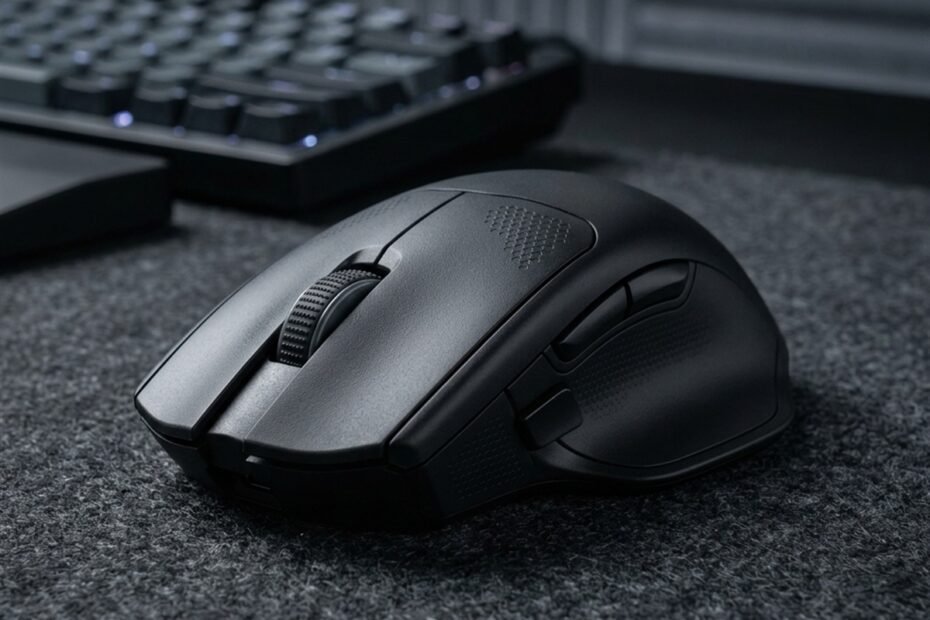
The best mouse shape for palm grip is usually a fuller shell with enough length, width, and rear support to let the hand rest naturally on the mouse. However, finding the right fit depends on your hand size and natural contact points rather than simply choosing the largest mouse available. Understanding how palm grip differs from fingertip grip clarifies why full palm support requires continuous surface contact across the rear shell and finger grooves.
What Mouse Shape Is Best for Palm Grip?
The best mouse shape for palm grip features a fuller shell profile, adequate front-to-back length, supportive width across the grip points, a stable rear hump, and a natural side contour that cradles the fingers without forceful squeezing. This physical geometry allows the entire palm to contact the shell continuously, promoting relaxed forearm muscles and consistent crosshair stability in competitive shooters.
These are the main mouse shape characteristics to evaluate when choosing a palm grip mouse:
| Shape Characteristic | What It Does | Why It Matters for Palm Grip |
|---|---|---|
| Fuller shell | Provides more surface contact | Supports more of the hand |
| Adequate length | Extends under more of the palm | Helps maintain natural contact |
| Adequate width | Creates more side room | Reduces excessive squeezing |
| Rear support | Supports the back of the palm | Helps maintain a stable grip |
| Natural contour | Follows the hand’s resting position | Makes the grip feel less forced |
Core mouse shape characteristics for palm grip.
Palm grip generally benefits from a supportive shell, but the correct proportions depend on the player’s hand size and natural grip. For formal design standards, official manufacturer research such as ZOWIE guidance on mouse grip shapes emphasizes how fuller, wider shells and taller rear arches distribute palm pressure evenly during micro-adjustments.
Why Does Mouse Shape Matter So Much for Palm Grip?
Palm grip places more of the hand against the shell than any other grip style, meaning mouse geometry directly dictates where the palm, fingers, and thumb rest during gameplay. When a shape fails to match your hand’s natural resting curvature, muscle tension accumulates rapidly across the palm and wrist.
Palm Contact and Shell Support: Distributing Continuous Hand Weight
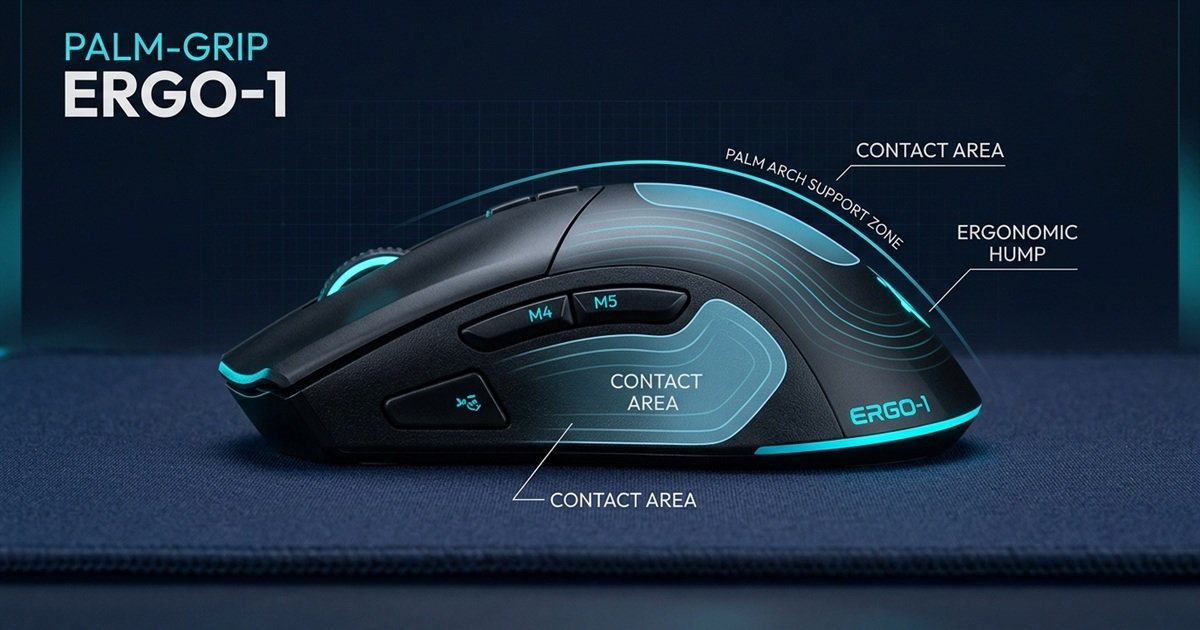
A palm grip relies on constant surface area contact across the thenar and hypothenar eminences of the hand. The rear shell must curve upward to meet the natural arch of the palm, preventing the wrist from collapsing backward onto the mouse pad. Finger placement along the primary buttons requires gentle curvature so the index and middle fingers rest flat without curling, while the thumb rests naturally along the left side flank without hovering in mid-air.
The technical diagram below highlights the primary palm contact zones and anatomical arch support that define an effective palm grip shell profile:
Shape and Grip Pressure: Preventing Muscle Squeeze and Hand Fatigue
When mouse geometry fails to provide adequate contact points, your hand reflexively alters its grip pressure to maintain control. If a shell is too small, your fingers compensate by curling involuntarily, turning a relaxed palm grip into a strained hybrid. If the waist is too narrow, the thumb and ring finger squeeze inward, causing lateral hand cramps. If the body is too short, the lower palm drops off the edge and drags across the mouse pad, creating unpredictable friction. Choosing the wrong hump placement forces constant readjustments during firefights.
Because palm grip depends on continuous hand contact, shell geometry can matter more than many specifications when determining whether a mouse feels natural.
GearTP Key Rule
The Palm Grip Principle: Never choose a mouse based purely on raw sensor specifications if the hump forces your palm to flatten or your knuckles to hyperextend. In tactical shooters, continuous palm support and relaxed side grip govern over 80% of your micro-adjustment consistency.
What Mouse Hump Is Best for Palm Grip?
A supportive rear hump is often useful for palm grip because it gives the back of the hand a stable contact point, although hump height and position still need to match hand size. The curvature of the hump acts as the mechanical foundation that bears the weight of the hand during wide swiping movements.
Rear Hump vs Center Hump: Stabilizing Lower Palm vs Balanced Arch
The placement of the highest point along the mouse spine determines where support is concentrated. A rear hump places maximum volume under the base of the palm, creating an immediate tactile anchor that locks the wrist into an upright, supportive posture. A center hump positions the crest directly under the middle knuckles, offering a balanced, versatile arch that permits slight finger adjustments but offers less dedicated rear-palm wedging.
High Hump vs Low Hump: Maximizing Arch Contact vs Tracking Freedom
Within a palm grip context, hump height directly dictates how flat or arched your hand rests against the surface. A tall hump fills the palm cavity completely, eliminating negative space and maximizing skin-to-shell contact for relaxed stability. A low hump lowers the hand profile closer to the desk surface, giving the fingers slightly more vertical freedom while potentially sacrificing lower palm support. Evaluating low hump vs high hump mouse shapes helps players determine whether their hand prefers full arch support or a lower tracking angle.
The following table shows how different hump configurations can change palm grip support:
| Hump Configuration | Palm Grip Effect | Potential Trade-Off |
|---|---|---|
| Higher hump | More pronounced palm support | Can feel bulky |
| Lower hump | More freedom above the shell | May provide less support |
| Rear hump | Stronger rear-palm contact | Can feel restrictive |
| Center hump | More balanced shell contact | Less dedicated rear support |
How hump position and height affect palm grip.
A higher or rear-positioned hump is not automatically better. The useful hump is the one that supports the palm without forcing the hand into an unnatural position.
Is an Ergonomic or Symmetrical Shape Better for Palm Grip?
Ergonomic shapes often provide more obvious palm and side support, while symmetrical shapes can also work when their dimensions and hump position give the hand enough support. Neither category is universally superior; fit depends entirely on how your wrist angles naturally over the desk surface.
Why Ergonomic Contours Naturally Fit Palm Grip Mechanics
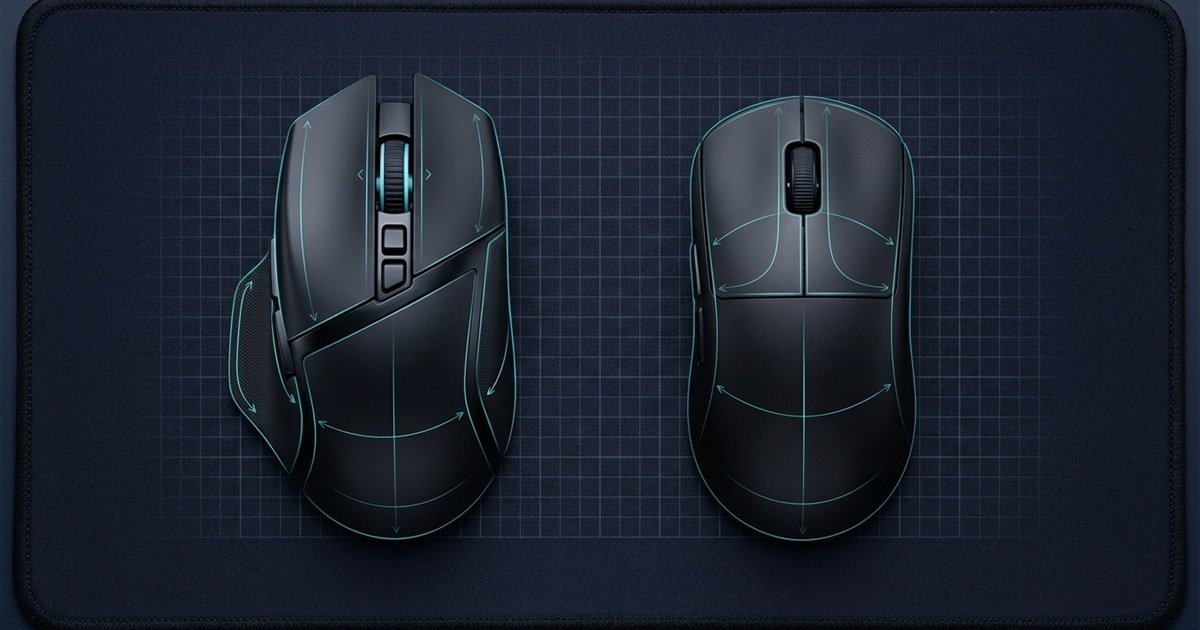
Ergonomic shells feature an asymmetrical design where the left side rises higher than the right, mimicking the natural pronation angle of the human forearm. This slanted contour allows the hand to rest at a slight tilt rather than completely flat, reducing tension across the carpal tunnel. The contoured thumb groove and flared right side provide dedicated resting ledges for all five digits, delivering effortless stability during extended practice sessions.
The comparison diagram below illustrates the structural differences between an asymmetrical ergonomic contour and a symmetrical ambidextrous shell:
When Symmetrical Mice Provide Sufficient Palm Support
A symmetrical ambidextrous mouse can support a palm grip effectively if it possesses adequate physical width, sufficient overall length, and a tall, supportive hump profile. Players who prefer a neutral wrist angle or who slightly angle their mouse inward often find symmetrical shapes more adaptable, provided the shell provides enough surface area to keep the palm from dragging.
Use these differences to understand how each shell style can behave with a palm grip:
| Shape Type | Typical Palm Support | Potential Advantage | Potential Limitation |
|---|---|---|---|
| Ergonomic | More contoured | Stronger hand support | More directional |
| Symmetrical | More neutral | Flexible hand positioning | May provide less palm contour |
Ergonomic and symmetrical mouse shapes for palm grip.
Palm grip does not require an ergonomic shell. The better category is the one whose dimensions and contact points match the hand. Authoritative peripheral engineering insights, including Logitech’s guide to gaming mouse shapes and grips, confirm that grip comfort depends primarily on hand dimensions aligning with shell volume rather than purely on shell symmetry.
“
Competitive Ergonomic Insight“An ergonomic mouse does not make your crosshair faster; it eliminates the subtle, involuntary forearm tension that quietly ruins your tracking stability by the late rounds of a match.”
How Does Hand Size Change the Best Palm Grip Mouse Shape?
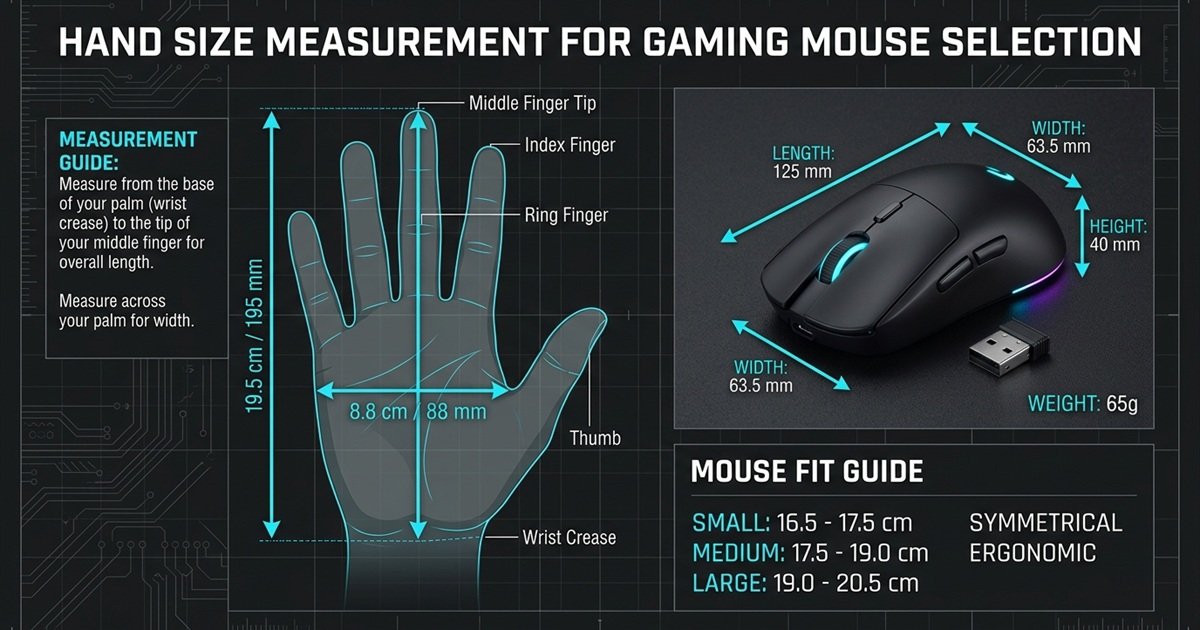
Hand size changes how much length, width, and height a palm grip mouse needs, so the same shell can feel supportive to one player and oversized or cramped to another. Matching mouse dimensions to hand proportions prevents overreaching for controls or crowding the fingers.
The technical blueprint below outlines proper hand measurement protocols and proportional mouse shell sizing thresholds:
Small Hands: Prioritizing Controlled Shell Length and Button Reach
Gamers with hands measuring under 17 cm in length must be cautious with long, high-volume shells. A mouse that is too long prevents small hands from reaching the primary click sweet spots and scroll wheel without shifting the palm forward. Players with smaller hands should look for compact ergonomic or mid-hump symmetrical shells with controlled length and moderate hump height to avoid wrist hyperextension.
Medium Hands: Balancing Proportions for Natural Palm Contact
Hands measuring between 17 cm and 19.5 cm fall into the most versatile category, matching the baseline engineering of most standard competitive mice. Medium-handed players typically thrive with balanced proportions that offer moderate shell volume, allowing full palm contact without filling the hand to the point of immobility.
Large Hands: Maximizing Shell Volume and Rear Palm Elevation
Hands exceeding 19.5 cm require substantial physical volume and extended shell coverage. If a mouse lacks sufficient length and width, large hands will overhang the front buttons and drag the wrist across the mouse pad. Large-handed palm grippers must prioritize generous length, a wide grip width, and an elevated rear hump to keep the entire palm elevated and comfortable.
The following table summarizes the shape priorities that usually matter at different hand sizes:
| Hand Size | Main Shape Priority | Common Fit Problem |
|---|---|---|
| Small | Controlled length and height | Shell feels oversized |
| Medium | Balanced proportions | One dimension feels slightly off |
| Large | More length and palm support | Short or narrow shell |
Palm grip shape priorities by hand size.
Hand size should help narrow the shape range, not force every player into one exact mouse category. Natural grip flexibility and finger length ratios also influence final comfort.
Which Mouse Dimensions Matter Most for Palm Grip?
Length, width, and height work together to determine how much of the hand contacts the shell and where the palm naturally rests. Evaluating these three dimensions as an interrelated system ensures balanced hand support.
Mouse Length: Supporting Palm Coverage and Finger Sweet Spots
Length determines front-to-back coverage across the hand. Proper shell length provides continuous support from the base of your palm to the fingertips. If a mouse is too short, the heel of the palm hangs unsupported off the rear ledge. If it is excessively long, the fingertips fail to reach the primary switch actuation zones, making clicks feel stiff and awkward.
Mouse Width: Relieving Muscle Strain and Side Finger Pinching
Width dictates lateral hand compression and side comfort. Measured at the narrowest grip section and the rear flare, width determines whether your thumb, ring finger, and pinky have adequate resting space. A mouse that is too narrow forces the fingers to pinch together, generating cramping along the outer edge of the palm.
Mouse Height: Filling the Palm Arch and Vertical Cavity
Height governs vertical palm arch and internal cavity volume. The peak height and its slope dictate how much the fingers must curve. A taller mouse fills the hollow of the palm, resting the hand in a relaxed anatomical position, whereas a flatter profile lowers the knuckles toward the pad surface.
These dimensions affect different parts of the palm grip, so they should be evaluated together:
| Dimension | Main Effect | What to Check |
|---|---|---|
| Length | Front-to-back coverage | Palm and finger placement |
| Width | Side-to-side space | Thumb and outer-finger comfort |
| Height | Vertical palm support | Hump and hand contact |
Mouse dimensions that influence palm grip fit.
A mouse can have the right length but still feel wrong if its width or height does not match the hand.
How Do You Know if a Mouse Shape Fits Your Palm Grip?
A palm grip mouse fits when the hand can rest naturally, the fingers reach the controls without excessive stretching, and the player does not need to squeeze or constantly reposition the grip during competitive tracking.
Use these five steps to check whether a mouse shape fits your palm grip:
- Place your hand naturally on the shell without forcing your fingers into specific grooves.
- Check palm contact to ensure the shell supports both the center arch and the base of your hand.
- Check finger reach to verify that your index and middle fingers naturally land over the main click switches without overextending.
- Check thumb and side support to confirm that your lateral digits rest comfortably without dragging on the pad or pinching the sides.
- Move, lift, and reposition the mouse during simulated aiming drills to verify that the shell stays securely seated in your hand without sliding.
The photograph below shows an optimal palm grip fit with complete surface contact across the rear shell and primary switches:
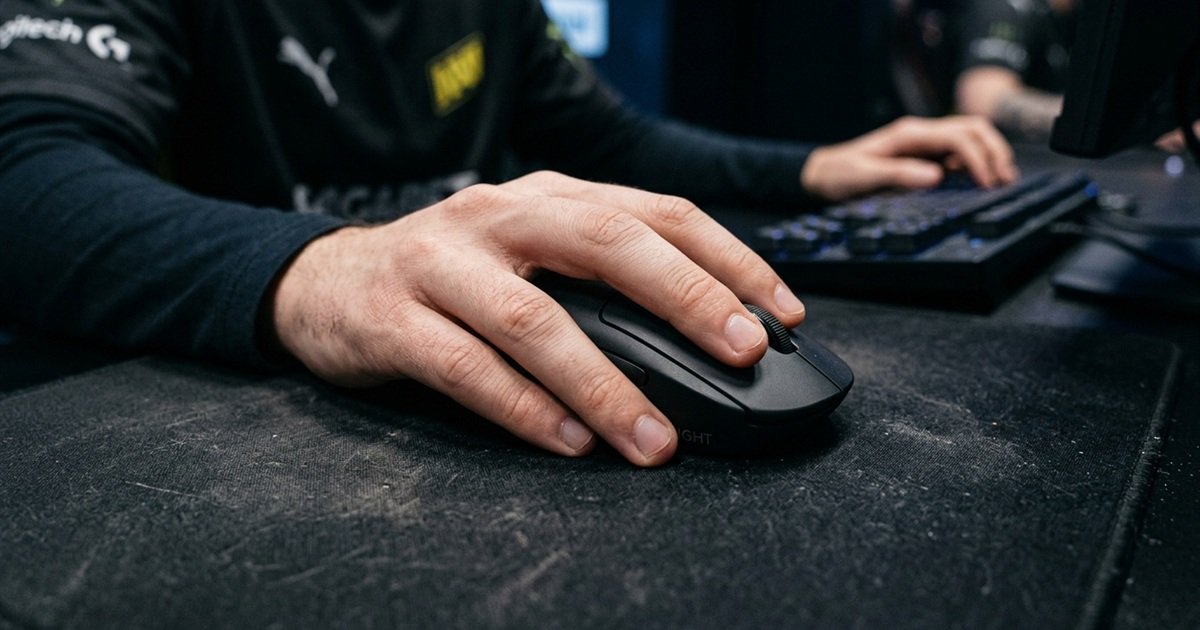
The best shape should feel natural during movement rather than requiring constant grip corrections.
What Palm Grip Mouse Shapes Should You Be Careful With?
Palm grip users should be cautious with shapes that leave the palm unsupported, create excessive side pressure, or force the hand into an unnatural position. Choosing an unsuitable shell compromises aiming consistency and can cause chronic wrist strain.
Watch for these shape mismatch signs when testing a palm grip mouse:
- The palm hangs too far off the rear, forcing the heel of the hand to drag across the mouse pad.
- The fingers feel stretched or cramped when trying to click the primary buttons.
- The sides feel too narrow, forcing the thumb and pinky to pinch the shell tightly.
- The hump presses aggressively against the wrong part of the palm, causing localized soreness.
- The hand keeps changing position or sliding during continuous tracking movements.
A shape problem is often easier to identify through repeated discomfort or grip adjustments than through a specification sheet.
What Is the Best Palm Grip Mouse Shape for FPS Gaming?
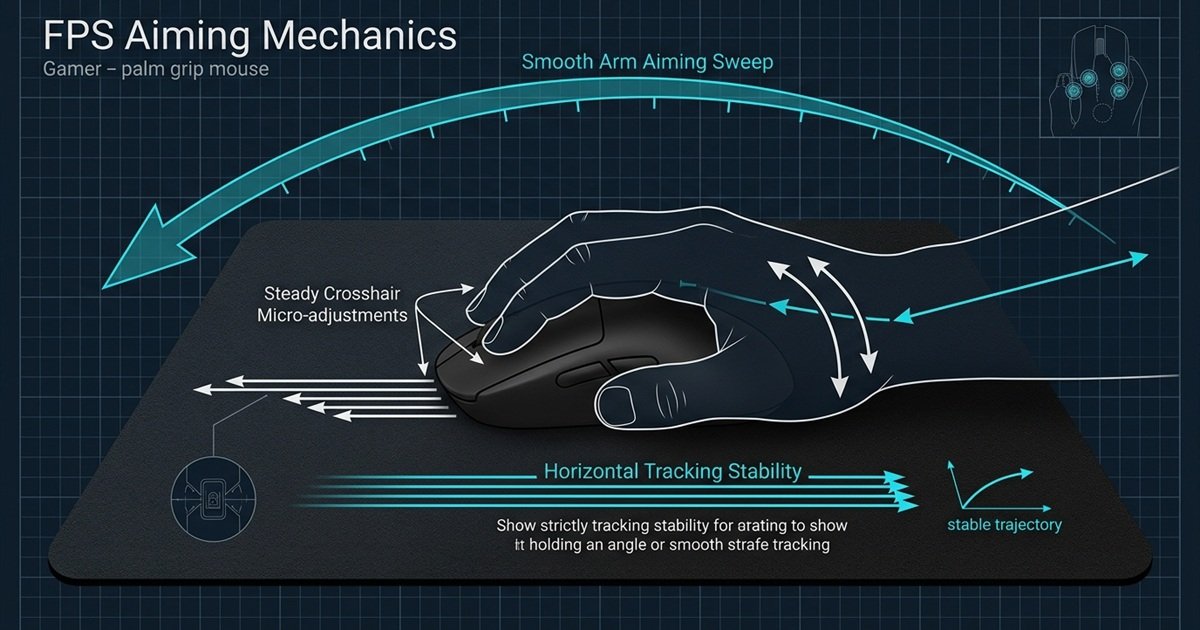
For FPS gaming, a palm grip shape should provide stable palm support while still allowing controlled movement, lifting, and repositioning. Competitive tactical shooters require steady crosshair placement alongside sudden flick corrections, making balanced shape geometry essential.
The tactical aiming diagram below illustrates how palm grip shell contact stabilizes horizontal tracking and crosshair micro-adjustments:
These shape priorities are especially relevant when palm grip is used for FPS gaming:
| Shape Priority | Why It Matters in FPS |
|---|---|
| Palm support | Helps maintain consistent hand contact |
| Stable hump | Gives the palm a repeatable reference point |
| Adequate length | Supports natural full-hand contact |
| Comfortable width | Reduces excessive grip pressure |
| Manageable contour | Supports movement without feeling restrictive |
Palm grip mouse shape priorities for FPS gaming.
For FPS, the useful shape is one that keeps the grip stable while still allowing repeatable aiming movements and clean repositioning. When choosing a gaming mouse for FPS games, pairing ergonomic shell stability with low overall weight provides the ideal balance for tactical precision.
How Should You Choose a Palm Grip Mouse Shape Before Comparing Models?
Choose the shape category first, narrow it by hand size and dimensions, then compare individual mice that already fit those requirements. Filtering candidates by physical geometry before inspecting components prevents buying an ill-fitting mouse based solely on hype.
Follow this order to narrow down a palm grip mouse before comparing specific models:
- Confirm your natural grip to ensure full palm contact is truly your preferred competitive style.
- Check your hand size by measuring from the base of the palm to the tip of your middle finger.
- Choose the shell category between contoured ergonomic or neutral symmetrical profiles.
- Evaluate hump position and height based on whether you need rear-palm wedging or balanced center support.
- Compare length, width, and height to ensure balanced dimensions that match your measurements.
- Test the shape in person or verify return policies if physical testing is unavailable.
- Compare product specifications only after confirming the shell shape fits your hand.
Shape should narrow the shortlist first. Sensor, weight, connectivity, and other specifications should come later when comparing mice that already fit your hand.
FAQ: Best Mouse Shape for Palm Grip
Review these direct answers to the most common questions regarding palm grip mouse shapes, ergonomic geometry, and sizing criteria.
What mouse shape is best for palm grip?
The best mouse shape for palm grip is a medium-to-large ergonomic or high-profile symmetrical shell with a supportive hump and adequate grip width. This design allows the entire surface of the palm and fingers to rest comfortably without muscular strain.
Does palm grip require a large mouse?
Palm grip does not inherently require a large mouse, but it does require a mouse that matches your hand size proportionally. A small hand will achieve full palm contact on a compact shell, whereas a large hand requires an extended, high-volume body.
Does hand size affect palm grip mouse shape?
Yes, hand size directly determines the required length, width, and height of a palm grip mouse. A shell that fits a medium hand perfectly will feel cramped for large hands and unmanageably bulky for smaller hands.
Should palm grip users prioritize mouse length or width?
Palm grip users must balance both dimensions equally. Adequate length ensures that the heel of the palm and the fingertips rest properly on the shell, while sufficient width prevents hand cramping caused by inward finger squeezing.
Is an ergonomic mouse better for palm grip?
Ergonomic shapes are often better for palm grip because their asymmetrical curvature supports the natural tilt of the hand and wrist. This reduces pronation strain during long sessions, although high-profile symmetrical mice can also work well.
Can palm grip work with a symmetrical mouse?
Yes, palm grip can work effectively with a symmetrical mouse if the shell has sufficient length, width, and a prominent center or rear hump. Symmetrical mice with low, flat profiles, however, provide inadequate palm contact.
Is a high hump better for palm grip?
A higher hump is generally better for palm grip because it fills the hollow cavity of the hand, providing physical support that prevents the palm from collapsing. However, the hump must not be so tall that it causes wrist hyperextension.
Should a palm grip mouse have a rear hump?
A rear hump is highly beneficial for palm grip users who desire firm support under the base of the palm. A center hump also works well for players who prefer balanced contact across the middle of the hand.
What mouse shape is best for small hands with palm grip?
Small hands using a palm grip benefit most from compact ergonomic shells or scaled-down symmetrical mice under 120 mm in length. These dimensions allow smaller fingers to reach the primary buttons without sacrificing palm contact.
What mouse shape is best for large hands with palm grip?
Large hands require an extended ergonomic mouse measuring at least 126 mm in length with a wide grip width and a tall rear hump. This ensures the palm remains fully supported without dragging across the pad.
How do I know if a mouse shape fits my palm grip?
A mouse shape fits your palm grip when your entire hand rests naturally on the shell, your fingers easily reach the primary buttons, and you can track targets smoothly without squeezing the sides or repositioning your grip.
What should I check before buying a palm grip gaming mouse?
Before purchasing, check your hand dimensions against the mouse’s length, width, and height, verify the hump position, and ensure the shell volume supports your palm without forcing an unnatural wrist angle.
Conclusion
Finding the right mouse shape for palm grip is not about identifying a single universal mouse model. Because palm grip relies on extensive, continuous surface contact, the ideal shape is determined by the harmonious alignment between your hand size and the physical dimensions of the mouse shell.
To make the smartest purchasing decision, follow the structured selection framework: confirm your natural palm grip, measure your hand dimensions, and review the top options in our guide to the best gaming mouse for palm grip in FPS to see how supportive shells and ergonomic humps deliver consistent aiming control. Exploring our comprehensive guide to the best mouse shape for aiming provides deeper insights into how different contour profiles influence your tactical shooting performance.
Thank you for taking the time to read our guide. We hope this comprehensive shape analysis helps you find the most comfortable and stable mouse for your competitive setup.