
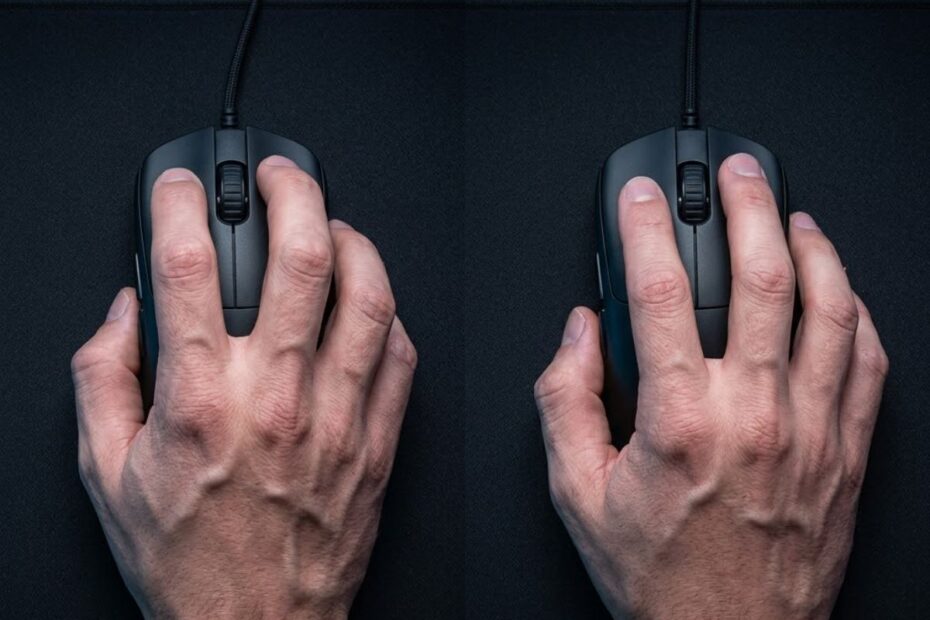
Claw Grip and Fingertip Grip are both excellent mouse grip styles for FPS games, but they suit different aiming habits. Claw Grip offers a balanced combination of stability and speed, while Fingertip Grip prioritizes agility and precise fingertip control. Choosing the better grip depends on how you naturally aim, your preferred mouse movements, and the level of control you want during gameplay.
Many players spend hours comparing gaming mouse sensors, switches, or weight while overlooking the factor that directly connects them to the mouse: grip style. The way your hand contacts the mouse affects flick shots, tracking consistency, micro-adjustments, fatigue, and even which mouse shape feels comfortable. Understanding these differences makes it much easier to improve aim without immediately changing your hardware.
This guide compares Claw Grip vs Fingertip Grip from a competitive FPS perspective. Instead of declaring one grip universally better, you’ll learn how each grip behaves in real gameplay, what type of player benefits from it, and which situations favor one style over the other.
Claw Grip vs Fingertip Grip: The Key Differences at a Glance
The primary difference between Claw Grip and Fingertip Grip is the amount of hand contact with the mouse. Claw Grip keeps part of the palm resting on the mouse while the fingers remain arched, creating a balance between stability and quick movement. Fingertip Grip lifts the palm entirely off the mouse, allowing the fingertips to control nearly every adjustment for maximum freedom of movement.
The illustration below highlights the biggest visual differences between both grip styles:
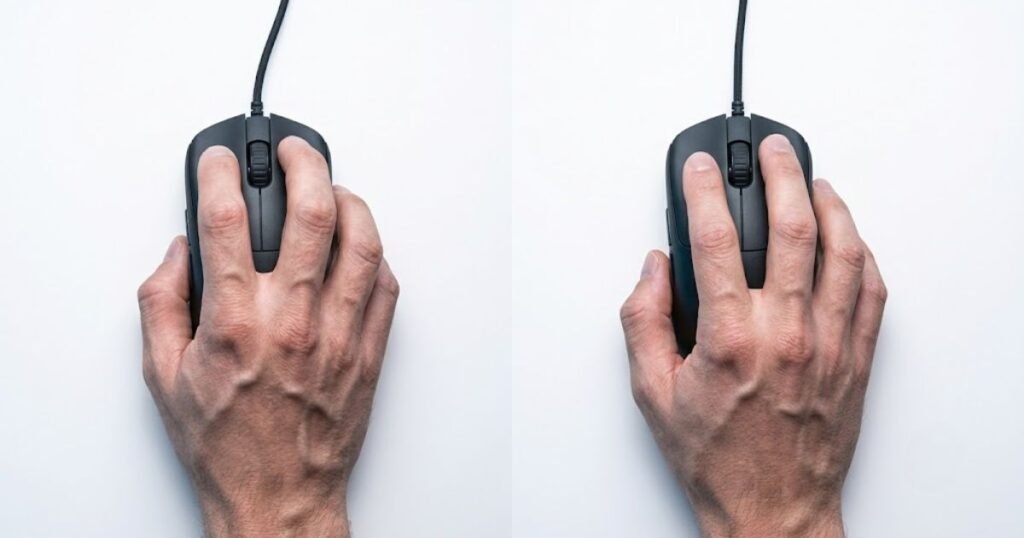
Although both grips are widely used in competitive FPS games, they are designed around different movement philosophies. Claw Grip emphasizes consistent control without sacrificing speed, while Fingertip Grip maximizes agility and fine mouse adjustments. Neither approach is objectively superior because each supports different aiming mechanics and playstyles.
The table below compares the key differences between Claw Grip and Fingertip Grip:
| Category | Claw Grip | Fingertip Grip |
|---|---|---|
| Palm Contact | Partial palm support | No palm contact |
| Finger Position | Curved fingers | Extended fingertips |
| Main Movement Source | Fingers and wrist | Mainly fingertips and wrist |
| Stability | High | Moderate |
| Agility | High | Very High |
| Micro-adjustment Potential | Very Good | Excellent |
| Learning Curve | Moderate | Steeper |
| Typical Player Preference | Balanced aimers | Fast and precise aimers |
At a glance, the biggest trade-off is stability versus freedom of movement. Players who value consistent mouse control often prefer Claw Grip, while those who rely on rapid micro-corrections frequently gravitate toward Fingertip Grip. The following sections explain why these differences occur and how they influence aiming performance.
How Hand Position Changes Mouse Control and Precision
Hand position is the foundation of every mouse movement you make. The amount of palm contact, finger placement, and wrist involvement determines how easily you control the mouse during tracking, flicking, and micro-adjustments. While Claw Grip and Fingertip Grip may appear similar at first glance, they create noticeably different movement mechanics once you begin aiming in FPS games.
The image below demonstrates how each grip generates mouse movement:
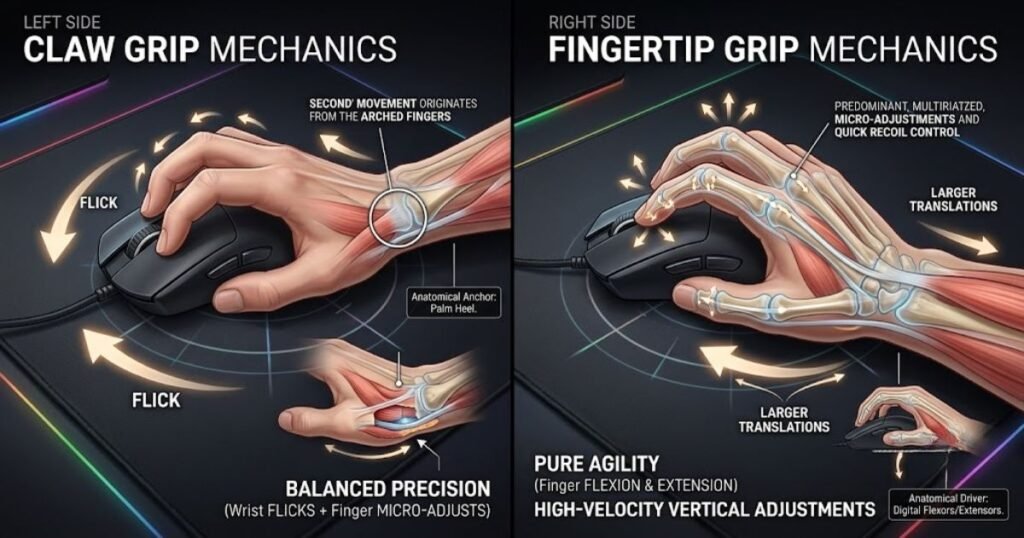
Rather than changing sensitivity or mouse settings, many players experience immediate differences simply by altering how their hand interacts with the mouse. Understanding these mechanics makes it easier to identify which grip naturally complements your aiming style.
Palm Contact and Finger Placement
The largest mechanical difference between both grips is how much of your hand touches the mouse. Claw Grip keeps the rear portion of the palm lightly supported while the fingers curve over the buttons. This creates a stable anchor that helps maintain consistent control without completely restricting finger movement.
By contrast, Fingertip Grip removes palm contact almost entirely. Only the fingertips remain in contact with the mouse, allowing quicker directional changes and more independent finger movement. Because there is less support from the palm, players rely more heavily on finger muscles to stabilize the mouse.
Players who are unfamiliar with these grip styles can first learn the fundamentals of Claw Grip before comparing how each approach changes overall mouse control.
Overall, palm contact directly influences how stable or agile the mouse feels, making it one of the most important differences between these two grip styles.
Wrist Movement vs Finger Movement
Claw Grip and Fingertip Grip distribute movement differently between the wrist and fingers. Claw Grip typically combines wrist movement for larger adjustments with finger movement for precise corrections. This balanced workload allows many FPS players to transition smoothly between tracking and flicking without dramatically changing their technique.
Fingertip Grip shifts much more responsibility toward the fingers. Since the palm no longer supports the mouse, even small aiming corrections are generated through fingertip movement. This provides exceptional responsiveness but also requires greater finger dexterity and muscle control during extended gaming sessions.
Neither approach is inherently more accurate. The difference lies in which muscle groups perform most of the work and how naturally those movements fit your personal aiming habits.
Stability During Fast Aim Adjustments
Stable aim depends on maintaining control while changing direction quickly. During fast flicks or sudden target transitions, Claw Grip generally feels more planted because the palm provides an additional point of contact. Many tactical FPS players appreciate this added stability when making consistent shots under pressure.
Fingertip Grip allows faster corrections immediately after a flick because the fingers can reposition the mouse with minimal resistance. However, the reduced palm support means maintaining perfect consistency often requires more practice, especially for players who tend to grip the mouse too lightly.
The table below compares how each grip generates mouse movement and precision:
| Movement Factor | Claw Grip | Fingertip Grip |
|---|---|---|
| Palm Stability | Higher | Lower |
| Finger Independence | Moderate | Very High |
| Large Flick Control | Excellent | Very Good |
| Micro-adjustment Speed | Very Good | Excellent |
| Consistency for Beginners | Higher | Lower |
Ultimately, hand position determines how your muscles generate every mouse movement. Claw Grip favors balanced stability and control, while Fingertip Grip emphasizes flexibility and rapid fingertip adjustments. Recognizing these mechanical differences is the first step toward choosing the grip that best matches your FPS aiming style.
The Advantages and Drawbacks of Each Grip Style
Both Claw Grip and Fingertip Grip have distinct strengths and weaknesses, making neither grip universally better for every FPS player. Claw Grip is widely appreciated for its balance between stability and speed, while Fingertip Grip offers unmatched agility and precise fingertip control. Understanding these trade-offs helps you choose a grip that complements your aiming habits rather than simply copying professional players.
The goal is not to find the “best” grip but to identify which one supports your natural movements. Factors such as reaction speed, aiming technique, mouse shape, and hand endurance all influence whether a grip feels comfortable during long gaming sessions.
Why Many FPS Players Prefer Claw Grip
Claw Grip is popular because it provides an effective balance between control and mobility. The combination of partial palm support and curved fingers allows players to generate fast movements while maintaining consistent control over the mouse. This balance makes Claw Grip one of the most versatile options for competitive FPS games.
The benefits below explain why many players choose Claw Grip:
- Balanced control: Partial palm contact improves overall stability without making movements feel sluggish.
- Reliable flick shots: The wrist and fingers work together to produce controlled, repeatable flicks.
- Consistent tracking: Maintaining steady crosshair movement is generally easier because the mouse feels more supported.
- Versatile performance: Claw Grip performs well across tactical shooters and fast-paced arena shooters alike.
- Comfortable learning curve: Many players adapt to Claw Grip more quickly than Fingertip Grip.
These advantages explain why Claw Grip remains one of the most widely used grip styles among both casual and competitive FPS players.
Where Claw Grip Can Feel Limiting
Despite its versatility, Claw Grip is not without compromises. Because part of the palm stays in contact with the mouse, some players feel slightly restricted when performing extremely fast fingertip corrections. This limitation becomes more noticeable for gamers who prefer lightweight mice and highly aggressive aiming styles.
The limitations below explain where Claw Grip may feel less effective:
- Reduced finger freedom: Palm contact slightly limits independent finger movement.
- Less agile micro-corrections: Tiny adjustments may feel slower than with Fingertip Grip.
- Hand posture fatigue: Keeping the fingers arched for extended periods can tire the hand.
- Shape dependency: Claw Grip performs best on mice designed to support its finger posture.
These drawbacks rarely outweigh the overall benefits, but they are worth considering if you naturally prefer extremely fast fingertip movements.
Why Fingertip Grip Excels at Fast Mouse Control
Fingertip Grip offers exceptional agility because every movement originates from the fingertips. Without palm contact restricting motion, players can reposition the mouse quickly and make extremely small corrections with minimal effort. This responsiveness is one of the main reasons some high-level aimers favor Fingertip Grip.
Players who are unfamiliar with its mechanics can first explore Fingertip Grip to better understand how this grip changes overall mouse control before deciding whether it suits their playstyle.
The strengths below explain why Fingertip Grip appeals to many experienced FPS players:
- Maximum agility: Minimal hand contact allows extremely fast directional changes.
- Excellent micro-adjustments: Small fingertip movements enable highly precise corrections.
- Quick target transitions: Switching between enemies often feels faster.
- Works well with lightweight mice: Lower mouse weight complements fingertip control.
- High movement freedom: Players experience very little physical restriction while aiming.
These strengths make Fingertip Grip particularly attractive for players who prioritize speed and precision over additional stability.
Challenges of Using Fingertip Grip
Fingertip Grip demands greater finger strength and consistency than most other grip styles. Because the palm provides no support, the fingers must control nearly every aspect of mouse movement. While this allows remarkable precision, it also increases the difficulty of maintaining consistent aim during long gaming sessions.
The challenges below explain why Fingertip Grip is not ideal for everyone:
- Higher learning curve: Building consistent fingertip control takes practice.
- Greater finger fatigue: Continuous fingertip movement can become tiring during extended play.
- Reduced stability: Less palm contact means less natural support for the mouse.
- More sensitive to poor technique: Small mistakes are easier to notice because every movement comes directly from the fingers.
Although Fingertip Grip can deliver outstanding aiming performance, players usually achieve the best results only after developing strong muscle memory and consistent hand control.
Ultimately, both grip styles involve meaningful trade-offs. Claw Grip emphasizes dependable control with balanced mobility, while Fingertip Grip maximizes agility and precision at the cost of increased technical demands. Choosing between them depends less on which grip is objectively better and more on which one supports your natural aiming mechanics.
Which Grip Performs Better for Different FPS Aiming Techniques?
The best grip depends on the aiming technique you use most often rather than the game itself. Tracking, flick shots, micro-adjustments, and target transitions all place different demands on your hand. Claw Grip and Fingertip Grip excel in different areas, which is why professional FPS players successfully compete with both styles.
The comparison below shows how both grip styles perform during common FPS aiming scenarios:
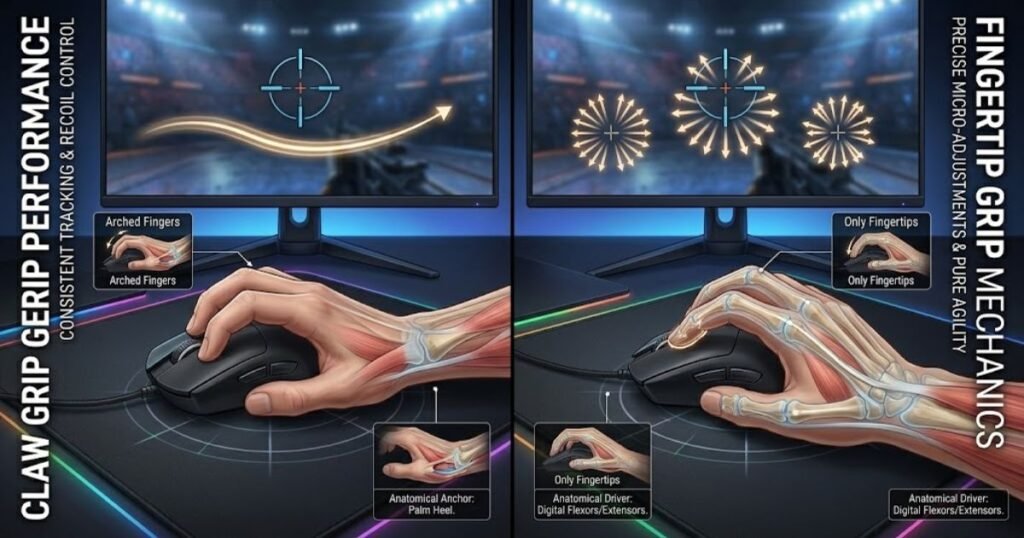
Instead of asking which grip is stronger overall, it’s more useful to evaluate how each one performs during specific aiming scenarios that frequently occur in competitive shooters.
Tracking Moving Targets
Tracking requires smooth, controlled mouse movement over an extended period of time. Claw Grip generally provides more stability because partial palm support helps reduce unnecessary movement while following a moving opponent. This added stability allows many players to maintain consistent crosshair placement during sustained tracking.
Fingertip Grip also performs well for tracking but demands greater finger control. Small inconsistencies in fingertip pressure can create tiny deviations that become noticeable during prolonged engagements, especially for players who are still adapting to the grip.
For players who prioritize tracking consistency over raw agility, Claw Grip often provides a more forgiving experience.
Flick Shots and Target Switching
Fast flicks reward grips that allow rapid acceleration and quick recovery after each movement. Claw Grip generates powerful wrist-driven flicks while maintaining enough stability to stop accurately on target. Many tactical FPS players appreciate this balance because it supports consistent first-shot accuracy.
Fingertip Grip excels at chaining multiple flicks together thanks to its unrestricted finger movement. The mouse can change direction almost instantly, making rapid target switching feel exceptionally responsive once sufficient muscle memory has been developed.
Both grips perform well for flick shots, but they achieve similar results through different movement mechanics.
Micro-adjustments for Pixel Precision
Micro-adjustments involve correcting your aim by only a few pixels before taking a shot. This is where Fingertip Grip often has a noticeable advantage. Since every movement originates from the fingertips, extremely small corrections can be made with remarkable precision and minimal physical effort.
Claw Grip still delivers excellent precision, but the additional palm contact slightly reduces finger independence. As a result, very fine corrections may feel marginally slower for players who rely heavily on fingertip movement.
Players who frequently perform precise headshot adjustments often appreciate the responsiveness of Fingertip Grip in these situations.
Maintaining Consistency Under Pressure
Consistency is often more valuable than peak performance during competitive matches. While Fingertip Grip may allow faster adjustments, Claw Grip generally provides a more repeatable aiming experience under pressure. The extra point of contact created by the palm helps stabilize movement when adrenaline increases during critical rounds.
The table below compares how both grips perform across common FPS aiming techniques:
| Aiming Technique | Claw Grip | Fingertip Grip |
|---|---|---|
| Tracking | Excellent | Very Good |
| Flick Shots | Excellent | Excellent |
| Micro-adjustments | Very Good | Excellent |
| Target Switching | Very Good | Excellent |
| Consistency | Excellent | Very Good |
Overall, Claw Grip favors repeatable control and stability, while Fingertip Grip rewards players who can fully utilize rapid fingertip movements. The better choice depends on which aiming mechanics dominate your gameplay rather than on any universal performance advantage.
Choosing Between Claw Grip and Fingertip Grip Based on Your Playstyle
The best mouse grip is the one that complements your natural aiming style, not necessarily the one used by professional players. While Claw Grip and Fingertip Grip are both capable of elite-level performance, they solve different gameplay challenges. Instead of asking which grip is objectively superior, focus on how you aim, how you move your mouse, and what feels consistent during long gaming sessions.
Playstyle is often a better indicator than game title alone. Two Valorant players, for example, may achieve similar ranks while using completely different grip styles because their aiming habits, mouse control, and movement patterns differ significantly.
Players Who Benefit More from Claw Grip
Claw Grip is generally the better choice for players who value consistent control without sacrificing speed. The additional palm contact creates a more stable foundation while still allowing quick wrist and finger movements. This combination makes Claw Grip well suited to players who rely on repeatable mechanics rather than constant micro-adjustments.
The characteristics below describe players who usually perform well with Claw Grip:
- Balanced aimers: Prefer combining wrist movement with finger control instead of relying heavily on either one.
- Tactical FPS players: Frequently prioritize accurate first-shot placement over continuous mouse movement.
- Players seeking consistency: Value predictable mouse control throughout long competitive sessions.
- Medium or large hand users: Often find partial palm support more comfortable on medium-sized gaming mice.
- Players learning competitive FPS: Usually adapt to Claw Grip more quickly than Fingertip Grip.
These characteristics explain why Claw Grip remains one of the safest recommendations for players looking to balance speed, comfort, and aiming consistency.
Players Who Benefit More from Fingertip Grip
Fingertip Grip is better suited to players who naturally prioritize speed, precision, and unrestricted mouse movement. Because the palm never rests on the mouse, every adjustment comes directly from the fingertips, allowing extremely responsive aim when supported by strong muscle memory.
The characteristics below describe players who often prefer Fingertip Grip:
- Fast-reacting players: Frequently make rapid target transitions during combat.
- Micro-adjustment specialists: Constantly refine crosshair placement before firing.
- Lightweight mouse users: Benefit from the reduced resistance created by minimal hand contact.
- Experienced aim trainers: Already possess strong fingertip control and refined mouse precision.
- Players comfortable with higher mechanical demands: Do not mind spending time building consistent muscle memory.
Players who are still experimenting with different aiming techniques may find it helpful to explore the best mouse grip styles for FPS before committing to a single grip style.
Although Fingertip Grip offers exceptional freedom of movement, it delivers the best results only when the player’s technique is already well developed.
Can You Switch Between Both Grip Styles?
Yes, switching between Claw Grip and Fingertip Grip is possible, but the transition requires patience and consistent practice. Because each grip activates different muscle groups and movement patterns, changing grips may temporarily reduce accuracy until new muscle memory develops.
Many players expect immediate improvement after changing grip styles, but short-term inconsistency is completely normal. Instead of evaluating the new grip after a single gaming session, allow enough practice time for your hand to adapt naturally.
The following process can help you transition between grip styles more smoothly:
- Choose one grip: Commit to a single grip instead of switching back and forth every match.
- Practice basic movements: Spend time tracking targets and performing simple flicks before playing ranked matches.
- Adjust your mouse naturally: Avoid changing DPI or sensitivity immediately unless movement feels completely uncomfortable.
- Build consistent muscle memory: Practice for several days before judging overall performance.
- Evaluate long-term comfort: Choose the grip that remains accurate and comfortable after extended gaming sessions rather than the one that feels fastest initially.
Changing grip styles is usually more successful when players prioritize consistency over immediate results. Giving your hand enough time to adapt often produces better long-term aim than making constant adjustments.
Ultimately, selecting the right grip is less about copying others and more about identifying which movement pattern feels reliable under real gameplay conditions. The grip that consistently supports your natural mechanics will almost always outperform one that simply looks faster on paper.
Common Mistakes When Comparing Claw Grip and Fingertip Grip
Many players choose the wrong grip because they compare Claw Grip and Fingertip Grip using oversimplified assumptions instead of practical gameplay experience. Internet discussions often focus on isolated advantages while ignoring factors such as hand size, mouse shape, and individual aiming habits. Avoiding these misconceptions leads to much better long-term decisions.
Rather than searching for a universally superior grip, evaluate how each option fits your own mechanics and comfort. Small differences in technique often have a greater impact on aiming performance than the grip style itself.
Assuming One Grip Is Always Better
One of the most common misconceptions is believing that one grip style outperforms the other in every situation. In reality, both Claw Grip and Fingertip Grip have proven successful across professional and casual FPS play. Their effectiveness depends on the player rather than the grip itself.
Instead of asking which grip wins overall, compare how each one supports your preferred aiming mechanics and gameplay habits.
Ignoring Mouse Shape and Hand Size
Grip style cannot be separated from mouse shape and hand size. A grip that feels comfortable on one mouse may become unstable on another simply because the dimensions or hump placement no longer support your hand naturally.
Many players blame their grip for inconsistent aim when the real issue is using a mouse shape that doesn’t match their hand dimensions or preferred movement style.
Copying Professional Players Without Testing
Professional players succeed because of years of practice, not solely because of the grip they use. Copying a professional’s grip without considering your own comfort often creates unnecessary frustration and inconsistent aim.
The mistakes below explain what to avoid when choosing a grip style:
- Following trends: Popularity does not guarantee better performance for every player.
- Changing grips too frequently: Constant switching prevents muscle memory from developing.
- Ignoring comfort: A grip that causes fatigue is unlikely to remain consistent during long sessions.
- Expecting instant improvement: Every grip requires practice before its advantages become noticeable.
- Overlooking personal preference: The best grip is the one you can reproduce consistently under pressure.
Recognizing these mistakes makes it much easier to evaluate grip styles objectively instead of relying on assumptions or trends. A well-informed decision usually produces better long-term results than simply imitating another player’s setup.
Claw Grip vs Fingertip Grip Comparison Table
If you’re still undecided, comparing both grip styles side by side makes the decision much easier. While previous sections explained individual mechanics and gameplay advantages, this comparison summarizes the most important differences in one place. Instead of focusing on isolated features, consider which grip aligns with your natural movement patterns, comfort, and long-term consistency.
The comparison below highlights the areas that matter most to FPS players, including stability, agility, learning curve, comfort, and ideal player profiles.
The table below summarizes the complete comparison between Claw Grip and Fingertip Grip:
| Category | Claw Grip | Fingertip Grip | Better Choice |
|---|---|---|---|
| Overall Stability | Excellent | Very Good | Claw Grip |
| Movement Freedom | High | Excellent | Fingertip Grip |
| Tracking Performance | Excellent | Very Good | Claw Grip |
| Flick Shot Speed | Excellent | Excellent | Draw |
| Micro-adjustments | Very Good | Excellent | Fingertip Grip |
| Target Switching | Very Good | Excellent | Fingertip Grip |
| Learning Curve | Easier | More Difficult | Claw Grip |
| Long Session Comfort | Excellent | Very Good | Claw Grip |
| Best Mouse Weight | Medium to Lightweight | Lightweight | Depends on Preference |
| Best For | Balanced, consistent aiming | Fast, highly responsive aiming | Depends on Playstyle |
Rather than looking for a universal winner, use this comparison to identify which grip supports your own strengths. Players who prioritize stability and repeatability generally feel more comfortable with Claw Grip, while those who value agility and fingertip precision often achieve better results with Fingertip Grip.
If you’re also considering a grip that provides even more palm support, comparing Claw Grip vs Palm Grip can help you understand how each grip style changes control, comfort, and aiming mechanics.
Final Verdict: Should You Choose Claw Grip or Fingertip Grip?
There is no universally better choice between Claw Grip and Fingertip Grip because both are capable of delivering exceptional FPS performance. The right grip is the one that allows you to aim consistently, stay comfortable during long sessions, and maintain confidence under pressure. Raw speed means very little if you cannot reproduce your movements reliably from match to match.
If your priority is balanced control, dependable tracking, and repeatable flick shots, Claw Grip is generally the safer choice. The combination of partial palm support and finger mobility makes it easier for most players to develop stable aiming mechanics without sacrificing responsiveness.
On the other hand, if you naturally rely on fingertip movement, enjoy making rapid corrections, and prefer lightweight mice, Fingertip Grip can unlock greater agility and finer mouse control. However, these advantages usually become noticeable only after building sufficient muscle memory and consistent technique.
Neither grip should be selected simply because a professional player uses it. Personal comfort, hand size, mouse shape, and aiming habits remain far more important than following trends. The most effective grip is the one that continues to feel reliable even during high-pressure competitive matches.
Whether you’re experimenting with your first gaming mouse or refining an existing setup, GearTP provides in-depth FPS gaming mouse guides to help you choose the right grip, mouse shape, and hardware for your individual playstyle.
Ultimately, both Claw Grip and Fingertip Grip are proven options for competitive FPS gaming. Instead of searching for a perfect answer, spend time practicing with the grip that feels most natural. Consistent mechanics will always contribute more to long-term improvement than switching between grip styles in search of a shortcut.
Frequently Asked Questions About Claw Grip vs Fingertip Grip
Choosing between Claw Grip and Fingertip Grip often raises practical questions that go beyond basic comparisons. The answers below address the most common concerns from FPS players, helping you make a more informed decision based on comfort, aiming mechanics, and long-term performance rather than assumptions.
Is Claw Grip better than Fingertip Grip for FPS games?
No, neither grip is objectively better. Claw Grip generally provides greater stability and consistency, while Fingertip Grip offers superior agility and faster micro-adjustments. The better choice depends on your aiming style and personal comfort.
Which grip is easier for beginners?
Claw Grip is usually easier for most beginners. The additional palm contact provides more stability, making it easier to build consistent muscle memory before learning more advanced aiming techniques.
Do professional FPS players use Fingertip Grip?
Yes, many professional players successfully use Fingertip Grip. However, professionals also use Claw Grip and Palm Grip. Their success comes from years of practice and consistency rather than the grip style alone.
Does Claw Grip improve flick shots?
Claw Grip can improve flick consistency for many players. The combination of wrist movement and partial palm support helps control rapid movements while maintaining accurate stopping power.
Is Fingertip Grip better for lightweight gaming mice?
In many cases, yes. Lightweight mice require less effort to move, allowing Fingertip Grip users to fully utilize rapid directional changes and precise fingertip adjustments.
Can I switch from Claw Grip to Fingertip Grip?
Yes, but expect an adjustment period. Most players need several days or weeks of consistent practice before the new grip begins to feel natural and accurate.
Which grip causes less hand fatigue?
Claw Grip usually causes less finger fatigue during long sessions. Because part of the palm supports the mouse, the fingers perform less continuous work than they do with Fingertip Grip.
Does hand size affect which grip I should use?
Absolutely. Hand size influences how comfortably you can position your fingers and palm on the mouse. Choosing an appropriate mouse shape is just as important as selecting the grip itself.
Which grip is better for tactical FPS games like CS2 or VALORANT?
Both grips perform well in tactical shooters. Players who prioritize consistent crosshair placement often prefer Claw Grip, while those who rely on rapid corrections may favor Fingertip Grip.
Can Fingertip Grip improve tracking accuracy?
It can, but only after sufficient practice. Fingertip Grip allows extremely fine adjustments, although maintaining smooth tracking requires well-developed finger control and muscle memory.
Should I change my mouse when switching grip styles?
Not necessarily. Try adapting to the new grip first. If your current mouse shape consistently feels uncomfortable after practicing, then consider switching to a model better suited to your preferred grip.
How do I know which grip fits me best?
The best grip is the one that feels both comfortable and repeatable. If you can consistently aim, track targets, and play long sessions without discomfort, you’ve likely found the grip that suits your natural mechanics.
Conclusion: Choose the Grip That Feels Natural, Not the One Everyone Else Uses
Claw Grip and Fingertip Grip are both capable of delivering outstanding FPS performance when matched with the right player. Claw Grip emphasizes balanced stability and dependable control, while Fingertip Grip rewards players who prefer unrestricted movement and precise fingertip adjustments. Neither grip guarantees better aim on its own.
Instead of chasing trends or copying professional players, focus on developing consistent muscle memory with the grip that feels most natural in your hand. Long-term improvement comes from practicing one grip consistently rather than frequently switching between different techniques in search of immediate results.
Remember that grip style is only one part of the equation. Mouse shape, hand size, sensitivity, and regular practice all work together to influence your overall aiming performance. Evaluating these factors as a complete system will help you make a better long-term decision than focusing on grip style alone.
Whether you ultimately choose Claw Grip or Fingertip Grip, consistency, comfort, and confidence will always have a greater impact on your gameplay than following the latest trend.
Thank you for reading this guide. We hope it helps you find the mouse grip that best matches your FPS playstyle.