
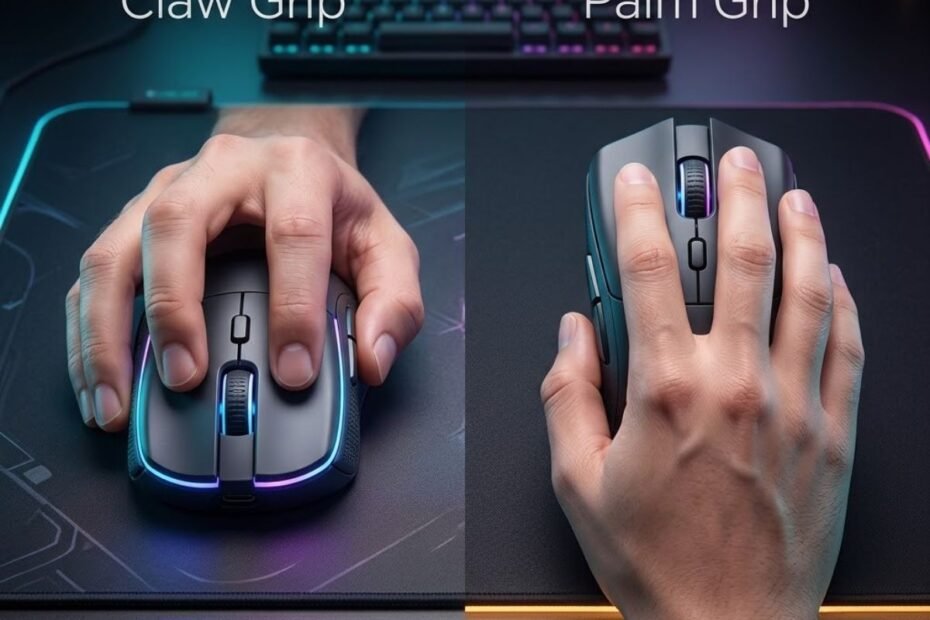
Claw grip vs palm grip comes down to how you want your mouse to feel and move: claw grip generally favors faster flicks and micro adjustments, while palm grip usually provides greater stability and comfort. Neither grip is universally better. The right choice depends on your aiming style, hand size, mouse shape, and how naturally you can maintain the grip during long FPS sessions.
Many players spend hours comparing gaming mice without realizing that mouse grip has just as much influence on aiming performance. Choosing the wrong grip can make even a premium gaming mouse feel uncomfortable or difficult to control, while the right grip allows you to move naturally and build consistent muscle memory over time.
This guide compares claw grip and palm grip from a practical perspective. Instead of explaining what each grip is, you’ll learn how they affect mouse control, stability, and overall gameplay so you can confidently choose the grip that best matches your playstyle.
Claw Grip vs Palm Grip: What Are the Practical Differences?
Claw grip and palm grip mainly differ in how much of your hand contacts the mouse and where movement control comes from. Claw grip uses more active finger control with limited palm contact, while palm grip keeps more of the hand supported by the mouse. This makes claw grip generally feel more agile and responsive, while palm grip tends to feel more stable and relaxed.
The illustration below highlights how each grip changes the way your hand controls the mouse:
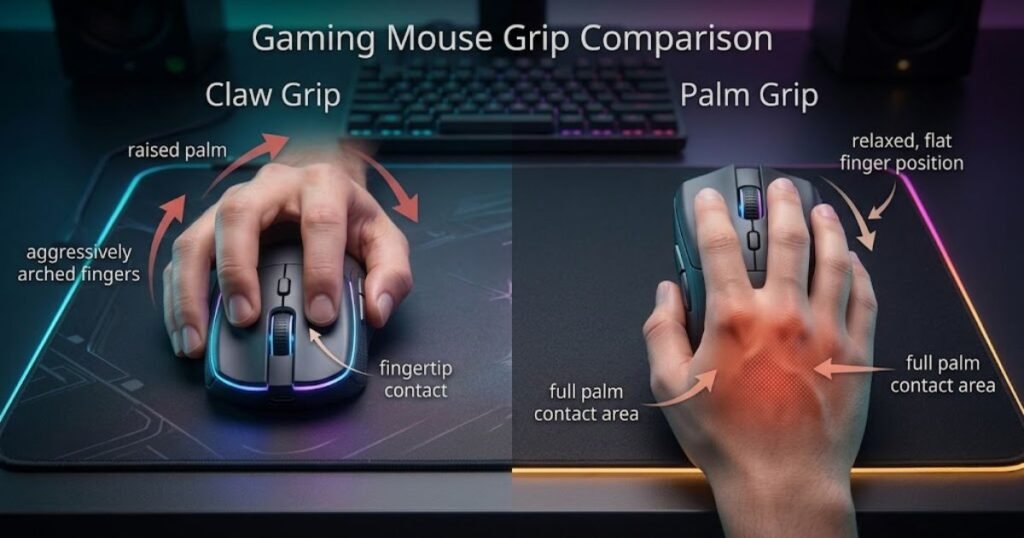
The key difference is that claw grip gives your fingers a more active role, while palm grip provides greater support through the palm. Both can work well for FPS gaming, but they create different movement patterns and should be evaluated based on how naturally you can control the mouse.
How Finger Position Changes Mouse Control
Finger position changes how actively your fingertips contribute to mouse control. In claw grip, the fingers remain naturally arched and take a more active role in clicking, stopping, and making small directional corrections. In palm grip, the fingers stay more relaxed while the hand maintains greater contact with the mouse, creating a more supported movement pattern.
Claw grip keeps the fingers naturally arched, allowing quick clicks and rapid directional changes with minimal movement. Palm grip relaxes the fingers, distributing movement across the entire hand to create smoother and more predictable mouse control.
Claw grip gives the fingers more responsibility for quick corrections, while palm grip distributes more of the movement across the hand. This can make claw grip feel more responsive when making short directional changes, whereas palm grip often feels steadier when the hand moves in a smoother, more continuous pattern.
If you’d like to understand how claw grip and other grip styles compare in different gaming scenarios, our guide to different mouse grip styles for FPS explains when each grip works best.
Finger position is one of the clearest mechanical differences between claw grip and palm grip. Claw grip gives the fingers a more active role in controlling short movements, while palm grip relies more on the hand for supported and consistent movement. If you want to compare claw grip with a more fingertip-driven style, the differences become clearer when looking at claw grip vs fingertip grip. This difference helps explain why the two grips can feel noticeably different even when using the same mouse.
How Palm Contact Influences Stability and Precision
Palm contact mainly affects how much physical support the hand has while controlling the mouse. Palm grip keeps more of the hand in contact with the mouse, which can create a more supported and stable feel. Claw grip reduces palm contact, giving the fingers more freedom to make small movements and corrections.
Neither grip is inherently more precise because accuracy depends on repeatable control, not palm contact alone. Palm grip can give some players a stable base for consistent movements, while claw grip can give others more freedom for small corrections. The important factor is which grip allows you to reproduce the same movements reliably.
The better grip is the one that lets you maintain consistent control throughout practice and competitive play. Rather than treating palm contact as a direct measure of precision, consider whether the grip feels stable, repeatable, and comfortable across the movements you use most often.
The table below summarizes how palm contact changes control between claw grip and palm grip:
| Comparison Factor | Claw Grip | Palm Grip |
|---|---|---|
| Finger Position | Arched fingers with active fingertip control. | Relaxed fingers supported by the mouse body. |
| Palm Contact | Minimal contact with the rear of the mouse. | Full or near-full palm support. |
| Movement Style | Fast, agile, and responsive. | Smooth, stable, and controlled. |
| Primary Strength | Quick directional changes and flexibility. | Consistent control and stability. |
| Typical Feel | Dynamic with greater finger involvement. | Relaxed with greater hand support. |
The main difference between claw grip and palm grip is how control is shared between the fingers and the palm. Claw grip gives the fingers a more active role, while palm grip provides greater hand support. These differences create the foundation for how each grip feels during specific FPS aiming techniques.
Claw Grip vs Palm Grip for Different FPS Aiming Techniques
Claw grip generally suits fast flicks and quick micro adjustments, while palm grip often feels more stable during continuous tracking. The difference comes from how each grip distributes control across the fingers, wrist, and hand. Neither grip automatically improves aim, but each can complement different FPS aiming techniques.
Competitive FPS games require multiple aiming techniques within the same match. You might flick to one target, track another across the screen, then make tiny adjustments before firing. The way your hand interacts with the mouse can influence how comfortable and repeatable each of these movements feels.
Which Grip Performs Better for Flick Shots?
Claw grip often suits flick shots because the fingers can contribute more actively to quick changes in mouse direction. The reduced palm contact gives the hand more freedom to reposition and stop the mouse during rapid target acquisition, although players can still perform accurate flicks with palm grip through consistent practice.
The comparison below illustrates how each grip supports different aiming techniques:
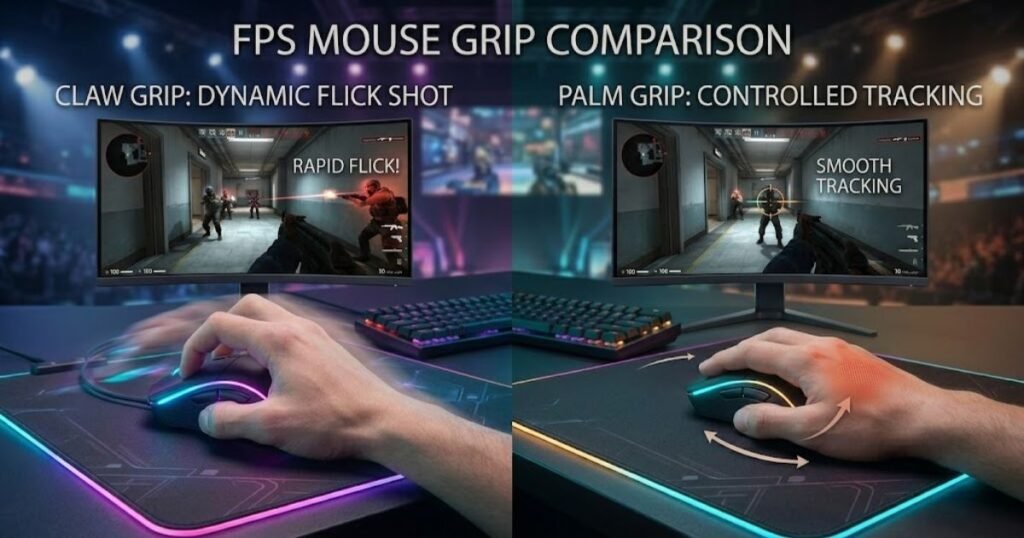
This added finger mobility can be useful when a flick requires a rapid change in direction followed by a precise stop. That can matter in tactical FPS situations where a player needs to acquire a target quickly, but the advantage depends on the player’s control and practice rather than the grip alone.
Palm grip can still support accurate flick shots, but its larger contact area often produces a more supported movement pattern. Players who rely more on wrist or arm movement can still perform fast and accurate flicks with palm grip, especially when the mouse shape and sensitivity suit their technique.
For flick shots, claw grip generally offers more active finger control, while palm grip can remain highly effective when the player is comfortable with larger hand or arm movements. The practical winner is the grip that lets you acquire and stop on targets consistently without overcorrecting.
Which Grip Offers Better Tracking Accuracy?
Palm grip often feels more stable for continuous tracking because more of the hand remains supported by the mouse. This can make it easier to maintain smooth movement while following targets across the screen, although experienced players can achieve strong tracking performance with claw grip as well.
Stable tracking becomes particularly valuable when following fast-moving targets or maintaining consistent crosshair movement during longer engagements. Greater palm support can reduce the need for constant finger corrections, which may make continuous tracking feel more predictable for some players.
Claw grip is also capable of excellent tracking, especially for experienced players. However, maintaining perfectly smooth movement usually requires greater finger coordination because less of the hand stabilizes the mouse throughout the motion.
The main difference is how naturally each grip lets you maintain smooth, repeatable movement while tracking. Palm grip may feel more stable for continuous target movement, while claw grip can remain highly effective when the player has strong finger control and established muscle memory.
Which Grip Handles Micro Adjustments More Naturally?
Claw grip often makes micro adjustments feel more responsive because the fingers can contribute directly to small changes in mouse direction. This can make short crosshair corrections feel easier without requiring the entire hand to move, while palm grip can provide a steadier alternative through coordinated hand and wrist movement.
Micro adjustments are the small corrections used to refine crosshair placement after the initial mouse movement. They can become important when a target changes direction, appears slightly outside your crosshair, or requires a final correction before a shot. Claw grip gives the fingers more freedom to make these short movements, while palm grip can rely more on coordinated hand and wrist control.
Palm grip approaches micro adjustments differently. Instead of relying mainly on finger movement, it encourages coordinated movement from the hand and wrist, which some players find easier to repeat consistently during extended matches.
Claw grip may feel more natural for players who make frequent fingertip corrections, while palm grip can feel more stable for players who prefer hand and wrist control. Neither grip guarantees better micro adjustments, so consistency, mouse shape, and established muscle memory should ultimately guide the choice.
The table below compares how each grip performs across common FPS aiming techniques:
| FPS Technique | Claw Grip | Palm Grip |
|---|---|---|
| Flick Shots | Excellent for rapid target acquisition. | Capable but generally less explosive. |
| Tracking | Highly responsive with practice. | Very stable and consistent. |
| Micro Adjustments | Fast fingertip corrections. | Smooth hand-guided corrections. |
| Crosshair Stability | Requires greater finger control. | Naturally stable. |
| Best Fit | Players who prioritize speed and agility. | Players who value control and consistency. |
This comparison shows that neither grip dominates every aiming technique. Claw grip tends to reward fast, reactive movements, while palm grip emphasizes stability during continuous control. The next step is determining which grip remains comfortable enough to maintain that performance throughout long gaming sessions.
Which Grip Feels Better During Long Gaming Sessions?
Palm grip is generally more comfortable for extended gaming sessions because it supports more of the hand, while claw grip can reduce comfort over time due to greater finger and wrist engagement. However, comfort is highly individual. The best grip is the one that allows you to maintain consistent control without creating unnecessary fatigue after hours of gameplay.
Many players focus entirely on aiming performance when choosing a grip, but long-term comfort directly affects consistency. As fatigue builds, reaction time, precision, and confidence can gradually decline, even if your mouse and settings remain unchanged.
How Each Grip Affects Hand Fatigue During Extended Play
The way your hand supports the mouse has a direct impact on muscle fatigue. Palm grip distributes pressure across the entire hand, allowing the fingers to stay relatively relaxed throughout a gaming session. This balanced support often helps reduce strain during several hours of continuous play.
The following comparison shows how each grip distributes pressure across the hand:
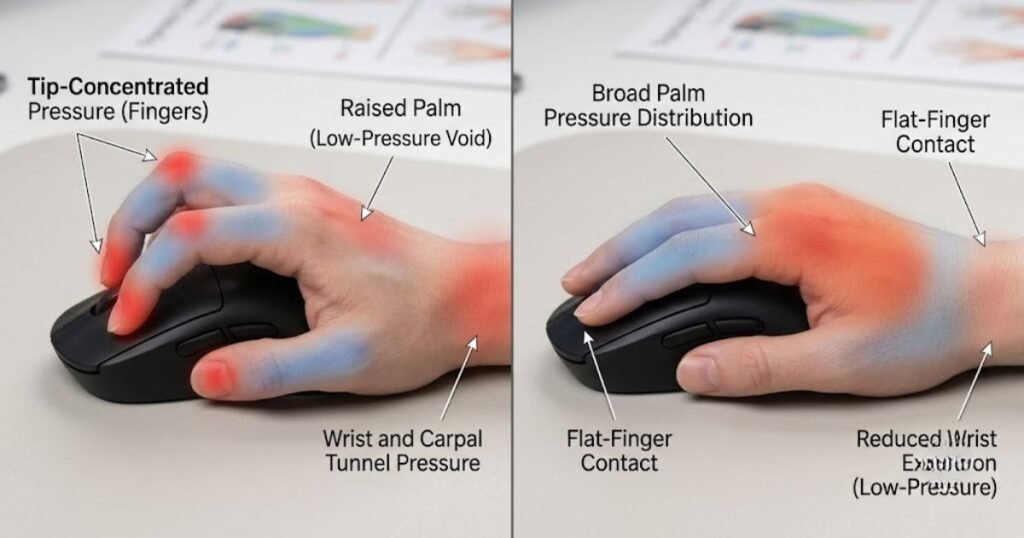
Claw grip requires the fingers to remain slightly curved while actively controlling most mouse movements. Maintaining this position for long periods increases muscle engagement, particularly in the fingers and forearm. For some players, this additional effort is barely noticeable, while others begin to experience fatigue after lengthy practice sessions.
Neither grip guarantees comfort because physical conditioning, desk setup, and individual anatomy all influence endurance. The important goal is finding a grip that remains consistent from the first match to the last.
In general, players who spend long hours practicing should evaluate how their grip feels after several consecutive matches rather than judging comfort during only a few minutes of gameplay.
How Wrist Movement Changes Between Claw Grip and Palm Grip
Claw grip and palm grip encourage different movement patterns from the wrist and arm. Claw grip naturally relies more on wrist movement for quick corrections, while palm grip often combines larger arm movements with smaller wrist adjustments to produce smoother control.
Neither movement style is inherently healthier than the other. Problems usually arise when a player forces unnatural movements or maintains excessive tension throughout a gaming session. A relaxed posture and proper desk ergonomics are generally more important than the grip style itself.
Players who prefer fast-paced tactical shooters may naturally use more wrist movement regardless of grip style, while those playing tracking-heavy games often incorporate larger arm movements to maintain consistent control.
Ultimately, efficient movement comes from allowing your wrist and arm to work together naturally instead of forcing one movement pattern in every situation.
Mouse comfort is also influenced by hand position and how the hand interacts with the device. Ergonomic research has examined differences in wrist movement, muscle activity, comfort, and exertion across different mouse hand positions. Research published in Applied Ergonomics provides additional context for why hand position matters when evaluating mouse comfort and control.
Which Grip Is Easier to Maintain Over Time?
Palm grip is often easier to maintain over long periods because it places less continuous demand on the fingers. The larger contact area helps stabilize the mouse with less active muscle engagement, allowing many players to remain comfortable during marathon gaming sessions.
Claw grip, however, rewards players who are comfortable maintaining active finger control. Once adapted, many competitive players have no difficulty using claw grip for extended periods because their muscles become accustomed to the posture through regular practice.
If you’re unfamiliar with the mechanics and characteristics of this grip style, our guide to what is palm grip explains how the grip naturally supports comfort and control in greater detail.
The best long-term choice is not the grip that feels most comfortable for five minutes, but the one that still feels natural after several hours of competitive play.
The table below compares how claw grip and palm grip influence long-term comfort:
| Comfort Factor | Claw Grip | Palm Grip |
|---|---|---|
| Finger Fatigue | Generally higher due to active finger positioning. | Usually lower because the hand remains more relaxed. |
| Palm Support | Limited contact with the mouse. | Full or near-full palm support. |
| Long Gaming Sessions | Comfort depends heavily on adaptation. | Often easier for extended play. |
| Muscle Engagement | Greater involvement from fingers and wrist. | More evenly distributed across the hand and arm. |
| Overall Comfort | Excellent for adapted players. | Excellent for players who prioritize comfort. |
The comparison demonstrates that comfort is determined by how naturally a grip fits your hand rather than by the grip itself. Once comfort is established, the next factor to evaluate is whether your hand size and mouse shape make one grip more suitable than the other.
How Hand Size and Mouse Shape Affect Grip Choice
Hand size and mouse shape can influence your grip choice just as much as personal preference. A grip that feels natural on one mouse may become uncomfortable on another if the dimensions do not match your hand. Rather than forcing yourself to use a specific grip style, it’s better to choose a combination of hand size, mouse shape, and grip that works together.
Many players believe they simply need to copy the grip used by professional gamers. In reality, professional players often select mice that complement both their hand size and preferred grip. Even small differences in mouse length, height, or hump placement can significantly change how comfortable and consistent a grip feels.
Small Hands and Compact Mouse Shapes
Players with smaller hands often have greater flexibility when using claw grip because compact mice are easier to control with fingertip movement. A shorter mouse body allows the fingers to reach the buttons comfortably while maintaining precise control during fast movements.
Palm grip is still possible with small hands, but larger mice may prevent the hand from resting naturally on the shell. This can lead to unnecessary stretching, making long gaming sessions feel less comfortable than they should.
Compact symmetrical mice are commonly preferred by players with smaller hands because they support quick repositioning without making the mouse feel oversized.
Ultimately, smaller hands benefit most from a mouse that allows natural finger placement without forcing the palm into an uncomfortable position.
Medium Hands and Balanced Mouse Designs
Medium-sized hands provide the greatest flexibility because they can comfortably adapt to both claw grip and palm grip. This allows players to focus more on their preferred aiming style instead of worrying about physical compatibility.
The illustration below shows how different hand sizes interact with various mouse shapes:
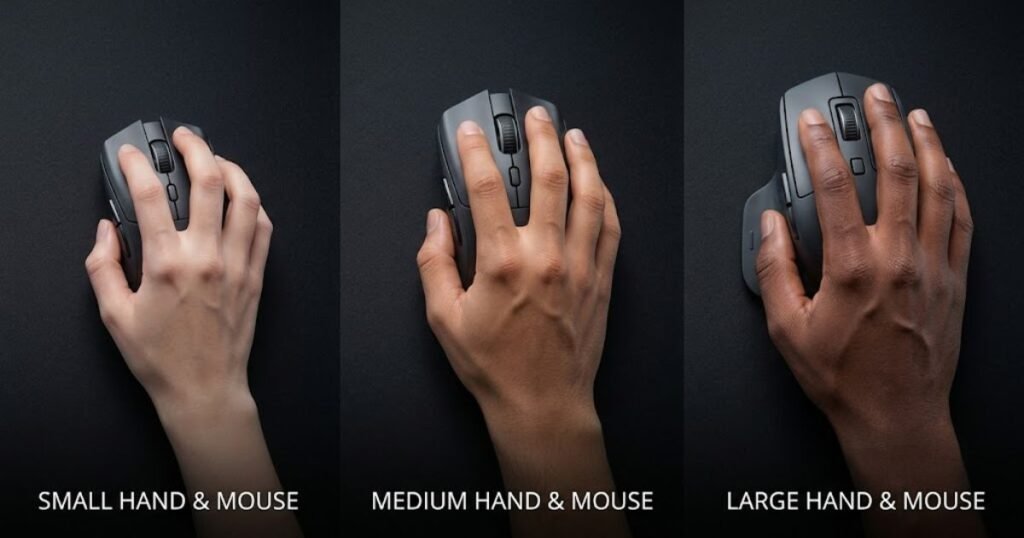
Balanced mouse designs with moderate length and hump height usually work well for medium hands. Depending on the mouse shape, some players naturally transition between claw grip during intense engagements and a more relaxed palm contact while navigating the map.
If you’re still deciding whether claw grip suits your playstyle, our guide explaining what is claw grip explores its mechanics and ideal use cases in greater detail.
Because medium hands are compatible with a wide variety of gaming mice, choosing the right grip often comes down to comfort and aiming preference rather than physical limitations.
Large Hands and Ergonomic Mouse Shapes
Large hands generally benefit from mice that provide enough surface area to support the palm without restricting movement. A longer body and fuller rear hump allow the hand to rest naturally, reducing unnecessary pressure on the fingers during extended gaming sessions.
Claw grip remains a popular option for players with large hands, especially when paired with larger symmetrical mice that provide enough room for finger movement without feeling cramped. However, if the mouse is too small, the fingers may become overly curled, increasing fatigue over time.
Palm grip often feels more natural for large hands because the entire hand can maintain stable contact with the mouse without excessive finger tension. The result is a more relaxed posture that many players find easier to maintain throughout long practice sessions.
The ideal mouse for large hands is one that allows your preferred grip to feel effortless instead of forcing your hand into an unnatural position.
The table below summarizes how hand size can influence grip selection:
| Hand Size | Recommended Grip | Recommended Mouse Shape |
|---|---|---|
| Small | Usually Claw Grip | Compact, low-profile symmetrical mice. |
| Medium | Claw Grip or Palm Grip | Balanced symmetrical or ergonomic designs. |
| Large | Usually Palm Grip, or Claw Grip with larger mice. | Longer bodies with higher rear support. |
The table shows that hand size does not determine a single “correct” grip, but it does influence which combinations are likely to feel more natural. Once you’ve considered both your hand size and mouse shape, the final step is choosing the grip that best matches your personal playstyle and the types of FPS games you enjoy.
How to Choose Between Claw Grip and Palm Grip
The best way to choose between claw grip and palm grip is to evaluate how you actually play rather than searching for a universally superior grip. Your preferred aiming technique, favorite FPS titles, and overall movement habits all contribute to which grip feels the most natural during real gameplay.
Instead of copying another player’s setup, focus on identifying the grip that consistently supports your own mechanics. A grip that feels effortless under pressure is usually a better long-term choice than one that only performs well in short testing sessions.
“The goal is to identify the root cause instead of making random changes that create new problems.”
Choose Based on Your FPS Playstyle
Different FPS games naturally emphasize different aiming styles, making certain grip characteristics more beneficial in specific situations. Tactical shooters such as VALORANT and Counter-Strike 2 often reward precise flick shots and fast target acquisition, while games like Apex Legends or Call of Duty require longer tracking sequences and continuous target adjustments.
That does not mean one grip is mandatory for a particular game. Instead, consider which aiming mechanics you use most frequently within your favorite titles and choose the grip that complements those movements.
The game itself should guide your decision, not trends or professional player preferences.
Choose Based on Your Personal Aim Style
Your natural aiming habits are often a stronger indicator than the game you play. Some players instinctively make fast wrist-driven corrections, while others rely on smooth arm movement to maintain steady tracking. Neither approach is wrong, but each may feel more comfortable with a different grip.
This decision guide summarizes the factors that help determine the most suitable grip:
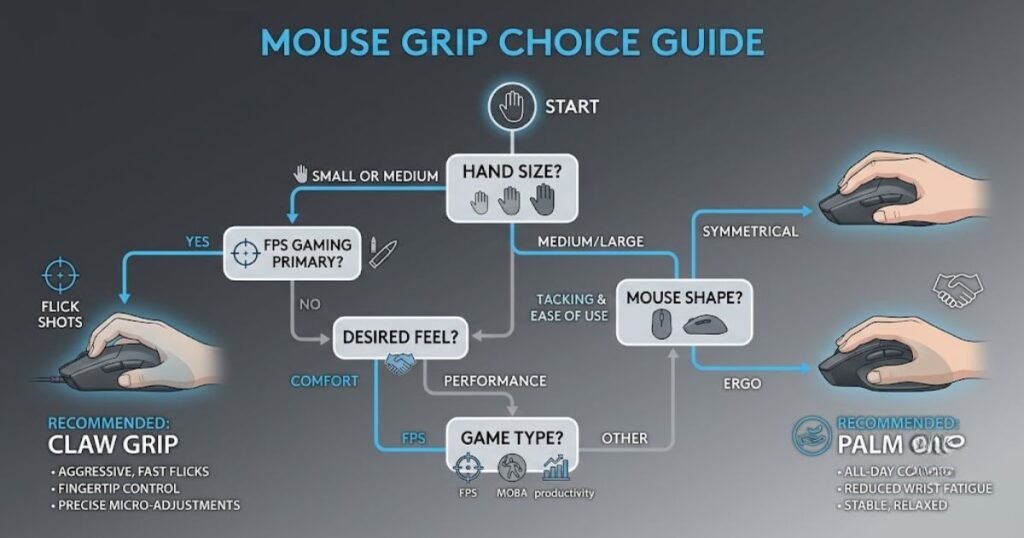
If your aim relies on rapid reactions and frequent micro corrections, you may naturally prefer the responsiveness of claw grip. If your movements are more controlled and continuous, palm grip may provide the stability needed to maintain consistent accuracy.
The most effective grip is the one that supports your existing muscle memory instead of forcing you to relearn every movement.
When Should You Switch to Another Grip Style?
You should only consider changing your grip if your current one consistently limits comfort or performance. Temporary inconsistency after switching is completely normal because your muscle memory needs time to adapt to a new movement pattern.
A grip change may be worthwhile if you frequently experience discomfort, struggle to maintain consistent control, or purchase a mouse whose shape no longer suits your current grip. Otherwise, constantly switching between grip styles usually slows improvement instead of accelerating it.
Consistency remains one of the most valuable advantages in competitive FPS games. Once you find a grip that feels natural, give yourself enough time to build reliable muscle memory before making further adjustments.
The following decision process can help you choose the right mouse grip:
- Identify your aiming style: Determine whether you rely more on flick shots, tracking, or a balanced combination of both.
- Evaluate your hand size: Make sure your grip feels natural with your current mouse dimensions.
- Consider your mouse shape: Choose a mouse that properly supports your preferred grip instead of forcing awkward hand placement.
- Test both grip styles: Spend several gaming sessions with each grip rather than making a decision after only a few minutes.
- Commit to one grip: Build consistent muscle memory before deciding whether another grip is genuinely better.
The process above helps eliminate guesswork by focusing on practical experience instead of assumptions.
The table below provides a quick decision guide for choosing between claw grip and palm grip:
| If You… | Recommended Grip |
|---|---|
| Prioritize fast flick shots and quick reactions. | Claw Grip |
| Prefer stable tracking and long gaming sessions. | Palm Grip |
| Have medium-sized hands and balanced aiming habits. | Either grip can work well. |
| Want to explore mice optimized for competitive shooters. | Gaming mouse for FPS games |
There is no universal winner between claw grip and palm grip. The better choice is the one that supports your aiming style, fits your hand comfortably, and allows you to perform consistently across every match without unnecessary strain.
Frequently Asked Questions About Claw Grip vs Palm Grip
Choosing between claw grip and palm grip often raises practical questions beyond simple comparisons. The answers below address common concerns that FPS players have when selecting a grip style, helping you make a more informed decision without repeating the topics covered earlier in this guide.
Is claw grip better than palm grip for FPS games?
No. Claw grip is not universally better than palm grip. Claw grip generally favors players who rely on rapid flicks and quick micro adjustments, while palm grip is often preferred by those who prioritize stability, smooth tracking, and long-term comfort. The better grip is the one that matches your aiming habits and feels natural during competitive play.
Do professional FPS players use claw grip more often?
Many professional FPS players use claw grip, but there is no universal standard. Professional players choose the grip that best complements their mouse shape, hand size, and years of developed muscle memory. Successful players can be found using both claw grip and palm grip across every major FPS title.
Can I switch from palm grip to claw grip?
Yes, but expect an adjustment period. Switching grip styles changes your muscle memory, so temporary inconsistency is completely normal. Most players require several days or weeks of consistent practice before a new grip begins to feel natural.
Does hand size matter when choosing a grip?
Yes. Hand size influences how comfortably you can maintain a grip. Smaller hands often pair well with compact mice and claw grip, while larger hands may find palm grip more comfortable on larger mouse shapes. However, individual preference remains the deciding factor.
Can the same gaming mouse support both grip styles?
Yes. Many gaming mice are versatile enough to support multiple grip styles. Whether a mouse feels comfortable depends on its dimensions, hump placement, and overall shape rather than its advertised grip compatibility.
Does claw grip cause more hand fatigue?
It can, especially for players who are new to the grip. Because claw grip requires greater finger engagement, some users experience more fatigue during long sessions. With proper adaptation and a suitable mouse, many players use claw grip comfortably for years.
Is palm grip too slow for competitive gaming?
No. Palm grip is fully capable of competitive performance. While it generally emphasizes stability over rapid finger movement, many highly skilled FPS players achieve exceptional accuracy and consistency using palm grip.
Should I choose my grip before buying a gaming mouse?
Yes. Identifying your preferred grip first makes it much easier to select an appropriate mouse shape. A mouse designed for your grip style usually feels more natural and requires less adjustment after purchase.
Can I naturally switch between claw grip and palm grip while gaming?
Some players naturally transition between the two during gameplay. However, most competitive players maintain one primary grip because consistent hand positioning helps develop stronger muscle memory and repeatable aim.
Does grip style affect mouse sensitivity?
No. Grip style does not directly change your sensitivity settings. However, because each grip encourages different movement mechanics, players sometimes adjust their sensitivity to better complement their preferred grip.
Is comfort more important than aiming speed?
In the long term, comfort often has a greater impact on consistency. A grip that feels natural allows you to practice longer, reduce fatigue, and build reliable muscle memory without unnecessary strain.
Should beginners start with claw grip or palm grip?
Beginners should start with whichever grip feels most natural. Building good habits is more important than forcing yourself to copy experienced players. Comfort and consistency usually produce better long-term improvement than chasing a particular grip style.
Final Verdict: Should You Choose Claw Grip or Palm Grip?
Neither claw grip nor palm grip is objectively better because each excels in different situations. Claw grip offers greater agility and fingertip control for players who value quick reactions, while palm grip provides stability and long-term comfort for those who prefer smooth, consistent aim.
Your final decision should be based on how you naturally play rather than what professional players use. Consider your preferred aiming technique, hand size, mouse shape, and overall comfort before committing to a grip. Once you find a grip that feels effortless, stay consistent long enough to build reliable muscle memory.
If you’re ready to pair your preferred grip with the right hardware, explore our recommendations for top gaming mice for FPS games in 2026 to find models that complement different grip styles and competitive play.
For more in-depth gaming mouse guides, comparisons, and FPS optimization resources, visit GearTP.
Thank you for reading! I hope this guide helps you find the grip style that feels most natural and improves your FPS gaming experience.