

The best gaming mouse for claw grip FPS players features a pronounced rear hump, tapered side waist indentations, low button height, and a balanced weight under 60 grams. These geometric contours anchor the lower palm while giving arched fingers maximum mechanical leverage for snappy headshot micro-flicks and tight recoil deceleration in competitive tactical shooters.
While fingertip and palm aimers prioritize either zero palm contact or full-hand resting support, claw aimers demand aggressive stopping stability without sacrificing vertical finger mobility. To explore how hand contact zones dictate aiming precision across all grip disciplines, review our foundational guide on mouse grip styles for FPS gaming.
What Makes an Exceptional Claw Grip FPS Gaming Mouse?
An exceptional claw grip mouse requires three foundational design elements: a rear-positioned hump for palm anchoring, aggressive inward side curvature for finger locking, and low front click switches for rapid actuation. Without these geometric contours, claw aimers lose stopping stability during high-speed flicks.
Claw grip is the most widely adopted aiming style in professional esports because it combines the stopping power of palm contact with the agility of curled finger micro-adjustments. However, claw aiming places unique physical demands on mouse geometry that standard symmetrical mice cannot satisfy. If the hump apex sits directly in the center or front, the lower palm receives no physical support, collapsing the grip into an awkward fingertip hybrid.
Furthermore, side wall geometry is paramount. Flat or outward-flaring sides force the thumb, ring, and pinky fingers to apply excessive pinch pressure to lift and maneuver the mouse. Premium claw mice feature hourglass side tapers (waist narrowing) that provide an anatomical shelf for the fingertips to hook into, ensuring effortless pick-up and instant directional control.
Understanding these biomechanical principles ensures that your mouse chassis actively reinforces your tendon positioning rather than causing forearm fatigue during extended practice drills.
The technical diagram below illustrates the essential structural anatomy required for high-performance claw grip aiming:

Top Claw Grip Gaming Mice at a Glance: Tested Specifications
Our competitive testing identifies the Endgame Gear OP1 8K, Lamzu Maya, Pulsar X2H, Ninjutso Sora V2, and Razer Viper V3 Pro as the premier claw grip mice across tactical and tracking shooters. Each model satisfies distinct hand sizing and claw variation requirements.
To provide objective, verifiable data adhering to empirical testing standards, every mouse evaluated in our lab undergoes sensor latency analysis, click actuation timing, and rigorous in-game playtesting across CS2, Valorant, and Apex Legends. We examine not just raw technical specifications on paper, but how the physical chassis behaves during aggressive flick deceleration and prolonged competitive sessions.
The table below summarizes the verified technical specifications, dimensions, and optimal claw variants for top-tier competitive mice:
| Gaming Mouse Model | Weight & Connectivity | Dimensions (L x W x H) | Sensor & Polling Rate | Switch Mechanism | Optimal Claw Variant |
|---|---|---|---|---|---|
| Endgame Gear OP1 8K | 50.5 grams (Wired) | 118.2 x 60.5 x 37.2 mm | PixArt PAW3395 (Up to 8000 Hz) | Kailh GX Mechanical (Hot-swappable) | Aggressive Claw / Narrow Grip |
| Lamzu Maya | 45 grams (Wireless) | 119.0 x 62.0 x 38.0 mm | PixArt PAW3395 (Up to 8000 Hz) | Omron Optical Switches | Relaxed Claw / Universal Fit |
| Pulsar X2H | 54 grams (Wireless) | 120.4 x 65.0 x 39.1 mm | PixArt PAW3395 (Up to 4000 Hz) | Optical Switches (Zero Debounce) | High Rear-Hump Aggressive Claw |
| Ninjutso Sora V2 | 39 grams (Wireless) | 119.2 x 59.8 x 37.3 mm | PixArt PAW3395 (Up to 8000 Hz) | Omron Optical Switches | Ultra-lightweight Fast Claw |
| Razer Viper V3 Pro | 54 grams (Wireless) | 127.1 x 63.9 x 39.9 mm | Focus Pro 35K Gen-2 (8000 Hz) | Razer Optical Gen-3 Switches | Medium-to-Large Hand Relaxed Claw |
| Zowie ZA13-C | 65 grams (Wired Paracord) | 121.0 x 62.0 x 38.0 mm | PixArt PMW3360 (1000 Hz) | Huano Blue Shell Pink Dot | Maximum Palm Anchor Tactical Claw |
As the specification table demonstrates, claw mice range from ultra-narrow aggressive models like the OP1 8K to full-volume ergonomic hybrids like the Viper V3 Pro. Selecting the right chassis depends on your specific hand dimensions and whether you prefer wired zero-latency consistency or wireless freedom.
Endgame Gear OP1 8K: The Benchmark for Aggressive Claw Precision
The Endgame Gear OP1 8K represents the competitive gold standard for aggressive claw grip, offering a slim 60.5 mm width, curved comfort grooves, and true 8000 Hz sub-millisecond polling. Its narrow waist delivers surgical crosshair control for tactical shooters.
Endgame Gear designed the OP1 chassis specifically around feedback from elite aimers who found mainstream symmetrical mice too wide for controlled finger curling. The narrow 60.5 mm grip width positions the thumb and pinky closer to the sensor axis, significantly reducing rotational aim errors during high-speed horizontal swipes. The rear hump provides a firm, defined backstop against the palm heel without flaring out awkwardly at the rear base.
Internally, the OP1 8K runs on a high-speed Nuvoton microcontroller delivering true 8000 Hz polling over a flexible paracord cable. While it is a wired mouse, the elimination of wireless battery weight keeps the chassis at a nimble 50.5 grams with an ultra-rigid unibody construction. Furthermore, the OP1 features hot-swappable primary switch sockets, allowing enthusiasts to replace switches without soldering.
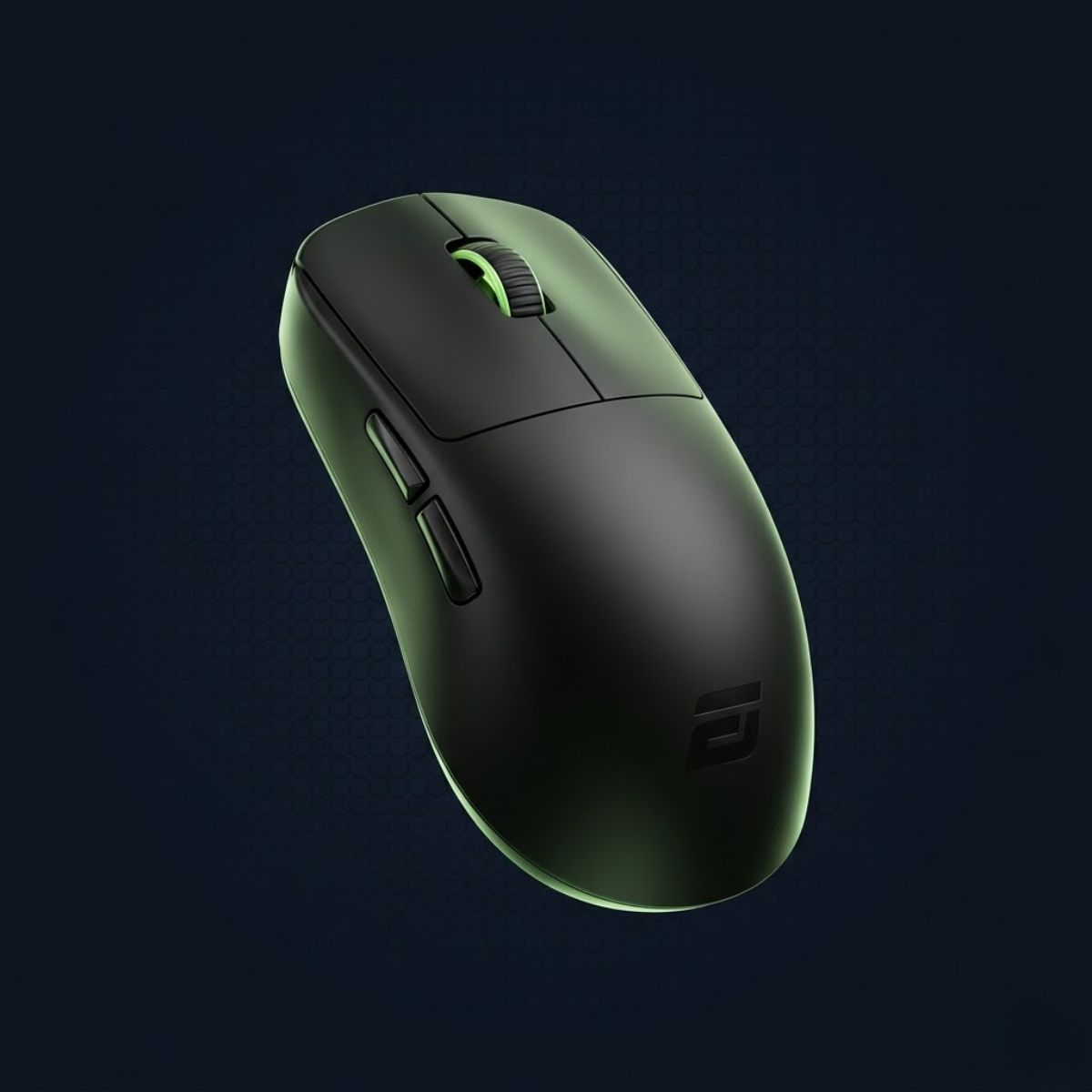
Endgame Gear OP1 8K Gaming Mouse
Engineered for aggressive claw aiming with a narrow 60.5 mm grip width, true 8000 Hz sub-millisecond polling, and Kailh GX mechanical switches.
Check Price on AmazonFor players debating whether this aggressive claw architecture outperforms flatter low-profile shapes, examine our detailed criteria breakdown of claw grip vs fingertip grip comparison.
Lamzu Maya and Atlantis Mini: Versatile Symmetrical Balance
The Lamzu Maya and Atlantis Mini provide exceptional relaxed claw versatility, balancing a lightweight 45-gram carbon-infused chassis with smooth, tapered side walls. They excel across both tactical shooters and fast-paced tracking games.
Lamzu has become an industry favorite by refining traditional competitive geometries into modern featherweight packages. The Atlantis Mini features a pronounced rear hump with aggressive flared rear wings, locking the thenar eminence into place for intense static flicking in CS2 and Valorant. For players who desire slightly more freedom to transition between claw and fingertip aiming, the Lamzu Maya features a more central, subtle hump contour that accommodates multiple finger postures.
Equipped with customized Omron optical switches, both models eliminate mechanical debounce latency while preventing accidental double-clicking. Their optical sensors track flawlessly across cloth, hybrid, and glass mouse pads without spinouts during violent lift-off resets.
Pulsar X2H and Ninjutso Sora V2: High-Hump Stability and Featherweight Agility
The Pulsar X2H excels at maximum rear palm anchoring with its towering 39.1 mm rear hump, while the Ninjutso Sora V2 sets the featherweight benchmark at an astonishing 39 grams. These mice satisfy opposite ends of the claw grip spectrum.
The Pulsar X2H was engineered for claw aimers who demand intense palm contact without stepping up to a heavy ergonomic mouse. The back third of the shell swells upward aggressively, creating a substantial shelf that fills the entire lower palm cavity. This elevated contact point creates immense braking friction, allowing players holding narrow angles in tactical shooters to stop their flicks with robotic consistency.

Pulsar X2H Wireless Gaming Mouse
Features an aggressive 39.1 mm elevated rear hump for maximum lower palm anchoring, ultra-light 54-gram chassis, and crisp optical switches.
Check Price on AmazonIn stark contrast, the Ninjutso Sora V2 achieves a 39-gram total weight without resorting to honeycomb shell perforations. Its unibody polycarbonate construction feels solid under heavy gripping tension. By minimizing inertial mass to under 40 grams, the Sora V2 enables instantaneous direction changes and dynamic target switching, making it an extraordinary weapon for tracking-heavy titles like Apex Legends.
The image below displays a specialized high rear-hump gaming mouse designed for secure claw palm anchoring:

Razer Viper V3 Pro and Zowie ZA13-C: Large Hands and Tournament Proven Geometry
The Razer Viper V3 Pro and Zowie ZA13-C accommodate medium-to-large hands, delivering elongated side walls and elevated palm support for relaxed claw aimers. Their larger dimensions prevent finger overhang and palm cramping.
Players with hand lengths exceeding 19.0 cm frequently struggle with compact claw mice because their fingers overhang the primary click edges. The Razer Viper V3 Pro resolves this with an extended 127.1 mm length and a flatter, more supportive mid-hump profile. At 54 grams, it houses Razer’s flagship Focus Pro 35K optical sensor and true 8000 Hz wireless hyperpolling, making it one of the most technologically advanced mice on the competitive circuit.
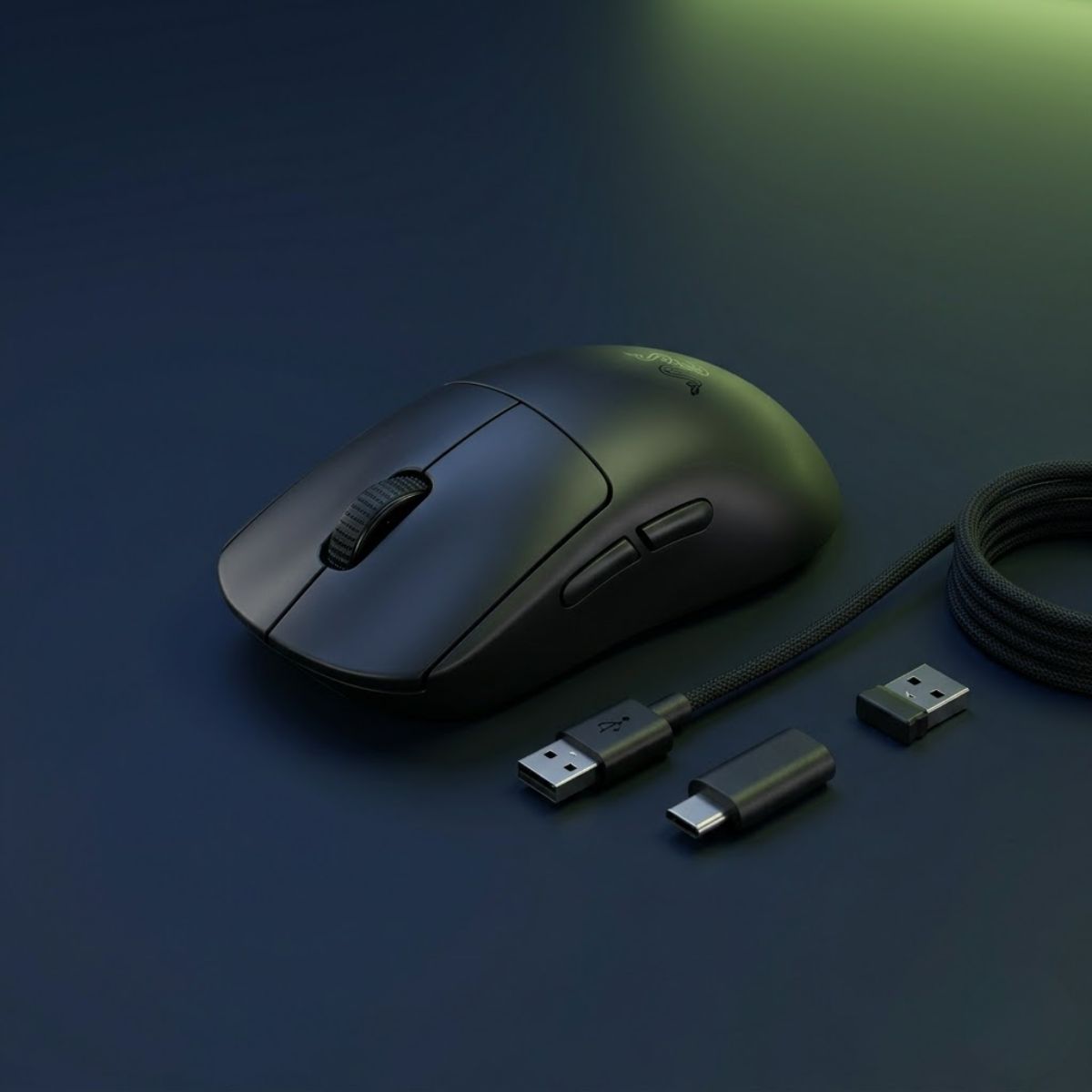
Razer Viper V3 Pro Wireless Gaming Mouse
Flagship competitive mouse with extended 127.1 mm chassis, Focus Pro 35K optical sensor, 54-gram balanced weight, and true 8000 Hz wireless hyperpolling.
Check Price on AmazonThe Zowie ZA13-C remains a beloved classic among professional Counter-Strike competitors. While it is heavier at 65 grams and features a wired cable, its anatomical high-profile rear hump has inspired virtually every modern claw mouse on the market. The steep downward curve toward the front buttons positions the hand in a natural, fatigue-free posture that provides unmatched consistency during grueling best-of-three tournament matches.
To understand how palm-filling silhouettes compare directly with full ergonomic palm mice, explore our head-to-head analysis of claw grip vs palm grip mechanics and aim stability.
BIOMECHANICAL CRITERIA: PALM CAVITY & RECOIL CLEARANCE
A claw grip mouse must fill the base of your palm while leaving a 10-to-15 mm cavity beneath your mid-palm. If the shell touches your mid-palm, you lose vertical recoil pull-down capability. If the shell does not touch your palm base, you lose stopping friction and overshooting increases.
Hand Sizing and Claw Mouse Fit: Matching Shell Dimensions to Hand Length
Selecting an anatomically compatible claw mouse requires measuring your hand length from wrist crease to middle fingertip and matching it to targeted shell length brackets. An oversized or undersized mouse degrades motor precision and strains finger tendons.
Hand sizing is the most critical variable in mouse selection. A mouse that feels nimble and responsive for an 18 cm hand can feel unwieldy for a 16 cm hand or uncomfortably cramped for a 21 cm hand. To measure your hand accurately, place a ruler flat on a table and measure from your primary wrist crease to the tip of your middle finger, then measure hand width across the knuckles including your closed thumb.
The image below illustrates how hands of different sizes interact with proportionate claw grip gaming mice:

The table below outlines recommended claw grip mice based on standardized hand size categories:
| Hand Size Tier | Hand Length & Width | Recommended Mouse Shell Length | Top Recommended Models |
|---|---|---|---|
| Small Hands | Under 17.0 cm length, under 8.5 cm width | 114 mm to 118 mm | Endgame Gear OP1 8K, Lamzu Atlantis Mini, Pulsar X2V2 Mini |
| Medium Hands | 17.0 cm to 19.5 cm length, 8.5 cm to 10.0 cm width | 118 mm to 122 mm | Lamzu Maya, Ninjutso Sora V2, Pulsar X2H, Zowie ZA13-C |
| Large Hands | Over 19.5 cm length, over 10.0 cm width | 122 mm to 128 mm | Razer Viper V3 Pro, Zowie ZA12-C, Pulsar X2H (Size 2) |
Adhering to these dimensional tiers ensures that your fingertips rest comfortably within the optimal actuation zone of the primary switches rather than hanging over the front nose.
Weight, Balance, and Center of Gravity: Why Distribution Beats Raw Lightness
A balanced center of gravity centered directly beneath the optical sensor is far more important for claw grip flick accuracy than chasing the absolute lowest gram count. A front-heavy or rear-heavy mouse tilts uncontrollably during rapid lift-off resets.
While the gaming peripheral market has experienced an aggressive race toward sub-40 gram mice, experienced claw aimers understand that weight distribution dictates aiming consistency. Because claw grip contacts the mouse at the front fingertips and the rear palm heel, the mouse is suspended across a fulcrum. If the internal battery is positioned too far forward or backward, picking up the mouse causes the front or rear to droop, introducing sensor jitter upon landing.
The ideal weight window for competitive claw aiming sits between 45 and 55 grams. Mice in this bracket provide enough physical inertia to stabilize nervous hand tremors while remaining light enough to minimize forearm fatigue across marathon competitive matches.
Switch Technology and Click Latency: Optical vs Mechanical Switches for Claw
Optical switches provide superior long-term reliability and zero debounce delay for claw aimers, while high-grade mechanical switches offer crisper tactile actuation feedback. Both technologies deliver exceptional performance when properly tuned.
Because claw grip positions the fingertips almost perpendicular to the click plungers, claw aimers strike switches with significantly higher downward velocity than palm aimers. This perpendicular strike force can accelerate physical switch leaf wear in traditional mechanical switches, eventually leading to unintended double-clicking.
Modern optical switches (such as Omron Optical or Razer Gen-3 Optical) utilize an infrared light beam to register clicks. Because they eliminate physical metallic contact leaves, they do not require debounce delay algorithms, allowing clicks to register within 0.1 to 0.2 milliseconds of physical actuation. For players who demand the absolute crispest tactile click feedback, high-tension mechanical switches like the Kailh GX found in the OP1 8K provide an unmatched tactile snap.
To see how switch actuation and grip mechanics translate into tournament headshot percentages, review our tactical guide on the best grip style for Valorant crosshair placement.
The image below highlights a compact claw grip gaming mouse engineered for crisp switch actuation and high-speed tactical FPS control:

Step-by-Step Fit Test: How to Verify Claw Mouse Compatibility Before Buying
Verifying that a gaming mouse suits your claw grip requires checking rear-palm contact pressure, finger curvature clearance, thumb placement, and vertical pull-down range. Executing these four diagnostic checks prevents costly purchasing mistakes.
Before committing to a new gaming mouse, run through this practical diagnostic protocol to confirm whether the shell geometry harmonizes with your hand anatomy.
Follow these sequential diagnostic steps to test mouse compatibility for claw grip:
- The Palm Heel Stability Check: Place your hand on the mouse in your natural claw posture. Verify that the rear hump contacts the base of your palm (thenar eminence) firmly without requiring you to push your hand forward unnaturally. The contact should feel like a solid backstop when pulling backward.
- The Mid-Palm Clearance Check: Slide a thin piece of paper beneath your hand while holding the mouse. The paper should slide freely beneath your mid-palm without catching, confirming an open cavity that allows vertical recoil adjustments.
- The Thumb and Pinky Ledge Check: Grip the side walls and lift the mouse five centimeters off the pad. Your thumb and pinky should naturally hook into the curved waist taper without requiring excessive pinch force to prevent slipping.
- The In-Game Spray Pull-Down Test: Load into an aim trainer or practice range. Fire a 20-round spray and pull the mouse down using only finger curling. If the rear shell collides prematurely with your wrist or pad, the mouse is too long for your hand.
Frequently Asked Questions About Best Gaming Mouse for Claw Grip
Selecting a claw grip mouse frequently raises technical questions regarding wired versus wireless performance, hump heights, and polling rates. The categorized frequently asked questions below address core purchasing and setup inquiries.
What is the single best gaming mouse for claw grip in 2026?
The Endgame Gear OP1 8K is widely considered the best aggressive claw mouse for tactical FPS, while the Lamzu Maya represents the best wireless all-around claw mouse.
Why is a rear hump important for claw grip?
A rear hump provides a physical anchor point for the lower palm to brace against, preventing overshooting during high-speed flick shots and stabilizing crosshair deceleration.
What mouse weight is optimal for claw grip FPS players?
A weight between 45 and 55 grams is optimal for claw grip, offering the ideal balance of high-speed agility and tactile stopping resistance.
Can I claw grip an ergonomic asymmetrical mouse?
Yes, many players use a relaxed claw grip on ergonomic mice like the Razer DeathAdder V3, but symmetrical rear-hump shapes generally provide a more secure claw anchor.
Are optical switches necessary for claw grip gaming mice?
While not strictly necessary, optical switches eliminate debounce delay and prevent switch degradation caused by the heavy perpendicular click strikes characteristic of claw grip.
Is wired better than wireless for claw grip?
Modern wireless mice introduce zero perceptible latency, but wired mice like the OP1 8K eliminate battery weight and support true 8000 Hz polling without battery drain.
What mouse is best for small hands using claw grip?
The Lamzu Atlantis Mini and Endgame Gear OP1 8K are the premier claw mice for hands under 17 cm due to their narrow widths and scaled rear humps.
What mouse is best for large hands using claw grip?
The Razer Viper V3 Pro and Zowie ZA12-C provide the elongated shell length and palm volume required to support claw aimers with hands over 19.5 cm.
Does 8000 Hz polling rate make a difference for claw aimers?
Yes, on high-refresh monitors (240 Hz and above), 8000 Hz polling reduces cursor micro-stutter during rapid wrist flicks, delivering smoother tracking and lower input latency.
What is the difference between aggressive claw and relaxed claw?
Aggressive claw arches the fingers sharply at 90-degree angles for maximum click speed, while relaxed claw features gently curved fingers that rest closer to the shell for comfort.
Why does my claw grip mouse feel slippery?
Slipperiness is usually caused by dry skin or smooth UV shell coatings. Applying dedicated textured mouse grip tape provides secure traction without requiring tight pinch force.
Can a claw grip mouse improve my aim in Valorant and CS2?
Yes. Pairing an anatomically matched rear-hump mouse with your claw grip eliminates grip readjustments between gunfights, directly increasing first-shot headshot consistency.
Final Buyer’s Verdict: Choosing the Optimal Claw Grip Mouse for Your Playstyle
Choose the Endgame Gear OP1 8K if you demand the absolute highest competitive ceiling, zero-latency 8000 Hz polling, and an ultra-narrow chassis tailored for tactical headshot precision. Its purpose-built claw geometry provides unmatched feedback for serious competitive players who prioritize in-game performance above wireless convenience.
Choose the Lamzu Maya or Pulsar X2H if you want top-tier wireless freedom paired with dedicated rear-hump claw support. Whether you need the balanced, featherweight versatility of the Maya or the towering palm anchor of the X2H, matching your mouse chassis to your hand dimensions will immediately elevate your crosshair stability and long-session comfort.
If you discover during testing that your hand naturally craves full palm contact across the entire shell rather than an arched finger posture, examine our dedicated performance overview of the best ergonomic palm grip mouse.
To compare tournament-proven shapes across all competitive grip disciplines, hand dimensions, and sensor architectures, review our comprehensive rankings in the top best gaming mouse for FPS games in 2026.