
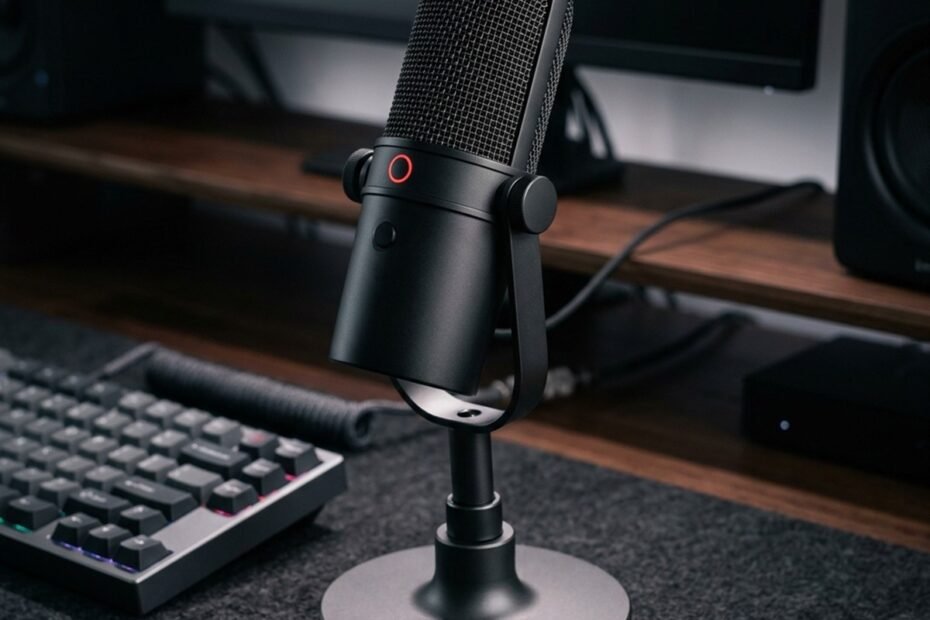
A gaming microphone is an acoustic transducer configured to capture human vocal speech and convert it into a clean electrical or digital audio stream for real-time team communication, Discord voice channels, competitive callouts, and live broadcasting. While standard consumer microphones prioritize broad general-purpose capture, a microphone suited for gaming focuses primarily on vocal intelligibility, off-axis rejection of ambient room acoustics, and convenient hardware integration at your desk.
In this foundational guide to understanding what is a gaming microphone, we explore the acoustic principles governing capsule mechanics, the engineering differences between standalone microphones and integrated headset microphones, how audio signal chains function across USB and XLR architectures, and how to methodically evaluate your setup to determine whether you genuinely require a dedicated recording unit.
What Is a Gaming Microphone and What Is It Used For?
A gaming microphone is an audio capture device engineered to transmit speech clearly during gaming sessions, team communications, and content creation. Practical voice clarity depends on capsule design, polar pattern orientation, and physical desk positioning rather than commercial gaming labels.
The term gaming microphone does not represent a standardized engineering classification like dynamic or condenser audio transducers. Instead, it describes a practical product category designed to solve distinct challenges faced by PC and console gamers. During intense gaming sessions, players simultaneously generate loud vocal commands while clicking mechanical keyboard switches and moving gaming mice across textured surfaces. A microphone suited for gaming must capture voice frequencies accurately without overwhelming teammates with background mechanical distractions.
How Gaming Microphones Support Team Communication
Gaming microphones improve competitive team communication by delivering consistent vocal intelligibility, preserving speech clarity across Discord compression algorithms, and preventing missed tactical callouts during loud firefights.
In competitive multiplayer titles such as Counter-Strike 2, Valorant, and Apex Legends, round outcomes frequently hinge on fractions of a second. When team members rely on distorted, low-bandwidth microphones, critical information such as enemy positioning, utility deployment, and health status can be misunderstood. Voice communication platforms like Discord employ the Opus audio codec, which compresses vocal data between 32 kbps and 96 kbps. Feeding a clean, unclipped input signal into this compression pipeline ensures speech remains crisp, intelligible, and free of metallic digital artifacts.
Gaming Microphone vs Built-In and Headset Microphones
Dedicated standalone gaming microphones feature physically larger diaphragm capsules than headset boom mics, resulting in wider dynamic range, lower self-noise, and greater placement freedom away from breath paths.
Integrated laptop microphones and tiny headset boom capsules are constrained by strict physical dimensions, typically utilizing miniature electret elements measuring between 4 mm and 6 mm. These micro-capsules have small surface areas, which limits their acoustic sensitivity and introduces audible electronic hiss known as self-noise. In contrast, standalone desktop microphones incorporate capsules ranging from 14 mm to 25 mm in diameter, allowing them to capture natural voice resonance and subtle vocal inflections with substantially higher signal-to-noise ratios.
Comparison of microphone form factors across gaming and daily communication use cases:
| Microphone Form Factor | Capsule Size (Typical) | Placement Freedom | Mechanical Noise Isolation | Portability Factor | Setup Complexity |
|---|---|---|---|---|---|
| Standalone Desk Microphone | 14 mm to 25 mm | High (Mountable on Boom Arm) | High (With Shock Mount) | Low (Stationary Desk Use) | Low to Moderate (USB or Interface) |
| Headset Boom Microphone | 4 mm to 9.9 mm | Fixed (Moves with Head) | Moderate (Sensitive to Breathing) | High (All-in-One Headset) | Very Low (Single Cable or Dongle) |
| Laptop Built-In Array | 2 mm to 4 mm | Zero (Locked to Screen Bezel) | Very Low (Picks Up Chassis Fans) | Maximum (Integrated) | Zero (Pre-Configured) |
| Clip-On Lavalier Mic | 4 mm to 8 mm | Moderate (Clips to Shirt) | Moderate (Picks Up Clothing Rustle) | High (Compact Cable) | Low to Moderate (Bodypack / Adapter) |
As illustrated in the comparative data above, standalone desktop microphones offer superior acoustic potential and isolation opportunities compared to integrated alternatives, but they require dedicated physical space on your battlestation and deliberate positioning.
How Does a Gaming Microphone Turn Voice Into a Digital Signal?
A microphone captures airborne sound waves via an acoustic diaphragm, converting mechanical vibrations into analog voltage. In USB models, integrated converters digitize this voltage internally, whereas XLR systems route analog voltage to external audio interfaces.
The journey from vocal cord vibration to digital data packets inside a multiplayer lobby involves precise electro-acoustic transduction. Understanding this multi-stage audio pipeline prevents common troubleshooting errors such as incorrect gain staging, digital clipping, and monitoring latency.
How the Microphone Capsule Captures Sound
The microphone capsule uses a flexible, ultra-thin diaphragm suspended next to a conductive backplate, producing proportional electrical fluctuations whenever incoming sound pressure waves cause the membrane to vibrate.
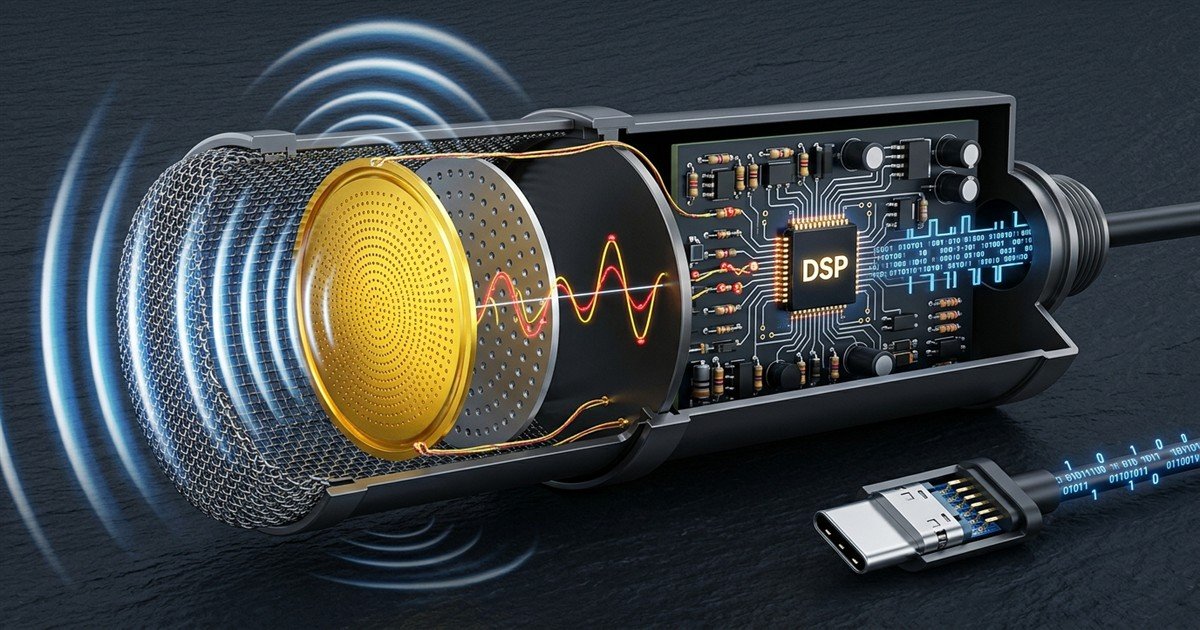
When you speak, vocal cords create traveling air pressure waves composed of alternating compressions and rarefactions. Inside a condenser capsule, these sound waves hit a micro-thin membrane, often coated in gold-sputtered Mylar, positioned fractions of a millimeter away from a solid metal backplate. This arrangement forms an electrical capacitor. As the diaphragm moves in response to voice waves, the distance between the plates changes, modulating electrical capacitance and generating a tiny alternating voltage signal that precisely mirrors your voice.
Acoustic transduction inside a condenser gaming microphone capsule:
How USB and XLR Microphones Process Audio Signals
USB microphones contain an all-in-one signal path with an internal preamplifier, analog-to-digital converter, and headphone amplifier. XLR microphones maintain a pure analog path, requiring an external interface for amplification and digitization.
The fundamental distinction between USB and XLR architectures lies in where the analog signal becomes digital data:
Signal chain architecture comparison between USB and XLR microphone systems:
| Signal Chain Stage | USB Gaming Microphone | XLR Audio System |
|---|---|---|
| Capsule Capture | Transducer generates microvolt analog signal | Transducer generates microvolt analog signal |
| Preamplification | Internal onboard preamp boosts signal | External audio interface preamp boosts signal |
| A/D Conversion | Internal ADC chip digitizes on microphone board | Dedicated converter inside external interface |
| Cable Interface | Direct USB-A or USB-C digital data cable | 3-pin balanced analog XLR cable |
| Power Supply | 5V DC bus power delivered over USB cable | 48V Phantom Power from audio interface |
| Expansion Flexibility | Fixed hardware parameters inside chassis | Modular; preamps, mixers, and ADCs can be upgraded |
For standard desktop gaming, USB models offer practical simplicity by eliminating extra hardware boxes and power supplies. XLR systems introduce modularity, allowing streamers and podcasters to pair professional broadcast capsules with studio-grade preamplifiers.
What Sampling Rate and Bit Depth Actually Mean
Bit depth defines dynamic range and recording resolution, while sampling rate dictates the frequency ceiling captured. For gaming comms, 24-bit depth and 48 kHz sampling provide ideal fidelity that exceeds voice chat compression thresholds.
Marketing materials frequently advertise extreme specifications such as 192 kHz sampling and 32-bit floating point processing. However, according to the Nyquist-Shannon sampling theorem, a sampling rate of 48 kHz perfectly captures acoustic frequencies up to 24,000 Hz, exceeding the upper threshold of human hearing (20,000 Hz). As detailed in our comprehensive guide to gaming microphone specs explained, a 24-bit depth provides 144 dB of dynamic range, creating a substantial safety buffer that prevents loud shouting callouts from digitally distorting without needing noisy analog gain boosts.
Gaming Microphone vs Regular Microphone: What Actually Differs?
Microphone acoustic performance is determined by capsule physical properties, polar directionality, and electronic tuning rather than commercial branding. A gaming microphone is not inherently superior to a general-purpose studio or broadcast microphone.
Differentiating a gaming microphone from a regular studio or office microphone requires looking past marketing terminology to evaluate acoustic design choices. To explore these differences in depth, read our analysis on gaming microphone vs regular microphone tuning.
Frequency Response and Voice Intelligibility
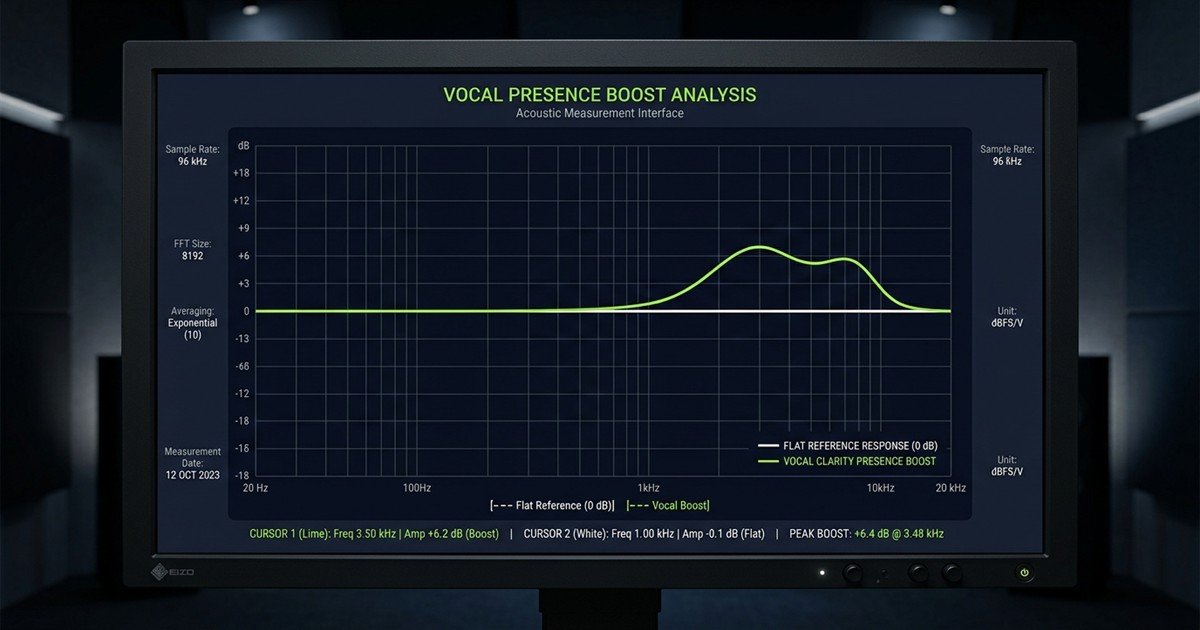
Gaming microphones frequently feature an intentional vocal presence boost between 2 kHz and 5 kHz, enhancing speech consonants to ensure teammate callouts remain intelligible through loud in-game explosions and gunfire.
Studio condenser microphones designed for vocal recording typically strive for a neutral, flat frequency response across the audible spectrum (20 Hz to 20,000 Hz), capturing natural vocal timbre without coloration. However, in multiplayer gaming environments, flat audio reproduction can sound muddy when mixed beneath heavy bass effects, game soundtracks, and spatial gunfire. Gaming microphones often incorporate hardware acoustic filters or DSP tuning that gently attenuates sub-bass rumble below 80 Hz while elevating upper-mid frequencies, sharpening consonant sounds such as T, K, S, and P.
Frequency response comparison between gaming tuning and flat studio capture:
Directionality, Off-Axis Rejection and Background Noise
Directional microphones reject sound originating from the sides and rear through acoustic phase cancellation ports, preventing mechanical switch clatter and PC case fan hum from overpowering your vocal stream.
A widespread misconception is that directional microphones eliminate background noise electronically. In reality, noise rejection is achieved through mechanical capsule ports. Acoustic waves entering rear vents travel an internal path that delays their arrival, causing them to meet waves striking the diaphragm front out of phase, naturally canceling out. Furthermore, placing a directional microphone close to your mouth activates the proximity effect, increasing low-frequency vocal energy and improving the direct-to-reverberant sound ratio, which makes your voice dominant over ambient room reverberation.
Maximum SPL and Headroom During Loud Speech
Maximum Sound Pressure Level (SPL) specifies the volume threshold a microphone tolerates before acoustic distortion occurs. Quality gaming microphones maintain headroom up to 120 dB SPL to handle loud competitive callouts cleanly.
Competitive gaming naturally involves sudden shifts in vocal dynamics, swinging from quiet whispers during stealth clutch plays to intense shouts during team fights. Microphones with inadequate acoustic headroom or poorly calibrated internal preamps suffer from capsule diaphragm clipping, turning vocal peaks into harsh, square-wave distortion. Quality gaming units incorporate preamplifiers capable of handling high instantaneous voltage without clipping the analog input stage.
Engineering and operational characteristics across microphone classifications:
| Acoustic Characteristic | Gaming-Focused Microphone | Studio Vocal Condenser | Broadcast Dynamic Mic | Headset Boom Microphone |
|---|---|---|---|---|
| Frequency Tuning | Vocal presence boost (2 to 5 kHz) | Flat, uncolored reference | Smooth roll-off with warm low-mids | Bandwidth-limited voice contour |
| Room Treatment Need | Moderate; relies on proximity | Critical; captures room reflections | Low; heavy diaphragm rejects room | Low; capsule rests near mouth |
| Mechanical Handling | Sensitive to desk vibrations | Highly sensitive; requires cage mount | Durable; internal capsule isolation | Resistant to desk; prone to breathing |
| Physical Controls | Mute buttons, gain dials, sidetone | Minimal; controlled via mixing desk | None; passive analog transducer | Inline or ear-cup mute switch |
| Maximum SPL Tolerance | 110 dB to 120 dB SPL | 130 dB to 140 dB SPL | 140 dB to 150 dB SPL | 105 dB to 115 dB SPL |
This operational breakdown demonstrates why deploying a delicate, wide-bandwidth studio condenser in an untreated bedroom often yields worse voice chat clarity than using a dedicated gaming or broadcast dynamic microphone positioned close to the user.
A 100 USD microphone positioned 10 cm from your mouth will consistently deliver cleaner speech intelligibility and lower keyboard bleed than a 500 USD studio microphone positioned 60 cm away on your desk. In untreated residential rooms, acoustic distance dictates voice clarity far more than the price of the transducer.
Which Gaming Microphone Components and Controls Matter?
The most impactful components in a gaming microphone setup include a directional cardioid capsule, analog gain potentiometer, tap-to-mute sensor, zero-latency sidetone output, and an articulated boom arm with shock mounting.
When configuring a dedicated recording setup, understanding individual hardware controls allows you to select features that solve tangible acoustic and ergonomic problems in your daily gaming workflow, as detailed in our guide on what to look for in a gaming microphone.
Cardioid, Omnidirectional and Other Pickup Patterns
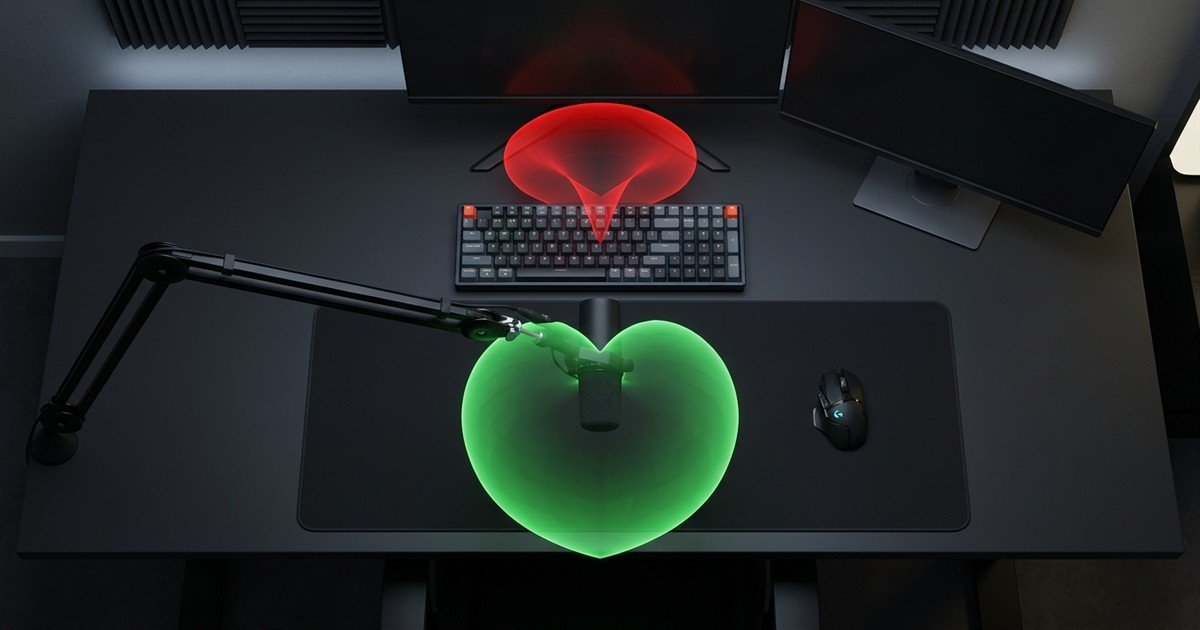
A cardioid polar pattern captures sound in a heart-shaped area in front of the capsule while establishing a maximum null rejection zone at 180 degrees directly behind the microphone.
For solo gaming setups, cardioid is the universally recommended polar pattern. By aiming the front axis of the microphone toward your mouth and orienting the rear dead zone toward your keyboard, mechanical switch clicks are attenuated by 15 dB to 20 dB relative to your voice. Multi-pattern microphones offering omnidirectional (360-degree capture) or bidirectional (front and back figure-8 capture) modes are primarily beneficial for roundtable podcasting or face-to-face co-op interviews, but introduce excessive ambient room noise during solo gaming.
Cardioid pickup polar pattern and rear keyboard sound rejection:
Gain, Mute Controls and Zero-Latency Monitoring
Hardware gain dials regulate analog preamplification sensitivity before digitization, while integrated sidetone headphone jacks provide real-time vocal feedback with zero processing latency.
Essential hardware features solve distinct operational hurdles during live gameplay:
Functional components, acoustic mechanisms, and practical gaming use cases:
| Hardware Component | Operating Mechanism | Problem Solved | Practical Gaming Utility |
|---|---|---|---|
| Physical Gain Dial | Adjusts analog preamp voltage amplification | Weak signal or harsh digital clipping | Calibrate input volume without opening OS menus |
| Tap-to-Mute Sensor | Capacitive electrical contact on chassis top | Noisy mechanical switch clicks during muting | Silently cut voice transmission during coughing or family entry |
| Hardware Sidetone Jack | Direct 3.5 mm DAC monitoring loop | Vocal strain from shouting with closed-back cans | Hear your natural voice in real time with zero delay |
| Elastic Shock Mount | Suspends microphone in elastic tension bands | Low-frequency desk thumps and keyboard vibration | Eliminates booming rumbles when banging desk or typing |
| Articulated Boom Arm | Counterbalanced spring or friction desk clamp | Sub-optimal acoustic distance and desk clutter | Brings capsule 10 cm from mouth; clears mousepad surface |
Combining an analog gain potentiometer with hardware sidetone monitoring ensures you maintain accurate volume control without shouting or guessing your transmission level.
Boom Arms, Desk Stands and Shock Mounts
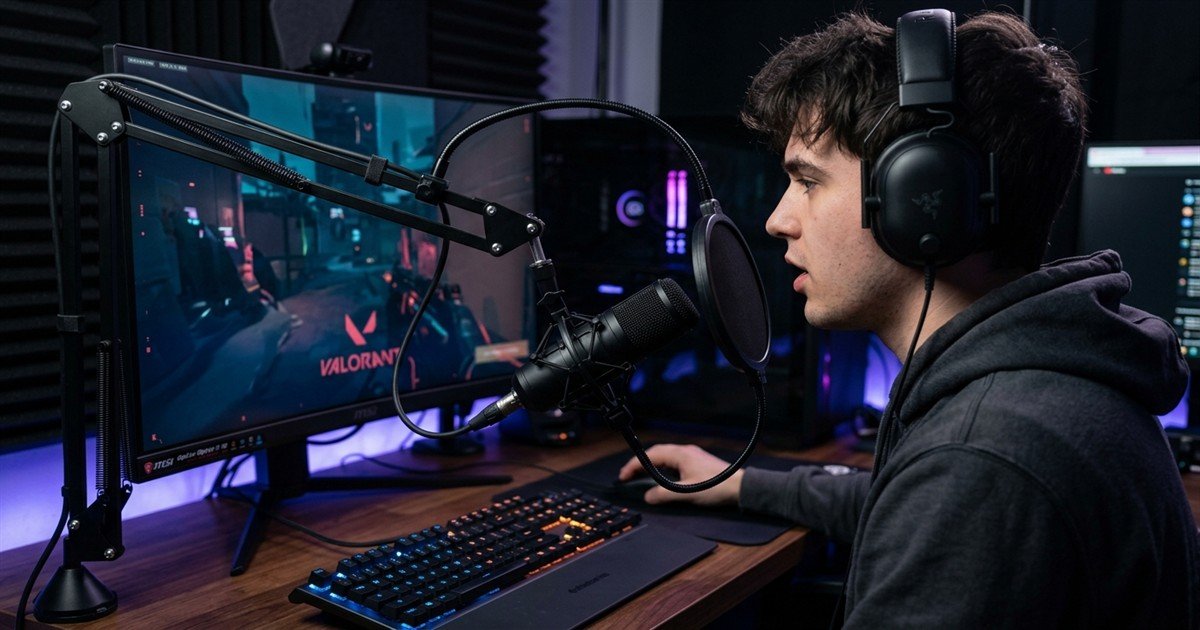
Mounting a microphone on an articulated boom arm decouples the chassis from mechanical desk vibrations while freeing essential mousepad surface area for competitive low-DPI aim control.
Most standalone gaming microphones ship with heavy cast-zinc desktop stands. While functional for basic use, placing a microphone on your tabletop couples the capsule directly to your desk. Every aggressive mouse swipe, keyboard bottom-out, and palm adjustment sends low-frequency structural shockwaves traveling through the desk into the capsule, registering as loud thuds on Discord. Migrating to an articulated boom arm equipped with an elastic suspension shock mount isolates the capsule mechanically and positions the microphone at optimal mouth height.
How to Decide Whether You Need a Dedicated Gaming Microphone
A dedicated microphone is worth considering when your existing setup produces muffled audio, lacks essential hardware controls, or fails to isolate keyboard clatter, provided desk space and budget permit.
Before purchasing a dedicated standalone microphone, gamers should systematically assess their specific communication bottlenecks. Many common vocal issues can be resolved through position adjustments and software tuning before deciding do you need a gaming microphone for your setup.
Step-by-step evaluation framework to determine dedicated microphone necessity:
- Assess current voice clarity and teammate feedback: Record 30 seconds of speech in Windows Voice Recorder while typing. Listen back with headphones to identify whether your voice sounds muffled, thin, or distorted during rapid callouts.
- Identify background noise sources and acoustic environment: Determine whether background distractions are airborne (open windows, air conditioning hum) or structure-borne (desk vibration, aggressive mechanical key bottoming).
- Match audio requirements to gaming and streaming habits: If you strictly play casual multiplayer titles once a week, a modern headset boom microphone is sufficient. If you play competitive ranked lobbies daily, run Discord servers, or stream to Twitch, a dedicated unit provides noticeable value.
- Weigh ergonomic desk footprint against budget and complexity: Ensure your desk setup has mounting clearance for a boom arm or sturdy placement space that does not impede your mouse swipe radius before committing funds.
By following this four-stage evaluation sequence, you prevent unnecessary expenditure on hardware that may not address your primary acoustic bottlenecks.
Optimal desk positioning and mouth distance for competitive callout clarity:
Common voice communication symptoms, root acoustic causes, and corrective actions:
| Audio Issue | Root Acoustic Cause | Free Corrective Action | Hardware Upgrade Threshold |
|---|---|---|---|
| Loud Keyboard Clatter | Microphone positioned behind or right next to keyboard | Move mic closer to mouth; enable Discord Krisp noise gate | Upgrade to boom arm with rear-rejection cardioid capsule |
| Distorted, Harsh Callouts | Input gain set too high; digital clipping on vocal peaks | Lower Windows microphone volume to 70 percent; back off 5 cm | Upgrade to 24-bit microphone with physical analog gain dial |
| Hollow, Distant Voice | Microphone positioned over 50 cm away on tabletop | Elevate microphone on books; angle capsule toward face | Upgrade to standalone dynamic mic on counterbalanced arm |
| Explosive Popping (P/B sounds) | Plosive air blasts striking bare capsule directly | Position mic 45 degrees off-axis to breathe past the grille | Install dual-layer mesh pop filter or high-density foam cover |
Reviewing this troubleshooting matrix helps distinguish between problems caused by simple setup errors and genuine hardware limitations, helping you determine exactly when to upgrade your gaming mic.
What Should You Learn Next About Gaming Microphones?
After understanding acoustic fundamentals and signal flow, the logical next step in your audio journey is comparing standalone desk microphones directly against integrated headset boom mics to determine the ideal form factor for your battlestation.
Now that you understand what is a gaming microphone, explore our comprehensive Gaming Microphones guide to survey the entire hardware landscape across USB and XLR categories.
If you are debating between an all-in-one gaming headset and a dedicated desktop setup, consult our in-depth dedicated gaming microphone vs headset microphone comparison for direct latency benchmarks, cable ergonomics, and acoustic trade-offs.
Frequently Asked Questions About Gaming Microphones
Answers to essential inquiries regarding gaming microphone acoustic mechanics, setup optimization, and competitive voice clarity:
What is a gaming microphone used for?
A gaming microphone captures vocal speech clearly for in-game multiplayer communication, Discord voice channels, live streaming on Twitch or YouTube, and recording gameplay commentary with minimal background interference.
Do you need a dedicated microphone for gaming?
You do not strictly need a dedicated microphone if your gaming headset boom mic provides clean, intelligible callouts. A dedicated microphone becomes valuable when you require higher vocal fidelity, physical hardware controls, or broadcast-quality streaming.
Can you use a regular microphone for gaming?
Yes, any standard studio condenser, broadcast dynamic, or office USB microphone can be used for gaming. As long as it features a cardioid pickup pattern and connects to your PC via USB or an audio interface, it performs effectively.
Is a gaming microphone better than a headset microphone?
A standalone gaming microphone generally offers superior acoustic fidelity due to its larger capsule diaphragm (14 mm to 25 mm vs 4 mm to 6 mm). However, a headset mic stays at a fixed distance from your mouth, offering greater movement convenience.
What is the difference between a dynamic and a condenser microphone?
Condenser microphones use a light, electrically charged diaphragm, making them highly sensitive to subtle vocal detail and room acoustics. Dynamic microphones use a heavier magnetic voice coil, naturally rejecting distant background noise in untreated rooms.
What does a cardioid pickup pattern do?
A cardioid polar pattern captures sound primarily from the front in a heart-shaped area while rejecting sound originating from 180 degrees directly behind the capsule, attenuating mechanical keyboard switch clicks and PC fan noise.
Does a higher sampling rate improve gaming voice quality?
No, sampling rates above 48 kHz do not improve gaming voice quality because voice communication applications like Discord compress audio to 48 kHz Opus streams. 24-bit depth and 48 kHz sampling provide maximum practical clarity.
What does microphone gain control?
Gain controls the sensitivity of the internal analog preamplifier before the signal is digitized. Adjusting gain ensures your voice is sufficiently loud without exceeding 0 dBFS, which causes harsh digital clipping and distortion.
How far should a gaming microphone be from your mouth?
The optimal distance is 10 to 15 centimeters (4 to 6 inches), positioned at a 45-degree angle. This maintains a strong vocal signal-to-noise ratio over desk noises while preventing explosive breath bursts (plosives) from hitting the capsule.
How can you reduce keyboard noise in voice chat?
Reduce keyboard noise by using a cardioid microphone, elevating it on an articulated boom arm with a shock mount, aiming the rear null zone at your keyboard, and enabling an automated noise gate such as Discord Krisp.
Does a USB gaming microphone need an audio interface?
No, USB gaming microphones feature an integrated analog-to-digital converter (ADC) and internal preamplifier. They connect directly to your computer USB port and draw 5V bus power without requiring external audio hardware.
What should you check before buying a gaming microphone?
Before purchasing, evaluate your room acoustics (untreated vs quiet), desk mounting space (boom arm vs desk stand), physical hardware controls (tap-to-mute, gain dial, sidetone jack), and connection compatibility with your PC or console.