
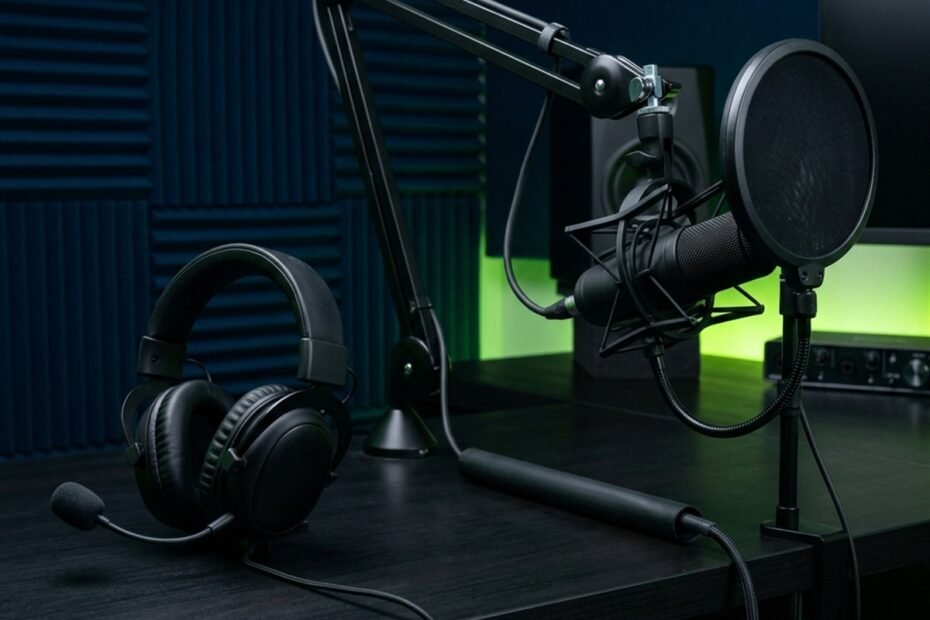
When to upgrade your gaming mic becomes essential when hardware bottlenecks such as preamplifier electrical hiss, harsh vocal clipping during intense callouts, unresolvable mechanical keyboard rumble, or compressed headset capsules compromise tactical team communication and broadcast production standards.
Most players waste hundreds of dollars purchasing expensive studio equipment when their actual voice problem stems from incorrect software settings, poor room acoustics, or improper physical positioning. Upgrading peripheral audio should be a calculated response to specific mechanical or electrical limits that software filters cannot fix. Recognizing the boundary between user error and true hardware inadequacy prevents unnecessary gear acquisition while ensuring your voice transmits with pristine tactical clarity.
Hardware Bottlenecks: Identifying Unfixable Audio Limitations
A hardware audio bottleneck occurs when physical capsule constraints or electrical component ceilings permanently degrade speech intelligibility regardless of digital equalization, software noise gates, or Windows sound setting adjustments.
Software utilities like Discord Krisp, Nvidia Broadcast, or OBS noise suppression filters can suppress consistent background hum, but they cannot restore lost frequency ranges or rebuild clipped voice signals. Recognizing genuine hardware limits saves hours of frustrating troubleshooting.
Four primary physical symptoms indicate that your current setup has reached its absolute hardware limit:
- Permanent Preamplifier Thermal Hiss: Low-cost analog microphone inputs on motherboards or budget headset dongles produce continuous white noise when analog gain is raised above 60 percent.
- Capsule Overload and Square-Wave Clipping: Small electret diaphragms found in basic gaming headsets cannot handle high sound pressure levels, physically distorting when you shout urgent competitive callouts.
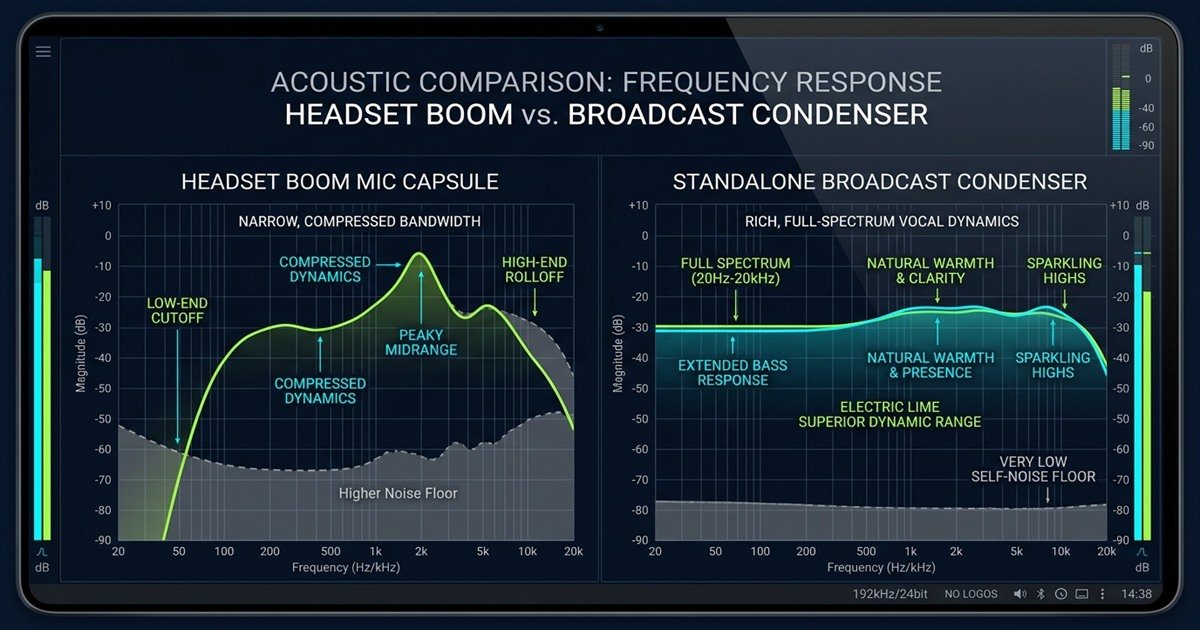
- Narrow, Compressed Frequency Transmission: Inexpensive headset capsules sharply roll off frequencies below 150 Hz and above 8,000 Hz, transforming natural speech into thin, tinny, telephone-like audio.
- Severe Desensitized Dynamic Range: Inability to capture whispered tactical alerts and loud victory cheers without manually touching system volume sliders mid-match.
When these symptoms persist despite thorough driver reinstallation and optimal gain calibration, your hardware has become the primary impediment to clean communication.
The technical diagnostic matrix below evaluates whether common voice transmission problems indicate hardware failure or simple configuration mistakes:
| Audio Problem | Root Acoustic Cause | Can Software Fix It? | Upgrade Verdict |
|---|---|---|---|
| Thin, Nasal, Tinny Voice | Sub-100 Hz capsule cutoff and tiny diaphragm mass | No (EQ cannot restore missing capsule data) | Hardware Upgrade Required |
| Harsh Vocal Crackle During Shouts | Acoustic capsule clipping (Exceeded Max SPL) | No (Clipped waveforms are permanently squared) | Hardware Upgrade Required |
| Continuous Static / White Noise | High self-noise from low-end motherboard soundchips | Partial (Noise suppressors create robotic artifacts) | Hardware Upgrade Required |
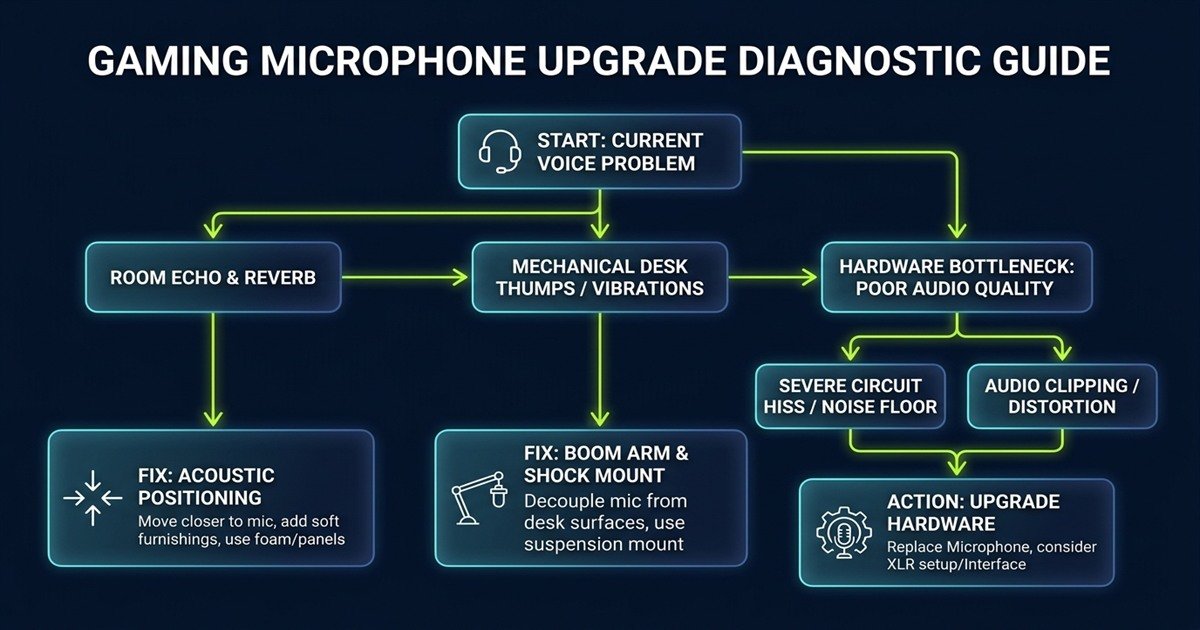
| Hollow Bathroom Room Echo | Reflective drywall surfaces and excessive distance | Partial (Reverb suppressors deaden voice tone) | Acoustic Treatment / Placement Fix |
| Heavy Table Thuds on Keystrokes | Structure-borne desk resonance through rigid stand | No (High-pass filters eliminate vocal warmth) | Boom Arm Shock Mount Fix |
| Distant, Quiet Vocal Volume | Microphone placed 60 cm away on desktop | No (Boosting gain amplifies keyboard and fans) | Repositioning Closer to Mouth |
Distinguishing between acoustic room flaws and component ceilings prevents premature peripheral spending while directing your budget where it makes the greatest sonic difference.
The acoustic spectrum comparison below demonstrates the vast fidelity gap between restricted headset capsules and full-range broadcast microphones:
To inspect capsule engineering specs such as diaphragm diameter, signal-to-noise ratio, and maximum sound pressure level, review our comprehensive breakdown of gaming microphone specs explained for deep hardware benchmarks.
Headset Microphones vs Standalone Microphones: The Essential Leap
Upgrading from a headset boom microphone to a standalone desktop microphone provides a substantial leap in voice fidelity due to larger capsule surface area, superior signal shielding, and dedicated preamplification circuitry.
Gaming headsets are engineering marvels of miniaturization, but spatial constraints force manufacturers to compromise heavily on microphone capsule size and shielding. Understanding these physical trade-offs clarifies why dedicated units dominate content creation and competitive esports.
Capsule Diameter: Physics Dictates Acoustic Fidelity
A standard gaming headset boom houses an electret microphone capsule measuring just 4 to 6 millimeters in diameter. Because the diaphragm has minimal surface area, it cannot capture rich low-frequency chest resonance, forcing internal circuits to aggressively boost mid-range frequencies to maintain basic speech clarity.
In contrast, standalone desktop condenser microphones utilize capsules ranging from 14 to 25 millimeters, while dynamic broadcast units incorporate robust moving-coil assemblies. The larger physical mass captures full-bodied vocal frequencies from 20 Hz to 20,000 Hz, preserving the authentic warmth, depth, and nuances of your natural speaking voice.
Preamplification and Electrical Isolation
Headset microphones sharing a single 3.5mm TRRS jack or slim unshielded USB dongle run mic lines directly alongside high-current headphone speaker wires. This proximity invites cross-talk interference, where loud in-game gunfire from your earcups leaks electrically into your outgoing voice channel.
Standalone USB and XLR microphones isolate audio capture entirely. They utilize dedicated power delivery, high-grade ground planes, and specialized analog-to-digital converters that eliminate electrical cross-talk and prevent motherboard coil whine from polluting your voice comms.
Intelligibility Trumps Marketing Hype: In fast-paced tactical shooters like CS2 or Valorant, teammates process calls faster when voices have rich presence and zero digital clipping. Standalone microphones transmit crisp consonant transients that cut effortlessly through loud combat without forcing your squad to raise your Discord volume.
The structural comparison below outlines the hardware engineering differences between headset boom capsules and standalone units:
| Engineering Factor | Gaming Headset Boom Mic | Dedicated Standalone Microphone |
|---|---|---|
| Capsule Size | 4 mm to 6 mm micro-electret | 14 mm to 25 mm studio condenser/dynamic |
| Acoustic Bandwidth | 100 Hz to 10,000 Hz (Band-limited) | 20 Hz to 20,000 Hz (Full human spectrum) |
| Max Sound Pressure Level | 110 dB to 115 dB SPL | 125 dB to 135 dB SPL |
| Signal Separation | Shares cable bundle with headphone drivers | Dedicated shielded USB cable or balanced XLR |
| Physical Adjustability | Fixed distance from mouth on flexible wire | Full 360-degree positioning via boom arms |
| Typical Upfront Cost | Included with 50 to 150 USD headset | 50 to 130 USD (USB) or 150+ USD (XLR) |
Recognizing these hardware distinctions ensures that transitioning away from an all-in-one headset represents a deliberate step toward studio-grade voice clarity, as explained in our foundational guide on what is a gaming microphone.
The diagnostic decision flowchart below guides players through systematic troubleshooting before making a purchasing decision:
For players curious about the essential physical attributes to prioritize when selecting your first dedicated standalone unit, explore our buyer checklist on what to look for in a gaming microphone to evaluate capsules, mounting options, and polar patterns.
When You Should NOT Upgrade: Acoustic and Configuration Fixes
Gamers should avoid purchasing a new microphone when existing audio complaints originate from room reverberation, improper mic-to-mouth distance, uncalibrated gain staging, or desk vibration coupling.
Buying a 250 USD broadcast microphone will actually worsen your voice quality if your environment suffers from hard acoustic reflections or if you place the capsule 60 centimeters away next to your computer fans. Sensitive microphones capture more room flaws, not fewer.
Before spending money on replacement hardware, execute the following four free optimizations:
- Correct the 3:1 Distance Ratio: Move your existing microphone closer to your mouth (10 to 15 centimeters). Halving the distance quadruples the acoustic voice energy relative to background room noise, instantly improving speech clarity.
- Calibrate Input Gain to -18 dBFS: Reduce your software volume slider or physical gain knob so your loudest callouts peak at -12 dBFS. This eliminates square-wave digital distortion without spending a dime.
- Add Soft Furnishings to Tame Room Flutter: Heavy curtains, a dense floor rug, or bookshelf diffusion absorb high-frequency slapback echo far more effectively than swapping microphone capsules.
- Utilize Native Software Noise Gates: Configure Discord or OBS threshold filters to shut the microphone channel completely whenever you are not actively speaking, muting keyboard idle noise.
Executing these zero-cost adjustments often resolves 90 percent of common voice complaints, eliminating the immediate necessity for new equipment.
Follow this sequential troubleshooting procedure to ensure your current gear operates at peak potential before shopping for an upgrade:
- Perform a Raw Offline Recording: Record a 30-second speech sample using Windows Sound Recorder with all Discord filters and AI noise cancelers completely disabled.
- Identify the Primary Noise Source: Listen on headphones to isolate whether background issues stem from room reverberation, fan hum, keyboard switches, or electronic hiss.
- Optimize Physical Capsule Proximity: Re-position the microphone 12 centimeters away, speaking across the capsule at a 45-degree angle to avoid direct plosive breath blasts.
- Set Clean Operating Gain: Adjust input volume until speaking levels bounce between -18 dBFS and -14 dBFS on monitoring meters.
- Evaluate Residual Defects: If the recording remains muffled, severely distorted, or dominated by circuit hiss despite close positioning, proceed with a hardware upgrade.
Applying this structured diagnostic audit guarantees that any subsequent hardware investment yields immediate and verifiable improvements in vocal transmission.
The Progression Path: Upgrading from USB to XLR Systems
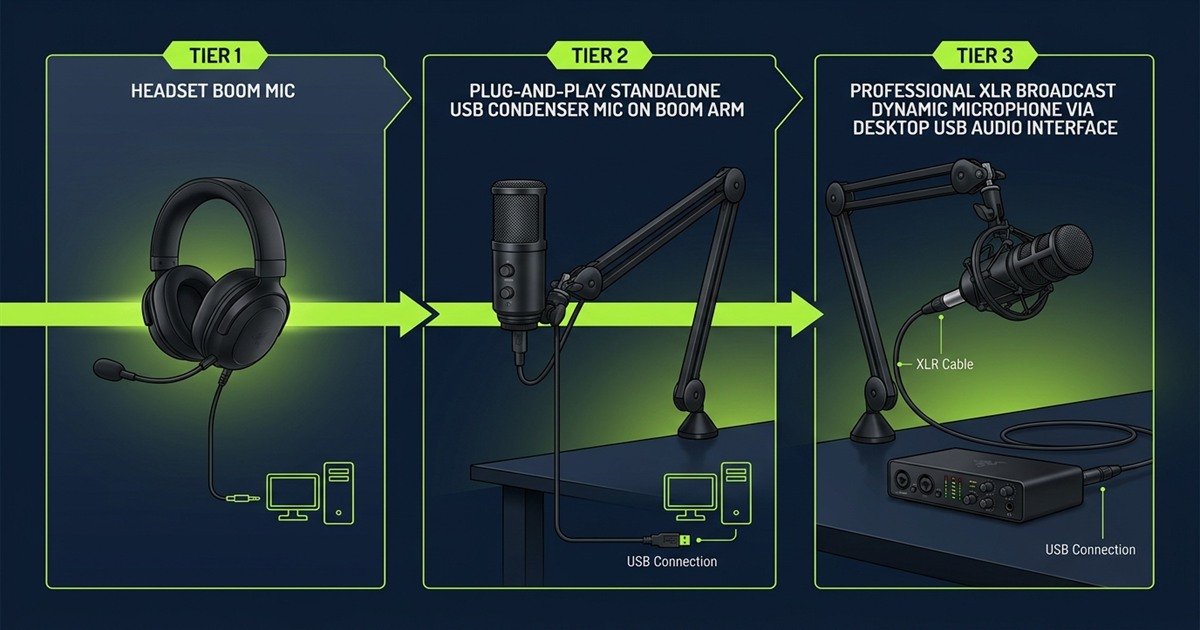
The audio progression path moves from integrated headset boom mics to plug-and-play USB condenser units, culminating in modular XLR dynamic microphones paired with external audio interfaces for ultimate control and durability.
Understanding where you stand on this evolutionary path prevents overshooting your actual operational requirements or buying incompatible studio gear.
Tier 1 to Tier 2: The Plug-and-Play USB Upgrade
Moving from a headset mic to a quality USB desktop microphone (costing 50 to 130 USD) delivers the highest return on investment in gaming audio. You gain full-range frequency capture, zero electrical cross-talk, integrated headphone monitoring, and simple USB connectivity requiring zero external drivers.
Pairing a USB microphone with an articulated boom arm equipped with elastic suspension shock mounts isolates desk impacts, providing 95 percent of the vocal fidelity needed for high-level competitive gaming and live streaming.
Tier 2 to Tier 3: The Modular XLR Ecosystem
Upgrading from a USB microphone to an XLR audio setup represents a transition from consumer convenience to professional modularity. XLR microphones do not plug into computers directly; they require a dedicated USB audio interface with high-voltage analog preamplifiers and balanced cabling.
A dedicated XLR setup becomes justifiable under specific operational conditions:
- Need for Ultra-Clean Analog Gain: Broadcast dynamic microphones like the Shure SM7B require 60 dB of pristine preamplifier gain that internal USB circuits cannot deliver without background hiss.
- Zero-Latency Hardware Signal Mixing: Streamers requiring multi-track physical faders, external hardware compressors, and balanced studio monitor routing.
- Long-Term Hardware Durability: XLR microphones lack onboard digital chips, meaning they never face driver obsolescence and can operate flawlessly for decades.
- Multi-Channel Expansion: Gaming creators who host dual in-person podcasts or local multiplayer commentary from a single workstation.
XLR Is an Infrastructure Investment: Moving to XLR requires purchasing an audio interface, balanced cabling, a heavy-duty boom arm, and acoustic pop filtration. For everyday Discord communication, a modern 24-bit USB microphone delivers identical speech comprehension at one-third the financial investment.
The upgrade tier comparison below highlights the technical capabilities, budget requirements, and target users across all three audio stages:
| Upgrade Tier | Hardware Configuration | Typical Investment | Primary Advantages | Recommended Audience |
|---|---|---|---|---|
| Tier 1: Headset Boom | All-in-one headset with 3.5mm/USB plug | 30 to 100 USD (Total) | Zero desk footprint, integrated hearing and speaking | Casual multiplayer gamers on tight budgets |
| Tier 2: Standalone USB | Condenser/Dynamic USB mic on boom arm | 60 to 140 USD complete | Full frequency capture, zero cross-talk, tap-to-mute | Competitive FPS players, Discord regulars, entry streamers |
| Tier 3: Modular XLR | Dynamic XLR mic, audio interface, balanced cable | 180 to 450 USD complete | Infinite durability, modular expansion, studio headroom | Professional content creators, podcasters, audiophiles |
Selecting the tier that aligns with your practical communication goals ensures you invest your peripheral budget where it generates real competitive value.
The visual equipment progression below maps the physical transition across each audio hardware tier:
To explore how microphone design integrates with your overall audio and desk ergonomics, browse our comprehensive portal for gaming microphones to inspect hardware comparisons and setup recommendations.
Frequently Asked Questions
Here are direct answers to the most common questions gamers ask regarding microphone upgrade timing, hardware bottlenecks, and audio calibration:
When should I upgrade my gaming headset microphone?
Upgrade your headset microphone when teammates consistently report muffled, tinny speech, or when high gain introduces permanent background electrical hiss that software filters cannot eliminate.
Does a better gaming microphone improve competitive performance?
Yes, clean voice communication ensures teammates comprehend rapid tactical callouts instantly without verbal repetition or distracting distortion during high-stress tournament firefights.
Will upgrading my microphone eliminate keyboard clicking sounds?
No, upgrading alone will not eliminate clicks; you must pair a cardioid capsule with an articulated boom arm positioned 10 cm from your mouth and angled away from switches.
Can Discord Krisp noise suppression replace a hardware upgrade?
Krisp suppresses background hum effectively, but it cannot restore thin, telephone-like frequency response or repair harsh audio distortion caused by an overloaded capsule.
Why does my gaming microphone pick up desk vibrations?
Microphones resting on stock desktop stands absorb structure-borne vibrations from keyboard typing and mouse swipes, requiring an elastic suspension shock mount on a boom arm to fix.
Is a USB microphone good enough for competitive gaming and streaming?
Yes, modern 24-bit USB microphones deliver 95 percent of the vocal fidelity of professional XLR systems, offering plug-and-play simplicity and integrated tap-to-mute controls.
When is an XLR microphone setup actually necessary for gaming?
An XLR setup becomes necessary when you require multi-channel hardware mixing, pristine 60 dB analog preamps for low-output broadcast dynamics, or lifetime modular durability.
What is the difference between dynamic and condenser microphones for gaming?
Dynamic microphones naturally reject room echo and distant keyboard clicks due to heavier diaphragms, whereas sensitive condensers capture delicate vocal details but require acoustic room treatment.
How close should a gaming microphone be to your mouth?
Position your gaming microphone 10 to 15 centimeters away from your mouth, angled at 45 degrees to maximize vocal clarity while preventing direct breath plosives.
Why does my voice sound distorted when I shout in game?
Shouting distorts voice comms when acoustic sound pressure exceeds the capsule maximum SPL or when analog preamplifier gain is set too high, causing digital clipping above 0 dBFS.
How do I test if my microphone problem is caused by room acoustics?
Record your voice under a heavy blanket; if the hollow bathroom sound disappears completely, your issue is reflective room reverb rather than a defective microphone capsule.
What is the most cost-effective first upgrade for a gaming microphone?
An articulated boom arm with an elastic shock mount is the most cost-effective upgrade, decoupling the capsule from desk vibrations while positioning it close to your mouth.