
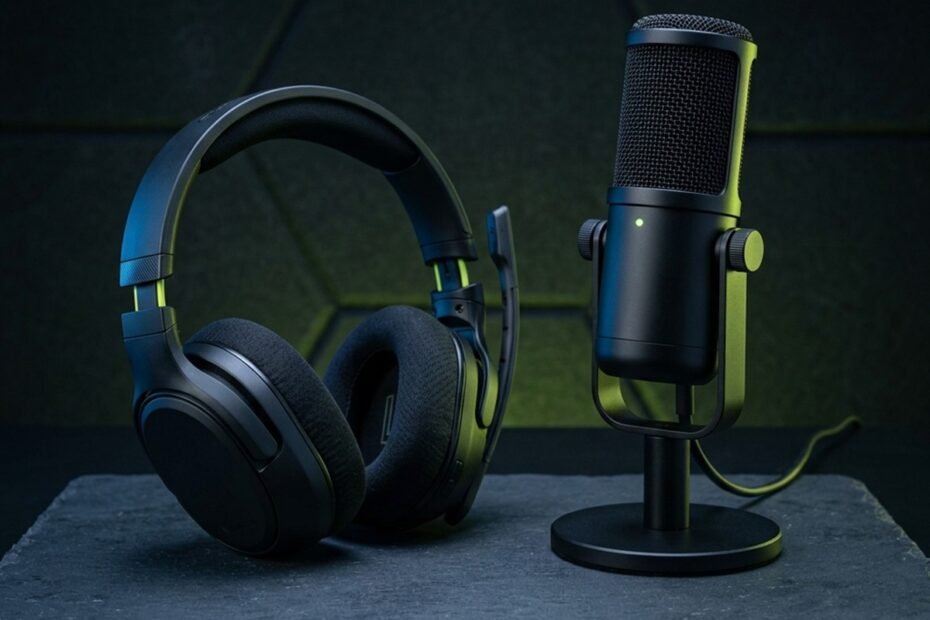
Most gamers do not need a dedicated gaming microphone if their headset already delivers clear voice chat. A standalone mic becomes worthwhile when audio quality, streaming needs, or setup limitations justify the extra cost and space.
Marketing campaigns from peripheral manufacturers frequently suggest that high-fidelity standalone audio is an indispensable requirement for modern gaming. Content creators display elegant boom arms and glowing condenser capsules on stream, leading many players to believe their existing audio gear puts them at a competitive disadvantage.
In reality, voice communication during gaming serves a functional purpose: transmitting tactical information clearly, reliably, and without distracting your teammates. In this practical assessment, we analyze when built-in audio is genuinely sufficient, evaluate observable symptoms that justify an upgrade, inspect physical battlestation constraints, and provide zero-cost calibration steps before you spend your peripheral budget.
Core Evaluation: When Built-In Audio Is Truly Sufficient
Integrated headset microphones are sufficient for casual and competitive matchmaking if voice transmission is intelligible. Upgrading to a standalone unit delivers diminishing returns when communication is limited to compressed voice chat.
Before purchasing new audio hardware, evaluate how your voice communication is actually consumed. Voice chat applications use data compression algorithms to minimize network bandwidth during online play. Because voice channels transmit audio at lower bitrates than studio master recordings, the acoustic nuances of an expensive large-diaphragm capsule are largely compressed during transit. Understanding what is a gaming microphone begins with recognizing the boundary between functional in-game communication and broadcast-level audio production.
Communication fidelity requirements and equipment sufficiency across gaming scenarios:
| Gaming Scenario | Required Vocal Fidelity | Background Noise Hazard | Built-In Mic Sufficiency | Practical Audio Solution |
|---|---|---|---|---|
| Casual Co-Op and Discord Party | Basic speech intelligibility | Moderate (Room reflections, TV) | Usually sufficient if volume is calibrated | Standard gaming headset with tuned input level |
| Competitive Ranked Matchmaking | Clear tactical callouts under gunfire | High (Mechanical switch clatter) | Highly sufficient due to mouth proximity | Quality headset boom mic with noise suppression |
| Live Streaming and Content Creation | Broadcast warmth and dynamic range | Critical (Viewers hear room ambiance) | Rarely sufficient for viewer retention | Standalone dynamic or USB cardioid microphone |
| Remote Work and Gaming Hybrid | Professional vocal clarity | Moderate (Keyboard typing during calls) | Marginal (Picks up room hollow tone) | Dedicated USB desktop mic with physical mute |
As outlined in the situational assessment above, if your primary gaming activity consists of casual multiplayer sessions or ranked matchmaking, a standard headset microphone provides sufficient clarity. Investing in expensive studio equipment produces negligible improvements in team coordination if your current microphone already delivers intelligible callouts.
Casual Discord and In-Game Callouts: The Sufficiency Baseline
In competitive tactical shooters, fast callout delivery and volume stability matter far more than studio acoustic warmth, making properly adjusted headset microphones entirely adequate.
In titles like Counter-Strike 2, Valorant, or Apex Legends, team communication focuses on actionable tactical data: enemy positions, remaining utility, and site rotations. Your teammates do not evaluate whether your voice contains rich sub-bass resonance; they need to discern critical information in fractions of a second during loud gunfire. Because a headset boom microphone rests two centimeters from your lips, your vocal level remains consistent regardless of head movement, providing an outstanding operational baseline for tactical play.
Built-In Laptop and Webcam Microphones: Variable Acoustic Factors
Laptop and webcam microphones can function in quiet environments at close range, but distance, fan noise, and room reflections often degrade voice clarity.
Unlike headset microphones, built-in laptop and webcam microphones operate at significant physical distances from your mouth, typically between 50 and 80 centimeters. At this distance, the acoustic energy of your voice drops significantly before reaching the capsule, forcing the internal preamplifier to boost input gain. In a quiet, carpeted room, this arrangement can be tolerable for casual conversation. However, during gaming sessions, laptop cooling fans spin up and mechanical keyboards produce heavy vibrations, which distant microphones capture alongside your voice.
Critical Warning Signs: When Audio Problems Justify an Upgrade
Upgrading to a dedicated microphone becomes justified when your setup exhibits persistent voice distortion, unmanageable background noise, or requirements for public content creation.
While most gamers do not need standalone microphones, specific acoustic and physical failure modes warrant a hardware upgrade. Rather than upgrading out of general curiosity, look for observable problems that software adjustments cannot resolve. Before deciding, examining the direct trade-offs in our gaming mic vs headset mic breakdown can clarify whether hardware separation addresses your specific bottleneck.
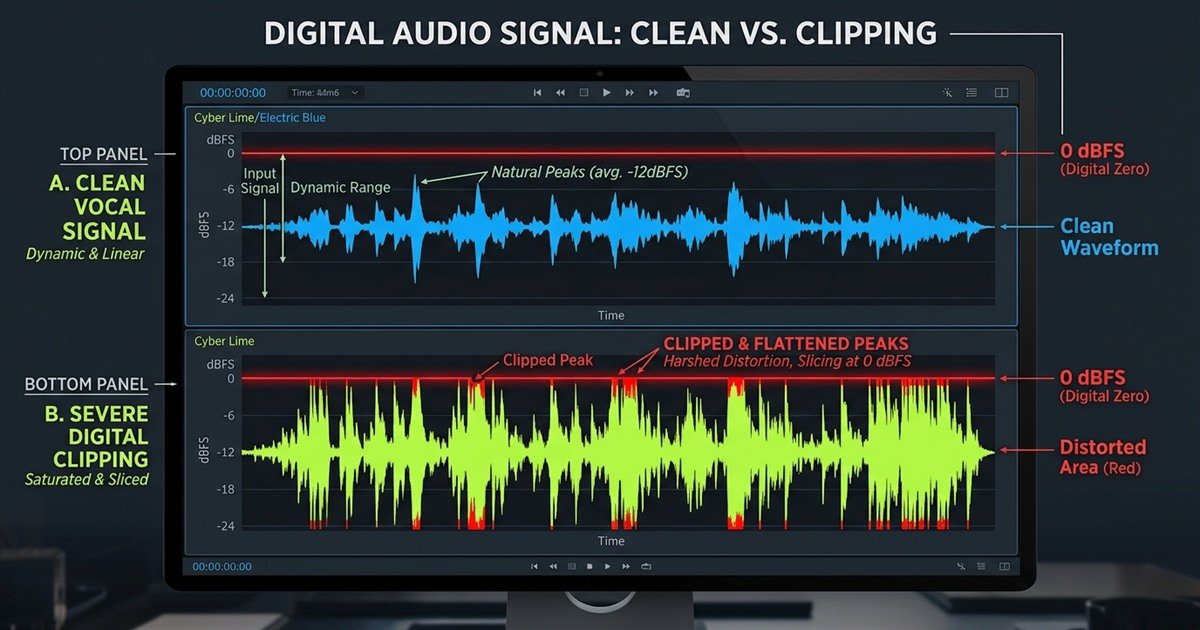
Illustrative visual representation comparing clean dynamic audio headroom against severe digital clipping distortion:
Unclear Voice Transmission and Repetitive Team Feedback
Frequent requests from teammates to repeat callouts indicate that your microphone capsule is introducing severe compression, low-output muffling, or digital clipping distortion.
Digital clipping occurs when incoming analog acoustic energy exceeds the maximum representable voltage limit of the analog-to-digital converter, causing waveform peaks to square off at 0 dBFS. This manifests as harsh, robotic crackling whenever you shout during intense moments. If your headset microphone capsule is damaged, worn out, or exhibits persistent electrical hum that causes teammates to mute you, hardware replacement is a practical necessity.
Persistent Background Noise and Mechanical Interference
If heavy mechanical keyboard vibrations or high-output cooling fans continue to bleed into voice chat after tuning software gates, directional hardware isolation is required.
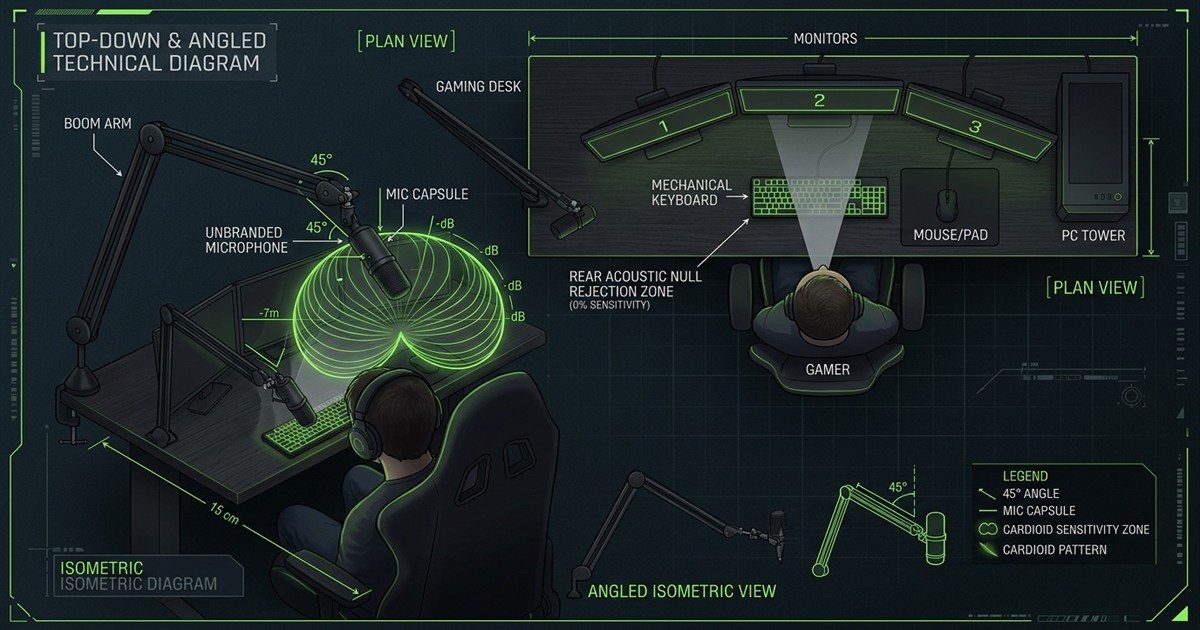
Omnidirectional built-in microphones capture sound equally from all directions, gathering fan whines, air conditioner hums, and keyboard clicks. While software filters like Discord Krisp help suppress static background noise, aggressive software gating can clip off the beginnings and ends of your words, making tactical callouts sound choppy. A dedicated cardioid microphone, properly positioned and oriented with its rear null zone toward the keyboard, rejects mechanical sounds acoustically at the physical capsule level.
Content Creation and Broadcast Intelligibility Requirements
For live streaming, video editing, or voiceover production, clean vocal fidelity directly influences audience perception and viewing comfort over extended periods.
While teammates in Discord will tolerate compressed audio, public audiences on Twitch or YouTube are sensitive to harsh frequencies and muffled delivery. Poor audio quality can cause viewers to leave a broadcast, as listening to harsh sibilance or constant preamp hiss causes ear fatigue over hours of viewing. For aspiring content creators, a dedicated microphone provides the dynamic headroom and vocal clarity required for competitive broadcast standards.
Physical Battlestation Constraints: Desk Space and Acoustic Realities
Operating a standalone microphone requires available desk mounting space and acceptable room acoustics. In cramped setups or echoey rooms, a standalone microphone can introduce more problems than it solves.
A microphone does not function in isolation; it interacts directly with your desk ergonomics and room acoustic environment. Many players purchase a standalone microphone only to discover that the included desk stand obstructs mouse movements or that their bare walls turn their voice hollow and reverberant.
Battlestation desk dimensions, mousepad clearance, and microphone mounting feasibility:
| Desk Dimension Profile | Mousepad Dimension | Room Acoustic Surface | Stock Desktop Stand Viability | Boom Arm Installation Need |
|---|---|---|---|---|
| Compact Desk (Under 80 cm width) | Standard (300 mm x 250 mm) | Bare plasterboard or tile | Impractical; encroaches on mouse space | Essential; clamp to side or rear edge |
| Standard Desk (100 to 140 cm width) | Large Esports (450 mm x 400 mm) | Mixed (Curtains, carpet) | Viable only if placed behind keyboard | Recommended to clear mousepad surface |
| Large Desk (Over 150 cm width) | Deskmat (900 mm x 400 mm) | Dampened (Bookshelves, rugs) | Viable if positioned at 15 cm distance | Optional; enhances placement flexibility |
| Untreated Room (Hard bare walls) | Any dimension | Highly reflective surfaces | Poor; picks up slap-back room echo | Essential; brings capsule close to lips |
As demonstrated in the spatial matrix above, desktop surface area and room reflectivity govern practical microphone performance. Before committing to a purchase, measure your available desk margins and inspect whether your desk frame accommodates a C-clamp mounting bracket.
Optimal microphone positioning geometry and cardioid null zone orientation away from mechanical keyboards:
Mousepad Clearance, Mouse Movement, and Microphone Placement
Low-sensitivity competitive FPS gaming requires wide arm movements across 450 mm mousepads, which desktop microphone stands can physically obstruct.
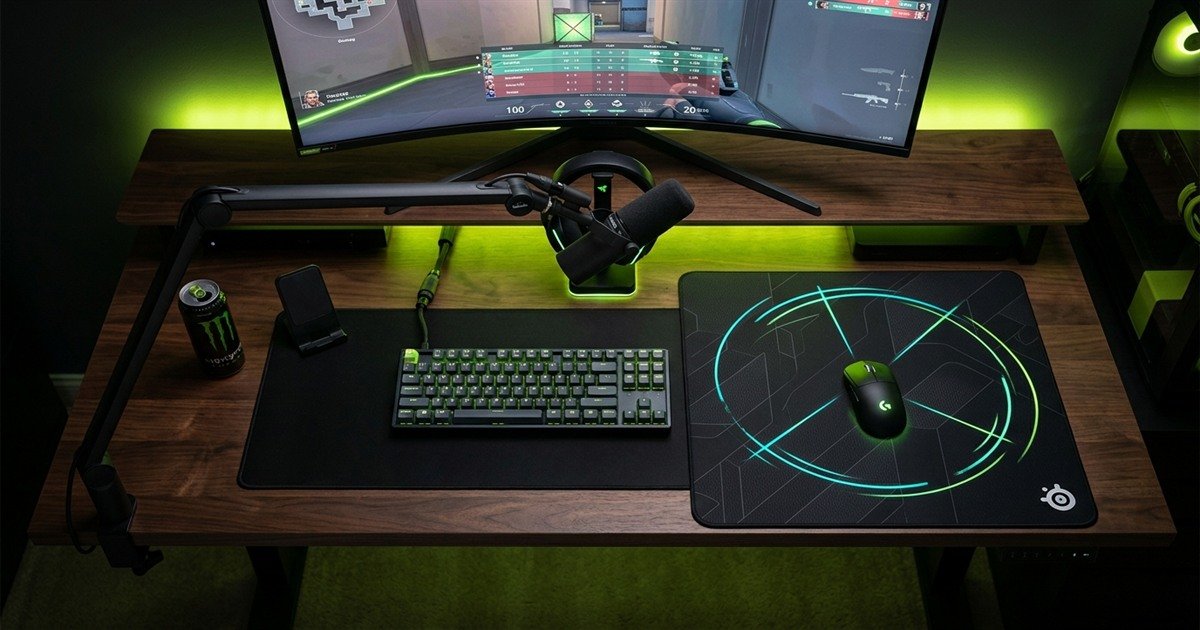
Competitive players using 400 to 800 DPI settings execute sweeping arm swipes to turn 180 degrees. Placing a heavy desktop microphone stand on your desk surface creates a physical hazard right next to your mousepad. During sudden resets or wide flicks, players frequently collide with desktop stands, throwing off aim and jarring the microphone capsule. If you cannot install an articulated boom arm to elevate the microphone off the desk surface, sticking with a headset microphone preserves unrestricted arm movement.
Battlestation ergonomic layout showing articulated boom arm elevation preserving full mousepad flick clearance:
Room Acoustics, Reverberation, and Polar Pattern Rejection
Sensitive condenser microphones capture room reverberations in untreated spaces, which can make voice transmission sound distant and hollow compared to close-proximity headset mics.
In bedrooms with bare drywall, tile flooring, and minimal furniture, sound waves bounce repeatedly between parallel surfaces. When using a sensitive standalone condenser microphone at a distance of 30 centimeters, the capsule gathers these delayed reflections alongside your direct voice, producing an echoey, hollow tone. While polar patterns help reject sounds arriving from the rear, they cannot eliminate reflections entering from the sides or ceiling. In reverberant environments, keeping a microphone capsule within two centimeters of your lips remains an effective defense against room echo.
Acoustic noise source characteristics and physical mitigation methods across gaming environments:
| Noise Source | Acoustic Frequency Range | Transmission Path | Impact on Voice Chat | Practical Mitigation Method |
|---|---|---|---|---|
| Mechanical Switch Clicks | 2 kHz to 6 kHz (High transient) | Airborne direct path | Sharp clatters during callouts | Aim rear cardioid null zone at keys; raise mic angle |
| Desk Slams and Mouse Landings | 40 Hz to 150 Hz (Low sub-bass) | Structure-borne through desk | Deafening low-end thumps | Install elastic suspension shock mount on boom arm |
| PC Chassis Cooling Fans | 100 Hz to 1 kHz (Continuous drone) | Airborne diffuse path | Persistent background hiss | Calibrate automated noise gate in Discord or OBS |
| Room Slap-Back Flutter Echo | 500 Hz to 4 kHz (Reflected waves) | Boundary wall reflection | Hollow, bathroom-like tone | Move capsule closer to mouth; add curtains or rugs |
Understanding these acoustic transmission paths helps isolate whether audio complaints stem from physical desk resonance, room reflections, or electrical settings, allowing targeted fixes before considering equipment replacement.
Free Software and Tuning Steps Before Spending Money
Before buying a dedicated microphone, test your current setup, adjust input gain, improve microphone placement, and use noise suppression where appropriate. These changes may improve clarity without adding new hardware.
Many complaints regarding poor microphone quality stem from misconfigured software settings rather than hardware limitations. Default operating system audio levels frequently push preamplifiers into distortion, while misaligned boom arms catch explosive breath bursts. Applying methodical adjustments can resolve intelligibility issues without financial cost.
Zero-cost software and hardware calibration checklist to maximize existing microphone quality:
| Calibration Step | Optimal Target Setting | Problem Mitigated | Practical Result |
|---|---|---|---|
| Windows Microphone Gain | 65 to 80 percent input slider | Preamplifier digital clipping | Preserves vocal headroom during loud callouts |
| Discord Noise Suppression | Krisp enabled (Standard room) | PC fan hum and keyboard clicks | Silences background noise between spoken phrases |
| Capsule Positioning Distance | 2 to 3 cm away from lip corner | Harsh breath pops and plosives | Maintains strong signal without explosive air blasts |
| Physical Windscreen Cover | Dense foam sleeve fitted over grille | Vocal friction and air bursts | Smooths high-frequency consonant harshness |
Applying this zero-cost checklist takes less than ten minutes and often restores clear communication. If your audio remains distorted or unintelligible after these steps, hardware limitations may be the underlying cause.
Input Gain Calibration and Avoiding Digital Distortion
Setting operating system input volume to 100 percent frequently over-amplifies weak signals into harsh digital distortion, reducing speech intelligibility.
Windows audio settings often default microphone levels to maximum (100 percent) or apply an aggressive +10 dB to +20 dB software boost. When you speak loudly during tense gaming moments, this excessive amplification forces the digital audio stream beyond 0 dBFS, creating harsh clipping. Lowering your Windows input level to roughly 70 to 75 percent and speaking naturally provides dynamic headroom, preventing distortion while keeping your voice clear.
Software Noise Suppression and Physical Capsule Distance
Repositioning a headset boom capsule slightly off-axis from your mouth prevents explosive air blasts while allowing noise filters to function without voice cutting.
Many gamers position their headset microphone directly in front of their lips or under their nostrils, causing exhaled breath to strike the capsule directly. This creates booming plosive sounds that confuse automated noise suppression algorithms. By adjusting the boom arm so the capsule sits 2 centimeters away, aligned with the corner of your lower lip, breath blasts travel past the microphone rather than striking it. This allows background noise suppression tools like Discord Krisp to isolate keyboard clicks without cutting off your vocal syllables.
Step-by-Step Diagnostic Framework: Determining Your Need
Follow this structured diagnostic sequence to determine whether your current communication setup is adequate or whether a dedicated hardware upgrade is genuinely warranted.
To avoid spending money unnecessarily, follow this four-step diagnostic sequence to evaluate your communication setup objectively.
Four-step diagnostic sequence to evaluate whether you need a dedicated gaming microphone:
- Step 1 – Record and evaluate an actual thirty-second speech sample while actively typing: Open an audio recorder or Discord Mic Test. Speak standard gaming callouts while aggressively tapping your mechanical keyboard. Listen back through closed-back headphones to evaluate whether your voice is intelligible over keyboard sounds.
- Step 2 – Listen for room reverberation, electrical hiss, and digital clipping: Examine the recording for audible electronic hiss, harsh clipping when speaking loudly, or hollow room slapback. If your voice sounds clear and natural without distortion, your current hardware is functionally adequate.
- Step 3 – Solicit direct feedback from frequent teammates and regular listeners: Ask regular squadmates whether your callouts are ever missed during loud in-game moments. Teammates provide direct real-world feedback on whether your audio is genuinely causing communication breakdowns.
- Step 4 – Weigh total setup investment against your primary peripheral priorities: If you identify genuine audio bottlenecks, calculate the complete cost of a microphone, shock mount, and boom arm. Determine whether this investment delivers greater practical benefit than upgrading a mouse sensor, keyboard switches, or high-refresh monitor.
Hardware upgrade pathways and specific problems solved across audio hardware categories:
| Audio Upgrade Pathway | Core Problem Solved | Key Ergonomic Trade-Off | Recommended User Profile |
|---|---|---|---|
| Software and Placement Calibration | Clipping, breath pops, minor keyboard bleed | Requires 10 minutes of testing; zero cost | All casual and competitive gamers on existing headsets |
| Quality Esports Headset Replacement | Damaged cable, poor mic boom, ear fatigue | Fixed capsule; all-in-one simplicity preserved | Competitive FPS players prioritizing clear mousepad area |
| Entry-to-Mid USB Cardioid Microphone | Muffled vocal tone, low capsule bandwidth | Requires desk space or basic boom arm clamp | Discord regulars, hybrid remote workers, casual streamers |
| Dynamic Broadcast Microphone Setup | Untreated room echo, loud mechanical switches | Highest cost; requires boom arm and setup effort | Daily streamers, content creators, broadcast talent |
Evaluating these paths ensures you address the actual bottleneck in your setup rather than buying hardware that introduces new spatial or acoustic challenges.
Do not buy a standalone microphone just because streamers use one. If your current setup delivers clear callouts without distracting noise, you may not need an upgrade. Fix the actual problem first, then decide whether new hardware is worth the cost and desk space. To survey available peripheral choices across categories, explore our guide to gaming microphones.
Frequently Asked Questions
Direct answers to common questions regarding standalone microphone necessity, audio upgrades, and setup optimization:
Do you need a gaming microphone for casual multiplayer?
No, casual multiplayer does not require a dedicated gaming microphone. Standard gaming headsets or wired earbuds with inline microphones provide sufficient clarity for Discord voice chat and party communication.
Does a dedicated microphone improve your gaming performance?
A dedicated microphone does not directly improve mechanical aim or reaction time. It aids competitive play only by ensuring tactical callouts are understood instantly without repetition during intense combat.
What is the minimum audio quality required for competitive Discord callouts?
The minimum requirement is consistent vocal intelligibility without digital clipping, muffled syllables, or persistent electrical hum. Voice communication codecs compress audio, making studio-grade fidelity unnecessary for basic tactical play.
Can a webcam microphone replace a dedicated gaming microphone?
Webcam microphones are rarely ideal for gaming because their distance (50 to 80 cm) captures significant room reverberation, keyboard clatter, and PC fan noise, resulting in hollow, echoey vocal transmission.
Should you upgrade your headset or buy a dedicated microphone first?
Upgrade your headset or headphones first if your primary goal is competitive gameplay. Hearing directional footsteps and spatial cues directly affects in-game performance far more than microphone broadcast warmth.
Why can a standalone microphone sound hollow in an untreated room?
Sensitive condenser capsules placed 20 to 30 centimeters away capture sound reflections bouncing off bare drywall and hard floors, producing a hollow, reverberant tone absent in close-proximity headset mics.
Can software noise suppression fix a poor-quality microphone?
Software noise suppression can eliminate static background hum, but it cannot repair muffled capsule frequency response, physical distortion, or harsh breath clipping without cutting off spoken syllables.
How much desk space do you need for a standalone microphone?
A desktop stand requires roughly 15 by 15 centimeters of clear surface area. However, an articulated boom arm clamped to the desk edge consumes zero mousepad space, elevating the capsule overhead.
Does microphone gain increase background noise?
Yes, increasing preamplifier gain amplifies all acoustic signals arriving at the capsule, including PC fan hum, keyboard switches, and room echo, alongside your voice.
Do professional FPS esports players use dedicated microphones?
In official tournament LAN environments, professional players use headset boom microphones or dedicated tournament communication headsets for sound isolation. Some players use standalone microphones on personal home streaming setups.
How much should you budget for a standalone microphone setup?
A reliable entry-to-mid USB setup with a cardioid microphone, desktop shock mount, and basic boom arm typically costs between 60 and 120 USD, offering strong practical value without professional studio expense.
When is buying a standalone microphone unnecessary?
Buying a standalone microphone is unnecessary if your teammates understand your callouts cleanly, your desk space is restricted by a large mousepad, and you do not engage in public broadcasting or streaming.