
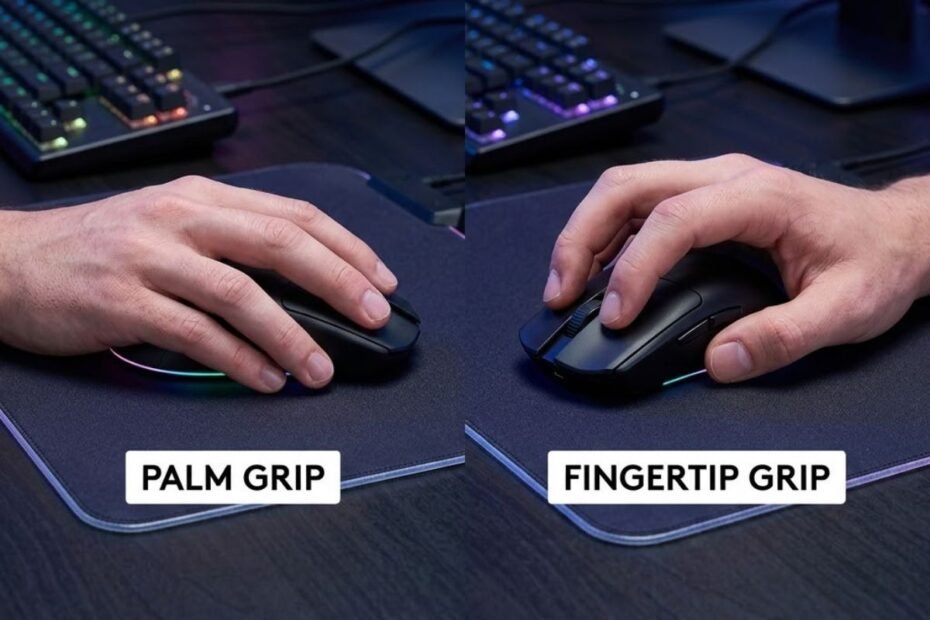
Choosing between palm grip vs fingertip grip is one of the most important decisions for FPS players because your grip directly influences aiming consistency, movement speed, comfort, and overall mouse control. Palm Grip prioritizes stability and long-term comfort, while Fingertip Grip focuses on agility and rapid mouse movements. Neither grip is objectively better. The right choice depends on your hand size, aiming mechanics, preferred FPS games, and mouse shape.
If you’re exploring different mouse grip techniques to improve your aim, GearTP also provides in-depth gaming mouse resources that can help you build a setup tailored to competitive FPS gaming.
Palm Grip vs Fingertip Grip: Key Differences at a Glance
The primary difference between Palm Grip and Fingertip Grip is how much of your hand contacts the mouse. Palm Grip keeps your entire palm resting on the mouse for greater stability and comfort, while Fingertip Grip lifts the palm away so your fingertips control nearly every movement. This single difference changes how you aim, move the mouse, and maintain control during gameplay.
The illustration below highlights the fundamental difference between both grip styles:
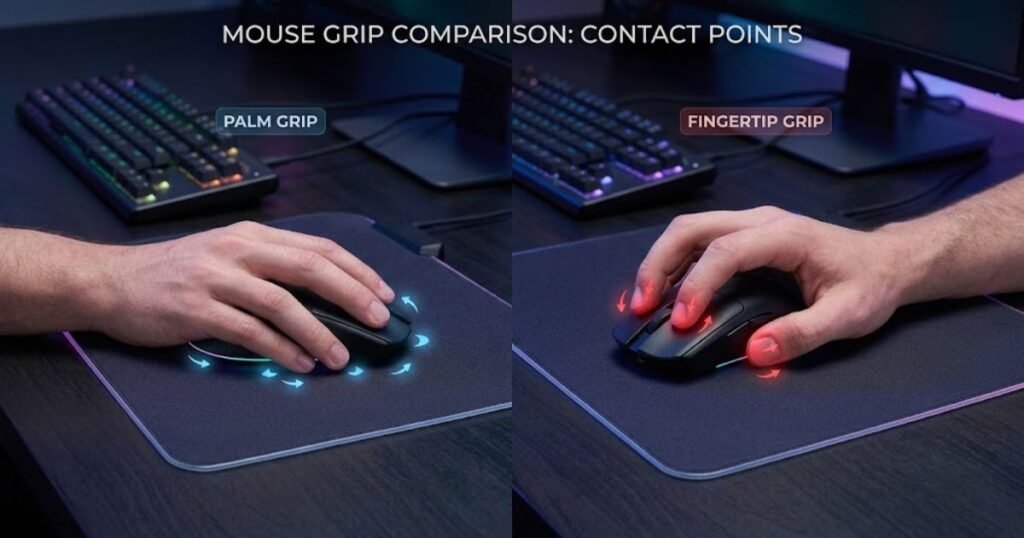
Understanding these fundamentals first makes it much easier to compare their real-world gaming performance later. Rather than deciding which grip is “better,” start by understanding how each one naturally behaves.
Palm Grip in One Minute
Palm Grip is a mouse grip where your entire palm rests on the mouse, creating full contact between your hand and the shell. This relaxed posture distributes pressure across your whole hand, making it comfortable for extended gaming sessions while promoting stable and predictable movements.
Players who want a more detailed explanation of this grip style can read our complete guide to Palm Grip. In short, Palm Grip naturally favors larger wrist and arm movements instead of relying heavily on finger adjustments.
Because the mouse is supported by your entire hand, it often feels more stable when tracking enemies or maintaining smooth crosshair control. Many players also find Palm Grip easier to learn because it closely resembles the way most people naturally hold a computer mouse.
Overall, Palm Grip emphasizes comfort, consistency, and controlled movement rather than maximum agility.
Fingertip Grip in One Minute
Fingertip Grip is a mouse grip where only your fingertips touch the mouse while your palm remains elevated above the shell. Instead of moving the mouse with your entire hand, most adjustments come from your fingers and wrist, allowing much quicker directional changes.
This grip gives players greater freedom to perform rapid micro-adjustments, making it popular among gamers who prefer highly responsive mouse control. Since the palm never fully supports the mouse, every movement requires more active finger control than Palm Grip.
While Fingertip Grip offers exceptional mobility, it can also feel less forgiving during long gaming sessions because your fingers remain engaged almost constantly. It generally requires more practice before it feels natural.
In summary, Fingertip Grip sacrifices some stability in exchange for faster movement and greater precision during small adjustments.
The table below compares the most important differences between Palm Grip and Fingertip Grip:
| Feature | Palm Grip | Fingertip Grip |
|---|---|---|
| Hand Contact | Entire palm rests on the mouse. | Only fingertips touch the mouse. |
| Primary Movement | Arm and wrist. | Fingers and wrist. |
| Stability | High. | Moderate. |
| Agility | Moderate. | Very High. |
| Comfort | Excellent for long sessions. | Depends on finger endurance. |
| Learning Curve | Easy. | Moderate. |
At a glance, Palm Grip offers greater comfort and stability, while Fingertip Grip delivers higher agility and finer finger control. However, these differences only tell part of the story. Their impact becomes much clearer when comparing real FPS performance in different aiming situations.
Palm Grip vs Fingertip Grip Performance Comparison
Neither Palm Grip nor Fingertip Grip dominates every aspect of FPS gameplay. Palm Grip generally provides steadier tracking and consistent control, while Fingertip Grip excels at rapid micro-adjustments and quick directional changes. The better option depends on the type of aiming you perform most often.
The comparison below demonstrates how each grip influences aiming mechanics:
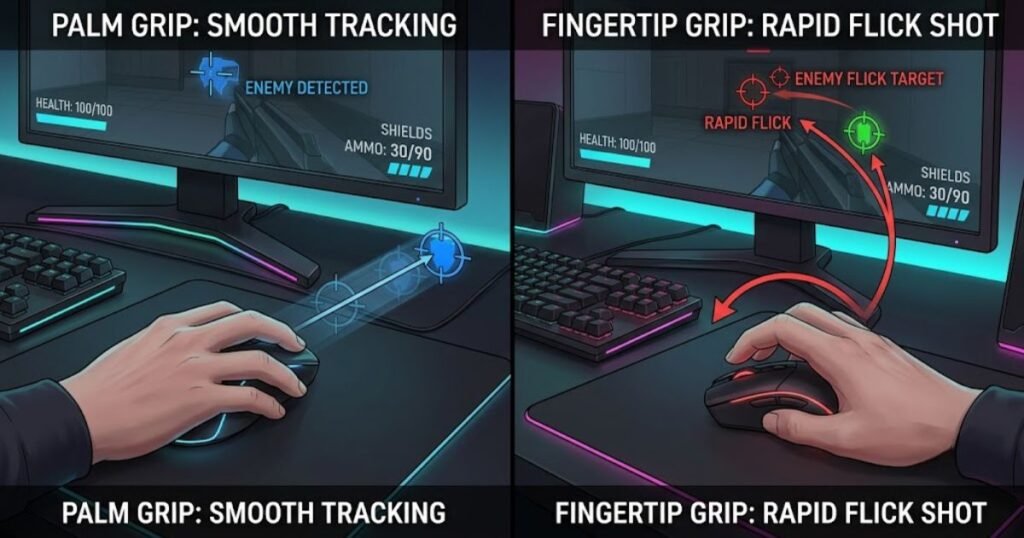
Instead of focusing only on speed or accuracy, it’s more useful to compare how each grip performs during the most common aiming scenarios in competitive FPS games.
Accuracy and Precision
Palm Grip usually delivers more consistent precision because your hand maintains full contact with the mouse, reducing unwanted movement. The additional support makes it easier to keep crosshair placement stable during controlled aiming and recoil management.
Fingertip Grip, however, provides superior precision during tiny adjustments because individual finger movements can reposition the mouse with remarkable speed. Skilled players often use this advantage to refine head-level crosshair placement without moving their entire arm.
Neither grip is inherently more accurate. Palm Grip favors stable precision, while Fingertip Grip favors highly responsive precision.
Flick Speed and Micro Adjustments
Fingertip Grip generally performs better for fast flicks and micro-adjustments because finger movement allows the mouse to change direction almost instantly. This responsiveness can be especially valuable when reacting to unpredictable enemy movement.
Palm Grip can still produce excellent flick shots, but larger arm and wrist movements often require slightly more travel distance before the crosshair reaches its target. In return, many players experience smoother stopping power once the flick finishes.
Ultimately, Fingertip Grip prioritizes reaction speed, whereas Palm Grip emphasizes controlled execution.
Tracking Moving Targets
Palm Grip often provides smoother target tracking because the larger contact area helps stabilize continuous mouse movement. This stability can reduce small aiming inconsistencies while following opponents across the screen.
Fingertip Grip remains highly capable of tracking, but maintaining perfectly smooth movement requires greater finger control, especially during long engagements. Players with excellent mouse control can still achieve outstanding tracking performance, although the learning curve is steeper.
Tracking performance therefore depends more on individual technique than on the grip itself, but Palm Grip generally offers a more forgiving experience for most players.
The table below compares how Palm Grip and Fingertip Grip perform during common FPS aiming situations:
| Performance Area | Palm Grip | Fingertip Grip |
|---|---|---|
| Precision Stability | Excellent. | Very Good. |
| Micro Adjustments | Good. | Excellent. |
| Flick Speed | Very Good. | Excellent. |
| Target Tracking | Excellent. | Very Good. |
| Stopping Control | Excellent. | Very Good. |
| Reaction Speed | Very Good. | Excellent. |
Performance differences between Palm Grip and Fingertip Grip are less about absolute accuracy and more about movement style. Palm Grip rewards controlled consistency, while Fingertip Grip rewards fast reactions and agile mouse control. The next step is understanding how these characteristics affect comfort during long gaming sessions and which mouse shapes complement each grip style.
Comfort and Fatigue During Long Gaming Sessions
Comfort is where Palm Grip and Fingertip Grip differ the most during extended gaming sessions. Palm Grip naturally distributes pressure across the entire hand, making it easier to stay comfortable over several hours. Fingertip Grip, on the other hand, keeps the fingers constantly engaged, offering greater mobility but requiring more muscular effort over time.
While performance often receives the most attention, long-term comfort directly affects consistency. Even a highly responsive grip can become less effective if hand fatigue gradually reduces your precision during competitive matches.
Hand and Wrist Fatigue
Palm Grip generally produces less hand fatigue because the mouse supports your entire palm, reducing the workload placed on your fingers. Since the hand remains relaxed throughout most movements, many players experience less tension after several hours of gaming.
By contrast, Fingertip Grip depends heavily on continuous finger activation. Every adjustment, lift, and reposition requires small muscles to stay engaged, which may lead to earlier fatigue for players who are not accustomed to this grip. This doesn’t mean Fingertip Grip is uncomfortable, but it usually demands better finger endurance.
Players considering other grip styles may also find it useful to compare Claw Grip vs Palm Grip, especially if they want a balance between full-hand support and finger mobility.
Ultimately, fatigue depends on individual conditioning, but Palm Grip typically feels less demanding during continuous gameplay.
Long Gaming Sessions
During marathon gaming sessions, Palm Grip usually provides a more relaxed experience, while Fingertip Grip favors players who prioritize responsiveness over passive comfort. The difference becomes more noticeable after several consecutive matches rather than during a single game.
Players using Palm Grip often report fewer interruptions caused by hand discomfort because their grip relies on natural support from the mouse shell. Fingertip Grip users may occasionally need to reposition their fingers or stretch their hand to relieve tension, especially when using a mouse that doesn’t match their hand size.
Comfort is also influenced by factors beyond grip style, including mouse dimensions, weight, surface texture, sensitivity settings, and desk ergonomics. Choosing the right combination often matters more than changing your grip alone.
The factors below explain what has the greatest impact on long-term comfort:
- Mouse Size: A mouse that properly matches your hand reduces unnecessary finger strain regardless of grip style.
- Mouse Weight: Lightweight mice reduce physical effort during repeated movements, particularly for Fingertip Grip users.
- Grip Pressure: Squeezing the mouse too tightly increases muscle fatigue and limits smooth control.
- Sensitivity Settings: Extremely low or high sensitivity can force uncomfortable movement patterns.
- Desk Ergonomics: Proper chair height, arm support, and wrist positioning help minimize long-term strain.
These factors often have a greater influence on comfort than grip style alone, so optimizing your overall setup is just as important as choosing between Palm Grip and Fingertip Grip.
The table below summarizes how both grip styles compare during extended gaming sessions:
| Comfort Factor | Palm Grip | Fingertip Grip |
|---|---|---|
| Hand Relaxation | Excellent. | Moderate. |
| Finger Fatigue | Low. | Higher. |
| Long Session Comfort | Excellent. | Very Good with proper conditioning. |
| Grip Stability Over Time | Consistent. | May decrease as fingers tire. |
| Recommended for Marathon Sessions | Highly Recommended. | Recommended for experienced users. |
Neither grip guarantees perfect comfort, but Palm Grip generally requires less physical effort during extended play. Fingertip Grip rewards players who value responsiveness and are willing to maintain greater finger engagement. Beyond comfort, the next factor to consider is how mouse shape influences each grip style, since even the best grip can feel awkward on an unsuitable mouse.
Which Mouse Shape Fits Each Grip Best?
Mouse shape plays a major role in how comfortable and effective each grip style feels. Palm Grip usually performs best with larger mice that provide full palm support, while Fingertip Grip benefits from smaller, lighter mice that allow unrestricted finger movement. Even if two players use the same grip, different mouse shapes can produce completely different experiences.
The image below compares mouse shapes commonly recommended for each grip:
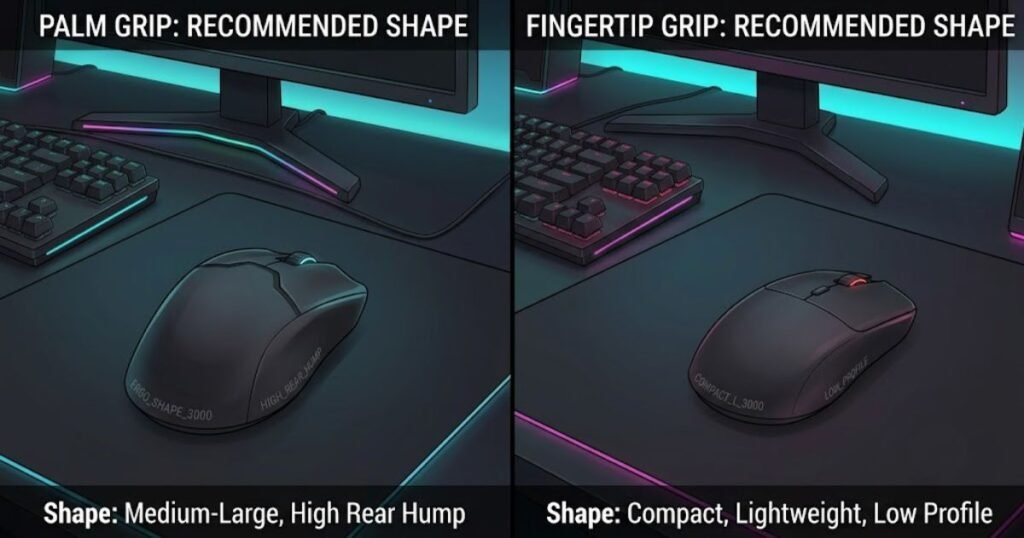
Selecting a grip without considering mouse shape often leads players to blame their technique when the real issue is hardware compatibility.
Best Mouse Shape for Palm Grip
Palm Grip works best with ergonomic or medium-to-large symmetrical mice that fully support the palm. A higher rear hump and longer body help maintain continuous hand contact, reducing unnecessary wrist and finger tension.
These characteristics allow players to move the mouse confidently using their arm and wrist while keeping their grip relaxed. Wider mice also help distribute pressure evenly across the hand, making them more comfortable during long sessions.
Rather than chasing the lightest possible mouse, Palm Grip users usually benefit more from a shape that naturally fills the hand.
Best Mouse Shape for Fingertip Grip
Fingertip Grip performs best with compact, lightweight mice that leave enough space beneath the palm for unrestricted finger movement. Lower-profile designs allow players to lift and reposition the mouse quickly without unnecessary resistance.
Smaller shells also make it easier to perform rapid micro-adjustments because the fingertips remain the primary source of control. A lightweight mouse further reduces the effort required for constant lifting and repositioning during fast-paced gameplay.
Players looking for suitable hardware recommendations can explore our curated list of the best gaming mice for FPS games, where different mouse shapes are matched to various grip styles and hand sizes.
Choosing a mouse that complements Fingertip Grip often has a greater impact than changing sensitivity or DPI settings alone.
The table below compares the ideal mouse characteristics for each grip style:
| Feature | Palm Grip | Fingertip Grip |
|---|---|---|
| Mouse Size | Medium to Large. | Small to Medium. |
| Rear Hump | Higher. | Lower. |
| Body Length | Longer. | Shorter. |
| Weight Preference | Medium or Lightweight. | Lightweight. |
| Overall Shape | Supports the entire palm. | Maximizes finger freedom. |
The right mouse shape should complement your natural grip instead of forcing you to adapt. Once grip style and mouse shape work together, choosing the most suitable grip for your favorite FPS titles becomes much easier.
Which Grip Works Better for Different FPS Games?
The best grip often depends on the type of FPS game you play rather than the grip itself. Tactical shooters reward consistency and disciplined crosshair placement, while fast-paced shooters demand rapid target switching and constant movement. Because every game emphasizes different aiming mechanics, one grip may feel more natural in a specific genre without being universally superior.
The example below shows how different FPS genres can favor different grip styles:
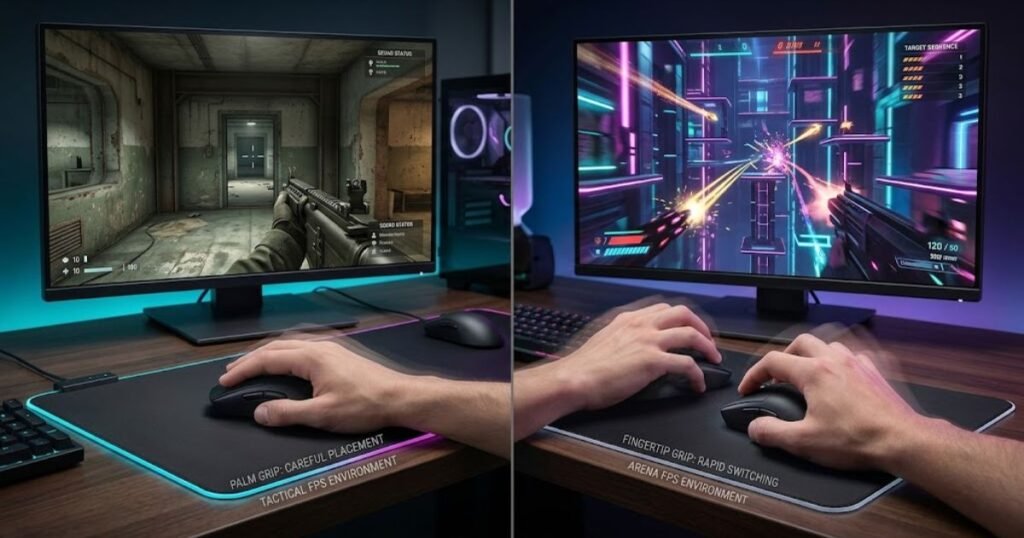
Instead of asking which grip is objectively better, it’s more useful to evaluate how each one complements the pace and aiming demands of your favorite games.
Valorant and CS2
Palm Grip is often preferred for tactical shooters like Valorant and Counter-Strike 2 because these games emphasize crosshair discipline, controlled flicks, and accurate first-shot placement. Stable mouse control allows players to hold precise angles and maintain consistent crosshair positioning throughout each round.
That said, Fingertip Grip remains a viable option for players who naturally rely on fast micro-adjustments during head-level aiming. Many experienced players achieve exceptional results with either grip because personal consistency matters far more than following a specific trend.
The slower pace of tactical shooters generally rewards deliberate mouse control over constant rapid movement, making stability an important advantage for many players.
Apex Legends and Overwatch
Fingertip Grip often feels more responsive in fast-paced shooters like Apex Legends and Overwatch because these games require continuous target switching, vertical tracking, and rapid directional changes. Constant movement encourages players to make quick corrections with their fingers while maintaining high mobility.
Palm Grip still performs well in these games, particularly for players who prefer smoother tracking instead of relying on aggressive wrist and finger movements. The ideal choice ultimately depends on individual aiming habits rather than the game alone.
Players searching for broader FPS mouse recommendations can also explore our complete Gaming Mouse for FPS Games resource, which explains how different hardware and grip styles work together across competitive titles.
Rather than forcing yourself to use the most popular grip, focus on the one that allows you to maintain consistent aim across different combat situations.
The table below compares which grip generally fits different FPS game styles:
| Game | Generally Recommended Grip | Main Reason |
|---|---|---|
| Valorant | Palm Grip | Stable crosshair placement and controlled flicks. |
| Counter-Strike 2 | Palm Grip | Consistent precision and recoil control. |
| Apex Legends | Fingertip Grip | Fast tracking and rapid target transitions. |
| Overwatch 2 | Fingertip Grip | Frequent directional changes and vertical aiming. |
| Battlefield | Either | Depends on weapon class and engagement distance. |
| Call of Duty | Either | Playstyle influences grip preference more than the game itself. |
Game genre can influence which grip feels more natural, but no competitive title forces players to use a specific technique. The grip that allows you to aim confidently and consistently will almost always outperform a grip chosen solely because professional players use it.
Palm Grip vs Fingertip Grip: Which One Should You Choose?
The best grip is the one that matches your natural hand movement, mouse shape, and preferred aiming style. If you constantly force yourself to imitate someone else’s grip, you’ll likely spend more time adapting than improving. Choosing the grip that feels natural usually leads to better long-term consistency.
Rather than making the decision based on a single feature like speed or comfort, evaluate your overall setup and playing habits. A simple decision framework makes this process much easier.
The following process can help you choose the right grip style:
- Evaluate Your Natural Grip: Hold your mouse normally without thinking about technique and observe where your palm naturally rests.
- Measure Your Hand Size: Larger hands often feel more comfortable with Palm Grip, while smaller hands may adapt more easily to Fingertip Grip.
- Consider Your Mouse Shape: Choose a grip that complements your current mouse instead of forcing an uncomfortable hand position.
- Analyze Your Aim Style: If you value stable tracking, Palm Grip may suit you better. If you depend on rapid micro-adjustments, Fingertip Grip may feel more responsive.
- Play With One Grip Consistently: Use the same grip for at least one week before deciding whether it truly fits your playstyle.
- Adjust Settings Only Afterward: Fine-tune sensitivity, DPI, or mouse weight after your grip becomes consistent instead of changing everything at once.
Following a structured evaluation process prevents unnecessary grip changes and allows muscle memory to develop naturally over time.
The table below provides a quick decision framework for choosing between Palm Grip and Fingertip Grip:
| If You Prefer… | Recommended Grip |
|---|---|
| Maximum comfort during long sessions | Palm Grip |
| Fast micro-adjustments | Fingertip Grip |
| Stable tracking | Palm Grip |
| Rapid directional changes | Fingertip Grip |
| A larger ergonomic mouse | Palm Grip |
| A compact lightweight mouse | Fingertip Grip |
There is no universally superior grip for FPS gaming. The most effective choice is the one that feels natural, supports consistent aim, and complements your mouse. If you’re still unsure where your grip fits within the broader spectrum of FPS techniques, our guide to mouse grip styles for FPS explains when each grip style is most appropriate.
Common Mistakes When Choosing Between Palm Grip and Fingertip Grip
Most players don’t struggle because they picked the wrong grip. They struggle because they never give one grip enough time to become consistent. Switching techniques too often, choosing a grip that doesn’t match the mouse, or copying professional players without considering personal comfort are common reasons why aim feels inconsistent. Recognizing these mistakes is often more valuable than searching for another grip style.
The illustration below highlights several common grip mistakes that reduce aiming consistency:
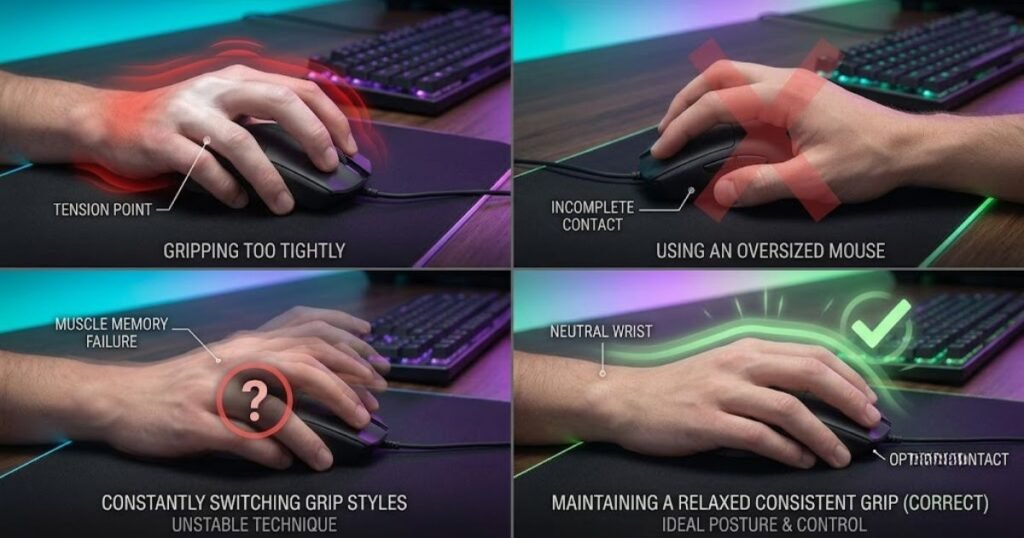
Developing reliable aim is a long-term process. Instead of chasing instant improvements, focus on building muscle memory with a grip that naturally fits your hand and playing style.
Why Copying Professional Players Doesn’t Always Work
Using the same grip as a professional player does not guarantee the same results because every player’s hand size, mouse shape, sensitivity, and aiming mechanics are different. Professional players choose a grip that complements years of practice, not because it is objectively superior.
A grip that feels comfortable for someone with smaller hands may become awkward for a player with larger hands. Likewise, a mouse designed for Fingertip Grip may feel unstable if your natural posture favors Palm Grip.
Rather than copying someone else’s setup, use professional preferences as inspiration while prioritizing what feels consistent for your own gameplay.
Building Consistency Is More Important Than Finding the “Perfect” Grip
No grip can improve your aim overnight if you constantly switch between techniques. Every time you change your grip, your brain has to rebuild movement patterns and muscle memory, delaying long-term improvement.
Instead of changing grips after a few poor matches, commit to one technique for several days or weeks. This gives your hand enough time to adapt before deciding whether the grip genuinely suits your playstyle.
Consistency is one of the strongest predictors of aiming improvement, regardless of whether you ultimately choose Palm Grip or Fingertip Grip.
The factors below explain the most common mistakes players should avoid:
- Changing Grip Too Frequently: Constant experimentation prevents muscle memory from developing.
- Ignoring Mouse Compatibility: A grip should match the mouse shape instead of forcing an uncomfortable hand position.
- Comparing Yourself to Professionals: Their equipment, experience, and biomechanics may be completely different from yours.
- Expecting Instant Improvement: Every grip requires an adjustment period before performance becomes consistent.
- Prioritizing Internet Trends: Popular recommendations are useful references but should never replace personal comfort.
Avoiding these habits allows your grip technique to develop naturally and creates a much stronger foundation for long-term improvement.
Players who are still evaluating other competitive grip styles can also compare Claw Grip vs Fingertip Grip to better understand where each technique fits within different FPS playstyles.
Ultimately, successful players spend less time changing their grip and more time mastering the one that feels natural.
Frequently Asked Questions About Palm Grip vs Fingertip Grip
The questions below address additional concerns that many FPS players have before choosing between Palm Grip and Fingertip Grip. These answers expand the discussion with practical scenarios that support better decision-making without repeating the topics covered earlier in this guide.
Can I switch from Palm Grip to Fingertip Grip without losing aim?
Yes, but expect a temporary adjustment period. Your muscle memory needs time to adapt, so consistent practice over several days or weeks is usually required before your aim stabilizes.
Can I naturally alternate between Palm Grip and Fingertip Grip?
Some players naturally use a hybrid grip during different situations. However, relying on one primary grip generally produces more consistent aim than frequently switching between multiple grip styles.
Does grip style affect mouse lift-off?
Indirectly, yes. Fingertip Grip users often lift and reposition the mouse more frequently, while Palm Grip users usually make longer continuous movements. The lift-off distance itself is determined by the mouse sensor rather than the grip.
Which grip works better with lightweight gaming mice?
Lightweight mice are commonly associated with Fingertip Grip because they are easier to lift and reposition. However, Palm Grip users also benefit from lightweight designs if the mouse provides adequate palm support.
Can Palm Grip cause wrist pain?
Palm Grip does not inherently cause wrist pain. Discomfort is more often related to poor posture, excessive grip pressure, improper desk height, or taking too few breaks during long gaming sessions.
Does Fingertip Grip improve click speed?
Not necessarily. Click speed depends more on finger dexterity and practice than on the grip itself, although Fingertip Grip may feel more responsive for rapid clicking.
Should I change my mouse if I change my grip?
Only if your current mouse no longer fits your new grip comfortably. Many players successfully adapt their grip without replacing their mouse, provided the shape remains suitable.
Is Palm Grip better for low-sensitivity players?
It often is. Palm Grip naturally complements larger arm movements that are common among low-sensitivity FPS players, although personal preference remains the deciding factor.
Can Fingertip Grip be used for tactical shooters?
Absolutely. Many experienced players use Fingertip Grip successfully in tactical FPS games by combining precise finger control with disciplined crosshair placement.
Does changing grip require changing DPI or sensitivity?
No. It is usually better to adapt to your new grip first before adjusting DPI or sensitivity, making it easier to identify which changes genuinely improve your performance.
Which grip is easier to maintain during long gaming sessions?
For most players, Palm Grip is easier to sustain over extended sessions. Its full-hand support reduces finger workload and helps maintain comfort during prolonged gameplay.
What matters more than choosing Palm Grip or Fingertip Grip?
Consistency matters more than the grip itself. A grip that feels natural, matches your mouse, and allows you to build reliable muscle memory will almost always outperform a grip chosen simply because it is popular.
The answers above reinforce the most important takeaway from this guide: there is no universally superior grip. Long-term improvement comes from choosing the grip that fits your hand, your mouse, and your natural aiming mechanics.
Conclusion
When comparing Palm Grip vs Fingertip Grip, the goal is not to find a universal winner but to identify which grip best complements your own mechanics. Palm Grip provides outstanding comfort and stable control, while Fingertip Grip offers exceptional agility and responsive micro-adjustments. Both techniques are capable of reaching the highest level of competitive play when paired with the right mouse and enough practice.
Instead of frequently changing your grip in search of instant improvements, commit to one style, give yourself time to adapt, and evaluate your progress over multiple gaming sessions. Consistent practice will have a far greater impact on your aim than constantly switching techniques.
Thank you for reading. We hope this comparison helps you choose the grip that feels natural and supports your long-term improvement in FPS games.