
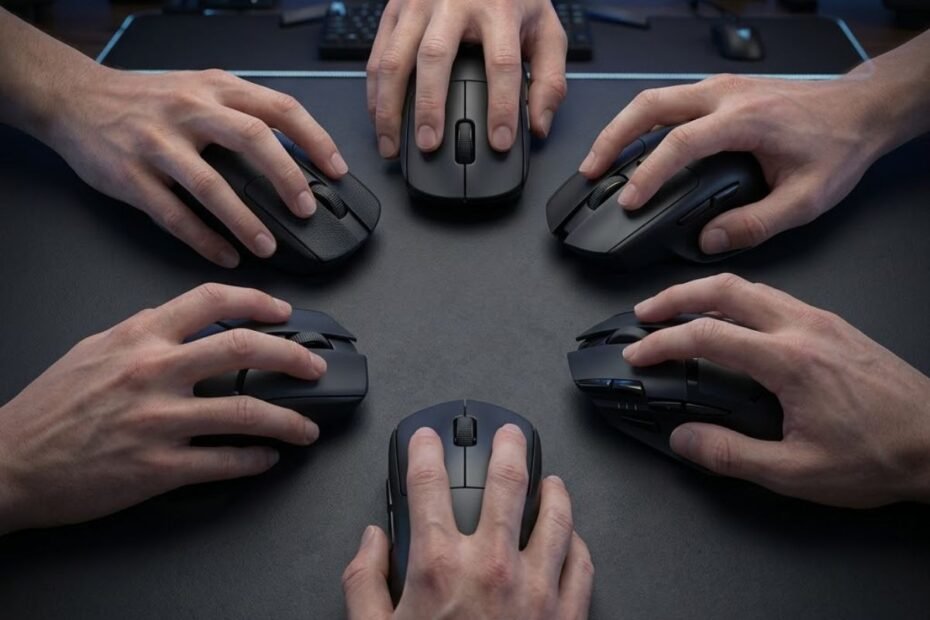
The best mouse shape for claw grip is the one that naturally supports your hand while allowing your fingers to move freely for precise clicks and fast aim adjustments. While many gamers focus on sensor specifications or mouse weight, experienced FPS players often discover that shape has a greater impact on long-term aiming consistency. A mouse that matches your claw grip can improve stability, reduce unnecessary hand tension, and make every movement feel more predictable.
Claw grip is one of the most common grip styles in competitive shooters because it combines the stability of palm contact with the responsiveness of fingertip control. However, this grip style also places higher demands on mouse design. Small differences in hump placement, width, height, or side curvature can completely change how comfortable and controllable a mouse feels during long gaming sessions.
Rather than recommending specific products, this guide focuses on understanding what makes a mouse shape ideal for claw grip. Once you understand the design principles behind a good claw grip mouse, choosing the right model becomes much easier regardless of brand or price.
If you’re looking for more in-depth FPS mouse guides, GearTP also covers gaming mouse design, aiming techniques, and buying guides to help players choose equipment based on real gameplay needs rather than marketing claims.
What Is the Best Mouse Shape for Claw Grip and Why Does It Matter?
The best mouse shape for claw grip provides balanced palm support while leaving enough room for your fingertips to control movement independently. Instead of forcing your hand into an uncomfortable position, a well-designed shape works with your natural grip, allowing smoother tracking, faster flicks, and more consistent click timing during competitive FPS games.
Unlike palm grip, claw grip does not rely on full hand contact with the mouse. Only the lower portion of the palm rests against the rear of the shell while the fingers remain arched above the buttons. This unique hand position makes mouse shape significantly more important than many players realize because every contour influences how naturally your hand maintains control.
A good claw grip mouse should provide enough support to prevent the hand from sliding backward without restricting finger movement. At the same time, the front section should remain low enough for quick button presses while the sides should offer enough grip for confident lifting during low-sensitivity gameplay.
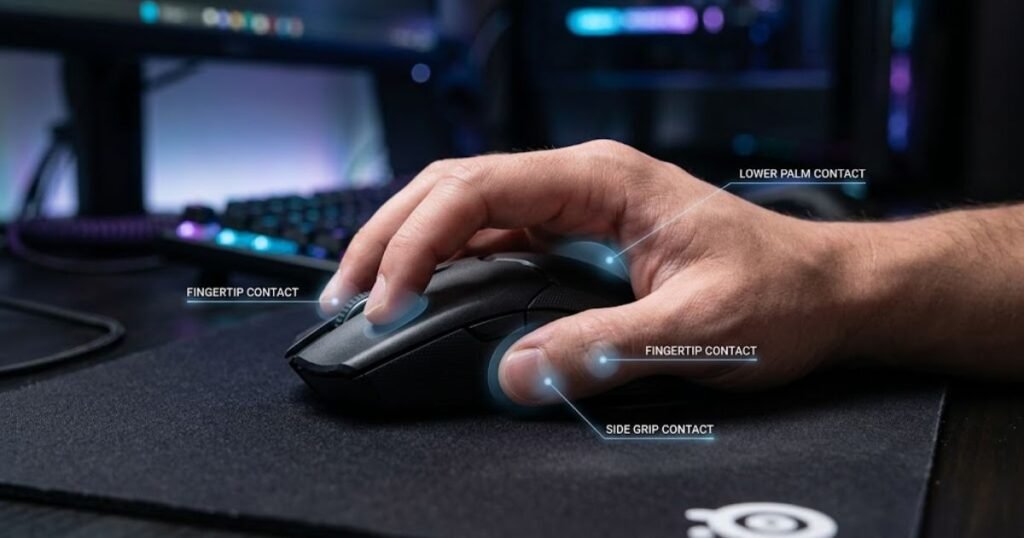
The illustration below highlights the primary contact points that define an effective claw grip:
Many players assume there is a universal “best” shape, but that simply isn’t true. Hand size, grip pressure, finger length, and preferred aiming style all influence which design feels the most natural. A shape that feels perfectly stable for one player may feel restrictive or unstable for someone with different proportions.
Understanding these design principles helps you evaluate any gaming mouse objectively instead of relying solely on popularity, professional player preferences, or product reviews.
Why Claw Grip Depends More on Shape Than Mouse Specifications
Mouse shape affects every movement your hand makes, while specifications mainly determine how accurately those movements are detected. Modern gaming mice already offer excellent sensors with extremely low latency, meaning shape has become one of the biggest factors separating a comfortable mouse from one that constantly feels awkward.
During a typical FPS match, players perform hundreds of micro-adjustments, tracking movements, flick shots, and lift-offs. Every one of these actions depends on how naturally the mouse fits the hand. If the shape creates unnecessary strain, players subconsciously compensate with extra grip force or unnatural wrist movement, which gradually reduces consistency over time.
Shape also influences muscle memory. When your hand always returns to the same position after lifting or repositioning the mouse, your aim becomes more repeatable. This consistency cannot be achieved simply by purchasing a lighter mouse or choosing a sensor with a higher DPI range.
Another overlooked factor is fatigue. A shape that forces excessive finger extension or constant grip tension may feel acceptable during a short gaming session but often becomes uncomfortable after several hours of competitive play. Reducing unnecessary muscle tension allows players to maintain better precision throughout longer matches.
Ultimately, modern gaming mice already provide excellent technical performance. Choosing a shape that naturally matches your hand delivers a much greater improvement than chasing increasingly higher hardware specifications.
How Claw Grip Changes the Way Your Hand Contacts the Mouse
Claw grip creates three primary contact points between your hand and the mouse, making shape balance more important than total surface contact. Understanding these contact points explains why certain mouse designs immediately feel more comfortable for claw grip players.
The first contact point is the lower palm, which lightly rests against the rear portion of the mouse. This area provides stability without fully supporting the entire hand. Because of this limited contact, the rear section needs enough height and curvature to keep the mouse secure during rapid directional changes.
The second contact point comes from the fingertips. Unlike palm grip, claw grip relies heavily on finger control for clicking, recoil compensation, and small aiming corrections. This is why front height and button positioning directly affect responsiveness and comfort.
The third contact point is created by the thumb and ring finger gripping the sides of the mouse during lift-offs. Side curvature, surface width, and grip shape all influence how confidently players can reposition the mouse without losing control.
When these three contact points work together, the mouse feels stable while remaining agile. Instead of fighting against the shape, your hand naturally returns to the same position after every movement, making muscle memory easier to develop and maintain.
Understanding how claw grip interacts with mouse geometry provides the foundation for evaluating every design feature discussed throughout the rest of this guide.
In the next section, we’ll break down the individual shape characteristics that have the biggest impact on claw grip performance and explain how each design element influences control, comfort, and aiming consistency.
Which Mouse Shape Features Matter Most When Choosing the Best Mouse for Claw Grip?
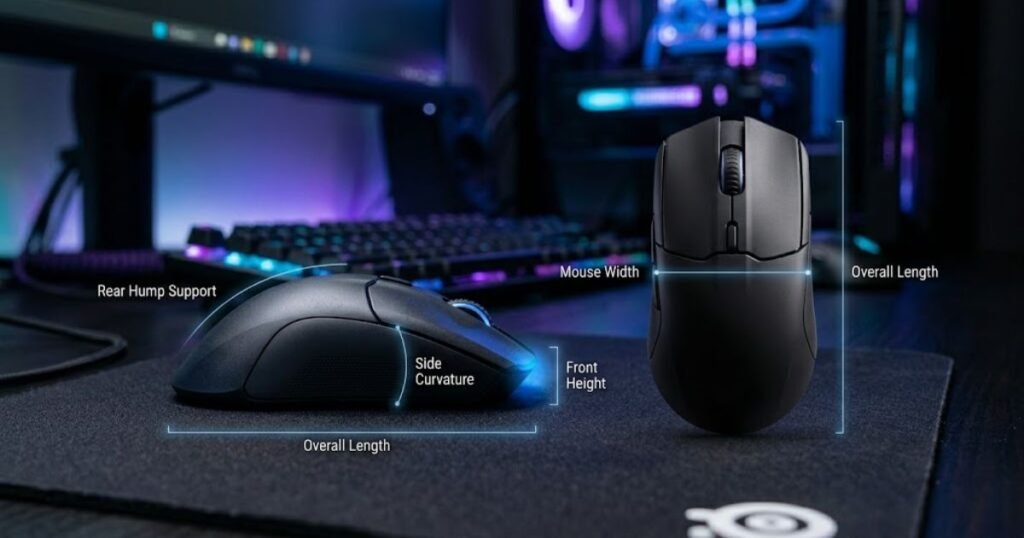
The most important mouse shape features for claw grip are rear hump support, overall width, side curvature, front height, and mouse length because each one affects a different part of your hand. Rather than working independently, these design elements interact to determine how stable, comfortable, and responsive a mouse feels during competitive FPS gameplay. Understanding what each feature actually does allows you to evaluate a mouse based on its geometry instead of relying on marketing terms or copying professional players.
The following comparison shows the key mouse shape features discussed in this section:
Many gaming mice advertise ergonomic improvements without explaining how those changes affect real gameplay. For claw grip users, the goal is not to find the most aggressive shape, but to create a balanced relationship between palm support, finger mobility, and grip stability. Even a small adjustment in one area of the shell can completely change how naturally your hand controls the mouse.
If you’re comparing complete gaming mouse designs across different FPS genres, our gaming mouse for FPS games guide explains how shape, weight, and performance work together when choosing the right mouse for competitive play.
Why Does Rear Hump Support Have the Greatest Impact on Claw Grip Stability?
Rear hump support is one of the most important design features because it determines how securely the lower palm stabilizes the mouse without limiting finger movement. Unlike palm grip, claw grip depends on only a small portion of the palm touching the mouse, making the rear hump the primary contact point responsible for maintaining control during fast aim adjustments.
When the rear hump naturally fills the space beneath the lower palm, your hand remains stable while your fingers stay free to perform micro-adjustments. This creates a balanced grip where stability comes from the shell itself rather than excessive squeezing force. As a result, many players experience smoother tracking and more consistent flick shots because the mouse returns to the same position after every lift.
Insufficient rear support often causes the hand to slide backward during gameplay, forcing players to tighten their grip unconsciously. Over time, this additional muscle tension increases fatigue and makes fine aiming corrections less consistent. On the opposite extreme, an oversized rear hump can occupy too much palm space, reducing finger flexibility and making the mouse feel slower during rapid directional changes.
It is also important to understand that an effective rear hump is not simply taller. Its height, width, and transition into the back shell all influence how pressure is distributed across the palm. Two mice with identical hump heights may feel completely different depending on how gradually or aggressively that support is shaped.
For most claw grip players, the ideal rear hump creates gentle contact that improves stability without forcing the hand into a fixed position. This balance allows the palm to guide the mouse while leaving the fingers responsible for precision aiming.
Choosing the right rear support establishes the foundation of an efficient claw grip because every other shape characteristic builds upon this primary point of contact.
How Does Mouse Width Affect Comfort, Grip Pressure, and Precision for Claw Grip?
Mouse width controls how naturally the thumb and ring finger secure the mouse, directly influencing grip pressure, comfort, and aiming precision. Unlike rear support, which stabilizes the palm, width determines how efficiently the fingers maintain control throughout every movement.
A mouse that closely matches your hand width allows the thumb and ring finger to hold the shell with minimal effort. Instead of constantly squeezing to prevent slipping, your hand maintains a relaxed grip while remaining ready for quick lift-offs and rapid directional changes. This relaxed positioning helps preserve precision during long gaming sessions because unnecessary muscle tension is reduced.
When a mouse is too narrow, players often pinch the shell more aggressively to compensate for the lack of side support. Although this may initially feel secure, prolonged grip pressure can increase finger fatigue and reduce fine motor control during extended gameplay. Small aiming corrections become more difficult because the fingers remain under constant tension.
Conversely, a mouse that is excessively wide forces the fingers farther apart than their natural resting position. While additional palm contact may improve stability for some users, excessive width can reduce fingertip agility and make rapid click transitions feel less responsive. Players who rely heavily on finger movement often notice that oversized mice feel slower despite having identical hardware specifications.
The ideal width allows the fingers to maintain secure contact without consciously gripping the shell. Instead of adapting your hand to the mouse, the mouse should naturally accommodate your hand structure.
Finding the correct width creates a more relaxed grip, improves consistency during lift-offs, and supports accurate aiming without increasing physical effort.
Why Does Side Curvature Improve Lift-Off Control and Finger Positioning?
Side curvature determines how consistently your fingers lock onto the mouse during movement, making it a critical factor for grip stability and lift-off control. While overall width defines the distance between your fingers, side curvature influences how naturally those fingers settle into position every time you pick up or reposition the mouse.
Well-designed side curves act as subtle reference points that help the thumb and ring finger return to the same location without conscious adjustment. This consistency strengthens muscle memory because your hand repeatedly contacts the mouse in an identical way throughout every gaming session.
For players using lower sensitivity settings, reliable lift-offs are particularly important. Every time the mouse is repositioned, the fingers must regain full control immediately after landing. Appropriate side curvature makes this transition smoother by reducing the amount of grip adjustment required after each lift.
Flat-sided mice provide greater flexibility because finger placement is less restricted, but they often require additional grip force to prevent slipping during aggressive movements. Deeply sculpted sides offer stronger indexing for the fingers, although they may feel restrictive if their contours do not match the natural shape of your hand.
The best side curvature is rarely the deepest or the flattest design available. Instead, it is the profile that disappears during gameplay because your fingers instinctively return to the same position without requiring constant correction.
Combined with proper rear support and appropriate width, effective side curvature completes the foundation of a stable claw grip while allowing the fingertips to remain relaxed and responsive throughout every match.
The remaining shape characteristics, including front height and overall mouse length, further refine how the mouse interacts with your fingers and palm, helping determine whether a design feels agile, supportive, or perfectly balanced for your individual grip style.
How Does Front Height Influence Finger Mobility and Click Responsiveness for Claw Grip?
Front height determines how naturally your fingers rest on the primary buttons, directly affecting click responsiveness, finger mobility, and micro-adjustment accuracy. Because claw grip relies on arched fingers rather than a fully supported hand, even a small difference in front height can change how quickly and comfortably your fingers react during gameplay.
The front section acts as the working area for the index and middle fingers. Every click, burst fire, recoil adjustment, and tracking correction begins here. If the front profile positions your fingers naturally, every movement feels effortless. If it forces your fingers too high or too low, maintaining precise control becomes increasingly difficult over long gaming sessions.
A lower front profile generally allows the fingers to remain more relaxed while preserving their natural arch. This positioning increases fingertip freedom, making rapid click sequences and fine aiming corrections feel smoother. Players who spend most of their time in tactical shooters often appreciate this design because quick reactions and precise trigger timing become easier to maintain.
Conversely, a taller front section provides additional support beneath the fingers, which some players find more comfortable during extended tracking movements. However, excessive front height may reduce fingertip flexibility by limiting the available range of motion. Instead of moving freely, the fingers begin working against the shell, creating unnecessary resistance during repeated clicks.
Finger length also influences how front height is perceived. Players with longer fingers often tolerate slightly taller front profiles because their fingertips still maintain a comfortable angle, while those with shorter fingers usually benefit from lower button placement that requires less extension.
The ideal front height should allow your fingers to stay naturally curved, maintain immediate contact with the buttons, and perform repeated clicks without creating unnecessary muscle tension.
Rather than focusing on whether a front profile is objectively high or low, evaluate whether it supports your natural finger posture while preserving complete freedom of movement.
Why Does Overall Mouse Length Change the Balance Between Hand Support and Agility?
Overall mouse length determines how much of your palm contacts the shell, influencing the balance between stability, maneuverability, and finger independence. While front height primarily affects finger posture, mouse length changes how the entire hand interacts with the mouse throughout every stage of aiming.
A shorter mouse leaves more open space behind the palm, encouraging greater fingertip involvement during movement. Because less of the shell contacts the hand, players often experience increased freedom when performing rapid flicks, vertical corrections, and repeated lift-offs. This active style of control appeals to many aggressive claw grip users who prioritize speed and precision over continuous palm support.
Longer mice extend farther into the palm, increasing the contact area that stabilizes the hand during tracking movements. Additional support can improve confidence when maintaining continuous aim on moving targets because the hand feels more anchored to the shell. However, excessive length may reduce the independence of the fingers by allowing too much palm contact, gradually shifting the grip closer to a relaxed palm grip instead of a true claw grip.
Mouse length should never be evaluated independently from hand size. A mouse that feels compact for someone with large hands may provide extensive palm support for someone with smaller hands. This is why overall dimensions matter more than numerical length measurements alone.
Another advantage of selecting the appropriate length is consistent repositioning. During low-sensitivity gameplay, players repeatedly lift and reset the mouse. A balanced length allows the hand to recover its natural grip immediately after each lift without requiring finger readjustments, strengthening long-term muscle memory.
The best overall length is not the shortest or longest available. It is the one that provides enough palm contact for stability while preserving the fingertip mobility that defines an effective claw grip.
The table below summarizes how each major shape characteristic contributes to claw grip performance:
| Shape Characteristic | Primary Role | Main Benefit | Potential Issue if Poorly Matched |
|---|---|---|---|
| Rear Hump Support | Stabilizes the lower palm | Improves grip consistency | Poor stability or restricted hand movement |
| Mouse Width | Controls side grip pressure | Reduces fatigue while improving control | Pinching or excessive finger stretching |
| Side Curvature | Indexes thumb and ring finger | More reliable lift-offs and grip consistency | Finger repositioning during gameplay |
| Front Height | Supports finger posture | Faster clicks and better fingertip mobility | Reduced click efficiency or finger fatigue |
| Overall Length | Balances palm contact | Combines stability with maneuverability | Too much palm support or insufficient stability |
The comparison shows that no single shape characteristic determines whether a mouse is suitable for claw grip. Instead, every design element contributes to a different part of hand control, and the best-performing mouse is one that balances these characteristics according to your hand size and preferred aiming style.
Now that you understand how individual design elements influence claw grip performance, the next step is comparing complete shape profiles. Rather than evaluating isolated features, we’ll examine how different hump configurations change the overall feel of a mouse and which profile best matches different claw grip preferences.
Which Hump Profile Works Best for Different Claw Grip Styles?
The best hump profile depends on how aggressively you use claw grip rather than simply choosing the highest or lowest hump available. Players who apply strong palm pressure often benefit from more pronounced rear support, while those using a relaxed claw usually prefer shapes that allow greater finger mobility. Instead of asking whether one hump profile is objectively better, the more useful question is which design complements your natural grip style.
This comparison illustrates how different hump profiles support different claw grip styles:
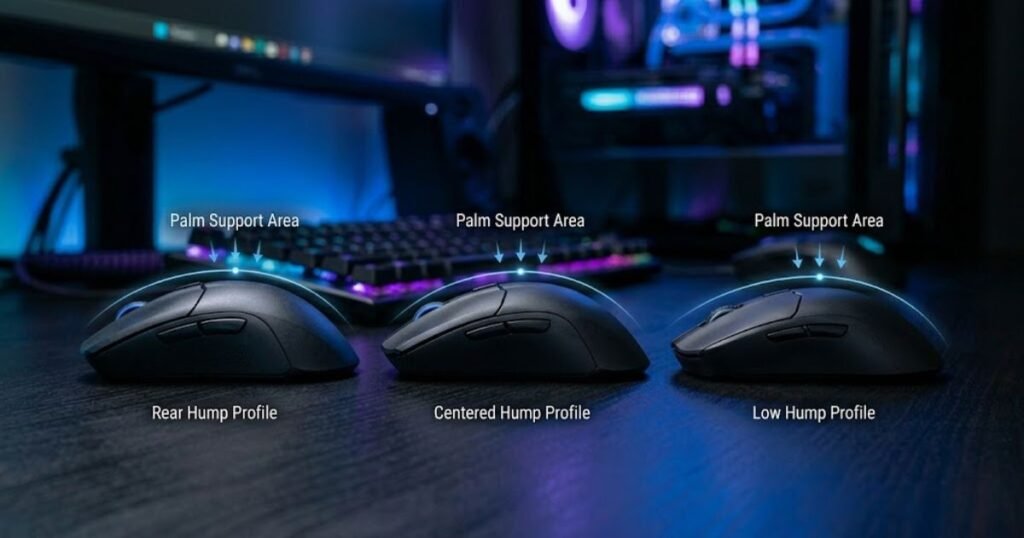
Many gamers mistakenly believe that hump height alone determines comfort. In reality, the entire hump profile, including its height, position, and transition into the rear shell, changes how your palm interacts with the mouse. Two mice with similar hump heights may feel completely different because their support is distributed in different areas of the hand.
To better understand how hump placement changes the overall feel of a gaming mouse, you can also compare rear hump vs center hump mouse designs in our dedicated guide.
Why Do Aggressive Claw Grip Players Usually Prefer Rear or High Hump Designs?
Aggressive claw grip players often prefer rear or high hump profiles because these designs provide stronger palm support during rapid flicks and repeated lift-offs. Since the fingers remain highly arched and actively control most aiming movements, additional rear support helps stabilize the hand without requiring excessive grip pressure.
This style is common among players who frequently perform explosive directional changes in tactical shooters. During large flicks, the rear hump acts as a stable anchor against the lower palm, allowing the fingertips to focus on fine aiming corrections instead of maintaining grip security.
A more pronounced hump can also improve grip consistency because the palm naturally returns to the same position after every mouse reset. This predictable hand placement strengthens muscle memory and reduces the need for constant grip adjustments throughout a match.
However, greater support is not always better. If the hump becomes too large relative to your hand, it may reduce finger mobility and make vertical corrections feel less fluid. The ideal rear support should improve stability while still allowing the fingertips to remain the primary source of mouse control.
For aggressive claw users, a well-positioned rear hump often creates the best balance between stability and responsiveness without making the mouse feel bulky.
How Do Relaxed Claw Grip Players Benefit from Lower or More Balanced Hump Profiles?
Relaxed claw grip players generally benefit from hump profiles that provide moderate palm contact while allowing greater freedom for natural finger movement. Instead of relying on firm rear support, this grip style prioritizes flexibility and effortless transitions between tracking, micro-adjustments, and repeated clicking.
Because the palm applies less pressure against the mouse, a lower or more balanced hump allows the hand to move more freely without feeling locked into a single position. Many players find that this design encourages smoother tracking because the fingers remain relaxed throughout long aiming sessions.
Another advantage of moderate hump profiles is reduced wrist tension. With less palm pressure pressing against the shell, the hand can make subtle adjustments more naturally, particularly during continuous target tracking or slower precision movements.
While relaxed claw users still require sufficient rear support, excessive hump height may create unnecessary resistance by pushing the palm higher than intended. Instead of feeling supported, the mouse may begin to dictate the grip position rather than adapting to it.
For players who value comfort and fluidity over maximum palm support, balanced hump designs often provide a more natural long-term experience without sacrificing control.
Which Hump Profile Offers the Best Balance for Most Competitive FPS Players?
For many competitive FPS players, a moderately raised rear hump provides the most balanced combination of stability, agility, and finger freedom. Rather than maximizing any single characteristic, these designs aim to support a wide range of claw grip variations while remaining adaptable across different game genres.
A balanced hump profile provides enough palm contact to improve consistency during rapid movements without restricting fingertip mobility. This versatility allows players to transition comfortably between flick shots, tracking, recoil control, and repeated lift-offs using the same grip position.
Moderately sculpted rear support also accommodates different grip pressures more effectively. Players who naturally grip the mouse firmly still receive adequate stability, while those using a lighter grip avoid feeling forced into an aggressive hand position.
This flexibility explains why many modern FPS-focused gaming mice adopt balanced hump profiles rather than extremely low or extremely tall designs. Instead of specializing for one specific grip style, they provide a shape that remains comfortable across a broader range of players and aiming techniques.
Ultimately, the best hump profile is the one that disappears during gameplay. When your hand remains stable without consciously thinking about grip position, the mouse is supporting your aim rather than becoming something you constantly need to adjust.
The table below compares how different hump profiles typically feel for various claw grip styles:
| Hump Profile | Best Suited For | Primary Advantage | Potential Trade-off |
|---|---|---|---|
| High Rear Hump | Aggressive claw grip | Maximum palm stability | May reduce finger freedom |
| Moderate Rear Hump | Most FPS claw grip players | Balanced stability and mobility | Less specialized for extreme preferences |
| Balanced Mid Hump | Relaxed claw grip | Natural hand positioning | Slightly less rear support |
| Low Hump | Light claw or claw-fingertip hybrid | Maximum finger mobility | Reduced palm stability |
The comparison highlights that hump profiles should be selected according to how your hand naturally grips the mouse rather than assuming one design is universally superior. Matching the hump profile to your claw grip style creates a more stable, repeatable aiming experience while reducing unnecessary hand fatigue.
While hump design determines how your palm interacts with the mouse, the overall shell geometry also plays a major role in comfort. The next section compares symmetrical and ergonomic mouse shapes to help determine which design philosophy better complements different claw grip preferences.
Should You Choose a Symmetrical or Ergonomic Mouse Shape for Claw Grip?
Most claw grip players perform best with a symmetrical mouse shape because it provides balanced finger positioning, greater freedom of movement, and more consistent control during FPS gameplay. However, that does not mean ergonomic mice are automatically a poor choice. The ideal shape depends on how much palm support you prefer, how aggressively you grip the mouse, and the type of aiming movements you use most often.
The image below compares the two most common shell designs used for claw grip:
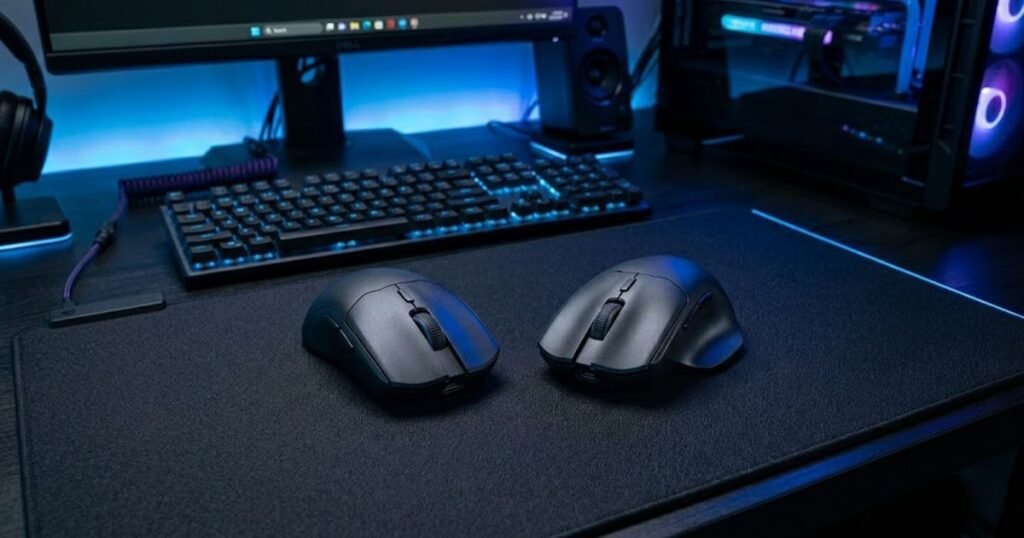
Unlike hump profiles that mainly influence palm contact, the overall shell design changes how your entire hand aligns with the mouse. A symmetrical shape keeps both sides relatively balanced, while an ergonomic shape intentionally favors the natural angle of the right hand. Understanding this difference helps you decide which design philosophy better matches your claw grip instead of assuming one style is universally superior.
For a deeper comparison of these two design philosophies, read our guide on symmetrical vs ergonomic mouse shape, where we explain how each design affects comfort, aiming consistency, and long-term control.
Why Do Most Competitive FPS Players Prefer Symmetrical Mouse Shapes for Claw Grip?
Symmetrical mouse shapes are widely preferred because they allow claw grip players to position their fingers naturally without forcing the hand into a predefined posture. This balanced geometry gives the fingertips greater freedom to control the mouse, making it easier to perform flick shots, recoil adjustments, and rapid directional changes.
Because both sides of the shell remain relatively even, the thumb and ring finger can apply balanced pressure during lift-offs and repositioning. This symmetry encourages repeatable hand placement, helping players develop stronger muscle memory over time.
Another advantage is versatility. A symmetrical design adapts well to both aggressive and relaxed claw grip styles, allowing small grip adjustments without feeling constrained by the shell. This flexibility is one reason why many professional FPS players continue to favor symmetrical mice across games such as Counter-Strike 2, VALORANT, and Apex Legends.
Symmetrical shapes also make transitioning between different aiming techniques feel more natural. Whether you’re tracking a moving target or making a fast flick toward an unexpected enemy, the shell remains neutral and predictable instead of encouraging movement in one particular direction.
For players seeking maximum consistency across different FPS titles, symmetrical designs often provide the most adaptable foundation for claw grip.
When Can an Ergonomic Mouse Shape Be a Better Choice for Claw Grip?
An ergonomic mouse shape can be an excellent option for claw grip if you prefer greater palm support and use a more relaxed grip with fewer aggressive fingertip movements. Rather than maximizing finger freedom, ergonomic designs focus on reducing hand strain by following the natural resting angle of the right hand.
The larger thumb groove and sculpted right side create additional contact points that improve overall stability. Players who spend long hours gaming or prioritize smooth tracking often appreciate this extra support because the hand remains relaxed throughout extended sessions.
Ergonomic shapes can also benefit users with larger hands who struggle to find enough palm contact on compact symmetrical mice. Instead of gripping more tightly to stabilize the mouse, the hand naturally settles into the contours of the shell, reducing unnecessary muscle tension.
However, these same contours may slightly limit grip flexibility for highly aggressive claw users. Since the shell encourages a specific hand position, players who frequently reposition their fingers during intense gameplay may find ergonomic mice less adaptable than symmetrical alternatives.
For claw grip players who value comfort and stability over unrestricted finger movement, an ergonomic design may deliver a more enjoyable long-term experience.
How Should You Decide Between Symmetrical and Ergonomic Shapes for Your Grip Style?
The best way to choose between symmetrical and ergonomic shapes is to evaluate how you naturally control the mouse rather than focusing on which design is more popular. Your grip pressure, hand size, preferred game genre, and aiming habits all influence which shell geometry will feel most comfortable over time.
If your fingertips perform most of the work while your palm provides only light support, a symmetrical shape usually offers the greatest flexibility. The balanced shell allows the fingers to remain highly active without interference from aggressive side contours.
If you rely more heavily on palm stability during long tracking movements or naturally rest more of your hand on the mouse, an ergonomic design may reduce fatigue while maintaining reliable control. The additional support helps distribute pressure more evenly across the hand, particularly during extended gaming sessions.
Neither approach is inherently better because both solve different problems. Symmetrical mice prioritize adaptability and fingertip freedom, while ergonomic mice prioritize comfort and palm support. Understanding your own grip behavior is far more valuable than simply following current trends or professional player preferences.
The ideal mouse shape is the one that allows your hand to remain relaxed, consistent, and fully focused on aiming rather than constantly adjusting its grip.
The table below compares symmetrical and ergonomic mouse shapes for claw grip players:
| Shape Type | Best For | Main Advantage | Possible Limitation |
|---|---|---|---|
| Symmetrical | Aggressive and balanced claw grip | Maximum finger freedom and versatility | Less palm support for some users |
| Ergonomic | Relaxed claw grip with greater palm contact | Improved comfort and stability | Reduced flexibility for active finger movement |
The comparison demonstrates that neither shell design is universally better for claw grip. Symmetrical mice excel when flexibility and fingertip control are the priority, while ergonomic designs provide additional palm support for players who value long-term comfort. Choosing the right geometry ultimately depends on how your hand naturally interacts with the mouse rather than the design category itself.
Once you’ve identified the shell design that matches your grip style, the next step is selecting dimensions that fit your hand. Mouse width and overall size play an equally important role in determining whether a shape feels comfortable during real gameplay.
How Should Hand Size Influence Your Choice of Mouse Shape for Claw Grip?
Hand size should determine how large, wide, and supportive a mouse feels rather than simply whether it is labeled as small or large. A shape that perfectly fits one player may feel unstable or restrictive for another because the relationship between the hand and the shell changes dramatically as hand dimensions increase or decrease. Choosing a mouse shape that matches your hand size allows claw grip to feel natural instead of forcing unnecessary adjustments during gameplay.
The comparison below demonstrates how hand size influences mouse shape selection:
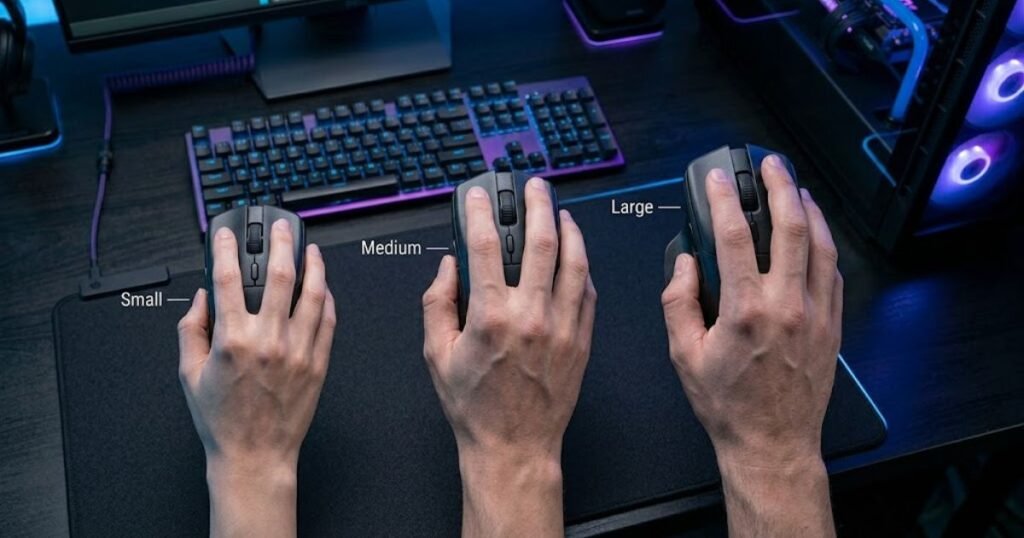
Many players focus only on the overall dimensions listed by manufacturers, but those numbers rarely tell the complete story. The same mouse can provide excellent control for someone with medium-sized hands while feeling either cramped or oversized for another player. Instead of chasing specific measurements, it is more effective to understand how hand size changes your interaction with the mouse.
If you’re deciding whether a narrower or wider shell better suits your hand, our guide comparing narrow vs wide gaming mouse explains how width affects grip comfort, lift-off confidence, and aiming precision.
Why Do Players with Smaller Hands Usually Benefit from More Compact Mouse Shapes?
Players with smaller hands generally achieve better claw grip control using compact mouse shapes because shorter dimensions allow the fingers to maintain a comfortable arch without overstretching. When the shell closely matches the size of the hand, every finger can reach its intended contact point naturally, making aiming movements feel smoother and more predictable.
A compact shape also improves fingertip independence. Because less of the mouse extends into the palm, the fingers remain free to perform rapid click sequences, recoil adjustments, and micro-corrections without fighting against excessive shell length.
Another advantage is improved lift-off control. Smaller hands often struggle with oversized mice because maintaining a secure grip requires additional finger pressure. A compact shell reduces this effort, allowing the thumb and ring finger to lift and reposition the mouse more confidently.
However, compact does not necessarily mean extremely small. A mouse that is too short may reduce palm stability, causing the hand to lose its primary support point during fast flicks. The goal is to choose a shape that balances agility with sufficient palm contact rather than simply selecting the smallest available model.
For smaller hands, the ideal shape encourages relaxed finger positioning while maintaining enough rear support to stabilize the claw grip throughout extended gaming sessions.
How Do Medium-Sized Hands Gain the Most Flexibility When Choosing Mouse Shapes?
Medium-sized hands are compatible with the widest variety of mouse shapes because they can comfortably adapt to both compact and moderately large designs. Instead of being limited by overall dimensions, players in this range benefit most by selecting a shape that matches their preferred aiming style and grip pressure.
For aggressive claw grip users, a slightly shorter shape with balanced rear support often increases fingertip mobility while preserving enough stability for precise flick shots. Players using a more relaxed claw, on the other hand, may appreciate a slightly larger shell that distributes palm pressure more evenly during extended tracking sessions.
Because medium-sized hands occupy the center of most design targets, manufacturers frequently optimize their flagship FPS mice around this hand category. As a result, these players usually have more flexibility to prioritize hump profile, shell geometry, or side curvature instead of worrying primarily about overall dimensions.
The key is to avoid assuming that every medium-sized hand requires the same shape. Finger length, grip pressure, and wrist movement all influence how a mouse feels, even among players with similar hand measurements.
This flexibility allows medium-handed players to focus on refining comfort and aiming consistency rather than simply searching for a mouse that physically fits.
What Should Players with Larger Hands Look for in a Claw Grip Mouse Shape?
Players with larger hands should prioritize mouse shapes that provide sufficient palm support without restricting fingertip movement. The challenge is not finding the biggest mouse available, but selecting a design that maintains claw grip mechanics while preventing the hand from feeling cramped.
A slightly longer shell often improves stability by allowing the lower palm to maintain consistent contact with the rear of the mouse. This additional support reduces the need to curl the fingers excessively, helping preserve a more relaxed grip during long gaming sessions.
Width also becomes increasingly important for larger hands. If the shell is too narrow, the thumb and ring finger may apply excessive pressure simply to maintain control, increasing fatigue over time. A shape with appropriate side support allows the hand to remain relaxed while still providing secure lift-offs and confident directional changes.
At the same time, players should avoid choosing oversized mice solely because they have large hands. Excessive length or width may reduce fingertip mobility, making rapid aim adjustments feel slower and less precise. Maintaining the defining characteristics of claw grip is more important than maximizing shell dimensions.
The best shape for larger hands balances generous palm support with enough freedom for the fingers to remain active throughout every stage of aiming.
The table below compares general mouse shape recommendations based on hand size:
| Hand Size | Recommended Shape | Primary Benefit | Main Focus |
|---|---|---|---|
| Small Hands | Compact and agile shapes | Greater fingertip control | Mobility and lift-off confidence |
| Medium Hands | Balanced medium-sized shapes | Maximum versatility | Match shape to grip style |
| Large Hands | Slightly longer, supportive shapes | Improved palm stability | Maintain finger freedom |
The comparison illustrates that hand size should guide how a mouse supports your grip rather than determine one specific model or dimension. A well-matched shape allows your hand to maintain natural contact points, reducing fatigue while improving long-term aiming consistency.
After choosing a shape that fits your hand, the final consideration is how that design performs in different types of FPS games. Different playstyles place different demands on mouse geometry, making some shapes more suitable for tactical precision while others excel during continuous tracking and high-speed movement.
Which Mouse Shape Works Best for Different FPS Playstyles?
The best mouse shape depends not only on your claw grip but also on the type of FPS games you play most often. Different playstyles place different demands on aiming mechanics. A shape that feels outstanding for precision-based tactical shooters may not provide the same level of comfort during fast-paced tracking games. Instead of searching for one universal solution, choosing a shape that complements your primary playstyle leads to better consistency and greater long-term comfort.
Every FPS title emphasizes different aiming skills. Some reward accurate first-shot precision, while others require continuous target tracking or rapid directional changes. Because mouse shape directly affects stability, finger mobility, and grip confidence, understanding these gameplay differences helps narrow your decision far more effectively than comparing specifications alone.
If you’re looking for complete mouse recommendations based on different FPS genres, our Top Best Gaming Mouse for FPS Games in 2026 guide compares leading options for competitive players with different aiming styles and preferences.
Which Mouse Shape Is Best for Tactical FPS Games Like Counter-Strike 2 and VALORANT?
Tactical FPS games generally favor mouse shapes that maximize stability without sacrificing fingertip precision. In games where every bullet matters, maintaining consistent crosshair placement is usually more valuable than maximizing movement speed.
Players in Counter-Strike 2 and VALORANT spend much of each round making small crosshair corrections before committing to a single accurate shot. A balanced shape with dependable rear support allows the hand to remain stable during these deliberate aiming movements while keeping the fingers free for precise click timing.
Because tactical shooters involve frequent stopping and starting rather than constant tracking, many claw grip players prefer shapes that encourage repeatable hand positioning after each mouse lift. Reliable grip consistency makes muscle memory easier to develop over hundreds of rounds.
The ideal shape for tactical FPS games prioritizes control, predictable hand placement, and effortless micro-adjustments instead of maximizing movement freedom alone.
Which Mouse Shape Supports Tracking-Heavy FPS Games the Best?
Tracking-focused FPS games benefit from mouse shapes that encourage relaxed hand movement and smooth directional control over extended periods. Instead of repeatedly resetting the crosshair, players continuously follow moving targets while maintaining stable aim.
Games such as Apex Legends, Call of Duty, and The Finals demand continuous cursor movement rather than isolated flick shots. During these situations, a shape that allows natural wrist movement and comfortable finger positioning helps reduce fatigue throughout longer engagements.
Balanced shell geometry also improves tracking consistency because the hand can make subtle horizontal and vertical corrections without excessive grip pressure. Maintaining a relaxed grip becomes increasingly important during prolonged firefights where small aiming adjustments determine whether the target remains centered.
For tracking-heavy gameplay, comfort and fluidity often contribute more to long-term performance than aggressive palm support alone.
Which Mouse Shape Helps Players Perform Better in Fast-Paced Arena Shooters?
Arena shooters reward mouse shapes that maximize agility, rapid lift-offs, and unrestricted fingertip movement. These games emphasize speed, unpredictable movement, and frequent changes in direction, requiring players to reposition the mouse constantly while maintaining precise aim.
Unlike tactical shooters, arena FPS titles often combine continuous movement with aggressive flicking, vertical aiming, and repeated mouse resets. A shape that feels lightweight in the hand, even without considering actual weight, allows players to react quickly during chaotic engagements.
Greater finger independence also improves responsiveness because the mouse can be redirected instantly without relying heavily on palm pressure. Shapes that feel compact and balanced often perform well in these environments because they encourage faster grip transitions between movements.
For players who spend most of their time in high-speed shooters, agility and effortless repositioning usually become more valuable than maximum palm support.
Which Mouse Shape Is the Best Choice If You Play Multiple FPS Genres?
If you regularly switch between different FPS games, a balanced mouse shape offers the greatest versatility across varying aiming styles. Rather than optimizing for one specific mechanic, these designs provide enough stability for tactical precision while preserving the flexibility needed for tracking and rapid movement.
Many competitive players rotate between games such as Counter-Strike 2, VALORANT, Apex Legends, and Battlefield throughout the week. Constantly adapting to dramatically different mouse shapes can interrupt muscle memory, making a versatile design a more practical long-term solution.
A balanced shape allows the hand to perform comfortably regardless of whether the next match requires careful crosshair placement, continuous tracking, or explosive flick shots. This adaptability reduces the learning curve when transitioning between games and helps maintain more consistent overall performance.
Instead of specializing for one genre, a well-balanced claw grip shape supports a broader range of aiming techniques without forcing major changes to your grip.
The table below summarizes how different FPS playstyles benefit from different mouse shape characteristics:
| FPS Playstyle | Recommended Shape Characteristics | Primary Reason |
|---|---|---|
| Tactical Shooters | Balanced rear support with stable fingertip control | Improves precision and crosshair consistency |
| Tracking-Heavy Shooters | Comfortable shell with natural hand movement | Reduces fatigue during continuous tracking |
| Fast-Paced Arena Shooters | Agile shape with excellent finger mobility | Supports rapid flicks and frequent lift-offs |
| Mixed FPS Genres | Well-balanced overall shape | Provides versatility across different aiming styles |
No single mouse shape dominates every FPS genre because each game rewards different aiming behaviors. Matching your preferred playstyle with the appropriate shape characteristics allows your claw grip to remain natural, consistent, and comfortable regardless of how demanding each match becomes.
What Common Mistakes Should You Avoid When Choosing the Best Mouse Shape for Claw Grip?
Most players choose the wrong mouse shape because they evaluate popularity, specifications, or appearance before considering how the shape fits their own hand and claw grip. A mouse can have excellent hardware and receive outstanding reviews but still perform poorly if its shape does not support your natural grip. Avoiding the following mistakes will help you make a more informed decision and improve your long-term aiming consistency.
The most common mistakes include:
- Buying the same mouse used by professional players.
- Prioritizing hardware specifications over mouse shape.
- Ignoring your hand size and claw grip style.
- Choosing an extreme shape without understanding its purpose.
- Judging comfort after only a short testing period.
- Changing your natural grip to fit the mouse.
Buying the same mouse used by professional players is a common mistake because professional equipment choices are based on personal preference rather than universal performance. Every player has different hand dimensions, grip pressure, and aiming habits, so a shape that feels perfect for a professional may not provide the same comfort or consistency for someone else. Instead of copying a setup, focus on finding a shape that naturally matches your own hand.
Prioritizing hardware specifications over mouse shape can also lead to disappointing results. Today’s gaming mice already deliver excellent sensors, low click latency, and high polling rates. Once technical performance reaches this level, the overall shape has a much greater influence on comfort, grip stability, and aiming consistency than small differences in specifications.
Ignoring your hand size and claw grip style often causes unnecessary fatigue during long gaming sessions. A shape that is too large may limit fingertip mobility, while one that is too small may reduce palm stability. Choosing dimensions that complement your natural claw grip allows your hand to remain relaxed throughout extended gameplay.
Choosing an extreme shape without understanding its purpose may reduce overall versatility. Highly specialized hump profiles, aggressive side curves, or unusual shell designs can perform exceptionally well for certain grip styles, but they may feel uncomfortable if they do not match the way you naturally hold the mouse. A balanced shape is often a better long-term solution than selecting the most aggressive design available.
Judging comfort after only a short testing period rarely provides an accurate impression of long-term performance. Some shapes require time for muscle memory to develop, while others may feel comfortable initially but create fatigue after several hours of continuous play. Evaluating consistency over multiple gaming sessions gives a much clearer understanding of whether a shape truly fits your hand.
Changing your natural grip to fit the mouse is usually the clearest sign that the shape is unsuitable. A well-designed claw grip mouse should support your natural hand position instead of forcing you to reposition your fingers, alter your wrist angle, or apply additional grip pressure simply to maintain control.
Avoiding these mistakes allows you to evaluate mouse shapes more objectively and focus on finding a design that supports your natural grip rather than forcing your hand to adapt to the mouse.
How Can You Choose the Best Mouse Shape for Your Claw Grip?
Choosing the best mouse shape becomes much easier when you follow a structured decision-making process instead of comparing random specifications or product rankings. By evaluating your hand, grip style, and gameplay habits step by step, you can quickly narrow your options and identify a shape that remains comfortable and consistent over time.
The following framework provides a practical approach for selecting a mouse shape that matches your claw grip and FPS playstyle:
- Measure your hand size. Start by measuring your hand length and width. These measurements provide a useful reference when determining whether a compact, medium, or larger shape is likely to fit your hand comfortably.
- Identify your claw grip style. Decide whether you naturally use an aggressive claw grip, a relaxed claw grip, or a hybrid variation. Your grip style determines how much palm support and fingertip mobility your mouse should provide.
- Choose a hump profile that supports your grip. Select a hump profile that complements the amount of palm contact you prefer. The goal is to create stable support without restricting natural finger movement.
- Select the overall shell geometry. Choose between a symmetrical or ergonomic design based on how you naturally position your hand. The shell should guide your grip without forcing your fingers into an uncomfortable posture.
- Match the shape to your primary FPS games. Consider whether your favorite games emphasize tactical precision, continuous tracking, or high-speed movement. Your preferred playstyle should influence the final balance between stability and agility.
- Evaluate long-term consistency before making a final decision. The best mouse shape should continue feeling comfortable after many hours of gameplay. Consistent control, low fatigue, and repeatable hand positioning are much better indicators than first impressions alone.
Following this process helps eliminate unnecessary guesswork and shifts your attention toward the factors that genuinely influence comfort and aiming performance. Rather than searching for a universally perfect mouse, you’ll be able to identify the shape that best supports your own claw grip, hand size, and competitive FPS playstyle.
Frequently Asked Questions About the Best Mouse Shape for Claw Grip
Choosing the best mouse shape for claw grip often raises practical questions about comfort, hand size, hump profiles, and FPS performance. The answers below address the most common concerns to help you make a more confident decision based on your own grip style rather than assumptions or marketing claims.
Is there a single best mouse shape for every claw grip player?
No. The best mouse shape depends on your hand size, claw grip style, and the types of FPS games you play. A shape that feels natural for one player may feel unstable or restrictive for another because every hand interacts differently with the mouse.
Are symmetrical mouse shapes always better than ergonomic shapes for claw grip?
Not always. Symmetrical shapes generally provide greater flexibility and fingertip freedom, making them popular among competitive FPS players. Ergonomic shapes, however, can offer better palm support for players who use a more relaxed claw grip or prefer additional stability.
Should I choose a high hump or a low hump for claw grip?
Neither option is universally better. Higher rear humps typically provide more palm support for aggressive claw grip, while lower or more balanced hump profiles allow greater finger mobility for relaxed claw grip users.
Does mouse shape matter more than weight?
For most players, yes. Once a gaming mouse reaches modern performance standards, its shape has a greater influence on comfort, grip consistency, and long-term aiming performance than small differences in weight.
How do I know if a mouse is too large for my claw grip?
If the mouse limits finger movement, forces excessive palm contact, or makes lift-offs feel awkward, it is probably too large. A suitable shape should allow your fingers to move naturally while maintaining stable palm support.
Can players with large hands still use compact mice?
Yes, provided the shape still offers enough rear support for a stable claw grip. Some players with large hands prefer compact mice because they increase fingertip control, although excessively small shapes may reduce overall comfort during extended gaming sessions.
Does hand size completely determine the best mouse shape?
No. Hand size provides a useful starting point, but grip pressure, finger length, and preferred aiming style are equally important when choosing the most comfortable shape.
Which mouse shape is better for tactical FPS games?
Tactical shooters generally benefit from balanced shapes that provide stable palm support while preserving precise fingertip control. Consistent hand positioning is usually more valuable than maximum agility in these games.
Which mouse shape works best for tracking-heavy FPS games?
Tracking-focused games often favor shapes that encourage relaxed hand movement and smooth directional control. Comfortable shell geometry helps reduce fatigue during long periods of continuous aiming.
How long should I test a mouse shape before deciding whether it fits?
Spend several gaming sessions using the mouse before reaching a conclusion. Initial comfort can be misleading, while long-term consistency provides a much better indication of whether the shape truly matches your claw grip.
Can changing my mouse shape improve my aim immediately?
Some players notice immediate improvements in comfort, but developing consistent aim usually requires time for your muscles to adapt to the new shape. Building reliable muscle memory is more important than expecting instant performance gains.
What is the most important factor when choosing the best mouse shape for claw grip?
The most important factor is how naturally the mouse supports your own hand. A shape that matches your hand size, claw grip style, and preferred FPS playstyle will usually deliver better comfort and aiming consistency than simply choosing the most popular gaming mouse.
Conclusion
The best mouse shape for claw grip is the one that complements your natural hand position, supports consistent aiming, and remains comfortable throughout long gaming sessions. Instead of focusing on a single feature such as hump height or overall size, evaluate how every aspect of the shape works together to support your grip style, hand dimensions, and preferred FPS games.
Throughout this guide, we’ve explored the key characteristics that influence claw grip performance, compared different hump profiles and shell geometries, examined how hand size affects comfort, and explained why different FPS playstyles benefit from different shape characteristics. Looking at these factors together provides a far more reliable way to choose a gaming mouse than relying on specifications or popularity alone.
Ultimately, no universal mouse shape fits every player. The right choice is the one that allows your hand to remain relaxed, your grip to stay consistent, and your attention to stay focused on the game instead of the mouse itself. When a shape feels natural enough to disappear from your awareness, you’ve found the right foundation for improving both comfort and aiming performance.
Thank you for reading this guide. We hope it has helped you better understand how mouse shape affects claw grip performance and made it easier to choose a design that matches your hand, grip style, and preferred FPS games. If you found this article helpful, explore more gaming mouse guides on GearTP to continue building a setup that supports more comfortable and consistent aiming.