
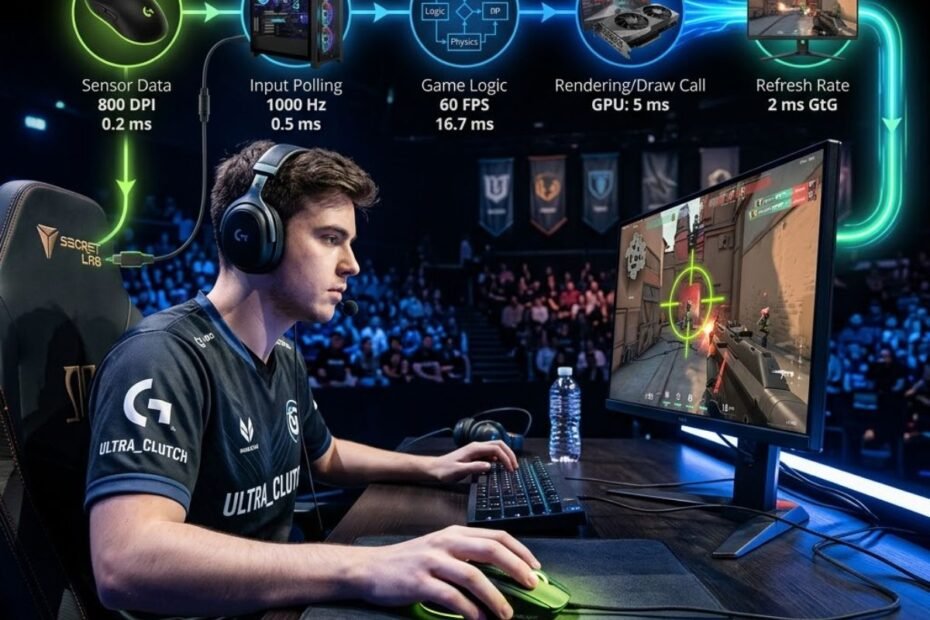
Mouse latency is the delay between a physical mouse movement or click and the moment that action appears on screen. In competitive FPS games, even small delays can make aiming feel less responsive, reduce tracking consistency, and create a disconnect between hand movement and visual feedback.
Many players immediately blame their gaming mouse when they notice delayed responsiveness. However, mouse latency is often caused by multiple components working together rather than a single device. The mouse, operating system, game engine, graphics pipeline, and monitor can all contribute to the final delay experienced during gameplay.
Before identifying specific causes of mouse latency, it is important to understand what mouse latency actually means and how mouse input travels through a gaming system. Once the input chain becomes clear, the sources of delay become much easier to understand.
What Mouse Latency Actually Means in Competitive Gaming
Mouse latency is the total amount of time required for a mouse action to be translated into visible movement or action on screen. For FPS players, lower mouse latency generally results in a more immediate and responsive gaming experience.
Unlike graphics quality or visual settings, latency directly affects how quickly a game responds to player input. Because competitive shooters rely heavily on timing and precision, latency often becomes one of the most important factors influencing overall responsiveness.
Understanding mouse latency does not mean focusing only on the mouse itself. Instead, it means understanding the complete path that input follows before it becomes visible on screen.
The Difference Between Mouse Latency and General Input Lag
Mouse latency and input lag are often treated as the same thing, but they describe different concepts. Mouse latency refers specifically to delays associated with mouse input, while input lag refers to the total delay between user input and visual feedback.
For example, a gaming mouse may respond extremely quickly, but additional delays can still be introduced by other components within the system. In that situation, mouse latency remains low while total input lag becomes much higher.
This distinction matters because players frequently misdiagnose responsiveness issues. A delayed feeling does not automatically mean the mouse is the source of the problem.
By separating mouse latency from overall input lag, players can better understand where performance bottlenecks may actually exist.
Why FPS Players Notice Mouse Latency Faster Than Casual Gamers
Competitive FPS games demand a level of responsiveness that many other genres simply do not require. Every crosshair adjustment, flick shot, tracking movement, and click depends on rapid feedback between the player and the game.
Because of this, FPS players often become highly sensitive to small changes in responsiveness. A delay that may feel insignificant in a role-playing game or strategy title can become noticeable during a fast-paced gunfight.
The illustration below shows how latency affects aiming precision during competitive FPS gameplay:
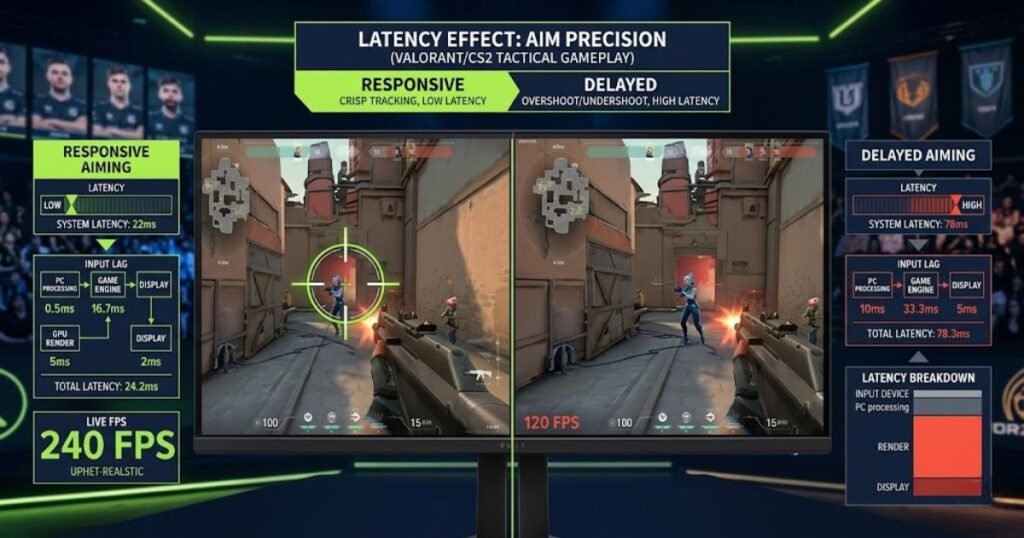
As players develop stronger aim mechanics and muscle memory, they become even more capable of detecting subtle changes in responsiveness. High-level players frequently recognize latency issues that less experienced gamers may never notice.
This sensitivity explains why discussions about mouse latency are particularly common within competitive FPS communities.
How Mouse Latency Affects Tracking, Flicking, and Click Timing
Mouse latency affects the relationship between physical movement and on-screen response. When latency increases, visual feedback arrives later than expected, making actions feel less connected.
The effects of increased latency can appear in several ways:
- Tracking may feel less precise during continuous target movement.
- Flick shots may require additional correction after stopping the mouse.
- Click timing can feel inconsistent during reaction-based engagements.
- Micro-adjustments may appear slightly delayed.
- Overall aiming responsiveness may feel less predictable.
These symptoms do not automatically indicate a problem with the mouse itself. Instead, they often indicate that somewhere within the input chain, delays are accumulating and affecting the final experience.
Understanding how latency influences aiming performance creates the foundation for identifying the real causes of delay later in the article.
How a Mouse Signal Travels From Your Hand to the Screen
Mouse latency exists because input must travel through multiple stages before appearing on screen. Every stage performs a necessary function, and each function requires a small amount of processing time.
While these delays are usually measured in milliseconds, they combine throughout the input chain. The total responsiveness that a player experiences is the result of all those stages working together.
To understand what causes mouse latency, it is first necessary to understand where latency can potentially be introduced.
The Journey From Sensor Detection to On-Screen Movement
Every mouse movement begins when the sensor detects physical motion across a surface. That movement is converted into digital information and transmitted to the computer.
Once the input reaches the computer, the operating system processes the information and passes it to the game. The game interprets the movement, generates a new frame, and sends that frame through the graphics pipeline. Finally, the monitor displays the updated image.
The diagram below illustrates the complete path that mouse input follows before appearing on screen:
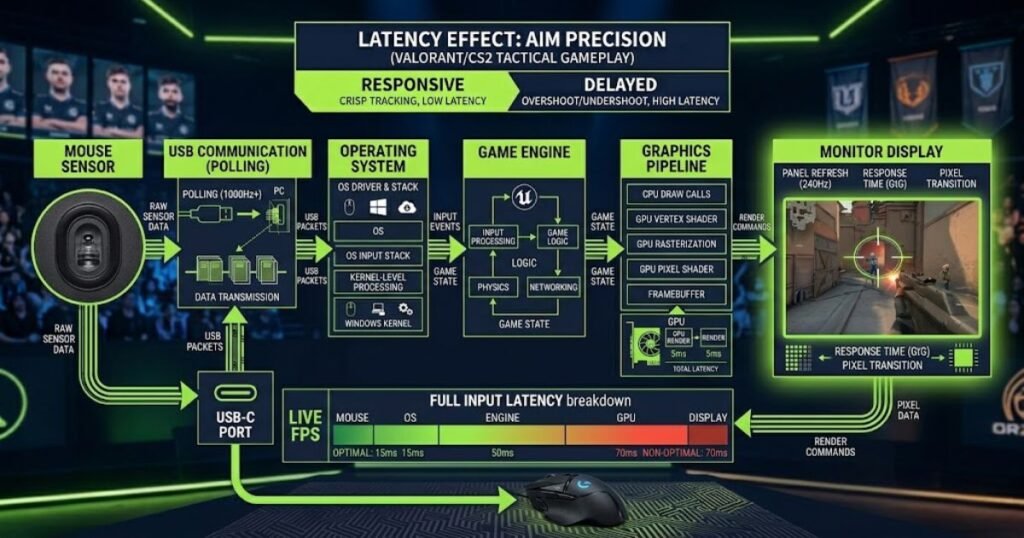
Although this process happens extremely quickly, it is never instantaneous. Every stage introduces a small amount of delay before the next stage can begin.
This is why mouse responsiveness depends on much more than the mouse alone.
Where Delays Can Occur Along the Input Chain
Delays can occur at multiple points between the moment a player moves the mouse and the moment the updated image appears on screen. Each stage has the potential to introduce latency, and the final experience is influenced by all of them combined.
Many players focus exclusively on the mouse when troubleshooting latency. However, the mouse represents only one component within a much larger input pipeline.
The following stages represent the most common locations where latency can be introduced:
| Input Stage | Potential Source of Delay |
|---|---|
| Mouse Hardware | Input detection and signal processing |
| USB Communication | Data transfer between the mouse and PC |
| Operating System | Input handling and device management |
| Game Engine | Input interpretation and frame generation |
| Graphics Pipeline | Rendering and frame buffering |
| Monitor | Display processing and refresh timing |
As the table shows, latency is rarely caused by a single component. Instead, it is usually the result of multiple stages contributing small amounts of delay throughout the entire system.
This explains why replacing a gaming mouse does not always solve responsiveness issues. Even if the mouse performs perfectly, delays elsewhere can still affect the final result.
Understanding these stages provides a useful framework for identifying where latency may originate.
Why Multiple Small Delays Add Up During Gameplay
A common misconception is that only large delays matter. In reality, several small delays often combine to create a noticeable difference in responsiveness.
A few milliseconds added by one component may seem insignificant on its own. However, when similar delays occur at several stages of the input chain, the total latency can become much larger than expected.
This cumulative effect is one reason why responsiveness sometimes feels inconsistent even when individual hardware components appear to be functioning normally.
For competitive FPS players, understanding this principle is important because effective troubleshooting requires examining the entire input chain rather than focusing on a single device.
Now that the complete input path is clear, the next step is to examine the specific hardware-related factors that can contribute to mouse latency in modern gaming setups.
Hardware Factors That Can Cause Mouse Latency
Mouse hardware can contribute to latency before input ever reaches the computer. While modern gaming mice are significantly faster than older designs, hardware limitations can still introduce delays that affect responsiveness in FPS games.
Many players assume all gaming mice perform similarly when it comes to latency. In reality, differences in sensor technology, wireless communication, internal processing, and firmware behavior can influence how quickly input is delivered to the system.
The image below highlights several hardware components that can contribute to mouse latency:
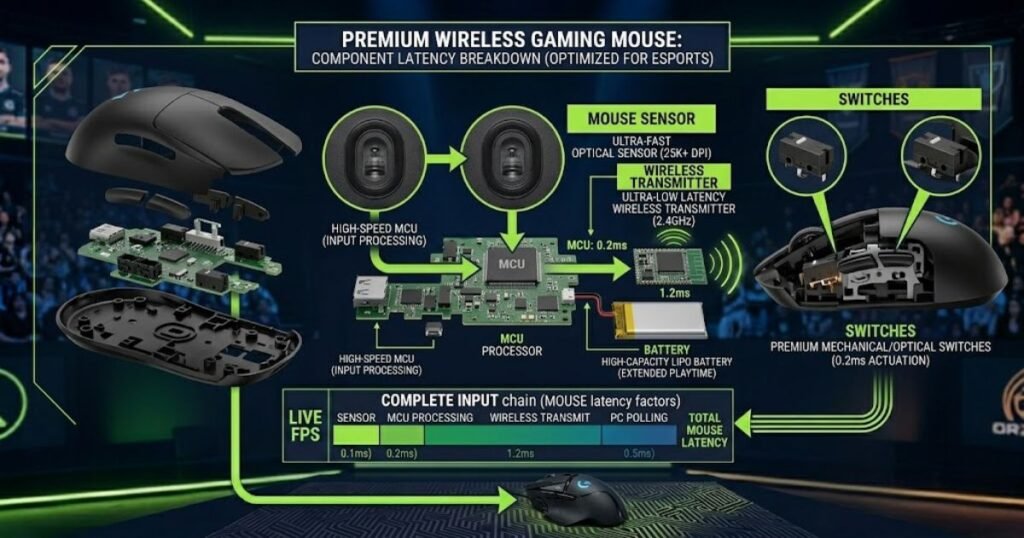
Understanding these hardware-related factors helps separate genuine mouse limitations from delays caused elsewhere in the input chain.
Sensor Processing Delays Inside Modern Gaming Mice
The sensor is responsible for detecting physical movement and converting it into digital information. Before movement reaches the computer, the sensor must capture surface data, calculate motion, and prepare that information for transmission.
Modern flagship sensors are extremely fast, but not all sensors process data equally. Older sensors, lower-quality sensors, or heavily filtered sensor implementations may introduce additional delay before movement is reported.
Some gaming mice also apply extra processing designed to improve tracking stability. While these features may help smooth movement, excessive processing can sometimes increase latency.
To better understand how sensors track movement and influence responsiveness, it helps to learn more about how gaming mouse sensors process movement.
In most modern gaming mice, sensor latency is relatively small. However, it remains an important part of the overall latency equation because every stage contributes to the final result.
Wireless Communication Delays and Signal Interference
Wireless gaming mice must transmit data between the mouse and a receiver before input reaches the computer. This additional communication stage creates another opportunity for latency to occur.
Modern low-latency wireless technologies have dramatically reduced the gap between wired and wireless performance. However, signal quality still plays an important role in maintaining consistent responsiveness.
Several factors can interfere with wireless communication:
- Distance between the mouse and receiver.
- Physical obstacles near the receiver.
- Nearby wireless devices operating on similar frequencies.
- USB hubs that create signal instability.
- Poor receiver placement on the desk.
When wireless communication becomes unstable, latency may increase or become inconsistent. In severe cases, packet retransmissions can create noticeable responsiveness issues during gameplay.
For most modern gaming mice, placing the receiver close to the mouse significantly reduces the likelihood of wireless-related latency problems.
Polling Rate Limitations and Report Timing
Polling rate determines how frequently a mouse sends updates to the computer. Because mouse reports are transmitted at fixed intervals, polling rate directly influences how quickly movement information can reach the system.
A lower polling rate creates larger gaps between reports, while a higher polling rate reduces the time between updates.
Players who are unfamiliar with this concept should first understand what polling rate means for gaming performance.
The relationship between polling rate and report timing can be summarized below:
| Polling Rate | Report Interval | Potential Impact on Responsiveness |
|---|---|---|
| 125Hz | 8 ms | Noticeably slower updates |
| 500Hz | 2 ms | Good responsiveness |
| 1000Hz | 1 ms | Common competitive standard |
| 4000Hz | 0.25 ms | Faster update frequency |
| 8000Hz | 0.125 ms | Maximum report frequency available today |
As the table shows, higher polling rates reduce the maximum delay between reports. However, polling rate is only one factor among many and should not be viewed as a complete solution to latency.
Many other components still influence the final responsiveness experienced during gameplay.
Firmware Processing and Motion Filtering
Firmware acts as the internal software that controls how a mouse processes input before sending information to the computer.
Different manufacturers implement firmware differently. Some prioritize raw responsiveness, while others include additional processing designed to improve stability, compatibility, or battery efficiency.
Examples of firmware-based processing include:
- Motion filtering.
- Signal correction algorithms.
- Power-saving behavior.
- Wireless optimization routines.
- Debounce management for mouse clicks.
While these systems often improve overall usability, excessive processing can increase the amount of time required before information leaves the mouse.
Well-designed gaming mice balance accuracy, stability, and responsiveness without introducing meaningful additional latency.
How Different Hardware Factors Compare in Real-World Gaming
Not every hardware-related factor contributes equally to mouse latency. Some sources of delay have a larger influence on responsiveness than others.
The comparison below highlights the relative impact of common hardware-related latency factors:
| Hardware Factor | Potential Influence on Latency |
|---|---|
| Sensor Processing | Low to Moderate |
| Wireless Communication Quality | Moderate |
| Polling Rate Configuration | Moderate |
| Firmware Processing | Low to Moderate |
| Signal Interference | Moderate to High |
The table illustrates why troubleshooting should focus on the entire hardware environment rather than a single specification. A mouse with an excellent sensor can still experience responsiveness issues if wireless communication becomes unstable or firmware settings introduce additional processing.
Hardware remains an important part of the latency equation, but it is only one section of the larger input chain. In many gaming systems, delays originating from the PC itself can have an even greater impact on responsiveness.
The next section examines how CPU usage, USB communication, background applications, and other system-level factors can increase mouse latency even when the mouse hardware performs perfectly.
PC Performance Issues That Increase Mouse Latency
A gaming mouse can feel delayed even when the mouse itself is performing perfectly. Once input reaches the computer, the system must process that information quickly enough to keep pace with player actions. If the PC cannot process input efficiently, additional latency may be introduced before the game ever responds.
The comparison below demonstrates how system bottlenecks can affect gaming responsiveness:
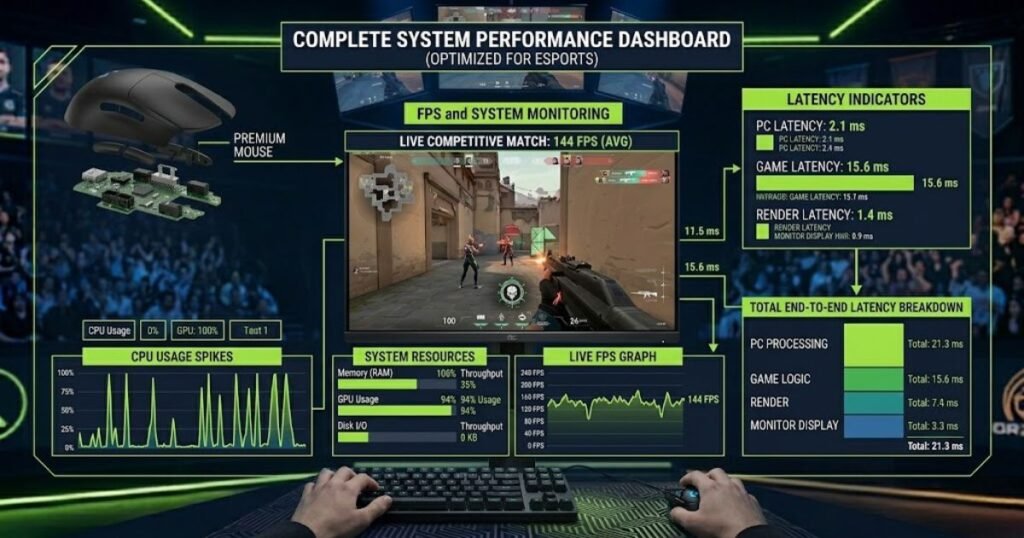
This is one reason why upgrading a mouse does not always solve responsiveness problems. In many cases, the true source of delay originates from system-level bottlenecks rather than mouse hardware.
High CPU Usage and Input Processing Bottlenecks
The CPU plays a critical role in handling input data, game logic, and communication between hardware components. When CPU resources become heavily utilized, input processing may be delayed as the system prioritizes other tasks.
This issue becomes more common in competitive games where players attempt to maximize frame rates while simultaneously running background applications.
Common sources of excessive CPU usage include:
- Streaming software.
- Video recording applications.
- Browser tabs running in the background.
- Game launchers and update services.
- Antivirus scans and security software.
When CPU resources become constrained, responsiveness may feel inconsistent even though the mouse itself continues to function normally.
Players interested in the relationship between system load and responsiveness can learn more about how high polling rates affect CPU usage under certain conditions.
Maintaining adequate CPU headroom is often one of the most effective ways to preserve consistent responsiveness during gameplay.
USB Controller and Port Performance Limitations
Before mouse input reaches the game, it must travel through the computer’s USB subsystem. Although modern USB technology is extremely fast, certain configurations can still create performance issues.
Problems are more likely to occur when multiple high-bandwidth devices share the same USB controller or when heavily loaded USB hubs are used.
Potential USB-related issues include:
- Overloaded USB controllers.
- Poor-quality USB hubs.
- Bandwidth competition between devices.
- Driver-related communication problems.
- Power delivery inconsistencies.
These issues rarely create dramatic latency increases on their own, but they can contribute to inconsistent responsiveness and unstable performance under certain conditions.
Ensuring that gaming peripherals use stable USB connections helps reduce the likelihood of communication-related delays.
Background Applications Consuming System Resources
Background applications can affect responsiveness by consuming CPU cycles, memory resources, storage bandwidth, and system interrupts.
Many gamers underestimate the cumulative effect of multiple background tasks running simultaneously. While a single application may have little impact, several programs competing for resources can increase overall system latency.
Applications commonly associated with increased system load include:
- Discord overlays.
- Recording software.
- RGB control suites.
- Hardware monitoring utilities.
- Cloud synchronization services.
Reducing unnecessary background activity helps ensure that the game receives system resources as quickly as possible.
Competitive players often run streamlined gaming profiles specifically to minimize these potential sources of delay.
Power Saving Features That Reduce Responsiveness
Modern operating systems and hardware platforms frequently prioritize power efficiency. While these features improve battery life and energy consumption, they can sometimes introduce responsiveness penalties.
Power-saving systems may reduce processor frequency, place devices into low-power states, or delay resource allocation until activity is detected.
Although these delays are often small, they can become noticeable in competitive gaming environments where responsiveness is a priority.
High-performance power plans are commonly recommended for competitive gaming because they reduce the likelihood of aggressive power-saving behavior interfering with responsiveness.
Balancing efficiency and performance is important, but competitive players generally benefit from configurations that prioritize responsiveness.
Which PC Factors Have the Largest Impact on Mouse Latency?
Not every system-level issue affects latency equally. Some bottlenecks create larger responsiveness penalties than others.
The table below compares several common PC-related sources of latency:
| PC Factor | Potential Impact on Responsiveness |
|---|---|
| High CPU Usage | High |
| Heavy Background Applications | Moderate to High |
| USB Controller Congestion | Moderate |
| Power Saving Features | Low to Moderate |
| Driver Conflicts | Moderate |
As shown above, CPU limitations and excessive background activity often create larger responsiveness problems than players expect. Addressing these bottlenecks can sometimes provide more noticeable improvements than changing mouse hardware.
Understanding the role of the PC helps eliminate one of the most common misconceptions about latency: the belief that every responsiveness issue originates from the mouse itself.
Display and Graphics Settings That Make a Mouse Feel Delayed
Many players associate delayed responsiveness with mouse hardware when the actual source of latency exists within the display pipeline. Even if mouse input reaches the computer quickly, delays in rendering and display processing can still make aiming feel sluggish.
The example below shows how display latency can influence perceived mouse responsiveness:
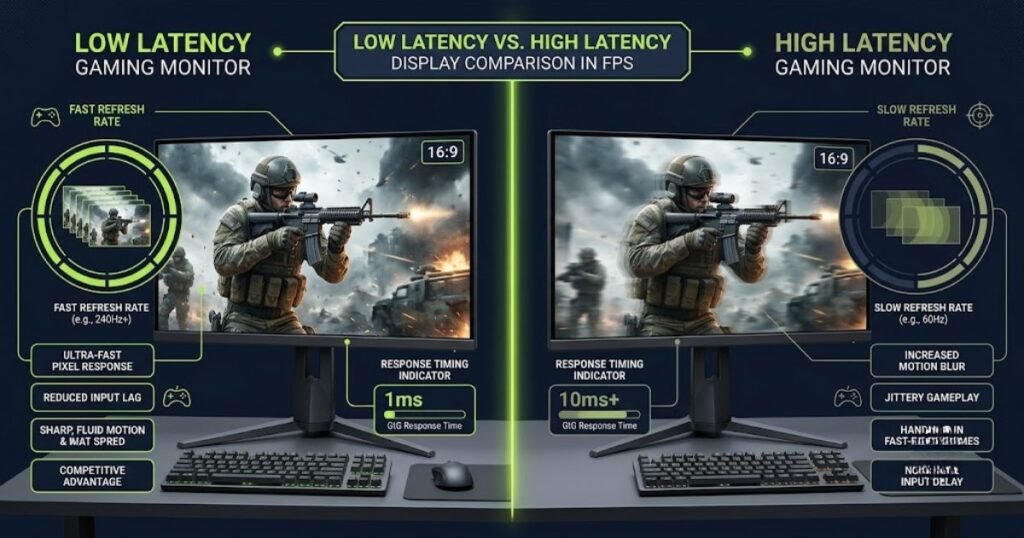
This type of latency is particularly deceptive because the mouse continues to operate normally while visual feedback arrives later than expected.
Monitor Response Time and Display Processing Delay
After a frame is rendered, the monitor must process and display the image. This stage introduces another opportunity for latency to occur.
Gaming monitors are specifically designed to reduce display processing delays, but not all displays perform equally.
Factors that influence display responsiveness include:
- Internal monitor processing.
- Image enhancement features.
- Scaling operations.
- Response time optimization settings.
- Display electronics quality.
Even when two monitors share the same refresh rate, their processing delays can differ significantly.
This is one reason why competitive players often prioritize low-latency gaming monitors over general-purpose displays.
Refresh Rate Limitations and Perceived Responsiveness
Refresh rate determines how frequently a monitor updates the image displayed on screen. Higher refresh rates provide more frequent visual updates, which can reduce perceived latency.
Although refresh rate does not directly change mouse hardware performance, it influences how quickly players see the results of their actions.
Aiming often feels more responsive at higher refresh rates because visual feedback arrives more frequently throughout gameplay.
This improvement is especially noticeable during fast tracking movements and rapid target transitions.
V-Sync, Triple Buffering, and Frame Queues
Graphics synchronization technologies can improve visual smoothness, but they may also introduce additional latency depending on how they are configured.
V-Sync, triple buffering, and frame queue systems are designed to reduce visual artifacts such as screen tearing. However, these systems sometimes increase the amount of time required before a frame appears on screen.
The impact varies depending on hardware, game engine behavior, and graphics settings.
Players focused on competitive responsiveness often evaluate these settings carefully to balance image quality against latency.
This is also why understanding how polling rate contributes to overall input latency requires examining the entire system rather than focusing solely on mouse hardware.
GPU Bottlenecks That Increase Input Delay
The graphics processor is responsible for rendering frames before they are displayed. When GPU workloads become excessive, rendering delays can accumulate and increase overall latency.
Common GPU-related causes of increased delay include:
- Extremely high graphics settings.
- Heavy ray tracing workloads.
- Resolution settings that exceed hardware capabilities.
- Frame generation technologies.
- GPU saturation near maximum utilization.
When rendering falls behind, visual feedback arrives later even though mouse input may have been processed correctly.
This disconnect often creates the impression that the mouse is unresponsive when the actual bottleneck exists within the rendering pipeline.
How Display Settings Influence Perceived Mouse Latency
Display-related latency is often more noticeable than hardware-level mouse latency because players experience the delay directly through visual feedback.
The following table summarizes common display-related contributors to perceived responsiveness:
| Display Factor | Potential Impact on Responsiveness |
|---|---|
| Low Refresh Rate | High |
| Display Processing Delay | Moderate to High |
| V-Sync | Moderate |
| Frame Queue Build-Up | Moderate to High |
| GPU Saturation | High |
As the table demonstrates, many responsiveness problems originate after input has already been processed. This explains why players sometimes perceive mouse latency even when the mouse itself is performing exactly as intended.
By understanding the display pipeline, players gain a more complete picture of how latency develops throughout a gaming system.
The next section examines software and operating system factors that can further influence mouse responsiveness before gameplay begins.
Software and Operating System Factors That Affect Mouse Responsiveness
Mouse latency is not always caused by hardware limitations. After input reaches the computer, software and operating system processes continue to influence how quickly that input reaches the game.
Even on a powerful gaming PC with a high-end mouse, software-level inefficiencies can introduce additional delays. These delays are often difficult to identify because they occur behind the scenes and may not produce obvious warning signs.
Understanding software-related sources of latency helps players avoid blaming hardware when the real issue exists within the operating system or application environment.
Windows Mouse Settings and Pointer Processing
Windows processes mouse input before it reaches most applications. Certain settings can alter how movement data is handled, which may affect consistency and responsiveness.
One of the most discussed settings among FPS players is mouse acceleration. When enabled, cursor movement changes based on movement speed rather than physical distance alone.
While mouse acceleration can be useful in some productivity scenarios, many competitive players prefer raw and predictable movement behavior.
Additional Windows settings that may influence responsiveness include:
- Pointer precision settings.
- Input processing behavior.
- Device-specific configuration profiles.
- Accessibility-related input modifications.
Maintaining consistent input processing is often more important than pursuing theoretical latency reductions.
For competitive FPS gaming, predictable input behavior generally provides the best experience.
Driver Conflicts and Device Management Issues
Drivers act as the communication layer between hardware and the operating system. When drivers function properly, input devices operate efficiently and reliably.
Problems arise when multiple drivers conflict with one another or when outdated software creates compatibility issues.
Potential driver-related problems include:
- Conflicting peripheral software.
- Outdated USB drivers.
- Corrupted device configurations.
- Operating system compatibility issues.
- Multiple devices competing for control.
These issues rarely create dramatic latency increases, but they can contribute to inconsistent responsiveness and unpredictable behavior.
Ensuring that devices use stable and current drivers helps minimize unnecessary complications within the input chain.
Overlay Software and Background Utilities
Many modern gaming applications include overlays that appear on top of games. While convenient, these overlays add another software layer between the game and the player.
Examples include:
- Game recording overlays.
- Performance monitoring tools.
- Communication overlays.
- Hardware monitoring applications.
- RGB management software.
Each additional utility consumes system resources and may introduce extra processing overhead.
Although the impact is usually small, multiple overlays operating simultaneously can create measurable increases in system latency.
Competitive players often disable unnecessary overlays to simplify the software environment and reduce potential sources of interference.
Game Engine Input Handling Differences
Not every game processes input in the same way. Different game engines use different methods to collect, interpret, and apply mouse input.
As a result, the same mouse may feel slightly different across multiple games even when sensitivity settings remain unchanged.
Factors that vary between game engines include:
- Input sampling behavior.
- Frame synchronization methods.
- Input buffering systems.
- Tick rate architecture.
- Engine-level latency optimizations.
This variation explains why responsiveness can differ between games despite identical hardware and operating system configurations.
Understanding engine behavior helps players recognize that perceived mouse latency is not always caused by their equipment.
Which Software Factors Have the Greatest Impact on Responsiveness?
Software-related latency sources vary significantly in their impact. Some have little influence on gameplay, while others can noticeably affect responsiveness.
The table below compares several common software-related contributors to latency:
| Software Factor | Potential Impact on Responsiveness |
|---|---|
| Input Processing Settings | Moderate |
| Driver Conflicts | Moderate |
| Overlay Software | Low to Moderate |
| Background Utilities | Moderate |
| Game Engine Behavior | Moderate to High |
As shown above, software can contribute meaningfully to latency even when hardware performance remains strong. This is why troubleshooting should include both hardware and software considerations.
A complete understanding of latency requires evaluating the entire gaming environment rather than focusing exclusively on physical devices.
Common Symptoms That Indicate Mouse Latency Problems
Mouse latency does not always present itself in obvious ways. Many players experience responsiveness issues without immediately recognizing latency as the underlying cause.
Because several different problems can produce similar symptoms, understanding the warning signs of latency helps players identify potential issues more accurately.
Delayed Flick Shots and Missed Timing Windows
One of the most recognizable symptoms of mouse latency is a feeling that flick shots arrive slightly later than intended.
Players may feel as though they reached the target correctly, yet visual feedback appears delayed enough to disrupt timing.
This symptom often becomes more noticeable during fast engagements where reaction speed plays a critical role.
Although aim mechanics may remain technically correct, delayed feedback can make execution feel inconsistent.
Sluggish Tracking During Fast Target Movement
Tracking requires continuous synchronization between hand movement and crosshair movement. Increased latency can make this connection feel less immediate.
Players experiencing latency-related tracking issues often describe the crosshair as feeling slightly behind their physical movement.
This effect can be subtle, but it becomes easier to recognize during prolonged tracking scenarios.
Responsiveness issues of this type are frequently mistaken for poor aim consistency when latency may actually be contributing to the problem.
Mouse Clicks That Feel Behind the Action
Latency does not affect movement alone. Click responsiveness can also be influenced by delays occurring throughout the input chain.
Players may feel that shots are firing slightly later than expected, particularly during reaction-based situations.
While click latency and movement latency are not identical, both contribute to the overall perception of responsiveness.
Consistent click timing is especially important in tactical shooters where engagements are often decided within milliseconds.
Inconsistent Responsiveness Between Matches
Latency problems are not always constant. In some cases, responsiveness may feel excellent during one session and noticeably worse during another.
This inconsistency often points toward factors such as system load, background activity, thermal conditions, or software behavior rather than permanent hardware limitations.
Recognizing these patterns can provide valuable clues when diagnosing responsiveness issues.
Consistent performance is often a stronger indicator of a healthy gaming setup than achieving the lowest possible latency number.
The symptoms below commonly appear when latency begins affecting responsiveness:
- Crosshair movement feels slightly delayed.
- Flick shots require frequent correction.
- Tracking feels disconnected from hand movement.
- Click timing feels inconsistent.
- Responsiveness changes between gaming sessions.
These symptoms do not automatically confirm a latency problem, but they often justify further investigation.
Understanding these warning signs makes it easier to determine whether testing is necessary.
How to Measure Mouse Latency Accurately
Measuring mouse latency is the most reliable way to separate perception from reality. While responsiveness can feel subjective, proper testing helps identify whether latency is actually present and where it may be originating.
Because multiple components contribute to total latency, accurate testing requires a systematic approach rather than relying on assumptions.
Using Online Mouse Latency Testing Tools
Online latency tools provide a quick way to evaluate responsiveness without specialized equipment.
These tools typically measure reaction timing and input behavior through browser-based tests.
Although convenient, they should be viewed as introductory diagnostic tools rather than precise measurement solutions.
They are most useful for identifying obvious issues and establishing baseline comparisons.
Measuring Delay With a High-Speed Camera
High-speed video analysis is one of the most widely used methods for evaluating input latency.
By recording a mouse action and the resulting on-screen response frame by frame, players can estimate the amount of delay occurring within the system.
This method allows visual verification rather than relying solely on software measurements.
While not perfect, it provides valuable insight into real-world responsiveness.
Using NVIDIA Reflex Analyzer
NVIDIA Reflex Analyzer is designed specifically to measure end-to-end system latency.
Unlike methods that focus on individual components, Reflex Analyzer evaluates the complete path from input to visual output.
This makes it particularly useful for competitive players seeking detailed latency information.
When supported hardware is available, Reflex Analyzer can provide a more comprehensive view of overall responsiveness.
Comparing Different Hardware Configurations
One of the most effective ways to identify latency sources is to compare system configurations methodically.
Testing changes individually helps isolate the components responsible for responsiveness differences.
The following process provides a structured approach:
- Establish a baseline using your normal gaming configuration.
- Change only one variable at a time.
- Repeat the same test conditions consistently.
- Record any measurable differences in responsiveness.
- Compare results before making additional changes.
Testing multiple variables simultaneously often makes results difficult to interpret.
A controlled approach produces more reliable conclusions and helps prevent misdiagnosis.
Once latency has been identified and measured, the next step is determining which optimizations can reduce it most effectively without compromising overall gaming performance.
The Most Effective Ways to Reduce Mouse Latency
Reducing mouse latency requires optimizing the entire input chain rather than focusing on a single component. Because latency can originate from hardware, software, system performance, graphics settings, or display behavior, the most effective improvements usually come from addressing multiple areas together.
The setup below demonstrates several common strategies used to reduce mouse latency:
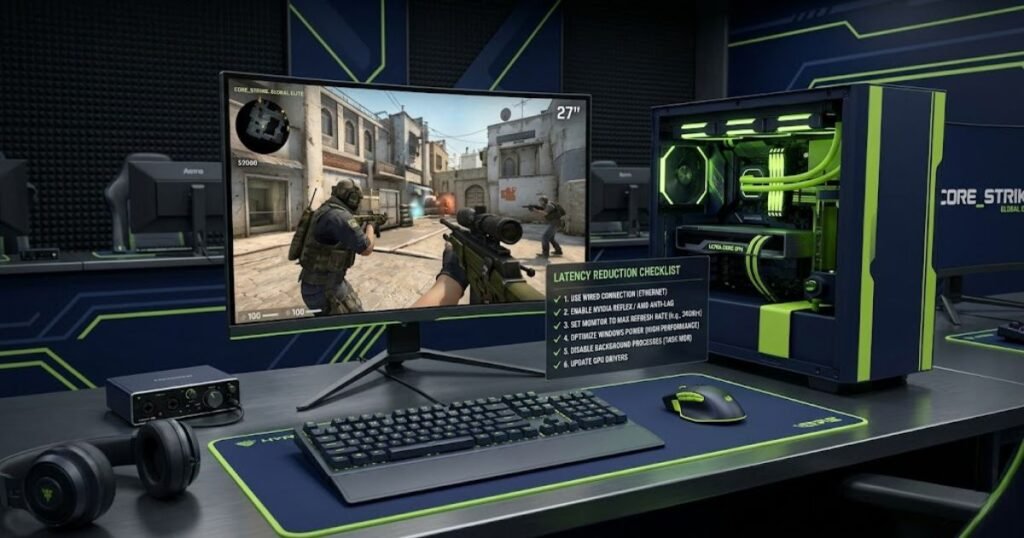
While it is impossible to eliminate all latency, players can significantly improve responsiveness by reducing avoidable delays throughout their gaming setup.
Optimizing Mouse Hardware Settings
The first step is ensuring that the mouse itself is configured appropriately for competitive gaming. Modern gaming mice provide several options that influence responsiveness and consistency.
Common hardware optimizations include:
- Keeping mouse firmware updated.
- Using a stable wireless receiver position.
- Selecting an appropriate polling rate.
- Using a high-quality mouse pad surface.
- Avoiding unnecessary signal interference.
These adjustments help ensure that mouse input reaches the computer as efficiently as possible.
Although hardware improvements alone may not solve every latency issue, they provide a strong foundation for overall responsiveness.
Improving PC Performance and Resource Allocation
System performance plays a major role in determining how quickly input is processed. Even a high-end gaming mouse cannot compensate for a heavily loaded system.
Competitive players often improve responsiveness by reducing unnecessary resource consumption.
Useful optimization strategies include:
- Closing unused background applications.
- Reducing unnecessary startup programs.
- Maintaining adequate CPU headroom.
- Keeping device drivers updated.
- Using performance-focused power settings.
These changes help the operating system and game process input more consistently under load.
In many situations, system-level optimizations provide larger responsiveness gains than hardware upgrades alone.
Reducing Display and Graphics Delays
Display-related latency often has a greater effect on perceived responsiveness than many players realize. Because visual feedback is the final stage of the input chain, delays introduced here are immediately noticeable.
Players seeking lower latency commonly focus on:
- Using high-refresh-rate gaming monitors.
- Maintaining stable frame rates.
- Reducing excessive graphics settings.
- Avoiding unnecessary frame buffering.
- Using low-latency display modes when available.
These adjustments help shorten the time between game processing and visual feedback.
When display latency decreases, mouse movement often feels more immediate even though the mouse itself has not changed.
Removing Software-Based Sources of Latency
Software-related latency can be difficult to identify because it often develops gradually as additional applications and utilities accumulate over time.
Reducing software overhead helps create a cleaner and more predictable gaming environment.
Competitive players frequently disable or limit:
- Unnecessary overlays.
- Unused peripheral software.
- Background recording tools.
- Excessive monitoring utilities.
- Applications that consume system resources during gameplay.
While each individual change may seem small, the cumulative effect can improve overall responsiveness and consistency.
The goal is not simply achieving the lowest latency number possible. Instead, it is creating a system that responds consistently under real gaming conditions.
Mouse Latency Myths That Continue to Mislead Gamers
Many misconceptions about mouse latency continue to circulate within gaming communities. While some contain elements of truth, they often oversimplify how latency actually works.
Understanding these myths helps players make better decisions when troubleshooting responsiveness issues.
Higher DPI Always Means Lower Latency
This myth persists because some latency tests show slight differences between DPI settings. However, DPI primarily controls cursor sensitivity rather than eliminating latency.
Higher DPI may improve data granularity in certain situations, but it does not automatically create a faster or more responsive gaming experience.
Responsiveness depends on the entire input chain rather than a single sensitivity setting.
Wireless Mice Are Automatically Slower Than Wired Mice
This belief was more accurate many years ago when wireless technologies introduced significant delays. Modern gaming mice have dramatically reduced wireless latency and often perform at levels that are nearly indistinguishable from wired alternatives.
In many competitive environments, professional players successfully use wireless gaming mice without experiencing meaningful latency disadvantages.
Wireless performance today depends far more on implementation quality than connection type alone.
8000Hz Polling Rate Eliminates All Input Delay
Higher polling rates reduce the interval between mouse reports, but they do not remove latency from the rest of the system.
Many players incorrectly assume that upgrading to extremely high polling rates automatically solves responsiveness issues. In reality, rendering delays, display latency, operating system behavior, and game engine processing still contribute to total latency.
Players interested in understanding the real-world differences should examine 4000Hz versus 8000Hz polling rate performance rather than assuming that higher numbers always produce dramatic improvements.
Polling rate remains only one component within a much larger latency equation.
Buying a New Mouse Always Fixes Latency Problems
This is perhaps the most common misconception of all. While outdated or low-quality mice can contribute to latency, many responsiveness problems originate elsewhere.
System bottlenecks, display processing, software behavior, graphics settings, and operating system configuration frequently play larger roles than the mouse itself.
Replacing hardware without identifying the true source of delay often leads to disappointment because the underlying issue remains unchanged.
Effective troubleshooting begins with understanding the complete input chain rather than assuming that new hardware is always the answer.
Frequently Asked Questions About Mouse Latency in FPS Gaming
Players researching mouse latency often encounter similar questions regarding responsiveness, hardware performance, system optimization, and competitive gaming. The answers below address the most common concerns while reinforcing the key concepts discussed throughout this guide.
What causes mouse latency in gaming?
Mouse latency is caused by delays that occur between physical mouse input and visual feedback on screen. These delays can originate from mouse hardware, the operating system, PC performance, graphics processing, display behavior, or game engine processing.
What is considered good mouse latency for FPS games?
Competitive players generally prefer the lowest latency possible, but consistency is often more important than chasing specific numbers. Modern gaming mice typically provide latency levels that are suitable for competitive FPS gaming when paired with a properly optimized system.
How is mouse latency different from input lag?
Mouse latency refers specifically to delays associated with mouse input, while input lag refers to the total delay between user input and visual output. Mouse latency is therefore one component of overall input lag.
Does polling rate affect mouse latency?
Yes. Polling rate influences how frequently a mouse sends updates to the computer. Higher polling rates reduce the maximum interval between reports, but they do not eliminate latency elsewhere in the input chain.
Can CPU usage increase mouse latency?
Yes. High CPU utilization can delay input processing and increase overall system latency. This is particularly common when games compete with background applications for system resources.
Can a monitor cause mouse latency?
Yes. Display processing, refresh rate limitations, frame buffering, and other monitor-related factors can increase the time required before visual feedback appears on screen.
Is wireless mouse latency still a problem in modern gaming?
For most modern gaming mice, wireless latency is no longer a major concern. High-quality wireless implementations often provide responsiveness that is extremely close to wired performance.
Why does my mouse feel delayed even when FPS is high?
High frame rates do not guarantee low latency. Display processing, operating system behavior, background applications, driver issues, and other factors can still contribute to delayed responsiveness.
How can I test mouse latency at home?
Players can use online latency tools, high-speed video analysis, or specialized technologies such as NVIDIA Reflex Analyzer to evaluate responsiveness and identify potential latency issues.
Can USB ports affect mouse performance?
Yes. USB controller congestion, poor-quality hubs, unstable connections, and certain driver issues can influence communication between the mouse and the computer.
What is the fastest way to reduce mouse latency?
The most effective approach is identifying the largest source of delay within the input chain. Hardware upgrades alone are rarely the complete solution.
Does mouse latency really matter for competitive FPS gaming?
Yes. Lower and more consistent latency improves the connection between physical movement and visual feedback, helping players maintain precise aim, accurate tracking, and reliable reaction timing.
Final Thoughts on What Causes Mouse Latency
Mouse latency is rarely caused by a single component. Instead, it develops as input moves through the mouse, operating system, game engine, graphics pipeline, and display before finally appearing on screen.
Understanding this complete input chain is the key to diagnosing responsiveness issues accurately. Rather than focusing exclusively on hardware specifications, competitive players should evaluate every stage that contributes to latency.
For players building a responsive competitive setup, choosing the best gaming mouse for FPS games is only one part of the equation. Long-term responsiveness comes from optimizing the entire gaming system so that every movement feels immediate, consistent, and predictable.
Thank you for reading GearTP. We hope this guide helps you better understand what causes mouse latency and how to create a more responsive FPS gaming experience.