
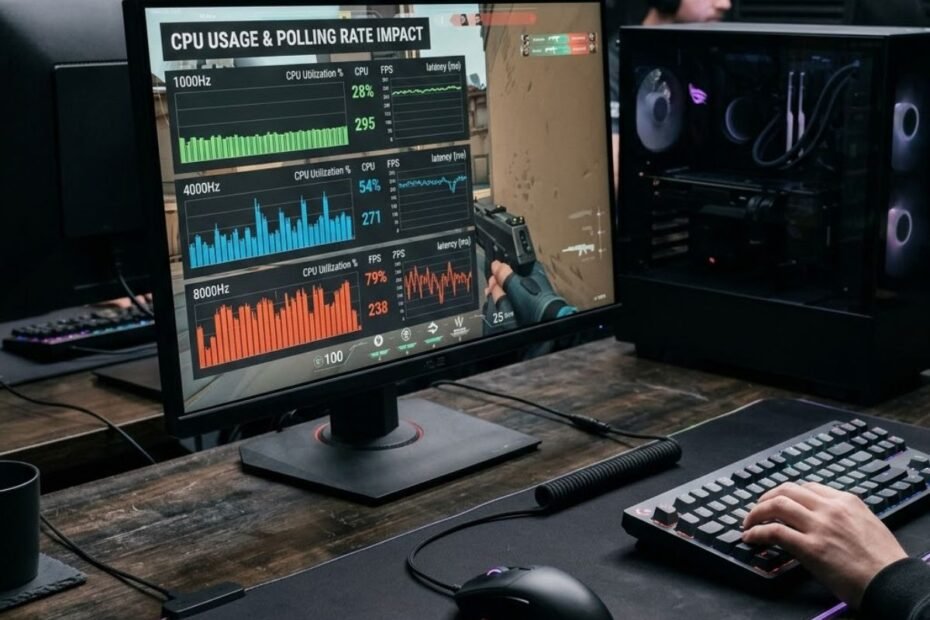
Polling rate increases CPU activity because the system must process more mouse reports every second. However, a higher polling rate does not automatically mean a major performance loss. The real impact depends on the polling rate itself, CPU performance, operating system behavior, and how a game handles input data. For most FPS players, understanding this relationship helps determine whether moving from 1000Hz to 4000Hz or 8000Hz is actually worthwhile.
As gaming mice continue to adopt 4000Hz and 8000Hz polling rates, discussions about CPU usage have become increasingly common. Some players report smoother responsiveness, while others notice higher CPU load or occasional frame-time spikes. To understand what is really happening, it is important to look at how polling rate interacts with the system rather than focusing only on marketing specifications.
What Is the Relationship Between Polling Rate and CPU Usage?
The relationship between polling rate and CPU usage is straightforward: as polling rate increases, the computer receives and processes more mouse reports every second. Each report contains movement and button input information that must travel through the operating system before reaching a game. More reports require more processing work, which naturally increases CPU activity.
The illustration below shows how higher polling rates increase the number of mouse reports sent to the computer:
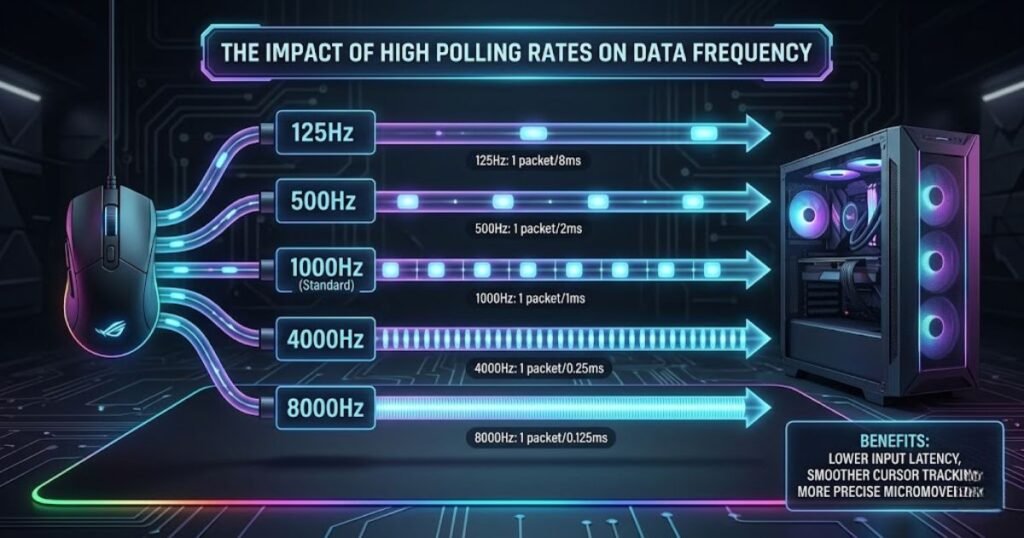
Although this additional workload is usually small on modern systems, it becomes more noticeable as polling rates move beyond traditional 1000Hz settings. Understanding why this happens starts with understanding how polling rate works.
How Mouse Reports Travel From the Sensor to the CPU
A mouse report is a package of input data sent from the mouse to the computer. Every time the mouse sends a report, the operating system receives new movement information that can be used by applications and games.
When a player moves a gaming mouse, the sensor tracks movement and converts it into digital information. This information is transmitted through the USB connection according to the configured polling rate. The operating system receives these reports and passes them to software that needs the data.
The process happens continuously while gaming:
- The mouse sensor detects movement.
- The mouse generates a report.
- The USB connection transfers the report.
- The operating system receives the input.
- The CPU processes the information.
- The game reads the updated mouse position.
Because every report must move through this chain, increasing the number of reports naturally increases the amount of work performed by the system.
Why More Reports Require More Processing Time
Higher polling rates generate more reports per second, which means the CPU must handle more input events during the same amount of time. Even though individual mouse reports are very small, processing thousands of them every second creates additional overhead.
A 1000Hz polling rate sends one thousand reports every second. An 8000Hz polling rate sends eight thousand reports during the same period. While the data size remains relatively small, the system must still receive, manage, and distribute every report.
The comparison below shows how report frequency changes as polling rates increase:
| Polling Rate | Reports Per Second | Relative Input Activity |
|---|---|---|
| 125Hz | 125 | Very Low |
| 250Hz | 250 | Low |
| 500Hz | 500 | Moderate |
| 1000Hz | 1,000 | Standard Gaming Level |
| 2000Hz | 2,000 | High |
| 4000Hz | 4,000 | Very High |
| 8000Hz | 8,000 | Extreme |
As the table demonstrates, report frequency scales directly with polling rate. This increase explains why higher polling rates place additional demands on the operating system and processor even before a game begins using the input data.
Why CPU Usage Rises as Polling Rate Increases
CPU usage rises because each report must be processed individually rather than being grouped into a single update. The operating system cannot simply ignore incoming reports. Every report must be received, interpreted, and made available to software.
At lower polling rates, the amount of work remains relatively small. As polling rates move to 4000Hz and 8000Hz, the frequency of processing events increases significantly. The result is higher CPU activity, particularly in scenarios where the processor is already busy handling game logic, physics calculations, rendering preparation, and background tasks.
This does not necessarily mean that gaming performance will suffer. It simply means the CPU is being asked to perform more input-related work than it would at lower polling rates.
Before examining CPU overhead in greater detail, it helps to understand exactly what polling rate means in a gaming mouse and how report frequency influences communication between the mouse and the system.
Why Higher Polling Rates Create Additional CPU Overhead
Higher polling rates create CPU overhead because the system must react to input events more frequently. While the amount of data remains relatively small, the frequency of processing increases dramatically at 4000Hz and 8000Hz.
To understand this behavior, it is useful to look beyond the mouse itself and examine how modern operating systems handle USB input devices.
USB Polling and Interrupt Processing
USB devices communicate with the computer through a continuous process of data exchange. Every mouse report creates work that must be handled by the USB subsystem and eventually by the CPU.
Whenever new input data arrives, the system must acknowledge the report and make it available for applications. This process occurs thousands of times per second on modern gaming mice.
The following example illustrates how mouse input travels through the system before reaching a game:
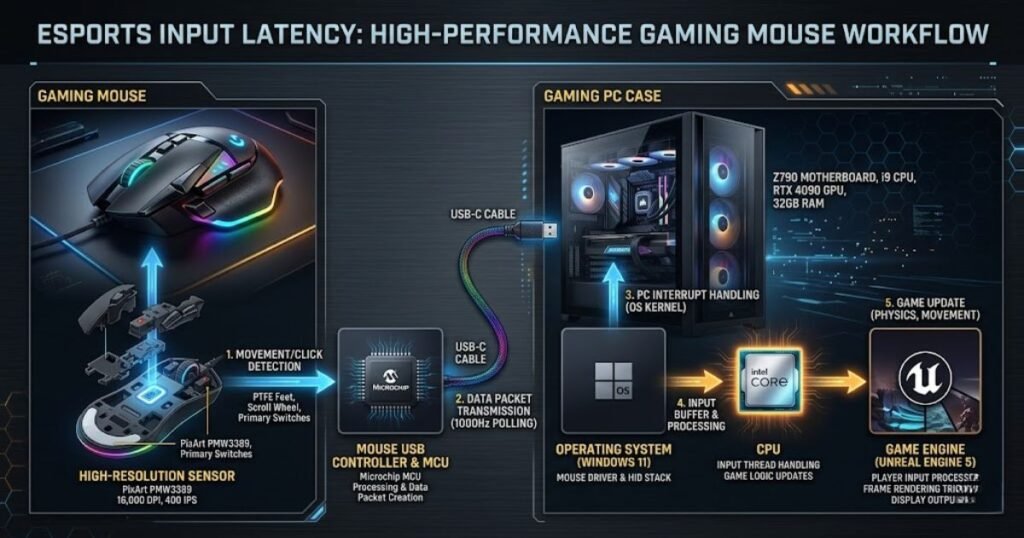
At lower polling rates, the number of processing events remains manageable. At higher polling rates, the frequency of these events rises substantially, increasing total CPU workload even if each individual event is extremely small.
The sequence below summarizes how high polling rates generate additional workload:
- The mouse sensor detects movement.
- The mouse sends a USB report.
- The USB controller receives the report.
- The operating system processes the event.
- The CPU updates input information.
- The game engine accesses the latest mouse data.
This workflow repeats continuously while gaming, making polling rate one of the factors that influences input-related CPU activity.
How Windows Handles Mouse Input Data
Windows processes incoming mouse reports through its input handling system before forwarding information to applications. Every report must pass through several software layers before a game can use the data.
These layers perform tasks such as event management, device communication, and application delivery. The faster reports arrive, the more frequently these processes must execute.
Although modern operating systems are highly optimized for this workload, increasing report frequency still increases the amount of processing that must occur every second.
This is one reason why CPU usage measurements often show higher values when moving from 1000Hz to 8000Hz polling rates.
Why 8000Hz Generates Eight Times More Reports Than 1000Hz
An 8000Hz polling rate produces eight times as many reports as a 1000Hz polling rate. This increase is the primary reason discussions about CPU usage usually focus on 8000Hz mice rather than 1000Hz models.
While the relationship is mathematically simple, the resulting CPU impact varies between systems. Some processors can absorb the extra workload with little measurable impact, while others experience more noticeable overhead.
The comparison below illustrates how processing demand grows alongside report frequency:
| Polling Rate | Reports Per Second | Relative CPU Workload |
|---|---|---|
| 1000Hz | 1,000 | Baseline |
| 2000Hz | 2,000 | 2× Baseline |
| 4000Hz | 4,000 | 4× Baseline |
| 8000Hz | 8,000 | 8× Baseline |
The table does not imply that CPU usage itself increases by exactly eight times. Instead, it shows that the number of input-processing events rises proportionally. Real-world CPU impact depends on hardware efficiency, operating system optimization, and the demands of the game being played.
Understanding this distinction is important because many discussions confuse increased report frequency with guaranteed performance loss. In reality, the amount of additional CPU work varies considerably between systems and gaming scenarios.
How Much CPU Usage Changes Between 1000Hz, 4000Hz, and 8000Hz
CPU usage generally increases as polling rate rises, but the increase is usually much smaller than many gamers expect. Moving from 1000Hz to 4000Hz or 8000Hz creates additional processing work, yet modern CPUs are often powerful enough to absorb that workload without causing major issues. The real question is not whether CPU usage increases, but whether the increase is large enough to affect the gaming experience.
Because every system is different, there is no universal CPU usage number that applies to all PCs. Processor architecture, background applications, operating system behavior, and game engine design all influence the final result.
CPU Impact on Modern Gaming PCs
Modern gaming CPUs typically handle higher polling rates with minimal overall CPU utilization increases. Processors designed for gaming workloads already manage thousands of calculations every frame, making mouse input processing a relatively small part of the total workload.
When moving from 1000Hz to 4000Hz, many users notice little to no measurable difference in overall system responsiveness. Even at 8000Hz, the CPU overhead often remains manageable on recent gaming hardware.
The comparison below illustrates the general trend seen on modern gaming systems:
| Polling Rate | CPU Impact | Typical User Experience |
|---|---|---|
| 1000Hz | Very Low | No noticeable overhead |
| 2000Hz | Low | Typically unchanged |
| 4000Hz | Moderate | Usually stable |
| 8000Hz | Highest | Depends on system capability |
As the table shows, CPU workload rises progressively rather than suddenly. This is why many players upgrading to 4000Hz do not immediately notice any significant changes in gaming performance.
CPU Impact on Older Systems
Older systems are more likely to experience noticeable overhead because they have fewer resources available for additional input processing. CPUs that are already operating near their performance limits have less capacity to handle the extra workload created by extremely high polling rates.
This does not mean older systems cannot use 4000Hz or 8000Hz polling rates. However, the probability of encountering frame-time inconsistencies, stutters, or higher CPU utilization increases compared to newer hardware.
Several factors can make older systems more sensitive:
- Lower single-thread performance.
- Fewer CPU cores.
- Background applications consuming resources.
- Games that already place heavy demands on the processor.
When these factors combine, even relatively small increases in input-processing workload can become more noticeable.
Why Benchmark Results Often Look Different
Polling rate benchmarks frequently produce different results because testing environments vary significantly. Two reviewers can test the same mouse at 8000Hz and report different CPU usage measurements simply because their hardware and software configurations differ.
Variables that influence results include:
- CPU model.
- Operating system version.
- Background software.
- Game engine optimization.
- Frame rate targets.
- USB controller implementation.
Because of these differences, benchmark numbers should be viewed as directional rather than universal. The trend remains consistent: higher polling rates increase CPU activity, but the size of the increase depends on the environment being tested.
Players who want a deeper breakdown of real-world differences can compare 1000Hz vs 4000Hz polling rate performance across modern gaming systems.
In short, polling rate affects CPU usage on every system, but the practical significance of that increase depends heavily on the available hardware resources.
Can High Polling Rates Reduce Gaming Performance?
High polling rates can reduce gaming performance when the CPU becomes a bottleneck, but this does not happen on every system. The additional processing required by higher polling rates competes for CPU resources that games also need. Whether the impact becomes visible depends on how much spare CPU capacity is available.
This distinction is important because increased CPU usage and reduced gaming performance are not always the same thing. A system can show higher CPU activity while maintaining identical frame rates and responsiveness.
When FPS Drops Become Noticeable
FPS reductions become more likely when a CPU is already operating near its performance limits. In these situations, adding thousands of additional input events every second can increase workload enough to affect frame generation.
This comparison demonstrates how CPU workload and frame-rate targets interact during gameplay:
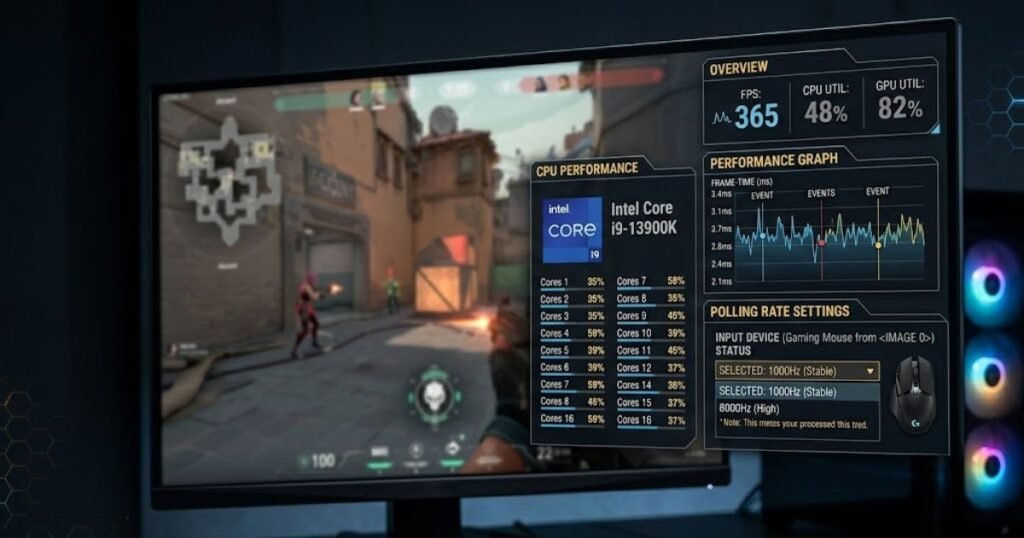
Competitive FPS titles often run at very high frame rates. Players targeting 300 FPS, 400 FPS, or higher place considerable demand on the processor. Under those conditions, even relatively small increases in CPU workload can influence performance.
The following scenarios illustrate how polling rate can affect gaming performance:
| System Condition | Performance Impact Risk | Expected Outcome |
|---|---|---|
| Low CPU Utilization | Very Low | No noticeable change |
| Moderate CPU Utilization | Low | Minor differences possible |
| High CPU Utilization | Moderate | Potential FPS reduction |
| CPU Bottlenecked | High | Possible stutters or FPS loss |
The table highlights that system conditions matter more than polling rate alone. The same 8000Hz mouse may behave differently depending on how heavily the processor is already being used.
Why Frame-Time Spikes Matter More Than Average FPS
Frame-time consistency often matters more than average FPS when evaluating polling rate performance. Competitive shooters depend on smooth and predictable frame delivery rather than a single average FPS number.
Even if average frame rates remain unchanged, inconsistent frame times can make gameplay feel less responsive. Small spikes may affect aiming precision, tracking, and overall mouse feel.
This is why many enthusiasts monitor frame-time graphs rather than focusing solely on FPS counters. Frame-time stability often reveals subtle issues that average FPS numbers fail to show.
Higher polling rates do not automatically cause frame-time spikes, but systems operating close to CPU limits are generally more vulnerable to them.
Games That Are More Sensitive to Input Processing
Some games react more strongly to high polling rates because they process input data more aggressively or operate at extremely high frame rates. Competitive shooters are often the most discussed examples because players frequently pursue maximum responsiveness.
Games commonly associated with polling-rate discussions include:
- Valorant
- Counter-Strike 2
- Apex Legends
- Rainbow Six Siege
- Overwatch 2
These titles often run at high frame rates and place significant emphasis on mouse precision, making small changes easier for experienced players to notice.
Most concerns about CPU load appear when gamers move beyond 4000Hz, making a detailed comparison of 4000Hz vs 8000Hz polling rate behavior especially useful.
Ultimately, gaming performance depends on the balance between polling rate, available CPU resources, and the demands of the game being played rather than polling rate alone.
Which Systems Benefit Least From 8000Hz Polling Rate?
Systems with limited CPU resources generally benefit the least from 8000Hz polling rates because the additional processing workload provides minimal practical advantages. While higher polling rates can reduce input latency slightly, not every system can take full advantage of those gains.
The example below compares hardware configurations that benefit differently from 8000Hz polling rates:
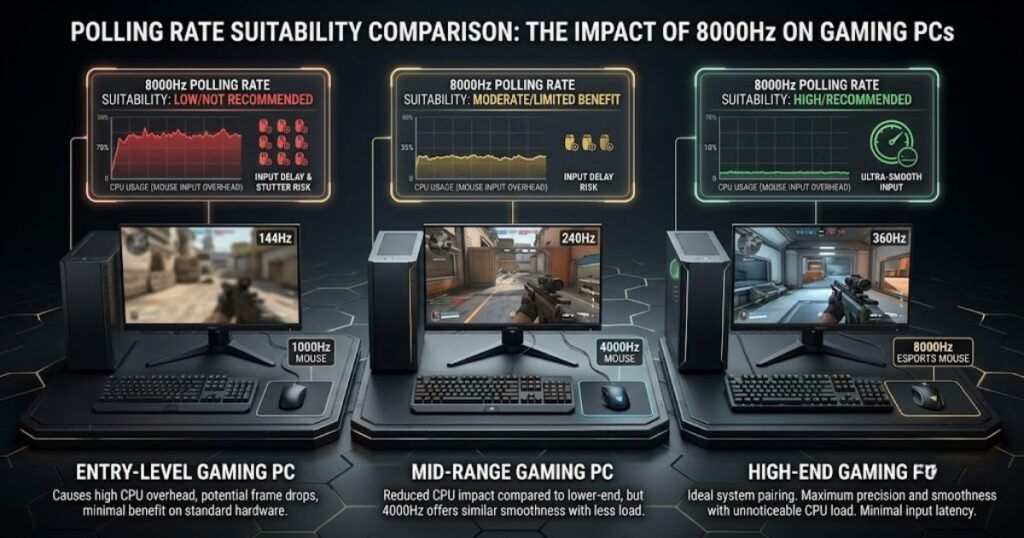
Understanding where 8000Hz offers limited value helps players make more informed decisions about whether upgrading polling rate settings is worthwhile.
Entry-Level Gaming PCs
Entry-level gaming systems often see the smallest benefit from 8000Hz polling rates. These PCs typically prioritize overall gaming performance over extremely small input latency improvements.
When processor resources are limited, allocating additional CPU time to input processing may not provide a meaningful competitive advantage. In many cases, maintaining stable frame rates delivers a greater benefit than maximizing polling rate.
Older CPUs With Fewer Cores
Older processors usually have less flexibility when handling additional workloads. Although polling rate alone rarely overwhelms a CPU, older architectures are generally less efficient at multitasking compared to modern gaming processors.
As a result, the trade-off between additional CPU activity and reduced input latency becomes less favorable on aging hardware.
Systems Already Running Near Maximum CPU Utilization
Any system operating close to full CPU utilization is a poor candidate for extremely high polling rates. When resources are already heavily consumed, adding more processing events creates additional pressure on the processor.
Common warning signs include:
- Frequent CPU usage spikes.
- Frame-time instability.
- Stutters during intense gameplay.
- Reduced responsiveness when multitasking.
The comparison below summarizes which systems are least likely to benefit from 8000Hz polling rates:
| System Type | Expected Benefit | Recommendation |
|---|---|---|
| Entry-Level Gaming PC | Low | 1000Hz–4000Hz |
| Older CPU Platform | Low | 1000Hz–4000Hz |
| CPU-Limited System | Very Low | Prioritize stability |
| Modern High-End PC | Highest | Consider 8000Hz |
As the table indicates, the systems that benefit most from 8000Hz polling rates are typically those with abundant CPU resources. For everyone else, lower polling rates often provide a more balanced combination of responsiveness and efficiency.
When Does 8000Hz Polling Rate Actually Make Sense?
8000Hz polling rates make the most sense when a gaming setup can fully support the additional input-processing workload and the player values every possible reduction in input latency. While 8000Hz has become a popular specification among flagship gaming mice, it is not automatically the best choice for every player or every system.
The key question is not whether 8000Hz is technically faster than 1000Hz. It is. The more important question is whether the improvement is meaningful enough to justify the additional CPU activity and potential compatibility considerations.
Competitive FPS Scenarios
Competitive FPS players are the group most likely to benefit from 8000Hz polling rates. Games such as Valorant, Counter-Strike 2, and Apex Legends reward precise aiming, fast reactions, and consistent mouse tracking.
At extremely high levels of competition, players often optimize every aspect of their setup, including monitors, mice, keyboards, graphics settings, and system latency. Within this environment, even small improvements become valuable.
Some situations where 8000Hz may provide the greatest value include:
- Professional esports competition.
- High-level ranked play.
- Aim training and precision-focused practice.
- Players who are highly sensitive to mouse responsiveness.
For these users, reducing input delay by even a small amount may contribute to a more responsive overall experience.
High-Refresh-Rate Monitor Setups
The advantages of higher polling rates become easier to justify when paired with high-refresh-rate displays. A monitor capable of updating hundreds of times per second can expose smaller differences in system responsiveness than lower refresh-rate displays.
As refresh rates increase, the entire system becomes more capable of displaying subtle improvements in input timing. While the gains remain relatively small, the environment is better suited to taking advantage of them.
The comparison below illustrates how polling rate and display refresh rates often align:
| Display Refresh Rate | Polling Rate Compatibility | Potential Benefit Level |
|---|---|---|
| 60Hz | 1000Hz | Low |
| 144Hz | 1000Hz–4000Hz | Moderate |
| 240Hz | 4000Hz | High |
| 360Hz+ | 4000Hz–8000Hz | Highest |
As monitor refresh rates climb, the potential value of higher polling rates generally increases. However, display refresh rate alone does not guarantee that a player will notice a meaningful difference.
Situations Where Lower Polling Rates Remain the Better Choice
Lower polling rates often remain the smarter option when system efficiency and stability are more important than chasing the smallest possible latency improvements.
Many players use 1000Hz or 4000Hz because these settings provide an excellent balance between responsiveness and hardware demands. In practice, they already deliver extremely fast input updates that are sufficient for the vast majority of FPS gamers.
Lower polling rates may be preferable when:
- The CPU is already heavily utilized.
- Gaming performance is the primary priority.
- The system is older or mid-range.
- Input responsiveness already feels excellent.
- Stability is more important than theoretical latency gains.
The decision ultimately comes down to priorities. Some players prefer maximizing responsiveness, while others prefer minimizing unnecessary system overhead.
While CPU overhead is one side of the equation, many competitive players are equally concerned about polling rate and input latency when choosing higher report rates.
In short, 8000Hz makes the most sense when the hardware, display, and competitive goals all align to support its advantages.
Common Misconceptions About Polling Rate and CPU Usage
Many claims about polling rate and CPU usage are based on misunderstandings, incomplete benchmarks, or exaggerated assumptions. While higher polling rates do increase processing activity, the real-world effects are often more nuanced than internet discussions suggest.
Separating facts from myths helps players make better decisions about their mouse settings and system configuration.
Myth: 8000Hz Always Hurts FPS
8000Hz does not automatically reduce FPS on every system. Modern gaming PCs frequently handle the additional workload without producing measurable frame-rate losses.
Performance problems usually appear only when a CPU is already heavily loaded or when a particular game reacts poorly to increased input-processing activity. Many players use 8000Hz successfully without observing any meaningful FPS reduction.
As a result, the statement that 8000Hz always hurts gaming performance is inaccurate.
Myth: Higher Polling Rates Always Improve Aim
Higher polling rates do not guarantee better aiming performance. A player’s mechanics, game knowledge, reaction time, and consistency remain far more important than polling rate alone.
Although higher polling rates can reduce input latency slightly, the improvement is relatively small compared to the influence of training and skill development.
Many elite players have achieved exceptional results using 1000Hz polling rates long before 4000Hz and 8000Hz devices became common.
Myth: CPU Usage Increases Dramatically on Every PC
The increase in CPU usage varies significantly from one system to another. Some PCs show only minor changes when switching to higher polling rates, while others display more noticeable differences.
Factors influencing results include:
- CPU architecture.
- Game engine behavior.
- Operating system optimization.
- Background applications.
- Current CPU utilization.
Because these variables differ between users, blanket statements about CPU impact are often misleading.
The most accurate conclusion is that higher polling rates increase CPU activity, but the practical consequences depend heavily on the environment.
Is Higher Polling Rate Worth the Extra CPU Usage?
For most FPS players, higher polling rates are worth using when the system can support them comfortably, but the practical gains become smaller as polling rates increase. The jump from lower polling rates to 1000Hz is generally significant, while the difference between 4000Hz and 8000Hz is often much harder to notice.
This visual highlights the trade-off between responsiveness and CPU demand at different polling rates:
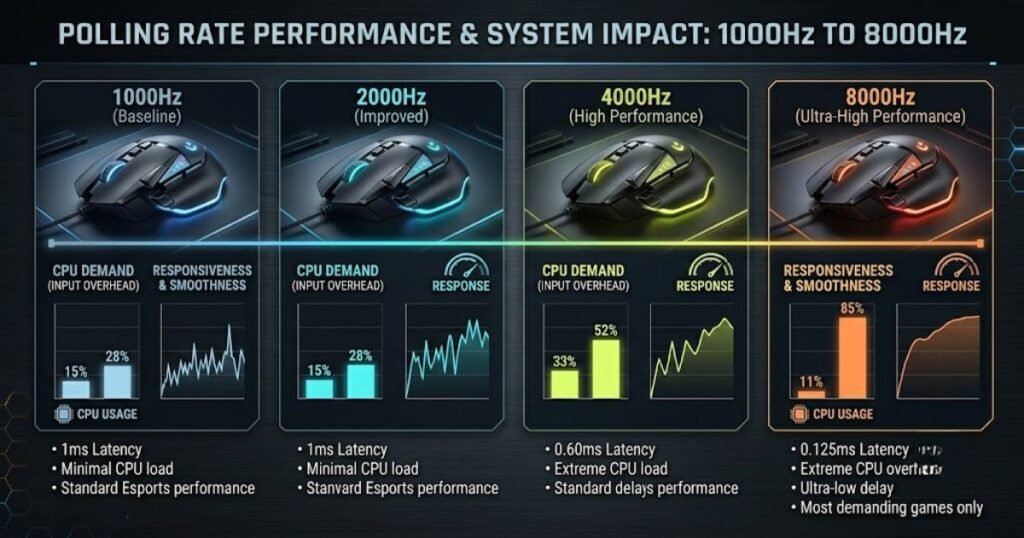
Evaluating value requires considering both the benefits and the costs rather than focusing on a single specification.
The comparison below summarizes the trade-offs involved:
| Polling Rate | Responsiveness | CPU Demand | Overall Balance |
|---|---|---|---|
| 1000Hz | Excellent | Low | Best for most players |
| 2000Hz | Very High | Low | Strong balance |
| 4000Hz | Extremely High | Moderate | Enthusiast choice |
| 8000Hz | Maximum | Highest | Niche optimization |
As the table demonstrates, each step upward in polling rate delivers diminishing returns. Responsiveness continues to improve, but the improvements become progressively smaller while CPU demands continue to rise.
For most gamers, 1000Hz or 4000Hz offers the most practical balance. Competitive enthusiasts with powerful systems may choose 8000Hz, but the benefits are typically incremental rather than transformative.
Ultimately, polling rate should be viewed as one part of a larger performance equation that includes hardware capability, display refresh rate, game optimization, and personal preference.
Frequently Asked Questions About Polling Rate and CPU Usage
Polling rate and CPU usage generate many questions among FPS gamers because the topic combines hardware performance, input responsiveness, and real-world gaming results. The answers below address the most common concerns.
What is polling rate in a gaming mouse?
Polling rate is the frequency at which a mouse sends position and button data to a computer. It is measured in hertz (Hz) and indicates how many reports are transmitted each second.
Does polling rate increase CPU usage?
Yes. Higher polling rates increase CPU activity because the system must process more mouse reports every second.
How much CPU usage does 8000Hz add?
The exact increase varies by system, operating system, and game. Modern gaming PCs often experience only a modest increase, while older systems may show more noticeable changes.
Can polling rate reduce FPS?
Polling rate can reduce FPS if the processor becomes a bottleneck, but this does not happen on every system.
Does polling rate affect frame times?
Yes. In some situations, extremely high polling rates may influence frame-time consistency, particularly on CPU-limited systems.
Is 8000Hz better than 1000Hz?
8000Hz provides more frequent updates than 1000Hz, but the practical improvement depends on the player’s hardware and sensitivity to input responsiveness.
Do all games support 8000Hz polling rates?
Most modern games work with 8000Hz devices, but implementation quality and performance impact vary between game engines.
Why do some games stutter at high polling rates?
Stuttering may occur when increased input-processing workload combines with existing CPU limitations or game-engine inefficiencies.
Does polling rate affect input latency?
Yes. Higher polling rates reduce the delay between mouse movement and report delivery, helping lower overall input latency.
Should competitive FPS players use 8000Hz?
Competitive players with powerful systems may benefit from 8000Hz, especially when pursuing maximum responsiveness.
What polling rate is best for mid-range gaming PCs?
Many mid-range systems achieve an excellent balance between responsiveness and efficiency at 1000Hz or 4000Hz.
Can lowering polling rate improve stability?
Yes. Reducing polling rate can decrease CPU workload and may improve consistency on systems experiencing performance issues.
Conclusion
Polling rate increases CPU usage because higher report frequencies require additional input processing, but the impact is usually smaller than many gamers expect. Modern gaming PCs often handle 1000Hz, 4000Hz, and even 8000Hz polling rates without significant problems, while older or CPU-limited systems may experience more noticeable overhead.
For most FPS players, the best approach is to balance responsiveness with system stability. Higher polling rates can reduce input latency, but the practical benefits become smaller as polling rates rise. Understanding this trade-off allows players to choose settings that match both their hardware and competitive goals.
Thank you for reading.