
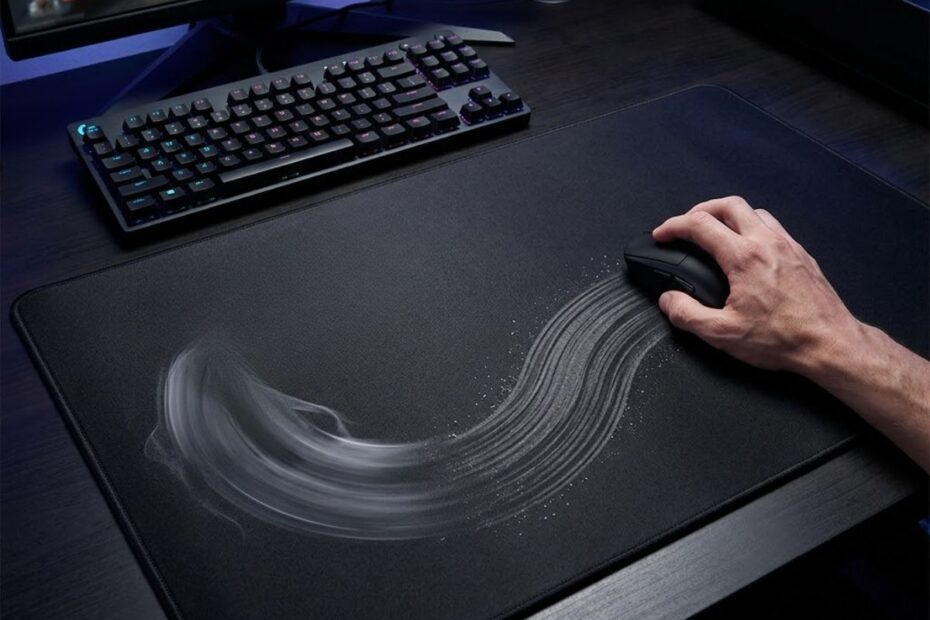
Mouse pad friction is the resistance you feel when your mouse skates move across a mouse pad surface. It helps determine whether your mouse feels fast, controlled, smooth, sticky, or easy to stop during FPS gameplay.
For FPS players, friction matters because aim is not only about DPI, sensitivity, or mouse weight. The surface under the mouse changes how movement starts, how glide continues, and how easily the mouse stops when your crosshair reaches the target.
That is why two players can use the same mouse and the same sensitivity but feel completely different levels of control on different mouse pads. Understanding friction helps you choose a surface that supports your aim style instead of forcing your hand to fight the pad.
What Is Mouse Pad Friction?
Mouse pad friction is the resistance created between a mouse skate and a mouse pad surface. It helps determine how much effort is needed to start, move, and stop the mouse during aiming movements.
In simple terms, friction is the reason one mouse pad feels slow and controlled while another feels fast and slippery. A mouse does not glide through empty air. It moves across fabric, hybrid material, glass, or another surface, and that contact creates resistance.
Example of mouse pad friction during movement:
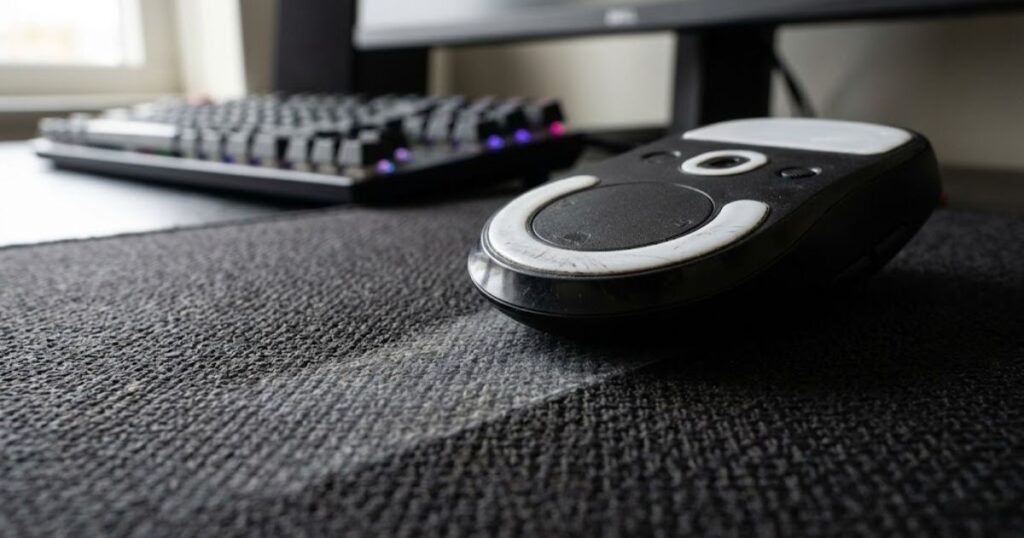
This resistance is not always bad. In FPS games, a certain amount of friction can help stabilize your aim, especially when you need to stop on a small target or make tiny corrections around the head level.
How Friction Is Created Between Mouse Skates and Mouse Pads
Friction is created when mouse feet interact with the texture and material of a mouse pad surface. It helps shape the glide feeling every time the mouse moves across the pad.
Mouse skates are usually made from PTFE or similar low-friction materials, but they still make contact with the pad. The smoother the surface interaction feels, the easier the mouse glides. The rougher or more textured the surface feels, the more resistance the player notices.
The shape and condition of the mouse skates also matter. Fresh, rounded skates often glide more smoothly than worn or scratched skates, even on the same mouse pad.
Why Every Mouse Pad Has a Different Friction Level
Every mouse pad has a different friction level because surface material, weave pattern, coating, and wear condition all change glide resistance. These differences help explain why mouse pads can feel very different even when they look similar.
Some cloth pads use tighter weaves that create more control. Some hybrid pads use textured surfaces that feel faster while still offering moderate stopping power. Hard pads and glass pads usually reduce friction more aggressively, which can make movement feel faster but less forgiving.
Different friction characteristics are one reason why a gaming surface feels different from another. If you are still unfamiliar with the fundamentals of gaming surfaces, it can help to understand what a gaming mouse pad for FPS games actually does before comparing friction levels.
The factors below explain what influences mouse pad friction:
- Surface material: Cloth, hybrid, hard, and glass surfaces create different levels of resistance.
- Surface texture: Rougher textures usually create more drag, while smoother textures usually feel faster.
- Mouse skates: Skate material, shape, and wear condition can change how the mouse glides.
- Humidity: Moisture can make some cloth pads feel slower or less consistent.
- Dust accumulation: Dirt and debris can increase resistance and create uneven glide zones.
- Surface condition: A worn surface may feel different from the same pad when it was new.
These factors work together instead of acting separately. That is why friction should be judged by real movement feel, not by surface material alone.
Mouse pad friction is a physical characteristic found on every gaming surface. The amount of friction depends on multiple surface-related factors, and those factors directly affect how controlled or fast the mouse feels during gameplay.
Why Mouse Pad Friction Matters for FPS Aim
Mouse pad friction helps influence how accurately players start, stop, and control mouse movements during FPS gameplay. It is important because aiming depends on both movement speed and movement control.
In FPS games, the mouse rarely moves in one simple motion. Players constantly switch between micro adjustments, fast flicks, recoil control, angle clearing, and target tracking. Each of those actions feels different depending on the friction level of the pad.
A very fast surface may feel exciting at first, but it can make stopping harder for some players. A very controlled surface may improve precision, but it can feel tiring or restrictive if the player needs large movements often.
How Friction Influences Micro Adjustments
Friction helps stabilize small aiming corrections during precision shooting situations. This is especially important when players need to adjust the crosshair by only a few pixels.
Micro adjustments are common in tactical FPS games like Valorant and CS2. When your crosshair is already close to the target, you do not need a huge movement. You need a small, controlled correction that does not overshoot.
Higher or more balanced friction can make these small movements feel more deliberate. The mouse may not start moving as instantly as it would on a very fast surface, but that extra resistance can help some players feel more stable.
How Friction Influences Flick Control
Friction helps determine how easily players can stop a fast mouse movement at the intended target. This makes it important for flick shots, angle snaps, and sudden target switches.
A flick shot is not only about moving the mouse quickly. The player also has to stop the mouse at the right point. If the surface is too slippery for the player’s control level, the crosshair can pass the target even when the movement starts correctly.
More controlled friction can help the mouse slow down sooner at the end of a movement. That stopping behavior is one reason many FPS players care about surface feel instead of only chasing the fastest glide possible.
How Friction Influences Tracking Performance
Friction helps affect how smoothly players can follow moving targets over time. Tracking requires continuous movement, so the mouse pad needs to feel predictable throughout the glide.
In tracking-heavy games, players often move the mouse for longer periods while following strafing enemies. If friction feels uneven, the crosshair can speed up, slow down, or hesitate in ways that make tracking less stable.
Consistent glide is important because even small changes in surface resistance can alter tracking behavior. This is one reason many FPS players pay close attention to whether mouse pads affect aim consistency over time.
The factors below explain how friction affects aiming performance:
- Micro adjustments: Friction can help make small aim corrections feel more controlled.
- Flick control: Friction affects how easily the mouse stops after fast movement.
- Tracking stability: Consistent friction helps maintain smoother movement across the pad.
- Stopping precision: More control can help players stop closer to the intended target.
- Overall consistency: Predictable resistance helps aim feel repeatable across different rounds.
Friction affects more than glide speed. It influences how the mouse behaves during the most important aiming actions in FPS games.
Mouse pad friction matters because FPS aim depends on repeatable movement. When the surface feels predictable, players can build more reliable muscle memory and make better decisions about their setup.
Static Friction vs Dynamic Friction Explained
Static friction affects how movement begins, while dynamic friction affects how movement feels once the mouse is already gliding. Understanding the difference helps explain why some mouse pads feel controlled while others feel effortless to move across.
Many FPS players describe a pad as feeling “slow” or “fast,” but that feeling is usually influenced by both static friction and dynamic friction together. Looking at only one friction type rarely reflects how a surface behaves during real gameplay.
By separating these two concepts, players can better understand why some pads excel at precision aiming while others feel smoother for tracking-heavy games.
What Is Static Friction?
Static friction is the resistance that must be overcome before the mouse starts moving. It helps determine how much force is required to initiate a movement from a stationary position.
Every time you place your crosshair on an angle and begin moving toward a target, static friction is involved. A higher level of static friction creates more resistance before movement starts, while a lower level allows movement to begin more easily.
This characteristic is often noticeable during micro adjustments because those movements start from a complete stop. Players who prefer precise corrections often pay close attention to static friction when evaluating a mouse pad.
What Is Dynamic Friction?
Dynamic friction is the resistance experienced while the mouse is already moving across the surface. It helps determine how smooth or controlled the glide feels during continuous motion.
Once the mouse begins moving, dynamic friction becomes the dominant force affecting the glide. Lower dynamic friction often creates a smoother and faster feeling, while higher dynamic friction produces a slower and more controlled sensation.
The image below illustrates the difference between starting and ongoing movement resistance:
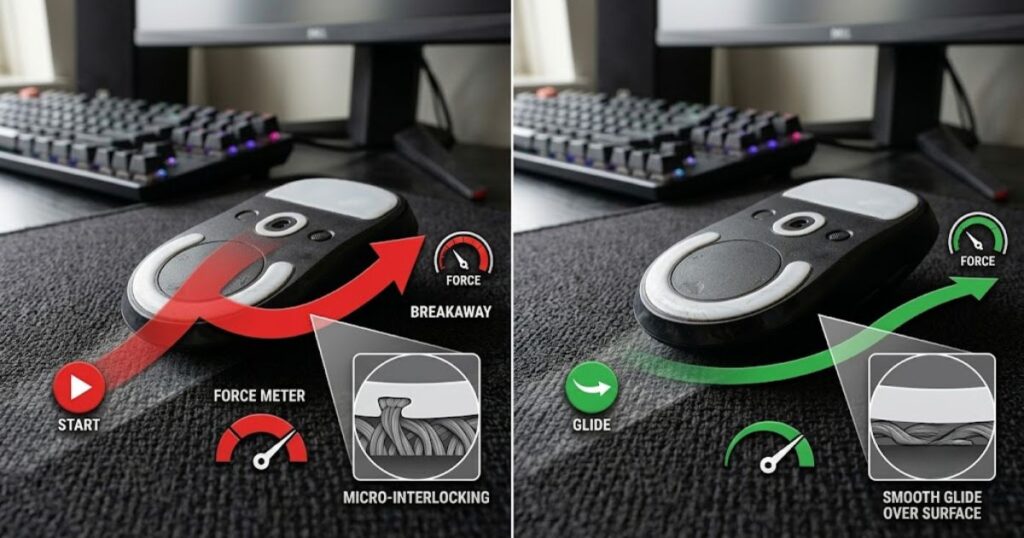
Tracking-focused players frequently notice dynamic friction because it influences how consistently the mouse moves while following targets across the screen.
The table below explains the differences between static friction and dynamic friction:
| Feature | Static Friction | Dynamic Friction |
|---|---|---|
| Occurs During | Start of movement | Ongoing movement |
| Primary Effect | Initial force required | Glide resistance |
| Influences | Micro adjustments | Tracking feel |
| Most Noticeable During | Starting aim | Maintaining aim |
Static and dynamic friction work together to create a mouse pad’s overall glide profile. Understanding both helps explain why some surfaces feel faster, slower, smoother, or more controlled during gameplay.
Which Friction Type Is More Important for FPS Players?
Both friction types are important because they influence different aiming behaviors. Neither static friction nor dynamic friction alone determines how a mouse pad performs.
Players who focus on precision and angle holding may notice static friction more often because movement initiation affects their micro corrections. Players who spend more time tracking moving targets may notice dynamic friction more because it shapes continuous glide behavior.
In practice, the most balanced mouse pads are usually those that maintain a predictable relationship between static and dynamic friction rather than maximizing one while ignoring the other.
Static friction and dynamic friction should always be evaluated together. The interaction between them often defines whether a surface feels stable, predictable, and comfortable during competitive FPS gameplay.
High Friction vs Low Friction Mouse Pads
High-friction surfaces prioritize control, while low-friction surfaces prioritize speed and freedom of movement. Neither approach is universally better because different players benefit from different glide characteristics.
Some FPS players prefer stronger resistance because it helps them stop the mouse more accurately. Others prefer lower resistance because it allows faster movement with less physical effort.
The comparison below shows how different friction levels influence glide behavior:
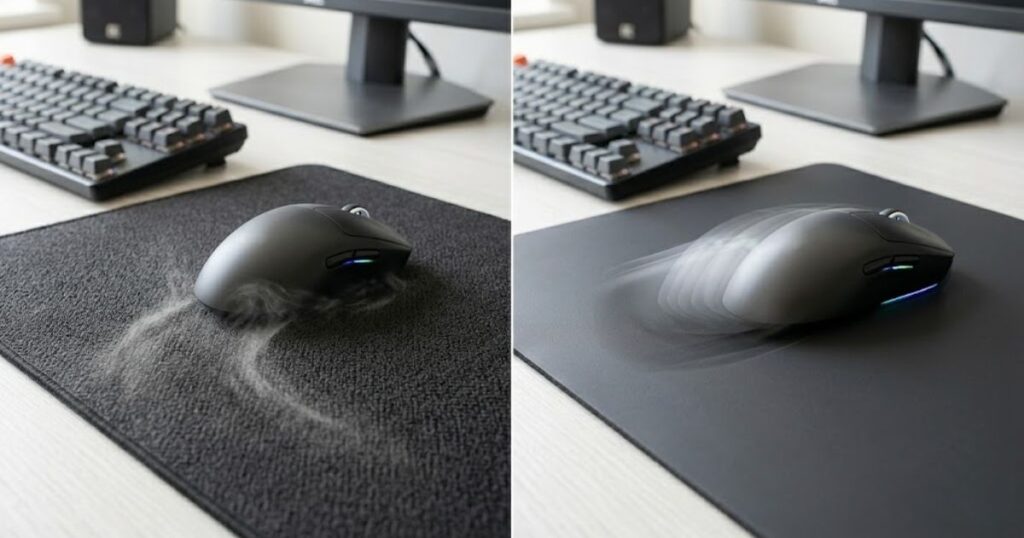
The ideal friction level depends on aiming style, sensitivity settings, and personal preference rather than a single “best” option.
The table below compares high-friction and low-friction mouse pads:
| Factor | High Friction | Low Friction |
|---|---|---|
| Glide Speed | Slower | Faster |
| Control | Higher | Lower |
| Stopping Power | Stronger | Weaker |
| Tracking Feel | Controlled | Fluid |
| Flick Behavior | Easier to stop | Easier to accelerate |
The comparison above shows that neither surface type is objectively superior. Each offers different advantages depending on the player’s goals and gameplay preferences.
While friction affects overall glide speed, many competitive players focus even more on stopping power because it directly influences how accurately they can end a movement. Understanding mouse pad stopping power helps explain why some players intentionally choose slower surfaces.
Advantages of High Friction Mouse Pads
High-friction mouse pads help players prioritize precision and stopping control. They are commonly preferred by players who value accuracy over raw movement speed.
Additional resistance can make it easier to slow down and stop the mouse near the intended target. This characteristic is particularly useful for tactical shooters where precision often matters more than movement speed.
Many control-focused cloth pads intentionally maintain higher friction levels because they help create a more deliberate aiming experience.
The benefits below explain why some players prefer high-friction surfaces:
- Improved stopping control: Easier to stop on target.
- Better micro adjustments: Small corrections feel more stable.
- More deliberate movement: Reduced risk of overshooting.
- Greater precision: Useful for tactical FPS gameplay.
- Controlled glide: Helps create predictable movement patterns.
These advantages explain why many precision-focused players continue to prefer control-oriented mouse pads despite the popularity of faster surfaces.
Advantages of Low Friction Mouse Pads
Low-friction mouse pads help players move faster with less physical effort. They are often preferred by players who value fluid movement and rapid directional changes.
Lower resistance allows the mouse to travel longer distances more easily. This can feel particularly comfortable for players who make large arm movements or frequently track moving targets.
Faster surfaces are common in games that reward continuous movement and aggressive target tracking rather than constant precision stopping.
The benefits below explain why some players prefer low-friction surfaces:
- Faster glide speed: Less effort is required to move the mouse.
- Smoother tracking: Continuous movement feels more fluid.
- Quicker target transitions: Easier to perform large flicks.
- Reduced fatigue: Large movements require less force.
- More freedom of movement: Glide feels less restricted.
These benefits explain why many tracking-focused players and fast-paced FPS players prefer lower-friction surfaces.
High friction focuses on control, while low friction focuses on speed. Neither option is automatically better because the best choice depends on how the player aims and what type of FPS games they play.
Which Friction Level Works Best for Different FPS Games?
Different FPS genres help favor different friction characteristics depending on their aiming demands. The ideal friction level often changes based on how much emphasis a game places on precision, tracking, movement speed, and target switching.
Not every FPS game rewards the same aiming mechanics. Tactical shooters typically emphasize precision and crosshair placement, while movement-heavy shooters often require smoother tracking and faster directional adjustments.
This is one reason why professional players across different FPS titles do not all use the same type of mouse pad. The demands of the game often influence the type of friction that feels most effective.
The table below explains recommended friction levels by FPS genre:
| FPS Genre | Recommended Friction | Primary Reason |
|---|---|---|
| Valorant | Medium to High | Precision and stopping control |
| CS2 | Medium to High | Crosshair placement and accuracy |
| Rainbow Six Siege | Medium | Balanced control and tracking |
| Apex Legends | Medium to Low | Continuous target tracking |
| Overwatch 2 | Medium to Low | Fast movement and tracking |
Game mechanics often influence surface preference. Tactical shooters and tracking-heavy shooters rarely prioritize identical glide characteristics, which explains why friction preferences vary significantly between communities.
Friction Preferences in Tactical FPS Games
Tactical shooters often reward controlled stopping power and precise adjustments. These games place a greater emphasis on accuracy than continuous movement.
In games such as Valorant and CS2, players frequently hold angles, pre-aim common positions, and rely on precise headshots. Because targets are often eliminated quickly, small aiming errors can have a major impact on the outcome of a round.
Higher friction or balanced control surfaces can help support this style of gameplay by making movement feel more deliberate and easier to stop accurately.
Friction Preferences in Tracking-Focused FPS Games
Tracking-focused games often reward smoother and faster glide characteristics. Players spend more time following moving targets rather than relying on isolated flick shots.
Games such as Apex Legends and Overwatch 2 frequently involve longer engagements where enemies move rapidly across the screen. Maintaining continuous tracking becomes more important than repeatedly stopping and starting the mouse.
Because of these requirements, many players in tracking-heavy games prefer surfaces with lower dynamic friction and smoother glide characteristics.
Friction preferences often vary by genre because each game rewards different aiming behaviors. Understanding those differences helps players choose surfaces that support the mechanics they use most frequently.
Does Mouse Pad Friction Change Over Time?
Yes, mouse pad friction helps change over time because surfaces experience wear, contamination, and environmental exposure. Even high-quality mouse pads rarely feel exactly the same after months of continuous use.
Many players assume friction is a permanent characteristic, but glide behavior naturally evolves as the surface ages. Dirt accumulates, fibers flatten, coatings wear down, and environmental conditions influence how the pad feels.
Because wear can gradually change glide behavior, players may eventually need to decide whether cleaning is enough or whether the surface should be replaced. If you are noticing persistent changes in glide or control, our guide to when to replace your mouse pad explains the signs that can help you make that decision.
The example below shows how surface wear can affect friction over time:
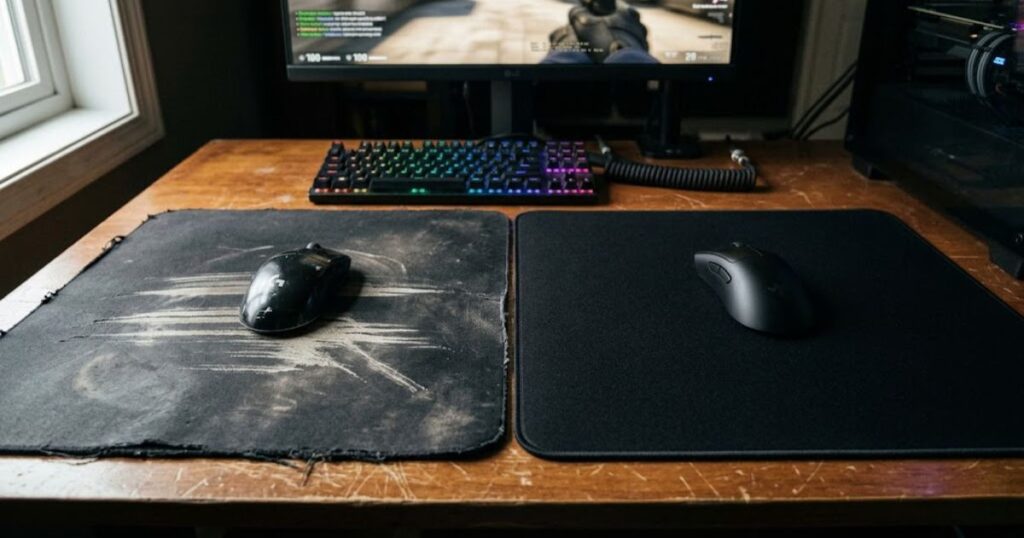
These changes may happen gradually, making them difficult to notice day by day. However, long-term users often recognize that older pads behave differently than when they were new.
How Dirt and Dust Affect Friction
Dust and debris help increase resistance and create inconsistent glide performance. Surface contamination is one of the most common causes of changing friction levels.
As dirt, skin particles, sweat residue, and environmental dust collect on the surface, the mouse skates encounter more resistance. This additional drag can make movements feel slower and less predictable.
Contamination often develops unevenly because players use certain areas of the mouse pad more frequently than others. As a result, different parts of the same pad may begin to feel different.
How Surface Wear Changes Friction
Repeated use helps alter surface texture and can change how friction behaves. Wear occurs naturally as mouse skates continuously interact with the same glide area.
Over time, cloth fibers may flatten, textured surfaces may smooth out, and coatings may gradually degrade. These changes affect how the mouse interacts with the surface and can alter both static and dynamic friction.
Surface wear rarely affects only friction. It can also create inconsistent glide zones that make mouse movement feel different across various areas of the pad, which is why surface consistency matters as a mouse pad ages.
The following process can help maintain consistent friction performance:
- Clean regularly: Remove dust, dirt, and oil buildup from the surface.
- Dry completely: Ensure the mouse pad is fully dry after cleaning.
- Store properly: Protect the surface from unnecessary contamination.
- Monitor wear: Check for noticeable changes in glide feel.
- Replace when needed: Upgrade the surface if performance becomes inconsistent.
Routine maintenance cannot completely prevent wear, but it can slow down the process and help preserve a more consistent glide experience.
Friction is not a fixed property that remains unchanged forever. Proper cleaning, storage, and maintenance help extend the useful life of a mouse pad and preserve predictable aiming performance.
How to Choose the Right Mouse Pad Friction Level
The ideal friction level helps depend on sensitivity, aim style, and game preference. There is no universal friction level that works best for every FPS player.
The goal is not to find the highest friction or the lowest friction surface. Instead, players should look for a balance that supports the way they naturally aim and move the mouse.
A friction level that feels perfect for one player may feel uncomfortable or restrictive for another, even if both players use similar hardware.
The table below helps identify suitable friction levels for different player types:
| Player Type | Recommended Friction | Primary Benefit |
|---|---|---|
| Low Sensitivity Player | Medium to High | Better stopping control |
| Tactical FPS Player | High | Precision aiming |
| Precision-Focused Player | High | Stable micro adjustments |
| Tracking-Focused Player | Medium to Low | Smoother tracking |
| Beginner FPS Player | Medium | Balanced performance |
These recommendations provide a useful starting point, but individual preference should always guide the final decision because aiming styles vary significantly between players.
Choosing Friction Based on Sensitivity
Mouse sensitivity helps determine how much stopping power and control a player may need. Different sensitivity ranges often create different friction preferences.
Lower sensitivity players generally make larger physical movements and often benefit from surfaces that provide additional stopping control. Higher sensitivity players may require less resistance because their movements cover shorter distances.
While sensitivity alone does not determine the ideal friction level, it often influences how a surface feels during real gameplay.
Choosing Friction Based on Aim Style
Aim style often influences friction preference more than hardware specifications. Players who rely on precision may prioritize different surface characteristics than players who focus on tracking.
Some players value maximum control during micro adjustments and flicks. Others prioritize smooth tracking and fluid movement. These differences explain why equally skilled players can prefer completely different mouse pads.
Once you understand the friction characteristics that fit your aiming style, the next step is comparing real products that match those preferences. Our guide to the best gaming mouse pads for FPS games in 2026 can help narrow down suitable options.
The best friction level depends on individual needs rather than trends or marketing claims. Testing different surfaces remains the most reliable way to identify what feels most comfortable and effective.
Common Myths About Mouse Pad Friction
Several common beliefs about friction oversimplify how mouse pads actually perform. Many players evaluate surfaces using assumptions that sound logical but do not always reflect real-world aiming performance.
Mouse pad friction is influenced by multiple factors, including surface texture, material, static friction, dynamic friction, and personal aiming style. Because of that complexity, simple statements about friction are often misleading.
Understanding these misconceptions can help players make more informed decisions instead of chasing trends or copying setups that may not fit their own needs.
The myths below explain common misunderstandings about friction:
- Lower friction is always better: Faster glide does not automatically improve aiming performance or accuracy.
- Higher friction hurts tracking: Many players track effectively on controlled surfaces because predictability matters as much as speed.
- All cloth pads feel identical: Different weaves, materials, and manufacturing methods create very different friction characteristics.
- Friction never changes: Surface wear, dirt accumulation, and environmental conditions can alter glide behavior over time.
- Professional players only use speed pads: Many professional FPS players continue to use control-oriented surfaces depending on their game and aim style.
These assumptions often ignore how personal aiming preferences influence performance. What feels fast and comfortable for one player may feel unstable or inconsistent for another.
Myth: Lower Friction Always Produces Better Aim
Lower friction does not automatically create better aim because aiming requires both movement speed and movement control. A surface that feels extremely fast may help one player but hurt another.
Many players initially associate speed with performance because faster movement can feel more responsive. However, faster movement also requires the ability to stop accurately and control overshooting.
For some players, reducing friction beyond a certain point actually makes aiming less predictable because the mouse becomes harder to control consistently.
Myth: More Friction Means Worse Performance
Higher friction does not automatically reduce performance because control can be just as valuable as speed. Many competitive players intentionally choose slower surfaces for greater precision.
Tactical FPS games frequently reward accurate crosshair placement and small adjustments rather than constant large movements. In those situations, additional control may provide meaningful benefits.
The goal is not to maximize or minimize friction. The goal is to find a friction level that supports consistent execution of your preferred aiming mechanics.
Myth: Friction Is the Only Mouse Pad Characteristic That Matters
Friction is important, but it is only one part of overall mouse pad performance. Other characteristics can influence the user experience just as significantly.
Surface consistency, durability, humidity resistance, base stability, and sensor compatibility all contribute to how a mouse pad performs during gameplay. A surface with ideal friction but poor consistency may still feel unreliable.
For this reason, evaluating a mouse pad requires looking beyond friction alone and considering the entire surface experience.
Many friction-related myths come from oversimplifying a highly personal aspect of FPS performance. The best results usually come from understanding how different characteristics work together rather than searching for a universally perfect friction level.
Final Thoughts on Mouse Pad Friction
Mouse pad friction helps determine how controlled, predictable, and comfortable mouse movement feels during FPS gameplay. It influences everything from micro adjustments and flick shots to tracking stability and overall consistency.
Understanding friction allows players to move beyond marketing terms and evaluate mouse pads based on how they actually perform. Rather than asking whether a surface is simply fast or slow, players can assess how its friction profile supports their preferred aiming style.
Friction also helps explain why different players prefer different surfaces. The ideal choice depends on individual preferences, sensitivity settings, game genre, and aiming habits rather than a single universal recommendation.
Friction is only one part of overall mouse pad performance. Sensor tracking quality can also be influenced by the surface beneath the mouse, especially when comparing different materials and textures. You can learn more in our guide explaining how mouse pads affect mouse sensors.
The following framework can help evaluate your ideal friction preference:
- Identify your FPS genre: Determine whether precision or tracking is more important.
- Evaluate your sensitivity: Consider how much stopping power you typically need.
- Assess your aim style: Decide whether you prioritize control or fluid movement.
- Compare different surfaces: Test how various friction levels affect your performance.
- Prioritize consistency: Choose the surface that feels predictable during extended gameplay.
Following a structured evaluation process helps prevent unnecessary upgrades and makes it easier to identify the characteristics that genuinely improve performance.
Mouse pad friction is one of the most influential characteristics of any gaming surface. Understanding how it works helps players make smarter equipment decisions and build a setup that supports their aiming style instead of working against it.
Players who want a broader understanding of gaming surfaces, materials, glide characteristics, and FPS mouse pad selection can continue with our complete guide to gaming mouse pads for FPS games.
Frequently Asked Questions About Mouse Pad Friction
Mouse pad friction can seem simple at first, but many FPS players still have questions about how it affects aiming performance, surface selection, and long-term consistency. The answers below address some of the most common questions players ask when evaluating friction characteristics on gaming mouse pads.
What Is Mouse Pad Friction?
Mouse pad friction is the resistance created between mouse skates and a mouse pad surface. It helps determine how easily the mouse starts moving, continues gliding, and stops during aiming movements.
Does Mouse Pad Friction Affect Aim Accuracy?
Yes, mouse pad friction helps affect aim accuracy by influencing movement control and stopping precision. Different friction levels can change how easily players perform micro adjustments, flick shots, and target tracking.
Is Higher Friction Better for FPS Games?
No, higher friction is not automatically better for FPS games. Some players benefit from greater control, while others perform better with smoother and faster glide characteristics.
What Is the Difference Between Static Friction and Dynamic Friction?
Static friction affects how movement begins, while dynamic friction affects how movement feels during glide. Together, they create the overall friction profile of a mouse pad.
Does Mouse Pad Friction Change Over Time?
Yes, mouse pad friction can change over time due to wear, dirt accumulation, humidity, and surface degradation. Regular maintenance helps preserve a more consistent glide experience.
How Does Friction Affect Tracking Performance?
Friction helps influence how smoothly a player can follow moving targets. Lower dynamic friction often feels smoother for tracking, while higher friction can create a more controlled movement experience.
How Does Friction Affect Flick Shots?
Friction affects how easily players accelerate and stop the mouse during fast movements. Balanced friction often helps improve control when ending a flick accurately on target.
What Is the Relationship Between Friction and Stopping Power?
Friction and stopping power are closely related because both influence how easily a player can stop mouse movement. Higher friction surfaces often provide stronger stopping power, although other surface characteristics also contribute.
Do Professional FPS Players Prefer High or Low Friction?
Professional FPS players use a wide range of friction levels depending on the game and personal preference. There is no single friction profile used by every professional player.
Can Humidity Affect Mouse Pad Friction?
Yes, humidity can affect mouse pad friction, especially on cloth surfaces. Increased moisture may change glide characteristics and create additional resistance during movement.
Are Cloth Mouse Pads Higher Friction Than Hard Pads?
In most cases, cloth mouse pads provide more friction than hard pads. However, friction levels can still vary significantly between different cloth and hard surface designs.
How Do I Choose the Right Friction Level for My Aim Style?
The right friction level depends on your sensitivity, aiming habits, and preferred FPS games. Testing different surface types remains the most reliable way to identify what feels most comfortable and consistent.
Thanks for reading our guide on mouse pad friction explained.
Pingback: Hard Mouse Pad Advantages: 5 Benefits for FPS Gaming