

Mouse pads affect mouse sensors by changing the surface information that sensors use to detect movement. A cleaner, more consistent surface helps the sensor read motion more accurately, while a worn or uneven surface can make tracking feel less stable.
This matters because a gaming mouse sensor does not simply “know” where your hand is moving. It constantly reads the surface under the mouse, compares tiny changes, and turns that information into cursor movement. For FPS players, that connection between surface quality and sensor behavior can affect how predictable the mouse feels during aiming.
A mouse pad does not magically make a bad sensor elite, but it can help a good sensor perform more consistently. The real question is not whether a mouse pad adds aim skill. The better question is whether the surface gives your sensor clean enough information to track movement without noise, skipping, or unpredictable changes.
How Do Mouse Sensors Read Mouse Pad Surfaces?
A mouse sensor is a small imaging system that reads the surface under the mouse and helps translate hand movement into cursor movement. It works by capturing surface detail, comparing position changes, and sending movement data to the computer.
In simple terms, the sensor needs something readable under it. A good mouse pad gives the sensor a consistent surface pattern to follow. A poor surface can make the sensor work harder because the texture, reflectivity, or wear pattern may not provide stable information.
How Optical Sensors Capture Surface Images
An optical sensor is a camera-like system that captures tiny images of the surface beneath the mouse. These repeated images help the sensor detect how far and how fast the mouse has moved.
When you move your mouse, the sensor compares one surface image to the next. If the surface has enough visible texture, the sensor can identify movement changes more reliably. That is why a mouse pad surface is not just a comfort layer under your hand. It is part of the tracking environment.
The illustration below shows how an optical sensor continuously captures surface information to detect movement:
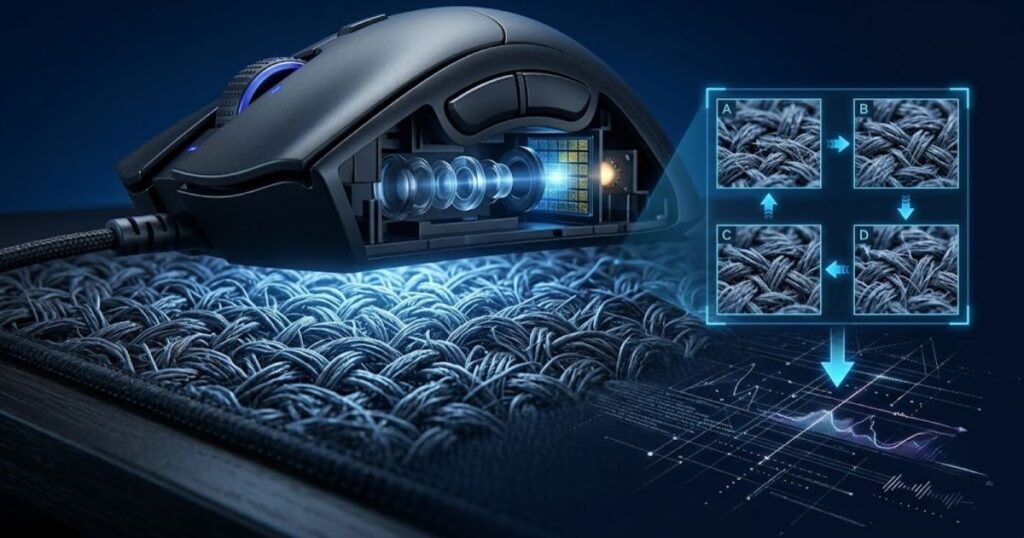
The sensor does not need the surface to look detailed to the human eye. It needs enough micro-detail for its internal image processing to detect motion. A surface that looks smooth may still be readable, while a glossy or uneven surface can sometimes create less reliable tracking behavior.
In summary, optical sensors depend on readable surface detail, and the mouse pad helps provide that detail in a controlled way.
Why Surface Detail Matters to Sensor Tracking
Surface detail is the visual information that helps a sensor understand movement. The more stable and readable that detail is, the easier it is for the sensor to maintain consistent tracking.
A clean cloth pad, for example, usually gives the sensor a repeated texture pattern. That pattern helps the sensor detect movement across the surface without sudden changes. If the pad has worn spots, stains, shiny areas, or uneven fabric, the sensor may receive different information depending on where the mouse moves.
This is one reason why two mouse pads can make the same mouse feel different. The mouse sensor has not changed, but the surface data it receives has changed. That difference can show up as smoother movement, rougher movement, or less predictable tracking.
In summary, surface detail matters because sensor accuracy depends on the quality of the information coming from the pad.
How Sensors Convert Surface Data into Movement
Mouse sensors convert surface data into movement by comparing surface images and calculating direction, speed, and distance. This process helps turn physical mouse movement into on-screen cursor movement.
When the mouse moves across a pad, the sensor detects how the surface pattern shifts between frames. The mouse then sends that movement information to the computer. If the surface pattern is stable, the movement data is usually more consistent. If the surface is hard to read, the movement data can become less predictable.
This does not mean every small surface difference will ruin tracking. Modern gaming sensors are very capable. However, even strong sensors still work best when the pad gives them consistent data from one movement to the next.
The factors below explain what the sensor needs from a mouse pad surface:
- Readable texture: The surface should provide enough micro-detail for the sensor to compare movement accurately.
- Consistent pattern: The pad should feel and read similarly across the entire usable area.
- Low visual noise: The surface should avoid confusing reflections, worn spots, or inconsistent material changes.
- Stable contact area: The mouse should glide across the surface without sudden changes that interrupt sensor reading.
The factors above show that a mouse pad supports tracking by giving the sensor stable information instead of random surface changes.
In summary, sensors convert surface information into movement data, so the mouse pad directly affects the quality of that input.
Why Does the Mouse Pad Surface Matter to a Sensor?
The mouse pad surface is the tracking layer that helps a sensor recognize movement. It matters because texture, consistency, and reflectivity can either help the sensor read motion clearly or make tracking less stable.
A mouse sensor performs best when the surface gives it a predictable pattern. If the pad changes from smooth to rough, clean to dirty, or matte to shiny in different areas, the sensor may not receive the same quality of information across the whole pad.
This is especially important for low-sensitivity FPS players because they often move the mouse across a larger area. A surface that tracks well in the center but poorly near the edges can make movement feel inconsistent during wide swipes.
Surface Texture Creates Readable Patterns
Surface texture is the pattern that helps a sensor identify movement. It gives the sensor reference points, which helps the mouse understand how it is moving across the pad.
The example below highlights how surface texture gives sensors the information needed for accurate tracking:
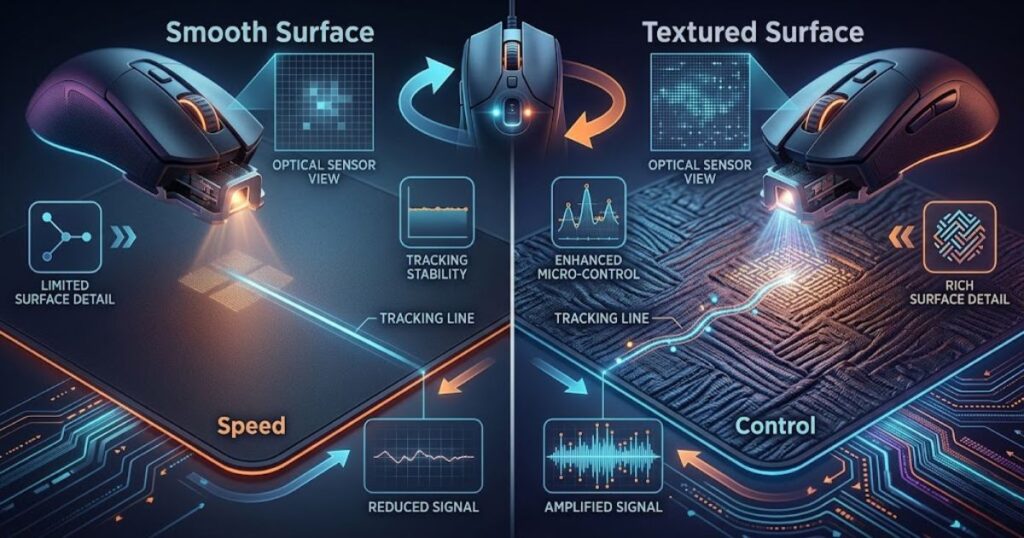
Cloth pads usually have woven textures. Hybrid pads may use tighter or more complex surface patterns. Hard pads often provide a smoother and faster surface. Each surface type gives the sensor a different kind of information, which is why tracking feel can change even when the mouse and DPI setting stay the same.
Texture also affects how predictable the sensor data feels during slow and fast movement. A consistent texture helps the sensor maintain a stable reading. An uneven texture can create subtle changes that players may feel as inconsistency.
In summary, texture matters because it gives the sensor the visual structure needed to follow movement accurately.
Surface Consistency Improves Tracking Stability
Surface consistency is the evenness of the mouse pad across its entire usable area. It helps the sensor maintain stable tracking because the surface information stays similar as the mouse moves.
A consistent pad allows the sensor to read movement without sudden changes in texture or material quality. This is useful in FPS games because aim depends on repeatable motion. When the same swipe produces the same tracking response, the player can build better muscle memory.
Inconsistent surfaces create the opposite problem. A worn center, frayed edge, dirty spot, or glossy area can make the sensor receive different information depending on where the mouse travels. That can make the mouse feel slightly different from one part of the pad to another.
In summary, consistency improves tracking stability by keeping the sensor’s surface input predictable across the pad.
Why Uniform Surfaces Produce Better Results
A uniform surface is a mouse pad surface that stays visually and physically consistent from one area to another. It helps produce better sensor results because the sensor does not need to adjust to sudden surface changes.
Uniformity matters more than many players realize. A pad can be fast, slow, soft, firm, cloth, hybrid, or hard, but the most important tracking factor is whether the sensor can read it consistently. A surface that behaves the same across the pad is usually easier for the sensor to track than a surface with mixed wear or inconsistent texture.
The table below explains how surface properties influence mouse sensor performance:
| Surface Property | How It Affects the Sensor | Tracking Result |
|---|---|---|
| Consistent texture | Gives the sensor stable surface detail to compare | More predictable tracking |
| Uneven wear | Changes the surface information across different areas | Less consistent movement feel |
| Low reflectivity | Reduces confusing light feedback for the sensor | Cleaner surface reading |
| Visible micro-patterns | Provides reference points for motion detection | Better movement recognition |
| Dirty or glossy spots | Can interrupt how the sensor reads the surface | Possible jitter or skipping |
Uniform surfaces produce better results because they reduce the chance of sudden tracking changes. The sensor gets a cleaner, more stable input, and the player gets a more predictable mouse response.
In summary, the mouse pad surface matters because it is the foundation the sensor reads during every movement.
Which Mouse Pad Characteristics Affect Sensor Performance?
Mouse pad characteristics affect sensor performance by changing how clearly and consistently the sensor can read the surface. Texture, material quality, reflectivity, surface wear, and pad condition all help determine tracking reliability.
This does not mean every mouse pad characteristic has the same impact. Some factors strongly affect sensor reading, while others mostly affect comfort or glide. For sensor performance, the most important question is whether the pad gives the sensor clean and repeatable surface data.
For a broader explanation of what a gaming mouse pad does in FPS games, the guide to what is a gaming mouse pad for fps games explains the role of mouse pads before going deeper into surface and sensor behavior.
Texture and Surface Microstructure
Texture is the surface pattern that helps the sensor detect movement. Microstructure is the tiny detail within that surface pattern, and it helps the sensor compare movement from one moment to the next.
A pad with a clear and even texture usually gives the sensor more stable information. This can make the mouse feel more predictable during both slow aiming and faster movements. If the texture is inconsistent, overly worn, or damaged, the sensor may receive uneven data.
Texture also affects how much feedback the player feels through the mouse feet. That physical feel is not the same as sensor performance, but the two can connect. A surface that feels inconsistent under the mouse may also be inconsistent for sensor reading if the material is worn or uneven.
In summary, texture and microstructure affect how clearly the sensor can recognize movement across the pad.
Material Composition and Surface Visibility
Material composition is the physical makeup of the mouse pad surface. It helps determine how visible and stable the surface is to the sensor.
Cloth, plastic, glass, and hybrid surfaces all interact with sensors differently. Some materials provide clear texture and stable contrast. Others may be smoother, shinier, or more reflective, which can make sensor reading more dependent on the quality of the sensor and surface design.
The best material is not always the fastest or most expensive one. For sensor performance, the best material is the one that gives clean tracking without confusing the sensor. A reliable material should not create sudden reflections, patchy wear, or uneven surface feedback.
In summary, material composition matters because it affects how visible and consistent the pad surface is to the sensor.
Surface Wear and Sensor Reliability
Surface wear is the gradual breakdown of a mouse pad’s tracking area. It can reduce sensor reliability because worn spots may read differently from clean or unused areas.
Over time, sweat, dust, skin oil, and friction can change the surface. The center of the pad often wears faster because that is where the mouse moves most. If that area becomes smoother, shinier, or dirtier than the rest of the pad, sensor behavior may feel less consistent.
The table below breaks down common mouse pad characteristics and how they affect sensor performance:
| Mouse Pad Characteristic | Sensor Impact | Why It Matters |
|---|---|---|
| Surface texture | High | Creates the visual pattern the sensor reads for motion detection |
| Material quality | Medium to high | Affects how stable and readable the surface remains over time |
| Reflectivity | Medium | Can influence how clearly the optical system sees the surface |
| Surface wear | High | Can create inconsistent tracking zones across the pad |
| Thickness | Low for sensor reading | Usually affects comfort and pressure feel more than sensor accuracy |
Surface wear is important because a mouse pad can lose tracking consistency before it looks completely unusable. If your mouse feels different in one area of the pad than another, the surface condition may be part of the problem.
In summary, the characteristics that most affect mouse sensors are the ones that change surface readability and tracking consistency.
How Different Mouse Pad Materials Influence Sensors
Different mouse pad materials influence sensors by changing the type and quality of surface information available for tracking. Each material creates a unique combination of texture, reflectivity, and consistency that can affect how efficiently a sensor reads movement.
Many players assume sensor performance depends entirely on the mouse itself. In reality, the surface beneath the sensor is part of the tracking system. While modern sensors are highly capable, they still depend on readable surface information to maintain reliable performance.
Cloth Mouse Pad Surfaces
Cloth mouse pad surfaces help sensors by providing consistent texture and stable surface detail. The woven fabric structure creates small patterns that optical sensors can use to track movement accurately.
The comparison below shows how common mouse pad materials create different tracking environments for sensors:
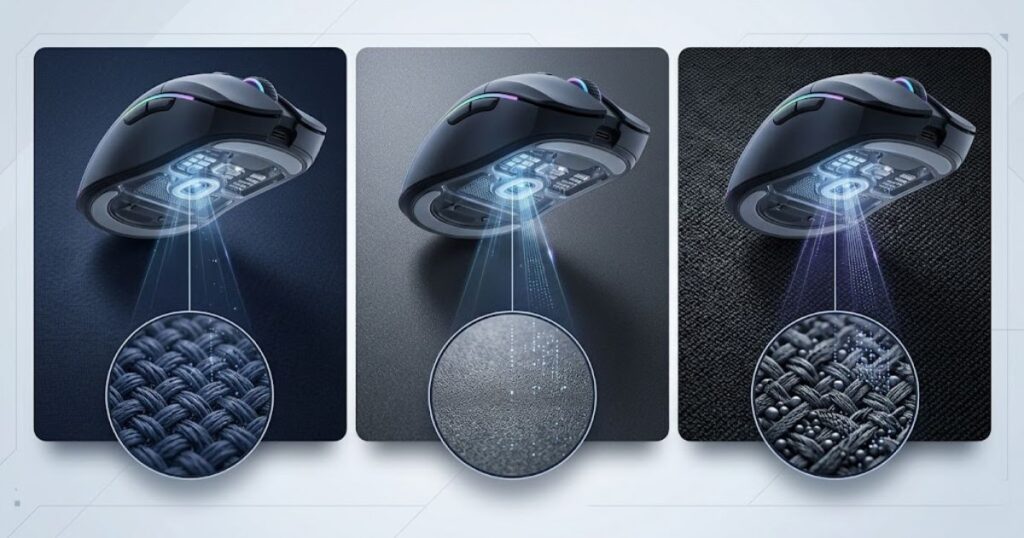
This is one reason cloth mouse pads remain the most common choice among FPS players. The texture tends to be predictable across the pad, allowing the sensor to receive similar information during both short adjustments and large arm movements.
Cloth surfaces also age gradually. While wear can eventually affect performance, a quality cloth pad often maintains enough surface detail for reliable tracking over a long period. Consistency is usually more important than speed when evaluating sensor compatibility.
In summary, cloth mouse pads provide stable and readable surface patterns that support reliable sensor tracking.
Hard Surface Mouse Pads
Hard surface mouse pads influence sensors by providing a smooth and uniform tracking area. Their rigid construction creates a different tracking environment compared to traditional cloth surfaces.
Many hard pads use plastic, composite materials, or coated surfaces. These materials often produce lower friction and faster glide. From a sensor perspective, the key factor is whether the surface remains visually consistent rather than whether it feels fast.
A well-designed hard pad can provide excellent tracking performance. However, heavily scratched or damaged hard surfaces may introduce irregularities that affect how the sensor interprets movement. The quality of the surface finish often matters more than the material category itself.
In summary, hard mouse pads can provide excellent sensor performance when their surface remains consistent and well-maintained.
Hybrid Surface Mouse Pads
Hybrid mouse pad surfaces combine characteristics from both cloth and hard materials to create a balance between texture consistency and glide speed. This combination helps sensors maintain reliable tracking while offering a different movement feel.
Hybrid surfaces often use specialized weaves, coatings, or layered materials that create a more controlled texture pattern. For the sensor, the advantage is not necessarily higher performance but rather a predictable and repeatable surface structure.
Because hybrid designs vary significantly between manufacturers, sensor behavior can also vary. Some hybrid pads resemble cloth tracking characteristics, while others behave more like hard surfaces.
In summary, hybrid surfaces aim to balance consistency, glide, and durability while providing stable tracking information for modern sensors.
The table below compares how common mouse pad materials influence sensor behavior:
| Material Type | Surface Consistency | Sensor Readability | Typical Tracking Feel |
|---|---|---|---|
| Cloth | High | High | Controlled and predictable |
| Hard Surface | High when maintained | High | Fast and responsive |
| Hybrid | High | High | Balanced and versatile |
Overall, material type changes the tracking environment, but consistency remains the most important factor for sensor performance.
Can Mouse Pads Change Tracking Quality?
Mouse pads can change tracking quality because they influence how consistently the sensor receives and processes surface information. Better surface consistency generally produces more reliable tracking behavior.
Tracking quality is not simply about whether the cursor moves. It is about how accurately the sensor interprets movement across different speeds, directions, and distances. Small differences in surface quality can influence how predictable that tracking feels.
When surface quality changes how consistently movement is detected, it is also worth looking at how mouse pads affect tracking accuracy in practical FPS use.
Stable Tracking Versus Unstable Tracking
Stable tracking is the ability of a sensor to maintain consistent movement detection across the entire mouse pad. It helps produce predictable cursor behavior and reliable movement translation.
When tracking is stable, the sensor receives similar information regardless of where the mouse travels. This consistency allows movement to feel repeatable and dependable. Players often describe stable tracking as smooth, controlled, and trustworthy.
Unstable tracking occurs when the surface information changes unexpectedly. Worn areas, inconsistent textures, or damaged sections can cause the sensor to receive different visual data, making movement feel less predictable.
In summary, stable tracking depends heavily on consistent surface information across the mouse pad.
Smooth Tracking Versus Interrupted Tracking
Smooth tracking occurs when the sensor continuously receives clear surface data without interruptions. It helps maintain fluid cursor movement and predictable sensor behavior.
Interrupted tracking happens when the sensor temporarily struggles to interpret the surface. These interruptions may appear as brief tracking inconsistencies, sudden movement changes, or reduced confidence in movement detection.
Most modern gaming sensors are excellent at handling difficult conditions, but they still perform best when the surface remains clean, readable, and consistent. A sensor can only work with the information available beneath it.
In summary, smooth tracking depends on uninterrupted surface visibility and reliable texture information.
Consistent Tracking Across Different Speeds
Consistent tracking across different speeds helps ensure that slow and fast movements produce predictable results. It allows the sensor to maintain accuracy regardless of movement intensity.
FPS players often alternate between precise micro-adjustments and rapid flicks. A consistent surface helps the sensor process both types of movement using the same quality of information. This consistency makes tracking behavior easier to predict during gameplay.
When surface quality varies, movement may feel different depending on speed. The issue is rarely the speed itself. Instead, it is often the changing quality of the surface information available to the sensor.
The factors below explain what contributes to higher tracking quality:
- Consistent texture: Provides stable visual patterns for movement detection.
- Clean surface condition: Reduces interference caused by dirt, oil, or debris.
- Uniform material quality: Helps maintain predictable tracking across the entire pad.
- Minimal wear: Prevents tracking differences between heavily used and unused areas.
The factors above demonstrate that tracking quality depends more on surface consistency than on any single material type.
In summary, mouse pads influence tracking quality by affecting the stability and reliability of the information a sensor receives.
Why Do Some Surfaces Feel Better Than Others?
Some surfaces feel better because they provide cleaner sensor data and more predictable movement behavior. A surface that consistently supports tracking often feels more comfortable and reliable during gameplay.
The feeling players experience is a combination of physical glide and sensor response. While glide affects how the mouse moves across the pad, sensor behavior affects how accurately that movement is translated on screen.
Surface Readability and Sensor Confidence
Surface readability is the ability of a sensor to clearly interpret the texture beneath it. It helps create reliable movement detection and predictable tracking behavior.
When a sensor can easily read the surface, movement tends to feel natural and consistent. The sensor spends less effort compensating for unclear information and more effort accurately tracking motion.
Players often describe highly readable surfaces as feeling smoother or more connected, even when the actual glide speed is similar to another pad.
In summary, better surface readability often leads to more confident and predictable sensor performance.
Consistency During Slow Movements
Consistency during slow movements helps sensors maintain precise tracking when making small adjustments. It is especially important for detailed cursor control and fine aiming corrections.
Slow movement tracking relies heavily on the sensor’s ability to detect subtle changes in surface position. A consistent surface provides clear reference points that help maintain movement accuracy during these adjustments.
This is one reason surface condition matters even when movement speed is low. The sensor still depends on the quality of the underlying texture information.
In summary, consistent surfaces help sensors maintain precise tracking during controlled movements.
Consistency During Fast Movements
Consistency during fast movements helps sensors maintain reliable tracking when the mouse moves rapidly across the pad. It supports predictable tracking behavior during large directional changes.
Fast movements place greater demands on the sensor because more surface information must be processed over a shorter period of time. A readable and consistent surface helps reduce tracking uncertainty during these situations.
Players who use lower sensitivity settings often perform large arm movements across significant portions of the mouse pad. This makes surface consistency particularly valuable because more of the pad becomes part of the tracking environment.
In summary, fast movement consistency depends on maintaining stable surface information throughout the entire tracking area.
The table below compares how different surface characteristics influence tracking feel:
| Surface Characteristic | Sensor Effect | Typical Feel |
|---|---|---|
| High consistency | Stable tracking data | Predictable |
| Uneven wear | Variable tracking information | Inconsistent |
| Clean texture | Reliable movement detection | Smooth |
| Damaged surface | Reduced tracking stability | Unreliable |
Overall, the quality of sensor input plays a major role in why certain mouse pads feel more reliable than others.
What Tracking Problems Can Poor Mouse Pads Cause?
Poor mouse pads can cause tracking problems because damaged, inconsistent, or contaminated surfaces provide unreliable information to the sensor. These issues can reduce tracking stability even when the mouse itself is functioning properly.
Many players assume tracking problems always originate from the sensor, firmware, or game settings. However, the mouse pad is part of the tracking system. When the surface quality deteriorates, the sensor may struggle to interpret movement as consistently as it did on a cleaner and more uniform surface.
Understanding these problems helps separate actual sensor issues from surface-related issues. In many cases, replacing or cleaning a worn mouse pad restores tracking consistency without changing the mouse itself.
Cursor Jitter and Tracking Noise
Cursor jitter is small, unintended cursor movement that appears even when the mouse is moving smoothly. It occurs when the sensor receives inconsistent surface information and struggles to interpret movement accurately.
The example below illustrates how surface wear can contribute to tracking inconsistencies:
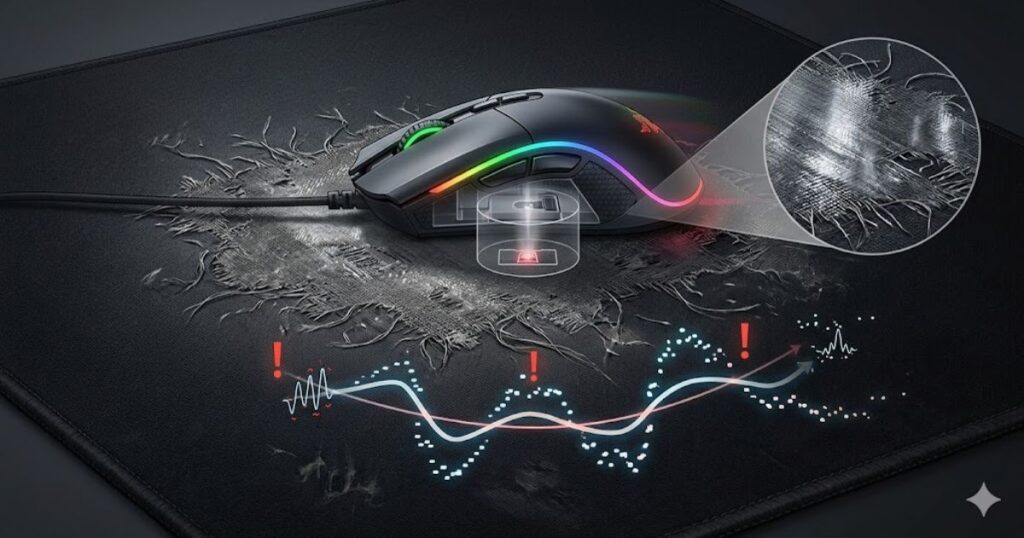
A clean and readable surface helps the sensor maintain confidence in the data it receives. When surface quality becomes inconsistent, tiny variations in texture or reflectivity may create movement information that is less stable.
Jitter is not always caused by a mouse pad, but surface condition can contribute to it. Worn fabric, shiny spots, and uneven texture may reduce the quality of the information available to the sensor.
In summary, cursor jitter can occur when the mouse pad no longer provides clean and consistent tracking information.
Tracking Interruptions and Skipping
Tracking interruptions occur when the sensor temporarily loses reliable movement information. They can make movement feel inconsistent, delayed, or less predictable.
Unlike minor tracking variations, interruptions are usually more noticeable because movement behavior changes suddenly. A sensor expects a continuous stream of readable surface information. If the surface becomes difficult to interpret, tracking quality may temporarily decrease.
Modern gaming sensors are very effective at maintaining tracking under normal conditions. However, heavily worn, damaged, or contaminated surfaces can still reduce the quality of available tracking data.
In summary, tracking interruptions can occur when the surface becomes difficult for the sensor to read consistently.
Inconsistent Cursor Movement
Inconsistent cursor movement is the feeling that identical hand movements do not always produce identical cursor responses. It often results from variations in tracking conditions rather than deliberate changes in settings.
For example, one area of a mouse pad may feel perfectly stable while another feels slightly different. The sensor is receiving different surface information depending on where it is positioned. Over time, this can make movement feel less repeatable.
Consistency is important because muscle memory depends on predictable results. If the tracking environment changes across the pad, movement may feel less reliable even when sensitivity settings remain unchanged.
The signs below can indicate surface-related tracking issues:
- Cursor jitter: Small unwanted movement variations during normal tracking.
- Tracking interruptions: Brief moments where movement feels less consistent.
- Uneven tracking zones: Different areas of the pad feel different during movement.
- Reduced predictability: Similar movements produce slightly different results.
The signs above do not automatically mean the mouse pad is the only cause, but they often indicate that surface quality should be inspected.
In summary, poor mouse pads can contribute to several forms of tracking inconsistency by reducing the quality of sensor input.
Do Modern Gaming Mouse Sensors Still Depend On Mouse Pads?
Modern gaming mouse sensors still depend on mouse pads because every optical sensor requires readable surface information to track movement accurately. Advanced technology improves compatibility, but it does not eliminate the need for a quality tracking surface.
Sensor technology has improved dramatically over the last decade. Today’s flagship sensors can handle a wider range of surfaces than older generations. Even so, surface quality remains an important part of the overall tracking system.
How Modern Sensors Have Improved
Modern gaming sensors have improved through better image processing, faster tracking capabilities, and improved surface compatibility. These improvements help sensors maintain reliable performance across a wider variety of mouse pads.
Older sensors often struggled with difficult surfaces and could lose tracking more easily. Modern designs are much more tolerant of surface variations, allowing them to maintain stable tracking under conditions that previously caused problems.
These improvements have reduced surface limitations, but they have not removed them entirely. The sensor still relies on the quality of the surface information available beneath it.
In summary, modern sensors are more capable than older generations, but they still benefit from high-quality tracking surfaces.
Why Surface Quality Still Matters
Surface quality still matters because the sensor can only process the information it receives. Better surface quality helps provide clearer, more consistent tracking data.
Even the most advanced sensor cannot create missing information. If the surface becomes excessively worn, inconsistent, or difficult to read, the sensor has fewer reliable reference points available for movement detection.
This is one reason competitive players continue to pay attention to mouse pad condition. Surface consistency helps maximize the performance potential of modern sensor technology.
In summary, better surfaces help sensors perform more consistently because they provide cleaner tracking information.
Common Misconceptions About Modern Sensors
Many misconceptions suggest that modern sensors make mouse pads irrelevant. In reality, sensor improvements reduce limitations but do not eliminate the importance of surface quality.
One common belief is that any surface performs identically with a modern gaming mouse. While compatibility has improved significantly, differences in texture, wear, and consistency can still influence tracking behavior.
Another misconception is that expensive sensors automatically overcome poor surfaces. Sensor quality and surface quality work together. Strong performance depends on both components functioning effectively.
The table below compares common assumptions about modern gaming sensors with actual tracking behavior:
| Common Belief | Reality |
|---|---|
| Modern sensors work equally well on every surface | Surface quality can still influence tracking consistency. |
| Mouse pads no longer matter | Sensors still depend on readable surface information. |
| Expensive sensors solve all tracking problems | Surface condition remains an important factor. |
| Tracking quality depends only on the mouse | The mouse pad is also part of the tracking system. |
For players building a complete gaming mouse pad for fps games setup, sensor technology and surface quality should be viewed as complementary parts of the same tracking system.
In summary, modern gaming sensors reduce surface limitations, but they still depend on quality mouse pads to deliver their best performance.
How To Tell If A Mouse Pad Is Affecting Sensor Performance
A mouse pad may be affecting sensor performance if tracking behavior changes despite stable mouse settings and hardware. Surface wear, contamination, and inconsistency are common indicators that the tracking environment has changed.
Because tracking issues can originate from multiple sources, it is important to evaluate the mouse pad systematically rather than assuming the sensor is at fault. Simple observations often reveal whether the surface has become part of the problem.
Signs You Can Notice During Gameplay
Gameplay often provides the earliest indication that a mouse pad is affecting tracking performance. Changes in movement predictability can appear before obvious visual damage becomes visible.
Players may notice that certain movements feel less repeatable than before. Tracking may feel slightly different depending on location, direction, or movement speed. These changes can be subtle at first but become more noticeable over time.
Because FPS games require consistent tracking behavior, even small changes in movement predictability can be easier to detect during gameplay than during normal desktop use.
In summary, gameplay performance can reveal tracking inconsistencies that are not immediately visible on the mouse pad itself.
Signs Of Surface Degradation
Surface degradation is the gradual change in a mouse pad’s texture, appearance, and consistency caused by long-term use. It can reduce the quality of the information available to the sensor.
Common signs include worn tracking zones, shiny patches, flattened texture, embedded dirt, and inconsistent glide characteristics. These changes may alter how the sensor interacts with the surface.
A pad does not need to look severely damaged before tracking quality changes. Minor surface variations can influence consistency long before the pad becomes unusable.
In summary, visible wear patterns often indicate that the tracking surface is no longer as consistent as it was originally.
Practical Tests To Check Sensor Performance
Practical testing helps determine whether the mouse pad is influencing sensor behavior. Simple comparisons can reveal whether the surface contributes to tracking inconsistencies.
Testing should focus on consistency rather than speed. The goal is to identify whether tracking behavior changes across different areas of the pad or when compared to another surface.
The following process can help evaluate whether a mouse pad is affecting sensor performance:
- Inspect the surface: Look for worn areas, dirt buildup, and visible texture changes.
- Test multiple regions: Compare tracking feel in the center, edges, and less-used areas.
- Compare another mouse pad: Use a second surface to identify behavioral differences.
- Perform slow movements: Check whether precise tracking remains stable.
- Perform fast swipes: Observe whether tracking remains predictable across the pad.
The process above helps isolate surface-related factors from other potential hardware or software variables.
If you notice that tracking behavior changes depending on where the mouse moves, surface consistency may be contributing to the issue. This is also closely related to whether mouse pads affect aim consistency during long gaming sessions.
In summary, simple testing can often reveal whether the mouse pad is influencing overall sensor performance.
How Mouse Pads Affect Mouse Sensors In FPS Games
Mouse pads affect mouse sensors in FPS games by influencing tracking consistency, movement predictability, and sensor stability. These factors help determine whether mouse movement feels reliable during aiming, tracking, and target acquisition.
Unlike general desktop use, FPS games place greater demands on the entire tracking system. Players frequently combine slow precision adjustments with rapid directional changes, which means the sensor continuously relies on surface information to maintain consistent performance.
The mouse pad does not improve mechanical aim by itself. Instead, it helps create a more predictable tracking environment that allows players to develop confidence in their movements over time.
Precision Tracking During Micro Adjustments
Precision tracking during micro adjustments helps players make small aiming corrections without unexpected movement behavior. It is especially important when lining up headshots or tracking distant targets.
The scenario below shows why consistent surface tracking matters during competitive FPS gameplay:

At very low movement speeds, sensors depend on subtle surface information to determine movement direction and distance. A consistent mouse pad surface helps maintain stable tracking data during these fine adjustments.
This is one reason many competitive players value surface consistency. Reliable tracking during micro adjustments helps build confidence because similar movements produce similar results over time.
In summary, consistent surface information supports precise sensor behavior during detailed aiming corrections.
Maintaining Consistency During Flick Movements
Maintaining consistency during flick movements helps sensors process rapid changes in direction without introducing tracking uncertainty. It allows large movements to remain predictable across different areas of the mouse pad.
During a flick, the sensor processes significantly more surface information over a shorter period. If the surface remains uniform, the sensor receives a stable stream of data throughout the movement.
Large arm movements are common among low-sensitivity FPS players. Because these movements cover a greater portion of the mouse pad, tracking consistency across the entire surface becomes increasingly important.
Players interested in larger tracking areas often explore why FPS players use large mouse pads because surface coverage can influence long-range movement consistency.
In summary, flick performance benefits from surfaces that provide consistent tracking information throughout large movements.
Predictable Sensor Behavior During Long Sessions
Predictable sensor behavior during long sessions helps maintain movement consistency across hours of gameplay. It allows players to rely on familiar tracking responses without constantly adapting to changing surface conditions.
Over extended sessions, players repeatedly use the same areas of a mouse pad. If the surface remains consistent, tracking behavior tends to remain predictable. If the surface degrades unevenly, movement may begin to feel different in frequently used zones.
Consistency becomes particularly valuable because competitive FPS gameplay depends heavily on repeatable motion. A stable tracking environment helps reduce unnecessary variables during performance-focused play.
The factors below explain why surface quality matters in FPS games:
- Movement predictability: Similar movements produce similar tracking results.
- Tracking stability: The sensor receives consistent surface information.
- Precision support: Fine aiming adjustments remain easier to control.
- Long-term consistency: Tracking behavior remains reliable across extended sessions.
The factors above show that mouse pads influence FPS performance primarily through tracking consistency rather than raw speed.
In summary, mouse pads affect FPS gaming by helping sensors maintain predictable tracking behavior across a wide range of movement scenarios.
What Makes A Mouse Pad Suitable For Reliable Sensor Performance?
A suitable mouse pad provides a consistent, durable, and readable surface that helps sensors maintain reliable tracking. The goal is not simply to maximize speed or control but to create a stable environment for movement detection.
Sensor performance depends heavily on surface quality. A suitable mouse pad supports that performance by minimizing tracking interruptions and maintaining consistent surface characteristics over time.
Surface Features That Improve Sensor Performance
Certain surface features improve sensor performance because they provide clearer and more stable tracking information. These characteristics help sensors interpret movement with greater consistency.
Readable texture, uniform material quality, and low surface degradation all contribute to a better tracking environment. These features allow the sensor to process movement information with fewer inconsistencies.
Durability also matters because a surface that maintains its original condition for longer periods provides more stable tracking performance over time.
In summary, the best surface features are those that preserve consistency and readability throughout the life of the mouse pad.
Features That Reduce Tracking Consistency
Certain surface characteristics can reduce tracking consistency by making the sensor’s tracking environment less predictable. These issues often develop gradually as the surface ages.
Uneven wear, damaged texture, embedded debris, and inconsistent material quality can all affect how reliably the sensor reads movement. The more variable the surface becomes, the more difficult it may be for the sensor to receive consistent information.
Not every imperfection causes noticeable problems, but larger inconsistencies can increase tracking variability across different areas of the pad.
In summary, anything that reduces surface consistency has the potential to reduce tracking consistency as well.
Characteristics Competitive Players Look For
Competitive players often look for characteristics that support long-term tracking consistency and predictable movement behavior. These qualities help create a reliable aiming environment.
While personal preferences vary, many experienced players prioritize surface consistency, durability, and reliable tracking behavior over marketing claims or cosmetic features.
When evaluating a complete gaming mouse pad for FPS games setup, these characteristics often matter more than surface category alone.
The table below explains which surface characteristics are most beneficial for reliable sensor performance:
| Characteristic | Why It Helps | Impact On Tracking |
|---|---|---|
| Consistent texture | Provides stable tracking references | High |
| Uniform surface quality | Reduces tracking variation | High |
| Durable construction | Maintains surface integrity longer | Medium to High |
| Low surface contamination | Improves readability | Medium |
| Minimal wear | Preserves consistent tracking behavior | High |
Players comparing products can use these characteristics as evaluation criteria when reviewing the top best gaming mouse pads for FPS games in 2026.
In summary, a suitable mouse pad supports sensor performance by maintaining a stable and readable tracking environment.
How Mouse Pads Affect Mouse Sensors: Final Verdict
Mouse pads affect mouse sensors because sensors rely on surface information to detect movement accurately. Surface texture, consistency, material quality, and long-term durability all influence how effectively the sensor can interpret movement data.
Throughout this article, one principle remains consistent: sensors perform best when they receive stable and readable information. The mouse pad is the source of that information, making it an important part of the overall tracking system.
While modern sensors are more capable than ever, they still depend on the quality of the surface beneath them. A consistent mouse pad helps create a more predictable tracking environment, which supports reliable movement behavior across different gaming scenarios.
The table below summarizes the relationship between mouse pads and sensor performance:
| Question | Short Answer |
|---|---|
| Do mouse pads affect mouse sensors? | Yes |
| Can surface consistency influence tracking quality? | Yes |
| Do modern sensors still benefit from quality mouse pads? | Yes |
| Can worn surfaces reduce tracking reliability? | Yes |
| Is the mouse pad part of the tracking system? | Yes |
If you are still learning the fundamentals, understanding what is a gaming mouse pad for FPS games provides additional context on how mouse pads contribute to overall gaming performance.
Ultimately, the best tracking experience comes from combining a capable sensor with a surface that remains consistent, durable, and easy to read throughout everyday use.
In summary, mouse pads affect mouse sensors because every movement begins with the surface information the sensor reads beneath the mouse.
Frequently Asked Questions About How Mouse Pads Affect Mouse Sensors
Mouse pads influence sensors through surface texture, consistency, material quality, and long-term wear. The frequently asked questions below answer some of the most common concerns about sensor performance and tracking behavior.
Do mouse pads really affect mouse sensors?
Yes, mouse pads affect mouse sensors because sensors rely on surface information to detect movement. A consistent and readable surface helps sensors maintain more reliable tracking.
How does a mouse sensor read a mouse pad surface?
A mouse sensor reads a mouse pad surface by capturing thousands of tiny images every second and comparing changes between them. This process helps the sensor calculate movement direction and distance.
Why do some mouse pads track better than others?
Some mouse pads track better because they provide more consistent texture and cleaner surface information. This helps sensors interpret movement more accurately.
Can a worn mouse pad affect sensor performance?
Yes, a worn mouse pad can affect sensor performance if surface texture becomes inconsistent. Worn areas may provide different tracking information than the rest of the pad.
Do modern gaming mouse sensors still need quality mouse pads?
Yes, modern gaming mouse sensors still benefit from quality mouse pads because they depend on surface information for tracking. Better surfaces help provide cleaner and more stable tracking data.
Can poor mouse pads cause tracking inconsistencies?
Yes, poor mouse pads can contribute to tracking inconsistencies when the surface becomes difficult for the sensor to read consistently. Surface wear and contamination are common causes.
What mouse pad characteristics affect sensors the most?
Surface texture, consistency, material quality, and long-term durability affect sensors the most. These characteristics determine how readable the tracking surface remains over time.
Do cloth and hard mouse pads affect sensors differently?
Yes, cloth and hard mouse pads provide different surface structures for sensors to read. Both can perform well, but they create different tracking environments.
Can a dirty mouse pad reduce tracking quality?
Yes, dirt, dust, and oil buildup can reduce tracking quality by making the surface less consistent. Cleaning the mouse pad can help restore more reliable sensor behavior.
Why does my mouse feel different after changing mouse pads?
Your mouse may feel different because the sensor is receiving different surface information. Changes in texture and consistency can alter the overall tracking experience.
How can I tell if my mouse pad is affecting my sensor?
You can inspect the surface for wear, compare tracking behavior across different areas, and test another mouse pad. Consistent differences often indicate a surface-related issue.
Can a better mouse pad improve tracking consistency in FPS games?
Yes, a better mouse pad can improve tracking consistency by providing a more stable and readable surface. This helps create more predictable sensor behavior during gameplay.
These FAQs highlight the most important ways mouse pads influence sensor performance. While modern sensors are highly advanced, they still rely on the quality and consistency of the surface beneath them.
Conclusion
Mouse pads affect mouse sensors because every optical sensor depends on surface information to detect movement. Texture, consistency, material quality, and surface condition all influence how accurately the sensor can interpret tracking data.
While modern gaming sensors are more advanced than ever, they still perform best when paired with a surface that remains stable and readable. A high-quality mouse pad does not increase sensor specifications, but it helps the sensor operate in a more consistent tracking environment.
For FPS players, the goal is not simply finding the fastest or most expensive mouse pad. The real objective is choosing a surface that provides reliable tracking behavior across every movement, from small aim adjustments to large swipes across the pad.
Understanding how mouse pads affect mouse sensors makes it easier to identify tracking issues, evaluate surface quality, and build a setup that delivers more predictable performance over time.
Thank you for reading.