
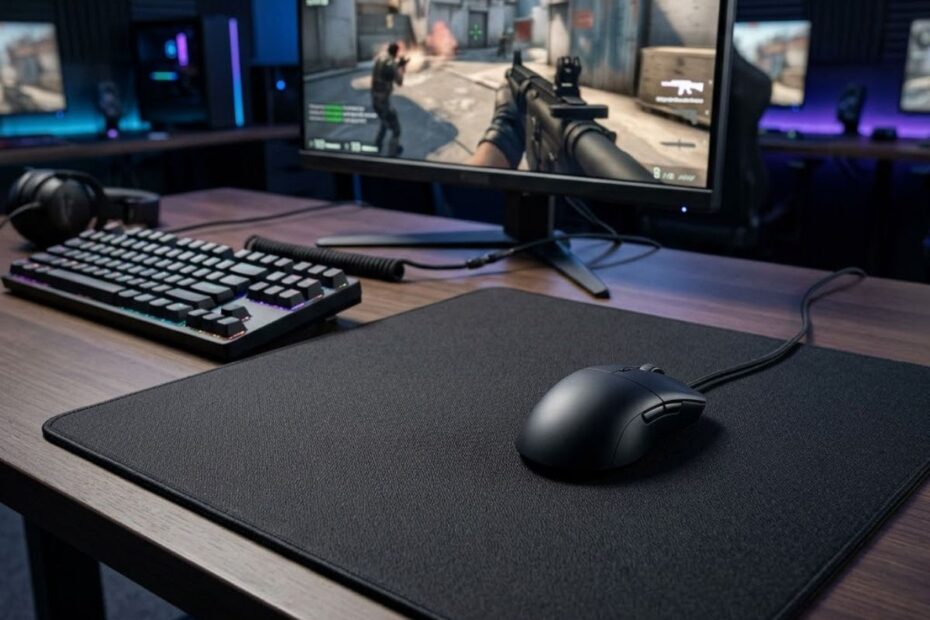
A gaming mouse pad for FPS games is a specialized mouse surface that helps improve tracking consistency, aiming control, and movement precision during competitive gameplay. Unlike a regular desk surface, it is designed to give your gaming mouse a predictable glide, stable friction, and reliable sensor contact.
For FPS players, the mouse pad is not just a desk accessory. It is the surface that connects every hand movement to your crosshair, which means it can affect flick shots, tracking, micro-adjustments, and overall aim consistency.
This guide explains what a gaming mouse pad is, why it matters for FPS games, how it affects aim, and how to choose the right surface for your playstyle.
What Is a Gaming Mouse Pad for FPS Games?
A gaming mouse pad for FPS games is a purpose-built surface that helps your mouse track more consistently, glide more predictably, and support better aiming control than a regular desk or office mouse pad.
Here’s an example of a dedicated gaming mouse pad used in a modern FPS setup:
In FPS games, every small movement matters. When you move your mouse, your sensor reads the surface below it and translates that motion into crosshair movement on screen. A poor surface can make that movement feel uneven, while a proper gaming mouse pad helps keep the response more stable.
The characteristics below explain what defines a gaming mouse pad:
- Consistent surface: A gaming mouse pad provides a more even texture so the sensor can read movement reliably across the pad.
- Controlled friction: The surface is designed to balance glide speed and stopping power for better aiming control.
- Stable base: A rubber or anti-slip base helps prevent the pad from sliding during fast flicks or wide arm movements.
- Better sensor contact: The surface helps modern gaming mice maintain more predictable tracking than random desk materials.
- FPS-focused movement: Gaming mouse pads are built to support repeated flicks, tracking, and micro-adjustments during competitive play.
These features make a gaming mouse pad different from a basic office pad because it is built around repeatable movement, not just comfort.
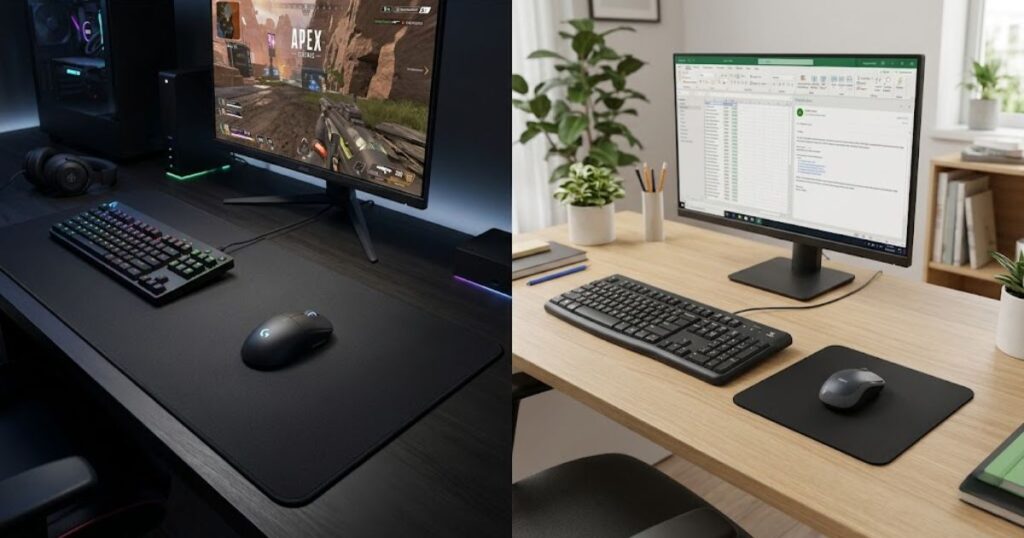
What Makes a Gaming Mouse Pad Different From a Standard Mouse Pad?
A gaming mouse pad is different from a standard mouse pad because it helps create a more predictable surface for sensor tracking, glide, and stopping control.
Standard mouse pads are usually made for casual office use. They may feel fine for browsing, schoolwork, or productivity tasks, but they are not always consistent enough for fast FPS aiming. Their surfaces can be too rough, too soft, too small, or unevenly worn.
Gaming mouse pads are made with aiming behavior in mind. They usually offer a larger usable area, a more controlled surface texture, stronger base grip, and materials that hold up better under repeated fast mouse movements.
That difference matters because FPS players often repeat the same motions hundreds of times in one session. A surface that feels slightly inconsistent in office use can feel much worse when you are trying to hold an angle, track a strafing enemy, or stop your crosshair on a headshot.
A standard mouse pad can still work for casual play, but a gaming mouse pad gives FPS players a more reliable foundation for consistent aiming.
Why FPS Players Depend on Consistent Mouse Surfaces
FPS players depend on consistent mouse surfaces because consistent friction helps the same hand movement produce the same crosshair movement.
Aiming in FPS games is built on repeatability. If your surface feels fast in one area and slow in another, your hand has to constantly adjust to the pad instead of focusing on the target. That inconsistency can make flicks feel unreliable and tracking feel less stable.
This is why many players care about surface texture, glide, and stopping power. A good pad helps reduce random surface behavior, so your aim feels less dependent on where your mouse happens to be on the desk.
For a deeper look at this specific topic, the guide on whether mouse pads affect aim consistency explains how surface behavior can influence repeatable aim in FPS games.
Consistent surfaces do not replace practice, but they help make practice more reliable because your mouse movement feels easier to repeat.
How Gaming Mouse Pads Support Modern Gaming Mice
Gaming mouse pads help modern gaming mice perform more reliably by giving the sensor a clean, consistent, and readable surface.
Modern gaming mice use optical sensors that read surface detail at high speed. When the surface is inconsistent, glossy, dirty, or uneven, the sensor may not feel as predictable during fast movement. A proper gaming mouse pad gives the sensor a better surface to read.
This does not mean every mouse pad will make every sensor better. It means a well-made surface reduces avoidable problems that can come from using random desk materials, worn pads, or unstable surfaces.
The relationship between mouse pads and sensors is important enough to deserve its own breakdown, especially for players using high-performance gaming mice.
A gaming mouse pad supports modern mice by giving the sensor a stable foundation, which helps your aim feel smoother and more predictable during FPS gameplay.
Why Does a Gaming Mouse Pad Matter in FPS Games?
A gaming mouse pad helps create consistent mouse movement and sensor tracking, which are essential for accurate aiming in FPS games.
FPS games are different from casual games because your mouse movement directly controls where you aim. Small changes in friction, surface texture, or pad size can affect how confidently you flick, track, and stop your crosshair.
The factors below explain why mouse pads matter in FPS games:
- Tracking consistency: A predictable surface helps the sensor read movement more evenly during fast and slow aim adjustments.
- Aim stability: Stable friction makes it easier to stop your crosshair where you want instead of overshooting.
- Repeatable movement: A consistent pad helps the same hand motion produce a similar result each time.
- Better control: The right surface can make flicks, tracking, and micro-adjustments feel more controlled.
- Reduced surface problems: A gaming mouse pad helps avoid issues caused by glossy desks, uneven tables, or worn office pads.
That is why a gaming mouse pad matters most when your goal is not just moving the mouse, but moving it with repeatable control.
Why Consistency Matters More Than Raw Speed
Consistency matters more than raw speed because FPS aim depends on repeatable control, not just how fast the mouse can glide.
A very fast surface can feel exciting at first, especially if you like quick flicks. The problem is that speed without control can make it harder to stop your crosshair accurately. In tactical FPS games, stopping power often matters as much as movement speed.
A consistent surface gives you a predictable relationship between hand movement and crosshair movement. That predictability helps you build muscle memory over time because your hand does not have to fight random changes in glide or friction.
This is also why the broader gaming mouse pad for FPS games guide should be treated as a foundation before choosing between specific pad types.
Speed can help in some games, but consistency is what helps your aim feel repeatable across long sessions.
How Surface Quality Affects Everyday Gameplay
Surface quality helps determine how smooth, stable, and predictable your mouse feels during normal FPS gameplay.
A poor surface can create drag, uneven glide, or inconsistent stopping points. You may not notice these issues when casually moving your cursor, but they become more obvious during real matches when you need to react quickly and aim precisely.
Surface quality also affects comfort. A rough or unstable surface can make longer sessions feel worse, especially for players who use wide arm movements. Over time, that discomfort can make your setup feel less controlled.
Good surface quality does not guarantee better aim by itself, but it removes unnecessary friction from your setup so your mechanics can become more consistent.
Why Competitive Players Pay Attention to Mouse Pads
Competitive players pay attention to mouse pads because the pad affects the surface conditions behind every aim movement.
In competitive FPS games, players often tune their mouse, sensitivity, grip, monitor settings, and crosshair. The mouse pad belongs in that same setup because it changes how the mouse feels in motion. Even a great gaming mouse can feel worse on the wrong surface.
Competitive players usually care about repeatability. They want their flicks, tracking, and angle clearing to feel the same every round. A reliable mouse pad helps create that stable environment.
If you are moving from casual play into more serious FPS games, upgrading from a random desk surface to a real gaming mouse pad is one of the simplest setup improvements to understand.
A gaming mouse pad matters in FPS games because it helps turn mouse movement into more predictable aim behavior.
How Does a Gaming Mouse Pad Affect Aim Performance?
A gaming mouse pad helps influence flick accuracy, tracking stability, and micro-adjustments by controlling friction, glide, and stopping power.
The effect is not magic. A mouse pad does not aim for you, and it will not turn bad mechanics into perfect aim overnight. What it can do is make your mouse movement feel more predictable, which helps you practice and perform with fewer surface-related distractions.
The table below explains how a gaming mouse pad can affect different FPS aiming skills:
| Aiming Skill | Mouse Pad Impact | Why It Matters |
|---|---|---|
| Flick shots | Moderate to high | The surface affects how quickly you start moving and how easily you stop on target. |
| Tracking | High | Consistent glide helps you follow moving targets without fighting uneven friction. |
| Micro-adjustments | High | Controlled friction helps with small corrections near the target. |
| Target switching | Moderate | A predictable surface helps you move between targets with better rhythm. |
The table shows that mouse pads affect aim most clearly when the movement requires both speed and control. Tracking and micro-adjustments usually reveal surface differences faster than casual cursor movement.
The illustration below shows how surface consistency influences aiming movements:
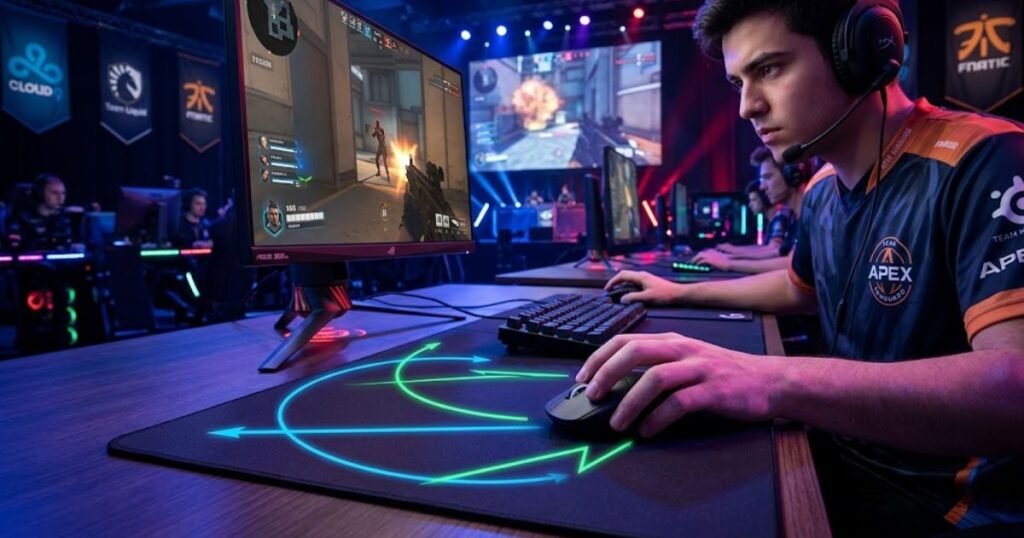
For a dedicated breakdown, read do mouse pads affect aim consistency to understand how surface behavior connects to repeatable FPS aim.
Impact on Flick Shots
A gaming mouse pad helps flick shots by controlling how quickly the mouse starts moving and how easily it stops near the target.
Flicking is not only about moving fast. It is also about stopping accurately. A surface with too little control can make you overshoot, while a surface with too much drag can make fast reactions feel slower.
The best surface for flicking depends on how you aim. Some players prefer faster pads for quick target switching, while others prefer control pads because they make stopping more confident.
For FPS players, flick performance improves most when the pad matches the player’s sensitivity and stopping preference.
Impact on Tracking Moving Targets
A gaming mouse pad helps tracking by giving your mouse a smoother and more consistent glide while following moving targets.
Tracking requires continuous movement. If the pad has uneven friction, your crosshair can feel like it speeds up or slows down unexpectedly. That makes it harder to stay on a strafing enemy, especially in faster games.
A balanced or slightly faster surface can help tracking feel smoother, while a control surface can help keep the movement more deliberate. The right choice depends on whether you struggle more with keeping up or with overcorrecting.
Tracking benefits from a surface that feels predictable across the full pad, not just in one clean area.
Impact on Precision Micro Adjustments
A gaming mouse pad helps micro-adjustments by giving players enough control to make small crosshair corrections without slipping past the target.
Micro-adjustments are common in tactical FPS games where your crosshair may already be close to the enemy, but not perfectly placed. In those moments, you need tiny controlled movements instead of large swipes.
A control-oriented surface can help because it gives more feedback and stopping power. However, the pad should not feel so muddy that small movements become difficult to start.
Micro-adjustments are where surface control becomes especially important because tiny inconsistencies can decide whether your crosshair lands cleanly or slightly off target.
A gaming mouse pad affects aim performance by making movement more consistent, which helps flicks, tracking, and small corrections feel easier to repeat.
What Are the Main Types of Gaming Mouse Pads?
Gaming mouse pads are generally divided into speed, control, and balanced surfaces that help FPS players achieve different levels of glide, stopping power, and aiming feel.
Although many mouse pads look similar at first glance, their surfaces can behave very differently during gameplay. Some are designed to reduce friction and maximize speed, while others are built to increase control and precision. Understanding these categories makes it easier to choose a mouse pad that matches your aiming style.
The table below compares the main categories of gaming mouse pads used in FPS games:
| Type | Glide Speed | Stopping Power | Best For |
|---|---|---|---|
| Speed Pad | High | Low | Fast tracking and aggressive movement |
| Control Pad | Low to Medium | High | Precision-focused tactical FPS games |
| Balanced Pad | Medium | Medium | Players seeking versatility |
The table shows that no single surface category is objectively best. The right choice depends on how you aim, the games you play, and the amount of control you prefer during mouse movement.
Speed Mouse Pads
Speed mouse pads are surfaces that help reduce friction and allow the mouse to move more freely across the pad.
Players who enjoy fast crosshair movement often prefer speed-oriented surfaces because they require less physical effort to move the mouse. This can make tracking feel smoother and rapid direction changes feel more effortless.
However, lower friction also means lower stopping power. Some players find speed pads more difficult to control during precise headshots because the mouse continues moving more easily after a flick.
Speed pads are often favored by players who prioritize fluid movement and fast target transitions.
Control Mouse Pads
Control mouse pads are surfaces that help increase stopping power and provide greater resistance during mouse movement.
Instead of maximizing glide speed, these pads focus on helping players stop the mouse more precisely. This additional friction can make small corrections feel more deliberate, especially during tactical FPS games where crosshair placement is critical.
Many players transitioning from casual gaming to competitive FPS titles prefer control surfaces because they often feel easier to manage while developing consistent aim habits.
Control pads prioritize accuracy and confidence over raw movement speed.
Balanced Hybrid Mouse Pads
Balanced mouse pads are surfaces that help combine the speed of faster pads with the stopping power of control-focused pads.
Many modern gaming mouse pads are designed as hybrid surfaces because they appeal to a wider range of players. Instead of pushing heavily toward one extreme, they provide a compromise between glide and control.
This balance can be especially useful for players who switch between multiple FPS games or who are still discovering their preferred aiming style. A hybrid pad often feels more forgiving because it avoids the strongest characteristics of either category.
Balanced surfaces are popular because they provide versatility without forcing players into a highly specialized experience.
Understanding the three major surface categories creates the foundation for comparing speed and control mouse pads in greater detail.
Speed vs Control Mouse Pads for FPS Games
Speed mouse pads help reduce friction for faster movement, while control mouse pads help increase stopping power for greater aiming precision.
This is one of the most common decisions FPS players face when choosing a mouse pad. Both surface types can perform extremely well, but they support different aiming preferences and movement styles.
The table below compares speed and control mouse pads for FPS games:
| Feature | Speed Pad | Control Pad |
|---|---|---|
| Glide Speed | Higher | Lower |
| Stopping Power | Lower | Higher |
| Tracking Feel | Smoother | More deliberate |
| Micro Adjustments | Faster | More controlled |
| Tactical FPS | Good | Excellent |
The comparison shows that speed and control surfaces solve different aiming challenges rather than competing to be universally superior.
Players looking for recommendations can explore our guide to the top best gaming mouse pads for FPS games in 2026 to see how popular pads fit into these categories.
Advantages of Speed Surfaces
Speed surfaces help players move the mouse more easily and cover larger distances with less effort.
The reduced friction can make target switching feel quicker and tracking feel more fluid. This is especially noticeable in games that involve frequent movement, multiple enemies, and constant repositioning.
Some players also enjoy the lighter feeling of speed pads because they require less physical force during extended gaming sessions.
Speed surfaces are often chosen by players who value movement freedom and rapid reactions.
Advantages of Control Surfaces
Control surfaces help players stop the mouse more accurately and maintain greater precision during small aiming movements.
The additional resistance can reduce overshooting and make crosshair placement feel more deliberate. This is particularly valuable in tactical shooters where accuracy often matters more than movement speed.
Control pads also tend to provide more feedback during movement, which some players find helpful for developing consistent muscle memory.
Control surfaces are often preferred by players who prioritize precision and confidence over maximum speed.
Which Surface Fits Tactical FPS Games Best?
Control-oriented surfaces generally fit tactical FPS games best because they help support precise stopping and accurate crosshair placement.
Games such as Valorant and Counter-Strike reward disciplined aiming, angle holding, and careful adjustments more than rapid full-screen tracking. For that reason, many tactical FPS players gravitate toward pads that offer greater stopping power.
That does not mean speed pads cannot work in these games. Many skilled players still use faster surfaces successfully. The deciding factor is usually personal preference rather than a strict rule.
For most tactical FPS players, a balanced or control-oriented surface provides the easiest path toward consistent aim development.
Choosing between speed and control surfaces becomes easier once you understand how different mouse pad materials influence glide and durability.
Cloth vs Hard Gaming Mouse Pads
Cloth and hard gaming mouse pads are surface materials that help create different levels of comfort, durability, friction, and glide speed.
While speed and control describe how a surface behaves, cloth and hard refer to how the surface is physically constructed. These materials influence the overall feel of the mouse pad and can affect long-term usage.
The table below compares cloth and hard gaming mouse pads:
| Feature | Cloth Pad | Hard Pad |
|---|---|---|
| Comfort | High | Medium |
| Control | Higher | Lower |
| Glide Speed | Moderate | Higher |
| Noise | Lower | Higher |
| Durability | Good | Excellent |
The two most common gaming mouse pad materials are shown below:
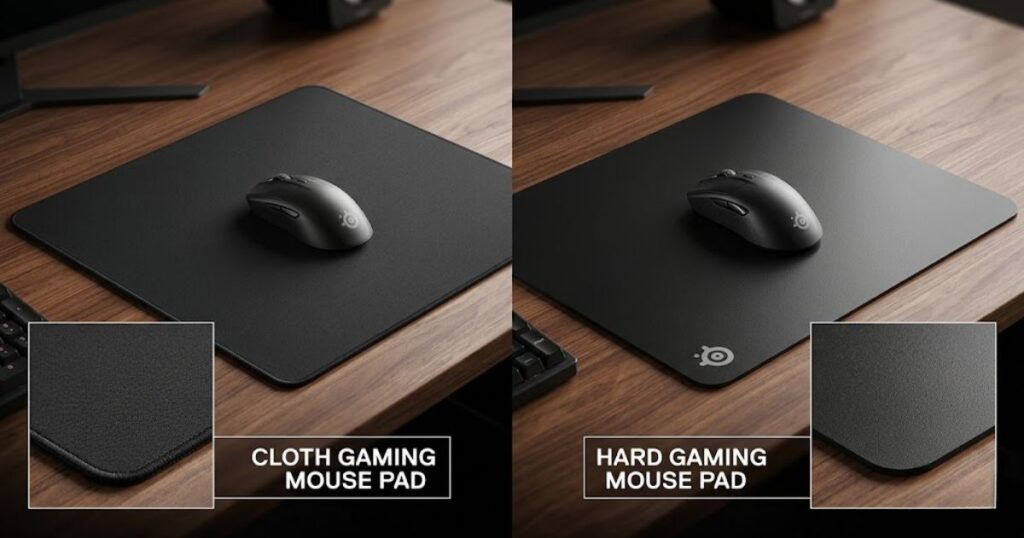
The comparison shows why cloth pads remain the most common choice among FPS players, while hard pads continue to appeal to users who prioritize speed and durability.
What Mouse Pad Size Is Best for FPS Games?
A larger gaming mouse pad helps most FPS players maintain consistent movement, avoid running out of space, and support lower sensitivity aiming styles.
Mouse pad size directly affects how freely you can move during gameplay. While many new players focus on sensors, DPI, or polling rate, the amount of available surface area often has a much bigger impact on comfort and consistency. A mouse pad that is too small can limit movement and force unnecessary adjustments during matches.
The table below compares common mouse pad sizes used in FPS games:
| Size | Typical Width | Best For |
|---|---|---|
| Small | Under 350 mm | High sensitivity players |
| Medium | 350-450 mm | Mixed gaming and everyday use |
| Large | 450-500 mm | Most FPS players |
| Extended | 900 mm+ | Low sensitivity and full desk setups |
The image below demonstrates the most common mouse pad sizes used by FPS players:
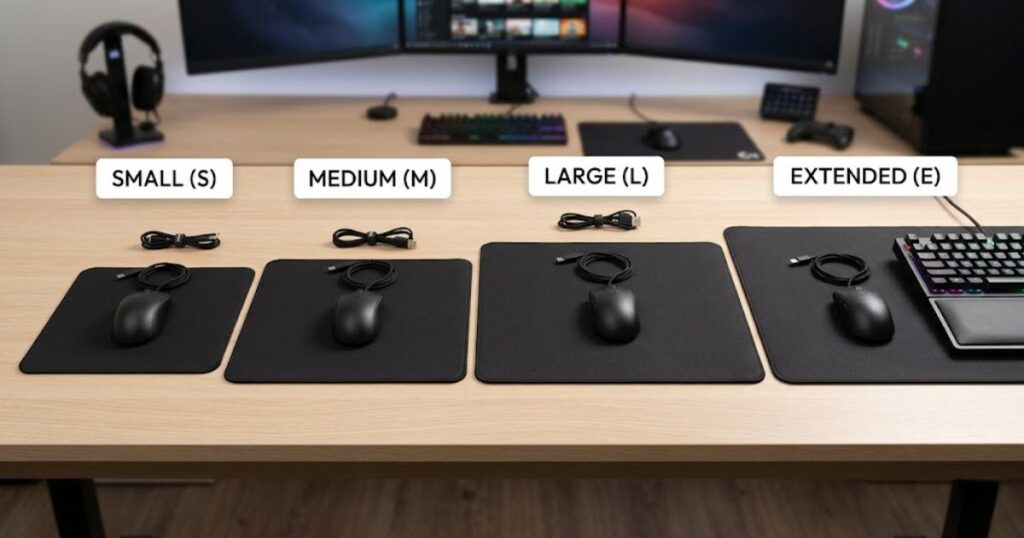
The table shows that larger mouse pads generally provide more flexibility for FPS gaming because they allow wider and more natural aiming movements.
Why Most FPS Players Prefer Large Mouse Pads
Large mouse pads help FPS players maintain uninterrupted movement, making them the most popular size category for competitive gaming.
Many FPS players use lower sensitivity settings because lower sensitivity can improve precision and consistency. The downside is that larger arm movements become necessary. A larger mouse pad provides enough room for these movements without constantly reaching the edge of the surface.
Large pads also reduce the need to frequently reposition the mouse during gameplay. This creates a smoother aiming experience and helps maintain focus during intense matches.
For most FPS players, a large mouse pad offers the best balance between movement freedom and desk space efficiency.
When a Medium Mouse Pad Is Enough for FPS Gaming
A medium mouse pad helps provide sufficient movement space for players who use moderate to high sensitivity settings.
Not every FPS player requires an oversized surface. Players with smaller desks or higher sensitivity settings often find that medium-sized pads provide enough room for normal gameplay while keeping the setup compact.
Medium pads can also work well for players who split their desk between gaming, work, and general computer use. They offer a practical compromise between gaming performance and everyday convenience.
For players who do not frequently perform large arm movements, a medium mouse pad can be a perfectly reasonable choice.
Is an Extended Mouse Pad Worth It for FPS Players?
An extended mouse pad helps create a larger continuous surface while allowing both the keyboard and mouse to sit on the same material.
Many players choose extended mouse pads because they provide maximum movement space and improve desk organization. The larger surface also helps keep the mouse movement area consistent regardless of hand position.
Players using low sensitivity settings often benefit most from extended pads because they rarely need to worry about running out of space during aggressive flicks or tracking movements.
If desk space is available, an extended mouse pad can be a comfortable and practical upgrade for many FPS setups.
Mouse pad size is important, but choosing the right size becomes much easier once sensitivity settings are taken into account.
How Does Mouse Sensitivity Affect Mouse Pad Choice?
Mouse sensitivity helps determine how much movement space you need, making it one of the most important factors when choosing a gaming mouse pad.
Many players choose a mouse pad based only on dimensions, but sensitivity often determines whether that size will actually work in practice. The lower the sensitivity, the farther you need to physically move the mouse to perform the same action on screen.
The table below shows how sensitivity influences mouse pad requirements:
| Sensitivity Style | Movement Distance | Recommended Pad Size |
|---|---|---|
| High Sensitivity | Short | Small to Medium |
| Medium Sensitivity | Moderate | Large |
| Low Sensitivity | Long | Large to Extended |
The table demonstrates why many competitive FPS players prefer larger mouse pads. Lower sensitivity naturally requires more movement space.
Why Low Sensitivity Players Need More Mouse Pad Space
Low sensitivity helps improve precision, but it also requires significantly more physical movement.
Players using low sensitivity often move the mouse across a much larger area when clearing angles, tracking opponents, or performing wide flicks. Without enough surface space, movement can become restricted and inconsistent.
This is one reason why large and extended mouse pads are extremely common among competitive FPS players.
More movement distance means more surface requirements, making low sensitivity one of the strongest reasons to buy a larger mouse pad.
How High Sensitivity Changes Mouse Pad Requirements
High sensitivity helps reduce the amount of physical movement required to control the crosshair.
Because small hand movements create larger on-screen movements, players using higher sensitivity can often play comfortably on smaller surfaces. They simply do not need the same movement range as low sensitivity users.
However, larger mouse pads can still provide flexibility and comfort even for high sensitivity players.
Higher sensitivity reduces space requirements, but it does not eliminate the benefits of having additional movement room.
Finding the Right Balance Between Sensitivity and Surface Size
The best setup helps balance movement freedom, aiming comfort, and available desk space.
There is no universal combination that works for everyone. Some players prefer extremely low sensitivity with oversized pads, while others achieve excellent results using higher sensitivity and more compact surfaces.
The goal is not to copy another player’s setup. The goal is to find a combination that allows you to move comfortably and maintain consistent aim over long sessions.
Mouse sensitivity and mouse pad size should always be evaluated together because they directly influence one another.
Once size and sensitivity are addressed, the next step is understanding which mouse pad features actually matter during FPS gameplay.
What Features Matter Most in a Gaming Mouse Pad?
The most important gaming mouse pad features help improve consistency, comfort, durability, and long-term aiming performance during FPS gameplay.
Many gaming mouse pads advertise unique technologies, special coatings, or marketing terms that sound impressive. In practice, only a handful of features have a noticeable impact on how a mouse pad actually feels and performs. Understanding these characteristics makes it easier to separate meaningful improvements from marketing claims.
The features below explain what matters most when choosing a gaming mouse pad:
- Surface texture: Determines glide speed, friction, and overall aiming feel.
- Thickness: Influences comfort, cushioning, and desk feel.
- Base grip: Helps prevent unwanted movement during gameplay.
- Durability: Affects how well the surface maintains its original performance over time.
- Edge stitching: Helps reduce fraying and improve lifespan.
The image below highlights the most important gaming mouse pad features:
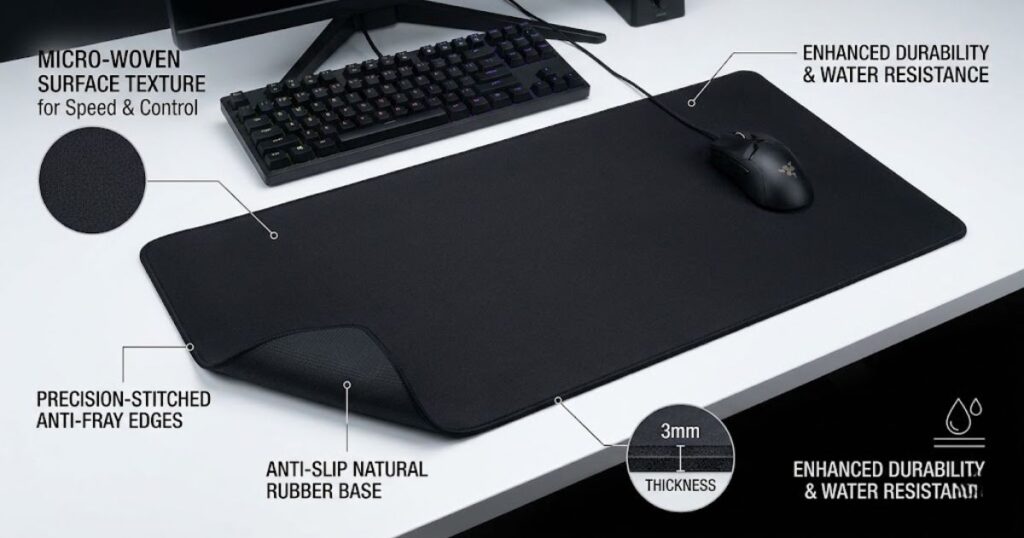
These features often have a much bigger impact on real-world performance than flashy marketing terms or product packaging.
Why Surface Texture Has the Biggest Impact on Mouse Pad Feel
Surface texture helps determine how fast, smooth, or controlled a mouse feels during movement, making it the single most influential mouse pad characteristic.
Every mouse pad surface creates a specific amount of friction. Some textures allow the mouse to glide more freely, while others provide greater resistance and stopping power. This difference affects how flicks, tracking, and micro-adjustments feel during gameplay.
Surface texture also plays a major role in how consistent the pad feels over time. Even if two mouse pads are similar in size and material, different textures can create completely different aiming experiences.
This is one reason why players often prefer certain mouse pads despite using identical gaming mice and sensitivity settings.
Surface texture has the greatest influence on mouse pad feel because it affects every movement you make during a match.
How Thickness Changes Comfort and Control
Mouse pad thickness helps influence comfort, pressure distribution, and the overall feel of the surface underneath the mouse.
Thicker mouse pads provide more cushioning and can feel more comfortable during long gaming sessions. They may also slightly soften the surface, which some players believe improves control during slower movements.
Thinner mouse pads generally feel firmer because there is less material between the surface and the desk. Some players prefer this direct feeling because it creates a more stable experience during fast movements.
The difference is usually subtle, but comfort preferences vary significantly between players.
Thickness is primarily a comfort feature, although it can slightly influence how the surface feels during gameplay.
Why a Stable Rubber Base Matters More Than Most Players Realize
A stable rubber base helps keep the mouse pad firmly in place, preventing unwanted movement during gameplay.
Many players focus entirely on the surface and ignore what is underneath. However, even the best surface can become frustrating if the mouse pad slides across the desk during intense moments.
A quality rubber base helps maintain consistent positioning throughout long gaming sessions. This stability becomes increasingly important for players who use aggressive arm movements, lower sensitivity settings, or large mouse pads.
Small shifts may seem insignificant, but they can interrupt muscle memory and create unnecessary distractions during competitive matches.
A stable base supports aim consistency by ensuring that only the mouse moves, not the surface beneath it.
Are Stitched Edges Worth Paying Extra For?
Stitched edges help improve durability by reducing fraying and protecting the outer edges of the mouse pad.
Over time, repeated use can cause the edges of cloth mouse pads to separate or wear down. Stitched borders reinforce these vulnerable areas and help the surface maintain its shape for a longer period.
The performance difference between stitched and non-stitched edges is usually minimal. The primary advantage is longevity rather than immediate gameplay improvement.
For players who plan to keep a mouse pad for several years, stitched edges are often a worthwhile upgrade.
Edge stitching does not directly improve aim, but it can help preserve the overall quality of the mouse pad over time.
The best gaming mouse pad features are the ones that contribute to a consistent experience throughout hundreds of hours of FPS gameplay.
Do Expensive Gaming Mouse Pads Improve FPS Performance?
Expensive gaming mouse pads help provide greater consistency, durability, and build quality, but they do not automatically improve aiming skill.
This is one of the most common questions among FPS players. Premium mouse pads often cost several times more than budget alternatives, leading many players to wonder whether the extra cost translates into better performance.
The table below compares typical differences between budget and premium gaming mouse pads:
| Feature | Budget Mouse Pad | Premium Mouse Pad |
|---|---|---|
| Surface Consistency | Good | Excellent |
| Durability | Moderate | High |
| Base Quality | Average | Better |
| Edge Construction | Basic | Premium |
| Longevity | Shorter | Longer |
The table shows that premium mouse pads usually focus on refinement, consistency, and durability rather than dramatic performance gains.
Players looking for current recommendations can explore our guide to the top best gaming mouse pads for FPS games in 2026 to compare popular options across different price ranges.
What Premium Mouse Pads Actually Offer
Premium gaming mouse pads help deliver more consistent surfaces, better materials, and longer-lasting performance.
Higher-end manufacturers often invest more heavily in material quality, manufacturing precision, and long-term durability. These improvements can create a more predictable experience over months or years of use.
The difference is rarely dramatic on day one. Instead, premium products often maintain their original feel longer and provide better overall quality control.
Premium mouse pads typically improve consistency rather than raw performance.
Where Budget Mouse Pads Can Still Perform Well
Budget gaming mouse pads help provide solid performance for many FPS players without requiring a large investment.
Modern budget mouse pads are often much better than many players expect. Numerous affordable options offer excellent tracking, good durability, and sufficient surface quality for competitive gameplay.
For newer players, upgrading from a poor surface to a decent budget gaming mouse pad usually delivers a bigger improvement than upgrading from a good mouse pad to an expensive one.
Budget mouse pads can still support excellent FPS performance when chosen carefully.
When Paying More Actually Makes Sense
Paying more for a gaming mouse pad helps make sense when consistency, durability, and long-term reliability are priorities.
Players who spend hundreds of hours gaming often notice surface wear more quickly than casual users. In these situations, premium materials and construction can become worthwhile because the mouse pad maintains its original feel for a longer period.
Competitive players may also appreciate the tighter quality control offered by higher-end products.
The value of a premium mouse pad depends less on skill level and more on usage habits, preferences, and expectations.
Expensive mouse pads can improve the quality of the experience, but they remain tools rather than shortcuts to better aim.
Common Gaming Mouse Pad Mistakes FPS Players Make
Many FPS players choose mouse pads based on trends, marketing claims, or professional player setups instead of their own sensitivity, aiming style, and gameplay needs.
A gaming mouse pad can improve consistency and comfort, but only if it matches how you actually play. Many players spend money on highly recommended mouse pads and still feel disappointed because they selected a surface that does not fit their setup or preferences.
The mistakes below explain the most common gaming mouse pad buying and usage errors:
- Choosing the wrong surface type: Buying a speed or control pad without understanding how it affects aiming feel.
- Buying a mouse pad that is too small: Limiting movement space and creating unnecessary restrictions.
- Ignoring maintenance: Allowing dirt and wear to change the surface over time.
- Copying professional setups blindly: Assuming a pro player’s mouse pad will automatically improve performance.
- Prioritizing marketing over personal preference: Choosing hype instead of actual needs.
Avoiding these mistakes usually has a greater impact than constantly switching between different mouse pads.
Why Choosing the Wrong Surface Type Creates Problems
Choosing the wrong surface type can make aiming feel uncomfortable, inconsistent, or difficult to control.
Some players naturally prefer faster movement and lower friction, while others perform better with additional stopping power. A surface that feels perfect for one player can feel frustrating for another.
This is why understanding your own aiming style matters more than following popular recommendations. The goal is to find a surface that complements your movement habits rather than forcing you to adapt to an uncomfortable experience.
The wrong surface type often creates more problems than using a less expensive mouse pad.
Why a Small Mouse Pad Can Limit Aim Consistency
A mouse pad that is too small can restrict movement and make aiming feel less predictable during gameplay.
Running out of space forces players to lift and reposition the mouse more frequently. While occasional repositioning is normal, excessive interruptions can break movement rhythm and reduce consistency.
This issue becomes especially noticeable for players using lower sensitivity settings because they require more physical movement to perform the same actions.
Adequate movement space is one of the simplest ways to create a more comfortable FPS setup.
Why Mouse Pad Maintenance Actually Matters
Regular maintenance helps preserve the original glide, texture, and consistency of a gaming mouse pad.
Over time, sweat, dust, skin particles, and debris accumulate on the surface. This buildup can change friction levels and make the mouse pad feel different from when it was new.
Many players blame their mouse, sensitivity, or aim when the real issue is a surface that has gradually become dirty or worn.
Keeping a mouse pad clean helps maintain a more predictable aiming experience over the long term.
Avoiding common mistakes helps ensure that a gaming mouse pad continues supporting consistent FPS performance instead of becoming a source of frustration.
Do You Really Need a Gaming Mouse Pad for FPS Games?
A gaming mouse pad helps provide a more consistent aiming experience, making it one of the most practical upgrades for FPS players.
While it is possible to play on a desk surface, office mouse pad, or other materials, a dedicated gaming mouse pad is designed specifically to support mouse tracking and movement consistency. The difference may seem small at first, but it becomes easier to notice as aiming skill improves.
The table below compares how different player types benefit from using a gaming mouse pad:
| Player Type | Benefit Level | Reason |
|---|---|---|
| Casual FPS Player | Moderate | Improved comfort and consistency |
| Regular FPS Player | High | More predictable aiming experience |
| Competitive Player | Very High | Greater consistency and control |
| Esports Player | Essential | Reliable performance under pressure |
The table shows that gaming mouse pads become increasingly valuable as aiming precision and consistency become more important.
Why Casual FPS Players Can Still Benefit From a Gaming Mouse Pad
A gaming mouse pad helps casual FPS players enjoy smoother movement and a more comfortable gaming experience.
Casual players may not notice every difference in surface texture or stopping power, but they can still benefit from a larger movement area, improved comfort, and better overall consistency.
Even an affordable gaming mouse pad often provides a better experience than random desk surfaces or worn office pads.
A gaming mouse pad is not only for competitive players because basic consistency benefits everyone.
Why Competitive Players Value Consistency So Highly
Competitive players value consistency because repeatable movement is one of the foundations of reliable aim.
At higher skill levels, small differences become easier to notice. Players spend hundreds or thousands of hours developing muscle memory, making surface consistency increasingly important.
A predictable mouse pad helps reduce variables and allows players to focus more on decision-making and mechanics.
Consistency is often the biggest reason competitive players invest in dedicated gaming surfaces.
Why Modern Gaming Mice Work Best on Dedicated Mouse Pads
Modern gaming mice help perform most consistently when paired with surfaces designed for reliable sensor tracking.
Today’s gaming mice use highly advanced sensors that can function on many surfaces, but that does not mean every surface produces the same experience. Dedicated mouse pads are designed to create predictable tracking conditions that support long-term consistency.
The goal is not simply making the mouse work. The goal is helping it feel consistent every time you play.
A dedicated gaming mouse pad provides a stable foundation that helps modern gaming mice perform more predictably.
Understanding the value of a gaming mouse pad makes it easier to choose the right one for your individual playstyle.
How to Choose the Right Gaming Mouse Pad for Your FPS Playstyle
The right gaming mouse pad helps match your sensitivity, aiming style, movement habits, and preferred FPS games.
There is no universally perfect gaming mouse pad. The best choice depends on how you play, what feels comfortable, and what type of aiming experience you want to create. Instead of copying someone else’s setup, it is usually better to evaluate your own needs first.
The following process can help you choose the right gaming mouse pad:
- Identify your sensitivity: Determine whether you use low, medium, or high sensitivity settings.
- Evaluate your movement style: Decide whether you rely more on arm aiming, wrist aiming, or a combination of both.
- Choose a surface category: Select a speed, control, or balanced surface based on your preferences.
- Select the appropriate size: Ensure there is enough movement space for your setup.
- Consider long-term durability: Look for quality materials, a stable base, and stitched edges when possible.
Following a structured decision process makes it easier to find a mouse pad that fits your needs instead of relying on marketing or trends.
Choosing a Mouse Pad for Valorant and CS2
Players who focus on Valorant and CS2 often benefit from surfaces that prioritize control and precise stopping power.
These games reward crosshair placement, disciplined aim, and accurate micro-adjustments. Many players prefer balanced or control-oriented surfaces because they support deliberate movements and confident stopping.
A large mouse pad is also common because lower sensitivity settings are widely used in tactical FPS games.
Control-focused surfaces often align well with the demands of tactical shooters.
Choosing a Mouse Pad for Apex Legends and Faster FPS Games
Players who focus on faster FPS games often prefer surfaces that allow smoother tracking and quicker movement.
Games with high mobility and frequent target tracking can make faster surfaces feel more comfortable. Some players appreciate the reduced friction because it supports rapid directional changes and continuous movement.
However, personal preference remains more important than any genre recommendation.
The ideal surface is the one that helps you maintain confidence during movement-heavy gameplay.
Choosing a Mouse Pad as a Beginner
Beginners usually benefit most from a balanced gaming mouse pad that provides a mix of speed, control, and versatility.
A balanced surface allows new players to develop preferences naturally without committing to an extreme speed or control experience. It also works well across multiple FPS genres while aiming habits are still developing.
As experience grows, players can decide whether they prefer faster glide, stronger stopping power, or simply want to stay with a balanced setup.
A balanced mouse pad provides one of the safest starting points for new FPS players.
The best gaming mouse pad for FPS games is ultimately the one that helps you maintain comfortable, consistent, and repeatable aim over time.
Frequently Asked Questions About Gaming Mouse Pads for FPS Games
Below are answers to some of the most common questions FPS players ask when researching gaming mouse pads, aiming performance, and setup optimization.
What Is a Gaming Mouse Pad for FPS Games?
A gaming mouse pad for FPS games is a specialized surface that helps provide more consistent tracking, smoother movement, and better aiming control than standard desk surfaces.
Do Gaming Mouse Pads Actually Improve Aim?
Gaming mouse pads help improve aiming consistency by creating a more predictable surface, but they do not automatically improve skill or replace practice.
Why Do Most FPS Players Use Large Mouse Pads?
Most FPS players use large mouse pads because they provide more movement space, which supports lower sensitivity settings and wider aiming motions.
What Is the Difference Between a Speed and Control Mouse Pad?
Speed mouse pads help reduce friction for faster movement, while control mouse pads help increase stopping power for more precise aim adjustments.
Are Cloth Mouse Pads Better Than Hard Mouse Pads for FPS Games?
Cloth mouse pads are generally more popular because they offer a balance of comfort, control, and consistency, although some players prefer hard surfaces for faster glide.
Can a Mouse Pad Affect Mouse Sensor Performance?
A mouse pad can affect how consistently a sensor tracks movement because different surfaces provide different levels of texture and readability for the sensor.
What Mouse Pad Size Is Best for Low Sensitivity Players?
Large and extended mouse pads are usually best for low sensitivity players because they provide enough room for wide arm movements.
How Long Does a Gaming Mouse Pad Typically Last?
A quality gaming mouse pad can last several years, although durability depends on usage habits, maintenance, material quality, and environmental conditions.
Do Expensive Gaming Mouse Pads Last Longer?
Premium gaming mouse pads often last longer because they typically use better materials, stronger construction, and more durable surface treatments.
Can You Use a Regular Mouse Pad for FPS Games?
A regular mouse pad can work for FPS games, but a dedicated gaming mouse pad usually provides more consistent tracking and movement characteristics.
Should Beginners Buy a Gaming Mouse Pad?
Beginners can benefit from a gaming mouse pad because it creates a more reliable aiming surface and helps establish consistent mouse movement habits.
How Do You Choose the Right Gaming Mouse Pad?
The right gaming mouse pad depends on your sensitivity settings, aiming style, preferred surface feel, available desk space, and budget.
Final Thoughts on Gaming Mouse Pads for FPS Games
A gaming mouse pad is more than just a surface underneath your mouse. It helps create a consistent environment for tracking, aiming, flicking, and building reliable muscle memory over time.
While no mouse pad can instantly improve skill, the right surface can remove unnecessary obstacles that make aiming feel inconsistent or uncomfortable. Factors such as surface type, size, material, and sensitivity compatibility all play an important role in the overall experience.
For most FPS players, a large cloth gaming mouse pad with a balanced or control-oriented surface provides the safest starting point. From there, personal preference becomes the deciding factor as players refine their setup and aiming style.
Thank you for reading GearTP.