
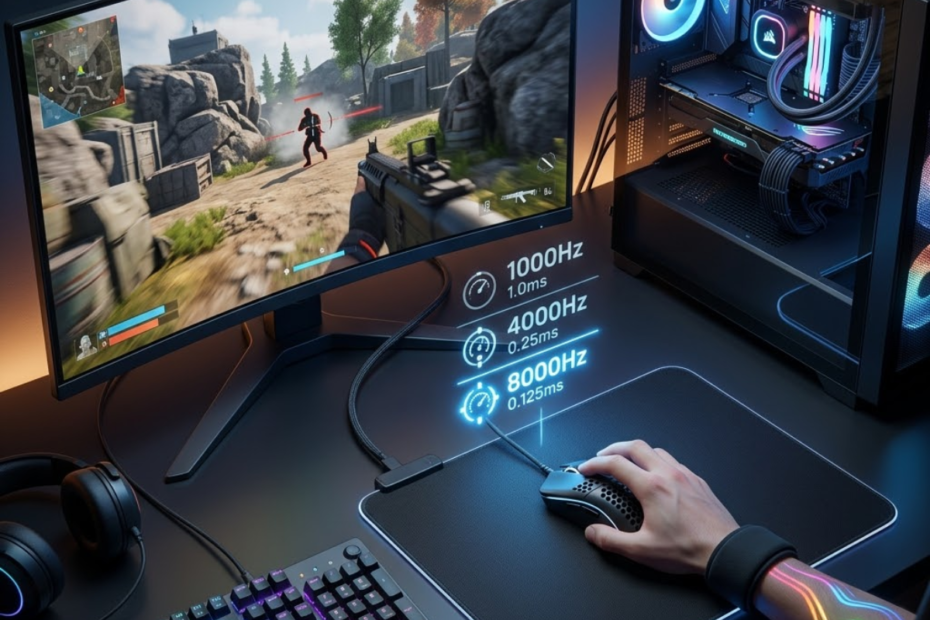
Polling rate and input latency are two connected parts of mouse responsiveness and help explain why some gaming mice feel faster and more responsive during FPS gameplay. Polling rate describes how often a mouse sends movement and click information to a computer, while input latency describes the total delay between a physical action and the moment that action appears on screen.
Many FPS players assume that buying a mouse with a higher polling rate automatically removes all input lag. In reality, polling rate only affects one stage of a much larger input pipeline that includes the mouse, operating system, game engine, graphics card, and display. Understanding how these components work together helps players make better hardware decisions and avoid common misconceptions. Polling rate should also be evaluated alongside factors such as shape, weight, comfort, and sensor performance when choosing a gaming mouse for FPS games.
This guide explains what polling rate and input latency are, how they differ, how they interact with each other, and why their relationship matters for competitive FPS games such as Valorant, Counter-Strike 2, Apex Legends, and Rainbow Six Siege.
What Is Polling Rate in a Gaming Mouse?
Polling rate is the frequency at which a mouse reports movement and click data to a computer and helps determine how often input information is updated during gameplay.
Every gaming mouse continuously communicates with the computer while it is being used. Instead of sending information only when a button is pressed, the mouse constantly reports movement coordinates, click states, and other input data. The frequency of these reports is measured in hertz, commonly written as Hz.
Here’s an example of how polling rate changes the frequency of mouse reports:
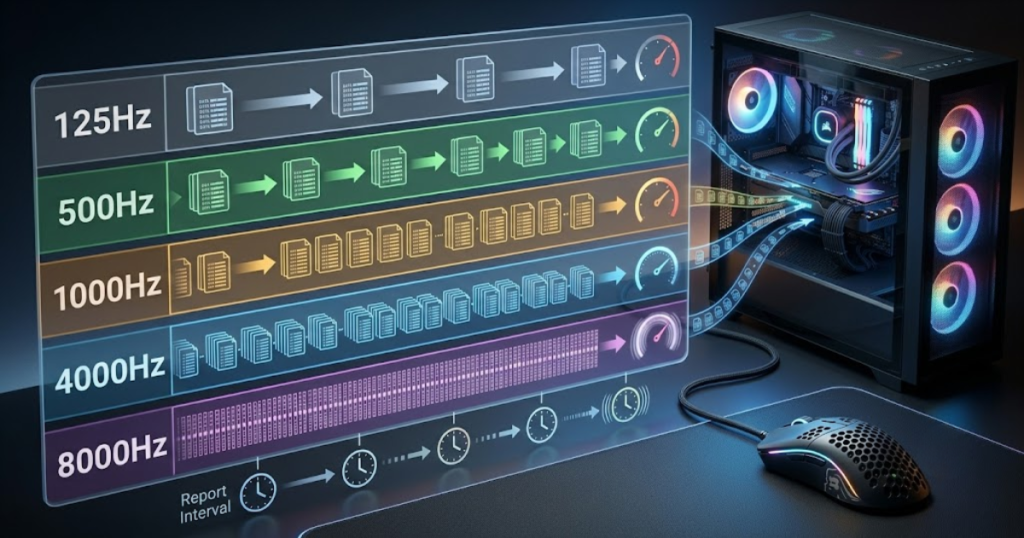
A higher polling rate means the mouse sends updates more frequently. This allows the computer to receive newer input information sooner, reducing the amount of time the system waits for the next update. As a result, cursor movement and aiming actions can feel more responsive, especially during fast-paced FPS gameplay.
How Polling Rate Communicates Mouse Input
Polling rate is the communication frequency between a mouse and a computer and helps determine how often new input information becomes available to the system.
When a mouse sensor tracks movement, the collected information is temporarily stored before being transmitted to the computer. The polling rate controls how often these transmissions occur. A 1000Hz polling rate means the mouse reports its position one thousand times per second, while an 8000Hz polling rate reports eight thousand times per second. If you want a complete explanation of polling rate fundamentals before exploring its relationship with latency, read our guide on what polling rate in a gaming mouse means.
The delay between reports is often called the report interval. This interval becomes shorter as polling rate increases. Because the computer receives fresh movement data more often, the chance of waiting for the next report decreases.
For FPS players, this process is most noticeable during fast aiming movements. Rapid flicks and directional changes generate large amounts of sensor data, and frequent reporting helps ensure that information reaches the game engine as quickly as possible.
In summary, polling rate controls the frequency of communication between the mouse and the computer, creating the foundation for responsive input performance.
Common Polling Rate Options Found in Gaming Mice
Common polling rate options are predefined reporting frequencies and help users choose a balance between responsiveness, compatibility, and system resource usage.
Modern gaming mice offer multiple polling rate settings. While higher numbers generally provide more frequent updates, each level serves different types of users and hardware configurations.
The factors below explain the most common polling rate options available today:
- 125Hz: Reports input every 8 milliseconds and is commonly found on basic office mice.
- 500Hz: Reports input every 2 milliseconds and offers noticeably faster updates than 125Hz.
- 1000Hz: Reports input every 1 millisecond and remains the standard choice for most competitive FPS players.
- 4000Hz: Reports input every 0.25 milliseconds and is designed for high-performance gaming mice.
- 8000Hz: Reports input every 0.125 milliseconds and represents the highest polling rate available on many flagship models.
These options demonstrate how gaming mice have evolved beyond the traditional 1000Hz standard. However, the practical benefit of each increase depends on the rest of the gaming system and the player’s ability to perceive latency differences.
Overall, higher polling rates provide more frequent updates, but they also produce diminishing returns as the numbers increase.
Why Polling Rate Became Important for FPS Players
Polling rate is a responsiveness metric and helps FPS players receive more frequent movement updates during fast aiming situations.
Competitive FPS games require players to make precise movements within extremely short periods of time. Whether tracking a moving opponent or performing a rapid flick shot, every action depends on how accurately the system receives and processes mouse input.
As monitor refresh rates increased from 60Hz to 144Hz, 240Hz, and even 360Hz, the demand for faster input updates also increased. Higher polling rates help ensure that movement information remains current as frames are rendered at increasingly faster speeds.
Professional and highly competitive players often pursue every possible reduction in delay, even when improvements are measured in fractions of a millisecond. While casual players may not notice large differences, high-level competitors frequently value any advantage that improves consistency and responsiveness.
As a result, polling rate became an important specification because it directly influences how frequently input data enters the gaming system.
To summarize, polling rate gained importance as competitive gaming and high-refresh-rate displays pushed players to seek faster and more consistent input performance.
What Is Input Latency and Why Does It Matter?
Input latency is the total delay between a physical mouse action and the corresponding result on screen and helps explain how responsive a gaming setup feels during FPS gameplay.
Unlike polling rate, which measures communication frequency, input latency measures time. It represents the complete delay experienced by the player from the moment an action occurs to the moment visual feedback appears on the display.
This delay is affected by multiple components working together. Even if a mouse has an extremely high polling rate, overall responsiveness can still suffer if another part of the system introduces additional delay.
Because FPS gameplay relies heavily on timing, lower input latency often creates a more immediate and connected feeling between player actions and on-screen results.
What Happens Between a Mouse Click and an On-Screen Action
Input latency is a chain of processing delays and helps describe every step required before a player sees the result of an action.
When a player clicks a mouse button, the signal first travels through the mouse hardware. The input is then transmitted to the operating system, processed by the game engine, rendered by the graphics card, and finally displayed on the monitor.
The input latency process involves multiple stages before an action appears on screen:
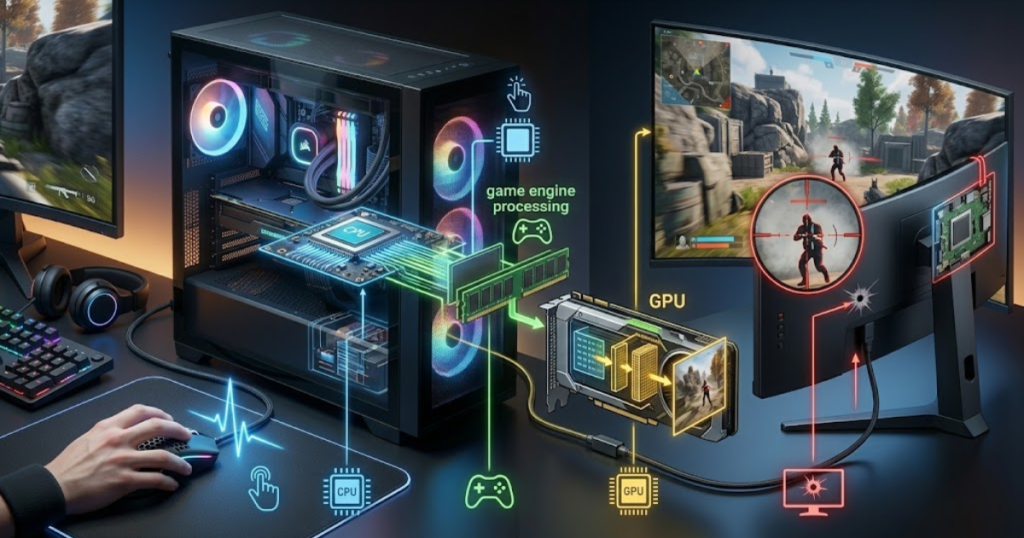
Each stage introduces a small amount of delay. Individually, these delays may appear insignificant, but together they create the total latency experienced by the player.
Understanding this process is important because reducing one stage does not automatically eliminate delays elsewhere. The responsiveness of a gaming setup depends on the combined performance of every component in the chain.
In short, input latency is the result of multiple systems working together rather than a single hardware specification.
The Main Components That Create Input Latency
Input latency is the sum of several independent delays and helps explain why responsiveness varies between gaming setups.
Many players focus exclusively on mouse specifications, but multiple hardware and software layers contribute to total latency.
The factors below explain the primary sources of input latency:
- Mouse Latency: Time required for the mouse hardware to detect and process input.
- USB Transmission Latency: Delay caused by transferring data from the mouse to the computer.
- Game Engine Latency: Processing time required for the game to interpret the input.
- Render Latency: Time needed for the GPU to generate a new frame.
- Display Latency: Delay introduced by monitor processing and refresh behavior.
Each component contributes to the final experience. Improvements in one area may provide limited benefits if another component remains significantly slower.
As a result, reducing total input latency requires a holistic view of the entire gaming system rather than focusing on a single specification.
Why Players Feel Total Latency Instead of Individual Delays
Total latency is the combined response time of the entire system and helps determine how immediate a game feels during play.
Players do not consciously detect individual sources of delay. Instead, they experience the final result as a single sensation of responsiveness. Whether the delay originates from the mouse, CPU, GPU, or monitor is largely irrelevant to perception because all delays accumulate before visual feedback appears.
This is why two gaming setups with identical mice can feel dramatically different. One system may have a faster display, lower rendering latency, or better frame pacing, resulting in a noticeably more responsive experience despite using the same polling rate.
For competitive FPS players, the goal is not merely to optimize one component but to reduce total latency across the entire input pipeline. Polling rate plays a role in this process, but it is only one contributor among many.
Ultimately, understanding total latency helps players evaluate hardware upgrades more realistically and avoid attributing all responsiveness improvements to a single specification.
In conclusion, players perceive overall system responsiveness rather than isolated delays, making total input latency the most meaningful measurement of real-world gaming performance.
Polling Rate vs Input Latency: What Is the Difference?
Polling rate is a measurement of reporting frequency and helps describe how often a mouse sends updates, while input latency is a measurement of delay and helps describe how quickly actions appear on screen.
Because both concepts relate to responsiveness, many gamers use them interchangeably. However, they measure completely different things. Polling rate describes how frequently information is transmitted from a mouse to a computer, while input latency measures the total time required for an action to become visible on screen.
Understanding this distinction is important because a higher polling rate does not automatically guarantee lower overall latency. Polling rate influences only one stage of the input pipeline, whereas input latency represents the final result of every stage working together.
The table below compares polling rate and input latency to show how each metric measures a different aspect of mouse responsiveness:
| Factor | Polling Rate | Input Latency |
|---|---|---|
| Measurement | Hertz (Hz) | Milliseconds (ms) |
| Purpose | Reporting frequency | Total delay |
| Scope | Mouse communication | Entire input pipeline |
| User Perception | Indirect | Direct |
| Performance Impact | Partial | Complete responsiveness |
The comparison shows that polling rate and input latency are related but not identical measurements. Polling rate influences how frequently information enters the system, while input latency reflects the total response delay experienced by the player.
Why Frequency and Delay Are Not the Same Thing
Frequency is the rate at which events occur and helps describe communication speed, while delay is the amount of waiting time and helps describe responsiveness.
A useful way to understand the difference is to think about a highway. Polling rate is similar to how often vehicles are allowed to enter the road, while input latency is the total travel time required to reach the destination. Increasing the entry frequency can improve traffic flow, but it does not eliminate delays caused by congestion further down the route.
In gaming mice, polling rate determines how often movement updates are delivered to the computer. Input latency measures how long the complete process takes before the result appears on screen. Because these measurements focus on different parts of the system, they should never be treated as interchangeable metrics.
As a result, a mouse can have an extremely high polling rate while still experiencing noticeable input latency if other components introduce delays.
In short, frequency and delay describe different performance characteristics, making it important to evaluate both independently.
Why Gamers Often Confuse These Two Terms
Polling rate and input latency are related performance concepts and help explain why many gamers mistakenly treat them as the same measurement.
The confusion largely comes from marketing materials and simplified product specifications. Manufacturers frequently advertise higher polling rates as proof of lower latency, which encourages users to associate the two terms directly.
Review videos and online discussions can also contribute to the misunderstanding. When players notice improved responsiveness after increasing polling rate, they often attribute the entire improvement to lower latency without considering other factors such as refresh rate, frame rate, or system optimization.
Another reason for confusion is that both metrics improve responsiveness. Since they influence a similar outcome, many players assume they measure the same thing even though they represent different stages of the input process.
Ultimately, understanding the distinction helps players evaluate hardware claims more accurately and avoid unrealistic expectations.
Which Metric Better Reflects Real Responsiveness
Input latency is the measurement of total system delay and helps reflect real responsiveness more accurately than polling rate alone.
While polling rate contributes to responsiveness, players do not directly experience polling rate itself. What they feel is the total delay between their action and the visual response generated by the game.
For example, increasing polling rate from 1000Hz to 8000Hz may reduce report delay by fractions of a millisecond. However, if the system still experiences significant rendering or display latency, the overall improvement may be difficult to notice.
This does not mean polling rate is unimportant. Rather, it means polling rate should be viewed as one factor within a larger responsiveness ecosystem. The final experience depends on the combined performance of every component in the input chain.
Therefore, input latency is generally the more meaningful metric when evaluating real-world gaming responsiveness because it reflects the complete experience rather than a single stage of communication.
To summarize, polling rate influences responsiveness, but input latency ultimately determines how responsive a gaming setup feels during actual gameplay.
How Polling Rate Affects Input Latency
The relationship between polling rate and input latency is the connection between reporting frequency and response delay and helps explain why higher polling rates can reduce a portion of overall input lag.
Every mouse report requires the computer to wait for incoming data. The time spent waiting depends on how frequently reports are delivered. When polling rate increases, the waiting interval becomes shorter, reducing one source of delay within the input pipeline.
However, the reduction affects only the communication stage between the mouse and the computer. Polling rate cannot remove delays introduced by rendering, processing, or display hardware. This is why increasing polling rate improves responsiveness but does not eliminate all forms of input latency.
Understanding how polling rate affects latency helps FPS players evaluate whether moving from 1000Hz to 4000Hz or 8000Hz provides meaningful benefits for their setup.
Why Higher Polling Rates Reduce Report Delay
Higher polling rates are faster communication frequencies and help reduce the waiting time between mouse reports.
A computer can only process information after it receives it. If a mouse reports data every 8 milliseconds, the system may need to wait several milliseconds before receiving the next update. Increasing the polling rate shortens this waiting period.
At 1000Hz, a new report arrives every 1 millisecond. At 4000Hz, updates arrive every 0.25 milliseconds. At 8000Hz, updates arrive every 0.125 milliseconds. These shorter intervals reduce the maximum time required to receive fresh input data.
The difference between polling rate intervals becomes easier to understand visually:
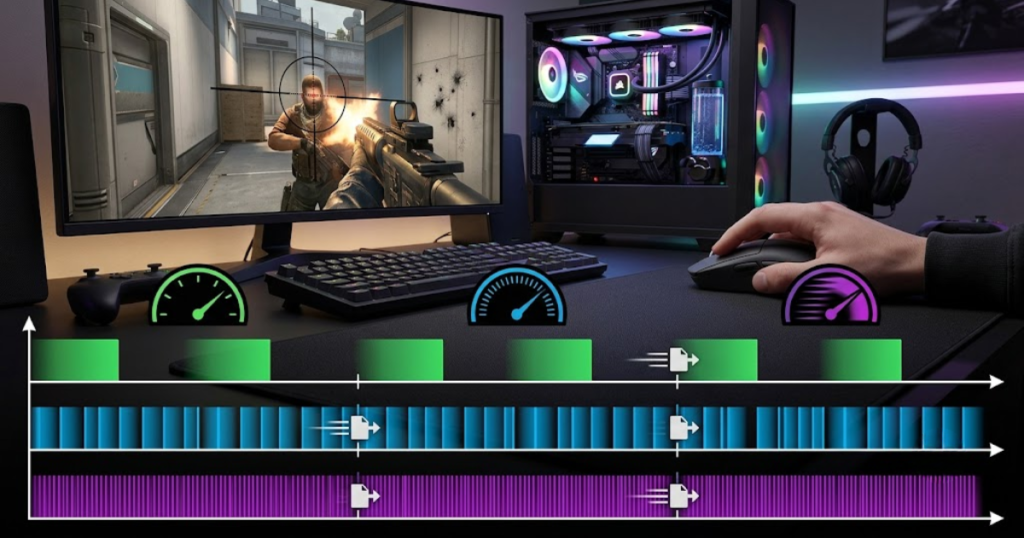
As a result, the game can react to movement and click events more quickly, contributing to lower input latency under the right conditions.
In summary, higher polling rates reduce report delay by providing more frequent input updates to the computer.
Estimated Report Delay at Different Polling Rates
The table below shows how different polling rates affect report intervals and help determine the theoretical delay between input updates:
| Polling Rate | Report Interval |
|---|---|
| 125Hz | 8ms |
| 500Hz | 2ms |
| 1000Hz | 1ms |
| 4000Hz | 0.25ms |
| 8000Hz | 0.125ms |
The table illustrates how report intervals become progressively shorter as polling rate increases. More frequent updates reduce waiting time and allow newer input information to reach the system faster.
Although these improvements appear significant on paper, real-world benefits become increasingly difficult to notice at extremely high polling rates because other forms of latency remain present.
Why the Gains Become Smaller at Higher Polling Rates
Diminishing returns are progressively smaller performance improvements and help explain why higher polling rates provide less noticeable benefits beyond certain levels.
The largest improvement occurs when moving from very low polling rates to 1000Hz. Reducing report intervals from 8 milliseconds to 1 millisecond creates a substantial reduction in communication delay.
Once the interval reaches 1 millisecond, additional improvements become much smaller. Moving from 1000Hz to 4000Hz reduces the interval by only 0.75 milliseconds, while moving from 4000Hz to 8000Hz reduces it by just 0.125 milliseconds. Players interested in the practical benefits of this first upgrade step can read our comparison of 1000Hz vs 4000Hz polling rate.
These reductions are technically measurable and can contribute to lower latency, but they represent a much smaller percentage of total system delay. As other latency sources begin to dominate, the practical impact becomes increasingly limited.
For this reason, many players consider 1000Hz the point where most responsiveness gains have already been achieved.
In conclusion, higher polling rates continue to reduce report delay, but the real-world benefits become progressively smaller as the polling rate increases.
Does a Higher Polling Rate Always Reduce Input Lag?
Higher polling rates are faster communication frequencies and help reduce report delays, but they do not automatically eliminate every source of input lag within a gaming system.
One of the most common misconceptions among FPS players is the belief that increasing polling rate will instantly make a setup feel dramatically faster. While a higher polling rate does reduce the time between mouse reports, input latency is influenced by many other components that operate after the mouse sends data.
For example, a gaming mouse running at 8000Hz can still feel less responsive than a 1000Hz mouse if the computer struggles to maintain stable frame rates or the monitor introduces significant display delay. This is because total latency is always the combined result of every stage in the input pipeline.
As a result, increasing polling rate should be viewed as one optimization among many rather than a universal solution for input lag.
Hardware Bottlenecks That Limit Latency Improvements
Hardware bottlenecks are performance limitations within a gaming system and help explain why higher polling rates cannot always deliver noticeable latency improvements.
Every gaming setup contains multiple components that process information before an action becomes visible on screen. If one component is significantly slower than the others, it can become the primary source of delay.
The factors below explain the most common bottlenecks that reduce the impact of higher polling rates:
- CPU Limitations: A processor with high utilization may struggle to process incoming data quickly, reducing the benefit of more frequent mouse reports.
- GPU Workload: Heavy rendering demands can introduce frame generation delays that exceed the latency savings gained from higher polling rates.
- Display Processing: Monitor processing and refresh behavior often contribute more latency than the difference between 1000Hz and 4000Hz.
- Game Engine Delay: Internal game systems require time to process player actions before updating the game world.
- Background Software: Additional applications running on the system can increase latency through resource competition.
These bottlenecks demonstrate why polling rate should never be evaluated in isolation. Faster mouse communication cannot fully compensate for delays occurring elsewhere in the system.
In summary, hardware limitations often determine the practical impact of polling rate upgrades more than the polling rate itself.
Why Some Players Notice No Difference
Perceived responsiveness is a combination of multiple latency factors and helps explain why some players experience little or no difference after increasing polling rate.
Not every player uses hardware capable of revealing extremely small latency improvements. A player using a 60Hz monitor may struggle to notice differences that become more apparent on a 240Hz or 360Hz display.
Individual perception also plays a role. Human sensitivity to latency varies significantly between players. Competitive FPS players who spend thousands of hours refining muscle memory often notice subtle changes that casual players may never detect.
Another important factor is expectation. Marketing materials sometimes create unrealistic assumptions about how dramatic the improvement should feel. When the actual change is measured in fractions of a millisecond, the perceived difference may be smaller than expected.
Therefore, the absence of a noticeable improvement does not necessarily mean higher polling rates are ineffective. It often means that other factors are dominating the overall experience.
Ultimately, responsiveness improvements become increasingly difficult to perceive as latency reductions become smaller.
When Polling Rate Stops Being the Main Limiting Factor
Polling rate stops being the primary limitation when other components contribute more latency than mouse communication itself and helps shift optimization priorities toward the rest of the system.
At low polling rates such as 125Hz or 500Hz, communication delay represents a significant portion of total latency. Increasing polling rate in these scenarios often creates measurable improvements.
Once a gaming mouse reaches 1000Hz, communication delay becomes relatively small compared to many other forms of latency. At this point, improvements from faster polling rates compete against rendering delays, display delays, operating system overhead, and game engine processing.
For many players, upgrading a monitor, improving frame rate stability, or reducing system latency may provide greater responsiveness gains than increasing polling rate from 1000Hz to 8000Hz.
This does not mean higher polling rates have no value. Instead, it means their relative importance decreases as other sources of latency become more significant.
In conclusion, polling rate eventually becomes one of many small contributors to responsiveness rather than the dominant performance factor.
How Polling Rate Influences FPS Gameplay
Polling rate is a mouse reporting specification and helps improve input consistency during fast and precise aiming situations commonly found in FPS games.
FPS gameplay places unique demands on input devices because aiming accuracy depends on continuous communication between the player’s hand and the game engine. Even small inconsistencies can affect tracking precision, flick timing, and target acquisition.
Higher polling rates do not increase player skill, but they can improve the consistency of information reaching the system. This can create smoother motion updates and more predictable behavior during demanding aiming scenarios.
The greatest benefits tend to appear during rapid movements where the system must process large amounts of input data within very short periods of time.
Fast Flick Shots and Sudden Direction Changes
Fast flick shots are rapid aiming movements toward a target and help players react quickly during competitive FPS engagements.
Flick aiming requires a player to move the mouse quickly across a large distance before stopping precisely on a target. During these movements, the mouse generates a substantial amount of sensor data that must be transmitted to the computer.
Higher polling rates allow more position updates to be delivered during the movement. This can reduce gaps between reports and provide smoother motion tracking throughout the flick.
While the improvement may be subtle, competitive players often value any increase in movement consistency because small differences can influence aiming precision at high skill levels.
As a result, higher polling rates are most beneficial when rapid directional changes generate large amounts of movement data.
In summary, flick shots represent one of the scenarios where polling rate improvements are most likely to influence gameplay.
Continuous Tracking During Movement
Tracking is the process of following a moving target and helps players maintain consistent crosshair placement throughout an engagement.
Unlike flick aiming, tracking relies on continuous mouse movement rather than sudden bursts of motion. Players must constantly adjust their aim to match an opponent’s position.
Because tracking generates an uninterrupted stream of movement data, more frequent reports can contribute to smoother cursor updates. This may improve the feeling of connection between hand movement and crosshair behavior.
The effect becomes more noticeable when paired with high-refresh-rate monitors that can display additional movement information provided by faster polling rates.
Although polling rate alone cannot guarantee better tracking performance, it can help create a more consistent aiming experience during sustained engagements.
Ultimately, tracking scenarios benefit from stable and frequent input updates that reduce interruptions in motion data.
Small Micro Adjustments During Aim Corrections
Micro adjustments are small aiming corrections and help players refine crosshair placement during precise shooting situations.
Many competitive FPS encounters are decided by tiny corrections made immediately before firing. These adjustments often occur within a very small area of the mousepad and require precise movement control.
The factors below explain situations where frequent mouse updates can support precision aiming:
- Headshot Alignment: Small corrections help place the crosshair precisely on target.
- Peeking Engagements: Quick adjustments improve accuracy when opponents appear unexpectedly.
- Target Switching: Fine corrections help transition smoothly between multiple enemies.
- Spray Control: Precise movement assists recoil management during sustained fire.
Higher polling rates cannot replace mechanical skill, but they can provide more frequent positional updates that support consistent micro adjustments.
For experienced players, these subtle improvements may contribute to a smoother aiming experience during high-pressure situations.
In conclusion, micro adjustments highlight how polling rate can influence precision-oriented aspects of FPS gameplay.
1000Hz vs 4000Hz vs 8000Hz for Input Latency
Different polling rate levels are communication frequencies and help reduce report delay at different degrees, with diminishing returns becoming increasingly noticeable beyond 1000Hz.
The modern gaming mouse market offers multiple high-performance polling rate options, but the practical difference between them is often misunderstood. While higher polling rates provide more frequent updates, the magnitude of improvement decreases as the numbers increase. For a detailed breakdown of the highest polling rate options available today, see our guide to 4000Hz vs 8000Hz polling rate.
Modern gaming mice now support multiple high-performance polling rate options:
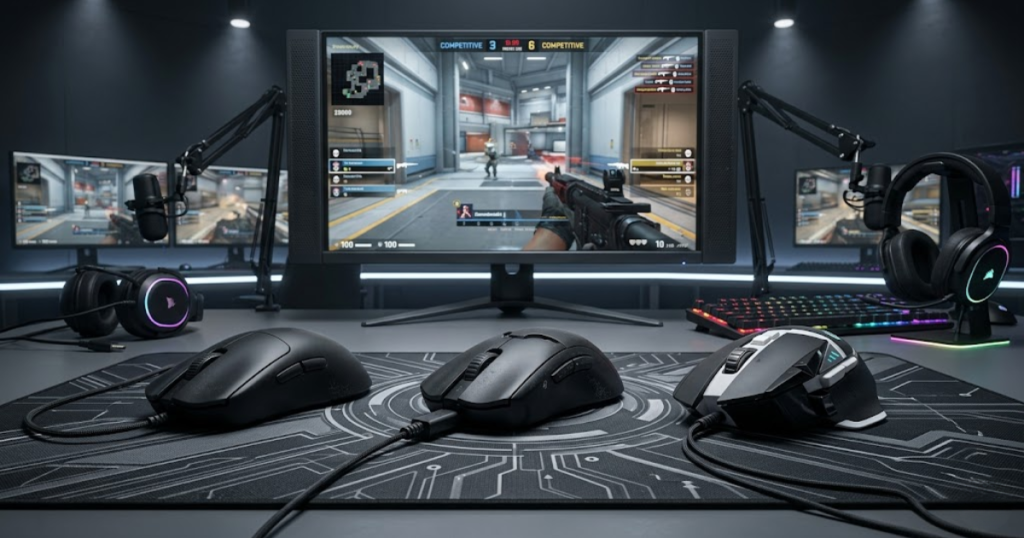
Understanding how 1000Hz, 4000Hz, and 8000Hz compare helps players determine whether upgrading is likely to produce meaningful benefits for their specific setup.
The table below compares the most common high-performance polling rate options used in modern FPS gaming:
| Feature | 1000Hz | 4000Hz | 8000Hz |
|---|---|---|---|
| Report Interval | 1ms | 0.25ms | 0.125ms |
| CPU Usage | Low | Moderate | High |
| Hardware Demand | Low | Medium | High |
| Latency Reduction | Baseline | Noticeable | Small Additional Gain |
| Recommended User | Most Players | Competitive FPS Players | Enthusiasts and Esports Users |
The comparison highlights that the largest jump in responsiveness occurs before reaching 1000Hz. Beyond that point, improvements continue but become progressively smaller relative to total system latency.
Choosing between these polling rates should depend on the player’s hardware, display refresh rate, and competitive goals rather than marketing claims alone.
What Matters More Than Polling Rate for Responsiveness?
Several gaming hardware factors are performance variables and help influence responsiveness more than polling rate in many FPS gaming setups.
Polling rate receives significant attention because it is easy to advertise and compare. However, responsiveness is the result of multiple components working together rather than a single specification. A gaming mouse can support 8000Hz polling, but the overall experience may still feel sluggish if other parts of the system introduce larger delays.
For most FPS players, factors such as mouse shape, sensor quality, monitor refresh rate, and overall system latency often have a greater impact on aiming consistency than polling rate alone. Understanding these priorities helps players invest in upgrades that provide meaningful improvements instead of chasing small theoretical gains.
The table below compares several factors that influence responsiveness and aiming performance in FPS games:
| Factor | Impact on Aim | Impact on Latency |
|---|---|---|
| Mouse Shape | Very High | Low |
| Sensor Quality | High | Medium |
| Monitor Refresh Rate | High | High |
| System Latency | Medium | Very High |
| Polling Rate | Medium | Medium |
The comparison shows that polling rate is only one part of a larger performance equation. Players often gain more practical benefits from improving comfort, visual clarity, and system responsiveness before pursuing extremely high polling rates.
Mouse Shape and Aim Consistency
Mouse shape is the physical design of a gaming mouse and helps determine comfort, control, and long-term aiming consistency.
Even the fastest gaming mouse cannot compensate for an uncomfortable shape. If a mouse forces awkward hand positioning, players may struggle to maintain consistent aim regardless of sensor specifications or polling rate settings.
Shape influences grip stability, wrist movement, and muscle memory. A mouse that fits the player’s hand naturally allows smoother movements and more reliable control during long gaming sessions. This benefit often outweighs the difference between 1000Hz and 8000Hz polling rates.
Professional FPS players frequently prioritize shape above nearly every other specification because comfort directly affects performance under pressure. Consistent hand positioning enables repeatable movements, which is essential for competitive aiming.
In summary, shape remains one of the most important factors for FPS performance because consistent control begins with physical comfort.
Sensor Quality and Motion Accuracy
Sensor quality is the ability of a mouse sensor to track movement accurately and helps ensure reliable aiming performance during gameplay.
A gaming mouse sensor converts physical movement into digital information. If the sensor introduces tracking errors, skips movement, or struggles with fast swipes, responsiveness can suffer regardless of polling rate.
Modern flagship sensors are capable of tracking extremely fast movements with excellent precision. High-quality sensors maintain accuracy during flick shots, tracking scenarios, and rapid directional changes, ensuring that the cursor reflects the player’s intended movement.
Although polling rate determines how often movement data is transmitted, the sensor determines whether the data itself is accurate. Reliable tracking provides a stronger foundation for competitive aiming than extremely high polling rates alone.
Ultimately, accurate motion tracking is essential because responsiveness becomes meaningless if movement data is incorrect.
Display Refresh Rate and System Responsiveness
Display refresh rate is the frequency at which a monitor updates images and helps determine how quickly visual information appears on screen.
Many discussions about polling rate ignore the importance of the display. Even if a mouse reports data extremely quickly, players can only see updates when the monitor refreshes the image.
A 240Hz or 360Hz display presents new visual information far more frequently than a 60Hz monitor. Because of this, high-refresh-rate displays are generally better positioned to reveal the benefits of higher polling rates.
System responsiveness also depends on frame rate stability, rendering speed, and operating system efficiency. Improvements in these areas often create larger reductions in total latency than increasing polling rate alone.
As a result, players seeking the most responsive experience should evaluate the entire gaming setup rather than focusing exclusively on mouse specifications.
In conclusion, display performance and overall system responsiveness frequently have a greater impact on perceived responsiveness than polling rate upgrades.
Should You Upgrade to a Higher Polling Rate?
Higher polling rates are advanced performance options and help competitive FPS players maximize responsiveness when supported by suitable hardware.
Choosing the right polling rate depends on both hardware and competitive goals:
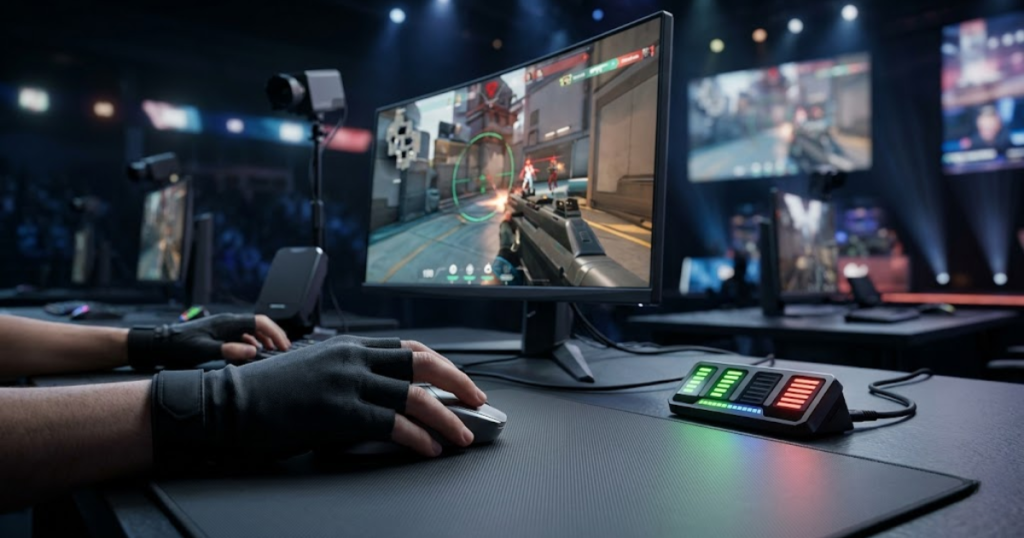
Not every player benefits equally from higher polling rates. While moving beyond 1000Hz can reduce report delay, the value of that improvement depends on the player’s goals, hardware configuration, and sensitivity to latency differences.
For some players, the upgrade provides smoother input updates and improved responsiveness. For others, the improvement may be too small to justify increased hardware requirements or battery consumption.
Players Who Benefit Most from 4000Hz and 8000Hz
High polling rate users are competitive gamers and help demonstrate the situations where additional input updates provide the greatest value.
Players using modern high-refresh-rate monitors are generally the most likely to benefit from higher polling rates. Displays operating at 240Hz, 360Hz, or higher can expose subtle differences that may be hidden on slower monitors.
Competitive FPS players who spend significant time practicing aim mechanics may also notice smoother movement updates during flick shots and tracking situations. Small improvements become more valuable when performance margins are extremely narrow.
Additionally, players using top-tier hardware capable of maintaining high frame rates are better positioned to take advantage of the extra data provided by faster polling rates.
Overall, higher polling rates are most beneficial when the rest of the system is already highly optimized.
Players Who Should Stay at 1000Hz
Standard polling rate users are players whose current hardware already provides sufficient responsiveness and helps avoid unnecessary upgrades.
For many gamers, 1000Hz remains the ideal balance between responsiveness, compatibility, and efficiency. The report interval is already extremely short, and the majority of responsiveness gains have already been achieved.
Players using 60Hz, 75Hz, or 144Hz monitors are less likely to notice significant improvements from moving to 4000Hz or 8000Hz. Likewise, casual players who focus on enjoyment rather than competition may find little practical difference.
Battery-powered wireless mice can also experience reduced battery life when operating at extremely high polling rates. In some cases, maintaining 1000Hz may provide a better overall user experience.
As a result, staying at 1000Hz is often the most sensible choice for the majority of FPS players.
How to Decide Whether an Upgrade Is Worth It
An upgrade decision is an evaluation process and helps players determine whether higher polling rates provide meaningful value for their setup.
Rather than upgrading solely because a higher number exists, players should consider how the change fits into their overall gaming system.
The following process can help determine whether a higher polling rate upgrade is worthwhile:
- Check Monitor Refresh Rate: Higher refresh rates are more likely to reveal latency improvements.
- Evaluate Current Mouse Performance: Ensure the existing mouse already performs reliably and accurately.
- Review System Performance: Stable frame rates and low system latency are important prerequisites.
- Consider Competitive Goals: Determine whether marginal performance gains are valuable for your play style.
- Test Different Settings: Compare polling rate options directly whenever possible.
Following this process helps players make decisions based on practical benefits rather than marketing claims.
The table below provides general polling rate recommendations for different types of players:
| Player Type | Recommended Polling Rate |
|---|---|
| Casual Gamer | 1000Hz |
| Competitive FPS Player | 1000Hz–4000Hz |
| Esports Player | 4000Hz–8000Hz |
| General PC User | 500Hz–1000Hz |
The recommendations highlight that most players can achieve excellent responsiveness without moving beyond 1000Hz. Higher polling rates are generally most valuable for highly competitive environments.
In summary, the decision to upgrade should depend on measurable needs rather than the pursuit of larger numbers alone.
Common Myths About Polling Rate and Input Latency
Common polling rate myths are oversimplified beliefs and help create misunderstandings about gaming mouse performance and responsiveness.
Because polling rate is easy to market, many misconceptions have developed around its real-world impact. These myths often exaggerate the importance of polling rate while ignoring other critical factors that influence responsiveness.
Higher Polling Rates Automatically Improve Aim
Higher polling rates are communication frequencies and help improve input consistency, but they do not automatically improve aiming skill.
Aim quality depends on mechanics, practice, positioning, and decision-making. Higher polling rates may provide smoother input updates, but they cannot replace experience or improve accuracy on their own.
Players who expect instant aim improvement after changing polling rate settings are often disappointed because mechanical skill remains the most important factor in FPS performance.
Ultimately, polling rate can support aiming consistency, but it cannot create aiming skill.
8000Hz Is Always Better Than 1000Hz
Higher polling rate numbers are performance specifications and help reduce report intervals, but they do not always provide meaningful real-world advantages.
The difference between 1000Hz and 8000Hz is measurable, but the practical impact depends on the player’s hardware and environment. In many situations, the improvement may be too small to notice consistently.
Higher polling rates can also increase CPU usage and battery consumption. Therefore, the highest setting is not automatically the best choice for every player.
As a result, selecting the most appropriate polling rate is often more important than selecting the highest one available.
Polling Rate Determines All Mouse Latency
Polling rate is one source of communication delay and helps influence responsiveness, but it does not determine total mouse latency by itself.
The factors below explain why total latency depends on more than polling rate:
- Sensor Processing: Input must first be detected by the sensor.
- System Processing: The operating system must process incoming information.
- Game Engine Processing: The game must react to player actions.
- Rendering Performance: Frames must be generated before being displayed.
- Monitor Behavior: Visual information must appear on screen.
These factors demonstrate that polling rate influences only one stage of a much larger process. Focusing exclusively on polling rate can lead to unrealistic expectations about responsiveness improvements.
In conclusion, total latency is the result of an entire system working together rather than a single mouse specification.
Frequently Asked Questions About Polling Rate and Input Latency
These frequently asked questions are common concerns among FPS players and help clarify how polling rate and input latency affect gaming responsiveness.
Many players researching polling rate and input latency encounter similar questions about performance, hardware requirements, and real-world benefits. The answers below provide quick explanations that complement the topics covered throughout this guide.
Is polling rate the same as input latency?
Polling rate is a communication frequency and helps determine how often a mouse sends updates, while input latency is the total response delay and helps measure overall system responsiveness.
No. Polling rate measures how frequently data is reported, while input latency measures the total delay between an action and the result appearing on screen.
How much delay does a 1000Hz polling rate add?
A 1000Hz polling rate is a reporting frequency of one thousand updates per second and helps limit report intervals to approximately one millisecond.
A 1000Hz polling rate creates a report interval of roughly 1ms. Actual input latency remains higher because other system delays are still involved.
Does 4000Hz reduce input latency?
A 4000Hz polling rate is a higher reporting frequency and helps reduce report delay compared to 1000Hz.
Yes. A 4000Hz polling rate reduces report intervals from 1ms to 0.25ms, which can contribute to lower overall latency under suitable hardware conditions.
Does 8000Hz improve gaming responsiveness?
An 8000Hz polling rate is an ultra-high reporting frequency and helps provide the most frequent input updates available on many gaming mice.
It can improve responsiveness, but the improvement is usually small compared to the jump from lower polling rates to 1000Hz.
Can polling rate improve aiming accuracy?
Polling rate is an input communication setting and helps improve movement consistency rather than aiming skill itself.
Higher polling rates may make movement updates smoother, but they do not automatically improve aim accuracy or mechanical skill.
Is polling rate more important than DPI?
Polling rate is a reporting specification and helps control update frequency, while DPI is a sensitivity measurement and helps determine cursor movement speed.
Neither is universally more important. They affect different aspects of mouse performance and should be optimized together.
What polling rate do professional FPS players use?
Professional FPS players use polling rates that help provide reliable responsiveness while maintaining system stability.
Most professional players use at least 1000Hz, while some have adopted 4000Hz or 8000Hz on compatible hardware.
Does polling rate affect click latency?
Polling rate is a communication frequency and helps influence how quickly click information reaches the computer.
Yes. Higher polling rates can slightly reduce click reporting delay, although total click latency also depends on switch and firmware performance.
Can higher polling rates lower FPS performance?
Higher polling rates are more demanding communication settings and help generate more frequent system processing activity.
In some cases, extremely high polling rates can increase CPU usage and slightly affect performance on weaker systems.
Is 1000Hz enough for competitive gaming?
A 1000Hz polling rate is the current competitive standard and helps provide excellent responsiveness for most FPS players.
Yes. Most competitive gamers can achieve outstanding performance with a stable 1000Hz polling rate.
Does monitor refresh rate affect input latency?
Monitor refresh rate is a display specification and helps determine how frequently new visual information appears on screen.
Yes. Higher refresh rate monitors typically reduce visual delay and can make responsiveness improvements easier to perceive.
Should casual players use 4000Hz or 8000Hz?
Higher polling rates are advanced performance options and help maximize responsiveness in optimized gaming setups.
Most casual players will be well served by 1000Hz. Higher polling rates are generally more beneficial for competitive users with high-end hardware.
These FAQs summarize the most important concepts surrounding polling rate and input latency. Understanding these fundamentals makes it easier to evaluate gaming mice, optimize settings, and make informed upgrade decisions.
Final Thoughts on Polling Rate and Input Latency
Polling rate is a communication frequency and helps reduce part of input latency, while input latency is the complete response delay and helps determine how responsive a gaming experience feels.
Throughout this guide, we have seen that polling rate and input latency are closely related but fundamentally different concepts. Polling rate influences how frequently information reaches the computer, while input latency reflects the complete delay experienced by the player.
Higher polling rates can reduce report delay and contribute to lower latency, but their impact becomes smaller as the polling rate increases. For many FPS players, 1000Hz already provides excellent responsiveness, while 4000Hz and 8000Hz are most valuable in highly competitive environments with modern high-refresh-rate hardware. If you are comparing complete gaming mouse options rather than individual specifications, explore our roundup of the best gaming mouse for FPS games in 2026.
Most importantly, responsiveness should always be viewed as a system-wide characteristic. Mouse shape, sensor quality, monitor refresh rate, frame rate stability, and overall system latency often play equally important or even greater roles in the final gaming experience.
Understanding the relationship between polling rate and input latency helps FPS players make smarter upgrade decisions, set realistic expectations, and focus on the factors that truly improve competitive performance.
Thank you for taking the time to read this guide. We hope this explanation helps you understand eDPI more clearly and make more informed sensitivity decisions for your FPS games.