
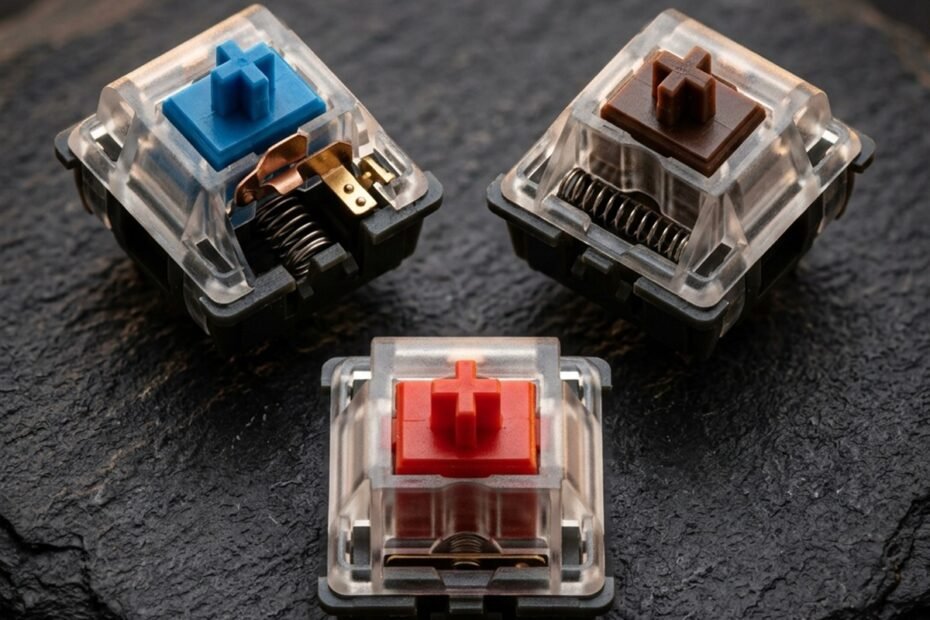
When selecting a mechanical keyboard, the switch type dictates more than ninety percent of your physical typing experience, auditory environment, and competitive responsiveness. The market predominantly divides into three foundational mechanical architectures: smooth linear switches, tactile bump switches, and audible clicky switches. Hardware analysis conducted on GearTP reveals that choosing the right switch requires balancing finger fatigue, acoustic tolerance, and actuation speed.
Understanding the head-to-head dynamics of linear vs tactile vs clicky switches requires analyzing stem leg geometry, force-displacement curves, and mechanical reset hysteresis. While every switch shares the fundamental anatomy explained in our technical guide to what is a mechanical keyboard switch, the physical shaping of the internal slider creates three distinct typing worlds tailored for dedicated office productivity or competitive gaming environments.
Core Mechanical Differences Between Linear, Tactile, and Clicky Switches
The core difference lies in stem leg geometry: linear switches feature flat legs for smooth travel, tactile switches use sculpted bumps for physical feedback, and clicky switches incorporate a click jacket or click bar for loud acoustic snapping.
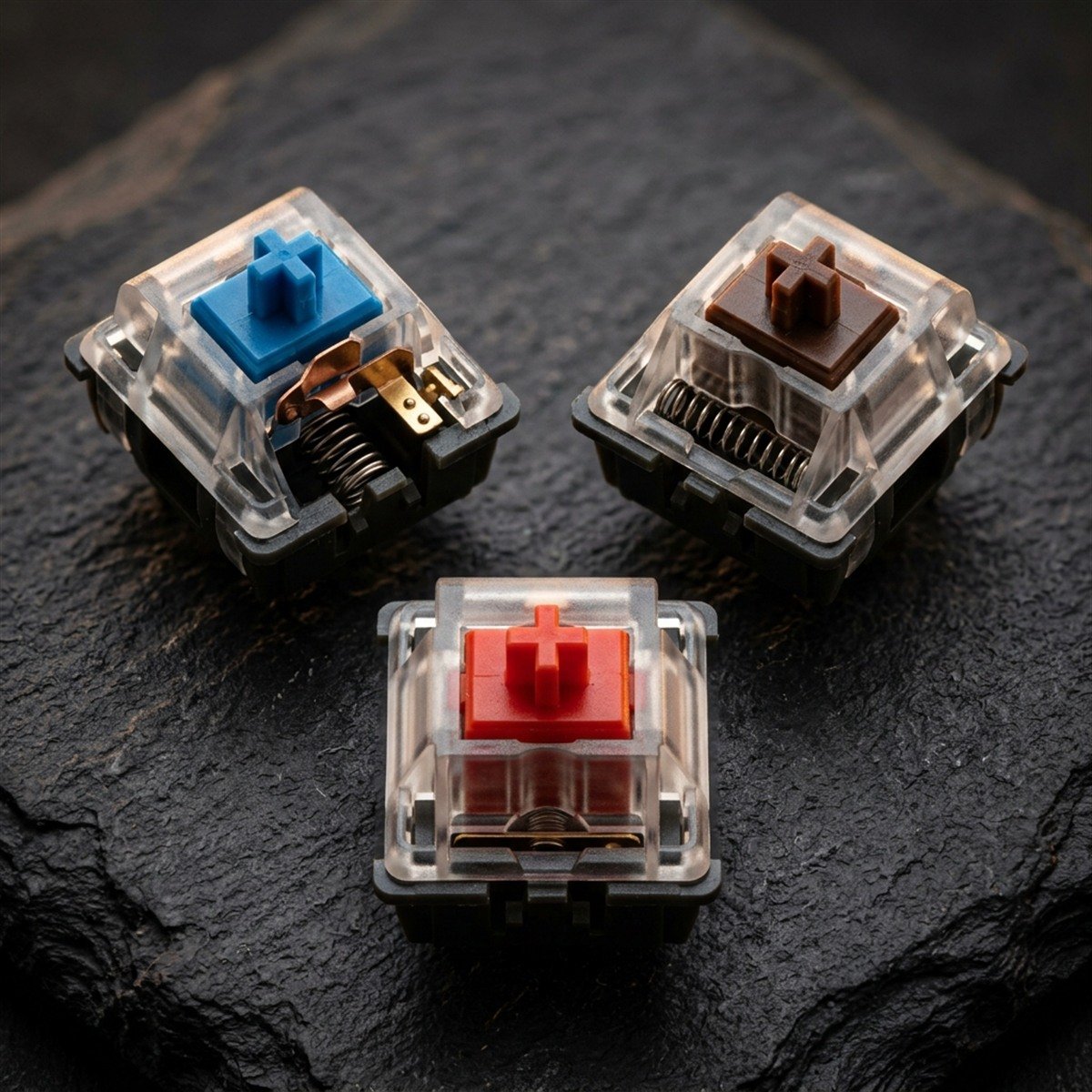
While all standard mechanical switches rely on coil springs and copper contact leaves, the physical contour of the stem legs directly dictates how the switch interacts with the contact leaf assembly. When you depress a key, the downward trajectory of the stem pushes its protruding legs against the flexible metal contact leaf. How that metal leaf bends and releases produces the characteristic feel and sound of each switch category.
In a linear switch, the stem legs are molded with a continuous, perfectly vertical slope. As the stem descends, resistance increases purely due to the progressive compression of the steel spring. There are no ridges, catches, or sudden drops along the travel path, resulting in uninterrupted downward motion from resting height to bottom-out.
Stem Leg Profile Mechanics: Smooth Incline vs Tactile Bump vs Click Jacket
Tactile switches modify this geometry by introducing a deliberate mechanical protrusion or bump along the front legs of the stem. As you press downward, the bump encounters the stationary contact leaf, creating an initial resistance peak known as the tactile barrier. Once your downward finger force overcomes this resistance peak, the bump slides past the leaf, allowing the switch to drop quickly toward the actuation point. This mechanical drop-off provides immediate physical tactile confirmation that the keystroke has registered without requiring visual confirmation on your monitor.
Clicky switches take physical tactile feedback a step further by integrating an audible acoustic snap mechanism. Traditional clicky switches (such as the classic Cherry MX Blue) utilize a two-piece slider assembly known as a click jacket. The white click jacket floats loosely around the primary switch stem. As the stem descends, the click jacket catches against the contact leaf until spring tension forces it to snap downward against the switch base, producing a sharp, metallic acoustic click at the exact millisecond of electrical contact closure. Modern clicky switches alternative designs utilize a tempered steel click bar that snaps against the housing interior for a crisper sound.
Acoustic Wave Physics: Silent Glide vs Subdued Thock vs High-Pitch Click Snapping
The acoustic output of mechanical switches is directly tied to internal kinetic collisions. Linear switches generate sound primarily during bottom-out (when the stem collides with the lower housing) and during upstroke return (when the stem hits the upper housing). Because linear switches lack internal clicking parts, their acoustic profile is relatively quiet, producing a muted, deep clack that can be dampened further using factory lubrication or internal sound-absorbing silicone foam.
Tactile switches introduce slightly more acoustic presence due to the friction of the stem bump dragging across the leaf, but their sound profile remains largely subdued and office-friendly. In stark contrast, clicky switches deliberately amplify high-frequency sound waves between 2 kHz and 4 kHz. The physical snap of the click jacket produces an acoustic spike ranging from 60 to 70 decibels, making clicky keyboards notoriously audible in open-plan office spaces and easily picked up by sensitive studio microphones during voice chat.
Head-to-Head Comparison: Force Curves, Tactile Feedback, and Operating Specs
Evaluating switches by technical specifications highlights their functional differences: linear switches provide consistent 45gf force without bumps, tactile switches exhibit a 55gf peak before dropping, and clicky switches feature a 60gf tactile snap.
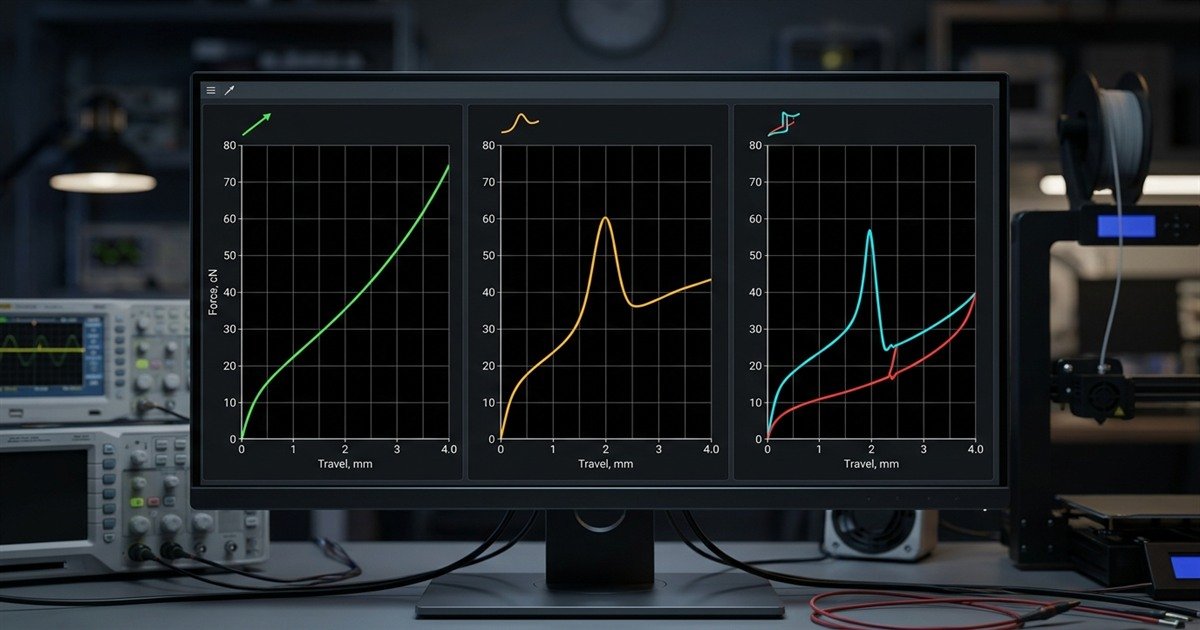
To understand switch feel objectively, engineers rely on force-displacement curves that chart vertical travel distance on the horizontal axis against resistance force in grams on the vertical axis. Examining these curves reveals why different switches respond distinctively under rapid finger strokes.
Comprehensive technical comparison matrix across linear, tactile, and clicky switch profiles:
| Switch Category | Industry Color Standard | Actuation Force | Tactile Feedback | Acoustic Level | Primary Strength |
|---|---|---|---|---|---|
| Linear | Red, Yellow, Black | 45gf to 50gf | None (Completely Smooth) | Low to Moderate (35dB to 45dB) | Rapid double-tapping and competitive esports speed |
| Tactile | Brown, Clear, Panda | 45gf to 55gf | Noticeable Mechanical Bump | Moderate (45dB to 52dB) | Typing accuracy and balanced mixed-use comfort |
| Clicky | Blue, Green, White | 50gf to 60gf | Sharp Bump with Snap | High (60dB to 70dB) | Satisfying tactile and auditory actuation confirmation |
This technical breakdown demonstrates how force curves translate into functional benefits: smooth linear travel favors gaming velocity, tactile bumps favor typing precision, and clicky snaps provide maximum auditory engagement.
Linear Switches (Red / Yellow): Unobstructed Downward Stroke and Smooth Operation
Linear switches, traditionally color-coded red or yellow in MX naming conventions, represent the standard for uninterrupted mechanical travel. On a force curve, a linear switch presents a continuous diagonal line that rises smoothly from resting preload (around 30gf) up to actuation (typically 45gf at 2.0mm), continuing up to 60gf at 4.0mm bottom-out.
Because there is no tactile obstacle to push through, linear switches allow your fingers to glide effortlessly across the keyboard. In fast-paced gaming environments where milliseconds dictate survival, the absence of tactile resistance ensures that downward key actuation begins the instant your finger exerts downward pressure.
Tactile Switches (Brown / Clear): Tactile Bump Confirmation Without Loud Acoustic Noise
Tactile switches, exemplified by classic MX Brown and modern Holy Panda designs, are engineered to provide positive mechanical feedback without irritating coworkers or family members. On a force curve, a tactile switch displays a prominent rounded peak between 1.0mm and 1.5mm of travel, where resistance temporarily increases to approximately 55gf before dropping sharply to 45gf as the contact leaves close.
This subtle drop in resistance signals your nervous system that the keystroke has been registered. Experienced touch-typists use this tactile cue to release the key immediately without bottoming out against the plate, significantly reducing finger fatigue and joint stress over eight-hour workdays.
Clicky Switches (Blue / Green): Distinct Mechanical Click and Definite Actuation Sensation
Clicky switches, traditionally designated by blue or green stem colorings, cater to typists who crave sensory feedback reminiscent of vintage electric typewriters. On a force curve, a clicky switch features a steep initial ramp peaking at roughly 60gf, followed by an immediate vertical cliff drop where the click jacket snaps downward.
The simultaneous tactile release and sharp acoustic click make it virtually impossible to register an accidental keystroke without noticing. For long-form novel writing, coding, or data entry, clicky switches deliver an exceptionally engaging rhythm, provided you operate in an isolated environment where acoustic noise is welcomed.
Esports and Gaming Performance: Reaction Speed and Counter-Strafing Latency
Linear switches overwhelmingly dominate competitive esports because their zero-hysteresis stem design allows instant key reset without requiring the finger to travel back over a physical tactile bump.
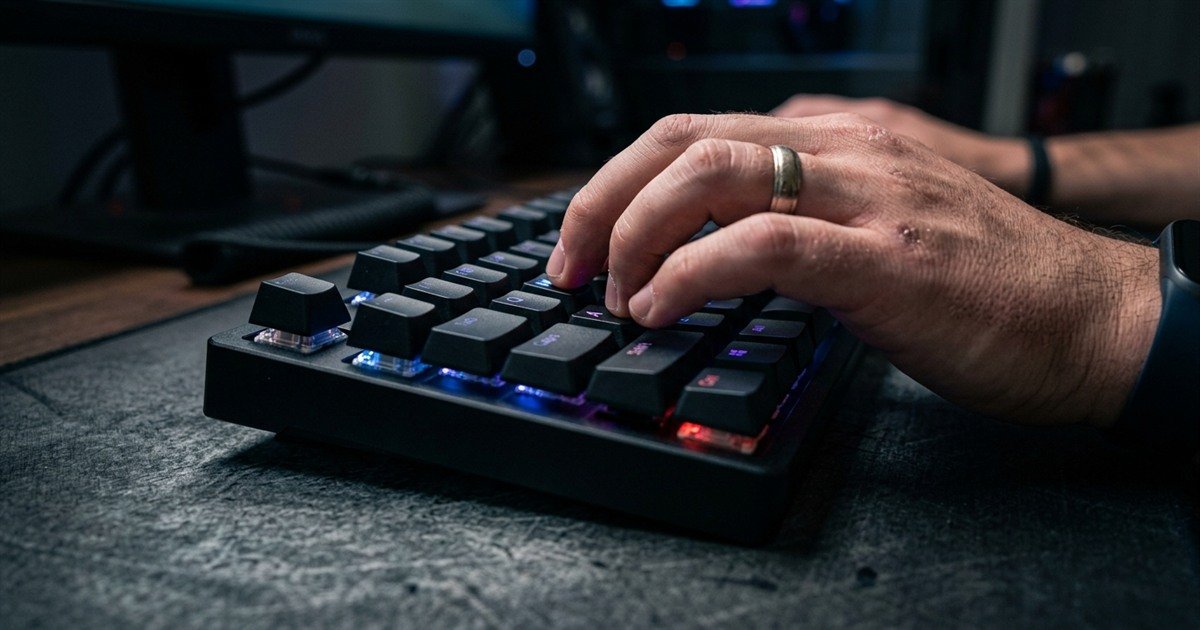
When surveying competitive professionals in Counter-Strike 2, Valorant, and Apex Legends, over ninety percent actively compete on a specialized gaming keyboard for FPS featuring smooth linear switches. This preference is not merely personal aesthetic taste; it is grounded in the physics of mechanical reset latency.
Hysteresis Gap Analysis: Why Tactile Bumps Can Hinder Rapid Double-Tapping
The term hysteresis describes the physical distance between the point where a switch actuates and the point where it releases (resets). In clicky switches with a floating click jacket, the reset point often sits 0.5mm to 0.8mm above the actuation point. This means that after pressing the key, you must release your finger significantly higher before the click jacket resets and allows a second actuation.
If you attempt to spam a movement key (such as tapping the A and D keys for rapid counter-strafing) near the actuation threshold on a clicky switch, you will inevitably encounter dead keypresses where the key moves down but fails to trigger because the mechanism never cleared its reset hurdle. Linear switches exhibit near-zero hysteresis, allowing players to feather movement keys rapidly around the actuation point with flawless reliability.
Finger Fatigue and Hand Strain During Prolonged Competitive Gaming Sessions
Competitive gaming sessions routinely last four to six hours of relentless movement inputs. Tactile and clicky switches require your fingers to generate extra downward force on every single stroke to break through the initial tactile barrier.
Over tens of thousands of WASD keypresses, that additional resistance accumulates into noticeable extensor tendon fatigue and forearm strain. Smooth 45gf linear switches minimize physical workload, allowing competitive gamers to maintain peak reaction speed and finger dexterity late into prolonged tournament matches.
Typing Accuracy and Daily Productivity: Selecting the Optimal Workplace Switch
For mixed workloads and typing precision, tactile switches provide the ideal balance by offering positive physical actuation confirmation that prevents accidental keystrokes while maintaining respectful acoustic volume.
While linear switches reign supreme in competitive gaming, their frictionless actuation can prove challenging for everyday typing and office productivity. Because linear switches require zero extra force to pass the actuation threshold, resting heavy fingers on keys can inadvertently trigger stray characters, leading to typos during fast email writing or programming.
Four-step decision protocol for determining your ideal mechanical switch type:
- Assess your primary computer use case: If you spend over seventy percent of your time playing competitive FPS games, choose linear switches. If typing and coding dominate, choose tactile switches.
- Evaluate your shared working environment: If you share a home or office space with others, eliminate clicky switches immediately to avoid acoustic disruption, opting for linear or tactile models.
- Test your resting finger pressure: If you tend to rest heavy hands on your keyboard and frequently misclick, select tactile switches with a pronounced bump (55gf to 60gf) to eliminate accidental inputs.
- Consider future upgrade paths: Choose a hot-swappable keyboard board so you can easily install linear switches on movement keys (WASD) and tactile switches on typing keys.
For players exploring the absolute cutting edge of gaming technology beyond traditional metal contacts, investigate what is a hall effect keyboard to discover how contactless magnetic analog sensing surpasses traditional linear switches.
Additionally, learn how magnetic switches achieve instantaneous key resets through dynamic travel tracking in our guide to what is rapid trigger.
Frequently Asked Questions About Linear, Tactile, and Clicky Switches
Key answers to common questions about switch characteristics, gaming suitability, and sound profiles:
What is the main difference between linear and tactile switches?
Linear switches move downward smoothly with uniform resistance and no physical bump, whereas tactile switches feature a noticeable physical bump midway through the stroke to confirm actuation.
This fundamental distinction makes linear switches preferred for competitive esports speed and rapid double-tapping, while tactile switches are favored for typing precision and error reduction.
Why are clicky switches generally discouraged in office environments?
Clicky switches utilize internal click jackets or click bars that generate loud high-frequency sound spikes between 60dB and 70dB, which can disrupt coworkers and get picked up on conference call microphones.
For professional office environments, silent linear or subdued tactile switches are strongly recommended to maintain a considerate acoustic workspace.
Are linear switches good for everyday typing and writing?
Linear switches are fully capable of typing, but their lack of tactile feedback can lead to accidental keypresses and bottoming out until typists adapt their finger pressure.
Many experienced typists prefer heavier linear switches (around 50gf to 60gf) or switches with progressive springs to prevent unintentional misclicks.
What colors represent linear, tactile, and clicky switches?
By industry convention originating from Cherry MX, linear switches are typically Red or Yellow, tactile switches are Brown or Clear, and clicky switches are Blue or Green.
While enthusiast custom switches now come in a vast rainbow of designer colorways, manufacturers still classify their switch mechanics under these three primary operational archetypes.
What is switch hysteresis and why does it matter in gaming?
Hysteresis is the physical distance between the actuation point and the reset point, creating dead travel zones where a key must travel upward before it can register again.
Linear switches have almost zero hysteresis, allowing instantaneous multi-tap inputs, while clicky switches have substantial hysteresis gaps that can cause missed inputs during rapid counter-strafing.
Can you game competitively on tactile or clicky switches?
Yes, you can game on any mechanical switch, but tactile bumps and click jacket hysteresis introduce minor physical resistance delays during fast-paced twitch movements.
In tactical FPS titles where counter-strafing precision determines duel outcomes, linear switches provide a measurable mechanical advantage over tactile and clicky alternatives.
How does switch lubrication affect tactile and clicky switches?
Lubricating linear switches enhances smoothness, but overlubricating tactile stem legs will mute or destroy the tactile bump, while lubricating click jackets can silence the acoustic click entirely.
When tuning tactile switches, enthusiasts lubricate the housing rails and spring coils while strictly avoiding the tactile stem legs to preserve distinct feedback.
What is bottoming out on a mechanical keyboard?
Bottoming out occurs when a keycap is pressed completely downward until the stem strikes the lower housing floor at maximum travel distance.
Because mechanical switches actuate midway through travel (around 2.0mm), bottoming out is mechanically unnecessary and can cause excess acoustic clatter and finger joint fatigue.
Which switch type has the longest operational lifespan?
Linear switches generally demonstrate the greatest long-term consistency because their simple single-piece stem design experiences less localized friction than tactile bumps or click jackets.
However, all high-quality mechanical switches from reputable manufacturers deliver rated lifespans of 50 million to 100 million keystrokes per key.
Can you mix switch types on a single keyboard?
Yes, hot-swappable keyboards allow you to mix switch types freely, such as installing smooth linear switches on WASD gaming keys and tactile switches on typing keys.
This hybrid setup provides competitive gaming agility for your left hand while preserving tactile feedback for typing numbers, commands, and communication.
Are click bars better than traditional click jackets?
Click bars, pioneered by Kailh, provide a sharper, more tactile click on both downward and upward strokes, offering cleaner acoustic pitch and reduced wobble compared to click jackets.
Enthusiasts seeking a modern clicky keyboard experience generally prefer click bar switches (such as Kailh Box White or Jade) over legacy two-piece click jacket designs.
Are magnetic Hall Effect switches better than linear mechanical switches?
For pure competitive gaming, magnetic Hall Effect switches offer dynamic reset and customizable actuation depths that surpass traditional fixed-contact linear switches.
However, traditional linear mechanical switches remain superior in acoustic customization, custom spring tuning, and compatibility with standard mechanical keyboard PCBs.
Final Verdict: Which Switch Profile Best Matches Your Playstyle?
Choosing between linear, tactile, and clicky switches comes down to your personal balance of gaming speed, typing feedback, and acoustic environment: linear for gaming, tactile for typing, and clicky for sensory engagement.
For dedicated competitive gamers and FPS players, smooth linear switches represent the definitive mechanical choice, eliminating tactile barriers and hysteresis to provide uninhibited reaction speeds and effortless counter-strafing. For typists, programmers, and professionals operating in shared workspaces, tactile switches provide the ultimate sweet spot, delivering positive actuation confirmation to prevent typos without offending acoustic sensibilities. Clicky switches remain the champion of nostalgic tactile and auditory bliss for solo typists who delight in every mechanical keystroke.
Thank you for exploring switch profiles with us. By matching your switch choice to your genuine gaming demands and workplace requirements, you build an input foundation that elevates both your competitive performance and everyday computing satisfaction.