
The best mouse settings for Valorant are a combination of balanced DPI, controlled sensitivity, stable eDPI, and optimized input settings that help improve aiming consistency, crosshair control, and first-shot accuracy. Most competitive players achieve better results when their setup supports precise micro-adjustments and predictable mouse movement rather than extremely fast cursor speed. While these recommendations provide a strong starting point, the ideal configuration still depends on your grip style, mousepad space, aiming habits, and the type of gaming mouse for FPS games you use.
Unlike fast-paced arena shooters, Valorant places heavy emphasis on first-shot accuracy, angle holding, and disciplined crosshair placement. Even small sensitivity changes can affect muscle memory consistency, especially during clutch situations or long-range engagements where precise adjustments matter the most. This is why many competitive players spend significant time optimizing their mouse sensitivity settings instead of constantly changing hardware.
Before adjusting DPI, polling rate, or in-game sensitivity, it is important to understand how FPS-focused gaming mice behave differently from regular office mice. Features such as sensor stability, click latency, lightweight design, and shape ergonomics all directly influence aiming consistency in tactical shooters. Choosing the correct combination of mouse settings and hardware creates a much more stable aiming foundation for long-term improvement in Valorant. If your current mouse feels unstable during flicks or micro-adjustments, our best gaming mouse for Valorant guide can help you choose a better hardware setup before fine-tuning sensitivity.
Why Mouse Settings Matter More in Valorant Than Other FPS Games
Valorant is one of the most precision-focused FPS games on the market, which means mouse settings directly affect aiming consistency, reaction control, and overall gunfight performance. Unlike movement-heavy shooters that rely more on tracking or chaotic engagements, Valorant rewards disciplined crosshair placement, clean flicks, and stable micro-adjustments during every round. Even small sensitivity changes can noticeably impact muscle memory and first-shot accuracy over time.
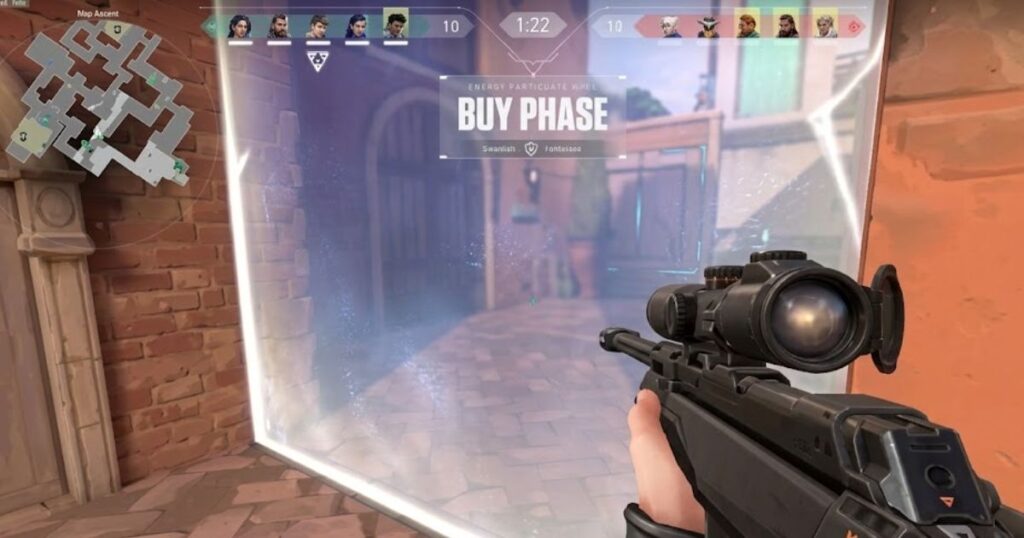
Many FPS players underestimate how much mouse settings influence tactical gameplay until they begin climbing competitive ranks. In Valorant, missing a single headshot because of unstable sensitivity or inconsistent cursor movement can completely change the outcome of a round. This is one reason professional players spend so much time optimizing DPI, eDPI, polling rate, and raw input behavior instead of constantly changing their mouse hardware.
Players coming from games like Apex Legends or Call of Duty often struggle at first because Valorant requires a very different aiming philosophy. Faster movement and aggressive tracking are less important than controlled precision and angle discipline. As a result, most competitive players gradually lower their sensitivity settings to improve stability during long-range duels and micro-correction movements.
Tactical Aim vs Tracking Aim
Tactical Aim and Tracking Aim in Valorant
Tactical aim in Valorant is a precision-focused aiming style that helps players secure faster and more consistent eliminations through crosshair placement, angle holding, and first-shot accuracy. Unlike tracking-heavy FPS games that reward continuous target following, Valorant places greater emphasis on controlled mouse movement and disciplined positioning before an engagement begins.
Because many fights are decided within a fraction of a second, players often gain more value from stable crosshair placement than from aggressive tracking mechanics. This is one reason why lower and more controlled sensitivity settings are commonly preferred in Valorant compared to faster-paced shooters.
Tracking aim still plays a role during close-range encounters, target transitions, and unexpected movement situations. However, it is not the primary mechanic that defines Valorant gunplay. Games such as Apex Legends or Overwatch place much greater importance on continuous target tracking, which often leads players to use different sensitivity preferences across titles.
As players improve, they usually discover that precise crosshair placement and reliable first-shot control contribute more to winning duels than raw turning speed. Understanding this difference helps explain why mouse settings that feel comfortable in tracking-focused games may feel unstable in Valorant’s slower and more deliberate combat environment.
Why Small Sensitivity Changes Affect Accuracy in Valorant
Small sensitivity changes affect accuracy because they alter the mouse movement patterns that help build consistent muscle memory over time. In Valorant, even minor adjustments can change flick distance, crosshair stopping control, and micro-correction timing, making aim feel less predictable during competitive matches.
Tactical FPS games reward repetition and consistency more than constant experimentation. When sensitivity changes too frequently, the brain has less opportunity to develop reliable movement patterns, which often leads to overflicking, underflicking, or unstable crosshair placement. Many players believe their mechanics are the problem when the real issue is repeatedly changing settings.
The impact becomes even more noticeable during ranked games where reaction speed and decision-making occur under pressure. Sensitivity that feels slightly too fast may reduce stopping precision, while sensitivity that feels too slow can make certain movements uncomfortable during aggressive plays. Achieving the right balance usually comes from long-term testing and stable practice rather than daily adjustments.
Most professional Valorant players keep their core sensitivity settings unchanged for extended periods unless hardware, comfort, or physical setup requirements force a change. Consistent settings allow muscle memory to develop more naturally, creating a stronger foundation for reliable aim, cleaner micro-adjustments, and better overall accuracy.
Over time, stable sensitivity habits often contribute more to aiming improvement than constantly searching for a new configuration after every difficult match.
The most important aiming fundamentals affected by mouse settings include:
• First-shot accuracy
• Crosshair placement
• Angle discipline
• Flick consistency
• Micro-adjustment control
Mouse settings matter more in Valorant because the game rewards precision, discipline, and consistent aiming mechanics far more than raw movement speed. Players who maintain stable sensitivity settings and develop long-term muscle memory usually achieve more reliable aiming performance than players who constantly experiment with new configurations.
Best DPI Settings for Valorant
The best DPI settings for Valorant are typically 800 DPI or 1600 DPI because they provide smooth cursor movement, reliable sensor performance, and consistent aiming control during competitive matches. While DPI affects how sensitive mouse movement feels, overall aiming performance depends on how DPI works together with in-game sensitivity to create a comfortable and repeatable setup.
Many players assume that increasing DPI automatically improves aim, but DPI is only one part of the overall sensitivity equation. Higher DPI simply increases cursor movement relative to physical mouse movement, while the final aiming experience is determined by both DPI and in-game sensitivity working together. This is why two players can use different DPI values while maintaining nearly identical aiming speed.
Valorant rewards precision far more than rapid camera movement, which is why 800 DPI remains one of the most common choices among competitive players. Modern gaming mouse sensors also perform exceptionally well at 1600 DPI, allowing players to achieve the same effective sensitivity while benefiting from smoother cursor tracking. The most important goal is not finding the highest DPI possible but maintaining a setup that feels predictable during flicks, micro-adjustments, and crosshair placement.
Why Most Valorant Pros Use 800 or 1600 DPI
Most Valorant professionals use 800 DPI or 1600 DPI because these settings provide a strong balance between precision, smooth cursor movement, and consistent mouse control. Both values work exceptionally well with modern gaming mouse sensors and allow players to create comfortable sensitivity settings without sacrificing aiming accuracy.
800 DPI remains the most common choice across professional Valorant because it feels predictable and easy to control during crosshair placement, angle clearing, and small flick adjustments. Many players also prefer 800 DPI because it offers a familiar balance between desktop navigation and in-game performance.
1600 DPI has become increasingly popular among modern professionals and aim-focused players because higher DPI can deliver smoother cursor tracking and more granular mouse movement at the sensor level. When combined with lower in-game sensitivity, 1600 DPI can feel slightly cleaner during micro-adjustments while maintaining the same overall aiming speed.
Although players often debate which value is superior, both 800 DPI and 1600 DPI are capable of delivering elite-level performance. The real advantage comes from choosing one DPI setting and building long-term consistency around it rather than frequently switching between different configurations.
For most players, the goal is not copying a professional player’s exact DPI but finding a setting that supports reliable crosshair control and repeatable aiming habits over time.
High DPI vs Low DPI for Valorant Players
High DPI and low DPI can both work well in Valorant, but most competitive players prefer 800 DPI or 1600 DPI because these settings balance smooth cursor movement with precise aiming control. Lower DPI usually feels slower and more deliberate, while higher DPI can feel smoother and more responsive when paired with controlled in-game sensitivity.
In Valorant, the raw DPI number is less important than how stable the mouse feels during crosshair placement, angle clearing, and small flick corrections. A higher DPI does not automatically make aim better, and a lower DPI does not automatically make aim more precise. The best choice is the DPI value that lets you maintain consistent mouse control without making the crosshair feel shaky or sluggish.
400 DPI can still work well for traditional low-sensitivity FPS players who prefer slower, heavier-feeling movement. 800 DPI is the most common balanced option because it feels predictable for both desktop use and in-game aiming. 1600 DPI is popular among players who want smoother cursor tracking while keeping their final aiming speed controlled through lower in-game sensitivity.
Popular DPI settings used by Valorant players:
- 400 DPI works well for traditional low-sensitivity players who want slower and more deliberate mouse movement.
- 800 DPI is the safest balanced choice for most Valorant players because it feels stable, familiar, and easy to control.
- 1600 DPI can feel smoother on modern gaming sensors when paired with lower in-game sensitivity.
- 3200 DPI and above are rarely needed for Valorant because they can make crosshair control feel overly sensitive if not adjusted carefully.
Instead of treating one DPI value as universally superior, players should choose a setting that feels predictable across practice, ranked matches, and long gaming sessions. Once DPI feels comfortable, in-game sensitivity becomes the next layer that determines final aiming speed.
Common DPI settings compared for Valorant:
| DPI Setting | Mouse Feel | Control Level | Best For |
|---|---|---|---|
| 400 DPI | Slow and deliberate | Very high | Traditional low-sensitivity FPS players |
| 800 DPI | Balanced and predictable | High | Most competitive Valorant players |
| 1600 DPI | Smooth and responsive | High when paired with low sensitivity | Modern sensor users and micro-adjustment focused players |
| 3200 DPI+ | Very fast and sensitive | Lower if not adjusted carefully | Rarely needed for tactical FPS gameplay |
For most Valorant players, 800 DPI is the safest starting point, while 1600 DPI is a strong alternative for players who prefer a smoother cursor feel. The real goal is not choosing the highest DPI possible, but finding a value that supports stable aim and repeatable crosshair control.
Best Sensitivity Range for Valorant Players
The best sensitivity range for Valorant players usually falls between 200 and 400 eDPI because it provides a balanced combination of aiming precision, crosshair control, and comfortable movement speed. This range allows players to perform accurate micro-adjustments while maintaining enough flexibility for fast reactions during competitive matches.
Unlike many fast-paced shooters, Valorant rewards first-shot accuracy and disciplined crosshair placement more than continuous tracking. Because of this, lower effective sensitivity remains the preferred choice for most competitive players. Slower settings often make it easier to stop the crosshair precisely on target, reducing unnecessary overflicking during stressful gunfights.
eDPI is calculated by multiplying mouse DPI by in-game sensitivity, allowing players to compare sensitivity settings more accurately across different DPI values. Two players may use completely different DPI settings while still maintaining nearly identical aiming speed if their final eDPI remains similar.
Typical sensitivity ranges seen in Valorant:
- 160–250 eDPI for precision-focused low-sensitivity players.
- 250–400 eDPI for balanced control and comfortable movement.
- 400+ eDPI for faster aiming styles and compact mouse movement.
Although these ranges provide useful starting points, the ideal sensitivity is ultimately the one that feels stable, predictable, and comfortable during real matches. Consistency usually contributes more to long-term improvement than constantly searching for a new sensitivity value.
Standard Sensitivity Ranges Used by Pro Players
Most professional Valorant players stay within a relatively controlled sensitivity range because lower effective sensitivity generally improves aiming consistency and crosshair precision. While individual preferences vary, professional players rarely use extremely high sensitivity settings because tactical FPS games reward stable mouse control more than rapid camera movement.
Common professional sensitivity configurations:
- 800 DPI with 0.25–0.40 in-game sensitivity.
- 1600 DPI with 0.125–0.20 in-game sensitivity.
- eDPI values commonly ranging between 200 and 400.
- Slightly faster setups for aggressive movement-focused players.
Some professionals prefer 1600 DPI because modern sensors can deliver smoother cursor updates while maintaining the same effective sensitivity. However, regardless of DPI preference, most professional setups still remain within a controlled eDPI range that prioritizes precision and consistency.
Professional settings can provide useful reference points, but they should be treated as starting guidelines rather than exact numbers that every player must copy.
Sensitivity Based on Aim Style
The ideal Valorant sensitivity often depends on aiming style because different players control mouse movement in different ways. Some players rely heavily on arm movement for precision, while others prefer faster wrist-based adjustments for quicker reactions and tighter movement spaces.
Arm aimers usually perform best with lower sensitivity because larger physical movement creates smoother crosshair control during long-range fights. This approach is commonly used by players who prioritize angle holding, disciplined positioning, and precise head-level crosshair placement.
Wrist aimers often prefer slightly higher sensitivity because smaller movement requires faster cursor response to maintain comfortable turning speed. Players using limited desk space or smaller mousepads frequently find medium sensitivity ranges more practical for daily play.
Typical sensitivity ranges based on aiming style:
- 160–250 eDPI for low-sensitivity arm aiming.
- 250–400 eDPI for balanced hybrid aiming.
- 400+ eDPI for faster wrist-focused movement.
While aim style can help narrow the ideal sensitivity range, long-term comfort and consistency remain more important than fitting into a specific category. The best sensitivity is the one that supports reliable aim across practice sessions, ranked games, and competitive matches.
How to Find Your Perfect Valorant Sensitivity
Finding your perfect Valorant sensitivity is the process of choosing a setting that helps you maintain consistent crosshair control, accurate flicks, and comfortable mouse movement during real matches. The ideal sensitivity should feel stable across practice sessions, ranked games, and long gaming sessions without forcing unnecessary adjustments.
There is no universal sensitivity that works for every player because hand size, aiming style, mousepad space, and movement habits all influence how a setup feels. Rather than copying a professional player’s settings, most players achieve better results by testing controlled sensitivity ranges and evaluating long-term consistency.
Many players spend weeks searching for a perfect number when the real goal is building repeatable aiming habits. A sensitivity that feels predictable during both practice and competitive matches usually performs better than constantly changing settings after every good or bad game.
Practicing in The Range helps players test sensitivity consistency before committing to new settings in competitive matches.
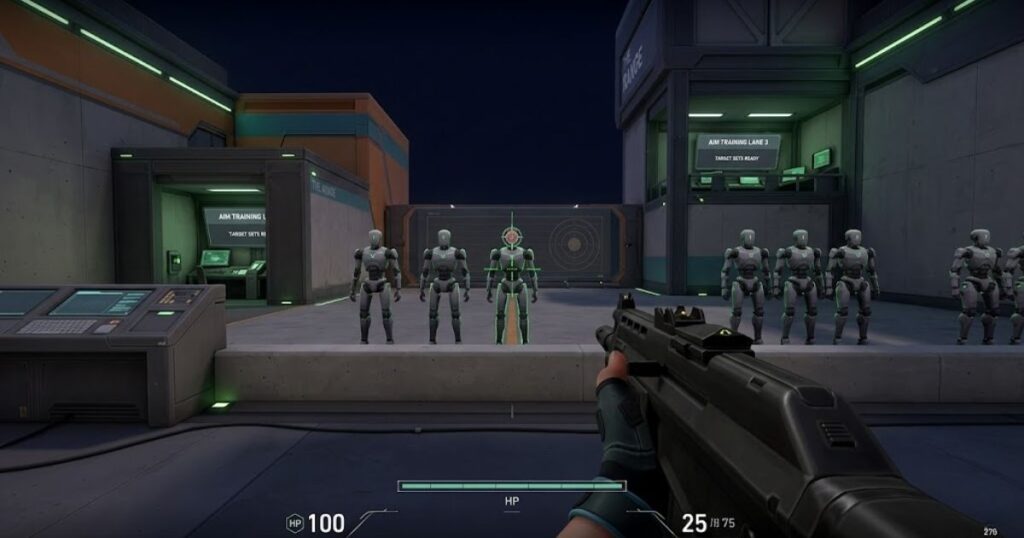
One of the simplest methods is using Valorant’s practice range to test how comfortable different sensitivity settings feel during flicks, target transitions, and micro-adjustments. The goal is not achieving perfect accuracy immediately but identifying a range that feels natural and repeatable over time.
Another effective approach is tracking performance during real matches instead of judging settings after only a few rounds. Consistent crosshair placement, comfortable turning speed, and reliable stopping control often provide better feedback than raw scoreboard performance alone.
Useful factors to evaluate when testing sensitivity:
- Mousepad size and available desk space.
- Arm aiming versus wrist aiming preference.
- Comfort during long gaming sessions.
- Control during long-range engagements.
- Consistency across multiple matches instead of single games.
These factors usually reveal whether a sensitivity feels sustainable over time rather than simply feeling fast or exciting during short practice sessions.
Common sensitivity ranges and the players they suit:
| Sensitivity Type | Recommended eDPI | Typical Playstyle | Main Advantage | Best For |
|---|---|---|---|---|
| Low Sens | 160–250 | Arm aiming | Maximum precision and stable crosshair control | Angle holders and tactical players |
| Balanced Sens | 250–400 | Hybrid arm and wrist aiming | Strong balance between control and speed | Most competitive Valorant players |
| High Sens | 400–500+ | Wrist-focused aiming | Faster turns and quicker reactions | Small mousepads and limited desk space |
| Custom Sens | Varies | Personal preference | Optimized around comfort and consistency | Experienced players refining their setup |
While sensitivity ranges provide useful starting points, long-term consistency matters more than matching a specific number. Players who keep their settings stable often develop stronger muscle memory and more reliable crosshair placement over time.
What Is eDPI in Valorant?
eDPI is an effective sensitivity value that helps Valorant players compare aiming speed more accurately by combining mouse DPI and in-game sensitivity into a single number. Instead of looking at DPI alone, eDPI shows the true speed of your crosshair movement, making it easier to compare setups between different players.
Many newer players focus only on DPI without realizing that in-game sensitivity significantly changes the final result. Two players can use completely different DPI values while maintaining nearly identical aiming speed if their final eDPI remains the same. This is why eDPI has become one of the most important measurements for evaluating Valorant sensitivity settings.
Understanding eDPI helps players test settings more logically, avoid unnecessary sensitivity changes, and compare professional setups more accurately. Rather than copying DPI values alone, competitive players usually evaluate the complete sensitivity equation through eDPI.
How eDPI Is Calculated in Valorant
eDPI is calculated by multiplying your mouse DPI by your in-game sensitivity. This simple formula creates a universal measurement that allows players to compare effective sensitivity across different DPI settings.
The eDPI formula:
- 800 DPI × 0.30 Sensitivity = 240 eDPI
- 1600 DPI × 0.15 Sensitivity = 240 eDPI
- 400 DPI × 0.60 Sensitivity = 240 eDPI
Although the DPI values are completely different, all three examples produce nearly identical crosshair movement speed in Valorant. This is why copying DPI without checking sensitivity often leads to misleading results.
Once players understand eDPI, comparing different setups becomes much easier because both hardware sensitivity and in-game settings are measured through a single value.
Best eDPI Range for Competitive Valorant
The best eDPI range for competitive Valorant is usually between 200 and 400 eDPI because it helps balance precise crosshair control, stable micro-adjustments, and comfortable movement speed. Lower eDPI values usually support better long-range precision, while slightly higher values can feel more responsive for aggressive movement and faster target switching.
eDPI matters more than DPI alone because it combines your mouse DPI and in-game sensitivity into one effective sensitivity value. This makes it easier to compare different setups fairly, even when players use different raw DPI settings. For example, 800 DPI at 0.30 sensitivity and 1600 DPI at 0.15 sensitivity both create 240 eDPI.
Most competitive Valorant players avoid extremely high eDPI because tactical fights depend on first-shot accuracy, head-level crosshair placement, and clean stopping control. A setup that feels too fast can cause overflicking, shaky micro-adjustments, and unstable aim during pressure situations. However, extremely low eDPI can also feel restrictive if your mousepad space or arm movement is limited.
Common eDPI ranges used by Valorant players:
- 160–220 eDPI works well for low-sensitivity arm aimers who want maximum precision.
- 220–320 eDPI fits many competitive players who want balanced control and movement.
- 320–400 eDPI suits hybrid aimers who prefer faster reactions without losing too much stability.
- 400+ eDPI can work for wrist-focused players, but it is harder to control consistently in tactical fights.
These ranges are useful starting points, but they should not be treated as strict rules. The right eDPI is the one that lets you hold angles, flick accurately, and correct your crosshair without feeling forced or unstable.
Competitive Valorant eDPI comparison:
| eDPI Range | Aiming Style | Main Advantage | Recommended For |
|---|---|---|---|
| 160–220 | Low Sens | Maximum precision and stable micro-adjustments | Arm aimers and tactical players |
| 220–320 | Balanced Sens | Controlled movement with flexible flick speed | Most competitive Valorant players |
| 320–400 | Hybrid Sens | Faster movement while maintaining solid control | Hybrid aimers and aggressive duelists |
| 400+ | High Sens | Very fast turning and compact mouse movement | Wrist-focused players and smaller setups |
Before changing your eDPI, test how your aim behaves during real gameplay situations instead of judging the setting from one practice session. If you constantly overflick, lowering your eDPI slightly may improve stopping control. If your movement feels restricted or you struggle to turn comfortably, a small increase may make the setup feel more natural.
The strongest eDPI setup is usually not the fastest or the slowest one. It is the range that helps you maintain stable crosshair placement, clean micro-adjustments, and repeatable aim under pressure.
Best Mouse Polling Rate for Valorant
The best mouse polling rate for Valorant is 1000Hz because it provides stable low-latency performance, smooth cursor movement, and reliable responsiveness without placing unnecessary strain on system resources. At 1000Hz, a mouse reports its position to the computer every 1 millisecond, which is already fast enough for precise flicks, micro-adjustments, and competitive aiming.
Polling rate determines how frequently a mouse sends movement information to the PC. Higher values can reduce input delay and make cursor movement appear slightly smoother, but they do not directly improve mechanical skill, crosshair placement, or aiming fundamentals. In most situations, consistency and comfort contribute far more to performance than increasing polling rate alone.
Most modern gaming mouse for FPS games models support polling rates ranging from 1000Hz to 8000Hz. While higher polling rates can provide marginal improvements in responsiveness, the difference becomes increasingly difficult to notice for many players during actual Valorant matches.
Common polling rate options available on modern gaming mice:
| Polling Rate | Report Interval | Mouse Feel | Recommended For |
|---|---|---|---|
| 500Hz | 2 ms | Responsive but less common today | Older gaming mice |
| 1000Hz | 1 ms | Stable and highly responsive | Most Valorant players |
| 4000Hz | 0.25 ms | Slightly smoother movement | High refresh rate setups |
| 8000Hz | 0.125 ms | Maximum responsiveness | High-end esports systems |
Although higher polling rates can provide smoother cursor updates, the practical improvement becomes smaller as values increase. For most players, 1000Hz remains the most balanced option because it delivers excellent responsiveness without introducing unnecessary hardware demands.
Choosing Between 1000Hz, 4000Hz, and 8000Hz for Valorant
For most players, 1000Hz is the best polling rate for Valorant because it delivers responsive mouse input, excellent system stability, and consistent performance without requiring high-end hardware. While 4000Hz and 8000Hz can provide smoother cursor updates and slightly lower input delay, the practical advantage is often much smaller than many players expect.
At 1000Hz, a mouse reports its position to the computer every 1 millisecond. This has remained the competitive standard for years because it provides reliable responsiveness during flicks, micro-adjustments, and crosshair placement. Most professional Valorant players continue to use 1000Hz because it feels predictable and stable across long gaming sessions.
4000Hz polling rate reduces reporting intervals further and may create smoother cursor movement on high refresh rate monitors. Players using 240Hz or 360Hz displays sometimes notice cleaner micro-adjustments and slightly more responsive aiming, particularly when paired with modern esports hardware.
8000Hz polling rate pushes responsiveness even further by sending significantly more updates to the PC. Although this can reduce input delay slightly, the difference becomes increasingly difficult to notice during actual gameplay. Higher polling rates may also increase CPU usage, especially on systems that are not optimized for extremely high polling rates.
Common polling rate setups used in Valorant:
- 1000Hz for stable competitive performance and maximum compatibility.
- 4000Hz for smoother cursor movement on high refresh rate systems.
- 8000Hz for enthusiast setups focused on minimizing input delay.
- 500Hz or lower mainly for older hardware or compatibility purposes.
While higher polling rates can offer incremental improvements, most players will gain far more performance from improving crosshair placement, sensitivity consistency, and mouse control fundamentals. For competitive Valorant, 1000Hz remains the most practical and widely recommended choice.
Does Higher Polling Rate Improve Aim in Valorant?
Higher polling rate can make mouse movement feel more responsive in Valorant, but it does not automatically improve aim by itself. A faster polling rate may help cursor updates feel smoother during small corrections, but crosshair placement, stable sensitivity, and consistent mouse control still matter far more during real gunfights.
Players often expect a major aiming upgrade after switching from 1000Hz to 4000Hz or 8000Hz, but the real difference is usually subtle. Higher polling rates reduce the time between mouse reports, which can make micro-adjustments feel cleaner on high refresh rate monitors. However, this improvement is easier to notice during slow controlled movement than during large flicks or chaotic fights.
System stability also matters. Extremely high polling rates can increase CPU usage, create inconsistent frame pacing, or cause stuttering on some setups. If the system becomes less stable, the higher polling rate can actually feel worse than a reliable 1000Hz configuration.
Before increasing polling rate, check these factors:
- Monitor refresh rate because 240Hz and 360Hz displays make smoother mouse updates easier to notice.
- CPU performance because higher polling rates can increase system load during gameplay.
- Mouse firmware quality because poor optimization can make high polling rates feel inconsistent.
- Sensitivity stability because poor mouse control will not be fixed by higher polling rate alone.
- Long-session consistency because a setting must feel reliable across full ranked sessions, not just short tests.
These factors help separate real responsiveness gains from hardware hype. For most players, higher polling rate is useful only when the rest of the setup is already stable and comfortable.
Polling rate impact on Valorant aim:
| Polling Rate | Response Interval | Aim Feel | Practical Impact |
|---|---|---|---|
| 1000Hz | 1 ms | Stable and responsive | Best balance for most Valorant players |
| 4000Hz | 0.25 ms | Smoother during micro-adjustments | Useful on 240Hz or 360Hz monitors |
| 8000Hz | 0.125 ms | Extremely responsive but demanding | Best for high-end systems and enthusiast setups |
For most Valorant players, stable performance and consistent aim development matter more than pushing the highest polling rate possible. A well-optimized 1000Hz setup already provides excellent responsiveness, while 4000Hz and 8000Hz mainly offer incremental improvements for players using powerful hardware and high refresh rate displays.
Raw Input Buffer and Windows Mouse Settings Explained
Raw Input helps Valorant receive movement data directly from the mouse sensor, while proper Windows mouse settings help preserve consistent and predictable aiming behavior. Together, these settings reduce unwanted cursor processing and create a more reliable foundation for competitive FPS gameplay.
In tactical shooters such as Valorant, even small inconsistencies can affect crosshair placement, flick accuracy, and micro-adjustments. This is why most competitive players prefer using raw mouse input and disabling operating system features that alter cursor movement behind the scenes.
Raw Input allows Valorant to bypass Windows cursor processing and read movement directly from the mouse sensor. As a result, mouse movement remains more consistent because operating system acceleration and pointer modifications are removed from the aiming process.
Raw Input Buffer is a separate Valorant setting designed to improve how the game handles extremely high-frequency mouse data. Riot introduced this feature primarily for players using modern gaming mice running at 2000Hz, 4000Hz, or 8000Hz polling rates, where large amounts of movement data must be processed efficiently.
For most players using standard 1000Hz polling, Raw Input remains the most important setting. Players using very high polling rates may benefit from Raw Input Buffer because it can help maintain smoother and more stable input behavior during gameplay.
Disabling Windows mouse acceleration is one of the most important steps for achieving consistent 1:1 mouse movement in Valorant:
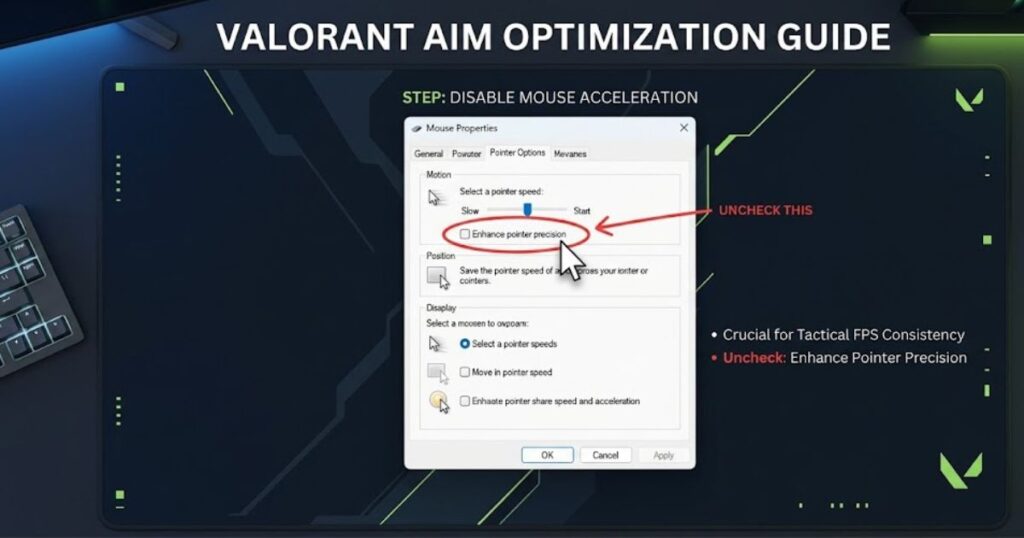
Windows mouse settings can influence aiming performance even before Valorant launches. The most important option is Enhance Pointer Precision, which is Microsoft’s built-in mouse acceleration system. When enabled, cursor distance changes based on hand speed instead of preserving true 1:1 mouse movement.
Competitive FPS players almost always disable this setting because it introduces variable cursor behavior that can make flicks and muscle memory less predictable. Consistent mouse movement is far more valuable than acceleration when building long-term aiming habits.
Recommended mouse settings for Valorant:
- Enable Raw Input in Valorant.
- Enable Raw Input Buffer if using high polling rate mice.
- Disable Enhance Pointer Precision in Windows.
- Keep Windows mouse speed at the default 6/11 setting.
- Avoid third-party software that modifies cursor acceleration.
These settings help create a cleaner and more predictable aiming environment by allowing mouse movement to remain consistent across practice sessions, ranked matches, and long-term skill development.
When combined with stable sensitivity, appropriate polling rate, and a comfortable gaming mouse setup, raw input settings help ensure that every mouse movement translates as accurately as possible inside Valorant.
Understanding Raw Input vs Windows Mouse Processing
Raw Input allows Valorant to receive mouse movement directly from the sensor, while Windows mouse processing passes movement data through operating system settings before it reaches the game. This difference affects how consistently mouse movement is translated into crosshair movement during competitive gameplay.
By default, Windows acts as an intermediary between the mouse and the game. Movement data can be influenced by cursor settings, pointer behavior, or mouse acceleration before being delivered to applications. Although this behavior is useful for general desktop navigation, it can introduce inconsistencies that are undesirable in tactical FPS games.
Raw Input bypasses these operating system modifications by allowing Valorant to read movement data directly from the mouse sensor. The game receives cleaner and more predictable input, helping preserve consistent 1:1 mouse movement during flicks, tracking adjustments, and crosshair corrections.
For competitive players, this consistency is one of the primary reasons Raw Input remains the preferred option. Reliable movement behavior helps build stronger muscle memory because identical hand movements produce more predictable in-game results over time.
Benefits of enabling Raw Input in Valorant:
- More consistent 1:1 mouse movement.
- Reduced interference from Windows cursor processing.
- More reliable flick accuracy and micro-adjustments.
- Improved muscle memory development through predictable movement.
- Better consistency during long practice sessions and ranked matches.
For most competitive players, enabling Raw Input is one of the simplest ways to create a cleaner and more predictable aiming environment.
What Raw Input Buffer Actually Does
Raw Input Buffer helps Valorant process high-frequency mouse data more efficiently, making it particularly useful for players using modern high polling rate gaming mice. Unlike standard Raw Input, which focuses on bypassing Windows mouse processing, Raw Input Buffer is designed to improve how incoming mouse reports are handled inside the game.
Modern esports mice operating at 2000Hz, 4000Hz, or 8000Hz polling rates send significantly more movement updates every second than traditional 1000Hz setups. This increased data flow can place additional demands on the system, especially during intense gameplay situations.
When enabled, Raw Input Buffer helps Valorant manage this incoming data more consistently. Some players may notice smoother cursor movement, cleaner micro-adjustments, and fewer input irregularities when using extremely high polling rates, particularly on high refresh rate monitors.
However, the impact depends heavily on hardware configuration. Players using standard 1000Hz polling rates often experience little difference because the amount of incoming mouse data is already easy for modern systems to process efficiently.
Raw Input Buffer is most useful when:
- Using 2000Hz, 4000Hz, or 8000Hz polling rates.
- Playing on 240Hz or higher refresh rate monitors.
- Running modern esports-focused gaming mice.
- Experiencing inconsistent input behavior at very high polling rates.
- Using a system capable of handling high-frequency input data efficiently.
For most Valorant players, enabling Raw Input is significantly more important than enabling Raw Input Buffer. Raw Input Buffer becomes increasingly valuable only as polling rate and overall hardware performance move into higher-end competitive territory.
Why Windows Mouse Acceleration Should Be Disabled
Windows mouse acceleration should be disabled because it changes cursor movement based on hand speed, making mouse input less predictable during Valorant matches. Competitive FPS games rely on consistent muscle memory, and acceleration interferes with that consistency by causing identical hand movements to produce different cursor distances.
When mouse acceleration is enabled, moving the mouse quickly results in greater cursor travel than moving the same physical distance at a slower speed. While this behavior can be useful for general desktop navigation, it creates unnecessary variability during competitive aiming where precision and repeatability are critical.
Valorant rewards stable flick timing, reliable crosshair placement, and accurate micro-adjustments. Mouse acceleration can make these mechanics harder to develop because the relationship between hand movement and in-game response constantly changes depending on movement speed. This inconsistency often becomes more noticeable during stressful situations where aiming precision matters most.
Disabling Enhance Pointer Precision allows every physical mouse movement to translate into predictable in-game movement without artificial speed scaling. Over time, this helps players build more reliable muscle memory and cleaner crosshair control because movement behavior remains consistent across every match.
Recommended mouse input settings for competitive Valorant:
- Enable Raw Input for direct communication between the mouse sensor and Valorant.
- Enable Raw Input Buffer when using high polling rate mice.
- Disable Enhance Pointer Precision to remove Windows mouse acceleration.
- Keep Windows pointer speed at 6/11 to preserve default movement scaling.
- Update mouse firmware regularly to maintain stable input performance.
These settings help create a more predictable aiming environment by ensuring mouse movement remains consistent regardless of hand speed or operating system behavior.
Competitive Valorant mouse input recommendations:
| Setting | Recommended Option | Main Benefit | Competitive Impact |
|---|---|---|---|
| Raw Input | Enabled | Direct sensor communication | Improves input consistency |
| Raw Input Buffer | Enabled for high polling rates | Stabilizes high-frequency input data | Reduces inconsistent movement behavior |
| Mouse Acceleration | Disabled | True 1:1 cursor movement | Improves muscle memory reliability |
| Windows Pointer Speed | 6/11 Default | Preserves raw movement scaling | Prevents artificial cursor modification |
For long-term improvement, consistent input behavior matters far more than constantly changing sensitivity or chasing new hardware specifications. Stable Raw Input settings, disabled mouse acceleration, and properly configured Windows options create a stronger foundation for accurate and repeatable aim in Valorant.
Best Valorant Mouse Settings for Different Aim Styles
The best Valorant mouse settings depend on how you naturally control mouse movement during gameplay. Some players rely on large arm movements for maximum precision, while others prefer smaller wrist movements for faster reactions and compact aiming adjustments. Because of these differences, the ideal sensitivity, eDPI range, and overall mouse setup can vary significantly from player to player.
Valorant rewards first-shot accuracy, disciplined crosshair placement, and clean micro-adjustments more than raw movement speed. As a result, aiming style plays a major role in determining which mouse settings feel comfortable and consistent during competitive matches.
Physical setup also influences sensitivity performance. Mousepad size, available desk space, grip style, and overall comfort can all affect how a sensitivity range behaves during real gameplay. A setup that feels perfect for an arm aimer may feel restrictive for a wrist aimer, even when both players have similar mechanical skill.
How different aim styles typically approach mouse settings:
| Aim Style | Typical eDPI | Movement Type | Main Strength | Best For |
|---|---|---|---|---|
| Arm Aiming | 160–250 | Large forearm movement | Maximum precision and control | Angle holding and long-range fights |
| Hybrid Aiming | 250–400 | Arm and wrist combination | Balanced speed and precision | Most competitive players |
| Wrist Aiming | 400+ | Compact wrist movement | Fast reactions and quick turns | Limited desk space and aggressive playstyles |
While these ranges provide useful starting points, comfort and consistency should always take priority. Players who choose settings that match their natural movement style often develop stronger muscle memory and more reliable crosshair control over time.
Best Mouse Settings for Wrist Aimers
Wrist aimers typically perform best with moderate to moderately high sensitivity settings because smaller mouse movements require faster cursor response to maintain comfortable turning speed. This aiming style relies more on wrist movement than large arm swipes, allowing quick reactions and compact adjustments during fast-paced engagements.
Many players prefer wrist aiming because it feels responsive while requiring less physical desk space. This approach is especially common among players using smaller mousepads, limited desk setups, or aggressive playstyles that involve frequent repositioning and rapid target transitions.
Although wrist aimers generally use faster sensitivity than arm aimers, extremely high sensitivity can still become difficult to control. Long-range fights, head-level crosshair placement, and precise micro-adjustments often become less consistent when sensitivity rises beyond a comfortable range.
Typical mouse settings used by wrist-focused players:
- DPI: 800–1600
- In-Game Sensitivity: 0.35–0.50
- eDPI: 280–500+
Advantages of wrist aiming in Valorant:
- Faster directional changes during aggressive movement.
- Easier turning speed on smaller mousepads.
- More responsive feeling during close-range engagements.
- Reduced physical arm movement during long gaming sessions.
Wrist aiming can be highly effective when sensitivity remains controlled and predictable. The goal is not maximizing speed, but finding a setting that allows quick reactions while maintaining enough precision for reliable crosshair placement and consistent aim.
Best Mouse Settings for Arm Aimers
Arm aimers typically perform best with lower sensitivity settings because larger mouse movements provide greater control, smoother crosshair adjustments, and more consistent aiming precision. This aiming style relies primarily on forearm movement rather than wrist flicks, making it one of the most common approaches among competitive Valorant players.
Lower sensitivity allows arm aimers to make deliberate corrections without causing the crosshair to feel overly reactive. Because Valorant rewards first-shot accuracy and disciplined angle holding, many players prefer slower effective sensitivity ranges that improve stopping control during long-range engagements.
Arm aiming also benefits from larger mousepads because wider movement space is required for comfortable swipes and precise tracking adjustments. Players who use this style often prioritize consistency and stability over raw turning speed.
Typical mouse settings used by arm-focused players:
- DPI: 400–800
- In-Game Sensitivity: 0.20–0.35
- eDPI: 160–280
Advantages of arm aiming in Valorant:
- Better micro-adjustment stability during tactical fights.
- Cleaner stopping accuracy during flick shots.
- More consistent crosshair placement over time.
- Improved muscle memory through larger and repeatable movements.
Although arm aiming requires more physical movement and desk space, it remains one of the most reliable approaches for players who prioritize precision and long-term consistency. The goal is not moving slower, but creating a sensitivity range that supports predictable crosshair control under pressure.
Best Mouse Settings for Hybrid Aimers
Hybrid aimers typically perform best with moderate sensitivity settings because this aiming style combines wrist movement and arm movement depending on the situation. Small adjustments are often handled with the wrist, while larger flicks and repositioning movements rely on the forearm. This balance makes hybrid aiming one of the most common approaches among competitive Valorant players.
Medium sensitivity ranges usually provide the best balance between control and responsiveness. Hybrid aimers benefit from having enough speed for quick reactions while maintaining the crosshair stability needed for precise headshots and controlled micro-adjustments.
Many players eventually settle into hybrid sensitivity ranges because they work well across different agents, playstyles, and engagement distances. This approach can also reduce physical strain during long gaming sessions while still preserving strong aiming consistency.
Typical mouse settings used by hybrid aimers:
- DPI: 800–1600
- In-Game Sensitivity: 0.25–0.35
- eDPI: 250–350
Advantages of hybrid aiming in Valorant:
- Balanced movement speed and aiming stability.
- Flexible across different agents and playstyles.
- Comfortable combination of wrist and arm movement.
- Easier long-term consistency for many players.
Hybrid aiming is often considered the middle ground between low-sensitivity arm aiming and faster wrist-focused setups. For many players, it offers an effective combination of precision, comfort, and adaptability during competitive matches.
Important factors to consider before adjusting sensitivity:
- Mousepad size and available desk space.
- Arm aiming versus wrist aiming preference.
- Crosshair stability during micro-adjustments.
- Long-term comfort during extended gaming sessions.
- Consistency across multiple matches rather than short testing periods.
These factors often influence aiming performance more than copying another player’s exact sensitivity values. A comfortable and repeatable setup usually produces better long-term results than constantly chasing new settings.
How common aim styles compare in Valorant:
| Aim Style | Typical eDPI | Main Advantage | Best For |
|---|---|---|---|
| Wrist Aiming | 280–500+ | Fast movement and reactive flicks | Aggressive players and compact setups |
| Arm Aiming | 160–280 | Stable precision and micro-adjustments | Tactical players and large mousepads |
| Hybrid Aiming | 250–350 | Balanced control and flexibility | Most competitive Valorant players |
The best Valorant mouse settings are usually the ones that match your natural movement habits while maintaining reliable crosshair control under pressure. Players who commit to one comfortable setup often develop stronger muscle memory and more consistent aim than those who constantly change sensitivity after every difficult match.
How to Find Your Perfect Valorant Sensitivity
Finding your perfect Valorant sensitivity is the process of identifying a setup that feels consistent, comfortable, and repeatable during real matches. The goal is not copying a professional player’s settings but discovering a sensitivity range that supports your natural aiming habits while maintaining stable crosshair control.
Every player interacts with sensitivity differently because factors such as hand movement, mousepad size, grip style, and desk space all influence aiming behavior. A setting that feels perfect for one player can feel unstable or restrictive for someone else, even if both players have similar mechanical skill.
Valorant rewards precise first-shot accuracy and disciplined crosshair placement, which means sensitivity should support reliable micro-adjustments instead of encouraging uncontrolled movement speed. Settings that feel comfortable during practice should also remain predictable during ranked matches where pressure and fatigue begin affecting consistency.
Rather than searching endlessly for a magical sensitivity value, players usually improve faster by testing a controlled range and evaluating long-term performance. Small adjustments combined with consistent practice often produce better results than constantly switching between completely different settings.
Once a sensitivity feels comfortable in practice, it should be tested across multiple ranked or unrated matches before making additional adjustments. Short testing sessions often produce misleading results because aim quality naturally fluctuates from game to game.
Useful steps for finding the right sensitivity:
- Start within a reasonable eDPI range instead of using extreme values.
- Test flick accuracy and stopping control inside The Range.
- Play several matches before deciding whether a setting works.
- Focus on consistency rather than occasional highlight plays.
- Make small adjustments instead of drastic sensitivity changes.
Following a structured testing process helps players identify whether aiming problems come from sensitivity itself or from mechanical habits such as crosshair placement, movement timing, and positioning.
Common signs that sensitivity may need adjustment:
| Aiming Issue | Possible Cause | Potential Adjustment |
|---|---|---|
| Frequent overflicking | Sensitivity feels too fast | Lower sensitivity slightly |
| Slow target acquisition | Sensitivity feels too low | Increase sensitivity slightly |
| Inconsistent micro-adjustments | Poor stopping control | Test a lower eDPI range |
| Physical fatigue during long sessions | Movement feels restrictive | Consider a small sensitivity increase |
Most players achieve better results when they commit to one comfortable sensitivity range long enough for muscle memory to develop naturally. Consistency often contributes more to improvement than endlessly searching for a perfect number.
Using the 180-Degree Test to Check Valorant Sensitivity
The 180-degree test is a simple method that helps Valorant players evaluate whether their sensitivity feels comfortable relative to their mousepad size and natural movement range. While it is not a perfect measurement system, it provides a practical starting point for identifying setups that may feel excessively fast or unnecessarily restrictive.
The test focuses on physical movement rather than sensitivity numbers alone. Instead of comparing DPI, eDPI, or professional settings, players evaluate how naturally their mouse movement translates into in-game turning distance. This approach helps reveal whether a sensitivity feels compatible with available desk space and personal aiming habits.
How to perform the 180-degree test:
- Place the mouse near one side of the mousepad.
- Move the mouse across the pad using a comfortable and natural swipe.
- Observe how far the character rotates inside Valorant.
- Evaluate whether the movement feels controlled and repeatable.
If the swipe causes the character to rotate far beyond 180 degrees, sensitivity may be unnecessarily high for your available movement space. If the character struggles to reach a 180-degree turn, sensitivity may feel restrictive and require excessive physical movement during matches.
What the results usually indicate:
- A turn close to 180 degrees often suggests a balanced starting point.
- Significantly more than 180 degrees may indicate overly fast sensitivity.
- Significantly less than 180 degrees may indicate overly slow sensitivity.
- Comfort and consistency remain more important than achieving an exact number.
The 180-degree test works best as an initial evaluation tool rather than a final sensitivity decision. Once a setup feels comfortable, players should continue testing through aim drills, The Range practice sessions, and real matches before making further adjustments.
Common 180-degree test outcomes:
| Test Result | Possible Interpretation | Suggested Action |
|---|---|---|
| Far Above 180° | Sensitivity may be too fast | Consider a small reduction |
| Near 180° | Movement feels balanced | Continue testing in matches |
| Far Below 180° | Sensitivity may be too slow | Consider a small increase |
| Feels Uncomfortable | Movement style mismatch | Review aim style and desk setup |
Players who combine the 180-degree test with long-term match testing usually make more reliable sensitivity decisions than players who rely only on professional settings or random sensitivity recommendations.
Using The Range to Fine-Tune Your Valorant Sensitivity
The Valorant Practice Range is one of the most effective places to fine-tune sensitivity because it allows repeated testing without the pressure of ranked matches. Instead of focusing on occasional highlight shots, players should evaluate how consistently they control the crosshair during flicks, micro-adjustments, and target transitions.
The controlled environment inside The Range makes it easier to identify sensitivity problems that may be difficult to notice during competitive games. Small aiming mistakes become more obvious when players repeat the same drills multiple times under identical conditions.
One useful exercise is tracking head-level targets while strafing side to side. If the crosshair repeatedly overshoots the target, sensitivity may be slightly too fast. If the crosshair constantly lags behind movement, sensitivity may be too slow for your natural aiming style.
Another effective drill involves flicking between stationary targets at different distances. Consistent overflicking often suggests excessive sensitivity, while repeated underflicking may indicate that movement speed feels too restricted. The goal is identifying patterns that appear across multiple practice sessions rather than reacting to a few missed shots.
Important factors to monitor while testing sensitivity:
- Mousepad size and available movement space.
- Arm aiming versus wrist aiming preference.
- Crosshair stability during flick shots.
- Comfort during long gaming sessions.
- Consistency across multiple practice sessions and matches.
These factors usually provide more valuable feedback than raw accuracy percentages because they reveal whether a sensitivity feels sustainable over time.
Common sensitivity adjustment patterns observed in The Range:
| Aiming Problem | Possible Cause | Suggested Adjustment | Typical Result |
|---|---|---|---|
| Constant Overflicking | Sensitivity too high | Lower eDPI slightly | Improved stopping control |
| Slow Target Correction | Sensitivity too low | Increase sensitivity slightly | Faster directional movement |
| Shaky Micro-Adjustments | Unstable movement control | Reduce overall sensitivity | Cleaner crosshair precision |
| Restricted Turning Movement | Limited movement range | Adjust settings around desk space | More comfortable mouse movement |
Once a sensitivity feels comfortable inside The Range, it should be validated across multiple ranked or unrated matches before making additional adjustments. Long-term consistency is usually a stronger indicator of a good setup than short-term performance spikes.
Most players improve faster when they commit to a comfortable sensitivity range and allow muscle memory to develop naturally. Stable settings combined with consistent practice often produce better results than constantly changing sensitivity after every difficult session.
Common Sensitivity Mistakes Valorant Players Should Avoid
Many Valorant players struggle with inconsistent aim not because their sensitivity is completely wrong, but because repeated sensitivity mistakes gradually damage crosshair control and mechanical consistency. Tactical FPS games reward stable movement habits, precise micro-adjustments, and reliable first-shot accuracy, making poor sensitivity decisions much more noticeable over time.
One of the biggest mistakes is assuming that every missed shot is caused by sensitivity. In reality, poor crosshair placement, panic movement, positioning errors, and inconsistent mechanics often contribute more to missed engagements than mouse settings alone. Constantly changing sensitivity after every bad match usually creates even more instability instead of solving the actual problem.
Many experienced players eventually discover that long-term consistency matters far more than chasing a perfect sensitivity number. This is one reason professional players often maintain the same settings for extended periods unless a significant comfort or hardware change requires adjustment.
Common sensitivity mistakes that hurt Valorant performance:
| Mistake | Typical Result | Long-Term Impact | Better Approach |
|---|---|---|---|
| Changing sensitivity too often | Unstable aim | Weak muscle memory development | Stay with one setting longer |
| Copying pro settings blindly | Uncomfortable mouse control | Inconsistent performance | Choose settings based on personal comfort |
| Using extremely high sensitivity | Overflicking and shaky aim | Poor micro-adjustment control | Test a more controlled range |
| Using extremely low sensitivity | Restricted movement | Difficulty reacting quickly | Balance precision and mobility |
| Blaming sensitivity for every mistake | Frequent unnecessary changes | Slower improvement | Review mechanics and positioning first |
Habits that often lead to sensitivity problems:
- Changing settings after a single bad ranked game.
- Copying professional players without considering aim style.
- Ignoring mousepad size and available desk space.
- Testing multiple sensitivities within the same session.
- Judging settings based on short-term results instead of long-term consistency.
These habits can make sensitivity feel inconsistent even when the actual settings are perfectly reasonable. Many players mistakenly blame sensitivity when the real issue comes from decision-making, crosshair placement, or movement discipline.
Signs that the problem may not be sensitivity:
- Crosshair placement frequently sits below head level.
- Panic spraying occurs during stressful fights.
- Positioning creates difficult engagements.
- Aim quality changes dramatically based on confidence levels.
- Performance fluctuates even when sensitivity remains unchanged.
Understanding the difference between a genuine sensitivity problem and a mechanical gameplay issue helps players make smarter adjustments. In many cases, improving fundamentals produces larger gains than changing sensitivity values.
For most Valorant players, stable settings combined with disciplined practice create a stronger foundation for long-term improvement than endlessly chasing the perfect sensitivity number. Consistency remains one of the most valuable advantages a player can build over time.
Playing on Extremely High Sensitivity
Using extremely high sensitivity is one of the most common mistakes Valorant players make because fast cursor movement often feels responsive at first but becomes difficult to control during real gunfights. Small hand movement errors are amplified at higher sensitivities, making precise crosshair placement and micro-adjustments significantly harder under pressure.
Many players are attracted to high sensitivity because rapid camera movement feels smooth during casual play and allows quick turns with minimal physical effort. However, Valorant is built around first-shot accuracy and controlled crosshair placement rather than constant high-speed tracking. A setup that feels exciting during movement can quickly become inconsistent when precise headshots are required.
Why extremely high sensitivity hurts aim:
- Small hand movements create larger aiming errors.
- Crosshair stopping accuracy becomes less reliable.
- Micro-adjustments feel shaky during long-range fights.
- Overflicking becomes more common under pressure.
- Muscle memory is harder to develop consistently.
These issues become especially noticeable during competitive matches where tiny aiming corrections often determine whether a duel is won or lost. While high sensitivity can increase movement speed, it frequently reduces the level of precision required for consistent Valorant gunplay.
Controlled sensitivity ranges commonly used by competitive players:
| eDPI Range | Typical Use | Main Advantage |
|---|---|---|
| 160–280 | Low-sensitivity arm aiming | Maximum precision and stability |
| 250–350 | Balanced hybrid aiming | Strong control with comfortable movement |
| 200–400 | Most competitive players | Reliable all-around performance |
How to fix overly high sensitivity:
- Reduce sensitivity gradually instead of making drastic changes.
- Test adjustments inside The Range before ranked matches.
- Focus on stopping accuracy rather than raw flick speed.
- Allow time for muscle memory to adapt to new settings.
- Evaluate performance across multiple sessions instead of one game.
Lowering sensitivity slightly often improves crosshair stability without making movement feel slow or unresponsive. For many players, finding a more controlled sensitivity range leads to cleaner flicks, better micro-adjustments, and more consistent aim over time.
Constantly Changing Sensitivity Settings
Frequently changing sensitivity is one of the fastest ways to create inconsistent aim because it prevents muscle memory from developing around a stable movement pattern. While occasional adjustments can be helpful when a setup clearly feels uncomfortable, changing settings after every bad match often creates more problems than it solves.
Many players immediately blame sensitivity after missing a few shots or losing several ranked games. Others constantly copy settings from professional players, streamers, or social media clips without giving their current setup enough time to stabilize. This creates a cycle where sensitivity changes become a reaction to frustration rather than a deliberate improvement process.
Why constantly changing sensitivity hurts aim:
- Flick distances never become fully predictable.
- Crosshair stopping accuracy remains inconsistent.
- Muscle memory struggles to develop properly.
- Confidence during gunfights becomes less reliable.
- Practice results fluctuate without a clear reason.
Every sensitivity adjustment slightly changes movement timing, cursor travel distance, and stopping behavior. Even small differences can affect aiming consistency because the brain must continuously adapt instead of reinforcing the same mechanical patterns over time.
Common symptoms of excessive sensitivity switching:
| Warning Sign | Possible Cause | Long-Term Effect |
|---|---|---|
| Inconsistent flick timing | Frequent sensitivity adjustments | Unstable aiming confidence |
| Changing stopping accuracy | Movement patterns constantly shifting | Poor crosshair control |
| Aim feels different every day | No adaptation period | Weak muscle memory development |
| Unpredictable practice results | Lack of mechanical consistency | Slower long-term improvement |
| Constant doubt about settings | Overanalyzing sensitivity | Reduced confidence during fights |
A better approach to sensitivity testing:
- Evaluate settings across multiple sessions rather than one match.
- Make small adjustments instead of large changes.
- Focus on long-term consistency rather than short-term results.
- Review crosshair placement and mechanics before blaming sensitivity.
- Allow sufficient time for adaptation after every adjustment.
Stable sensitivity creates a stronger foundation for mechanical improvement because movement patterns become increasingly automatic under pressure. For most Valorant players, consistency and repetition contribute more to aiming progress than constantly searching for a new sensitivity value after every difficult game.
Gripping the Mouse Too Tightly During Gunfights
Many Valorant players unknowingly grip the mouse too tightly during stressful situations, reducing their ability to make smooth and precise aiming adjustments. This habit, often called “death gripping” in FPS communities, creates unnecessary tension in the fingers, wrist, and forearm that can interfere with natural mouse control.
During intense gunfights, players often squeeze the mouse harder in an attempt to gain more control. However, increased tension usually has the opposite effect. Instead of improving accuracy, it restricts movement fluidity and makes precise micro-adjustments feel stiff and inconsistent.
Why excessive grip tension hurts aim:
- Micro-adjustments become less smooth and predictable.
- Crosshair corrections feel slower and less accurate.
- Flick consistency decreases during stressful fights.
- Hand and forearm fatigue build up more quickly.
- Long gaming sessions become physically uncomfortable.
Because the symptoms often resemble sensitivity problems, many players mistakenly change their settings when the real issue comes from physical tension. In reality, improving movement comfort frequently produces greater aiming consistency than adjusting sensitivity values.
Common signs of excessive mouse grip tension:
| Warning Sign | What It Often Indicates | Potential Impact |
|---|---|---|
| Excessive wrist tension | Overcompensating during flicks | Reduced movement precision |
| Squeezing the mouse during fights | Stress-related tension | Unstable micro-adjustments |
| Shoulder stiffness | Poor movement relaxation | Less fluid tracking and flicking |
| Fatigue after short sessions | Unnecessary muscle strain | Reduced long-term consistency |
| Shaky aim under pressure | Excessive physical tension | Inconsistent crosshair control |
Habits that can help reduce grip tension:
- Maintain a relaxed but controlled grip.
- Keep shoulders and forearms loose during gameplay.
- Take short breaks during long ranked sessions.
- Use a mouse shape that feels naturally comfortable.
- Focus on breathing and posture during stressful rounds.
Many high-level Valorant players aim effectively not because they force more control through tension, but because their movement remains relaxed and repeatable under pressure. A comfortable grip, stable posture, and consistent movement habits often create a stronger foundation for aim improvement than changing sensitivity settings repeatedly.
How common sensitivity mistakes affect Valorant performance
The table below summarizes the most common sensitivity mistakes that can reduce aiming consistency in Valorant:
| Common Mistake | Main Problem | Gameplay Effect | Recommended Solution |
|---|---|---|---|
| Using Extremely High Sensitivity | Reduced movement precision | Overflicking and unstable aim | Gradually lower eDPI and retest |
| Changing Sensitivity Too Frequently | Weak muscle memory development | Inconsistent crosshair control | Keep settings stable across multiple sessions |
| Gripping the Mouse Too Tightly | Excessive hand and wrist tension | Shaky micro-adjustments | Maintain a relaxed grip during fights |
| Blaming Sensitivity for Every Missed Shot | Ignoring mechanical mistakes | Slower long-term improvement | Review crosshair placement and positioning first |
Understanding these mistakes helps explain why some players continue struggling with aim even when using popular professional settings. In Valorant, stable mechanics, disciplined crosshair placement, and repeatable mouse control habits usually contribute more to performance than constantly searching for a new sensitivity value.
Avoiding these common mistakes creates a stronger foundation for long-term improvement because the focus shifts from changing settings to developing reliable aiming habits. Players who combine consistent sensitivity with good movement discipline often achieve more predictable and sustainable results over time.
Recommended Valorant Mouse Settings for Beginners
For most beginners, an eDPI range between 240 and 320 provides one of the safest starting points because it balances aiming precision, crosshair control, and comfortable movement speed. This range allows new players to learn Valorant fundamentals without dealing with the instability often caused by extremely high sensitivity settings.
Valorant rewards first-shot accuracy, disciplined crosshair placement, and clean micro-adjustments more than raw movement speed. Because of this, beginner mouse settings should focus on consistency and control rather than maximizing turning speed or copying aggressive professional setups.
A balanced sensitivity also makes it easier to develop good habits early. New players can build reliable muscle memory, learn proper angle clearing, and improve recoil control without constantly fighting against overly reactive mouse movement. Once these fundamentals become more consistent, future sensitivity adjustments become much easier to evaluate.
Recommended starting settings for new Valorant players:
| Setting | Recommended Range | Why It Helps Beginners |
|---|---|---|
| DPI | 800 | Simple and widely used standard |
| In-Game Sensitivity | 0.30–0.40 | Balanced control and movement speed |
| eDPI | 240–320 | Supports stable aim development |
| Polling Rate | 1000Hz | Reliable low-latency performance |
| Raw Input | Enabled | Provides direct mouse input |
Key priorities for beginner mouse settings:
- Focus on consistent crosshair placement.
- Prioritize control over maximum turning speed.
- Use settings that remain comfortable during long sessions.
- Avoid changing sensitivity after every bad match.
- Allow muscle memory to develop naturally over time.
These habits often contribute more to improvement than searching for the perfect sensitivity immediately. Most experienced players refine their settings gradually after developing stronger aiming fundamentals rather than making large adjustments from the beginning.
For new Valorant players, the goal is not finding a perfect number on day one. The goal is creating a stable foundation that supports long-term aim development, consistent crosshair control, and steady improvement across competitive matches.
Recommended DPI Settings for Beginner Valorant Players
For most beginners, 800 DPI is the safest starting point because it provides predictable cursor movement, strong aiming control, and easy sensitivity management. Players who prefer modern high-DPI setups can also use 1600 DPI, provided their in-game sensitivity is lowered appropriately to maintain a similar eDPI range.
800 DPI remains one of the most widely used settings across competitive Valorant because it offers a comfortable balance between responsiveness and precision. The movement feels stable during flick shots, micro-adjustments, and angle clearing, making it easier for new players to develop consistent aiming habits.
1600 DPI has become increasingly popular as modern sensors and hardware continue improving. Some players report smoother cursor updates and slightly cleaner tracking behavior, particularly when paired with low in-game sensitivity. Despite these technical differences, both DPI options can perform similarly when overall eDPI remains controlled.
Recommended DPI options for beginners:
- 800 DPI for a simple and proven competitive starting point.
- 1600 DPI for players who prefer higher sensor resolution with lower in-game sensitivity.
Why these DPI settings work well for beginners:
- Easier crosshair control during tactical fights.
- Stable movement while learning micro-adjustments.
- Cleaner stopping accuracy during flicks.
- Balanced combination of precision and responsiveness.
For new players, consistency matters more than choosing the “perfect” DPI. Both 800 and 1600 DPI can work extremely well when paired with a sensible sensitivity range and enough practice time.
Recommended In-Game Sensitivity for Beginners
Most beginner Valorant players perform best with moderate in-game sensitivity because it provides a balance between aiming precision and comfortable movement speed. A controlled sensitivity range makes it easier to learn crosshair placement, recoil control, and micro-adjustments without creating unnecessary instability.
For players using 800 DPI, an in-game sensitivity between 0.30 and 0.40 is often a practical starting range. Players using 1600 DPI can achieve a similar effective sensitivity by using approximately 0.15 to 0.20 sensitivity. Although the numbers differ, the resulting eDPI remains within a beginner-friendly range.
Many new players mistakenly increase sensitivity because slower movement initially feels restrictive. However, Valorant gunfights are usually won through positioning, crosshair placement, and first-shot accuracy rather than extremely fast turning speed. A slightly slower setup often feels more stable once aiming fundamentals begin improving.
Recommended starting sensitivity ranges:
- 0.30–0.40 sensitivity at 800 DPI
- 0.15–0.20 sensitivity at 1600 DPI
- Approximately 240–320 eDPI overall
Benefits of using a controlled sensitivity range:
- Reduces shaky crosshair movement.
- Improves first-shot consistency.
- Creates smoother micro-adjustments.
- Supports more reliable flick accuracy.
How beginner DPI and sensitivity combinations compare:
| DPI | In-Game Sensitivity | Approximate eDPI | Suitable For |
|---|---|---|---|
| 800 | 0.30 | 240 | Control-focused beginners |
| 800 | 0.40 | 320 | Balanced starting point |
| 1600 | 0.15 | 240 | Higher DPI preference |
| 1600 | 0.20 | 320 | Balanced modern setup |
As mechanics improve, sensitivity can be adjusted gradually based on comfort and aiming style. The priority for beginners should always be building stable habits and reliable crosshair control before experimenting with more specialized setups.
Essential Windows Mouse Settings
Correct Windows mouse settings help ensure that Valorant receives clean and predictable mouse input without unwanted operating system interference. Even a good sensitivity setup can feel inconsistent if Windows modifies cursor behavior before movement data reaches the game.
One of the most important settings is Enhance Pointer Precision, which is Microsoft’s mouse acceleration feature. Competitive FPS players almost always disable it because cursor movement changes based on hand speed rather than maintaining true 1:1 mouse movement. Consistent input is critical for building reliable muscle memory and accurate flick timing.
Keeping Windows pointer speed at the default 6/11 setting helps preserve raw movement scaling without introducing artificial cursor behavior. Combined with Raw Input enabled inside Valorant, this creates more predictable crosshair movement during micro-adjustments, tracking corrections, and flick shots.
Recommended Windows and input settings for Valorant:
- Enhance Pointer Precision: Off
- Windows Pointer Speed: 6/11 Default
- Raw Input: Enabled
- Polling Rate: 1000Hz
How to disable Windows mouse acceleration:
- Open Windows Search.
- Type Mouse Settings.
- Open Additional Mouse Settings.
- Select the Pointer Options tab.
- Uncheck Enhance Pointer Precision.
- Apply the changes and restart Valorant if needed.
These adjustments help ensure that crosshair movement reflects actual physical mouse movement rather than operating system acceleration behavior.
Beginner setup habits that improve aiming consistency:
- Stay within controlled eDPI ranges instead of using extremely high sensitivity.
- Keep Windows mouse acceleration disabled.
- Avoid changing sensitivity after every difficult match.
- Focus on crosshair placement before increasing movement speed.
- Prioritize comfort during long practice sessions.
These habits often contribute more to long-term improvement than constantly experimenting with new settings.
Recommended beginner Valorant mouse settings:
| Setting | Recommended Value | Main Benefit | Best For |
|---|---|---|---|
| DPI | 800–1600 | Balanced precision and smooth tracking | Most beginner players |
| In-Game Sensitivity | 0.30–0.40 at 800 DPI | Stable crosshair movement | Learning tactical aiming |
| eDPI | 240–320 | Controlled movement consistency | Balanced beginner setups |
| Polling Rate | 1000Hz | Reliable low-latency input | Competitive FPS gameplay |
| Mouse Acceleration | Disabled | True 1:1 cursor movement | Stable muscle memory development |
These beginner-friendly settings help reduce unnecessary aiming instability while learning crosshair placement, movement timing, and recoil control. Once the fundamentals feel natural, future sensitivity adjustments become easier to evaluate based on actual gameplay experience rather than short-term frustration.
Best Mouse Grip Styles for Valorant
The best mouse grip style for Valorant is the one that provides stable crosshair control, comfortable micro-adjustments, and consistent aim during long gaming sessions. Because grip style directly influences how the fingers, wrist, and forearm control mouse movement, it can significantly affect flick accuracy, stopping precision, and overall aiming consistency.
Even when two players use identical DPI, sensitivity, and mouse settings, their aiming performance can feel completely different depending on how they hold the mouse. Grip style changes how force is applied during movement, how quickly adjustments are made, and how comfortably the hand maintains control under pressure.
Most competitive Valorant players use one of three primary grip styles: Palm Grip, Claw Grip, or Fingertip Grip. Each approach offers different advantages for precision, comfort, and movement speed, making personal preference an important factor when choosing a grip.
Understanding how these grip styles compare is often the first step toward finding a mouse setup that feels natural and consistent during tactical FPS gameplay:
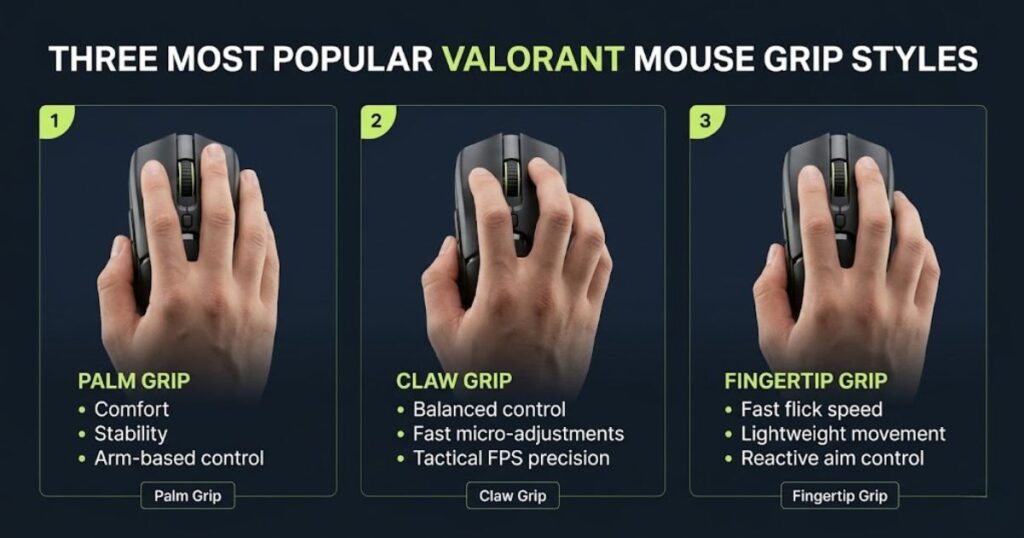
There is no universally perfect grip style because hand size, mouse shape, desk setup, and aiming habits all influence what feels comfortable during gameplay. A grip that works exceptionally well for one player may feel awkward or restrictive for another.
However, some grip styles are generally more common in tactical FPS games because they offer a balance between precision and control. This is one reason many professional Valorant players gravitate toward Claw Grip or Hybrid Claw Grip setups, although Palm Grip and Fingertip Grip remain effective when paired with the right mouse shape and sensitivity.
What grip style influences in Valorant:
- Crosshair stability during micro-adjustments.
- Flick shot consistency and stopping accuracy.
- Movement comfort during long gaming sessions.
- Reaction speed during fast target transitions.
- Overall mouse control under pressure.
Rather than copying the grip style used by professional players, it is usually more effective to identify which grip feels natural with your hand size and preferred mouse shape. Long-term comfort and consistency often matter more than forcing a grip style that feels unnatural.
In the following sections, we will compare Palm Grip, Claw Grip, and Fingertip Grip individually to understand their strengths, weaknesses, and the types of Valorant players they tend to suit best.
Relaxed Claw Grip for Valorant
Relaxed Claw Grip is one of the most popular grip styles among competitive Valorant players because it balances aiming precision, movement speed, and crosshair stability extremely well. The rear portion of the palm lightly contacts the mouse while the fingers remain slightly arched, creating a combination of comfort and responsive control that works well in tactical FPS gameplay.
This grip provides more finger control than Palm Grip while maintaining greater stability than Fingertip Grip. As a result, players can perform quick flicks, precise micro-adjustments, and controlled crosshair corrections without sacrificing overall movement consistency.
Many hybrid aimers prefer Relaxed Claw Grip because it naturally combines wrist movement and arm movement. The grip remains responsive during aggressive peeks and fast target transitions while still offering enough stability for disciplined angle holding and long-range gunfights.
How Relaxed Claw Grip works:
- Palm lightly contacts the rear portion of the mouse.
- Fingers remain slightly arched above the buttons.
- Wrist and forearm movement work together naturally.
- Crosshair movement remains controlled during flicks and corrections.
This balanced structure is one reason Relaxed Claw Grip remains highly popular among players who want both speed and precision without committing fully to Palm Grip or Fingertip Grip.
Why many Valorant players prefer Relaxed Claw Grip:
- Strong balance between precision and responsiveness.
- Excellent micro-adjustment control.
- Comfortable during long competitive sessions.
- Adaptable across multiple sensitivity ranges.
- Works well for both passive and aggressive playstyles.
These advantages make Relaxed Claw Grip particularly effective in Valorant, where players frequently alternate between slow crosshair discipline and explosive flick-based engagements.
Mouse characteristics that pair well with Relaxed Claw Grip:
| Mouse Characteristic | Why It Helps | Benefit for Claw Grip |
|---|---|---|
| Rear Hump Support | Provides palm contact and stability | Improves overall control |
| Symmetrical Shape | Allows flexible finger positioning | Supports balanced movement |
| Medium Mouse Size | Fits a wide range of hand sizes | Enhances comfort during long sessions |
| Lightweight Design | Reduces movement effort | Improves flick responsiveness |
For many Valorant players, Relaxed Claw Grip delivers an excellent combination of comfort, precision, and adaptability. This balance helps explain why it remains one of the most commonly used grip styles across both ranked play and professional competition.
Fingertip Grip for Valorant
Fingertip Grip is a highly responsive grip style that relies almost entirely on finger and wrist movement, allowing rapid flicks and quick directional adjustments during Valorant gunfights. Unlike Palm Grip or Relaxed Claw Grip, the palm makes little to no contact with the mouse, giving players greater freedom of movement and faster input response.
Because only the fingertips control the mouse, small hand movements can translate into quick crosshair adjustments. This responsiveness makes Fingertip Grip particularly attractive to players who prefer lightweight mice, aggressive peeking, and fast target transitions.
Many players enjoy the feeling of mobility that Fingertip Grip provides. The mouse remains highly maneuverable during gameplay, allowing quick reactions when clearing angles or responding to unexpected threats. However, the reduced palm support can make long-range precision slightly more challenging compared to grip styles that offer greater stability.
How Fingertip Grip works:
- Only the fingertips maintain direct contact with the mouse.
- The palm remains lifted or barely touches the shell.
- Movement relies heavily on finger and wrist control.
- The mouse stays highly mobile during fast aiming situations.
This structure prioritizes agility and responsiveness, making Fingertip Grip one of the fastest-feeling grip styles available for FPS games.
Why some Valorant players prefer Fingertip Grip:
- Extremely responsive movement feel.
- Fast flicks and rapid directional changes.
- Lightweight mouse control.
- Excellent for reactive aiming styles.
- Quick target transitions during aggressive gameplay.
These advantages can be particularly useful for players who enjoy high-tempo engagements and rely on rapid mouse movement to create aiming opportunities.
Mouse characteristics that pair well with Fingertip Grip:
| Mouse Characteristic | Why It Helps | Benefit for Fingertip Grip |
|---|---|---|
| Small Mouse Size | Easier fingertip control | Improves maneuverability |
| Lightweight Design | Requires less movement effort | Enhances flick speed |
| Flat Side Walls | Provides secure finger placement | Improves grip consistency |
| Symmetrical Shape | Allows unrestricted hand movement | Supports rapid adjustments |
For players who prioritize agility, quick reactions, and lightweight movement, Fingertip Grip can be an effective option. The key is pairing it with a suitable mouse shape and maintaining enough control to preserve consistent crosshair placement during tactical Valorant gunfights.
Palm Grip for Valorant
Palm Grip is a comfort-focused grip style that provides excellent stability and smooth mouse control by allowing the entire hand to rest naturally on the mouse. This grip is especially popular among lower-sensitivity players who rely on larger arm movements and controlled crosshair placement during tactical FPS gameplay.
Because the palm maintains continuous contact with the mouse shell, movement often feels more stable and predictable during long-range engagements. The added support can make micro-adjustments feel smoother while reducing unnecessary hand tension during extended gaming sessions.
Many arm aimers prefer Palm Grip because it encourages deliberate movement rather than fast finger-driven adjustments. This makes it particularly effective for players who prioritize consistent tracking, clean stopping accuracy, and disciplined angle holding.
How Palm Grip works:
- Entire hand rests naturally on the mouse surface.
- Full palm contact increases overall stability.
- Most aiming movement comes from the forearm.
- Wrist movement remains controlled and deliberate.
This structure creates a comfortable and predictable aiming experience that many players find easy to maintain over long competitive sessions.
Why some Valorant players prefer Palm Grip:
- Maximum comfort during extended gameplay.
- Stable crosshair control during tactical fights.
- Cleaner stopping accuracy on lower sensitivity.
- Reduced hand and wrist fatigue.
- Smooth movement consistency during long sessions.
These benefits make Palm Grip a strong option for players who value comfort and stability more than rapid fingertip-driven movement.
Mouse characteristics that pair well with Palm Grip:
- Ergonomic mice with strong palm support.
- Medium-to-large mouse bodies.
- Shapes designed for full-hand contact.
- Mice that provide comfortable rear support.
Palm Grip often works best when the mouse shape naturally fills the hand without forcing unnecessary finger tension or awkward positioning.
Important factors to consider when choosing a Valorant grip style:
- Hand size and mouse shape compatibility.
- Arm aiming versus wrist aiming preference.
- Long-session comfort during ranked play.
- Crosshair stability during micro-adjustments.
- Sensitivity range that feels natural with the grip.
These factors often influence aiming performance more than simply copying the grip style used by a professional player.
How the most common Valorant grip styles compare:
| Grip Style | Main Strength | Movement Style | Best For |
|---|---|---|---|
| Relaxed Claw Grip | Balanced precision and speed | Hybrid wrist and arm movement | Most competitive Valorant players |
| Fingertip Grip | Fast reactive flicks | Finger and wrist-focused movement | Aggressive lightweight aim styles |
| Palm Grip | Stable tactical control | Arm-focused movement | Low-sensitivity precision aiming |
A comfortable grip that supports natural movement will usually outperform an uncomfortable grip copied from another player. Long-term consistency, reduced tension, and stable mouse control remain the most important factors when choosing a grip style for Valorant.
Does Mouse Weight Affect Valorant Aim?
Yes, mouse weight significantly affects Valorant aim because it changes how quickly and smoothly players can control flicks, micro-adjustments, and crosshair stopping accuracy during fights. Lightweight mice generally feel faster and more responsive during aggressive movement, while heavier mice often create a more stable and deliberate aiming experience. Since Valorant heavily rewards precision and first-shot accuracy, mouse weight can noticeably influence how comfortable and controlled aiming feels over long sessions.
Modern competitive FPS players usually prefer lighter gaming mice because reduced weight makes rapid directional changes and flick corrections feel easier. However, extremely lightweight mice are not automatically better for everyone. Some players actually perform more consistently with slightly heavier mice because the added resistance helps stabilize shaky movement and reduces accidental overflicking during stressful situations.
The ideal weight depends heavily on grip style, sensitivity, movement habits, and physical comfort. Low-sensitivity arm aimers often prefer lightweight mice for faster sweeping movement, while some wrist-focused players feel more stable using slightly heavier setups that naturally slow down cursor movement.
Ultra-Lightweight Mice Under 60g
Ultra-lightweight gaming mice under 60 grams prioritize speed, agility, and effortless movement, making them a popular choice among competitive Valorant players. With less physical mass to move, these mice feel extremely responsive during flicks, rapid corrections, and wide arm movements.
Low-sensitivity arm aimers often benefit from lightweight mice because large swipes require less effort throughout long gaming sessions. Reduced weight can also make fast directional changes feel smoother when clearing angles or reacting to unexpected threats.
However, lower weight does not automatically improve aim. Because the mouse moves more freely, some players may experience overflicking or reduced stopping accuracy until their movement control becomes more refined.
Advantages of ultra-lightweight mice:
- Extremely responsive flick movement.
- Faster directional corrections.
- Reduced arm fatigue during long sessions.
- Excellent for low-sensitivity arm aiming.
Potential drawbacks:
- Overflicking may become more common.
- Less natural stopping resistance.
- Shaky aim can feel more noticeable.
- Requires good movement discipline.
Ultra-lightweight mice are often most effective for players who prioritize speed and mobility while maintaining enough control to stop the crosshair accurately during tactical engagements.
The Sweet Spot for Valorant Mouse Weight (60g–85g)
For most Valorant players, a mouse weight between 60 and 85 grams provides the best balance between speed, stability, and aiming consistency. This range remains popular because it combines the responsiveness of lightweight mice with enough physical control to maintain accurate stopping power during tactical fights.
Mice within this category generally feel versatile across different grip styles, sensitivity ranges, and aiming techniques. They remain fast enough for aggressive peeking while offering sufficient resistance to support controlled micro-adjustments and precise head-level aiming.
Because Valorant relies heavily on first-shot accuracy, many players find that balanced-weight mice provide a comfortable middle ground between agility and control.
Benefits of the 60g–85g range:
- Strong balance between speed and stability.
- Reliable micro-adjustment control.
- Comfortable for long competitive sessions.
- Works well across multiple grip styles.
- Suitable for most aiming preferences.
Things to keep in mind:
- Mouse shape often matters as much as weight.
- Weight distribution can influence handling feel.
- Personal preference still plays a major role.
- Some players may prefer lighter or heavier setups.
For players unsure where to start, this weight range is often the safest option because it supports a wide variety of aiming styles without strongly favoring one specific playstyle.
How different mouse weight categories compare in Valorant:
| Weight Range | Main Characteristic | Potential Advantage | Best For |
|---|---|---|---|
| Under 60g | Maximum agility | Fast flicks and rapid movement | Low-sensitivity arm aimers |
| 60g–85g | Balanced performance | Strong mix of speed and control | Most Valorant players |
| Above 85g | Greater stability | More movement resistance | Players who prefer deliberate control |
For most players, balanced-weight mice between 60 and 85 grams offer the most forgiving learning curve and the broadest compatibility with different aiming styles, grip techniques, and sensitivity preferences.
Heavy Mice Above 95g for Valorant
Heavy gaming mice above 95 grams prioritize stability and controlled movement, making them appealing to players who prefer deliberate crosshair adjustments over maximum flick speed. The additional mass naturally slows movement slightly, which can help create a more grounded and predictable aiming experience.
Some Valorant players prefer heavier mice because the extra resistance reduces accidental overflicking and makes crosshair stopping feel more controlled. This can be especially useful for players who struggle with shaky movement on ultra-lightweight mice or who prefer slower, more methodical aiming styles.
However, additional weight also means more physical effort is required to start, stop, and redirect movement. During long gaming sessions, this can increase wrist and forearm fatigue, particularly for low-sensitivity players who rely heavily on large arm movements.
Advantages of heavier gaming mice:
- More stable and deliberate movement feel.
- Helps reduce accidental overflicking.
- Smoother controlled tracking movement.
- Can feel comfortable for some wrist-focused players.
Potential drawbacks:
- Slower rapid directional movement.
- Higher fatigue during extended sessions.
- Less responsive feeling during fast flicks.
- Requires more physical effort overall.
Players who may prefer heavier mice:
- Players who prioritize controlled tactical aiming.
- Users running slightly higher sensitivity settings.
- Players who value stability over raw speed.
- Those who dislike extremely lightweight movement feel.
Although heavy mice are less common in modern competitive FPS games, they can still be effective when paired with the right sensitivity, grip style, and movement habits.
Factors to consider before choosing a mouse weight:
- Sensitivity and overall eDPI range.
- Arm aiming versus wrist aiming preference.
- Grip style compatibility.
- Comfort during long gaming sessions.
- Crosshair stability during micro-adjustments.
These factors usually influence aiming performance more than weight alone because mouse control depends on the entire setup working together.
How different mouse weight categories affect Valorant gameplay:
| Mouse Weight | Movement Feel | Main Advantage | Best For |
|---|---|---|---|
| Under 60g | Extremely fast and lightweight | Rapid flick speed and agility | Low-sensitivity arm aimers and aggressive players |
| 60g–85g | Balanced competitive control | Strong mix of speed and stability | Most competitive Valorant players |
| 95g–110g+ | Heavy and deliberate movement | Stable stopping accuracy | Players who prefer controlled aiming |
For most Valorant players, balanced-weight mice between 60 and 85 grams remain the most versatile option because they offer a strong combination of speed, control, and long-term comfort. However, the right mouse weight ultimately depends on personal preference, aiming style, and how naturally the mouse feels during real gameplay.
Best Mousepad Size for Valorant Sensitivity
The best mousepad size for Valorant is usually a Large or XL mousepad because lower sensitivity settings require more physical movement space for consistent aiming. Tactical FPS games reward controlled crosshair placement, smooth flicks, and stable micro-adjustments, all of which become easier when players have enough room to move freely.
Many competitive Valorant players use relatively low eDPI ranges, which means larger arm movements are often necessary to clear angles, track targets, and reposition the crosshair comfortably. A mousepad that feels too small can quickly become restrictive during intense fights.
Mousepad size influences more than comfort. It directly affects how sensitivity feels during gameplay because available movement space determines how naturally players can perform wide swipes and controlled corrections. This is one reason many experienced FPS players consider mousepad size an important part of their overall aiming setup.
To understand why larger mousepads are so common among competitive players, it helps to compare how available surface area affects movement freedom and aiming consistency:.
Another important advantage of larger mousepads is consistency during stressful situations. Running out of surface area mid-fight often forces awkward mouse lifting and repositioning, which can interrupt flick timing and reduce crosshair stability during critical engagements.
Players using lower sensitivity settings are especially vulnerable to this problem because they rely on larger arm movements throughout a match. Having sufficient space allows aiming mechanics to remain smooth and predictable without constantly adjusting hand position.
Why mousepad size matters for Valorant:
- Provides enough room for low-sensitivity movement.
- Reduces unnecessary mouse lifting during fights.
- Improves consistency during large flicks.
- Supports smoother arm aiming mechanics.
- Helps maintain stable crosshair control under pressure.
Although higher-sensitivity players can often use smaller surfaces comfortably, most competitive Valorant setups benefit from larger mousepads because they provide more flexibility and fewer movement limitations.
In the following sections, we will compare common mousepad sizes and determine which options work best for different sensitivity ranges, aiming styles, and desk setups.
Ideal Mousepad Dimensions for Valorant
Most competitive Valorant players prefer Large or XL mousepads because they provide enough space for low-sensitivity aiming, smooth flicks, and unrestricted arm movement. A larger surface reduces movement limitations and allows players to maintain consistent crosshair control throughout long matches.
Since Valorant rewards precision and controlled movement more than raw speed, many players choose mousepads that support stable arm aiming rather than compact surfaces that force constant repositioning. Larger pads also help create a more comfortable aiming environment during extended ranked sessions.
Recommended mousepad dimensions for Valorant:
- Minimum width: 450 mm.
- Minimum height: 400 mm.
- XL or Extended sizes for unrestricted movement.
- Cloth control surfaces for stronger stopping accuracy.
Many professional players prefer control-oriented cloth mousepads because they provide a balance between glide speed and stopping power. This makes it easier to perform precise micro-adjustments and controlled flicks during tactical gunfights.
Why larger mousepads are popular in Valorant:
- Prevent running out of movement space.
- Support low-sensitivity arm aiming.
- Reduce frequent mouse repositioning.
- Improve comfort during long sessions.
For most players, a Large or XL mousepad provides enough flexibility to handle both everyday gameplay and competitive aiming without feeling restrictive.
Why Mousepad Size Matters for Low Valorant Sensitivity
Mousepad size becomes increasingly important as sensitivity decreases because lower eDPI settings require significantly more physical movement to perform the same in-game actions. Players using low sensitivity often rely on large arm swipes for flicks, angle clearing, and rapid repositioning, making movement space a critical part of the setup.
Many competitive Valorant players operate within an eDPI range of roughly 200–300, which often requires wider mouse movement than casual FPS setups. When the available surface area becomes too small, aiming can feel restricted and inconsistent during high-pressure situations.
Running out of mousepad space forces players to lift and reposition the mouse more frequently. These interruptions may seem minor, but they can disrupt flick timing, reduce movement fluidity, and negatively affect crosshair control during important engagements.
Common problems caused by mousepads that are too small:
- Running out of space during wide flicks.
- Frequent mouse lifting and repositioning.
- Restricted arm movement.
- Awkward wrist positioning.
- Inconsistent crosshair control under pressure.
These issues become more noticeable as sensitivity decreases because every degree of in-game movement requires more physical travel distance on the mousepad.
How mousepad size affects low-sensitivity gameplay:
| Mousepad Size | Movement Freedom | Potential Limitation | Recommended For |
|---|---|---|---|
| Small | Limited | Frequent repositioning | High-sensitivity players |
| Large | Good | Few restrictions | Most Valorant players |
| XL / Extended | Maximum | Requires more desk space | Low-sensitivity arm aimers |
For players using low sensitivity, adequate movement space often feels just as important as choosing the right mouse or sensitivity setting. A comfortable surface that supports natural arm movement can make aiming feel more predictable and consistent over time.
Recommended Mousepad Types by Size
Different mousepad sizes suit different Valorant aiming styles because sensitivity, desk space, and movement habits all affect how much surface area a player needs. Large and XL cloth control pads are usually the safest choices because they support low-sensitivity aiming, smoother flicks, and more stable stopping control.
While XL mousepads are common in competitive setups, not every player needs the largest possible surface. Hybrid aimers may feel comfortable on Large pads, while high-sensitivity wrist aimers can sometimes perform well on Medium or smaller pads if movement remains consistent.
Common mousepad recommendations for Valorant players:
- Large cloth control pads for low-sensitivity arm aimers.
- XL or Extended pads for unrestricted movement freedom.
- Medium balanced pads for hybrid aiming setups.
- Compact pads mainly for high-sensitivity wrist aimers.
Most tactical FPS players avoid extremely small mousepads because restricted movement space often forces uncomfortable sensitivity compromises. In Valorant, consistent movement and stopping accuracy usually matter more than saving desk space.
Factors to consider before choosing a mousepad size:
- Sensitivity and eDPI range.
- Arm aiming versus wrist aiming preference.
- Available desk space.
- How often you lift the mouse during gameplay.
- Comfort during long competitive sessions.
These factors help determine whether a mousepad supports your natural aiming style or forces you to compensate with uncomfortable settings.
How common mousepad sizes compare for Valorant:
| Mousepad Size | Typical Dimensions | Main Advantage | Best For |
|---|---|---|---|
| Small | Under 360 × 300 mm | Compact desk efficiency | High-sensitivity wrist aimers |
| Large | Around 450 × 400 mm | Balanced movement freedom | Most competitive Valorant players |
| XL / Extended | 490 × 420 mm+ | Maximum arm aiming space | Low-sensitivity arm aimers |
For most Valorant players, a Large or XL mousepad creates a more stable aiming environment than a small compact pad. A properly sized surface often improves consistency more effectively than increasing sensitivity to compensate for limited movement space.
Best Pro Valorant Mouse Settings Examples
Professional Valorant settings can provide useful reference points, but they should be treated as examples rather than exact configurations to copy. Hand size, grip style, mouse shape, desk space, and aiming habits all influence whether a professional setup will feel comfortable in your own gameplay.
Most professional Valorant players use controlled low-to-medium sensitivity ranges because tactical FPS games reward precision, stable crosshair placement, and reliable micro-adjustments more than raw movement speed. While individual preferences vary, many competitive setups still fall within similar eDPI ranges designed for consistent headshot accuracy.
Another common pattern among professional players is overall setup consistency. Large mousepads, lightweight esports mice, stable polling rates, and predictable sensitivity settings remain far more important than chasing extreme specifications.
Common Professional Valorant Mouse Settings Baseline
If you want a safe starting point based on common professional trends, the settings below represent one of the most balanced Valorant configurations. These values are frequently found across competitive players because they support controlled crosshair placement and repeatable aim mechanics.
Common baseline settings:
- DPI: 800
- In-Game Sensitivity: 0.30–0.35
- eDPI: 240–280
- Polling Rate: 1000Hz
- Windows Sensitivity: 6/11
- Raw Input Buffer: Enabled
Why these settings are popular:
- Stable tactical crosshair control.
- Balanced speed and precision.
- Smooth micro-adjustments.
- Reliable long-session consistency.
Many players start within this range because it supports both arm aiming and hybrid aiming without creating unnecessary movement instability.
TenZ — Higher Hybrid Sensitivity
TenZ is known for using a higher DPI combined with lower in-game sensitivity, creating a modern hybrid setup that feels responsive while maintaining controlled overall sensitivity.
Rather than focusing on the DPI number alone, the important takeaway is how the final eDPI remains within a competitive range that still supports stable aim.
Typical TenZ-style configuration:
- DPI: 1600
- In-Game Sensitivity: 0.175–0.245
- eDPI: Approximately 280–390
- Polling Rate: 1000Hz+
Why this setup works:
- Smooth sensor tracking.
- Responsive hybrid movement.
- Strong flick potential.
- Flexible wrist and arm aiming balance.
Players interested in faster-feeling movement without entering extremely high sensitivity territory often gravitate toward setups similar to this approach.
Chronicle Mouse Settings Example
Chronicle represents the traditional low-sensitivity tactical FPS philosophy where consistency, stopping accuracy, and disciplined crosshair placement take priority over movement speed.
His settings reflect a style focused on controlled arm aiming and repeatable precision during long-range engagements.
Typical Chronicle-style configuration:
- DPI: 800
- In-Game Sensitivity: 0.20–0.25
- eDPI: Approximately 160–200
- Aiming Style: Low-sensitivity arm aiming
Why this setup works:
- Excellent stopping accuracy.
- Stable crosshair movement.
- Reliable micro-adjustments.
- Strong tactical precision.
This type of setup is often preferred by players who value maximum control and consistency during methodical gunfights.
yay — Balanced Tactical Control
yay is often associated with a balanced tactical setup that combines precision, consistency, and comfortable movement speed. His configuration sits closer to the center of common professional sensitivity ranges.
Typical yay-style configuration:
- DPI: 800
- In-Game Sensitivity: 0.27–0.35
- eDPI: Approximately 220–280
- Aiming Style: Balanced hybrid aiming
Why this setup works:
- Strong tactical stability.
- Reliable stopping precision.
- Balanced movement speed.
- Comfortable long-session performance.
For many players, this style of setup represents a practical middle ground between aggressive responsiveness and deliberate tactical control.
aspas Mouse Settings Example
aspas is known for an aggressive duelist playstyle built around confidence, fast reactions, and proactive engagements, yet his sensitivity remains within a controlled competitive range. This highlights an important Valorant principle: aggressive players do not necessarily use extremely high sensitivity. Instead, they often choose settings that remain stable enough for precise headshots while still supporting rapid movement.
His setup sits slightly faster than many traditional tactical FPS configurations, allowing responsive movement during entry fights without sacrificing overall crosshair control.
Typical aspas-style configuration:
- DPI: 800
- In-Game Sensitivity: 0.35–0.40
- eDPI: Approximately 280–320
- Aiming Style: Fast hybrid wrist-arm movement
Why this setup works:
- Faster reactive flicking during entry fights.
- Responsive movement without excessive sensitivity.
- Strong balance between aggression and stability.
- Effective for rapid repositioning and proactive peeking.
Rather than relying on extreme sensitivity, this style demonstrates how controlled settings can still support highly aggressive gameplay when paired with strong mechanics and disciplined crosshair placement.
Common patterns found across professional Valorant settings:
- Most professionals stay within approximately 160–400 eDPI.
- 800 DPI remains the most common standard.
- 1000Hz polling rate is widely preferred.
- Low-to-medium sensitivity dominates competitive play.
- Long-term consistency matters more than raw speed.
These trends reinforce the idea that stable aiming fundamentals usually have a greater impact on performance than chasing increasingly faster settings.
How popular professional Valorant settings compare:
| Player | DPI | In-Game Sensitivity | Estimated eDPI | Primary Style |
|---|---|---|---|---|
| TenZ | 1600 | 0.175–0.245 | 280–390 | Responsive hybrid aiming |
| Chronicle | 800 | 0.20–0.25 | 160–200 | Low-sensitivity tactical precision |
| yay | 800 | 0.27–0.35 | 220–280 | Balanced tactical control |
| aspas | 800 | 0.35–0.40 | 280–320 | Aggressive hybrid movement |
Professional settings are valuable because they reveal broader competitive patterns rather than a single perfect configuration. Most players improve faster by finding a comfortable sensitivity range, maintaining consistent mouse settings, and developing repeatable aiming habits over time rather than constantly copying new setups.
Final Tips for Optimizing Valorant Mouse Settings
The best Valorant mouse settings are usually the ones that feel stable, comfortable, and repeatable during real matches rather than settings that simply feel “fast” for a few rounds. Tactical shooters reward controlled crosshair placement, disciplined movement, and precise micro-adjustments far more than flashy sensitivity or extreme flick speed. Because of this, most long-term aim improvement comes from building reliable movement habits instead of constantly searching for a magical setup.
Another important thing many players overlook is that mouse settings should always match physical comfort and natural movement style. Grip type, mouse weight, mousepad size, desk space, and aiming habits all influence how sensitivity actually feels during gameplay. Two players using identical settings can still experience completely different aim consistency depending on how they physically interact with their setup.
It is also important to remember that improvement takes time. Even strong settings will initially feel unfamiliar if the brain has not fully adapted to the movement pattern yet. Stable practice over multiple sessions is usually much more valuable than repeatedly changing sensitivity after a few frustrating matches.
Prioritize Consistency Over Constant Changes
One of the biggest reasons players struggle with aim development is excessive sensitivity experimentation. Constantly changing settings prevents movement patterns from stabilizing naturally over time. Instead of building reliable flick timing and crosshair control, the brain is forced to continuously relearn movement distances and stopping behavior.
Most competitive players only make small sensitivity adjustments when there is a clear reason related to comfort, movement restriction, or long-term consistency problems. Short-term frustration after a bad ranked session is rarely a good reason to completely rebuild settings from scratch.
Better long-term habits usually include:
• Testing sensitivity over multiple sessions
• Making only small adjustments when necessary
• Keeping movement patterns stable during practice
• Focusing on crosshair placement before sensitivity speed
• Avoiding emotional setting changes after losses
Build Settings Around Your Aim Style
Different aiming styles naturally perform better with different sensitivity ranges and hardware setups. Low-sensitivity arm aimers usually prefer large mousepads, lightweight mice, and slower movement control for stable precision. Meanwhile, wrist-focused players may feel more comfortable with slightly faster sensitivity and more compact movement ranges.
Grip style also changes how sensitivity behaves during gameplay. Fingertip grip often feels more responsive with lighter mice and faster movement, while palm grip usually benefits from slower, more controlled tactical movement. Understanding these physical differences makes it much easier to optimize settings logically instead of randomly copying professional setups.
Several setup elements should always work together:
• Sensitivity and eDPI range
• Mouse weight and movement feel
• Grip style compatibility
• Mousepad size and movement space
• Wrist aiming vs arm aiming preference
Frequently Asked Questions About Valorant Mouse Settings
Many Valorant players still have questions about sensitivity, DPI, mouse weight, and aiming consistency even after optimizing their setup. This is completely normal because tactical FPS games are heavily influenced by personal movement habits, grip style, and physical comfort. The answers below cover some of the most common questions players ask when trying to improve their Valorant mouse settings and overall aiming performance.
What is the best mouse sensitivity for Valorant?
Most competitive players perform best between 200–400 eDPI because this range balances precise crosshair control with comfortable movement speed. A common starting point is 800 DPI with 0.30–0.35 in-game sensitivity. Lower sensitivity generally improves first-shot consistency and micro-adjustment stability during tactical fights.
Is 800 DPI or 1600 DPI better for Valorant?
Both 800 DPI and 1600 DPI work extremely well for Valorant when paired with low in-game sensitivity. 800 DPI remains the traditional competitive standard because it feels stable and predictable, while 1600 DPI can provide slightly smoother cursor tracking and marginally lower input latency on modern sensors.
What eDPI do most Valorant pros use?
Most professional Valorant players stay between roughly 160–320 eDPI. Extremely high sensitivity is relatively uncommon in pro play because tactical FPS games reward controlled movement and precise head-level crosshair placement far more than rapid turning speed.
Should I use Raw Input Buffer in Valorant?
Yes, enabling Raw Input Buffer is generally recommended, especially for modern gaming mice using high polling rates. Raw Input helps bypass Windows mouse acceleration behavior and delivers more consistent 1:1 movement translation directly into the game.
What polling rate is best for Valorant?
1000Hz is still the safest and most widely used polling rate for competitive Valorant because it provides stable low-latency responsiveness without unnecessary system strain. Some newer esports mice support 4000Hz or 8000Hz, but the real-world improvement is usually much smaller than many players expect.
Does mouse weight affect aim in Valorant?
Yes, mouse weight noticeably affects flick speed, movement control, and long-session comfort. Lightweight mice generally feel faster and more responsive, while slightly heavier mice can provide more stable stopping control during tactical engagements.
Is low sensitivity better for Valorant?
Lower sensitivity is usually preferred in Valorant because it improves crosshair stability and first-shot precision during tactical fights. However, the ideal sensitivity still depends on personal aiming style, desk space, and physical comfort during gameplay.
What mouse grip is best for Valorant?
Relaxed claw grip is one of the most popular grip styles in Valorant because it balances movement speed and micro-adjustment control very effectively. However, fingertip grip and palm grip can also work extremely well depending on sensitivity preference and mouse shape compatibility.
What size mousepad should I use for Valorant?
Most competitive players prefer Large or XL mousepads measuring at least 450 × 400 mm because lower sensitivity requires significantly more physical movement space. Larger surfaces help reduce mouse lifting and improve movement consistency during flicks.
Should beginners copy pro player settings?
Professional settings can be useful reference points, but blindly copying exact numbers rarely guarantees better aim. Grip style, desk space, mouse weight, and aiming habits all influence how settings actually feel during gameplay.
Why does my aim feel inconsistent even with good settings?
Inconsistent aim often comes from movement habits, crosshair placement, fatigue, or constant sensitivity changes rather than the settings themselves. Stable practice and controlled movement patterns usually matter much more than endlessly tweaking sensitivity.
How often should I change my sensitivity?
Sensitivity should only be adjusted when there is a clear long-term comfort or consistency problem. Constantly changing settings after bad matches usually hurts aim development more than it helps because movement timing and flick distance never fully stabilize.
Final Thoughts on Valorant Mouse Settings
Finding the best mouse settings for Valorant is ultimately about building a setup that feels stable, comfortable, and repeatable during real competitive matches. While DPI, eDPI, polling rate, mouse weight, and grip style all affect aiming performance, long-term consistency usually matters far more than constantly chasing new sensitivity trends or copying professional settings blindly.
Most players improve faster when they focus on controlled crosshair placement, stable movement habits, and gradual refinement instead of dramatic setting changes after every bad game. A balanced setup that supports your natural aiming style will almost always create more reliable results than forcing uncomfortable settings simply because they are popular in esports.
As your mechanics and confidence improve over time, small adjustments may still help fine-tune your setup. However, strong tactical fundamentals and consistent practice will always remain the biggest factors behind reliable Valorant aim performance.