
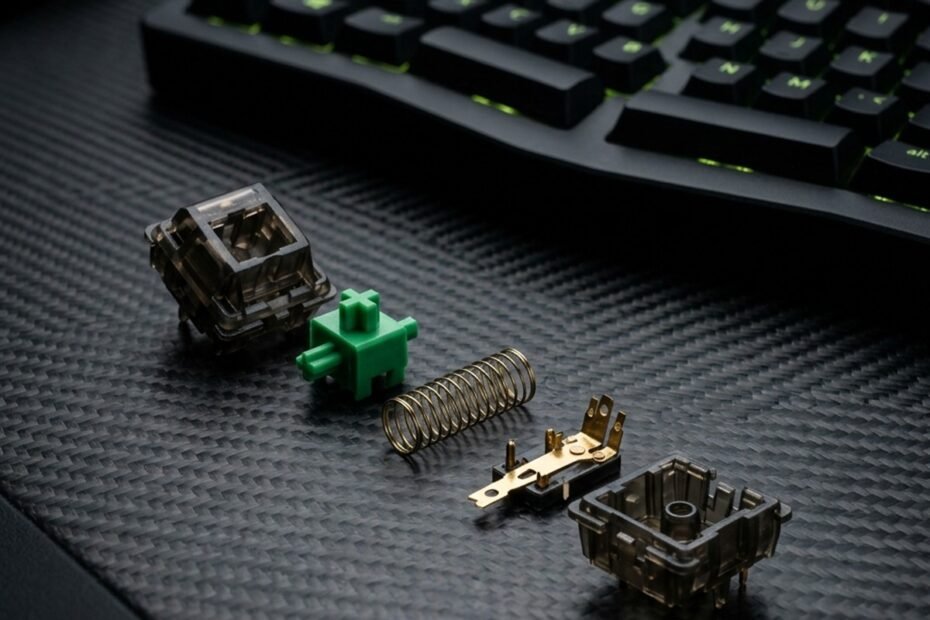
For decades, conventional computer keyboards have relied on inexpensive rubber dome membranes to register user inputs. While cost-effective, these rubber sheets require keys to be pressed completely to the bottom before an electrical contact registers, producing a mushy typing experience and imprecise input timings. The enduring rise of competitive esports analyzed on GearTP has pushed players to examine what is a mechanical keyboard switch and understand why individual electromechanical switches deliver far superior tactile consistency, input speed, and physical longevity.
Unlike membrane boards that share a single flexible circuit sheet, every key on a mechanical keyboard houses a self-contained mechanical switch engineered with precision plastic housings, a tempered steel spring, and gold-plated copper contact leaves. In this comprehensive technical breakdown, we explore the internal anatomy of mechanical switches, examine the physical mechanics behind actuation and reset thresholds, and outline key specifications so you can configure the optimal gaming keyboard for FPS performance.
What Is a Mechanical Keyboard Switch and How Does It Register Keystrokes?
A mechanical keyboard switch is an individual electromechanical mechanism seated under each keycap that uses a movable stem, coil spring, and metal contact leaves to close an electrical circuit and register keystrokes independently without bottoming out.
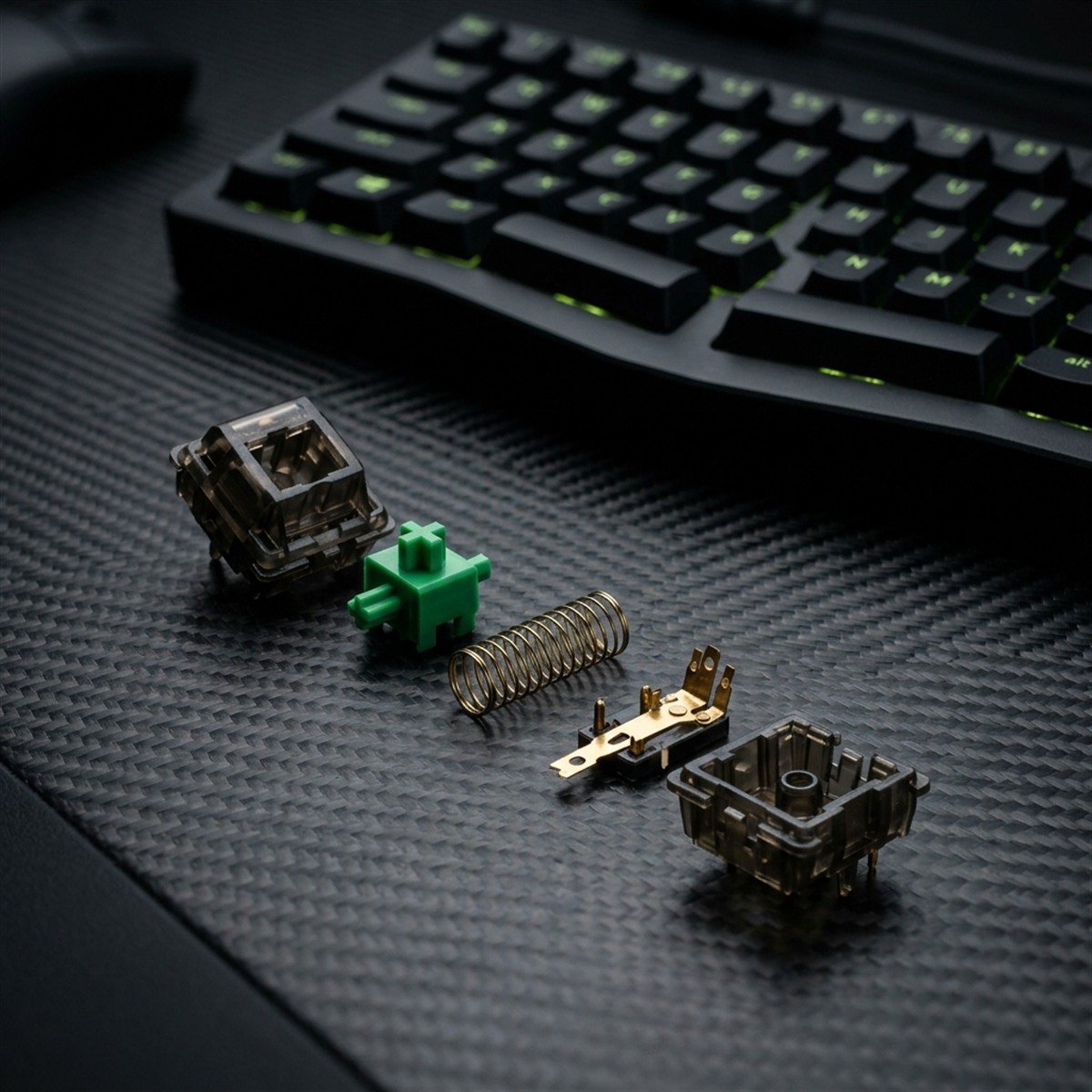
To understand the mechanical switch, one must first recognize that a mechanical keyboard is essentially an array of dozens of discrete physical machines working in unison. On a standard full-size keyboard, there are over one hundred individual switches soldered or socketed into a printed circuit board (PCB). Each switch operates autonomously, containing its own internal spring and physical contact system that isolates each keypress from neighboring keys.
When you depress a keycap, your downward finger pressure forces the switch stem downward against an internal coil spring. As the stem travels down the housing channels, its molded legs push against flexible metal contact leaves. Once the stem reaches a predetermined height along its travel path, the contact leaves snap together, closing an electrical circuit and sending an electrical voltage signal through the PCB traces to the keyboard microcontroller.
Individual Switch Architecture vs Shared Membrane Rubber Domes
The core distinction between mechanical keyboards and standard office keyboards lies in their underlying architectural independence. Membrane keyboards utilize three large, continuous sheets layered beneath a silicone or rubber dome sheet. When you press a membrane key, the rubber dome collapses, pushing a conductive pad down to bridge two trace layers. Because the entire board relies on shared conductive membranes, membrane keyboards suffer from key ghosting, inconsistent actuation resistance across keys, and rapid silicone degradation over two to three years of moderate use.
Mechanical switches eliminate shared failure points by providing an isolated electromechanical chamber for every single character. If a mechanical switch experiences contamination or physical wear, only that individual unit needs servicing, cleaning, or replacement. Furthermore, because each mechanical switch utilizes a precision-wound steel spring rather than elastomeric silicone, key resistance remains virtually identical whether you strike a key dead center or off-axis along its perimeter.
Actuation Point vs Reset Point: The Mechanics of Input Registration
One of the most consequential ergonomic advantages of mechanical switches is that input registration occurs midway through the key stroke rather than at the bottom of the downward motion. The height at which the electrical contact leaves touch and complete the circuit is called the actuation point. In a standard mechanical switch with 4.0 millimeters of total travel, actuation typically occurs at approximately 2.0 millimeters of downward displacement.
Once an input registers, releasing finger pressure allows the internal spring to push the stem back toward its resting position. The exact height where the contact leaves separate and the circuit reopens is known as the reset point. In linear switches, the actuation point and reset point sit at virtually identical elevations, enabling rapid double-tapping without having to release the key completely. In tactile and clicky switches, a small hysteresis gap separates the actuation point from the reset point to prevent accidental chatter or multiple registrations from small finger tremors.
The 5 Core Anatomical Components Inside Every Mechanical Switch
Every standard mechanical switch contains five core anatomical components: the upper housing cover, the movable center stem slider, a steel coil spring, electrical metal contact leaves, and the lower base housing.
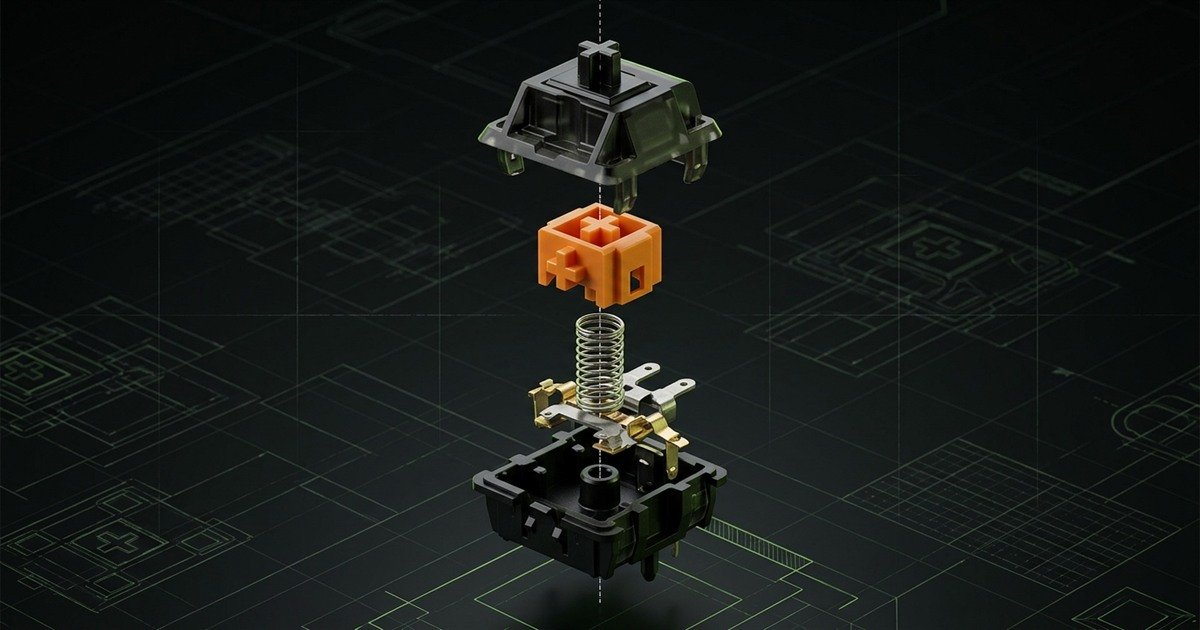
While mechanical switches may look compact from the outside, their interior design is a triumph of miniature electromechanical engineering. Each component must be manufactured with tolerances measured in hundredths of a millimeter to ensure smooth keystrokes, minimal stem wobble, and reliable electrical conductivity over tens of millions of cycles.
Anatomical breakdown and functional engineering roles of core mechanical switch components:
| Component | Primary Material | Engineering Function | Impact on Typing Feel |
|---|---|---|---|
| Upper Housing (Top Cover) | Polycarbonate (PC) or Nylon | Secures internal components and guides stem travel rails | Determines high-pitch acoustic profile and upstroke top-out sound |
| Movable Stem (Slider) | Polyoxymethylene (POM) | Translates downward finger force to contact leaves | Controls friction smoothness, tactile bump profile, and keycap stability |
| Coil Spring | Tempered Stainless Steel | Provides upward resistance and resets stem upon release | Governs actuation weight, bottom-out force, and return snap velocity |
| Contact Leaves | Beryllium Copper / Gold Alloy | Conducts electrical signal when closed by stem motion | Ensures reliable circuit closure, low contact resistance, and corrosion defense |
| Lower Housing (Base) | Nylon PA66 or Polycarbonate | Houses contact leaves, centers spring, and mounts to PCB | Influences deep bottom-out acoustic tone and mounting mechanical rigidity |
The dynamic interplay among these five components dictates everything from how smoothly the switch glides downward to the pitch of the bottom-out sound and the exact force required to actuate the key.
Stem Geometry: Defining Key Travel, Stability, and Cross-Mount Compatibility
The stem sits at the visual and functional center of the mechanical switch. At its top sits the standardized cross-shaped mount originally patented by Cherry in the 1980s, universally recognized today as the MX-style mount. This cross-stem profile allows enthusiasts to swap keycaps across hundreds of aftermarket profiles and materials without compatibility issues.
Below the keycap mount, the stem features lateral guide rails that slide along channels molded into the upper and lower housings. The front of the stem features two downward-facing legs. On linear switches, these legs are straight and smooth, allowing the contact leaves to glide with zero resistance. On tactile and clicky switches, these legs feature sculpted bumps that deliberately deflect the contact leaves outward, generating mechanical tactile resistance before the circuit snaps shut. Most modern stems are molded from polyoxymethylene (POM), a self-lubricating engineering thermoplastic known for exceptionally low sliding friction.
Spring Resistance: Controlling Actuation Force and Return Velocity
Directly beneath the stem sits a coiled spring manufactured from tempered stainless steel or gold-plated music wire. The spring is the primary engine of key resistance. As you press downward, the spring compresses, storing mechanical energy in proportion to its spring constant.
Spring design encompasses several engineering variables, including coil diameter, wire gauge, active coil count, and overall length. Standard linear springs deliver a steady, predictable increase in resistance as they compress. Extended stage springs (two-stage or slow-curve springs) provide higher starting resistance at the top of the stroke, preventing accidental key presses while maintaining a snappy, rapid return velocity that keeps the keycap glued to your fingertip during rapid counter-strafing.
Contact Leaf Metallurgy: Gold-Plated Crosspoint Reliability
The electrical heart of a mechanical switch is its contact leaf assembly, typically stamped from high-grade phosphor bronze or beryllium copper for exceptional fatigue resistance. The assembly consists of two distinct leaves: a stationary contact leaf and a flexible active contact leaf positioned directly in the path of the descending stem legs.
At the point where the two leaves collide, manufacturers apply a microscopic cladding of gold alloy in a crosspoint geometry. Gold is chemically inert, meaning it will not oxidize or corrode when exposed to ambient atmospheric moisture. The crosspoint prism shape concentrates contact pressure onto a microscopic contact point, cutting through any surface dust or microscopic lubricants to guarantee clean electrical conduction on every keystroke.
Key Switch Specifications That Dictate Typing and Gaming Feel
Four critical specifications determine switch performance and tactile feedback: actuation force (measured in grams), pre-travel distance (in millimeters), total travel distance, and switch lifespan measured in millions of keystroke cycles.
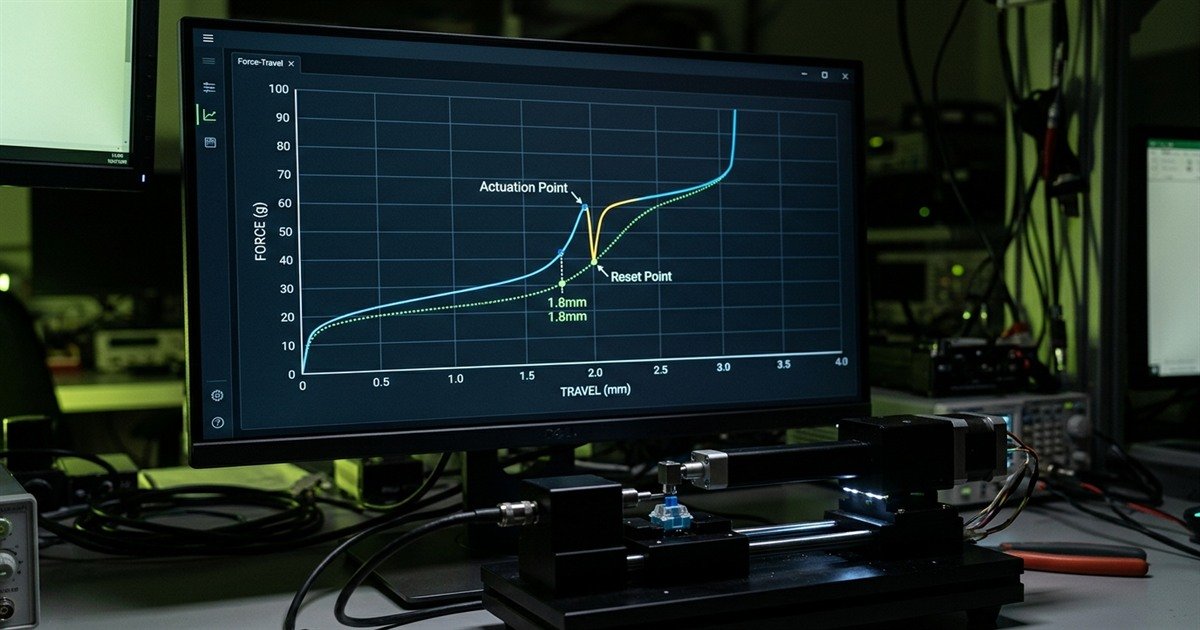
When comparing mechanical switches, technical spec sheets can seem overwhelming with numbers, tolerances, and force curves. Understanding how these mechanical metrics translate into actual physical sensations under your fingers is essential for selecting the right switch for your typing habits and competitive gaming style.
Actuation Force vs Bottom-Out Force: Understanding Gram Resistance
Force measurements in mechanical switches are quantified in gram-force (gf) or centinewtons (cN), which are practically interchangeable in keyboard engineering. Actuation force represents the exact downward force required to push the switch stem to its actuation point where the electrical contacts close.
In contrast, bottom-out force is the amount of force required to compress the spring fully until the stem collides with the floor of the lower housing. A standard red-style linear switch typically features an actuation force of 45gf at 2.0mm, but as the spring compresses further to 4.0mm, the resistance increases to approximately 60gf at bottom-out. Recognizing this difference prevents misconceptions: a switch labeled as 45g does not stay 45g throughout its entire downward stroke.
Pre-Travel vs Total Travel Distance (Millimeters)
Travel distances dictate the physical distance your fingers must move each keycap to trigger inputs and complete strokes. Pre-travel distance (often called actuation distance) measures the gap between the switch at rest and the moment electrical actuation occurs. On standard desktop switches, pre-travel measures 2.0 millimeters, whereas dedicated speed switches reduce pre-travel to 1.0mm to 1.2mm for faster reaction times in tactical shooters.
Total travel distance measures the entire downward path from rest to bottom-out. Standard mechanical switches feature 4.0 millimeters of total travel. Many contemporary gaming switches intentionally shorten total travel to 3.4mm or 3.6mm by utilizing extended stem poles that hit the bottom housing early, creating a sharp, solid bottom-out impact favored by competitive FPS enthusiasts.
Switch Lifespan and Hot-Swappable PCB Compatibility
Durability is one of the primary reasons professionals invest in mechanical keyboards. While membrane keyboards typically fail after 5 million keystrokes due to silicone dry-rot and tearing, high-quality mechanical switches are rated for 50 million to 100 million keystrokes per key. Gold crosspoint contacts and fatigue-tested steel springs maintain functional integrity across years of intensive daily gaming.
Modern keyboards have also popularized hot-swappable PCB sockets (such as Kailh or Gateron hot-swap receptacles). In the past, changing switches required desoldering every pin with a soldering iron. Hot-swappable sockets allow users to unplug old switches and plug in new ones in seconds using a simple mechanical puller tool. Hot-swap compatibility is divided into 3-pin (plate-mount) and 5-pin (PCB-mount) standards, with 5-pin switches offering superior mechanical alignment thanks to two extra plastic stabilizing legs.
Switch Categories and the Evolution to Modern Contactless Technology
Mechanical switches historically fall into linear, tactile, and clicky categories based on tactile bump and acoustics, while modern esports keyboards are transitioning toward contactless optical and magnetic Hall Effect architectures.
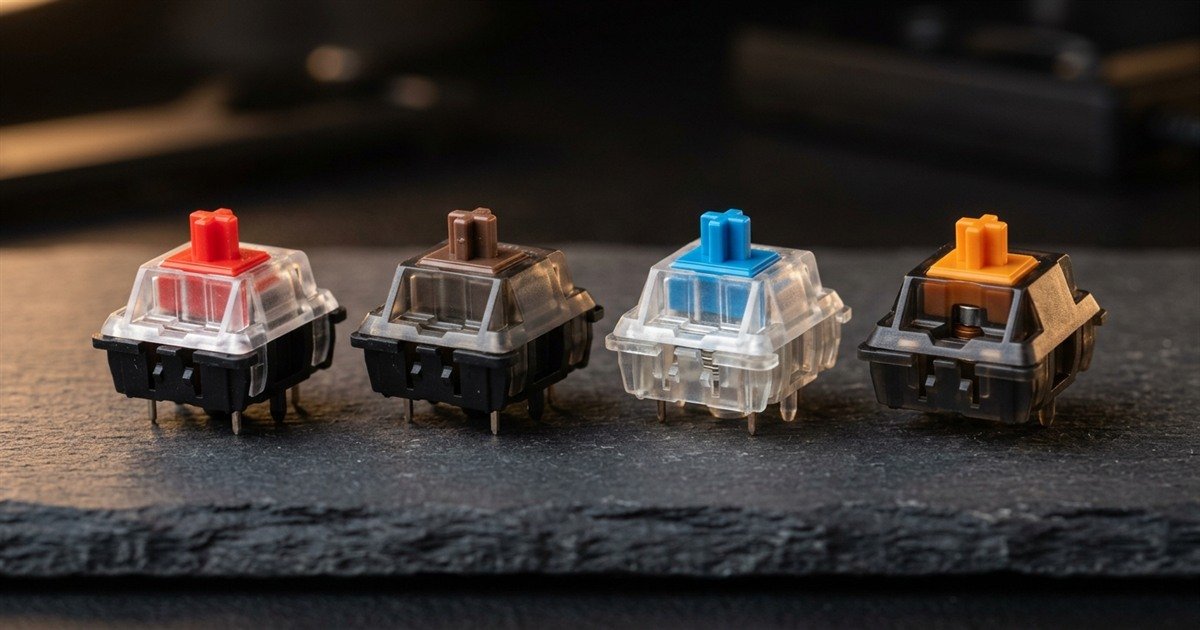
Over four decades of keyboard evolution, the mechanical switch market has organized into three primary operational flavors based on the physical tactile feel of the stem legs and acoustic feedback: smooth linear switches, tactile feedback switches, and audible clicky switches.
Four-step decision protocol for determining your initial switch baseline:
- Identify your primary computing application: Prioritize smooth linear switches for fast-paced competitive gaming, or select tactile switches if typing accuracy and programming productivity dominate your workflow.
- Select your tactile feedback requirement: Choose linear stems for unobstructed travel without bumps, tactile stems for a noticeable tactile hump before actuation, or clicky stems if you desire an audible click confirmation.
- Determine your actuation weight preference: Begin with standard 45gf switches if you are uncertain, moving down to 35gf-40gf for twitch reflexes or up to 55gf-62gf if you tend to rest heavy hands on your keys.
- Verify PCB mounting standard and hot-swap support: Confirm whether your keyboard PCB supports 3-pin plate-mount switches or 5-pin PCB-mount switches to ensure effortless drop-in upgrades.
To evaluate detailed actuation force curves, tactile bump profiles, and acoustic sound tests between mechanical switch types, read our in-depth comparison of linear vs tactile vs clicky switches.
For competitive FPS players demanding customizable actuation points and zero mechanical wear, discover what is a hall effect keyboard to see how permanent magnets are redefining input hardware.
Furthermore, explore how dynamic key reset mechanisms eliminate physical travel delays during rapid counter-strafing in our technical guide to what is rapid trigger.
Frequently Asked Questions About Mechanical Keyboard Switches
Key answers to common questions about mechanical switch mechanics, durability, and selection:
What makes a keyboard switch mechanical?
A switch is classified as mechanical when it uses an independent electromechanical assembly per key with a physical steel coil spring and dedicated metal contact leaves rather than a shared silicone rubber membrane.
This discrete physical construction isolates each keypress from neighboring keys, ensuring consistent resistance and allowing inputs to register midway through travel without requiring bottom-out contact.
How do mechanical switches differ from membrane keyboards?
Mechanical switches register inputs midway using independent metal contacts and springs, whereas membrane keyboards require pressing keys completely to the bottom to squeeze shared flexible plastic sheets together.
This architectural difference gives mechanical keyboards superior tactile feedback, 10 to 20 times longer lifespans, full key rollover (anti-ghosting), and easily repairable modular components.
What is a hot-swappable mechanical switch?
A hot-swappable switch is a mechanical switch installed into specialized PCB socket receptacles that allow users to plug and unplug switches without desoldering or using specialized electronics tools.
Hot-swappable boards allow enthusiasts to easily mix and match switch types, replace damaged units, or lubricate switch stems without disassembling the entire keyboard chassis.
What is an MX-style mechanical switch?
An MX-style switch refers to any mechanical switch built using the standardized form factor and cross-shaped keycap stem mount originally patented by Cherry in the Cherry MX series.
Because the original Cherry MX patents expired, modern manufacturers including Gateron, Kailh, Outemu, and Akko build MX-compatible switches that fit standard MX keycaps and PCB footprints.
What is switch actuation point and pre-travel?
The actuation point is the exact vertical travel distance where electrical contact leaves connect, and pre-travel is the vertical millimeter distance the key stem travels from rest to that actuation point.
Standard desktop mechanical switches feature an actuation pre-travel of 2.0mm, while speed gaming switches feature shortened pre-travel of 1.0mm to 1.2mm for accelerated input registration.
What is the difference between 3-pin and 5-pin switches?
The difference lies in mounting stability: 3-pin switches feature two metal electrical pins and one central plastic post, while 5-pin switches add two extra plastic alignment pins for PCB stability.
Three-pin switches are designed for keyboards using an aluminum or polycarbonate plate, while 5-pin switches are preferred for plateless builds or boards requiring maximum switch alignment rigidity.
Why do mechanical switches require debounce delay?
Debounce delay is a software filtering timer that prevents physical contact bounce noise from registering as multiple rapid keystrokes when flexible copper leaves strike together.
When physical metal contacts collide, they microscopically bounce for 1 to 5 milliseconds before settling. The keyboard firmware ignores signals during this debounce window to eliminate key chatter.
What causes mechanical switch wobble and key rattle?
Switch wobble is caused by loose manufacturing tolerances between the stem rails and top housing channels, while key rattle stems from unlubricated wire stabilizers on larger keys.
Modern switches minimize stem wobble by using box-style stem perimeters and tight polycarbonate housings, while keyboard stabilizers require dielectric grease to eliminate wire rattling.
How long do mechanical keyboard switches last under heavy use?
High-quality mechanical switches last between 50 million and 100 million keystrokes per key, translating to over ten to fifteen years of intensive daily gaming and typing.
Corrosion-resistant gold crosspoint contacts and fatigue-tested tempered steel springs ensure consistent performance long after conventional membrane keyboard domes have lost elasticity.
Does switch weight directly impact gaming reaction times?
Lighter actuation switches between 35gf and 45gf allow faster physical movement and rapid double-tapping, but excessively light switches can lead to accidental misclicks under finger resting weight.
Competitive players generally converge around 40gf to 45gf as an optimal compromise between lightning-fast actuation and deliberate tactile control in high-stress esports scenarios.
Can you lubricate mechanical switches to improve smoothness?
Applying specialized synthetic lubricants like Krytox 205g0 to stem rails and spring coils eliminates plastic scratchiness, dampens spring ping, and deepens acoustic sound profiles.
Many modern switch manufacturers now offer factory-lubricated switches that provide butter-smooth keystrokes straight out of the box without requiring manual switch opening.
Are mechanical switches being replaced by Hall Effect magnetic switches?
In competitive esports, contactless magnetic Hall Effect switches are rapidly gaining dominance due to rapid trigger and adjustable actuation, but traditional mechanical switches remain the gold standard for tactile typing.
Traditional mechanical switches continue to offer unmatched tactile variety, distinct acoustic sound profiles, and vast custom enthusiast ecosystems that purely magnetic switches cannot replicate.
Final Verdict: Why Switch Selection Shapes Your Keyboard Performance
Switch selection accounts for over ninety percent of overall keyboard feel, responsiveness, and auditory feedback, making switch architecture the single most influential hardware choice in any mechanical keyboard build.
Understanding what is a mechanical keyboard switch transforms how you evaluate keyboard hardware. Rather than treating a keyboard as a monolithic commodity, recognizing that each keycap rests on a precision electromechanical instrument empowers you to customize your setup to your exact physical preferences. Whether you prioritize the butter-smooth consistency of linear stems for competitive FPS combat, the clean tactile feedback of tactile switches for programming, or the next-generation capabilities of analog magnetic sensors, the mechanical switch remains the beating heart of computing input precision.
Thank you for exploring mechanical switch fundamentals with us. By matching your actuation force, travel distance, and stem profile to your individual playstyle, you unlock a level of tactile precision and consistency that elevates both your daily productivity and competitive gaming execution.