
Gaming microphone specs explained clearly: audio specifications define microphone frequency response, polar pattern rejection, digital resolution (bit depth and sample rate), analog sensitivity, and maximum SPL to guarantee clean, unclipped voice communication during intense gaming sessions.
Understanding hardware specifications prevents overspending on studio audio gear that provides zero competitive advantage in Discord or team voice chat. Every manufacturer datasheet lists decibels, kilohertz, and millivolts, but raw numbers mean nothing without understanding their impact on vocal clarity and background noise rejection. Mastering these metrics allows you to configure accurate digital gain, eliminate keyboard clatter, and establish optimal vocal presence in competitive titles.
Frequency Response: Tuning Vocal Warmth and Presence Curves
A microphone frequency response curve measures how accurately the capsule captures sound pressure across audible frequencies from 20 Hz to 20,000 Hz, dictating voice fullness, clarity, and unwanted background rumble isolation.
Human speech operates within a specific acoustic window, typically spanning 80 Hz to 12,000 Hz. Studio reference microphones target a ruler-flat response, capturing sound without coloration. Gaming-oriented microphones, however, utilize tailored frequency response curves designed to enhance voice intelligibility over chaotic game soundscapes.
Tailored frequency curves introduce deliberate peaks and dips to solve common desktop audio problems:
- Low-End Rolloff (Sub-80 Hz Attenuation): Natural or switchable high-pass filters cut mechanical desk vibrations, air conditioning rumble, and heavy PC fan hum before reaching the analog preamplifier.
- Mid-Range Neutrality (250 Hz to 2,000 Hz): Linear response through the fundamental vocal frequencies preserves natural voice tone without creating boxy, muffled, or hollow sound characteristics.
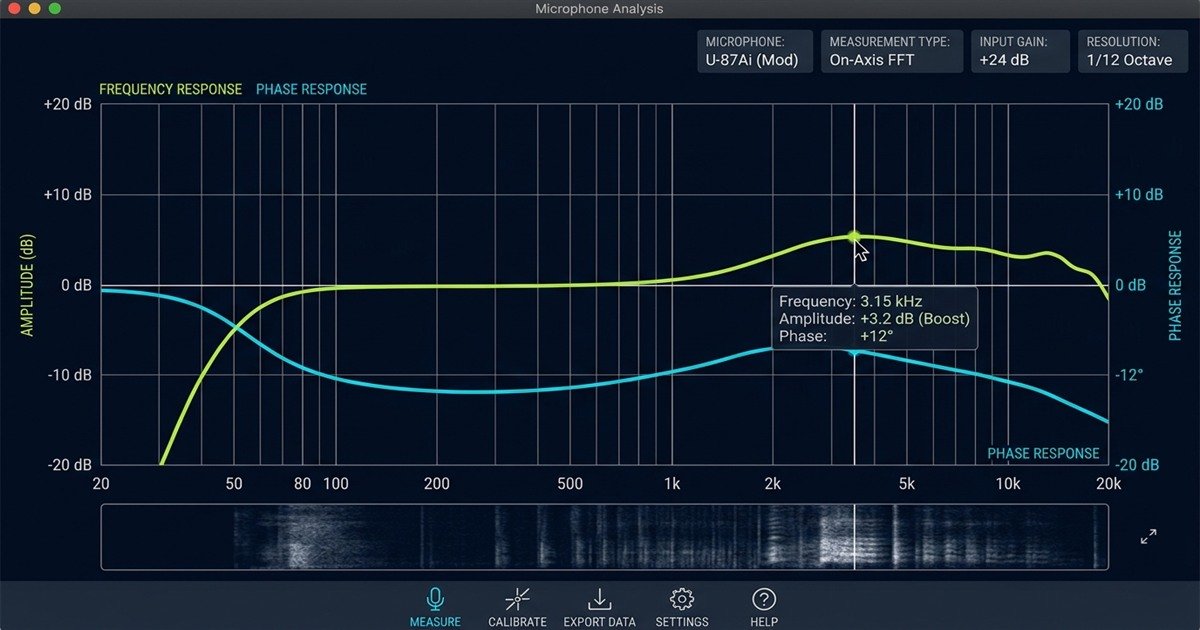
- Presence Peak (3,000 Hz to 7,000 Hz): A gradual 2 dB to 5 dB boost enhances consonant sounds such as “T”, “K”, and “S”, ensuring teammates comprehend rapid tactical callouts above gunfire.
- High-Frequency Shelf (Above 10,000 Hz): Smooth rolloff minimizes harsh sibilance and digital compression artifacts common in real-time voice encoding protocols.
Understanding these acoustic frequency bands enables players to identify whether a capsule requires external equalization software or delivers plug-and-play vocal punch out of the box.
The following frequency range breakdown details how specific acoustic zones influence in-game speech and ambient desktop noise:
| Frequency Band | Acoustic Role | Impact on Gaming Voice | Recommended Tuning |
|---|---|---|---|
| 20 Hz to 80 Hz | Sub-Bass Rumble | Desk thumps, subwoofer bleed, and HVAC rumble | Steep high-pass cut (-12 dB/octave) |
| 80 Hz to 250 Hz | Vocal Fundamental & Chest Resonance | Warmth and body; excessive buildup causes mud | Flat response with slight proximity control |
| 250 Hz to 2,000 Hz | Speech Intelligibility & Core Vowels | Main vocal power; critical for natural timber | Neutral, flat transmission curve |
| 2,000 Hz to 6,000 Hz | Presence & Consonant Articulation | Separates voice comms from loud explosion effects | Smooth +3 dB gentle presence boost |
| 6,000 Hz to 12,000 Hz | Brilliance & Sibilance | Air and definition; excessive boost causes sibilance | Controlled decay to avoid harsh piercing tones |
| 12,000 Hz to 20,000 Hz | Ultra-High Frequencies | Negligible speech data; carries electrical hiss | Natural rolloff above 15,000 Hz |
Carefully evaluating frequency response curves prevents purchasing overly flat microphones that sound dull in compressed voice codecs without extensive post-processing.
Below is a visual technical comparison illustrating flat studio response versus tailored gaming voice curves across the frequency spectrum:
When selecting a dedicated unit for streaming or competitive comms, evaluate whether you prefer native plug-and-play presence or flat studio neutrality requiring dedicated digital signal processing on our gaming microphones category resource.
Sample Rate and Bit Depth: Digital Audio Conversion Reality
Sample rate and bit depth govern how frequently analog sound waves are measured per second and how accurately dynamic signal amplitude is quantified into binary data for computer processing.
Every USB gaming microphone incorporates an onboard Analog-to-Digital Converter (ADC). Marketing departments often boast 24-bit/96kHz or 24-bit/192kHz recording modes as essential competitive features. However, real-world gaming audio operates under different bandwidth and latency constraints than multi-track orchestral music production.
Sample Rate: Nyquist Theorem and Voice Codec Limits
Sample rate, expressed in kilohertz (kHz), defines the number of audio snapshots captured each second. According to the Nyquist-Shannon sampling theorem, capturing an acoustic frequency requires a sample rate at least double that frequency. Because human hearing caps out at 20,000 Hz, a sample rate of 44,100 Hz (CD quality) accurately reconstructs all audible frequencies up to 22,050 Hz without distortion.
In competitive gaming, standard voice chat protocols such as Discord Opus, TeamSpeak, and native in-game engines encode audio at 48 kHz. Operating your hardware at 96 kHz or 192 kHz introduces real-time downsampling calculations, consuming CPU cycles and potentially causing audio buffer crackles while providing zero audible fidelity enhancement to your teammates.
Bit Depth: Quantization Noise and Dynamic Range Headroom
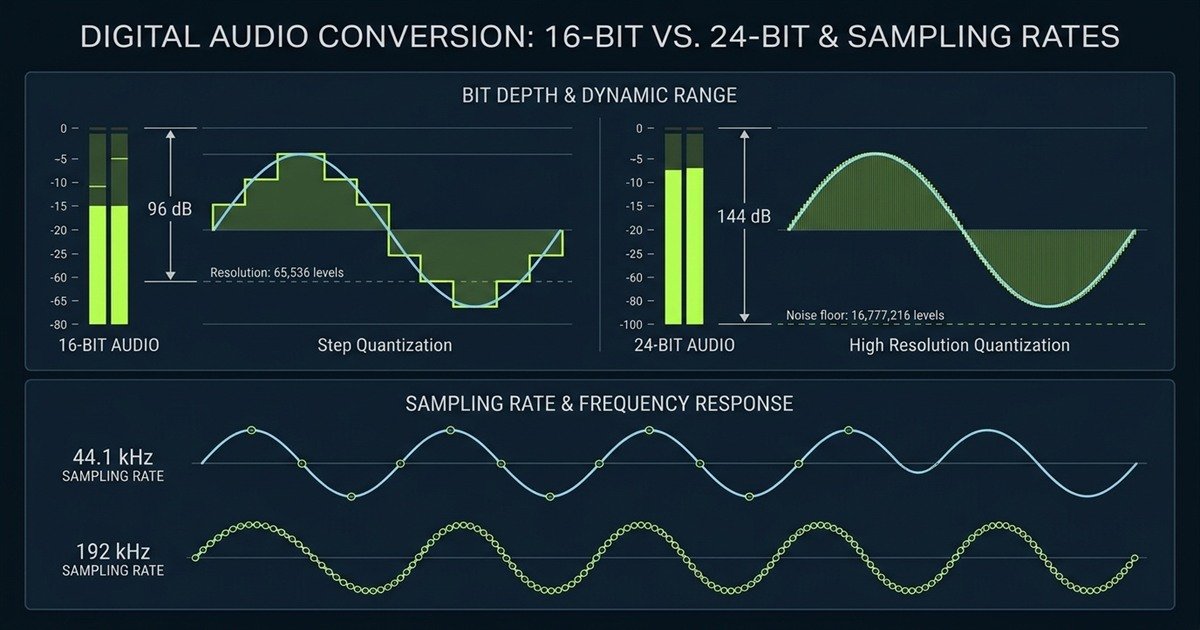
Bit depth dictates dynamic range, which represents the decibel difference between the quietest noise floor and the loudest unclipped peak. Each additional bit provides 6 dB of signal dynamic range:
- 16-Bit Resolution (96 dB Dynamic Range): Provides 65,536 discrete amplitude steps, exceeding the ambient noise isolation capability of any home gaming environment.
- 24-Bit Resolution (144 dB Dynamic Range): Offers 16,777,216 discrete steps, lowering the digital quantization noise floor far below thermal circuit noise.
The primary benefit of 24-bit audio in gaming is analog gain headroom. It permits users to set lower analog preamp sensitivity, leaving 18 dB of safety margin so that unexpected screaming during intense clutch moments does not cause square-wave digital clipping.
The technical relationship between digital resolution and practical gaming requirements is outlined in the comparative table below:
| Digital Audio Spec | Theoretical Capacity | Practical Reality | Gaming Recommendation |
|---|---|---|---|
| 16-bit Resolution | 96 dB Dynamic Range | Sufficient for home rooms with 35 dB ambient noise | Acceptable for budget USB microphones |
| 24-bit Resolution | 144 dB Dynamic Range | Allows massive digital headroom without noise penalty | Standard choice for competitive comms and streaming |
| 44.1 kHz Sample Rate | 22.05 kHz Nyquist Ceiling | Legacy standard for compact discs | Functional, but requires resampling in Discord |
| 48 kHz Sample Rate | 24.0 kHz Nyquist Ceiling | Native native standard for video, Discord, and Windows | Optimal setting for zero latency and flawless sync |
| 96 kHz Sample Rate | 48.0 kHz Nyquist Ceiling | Captures ultrasonic bat frequencies | Unnecessary overhead; causes potential driver jitter |
| 192 kHz Sample Rate | 96.0 kHz Nyquist Ceiling | Strictly for extreme pitch-shifting audio design | Marketing gimmick for gaming setups |
Setting your Windows Sound Control Panel to 24-bit, 48,000 Hz provides the perfect union of high dynamic range and native software synchronization without wasting processing power.
The graphic below illustrates the mathematical quantization stairs of bit depth alongside sampling rate waveforms:
To understand how capsule hardware interacts with digital conversion hardware across different setups, review our foundational guide on what is a gaming microphone to grasp core acoustic engineering principles.
Polar Patterns: Controlling Acoustic Directivity and Noise Rejection
A microphone polar pattern defines its 360-degree acoustic sensitivity, charting the angles where it captures voice vibrations and the null angles where it rejects mechanical keyboard switches and room echo.
Choosing the correct polar pattern is the single most effective way to eliminate mechanical keyboard clatter, mouse clicks, and computer cooling fan noise without relying on aggressive AI noise gates that clip your vocal transients.
Cardioid: The Gold Standard for Solo Gaming Desktops
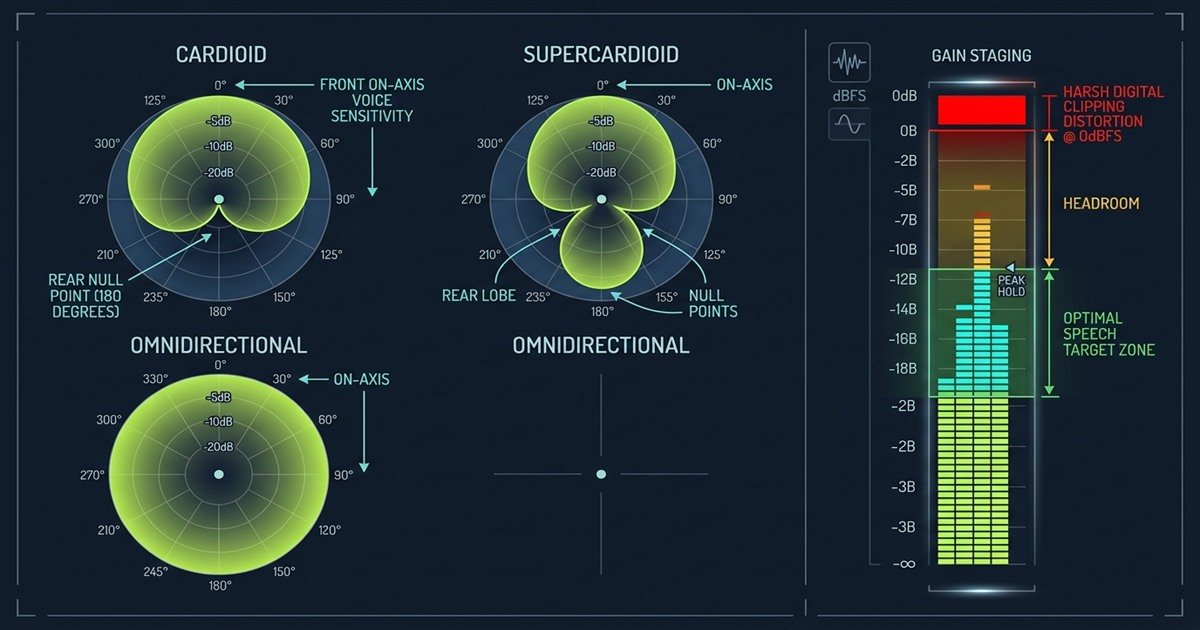
The cardioid pattern provides a heart-shaped pickup area centered directly in front of the capsule (0 degrees). It attenuates sounds arriving from the sides (90 and 270 degrees) by roughly 6 dB and provides maximum sound rejection at the rear (180 degrees), typically reaching -20 dB to -25 dB of attenuation.
Positioning a cardioid microphone on an adjustable boom arm with its rear pointing directly toward your mechanical keyboard creates an acoustic dead zone, dramatically reducing keystroke clatter before the signal ever enters your operating system.
Supercardioid and Hypercardioid: Tighter Frontal Focus
Supercardioid capsules offer a narrower frontal pickup angle, delivering superior side rejection compared to standard cardioid designs. However, this narrow pattern creates a small pickup sensitivity lobe directly behind the microphone at 180 degrees, with the actual rejection nulls shifted to 125 and 235 degrees.
If you use a supercardioid microphone, angling the rear directly at a loud mechanical keyboard can inadvertently capture switch clicks through the rear lobe. Adjusting the microphone angle so that keyboard switches align with the 125-degree null points restores effective acoustic isolation.
Omnidirectional and Bidirectional: Specialized Use Cases
Omnidirectional capsules record sound equally from all 360 degrees. While useful for tabletop podcast discussions involving multiple participants, omnidirectional mode is completely unsuitable for solo gaming because it captures every computer fan, reverberation, and keyboard keystroke within the room.
Bidirectional (Figure-8) patterns capture sound exclusively from the front and rear while providing complete cancellation at the sides (90 and 270 degrees). This configuration excels at face-to-face dual commentary across a desk while rejecting side PC chassis noise.
Acoustic Isolation Beats Digital Suppression: Physical polar pattern rejection produces zero latency and zero signal distortion. Digital AI filters frequently clip the first syllable of rapid callouts when processing heavy keyboard clatter, whereas a properly angled cardioid capsule eliminates noise mechanically at the acoustic diaphragm.
The polar pattern selection criteria below highlight directivity angles and rear attenuation depths for gaming environments:
| Polar Pattern | Pickup Angle | Rear Attenuation (180 deg) | Null Rejection Points | Gaming Application |
|---|---|---|---|---|
| Cardioid | 131 degrees | -20 dB to -25 dB | Exact rear (180 degrees) | Ideal for solo desktop gaming and streaming |
| Supercardioid | 115 degrees | -12 dB (Rear lobe present) | 125 degrees and 235 degrees | Tight frontal focus; requires angled placement |
| Hypercardioid | 105 degrees | -8 dB (Larger rear lobe) | 110 degrees and 250 degrees | Maximum side isolation in treated acoustic rooms |
| Omnidirectional | 360 degrees | 0 dB (No rejection) | None (Captures all angles) | Unsuitable for gaming; picks up room echo |
| Bidirectional | 90 degrees (Dual) | 0 dB (Picks up rear) | Direct sides (90 and 270 degrees) | Two-person interviews across a shared desk |
Choosing the correct directivity pattern ensures your voice remains crisp while unwanted mechanical keystrokes remain silenced at the capsule level.
The polar pickup chart and gain staging visualizer below display off-axis cancellation zones alongside recommended speech decibel levels:
For a detailed breakdown of physical mount designs, internal shock mounts, and tactile capsule mute switches, explore our companion analysis on what to look for in a gaming microphone to refine your gear checklist.
Sensitivity, SPL, and Gain Staging: Controlling Signal Integrity
Microphone sensitivity and Maximum Sound Pressure Level (SPL) determine how effectively the capsule converts acoustic air pressure into electrical voltage without overloading internal circuitry or producing audible preamplifier hiss.
These electrical specifications dictate how you must configure analog gain knobs and software volume sliders to achieve clean vocal projection without distortion.
Sensitivity (dBV/Pa): Understanding Capsule Output Voltage
Sensitivity indicates the electrical voltage output generated when exposed to a standardized acoustic pressure of 1 Pascal (equivalent to 94 dB SPL at 1,000 Hz). In audio datasheets, sensitivity is expressed as a negative decibel number relative to 1 Volt (dBV/Pa) or in millivolts per Pascal (mV/Pa):
- High-Sensitivity Condensers (-36 dBV/Pa to -40 dBV/Pa / ~15 mV/Pa): Produce substantial voltage output, requiring minimal preamplifier gain. They capture delicate vocal nuances but effortlessly pick up room reflections and distant PC fan hum.
- Low-Sensitivity Dynamics (-54 dBV/Pa to -58 dBV/Pa / ~1.5 mV/Pa): Generate tiny electrical voltages, requiring 50 dB to 60 dB of clean analog gain. Their low output naturally rejects quiet ambient background noise, demanding close speech positioning within 5 to 10 centimeters.
Maximum SPL and Total Harmonic Distortion (THD)
Maximum Sound Pressure Level (Max SPL) measures the highest acoustic volume a microphone capsule can withstand before producing 0.5% or 1.0% Total Harmonic Distortion (THD). Expressed in decibels (dB SPL), this metric guarantees that loud yelling or excited shouting will not physically distort the diaphragm.
Most gaming condenser microphones offer Max SPL ratings between 120 dB SPL and 130 dB SPL, while dynamic broadcast microphones routinely exceed 140 dB SPL. Because conversational speech averages 65 dB SPL and passionate screaming rarely exceeds 105 dB SPL at a distance of 15 centimeters, virtually any modern gaming microphone provides ample SPL headroom against acoustic capsule clipping.
Signal-to-Noise Ratio (SNR) and Self-Noise
Signal-to-Noise Ratio (SNR) quantifies the gap between a standard 94 dB SPL voice signal and the internal electrical noise floor (self-noise) generated by microphone transistors and circuit resistors:
- Excellent SNR (> 78 dB / < 16 dBA Self-Noise): Clean, studio-grade background that produces imperceptible electronic hiss even when listening via sensitive in-ear monitors.
- Acceptable Gaming SNR (70 dB to 74 dB / 20 to 24 dBA Self-Noise): Clean vocal transmission for gaming; subtle white noise may become audible if preamplifier gain is pushed past 85%.
- Poor SNR (< 66 dB / > 28 dBA Self-Noise): Audible background hiss continuously triggers voice chat activation thresholds in quiet rooms.
Target -18 dBFS to -12 dBFS on Vocal Peaks: In digital audio workstations and streaming software, configure your analog gain knob so normal speaking levels hover around -18 dBFS, with excited shouting peaking at -12 dBFS. This leaves 12 dB of safety headroom, preventing harsh digital clipping that ruins voice comms.
The sequential gain staging protocol below guarantees clean vocal transmission without clipping or circuit noise:
- Physical Capsule Placement: Position the microphone 10 to 15 centimeters away from your mouth, angled at 45 degrees toward your cheek to prevent direct plosive air bursts.
- Reset Digital Processing: Disable all software compressors, limiters, AI noise suppressors, and Discord automatic gain control to assess pure hardware input.
- Adjust Analog Preamp Gain: Speak in your normal gaming voice while observing the input meter, adjusting the physical knob until peaks bounce between -18 dBFS and -14 dBFS.
- Perform Stress Shouting Test: Deliver an excited tactical callout at maximum expected volume; verify that the input meter never reaches 0 dBFS or turns red.
- Configure Digital Noise Gate Threshold: Set software gate threshold 5 dB above your room’s ambient noise floor (-45 dBFS to -50 dBFS) to silence keyboard idling between sentences.
Executing this calibration sequence ensures that your microphone operates within its cleanest linear range, providing studio-grade vocal transmission across all voice platforms.
Impedance and Connectivity: USB Audio Codecs vs XLR Audio Interfaces
Microphone impedance and connection topology dictate how audio signals travel from the acoustic capsule to your operating system, separating self-contained USB digital converters from modular analog XLR interfaces.
Understanding impedance and output protocols prevents signal degradation, electrical interference, and ground loop hum in complex desktop battle stations.
Output Impedance (Ohms)
Microphone output impedance, measured in Ohms, indicates electrical resistance to the audio signal. Modern low-impedance microphones range between 50 Ohms and 600 Ohms. Audio engineering follows the bridging impedance principle, requiring the receiving preamplifier input impedance to be at least five to ten times greater than the microphone output impedance (typically 1,500 Ohms to 3,000 Ohms) to prevent high-frequency attenuation and signal loading.
USB Architecture: Plug-and-Play Digital Simplicity
USB gaming microphones house the microphone capsule, analog preamplifier, analog-to-digital converter, headphone amplifier, and digital signal processor inside a single chassis. The computer receives a pre-digitized class-compliant audio stream over a standard USB cable, bypassing motherboard sound card interference entirely.
While exceptionally convenient and affordable, USB microphones are susceptible to 5-Volt USB bus power noise from unshielded motherboard traces and cannot be upgraded modularly if a single internal component fails.
XLR Architecture: Balanced Analog Reliability
XLR microphones output a balanced analog audio signal across three conductors: ground (Pin 1), positive hot (Pin 2), and negative cold (Pin 3). Balanced transmission relies on Common Mode Rejection (CMRR), where external electromagnetic interference picked up along the cable run is phase-inverted and eliminated at the audio interface receiver.
Operating an XLR setup requires a dedicated external USB audio interface delivering 48-Volt phantom power for condenser capsules or ultra-clean 60 dB analog preamps for low-output dynamic capsules.
The technical and financial comparison below outlines the structural trade-offs between USB and XLR audio configurations:
| Engineering Attribute | Integrated USB Microphone | Modular XLR Microphone Setup |
|---|---|---|
| Signal Topology | Digital packet stream over USB bus | Balanced analog signal across 3-pin XLR |
| Analog Preamplifier | Internal micro-chip preamp on USB board | External high-voltage audio interface preamp |
| Analog-to-Digital Conversion | Fixed onboard ADC (16/24-bit) | High-grade audio interface converter |
| Electromagnetic Shielding | Vulnerable to USB 5V electrical bus noise | Total Common Mode Rejection over long cables |
| Hardware Monitoring | Integrated 3.5mm zero-latency output | Dedicated headphone amplifier on interface |
| Component Modularity | All-in-one unit; non-replaceable | Freely swap mics, preamps, and interfaces |
| Typical Entry Investment | 40 to 130 USD complete | 120 to 300 USD (Mic, Interface, Cable, Stand) |
For most competitive players, a high-quality USB microphone provides 95% of the practical vocal fidelity of an XLR setup without the desk footprint or financial commitment of outboard gear. To evaluate specific hardware limitations and acoustic bottlenecks before buying, consult our guide on when to upgrade your gaming mic.
Frequently Asked Questions
Here are answers to the most common technical questions regarding gaming microphone specifications, audio performance metrics, and digital calibration:
What is frequency response in a gaming microphone?
Frequency response measures the range of sound frequencies a microphone capsule can detect, spanning 20 Hz to 20,000 Hz, and illustrates how accurately different vocal pitches are amplified or attenuated.
Why do gaming microphones emphasize a presence boost?
A presence boost between 3,000 Hz and 6,000 Hz enhances speech consonant clarity, ensuring tactical voice callouts cut through loud in-game gunfire and explosions on compressed voice servers.
What does polar pattern mean on a microphone datasheet?
A polar pattern describes a microphone capsule directional sensitivity across 360 degrees, charting where it captures sound and where it rejects keyboard switches and background room noise.
What is the best polar pattern for desktop gaming?
Cardioid is the best pattern for gaming because it captures voice clearly from the front while attenuating sound arriving from the sides and completely rejecting noise from the rear.
Is 24-bit audio noticeably better than 16-bit for gaming?
Yes, 24-bit audio provides 144 dB of dynamic range compared to 96 dB in 16-bit, allowing gamers to maintain higher volume headroom without risking digital clipping during loud shouting.
Does a 192 kHz sample rate improve voice chat quality?
No, voice applications like Discord compress audio to 48 kHz, meaning higher sample rates like 192 kHz waste processing power and provide zero audible improvement in voice chat.
What is microphone sensitivity in dBV per Pascal?
Sensitivity measures the electrical voltage output generated by a microphone capsule at a standardized sound pressure of 94 dB SPL, indicating whether the capsule requires high preamplifier gain.
What is Max SPL on a gaming microphone specification sheet?
Max SPL represents the maximum sound pressure level a microphone can withstand before its capsule introduces 0.5 percent harmonic distortion, guaranteeing performance during loud vocal shouting.
How does signal to noise ratio affect microphone audio?
Signal to Noise Ratio (SNR) indicates the decibel difference between spoken voice and internal circuit hiss; an SNR above 74 dB ensures background electrical hiss remains completely inaudible.
Why do condenser microphones pick up more keyboard noise than dynamic mics?
Condensers feature lighter diaphragms with higher sensitivity across wide frequency ranges, capturing subtle high-frequency transient clicks that lower-sensitivity dynamic diaphragms naturally ignore.
What is Common Mode Rejection in XLR microphone cables?
Common Mode Rejection is a noise-cancellation technique in balanced XLR cables where electromagnetic interference picked up along cable conductors is phase-inverted and eliminated at the receiver.
How should a gamer configure analog microphone gain staging?
Set analog microphone gain so normal conversational speech registers around -18 dBFS on digital meters, ensuring enthusiastic tactical shouts peak around -12 dBFS without causing digital distortion.