
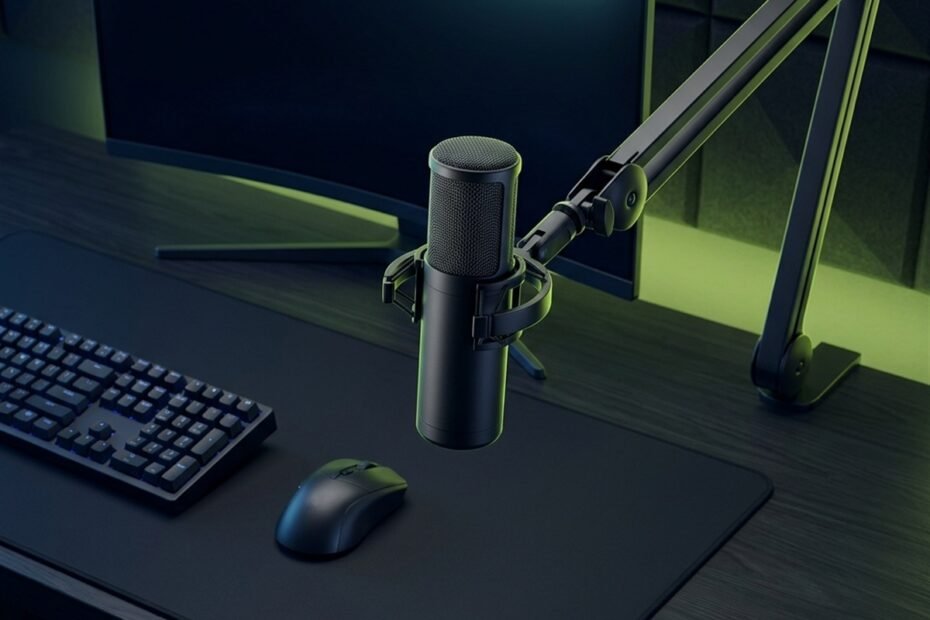
When shopping for a gaming microphone, prioritize dynamic capsules for untreated rooms, a cardioid pickup pattern, physical tap-to-mute, direct gain control, zero-latency monitoring, standard boom arm mounting threads, and honest 24-bit 48 kHz digital conversion.
Choosing a gaming microphone often feels overwhelming due to aggressive peripheral marketing and conflicting technical jargon. Packaging boxes highlight exaggerated sample rates, multi-color lighting arrays, and proprietary acoustic buzzwords that provide little practical benefit during a chaotic Discord voice call or ranked matchmaking session.
In competitive gaming, an effective microphone must accomplish three functional tasks: isolate your spoken voice from mechanical keyboard switches, prevent digital distortion during loud tactical callouts, and integrate seamlessly into your battlestation without stealing mousepad space. Having explored what is a gaming microphone in our architectural overview, this buyer guide delivers an objective framework to evaluate critical hardware criteria before spending your peripheral budget.
Transducer Architecture: Dynamic vs Condenser Selection
Select a dynamic microphone for untreated gaming bedrooms to reject ambient keyboard clatter naturally, or choose a condenser microphone if you speak in a sound-dampened space and require sensitive vocal detail.
The acoustic transducer is the physical sensor that converts spoken sound waves into electrical voltages. Gaming microphones utilize one of two core transducer technologies: electromagnetic dynamic moving coils or electrostatic condenser capsules. Choosing the correct transducer type represents your most critical purchasing decision because it dictates how the microphone interacts with room reverberation and desk noise.
Acoustic and operational differences between dynamic and condenser gaming microphones:
| Transducer Metric | Dynamic Capsule Microphone | Condenser Capsule Microphone |
|---|---|---|
| Operating Principle | Moving coil attached to heavy diaphragm | Ultra-light conductive gold-sputtered plate |
| Acoustic Sensitivity | Low (-54 to -58 dBV/Pa) | High (-36 to -42 dBV/Pa) |
| Optimal Speaking Distance | 5 to 10 cm from lips | 15 to 25 cm from lips |
| Untreated Room Resilience | Excellent; ignores room slap-back flutter | Poor; captures bare wall reflections |
| Mechanical Keyboard Bleed | Minimal; low sensitivity ignores distant clicks | Noticeable; captures high-frequency switch clatter |
| External Power Requirement | Passive capsule; zero phantom power | Active capsule; requires 5V USB or 48V phantom |
| Ideal Battlestation Use Case | Untreated bedrooms, noisy houses, clicky keys | Acoustically treated rooms, quiet streaming setups |
Cutaway acoustic comparison of dynamic moving-coil vs electrostatic condenser transducer mechanics:
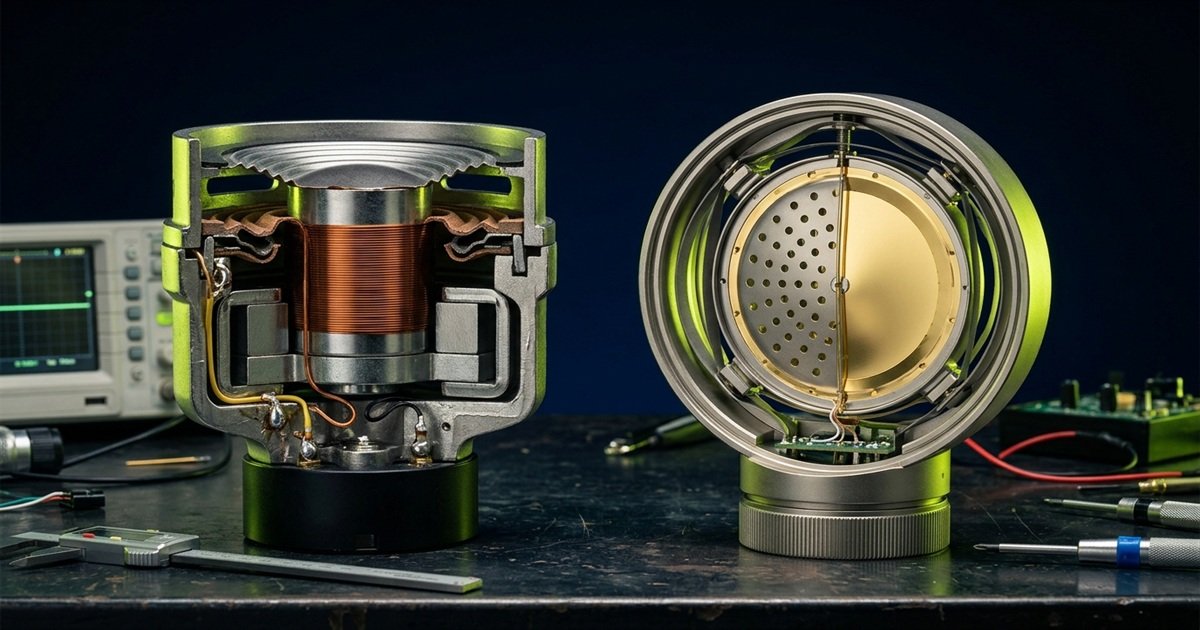
Understanding these acoustic properties prevents the disappointment of purchasing an expensive condenser only to discover it captures every distant computer fan hum, as discussed when comparing gaming mic vs headset mic background isolation.
Dynamic Capsules: Natural Noise Rejection for Untreated Rooms
Dynamic microphones utilize heavy diaphragms that require high acoustic pressure to oscillate, making them naturally deaf to distant computer fan whine and mechanical keyboard clatter.
In a dynamic microphone capsule, a relatively heavy copper voice coil is attached to a mylar diaphragm suspended inside a permanent magnetic field. Because moving this physical mass requires substantial kinetic acoustic energy, quiet sounds arriving from across the room lack the force to generate a noticeable electrical signal. To be heard clearly, you must position the capsule 5 to 10 centimeters from your lips.
This close-proximity requirement is a major ergonomic asset for competitive gamers. If your PC chassis sits on top of your desk with cooling fans spinning under heavy GPU loads, or if you type on tactile mechanical switches, a dynamic gaming microphone suppresses those background noises at the physical capsule level without relying on aggressive software filters that can make your voice sound artificial.
Condenser Capsules: Vocal Nuance and Transient Speed
Condenser microphones employ microscopic diaphragms that respond instantaneously to sound pressure changes, capturing crisp vocal articulation and airy high-frequency harmonics.
Condenser microphones operate on electrostatic capacitance. A microscopic conductive membrane is placed parallel to a fixed backplate. Because the diaphragm has virtually zero mass, it responds to rapid high-frequency air vibrations effortlessly. This produces a bright, open vocal character with exceptional transient response, making speech sound intimate, detailed, and broadcast-ready.
However, extreme acoustic sensitivity is a double-edged sword. In a standard gaming room with bare drywall, hardwood floors, and glass windows, sound waves bounce repeatedly across reflective surfaces. A condenser microphone placed 20 centimeters away captures those delayed sound reflections, creating a hollow, bathroom-like vocal tone that no software equalizer can completely repair.
Polar Pickup Patterns: Directional Isolation Mechanics
Insist on a true cardioid pickup pattern for gaming, which isolates sound arriving from the front while creating an acoustic null zone at 180 degrees directly behind the capsule.
A polar pattern describes a microphone sensitivity across a 360-degree sphere. While peripheral manufacturers frequently promote multi-pattern switches featuring omnidirectional, bidirectional, and stereo settings as premium selling points, the vast majority of gaming scenarios demand exactly one directional pattern: cardioid.
Polar pickup pattern characteristics and battlestation effectiveness:
| Polar Pattern | Capture Geometry | Rear Rejection at 180° | Gaming Battlestation Viability |
|---|---|---|---|
| Cardioid (Directional) | Heart-shaped forward lobe (0° on-axis) | Maximum attenuation (18 to 25 dB) | Essential standard; rejects keyboard switches |
| Supercardioid / Hypercardioid | Narrower forward lobe; tighter side rejection | Moderate (Presents small rear pickup lobe) | Viable; requires precise on-axis alignment |
| Omnidirectional (360°) | Equal sensitivity across all spherical angles | Zero rejection (0 dB attenuation) | Unusable for gaming; captures room echo |
| Bidirectional (Figure-8) | Captures front and rear; rejects sides (90°) | Zero rejection at rear (Captures keyboard directly) | Impractical; intended for face-to-face podcasts |
Gamers evaluating overall audio priorities should determine whether standalone hardware solves real communication issues, as outlined in our diagnostic guide on do you need a gaming microphone for competitive matchmaking.
The Cardioid Null Zone: Keyboard Mitigation Strategy
A cardioid capsule attenuates sound arriving from directly behind by 18 to 25 decibels, creating an acoustic dead zone ideal for positioning facing mechanical keyboard switches.
Cardioid polar patterns rely on internal phase cancellation ports. Sound waves entering the rear acoustic vents travel an engineered path that cancels out waves hitting the front of the diaphragm simultaneously. This phase interference creates a deep null zone directly at 180 degrees. When you align your microphone so its rear points straight at your keyboard while the front grille faces your mouth, clattering keypresses fall directly into this attenuation zone.
Be cautious of microphones labeled supercardioid or hypercardioid. While these patterns offer narrower front lobes with better side rejection, they suffer from an acoustic rear lobe that captures sound arriving directly behind the base. If placed on a desk directly in front of a keyboard, a hypercardioid capsule can inadvertently amplify switch clatter through its rear sensitivity lobe.
The Multi-Pattern Marketing Trap
Multi-pattern microphones use dual capsules that add cost and internal complexity without providing real utility for solo desktop gaming setups.
Many popular consumer gaming microphones feature a rotary dial to switch between cardioid, omnidirectional, figure-8, and stereo modes. In reality, switching a gaming microphone to omnidirectional in an untreated room instantly floods your voice channel with ambient PC fan hum, room flutter echo, and street traffic noise. Figure-8 mode aims a full sensitivity lobe straight at your mechanical keyboard.
Unless you regularly record round-table conference discussions or two-person interviews across a single table, paying extra for multi-capsule arrays is poor resource allocation. A dedicated single-capsule cardioid microphone engineered with high-grade components almost always delivers superior vocal clarity than a budget multi-pattern unit crammed with compromised miniature capsules.
On-Board Controls and Connectivity Standards
Look for hardware tap-to-mute with clear LED feedback, an analog gain knob, zero-latency 3.5 mm monitoring, and a modern USB-C connection that avoids fragile micro-USB ports.
Physical quality-of-life controls separate well-engineered gaming microphones from generic audio hardware. In the middle of an intense firefight, opening a software menu or alt-tabbing away from your game to adjust voice volume or mute a coughing fit is completely impractical. Tactile hardware controls located directly on the chassis ensure seamless operation.
Essential on-board physical controls and interface requirements:
| Hardware Control / Port | Critical Function | Ideal Implementation | Common Defect to Avoid |
|---|---|---|---|
| Tap-to-Mute Sensor | Instant silent muting mid-match | Capacitive touch surface on top cap | Loud clicking mechanical button |
| Mute Status Indicator | Visual confirmation of microphone state | Distinct two-tone LED ring (Red vs Green) | Tiny hidden light or zero indicator |
| Analog Gain Knob | Hardware input volume calibration | Smooth rotary dial with physical resistance | Endless software-only digital encoder |
| 3.5 mm Headphone Jack | Zero-latency direct sidetone monitoring | Dedicated volume wheel and direct circuit | Software-buffered audio with echo delay |
| Digital Connection Port | Power and digital audio transmission | Reinforced USB Type-C connector | Fragile Micro-USB with loose pins |
Tactile on-board hardware controls and audio connectivity interface layout:
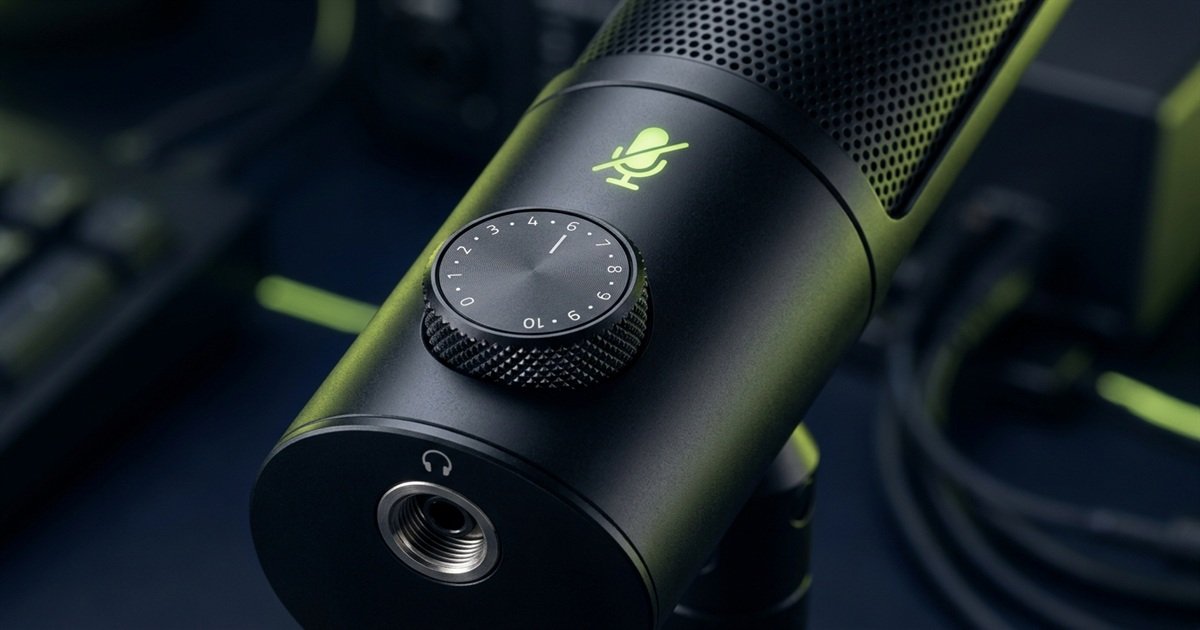
Reviewing our broader analysis of desktop gaming microphones helps clarify how these physical interfaces fit different battlestation layouts.
Capacitive Tap-to-Mute vs Mechanical Switches
Capacitive touch sensors allow silent muting without transmitting loud metallic thumps into your voice channel, provided they include clear visual LED status rings.
Older microphones and budget models rely on physical click-switches to toggle mute states. Because microphones are designed to capture acoustic vibrations, pressing a stiff plastic button sends a deafening mechanical pop directly through the chassis into your teammates ears. Capacitive touch sensors located on the top grille eliminate this problem entirely, allowing silent muting with a gentle finger touch.
Equally critical is unambiguous visual feedback. An illuminated LED ring or glowing capsule that shifts from active slate/white to prominent red prevents hot mic incidents where private conversations are broadcast over team voice channels. Microphones that omit visual mute indicators cause constant user uncertainty.
Zero-Latency Monitoring and Sidetone
Direct hardware monitoring feeds your voice into your headphones with zero millisecond delay, preventing speech slurring and shouting caused by closed-back earcups.
When playing games with passive noise-isolating closed-back headphones, you cannot hear your own natural speaking voice clearly. This isolation phenomenon causes players to unconsciously shout, resulting in vocal strain and irritated housemates. Direct 3.5 mm monitoring solves this by routing an analog copy of your voice straight from the capsule into your headphones with zero digital buffer latency.
Do not confuse direct hardware sidetone with Windows Listen to this device feature. Routing microphone monitoring through the operating system introduces a 30 to 80 millisecond audio delay. Hearing your own voice delayed by even a fraction of a second creates an auditory feedback loop that disrupts normal speech articulation.
Digital Audio Specifications: Separating Facts from Marketing
Target 24-bit depth and 48 kHz sampling rates; higher claims like 192 kHz provide zero audible benefit for gaming and waste processing power across compressed voice channels.
Audio peripheral marketing frequently relies on large numbers to convince buyers that more expensive hardware produces superior clarity. Retail packaging often prominently advertises 24-bit 192 kHz or 32-bit float audio converters. Understanding digital audio engineering fundamentals reveals why these extreme numbers are irrelevant for gaming.
Digital audio converter specifications versus practical gaming voice reality:
| Audio Parameter | Marketing Spec Level | Competitive Reality | Practical Engineering Verdict |
|---|---|---|---|
| Bit Depth | 24-bit / 32-bit float | 24-bit optimal (16-bit acceptable) | 24-bit provides 144 dB dynamic range; prevents digital clipping |
| Sampling Rate | 96 kHz / 192 kHz | 48 kHz industry standard | 48 kHz captures up to 24 kHz; exceeds human hearing limits |
| Signal-to-Noise (SNR) | Above 100 dB advertised | 70 to 85 dB actual | Room ambient noise (40 dBA) bottlenecks SNR, not converter |
| Frequency Response | 20 Hz to 20,000 Hz claimed | 80 Hz to 14,000 Hz effective | Frequencies above 15 kHz carry zero vocal intelligibility cues |
| Discord Voice Codec | Opus 48 kHz mono stream | Compressed at 32 to 64 kbps | High-resolution audio is downsampled immediately upon upload |
Do not pay a price premium for a gaming microphone based on 96 kHz or 192 kHz sampling rate claims. In competitive gaming, capsule acoustics, physical proximity, and background noise rejection dictate vocal quality, whereas ultra-high sample rates are instantly compressed by voice chat codecs.
Why 24-Bit / 48 kHz Is the Optimal Sweet Spot
A 24-bit depth expands recording dynamic range to 144 decibels, offering substantial headroom that prevents harsh digital distortion during loud in-game callouts.
Bit depth dictates digital dynamic range, which is the volume difference between the quietest noise floor and the loudest undistorted peak. Older 16-bit converters provide 96 dB of dynamic range, requiring precise gain calibration to avoid digital clipping when you raise your voice. A 24-bit converter expands this range to 144 dB, allowing you to set lower input gain for regular speech while ensuring explosive shouts remain clean and undistorted.
Meanwhile, according to the Nyquist-Shannon sampling theorem, a 48 kHz sampling rate accurately reproduces sound frequencies up to 24,000 Hz. Because adult human hearing caps out below 20,000 Hz, and human speech contains no communicative information above 10,000 Hz, sampling rates of 96 kHz or 192 kHz capture ultrasonic frequencies inaudible to human ears while increasing USB bus latency and CPU utilization.
Mounting Ergonomics, Desk Space, and Vibration Isolation
Verify that your prospective microphone includes standard 3/8-inch and 5/8-inch mounting threads, an elastic shock mount, and clearance for an articulated boom arm.
A high-quality microphone capsule produces terrible audio if physical mounting vibrations are allowed to enter the housing. Most consumer gaming microphones ship with compact desktop stands that look attractive out of the box but create severe ergonomic and acoustic compromises when placed on an active gaming surface.
Mounting hardware options and acoustic isolation performance:
| Mounting Hardware | Desk Space Impact | Vibration Dampening | Optimal Proximity Range |
|---|---|---|---|
| Stock Desktop Stand | Consumes 15×15 cm mousepad area | Poor; transfers desk thumps and clicks | Poor; sits 40 to 60 cm away from mouth |
| Internal Silicone Ring Mount | Zero footprint change | Moderate; dampens high-frequency taps | Independent of mounting position |
| External Spider Shock Mount | Adds 5 cm capsule radius | Superior; isolates low-frequency desk slams | Maintains clean isolation at any height |
| Articulated Boom Arm | Zero surface footprint; clamps to edge | Excellent when paired with shock mount | Perfect; positions capsule 10 cm from lips |
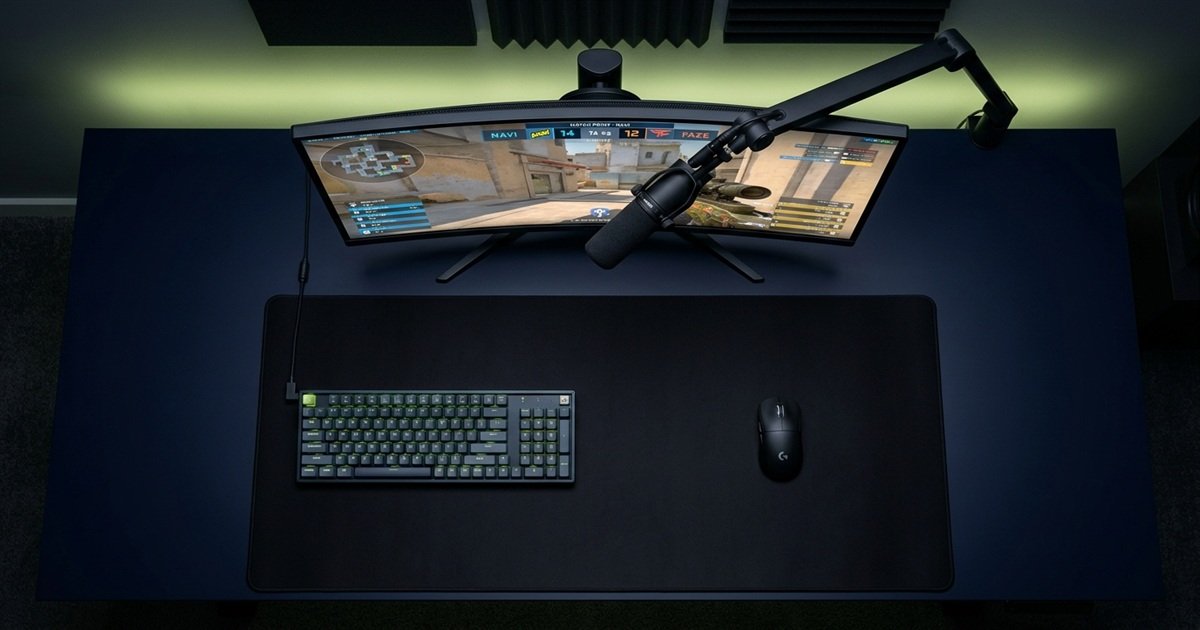
Articulated boom arm desk layout and open mousepad swipe clearance for arm aimers:
Why Desktop Stands Fail Competitive Gamers
Desktop stands transfer mechanical keyboard typing and aggressive mouse swipe thumps directly through the desk frame into your audio stream as sub-bass rumbles.
When a microphone rests directly on a desk surface, structure-borne sound waves travel effortlessly through wood, glass, or steel desks. Every time you reposition your mouse after a wide swipe, hammer your spacebar, or tap your desk in frustration, the impact registers as an explosive low-frequency thud between 40 Hz and 120 Hz on Discord. Furthermore, a desk stand forces the capsule 40 to 60 centimeters away from your mouth, requiring higher gain that pulls in excessive room echo.
An articulated boom arm clamped to the rear or side desk edge solves both challenges. It elevates the microphone overhead, preserving 100 percent of your mousepad surface for wide low-sensitivity arm aiming while placing the capsule precisely 10 to 15 centimeters from your lips. Always check that the microphone chassis features standard 3/8-inch or 5/8-inch threading or includes a compatible brass adapter.
Internal vs External Shock Mounts and Pop Filters
Elastic suspension bands absorb mechanical vibrations, while dual-layer mesh pop filters disperse turbulent breath blasts that cause harsh plosive distortion.
Plosive consonants such as p, b, and t produce sudden jets of turbulent air that strike the microphone diaphragm, producing harsh clipping pops. Microphones with built-in internal foam liners or integrated metal mesh grilles disperse these air bursts before they reach the capsule. If your chosen model lacks an internal pop filter, budget 10 to 15 dollars for an external clamp-on mesh shield or high-density foam windscreen.
Sequential evaluation order when choosing a gaming microphone:
- Audit Your Acoustic Environment: Examine your room. If your space has hard floors, bare walls, and background family or PC fan noise, choose a dynamic microphone. If your room features carpet, curtains, or acoustic panels, a cardioid condenser is viable.
- Confirm True Cardioid Pickup: Avoid paying extra for multi-pattern selectors unless you produce multi-person podcasts. Prioritize microphones with proven 180-degree rear rejection to keep mechanical keyboard clatter out of voice chat.
- Verify Physical Control Hardware: Ensure the microphone provides a silent capacitive tap-to-mute button with a visible LED indicator, a dedicated analog gain dial, and a direct 3.5 mm zero-latency headphone monitoring jack.
- Check Mounting and Thread Compatibility: Confirm the microphone chassis supports standard 3/8-inch and 5/8-inch boom arm threading, and budget for an articulated boom arm to free up competitive mousepad surface area.
- Validate Honest Digital Converter Specs: Stick to dependable 24-bit depth and 48 kHz sampling rates over USB Type-C, ignoring marketing claims of 96 kHz or 192 kHz that waste system resources without improving voice chat.
Frequently Asked Questions
Frequently asked questions regarding essential criteria and specifications when choosing a gaming microphone:
What is the most important feature to look for in a gaming microphone?
The most important feature is a directional cardioid pickup pattern paired with an appropriate transducer type. Cardioid directionality captures speech while rejecting rear keyboard noise, ensuring clean communication regardless of extra software features.
Should gamers buy a dynamic or condenser microphone?
Most gamers in untreated rooms should choose a dynamic microphone because its lower sensitivity naturally ignores distant fan noise and keyboard switches. Condenser microphones are suitable only for quiet, sound-dampened spaces.
Does a higher sampling rate like 192 kHz make voice chat sound better?
No, 192 kHz sampling rates provide zero audible benefit for gaming voice chat. Discord and game engines downsample audio to 48 kHz or lower, making ultra-high sample rates completely irrelevant for communication.
Is a USB microphone sufficient or do you need an XLR setup?
A USB microphone is completely sufficient for competitive gaming, Discord calls, and casual streaming. XLR setups introduce higher costs and hardware complexity that only professional broadcasters and musicians truly require.
Why is a physical gain knob important on a gaming microphone?
A physical gain knob allows immediate hardware input level calibration. You can quickly dial back sensitivity to avoid distortion or increase volume without opening software menus or alt-tabbing during active matches.
Why is capacitive tap-to-mute better than a mechanical mute switch?
Capacitive tap-to-mute sensors operate silently, whereas mechanical switches transmit loud physical thuds and clicks through the microphone chassis into your teammates headsets whenever toggled.
Do you need a boom arm when buying a gaming microphone?
A boom arm is strongly recommended. It isolates the capsule from desk vibrations, frees up valuable mousepad flick space, and positions the microphone 10 centimeters from your lips for optimal vocal clarity.
What does a microphone shock mount do for gaming?
A shock mount suspends the microphone in elastic bands, absorbing physical vibrations from keyboard typing, desk bumps, and mouse landings before they can reach the capsule and create low-end rumbles.
How much should you spend on a good gaming microphone?
Expect to spend between 60 and 120 USD for a complete USB setup with clean audio conversion and on-board controls. Spending over 150 USD yields sharply diminishing returns for standard voice communication.
Does RGB lighting affect microphone audio performance?
RGB lighting provides aesthetic customization but zero acoustic benefit. Ensure RGB lighting can be completely disabled or configured to indicate mute status without creating internal electrical hum.
What is zero-latency headphone monitoring?
Zero-latency monitoring routes an analog copy of your spoken voice directly into your headphones without digital buffer delay, allowing you to hear yourself speak naturally through closed-back earcups.
When should you avoid buying a condenser gaming microphone?
Avoid condenser microphones if your battlestation features loud mechanical switches, PC fans blowing nearby, bare walls without acoustic dampening, or if family members talk in the same room.