
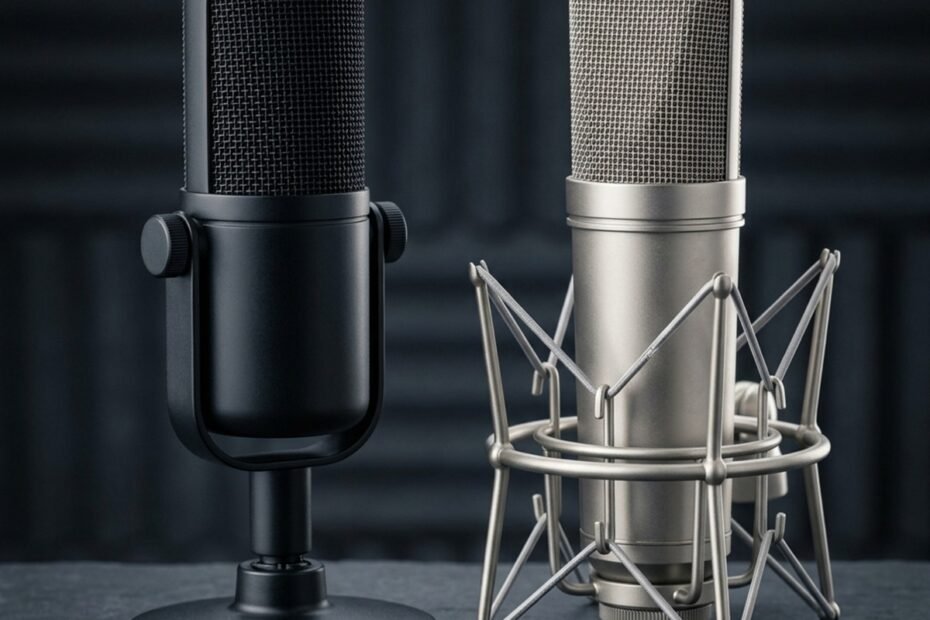
Gaming microphones feature tuned vocal presence boosts, integrated USB analog-to-digital conversion, and convenient on-board controls like tap-to-mute. Regular microphones prioritize acoustic neutrality, flat frequency response, balanced XLR connectivity, and require dedicated external preamps.
Navigating audio equipment often creates confusion between lifestyle branding and true acoustic engineering. Gamers seeking better vocal fidelity encounter dedicated gaming microphones advertised alongside legendary studio reference models. While both capture speech, their acoustic targets, hardware signal chains, and desktop workflows serve fundamentally different environments.
A gaming microphone is engineered as an all-in-one digital appliance tailored for uncompressed speech intelligibility amidst keyboard clatter and ambient fan drone. Conversely, a regular studio or broadcast microphone operates as a high-precision transducer designed to capture flat, uncolored sound within treated acoustic spaces. Understanding what is a gaming microphone requires analyzing capsule response, preamplification architecture, digital signal processing, and physical desktop constraints.
Core Comparison: What Distinguishes Gaming Mics From Regular Mics
The distinction lies in target voicing and hardware integration: gaming microphones combine capsules, preamps, and DSP into plug-and-play USB units, whereas regular studio microphones deliver uncolored acoustic capture requiring external analog interfaces.
Audio hardware categories reflect specific workflow priorities. Studio engineers demand strict acoustic linearity so recordings represent reality without artificial coloration. Competitive gamers and live streamers, however, require aggressive vocal cutting power that pushes speech above explosions, team callouts, and background mechanical switch clicks.
Architectural and acoustic design parameters differentiating microphone categories:
| Design Parameter | Dedicated Gaming Microphone | Regular Studio Microphone | Regular Office Conference Mic |
|---|---|---|---|
| Acoustic Tuning Target | Vocal presence peak (2 kHz to 6 kHz) | Flat, neutral reference response | Bandwidth-limited telecommunication vocal |
| Signal Connection | Direct USB-C / USB-A digital interface | Balanced 3-pin analog XLR interface | USB-A corded or 3.5mm analog connector |
| Internal Hardware Chain | Integrated capsule, preamp, and ADC | Passive capsule requiring external preamp | Basic low-power electret chip and codec |
| On-Board Physical Controls | Touch tap-to-mute, gain dial, 3.5mm jack | None; passive shell with rear XLR port | Push-to-talk button or volume rocker |
| Room Acoustic Demand | Moderate; directional rejection algorithms | High; captures room reflections and flutter | Low; aggressive built-in noise gating |
| Aesthetic and Chassis | Integrated shock mounts, matte accents | Industrial metal casing, standard threads | Compact plastic housing, low visual profile |
This architectural split dictates how each device functions on a daily basis. Evaluating whether you need a dedicated capsule or an existing headset requires weighing convenience against sonic purity, as detailed in our guide on gaming mic vs headset mic tradeoffs.
Target Use Case and Design Philosophy
Gaming microphones prioritize immediate desktop ergonomics and communication clarity, whereas regular studio microphones prioritize modularity, headroom, and archival-quality acoustic transparency.
Manufacturers designing peripherals for gamers recognize that most players lack sound-isolated studio booths, rackmount compressors, and outboard equalizers. As a result, gaming microphones bundle the entire recording chain inside a single desktop enclosure. The objective is frictionless deployment: plug the cable into a computer port, launch Discord or OBS, and communicate without configuring driver sample rates or analog input impedance.
Regular microphones, specifically professional studio condenser and dynamic units, follow an audiophile modularity philosophy. A studio microphone is strictly an analog sensor. It converts air pressure fluctuations into tiny millivolt electrical signals, delegating amplification, filtering, and analog-to-digital conversion to specialized external gear. This modular design allows audio engineers to pair specific microphones with distinct preamps to achieve vintage warmth or clinical transparency.
Frequency Response Tuning: Vocal Clarity vs Flat Linearity
Gaming microphones employ intentional frequency response equalization with mid-range presence boosts, while regular reference microphones maintain a flat response curve to preserve authentic timbre.
Human speech intelligibility resides predominantly in the upper mid-range between 2,000 Hz and 6,000 Hz. Consonant sounds such as t, k, s, and p provide crisp syllable definition. Gaming microphone manufacturers intentionally tune internal acoustic chambers and digital signal processors to elevate this presence band by 2 to 5 dB. This vocal shaping ensures your tactical warnings cut cleanly through dense in-game audio mixes without requiring manual equalizer adjustment.
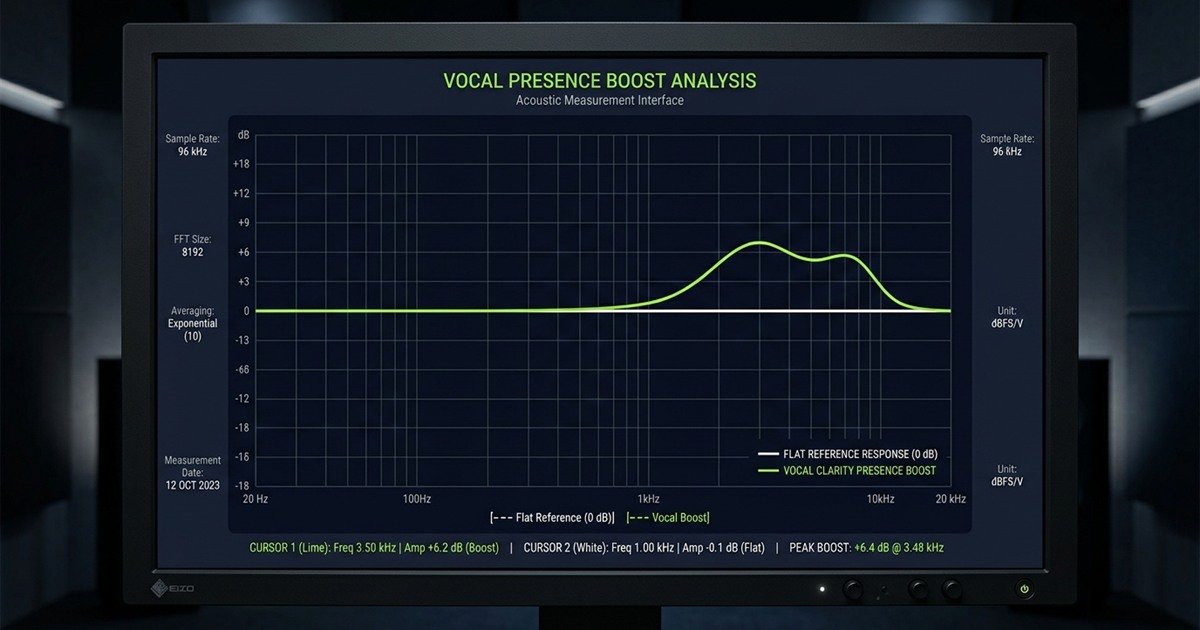
In contrast, a regular broadcast or studio condenser microphone strives for an uncolored, ruler-flat frequency response from 20 Hz to 20,000 Hz. If a studio mic artificially boosted high frequencies, recorded acoustic guitars, violins, or voiceovers would sound harsh and sibilant during mastering. While flat response curves capture voices with lifelike natural warmth, an un-equalized studio mic in an uncompressed voice channel can sound slightly darker or boomy compared to an aggressive gaming capsule.
Hardware Features and Connectivity: USB Simplicity vs XLR Flexibility
Gaming microphones connect via universal USB interfaces with on-chassis quick controls, while regular microphones rely on three-pin balanced XLR connections that offer superior shielding and analog hardware expandability.
Connectivity dictates how audio gear integrates with your operating system and desk setup. USB gaming microphones feature integrated sound cards that negotiate directly with Windows, macOS, and consoles. Studio XLR microphones require analog cabling and balanced electrical signaling to reject electromagnetic noise before reaching an external digitizer.
Interface specifications and hardware chain requirements across connection standards:
| Feature / Requirement | Integrated USB Gaming Setup | Modular Regular XLR Studio Setup |
|---|---|---|
| Physical Connector | USB Type-C or Type-A digital port | Standard 3-pin balanced XLR connector |
| Required External Hardware | None; plugs directly into PC | USB audio interface or analog hardware mixer |
| Preamplifier Circuitry | Miniaturized internal IC chip | Dedicated discrete analog preamplifiers |
| Phantom Power (+48V) | Drawn directly from 5V USB rail | Supplied by interface phantom power circuit |
| Zero-Latency Monitoring | Built-in 3.5mm stereo headphone port | Direct monitoring circuit on audio interface |
| Cable Length Tolerance | Up to 3 meters without signal repeaters | Up to 50 meters with balanced line rejection |
| Total Initial Cost Range | 50 to 130 USD complete | 140 to 350 USD (Mic, interface, XLR cable) |
Players unsure whether an investment in standalone hardware provides tangible match benefits can review our diagnostic guide on do you need a gaming microphone to evaluate current voice clarity.
On-Board Controls: Tap-to-Mute, Gain Dials, and Monitoring
Gaming microphones integrate physical quality-of-life controls directly into the chassis, allowing players to mute audio and adjust gain instantly without opening software menus mid-match.
During an intense ranked round, alt-tabbing to mute a cough or adjust voice volume can result in an eliminated character. Gaming microphone manufacturers address this with capacitive tap-to-mute sensors mounted on top of the capsule. A subtle LED indicator ring provides visual feedback, glowing red when muted and green or white when active. Rotary gain knobs and direct 3.5 mm zero-latency headphone monitoring jacks on the shell enable instant calibration.
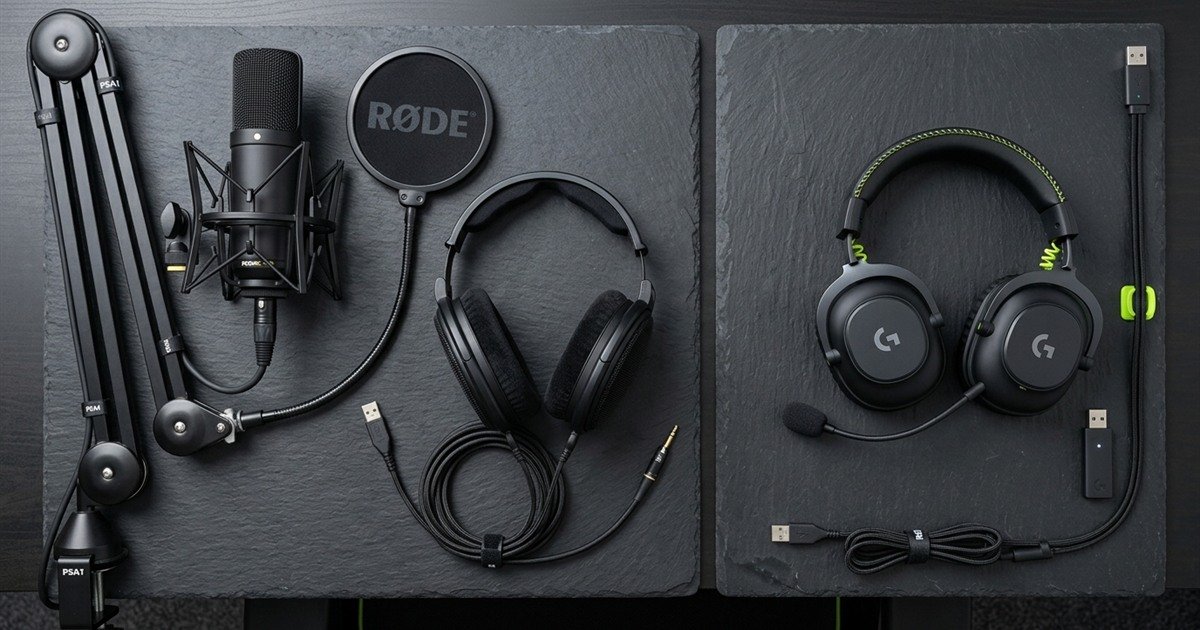
Regular studio microphones contain zero physical buttons on their chassis. They are pure acoustic instruments. If you sneeze into a classic studio condenser mic, you must reach over to an external audio mixer slider, press a physical mute switch on an interface, or configure a global software hotkey. For casual gamers, this lack of on-body tactile control introduces unnecessary friction during everyday voice sessions.
Analog-to-Digital Conversion and Driver Integration
All-in-one USB gaming microphones rely on compact internal converter chips, whereas regular studio microphones utilize dedicated interface converters that provide higher dynamic range and lower noise floors.
An analog-to-digital converter (ADC) samples continuous voltage waves and translates them into binary numbers. In a USB gaming microphone, this converter chip shares a small circuit board with LED controllers and USB controllers inside the base of the microphone. While modern 24-bit 96 kHz gaming converters deliver exceptional clarity, cramming preamps and digital circuits into close proximity can introduce faint electronic noise if USB ground loops occur.
Regular microphones keep the analog sensor isolated from digital circuitry. High-quality XLR cables utilize two out-of-phase signal conductors surrounded by a braided copper shield. Any electromagnetic hum picked up along the cable is cancelled out at the interface via common-mode rejection. The interface then digitizes the signal using high-current power supplies and premium operational amplifiers, delivering higher dynamic headroom before digital clipping.
Acoustic Performance and Room Treatment Sensitivity
Studio regular microphones possess sensitive diaphragms that reveal untreated room flutter and keyboard noise, while gaming microphones incorporate tight directional capsules designed to mitigate domestic background clatter.
A common misconception among gamers is that purchasing an expensive regular studio microphone will instantly produce pristine broadcast audio. In practice, professional studio microphones are engineered for sound-dampened recording studios treated with acoustic rockwool panels, bass traps, and heavy carpeting. In an untreated bedroom with bare plaster walls and hardwood flooring, a studio capsule captures every slap-back echo.
Acoustic performance and room treatment sensitivity matrix:
| Acoustic Metric | USB Gaming Cardioid Microphone | Studio Large-Diaphragm Condenser | Studio Broadcast Dynamic Microphone |
|---|---|---|---|
| Transducer Sensitivity | Moderate (-36 to -42 dBV/Pa) | High (-28 to -34 dBV/Pa) | Low (-54 to -59 dBV/Pa) |
| Off-Axis Rear Attenuation | 18 to 22 dB at 180 degrees | 15 to 20 dB at 180 degrees | 20 to 26 dB at 180 degrees |
| Mechanical Switch Sensitivity | Moderate; mitigated by foam mounts | High; registers distant tactile clicks | Very low; requires close speech proximity |
| Desk Vibration Dampening | Built-in elastic bands or silicone rings | External spider shock mount required | Internal pneumatic capsule suspension |
| Untreated Room Performance | Acceptable with directional orientation | Poor; prone to hollow reverberation | Excellent; rejects ambient reflections |
Evaluating overall battlestation ergonomics alongside microphone mounting solutions ensures your peripheral investments remain balanced, as outlined in our overview of gaming microphones across desktop tiers.
Background Noise Rejection and Polar Pattern Tuning
Directional cardioid polar patterns isolate vocal input from the front while creating a null zone at 180 degrees to reject mechanical keyboard typing and PC fan exhaust.
Cardioid polar patterns exhibit heart-shaped sensitivity, capturing sounds directly in front of the capsule while progressively attenuating sounds arriving from the sides and rear. Gaming microphones optimize this rear null zone to assist battlestation placement. By positioning the rear of the microphone directly facing your mechanical keyboard, clattering switch noise falls into the acoustic dead zone.
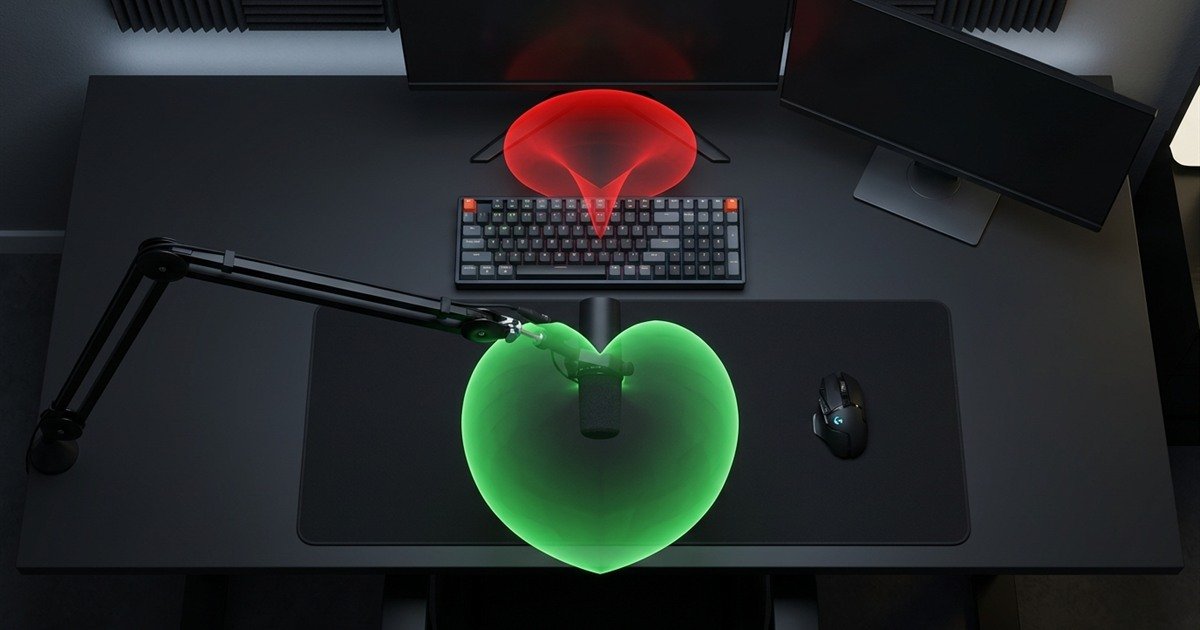
Many multi-pattern gaming microphones feature selectable pickup settings, including omnidirectional, bidirectional (figure-8), and stereo modes. For competitive gaming, omnidirectional and stereo modes are counterproductive because they draw in 360-degree room echoes and keyboard reverberations. Sticking strictly to cardioid mode ensures maximum focus on your voice.
Sensitivity to Untreated Room Reflections and Keyboard Clatter
Large-diaphragm regular studio microphones capture minute air vibrations across the entire room, requiring deliberate acoustic dampening to avoid hollow, boxy vocal coloration.
A gold-sputtered studio condenser diaphragm measures up to 25 millimeters in diameter and possesses microscopic mass. It responds instantaneously to sound pressure changes, capturing breath inflections and subtle harmonics. However, when deployed in an untreated room, that extreme transient sensitivity records sound waves bouncing off bare walls and ceiling corners, producing a hollow, bathroom-like vocal quality.
Gaming microphones frequently employ smaller electret condenser capsules or heavier dynamic elements that require higher acoustic energy to move. This lower raw sensitivity functions as an advantage in untreated spaces: quieter reverberant reflections lack sufficient acoustic energy to register strongly, keeping the focused vocal signal clean and legible.
Software Ecosystems and Digital Signal Processing (DSP)
Gaming microphones utilize bundled software suites with automated digital noise suppression, EQ presets, and voice gates, whereas regular microphones rely on analog hardware or host DAW plug-ins.
The modern gaming microphone is fundamentally a software-enhanced peripheral. Peripheral brands supply companion utility software that injects digital signal processing directly into the Windows audio pipeline. These suites simplify audio management for users without sound engineering backgrounds.
Digital processing features compared to analog studio hardware signal chains:
| Signal Processing Layer | Gaming Microphone Software Suite | Regular Studio Hardware / DAW Chain |
|---|---|---|
| Noise Suppression | AI-assisted background cancellation algorithms | Physical acoustic treatment and downward expanders |
| Noise Gate Threshold | Automated graphic slider with visual dB meter | Hardware noise gate unit or VST plug-in insert |
| Dynamic Compression | Single-click broadcast voice profile presets | Optical or VCA studio compressor hardware |
| Equalization (EQ) | 3-band to 10-band graphic interface with presets | Parametric hardware EQ or analog console strips |
| Voice Modifiers / Effects | Fun voice filters, pitch shifters, and soundboard | Dedicated pitch-correction and modulation plug-ins |
| System Resource Usage | Low to moderate background CPU/RAM overhead | Zero overhead on hardware; interface DSP handles load |
Proprietary Gaming Software Suites vs Hardware Preamp Processing
Companion software applications allow gamers to apply broadcast filters, clip guards, and RGB lighting profiles through single-click visual interfaces.
Software ecosystems from peripheral makers provide automated leveling algorithms that prevent harsh distortion during sudden shouts. When an excited gamer shouts during a clutch play, proprietary digital limiters attenuate the signal before clipping occurs. Additionally, these utilities integrate digital audio routing matrices, enabling creators to split game sound, Discord callouts, and music into separate virtual channels for OBS streaming.
Regular microphones provide zero bundled software. To process a regular XLR studio microphone, you must purchase a high-end audio interface with internal DSP chips or insert VST audio filters inside recording applications like Reaper, OBS, or Voicemeeter. This provides complete creative freedom, but requires technical understanding of ratios, thresholds, and attack times.
Do not buy an expensive regular studio microphone expecting instant broadcast perfection. In an untreated room, an all-in-one USB gaming microphone with calibrated noise suppression and on-board mute delivers clearer voice chat with significantly less setup friction.
Built-In Noise Gates, Compressors, and Voice Modifiers
Noise gates mute the microphone when you are not speaking, eliminating continuous PC cooling fan drone and distant household noise from open voice channels.
In competitive gaming, an open microphone transmitting continuous breathing or cooling fan whir creates severe fatigue for teammates. Built-in gaming software suites integrate automated noise gates that silence microphone input whenever vocal amplitude falls below a designated decibel threshold. Once you begin speaking, the gate opens instantly, transmitting your callout cleanly before closing again.
Furthermore, digital compressors even out voice volume variations. When players speak softly during tense reconnaissance and subsequently shout tactical calls during firefights, compression attenuates loud spikes while boosting subtle syllables. This maintains consistent listening levels across your entire gaming squad without manual gain adjustment.
Practical Decision Framework: Which Microphone Fits Your Setup
Select a gaming microphone if you prioritize plug-and-play simplicity, physical mute controls, and untreated room resilience; choose a regular microphone if you require modularity, music recording, and studio-grade signal paths.
Choosing between these two peripheral categories comes down to matching hardware capabilities with your physical workspace, technical patience, and primary audio activities. Spending additional budget on studio gear produces zero competitive advantage if all communication occurs over compressed voice chat.
Setup compatibility matrix matching microphone categories to specific use cases:
| Primary Battlestation Activity | Optimal Choice | Decisive Factor | Key Setup Trade-Off |
|---|---|---|---|
| Competitive Ranked Matchmaking | USB Gaming Microphone | Tap-to-mute, voice clarity EQ, desk simplicity | Lacks analog expandability for professional DAWs |
| Casual Co-Op and Discord Hangouts | USB Gaming Microphone | Frictionless setup; under 80 USD complete | Slight electronic noise floor under high gain |
| Dedicated Twitch / YouTube Live Streaming | USB Gaming Mic or XLR Dynamic | Dynamic element rejects mechanical keyboard clatter | XLR requires interface, boom arm, and extra budget |
| Vocal Recording and Music Production | Studio Regular XLR Condenser | Wide frequency linearity and 24-bit headroom | Requires treated room acoustics and outboard interface |
| Hybrid Remote Office and Evening Gaming | USB Gaming Microphone | Physical mute button, clean desktop footprint | Visual gamer styling may require subtle RGB off setting |
Sequential evaluation steps to choose between a gaming and regular microphone:
- Assess Room Acoustics: Inspect your battlestation walls and flooring. If your space features bare drywall, windows, and hard tiles without acoustic foam, avoid sensitive studio condenser microphones and select a directional gaming mic or broadcast dynamic.
- Determine Physical Control Needs: Evaluate how frequently you mute communication during matches. If you need instantaneous physical touch muting without hotkey conflicts, an all-in-one gaming microphone is indispensable.
- Evaluate Desktop Real Estate: Check whether you have space for an external audio interface box alongside cables. If desk surface area is restricted by a wide esports mousepad, an integrated USB gaming microphone clamped to an arm saves valuable room.
- Define Content and Recording Scope: If your goals include singing, voice acting, instrument recording, or podcast production, invest in a regular XLR studio setup that expands with modular outboard preamps.
- Calculate Total System Budget: A complete gaming USB microphone setup costs between 60 and 120 USD. A dependable regular XLR setup requires between 150 and 300 USD once the microphone, interface, balanced cable, and shock mount are calculated.
Frequently Asked Questions
Frequently asked questions regarding gaming microphones and regular audio hardware:
What is the main difference between a gaming microphone and a regular microphone?
The primary difference is target voicing and hardware integration. Gaming microphones are all-in-one USB units with presence-boosted vocal curves and on-board controls, while regular microphones deliver flat acoustic capture requiring external preamps.
Are regular studio microphones better than gaming microphones?
Regular studio microphones offer superior acoustic transparency and lower self-noise, but only in sound-treated rooms. In untreated rooms, their extreme sensitivity often captures distracting room echo and keyboard noise.
Can you use a regular microphone for gaming and Discord?
Yes, regular microphones work seamlessly for gaming when connected to an audio interface. However, they lack convenient on-chassis tap-to-mute buttons and require software hotkeys or interface switches to mute.
Does a gaming microphone have better sound quality than an office USB mic?
Yes, gaming microphones feature larger condenser or dynamic capsules with wider frequency response and superior signal-to-noise ratios compared to basic teleconferencing microphones tuned strictly for compressed telephone-grade speech.
Why do gaming microphones have boosted high frequencies?
Gaming microphones boost upper mid-range frequencies between 2 kHz and 6 kHz to emphasize speech consonant definition, ensuring tactical callouts cut through dense in-game explosions and gunfire audio.
Do regular XLR microphones require an external audio interface?
Yes, regular XLR microphones output low-voltage analog signals that require an external audio interface or mixer to provide preamplification, 48V phantom power, and analog-to-digital conversion before reaching your PC.
How does microphone sensitivity affect keyboard noise pickup?
High-sensitivity studio condenser capsules detect faint ambient vibrations, registering distant mechanical switch clicks, whereas lower-sensitivity gaming dynamic capsules require close vocal proximity and ignore distant clatter.
Can software DSP make a regular microphone function like a gaming mic?
Yes, host software tools like OBS or Equalizer APO can apply noise gates, presence EQ, and compressor filters to a regular microphone, replicating gaming suite functionality with extra setup effort.
Which microphone type is better for streaming and content creation?
Both are viable, but USB gaming microphones provide faster setup and virtual audio routing, while regular XLR dynamic microphones offer greater long-term durability and acoustic headroom for full-time content creators.
Do esports tournament players use gaming or regular microphones?
In official LAN tournaments, players use dedicated tournament aviation-style headsets with passive noise-canceling boom microphones for sound isolation, reserving standalone microphones for home streaming setups.
How much should you spend on a gaming mic compared to a regular mic setup?
A quality USB gaming microphone costs 60 to 120 USD complete. A dependable regular XLR setup requires 150 to 300 USD when factoring in the microphone, audio interface, and balanced cabling.
When is a regular studio microphone a better investment than a gaming microphone?
A regular studio microphone is a superior investment if you record music, narrate audiobooks, perform voice acting, or already own an audio interface and possess an acoustically treated recording space.