
Choosing your first gaming keyboard for FPS games can feel harder than it should. Specs such as actuation, polling rate, switch type, and Rapid Trigger can make a beginner feel like every detail matters, but your first keyboard does not need to be built around every advanced feature.
For FPS beginners, the better starting point is simple: choose a keyboard that gives you reliable movement input, a comfortable layout, and a key feel you can use consistently. From there, you can decide whether more specialized features are actually worth paying for.
What Should Your First Gaming Keyboard Do for FPS?
Your first gaming keyboard should provide reliable movement input, a comfortable layout, and consistent key response without making you pay for features you do not need.
In FPS games, your keyboard is primarily responsible for movement and other repeated key inputs. You may hold or tap movement keys while using abilities, crouching, jumping, or switching actions at the same time. That makes predictable input and comfortable key placement more important than having the most impressive specification sheet.
A first keyboard should also fit the way you actually use your desk. A larger board can take up valuable space that could otherwise be used for mouse movement, while a compact layout may remove keys you regularly use outside of gaming. The right choice therefore depends on both your FPS setup and your everyday needs.
What Matters During FPS Movement?
FPS beginners should first look for consistent movement input and a layout that lets them reach frequently used keys without awkward hand positioning.
Movement in an FPS is built around repeated inputs rather than a single key press. Walking, strafing, crouching, jumping, and using abilities can require different combinations of keys within a short period. A keyboard that feels predictable under those inputs can make the controls easier to learn and use consistently.
Comfort matters for the same reason. If the layout forces you to stretch for frequently used keys or takes up more desk space than you can comfortably spare, a technically capable keyboard may still be a poor first choice. Your goal is not to maximize the number of features. It is to find a control setup that feels natural enough that the keyboard stops becoming something you have to think about.
What a First FPS Keyboard Cannot Fix
A gaming keyboard can improve the consistency of your controls, but it cannot directly improve aim, positioning, game sense, or decision-making.
That distinction is important for beginners because gaming hardware is often presented through performance claims that are broader than what the hardware can actually change. A responsive keyboard can give you a predictable way to send movement inputs, but it does not make those decisions for you or replace practice.
The same applies to premium specifications. A higher-end keyboard may offer features that are useful for particular players, but those features should solve an actual problem in your setup rather than become the reason you buy the keyboard in the first place.
If you are still deciding what separates an FPS-focused keyboard from a general keyboard, a gaming keyboard for FPS games provides the broader foundation before you narrow down your first purchase.
For a first FPS keyboard, prioritize reliable input, comfortable positioning, and a layout that fits your setup before chasing advanced specifications.
Which Keyboard Features Matter Most for FPS Beginners?
FPS beginners should prioritize reliable key registration, comfortable movement, consistent key response, and a suitable layout before spending more on advanced or cosmetic features.
The most important keyboard features are easier to understand when their practical role is separated from cosmetic and secondary features:
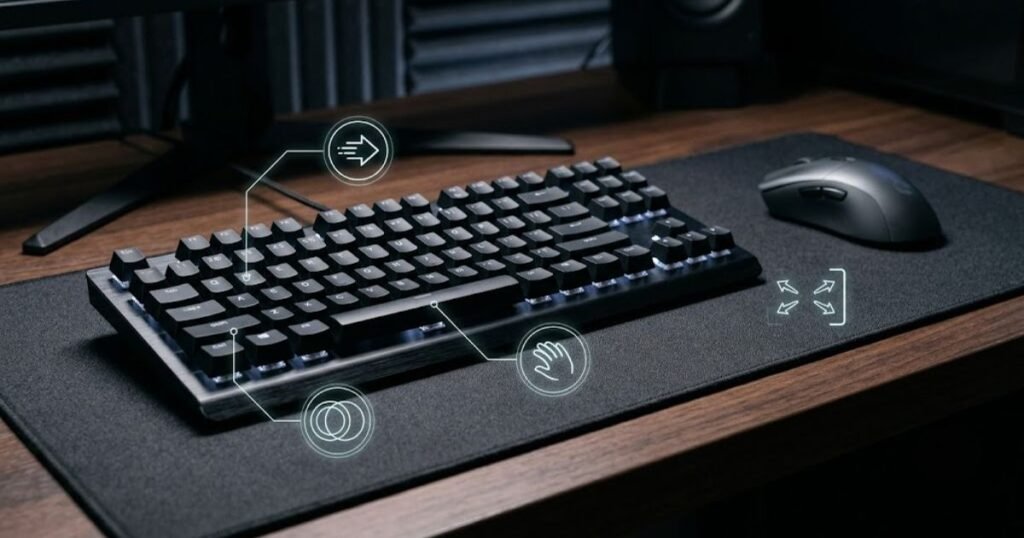
The easiest mistake for a first-time buyer is treating every specification as equally important. A gaming keyboard can have a long list of features, but that does not mean each one has the same effect on everyday FPS use. Beginners usually get more value from identifying the few characteristics that directly affect how the keyboard feels and behaves during play.
| Feature | Priority | Why It Matters |
|---|---|---|
| Layout | High | Determines available desk space and how easily you reach the keys you use. |
| Key registration | High | Helps simultaneous movement and action inputs register reliably. |
| Switch feel | High | Changes how movement keys feel during repeated presses. |
| Input consistency | High | Keeps repeated key presses predictable during gameplay. |
| Advanced actuation features | Medium | Can provide additional control options but are not essential for every beginner. |
| RGB lighting | Low | Primarily affects appearance rather than FPS input. |
| Extra media controls | Low | Can improve convenience but do not directly determine FPS control quality. |
Layout deserves attention because it affects more than how the keyboard looks on your desk. The amount of space the keyboard occupies can change how much room remains for your mouse, while the position and availability of keys can affect how easily you access actions outside basic movement.
Key registration and input consistency are also practical considerations for FPS beginners. Movement often involves combinations of inputs rather than isolated presses, so the keyboard should behave predictably when several keys are used together.
Switch feel belongs on the priority list for a different reason. It changes the physical experience of pressing the keys, which can affect whether repeated movement inputs feel comfortable over longer sessions. The important point for a beginner is not choosing a switch because it has the most impressive specification, but finding a feel that works with your normal use.
Advanced actuation features sit lower on the priority list because their usefulness depends more heavily on the individual player. They can become valuable when a player understands why a particular feature would improve their setup, but they should not automatically outrank basic comfort and reliable input.
The best first FPS keyboard is not the one with the most features. It is the one that gets the important fundamentals right while leaving features you do not need out of the buying decision.
Which Keyboard Layout Is Best for FPS Beginners?
TKL is a practical starting point for many FPS beginners because it removes the numpad without removing the familiar function row and arrow keys, while smaller layouts can make more sense when maximizing mouse space is the priority.
Keyboard layouts become easier to compare when their physical size and available keys are viewed side by side:
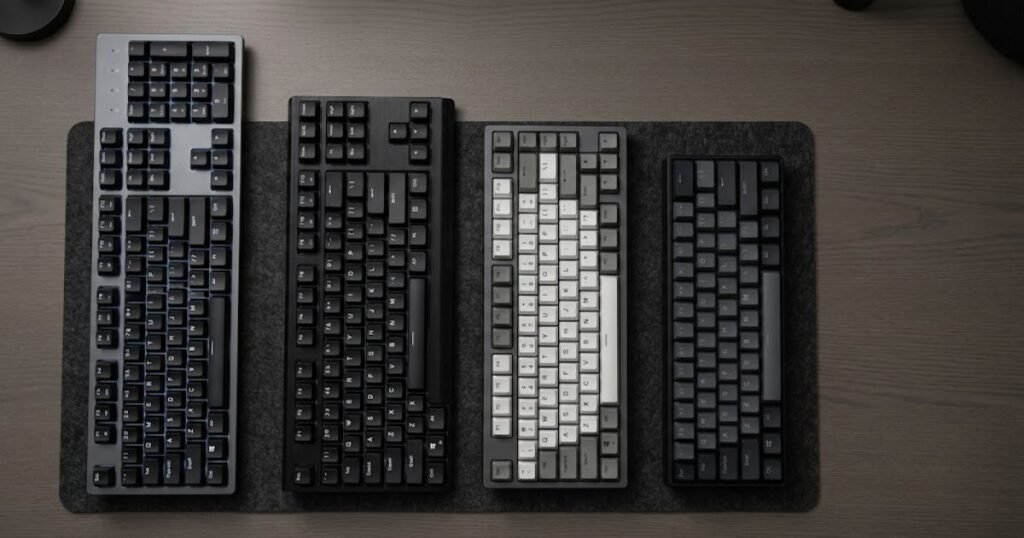
Keyboard size matters in FPS because the keyboard and mouse share the same limited desk space. A larger board can push the mouse farther to the side, while a compact board leaves more room for wider mouse movement. The right layout therefore depends less on having the smallest keyboard possible and more on which keys you actually need during gaming and everyday use.
| Layout | Desk Space | Beginner Fit | Main Tradeoff |
|---|---|---|---|
| Full-size | Highest usage | Good for users who need every standard key | Leaves less room for mouse movement |
| TKL | Moderate | Strong starting point for many FPS beginners | Still takes more space than compact layouts |
| 75% | Lower | Good for users who want a compact setup without going very small | Uses a more compact key arrangement |
| 60% | Lowest | Best suited to users comfortable with fewer dedicated keys | Removes dedicated function and arrow keys |
Is TKL a Good First FPS Keyboard Layout?
TKL is a strong first choice when you want more mouse space than a full-size keyboard provides without giving up the familiar function row and dedicated arrow keys.
The main advantage of TKL is the balance it provides. Removing the numpad reduces the keyboard’s footprint while keeping a layout that feels familiar to most users who have previously used a standard desktop keyboard. This can make the transition easier for beginners who want a more FPS-friendly setup without adapting to a highly compact board.
TKL can also make sense when the keyboard and mouse need to share a relatively narrow desk. The additional space created by removing the numpad can give the mouse more room to move without requiring the player to give up commonly used keys.
When Does a 75% or 60% Layout Make Sense?
A 75% or 60% keyboard makes sense when saving desk space is more important to you than keeping every dedicated key found on a larger layout.
A 75% layout keeps many familiar functions in a more compact arrangement, making it a middle ground for users who want to reduce keyboard width without making the jump to a 60% board. A 60% layout goes further by removing dedicated function and arrow keys, which can create substantially more room for the mouse.
That smaller footprint can be useful for players who use a wide mouse movement range or have limited desk space. The tradeoff is that some keys may require secondary key combinations or a different way of accessing them, which may matter if the keyboard is also used for school, work, or other everyday tasks.
For a first keyboard, there is no advantage in choosing the smallest layout simply because it is compact. The better choice is the layout that gives you enough mouse space while keeping the keys you actually use accessible.
Choose the smallest keyboard layout that still gives you the keys you regularly need, with TKL offering a straightforward balance for many FPS beginners.
Which Switch Type Should FPS Beginners Choose?
Linear switches are a practical starting point for many FPS beginners because their smooth, consistent press can feel predictable during repeated movement inputs, but tactile and clicky switches can also work when their feedback matches the player’s preference.
The physical differences between common switch types are easier to understand when their internal mechanisms are shown together:
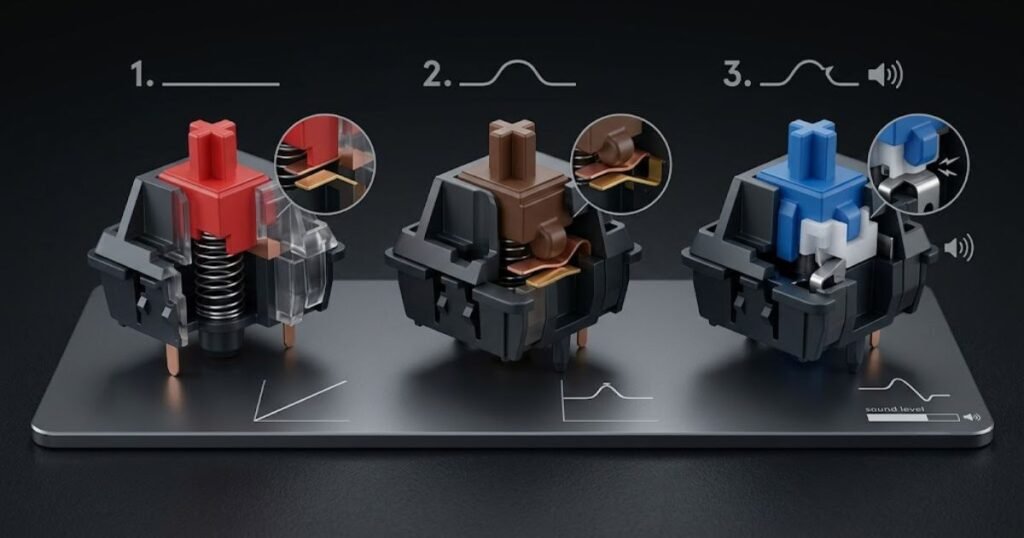
Switch type mainly changes how a key feels when you press and release it. For a first FPS keyboard, that physical feel matters because movement keys such as W, A, S, and D may be pressed repeatedly throughout a match. The goal is not to find a switch that is universally best for FPS, but to choose a feel that remains comfortable and predictable during longer sessions.
| Switch Type | Key Feel | FPS Consideration | Main Tradeoff |
|---|---|---|---|
| Linear | Smooth and consistent | Can feel predictable during repeated movement inputs | Provides less physical feedback during the press |
| Tactile | Noticeable bump | Provides physical feedback when the key actuates | The bump changes the feel of repeated presses |
| Clicky | Tactile and audible | Can work for players who prefer clear feedback | Produces more noise than other switch types |
Are Linear Switches a Good Starting Point for FPS?
Linear switches are often a straightforward starting point for FPS because the key travels smoothly without a tactile bump interrupting the press.
That smooth feel can make repeated movement inputs feel consistent, especially for players who prefer a uniform press from the beginning to the end of the key travel. It can also make the keyboard feel less distracting when the player is repeatedly tapping or holding movement keys.
However, a smooth press is a preference rather than a guarantee of better FPS performance. A beginner who dislikes the feel of linear switches may perform and play more comfortably with another switch type. The physical feedback you prefer during normal typing and gaming should therefore carry more weight than the label alone.
Are Tactile Switches Good for FPS?
Tactile switches can work well for FPS beginners who prefer noticeable physical feedback when pressing a key.
The tactile bump gives the press a distinct change in resistance, which some users find useful when they want more feedback from their inputs. This can make the keyboard feel more deliberate during both gaming and everyday typing.
There is no need to avoid tactile switches simply because they are not linear. Their suitability depends on whether that feedback feels comfortable and predictable to you. For a first keyboard, personal preference is more useful than assuming one switch category automatically produces better FPS results.
When Do Clicky Switches Make Sense?
Clicky switches make sense when you enjoy strong tactile and audible feedback and can use a louder keyboard without creating a problem in your environment.
The main distinction is sound as well as feel. Clicky switches produce an audible click during operation, which some users enjoy because it makes each press feel more distinct. That same characteristic can become a drawback in a shared bedroom, office, classroom, or other quiet environment.
For FPS beginners, the decision should therefore consider where and how the keyboard will be used. If you like the feedback and noise is acceptable, clicky switches can be a reasonable choice. If you need quieter operation, linear or tactile options may be easier to live with.
Switch feel is only one part of keyboard behavior. If you are comparing how switches relate to actuation and other FPS-focused keyboard characteristics, gaming keyboard features that matter for FPS covers those considerations separately.
For a first FPS keyboard, choose the switch that gives you a comfortable and predictable feel during repeated inputs rather than assuming one switch type is automatically superior.
How Important Are Keyboard Latency and Key Registration for Beginners?
Keyboard latency and reliable key registration matter for FPS beginners, but they should be treated as practical performance factors rather than numbers to chase without understanding their effect.
The relationship between a key press and registered input can be visualized as a simple input path:
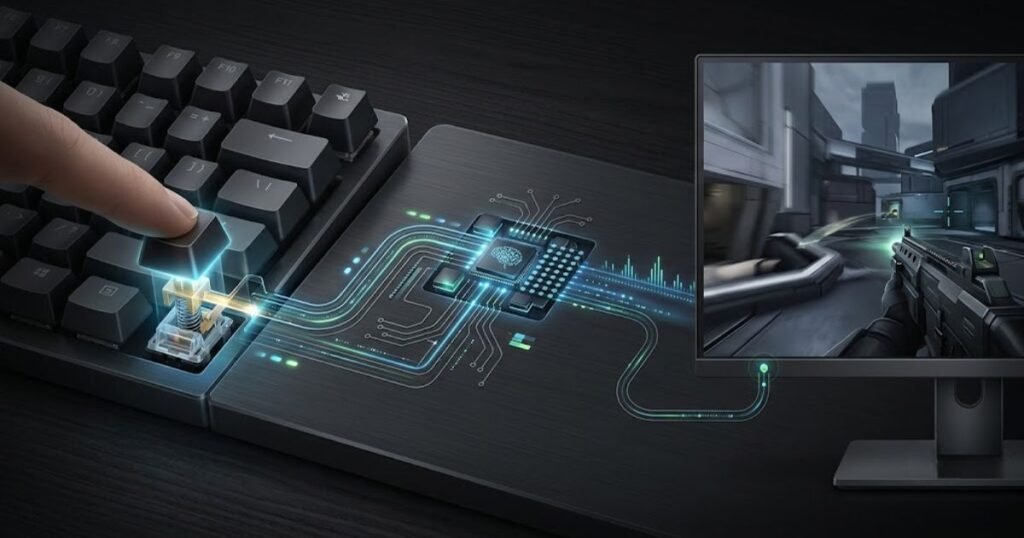
When you press a key in an FPS, the input needs to be detected and registered before the game can respond to it. For a beginner, the important question is not whether a keyboard has the highest advertised polling rate or the lowest claimed latency. It is whether the keyboard provides predictable input when you press one or several keys during normal gameplay.
What Does Keyboard Latency Actually Mean?
Keyboard latency is the delay between a physical key press and the keyboard’s input being registered by the system.
Lower latency can reduce the delay between an action and its registration, which can matter in games where movement and other inputs happen quickly. However, a beginner should not evaluate a keyboard from its latency figure alone. The number only describes one part of the input process and does not tell you whether the keyboard is comfortable, suitable for your layout, or useful for your actual playstyle.
This is also why advertised latency figures should be treated carefully when comparing keyboards. Different manufacturers may measure or present performance differently, so a lower number on a product page does not automatically mean the keyboard will create a noticeable improvement in every setup.
Does Polling Rate Matter for a First FPS Keyboard?
Polling rate describes how frequently a keyboard reports its input state, but a higher polling rate should not automatically be treated as a requirement for FPS beginners.
A higher reporting frequency can reduce the maximum interval between reports, but that does not mean every player will experience a meaningful difference from moving to a higher polling rate. The rest of the input system still matters, including the keyboard’s implementation, the computer, and the game.
For a first keyboard, polling rate is therefore better viewed as one specification within a larger performance picture. It should not outweigh basic considerations such as reliable key registration, comfortable key feel, and a layout that works with your desk.
Why Does Key Registration Matter During FPS Movement?
Reliable key registration matters because FPS movement can require several inputs to be detected together without unexpected missed or incorrect presses.
A player may hold one movement key while pressing another, then combine movement with crouching, jumping, or an ability input. The keyboard needs to recognize those presses consistently so the game receives the intended commands.
This is where features such as rollover and anti-ghosting become relevant. They are designed to help keyboards handle multiple key presses without producing unintended results. For a beginner, their value is practical: the keyboard should behave predictably when several keys are pressed during normal play.
| Feature | What It Affects | Beginner Priority |
|---|---|---|
| Input latency | Delay between a key press and its registration | High |
| Polling rate | How frequently the keyboard reports its input state | Medium |
| Key registration | Whether intended key presses are detected reliably | High |
| N-key rollover | Ability to register multiple simultaneous key presses | Useful |
| Actuation point | Where during key travel an input is registered | Medium |
| Rapid Trigger | Dynamic reset behavior based on key movement | Optional |
For most beginners, the practical priority is straightforward: the keyboard should register the inputs you make consistently before you worry about maximizing every response specification. Advanced features can become useful later when you understand what limitation you are trying to solve.
A first FPS keyboard should give you predictable input behavior rather than encourage you to choose a keyboard simply because one specification has a larger or smaller number.
Which Gaming Keyboard Features Can Beginners Ignore?
FPS beginners can usually ignore features that mainly add visual appeal, convenience, or specialized control options when those features do not solve a real problem in their setup.
A first gaming keyboard is easier to choose when you separate useful capabilities from features that simply make a product sound more advanced. A longer specification list does not necessarily make a keyboard a better fit for a beginner. What matters is whether a feature changes something you actually need during gaming or everyday use.
These features can usually be treated as secondary when choosing a first FPS keyboard:
- RGB lighting: Primarily changes the keyboard’s appearance rather than how FPS inputs are registered.
- Extra media controls: Useful for convenience, but they are not essential to controlling an FPS.
- Premium materials: Worth prioritizing when they provide meaningful durability or a feel you value, not simply because they make the keyboard more expensive.
- Unused macro features: Useful only when they support an actual gaming or workflow requirement.
- Extreme specifications: Should not outrank basic considerations such as reliable input, comfort, and a suitable layout.
That does not mean these features are bad. RGB can make a setup more enjoyable, media controls can be convenient, and advanced functions can become useful for a more experienced player. The important distinction is that none of them should automatically determine your first purchase.
Beginners should also be careful about buying a feature simply because it is associated with competitive gaming. A feature can be technically impressive while having little practical value for the way you play. This is especially relevant when comparing keyboards that differ substantially in price but offer similar fundamentals.
That buying pattern is also why it is useful to recognize common gaming keyboard mistakes before committing to a first keyboard. The issue is not having too many features; it is paying for features without knowing what problem they are supposed to solve.
Ignoring unnecessary features makes the first purchase simpler and keeps your budget focused on the parts of the keyboard that affect your actual use.
How Much Should You Spend on Your First FPS Gaming Keyboard?
Your first FPS gaming keyboard does not need to be expensive; the right budget is the one that covers reliable input, a suitable layout, comfortable use, and the features you will actually benefit from.
Price should come after you know what you need from the keyboard. Spending more can give you better construction, additional customization, or specialized performance features, but a higher price does not automatically make a keyboard a better first choice for FPS. Beginners should first identify the characteristics that matter to their setup and then decide how much they are willing to pay for them.
What Should an Entry-Level FPS Keyboard Provide?
An entry-level FPS keyboard should cover the fundamentals well enough that you do not have to compromise on reliable input, comfortable use, or an appropriate layout.
At this level, the goal is not to collect advanced features. A suitable layout, dependable key registration, a switch feel you are comfortable with, and reasonable build quality are more important than premium extras.
This makes an entry-level keyboard a sensible choice when you are still learning what you prefer. You may discover later that you want a different switch feel, a smaller layout, or a more specialized feature. There is little reason to pay for those preferences before you know that you actually need them.
When Does a Mid-Range Keyboard Make Sense?
A mid-range keyboard makes more sense when you want better construction, more flexibility, or useful features that you expect to keep using for several years.
The additional cost can be worthwhile when it improves something you already identified as important. For example, a player who knows they want a particular switch experience or more customization may benefit from spending more than they would on a basic board.
The key is to connect the extra cost to a specific benefit. If you cannot explain what the additional money gives you that your current choice does not, moving into a higher price tier may not improve the decision.
When Is a Premium FPS Keyboard Worth Paying For?
A premium FPS keyboard is worth considering when its specialized features address a specific need rather than simply offering a longer list of specifications.
Features such as adjustable actuation or Rapid Trigger can become relevant for players who understand how those functions affect their preferred controls. However, beginners do not need to treat them as mandatory requirements for a first FPS keyboard.
A premium keyboard can also make sense when you value factors beyond FPS performance, such as build quality, customization, or long-term ownership. The important question is whether those benefits justify the additional cost for you.
| Budget Level | Main Goal | What to Prioritize |
|---|---|---|
| Entry-level | Reliable first keyboard | Input consistency, suitable layout, comfortable key feel, and basic build quality |
| Mid-range | Better long-term value | Build quality, switch flexibility, and features with practical value |
| Premium | Specialized performance and customization | Advanced actuation, Rapid Trigger, tuning options, or premium construction |
The most important distinction between these tiers is not the price itself. It is how clearly the additional features solve a problem. A beginner who only needs dependable movement input may gain little from a premium keyboard, while a player who already knows which advanced features they want may have a stronger reason to spend more.
It is also worth keeping the rest of your setup in perspective. Your first keyboard is only one part of an FPS setup, so putting a disproportionate amount of your budget into a keyboard can make less sense if other equipment still has more obvious limitations.
Choose your budget based on the features you can justify using, rather than assuming a more expensive keyboard will automatically provide a better FPS experience.
How to Choose Your First Gaming Keyboard for FPS
Choose your first FPS gaming keyboard by narrowing down the layout, switch feel, practical input needs, and budget before comparing individual models.
By this point, the important characteristics are already separated. The next step is not to learn another specification. It is to turn those priorities into a buying decision. This approach helps beginners avoid comparing keyboards based on features that sound impressive but do not address an actual need.
Use the following process to narrow down your first FPS keyboard:
- Choose the layout: Decide how much desk space you need and which keys you regularly use for gaming and everyday tasks.
- Choose the switch feel: Pick the key feel that remains comfortable and predictable during repeated inputs.
- Set your performance priorities: Decide whether reliable key registration, input response, or advanced actuation features actually matter for the way you play.
- Set your budget: Decide how much you are willing to spend before premium features influence the purchase.
- Compare suitable models: Only compare keyboards that already match your layout, switch preference, practical performance needs, and budget.
The last step is where many first-time buyers can simplify the process. Once you have eliminated keyboards that do not fit your basic requirements, you do not need to compare every available model on the market. A smaller shortlist makes differences in build quality, features, and price easier to evaluate.
Your everyday use should also influence the final choice. If the keyboard will be used for school, work, or general typing as well as FPS, a highly compact layout or gaming-specific feature set may not be the best fit simply because it is marketed toward gamers. In that situation, comparing a gaming keyboard vs office keyboard can help frame the tradeoffs around how you actually use your keyboard.
Most importantly, do not reverse the process by starting with a premium keyboard and then trying to justify its features. Start with your requirements, remove unsuitable options, and let the remaining differences determine which model offers the best fit.
The right first FPS keyboard is the one that satisfies your actual requirements before its extra features become part of the decision.
First Gaming Keyboard for FPS Beginners FAQ
These questions cover the basic concepts, technical considerations, and buying decisions that matter most when choosing a first gaming keyboard for FPS.
What Is a Gaming Keyboard for FPS?
A gaming keyboard for FPS is a keyboard designed to provide responsive, consistent input for movement and other actions commonly used in first-person shooter games.
What Is the Best Keyboard Layout for FPS Beginners?
There is no single best layout for every beginner. TKL is a practical starting point for many players because it removes the numpad while keeping familiar keys, while smaller layouts can provide more mouse space.
What Does a First Gaming Keyboard Need?
A first gaming keyboard needs reliable input, a comfortable layout, a suitable key feel, and features that match the player’s actual needs. Advanced features are optional rather than mandatory.
Does Keyboard Latency Matter for FPS Beginners?
Yes. Keyboard latency affects the delay between a physical key press and its registration, but beginners should prioritize reliable and consistent input rather than choosing a keyboard solely because it advertises the lowest latency.
Does Polling Rate Matter for FPS?
Polling rate describes how frequently a keyboard reports its input state. A higher polling rate can reduce the maximum interval between reports, but it should not be treated as a requirement for every FPS beginner.
Do FPS Beginners Need Rapid Trigger?
No. Rapid Trigger is an optional feature that can be useful for players who specifically want dynamic key reset behavior, but a beginner can have a suitable FPS keyboard without it.
Should FPS Beginners Buy a TKL or 60% Keyboard?
Choose TKL when you want a familiar layout with more mouse space than full-size, and consider 60% when maximizing desk space matters more than keeping dedicated function and arrow keys.
Are Linear Switches Better for a First FPS Keyboard?
Linear switches can be a practical starting point because their smooth press may feel predictable during repeated movement inputs, but tactile and clicky switches can also be suitable when their feedback matches your preference.
How Much Should a Beginner Spend on an FPS Gaming Keyboard?
A beginner should spend enough to get reliable input, a suitable layout, comfortable key feel, and the features they will actually use. A higher price is not automatically better if the extra features do not solve a real need.
What Matters Most When Choosing a First FPS Keyboard?
Prioritize the characteristics that affect everyday use: a suitable layout, comfortable key feel, reliable key registration, and consistent input. These fundamentals should come before cosmetic or specialized features.
Can a Gaming Keyboard Improve FPS Aim?
A gaming keyboard does not directly improve aim. It can provide consistent movement and action inputs, but aiming still depends on factors such as mouse control, positioning, and player skill.
Is an Expensive Gaming Keyboard Better for FPS Beginners?
Not necessarily. A more expensive keyboard can provide better construction or specialized features, but the best first keyboard is the one that matches the beginner’s actual requirements rather than the one with the highest price or longest specification list.
Thanks for reading, and I hope this guide helps you choose your first gaming keyboard for FPS with confidence.