
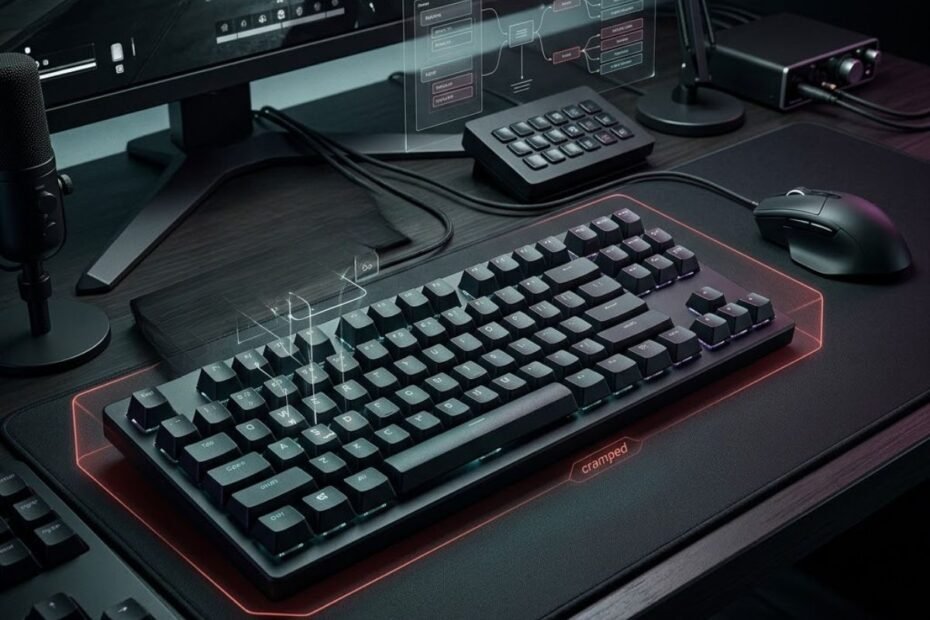
Gaming keyboard mistakes are often less obvious than they seem. A keyboard can feel too slow, uncomfortable, inconsistent, or difficult to use, but the problem is not always the hardware itself. In many cases, the mistake starts with choosing features for the wrong reason, using a setup that does not fit, or changing settings without a clear way to evaluate the result.
The most common gaming keyboard mistakes usually fall into three areas: choosing a keyboard without a clear need, using or configuring it in a way that creates unnecessary problems, and replacing it before proving that the keyboard is actually the limitation. Understanding where the mistake comes from makes it easier to fix the right problem instead of spending money on another piece of gear.
What Are the Most Common Gaming Keyboard Mistakes?
The most common gaming keyboard mistakes include choosing features without a real need, selecting an unsuitable layout or switch, chasing overly sensitive settings, creating inefficient keybinds, ignoring comfort, changing configurations too often, neglecting basic maintenance, and replacing a keyboard before confirming that it is the actual problem.
A useful way to understand these mistakes is to separate keyboard problems from setup and user behavior:
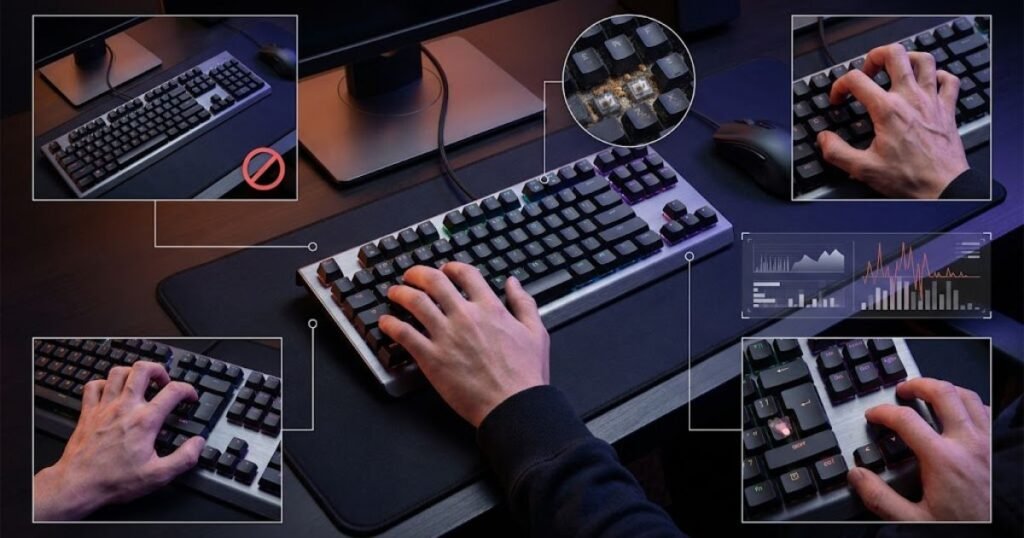
These mistakes do not all affect gaming in the same way. Some can directly change how the keyboard feels or responds, while others mainly create unnecessary cost, discomfort, or inconsistency. That distinction matters because not every keyboard problem requires a new keyboard.
Which Gaming Keyboard Mistakes Actually Affect FPS Performance?
Keyboard mistakes are most likely to affect FPS performance when they interfere with input consistency, movement control, available desk space, or the player’s ability to use important keys comfortably.
For example, an unsuitable layout can take up more desk space than necessary, while poorly chosen keybinds can make frequently used actions harder to reach. A configuration that is too sensitive may also create unintended inputs instead of improving control.
However, the effect should not be exaggerated. A gaming keyboard is only one part of an FPS setup, and a keyboard mistake does not automatically explain poor aim, slow reactions, or inconsistent match performance. The first question should always be whether the keyboard creates a repeatable problem that can actually be observed during normal use.
Which Keyboard Problems Are Really Setup or Habit Problems?
Many apparent keyboard problems are actually caused by positioning, configuration, unfamiliarity, or user habits rather than a hardware limitation.
A player may replace a keyboard because it feels uncomfortable when the real issue is its position on the desk. Another player may keep changing actuation or other settings because performance feels inconsistent, making it impossible to determine whether any individual change helped. Similarly, a familiar keyboard can feel better simply because the player has already adapted to its layout and key positions.
This is why diagnosing the problem should come before choosing an upgrade. A useful test is to ask whether the issue remains after reasonable adjustments and whether the same problem can be reproduced consistently. If it cannot, replacing the keyboard may solve nothing.
The table below separates common keyboard mistakes by where they occur and what they can affect:
| Mistake Area | Typical Problem | What It Can Affect | First Thing to Check |
|---|---|---|---|
| Buying | Choosing features without a clear need | Value and setup fit | Actual requirement |
| Layout | Using a keyboard that takes up unnecessary desk space | Mouse room and positioning | Desk setup |
| Switches | Choosing based on hype rather than personal preference | Feel, feedback, and control | Switch characteristics |
| Settings | Using overly sensitive input settings | Input consistency | Unintended inputs |
| Keybinds | Placing frequently used actions in inconvenient positions | Movement efficiency and control | Natural hand position |
| Comfort | Ignoring discomfort during long sessions | Usability and consistency | Keyboard position and setup |
| Configuration | Changing multiple settings too frequently | Adaptation and evaluation | One variable at a time |
| Maintenance | Ignoring physical keyboard problems | Input reliability | Keys, debris, and connections |
| Replacement | Buying a new keyboard before identifying the real problem | Spending and upgrade value | Actual hardware limitation |
The key takeaway is that a gaming keyboard mistake is not always a reason to replace the keyboard. The better approach is to identify whether the problem comes from the hardware, the setup, the configuration, or the player’s habits before deciding what needs to change.
Choosing Gaming Keyboard Features Without a Real Need
Choosing gaming keyboard features without a clear need is a common mistake because a longer feature list can make a keyboard appear more capable without proving that those features solve a real problem. FPS players can easily focus on specifications, marketing terms, or features associated with competitive gaming before identifying what their current setup actually lacks. That reverses the decision process.
A better approach is to start with the problem and then determine whether a particular keyboard feature addresses it. A feature can be technically impressive and still have little practical value for a player who does not need it. This distinction is especially important when comparing keyboards that use similar marketing language but offer different capabilities.
Buying Features Because They Sound Faster or More Advanced
A feature should not be treated as valuable simply because its name suggests faster input, greater precision, or more advanced technology. Gaming hardware marketing often presents technical capabilities as performance advantages, but the existence of a feature does not establish how much it will matter in a specific player’s setup.
This can lead to a simple but flawed assumption: if one keyboard has more advanced features than another, it must provide better gaming performance. The missing step is whether the player can actually use those capabilities to address a meaningful limitation.
For example, a player may prioritize a highly configurable keyboard because customization sounds useful, even though the player rarely changes key assignments or settings. In that situation, the feature adds complexity without necessarily improving the actual gaming experience.
The better question is not “Which keyboard has the most features?” but “Which features solve a problem I actually have?”
Assuming More Features Mean Better Gaming Performance
More keyboard features do not automatically translate into better FPS performance because their value depends on how they affect the player’s actual use. Some features can improve convenience or customization, while others may have a more direct relationship with input behavior. Treating all features as equally important makes it harder to distinguish meaningful differences from unnecessary extras.
This is where feature overload becomes a purchasing mistake. A player may spend more for capabilities that will rarely be used while overlooking simpler characteristics that have a greater effect on everyday comfort or control.
Feature value is therefore contextual. The same feature can be useful for one player and irrelevant to another because their games, habits, desk setup, and preferred controls are different.
The table below shows how to evaluate a gaming keyboard feature before treating it as a meaningful advantage:
| Evaluation Question | What It Reveals | Potential Mistake |
|---|---|---|
| What problem does the feature solve? | Whether the feature has a practical purpose | Buying a feature without a real need |
| Will I use the feature regularly? | Whether its benefit applies to everyday use | Paying for rarely used capabilities |
| Does it change something important in my setup? | Whether the feature has meaningful impact | Confusing novelty with performance |
| Can I identify a measurable or observable benefit? | Whether the claimed advantage can be evaluated | Accepting marketing claims without testing them |
| Would a simpler keyboard solve the same problem? | Whether additional complexity is necessary | Assuming the most feature-rich option is best |
The important distinction is between having a feature and benefiting from a feature. A keyboard can offer more functionality without being a better fit for a particular FPS player.
How to Tell Whether a Keyboard Feature Actually Matters
A gaming keyboard feature matters when it addresses a specific problem, provides a meaningful benefit, and fits the way the player actually uses the keyboard. This creates a more reliable way to evaluate features than comparing specifications in isolation.
Start with the limitation rather than the product. If the problem is unclear, there is no strong reason to prioritize a particular feature yet. Once the problem is defined, the relevant feature becomes easier to identify and evaluate.
For example, a player who needs more flexible control may have a reason to investigate customization features, while another player may care more about physical layout or key feel. Those are different needs, so the same feature cannot reasonably be treated as universally important.
It is also useful to separate feature presence from feature usefulness. A specification can confirm that a capability exists, but it does not by itself prove that the capability will improve a player’s performance. That distinction helps prevent marketing language from becoming the starting point of the buying decision.
For FPS players who want to evaluate keyboard capabilities based on their actual use rather than a generic feature checklist, gaming keyboard features that matter for FPS provides the more specific feature-focused context.
The key takeaway is simple: do not buy a gaming keyboard because it has more features; buy or choose features because they solve a problem you can clearly identify. A problem-first approach keeps the decision focused on usefulness instead of turning a feature list into a substitute for actual requirements.
Choosing the Wrong Keyboard Layout for Your Desk
Choosing a keyboard layout without considering desk space and key requirements is a common gaming keyboard mistake because the physical size of the keyboard affects how much room remains for the mouse and how naturally the player can position both hands. A larger keyboard is not automatically worse for gaming, and a compact keyboard is not automatically better. The right choice depends on what the player needs from the keyboard and how much space the setup provides.
Layout decisions are often influenced by assumptions such as “smaller is better for FPS” or “full-size gives you more functionality.” Neither is universally true. The mistake is choosing a layout based on a general recommendation without checking whether it fits the player’s actual desk and daily use.
Choosing a Larger Layout Without Considering Desk Space
A larger keyboard can become a problem when its footprint takes up desk space that the player needs for comfortable mouse movement. This matters particularly for FPS players who use wider mouse movements or prefer a lower sensitivity that requires more physical space.
The problem is not the keyboard size by itself. A full-size layout can be perfectly practical when the desk provides enough room and the player regularly uses the additional keys. The mistake occurs when the keyboard occupies more space than the player’s setup can comfortably accommodate.
A cramped desk can also encourage awkward positioning. Instead of placing the keyboard and mouse where they feel natural, the player may angle or shift the keyboard simply to create enough room for the mouse. That can make the entire setup feel less consistent even though the keyboard itself works correctly.
The relationship between keyboard footprint and available mouse space is easier to see in a typical FPS desk setup:
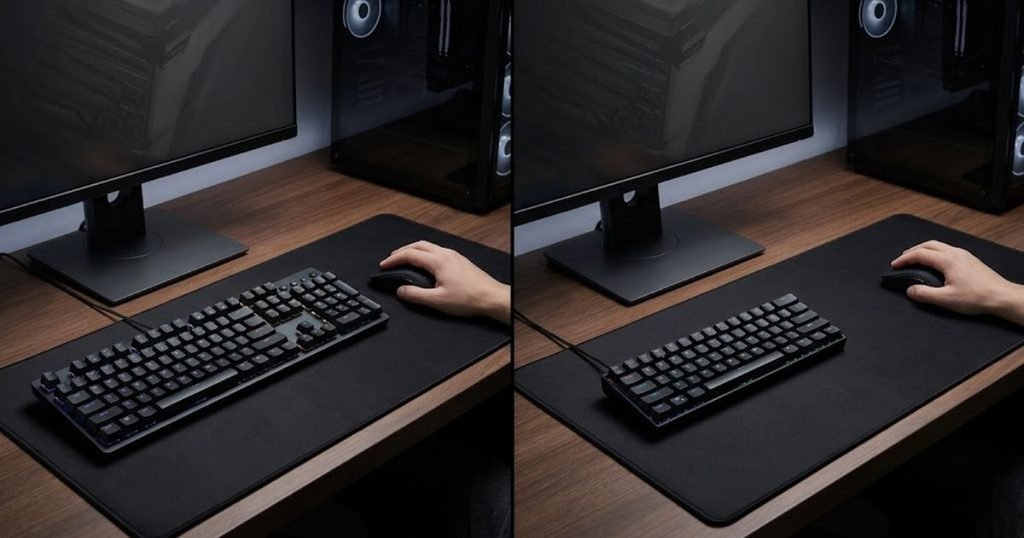
Before choosing a larger layout, consider the space available around the keyboard rather than looking only at the number of keys it provides.
Choosing a Compact Layout Without Checking Which Keys You Need
A compact keyboard can save valuable desk space, but choosing one without checking which keys you actually use can create a different problem. Removing or relocating keys may be convenient for some setups but inconvenient for players who regularly use dedicated navigation, function, or other secondary keys.
This is where the idea that “smaller is always better for FPS” breaks down. The space gained by a compact layout has value only if the player can still access the keys and controls needed for everyday gaming and other computer use.
A player who spends most of their time in an FPS may have different requirements from someone who switches frequently between gaming, productivity, communication, and other applications. The best layout therefore depends on the complete use case rather than the game category alone.
The goal is not to choose the smallest keyboard possible. It is to choose the smallest layout that still provides the keys and access the player actually needs.
Why Keyboard Width Can Matter to FPS Players
Keyboard width can matter to FPS players because it changes the amount of usable space around the keyboard, particularly the room available for the mouse. This does not mean that every FPS player needs a compact keyboard. It means that keyboard footprint should be considered together with mouse positioning instead of being evaluated independently.
For a player who uses broad mouse movements, a keyboard that sits too close to the mouse can become an ongoing physical constraint. Moving to a narrower layout may help, but changing the keyboard is only one possible adjustment. Keyboard position, desk dimensions, mouse placement, and overall setup should also be considered.
This distinction prevents a common mistake: treating keyboard layout as a performance upgrade by itself. A different layout can create more useful space, but it does not automatically make a player faster, more accurate, or more consistent.
The key takeaway is simple: choose a keyboard layout based on desk space, required keys, and natural positioning rather than assuming that the largest or smallest layout is automatically better for FPS.
Choosing Switches Based on Hype Instead of Feel
Choosing a keyboard switch because it is widely promoted as a gaming switch is another common mistake because switch preference is closely connected to how the player actually experiences each keystroke. A switch can have characteristics that sound attractive on a specification sheet while still feeling unsuitable to the person using it.
Switch choice becomes easier to understand when the physical differences in key feel, feedback, and sound are considered together:
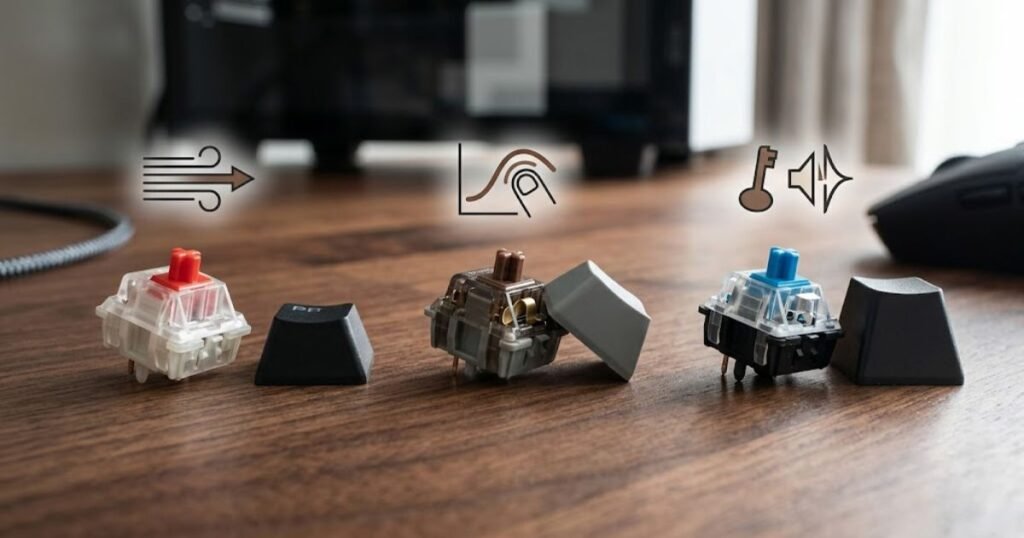
Switch choice should therefore be treated as a fit question rather than a ranking exercise. The relevant considerations include how a key feels when pressed, how much feedback it provides, how much noise it creates, and whether that behavior feels predictable during repeated inputs.
Assuming Linear Switches Are Automatically Better for Gaming
Linear switches are not automatically better for gaming simply because they provide a smooth keystroke. Their feel may work well for some players, but a different player may prefer more noticeable feedback when pressing a key.
The mistake is turning a characteristic into a universal recommendation. A switch type describes a particular behavior, but the usefulness of that behavior depends on the player’s preference and how the keyboard is used.
FPS players also have different expectations from their keyboards. Some may prioritize a smooth and consistent feel, while others may prefer clearer physical feedback. Neither preference is inherently more competitive.
Instead of asking which switch type is “best,” a more useful question is whether the switch behavior makes repeated inputs feel predictable and comfortable for the person using it.
Choosing a Switch Without Considering Feedback and Noise
Ignoring feedback and noise can make a technically suitable switch feel wrong in everyday use. The physical sensation of pressing a key is part of the keyboard experience, especially for players who spend long periods using the same keyboard.
Feedback can influence how clearly a keystroke feels, while sound can affect whether the keyboard is comfortable to use in a shared environment. These factors do not determine FPS performance on their own, but they can affect satisfaction and consistency during normal use.
Noise is also contextual. A switch that feels acceptable in a private gaming space may be less suitable in a bedroom, shared room, or workspace where other people are nearby. That makes switch selection a broader usability decision rather than a purely competitive one.
The important point is that switch characteristics should be evaluated as a combination of feel, feedback, sound, and personal preference rather than reduced to a simple “gaming” ranking.
Confusing Actuation With Overall Keyboard Performance
Actuation is only one characteristic of a keyboard’s input behavior, so treating it as a complete measure of gaming performance can lead to the wrong conclusion. A player may focus heavily on how quickly a key can register while overlooking whether the overall switch feel is comfortable and predictable.
This is especially important when comparing keyboards through isolated specifications. A number can describe one technical characteristic, but it cannot fully describe how the keyboard feels during repeated use or whether the player can control it comfortably.
That does not make actuation irrelevant. It simply means that the specification should be interpreted in context instead of being treated as a shortcut for determining which keyboard is better.
For this reason, avoid choosing a switch solely because its specifications appear more aggressive or competitive. The better decision is based on whether its characteristics match the player’s preferred input feel and actual use.
The key takeaway is that switch choice should be based on fit rather than hype. A switch is not automatically better because it is marketed toward gamers, and a technical characteristic should not be treated as a complete measure of keyboard performance.
Chasing the Most Sensitive Keyboard Settings
Chasing the most sensitive keyboard settings is a common gaming keyboard mistake because lower or more aggressive settings do not automatically produce better control. A setting that allows an input to register with less movement may sound like a performance advantage, but its practical value depends on whether the player can use it consistently without creating unintended inputs.
The tradeoff between sensitivity and control can be represented by the difference between intentional and accidental inputs:
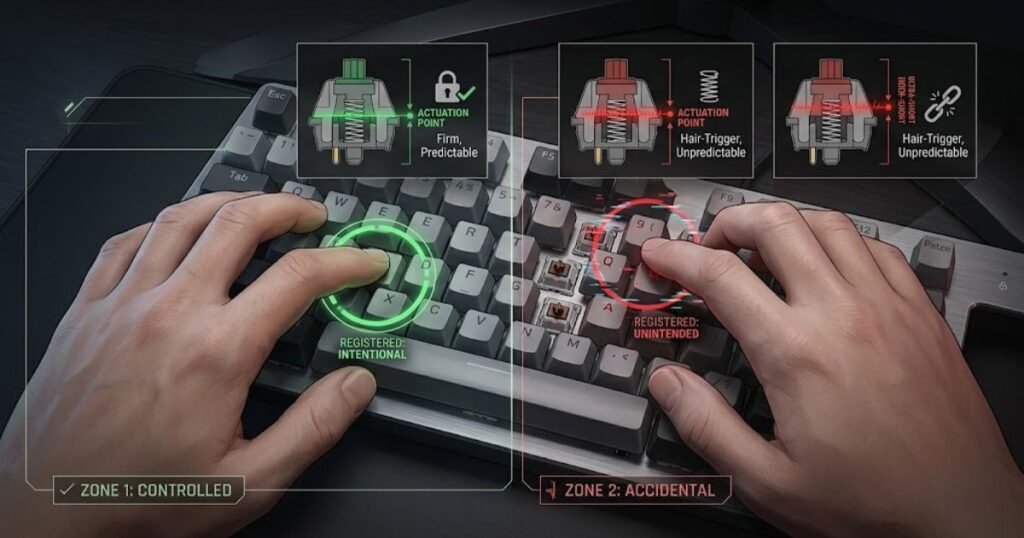
This mistake usually comes from treating sensitivity as a simple race toward the lowest possible setting. In reality, the useful setting is the one that provides predictable input for the player. A configuration that feels extremely responsive but causes frequent accidental inputs can create a worse experience than a less aggressive setting that the player can control reliably.
Assuming Lower Actuation Is Always Better
Lower actuation is not automatically better because faster registration can become harder to control when the player unintentionally triggers keys. The appeal of a lower actuation point is easy to understand: less physical movement can make an input register sooner. But that characteristic only becomes useful when the player can maintain accurate and intentional control.
The mistake is therefore not using a sensitive setting. The mistake is assuming that increasing sensitivity always improves performance.
Different players may prefer different levels of sensitivity because their hand position, typing habits, key usage, and level of familiarity with the keyboard are not identical. A configuration that feels responsive to one player can feel overly sensitive to another.
For FPS gaming, this distinction matters because movement and other frequently used inputs need to be deliberate and repeatable. If a player regularly triggers a key before intending to do so, the theoretical speed advantage of a more sensitive configuration may have little practical value.
A better evaluation question is therefore:
Can I trigger the input when I intend to, without regularly triggering it when I do not?
If the answer is no, increasing sensitivity further is unlikely to solve the underlying problem.
Ignoring Accidental Inputs When Testing Sensitive Settings
Accidental inputs are one of the clearest signs that a keyboard setting may be too sensitive for a particular player. When a key can register from very little movement, small differences in finger position or pressure can matter more during normal use.
This does not mean that sensitive settings are inherently problematic. It means that the setting should be evaluated through actual input behavior rather than through the specification alone.
For example, a player may notice unintended movement, an unexpected action, or a key registering while the finger is resting near the activation point. If these events occur repeatedly, the configuration may be trading controllability for responsiveness.
The right response is not necessarily to abandon the feature. Instead, the player should determine whether a less sensitive configuration provides more consistent control. This keeps the evaluation focused on the actual problem rather than on the assumption that a more aggressive setting must be better.
It is also important to distinguish an occasional mistake from a repeatable pattern. One accidental input does not prove that a setting is unsuitable. Repeated unintended inputs during normal play provide much stronger evidence that the configuration may need adjustment.
Copying Another Player’s Settings Without Their Setup Context
Copying another player’s keyboard settings without considering their setup and habits is a mistake because a configuration that works for one player may not produce the same result for someone else. Settings exist within a larger context that includes the keyboard, physical setup, key usage, playing habits, and familiarity with the configuration.
Professional players and experienced gamers can provide useful examples, but their settings should not automatically be treated as universal recommendations. The fact that a particular configuration works for a highly skilled player only demonstrates that it works for that player.
There is also a psychological trap here. Copying a familiar player’s settings can create the expectation that performance should immediately improve. If it does not, the player may continue changing settings instead of determining whether the original problem was actually related to keyboard sensitivity.
A more reliable approach is to use another player’s configuration as a reference point rather than as a target. Test the underlying behavior, identify whether it solves a specific problem, and keep the setting only if it produces a meaningful improvement without introducing new problems.
The key takeaway is simple: the goal of keyboard sensitivity settings is predictable and intentional input, not the lowest possible actuation or the most aggressive configuration. A setting is useful when it improves control for the player using it, not merely because it looks faster on a specification sheet.
Using Keybinds That Create Unnecessary Hand Movement
Using keybinds that create unnecessary hand movement is a common gaming keyboard mistake because frequently used actions become harder to reach when they are placed far from the player’s natural hand position. Keybinds should make important actions easier to perform consistently, not force the player to repeatedly move the hand away from a comfortable position.
This does not mean that default keybinds are always wrong or that every player needs a highly customized layout. The problem is keeping a keybind simply because it is familiar when it repeatedly creates awkward movement during normal gameplay.
Keeping Default Keybinds Without Considering Your Playstyle
Default keybinds can become a problem when they do not match the actions a player performs most frequently. A default configuration is designed to provide a broadly usable starting point, not to account for every player’s preferred movement, abilities, or interaction patterns.
For an FPS player, frequently used actions can become more demanding when they require an uncomfortable finger position or force the hand to move away from its usual position. The effect may be small during a short session but become more noticeable when the same movement is repeated throughout many matches.
The mistake is not using default controls. The mistake is assuming that familiarity automatically means the configuration is efficient.
Placing Frequently Used Actions Too Far From Your Natural Position
Frequently used actions should be easy to reach from the player’s natural hand position because unnecessary repositioning adds another physical step to an action that may already need to be performed quickly.
This becomes especially relevant when several actions are performed repeatedly during movement or combat. If the player has to stretch, reposition, or release a comfortable movement position to access an important key, the keybind may be creating unnecessary friction.
The solution is not to move every command closer to the hand. Less frequently used actions can remain farther away if that arrangement makes sense for the overall layout. The important distinction is between high-frequency actions and controls that are rarely needed.
The keybind situations below are more likely to create unnecessary hand movement:
- Frequently used actions: Repeated actions that require awkward reaches can interrupt a player’s natural hand position.
- Movement-critical actions: Commands that are commonly used while moving can become harder to execute when their positions force unnecessary finger travel.
- Infrequent actions: Rarely used commands generally do not need to occupy the most convenient positions.
- Unfamiliar placements: A new keybind can create temporary mistakes if the player has not developed familiarity with it.
The factors above show why keybind quality depends on frequency, accessibility, and familiarity rather than simply moving as many commands as possible toward the center of the keyboard.
Changing Too Many Keybinds at Once
Changing too many keybinds at once can create a new consistency problem because the player must relearn several actions simultaneously. A configuration may look more efficient on paper while feeling worse in actual gameplay simply because the player has not adapted to the new positions.
This is particularly important when changing controls that are already deeply familiar. Muscle memory and habitual finger positioning can make an established keybind feel automatic, so replacing several familiar controls at once can temporarily increase mistakes.
A better approach is to identify the keybind that creates the clearest problem and evaluate that change before modifying the rest of the configuration. This makes it easier to determine whether the adjustment actually helped.
The key takeaway is that good keybinds reduce unnecessary movement without creating unnecessary relearning. The goal is not maximum customization, but a control layout that feels natural for the actions the player performs most often.
Changing Keyboard Settings Too Often
Changing keyboard settings too often is a mistake because constant configuration changes make it difficult to determine whether any individual setting actually improved the player’s experience. When several variables are changed after every poor match or uncomfortable session, the player loses a stable reference point for evaluating the setup.
This is different from using settings that are too sensitive. Part 4 addressed the consequences of overly aggressive settings. The problem here is the evaluation process itself: repeatedly changing the configuration before there is enough evidence to judge the previous change.
Changing Settings After Every Bad Match
A single bad match is weak evidence that a keyboard setting needs to change. FPS performance naturally varies because of aim, decision-making, fatigue, opponents, game conditions, and many other factors.
If a player changes keyboard settings after every disappointing result, the configuration can become a moving target. The player may never spend enough time with one setup to determine whether it actually feels more consistent.
This can also create a psychological cycle: poor result, configuration change, temporary expectation, another poor result, and another configuration change. The player ends up reacting to individual outcomes instead of evaluating the keyboard through repeatable evidence.
The better approach is to identify a specific keyboard-related problem before making a change. A setting should have a reason behind it rather than becoming a reaction to one bad game.
Changing Multiple Variables at the Same Time
Changing multiple keyboard variables at once makes the result harder to interpret because there is no reliable way to identify which change caused the improvement or problem.
For example, changing actuation, keybinds, and other configuration settings during the same session may produce a different overall feeling, but that does not explain why the experience changed. The player may keep all three changes even though only one was useful.
This is essentially a testing problem. If the objective is to determine whether a particular configuration solves a particular issue, changing several variables at once reduces the quality of the evidence.
Keeping most of the setup stable creates a clearer comparison. It also makes it easier to reverse a change when the result is worse.
Never Giving a Configuration Enough Time to Evaluate
A keyboard configuration needs consistent use before the player can make a meaningful judgment about whether it works. Familiarity matters because a new key position or setting can initially feel worse simply because the player’s previous configuration is deeply established.
This does not mean every setting should be kept indefinitely. It means the player should distinguish between an adjustment that genuinely creates a problem and an adjustment that simply feels unfamiliar at first.
The following process can help evaluate a keyboard setting without constantly rebuilding the configuration:
- Identify the problem: Define the specific keyboard behavior you want to improve before changing a setting.
- Change one variable: Keep other relevant settings stable so the result is easier to interpret.
- Use the configuration consistently: Give yourself enough time to become familiar with the change instead of judging it immediately.
- Observe repeatable results: Look for recurring improvements or problems rather than relying on one match or one short session.
- Keep or reverse the change: Retain the setting when it solves the original problem without creating a more significant one.
This process creates a more useful comparison because each configuration change has a defined purpose and a clearer basis for evaluation.
The key takeaway is that keyboard settings should be changed as controlled adjustments, not emotional reactions to individual matches. A stable configuration gives the player a reference point, while controlled changes make it easier to determine what actually works.
Neglecting Basic Gaming Keyboard Maintenance
Neglecting basic gaming keyboard maintenance is a common mistake because physical problems such as debris, sticky keys, or inconsistent key behavior can sometimes be mistaken for a problem with the keyboard’s technology. A keyboard does not need to be visibly dirty to develop an issue that affects everyday use. Small physical problems can become more noticeable when the same keys are pressed repeatedly during long gaming sessions.
Maintenance is therefore part of diagnosis, not simply a cosmetic task. Before changing settings or replacing hardware because a key feels inconsistent, it is worth checking whether the problem has an obvious physical cause. This helps separate a genuine hardware limitation from an issue that may be resolved without changing the keyboard.
Ignoring Dust, Debris, and Sticky Keys
Dust, debris, and sticky keys can interfere with normal key behavior, making a physical keyboard issue feel like an input or performance problem. A key that does not move or return normally can affect consistency even when the keyboard’s underlying technology is functioning as designed.
This is particularly relevant for frequently used keys because repeated inputs make small physical problems easier to notice. A player may interpret an inconsistent key as a sign that the keyboard is becoming unreliable when the immediate issue is limited to the condition of the affected key.
The first step is therefore simple observation. Check whether the problem affects one key, several keys, or the entire keyboard. A single sticky or physically abnormal key points toward a different type of problem than widespread input issues.
It is also important not to assume that every keyboard should be cleaned in exactly the same way. Construction, keycap design, switch type, and manufacturer recommendations can differ, so any specific cleaning method should be checked against the documentation for the particular keyboard.
Treating Every Input Problem as a Hardware Upgrade Problem
Not every inconsistent keyboard input is a reason to buy a new keyboard because the symptom may come from a physical condition that can be identified before replacement is considered. This is one of the most important diagnostic distinctions in the entire article.
Consider the pattern of the problem first. If one key behaves differently while the rest of the keyboard works normally, the issue should not immediately be treated as evidence that the entire keyboard is unsuitable. If several keys show similar symptoms, the investigation can move toward broader hardware or connection-related causes.
The goal is not to prove that the keyboard is never responsible. The goal is to avoid making the upgrade decision before understanding what is actually happening.
The table below separates common keyboard symptoms from the first issue worth checking:
| Symptom | Possible Cause | First Check | What Not to Assume |
|---|---|---|---|
| One sticky key | Debris or a physical key issue | Condition and movement of the affected key | The entire keyboard needs replacement |
| One key feels inconsistent | Physical key or switch behavior | Whether the symptom is isolated | Every input setting is wrong |
| Several keys behave inconsistently | Broader hardware or connection issue | Whether the pattern affects multiple keys | One isolated key is responsible |
| Input problem appears intermittently | Connection, hardware, or system-related issue | When and where the problem occurs | A new keyboard is automatically required |
The table is not a replacement for manufacturer troubleshooting. Its purpose is to establish the correct order of thinking: identify the symptom, narrow down the possible cause, and only then decide whether the keyboard itself is the limitation.
Using Cleaning Methods Without Checking the Manufacturer
Using a cleaning method without checking the keyboard manufacturer’s guidance can create unnecessary risk because different keyboards can have different construction and maintenance requirements. General advice may be useful for understanding what needs attention, but it should not automatically be treated as a universal procedure for every keyboard.
This matters even more when cleaning involves removing keycaps, accessing internal components, using cleaning agents, or applying force to parts of the keyboard. A method that is appropriate for one design may not be appropriate for another.
When a specific cleaning procedure is necessary, the safest information hierarchy is straightforward: start with the keyboard manufacturer’s documentation for that model, follow the stated precautions, and avoid improvising a procedure simply because it worked on another keyboard.
There is also an important distinction between maintenance and repair. Basic maintenance can help keep a keyboard in usable condition, but persistent hardware faults may require manufacturer support or a qualified repair process rather than increasingly aggressive cleaning.
The key takeaway is that basic maintenance should come before assumptions about keyboard failure, but maintenance should also stay within the manufacturer’s recommended boundaries. Identifying a physical symptom first makes it easier to decide whether the problem is something that can be addressed through maintenance or whether further troubleshooting is necessary.
Replacing the Keyboard Before Proving It Is the Problem
Replacing a gaming keyboard before proving that it is the actual problem is a common mistake because a new keyboard cannot fix an issue that comes from another part of the setup or from the player’s configuration. A keyboard upgrade can be worthwhile when the current hardware creates a consistent limitation, but knowing when should you upgrade your keyboard requires proving the problem comes from the hardware rather than your configuration.
This distinction matters because upgrading hardware can feel like progress even when the underlying problem remains unchanged. A player may replace a keyboard because movement feels inconsistent, only to discover that the real issue was desk positioning, unfamiliar controls, or another part of the setup.
The goal is therefore not to avoid upgrades. The goal is to make sure the upgrade addresses a problem that the current keyboard can realistically cause.
Signs Your Keyboard May Actually Be the Problem
A keyboard becomes a more reasonable upgrade candidate when the same hardware-related problem remains consistent after basic troubleshooting and reasonable configuration changes. One isolated mistake or an occasional uncomfortable session is not enough evidence by itself.
Look for repeatable patterns. If the same key repeatedly behaves abnormally, a physical problem continues after appropriate checks, or the keyboard consistently lacks a capability that the player genuinely needs, there is stronger evidence that the hardware may be contributing to the problem.
The important word is consistent. A recurring problem provides much stronger evidence than a single bad match, a temporary feeling of discomfort, or a sudden desire to try a new keyboard.
Another useful distinction is whether the limitation comes from the keyboard itself. If changing the keyboard would directly remove the limitation, an upgrade has a clearer purpose. If the same problem would remain with a different keyboard, the upgrade is unlikely to solve it.
Before making that decision, it helps to understand the role a gaming keyboard is supposed to play in an FPS setup. A gaming keyboard for FPS games is primarily relevant to input feel, movement control, layout, and the way the keyboard fits the player’s setup, rather than being a universal solution for every performance problem.
Signs the Problem May Be Somewhere Else
If the problem changes significantly when the player adjusts positioning, keybinds, settings, or habits, the keyboard itself may not be the primary limitation. This is an important reason to diagnose before replacing hardware.
For example, if moving the keyboard creates more usable mouse space, the original problem may have been desk positioning rather than keyboard quality. If changing a problematic keybind removes the issue, replacing the keyboard would have addressed the wrong layer of the setup.
The same principle applies to inconsistent results. FPS performance naturally varies, so a keyboard should not be blamed simply because performance fluctuates. The stronger evidence is a repeatable keyboard-specific behavior that remains after reasonable adjustments.
The following signs suggest that replacing the keyboard may not be the first solution:
- Problem changes with positioning: If moving the keyboard or adjusting the desk setup improves the issue, the hardware may not be the primary limitation.
- Problem disappears after changing keybinds: If a different control arrangement solves the problem, replacing the keyboard may not be necessary.
- Problem appears only occasionally: Infrequent issues provide weaker evidence than a repeatable hardware-specific pattern.
- Problem is unrelated to keyboard input: Aim, game sense, network conditions, and other performance factors cannot automatically be solved with a keyboard upgrade.
These signs help separate a genuine keyboard limitation from a broader gaming setup problem. The distinction is important because replacing hardware should solve the cause, not simply change the equipment.
When a Keyboard Upgrade Becomes a Rational Decision
A keyboard upgrade becomes a rational decision when the current keyboard has a clearly identified limitation that matters to the player’s actual use and the replacement directly addresses that limitation. This is a much stronger basis for an upgrade than wanting newer hardware or following another player’s setup.
The decision should also account for whether the limitation is significant enough to justify the cost. A minor inconvenience does not necessarily justify replacing a perfectly functional keyboard, especially when a simple setup adjustment can produce a similar result.
On the other hand, continuing to use hardware that consistently creates a meaningful problem is not automatically the smarter financial choice. If the keyboard repeatedly interferes with the player’s preferred setup and the limitation cannot reasonably be corrected, an upgrade may have a clear purpose.
The decision can be reduced to three questions:
- Is the problem repeatable? Confirm that the issue occurs consistently enough to distinguish it from normal variation.
- Is the keyboard responsible? Rule out positioning, configuration, habits, and unrelated setup factors before blaming the hardware.
- Will the replacement solve it? Choose an upgrade only when its relevant characteristics directly address the identified limitation.
This process keeps the upgrade decision grounded in evidence instead of frustration or novelty. It also prevents the common cycle of replacing one piece of hardware after another without identifying the original problem.
The key takeaway is that a new gaming keyboard is worth considering when the current keyboard creates a proven limitation that the replacement can directly solve. If the problem disappears after changing the setup or configuration, the better upgrade may be no hardware upgrade at all.
How Can You Avoid Common Gaming Keyboard Mistakes Before Buying?
You can avoid common gaming keyboard mistakes by identifying the problem first, defining what the keyboard actually needs to solve, checking whether the layout and feel fit your setup, and evaluating an upgrade based on real use rather than marketing claims. This approach turns the buying decision from a search for the most advanced keyboard into a search for the right keyboard for a specific need.
That distinction matters because a gaming keyboard is still an input device, not a guaranteed performance upgrade. Wikipedia describes a computer keyboard as a built-in or peripheral input device that uses keys to send input to a computer. :contentReference[oaicite:1]{index=1} The gaming-specific differences matter when they change how the keyboard fits the player’s use, but the presence of more features does not automatically make a keyboard the better choice.
That principle also applies to avoiding keyboard mistakes. The goal is not to find a keyboard that looks impressive on paper. The goal is to identify a real limitation and determine whether a different keyboard can address it.
Use the following process before making a gaming keyboard decision:
- Identify the actual problem: Define what feels wrong with the current setup. Avoid starting with a product or feature before knowing what needs to improve.
- Separate the keyboard from the rest of the setup: Check whether the issue comes from keyboard positioning, desk space, keybinds, settings, habits, or another part of the gaming setup.
- Define the keyboard characteristics that matter: Consider layout, switch feel, input behavior, comfort, and other characteristics only after the underlying problem is clear.
- Check whether the feature solves the problem: Do not treat a longer specification list as proof of better performance. A feature has value when it addresses a relevant need.
- Evaluate the physical fit: Make sure the keyboard works with the available desk space, mouse position, hand position, and the keys you actually use.
- Test changes systematically: When adjusting settings or controls, avoid changing everything at once. A stable reference point makes it easier to identify what actually helped.
- Check persistent physical problems: If a key behaves abnormally, identify the symptom and follow the manufacturer’s guidance before assuming that the entire keyboard needs replacement.
- Upgrade only when the limitation is proven: A new keyboard makes the most sense when the current hardware creates a repeatable problem and the replacement directly addresses it.
This process also reflects GearTP’s broader approach to gaming gear: specifications matter, but they are only one part of evaluating how a product performs in a real setup. GearTP emphasizes performance signals, real setup fit, and value rather than treating specifications as the entire decision. :contentReference[oaicite:2]{index=2}
The key takeaway is that avoiding gaming keyboard mistakes is less about finding the most advanced keyboard and more about making the decision in the right order. Start with the problem, identify the relevant characteristic, test the setup, and upgrade only when the evidence supports the decision.
Frequently Asked Questions About Common Gaming Keyboard Mistakes
Common gaming keyboard mistakes are often caused by confusing specifications with practical benefits, changing configurations without a clear reason, or replacing hardware before identifying the actual limitation. The questions below address the mistakes FPS players are most likely to encounter when choosing, configuring, and evaluating a gaming keyboard.
What is the most common gaming keyboard mistake?
The most common gaming keyboard mistake is choosing a keyboard or feature before identifying the problem it needs to solve. This can lead players to prioritize specifications, trends, or recommendations that do not match their actual setup.
A better approach is to define the limitation first and then determine which keyboard characteristics are relevant to that problem.
Does a more expensive gaming keyboard automatically improve FPS performance?
No, a more expensive gaming keyboard does not automatically improve FPS performance. Higher pricing can reflect additional features, materials, customization, or other characteristics, but those differences only matter when they provide a useful benefit for the player.
The relevant question is whether the keyboard solves a specific limitation in the player’s setup.
Is a smaller keyboard always better for FPS games?
No, a smaller keyboard is not automatically better for FPS games. A compact layout can create more room for the mouse, but it may also remove or relocate keys that some players regularly use.
The right layout depends on desk space, mouse positioning, required keys, and the player’s overall use.
Are linear switches always better for FPS gaming?
No, linear switches are not universally better for FPS gaming. They provide a particular keystroke feel, but switch preference depends on how the player responds to smoothness, feedback, sound, and overall key feel.
A switch should be evaluated based on fit rather than a universal ranking.
Is lower actuation always better on a gaming keyboard?
No, lower actuation is not automatically better. A more sensitive configuration can allow inputs to register with less movement, but excessive sensitivity can also increase unintended inputs for some players.
The useful setting is the one that provides predictable and intentional control.
Should I copy a professional player’s keyboard settings?
You can use a professional player’s settings as a reference, but you should not assume they will be optimal for your setup. Different players have different keyboards, habits, hand positions, keybinds, and levels of familiarity.
Use another player’s configuration as a starting point for testing rather than treating it as a universal standard.
Should I change my keyboard settings after a bad FPS match?
No, one bad FPS match is usually not enough evidence to justify changing keyboard settings. Performance can vary because of many factors that have nothing to do with the keyboard.
A repeatable keyboard-specific problem provides stronger evidence than a single poor result.
How often should I change my gaming keyboard settings?
There is no universal schedule for changing keyboard settings. Settings should be changed when there is a specific reason to test a different configuration, not simply because another player uses it or because one session went badly.
Changing one variable at a time also makes it easier to determine whether the adjustment actually helped.
Can dirty keys cause gaming keyboard problems?
Yes, debris or physical problems around a key can contribute to inconsistent key behavior. A sticky or abnormal key should be investigated before assuming that the entire keyboard has a performance problem.
For model-specific cleaning instructions, follow the manufacturer’s documentation rather than applying the same procedure to every keyboard.
When should I replace my gaming keyboard?
You should consider replacing a gaming keyboard when it creates a repeatable limitation that cannot reasonably be solved through appropriate setup or configuration changes. The replacement should also directly address the identified limitation.
Replacing hardware simply because a newer model has more features is a weaker reason than replacing it because the current keyboard genuinely prevents you from using your preferred setup.
Can a new gaming keyboard fix poor FPS performance?
A new gaming keyboard can improve a specific keyboard-related limitation, but it cannot automatically fix overall FPS performance. Aim, game sense, positioning, display performance, network conditions, and other factors can affect gameplay independently of the keyboard.
A keyboard upgrade should therefore be tied to a keyboard-specific problem rather than used as a general performance solution.
What should I check before buying a gaming keyboard?
Before buying a gaming keyboard, check the problem you want to solve, the required layout, desk space, switch feel, input behavior, comfort, and whether the features provide a meaningful benefit for your use.
Most importantly, avoid treating specifications as the decision itself. The right keyboard is the one that fits the player’s requirements and solves a real setup problem.
Common gaming keyboard mistakes become much easier to avoid when the buying process starts with the player’s actual problem instead of the product’s feature list.
Thanks for reading GearTP. We hope this guide helped you avoid common gaming keyboard mistakes and make a more confident decision for your FPS setup.