
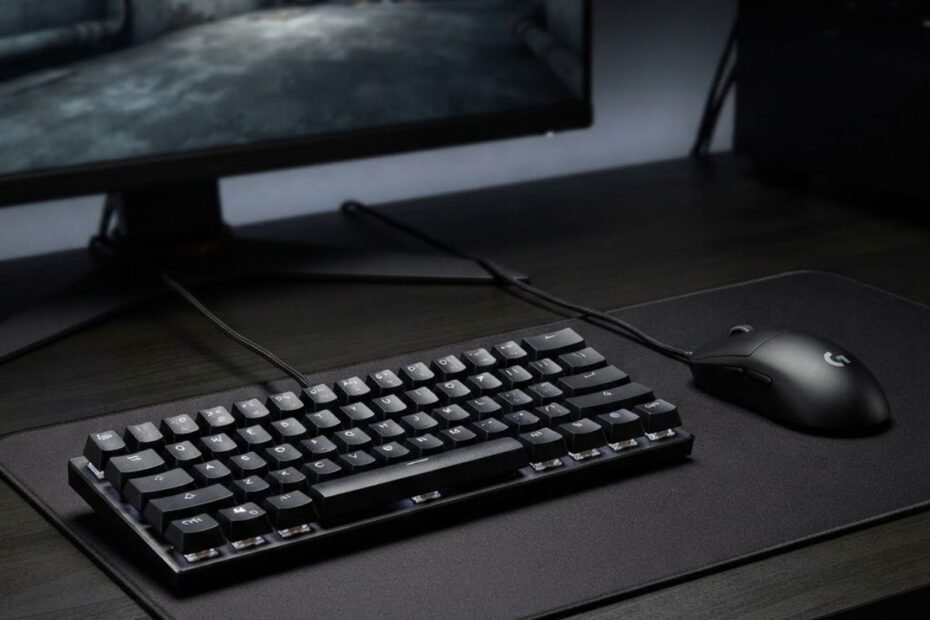
The gaming keyboard features that matter most for FPS are input responsiveness, reliable key registration, actuation behavior, movement-oriented features, and a layout that fits your mouse space. These features affect how consistently your inputs register and how naturally the keyboard fits into an FPS setup. Other features, such as RGB lighting or media controls, can improve convenience, but they usually have little direct effect on gameplay performance.
That distinction matters because gaming keyboards often advertise a long list of specifications and features as if they carry equal value. They do not. For FPS gaming, the useful question is not how many features a keyboard has, but whether those features solve an actual input or setup problem.
If you are starting from the broader concept of what makes a keyboard suitable for this type of gaming, a gaming keyboard for FPS games is best evaluated by how its design supports consistent inputs, movement, and control rather than by its feature count alone.
Which Gaming Keyboard Features Matter Most for FPS?
The most important gaming keyboard features for FPS are the ones that improve input consistency, control how keys activate and reset, and help the keyboard fit the player’s movement and desk setup. These features deserve more attention than cosmetic additions because they have a clearer relationship with how the keyboard behaves during gameplay.
FPS players repeatedly press movement keys, combine several inputs, release keys quickly, and make these actions under time pressure. A keyboard therefore needs to register those inputs predictably. That does not mean every high-end specification produces a noticeable advantage. The practical value of a feature depends on how it changes the player’s actual interaction with the keyboard.
Input Responsiveness Is a Core FPS Consideration
Input responsiveness matters because FPS gameplay depends on the keyboard registering physical key presses consistently and with minimal unnecessary delay. Movement, ability selection, weapon switching, crouching, jumping, and other actions all begin with a physical input. When the keyboard handles those inputs consistently, the player has a more predictable connection between the key press and the resulting action in the game.
However, responsiveness should not be reduced to a single specification. A higher advertised number does not automatically mean a player will perform better. The useful distinction is between a keyboard that provides consistent input behavior and one whose marketing emphasizes specifications without explaining their practical effect.
This is especially important when comparing keyboards with different performance claims. The goal is not to chase the largest specification, but to identify whether the feature changes something that matters during actual FPS play.
Reliable Key Registration Matters During Fast Inputs
Reliable key registration matters when several inputs need to be recognized together or when a player repeatedly presses and releases keys during fast gameplay. FPS movement rarely consists of one isolated key press. Players may combine movement with crouching, jumping, ability usage, weapon switching, or other actions within the same sequence.
Reliable key registration becomes particularly important in these FPS situations:
- Multiple simultaneous inputs: Several keys may need to register during movement and action combinations.
- Rapid movement transitions: Direction changes require consistent recognition of repeated key presses and releases.
- Movement combined with other actions: Players may need to move while activating abilities, switching weapons, or performing other inputs.
- Repeated key presses: Consistent registration helps prevent unpredictable behavior during fast sequences.
These factors make key registration a more meaningful FPS consideration than cosmetic features. The keyboard should respond predictably to the way the player actually uses it rather than simply offering a large collection of advertised features.
Feature Count Does Not Equal FPS Performance
A keyboard with more features is not automatically better for FPS because feature quantity does not indicate how much those features affect gameplay. A keyboard can include RGB lighting, displays, media controls, software customization, and other extras while offering little additional value for a player whose main concern is movement and input consistency.
The opposite can also be true. A keyboard with fewer features may provide the input behavior, actuation options, switch feel, and layout that better match a particular player’s needs. This is why feature evaluation should start with the player’s actual use case rather than the specification list.
For FPS gaming, a practical hierarchy is more useful than simply counting features. Input behavior comes first, followed by features that change activation or movement control. Layout and switch feel then help determine whether the keyboard fits the player’s physical setup and preferences.
The table below ranks the main gaming keyboard features by their practical importance for FPS:
| Feature | FPS Impact | Priority |
|---|---|---|
| Input responsiveness | Direct | High |
| Reliable key registration | Direct | High |
| Actuation behavior | Direct | High |
| Movement-oriented features | Depends on game and playstyle | Medium to High |
| Keyboard layout | Indirect but practical | Medium to High |
| RGB lighting | Minimal | Low |
| Media controls | Minimal | Low |
Table conclusion: Input responsiveness, reliable key registration, and actuation behavior deserve the highest priority because they have the clearest relationship with how keyboard inputs are handled during FPS gameplay.
Overall, FPS players should evaluate a gaming keyboard by starting with input behavior rather than its total feature count. Once the core input characteristics are understood, features such as actuation options, movement-focused functions, switch feel, and layout can be evaluated according to the player’s specific needs.
How Does Actuation Behavior Affect FPS Keyboard Performance?
Actuation behavior affects FPS keyboard performance by determining how far a key must be pressed before the keyboard registers the input. For FPS players, this can influence how a movement key feels during repeated presses, how easily accidental inputs occur, and how much control a player has over the keyboard. The practical value depends on the keyboard’s implementation and the player’s preferences, so a shorter actuation point should not automatically be treated as better.
Unlike overall input responsiveness, which describes how consistently the keyboard handles an input, actuation focuses specifically on when the key press becomes an input. Keeping these concepts separate is important when comparing gaming keyboard specifications.
What Actuation Means for FPS Inputs
Actuation is the point in a key press at which the keyboard registers the input. A shorter actuation distance means the input can register with less physical key travel, while a deeper actuation point requires the key to be pressed farther before registration.
The relationship between key travel and input registration can be visualized through the way a mechanical key moves during a press:
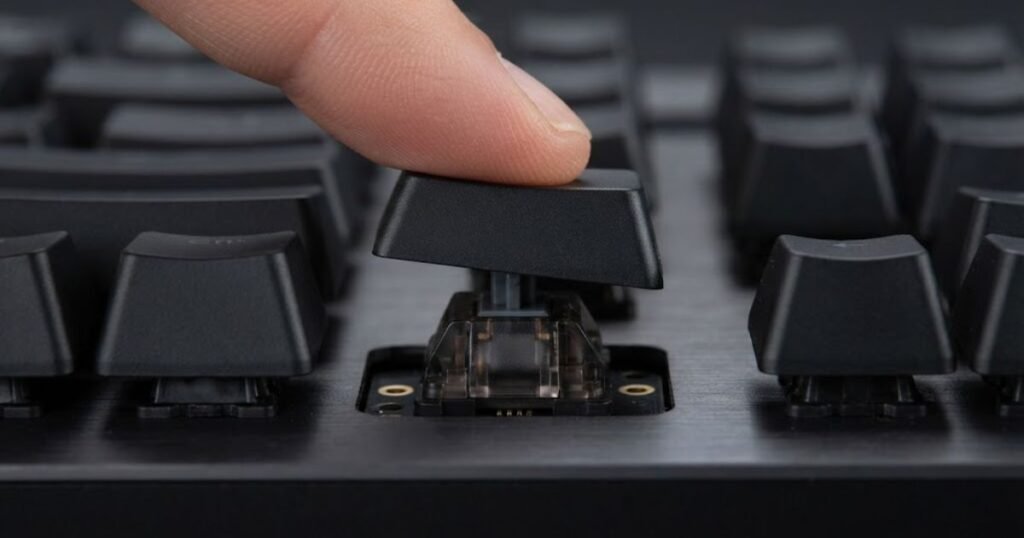
For FPS gaming, this distinction is most noticeable on frequently used movement keys. Players may repeatedly press and release keys such as W, A, S, and D, so the relationship between physical key travel and input registration can affect how the keyboard feels during movement.
Actuation should therefore be considered a control characteristic, not simply a speed specification. Two keyboards can both be responsive while feeling very different because their actuation behavior differs.
| Actuation characteristic | Potential effect in FPS | Main consideration |
|---|---|---|
| Shorter actuation | Input can register with less key travel | May feel more sensitive |
| Deeper actuation | Requires more physical key travel | Can feel more deliberate |
| Adjustable actuation | Allows the activation point to be customized | Useful when players have different preferences |
The key takeaway is that actuation changes the relationship between key travel and input registration. It does not, by itself, determine whether a keyboard will make someone a better FPS player.
Adjustable Actuation Can Change Movement Feel
Adjustable actuation lets players change where a key registers within its available travel, which can make movement keys feel more or less sensitive. This can be useful for players who want different levels of key sensitivity depending on their typing and gaming habits.
A more sensitive setting may appeal to players who prefer minimal key travel before an input registers. Another player may prefer a deeper setting because it provides more physical separation between resting on a key and activating it.
This difference becomes particularly relevant for movement because FPS players repeatedly use the same small group of keys. A setting that feels comfortable during a short gaming session may not necessarily feel comfortable after several hours, so customization should be judged by consistency and control rather than by the shortest available actuation point.
When evaluating adjustable actuation, consider these practical factors:
- Movement control: Does the chosen setting feel predictable when repeatedly pressing and releasing movement keys?
- Accidental inputs: Is the setting sensitive enough that resting or brushing against a key causes unwanted activation?
- Adaptation: Can you use the setting consistently without changing your normal key-press habits?
- Comfort: Does the setting remain comfortable during longer gaming sessions?
These factors are more useful than assuming one actuation setting is universally optimal. The right setting is the one that gives the player predictable control without creating unnecessary accidental inputs.
When Faster Actuation Is Not Automatically Better
A faster actuation point is not automatically better for FPS because greater sensitivity can also make unintended inputs easier to trigger. Players who rest their fingers heavily on movement keys or use different key-press habits may find an extremely sensitive setting less comfortable or less predictable.
There is also a difference between registering an input earlier and performing an action better. A keyboard can change when an input is detected, but the player’s reaction time, movement technique, decision-making, and familiarity with the setting still determine what happens after that input.
For that reason, adjustable actuation is best treated as a way to tune keyboard behavior, not as a guaranteed performance upgrade. Players who benefit from customization may find it useful, while others may notice little practical difference after adapting to their preferred setting.
If a keyboard advertises a specific actuation distance, adjustable range, or other technical specification, that value should be verified against the manufacturer’s official documentation before being used to compare products. The exact implementation can vary between keyboard models, so generic assumptions about a feature should not replace model-specific specifications.
In short, actuation is most valuable when it gives an FPS player useful control over how keys activate. A shorter or adjustable actuation point can change the feel of movement and repeated inputs, but the best setting depends on the player’s habits, comfort, and ability to use it consistently.
Does Rapid Trigger Matter for FPS Gaming?
Rapid Trigger can matter for FPS gaming because it changes how quickly a key can reset and register another input, making it particularly relevant to repeated movement inputs. Its value is most noticeable for players who frequently make rapid directional changes or repeatedly press and release movement keys. However, Rapid Trigger is not a universal requirement for FPS gaming, and its practical benefit depends on the game, playstyle, and player’s ability to adapt to the feature.
Rapid Trigger should also be considered separately from adjustable actuation. Actuation determines where a key press registers, while Rapid Trigger changes how the keyboard responds to key movement during subsequent presses and releases. For a complete deep dive into analog switch physics and counter-strafing advantages, read our full guide on what is rapid trigger to understand how it eliminates mechanical reset latency.
Why Rapid Trigger Is Most Relevant to Movement
Rapid Trigger is most relevant to movement because FPS players often need to press and release the same movement keys repeatedly and with precise timing. Traditional keyboard behavior generally follows a fixed activation and reset point. Rapid Trigger can instead respond to changes in key travel, allowing a key to reset without requiring the player to return it through the same fixed point.
This can be useful during repeated directional inputs. For example, a player may release one movement key and quickly press another when changing direction. The feature is designed to make the keyboard respond to those changes with less required key travel, which can change the feel of movement.
Rapid Trigger is most relevant when the player repeatedly changes the direction and state of movement keys:
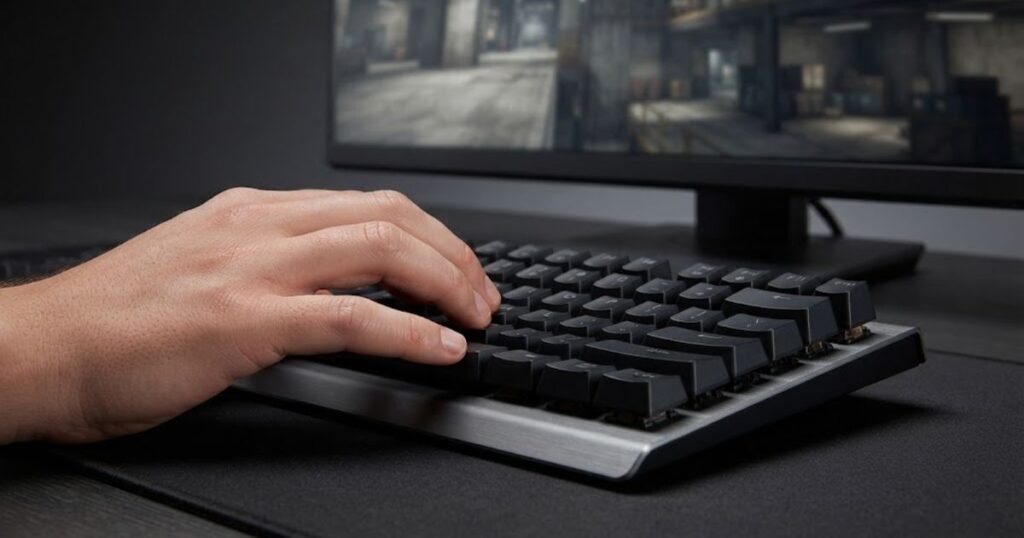
That does not mean Rapid Trigger directly improves aim, reaction time, or decision-making. Its role is narrower: it changes the way the keyboard detects key movement during repeated inputs.
- Repeated movement: Rapid Trigger can be relevant when a player frequently presses and releases movement keys.
- Directional changes: The feature can change how quickly a key becomes ready to register another input.
- Movement consistency: A suitable setting can make repeated key transitions feel more predictable.
- Input sensitivity: Greater sensitivity can also require players to adapt their normal key-press habits.
The main reason to consider Rapid Trigger for FPS is therefore movement behavior, not the assumption that the feature improves every part of competitive performance.
Rapid Trigger Is More Relevant to Some Players Than Others
Rapid Trigger is more valuable for players whose FPS playstyle depends heavily on repeated movement inputs than for players who rarely use rapid key transitions. The difference comes from how frequently the feature’s behavior is actually used during gameplay.
Players who spend much of their time in movement-intensive situations may notice the change more readily. In contrast, a player who primarily values general keyboard comfort, typing, or a familiar switch feel may gain less from prioritizing Rapid Trigger.
The game itself also matters. Different FPS titles have different movement systems, mechanics, and competitive demands, so the usefulness of a keyboard feature cannot be judged independently of the game being played.
| Player situation | Potential value of Rapid Trigger | Why |
|---|---|---|
| Movement-heavy FPS play | Higher | Frequent key presses and releases make the feature more relevant |
| Players focused on movement precision | Higher | Key reset behavior can affect movement feel |
| General FPS play | Moderate | Benefits depend on how often rapid movement inputs are used |
| Players who prefer traditional key behavior | Lower | Changing familiar input behavior may provide little practical benefit |
There is no requirement for every FPS player to use Rapid Trigger. It is better viewed as a specialized input feature whose usefulness increases when its behavior matches the player’s movement demands.
Rapid Trigger Is a Feature, Not a Guaranteed Competitive Advantage
Rapid Trigger does not guarantee better FPS performance because changing keyboard input behavior cannot replace player skill, game knowledge, or consistent mechanics. It may change how a movement input feels, but the player still has to make the correct decision and execute the intended action.
There is also an adaptation period to consider. A highly sensitive input configuration may feel unfamiliar to someone who has spent years using a conventional keyboard. A player who cannot control the new behavior comfortably may gain little from the theoretical advantage of faster key resetting.
For this reason, Rapid Trigger should be evaluated using a simple question: Does this feature solve a real movement or input problem for the way you play? If the answer is no, it should not automatically outrank other factors such as keyboard comfort, switch feel, or layout.
If a manufacturer provides a specific Rapid Trigger implementation or technical specification for a keyboard, that information should be checked against the manufacturer’s documentation before comparing models. The feature name alone does not establish that every keyboard implements it in exactly the same way.
In conclusion, Rapid Trigger can be a meaningful FPS keyboard feature for players who rely heavily on rapid movement inputs, but it is not a mandatory feature or a guaranteed path to better performance. Its value comes from how well its input behavior matches the player’s movement style and whether the player can use it consistently.
How Do Switches Affect FPS Keyboard Feel?
Switches mainly affect how an FPS keyboard feels during each key press, including the amount of resistance, physical feedback, and smoothness of the key movement. Unlike features that directly change how the keyboard detects an input, switch characteristics are primarily about the physical interaction between the player and the keyboard. That makes switch choice an important comfort and control consideration, but not a guaranteed FPS performance upgrade.
For FPS players, the best switch is therefore not determined by a single specification. A switch that feels smooth and predictable to one player may feel too light or lacking in feedback to another. The more useful approach is to understand how different switch characteristics change the feel of repeated movement and action inputs.
Linear Switches Provide a Smooth Key Press
Linear switches provide a smooth key press without a tactile bump interrupting the travel of the key. This consistent movement can appeal to FPS players who prefer a clean, uninterrupted feel when repeatedly pressing movement or action keys.
The physical difference between switch types is easier to understand when the keyboard is viewed as a tactile input device:
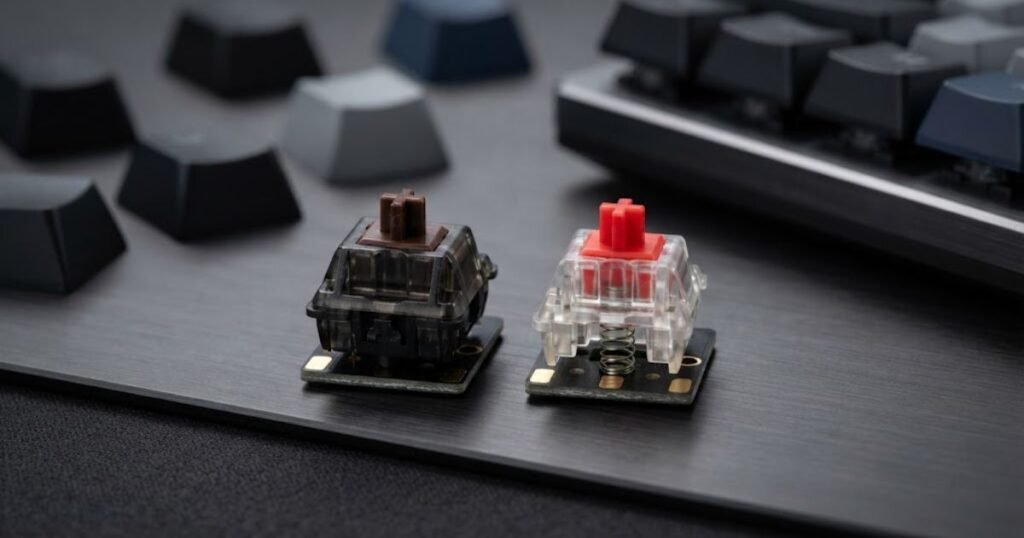
The main advantage is consistency of feel rather than a guaranteed reduction in reaction time. A player who already prefers smooth key travel may find linear switches easier to use for repeated inputs, while another player may prefer more physical feedback.
Linear switches can therefore be a sensible choice when the priority is a predictable key press with minimal tactile interruption. They should not, however, be treated as inherently superior to other switch types for FPS gaming.
Tactile Switches Provide More Physical Feedback
Tactile switches provide a noticeable bump during the key press, giving the player additional physical feedback as the key moves through its travel. This can make the point of interaction feel more distinct, which some players may prefer when using movement and action keys.
The trade-off is primarily a matter of feel. A tactile bump can make each press feel more deliberate, while players who prefer uninterrupted movement may find a linear switch more natural.
For FPS gaming, tactile switches should therefore be evaluated according to personal preference and comfort rather than the assumption that tactile feedback automatically improves control.
Actuation Force Can Affect Comfort and Accidental Inputs
Actuation force affects how much pressure is required to activate a key, which can influence both comfort and how easily accidental presses occur. A lighter switch requires less force, while a heavier switch requires more deliberate pressure.
A lighter feel may appeal to players who prefer minimal resistance during repeated key presses. However, players who rest their fingers on the keyboard or press keys heavily may prefer more resistance to reduce unintended activation.
Heavier switches can provide a more deliberate physical feel, but they may also require more effort during long gaming sessions. Neither direction is universally better because the useful balance depends on the player’s hand position, typing habits, and tolerance for key resistance.
When comparing switch characteristics for FPS, consider these practical differences:
- Linear feel: Smooth key travel with no tactile bump.
- Tactile feel: Noticeable physical feedback during the press.
- Lighter actuation force: Less pressure is needed to activate the key, but accidental inputs may be easier for some players.
- Heavier actuation force: More pressure is required, which can provide a more deliberate feel but may increase fatigue for some players.
These characteristics show why switch selection is best treated as a fit decision. The switch should feel predictable and comfortable enough that the player can maintain consistent inputs without constantly thinking about the keyboard itself.
The table below compares common switch characteristics from an FPS perspective:
| Switch characteristic | Potential FPS benefit | Main consideration |
|---|---|---|
| Linear feel | Smooth repeated key presses | Best suited to players who prefer uninterrupted key travel |
| Tactile feedback | Clearer physical feedback during a press | May feel less smooth than a linear switch |
| Lighter actuation force | Less pressure required for activation | Can increase accidental inputs for some players |
| Heavier actuation force | More deliberate key feel | May increase fatigue during long sessions |
Table conclusion: Linear, tactile, lighter, and heavier switch characteristics each create different physical trade-offs, so the most suitable option depends more on comfort and control preference than on a universal FPS advantage.
Switches are therefore worth considering after understanding the keyboard’s core input behavior. They shape how the keyboard feels in the player’s hands, especially during repeated presses, but they should not be confused with features that directly alter key activation or reset behavior.
In conclusion, switch choice is primarily a feel and comfort decision for FPS players. Linear switches suit players who prefer smooth movement, tactile switches provide more physical feedback, and actuation force determines how light or deliberate each press feels. The right choice is the one that supports consistent use without creating discomfort or unwanted inputs.
Does Keyboard Layout Matter for FPS?
Keyboard layout matters for FPS because the size and arrangement of the keyboard can change how much desk space remains for the mouse and how easily you can reach the keys you use during gameplay. A compact layout can give a player more room for wide mouse movements, while a larger layout may be more practical for players who also use their keyboard for work or other tasks.
Keyboard size becomes particularly noticeable when comparing how much room different layouts leave for mouse movement:
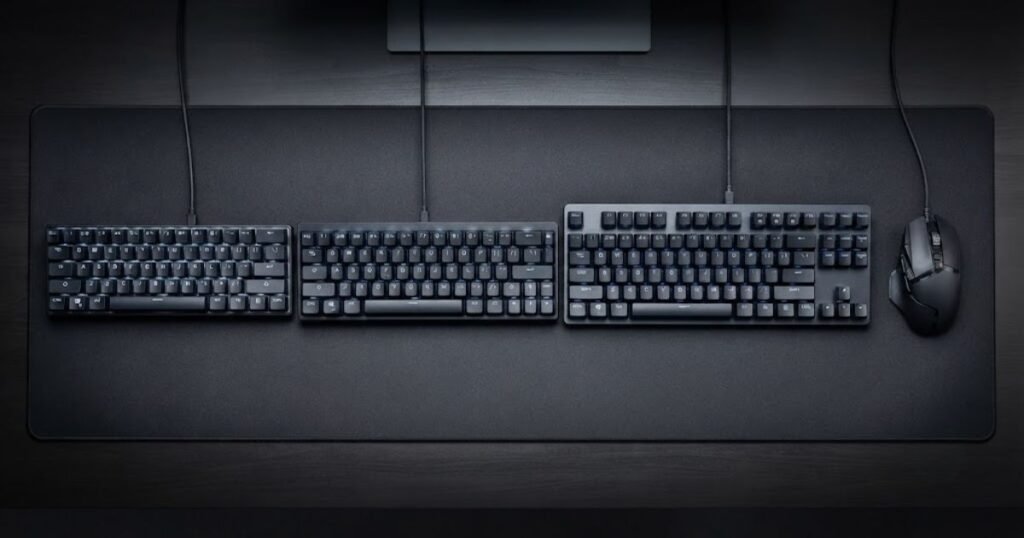
Unlike switch characteristics, layout does not primarily change how an individual key feels when pressed. Its main effect is on the physical relationship between the keyboard, mouse, and available desk space. That makes layout an important setup consideration, but it does not make one format universally better for every FPS player.
Why TKL Keyboards Are Popular for FPS Setups
TKL keyboards can be useful for FPS because they remove the dedicated number pad while retaining the function row and most of the navigation keys. This reduces the keyboard’s horizontal footprint compared with a full-size model and can leave more room for mouse movement.
This can be particularly useful for players who use a low mouse sensitivity and need larger physical movements across the desk. The benefit comes from the additional space available around the keyboard, not from the TKL layout changing how the keyboard registers inputs.
TKL can also provide a familiar transition for players who use a full-size keyboard outside gaming but want a smaller footprint for their FPS setup.
When a 60% or 65% Keyboard Makes More Sense
60% and 65% keyboards make more sense when minimizing desk footprint is a priority and the player is comfortable working without some dedicated keys. Their smaller physical size can create more room for the mouse, which may be valuable for players who use broad mouse movements.
A 60% layout typically removes more dedicated keys than a TKL design, while a 65% layout retains a compact form while adding commonly used navigation keys. The choice therefore involves a trade-off between available desk space and access to dedicated keys.
Consider a compact layout when these factors match your setup:
- Limited desk space: A smaller keyboard leaves more room for the mouse and other equipment.
- Large mouse movements: Extra horizontal space can make broad movements easier to accommodate.
- Minimal reliance on dedicated keys: Players who rarely use the removed keys may not miss them during gaming.
- Preference for a compact setup: A smaller keyboard can make the overall desk arrangement feel less crowded.
The important point is that compactness provides a physical setup benefit. It does not inherently make movement, aiming, or reaction faster.
When Full-Size Still Makes Sense
A full-size keyboard can still make sense for FPS players who need a dedicated number pad or regularly use their keyboard for productivity outside gaming. The larger layout may take up more desk space, but that trade-off can be worthwhile for someone who uses the same keyboard for gaming, work, school, or other tasks.
Players who do not need maximum mouse space may also have little reason to sacrifice the dedicated keys offered by a full-size layout. In that situation, choosing a smaller keyboard purely because it is popular among FPS players may solve a problem the player does not actually have.
The right layout should therefore start with the player’s physical setup and daily use rather than with the assumption that smaller is always better.
The table below compares common keyboard layouts for FPS setups:
| Layout | Main advantage | Main trade-off |
|---|---|---|
| 60% | Maximum compactness and more available mouse space | Fewer dedicated keys |
| 65% | Compact size with commonly used navigation keys | Less compact than 60% |
| TKL | More mouse room while retaining the function row | Larger footprint than compact layouts |
| Full-size | Full access to dedicated keys and number pad | Uses more horizontal desk space |
Table conclusion: Compact layouts prioritize desk and mouse space, while larger layouts preserve more dedicated keys. The better choice depends on which trade-off fits the player’s setup.
Layout should therefore be evaluated as a setup-fit feature. If desk space is tight or mouse movement is constrained, a smaller layout can solve a practical problem. If the keyboard also needs to serve productivity needs, retaining additional keys may be more valuable.
In conclusion, keyboard layout can matter for FPS without directly changing keyboard performance. TKL, 60%, and 65% layouts can provide more room for the mouse, while full-size keyboards offer more dedicated keys. The right choice is the layout that gives the player the necessary control and desk space without removing keys they actually need.
Which Gaming Keyboard Features Matter Less for FPS?
Gaming keyboard features that matter less for FPS are usually those that improve appearance, convenience, or general desktop use without changing how movement and other game inputs are handled. RGB lighting, media controls, displays, and similar extras can still be useful, but they should usually come after core input characteristics when an FPS player has a limited budget or needs to prioritize features.
This does not mean these features are worthless. A player who also uses the keyboard for work, streaming, or everyday computing may value them highly. The important distinction is whether a feature solves an FPS performance problem or serves another purpose outside gameplay.
RGB Lighting Is Mostly Cosmetic
RGB lighting generally has little direct impact on FPS performance because it changes the keyboard’s appearance rather than its input behavior. Lighting can make a setup more visually appealing, improve the look of a gaming desk, or provide customization options through keyboard software, but it does not inherently make movement inputs register faster or more consistently.
For players choosing between two keyboards with similar core performance characteristics, RGB may reasonably become a preference factor. When the choice is between paying more for additional lighting effects or investing in a feature that changes keyboard input behavior, the performance-oriented feature is usually more relevant to an FPS-focused setup.
Media Controls and Extra Convenience Features
Media controls and other convenience features are primarily useful for managing everyday computer tasks rather than improving FPS gameplay. Dedicated volume controls, playback buttons, OLED displays, macro controls, and similar additions can make a keyboard more convenient, particularly for users who switch frequently between gaming and other activities.
Their value therefore depends heavily on how the keyboard will be used outside the game. A streamer may appreciate dedicated controls that simplify their workflow, while a player who only wants a keyboard for competitive FPS may have little reason to prioritize them.
These features can be useful when they solve a genuine setup or workflow need:
- Media controls: Useful for adjusting audio without leaving the game or switching applications.
- Displays: Can provide information or customization for users who value on-device controls.
- Extra programmable controls: May be useful for productivity, streaming, or other workflows.
- Advanced lighting: Can provide additional customization for the overall gaming setup.
These are legitimate reasons to value convenience features, but they should not be confused with features that directly affect how the keyboard handles FPS inputs.
The distinction is especially useful when comparing gaming keyboards vs office keyboards, because the two categories can prioritize different combinations of performance, convenience, comfort, and everyday functionality.
Extra Features Can Still Matter for a Gaming Setup
Lower-priority FPS features can still be worthwhile when they improve the way a player uses the keyboard outside the game. Not every purchase decision needs to be based exclusively on competitive performance. A keyboard may serve as both a gaming device and a daily workstation, making convenience features more valuable than they would be for a dedicated competitive setup.
The key is to separate useful extras from performance requirements. If a feature improves your workflow or makes the setup more enjoyable, it can justify its place in the purchase decision. It simply should not be presented as though it provides the same FPS benefit as features that directly affect input behavior.
The table below separates features with a more direct FPS role from features that primarily serve appearance or convenience:
| Feature | Direct FPS impact | Typical role |
|---|---|---|
| Input responsiveness | High | Performance |
| Reliable key registration | High | Performance |
| Actuation behavior | High | Performance |
| Keyboard layout | Indirect | Setup fit |
| RGB lighting | Low | Aesthetics |
| Media controls | Low | Convenience |
| Display features | Low | Convenience |
Table conclusion: Performance-related features should receive greater priority when the goal is FPS input performance, while cosmetic and convenience features are better treated as secondary preferences.
There is no need to avoid keyboards with RGB lighting, media controls, or other extras. The more useful approach is to decide what you actually need from the keyboard and avoid paying a premium for features that do not address your priorities.
In conclusion, features such as RGB lighting, media controls, and displays are usually secondary considerations for FPS. They can improve aesthetics or everyday usability, but they should not outweigh core input characteristics when FPS performance is the primary goal.
How Should You Prioritize Gaming Keyboard Features for FPS?
Prioritize gaming keyboard features for FPS by evaluating the features that affect your actual inputs first, then considering customization, physical fit, and convenience. This approach helps you spend more of your budget on features that solve a real problem instead of paying extra for specifications or extras you may never use.
The right priority also depends on the player. Someone who struggles with accidental movement inputs has a different need from someone who needs more mouse space or wants a keyboard that doubles as a daily workstation. A useful evaluation therefore starts with the problem you want the keyboard to solve rather than with the most impressive specification on the product page.
- Identify your main FPS priority: Decide whether your main concern is input behavior, movement control, comfort, or available desk space.
- Evaluate the keyboard’s input behavior: Look for consistent and predictable handling of the inputs you use most during gameplay.
- Consider actuation features: Adjustable actuation and Rapid Trigger can be useful when their behavior matches your movement style, but they are not mandatory for every player.
- Choose the right switch feel: Consider whether you prefer smooth linear movement or the physical feedback of tactile switches, along with the amount of key resistance you find comfortable.
- Choose a suitable layout: Match the keyboard’s physical size to your available desk space, mouse movement, and need for dedicated keys.
- Deprioritize low-impact extras when necessary: If your budget is limited, prioritize performance-related characteristics before RGB lighting, displays, media controls, and other convenience features.
This order keeps the buying decision focused on actual use rather than feature count. It also prevents a common mistake: paying for an advanced feature before determining whether the feature addresses a problem you experience while playing.
Start With the Problem You Want to Solve
The most useful starting point is identifying what you want the new keyboard to improve. If your current keyboard feels inconsistent during repeated inputs, input behavior should receive more attention. If your keyboard takes up too much desk space, layout may be the more important consideration. If the keys feel uncomfortable during long sessions, switch characteristics may deserve greater priority.
This prevents specifications from becoming the starting point of the decision. A feature only has meaningful value when it connects to a specific need.
A practical priority order is therefore:
- Performance need: Identify the keyboard behavior that is currently limiting you.
- Feature fit: Determine which feature actually addresses that problem.
- Physical fit: Make sure the layout and switch feel work with your setup and habits.
- Secondary preferences: Consider convenience and cosmetic features after the core requirements are satisfied.
This framework is more useful than choosing a keyboard simply because it has a longer specification list. For someone buying a keyboard for the first time, the same approach helps narrow the options around actual FPS needs instead of overwhelming the decision with features. That is why identifying what to look for in a first gaming keyboard should come before comparing individual models.
Match Advanced Features to Your Playstyle
Advanced keyboard features are worth prioritizing only when their behavior matches the way you actually play FPS games. Rapid Trigger may be relevant to a player who relies heavily on repeated movement inputs, while another player may place greater value on a familiar switch feel or a compact layout.
The same principle applies to adjustable actuation. Customization can be useful when it solves a specific control or comfort issue, but it should not become a purchase requirement simply because it appears on a premium gaming keyboard.
There is also no need to treat every FPS player as having identical hardware requirements. Competitive experience, preferred games, sensitivity settings, desk size, and personal input habits can all change which features are worth paying for.
Balance FPS Performance With Everyday Use
If the keyboard will also be used for work, school, or general computing, include those requirements before making the final choice. A full-size layout may be worthwhile for someone who regularly uses a number pad, while a compact layout may make more sense for someone who prioritizes mouse space.
The same applies to convenience features. Media controls or additional customization may have little direct FPS value, but they can still improve the overall usefulness of a keyboard that stays on your desk every day.
The goal is not to eliminate every non-FPS feature. It is to make sure those features do not consume the budget or compromise the characteristics that matter most to your primary use case.
For a broader view of the category and how these individual considerations fit into the overall FPS keyboard selection process, you can explore gaming keyboards for FPS.
Do Not Pay for a Feature You Will Not Use
A feature should justify its cost by solving a real problem or providing meaningful value in your setup. This is particularly important with premium gaming keyboards, where additional features can significantly increase the price without necessarily changing the parts of the keyboard that matter most to your gameplay.
For example, a player who already has enough desk space may gain little from moving to a smaller layout, while a player with a restricted setup may consider that one of the most useful characteristics. Likewise, a player who does not notice a meaningful difference from adjustable actuation may be better served by investing in comfort or build quality.
Once the essential requirements are covered, secondary features can be evaluated according to preference rather than treated as performance necessities.
In conclusion, the best way to prioritize gaming keyboard features for FPS is to start with your actual problem, match the feature to that problem, and only then consider additional customization and convenience. This keeps the decision grounded in how you play rather than in how many features a keyboard can advertise.
What Should You Look for in an FPS Gaming Keyboard?
Look for an FPS gaming keyboard that provides predictable input behavior, useful actuation options when needed, a comfortable switch feel, an appropriate layout, and only the extra features that fit your setup. The strongest choice is not necessarily the keyboard with the most advanced specification sheet, but the one whose important characteristics match the way you actually play.
Use the following checklist when comparing models:
| Feature | Priority | Why it matters |
|---|---|---|
| Input responsiveness | High | Supports predictable keyboard input during gameplay |
| Reliable key registration | High | Helps handle simultaneous and repeated inputs consistently |
| Actuation behavior | High | Determines how key travel relates to input activation |
| Rapid Trigger | Conditional | Can be useful for players who prioritize rapid movement inputs |
| Switch feel | Medium | Affects physical feedback, resistance, and long-session comfort |
| Keyboard layout | Medium to High | Determines desk footprint and available mouse space |
| RGB lighting | Low | Primarily affects aesthetics and customization |
| Media controls | Low | Primarily improves everyday convenience |
Table conclusion: Prioritize features that affect input behavior and setup fit first, then consider advanced or cosmetic features according to your personal needs.
In conclusion, choosing an FPS gaming keyboard is less about finding the keyboard with the longest feature list and more about identifying the features that solve your specific problems. Once the core requirements are covered, the remaining features can be judged by comfort, convenience, and personal preference.
Frequently Asked Questions About Gaming Keyboard Features for FPS
FPS players do not need every gaming keyboard feature to get a suitable setup. The most useful features are the ones that improve input consistency, fit the player’s movement preferences, and solve practical setup problems. The questions below address the most common decisions players face when comparing FPS gaming keyboards.
What gaming keyboard features matter most for FPS?
The features that matter most are reliable input behavior, actuation characteristics, movement-oriented features, and a layout that fits your desk and mouse space. Switch feel can also matter for comfort, while features such as RGB lighting and media controls are generally secondary for FPS performance.
Does a gaming keyboard actually improve FPS performance?
A gaming keyboard can provide input characteristics that are useful for FPS, but it does not automatically make a player perform better. Consistent input behavior, suitable actuation, and a comfortable setup can support gameplay, but mechanics, decision-making, and practice remain essential.
Does Rapid Trigger matter for FPS games?
Rapid Trigger can matter for players who rely heavily on repeated movement inputs. It changes how the keyboard responds to key movement during repeated presses and releases, which can alter the feel of directional changes. It is useful for some players, but it is not a requirement for playing FPS games.
Is adjustable actuation useful for FPS gaming?
Adjustable actuation can be useful when a player wants to customize how much key travel is required before an input registers. A suitable setting can change the feel of movement and repeated inputs, but the benefit depends on the player’s habits, comfort, and ability to use the setting consistently.
Are linear switches better for FPS?
Linear switches are not universally better for FPS, but their smooth key travel can appeal to players who prefer an uninterrupted feel during repeated presses. Tactile switches can be equally suitable for players who prefer more physical feedback.
Does keyboard layout affect FPS performance?
Keyboard layout can affect the physical setup more than the keyboard’s input behavior. Smaller layouts can leave more room for mouse movement, while larger layouts retain more dedicated keys. The effect depends on desk space, mouse sensitivity, and how the keyboard is used outside gaming.
Is TKL better than full-size for FPS gaming?
TKL can be a better fit for FPS players who want more mouse space while keeping the function row and most navigation keys. Full-size can still be preferable for players who need a number pad or use the same keyboard for productivity.
Do faster keyboard features make you react faster?
Faster keyboard input characteristics do not automatically make a player’s reaction time faster. They can change how quickly or sensitively the keyboard registers certain inputs, but human reaction time, decision-making, and execution still determine the player’s overall response.
Does RGB lighting matter for FPS?
RGB lighting has little direct impact on FPS performance. It primarily affects the appearance and customization of the setup. It can still be worthwhile if aesthetics are important to the player, but it should generally come after performance-related keyboard characteristics when FPS is the priority.
Do you need Rapid Trigger to play FPS games competitively?
No, Rapid Trigger is not required to play FPS games competitively. It can provide a different movement input experience, particularly for players who frequently use rapid directional inputs, but competitive performance does not depend on owning a keyboard with this feature.
What should you prioritize when buying a gaming keyboard for FPS?
Start with input behavior, then evaluate actuation features, switch feel, layout, and secondary features according to your needs. If the budget is limited, prioritize characteristics that address an actual gameplay or setup problem before cosmetic and convenience features.
What gaming keyboard features are mostly unnecessary for FPS?
RGB lighting, display features, media controls, and other convenience-focused additions are usually not essential for FPS performance. They can improve a keyboard’s appearance or everyday usability, but they should not outweigh core input characteristics when the primary goal is FPS gaming.
Final Takeaway
The most valuable gaming keyboard features for FPS are the ones that improve predictable input behavior or solve a real problem with your movement, comfort, or desk setup. Actuation and Rapid Trigger can be useful for players who benefit from more responsive movement behavior, while switch feel and layout are largely about finding the right physical fit.
There is no universal feature combination that every FPS player needs. A keyboard should be judged by how its features interact with the way you actually play, not by how long its specification list is. When the budget is limited, prioritize features with a clear purpose and treat cosmetic or convenience additions as secondary choices.
Thanks for reading GearTP, and I hope this guide helps you choose the right gaming keyboard for your FPS setup.The simplest rule is this: choose the features that solve your problems, not the features that merely make the specification sheet look impressive.