
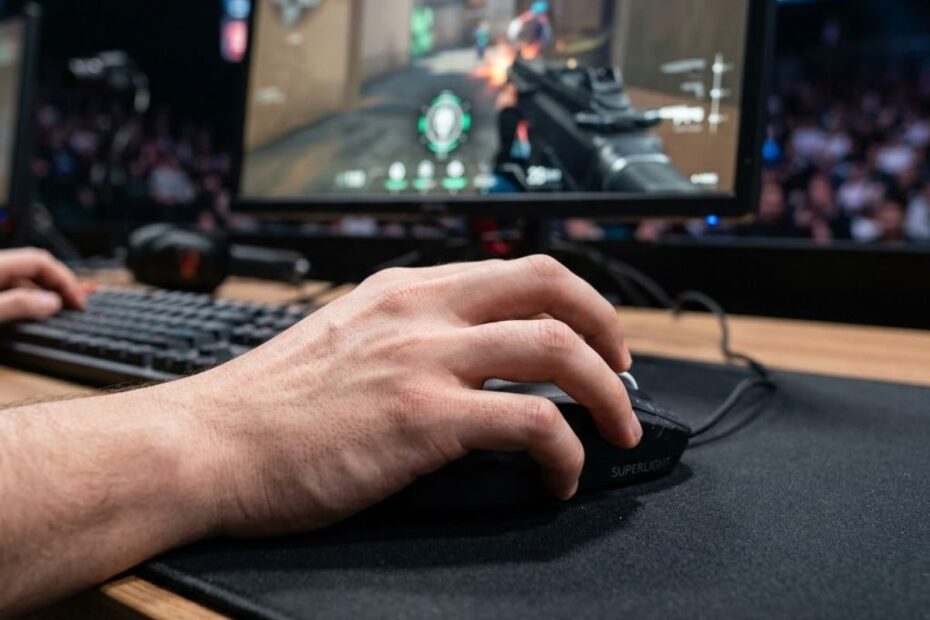
Claw grip is a mouse grip style where your palm lightly touches the rear of the mouse while your fingers arch upward like a claw. This grip helps FPS players combine fast mouse movement, quick clicking, and precise aim corrections without fully resting the hand on the mouse.
For many Valorant, CS2, Apex Legends, and tactical FPS players, claw grip feels like a middle ground between comfort and speed. It gives more control than fingertip grip for some players, but it usually feels more agile than a full palm grip. That is why many competitive players test claw grip when they want faster flicks without losing too much stability.
This guide explains what claw grip is, how it works, who should use it, who should avoid it, and what mouse features usually fit claw grip players best. If you are still comparing multiple grip types, this article also connects naturally with our guide to different mouse grip styles for FPS games.
What Is Claw Grip?
Claw grip is a gaming mouse grip style that uses partial palm contact and curved fingers to balance speed, precision, and control. Instead of laying the whole hand flat on the mouse, the player keeps the fingers raised and slightly bent. This creates a more active grip position for clicking, flicking, and making small aim adjustments.
Here’s what a typical claw grip position looks like in practice:
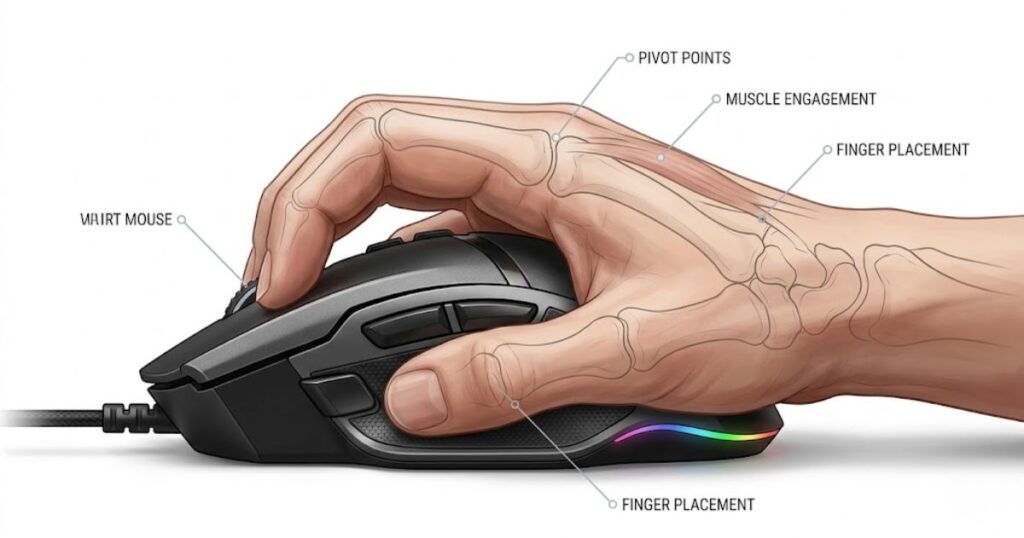
In claw grip, the back of the palm usually touches the rear hump of the mouse, while the fingertips rest on the main buttons and side areas. The hand does not fully relax into the mouse shell. That small amount of tension is what gives claw grip its responsive feeling.
For FPS games, claw grip is often used because it allows players to move the mouse quickly while still keeping enough contact for stability. It can feel especially useful when switching between wide flick shots and tiny crosshair corrections.
Why Is It Called Claw Grip?
It is called claw grip because the fingers curve upward in a shape that looks similar to a claw. The name describes the visible hand posture rather than a specific performance rule. When viewed from the side, the fingers are not flat like palm grip and not barely touching like fingertip grip.
This curved finger position gives the player more direct control over the mouse buttons. The index and middle fingers can press quickly, while the thumb and ring finger help stabilize the sides of the mouse. That combination creates the sharp and responsive feel many FPS players associate with claw grip.
The important point is that claw grip is not about forcing your fingers into an extreme shape. A good claw grip should feel controlled, not painful. If the hand feels overly tense after a few minutes, the grip pressure or mouse shape may not be right.
What Does a Claw Grip Look Like?
A claw grip looks like a raised-hand position where the rear palm touches the mouse and the fingers arch over the buttons. The palm does not cover the entire mouse, and the fingers do not stay fully flat. This makes claw grip easy to identify compared with palm grip and fingertip grip.
The table below explains the physical characteristics of a claw grip:
| Feature | Claw Grip Position | What It Means in Practice |
|---|---|---|
| Palm Contact | Partial contact | The rear palm touches the back of the mouse, but the full palm does not rest flat. |
| Finger Position | Arched fingers | The index and middle fingers curve over the main buttons for faster input. |
| Mouse Control | Fingers and wrist | Small corrections come from the fingers, while larger movements come from the wrist and arm. |
| Stability | Moderate to high | The rear palm contact helps keep the mouse from feeling too loose. |
| Speed | High | The raised finger position can make clicks, flicks, and resets feel quicker. |
Claw grip is easiest to recognize by the combination of partial palm contact and curved fingers. If your palm is fully relaxed across the mouse, you are probably using palm grip. If only your fingertips touch the mouse with almost no palm contact, you are closer to fingertip grip.
In short, claw grip is a controlled, responsive mouse grip style built around arched fingers and partial palm support. It gives FPS players a practical balance between fast movement and stable aim control.
How Does Claw Grip Work?
Claw grip works by combining finger control and wrist movement, helping players make faster aim adjustments during FPS gameplay. The fingers handle small corrections and quick inputs, while the wrist supports flicks, turns, and target switching. This makes claw grip feel active and responsive.
Unlike palm grip, claw grip does not depend on full-hand contact for stability. Unlike fingertip grip, it does not remove palm support almost completely. That middle position gives many players enough control for tactical shooters while still allowing quick reactions.
In practical FPS gameplay, claw grip often feels strongest during moments where you need to react fast but still stop the crosshair accurately. This includes holding an angle, correcting after a flick, clearing corners, or adjusting from one target to another.
Finger Movement in Claw Grip
Finger movement in claw grip helps players make small aim corrections and fast button inputs. Because the fingers are curved, they can press and release the mouse buttons quickly without needing the whole hand to shift position.
The fingertips also help control tiny left, right, forward, and backward adjustments. These micro movements are useful when your crosshair is close to the target but not perfectly placed. In games like Valorant and CS2, that small correction can matter more than a large flick.
Finger movement does not replace good crosshair placement or aim training. It simply gives the player another layer of control. When used comfortably, claw grip can make the mouse feel more connected to the hand during precise aim corrections.
Wrist Movement in Claw Grip
Wrist movement in claw grip supports faster flick shots, target switching, and quick directional changes. Since the palm does not fully rest on the mouse, the wrist can move more freely than it usually does in a relaxed palm grip.
This can help FPS players snap between targets or adjust quickly when an enemy appears outside the current crosshair position. The wrist gives the movement speed, while the fingers help refine the final aim placement. That is one reason claw grip can feel strong for aggressive FPS playstyles.
However, the wrist should not carry all the work. Players using low sensitivity may still need arm movement for larger turns. Claw grip works best when the hand, wrist, and arm share movement naturally instead of forcing one part to do everything.
Why Claw Grip Feels Responsive
Claw grip feels responsive because the fingers stay active and ready to control the mouse at all times. The hand is not fully relaxed into the shell, so the player can click, stop, and correct movement quickly.
This responsive feeling is one of the biggest reasons FPS players experiment with claw grip. It can make the mouse feel easier to reposition during fast fights. It can also help players who feel too slow or too locked in when using palm grip.
The tradeoff is that responsiveness can turn into tension if the player grips too hard. A good claw grip should feel ready, not strained. If the grip feels stiff, the player may need to relax their hand or use a mouse shape that supports claw grip better.
Overall, claw grip works by giving the player fast finger control, flexible wrist movement, and enough rear-palm contact to stay stable. This is what makes it one of the most popular grip styles for competitive FPS games.
How Is Claw Grip Different From Palm Grip and Fingertip Grip?
Claw grip is different from palm grip and fingertip grip because it balances stability and agility. Palm grip focuses more on comfort and hand support, while fingertip grip prioritizes maximum freedom of movement. Claw grip sits between these two extremes, making it one of the most versatile mouse grip styles for FPS gaming.
The visual comparison below helps illustrate the differences between the three major mouse grip styles:
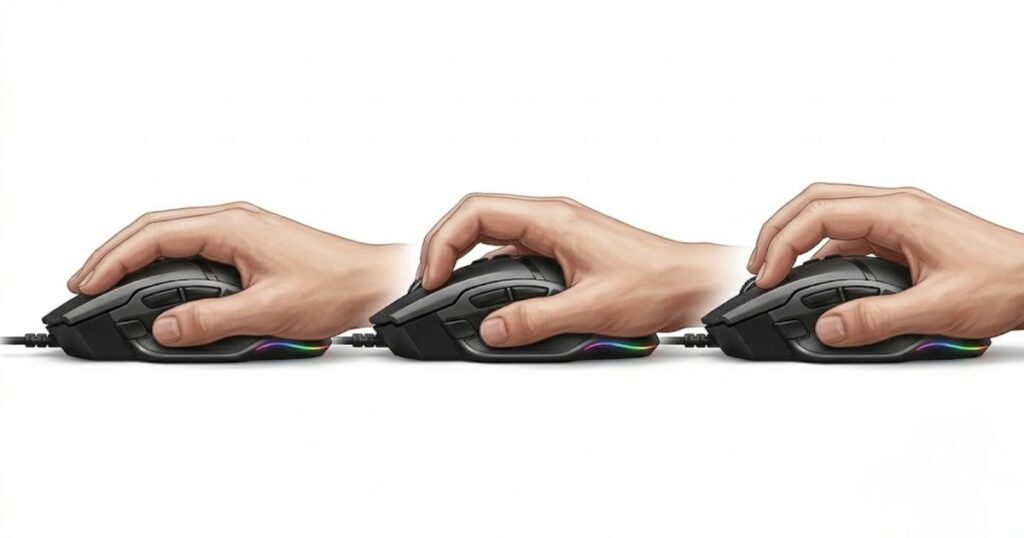
Understanding these differences helps explain why players often prefer different grip styles even when using the same mouse. The best grip is not determined by popularity but by how naturally it matches a player’s aiming mechanics and comfort preferences.
The table below compares the three most common mouse grip styles used in FPS games:
| Feature | Palm Grip | Claw Grip | Fingertip Grip |
|---|---|---|---|
| Palm Contact | Full | Partial | Minimal |
| Movement Source | Arm + Wrist | Fingers + Wrist | Primarily Fingers |
| Speed | Moderate | High | Very High |
| Stability | High | Medium-High | Low-Medium |
| Comfort | High | Medium | Low |
This comparison shows why claw grip is frequently described as a hybrid grip. It provides more support than fingertip grip while remaining more responsive than palm grip.
Why Do Palm Grip Players Prefer More Hand Support?
Palm grip players prefer more hand support because the entire hand rests on the mouse. This reduces finger tension and often feels more comfortable during extended gaming sessions.
Players who value comfort, smooth tracking, and relaxed movements often choose palm grip. The tradeoff is that the mouse may feel less responsive during rapid directional changes compared to claw grip.
If you want to learn more about this grip style, see our guide on palm grip.
Ultimately, palm grip prioritizes comfort and stability over responsiveness.
Why Do Fingertip Grip Players Prefer Maximum Agility?
Fingertip grip players prefer maximum agility because only the fingertips control the mouse. This allows very fast repositioning and extremely free movement.
The reduced palm contact creates a lightweight feeling that some players enjoy. However, the lack of support can make the grip harder to control consistently during long sessions.
Players interested in this style can read our complete guide to fingertip grip.
In exchange for greater freedom, fingertip grip often requires more finger control and endurance.
Why Is Claw Grip Considered a Balanced FPS Grip Style?
Claw grip is considered balanced because it combines control, speed, and support in a single grip style. Players receive enough palm contact to stabilize the mouse while still maintaining active finger control.
This balance is one of the biggest reasons claw grip remains popular across multiple FPS genres. It adapts well to tactical shooters, arena shooters, and battle royale games without strongly favoring one type of movement.
As a result, many players view claw grip as a practical middle-ground option rather than an extreme specialization.
Overall, the biggest difference between the three grip styles is how they distribute stability, comfort, and responsiveness.
What Are the Main Advantages of Claw Grip for FPS Games?
The main advantages of claw grip are faster mouse responsiveness, improved aim corrections, and better adaptability across different FPS scenarios. These benefits come from the combination of active finger positioning and partial palm support rather than from any single movement technique.
While no grip style automatically improves aim, claw grip provides several characteristics that many competitive players find useful. These advantages become most noticeable when precision and reaction speed are equally important.
The table below explains the key benefits commonly associated with claw grip:
| Benefit | Practical Impact |
|---|---|
| Responsive Control | Faster mouse repositioning |
| Precision Adjustments | Easier micro-corrections |
| Flexible Movement | Supports multiple aiming styles |
| Balanced Support | More stability than fingertip grip |
| Versatility | Works across many FPS genres |
The advantages above focus on overall mouse control rather than isolated aiming mechanics. Together, they create a balanced experience that suits many players.
The benefits below explain why many FPS players choose claw grip:
- Responsive Movement: Allows quick changes in mouse direction.
- Accurate Corrections: Helps refine crosshair placement.
- Versatile Control: Supports multiple aiming styles.
- Balanced Feel: Combines speed and support.
- Competitive Adaptability: Works well in various FPS games.
These strengths make claw grip attractive to players seeking a balance between comfort and performance.
Why Does Claw Grip Feel More Responsive Than Palm Grip?
Claw grip feels more responsive than palm grip because the fingers remain actively engaged with the mouse. The hand is ready to adjust movement at any moment rather than resting fully on the shell.
This active posture often creates a stronger sense of connection between the player and the mouse. Many players describe the mouse as feeling easier to reposition during fast engagements.
Greater responsiveness is one of the defining characteristics of claw grip.
Why Does Claw Grip Support Precise Aim Corrections?
Claw grip supports precise aim corrections because finger input plays a larger role in mouse control. Small crosshair adjustments can be made without relying entirely on larger wrist or arm movements.
This characteristic is especially valuable when the crosshair is already near the target and only minor corrections are required. In tactical FPS games, these small movements can have a significant impact on accuracy.
The ability to make precise corrections contributes heavily to claw grip’s popularity.
Why Is Claw Grip Effective Across Different FPS Genres?
Claw grip is effective across different FPS genres because it does not strongly favor one movement style over another. It supports both precision-oriented gameplay and faster-paced engagements.
Players can use claw grip successfully in games that emphasize tactical positioning as well as games that require more aggressive movement. This versatility helps explain its long-term popularity among FPS enthusiasts.
For many players, adaptability is the biggest advantage of claw grip over more specialized grip styles.
Overall, claw grip’s greatest strength is its ability to balance multiple performance characteristics without heavily sacrificing one for another.
What Are the Disadvantages of Claw Grip?
The main disadvantages of claw grip are increased finger tension, reduced comfort during long sessions, and a higher adaptation requirement compared to palm grip. While many FPS players enjoy the responsiveness of claw grip, the active hand position may not feel natural for everyone.
Every mouse grip style involves tradeoffs. The same finger positioning that helps create faster and more responsive movements can also introduce fatigue if the grip is too aggressive or maintained for long periods.
Understanding these limitations is important because a grip style should remain comfortable over months and years of gameplay rather than only feeling effective during short sessions.
The table below explains the most common drawbacks associated with claw grip:
| Drawback | Potential Impact |
|---|---|
| Finger Tension | Can increase fatigue over time |
| Reduced Relaxation | Less comfortable than palm grip |
| Adjustment Period | Requires adaptation for new users |
| Grip Consistency | Can vary when tired |
| Long Session Comfort | May become less comfortable after extended use |
The disadvantages above explain why some players eventually return to palm grip even after initially enjoying claw grip. Comfort remains a major factor in long-term performance.
The factors below explain why claw grip may not work for every player:
- Higher Finger Activity: The fingers remain engaged more frequently than in palm grip.
- Less Hand Relaxation: The hand may feel less supported during long sessions.
- Adaptation Requirement: New users often need time to adjust.
- Consistency Challenges: Grip pressure can change when fatigue develops.
- Comfort Tradeoff: Increased responsiveness may reduce overall comfort.
These drawbacks do not automatically make claw grip a poor choice. Instead, they highlight the tradeoffs that players should understand before committing to the grip style.
Why Can Claw Grip Cause Finger Fatigue?
Claw grip can cause finger fatigue because the fingers remain elevated and actively engaged during gameplay. Unlike palm grip, the hand rarely rests completely on the mouse.
Over time, this posture may place additional workload on the fingers and small hand muscles. Some players adapt quickly, while others notice fatigue during longer gaming sessions.
The level of fatigue depends heavily on grip pressure, individual hand structure, and overall playing habits.
Why Does Claw Grip Feel Less Relaxed Than Palm Grip?
Claw grip feels less relaxed because it relies on an active hand position rather than full palm support. The hand remains prepared for movement instead of resting naturally on the mouse shell.
Many competitive players accept this tradeoff because they value responsiveness. However, players who prioritize comfort often prefer grip styles that allow the hand to remain more relaxed.
This difference is one of the primary reasons grip preference varies significantly between players.
Why Do Some Players Struggle to Adapt to Claw Grip?
Some players struggle to adapt because claw grip changes the way the hand controls the mouse. Players who have used palm grip for years may initially find claw grip unfamiliar.
The adjustment period can involve changes in muscle memory, grip pressure, and movement habits. During this transition, aim consistency may temporarily decrease before improving.
For this reason, claw grip often rewards patience and gradual adaptation rather than immediate results.
Overall, the disadvantages of claw grip are mostly related to comfort and adaptation rather than performance limitations.
Who Should Use Claw Grip?
Claw grip is best suited for FPS players who want a balance between responsiveness, control, and stability. It often appeals to players who feel limited by the slower responsiveness of palm grip but do not want the minimal support offered by fingertip grip.
Many competitive FPS players prefer claw grip because it supports both speed and precision:
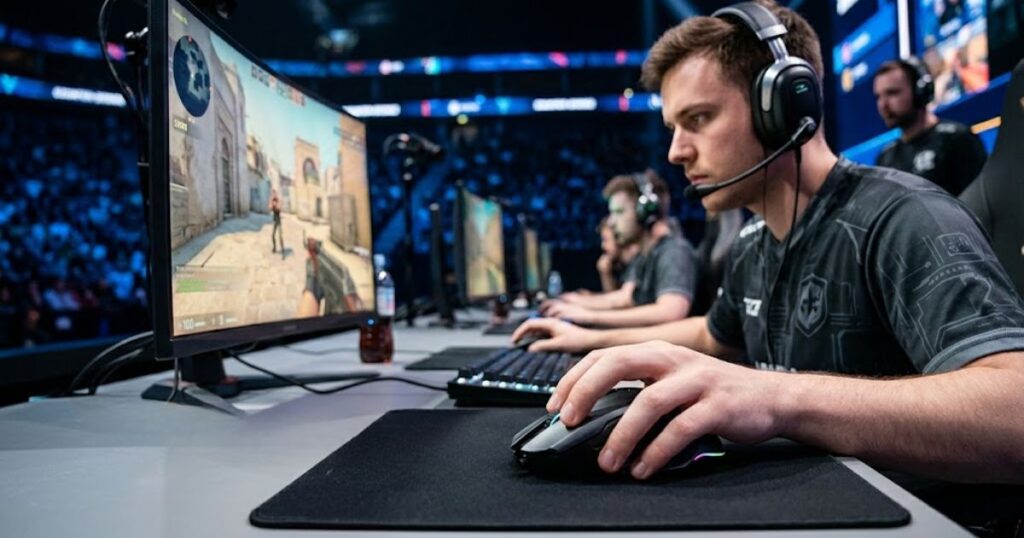
Because claw grip sits between these two extremes, it works well for a wide range of FPS players. Rather than focusing on a specific game, it is more useful to examine the types of players who benefit from its characteristics.
The table below identifies player profiles that commonly benefit from claw grip:
| Player Type | Suitability |
|---|---|
| Competitive FPS Players | Excellent |
| Hybrid Aim Players | Excellent |
| Wrist-Aim Players | Very Good |
| Tactical Shooter Players | Very Good |
| Casual Players | Moderate |
The table highlights a common pattern. Claw grip tends to attract players who value responsiveness but still want enough support to maintain control during precise aiming situations.
Why Do Competitive FPS Players Often Use Claw Grip?
Competitive FPS players often use claw grip because it supports both quick reactions and precise aim control. These players frequently encounter situations that require fast directional changes alongside accurate crosshair placement.
The balance provided by claw grip aligns well with the demands of competitive shooters. While it is not required for success, many players find that it complements their gameplay style.
This explains why claw grip remains common across multiple competitive FPS communities.
Why Is Claw Grip Popular Among Hybrid Aim Players?
Claw grip is popular among hybrid aim players because it adapts well to different movement requirements. Some engagements demand large movements, while others require extremely small corrections.
The blend of finger control and palm support allows players to transition between these scenarios naturally. This flexibility is one of the strongest arguments in favor of claw grip.
Players who regularly switch between tracking and precision aiming often appreciate this adaptability.
Why Does Claw Grip Appeal to Tactical FPS Players?
Claw grip appeals to tactical FPS players because it supports controlled and deliberate mouse movements. Tactical shooters often reward precision, positioning, and consistency rather than constant aggressive movement.
Many players feel that claw grip provides enough responsiveness without sacrificing too much stability. This combination makes it a comfortable choice for methodical aiming styles.
As a result, claw grip remains one of the most widely adopted grip styles within tactical FPS environments.
Overall, claw grip is most suitable for players who want a balanced approach to mouse control rather than prioritizing a single performance characteristic.
If you are exploring other factors that influence FPS performance beyond grip style, it is also worth understanding how a gaming mouse for FPS games affects consistency, control, and overall aiming performance.
Who Should Avoid Claw Grip?
Players who prioritize comfort, relaxed hand positioning, or minimal finger tension may want to avoid claw grip. While claw grip offers several performance advantages, those advantages do not automatically outweigh comfort concerns.
Some players simply perform better when their hands remain relaxed. Others experience discomfort when maintaining an active grip posture for extended periods. Understanding these situations can prevent unnecessary frustration.
Players Who Prioritize Maximum Comfort
Players who prioritize maximum comfort often prefer grip styles that provide greater hand support. A more relaxed posture may feel easier to maintain throughout long gaming sessions.
For these players, comfort can contribute more to consistency than increased responsiveness. A grip that feels natural is usually easier to sustain over time.
Comfort-focused players frequently gravitate toward grip styles that reduce hand tension.
Players Who Experience Frequent Hand Fatigue
Players who already experience hand fatigue may struggle with claw grip. The active finger positioning can sometimes amplify existing discomfort during extended play.
This does not mean claw grip is impossible to use, but it does mean players should pay close attention to comfort and recovery. Ignoring discomfort rarely leads to better long-term performance.
Comfort should always remain a priority when selecting a grip style.
Players Who Prefer Fully Relaxed Mouse Control
Players who prefer fully relaxed mouse control may find claw grip unnecessarily active. Some gamers simply enjoy a grip style that requires less finger engagement and less conscious hand positioning.
There is nothing inherently wrong with this preference. Grip styles are tools, and the best tool is the one that supports consistent performance without creating unnecessary strain.
Choosing a grip style should always be based on comfort, consistency, and personal preference rather than trends.
Ultimately, claw grip is not designed for every player. The best grip is the one that allows you to play comfortably and consistently over the long term.
How Do You Hold a Mouse Using Claw Grip?
You hold a mouse using claw grip by placing the rear of your palm on the back of the mouse while keeping your fingers curved over the buttons. The goal is to create a balance between support and responsiveness without gripping the mouse too tightly.
This example demonstrates the typical hand placement used in a proper claw grip:
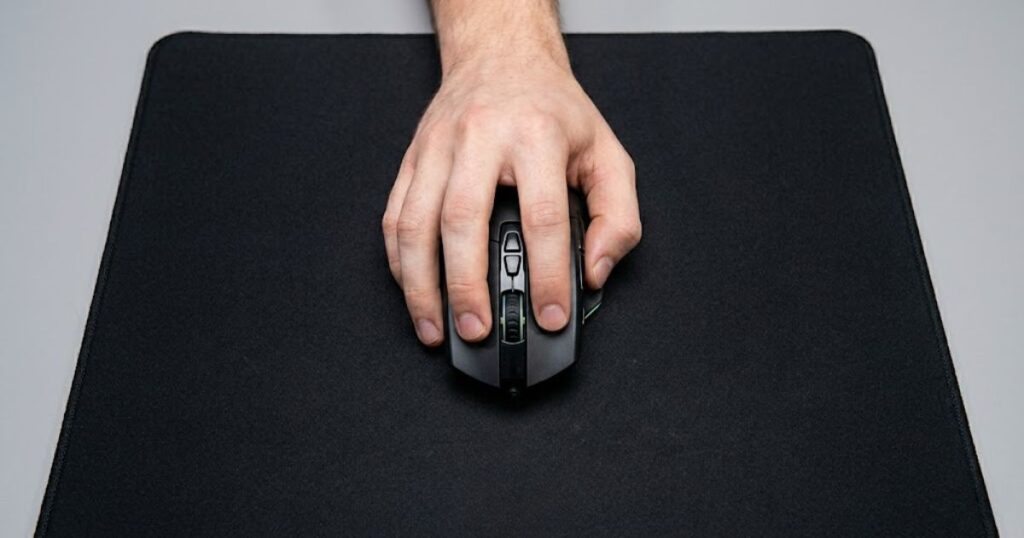
Many new players assume claw grip requires an extreme hand position. In reality, effective claw grip is usually subtle and comfortable. The hand should remain relaxed enough to maintain control during long gaming sessions while still allowing quick movements and adjustments.
The exact finger placement varies slightly from player to player, but the overall structure remains consistent. Partial palm contact and curved fingers are the defining characteristics of the grip.
The following process can help you build a proper claw grip:
- Place the Rear Palm: Rest the back portion of your palm lightly on the rear hump of the mouse.
- Curve the Fingers: Allow your index and middle fingers to arch naturally above the main buttons.
- Relax the Thumb: Keep the thumb resting comfortably along the side of the mouse.
- Reduce Grip Pressure: Hold the mouse securely without squeezing it.
- Test Mouse Control: Move the mouse through tracking, flicking, and target-switching exercises.
The process above provides a practical starting point for players who want to experiment with claw grip. Small adjustments are normal because hand sizes and preferences vary.
Where Should Your Fingers Rest in Claw Grip?
Your fingers should rest naturally on the mouse buttons while maintaining a gentle arch. The fingertips remain in contact with the buttons, allowing fast clicking and responsive control.
The fingers should not feel rigid or overly stretched. Excessive tension often reduces comfort and may negatively affect consistency during longer sessions.
A natural finger position is usually more effective than trying to force a dramatic claw shape.
Where Should Your Palm Contact the Mouse?
Your palm should contact the rear section of the mouse rather than covering the entire shell. This limited contact point provides stability while preserving finger freedom.
The amount of palm contact may vary slightly depending on hand size and mouse shape. Some players naturally use slightly more contact, while others prefer slightly less.
The important factor is maintaining enough support without restricting movement.
How Much Grip Pressure Should You Use?
You should use only enough grip pressure to maintain control of the mouse. Excessive pressure often creates unnecessary tension and reduces comfort.
Many players unintentionally squeeze the mouse during stressful situations. Over time, this habit can increase fatigue and make aiming feel less natural.
A relaxed but controlled grip usually produces better long-term consistency.
Overall, proper claw grip relies on balance rather than force. The hand should feel supported, responsive, and comfortable throughout gameplay.
What Are the Most Common Claw Grip Mistakes?
The most common claw grip mistakes involve excessive tension, poor hand positioning, and unrealistic expectations. Many problems attributed to claw grip actually result from incorrect execution rather than the grip style itself.
Understanding these mistakes can help players evaluate whether claw grip truly feels uncomfortable or whether a small adjustment is needed. Minor corrections often solve issues that initially seem significant.
The factors below explain the most common claw grip mistakes:
- Gripping Too Hard: Excessive pressure increases tension and fatigue.
- Over-Curving the Fingers: An exaggerated claw position often feels unnatural.
- Ignoring Comfort: Forcing a grip style rarely leads to long-term success.
- Changing Too Many Variables: Adjusting grip, sensitivity, and equipment simultaneously creates confusion.
- Expecting Instant Results: Adaptation takes time.
These mistakes often appear during the first few weeks of experimenting with claw grip. Fortunately, most of them are easy to correct once identified.
Why Is Gripping the Mouse Too Hard a Problem?
Gripping the mouse too hard creates unnecessary tension that can reduce comfort and consistency. Many players tighten their grip during intense moments without realizing it.
This tension may affect mouse control and contribute to fatigue over longer sessions. A lighter grip generally allows smoother movement and more natural adjustments.
Reducing grip pressure is one of the simplest ways to improve overall comfort.
Why Is Over-Curving the Fingers a Mistake?
Over-curving the fingers can make claw grip feel more uncomfortable than necessary. Some players assume a dramatic claw shape is required, but effective claw grip is usually much more natural.
The fingers should remain comfortably curved rather than aggressively bent. Excessive curvature often creates unnecessary strain without providing additional benefits.
A moderate and sustainable position is usually the better approach.
Why Should You Avoid Expecting Immediate Improvement?
You should avoid expecting immediate improvement because every grip change involves an adaptation period. The hand needs time to develop new movement habits and muscle memory.
Some players experience temporary inconsistency during this adjustment phase. This does not necessarily mean the grip style is unsuitable.
Patience often produces better results than constantly switching between grip styles.
Overall, most claw grip problems come from execution mistakes rather than the grip style itself.
What Signs Suggest Claw Grip Fits Your Playstyle?
Several performance and comfort indicators can suggest that claw grip naturally fits your playstyle. These signs help players determine whether the grip feels sustainable rather than simply effective in short testing sessions.
No grip style should be judged after only a few minutes of use. Consistency over time is a much stronger indicator of compatibility than initial impressions.
The signs below suggest that claw grip may fit your playstyle:
- Comfortable Mouse Control: The hand feels natural during extended play.
- Consistent Aim Adjustments: Small corrections feel predictable.
- Stable Crosshair Placement: Maintaining accuracy feels easier.
- Natural Hand Position: The grip does not require conscious effort.
- Sustainable Performance: Results remain stable over time.
These indicators focus on long-term usability rather than isolated moments of performance.
Does the Grip Feel Natural During Long Sessions?
A grip that feels natural during long sessions is often a strong sign of compatibility. Comfort plays a major role in maintaining consistency across weeks and months of gameplay.
If the grip feels effortless after extended use, it is more likely to remain sustainable in the long run.
Natural comfort is often one of the strongest indicators of a suitable grip style.
Do Small Aim Corrections Feel Consistent?
Consistent aim corrections suggest that the grip works well with your natural movement patterns. Small adjustments should feel predictable rather than forced.
Reliable micro-corrections often indicate that the hand and mouse are working together efficiently.
This consistency becomes increasingly important as skill levels improve.
Can You Maintain Performance Without Excessive Effort?
The ability to maintain performance without excessive effort is another positive sign. A suitable grip should support good habits rather than requiring constant concentration.
When a grip style matches a player’s natural tendencies, performance often feels more repeatable and sustainable.
The best grip style is usually the one that becomes almost invisible during gameplay because it feels completely natural.
Overall, claw grip fits players who can maintain comfort, control, and consistency without excessive strain or conscious effort.
Frequently Asked Questions About Claw Grip
The questions below answer some of the most common concerns FPS players have about claw grip. These answers provide quick explanations that complement the information covered throughout this guide.
What Is Claw Grip?
Claw grip is a mouse grip style where the palm lightly touches the rear of the mouse while the fingers remain curved over the buttons. This position helps balance speed, precision, and control during gameplay.
Is Claw Grip Good for FPS Games?
Yes, claw grip is considered one of the most effective grip styles for FPS games. Many players prefer it because it offers a balance between responsiveness and stability.
Is Claw Grip Better Than Palm Grip?
Claw grip is not universally better than palm grip. Claw grip prioritizes responsiveness, while palm grip prioritizes comfort and support. The better option depends on personal preference.
Is Claw Grip Better Than Fingertip Grip?
Claw grip is not inherently better than fingertip grip. Claw grip provides more stability, while fingertip grip provides greater freedom of movement.
Does Claw Grip Improve Aim?
Claw grip can improve aim for some players if it feels natural and comfortable. Consistency, practice, and mouse control remain more important than grip style alone.
Does Claw Grip Work With Large Hands?
Yes, claw grip can work with large hands when paired with an appropriately sized mouse. Hand size affects comfort, but it does not automatically determine grip preference.
Does Claw Grip Cause Hand Fatigue?
Claw grip may cause hand fatigue if excessive tension is used. Maintaining a relaxed grip usually reduces discomfort during longer gaming sessions.
How Long Does It Take to Adapt to Claw Grip?
Most players need several days to a few weeks to adapt to claw grip. The exact timeframe depends on previous habits and individual comfort levels.
Why Do Professional FPS Players Use Claw Grip?
Many professional FPS players use claw grip because it provides a balance between speed and precision. However, professional players use a variety of grip styles successfully.
What Mouse Shape Is Best for Claw Grip?
Many claw grip users prefer mice with a supportive rear hump and medium-sized shape. The ideal shape depends on hand size and personal preference.
Can You Use Claw Grip for Non-FPS Games?
Yes, claw grip can be used for many game genres beyond FPS titles. MOBA, RTS, and general gaming players may also find it comfortable.
How Do You Know if Claw Grip Fits Your Playstyle?
Claw grip likely fits your playstyle if it feels comfortable, consistent, and easy to maintain over long sessions. A suitable grip should improve control without creating unnecessary strain.
Conclusion
Claw grip is a balanced mouse grip style that combines the stability of palm contact with the responsiveness of active finger control. This combination has made it one of the most popular grip styles among FPS players.
Throughout this guide, we explored how claw grip works, how it differs from other grip styles, its advantages and disadvantages, the types of players who benefit most from it, and the common mistakes that can affect comfort and consistency.
While claw grip can be an excellent choice for many FPS gamers, no grip style is universally superior. The best grip is the one that feels natural, remains comfortable during long sessions, and allows you to maintain consistent mouse control over time.
If you are still comparing different grip styles, our guide to best mouse grip styles for FPS games can help you determine which option best matches your playstyle.
Thanks for reading.