
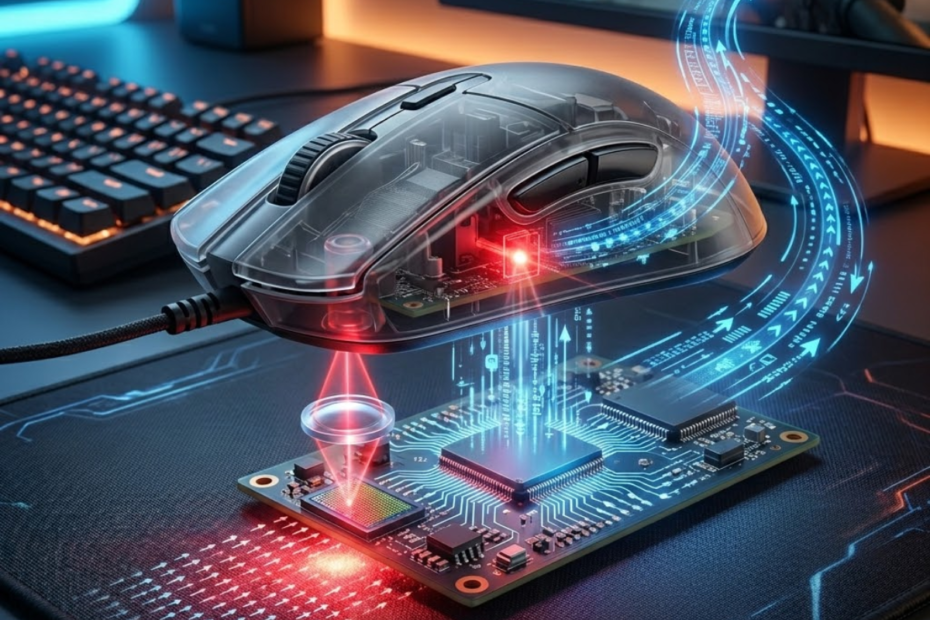
Modern gaming mice can track movement with remarkable precision, but many FPS players never learn what actually happens beneath the mouse. Terms such as DPI, IPS, tracking accuracy, and sensor performance are frequently mentioned in reviews, yet the technology responsible for those specifications often remains misunderstood.
A gaming mouse sensor works by capturing images of the surface beneath the mouse, comparing those images thousands of times every second, calculating movement, and sending tracking data to the computer. This process helps transform physical hand movement into accurate cursor movement during gameplay.
Understanding how gaming mouse sensors work creates a stronger foundation for understanding DPI, IPS, acceleration, and tracking consistency. It also helps players evaluate gaming mice based on real sensor performance rather than marketing claims.
How Do Gaming Mouse Sensors Work?
Gaming mouse sensors are tracking systems that detect physical mouse movement across a surface. Gaming mouse sensors help convert real-world hand movement into accurate cursor movement on a computer screen.
Every time a gaming mouse moves, the sensor underneath the mouse begins analyzing the surface below it. Rather than tracking the user’s hand directly, the sensor focuses on tiny visual details found on the mouse pad or desk surface. These details act as reference points that allow the sensor to determine movement.
Modern gaming sensors continuously capture and process images at extremely high speeds. By comparing one image with the next, the sensor can identify how far the mouse has moved and in which direction. The calculated movement data is then transmitted to the computer where the cursor position is updated almost instantly.
This process occurs continuously while the mouse is moving. Because modern gaming sensors perform these calculations thousands of times per second, they can provide the responsiveness and precision required by competitive FPS players.
What Is A Gaming Mouse Sensor?
A gaming mouse sensor is a hardware component that tracks movement by analyzing the surface beneath the mouse. A gaming mouse sensor helps translate physical movement into digital input.
For readers who want a broader overview of sensor technology, sensor types, and how modern tracking systems evolved, understanding a gaming mouse sensor explained guide can provide useful background before exploring the technical details covered in this article.
The sensor serves as the primary tracking system inside a gaming mouse. Every movement that appears on screen begins with information gathered by the sensor. Without a sensor, the computer would have no way to determine where the mouse is moving.
Modern gaming mice primarily use optical sensors. These sensors rely on light, imaging technology, and processing algorithms to monitor movement. While the technology has become significantly more advanced over the years, the fundamental purpose remains the same: accurately measure movement.
Because the sensor acts as the foundation of tracking performance, its quality directly affects how consistently movement is reproduced during gameplay.
What Does A Gaming Mouse Sensor Actually Detect?
A gaming mouse sensor is a tracking device that detects changes in surface position rather than measuring hand movement directly. This process helps the mouse calculate direction and travel distance.
Many players assume a mouse sensor somehow tracks the position of their hand. In reality, the sensor never sees the hand itself. Instead, it focuses entirely on the surface beneath the mouse.
As the mouse moves, the sensor captures images of tiny patterns, fibers, scratches, and texture details on the surface. The sensor compares these patterns across multiple images and identifies how they shift over time.
The amount of pattern movement determines how far the mouse has traveled, while the direction of pattern movement determines where the cursor should move. This approach allows the sensor to calculate movement with exceptional precision.
Why Sensor Performance Matters In FPS Games
Sensor performance is a factor that determines how accurately movement is translated into aiming actions. Good sensor performance helps FPS players maintain consistency during tracking and flick shots.
FPS games place unusually high demands on mouse tracking systems. Players frequently perform rapid flicks, micro-adjustments, target tracking, and quick direction changes. Any tracking inconsistency can affect aiming precision.
A high-quality sensor ensures that movement on the mouse pad closely matches movement on screen. This consistency allows players to develop reliable muscle memory and predictable aim behavior over time.
Although sensor quality alone does not create better aim, reliable tracking removes a potential source of error and allows players to focus entirely on execution and decision-making. Sensor performance remains one of the most important factors that separates a high-quality gaming mouse for FPS games from an ordinary mouse.
Understanding the role of the sensor provides important context for everything that follows. Before exploring specifications such as DPI and IPS, it is necessary to understand how movement is actually detected and processed.
What Happens When You Move A Gaming Mouse?
The movement process is a sequence of tracking calculations that begins when the sensor captures surface data. This process helps transform physical movement into real-time cursor updates.
When a gaming mouse moves across a surface, several different systems begin working simultaneously. Although the entire sequence happens almost instantly, multiple stages occur before movement appears on screen.
The diagram below shows the complete movement tracking sequence inside a gaming mouse sensor:
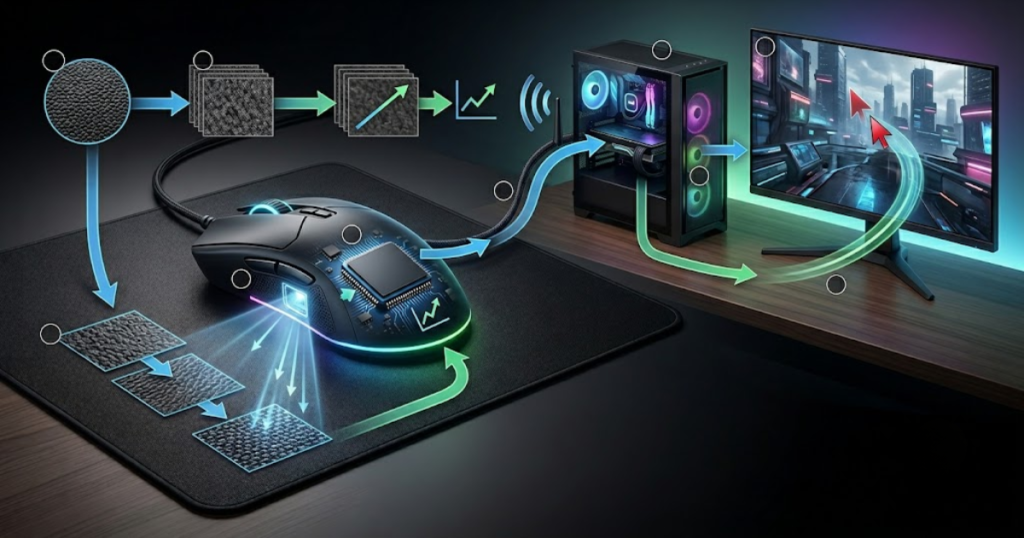
The sensor must first capture visual information, process that information, calculate movement values, and finally send tracking data to the computer. Understanding these stages makes it easier to understand how gaming sensors achieve accurate tracking.
The following process explains how a gaming mouse sensor converts movement into cursor motion:
- Surface Illumination: The sensor projects light onto the tracking surface.
- Image Capture: Thousands of images are recorded every second.
- Frame Comparison: Consecutive images are analyzed for changes.
- Motion Calculation: Movement direction and distance are calculated.
- Data Transmission: Tracking information is sent to the computer.
- Cursor Update: The operating system updates cursor position.
This process repeats continuously while the mouse is moving, creating the smooth tracking experience players expect from modern gaming mice.
How The Sensor Captures Surface Images
Surface image capture is the first stage of tracking that records visual details beneath the mouse. This stage helps create the raw data required for movement detection.
Underneath every optical gaming mouse is a small imaging system. The sensor illuminates the surface and captures extremely small images of the area directly beneath it.
These images contain countless visual details such as cloth fibers, microscopic imperfections, texture patterns, and surface variations. Even surfaces that appear smooth to the human eye contain enough detail for the sensor to analyze.
Modern gaming sensors can capture thousands of images every second. This rapid image acquisition provides the data necessary for highly accurate movement tracking.
How Frame Comparison Calculates Movement
Frame comparison is a tracking method that analyzes differences between consecutive images. This method helps determine movement direction and distance.
Capturing images alone does not provide movement information. The sensor must compare one image with the next and determine how the visual patterns have changed.
If a particular surface pattern shifts slightly to the left between images, the sensor can determine that the mouse moved in the opposite direction. Similar calculations occur simultaneously across multiple areas of the captured image.
By combining thousands of these comparisons, the sensor can accurately calculate both movement distance and movement direction. These calculations form the foundation of cursor tracking.
How Tracking Data Reaches The Computer
Tracking data is digital movement information generated by the sensor processor. This data helps the operating system update cursor position in real time.
After movement has been calculated, the sensor converts that information into digital coordinates. These coordinates represent how far the cursor should move along the horizontal and vertical axes.
The data is transmitted through either a wired USB connection or a wireless communication system. Regardless of connection type, the goal remains the same: deliver movement information as quickly as possible.
Once the operating system receives the data, the cursor position is updated immediately. Because this process occurs continuously, movement appears smooth and responsive to the user.
The movement pipeline described above explains the overall tracking sequence. The next step is understanding how different surfaces influence the sensor’s ability to perform these calculations accurately.
How Does A Gaming Mouse Track Movement On Different Surfaces?
Surface tracking is a process that relies on visible texture patterns beneath the sensor. Surface tracking helps the mouse maintain accurate movement detection across different materials.
A gaming mouse sensor cannot track movement in empty space. It requires visible surface details that can be analyzed and compared between images. The quality and consistency of those details directly affect tracking reliability.
Different materials provide different levels of texture information. Some surfaces contain abundant tracking detail, while others make it difficult for the sensor to identify movement accurately.
The comparison below shows how different surfaces influence gaming mouse tracking:
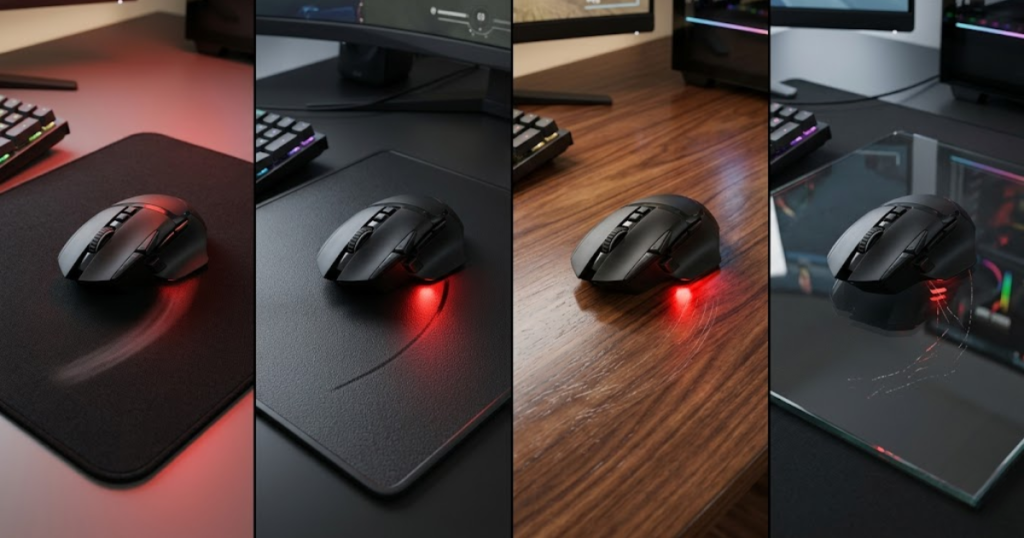
Understanding the relationship between sensors and surfaces helps explain why gaming mouse pads remain popular among competitive players.
Why Surface Texture Is Important For Tracking
Surface texture is a collection of visual details that the sensor can recognize. Surface texture helps the sensor identify movement between captured images.
Every tracking calculation depends on the sensor’s ability to locate unique patterns within captured images. Surface texture provides those patterns.
Cloth mouse pads, for example, contain thousands of woven fibers that create highly visible tracking references. These references allow the sensor to identify movement quickly and consistently.
Without sufficient texture information, movement calculations become more difficult and tracking reliability can decrease.
Why Reflective Surfaces Create Tracking Problems
Reflective surfaces are materials that distort the image patterns used by the sensor. These surfaces help explain why some desks and glass panels cause tracking issues.
Highly reflective materials often interfere with the light projected by the sensor. Instead of producing clear image patterns, reflections can create distorted or inconsistent visual information.
Because the sensor depends on stable image data, these distortions may reduce tracking accuracy. In extreme situations, the sensor may struggle to detect movement altogether.
This is one reason why traditional glass surfaces remain challenging for many optical sensors despite advances in tracking technology.
Why Mouse Pads Improve Tracking Consistency
Mouse pads are optimized tracking surfaces designed for sensor performance. Mouse pads help provide stable texture and predictable tracking behavior.
Gaming mouse pads are specifically designed to provide a consistent surface for sensor tracking. Unlike ordinary desks, they offer controlled texture patterns across the entire tracking area. They also help create more predictable sensor behavior when the mouse is lifted and repositioned, which is closely related to lift-off distance performance.
This consistency reduces the likelihood of unexpected tracking variations. It also helps ensure that movement calculations remain stable regardless of where the mouse is positioned on the pad.
For competitive FPS players, a high-quality mouse pad often provides a more reliable tracking environment than most desk surfaces.
Surface quality plays an important role in tracking performance, but the sensor also relies on several specialized hardware components working together behind the scenes. Understanding those components is the next step in learning how gaming mouse sensors work.
What Components Make Up A Gaming Mouse Sensor System?
A gaming mouse sensor system is a collection of hardware components working together to detect and process movement. These components help create accurate tracking performance by capturing images, analyzing changes, and transmitting movement data to the computer.
Many players refer to the entire tracking system as the sensor, but a modern gaming mouse actually relies on multiple specialized components. Each part performs a specific task within the tracking pipeline, and the quality of these components can influence overall performance.
The image below highlights the major hardware components inside a gaming mouse sensor system:
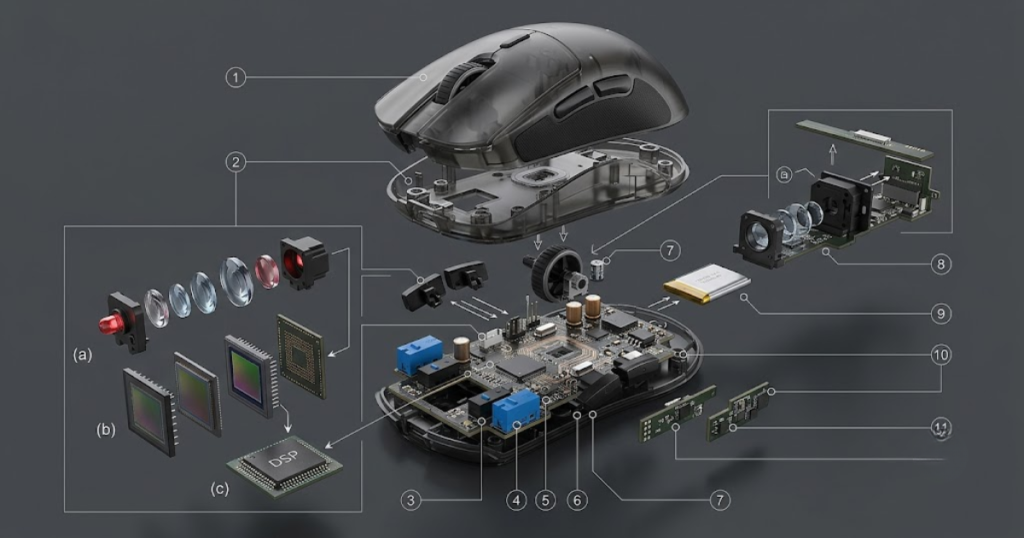
The sensor cannot function with only a camera or only a processor. Movement tracking requires image capture, image processing, movement calculation, and data transmission to work together as a complete system. Understanding these components provides a clearer picture of what happens inside a gaming mouse every time it moves.
The table below explains the main hardware components involved in gaming mouse tracking:
| Component | Function | Contribution |
|---|---|---|
| Lens | Focuses images | Image clarity |
| CMOS Sensor | Captures images | Movement detection |
| DSP Processor | Processes data | Tracking calculations |
| Controller | Sends information | Cursor response |
Together, these components create the foundation of modern gaming mouse tracking. A weakness in any part of the system can reduce the effectiveness of the overall tracking experience.
What The Lens Does During Tracking
The lens is an optical component that focuses surface details onto the sensor. The lens helps improve image quality so movement can be analyzed accurately.
The lens sits between the surface and the imaging sensor. Its primary purpose is to ensure that surface details remain sharp enough for tracking calculations. Without proper focus, captured images would contain less usable information.
Although gaming mouse marketing rarely discusses lenses, they play an important role in tracking quality. Even a high-end sensor can struggle if image clarity is reduced before information reaches the imaging system.
The lens helps maximize the amount of useful surface detail available for movement detection. This allows the sensor to identify positional changes more accurately.
How The CMOS Sensor Captures Images
The CMOS sensor is an imaging component that records thousands of surface snapshots per second. This component helps generate the visual data required for movement tracking.
The CMOS sensor functions similarly to a miniature camera. Instead of recording large photographs, it continuously captures tiny images of the tracking surface beneath the mouse.
Each captured image contains unique texture information. The sensor records these images at extremely high speeds, allowing movement calculations to occur with minimal delay.
The faster and more consistently these images are captured, the more information becomes available for movement analysis. This is one reason modern gaming sensors can maintain accurate tracking during rapid movements.
Rather than measuring distance directly, the CMOS sensor creates the raw visual information that makes movement calculations possible.
How The DSP Processes Movement Data
The DSP is a processing unit that analyzes captured images. The DSP helps calculate movement direction and travel distance by comparing image changes.
Once images have been captured, they must be analyzed before movement can be calculated. This responsibility belongs to the Digital Signal Processor, often referred to as the DSP.
The DSP compares consecutive images and identifies how visible surface patterns have shifted. These shifts reveal both movement direction and movement distance.
Modern DSP technology can perform enormous numbers of calculations every second. This processing power allows gaming mice to maintain accurate tracking even when players perform rapid flicks, fast swipes, or continuous target tracking.
The hardware components discussed above create the physical foundation of tracking. The next step is understanding how these components work together to convert image data into cursor movement.
How Optical Sensors Convert Motion Into Cursor Movement
Optical tracking is a calculation process that converts image changes into movement coordinates. Optical tracking helps generate cursor movement with high precision and consistency.
Capturing images alone does not move the cursor. The sensor must transform visual information into movement data that the computer can understand. This transformation occurs through a series of calculations performed continuously while the mouse is moving.
The visualization below demonstrates how image changes become cursor movement data:
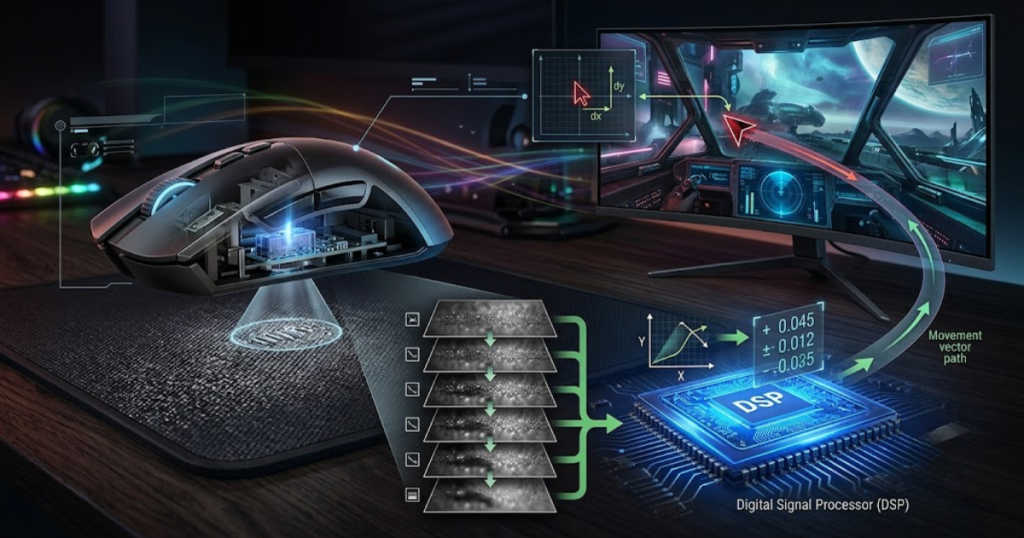
Every cursor movement begins as a change between two captured images. The sensor analyzes these changes, determines how the surface patterns have moved, and converts the result into movement coordinates.
The following process explains how optical sensors transform movement into cursor updates:
- Capture Images: Surface frames are recorded continuously.
- Analyze Differences: Consecutive images are compared.
- Detect Direction: Pattern movement reveals travel direction.
- Measure Distance: Surface displacement is calculated.
- Create Coordinates: X and Y movement values are generated.
- Update Cursor: The operating system moves the cursor.
This sequence occurs repeatedly while the mouse moves, allowing cursor updates to feel smooth and immediate during gameplay.
How Delta Movement Is Calculated
Delta movement is a measurement of positional change between captured images. Delta calculations help determine how far the mouse has traveled.
When the sensor compares two consecutive images, it identifies how much visible surface information has shifted. This shift is commonly referred to as delta movement.
A larger shift indicates greater movement, while a smaller shift indicates a shorter travel distance. The sensor performs these measurements repeatedly as new images are captured.
By accumulating thousands of delta calculations, the sensor can continuously track movement with remarkable precision.
Delta calculations form the mathematical foundation of modern optical tracking systems.
How X And Y Coordinates Are Generated
X and Y coordinates are movement values that represent horizontal and vertical travel. These coordinates help define cursor direction on screen.
Movement rarely occurs in a perfectly straight line. Players constantly move their mice in multiple directions while aiming, tracking enemies, or navigating menus.
To represent this movement digitally, the sensor converts positional changes into horizontal and vertical values. Horizontal movement becomes the X-axis, while vertical movement becomes the Y-axis.
The combination of these values allows the operating system to determine exactly where the cursor should move next. This coordinate-based approach provides smooth movement across every direction.
Without coordinate generation, the sensor would be unable to communicate movement information effectively to the computer.
How The Operating System Uses Sensor Data
Sensor data is a stream of movement information sent to the operating system. This data helps update cursor position on screen in real time.
Once movement coordinates have been calculated, they are transmitted to the computer through either a wired or wireless connection. The operating system receives this information and updates cursor position accordingly.
Because data is transmitted continuously, cursor movement appears fluid rather than step-based. Modern gaming mice can deliver movement updates at extremely high frequencies, creating responsive and predictable tracking behavior.
The operating system itself does not calculate tracking movement. Instead, it relies on the sensor to provide accurate coordinate information and simply updates cursor position based on the data received.
Now that the tracking process has been explained, it becomes easier to understand how sensitivity settings influence cursor movement. This is where DPI enters the discussion.
What Role Does DPI Play In Sensor Tracking?
DPI is a sensitivity measurement that determines how far the cursor moves relative to physical mouse movement. DPI helps adjust cursor speed without changing the underlying tracking quality of the sensor.
DPI is one of the most widely recognized gaming mouse specifications, yet it is also one of the most misunderstood. Many players assume higher DPI automatically means a better sensor, but DPI and sensor quality measure completely different things.
The sensor’s job is to detect movement accurately. DPI determines how that movement is translated into cursor travel distance. Because of this distinction, changing DPI affects sensitivity but does not improve tracking precision.
The table below explains how different DPI settings affect cursor travel distance:
| DPI | Cursor Travel | Typical Usage |
|---|---|---|
| 400 | Slow | Low sensitivity FPS players |
| 800 | Balanced | Most competitive FPS players |
| 1600 | Fast | Higher sensitivity setups |
| 3200+ | Very Fast | Specialized preferences |
Understanding this distinction helps players evaluate gaming mice more accurately and avoid confusing sensitivity settings with sensor performance.
What DPI Actually Measures
DPI is a measurement of cursor movement sensitivity. DPI helps determine how much cursor movement occurs for a given physical travel distance.
DPI stands for Dots Per Inch. In practical terms, it represents how sensitive cursor movement will be when the mouse travels a specific distance across a surface.
A higher DPI setting causes the cursor to travel farther with less physical movement. A lower DPI setting requires more physical movement to achieve the same cursor distance.
DPI therefore influences sensitivity preferences rather than tracking quality. It determines responsiveness but not accuracy.
How DPI Changes Cursor Speed
Cursor speed is a result of sensitivity scaling applied by the sensor. DPI helps increase or decrease cursor travel distance across the screen.
When DPI increases, every inch of mouse movement generates more cursor travel. This makes the cursor feel faster because less physical effort is required to move across the screen.
When DPI decreases, the opposite occurs. More physical movement becomes necessary, creating slower but often more controlled cursor behavior.
FPS players typically adjust DPI according to personal preference, monitor resolution, and overall sensitivity settings. The goal is to find a balance between speed and control.
DPI itself does not determine whether a sensor is accurate. It simply influences how movement is scaled.
Why Higher DPI Does Not Mean Better Tracking
Higher DPI is a sensitivity setting rather than a quality indicator. DPI helps adjust movement speed but does not guarantee better accuracy.
Many gaming mouse advertisements emphasize extremely high DPI values because they are easy to market. However, a sensor with a very high DPI rating is not automatically superior to one with a lower maximum setting.
Tracking quality depends on factors such as image capture consistency, processing accuracy, movement stability, and sensor design. DPI simply modifies sensitivity behavior.
This is why many professional FPS players continue using 400 DPI, 800 DPI, or 1600 DPI despite having access to sensors capable of much higher values.
DPI explains how movement is scaled after tracking occurs. The next specification, IPS, focuses on how quickly a sensor can track movement before accuracy begins to suffer.
What Is IPS And Why Is It Important For Fast Flicks?
IPS is a tracking speed specification that measures the maximum movement speed a sensor can accurately track. IPS helps determine whether a gaming mouse can maintain reliable tracking during fast flicks and aggressive movements.
While DPI controls how movement is scaled on screen, IPS focuses on something completely different: tracking speed. A sensor may offer excellent sensitivity settings, but if it cannot keep up with extremely fast movements, tracking accuracy can suffer.
The example below illustrates how sensor tracking behaves during high-speed flick movements:
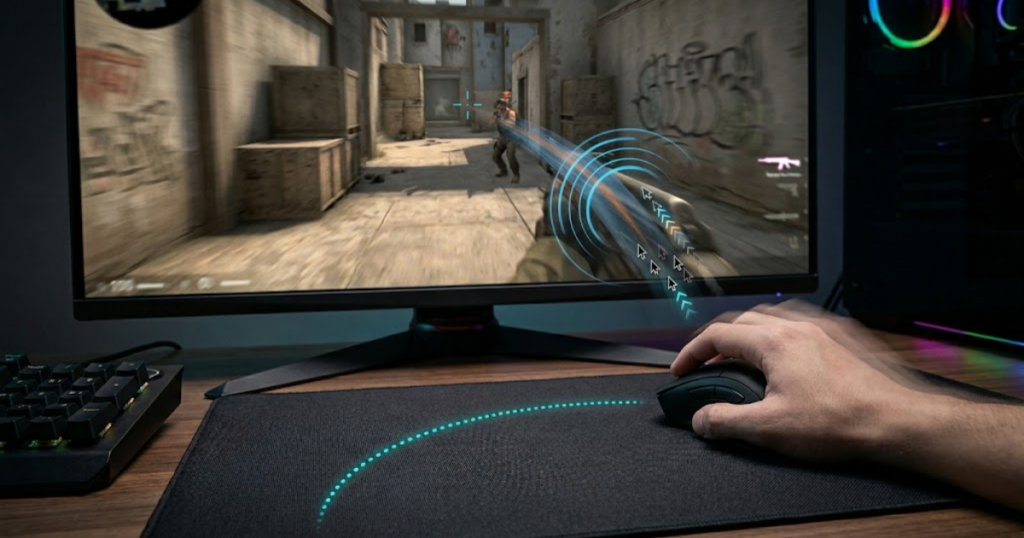
Fast flicks are common in FPS games such as Valorant, Counter-Strike 2, and Apex Legends. During these situations, the sensor must continue capturing and processing movement information accurately despite the increased speed. IPS helps define the limits of that capability.
Understanding IPS allows players to evaluate whether a sensor can handle their movement style without introducing tracking loss or cursor instability.
The table below explains IPS ratings and tracking capability:
| IPS Rating | Tracking Capability |
|---|---|
| 150 IPS | Basic tracking performance |
| 300 IPS | Good tracking reliability |
| 500 IPS | Suitable for competitive FPS gaming |
| 650+ IPS | Premium sensor performance |
Although modern gaming sensors typically provide more IPS than most players can realistically exceed, IPS remains an important specification because it reflects the sensor’s ability to maintain stability under demanding conditions.
What IPS Measures
IPS is a measurement of maximum tracking speed. IPS helps indicate how fast a sensor can move before tracking accuracy begins to decline.
IPS stands for Inches Per Second. It measures the maximum speed at which the sensor can accurately monitor movement across a surface while maintaining reliable tracking.
Unlike DPI, which controls sensitivity, IPS evaluates movement speed capability. A higher IPS rating means the sensor can continue tracking accurately even when the mouse is moving extremely quickly.
This specification becomes important because every sensor has a physical limit. Once movement exceeds that limit, tracking quality can deteriorate.
IPS therefore represents the speed ceiling of a gaming mouse sensor rather than its sensitivity level.
How Fast Flicks Challenge A Sensor
Fast flicks are rapid movements that place extreme demands on sensor tracking. Fast flicks help reveal whether a sensor can maintain accuracy under high-speed conditions.
During a flick shot, a player may move the mouse across a large distance within a fraction of a second. This creates a significant tracking challenge because the sensor must continue capturing clear movement information despite the increased speed.
At slower movement speeds, sensors have ample time to compare image changes and calculate movement. During fast flicks, however, those calculations must occur much more quickly while maintaining precision.
Modern gaming sensors are specifically designed to handle these demanding scenarios. Their high IPS ratings allow them to continue tracking accurately even when movement becomes aggressive. Some sensors may also apply additional processing techniques such as sensor smoothing to influence how movement data is interpreted and delivered.
This is one reason why modern gaming mice perform significantly better than older generations during competitive gameplay.
What Happens When IPS Limits Are Exceeded
Tracking failure is a condition where movement exceeds sensor capability. This condition helps explain cursor skipping, unexpected movement, or temporary tracking loss.
If a mouse moves faster than the sensor can accurately track, image comparisons become increasingly difficult. At some point, the sensor may lose the ability to calculate movement correctly.
When this occurs, symptoms such as cursor skipping, erratic movement, or temporary tracking loss may appear. These issues can severely impact aiming performance during competitive gameplay.
Fortunately, modern flagship gaming sensors offer IPS ratings high enough that most players will never realistically exceed them. Even extremely fast flicks typically remain within the tracking limits of current high-end sensors.
IPS defines how fast a sensor can track movement. Another specification often discussed alongside tracking performance is acceleration, which focuses on how movement speed influences cursor behavior.
What Is Sensor Acceleration?
Sensor acceleration is a behavior where cursor movement changes based on movement speed rather than movement distance alone. Understanding sensor acceleration helps explain why some tracking experiences feel inconsistent.
Ideally, moving a mouse the same distance should always produce the same cursor travel distance regardless of movement speed. Sensor acceleration disrupts this relationship by introducing speed-dependent behavior.
Although modern gaming sensors have largely eliminated hardware acceleration issues, the concept remains important because it directly affects aiming consistency and muscle memory development.
For competitive FPS players, predictable tracking behavior is generally preferred because it allows physical movement and on-screen movement to remain consistent.
How Sensor Acceleration Works
Sensor acceleration is a speed-dependent movement adjustment. This behavior helps explain why identical movement distances can produce different cursor results.
Imagine moving the mouse ten centimeters across a mouse pad. Under ideal circumstances, the cursor should travel the same distance every time.
With acceleration, however, movement speed influences the outcome. Moving the mouse slowly may produce one cursor distance, while moving it quickly may produce a different result despite the physical distance remaining unchanged.
This variation creates inconsistency because cursor behavior becomes dependent on speed rather than distance alone.
As a result, players may struggle to develop reliable muscle memory when acceleration is present.
Why Hardware Acceleration Is Undesirable For FPS Games
Hardware acceleration is a tracking behavior that changes aiming consistency. Removing acceleration helps create predictable and repeatable cursor movement.
Competitive FPS gameplay relies heavily on consistency. Players train specific movement distances repeatedly until they become automatic.
If acceleration causes those movements to produce different results depending on speed, aiming precision becomes more difficult to maintain. Flick shots, target switching, and micro-adjustments can all become less predictable.
This is why competitive players generally prefer one-to-one tracking behavior. When physical movement always produces the same on-screen result, muscle memory becomes significantly easier to develop.
Modern gaming mice prioritize this type of consistent tracking experience.
How Modern Sensors Avoid Acceleration Issues
Modern sensors are tracking systems designed to maintain one-to-one movement behavior. This design helps improve predictability and aiming consistency.
Advances in sensor technology have dramatically reduced the acceleration problems that affected some older sensors. Modern flagship sensors are engineered to provide accurate movement calculations without introducing speed-based tracking changes.
Improved image processing, better tracking algorithms, and more powerful onboard processors all contribute to this improvement. These technologies allow sensors to maintain consistent behavior across a wide range of movement speeds.
As a result, modern gaming mice provide tracking performance that is far more predictable than previous generations.
Eliminating acceleration issues represents one example of how gaming sensors have evolved. Modern sensors also incorporate numerous technologies specifically designed to reduce tracking errors and improve reliability.
How Do Modern Gaming Sensors Reduce Tracking Errors?
Modern gaming sensors are advanced tracking systems designed to minimize inaccuracies. These improvements help maintain reliable tracking performance across a wide range of movement speeds and playing conditions.
Tracking accuracy is influenced by more than just image capture. Sensors must also handle noise, processing limitations, movement instability, and surface variations. Modern gaming sensors address these challenges through a combination of hardware and software improvements.
The goal is not simply to track movement, but to track movement consistently and predictably under demanding gaming conditions.
The factors below explain how modern sensors improve tracking reliability:
- Higher Frame Capture Rates: More images are collected every second.
- Improved Processing Power: Movement calculations become more accurate.
- Better Surface Recognition: Sensors can track more surface types reliably.
- Reduced Tracking Artifacts: Unwanted behavior is minimized.
- Enhanced Stability: Tracking remains reliable during rapid movement.
These improvements allow modern sensors to deliver significantly more reliable performance than older generations.
How Sensor Processing Has Improved Over Time
Sensor processing is the method used to analyze movement data. Improved processing helps reduce tracking inaccuracies and improve overall reliability.
Older gaming sensors operated with less processing power and simpler tracking algorithms. While effective for their time, they were more vulnerable to tracking limitations during demanding gameplay.
Modern processors can analyze larger amounts of image data at much higher speeds. This additional processing capability allows movement calculations to become more accurate and stable.
As processing technology continues to improve, sensors become increasingly capable of maintaining consistent performance across different scenarios.
Better processing helps create more reliable movement information before it is sent to the computer.
How Modern Sensors Handle Rapid Movements
Rapid movement handling is a capability that maintains tracking accuracy during fast actions. This capability helps support competitive FPS gameplay.
Fast swipes and aggressive flicks place significant demands on tracking systems. To maintain accuracy, modern sensors combine high image capture rates, high IPS capabilities, and advanced processing algorithms.
These technologies allow sensors to continue recognizing movement patterns even when travel speed increases dramatically. The result is smoother and more predictable tracking during intense gameplay situations.
Reliable rapid-movement tracking is particularly important for low-sensitivity players who frequently perform large arm movements.
This capability represents one of the most significant improvements in modern gaming sensor technology.
How Manufacturers Improve Tracking Stability
Tracking stability is the ability to maintain consistent sensor behavior. Engineering improvements help reduce unwanted deviations and improve predictability.
Manufacturers invest significant resources into improving stability because consistency is critical for competitive gaming. Even minor tracking irregularities can affect aiming precision over time.
Modern sensor development focuses on minimizing sources of instability such as image noise, inaccurate movement interpretation, and environmental interference. These improvements allow sensors to behave more predictably across different usage scenarios.
The result is a tracking experience that feels more natural and dependable, allowing players to focus on gameplay rather than hardware limitations.
Modern gaming sensors have become remarkably reliable because of these advancements. However, tracking quality can still be influenced by the surface beneath the mouse, which remains an important factor in overall sensor performance.
Why Does Surface Quality Affect Sensor Performance?
Surface quality is a factor that influences how clearly a sensor can detect movement. Better surfaces help improve tracking consistency, movement stability, and overall sensor reliability.
Even the most advanced gaming mouse sensor still depends on the information available beneath it. The sensor can only analyze what it sees, which means the quality of the tracking surface directly affects the quality of the tracking data.
A surface with clear and consistent texture gives the sensor more information to work with. In contrast, surfaces with poor texture, excessive reflection, or inconsistent patterns may reduce the quality of the captured images and make tracking more difficult.
This relationship explains why many competitive players invest in quality mouse pads despite using premium gaming mice. A high-end sensor performs best when paired with a suitable tracking surface.
The table below compares common tracking surfaces used with gaming mice:
| Surface | Tracking Quality | Characteristics |
|---|---|---|
| Cloth Mouse Pad | Excellent | Consistent texture and reliable tracking |
| Hard Mouse Pad | Excellent | Smooth glide with stable tracking |
| Wood Desk | Moderate | Performance varies by finish and texture |
| Plastic Surface | Good | Usually tracks well if texture is consistent |
| Glass Surface | Poor | Highly reflective and difficult to track |
While modern sensors have become increasingly versatile, they still perform best on surfaces specifically designed for optical tracking.
The factors below explain why surface quality affects tracking:
- Texture Detail: Sensors need visible patterns to calculate movement.
- Reflectivity: Excessive reflections can interfere with image capture.
- Consistency: Uniform surfaces improve tracking stability.
- Cleanliness: Dirt and debris may reduce image quality.
- Wear: Surface damage can create tracking inconsistencies.
These factors influence the quality of the images captured by the sensor, which ultimately affects tracking reliability.
Cloth Mouse Pads Versus Hard Mouse Pads
Cloth and hard mouse pads are specialized tracking surfaces designed for gaming. Both surface types help provide reliable sensor performance while offering different movement characteristics.
Cloth mouse pads remain the most popular choice among FPS players because they provide excellent control and consistent texture. The woven surface creates abundant visual detail that sensors can easily recognize.
Hard mouse pads offer a smoother glide and often feel faster during movement. Their solid surfaces also provide stable tracking, although the movement experience differs significantly from cloth pads.
Neither option is universally better. The choice depends on personal preference, desired glide characteristics, and overall comfort. From a sensor perspective, both generally provide excellent tracking conditions.
The important factor is consistency rather than material type alone.
Why Glass Remains Difficult For Most Sensors
Glass is a highly reflective material that limits visible tracking details. This characteristic helps explain why many sensors struggle to track accurately on glass surfaces.
Most optical sensors rely on texture information to calculate movement. Glass surfaces often provide very little usable texture and may reflect light in unpredictable ways.
Instead of capturing clear image patterns, the sensor may receive distorted or repetitive visual information. This makes movement calculations more difficult and can lead to tracking instability.
Although some specialized sensors are designed specifically for glass tracking, traditional gaming sensors generally perform best on textured surfaces rather than highly reflective materials.
This limitation is a consequence of how optical tracking works rather than a flaw in modern sensor technology.
How Surface Consistency Improves Tracking
Surface consistency is the uniformity of texture across a tracking area. Surface consistency helps sensors maintain stable movement detection during gameplay.
A consistent surface allows the sensor to encounter predictable visual patterns regardless of where the mouse moves. This predictability simplifies image analysis and helps maintain reliable tracking behavior.
Inconsistent surfaces may contain abrupt texture changes, damaged areas, or irregular patterns that complicate movement calculations. While modern sensors are highly capable, consistency still contributes to better overall tracking conditions.
This is one reason why dedicated gaming mouse pads are designed to provide uniform texture throughout the entire tracking area.
Surface quality influences tracking conditions, but many players still misunderstand what sensor specifications actually mean. Separating facts from myths is important when evaluating gaming mouse performance.
Common Myths About Gaming Mouse Sensors
Gaming mouse sensor myths are misconceptions that confuse specifications with actual performance. Understanding these myths helps players evaluate gaming mice more accurately.
The gaming peripheral industry often emphasizes technical specifications because numbers are easy to market. As a result, many players develop incorrect assumptions about how sensors work and what truly affects performance.
Some myths originate from outdated technology, while others are created by misunderstandings surrounding specifications such as DPI and sensor performance.
Learning to identify these misconceptions helps players focus on meaningful performance characteristics rather than marketing claims.
The myths below explain common misunderstandings about gaming mouse sensors:
- Higher DPI Means Better Tracking: DPI controls sensitivity, not tracking quality.
- Expensive Sensors Automatically Improve Aim: Skill remains the largest factor in aiming performance.
- All Modern Sensors Are Identical: Design differences still influence behavior.
- More Specifications Always Mean Better Performance: Real-world tracking matters more than marketing numbers.
- Sensor Quality Is The Only Important Mouse Feature: Shape, weight, and comfort remain critical.
Understanding these misconceptions allows players to make more informed purchasing decisions and set realistic expectations for sensor performance.
Higher DPI Means Better Sensor Performance
Higher DPI is a sensitivity increase rather than a tracking quality improvement. This distinction helps prevent one of the most common misunderstandings in gaming mice.
Many gaming mouse advertisements promote extremely high DPI values because larger numbers appear impressive. However, DPI simply changes how much cursor movement occurs relative to physical movement.
A sensor capable of 30,000 DPI is not automatically more accurate than a sensor operating at 3,200 DPI. Tracking accuracy depends on movement detection quality, not maximum sensitivity settings.
This is why many professional FPS players continue using relatively modest DPI values despite having access to sensors capable of much higher settings.
DPI remains useful for adjusting sensitivity, but it should not be treated as a direct indicator of tracking quality.
Expensive Sensors Automatically Improve Aim
Premium sensors are advanced tracking systems but not automatic skill boosters. Better hardware helps remove limitations, but player skill remains the primary factor behind aiming performance.
A high-end sensor can provide accurate tracking, stable movement behavior, and reliable performance during demanding situations. However, these benefits do not replace practice, game knowledge, or mechanical skill.
If two players use different sensors but possess dramatically different aiming abilities, the more skilled player will almost always perform better regardless of hardware.
Premium sensors help create a more consistent environment for skill development, but they do not generate skill automatically.
Understanding this distinction helps set realistic expectations when upgrading gaming equipment.
All Modern Gaming Sensors Perform Exactly The Same
Modern sensors are highly capable but not completely identical. Design differences help create variations in performance characteristics and implementation quality.
Most flagship gaming sensors today provide excellent tracking performance. However, manufacturers may implement different processing methods, firmware tuning, and performance optimizations.
These differences can influence tracking feel, compatibility with certain surfaces, power efficiency, and overall user experience. While the performance gap between modern flagship sensors is much smaller than it once was, differences still exist.
As a result, evaluating sensors based solely on specifications may not always reveal the full picture.
Separating myths from reality makes it easier to understand what truly matters when evaluating sensor quality in practical gameplay situations.
How Can You Tell If A Gaming Mouse Sensor Is Good?
A good gaming mouse sensor is a tracking system that delivers consistent and predictable movement. A good sensor helps maintain reliable performance across different gameplay situations without introducing unwanted tracking behavior.
Many players focus on specifications because they are easy to compare. However, real-world sensor quality is determined more by behavior than by numbers alone.
A quality sensor should track accurately, maintain stability during rapid movements, and behave consistently over time. These characteristics are far more meaningful than maximum DPI values or marketing claims.
Evaluating sensor quality therefore requires examining practical performance rather than relying exclusively on specifications.
The table below explains the most important indicators of sensor quality:
| Factor | Good Sensor | Poor Sensor |
|---|---|---|
| Tracking Consistency | Stable and repeatable | Variable behavior |
| Fast Flick Tracking | Accurate under speed | Tracking loss possible |
| Surface Compatibility | Works on many surfaces | Limited support |
| Movement Stability | Predictable output | Erratic behavior |
Players should prioritize reliable performance characteristics because they have a direct impact on gameplay consistency. For players comparing actual sensor implementations across different models, reviewing the best gaming mouse for FPS games in 2026 can provide practical examples of modern sensor performance.
Tracking Consistency
Tracking consistency is the ability to reproduce movement accurately over time. Tracking consistency helps players develop reliable muscle memory and predictable aiming behavior.
When a sensor is consistent, identical physical movements produce identical cursor movements. This predictable relationship allows players to build confidence in their aiming mechanics.
Inconsistent sensors create uncertainty because movement outcomes may vary even when physical input remains unchanged. This makes it more difficult to develop repeatable aiming habits.
Consistency is therefore one of the most valuable characteristics of a quality gaming sensor.
Without consistency, even impressive specifications lose much of their practical value.
Sensor Stability During Fast Movements
Sensor stability is the ability to maintain tracking during rapid actions. Sensor stability helps prevent tracking errors during demanding gameplay situations.
Competitive FPS players frequently perform fast flicks, rapid target switches, and large mouse movements. These situations place significant demands on tracking systems.
A stable sensor continues producing reliable movement information despite increased speed. This stability reduces the risk of unexpected cursor behavior when precision matters most.
Because competitive gaming often involves high-pressure situations, stability becomes an essential component of overall sensor quality.
Reliable fast-movement performance is one of the clearest signs of a capable gaming sensor.
Real World FPS Performance
Real-world FPS performance is the practical behavior of a sensor during gameplay. Real-world testing helps reveal strengths and weaknesses that specifications alone cannot fully explain.
Specifications provide useful information, but gameplay ultimately determines whether a sensor performs well. Real-world testing evaluates how the sensor behaves during tracking, flicking, micro-adjustments, and target acquisition.
A sensor that performs consistently across these situations is generally more valuable than one that simply advertises impressive technical numbers.
For this reason, experienced players often prioritize practical performance observations over specification comparisons alone.
A good gaming mouse sensor is ultimately defined by how reliably it converts movement into accurate cursor behavior. Understanding this principle helps players evaluate gaming mice more effectively and make better-informed decisions.
Frequently Asked Questions
Understanding the fundamentals of gaming mouse sensors helps explain how modern tracking technology works, but many FPS players still have specific questions about sensor behavior, specifications, and real-world performance. The answers below address some of the most common questions related to gaming mouse sensors and tracking accuracy.
How does a gaming mouse sensor detect movement?
A gaming mouse sensor detects movement by capturing images of the surface beneath the mouse. The sensor helps calculate direction and distance by comparing changes between consecutive images.
Instead of tracking the user’s hand, the sensor analyzes tiny texture patterns on the tracking surface. These changes allow the sensor to determine how the mouse has moved.
Do gaming mouse sensors take pictures?
Gaming mouse sensors are miniature imaging systems that continuously capture surface images. These images help provide the visual information required for movement tracking.
The images are extremely small and are not stored like photographs. They exist only to help the sensor compare surface changes and calculate movement.
How many images per second does a gaming mouse sensor capture?
Gaming mouse sensors capture thousands of images every second. High image capture rates help improve movement detection and tracking accuracy.
The exact number varies by sensor model, but modern gaming sensors process image data at extremely high speeds to maintain smooth tracking.
Why do gaming mice use optical sensors?
Optical sensors are tracking systems that use light and image analysis to detect movement. Optical sensors help provide accurate and reliable tracking across a wide range of surfaces.
Modern optical sensors offer excellent tracking performance, low latency, and high consistency, making them the preferred choice for gaming mice.
Can gaming mouse sensors work on glass?
Most gaming mouse sensors struggle on glass because glass provides limited texture information. Textured surfaces help sensors track movement more reliably.
Some specialized sensors are designed for glass compatibility, but traditional gaming sensors generally perform better on mouse pads and textured surfaces.
What affects sensor accuracy the most?
Sensor accuracy is influenced by image quality, processing capability, tracking stability, and surface conditions. These factors help determine how consistently movement is reproduced.
Modern flagship sensors typically provide excellent accuracy, especially when paired with a quality mouse pad.
Is DPI part of the sensor?
DPI is a sensitivity measurement controlled by the sensor system. DPI helps determine how much cursor movement occurs relative to physical mouse movement.
DPI influences sensitivity but does not directly indicate overall sensor quality.
What is the difference between DPI and IPS?
DPI is a sensitivity specification while IPS is a tracking speed specification. DPI helps control cursor travel distance, while IPS helps determine maximum tracking speed.
Although both are sensor-related specifications, they measure completely different aspects of performance.
Do modern gaming sensors still have acceleration?
Modern gaming sensors are designed to minimize hardware acceleration. This design helps maintain consistent one-to-one tracking behavior.
Most flagship gaming sensors provide highly predictable movement without introducing unwanted speed-based tracking changes.
Why do FPS players care about sensor quality?
Sensor quality is a factor that influences tracking consistency and aiming reliability. Good sensor quality helps FPS players build predictable muscle memory.
Reliable tracking reduces the chance of hardware-related inconsistencies during competitive gameplay.
Does a better sensor improve aim?
A better sensor is a more reliable tracking system that helps eliminate potential tracking limitations. A better sensor helps support skill development but does not create aiming skill automatically.
Practice, experience, and technique remain the primary factors behind aiming performance.
What should I look for in a gaming mouse sensor?
A good gaming mouse sensor is a sensor that provides stable tracking, high consistency, and predictable movement behavior. These characteristics help create a reliable gaming experience.
Players should prioritize tracking consistency, movement stability, and real-world performance rather than focusing only on marketing specifications.
Conclusion
Gaming mouse sensors are tracking systems that convert physical movement into digital cursor movement. Gaming mouse sensors help deliver the accuracy, consistency, and responsiveness required for modern FPS gaming.
Although the process appears simple from the player’s perspective, modern sensors perform an extraordinary amount of work behind the scenes. They continuously capture surface images, analyze movement patterns, calculate coordinates, and transmit tracking data to the computer in real time.
Understanding how gaming mouse sensors work also makes it easier to understand related concepts such as DPI, IPS, acceleration, tracking stability, and surface compatibility. Rather than viewing these specifications as isolated numbers, players can see how each contributes to the overall tracking process.
Modern gaming sensors have reached a level of performance where tracking limitations are rarely the deciding factor in gameplay. For most players, choosing a sensor with reliable tracking behavior and pairing it with a suitable mouse pad will provide everything needed for accurate and consistent performance.
Thank you for taking the time to read this guide. We hope this explanation has helped you better understand how gaming mouse sensors work and what truly matters when evaluating sensor performance for FPS games.