
There is no single gaming keyboard that is automatically the best for every FPS player in 2026. The right choice depends on how you play, how much mouse space you need, which input features matter to you, and how much you want to spend.
For competitive FPS players, responsiveness and controllable actuation can matter more than extra features or a larger layout. Players who use low mouse sensitivity may prefer a compact keyboard that leaves more room for wide mouse movements, while others may want a TKL or larger layout for a better balance between gaming and everyday use.
This guide compares the factors that matter when choosing an FPS gaming keyboard, explains the tradeoffs between different keyboard types, and helps you narrow your options before choosing a specific model.
Understanding where an FPS gaming keyboard fits within the broader category can also help you evaluate the right features and use cases without treating every gaming keyboard as the same.
If you are starting with the broader topic, the gaming keyboard for FPS guide provides the larger context for choosing a keyboard around an FPS setup.
Quick Picks: Best Gaming Keyboards for FPS in 2026
Choose the option that best matches your FPS setup and priorities.
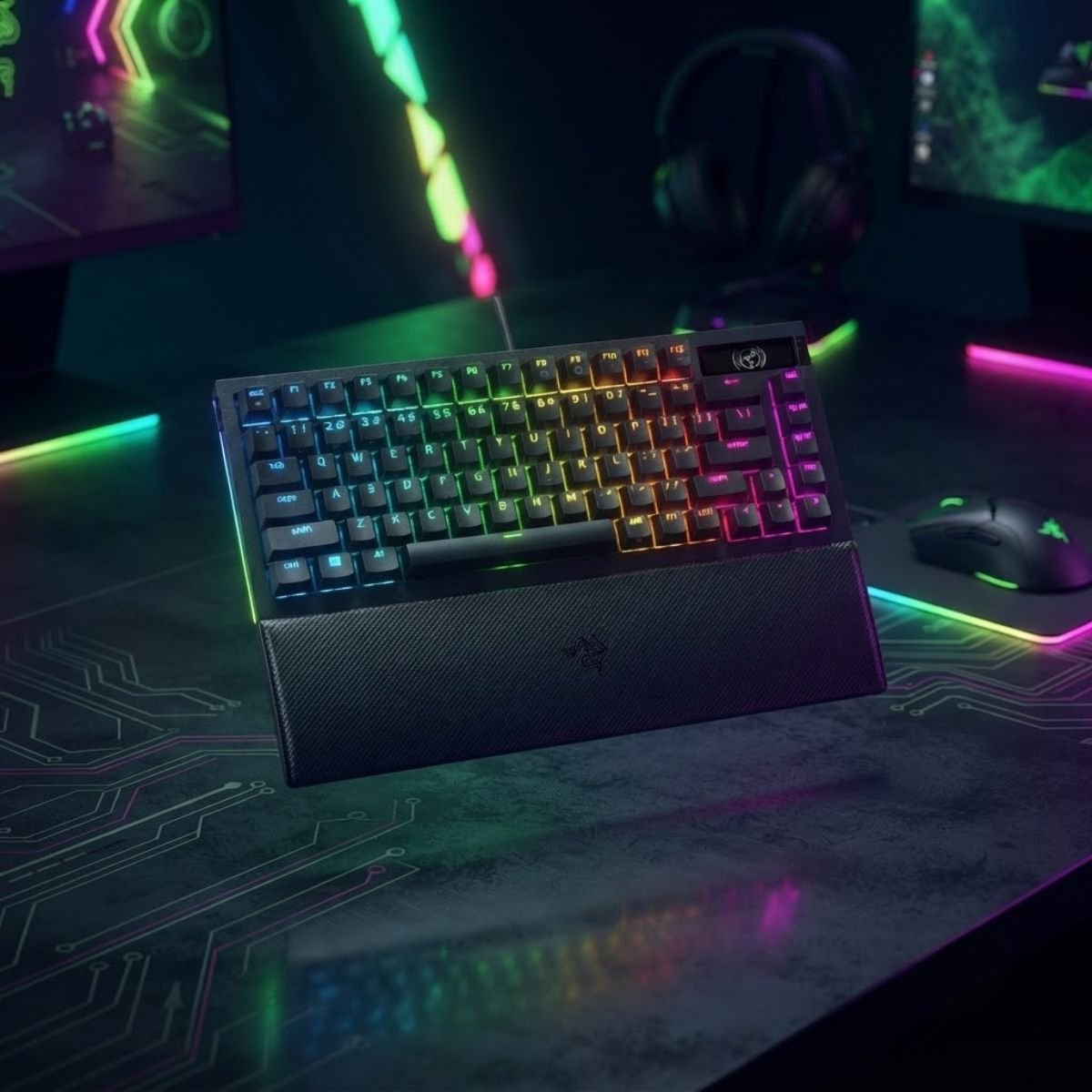
Razer BlackWidow V4 Pro 75%
A balanced choice for FPS gaming and everyday use.
See the full pick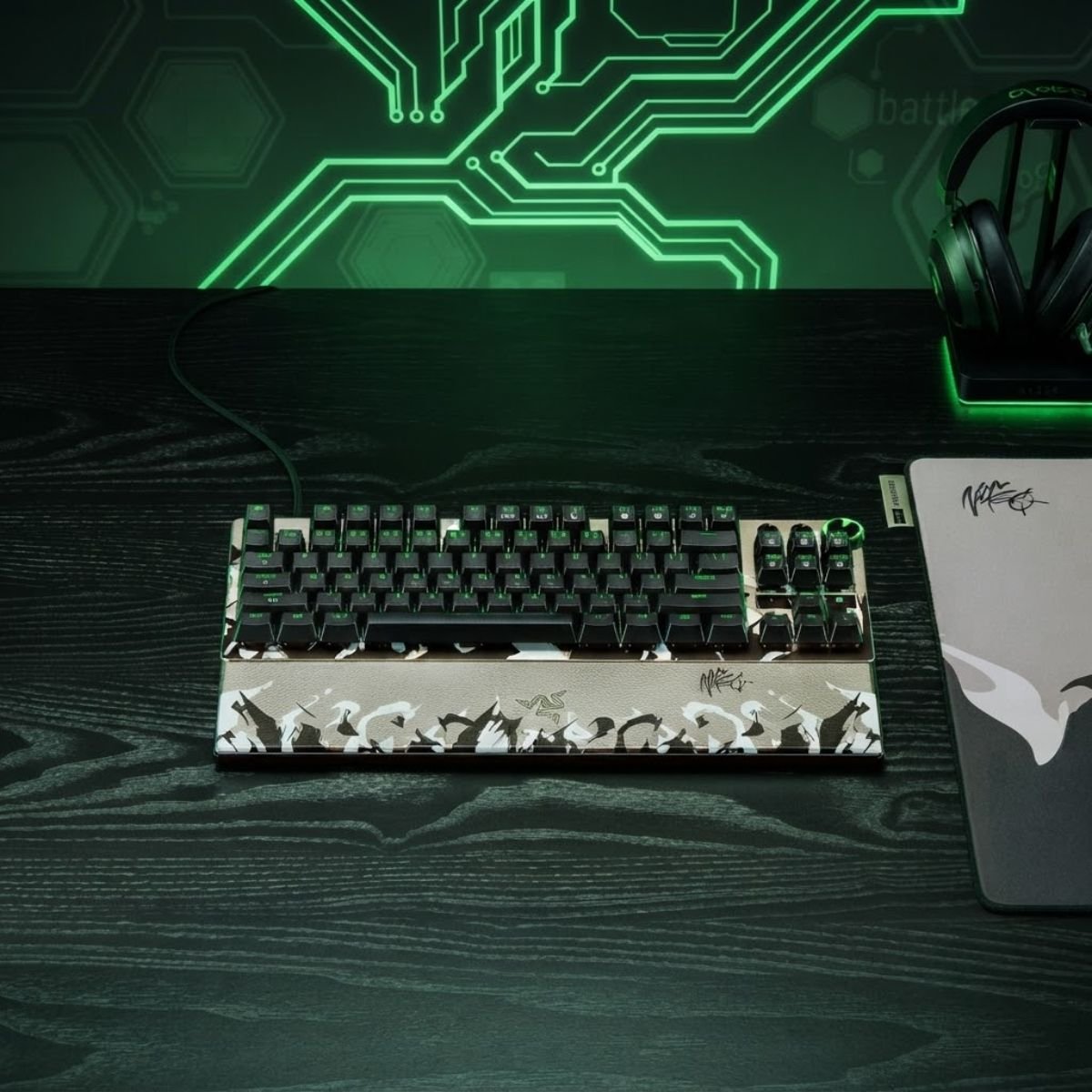
Razer Huntsman V3 Pro TKL 8 kHz
Built around adjustable input control for competitive FPS play.
See the full pick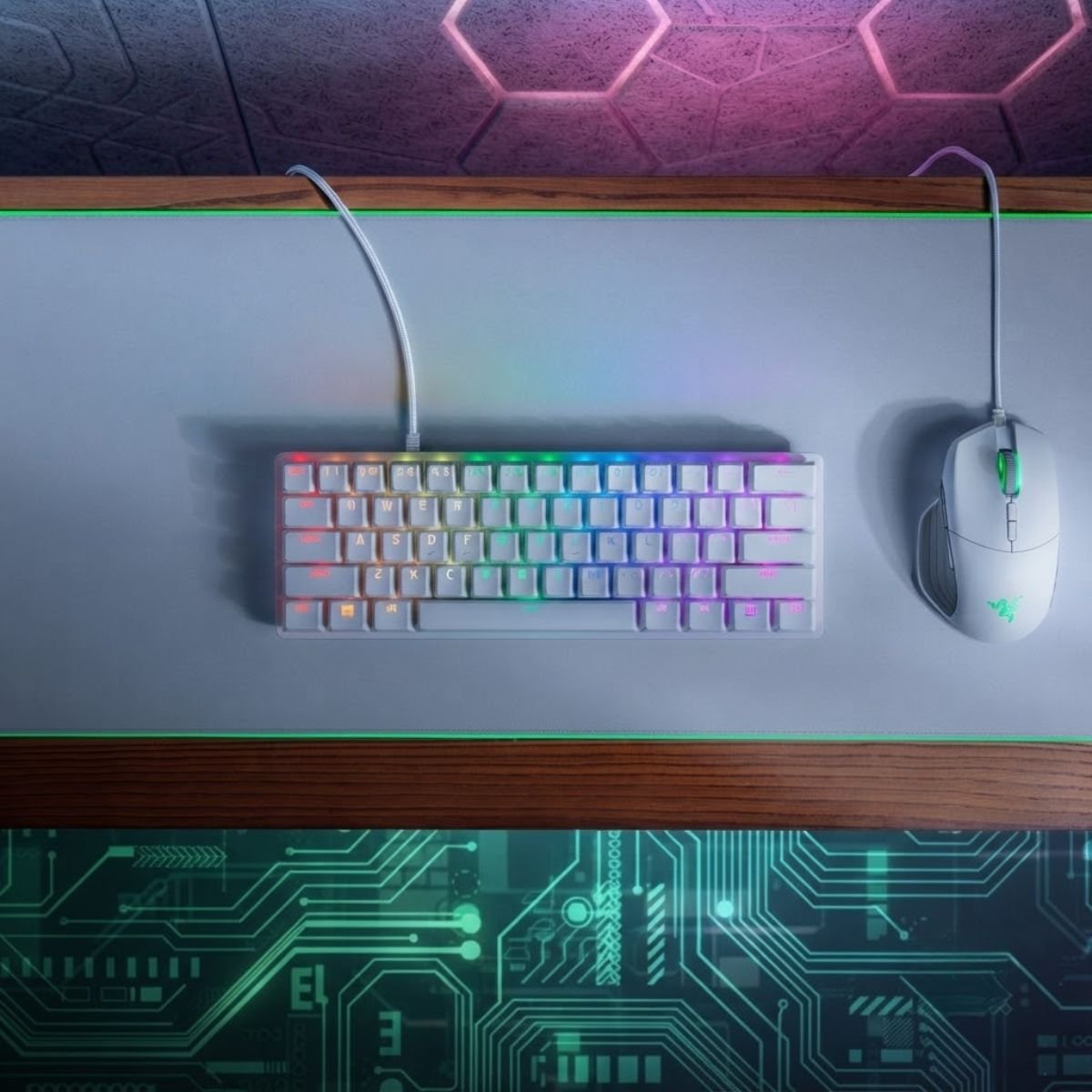
Razer Huntsman Mini
A small 60% layout for players who prioritize mouse space.
See the full pick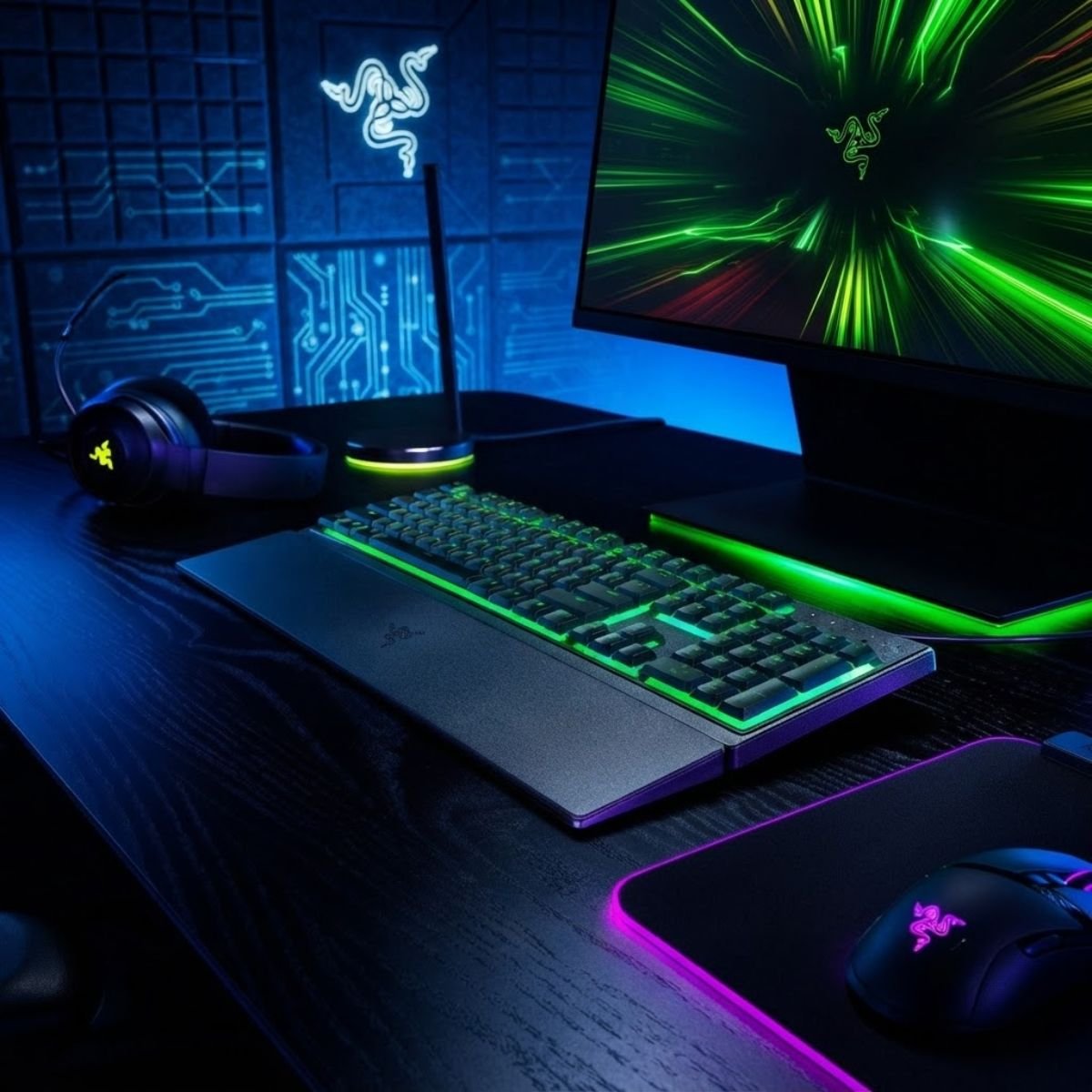
Razer Ornata V3 X
A value-focused option for essential FPS gaming features.
See the full pickWhat Is the Best Gaming Keyboard for FPS in 2026?
The best gaming keyboard for FPS in 2026 is the one that matches your competitive priorities, keyboard layout, available mouse space, useful input features, and budget. A keyboard with advanced features is not automatically the best choice if those features do not solve a problem in your setup.
For most FPS players, the decision should start with the type of experience they want rather than a specific brand or specification. Competitive players may prioritize responsive input and adjustable actuation, while players who also use their keyboard for work may place more value on layout, comfort, and everyday usability.
The table below compares the main FPS gaming keyboard categories by their primary use case and tradeoffs:
| Keyboard Category | Best For | Primary Priority | Main Tradeoff |
|---|---|---|---|
| Competitive FPS Keyboard | Players focused on competitive performance | Responsive input and controllable actuation | Advanced features may cost more |
| TKL Gaming Keyboard | Players who want balance | Mouse space and everyday usability | Larger footprint than compact layouts |
| Compact Gaming Keyboard | Low-sensitivity FPS players and smaller desks | Maximum mouse movement space | Fewer dedicated keys |
| Budget FPS Keyboard | Value-focused players | Essential gaming performance | Fewer premium features |
| Wireless FPS Keyboard | Clean and flexible desk setups | Wireless convenience with reliable performance | Battery and wireless implementation matter |
| Gaming and Work Keyboard | Players who use one keyboard for everything | Gaming performance and everyday comfort | May not maximize competitive features |
The table shows why a single universal winner can be misleading. A competitive FPS player may value input control above everything else, while someone who alternates between gaming, studying, and work may benefit more from a balanced layout and comfortable everyday use. The best choice becomes clearer once these priorities are separated.
Before comparing individual keyboards, it is also important to understand what actually separates a useful FPS keyboard from one that simply has an impressive specification sheet. The next section establishes the criteria used to make that comparison.
How We Evaluate Gaming Keyboards for FPS
The most important factors when evaluating a gaming keyboard for FPS are input responsiveness, actuation control, keyboard layout, comfort, software features, and overall value. These factors matter because an FPS keyboard has to fit both the way you play and the physical limitations of your setup, rather than simply offer the largest number of advertised features.
FPS Responsiveness and Input Behavior
FPS responsiveness refers to how consistently a keyboard registers your key presses and how quickly its input system responds to those presses. For competitive gaming, this matters most when you rely on precise movement inputs, rapid directional changes, or repeated key presses.
The main elements used to evaluate an FPS gaming keyboard can be seen in a typical competitive desk setup:
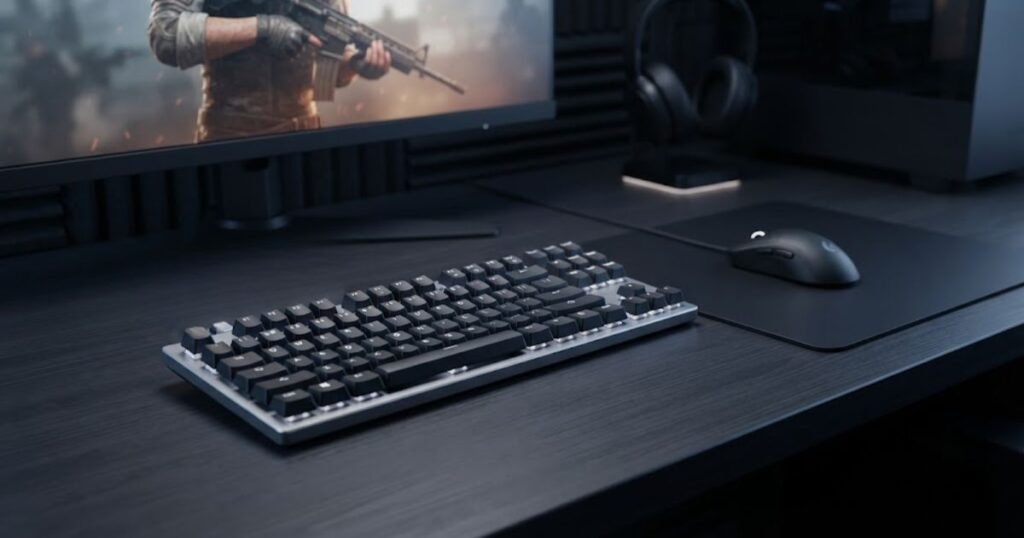
Polling rate, scan behavior, switch characteristics, firmware, and the complete input system can all influence responsiveness. A higher polling rate alone does not guarantee a better real-world experience, so it should be considered alongside the keyboard’s overall implementation rather than treated as the deciding specification.
For that reason, GearTP evaluates responsiveness as part of the complete keyboard rather than ranking products by a single latency or polling-rate number.
Rapid Trigger and Adjustable Actuation
Rapid Trigger and adjustable actuation can be valuable for FPS players who want greater control over how their movement keys respond. These features allow certain keyboards to change how quickly a key activates or resets, which can be particularly relevant to players who make frequent movement inputs.
However, these features should not automatically determine a purchase. Their value depends on whether the player actually benefits from more control over key activation and release. A keyboard without every competitive feature can still be a strong choice when its layout, feel, usability, and price better match the player’s needs.
Players comparing these features in more detail can use GearTP’s gaming keyboard features that matter for FPS coverage when the specific feature differences become part of their decision.
Ultimately, Rapid Trigger and adjustable actuation are evaluation factors, not automatic indicators of a superior keyboard.
Keyboard Layout and Mouse Space
Keyboard layout matters in FPS because the keyboard occupies physical space next to the mouse. A smaller layout can leave more room for wide mouse movements, while a larger layout preserves dedicated keys that may be useful outside gaming.
Compact layouts can suit players who prioritize mouse space and a minimal desk footprint. TKL layouts provide a middle ground by removing the number pad while retaining a familiar set of navigation and function keys. Larger layouts can make more sense for players who regularly switch between gaming and productivity.
The important question is therefore not whether one layout is universally better, but whether the keyboard leaves enough room for the way you position and move your mouse while retaining the keys you actually use.
Layout should be treated as a setup decision rather than a performance ranking. A compact keyboard is only an advantage if its reduced footprint benefits the player’s actual desk and control style.
Build Quality, Comfort, and Everyday Use
Build quality and comfort matter because an FPS keyboard is often used for long gaming sessions and may also serve as the primary keyboard for everyday tasks. A keyboard that performs well but feels uncomfortable or impractical outside gaming may not provide the best overall fit.
The main factors to consider include:
- Key feel: The switch and key response should feel consistent with the player’s preference and usage.
- Stabilizers: Larger keys should remain controlled and consistent during repeated use.
- Keycaps: The keycap design and surface can affect everyday comfort and familiarity.
- Build: The case and internal construction should provide a stable typing and gaming experience.
- Long-session comfort: The overall keyboard should remain practical during extended gaming and everyday use.
These characteristics do not replace FPS performance criteria, but they can determine whether a keyboard remains a good choice after the novelty of a new purchase wears off.
Software and Competitive Controls
Keyboard software becomes important when a model provides adjustable input behavior, profiles, remapping, or other competitive controls. Good software should make these settings useful without making the keyboard unnecessarily difficult to configure.
Competitive controls should also be evaluated based on their practical purpose. A feature is more valuable when it gives the player meaningful control over the keyboard’s behavior rather than simply adding another option to the specification sheet.
Software should therefore be treated as part of the keyboard experience. The strongest implementation is not necessarily the one with the most settings, but the one that provides useful controls and makes them practical to configure.
Price and Overall Value
Overall value is determined by what the keyboard provides relative to its price, not by whether it is the cheapest or most expensive option. A budget keyboard can offer strong value when it covers the features an FPS player actually needs, while a premium keyboard needs meaningful advantages to justify its higher cost.
The evaluation should consider performance, useful input features, layout, build quality, software, comfort, and the player’s actual priorities together. This prevents a single premium feature from making an otherwise poor fit appear more valuable than it really is.
Value is therefore the final balance between performance, usability, features, and cost. The right keyboard is the one that provides the capabilities the player will actually use without paying for advantages that do not matter to their setup.
The table below summarizes the criteria used to evaluate each FPS gaming keyboard:
| Criterion | Why It Matters for FPS | Priority |
|---|---|---|
| Responsiveness | Supports consistent registration of movement and other inputs. | High |
| Actuation Control | Allows players to adjust how key activation and release behave when supported. | High |
| Layout | Determines mouse space, desk footprint, and access to dedicated keys. | High |
| Build and Comfort | Affects stability and usability during long gaming and everyday sessions. | Medium |
| Software | Determines how easily useful keyboard controls can be configured. | Medium |
| Value | Shows whether the overall capabilities justify the keyboard’s price. | High |
These criteria provide the framework for comparing the keyboards later in this guide. They also keep the evaluation focused on practical FPS performance and setup fit instead of allowing one specification or marketing feature to determine the ranking by itself.
The Best Gaming Keyboards for FPS in 2026
The best FPS gaming keyboard depends on the role you need it to fill. Instead of treating every keyboard as a direct substitute, the picks in this section are organized around distinct use cases such as overall performance and competitive FPS play. This makes it easier to compare keyboards based on what you actually need rather than choosing one simply because it has the longest feature list.
The four picks below cover different FPS priorities, from balanced everyday use and competitive input control to compact mouse space and budget-focused gaming.
Best Overall Gaming Keyboard for FPS
For players who want one keyboard that balances competitive FPS control with broader everyday usability, this 75% model offers a strong middle ground:
Razer BlackWidow V4 Pro 75%
The Razer BlackWidow V4 Pro 75% is a strong overall FPS choice for players who want a compact layout without giving up dedicated function and arrow keys, advanced controls, or flexible connectivity.
- 75% layout keeps more mouse space available while retaining dedicated function and arrow keys.
- Up to 4000 Hz polling, hot-swappable switches, and programmable controls support a responsive gaming setup.
- HyperSpeed Wireless, Bluetooth 5.1, OLED display, and Command Dial add flexibility beyond competitive FPS play.
Best Competitive FPS Gaming Keyboard
For competitive FPS players who want direct control over actuation and key reset behavior, this TKL keyboard is built around the input features that matter most in fast movement scenarios:
Razer Huntsman V3 Pro Tenkeyless 8 kHz
The Razer Huntsman V3 Pro Tenkeyless 8 kHz is designed for competitive FPS players who want adjustable input behavior, Rapid Trigger, and a TKL layout that leaves more room for mouse movement.
- 0.1 to 4.0 mm adjustable actuation lets players customize the activation point to their preferred input feel.
- Rapid Trigger and Snap Tap are designed for fast repeated inputs and directional changes.
- True 8000 Hz polling, Analog Optical Switches Gen-2, and onboard adjustment controls support a competition-focused setup.
This pick is not necessarily the best keyboard for every FPS player. Its purpose is to serve players who are willing to prioritize competitive control over features that may matter more for general gaming or everyday use.
Best Compact Gaming Keyboard for FPS
For FPS players who prioritize mouse space above dedicated keys, this compact 60% keyboard keeps the footprint small while retaining the core controls needed for gaming:
Razer Huntsman Mini
The Razer Huntsman Mini is a compact 60% gaming keyboard for FPS players who want to minimize keyboard footprint and leave more physical room for mouse movement.
- 60% layout reduces the keyboard footprint and creates more space beside the mouse.
- Razer Optical Switches provide the direct key response expected from a gaming-focused keyboard.
- Detachable USB-C connectivity and Doubleshot PBT keycaps keep the compact design practical for everyday use.
A compact keyboard makes the most sense when desk space and unrestricted mouse movement are more important than having every dedicated key available. Players who frequently switch between gaming and productivity may prefer a larger layout instead.
FPS Gaming Keyboard Comparison: Which One Fits Your Setup?
The right FPS gaming keyboard depends on the constraint you are trying to solve. Competitive players may prioritize input control, while other players may need more mouse space, a lower price, or a familiar layout for gaming and everyday use.
Use the comparison below to identify the keyboard type that best matches your setup before narrowing your choice to a specific model:
| FPS Priority | Recommended Keyboard Type | Why It Fits | Main Tradeoff |
|---|---|---|---|
| Maximum competitive control | Competitive FPS keyboard | Prioritizes responsive input and advanced control features. | Advanced features can increase the price. |
| More mouse space with familiar controls | TKL keyboard | Removes the number pad while retaining a familiar layout. | Uses more desk space than compact layouts. |
| Maximum mouse space | Compact keyboard | Reduces the keyboard footprint beside the mouse. | Fewer dedicated keys. |
| Lower spending | Budget FPS keyboard | Focuses spending on essential gaming capabilities. | Fewer premium features may be available. |
| Flexible desk setup | Wireless keyboard | Provides cable-free placement and a cleaner desk. | Wireless implementation and battery behavior matter. |
| Gaming and everyday use | Versatile gaming keyboard | Balances FPS features with regular typing and productivity. | May not maximize competitive features. |
Choose a Competitive FPS Keyboard If You Prioritize Input Control
A competitive FPS keyboard makes the most sense when your main goal is controlling and refining keyboard input. This is the category to consider when advanced actuation or input features are relevant to the way you play and you are willing to prioritize them over broader everyday considerations.
The physical difference between common keyboard layouts becomes clearer when they are placed side by side:
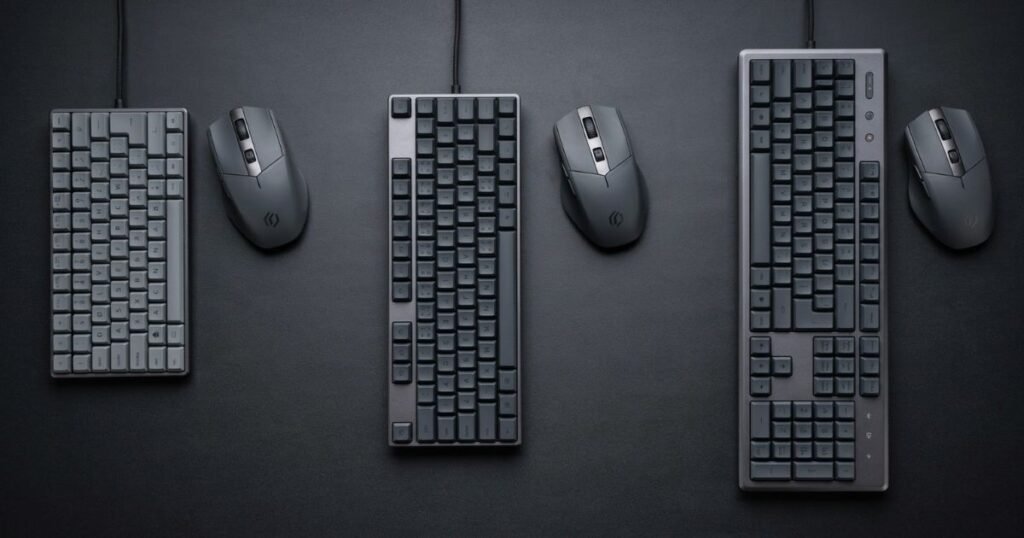
The tradeoff is that competitive-focused features can add cost without providing equal value to players who do not use them.
Choose a TKL Keyboard If You Want Balance
A TKL keyboard is the middle-ground option when you want additional mouse space without moving to a compact layout. It can work particularly well for players who use the same keyboard for FPS games and everyday tasks.
The main limitation is that it still occupies more desk space than compact layouts, so it may not be the best choice for players who need maximum room for mouse movement.
Choose a Compact Keyboard If Mouse Space Comes First
A compact keyboard is the better fit when unrestricted mouse movement is more important than having dedicated navigation and function keys. Its smaller footprint can make a noticeable difference on desks where the keyboard and mouse compete for space.
The compromise is reduced direct access to some keys. Before choosing a compact layout, make sure those missing keys will not create problems in the games or applications you use.
Choose a Budget Keyboard If You Need the Essentials
A budget FPS keyboard is appropriate when you want useful gaming performance without paying for every premium feature. The key is to identify which capabilities actually matter to your setup and avoid paying for features that will not change your experience.
Budget should therefore be treated as a value constraint rather than a performance category. A lower-priced keyboard can be the better choice when it covers your requirements without unnecessary extras.
The comparison becomes useful once you stop asking which keyboard is universally best and instead identify which category solves the biggest limitation in your own setup. The following sections can then examine whether specific features or price levels justify moving to a different option.
Best Budget Gaming Keyboard for FPS
For FPS players who want to keep spending under control while still getting a dedicated gaming keyboard, this model focuses on the essential features rather than premium competitive controls:
Razer Ornata V3 X
The Razer Ornata V3 X is the budget pick for FPS players who want essential gaming functionality without paying for advanced competitive keyboard features they may not need.
- Low-profile keycaps provide a shorter, more streamlined keyboard design for everyday gaming and typing.
- Full-size layout keeps dedicated keys available for players who use their keyboard beyond FPS gaming.
- Chroma RGB, 1000 Hz polling, and Razer Synapse 4 provide the core gaming features expected from a modern Razer keyboard.
Which FPS Keyboard Features Are Actually Worth Paying For?
The FPS keyboard features worth paying for are the ones that provide a meaningful benefit to your specific playstyle. Rapid Trigger, adjustable actuation, Hall Effect sensing, high polling rates, and advanced software can be useful, but their value depends on how you use the keyboard and whether the implementation delivers a practical advantage.
Is Rapid Trigger Worth Paying More For?
Rapid Trigger can be worth paying more for players who want greater control over key activation and release during fast movement inputs. Its value is strongest when the player can actually take advantage of that control rather than simply owning the feature.
Several keyboard technologies can influence how players evaluate input control, but each one serves a different purpose:
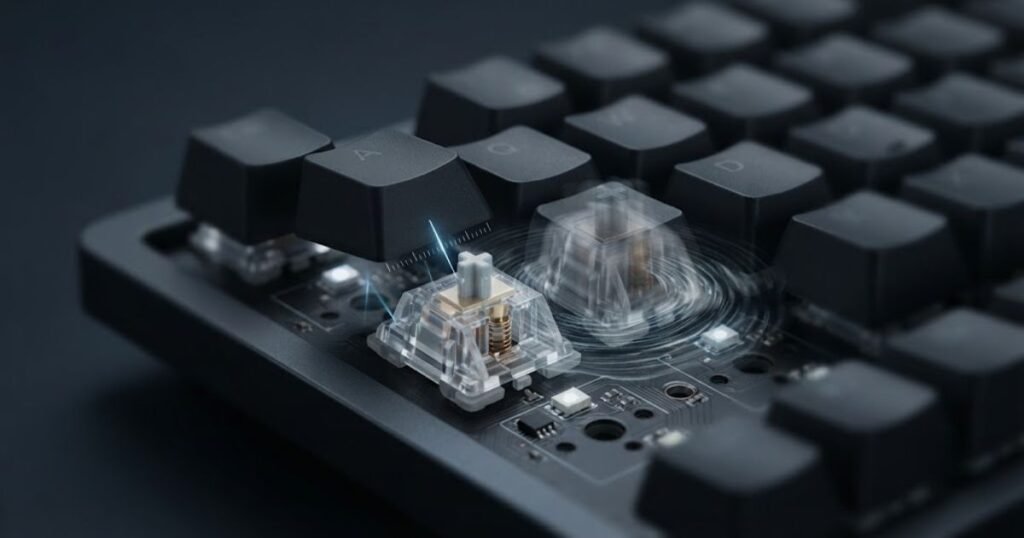
Rapid Trigger should therefore be evaluated as a competitive input feature, not as a guarantee of better aim or faster performance. Players who do not need more precise control over key reset behavior may get better value from a simpler keyboard.
Is Adjustable Actuation Worth Paying More For?
Adjustable actuation is worth considering when you want to customize how far a key needs to travel before registering an input. This can provide additional control over the keyboard’s feel and response, but the benefit depends on whether you prefer and use those adjustments.
The feature becomes less important when you are already comfortable with a fixed actuation point and have no specific reason to change it.
Does Hall Effect Matter for FPS Gaming?
Hall Effect sensing can matter for FPS gaming because it enables certain keyboards to detect key position continuously and support features such as adjustable actuation or Rapid Trigger. However, the presence of Hall Effect switches alone does not determine whether a keyboard is better for FPS.
The practical value comes from how the sensing technology is implemented and which controls it enables. Players should evaluate the complete input system rather than treating the switch technology as a standalone performance guarantee.
Does a Higher Polling Rate Matter for FPS?
A higher polling rate can reduce the interval between keyboard reports, but it should not be treated as a standalone measure of keyboard quality. The real-world benefit depends on the complete input pipeline, system configuration, and whether the player can meaningfully benefit from the additional reporting frequency.
For that reason, a higher polling rate should be considered alongside measured responsiveness, input implementation, and other relevant characteristics instead of being used as the primary reason to choose one keyboard over another.
Which Competitive Keyboard Features Can You Ignore?
You can ignore a competitive keyboard feature when it does not solve a problem in your own setup. Features that sound impressive on a specification sheet may have little practical value if you do not use them or cannot perceive a meaningful difference during normal play.
A useful buying rule is to prioritize features that change how you actually play rather than collecting specifications simply because they are available. This approach also helps prevent a premium keyboard from becoming an unnecessary upgrade.
The table below shows how common FPS keyboard features translate into practical value:
| Feature | What It Changes | Who Benefits Most | Priority |
|---|---|---|---|
| Rapid Trigger | Changes how key activation and reset behavior can respond to movement. | Competitive FPS players who use rapid movement inputs. | High for the right player |
| Adjustable Actuation | Allows the activation point to be customized when supported. | Players who want control over key response. | Medium to High |
| Hall Effect Sensing | Enables continuous key-position detection and related input features. | Players who want advanced input controls. | Depends on implementation |
| Higher Polling Rate | Increases the frequency at which keyboard input can be reported. | Players with systems and setups that can benefit from it. | Secondary |
| Advanced Software | Provides additional configuration and customization options. | Players who actively use custom profiles and controls. | Medium |
The most valuable feature is the one that addresses a real limitation in your setup. A player who benefits from adjustable input control may justify paying more for it, while another player may be better served by investing in layout, comfort, or overall build quality instead.
How Much Should You Spend on an FPS Gaming Keyboard?
The right amount to spend on an FPS gaming keyboard depends on the features you actually need and how heavily you use the keyboard. A higher price can provide better construction, more advanced input controls, broader connectivity, or additional customization, but those improvements only create value when they matter to you.
What You Can Expect From Budget FPS Keyboards
Budget FPS keyboards should focus on reliable core functionality rather than trying to reproduce every premium feature. They can make sense for new players, value-focused buyers, or anyone whose current keyboard lacks basic gaming usability but does not require advanced competitive controls.
What Mid-Range FPS Keyboards Add
Mid-range keyboards can provide a stronger balance between gaming features, construction, software, layout choices, and everyday usability. This range can be attractive when you want meaningful improvements without paying primarily for the most advanced features available.
When Is a Premium FPS Keyboard Worth the Extra Cost?
A premium FPS keyboard is worth the extra cost when its additional capabilities directly address your priorities. Advanced input controls, specialized switches, better software, premium construction, or more flexible connectivity can justify the price when you will actually use those advantages.
Premium pricing becomes harder to justify when the main difference is a feature that does not change how you play or use the keyboard.
The table below shows what buyers should generally expect from different FPS gaming keyboard price levels:
| Price Level | What to Prioritize | Best For | Main Tradeoff |
|---|---|---|---|
| Budget | Reliable core functionality and essential features. | New and value-focused players. | Fewer premium controls and customization options. |
| Mid-Range | Balance of performance, features, build, and usability. | Players wanting a stronger all-around keyboard. | May lack the most advanced competitive features. |
| Premium | Advanced input control, construction, software, or connectivity. | Players who will actively use premium capabilities. | Higher cost with diminishing value for some players. |
Price should follow your requirements rather than determine them. Once you know which features and layout characteristics matter to your FPS setup, it becomes much easier to decide whether moving into a higher price range provides a meaningful improvement.
What Should You Avoid When Choosing an FPS Gaming Keyboard?
The biggest mistakes when choosing an FPS gaming keyboard usually come from focusing on specifications instead of the needs of your actual setup. A keyboard can have advanced features and still be a poor choice if its layout wastes mouse space, its premium controls are never used, or its price is difficult to justify.
Choosing Based on Polling Rate Alone
A high polling rate should not be the sole reason to choose one FPS keyboard over another. Reporting frequency is only one part of the input system, and a higher number does not automatically translate into a better overall gaming experience.
Compare polling rate alongside the keyboard’s complete input implementation, responsiveness, software, layout, and other characteristics that affect how you actually use it.
Paying for Features You Will Not Use
Premium features only create value when they solve a problem you actually have. Buying a keyboard because it offers more adjustment options, customization, or competitive controls can lead to unnecessary spending if those features never become part of your normal setup.
Before paying more, identify which feature changes something you care about. If a feature does not improve your control, comfort, workflow, or setup, it should not automatically increase the keyboard’s value in your decision.
Ignoring Keyboard Size and Mouse Space
Keyboard size can have a direct effect on how much room remains for your mouse. This becomes especially important for players who use low sensitivity and need larger physical movements during FPS games.
A larger keyboard is not inherently worse, and a compact keyboard is not automatically better. The mistake is choosing a layout without considering the available desk space and how you position your keyboard relative to your mouse.
Choosing the Most Expensive Keyboard Automatically
The most expensive keyboard is not necessarily the best FPS keyboard for your setup. Premium models often add advanced controls, materials, connectivity, or customization, but those additions only matter when they match your priorities.
A less expensive keyboard can provide better value when it covers the capabilities you actually need. The decision should therefore be based on fit and usefulness rather than price alone.
Confusing Marketing Claims With Measured Performance
Marketing specifications can describe what a keyboard is designed to support, but they do not always tell you how the complete product behaves in practical use. Claims about speed, responsiveness, or competitive performance should be considered alongside reliable technical information and independent testing when available.
This is especially important when comparing keyboards that advertise similar features. Two products can support the same technology while delivering different experiences because of differences in implementation, firmware, software, or overall design.
These mistakes all point to the same buying principle: evaluate the keyboard as a complete product instead of allowing one specification, feature, or price tag to determine the decision.
How to Choose the Right Gaming Keyboard for FPS
The simplest way to choose the right FPS gaming keyboard is to start with your actual setup, identify the features that solve a real need, and then compare keyboards within your budget. This approach prevents the decision from being driven by specifications that may have little practical value for you.
Start With Your Main FPS Games
Your primary FPS games can help define which keyboard characteristics deserve the most attention. Players who spend most of their time in competitive tactical shooters may prioritize movement input and actuation control differently from players who regularly switch between several genres.
The goal is not to choose a different keyboard for every game. Instead, identify the common requirements across the games you actually play and use those requirements as the foundation of your decision.
Decide Which Layout Fits Your Mouse Movement
Choose your keyboard size based on the amount of physical space you need for your mouse and the keys you regularly use. A compact keyboard can maximize mouse clearance, while a TKL layout preserves more dedicated keys without the footprint of a full-size model.
Think about your actual desk position before choosing a layout. The best size is the one that gives you enough mouse room without removing keys that you genuinely need.
Identify the Input Features You Actually Need
Once the layout is clear, decide which input features provide meaningful value for your playstyle. Rapid Trigger and adjustable actuation can matter to some competitive players, while others may place more importance on switch feel, software, connectivity, or everyday usability.
Do not start with a list of premium features and work backward. Start with the problem you want the keyboard to solve, then determine whether a specific feature addresses it.
Set Your Budget Before Comparing Premium Models
Set a realistic spending limit before comparing keyboards with increasingly advanced features. This keeps the decision focused on value and makes it easier to identify which upgrades are genuinely worth paying for.
A budget should not prevent you from choosing a premium keyboard when its capabilities are important to you. It simply gives you a clear standard for deciding whether those additional capabilities justify the extra cost.
Narrow the Choice to Two or Three Keyboards
Once you know your games, layout, priorities, and budget, reduce the shortlist to two or three realistic options. Comparing a small group makes tradeoffs easier to see and prevents minor specification differences from overwhelming the decision.
At this stage, compare the keyboards using the same criteria rather than changing the standard for each model. Look at the features that matter most to your setup first, then use secondary factors such as build, software, comfort, and connectivity to separate otherwise similar options.
Make the Final Decision Based on Your Biggest Constraint
If two keyboards appear similar, choose the one that solves the biggest limitation in your current setup. That could mean gaining more mouse space, getting a specific input feature, reducing cost, improving everyday usability, or simplifying your desk.
The following process can help you narrow down your final FPS gaming keyboard choice:
- Identify your main FPS games: Determine the common requirements across the games you actually play.
- Choose your layout: Match the keyboard size to your desk, mouse movement, and required keys.
- Prioritize useful features: Focus on input controls and other features that solve a real need.
- Set your budget: Establish how much additional capability you are willing to pay for.
- Compare your finalists: Evaluate the remaining keyboards using the same performance, usability, and value criteria.
- Choose the best fit: Select the keyboard that addresses your biggest setup constraint without unnecessary compromises.
This process keeps the purchase decision focused on your actual gaming environment. Instead of asking which keyboard has the most impressive specifications, you can identify which model provides the capabilities that matter most to you.
The right FPS gaming keyboard is ultimately a matter of fit. Once your layout, input priorities, budget, and everyday requirements are clear, the remaining choices become much easier to compare.
Frequently Asked Questions About Gaming Keyboards for FPS
These answers address the most common questions about choosing, comparing, and using gaming keyboards for FPS games in 2026.
What is the best gaming keyboard for FPS in 2026?
The best gaming keyboard for FPS in 2026 depends on your priorities, including input responsiveness, keyboard layout, mouse space, useful competitive features, and budget. There is no single model that is the best fit for every FPS player.
Competitive players may prioritize adjustable input controls, while players who use the same keyboard for gaming and everyday tasks may prefer a more balanced layout and broader usability.
Is Rapid Trigger necessary for competitive FPS?
Rapid Trigger is not necessary for every competitive FPS player, but it can be useful for players who want greater control over key activation and reset behavior during fast movement inputs.
Its value depends on whether you can make practical use of the feature. A keyboard without Rapid Trigger can still be a strong choice when its other characteristics better match your setup.
Are Hall Effect keyboards better for FPS gaming?
Hall Effect keyboards are not automatically better for FPS gaming. Hall Effect sensing can enable features such as adjustable actuation and Rapid Trigger, but the overall keyboard implementation still determines its practical value.
Consider the input features, software, layout, build quality, and price alongside the switch technology instead of treating Hall Effect as a standalone performance guarantee.
Is TKL better than 60% for FPS?
Neither layout is universally better for FPS. A TKL keyboard provides more dedicated keys while reducing the footprint compared with a full-size keyboard, while a 60% layout provides more mouse space by removing additional dedicated keys.
Choose between them based on your mouse movement, desk space, and whether you need direct access to navigation and function keys.
Does keyboard latency affect FPS performance?
Keyboard latency can affect how quickly an input is registered, but it is only one part of the complete input system. A lower latency figure does not automatically make a keyboard better if other characteristics do not fit your setup.
When comparing keyboards, consider measured responsiveness alongside actuation behavior, firmware, software, layout, and overall usability.
Does 8000Hz polling rate make a noticeable difference?
An 8000Hz polling rate increases the frequency at which a keyboard can report input, but the practical difference depends on the complete system and how the keyboard implements that reporting rate.
Players should avoid choosing a keyboard solely because it advertises a higher polling rate. It should be evaluated alongside actual responsiveness and the rest of the keyboard’s design.
What is the best budget keyboard for FPS gaming?
The best budget FPS keyboard is one that provides the essential capabilities you need without charging for features that do not affect your setup.
Compare input behavior, layout, build quality, useful features, and current price rather than selecting the cheapest keyboard available.
Is a wireless keyboard good enough for competitive FPS?
A wireless keyboard can be suitable for competitive FPS when its wireless implementation provides reliable connectivity and appropriate input performance. Wireless capability alone does not determine whether a keyboard is competitive.
Check the supported wireless technology, input performance, battery behavior, and wired operating options before making the decision.
What keyboard features matter most for FPS?
The most important FPS keyboard features are the ones that affect input control, responsiveness, layout, and usability for your particular setup. Rapid Trigger and adjustable actuation can matter to competitive players, while layout and mouse space can be more important to other players.
The best feature set is therefore determined by your actual requirements rather than the number of features available.
Should you buy a premium gaming keyboard for FPS?
A premium gaming keyboard is worth buying when its additional features solve a problem that matters to you. Advanced input controls, construction, software, or connectivity can justify a higher price when you will actively use those capabilities.
If the premium features do not change your experience, a less expensive keyboard may provide better value.
Can a gaming keyboard improve aim?
A gaming keyboard cannot directly improve your aim in the same way that practice and mouse control do. A suitable keyboard can provide responsive and consistent movement inputs, but it does not replace aiming skill or training.
The keyboard’s role is to provide reliable control while you develop the skills that determine your FPS performance.
How do you choose the right FPS gaming keyboard?
Choose an FPS gaming keyboard by identifying your main games, deciding which layout fits your mouse movement, selecting the input features you actually need, setting a budget, and comparing a small group of suitable options.
The final choice should solve the biggest limitation in your current setup rather than simply offer the highest specification or price.
Final Verdict: Which FPS Gaming Keyboard Should You Buy?
The best FPS gaming keyboard is the one that matches your setup rather than the one with the longest specification list. Competitive players should prioritize the input characteristics they can actually use, while players with limited desk space may benefit more from a compact layout or TKL design.
Budget-focused buyers should concentrate on essential performance and value, while players who want one keyboard for gaming and everyday use should give greater weight to comfort, layout, connectivity, and general usability.
When several keyboards appear similar, return to the biggest constraint in your setup. The keyboard that solves that problem without unnecessary compromises is usually the stronger choice.
Thanks for reading! I hope this guide helps you choose the right gaming keyboard for your FPS setup.