
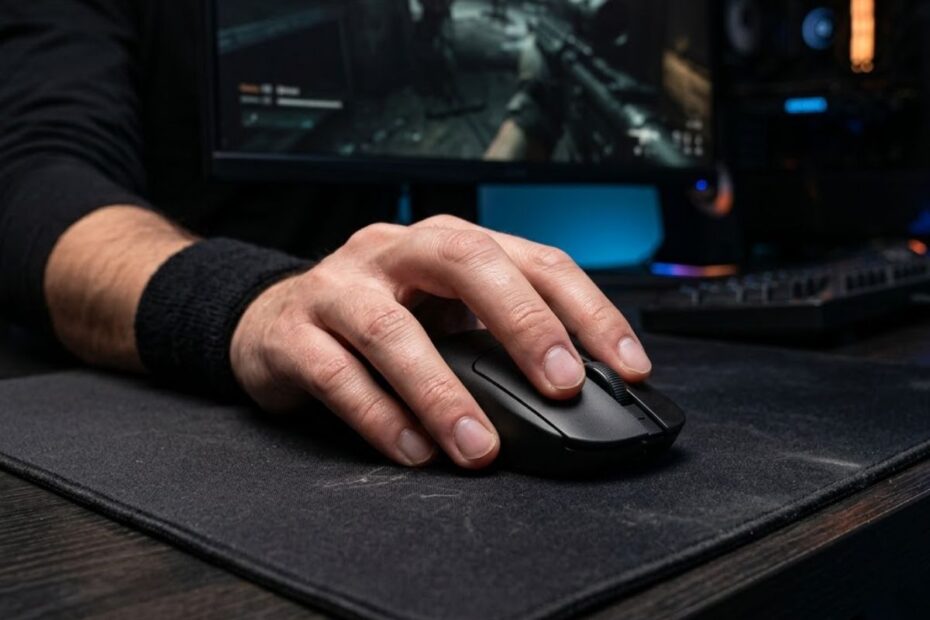
Fingertip grip is a mouse grip style where only the fingertips touch the mouse while the palm remains elevated. It helps FPS players perform quick directional changes, fast flicks, and precise micro-adjustments with less hand contact.
Among the three major FPS mouse grip styles, fingertip grip is often considered the most agile. Instead of wrapping the hand around the mouse, players rely primarily on finger movement to control aim and positioning.
Understanding how fingertip grip works is important because the grip directly affects mouse control, aiming consistency, comfort, and the type of gaming mouse that will feel most natural during gameplay.
What Is Fingertip Grip?
Fingertip grip is a mouse grip style where the fingertips are the primary contact points while the palm stays off the mouse. It helps players create fast and flexible mouse movements by reducing the amount of hand contact with the mouse shell.
Unlike grip styles that use the palm for support, fingertip grip relies on the fingers to guide movement, make corrections, and reposition the mouse. This creates a lighter feeling that many FPS players associate with speed and agility.
The hand position below shows the defining contact points that separate fingertip grip from other mouse grip styles:
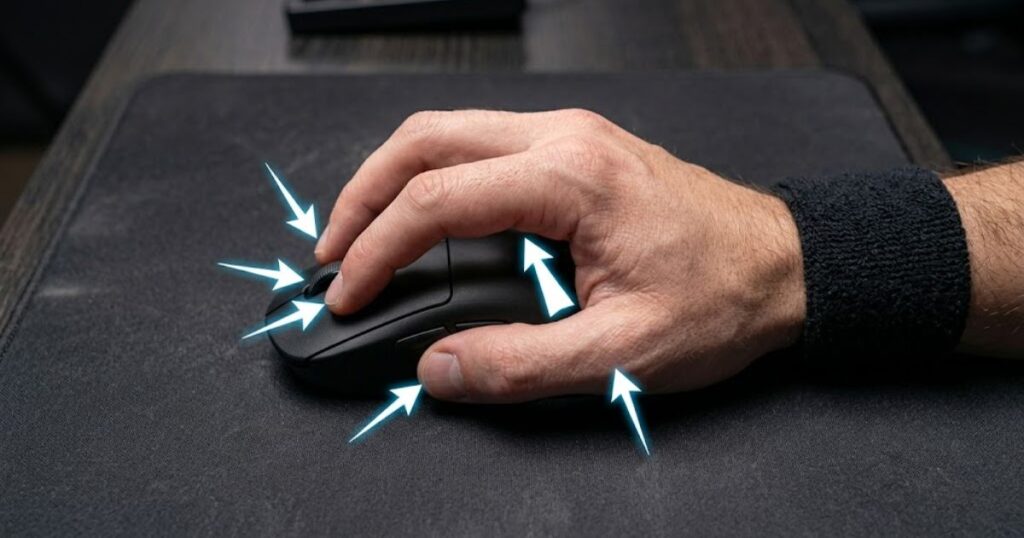
Because the palm does not anchor the mouse, fingertip grip often feels less restrictive than other grip styles. However, it also places more responsibility on finger control and coordination.
The table below explains the primary contact points used in fingertip grip:
| Hand Area | Touches The Mouse | Primary Function |
|---|---|---|
| Fingertips | Yes | Main control and movement source |
| Thumb | Yes | Side support and stabilization |
| Ring Finger And Pinky | Yes | Balance and directional control |
| Palm | No | Typically remains elevated |
Overall, fingertip grip can be described as a finger-driven mouse grip that prioritizes movement freedom and agility over maximum hand support.
How Fingertip Grip Looks On A Mouse
Fingertip grip looks like a floating hand position where the palm remains separated from the mouse shell. It helps create additional freedom for finger-driven movement during aiming.
When viewed from the side, there is usually a visible gap between the palm and the rear hump of the mouse. The fingers stay in contact with the buttons and side surfaces while the palm avoids resting on the back section.
This position makes the mouse appear smaller inside the hand because less of the hand is wrapped around it. The fingertips become the primary connection between the player and the mouse.
Visually, fingertip grip is the least connected grip style among the three major FPS grip types, which contributes to its fast and responsive feeling.
Why Players Call It Fingertip Grip
The term fingertip grip is used because the fingertips perform most of the contact and control. It helps distinguish this grip style from palm grip and claw grip, which use additional hand contact points.
The name directly reflects the way the mouse is controlled. Rather than anchoring the mouse with the palm, players guide movement through small motions generated by the fingers.
This terminology is widely used throughout the gaming community because it accurately describes the grip’s defining characteristic. If the fingertips are doing most of the work, the grip naturally falls into the fingertip category.
The name may be simple, but it captures the core concept behind the entire grip style: fingertip-driven control.
Understanding the definition of fingertip grip is the first step. The next question is how this grip actually affects movement and aiming performance during FPS gameplay.
How Fingertip Grip Works During FPS Gameplay
Fingertip grip works by transferring more mouse control to the fingers instead of relying heavily on the palm. It helps players make fast directional changes and precise aim corrections with minimal physical movement.
Every FPS player uses a combination of arm movement, wrist movement, and finger movement. What makes fingertip grip unique is the larger role that finger movement plays in the overall aiming process.
Because the fingers can move independently, players gain access to small corrections that can be difficult to perform using only arm or wrist movement.
How Finger-Controlled Movement Works
Finger-controlled movement is the process of using the fingertips to push, pull, and reposition the mouse. It helps create fast and precise adjustments without requiring large wrist or arm movements.
For example, a player may pull the mouse backward slightly after overflicking a target. Another player may push the mouse forward a few millimeters to align the crosshair perfectly with an enemy’s head.
These adjustments often happen in fractions of a second. Because the movement originates from the fingers, the correction distance can be extremely small and controlled.
Finger-controlled movement is one of the biggest reasons many competitive FPS players choose fingertip grip.
Why Small Adjustments Become Easier
Small adjustments become easier because fingertip grip allows the fingers to operate more freely. It helps players make micro-corrections without shifting the entire hand position.
In tactical shooters such as Valorant and Counter-Strike 2, many engagements are decided by tiny crosshair corrections before firing a shot. Even a few pixels of movement can determine whether a shot hits or misses.
Since the fingers have greater freedom of movement, these corrections can feel faster and more natural. This is particularly noticeable when tracking moving targets or correcting recoil patterns.
The ability to perform fast micro-adjustments is one of the most commonly cited advantages of fingertip grip among FPS players.
As a result, fingertip grip tends to excel in situations where precision corrections matter more than pure stability.
Key Characteristics Of Fingertip Grip
Fingertip grip is characterized by minimal palm contact, finger-driven control, and high mouse mobility. It helps create a distinct feel that separates it from both palm grip and claw grip.
Many players are unsure which grip style they actually use. Identifying the defining characteristics of fingertip grip is often the easiest way to determine whether this grip matches your current habits.
The characteristics below explain what typically defines fingertip grip:
- Minimal Palm Contact: The palm remains elevated instead of resting on the mouse.
- Finger-Driven Control: Most movement originates from the fingertips.
- High Mobility: The mouse feels easy to reposition quickly.
- Low Hand Support: Less physical support comes from the lower hand.
- Greater Mouse Lift Frequency: Players often reposition the mouse more frequently.
These characteristics create the unique balance of speed and control that many FPS players associate with fingertip grip.
Physical Traits Of Fingertip Grip
The physical traits of fingertip grip are a floating palm, light mouse contact, and active finger positioning. These traits help maximize movement freedom during gameplay.
The hand typically sits higher above the mouse compared with palm grip. The rear hump often has little or no contact with the palm, creating a noticeable gap between the hand and the shell.
The fingers stay engaged throughout gameplay because they are responsible for controlling movement and maintaining stability.
These physical traits are usually easy to identify when observing a player from the side.
Common Habits Of Fingertip Players
Common fingertip grip habits include frequent repositioning, active finger adjustments, and a preference for agile mouse movement. These habits help players take advantage of the grip’s mobility-focused design.
Many fingertip players lift and reset their mouse position more often than palm grip users. Because the palm is not anchoring the mouse, repositioning becomes a natural part of the aiming process.
They also tend to make more finger-based corrections during aim duels. Small adjustments often occur automatically without requiring large wrist movements.
These behavioral patterns reinforce the core identity of fingertip grip: mobility, responsiveness, and precise finger control.
Together, these characteristics explain why fingertip grip feels different from other FPS mouse grip styles and why some players adapt to it more naturally than others.
Benefits Of Fingertip Grip For FPS Games
Fingertip grip helps improve agility, reaction speed, and precise crosshair corrections. It helps FPS players make fast aiming adjustments using finger movement rather than relying entirely on the wrist or arm.
The image below illustrates how fingertip grip supports rapid aiming movements during FPS gameplay:
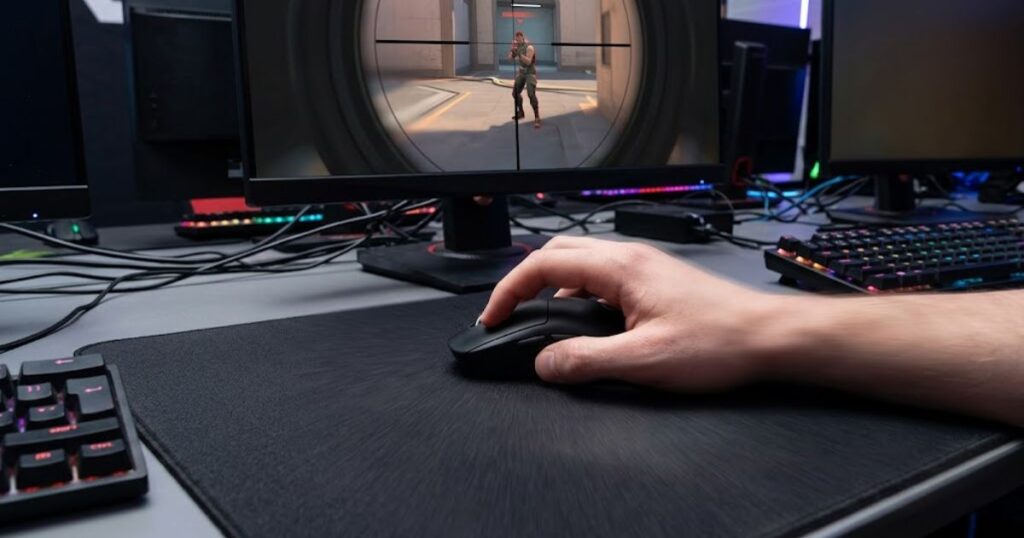
The biggest strength of fingertip grip is mobility. Because less of the hand touches the mouse, players can change direction quickly and reposition the mouse with minimal resistance.
For players who enjoy responsive aim and frequent micro-corrections, fingertip grip often feels more dynamic than grip styles that prioritize support and stability.
The benefits below explain why many FPS players choose fingertip grip:
- High Agility: Rapid directional changes feel easier because the mouse is controlled primarily through the fingers.
- Precise Micro-Adjustments: Small aiming corrections require less physical movement.
- Quick Mouse Repositioning: The mouse can be lifted and reset efficiently.
- Responsive Control: Small inputs translate quickly into cursor movement.
- Flexible Movement: Players can combine finger, wrist, and arm movement more freely.
These benefits make fingertip grip particularly appealing to players who value speed and responsiveness during aim-intensive situations.
Faster Flick Aiming
Faster flick aiming is one of the most commonly cited advantages of fingertip grip. It helps players move the crosshair rapidly between targets without feeling constrained by heavy palm contact.
Because the hand maintains less contact with the mouse shell, many players find it easier to generate explosive directional changes. This can feel especially useful when reacting to unexpected targets during competitive matches.
Flick speed still depends on practice and mouse control, but fingertip grip naturally supports a fast and responsive aiming style.
Players interested in comparing different grip styles can also explore our guide to best mouse grip styles for fps to understand how each grip influences aiming mechanics.
For players who rely heavily on target switching and rapid reactions, fingertip grip can feel particularly rewarding.
Improved Micro Adjustments
Micro-adjustments are small aiming corrections made after the crosshair is already near the target. Fingertip grip helps perform these corrections quickly through finger movement.
Instead of moving the entire hand, players can make tiny directional changes that require only a few millimeters of movement. This allows the crosshair to be refined with minimal effort.
These corrections often occur during headshot adjustments, recoil recovery, or tracking small enemy movements across the screen.
The ability to make fast and precise micro-adjustments is one of the defining strengths of fingertip grip in FPS games.
Overall, the advantages of fingertip grip revolve around movement freedom, responsiveness, and precision-oriented control.
Drawbacks Of Fingertip Grip
Fingertip grip can reduce stability and increase physical demand on the fingers. It helps maximize agility, but the reduced hand support creates trade-offs that some players may find challenging.
No mouse grip style is perfect. The same characteristics that make fingertip grip feel fast can also make it feel less secure during long gaming sessions or extended tracking scenarios.
Understanding these drawbacks is important because comfort and consistency often matter more than theoretical performance advantages.
The table below explains the most common drawbacks associated with fingertip grip:
| Drawback | Primary Cause | Potential Effect |
|---|---|---|
| Reduced Stability | Minimal palm contact | Less support during tracking |
| Finger Fatigue | Increased finger workload | Discomfort during long sessions |
| Longer Learning Curve | Requires refined control | Slower adaptation period |
| Mouse Compatibility Issues | Not all shapes fit well | Reduced comfort and efficiency |
Players who understand these trade-offs can make more informed decisions before switching to fingertip grip full-time.
Reduced Tracking Stability
Reduced stability is one of the most common concerns associated with fingertip grip. It helps increase movement freedom, but less hand contact can make continuous tracking feel less controlled.
Tracking often requires smooth and consistent movement over extended distances. Because fingertip grip relies heavily on finger control, maintaining perfectly stable motion can sometimes become more difficult.
The effect varies from player to player, but stability is usually the first trade-off discussed when comparing fingertip grip with more supportive grip styles.
This is why some tracking-focused players eventually choose grips that provide greater hand contact.
Increased Finger Strain
Finger strain is another potential downside because the fingers perform a larger percentage of the workload. It helps create responsive control, but prolonged tension can lead to fatigue.
This issue becomes more noticeable when using a mouse that is too large, too heavy, or poorly suited for fingertip control. The fingers must work harder to maintain positioning and stability.
Most experienced fingertip users reduce strain by maintaining a relaxed grip and choosing a mouse that complements their hand size.
While fatigue can occur, proper technique and equipment selection often minimize the problem significantly.
Ultimately, fingertip grip asks the fingers to do more work, which is both one of its strengths and one of its limitations.
Fingertip Grip vs Palm Grip
Fingertip grip and palm grip are designed around different priorities. Fingertip grip helps maximize mobility and freedom of movement, while palm grip focuses on comfort, support, and stability.
Neither grip style is universally superior because each one solves a different problem. The best choice depends on the player’s preferences, aiming habits, and comfort requirements.
Comparing the two directly helps reveal where each grip style performs best.
The table below compares fingertip grip and palm grip across key FPS gaming factors:
| Factor | Fingertip Grip | Palm Grip |
|---|---|---|
| Agility | High | Medium |
| Comfort | Medium | High |
| Stability | Medium | High |
| Micro-Adjustments | High | Medium |
| Long Session Comfort | Medium | High |
This comparison explains why players with different aiming preferences often choose different grip styles despite playing the same games.
Aim Performance Differences
The primary aim difference is that fingertip grip favors mobility while palm grip favors consistency. It helps explain why different players achieve success using completely different grip styles.
Players who enjoy rapid aim corrections often prefer fingertip grip because it supports fast directional changes. Players who prioritize stable tracking may feel more comfortable using palm grip.
The most effective grip is rarely determined by theory alone. Consistency under pressure is usually a stronger indicator of performance.
As a result, aim performance should always be evaluated through practical experience rather than assumptions.
Comfort And Stability Differences
Palm grip generally provides more comfort because a larger portion of the hand rests on the mouse. It helps reduce the workload placed on the fingers during long sessions.
By comparison, fingertip grip creates a lighter and more mobile feel but requires greater finger involvement. Some players enjoy this responsiveness, while others prefer the support offered by palm grip.
Players interested in exploring this alternative style can learn more about palm grip for fps games and how it differs from fingertip-focused control.
Ultimately, the decision between fingertip grip and palm grip comes down to whether you value mobility or support more during gameplay.
This comparison covers the most supportive grip style. The next step is comparing fingertip grip to claw grip, which occupies the middle ground between mobility and stability.
Fingertip Grip vs Claw Grip
Fingertip grip and claw grip are both popular among FPS players, but they achieve control in different ways. Fingertip grip helps maximize movement freedom, while claw grip balances agility with additional hand support.
The comparison below highlights the visible differences between fingertip grip and claw grip hand positioning:

Many players compare these two grip styles because they share several similarities. Both rely heavily on finger control, but claw grip introduces partial palm contact that changes how the mouse feels during gameplay.
The choice between them often comes down to whether a player prefers maximum mobility or a balance between mobility and stability.
The table below compares fingertip grip and claw grip across important FPS performance factors:
| Factor | Fingertip Grip | Claw Grip |
|---|---|---|
| Mobility | High | Medium-High |
| Stability | Medium | High |
| Finger Control | Very High | High |
| Learning Curve | Higher | Moderate |
| Versatility | Medium | High |
As a result, many players consider claw grip the middle-ground option between comfort and agility.
Hand Position Differences
The main hand position difference is that claw grip uses partial palm contact while fingertip grip keeps the palm elevated. It helps create a more secure feeling without completely sacrificing mobility.
In claw grip, the fingers are arched and the rear portion of the hand often touches the mouse. This creates an additional support point that many players find beneficial during longer sessions.
Fingertip grip removes most of that support in exchange for greater movement freedom. The mouse feels lighter inside the hand and responds more directly to finger input.
This difference in hand positioning is one of the biggest reasons the two grip styles feel distinct despite sharing some similarities.
Which Grip Offers Better Control
Neither grip universally offers better control because control depends on the type of movement being performed. Fingertip grip helps maximize fine adjustments, while claw grip often feels more stable during extended tracking.
Players who prioritize rapid corrections may prefer fingertip grip. Players who want a stronger connection between the hand and mouse may prefer claw grip.
Those interested in the hybrid approach can learn more about claw grip for fps games and how it combines characteristics from both styles.
Ultimately, the better grip is the one that allows consistent performance under pressure.
Comparing fingertip grip and claw grip highlights how different grip styles influence control. The next question is where fingertip grip performs best in actual FPS games.
Which FPS Games Benefit Most From Fingertip Grip?
Fingertip grip works best in FPS games that reward fast target switching and precise crosshair adjustments. It helps players react quickly when small aiming corrections have a significant impact on performance.
Different FPS games place different demands on mouse control. Some emphasize precision and first-shot accuracy, while others require continuous tracking and sustained movement.
Understanding these differences helps determine whether fingertip grip aligns with the mechanical requirements of a particular game.
The table below explains how fingertip grip fits different FPS genres:
| Game Type | Suitability | Reason |
|---|---|---|
| Tactical Shooters | High | Frequent micro-adjustments and precision aiming |
| Arena Shooters | Medium-High | Fast movement and target switching |
| Hero Shooters | Medium | Mixed tracking and precision requirements |
| Battle Royale Games | Medium | Longer tracking engagements |
This explains why many tactical FPS players experiment with fingertip grip at some point in their development.
Tactical FPS Games
Tactical shooters are among the strongest environments for fingertip grip. It helps players perform fast crosshair corrections before taking accurate shots.
Games such as Valorant and Counter-Strike 2 often reward precision more than raw tracking ability. A small correction before firing can decide the outcome of an engagement.
Because fingertip grip excels at micro-adjustments, many players find it naturally suited to this style of gameplay.
The emphasis on precision makes tactical shooters one of the most common homes for fingertip grip users.
Fast-Paced Tracking Shooters
Tracking-focused shooters require sustained mouse control over longer periods. Fingertip grip helps maintain agility, but some players may prefer additional stability for continuous tracking.
Games with highly mobile targets place greater emphasis on maintaining smooth movement rather than performing isolated corrections.
As a result, player preference becomes more important than theoretical grip advantages in these environments.
Fingertip grip can still perform well, but individual comfort often becomes the deciding factor.
Game selection influences grip preference, but equipment choice matters as well. Certain mouse characteristics work significantly better with fingertip grip than others.
What Type Of Mouse Works Best With Fingertip Grip?
The best fingertip grip mouse is typically lightweight, compact, and easy to control with the fingers. It helps maximize the mobility advantages that define fingertip grip.
The example below shows the type of gaming mouse shape commonly preferred by fingertip grip users:
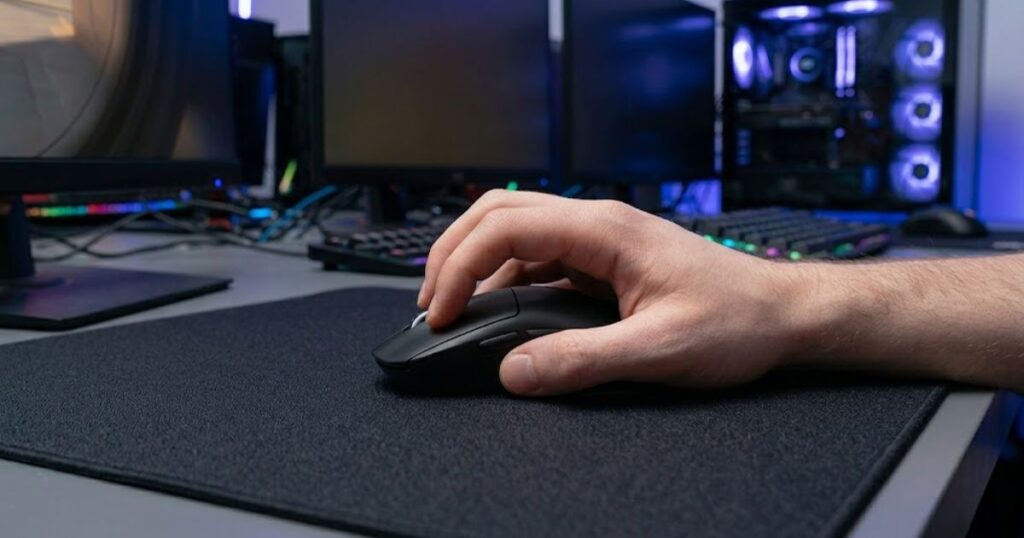
Mouse shape often matters more than specifications alone. A technically impressive mouse can still feel uncomfortable if its size or shape conflicts with fingertip control.
The goal is to find a mouse that allows the fingers to move freely without requiring excessive effort.
The table below explains the most important mouse characteristics for fingertip grip:
| Characteristic | Preferred Direction | Reason |
|---|---|---|
| Weight | Lighter | Easier finger-driven movement |
| Length | Shorter | Prevents unwanted palm contact |
| Width | Moderate | Supports finger control |
| Shape | Low Profile | Improves fingertip mobility |
Choosing the right shape often has a greater impact on comfort than chasing small specification differences.
Ideal Mouse Weight
Lighter mouse weights are generally preferred for fingertip grip because they require less effort to move. They help maintain the responsive feeling that many fingertip users seek.
Heavy mice can still work, but they place additional demands on the fingers during lifting and repositioning.
For this reason, many modern fingertip grip users gravitate toward lightweight gaming mice.
Weight preference remains personal, but lighter designs tend to align naturally with fingertip mechanics.
Ideal Mouse Shape And Size
Smaller and lower-profile mice are often easier to use with fingertip grip. They help prevent unnecessary palm contact and allow greater freedom of movement.
Large mice may force the palm into contact with the shell, reducing the defining characteristics of fingertip grip.
Players looking for examples can explore our recommendations in top best gaming mouse for fps games in 2026 to see how different shapes support different grip styles.
The right mouse should feel like an extension of the fingers rather than an object that the entire hand needs to support.
Mouse selection plays an important role in fingertip grip performance, but the most important factor is still whether the grip style matches the player using it.
Who Should Use Fingertip Grip?
Fingertip grip is best suited for players who value agility, quick reactions, and precise mouse control. It helps users take advantage of finger-driven movement that supports fast aim corrections and responsive gameplay.
Not every player naturally adapts to fingertip grip. Some players immediately enjoy the freedom it provides, while others prefer the stability and support offered by other grip styles.
The key is matching the grip style to the player’s aiming habits rather than forcing a grip that feels uncomfortable.
The table below explains which types of FPS players are most likely to benefit from fingertip grip:
| Player Type | Suitability | Reason |
|---|---|---|
| Precision-Focused Players | High | Frequently rely on micro-adjustments |
| Flick-Oriented Players | High | Benefit from rapid directional changes |
| Low Sensitivity Players | Medium-High | Can combine arm aim with finger corrections |
| Tracking Specialists | Medium | May prefer additional stability |
| Comfort-Oriented Players | Low-Medium | May prefer greater hand support |
Understanding your own aiming habits is often more valuable than copying the grip style used by another player.
Players Who Benefit Most
Players who benefit most from fingertip grip are those who naturally make frequent aim corrections and enjoy a highly responsive mouse feel. It helps them translate finger movement directly into crosshair adjustments.
Many of these players prefer active mouse control rather than allowing the mouse to rest heavily inside the hand. They often enjoy experimenting with different sensitivities, grip techniques, and aiming methods.
Fingertip grip also appeals to players who dislike feeling restricted by excessive palm contact.
For these users, the freedom of movement often outweighs the reduced support.
Players Who May Prefer Another Grip
Some players may prefer another grip style because stability and comfort are more important to them than mobility. It helps explain why fingertip grip is not the ideal solution for every FPS player.
Players who experience finger fatigue, struggle with tracking consistency, or prefer a more secure hand position may feel more comfortable using palm grip or claw grip.
Similarly, players who enjoy long gaming sessions may appreciate the additional support offered by grip styles with greater hand contact.
Choosing a grip style should always be based on performance and comfort rather than popularity.
Ultimately, fingertip grip works best when its strengths align naturally with the player’s mechanical preferences.
Is Fingertip Grip Good For FPS Games?
Yes, fingertip grip is good for FPS games when it matches the player’s aiming style and comfort preferences. It helps provide excellent mobility, precise aim corrections, and responsive mouse control for many competitive players.
However, being a good grip style does not mean it is automatically the best grip style. Performance depends on how comfortably a player can repeat movements under pressure and maintain consistency over time.
This is why professional players use a wide range of grip styles despite competing at the highest levels.
The table below summarizes when fingertip grip is most likely to be a strong choice:
| Situation | Recommendation |
|---|---|
| You value agility and responsiveness | Recommended |
| You rely on micro-adjustments | Recommended |
| You enjoy lightweight mice | Recommended |
| You prioritize comfort above all else | Consider Alternatives |
| You prefer maximum hand support | Consider Alternatives |
There is no universally perfect grip style, but there is often a grip style that fits a specific player better than others.
When Fingertip Grip Is A Good Choice
Fingertip grip is a good choice when quick reactions, mobility, and precise corrections are important parts of your gameplay. It helps create a highly responsive connection between the hand and mouse.
Players who naturally enjoy active mouse movement often adapt to fingertip grip more easily than players who prefer a stable, planted feel.
Many competitive players appreciate the freedom that fingertip grip provides during fast engagements and precision aiming scenarios.
When the grip feels natural, its strengths become much easier to use consistently.
When Another Grip May Be Better
Another grip style may be better if comfort, support, or tracking consistency are higher priorities than mobility. It helps ensure that the grip style matches the player’s needs rather than forcing unnecessary compromises.
Some players simply perform better when more of the hand remains connected to the mouse. Others prefer the additional stability that comes from greater palm contact.
If fingertip grip feels uncomfortable or difficult to control after a reasonable adaptation period, another grip style may be a more effective long-term solution.
The best grip style is not the most popular one. It is the one that allows consistent performance, confidence, and comfort during real gameplay.
Fingertip grip remains one of the most popular FPS mouse grip styles because it offers a unique combination of agility and precision. Whether it is the right choice ultimately depends on how naturally its strengths fit your own playstyle.
Frequently Asked Questions About Fingertip Grip
Even after understanding how fingertip grip works, many FPS players still have practical questions about performance, comfort, adaptation, and mouse compatibility. The answers below address some of the most common concerns players have before deciding whether fingertip grip is right for them.
What is fingertip grip in gaming?
Fingertip grip is a mouse grip style where only the fingertips touch the mouse while the palm remains elevated. It helps players create fast mouse movements and precise aim corrections using finger control.
Is fingertip grip good for FPS games?
Yes, fingertip grip is effective for many FPS games because it supports agility and precision. It helps players perform quick directional changes and micro-adjustments during combat.
Do professional FPS players use fingertip grip?
Yes, some professional players use fingertip grip because it suits their aiming style. It helps them maximize responsiveness, although many pros also use claw grip and palm grip successfully.
Is fingertip grip better than palm grip?
Fingertip grip is not universally better than palm grip. It helps provide more mobility, while palm grip generally offers greater comfort and stability.
Is fingertip grip better than claw grip?
Neither grip is objectively better. Fingertip grip helps maximize movement freedom, while claw grip provides a balance between agility and support.
Does fingertip grip improve flick shots?
Fingertip grip can improve flick shots for players who are comfortable with finger-driven movement. It helps create rapid directional changes and quick target acquisition.
Does fingertip grip improve tracking aim?
Fingertip grip can support tracking aim, but results vary by player. It helps maintain agility, although some players prefer additional stability for extended tracking scenarios.
Can fingertip grip cause hand fatigue?
Yes, fingertip grip can cause fatigue if the fingers remain tense for long periods. It helps improve control, but excessive grip pressure may increase strain over time.
What mouse shape works best for fingertip grip?
Smaller and lower-profile mouse shapes generally work best. They help prevent unwanted palm contact and allow greater freedom of movement.
Can players with large hands use fingertip grip?
Yes, players with large hands can use fingertip grip. It helps if the mouse size matches the player’s hand dimensions and allows comfortable finger control.
How long does it take to adapt to fingertip grip?
Adaptation time varies between players. It helps to expect a short adjustment period while developing finger control and consistency.
Should beginners use fingertip grip?
Beginners can use fingertip grip if it feels natural and comfortable. It helps develop precise mouse control, but no single grip style is mandatory for improvement.
Conclusion
Fingertip grip is one of the most mobility-focused mouse grip styles available for FPS games. It helps players perform fast aim corrections, responsive flicks, and precise micro-adjustments through finger-driven control.
Its strengths come from freedom of movement rather than additional support. This makes it appealing to players who value agility, but it may not be the ideal choice for everyone. Comfort, consistency, hand size, mouse shape, and personal preference all play important roles in determining whether fingertip grip is the right fit.
Ultimately, the best mouse grip is not the one used by the most professional players or recommended by the most guides. The best grip is the one that allows you to aim confidently, remain comfortable during long sessions, and perform consistently under pressure.
Thank you for taking the time to read this guide. We hope it helped you better understand fingertip grip and how it may influence your FPS gaming performance.