
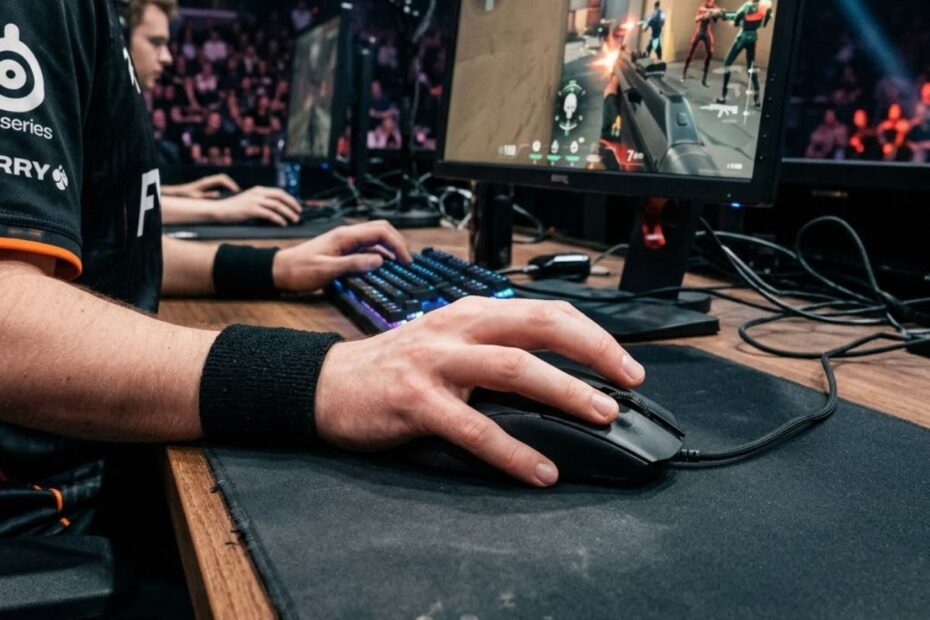
Palm grip is a mouse grip style where the entire palm rests on the mouse, helping FPS players achieve greater comfort, stability, and consistent control during long gaming sessions.
If your hand naturally covers most of the mouse and your fingers remain relaxed while aiming, there is a good chance you are already using palm grip. This grip style has been popular for years because it provides a comfortable connection between the hand and the mouse without requiring an aggressive finger position.
For FPS players, grip style affects more than comfort. It influences tracking accuracy, flick consistency, fatigue levels, and even the type of gaming mouse that feels natural during gameplay. Understanding palm grip can help you determine whether your current setup matches your aiming style.
What Is Palm Grip?
Palm grip is a mouse grip style where most of the hand stays in contact with the mouse, helping players maintain stable and comfortable control during aiming movements.
Unlike more aggressive grip styles that rely heavily on finger movement, palm grip allows the hand to rest naturally on the mouse shell. The palm supports much of the mouse contact area, creating a secure and planted feeling that many players find comfortable for extended gaming sessions.
Because the hand remains supported, palm grip is often associated with smoother movement and reduced strain. Many FPS players who value consistency and comfort prefer this grip style over alternatives that demand more finger tension.
Palm grip is not automatically the best option for every player, but it remains one of the most widely used mouse grip styles because it balances comfort and control effectively. Understanding how it works is the first step toward deciding whether it fits your own aiming preferences.
How Does Palm Grip Position the Hand?
Palm grip positions the hand by allowing the palm, fingers, and lower hand to rest directly on the mouse, helping create a stable and supported grip.
In a typical palm grip posture, the rear hump of the mouse fills part of the palm while the fingers extend naturally toward the main buttons. The fingers are usually flatter than they would be in claw grip, and the hand remains relaxed rather than elevated.
This positioning spreads contact across a larger area of the hand. Instead of relying heavily on fingertip control, movement is distributed through the fingers, palm, wrist, and sometimes the entire arm depending on the player’s sensitivity settings.
The result is a grip style that often feels secure and predictable. Many players describe palm grip as feeling connected to the mouse because so much of the hand remains in contact throughout gameplay.
Overall, hand positioning is what defines palm grip and separates it from more aggressive grip styles that reduce palm contact.
Why Do FPS Players Use Palm Grip?
FPS players use palm grip because it helps provide comfort, stability, and consistent mouse control during long gaming sessions.
Competitive shooters often require thousands of repetitive movements in a single session. A grip style that feels natural can help reduce discomfort and make aiming feel more predictable over time. Palm grip addresses this by supporting the hand instead of forcing it into a constantly elevated position.
Many players also appreciate the stability that comes from increased hand contact. When more of the hand touches the mouse, sudden unintended movements may become easier to control. This can be beneficial when tracking targets or holding precise crosshair placement.
Another reason palm grip remains popular is accessibility. New players often adopt it naturally without needing to consciously learn a grip technique. Because the posture feels intuitive, it becomes an easy starting point for many FPS gamers.
While different grip styles offer different advantages, palm grip continues to be a popular choice because it combines comfort and control in a way that suits a wide range of players.
What Does a Palm Grip Look Like?
Palm grip is recognizable because the palm, fingers, and lower hand remain supported by the mouse, helping create full-hand contact during gameplay.
Many players are unsure which grip style they actually use. Looking at how the hand sits on the mouse is usually the easiest way to identify palm grip. Unlike fingertip grip or claw grip, the hand is not hovering above the mouse body.
The mouse supports most of the hand, allowing the player to move comfortably without constantly relying on finger tension. This creates a distinct appearance that is easy to identify once you understand the key characteristics.
Recognizing these visual cues can help you determine whether palm grip already matches your natural aiming style.
Finger Placement in Palm Grip
Finger placement in palm grip keeps the fingers relatively flat on the mouse buttons, helping maintain comfort and stable clicking control.
The index finger normally rests across the left mouse button while the middle finger remains on the right mouse button. Rather than arching sharply upward, the fingers stay relaxed and extended along the surface of the mouse.
This flatter finger position often reduces tension during extended gaming sessions. Because the fingers are not constantly curled, many players find palm grip more comfortable during long periods of play.
Finger placement also influences clicking feel. With the fingers already resting on the buttons, clicks can feel natural and consistent without requiring excessive movement.
As a result, finger positioning plays an important role in the overall comfort and stability that palm grip provides.
Palm Contact Areas During Gameplay
Palm grip creates large contact areas between the hand and mouse, helping improve support and overall control.
The rear hump of the mouse typically supports the center of the palm while the lower portion of the hand rests against the back section of the mouse shell. Additional contact is created by the thumb and ring finger along the side panels.
This extensive contact area is one of the defining characteristics of palm grip. Compared with other grip styles, the hand feels more connected to the mouse because multiple sections of the hand remain engaged simultaneously.
The increased support often contributes to a stable aiming experience, especially during controlled tracking movements where consistency is more important than rapid finger adjustments.
Understanding these contact points makes it easier to identify palm grip and understand why many FPS players prefer its supported feel.
How Is Palm Grip Different From Claw Grip?
Palm grip is different from claw grip because it keeps more of the hand in contact with the mouse, helping create a more supported and stable aiming experience.
Many FPS players compare palm grip and claw grip because both are widely used in competitive gaming. While they may appear similar from a distance, the way they position the hand and control the mouse is noticeably different.
The hand position below shows how palm grip creates full-hand support on the mouse:
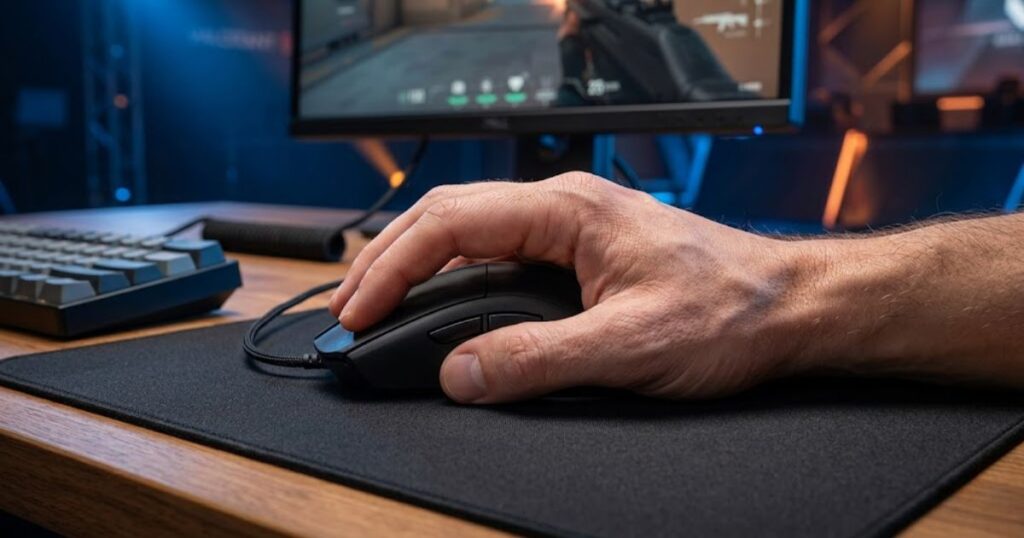
Palm grip focuses on support and comfort by allowing the mouse to fill the hand. Claw grip creates a more aggressive posture where the fingers remain elevated and play a larger role in movement. Understanding these differences helps players identify which grip style naturally matches their aiming habits.
The table below explains the key differences between palm grip and claw grip:
| Factor | Palm Grip | Claw Grip |
|---|---|---|
| Palm Contact | Most of the palm rests on the mouse. | Only part of the palm touches the mouse. |
| Finger Position | Fingers remain flatter and more relaxed. | Fingers stay curved and elevated. |
| Movement Style | Relies more on hand and arm movement. | Relies more on finger movement. |
| Primary Focus | Comfort and stability. | Responsiveness and agility. |
| Typical Feel | Supported and controlled. | Reactive and aggressive. |
The comparison shows that neither grip is universally superior. Palm grip is built around support and consistency, while claw grip is built around faster hand reactions and greater finger involvement.
If you want to explore the mechanics, strengths, and aiming style of the alternative grip in more detail, read our complete guide to claw grip.
Why Palm Grip Feels More Relaxed
Palm grip feels more relaxed because the mouse supports the hand instead of requiring constant finger tension.
The comparison below highlights the visual difference between palm grip and claw grip:
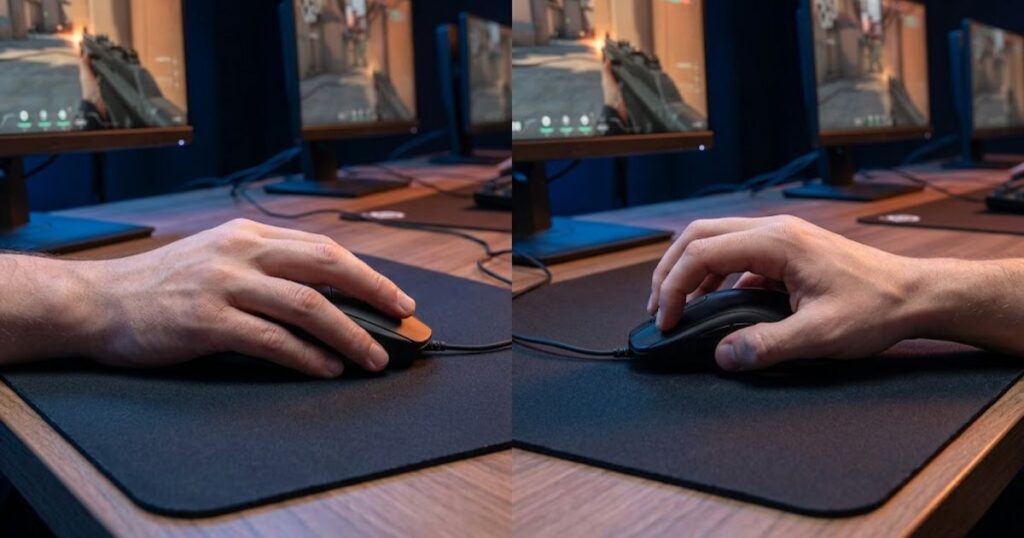
With palm grip, the hand rests naturally on the mouse shell. The fingers stay in a more neutral position, reducing the need to maintain an elevated posture throughout gameplay.
This supported hand position often feels easier to sustain during extended gaming sessions. Many players describe palm grip as natural because it allows the mouse to carry more of the hand’s weight.
The relaxed posture is one of the biggest reasons palm grip remains popular among FPS players who value long-term comfort.
Why Claw Grip Feels More Responsive
Claw grip feels more responsive because the elevated fingers can make faster movement adjustments.
When the fingers remain arched, they can contribute more directly to mouse movement. This creates a feeling of increased responsiveness, particularly during rapid corrections and sudden directional changes.
The tradeoff is that the hand usually remains under more tension than it would with palm grip. Some players enjoy this aggressive feeling, while others prefer a more relaxed approach.
Ultimately, claw grip emphasizes reaction speed while palm grip emphasizes stability and support.
What Are the Main Characteristics of Palm Grip?
Palm grip is characterized by full-hand support, extensive mouse contact, relaxed finger posture, and controlled movement patterns.
Every player uses palm grip slightly differently, but several characteristics consistently appear across most users. These traits define the grip style and make it easy to distinguish from other common FPS grips.
The characteristics below explain what makes palm grip unique:
- Full Palm Support: The mouse supports a large portion of the palm throughout gameplay.
- Large Contact Area: Multiple parts of the hand stay connected to the mouse at the same time.
- Relaxed Finger Posture: Fingers remain flatter rather than aggressively curved.
- Controlled Movement Style: Mouse movement often comes from the hand, wrist, or arm working together.
- Comfort-Oriented Design: The grip naturally prioritizes support over aggressive positioning.
The characteristics above show that palm grip is not defined by speed or sensitivity preferences. Instead, it is defined by how the hand physically interacts with the mouse.
These defining traits help explain why palm grip often feels stable, predictable, and comfortable during gameplay.
What Are the Advantages of Palm Grip?
Palm grip offers advantages in comfort, consistency, and overall mouse control by providing greater hand support.
The benefits of palm grip extend beyond simple comfort. The larger contact area between the hand and mouse can influence how confidently players move, track targets, and maintain control during extended matches.
The table below explains the primary advantages of palm grip:
| Advantage | Benefit During Gameplay |
|---|---|
| Comfort | Feels easier to maintain during long sessions. |
| Stable Control | Creates a more supported aiming platform. |
| Predictable Movement | Helps maintain consistent movement patterns. |
| Natural Feel | Often requires little adjustment for new players. |
| Reduced Hand Strain | Can feel less physically demanding over time. |
The table highlights why palm grip remains one of the most common grip styles in gaming. Its strengths are centered around comfort, repeatability, and long-term usability.
These advantages become especially noticeable during long sessions where fatigue and consistency begin affecting performance.
Better Long-Session Comfort
Palm grip improves long-session comfort by allowing the hand to remain supported throughout gameplay.
Long gaming sessions often expose weaknesses in uncomfortable grip styles. Palm grip helps reduce that issue because the mouse supports much of the hand instead of requiring constant muscle engagement.
Many players find they can maintain palm grip comfortably for hours without feeling the same level of hand tension associated with more aggressive grips.
This emphasis on support makes comfort one of the most recognized strengths of palm grip.
More Stable Tracking Movements
Palm grip helps create stable tracking movements by increasing the connection between the hand and mouse.
Tracking requires controlled movement rather than explosive direction changes. Because the hand remains supported, many players feel that palm grip produces smoother and more predictable movement patterns.
The larger contact area can help reduce unnecessary motion and improve the feeling of control while following moving targets.
For players who value smooth tracking, this stability is often one of the most appealing aspects of palm grip.
Reduced Wrist Tension
Palm grip can reduce wrist tension by distributing movement across a larger portion of the hand and arm.
Instead of relying heavily on finger activity, palm grip allows the entire hand to contribute to movement. This can create a more balanced workload across multiple joints and muscles.
While comfort varies between individuals, many players report that palm grip feels less physically demanding during long sessions than more finger-intensive grip styles.
Reduced tension is another reason palm grip remains popular among players who prioritize comfort and consistency.
What Are the Disadvantages of Palm Grip?
Palm grip can limit certain fast adjustment movements because the hand stays more connected to the mouse.
Every grip style involves tradeoffs. The same characteristics that make palm grip stable and comfortable can also create limitations for players who prefer rapid finger-driven movement.
The table below explains the main disadvantages of palm grip:
| Disadvantage | Potential Impact |
|---|---|
| Slower Micro-Adjustments | Small corrections may feel less immediate. |
| Reduced Agility | Fast direction changes can feel less responsive. |
| Greater Mouse Size Dependence | Requires a shape that properly supports the hand. |
| Less Finger Involvement | Limits some finger-based movement techniques. |
| Potential Speed Tradeoff | May feel slower to highly aggressive players. |
The table shows that palm grip sacrifices some movement freedom in exchange for stability and comfort. Whether those tradeoffs matter depends entirely on how a player prefers to aim.
Understanding these limitations helps players evaluate whether palm grip matches their natural movement style before making major changes.
Slower Finger Corrections
Palm grip can slow finger corrections because the fingers play a smaller role in overall mouse movement.
Since the hand remains supported by the mouse, individual finger movements often contribute less to aiming than they do in claw grip or fingertip grip. This can make extremely small corrections feel less immediate.
Players who rely heavily on finger control may notice this limitation more than players who primarily use wrist or arm movement.
The reduced finger involvement is one of the most common tradeoffs associated with palm grip.
Less Flexibility for Fast Flicks
Palm grip may feel less flexible for fast flicks because the larger contact area keeps movement more controlled.
Fast flick shots often benefit from rapid direction changes and immediate stopping power. Palm grip can still perform these actions, but the movement usually feels smoother rather than sharply reactive.
Players who prefer extremely agile mouse handling sometimes choose grip styles with less palm contact. If you want to explore the opposite approach, our guide to fingertip grip explains how a minimal-contact grip changes mouse control.
While palm grip remains effective for FPS games, its strengths are generally found in stability and support rather than maximum agility.
Is Palm Grip Good for FPS Games?
Palm grip is good for FPS games because it helps players maintain controlled mouse movement, consistent crosshair placement, and reliable tracking performance.
Many new FPS players assume there is a single “best” grip style for competitive gaming. In reality, different grip styles excel in different situations. Palm grip performs particularly well when the player values controlled aim and repeatable movement patterns.
Rather than focusing on extreme speed, palm grip encourages smooth and deliberate mouse control. This can be beneficial in games where positioning, tracking, and precision matter more than constant rapid adjustments.
The table below explains how palm grip performs across different FPS gameplay situations:
| Scenario | Palm Grip Performance |
|---|---|
| Tracking Targets | Excellent |
| Crosshair Placement | Excellent |
| Holding Angles | Very Good |
| Flick Shots | Good |
| Rapid Micro-Corrections | Moderate |
The table shows that palm grip is highly effective for most FPS tasks. Its biggest strengths appear when players need consistency rather than maximum hand agility.
The example below shows how palm grip is commonly used during competitive FPS gameplay:
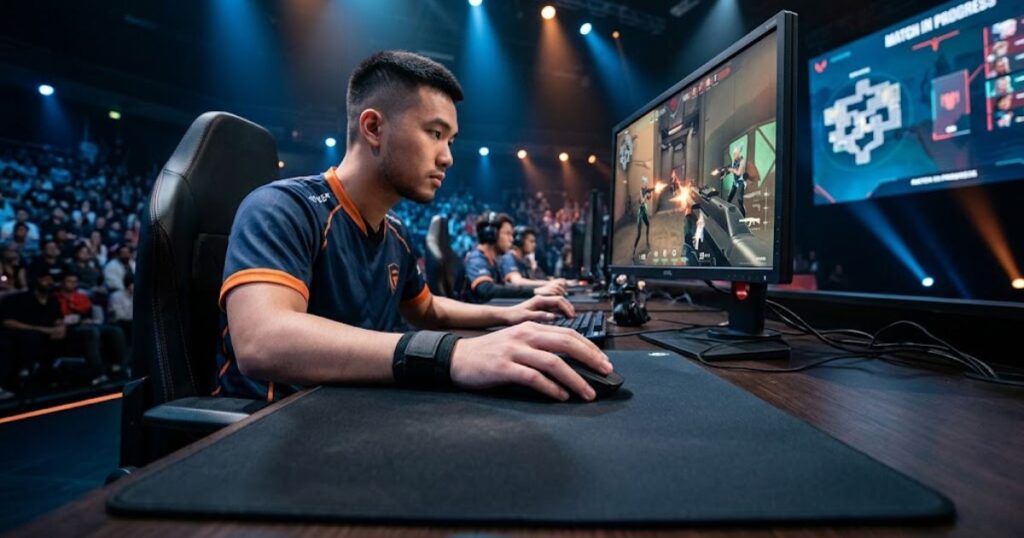
Palm grip remains a competitive option because reliable aim often matters more than raw movement speed.
Palm Grip in Tactical FPS Games
Palm grip works well in tactical FPS games because these games reward positioning, crosshair discipline, and controlled aiming.
In tactical shooters, players frequently spend more time preparing shots than rapidly chasing targets. Consistent crosshair placement and predictable movement often have a larger impact on performance than pure mouse speed.
Because palm grip naturally supports controlled movement, many players find it comfortable for games that emphasize precision and decision-making.
The grip style complements the slower and more methodical pace often found in tactical FPS environments.
Palm Grip in Tracking-Based FPS Games
Palm grip can also perform well in tracking-based FPS games by supporting smooth and continuous mouse movement.
Tracking-focused gameplay requires players to keep their crosshair connected to moving opponents over time. Stable movement can often be more valuable than sudden bursts of speed.
The supported nature of palm grip helps many players maintain a consistent feel while following targets across the screen. This makes it a practical option even in faster-paced FPS titles.
Its ability to support controlled tracking is one reason palm grip remains relevant across multiple FPS genres.
Which FPS Players Benefit Most From Palm Grip?
Palm grip benefits players who prioritize consistency, controlled aim, and comfortable long-term gameplay.
Not every player experiences the same results with palm grip. Certain playstyles naturally align better with the strengths of the grip, making it easier for some players to take advantage of its characteristics.
The table below explains which types of FPS players typically benefit most from palm grip:
| Player Type | Suitability |
|---|---|
| Low Sensitivity Players | Excellent |
| Arm Aimers | Excellent |
| Comfort-Focused Players | Excellent |
| Tracking-Oriented Players | Very Good |
| Aggressive Finger Aimers | Moderate |
The table highlights that palm grip is often a strong match for players who use larger mouse movements and prefer a stable aiming foundation.
Understanding your aiming habits is often more important than copying the grip style of professional players.
Low Sensitivity Players
Low sensitivity players often benefit from palm grip because their aiming style relies heavily on larger mouse movements.
Lower sensitivity settings require more physical movement to cover the same distance on screen. Many players perform these movements using the arm and wrist rather than relying entirely on finger control.
Palm grip naturally supports this approach because it creates a secure connection between the hand and mouse during larger swipes.
This makes palm grip a common choice among players who prefer lower sensitivity ranges.
Players Who Use Arm Aiming
Players who aim primarily with their arm often find palm grip comfortable because the grip supports larger movement patterns.
Arm aiming involves moving the mouse across a greater portion of the mouse pad rather than depending heavily on finger adjustments. A supported grip can help these larger movements feel more consistent.
Because palm grip keeps the hand connected to the mouse, many arm aimers find it easier to maintain the same movement feeling across repeated actions.
The compatibility between arm aiming and palm grip is one reason the grip remains popular among competitive FPS players.
Does Hand Size Affect Palm Grip?
Hand size affects palm grip because the grip relies on the mouse providing enough surface area to properly support the hand.
Unlike some grip styles that use minimal palm contact, palm grip depends heavily on the relationship between hand size and mouse shape. If the mouse is too small, the hand may not receive the support that defines the grip style.
The table below explains how different hand sizes generally interact with palm grip:
| Hand Size | Compatibility |
|---|---|
| Small Hands | Depends heavily on mouse size. |
| Medium Hands | Usually very comfortable. |
| Large Hands | Often ideal. |
The table shows why mouse fit becomes increasingly important when using palm grip. The goal is not simply finding a large mouse, but finding one that properly supports the hand.
Choosing a suitable shape is often more important than chasing specific specifications or marketing claims.
Medium Hands
Medium-sized hands are often well suited to palm grip because many gaming mice are designed around this size range.
Players with medium hands typically have access to the widest range of compatible mouse shapes. Many modern gaming mice provide enough support to allow comfortable palm contact without feeling oversized.
This flexibility makes it easier to experiment with different shapes while maintaining the core characteristics of palm grip.
As a result, medium-hand users often have the easiest time finding a comfortable palm grip setup.
Large Hands
Large hands often work particularly well with palm grip because the hand can fully engage with the mouse shape.
Players with larger hands may struggle to achieve full support when using small mice. Palm grip helps solve this issue by encouraging the use of shapes that properly fill the hand.
When paired with an appropriate mouse size, large-handed players can often take full advantage of the grip’s supported feel and controlled movement style.
This combination is one reason palm grip remains especially popular among players with larger hands.
How Can You Tell If Palm Grip Fits You?
The best way to determine whether palm grip fits you is to evaluate your comfort, control, and consistency during actual gameplay.
Many players spend too much time trying to copy professional settings instead of paying attention to how their own hand interacts with the mouse. A grip style should support your natural movement patterns rather than force you into an uncomfortable position.
Palm grip is most effective when it feels effortless. If maintaining the grip requires constant adjustment or causes discomfort, another grip style may be a better match.
The following process can help determine whether palm grip fits your playstyle:
- Use Your Natural Hand Position: Place your hand on the mouse without consciously adjusting your grip.
- Check Palm Contact: Confirm whether most of your palm naturally rests on the mouse shell.
- Play Several Matches: Test the grip during normal gameplay rather than short aim drills.
- Monitor Comfort Levels: Pay attention to fatigue, tension, or discomfort over time.
- Evaluate Aim Consistency: Determine whether your tracking and crosshair placement feel repeatable.
The process above focuses on long-term usability rather than first impressions. A grip style that feels comfortable after several hours is usually more valuable than one that feels impressive for a few minutes.
Ultimately, palm grip is a good fit when it supports both comfort and reliable mouse control without requiring constant adjustment.
What Mouse Features Support Palm Grip?
Palm grip works best with mouse shapes that provide adequate palm support, comfortable dimensions, and a stable hand position.
Choosing a suitable mouse shape is often more important than chasing sensor specifications or marketing claims. Because palm grip relies heavily on hand support, the physical design of the mouse plays a major role in the overall experience.
The table below explains the mouse features that commonly work well with palm grip:
| Feature | Why It Helps |
|---|---|
| Higher Rear Hump | Provides additional palm support. |
| Larger Overall Shape | Creates more contact with the hand. |
| Comfortable Curves | Helps maintain a natural hand position. |
| Stable Side Shape | Improves overall grip security. |
| Balanced Dimensions | Allows the hand to rest comfortably. |
The table shows that palm grip benefits primarily from ergonomic support rather than extreme specifications. A comfortable shape often has a greater impact on the experience than small performance differences between mice.
If you want to compare how different grip styles interact with mouse shapes, read our guide to best mouse grip styles for FPS games.
Finding the right shape can significantly improve how natural and effective palm grip feels during gameplay.
Mouse Shape Considerations
Mouse shape is important for palm grip because it determines how effectively the mouse supports the hand.
The image below demonstrates the type of mouse shape that typically supports palm grip:
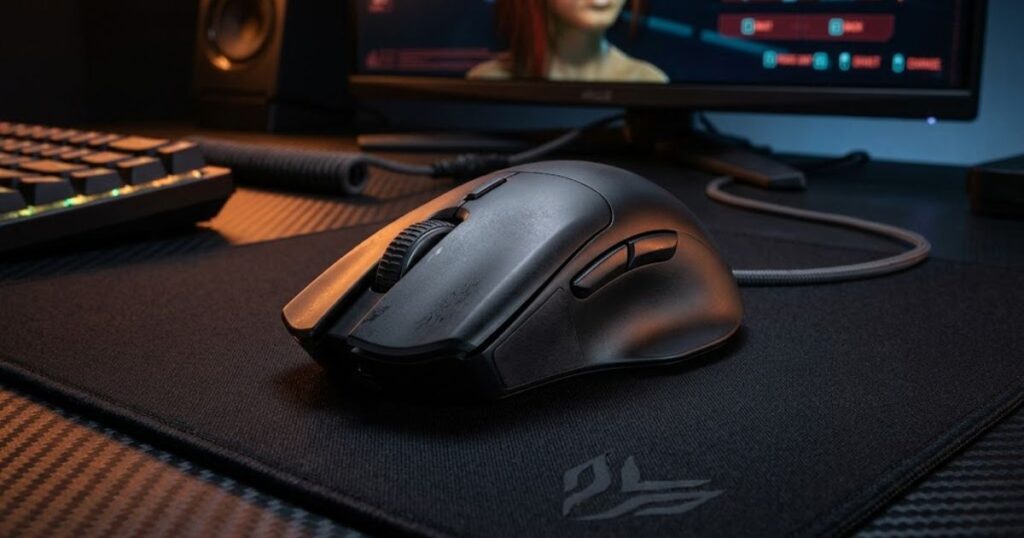
A shape that properly fills the palm can help maintain the defining characteristics of palm grip. If the mouse feels too flat or too short, the hand may lose the support that makes the grip comfortable.
This is why many palm grip users focus heavily on shape before considering other specifications. The mouse must physically fit the hand before any technical feature can matter.
Proper shape compatibility helps palm grip feel natural, stable, and easy to maintain.
Mouse Size Considerations
Mouse size matters because palm grip relies on adequate hand support across a larger contact area.
A mouse that is too small may force the hand into an unintended position. A mouse that is too large may reduce maneuverability and make movement feel awkward.
The goal is to find a size that allows the palm to rest comfortably while preserving natural control of the buttons and side grips.
Balanced sizing helps preserve the core benefits that make palm grip appealing in the first place.
Should You Switch From Palm Grip to Another Grip Style?
Most players should only switch from palm grip if they experience discomfort, control limitations, or a clear mismatch with their natural aiming style.
Changing grip styles can temporarily reduce performance because the hand must adapt to new movement patterns. For this reason, switching should be based on a specific problem rather than curiosity alone.
Many players perform well with palm grip for years without needing to change. Others eventually discover that a different grip style better matches their aiming preferences.
The most important factor is not whether a grip style is popular, but whether it allows you to play comfortably and consistently.
If palm grip already feels natural and your aim remains reliable, there is often little reason to force a change.
Final Thoughts on Palm Grip for FPS Gaming
Palm grip remains one of the most comfortable and widely used mouse grip styles for FPS players because it combines support, control, and long-term usability.
Throughout this guide, we explored how palm grip works, how it differs from other grip styles, where it performs well, and which players benefit most from using it. The grip continues to be relevant because comfort and consistency remain important parts of competitive aiming.
No grip style is perfect for everyone. The best choice depends on how you naturally move the mouse, how you aim, and what feels sustainable during long gaming sessions.
If you are still exploring grip styles and mouse preferences, our guide to the best gaming mouse for FPS games can help you understand how mouse shape and design affect overall performance.
For a broader understanding of sensors, shapes, grip styles, and FPS mouse fundamentals, visit our complete resource on gaming mouse for FPS games.
Frequently Asked Questions About Palm Grip
The questions below answer common concerns FPS players have when learning about palm grip, choosing a grip style, and improving their aiming performance.
While the main guide covers the core concepts, these frequently asked questions address practical situations that players often encounter when evaluating palm grip for FPS gaming.
Is Palm Grip Better Than Claw Grip for FPS Games?
Palm grip is not automatically better than claw grip because each grip style helps different types of players.
Palm grip focuses on support and consistent control, while claw grip focuses on faster finger-driven adjustments. The better option depends on your natural aiming style and comfort preferences.
Is Palm Grip Good for Beginners?
Palm grip is often good for beginners because it feels natural and easy to maintain.
Many new FPS players naturally place their hand on the mouse in a palm grip position. The supported posture can make it easier to develop consistent mouse control while learning FPS fundamentals.
Do Professional FPS Players Use Palm Grip?
Yes, some professional FPS players use palm grip because it supports reliable and repeatable aiming.
Professional players use a variety of grip styles. Success depends more on consistency and practice than on using a specific grip.
Can Palm Grip Improve Aim Accuracy?
Palm grip can improve aim accuracy if it helps you maintain more consistent mouse control.
The grip itself does not increase accuracy automatically. However, a grip that feels comfortable and repeatable can make it easier to develop reliable aiming habits.
Can Palm Grip Cause Wrist Pain?
Palm grip does not directly cause wrist pain, but poor ergonomics can create discomfort with any grip style.
Mouse shape, desk height, posture, sensitivity settings, and playing habits all contribute to overall comfort. These factors are often more important than grip style alone.
Is Palm Grip Suitable for High Sensitivity Players?
Yes, palm grip can work with high sensitivity settings, although many palm grip users prefer medium or low sensitivity.
The grip style and sensitivity setting are separate variables. The best combination depends on personal preference and aiming technique.
Do Large Hands Work Better With Palm Grip?
Large hands often work well with palm grip because the grip benefits from greater mouse support.
When paired with an appropriately sized mouse, larger hands can take full advantage of the contact area that defines palm grip.
Is Palm Grip Good for Valorant?
Palm grip can work well in Valorant because the game rewards controlled crosshair placement and consistent aiming.
Many players find that the stable nature of palm grip supports the disciplined aiming approach commonly used in tactical shooters.
Is Palm Grip Good for Counter-Strike 2?
Palm grip can be effective in Counter-Strike 2 because it helps support controlled movement and repeatable aim mechanics.
As with other FPS games, the best grip is the one that allows the player to perform comfortably and consistently over time.
What Mouse Size Works Best With Palm Grip?
The best mouse size for palm grip is one that comfortably supports the palm without forcing the hand into an unnatural position.
A properly sized mouse helps preserve the support and control that make palm grip effective.
Should I Change My Grip Style if My Aim Feels Inconsistent?
You should only change your grip style if you believe it is causing a specific problem.
Inconsistent aim is often related to practice habits, sensitivity settings, or mouse control rather than grip style alone.
How Long Does It Take to Adapt to Palm Grip?
Most players need several days to several weeks to fully adapt to a new grip style.
The exact adjustment period varies depending on previous habits, playtime, and how different the new grip feels compared with the old one.
Final Thoughts on Palm Grip for FPS Gaming
Palm grip remains one of the most comfortable and widely used mouse grip styles because it combines support, control, and long-term usability.
Throughout this guide, we explored what palm grip is, how it works, how it compares with other grip styles, and which types of FPS players are most likely to benefit from using it. Understanding these fundamentals can help you determine whether palm grip naturally fits your own aiming style.
No grip style is universally perfect. The most effective choice is the one that allows you to play comfortably, maintain consistent mouse control, and perform reliably across long gaming sessions.
If you want to compare palm grip with other popular grip styles, be sure to read our guide to best mouse grip styles for FPS games. Understanding the strengths and tradeoffs of each grip style can help you make a more informed decision.
If you are also researching gaming mice, shapes, sensors, and FPS performance fundamentals, explore our complete guide to gaming mouse for FPS games for additional insights.
Thank you for taking the time to read this guide. We hope it helped you better understand palm grip and determine whether it is the right fit for your FPS gaming setup.