
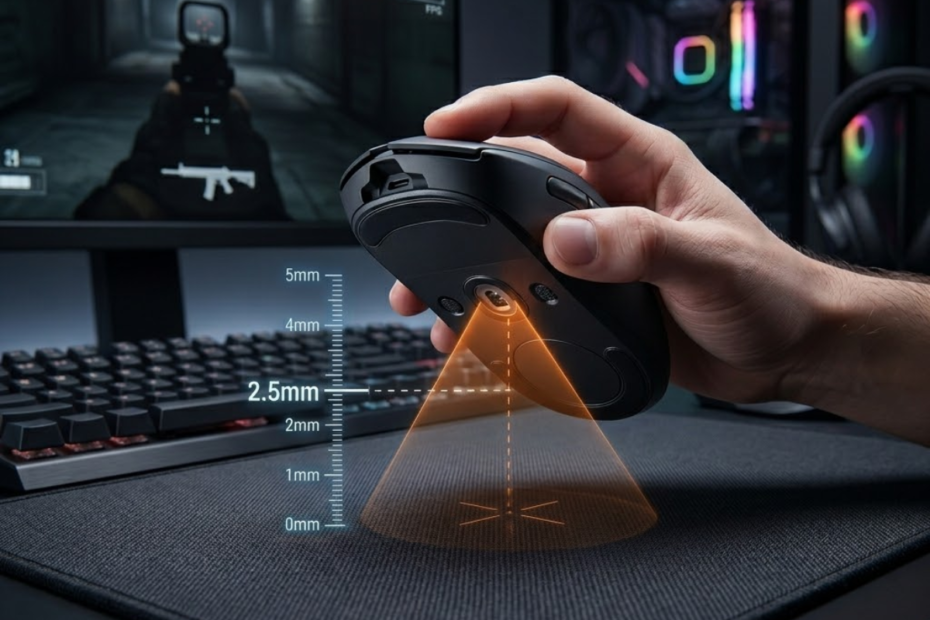
Lift Off Distance is the height at which a gaming mouse sensor stops tracking movement after the mouse is lifted from the surface. It helps FPS players understand why the crosshair may still move slightly when they pick up the mouse to reposition.
In fast FPS games, lifting the mouse is not a rare action. Players do it constantly when resetting their hand position, especially when using low sensitivity, large mouse pads, and wide arm movements. If the mouse keeps tracking while it is already in the air, the crosshair can drift away from the intended position.
This is why Lift Off Distance, often shortened to LOD, matters more than many beginners expect. It does not replace aim training, DPI tuning, or good mouse control, but it can affect how stable the mouse feels during real gameplay.
For most competitive FPS players, a lower Lift Off Distance feels more controlled because the sensor stops tracking sooner after the mouse leaves the pad. A higher Lift Off Distance can feel less predictable if the player frequently lifts and resets the mouse during fights.
What Is Lift Off Distance in a Gaming Mouse?
Lift Off Distance is the distance between the mouse sensor and the surface where the sensor stops tracking movement. It helps define how much cursor or crosshair movement can still happen when the mouse is lifted during gameplay.
In simple terms, Lift Off Distance answers one practical question: how high can you lift the mouse before it stops reading the mouse pad? If the answer is very low, the sensor stops tracking quickly. If the answer is high, the sensor may continue tracking even when the mouse is already off the surface.
The illustration below shows what Lift Off Distance looks like when a gaming mouse begins leaving the mouse pad:
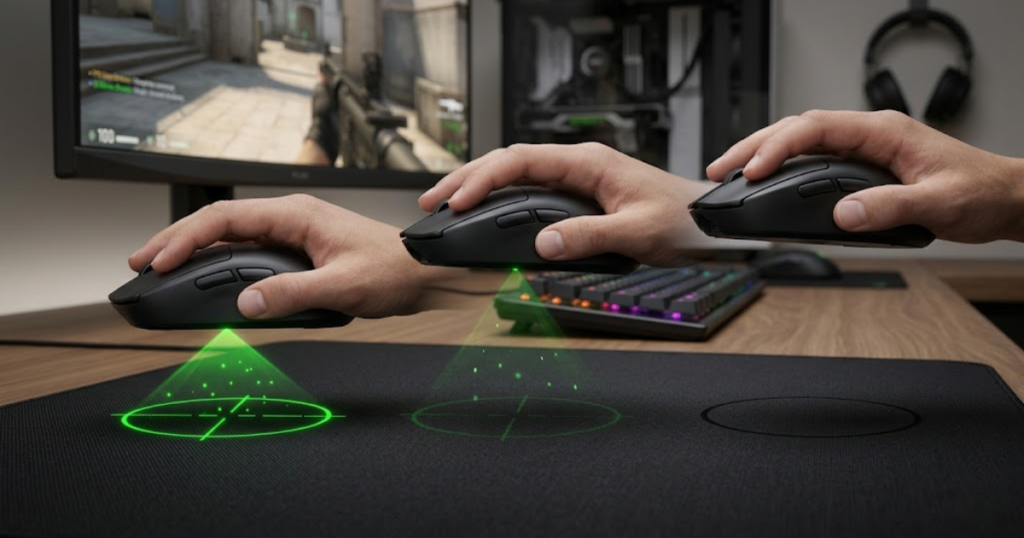
This matters because a gaming mouse is not always flat on the mouse pad. FPS players often lift one side slightly, reset their wrist, or pick up the mouse entirely after a large swipe. During those moments, the sensor can still detect surface detail if the distance is within its tracking threshold.
LOD is usually measured in millimeters, but most players feel it more than they measure it. A mouse with low LOD may feel like it disconnects from the pad as soon as it is lifted. A mouse with high LOD may feel like the crosshair keeps sliding even after the player thinks the mouse should have stopped moving.
Lift Off Distance is not the same thing as DPI, polling rate, or sensor accuracy. It is a specific part of sensor behavior that appears only when the mouse is leaving the surface. That makes it especially relevant for players who reset their mouse position often.
In short, Lift Off Distance explains what happens between full surface contact and complete sensor stop. Understanding this concept makes it easier to judge whether a mouse feels stable when repositioning in FPS games.
What Happens When You Lift a Mouse Off the Surface?
Lifting a mouse off the surface is the moment when the sensor begins losing a clear view of the mouse pad. This helps explain why the cursor may still move briefly before the sensor fully stops tracking.
When the mouse sits flat on the pad, the sensor reads tiny surface details and converts those changes into movement. As the mouse rises, those surface details become harder for the sensor to read. The sensor does not always stop instantly because it may still receive enough visual information to detect motion.
This short transition is where Lift Off Distance becomes noticeable. If the sensor keeps reading the surface for too long, small hand movements in the air can still move the cursor. In a desktop environment, this may feel like minor pointer drift. In an FPS game, it can move the crosshair away from the angle the player wanted to hold.
For example, a low-sensitivity Valorant or CS2 player may swipe across the pad, lift the mouse, and place it back near the center. If the LOD is too high, the crosshair may shift during the lift instead of staying stable. That movement may be small, but small aim errors matter when the player is holding a tight angle.
A low Lift Off Distance reduces this unwanted movement by stopping tracking sooner. The mouse still works normally when it touches the pad, but it becomes less active during the lift. That is the main reason LOD is often discussed in competitive FPS setups.
To conclude, lifting a mouse creates a short tracking transition between surface contact and sensor stop. The lower and more predictable that transition feels, the easier it is to reposition without disturbing crosshair placement.
Why Modern Gaming Mice Measure Lift Off Distance
Modern gaming mice measure Lift Off Distance because sensor behavior affects how stable the mouse feels when it leaves the surface. This helps players understand one important part of gaming mouse sensor performance beyond basic DPI numbers.
Older or basic mice often focused on simple pointer movement. Modern FPS mice are designed for faster flicks, lower latency, better tracking, and more consistent control. Because of that, sensor behavior during lift-off is no longer ignored.
A gaming mouse sensor has to know when to track and when to stop. If it stops too late, the player may experience unwanted cursor movement during repositioning. If it stops too early or inconsistently, the mouse may feel unstable on uneven surfaces or when the player applies light pressure.
Good LOD behavior is not only about having the lowest possible number. It is about having predictable tracking behavior. A mouse should track accurately when it is on the pad and stop tracking cleanly when it is lifted high enough.
Many modern gaming mice also include surface tuning or LOD settings in their software. These options allow players to choose a lower or higher lift-off threshold depending on their mouse pad and preference. This is useful because not every surface reflects light or texture in the same way.
To conclude, modern gaming mice measure Lift Off Distance because the moment of lifting the mouse is part of real gameplay. A good sensor should feel consistent not only while moving on the pad, but also while leaving and returning to the pad.
How Lift Off Distance Differs From Sensor Tracking Range
Lift Off Distance is the stopping point of sensor tracking during lift-off, while sensor tracking range is the broader ability of the sensor to read movement across different conditions. This helps separate LOD from general sensor quality.
Sensor tracking range can involve many things, including surface compatibility, maximum tracking speed, acceleration handling, and movement consistency. These factors describe how well the mouse follows motion while it is being used normally on a surface.
Lift Off Distance is narrower. It focuses only on what happens when the sensor moves away from the pad. A mouse can have excellent tracking on the surface but still have a Lift Off Distance that feels too high for a specific player.
This distinction matters because some players assume that a better sensor automatically means perfect LOD. In reality, sensor quality and LOD behavior are related but not identical. A good FPS mouse should have both accurate surface tracking and controlled lift-off behavior.
For example, a sensor may track smoothly during a fast horizontal flick, but if the player lifts the mouse after the flick and the crosshair continues moving, the issue is not normal tracking accuracy. It is the lift-off behavior of the sensor and surface combination.
To conclude, Lift Off Distance is not a replacement term for tracking performance. It is a specific sensor behavior that explains when movement stops as the mouse leaves the pad.
How Does Lift Off Distance Work?
Lift Off Distance is created by the way a mouse sensor reads surface detail as the mouse moves farther away from the pad. It helps determine the exact point where tracking becomes too weak for the sensor to continue reporting movement.
A gaming mouse sensor works by taking rapid readings of the surface underneath it. As the mouse moves, the sensor compares those surface patterns and translates the changes into cursor or crosshair movement. When the mouse is lifted, the surface becomes less clear, and the sensor eventually stops tracking.
This process is not random. It depends on sensor design, firmware tuning, lens height, mouse feet thickness, and the surface under the mouse. That is why two mice can feel different even when they use similar DPI and polling rate settings.
The following process explains how Lift Off Distance works step by step:
- Sensor Reads Surface: The sensor captures surface texture while the mouse is flat on the mouse pad.
- Mouse Begins Lifting: The distance between the sensor lens and the surface starts increasing.
- Tracking Becomes Weaker: The sensor receives less usable surface detail as the mouse rises.
- Tracking Stops: The sensor reaches its lift-off threshold and stops reporting movement.
This process explains why LOD is felt during repositioning instead of normal aiming. When the mouse remains on the pad, tracking should stay active. When the mouse rises above its threshold, tracking should stop cleanly.
The process below illustrates how a mouse sensor gradually loses surface tracking as the mouse is lifted:
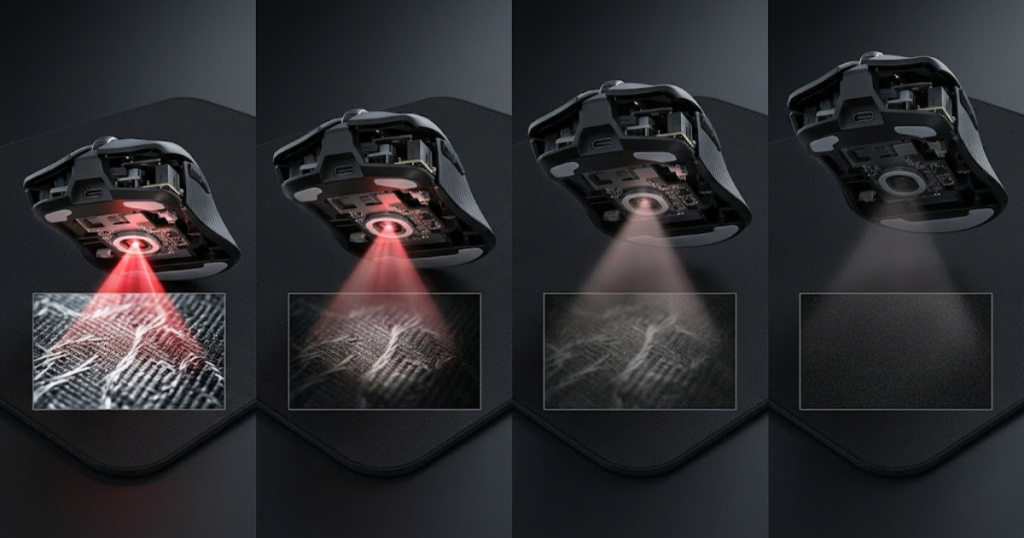
In short, Lift Off Distance works as a stop point for sensor tracking. The cleaner and more predictable that stop point is, the more stable the mouse feels during FPS repositioning.
How Optical Sensors Detect Surface Movement
Optical sensors detect surface movement by reading tiny texture changes under the mouse. This helps explain how gaming mouse sensors work and why Lift Off Distance depends on both the sensor and the surface.
An optical gaming mouse uses a light source and an imaging sensor to observe the surface below it. The sensor captures many surface snapshots per second and compares them to determine movement direction and speed. This is why surface quality matters so much for tracking consistency.
When the mouse is flat on the pad, the sensor has a sharp and reliable view of the texture. When the mouse rises, the texture becomes less distinct. At some point, the sensor can no longer read enough detail to report accurate movement.
This is where LOD appears. If the sensor can still read the surface from a higher distance, the LOD feels higher. If the sensor loses the surface quickly, the LOD feels lower. The firmware can also influence this behavior by deciding how aggressively the mouse stops reporting movement during lift-off.
For FPS players, this matters because aim control depends on predictable input. A mouse that tracks perfectly on the pad but behaves unpredictably during lift-off can still feel awkward during intense gameplay.
To conclude, optical sensors detect movement by reading surface texture. Lift Off Distance happens when that texture becomes too far or too unclear for reliable tracking.
What Causes a Sensor to Stop Tracking?
A sensor stops tracking when it can no longer read enough usable surface detail to report movement accurately. This helps define the real Lift Off Distance of a mouse in a specific setup.
The stop point is influenced by several physical and software factors. The sensor lens, the height of the mouse feet, the reflectiveness of the pad, and the mouse firmware all contribute to how quickly tracking ends after the mouse is lifted.
A sensor does not simply decide to stop because the mouse is in the air. It stops when the surface signal becomes too weak, too blurry, or too unreliable. In better gaming mice, this transition is tuned to feel deliberate instead of random.
Some mice allow users to choose between low, medium, or high LOD modes. A low setting usually tells the sensor to stop tracking sooner. A higher setting allows the sensor to keep tracking from farther away, which can help on difficult surfaces but may feel worse for FPS repositioning.
Mouse feet can also change the real-world result. Thicker replacement skates increase the distance between the sensor and the pad even when the mouse is resting normally. This can slightly change how close the mouse is to its lift-off threshold.
To conclude, a sensor stops tracking when the surface signal becomes unreliable. The exact point depends on hardware, firmware, and the surface the player uses.
Why Different Surfaces Affect Lift Off Distance
Different surfaces affect Lift Off Distance because each surface reflects light and texture differently. This helps explain why the same mouse can feel slightly different on a cloth pad, hard pad, glass pad, or worn mouse pad.
A cloth mouse pad usually has a textured surface that optical sensors can read consistently. However, the exact weave, color, and wear level can change how clearly the sensor sees the surface. A dark, clean cloth pad may behave differently from a bright, glossy, or heavily worn pad.
Hard pads can create a sharper or more reflective surface depending on the material. Some sensors read them very well, while others may produce different lift-off behavior. This is one reason some gaming mouse software includes surface calibration.
Surface texture also affects how the sensor transitions from tracking to not tracking. A surface that remains readable from farther away may produce a higher LOD. A surface that becomes unreadable quickly may create a lower LOD feel.
This does not mean one surface is always better than another. It means the mouse and pad should work well together. FPS players usually care about whether the setup feels predictable during both swipes and repositioning.
To conclude, Lift Off Distance is not only a mouse specification. It is the result of how the mouse sensor interacts with the specific surface under it.
Why Do FPS Players Care About Lift Off Distance?
Lift Off Distance is important for FPS players because it affects how much the crosshair can move when the mouse is lifted for repositioning. It helps players keep aim more stable during fast resets, wide swipes, and low-sensitivity movement.
The example below shows why repositioning behavior is important for competitive FPS players:
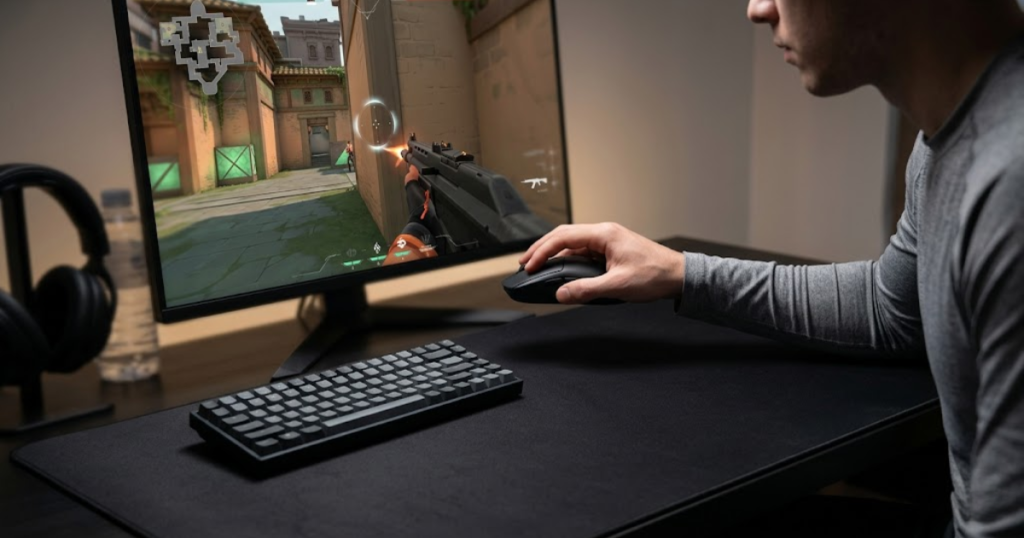
FPS games reward precision during small timing windows. A player may clear an angle, flick to a target, reset the mouse, and prepare for the next fight within seconds. If the crosshair moves during the reset, the player may lose the exact position they were trying to hold.
This issue becomes more noticeable for players who use low sensitivity. Low sensitivity usually requires larger arm movements, which means the player runs out of mouse pad space more often. More resets create more chances for LOD to affect the crosshair.
The factors below explain why FPS players care about Lift Off Distance:
- Repositioning: FPS players often lift the mouse to reset their hand position after large swipes.
- Crosshair Stability: Lower LOD can reduce unwanted movement while the mouse is in the air.
- Low Sensitivity Play: Players using lower sensitivity usually lift the mouse more often during wide movements.
- Consistency: Predictable lift-off behavior makes the mouse feel more controlled during repeated resets.
These factors matter because FPS aim is not only about hitting one flick. It is about repeating the same movement patterns with confidence. A mouse that behaves predictably during lift-off helps reduce one more source of inconsistency.
In short, FPS players care about Lift Off Distance because repositioning is part of real aim control. Lower and more predictable LOD can make the mouse feel steadier during competitive gameplay.
The Relationship Between Repositioning and Aim Control
Repositioning is the act of lifting and resetting the mouse to regain comfortable movement space. This helps FPS players maintain aim control after large swipes, long tracking motions, or repeated angle adjustments.
In games like Valorant, CS2, and Apex Legends, players often need both precision and range of motion. They may use a lower sensitivity for better micro-control, but that lower sensitivity also requires more physical movement. When the player reaches the edge of the mouse pad or an uncomfortable arm position, they lift the mouse and reset it.
If Lift Off Distance is too high, the sensor may continue tracking during the reset. That means the crosshair can shift even though the player is not trying to aim. This can be especially frustrating when holding a tight angle or preparing for a second enemy after the first fight.
Good repositioning should feel neutral. The player lifts the mouse, moves it back, places it down, and continues aiming without unwanted crosshair drift. A lower LOD supports that feeling by stopping sensor input sooner during the lift.
This does not mean LOD is the only factor behind good aim control. Mouse shape, weight, grip style, sensitivity, and mouse pad size also matter. However, LOD affects the reset phase, which is often overlooked by beginners.
To conclude, repositioning connects directly to aim control because the crosshair should stay predictable while the hand resets. Lift Off Distance helps determine how clean that reset feels.
How Unwanted Cursor Movement Happens
Unwanted cursor movement happens when the sensor keeps tracking after the player has already started lifting the mouse. This helps explain why a high Lift Off Distance can feel distracting during FPS gameplay.
When a player lifts the mouse, the hand does not move perfectly straight upward. There is usually a small sideways motion, wrist rotation, or backward reset movement. If the sensor is still active during that motion, the game receives input and moves the crosshair.
That input may be tiny, but FPS games make small errors visible. A few pixels of drift can move the crosshair off a head-level angle. It can also make the player feel like the mouse is floating or sliding during resets.
This issue is more noticeable when a player repeatedly resets the mouse in tense situations. For example, after a missed spray or a fast 180-degree turn, the player may lift the mouse quickly to return to a comfortable position. A high LOD can turn that reset into extra crosshair movement.
Low LOD reduces the window where this unwanted movement can happen. The sensor stops tracking earlier, so sideways motion in the air has less effect on the crosshair. This creates a cleaner separation between aiming and repositioning.
To conclude, unwanted cursor movement is not usually caused by bad aim. It can come from the sensor staying active during lift-off, which is exactly the behavior Lift Off Distance describes.
Why Low Sensitivity Players Notice LOD More Often
Low sensitivity players notice Lift Off Distance more often because they move the mouse farther and lift it more frequently. This helps explain why LOD becomes more important in arm aiming and large mouse pad setups.
A low sensitivity setup gives players more fine control over small aim adjustments, but it requires wider physical movement. Turning around, clearing multiple angles, or tracking a fast target may require the player to move across a large portion of the pad.
Because of that, low sensitivity players run out of comfortable mouse space more often than high sensitivity players. Every time they lift and reset the mouse, Lift Off Distance has a chance to affect the crosshair.
High sensitivity players may still care about LOD, but they usually lift the mouse less often during normal movement. Their smaller hand motions reduce the number of lift-off events, so LOD may feel less obvious unless the mouse has an unusually high lift-off threshold.
For low sensitivity players, a mouse with low and consistent LOD can make resets feel more natural. The mouse stops tracking quickly when lifted, then resumes tracking when placed back down. This rhythm supports cleaner aim habits over time.
To conclude, low sensitivity players notice LOD more because their aiming style creates more repositioning moments. The more often the mouse leaves the pad, the more important predictable Lift Off Distance becomes.
Low Lift Off Distance vs High Lift Off Distance
Low Lift Off Distance is a sensor behavior that stops tracking movement sooner after the mouse leaves the surface. A higher Lift Off Distance allows the sensor to continue tracking from farther away, which helps create a different repositioning experience during FPS gameplay.
Neither option is universally right or wrong because the ideal Lift Off Distance depends on how the player uses the mouse. However, most competitive FPS players tend to prefer lower Lift Off Distance because it minimizes unwanted crosshair movement while resetting mouse position.
The practical difference appears during repositioning rather than normal tracking. When the mouse remains on the pad, both low and high LOD sensors can track accurately. The difference becomes noticeable only when the mouse begins leaving the surface.
The table below explains the differences between low and high lift off distance in FPS games:
| Factor | Low Lift Off Distance | High Lift Off Distance |
|---|---|---|
| Tracking During Lift | Stops sooner | Continues longer |
| Crosshair Stability | Higher | Lower |
| Reposition Control | Better | Less predictable |
| FPS Suitability | Excellent | Situational |
| Pro Player Preference | Common | Less common |
Although low LOD is often preferred for competitive FPS games, some users may not notice a meaningful difference depending on their sensitivity, grip style, and repositioning habits. The goal is not finding the lowest number possible, but finding a level that feels predictable during real gameplay.
The comparison below highlights how low and high Lift Off Distance affect crosshair movement during repositioning:
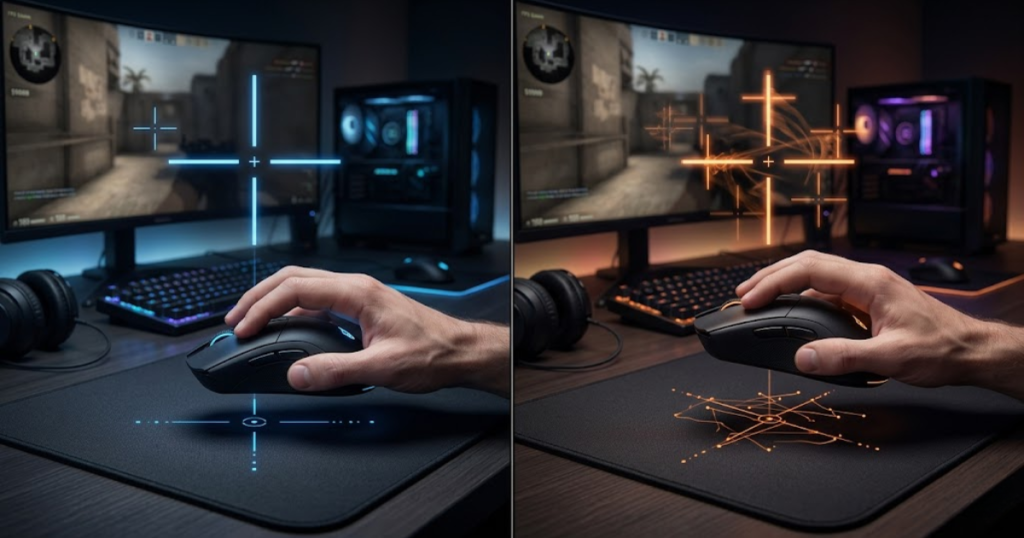
To conclude, low and high Lift Off Distance mainly change how the mouse behaves during lift-off. For most FPS players, lower and more consistent LOD creates a more controlled aiming experience.
Advantages of Low Lift Off Distance
Low Lift Off Distance is a sensor behavior that stops tracking movement quickly after the mouse leaves the surface. This helps reduce unintended crosshair movement when repositioning during FPS games.
The biggest advantage of low LOD is consistency. When the player lifts the mouse, tracking stops almost immediately, making it easier to separate aiming actions from repositioning actions. This can create a cleaner and more predictable feel during repeated resets.
Low LOD is particularly valuable for players who use low sensitivity settings. Because these players lift the mouse more often, reducing unwanted tracking during lift-off can make aim feel more stable over long play sessions.
Another advantage is confidence. Players who trust that their crosshair will remain stable during repositioning are less likely to make unnecessary corrections after placing the mouse back on the pad. This helps maintain rhythm and focus during matches.
Low LOD can also reduce visual distractions. Small crosshair shifts may seem insignificant, but competitive players often notice tiny inconsistencies that casual users ignore. A lower lift-off threshold removes one of those potential distractions.
To conclude, the primary advantage of low Lift Off Distance is improved repositioning control. The sensor stops tracking sooner, allowing the player to reset the mouse without introducing unwanted movement.
Advantages of High Lift Off Distance
High Lift Off Distance is a sensor behavior that continues tracking movement from a greater distance above the surface. This helps maintain tracking across a wider range of lifting conditions and surface situations.
Although high LOD is less popular among competitive FPS players, it does offer some practical benefits. Certain users prefer a mouse that continues tracking slightly longer because it feels more forgiving during light lifts or uneven hand pressure.
Higher LOD can also be useful on surfaces where sensor visibility changes rapidly. If the sensor continues receiving usable surface information from farther away, tracking interruptions may feel less abrupt in some environments.
Some casual users may never notice higher LOD because they rarely reposition the mouse aggressively. Players who use higher sensitivity settings often perform smaller movements, meaning lift-off behavior plays a smaller role in their overall experience.
Another benefit is familiarity. Players who have spent years using mice with higher LOD may find extremely low LOD unusual at first because the tracking stops sooner than expected during lifting motions.
To conclude, high Lift Off Distance is not automatically a flaw. While it may be less desirable for many FPS players, it can still suit users whose aiming style does not rely heavily on frequent repositioning.
Which One Feels Better for Competitive FPS Games
Low Lift Off Distance is generally the preferred choice for competitive FPS games because it helps minimize unwanted crosshair movement during repositioning. This creates a more predictable relationship between hand movement and cursor movement.
Competitive FPS titles place heavy emphasis on consistency. Players often repeat the same movements thousands of times while building muscle memory. Any unnecessary movement during lift-off can interfere with that consistency, especially when holding precise angles.
A lower LOD supports the idea that tracking should happen only when the player intends to move the mouse on the surface. Once the mouse leaves the pad, tracking should end quickly so the repositioning phase remains separate from active aiming.
Professional and high-level players often favor lower LOD because their setups typically involve lower sensitivity, larger mouse pads, and frequent mouse resets. These conditions make lift-off behavior easier to notice during gameplay.
That said, the difference between low and high LOD should not be exaggerated. A good mouse shape, comfortable grip, reliable sensor, and proper sensitivity settings usually have a greater impact on performance than LOD alone.
To conclude, low Lift Off Distance tends to feel better for competitive FPS gaming because it improves repositioning control. However, it should be viewed as one part of a complete aiming setup rather than the single factor that determines performance.
What Is Considered a Good Lift Off Distance?
A good Lift Off Distance is a height that stops unwanted tracking quickly while still maintaining consistent sensor behavior on the mouse pad. This helps balance crosshair stability and everyday usability for FPS players.
Most modern gaming mice already provide Lift Off Distance values that are suitable for competitive gaming. The discussion is usually not about whether a mouse has LOD, but whether the LOD feels low, medium, or high relative to the player’s expectations.
For FPS players, a lower Lift Off Distance is often considered desirable because it reduces movement during repositioning. However, extremely low values are not automatically better if they create inconsistent tracking on specific surfaces.
The table below explains common lift off distance ranges and their typical use cases:
| LOD Range | Typical Height | FPS Suitability |
|---|---|---|
| Very Low | Below 1 mm | Excellent |
| Low | 1 to 2 mm | Ideal for most players |
| Medium | 2 to 3 mm | Acceptable |
| High | Above 3 mm | Less preferred |
It is important to remember that these ranges are general guidelines rather than strict rules. Real-world behavior can vary depending on the sensor, firmware, mouse feet, and mouse pad being used.
To conclude, a good Lift Off Distance is one that feels predictable during repositioning. For most FPS players, a low but stable LOD provides the best balance between control and consistency.
Extremely Low Lift Off Distance
Extremely low Lift Off Distance is a setting where the sensor stops tracking almost immediately after leaving the surface. This helps eliminate unwanted cursor movement during lift-off as much as possible.
Many competitive players appreciate extremely low LOD because it creates a strong separation between aiming and repositioning. Once the mouse begins lifting, the sensor quickly stops reporting movement, which can make resets feel cleaner.
However, extremely low LOD is not always ideal. If the threshold becomes too aggressive, some surfaces may produce inconsistent behavior when the mouse is tilted slightly or used with uneven pressure. This is why manufacturers often balance low LOD with reliable tracking.
Some advanced gaming mice offer calibration features that allow users to tune lift-off behavior closer to their preferences. These tools can help players achieve a lower LOD without sacrificing stability.
To conclude, extremely low Lift Off Distance can be beneficial for competitive FPS play, but only when it remains consistent across normal usage conditions.
Medium Lift Off Distance
Medium Lift Off Distance is a middle-ground sensor behavior that allows some tracking during lift-off before movement stops. This helps create a balance between repositioning control and surface flexibility.
A medium LOD often goes unnoticed by casual players because the tracking behavior remains relatively predictable during normal use. The sensor does not stop immediately, but it also does not continue tracking excessively far above the surface.
For many users, medium LOD provides a comfortable compromise. The mouse feels responsive on a variety of surfaces while still limiting major cursor drift during repositioning. This is one reason why some mainstream gaming mice ship with moderate lift-off values by default.
Competitive FPS players may still prefer lower LOD, especially if they use large arm movements and frequent mouse resets. However, medium LOD is usually not problematic unless the player is highly sensitive to lift-off behavior.
To conclude, medium Lift Off Distance offers a balanced experience that works well for many users, even if it is not always the first choice for competitive FPS enthusiasts.
High Lift Off Distance
High Lift Off Distance is a sensor behavior that continues tracking from farther above the surface. This helps maintain movement detection during lifting but can increase unwanted cursor movement during repositioning.
The most common criticism of high LOD is that the crosshair may continue moving even after the player expects tracking to stop. This becomes more noticeable in games that require precise angle holding and repeated mouse resets.
Despite that limitation, high LOD is not necessarily a sign of a poor sensor. Some sensors and surfaces naturally produce higher lift-off values, and many users adapt without difficulty. The importance of LOD depends heavily on how often the player lifts the mouse.
Players who use higher sensitivity settings may notice less impact because their movement range is smaller. In contrast, low sensitivity players often encounter lift-off events more frequently, making higher LOD easier to feel during gameplay.
To conclude, high Lift Off Distance can still function well for many users, but it is generally less desirable for competitive FPS players who prioritize precise repositioning control.
Does Lift Off Distance Affect Aim Accuracy?
Lift Off Distance is a sensor characteristic that influences how the mouse behaves during lift-off. It helps affect aiming consistency during repositioning, but it does not directly increase or decrease the sensor’s raw accuracy.
This distinction is important because many players assume that lower LOD automatically creates better aim. In reality, Lift Off Distance affects what happens when the mouse leaves the surface, while aim accuracy depends on a much broader combination of factors.
Sensor quality, shape, grip comfort, sensitivity settings, practice habits, and mouse control all play major roles in aiming performance. LOD contributes only to the repositioning phase of mouse movement.
Understanding this difference helps players avoid unrealistic expectations. A lower Lift Off Distance can make a mouse feel cleaner during resets, but it will not instantly improve tracking precision or flick accuracy on its own.
To conclude, Lift Off Distance influences the feel of aiming rather than the underlying accuracy of the sensor. It is best viewed as a supporting factor rather than a direct performance multiplier.
What Lift Off Distance Can Affect
Lift Off Distance can affect how stable and predictable the mouse feels during repositioning. This helps influence a player’s confidence when resetting the mouse between aiming movements.
A lower LOD can reduce unwanted cursor drift while the mouse is in the air. This makes it easier to maintain the intended crosshair position after a large swipe or rapid movement across the pad.
LOD can also influence consistency. Players who frequently lift the mouse may notice that a lower and more predictable lift-off threshold creates fewer surprises during gameplay. The crosshair behaves in a more repeatable way from one reset to the next.
Another area affected by LOD is perceived control. Even if two mice offer identical tracking performance on the surface, differences in lift-off behavior can make one feel more stable during repeated repositioning.
To conclude, Lift Off Distance affects repositioning behavior, crosshair stability, and consistency. These factors influence the feel of aiming rather than the actual accuracy of the sensor.
What Lift Off Distance Cannot Affect
Lift Off Distance cannot directly improve the sensor’s ability to track movement while the mouse remains on the surface. This helps separate LOD from core sensor performance characteristics.
LOD does not increase DPI precision, reduce latency, improve polling rate, or make a sensor more accurate during normal movement. Those characteristics are controlled by different aspects of mouse hardware and firmware.
A mouse with low LOD can still have mediocre tracking quality if the sensor itself is poor. Likewise, a mouse with higher LOD can still deliver excellent tracking accuracy while moving across the mouse pad.
It is also important to understand that LOD does not replace practice. Better aim comes primarily from skill development, consistent settings, and repetition. Lift Off Distance can support those habits, but it cannot create them.
To conclude, Lift Off Distance does not improve core sensor accuracy. Its role is limited to lift-off behavior and repositioning control.
Common Misconceptions About LOD and Accuracy
Many misconceptions about Lift Off Distance come from treating it as a direct measure of sensor quality. This creates confusion about what LOD actually does and why it matters.
One common myth is that lower LOD always means better aim. While lower LOD can reduce unwanted movement during repositioning, it does not automatically improve tracking precision, reaction time, or crosshair placement.
Another misconception is that professional players succeed because of low LOD alone. In reality, professional performance comes from a complete combination of skill, training, setup optimization, and consistency.
Some users also assume that higher LOD means a defective sensor. In many cases, higher lift-off behavior is simply the result of sensor tuning, surface interaction, or design choices rather than a performance flaw.
Understanding these misconceptions helps players focus on the aspects of their setup that genuinely affect performance. Lift Off Distance matters, but it should be evaluated within the larger context of overall mouse control.
To conclude, LOD is an important sensor characteristic, but it should not be confused with raw aiming accuracy or overall gaming skill.
Does Lift Off Distance Affect Tracking Performance?
Lift Off Distance is a sensor behavior that determines when tracking stops as the mouse leaves the surface. This feature helps control cursor movement during repositioning, but it does not directly change tracking performance while the mouse remains on the mouse pad.
Many players confuse tracking performance with Lift Off Distance because both are related to the sensor. However, they describe different aspects of mouse behavior. Tracking performance refers to how accurately the sensor follows movement across the surface, while Lift Off Distance focuses on the transition between active tracking and tracking stop.
A gaming mouse can deliver excellent tracking accuracy and still have a Lift Off Distance that feels too high for a competitive FPS player. Likewise, a mouse can have a very low LOD but offer only average tracking quality if the sensor itself is not particularly strong.
The key idea is that tracking performance is measured during normal mouse movement on the surface. Lift Off Distance becomes relevant only when the mouse begins leaving that surface.
The table below explains the difference between tracking performance and lift off distance:
| Sensor Characteristic | Affected by Lift Off Distance? |
|---|---|
| Tracking Accuracy | No |
| Maximum Tracking Speed | No |
| Motion Consistency During Lift-Off | Yes |
| Cursor Drift While Repositioning | Yes |
| Surface Tracking Quality | No |
Understanding this distinction helps players evaluate mouse performance more accurately. Instead of treating LOD as a measure of sensor quality, it should be viewed as a separate characteristic that affects lift-off behavior.
To conclude, Lift Off Distance can influence how stable the mouse feels while repositioning, but it does not directly determine how accurately the sensor tracks movement on the surface.
Tracking Accuracy
Tracking accuracy is the ability of a sensor to follow movement correctly while the mouse remains on the mouse pad. This characteristic helps determine whether the cursor or crosshair moves exactly as the player’s hand intends.
When players discuss tracking accuracy, they are usually referring to normal sensor operation. The mouse is touching the surface, the sensor has a clear view of the texture beneath it, and movement data is being translated into cursor movement.
In this situation, Lift Off Distance plays almost no role because the mouse has not yet left the surface. Instead, tracking accuracy depends on sensor quality, firmware tuning, surface compatibility, and movement conditions.
Modern flagship gaming mice generally provide excellent tracking accuracy. For most FPS players, tracking quality differences between modern top-tier sensors are much smaller than differences in shape, weight, or comfort.
This is why a player should avoid assuming that lower LOD automatically means better tracking. The two characteristics serve different purposes and should be evaluated independently.
To conclude, tracking accuracy measures how well a sensor follows movement on the surface, while Lift Off Distance controls what happens when the mouse begins leaving that surface.
Motion Tracking Consistency
Motion tracking consistency is the ability of a sensor to deliver predictable movement behavior across repeated actions. This characteristic helps create a stable aiming experience during tracking, flicking, and repositioning.
Consistency matters because FPS players rely heavily on muscle memory. The same hand movement should produce the same result every time. Any unpredictable sensor behavior can make aiming feel unreliable even if the sensor remains technically accurate.
One factor often discussed alongside Lift Off Distance is sensor smoothing. While Lift Off Distance determines when tracking stops during lift-off, sensor smoothing affects how movement data is processed before being sent to the game.
These are separate concepts. A mouse can have low Lift Off Distance and still use smoothing under certain conditions. Likewise, a mouse can have minimal smoothing while maintaining a relatively high Lift Off Distance. Understanding the difference helps players diagnose how a mouse actually feels during gameplay.
For competitive FPS gaming, consistency is usually more important than chasing individual specifications. Players benefit most when every movement feels predictable, whether they are tracking a target, flicking to an angle, or resetting mouse position.
To conclude, motion tracking consistency focuses on repeatable behavior during gameplay. Lift Off Distance contributes to that consistency during repositioning, while other sensor technologies influence movement processing in different ways.
Lift Off Detection
Lift off detection is the process used by a sensor to determine when it should stop tracking movement after the mouse leaves the surface. This mechanism helps create the actual Lift Off Distance behavior that players experience during gameplay.
As the mouse rises from the pad, the sensor receives progressively weaker surface information. The sensor must decide when the remaining information is no longer reliable enough for accurate tracking. That decision point becomes the lift-off threshold.
A well-tuned lift off detection system should feel predictable. The sensor should stop tracking at roughly the same height each time, allowing the player to build confidence in repositioning behavior. Inconsistent lift-off detection can feel distracting because the crosshair may behave differently from one lift to the next.
Manufacturers often tune lift off detection differently depending on the intended audience. Competitive FPS mice typically prioritize lower lift-off thresholds, while some general-purpose mice may allow tracking to continue from greater distances.
Modern sensors have become increasingly effective at maintaining consistent lift-off behavior across different surfaces. However, surface material and calibration can still influence the final experience.
To conclude, lift off detection is the mechanism that creates Lift Off Distance. Consistent detection helps produce predictable repositioning behavior during FPS gameplay.
Optical vs Laser Sensors and Lift Off Distance
Optical sensors and laser sensors are two different technologies used to track movement. These technologies help create different Lift Off Distance behavior because they interact with surfaces in different ways.
Although both sensor types can detect movement accurately, they gather surface information differently. Those differences affect how long the sensor can continue reading the surface as the mouse moves away from it.
Historically, laser sensors were known for tracking across a wider variety of surfaces. Optical sensors became more popular among FPS players because they often delivered more predictable behavior, especially during competitive gaming scenarios.
Today, most esports-focused gaming mice use optical sensors. While modern technology has improved both categories, the preference for optical sensors remains strong in the FPS community.
The table below explains how optical and laser sensors compare in lift off distance behavior:
| Characteristic | Optical Sensor | Laser Sensor |
|---|---|---|
| Typical LOD | Lower | Higher |
| Surface Sensitivity | More controlled | More aggressive |
| FPS Popularity | Very high | Lower |
| Reposition Control | Better | Less preferred |
| Competitive Usage | Common | Rare |
While optical sensors dominate the FPS market today, the quality of implementation still matters more than sensor category alone. Sensor tuning, firmware, and surface interaction all contribute to the final experience.
The illustration below compares how optical and laser sensors interact with the mouse pad surface:
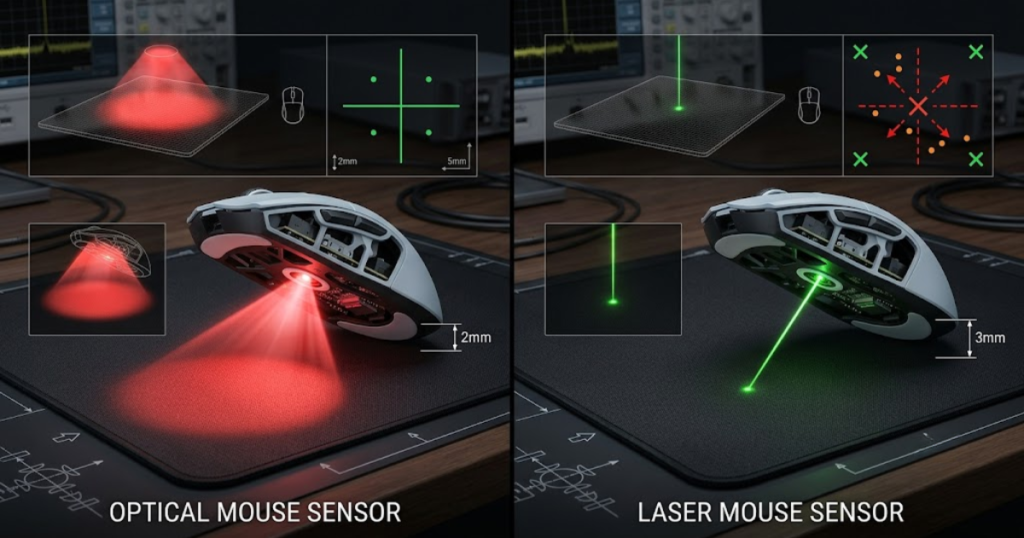
To conclude, optical and laser sensors can both perform well, but optical sensors are usually preferred for competitive FPS gaming because of their more predictable lift-off characteristics.
Typical Optical Sensor Behavior
Optical sensor behavior is characterized by consistent surface tracking and controlled lift-off detection. This behavior helps create the predictable feel that many FPS players prefer.
Optical sensors rely on visible or infrared light to observe the surface beneath the mouse. As the distance between the sensor and the surface increases, the image becomes less clear, eventually causing tracking to stop.
Because of this behavior, optical sensors often produce lower Lift Off Distance values than laser sensors. This can reduce unwanted cursor movement during repositioning and create a cleaner transition between active aiming and mouse resets.
Modern optical sensors are also highly refined. Manufacturers have spent years optimizing their performance for competitive gaming, leading to widespread adoption in esports-focused products.
To conclude, optical sensors typically provide controlled lift-off behavior and consistent tracking, making them a common choice among FPS players.
Typical Laser Sensor Behavior
Laser sensor behavior is characterized by deeper surface reading and extended tracking capability. This helps laser sensors operate on a broader range of surfaces but can also influence Lift Off Distance behavior.
Because laser sensors often continue reading surface detail from farther away, they may produce higher lift-off values than comparable optical sensors. This extended tracking capability can be useful in certain environments but is not always desirable for competitive FPS gaming.
Some players perceive laser sensors as more sensitive during lift-off because movement can continue longer after the mouse leaves the surface. Whether this is a benefit or drawback depends largely on the player’s preferences and aiming style.
Modern laser sensors are significantly better than older implementations, but they remain less common in esports-focused gaming mice. Most competitive players continue choosing optical solutions for greater consistency during repositioning.
To conclude, laser sensors offer broad surface compatibility and extended tracking behavior, but they are generally less favored for competitive FPS use.
Why Most FPS Mice Use Optical Sensors Today
Most FPS gaming mice use optical sensors because optical technology provides predictable tracking behavior and controlled Lift Off Distance characteristics. These qualities help support consistent aim performance during competitive play.
Competitive FPS players value reliability above nearly everything else. They want the mouse to respond the same way every time they move, stop, flick, or reposition. Optical sensors have earned a strong reputation for delivering that consistency.
Another reason is ecosystem maturity. Most leading sensor manufacturers have focused heavily on developing optical solutions for esports products. As a result, many flagship FPS mice now use advanced optical sensors with excellent tracking and lift-off performance.
Shape, weight, comfort, and sensor implementation still matter more than sensor category alone. However, the popularity of optical sensors reflects years of positive results within the competitive gaming community.
To conclude, FPS mice rely heavily on optical sensors because they provide the balance of tracking quality, consistency, and lift-off behavior that competitive players demand.
How Mouse Pads Influence Lift Off Distance
Mouse pads are surfaces that directly affect how a sensor reads texture and movement. These surfaces help influence Lift Off Distance because the sensor’s ability to track depends on the quality of the surface information it receives.
Many players focus entirely on the mouse while overlooking the role of the mouse pad. In reality, Lift Off Distance is not determined by the sensor alone. The interaction between the sensor and the surface is equally important.
Different materials, textures, colors, and wear levels can change how clearly the sensor sees the surface. Because of that, the same mouse may feel slightly different when used on different mouse pads.
This is one reason why some manufacturers include surface calibration tools. These systems attempt to optimize how the sensor interacts with the specific surface being used.
To conclude, Lift Off Distance is influenced by both the mouse and the mouse pad. The relationship between the two helps determine the final tracking experience.
Cloth Mouse Pads
Cloth mouse pads are textured surfaces commonly used by FPS players because they provide a balance of control and consistency. These surfaces help create stable tracking conditions for most modern optical sensors.
The woven texture of cloth pads gives the sensor clear surface detail to read. Because of this, many gaming mice are optimized specifically for cloth mouse pad environments.
Different cloth pads can still produce slightly different Lift Off Distance behavior. Factors such as weave density, color, thickness, and wear level all influence how the sensor perceives the surface.
Most competitive FPS players use cloth pads because they offer predictable tracking and comfortable glide characteristics. These qualities contribute to a more consistent overall aiming experience.
To conclude, cloth mouse pads provide reliable surface information that supports stable Lift Off Distance behavior in most gaming setups.
Hard Mouse Pads
Hard mouse pads are rigid surfaces that provide a smoother and often faster glide experience. These surfaces help create different sensor interactions compared to traditional cloth pads.
Because hard pads reflect light differently, some sensors may produce slightly different Lift Off Distance behavior. The exact result depends on both the surface material and the sensor design.
Many players enjoy hard pads because they allow quick movements with less friction. However, the reduced texture can change how the sensor interprets surface detail during lift-off.
This does not automatically make hard pads better or worse for Lift Off Distance. It simply means the sensor may interact with the surface differently than it would on cloth.
To conclude, hard mouse pads can influence Lift Off Distance through their unique surface characteristics, creating a different feel compared to cloth alternatives.
Surface Texture and Sensor Interaction
Surface texture is the collection of physical details that a sensor uses to track movement. This texture helps determine how clearly the sensor can read the surface during both normal tracking and lift-off transitions.
When the texture is easy for the sensor to identify, tracking remains stable and predictable. When the texture becomes difficult to read, tracking may weaken sooner as the mouse rises from the surface.
This interaction explains why Lift Off Distance is often described as a combination of mouse behavior and surface behavior rather than a standalone specification. The sensor and surface work together to create the final result.
Changes in surface wear can also influence sensor interaction over time. A heavily worn pad may provide different tracking characteristics compared to a new version of the same product.
To conclude, surface texture plays a direct role in Lift Off Distance because the sensor depends on texture visibility to determine when tracking should continue and when it should stop.
Can You Adjust Lift Off Distance?
Lift Off Distance is a sensor characteristic that can be adjusted on some gaming mice through software, firmware, or surface calibration features. These adjustment options help players fine-tune how quickly the sensor stops tracking when the mouse leaves the surface.
The example below shows a gaming mouse software interface with Lift Off Distance adjustment options:
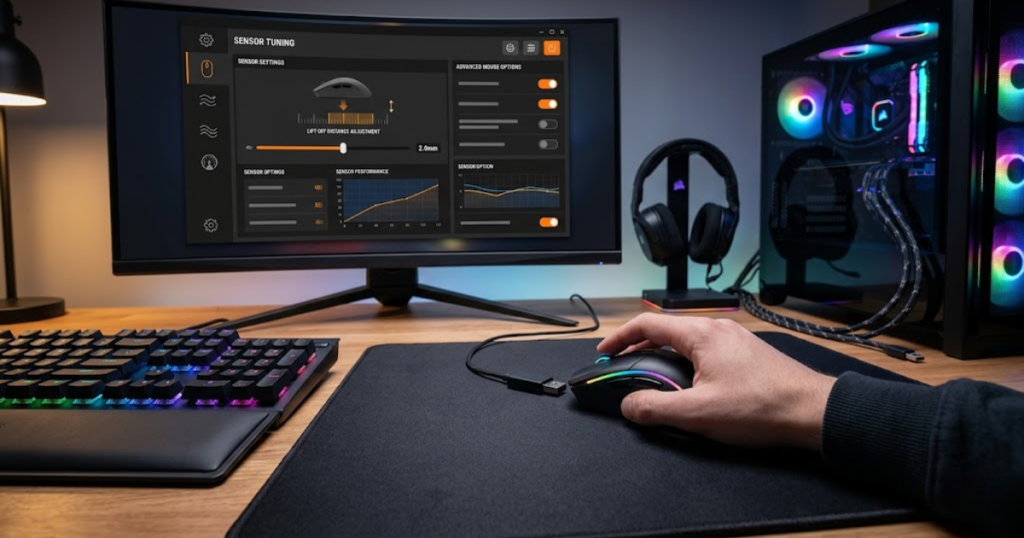
Not every gaming mouse offers direct Lift Off Distance controls. Some manufacturers provide dedicated LOD settings, while others optimize the value at the factory and leave no user adjustment options. Whether adjustment is available depends on the sensor, firmware, and software ecosystem.
For FPS players, the goal of adjusting Lift Off Distance is not to chase the lowest possible value. Instead, the objective is to find a lift-off behavior that feels predictable during repositioning while maintaining stable tracking on the mouse pad.
Many modern gaming mice already ship with well-tuned LOD values. In these cases, adjustment becomes more about personal preference than fixing a problem. Players who frequently reposition the mouse may prefer lower values, while others may prioritize broader surface compatibility.
The factors below explain how Lift Off Distance can be adjusted:
- Software Settings: Some gaming mice include direct LOD controls within their configuration software.
- Surface Calibration: Calibration systems can optimize sensor behavior for specific mouse pads.
- Firmware Features: Sensor tuning built into firmware may influence lift-off behavior.
- Hardware Limits: Not all sensors support user-adjustable Lift Off Distance settings.
Adjustment tools can improve the user experience, but they should be viewed as refinement features rather than mandatory requirements. Many competitive players perform well without ever modifying their mouse’s default LOD configuration.
To conclude, Lift Off Distance adjustment helps users customize sensor behavior for their setup. The best setting is usually the one that feels consistent during real gameplay rather than the one with the lowest number.
Software-Based LOD Adjustment
Software-based LOD adjustment is a feature that allows users to modify Lift Off Distance through a manufacturer’s configuration application. This functionality helps players tailor lift-off behavior without changing physical hardware.
When available, software controls typically offer predefined levels rather than precise millimeter values. Players may see options such as Low, Medium, and High instead of exact measurements. These presets adjust how aggressively the sensor stops tracking during lift-off.
The benefit of software adjustment is convenience. Users can test different settings quickly and determine which option feels best for their aiming style. This is especially useful for competitive players who want to optimize repositioning behavior.
However, software settings cannot completely override the physical limitations of a sensor. The effectiveness of adjustment depends on the hardware itself and the quality of the implementation.
To conclude, software-based LOD adjustment provides a practical way to customize sensor behavior, but the final result still depends on the underlying sensor design.
Calibration Features
Calibration features are sensor tools that adapt tracking behavior to a specific mouse pad. These systems help optimize how the sensor interacts with the surface and may indirectly influence Lift Off Distance.
Surface calibration works by analyzing the characteristics of the mouse pad. The sensor learns how the surface reflects light and how texture information should be interpreted during movement and lift-off transitions.
This process can improve consistency because the sensor is working with more accurate information about the environment. In some cases, calibration may slightly alter how early or late tracking stops when the mouse is lifted.
Not all gaming mice include calibration features, and results vary depending on the surface being used. Nevertheless, calibration can help create a more predictable experience for users who frequently change mouse pads or experiment with different surfaces.
To conclude, calibration features help sensors understand the surface more effectively, which can contribute to more consistent Lift Off Distance behavior.
Limitations of LOD Customization
LOD customization is a feature that allows some control over lift-off behavior, but it cannot completely transform the characteristics of a sensor. These limitations help explain why adjustment should be viewed as optimization rather than correction.
Every sensor operates within physical boundaries. Software settings can modify behavior to a degree, but they cannot completely eliminate the influence of sensor design, lens configuration, or surface interaction.
Players sometimes expect dramatic differences after changing LOD settings. In reality, adjustments are often subtle and most noticeable during repositioning rather than active aiming.
It is also possible to set Lift Off Distance too aggressively for a particular surface. If the sensor stops tracking too early, tracking stability near the surface may become less consistent under certain conditions.
To conclude, Lift Off Distance customization can improve comfort and consistency, but it works best as a fine-tuning tool rather than a complete solution to sensor-related concerns.
What Lift Off Distance Do Professional FPS Players Prefer?
Professional FPS players generally prefer lower Lift Off Distance because it reduces unwanted tracking during mouse repositioning. This preference helps create more predictable crosshair behavior during competitive gameplay.
Professional players spend thousands of hours refining muscle memory. Small inconsistencies that casual players may never notice can become meaningful at the highest level of competition. Because of this, many professionals choose settings and equipment that minimize variables.
Low Lift Off Distance supports that philosophy by limiting sensor activity once the mouse leaves the surface. The player can reposition the mouse confidently without worrying about additional crosshair movement.
While there is no universal professional standard for Lift Off Distance, lower values are generally more common among esports-focused setups. This preference is especially noticeable in tactical shooters where precise crosshair placement is critical.
The factors below explain why professional players often prefer lower Lift Off Distance:
- Frequent Repositioning: Professional players reset mouse position regularly during matches.
- Large Mouse Movements: Lower sensitivity setups create more lift-off events.
- Crosshair Stability: Lower LOD reduces unwanted movement during resets.
- Consistency: Predictable sensor behavior supports repeatable muscle memory.
It is important to remember that professional success is not determined by Lift Off Distance alone. Shape, comfort, training habits, and overall setup quality remain far more influential factors.
To conclude, professional FPS players often favor lower Lift Off Distance because it supports consistency during repositioning, but it remains only one part of a larger competitive setup.
Frequent Mouse Repositioning
Frequent mouse repositioning is the process of lifting and resetting the mouse during gameplay. This action helps players maintain comfortable movement space while using lower sensitivity settings.
Competitive FPS players often make large arm movements when clearing angles, tracking targets, or turning quickly. These movements eventually push the mouse toward the edge of the pad, making repositioning necessary.
Because repositioning occurs so often, lift-off behavior becomes more noticeable. A lower Lift Off Distance reduces the amount of tracking that occurs while the mouse is being moved back into position.
The goal is not to eliminate repositioning. Instead, the objective is to make repositioning invisible from a crosshair perspective so the player can focus entirely on gameplay.
To conclude, frequent mouse repositioning increases the importance of Lift Off Distance because every lift-off event creates an opportunity for unwanted tracking.
Large Mouse Pad Movements
Large mouse pad movements are broad physical motions used to control aiming at lower sensitivity settings. These movements help improve precision but also increase reliance on repositioning.
Many professional FPS players prefer lower sensitivity because it allows finer control over small aiming adjustments. The tradeoff is that larger physical movements become necessary to cover the same in-game distance.
As movement range increases, the mouse reaches the edge of the pad more frequently. This naturally creates additional lift-off events and makes Lift Off Distance easier to notice during gameplay.
A lower Lift Off Distance helps keep these large movements organized by preventing unnecessary crosshair drift when the player resets hand position between actions.
To conclude, large mouse pad movements increase the practical relevance of Lift Off Distance because repositioning becomes a regular part of aiming mechanics.
Consistent Crosshair Placement
Consistent crosshair placement is the ability to keep the crosshair in predictable and intentional locations throughout a match. This skill helps players react faster and maintain better positioning during engagements.
Crosshair placement depends heavily on muscle memory and repetition. When a player performs the same movements repeatedly, consistency becomes easier to maintain.
Unwanted tracking during lift-off can introduce small changes to crosshair position that disrupt this consistency. While these movements may be minor, they can still affect precision during high-level gameplay.
A lower Lift Off Distance reduces the likelihood of accidental movement during repositioning, allowing the player to maintain the intended crosshair position more reliably.
To conclude, consistent crosshair placement benefits from predictable lift-off behavior because fewer unintended movements occur during mouse resets.
Does Lift Off Distance Matter When Choosing a Gaming Mouse?
Lift Off Distance is a gaming mouse characteristic that influences repositioning behavior. This feature helps improve the overall experience for some FPS players, but it is not usually the most important factor when selecting a mouse.
Many buyers focus heavily on specifications when comparing gaming mice. While Lift Off Distance deserves consideration, other characteristics generally have a greater impact on comfort, performance, and long-term satisfaction.
Mouse shape determines how naturally the hand interacts with the device. Weight influences movement feel and fatigue. Sensor quality affects tracking performance. Compared to these fundamentals, Lift Off Distance usually plays a supporting role.
That does not mean LOD should be ignored. Players who frequently reposition the mouse may notice a meaningful difference between lower and higher lift-off behavior. However, most users will benefit more from choosing a mouse that fits their hand and play style first.
The table below explains where Lift Off Distance ranks among major gaming mouse features:
| Feature | Importance Level |
|---|---|
| Shape | Very High |
| Weight | Very High |
| Sensor Quality | Very High |
| Lift Off Distance | Moderate |
| RGB Lighting | Low |
Understanding feature priority helps buyers make smarter decisions. Instead of chasing one specification, it is better to evaluate how the entire mouse fits the intended use case.
To conclude, Lift Off Distance matters, but it should be viewed as a refinement factor rather than the primary reason to choose a gaming mouse.
When LOD Should Be a Priority
Lift Off Distance should become a priority when a player frequently notices unwanted cursor movement during repositioning. This focus helps address a specific issue rather than optimizing for a specification alone.
Players using low sensitivity settings often benefit most from paying attention to LOD. Their larger physical movements create more lift-off events, making repositioning behavior easier to feel during gameplay.
Users who have already found a comfortable shape, suitable weight, and reliable sensor may also choose to fine-tune their setup by evaluating Lift Off Distance more closely.
In these situations, lower and more predictable LOD can contribute to a cleaner overall aiming experience.
To conclude, Lift Off Distance deserves greater attention when repositioning behavior directly affects the player’s comfort or consistency.
When Other Features Matter More
Other mouse features matter more than Lift Off Distance when a player is choosing a mouse for overall performance and comfort. These features help shape the core experience of using a gaming mouse for FPS games.
Shape influences grip comfort and long-term control. Weight affects movement speed and fatigue. Sensor quality determines tracking reliability. These characteristics impact nearly every moment of gameplay, not just repositioning.
A player using an uncomfortable shape will likely notice performance issues long before Lift Off Distance becomes a concern. Likewise, poor weight balance can affect aiming far more frequently than lift-off behavior.
This is why experienced players often prioritize foundational characteristics first and evaluate Lift Off Distance later in the decision-making process.
To conclude, shape, weight, and sensor quality usually provide greater value than Lift Off Distance when selecting a gaming mouse.
A Practical Buying Perspective
A practical buying perspective is an approach that evaluates gaming mice based on overall performance rather than a single specification. This mindset helps buyers make balanced purchasing decisions.
Most modern gaming mice already offer acceptable Lift Off Distance behavior for competitive gaming. The difference between products often comes down to shape, comfort, weight distribution, button implementation, and sensor tuning.
Once those fundamentals are covered, Lift Off Distance can serve as an additional consideration. Buyers looking for complete recommendations can explore our guide to the best gaming mouse for FPS games in 2026 to compare options that balance multiple performance factors.
Rather than searching for the lowest Lift Off Distance possible, players should focus on finding equipment that feels comfortable, consistent, and reliable during actual gameplay.
To conclude, Lift Off Distance is one useful factor among many. The best gaming mouse is usually the one that delivers the most balanced overall experience rather than the most extreme specification.
Frequently Asked Questions About Lift Off Distance
Lift Off Distance is often misunderstood because it is closely related to sensor behavior, aiming performance, and gaming mouse setup preferences. The questions below answer the most common concerns FPS players have when learning about Lift Off Distance.
What does lift off distance mean on a gaming mouse?
Lift Off Distance is the height at which a mouse sensor stops tracking movement after the mouse leaves the surface. This behavior determines how much cursor movement can occur while repositioning the mouse.
Is lower lift off distance always better?
Lower Lift Off Distance is generally preferred for competitive FPS gaming because it reduces unwanted cursor movement during repositioning. However, the best Lift Off Distance depends on personal preference, surface compatibility, and sensor consistency.
What lift off distance do most FPS players prefer?
Most FPS players prefer a low Lift Off Distance because it allows the sensor to stop tracking sooner when the mouse is lifted. This behavior helps create more predictable crosshair placement during repositioning.
Does lift off distance affect DPI?
No, Lift Off Distance does not affect DPI. DPI controls sensitivity and cursor speed, while Lift Off Distance controls when tracking stops after the mouse leaves the surface.
Does lift off distance affect polling rate?
No, Lift Off Distance does not affect polling rate. Polling rate determines how frequently the mouse sends information to the computer, while Lift Off Distance determines lift-off behavior.
Can lift off distance improve aim?
Lift Off Distance can improve aiming consistency during repositioning by reducing unwanted cursor movement. However, it does not directly improve aiming skill, tracking precision, or reaction time.
What is the ideal lift off distance for Valorant?
For most Valorant players, a Lift Off Distance between 1 mm and 2 mm is considered ideal. This range provides a balance between stable tracking and controlled repositioning.
What is the ideal lift off distance for CS2?
Many CS2 players prefer lower Lift Off Distance settings because the game rewards precise crosshair placement and frequent mouse repositioning during competitive play.
Can a mouse pad change lift off distance?
Yes, mouse pads can influence Lift Off Distance because different materials and textures affect how the sensor reads the surface. The same mouse may produce different LOD behavior on different pads.
Are optical sensors better than laser sensors for low lift off distance?
Optical sensors are generally preferred for low Lift Off Distance behavior because they often provide more predictable tracking and repositioning characteristics in FPS games.
Can lift off distance be adjusted through software?
Some gaming mice allow Lift Off Distance adjustment through software or calibration features. Availability depends on the sensor, firmware, and manufacturer software support.
Should lift off distance influence gaming mouse buying decisions?
Lift Off Distance should be considered when choosing a gaming mouse, especially for FPS players. However, shape, weight, comfort, and sensor quality are usually more important factors than LOD alone.
Conclusion
Lift Off Distance is the height at which a mouse sensor stops tracking movement after the mouse leaves the surface. This sensor behavior helps determine how much unwanted cursor movement can occur during repositioning, making it especially relevant for FPS players who frequently lift and reset their mouse.
As discussed throughout this guide, Lift Off Distance is not a measure of sensor accuracy, DPI, or polling rate. Instead, it focuses on what happens when the mouse transitions from active tracking to no longer reading the surface. Understanding this distinction helps players evaluate gaming mice more accurately and avoid common misconceptions.
For most competitive FPS players, a lower and more consistent Lift Off Distance creates a more predictable aiming experience. It reduces unwanted crosshair movement during mouse resets and supports cleaner repositioning, particularly for players using lower sensitivity settings.
At the same time, Lift Off Distance should be viewed as one part of a larger gaming mouse setup. Shape, weight, comfort, and overall sensor quality usually have a greater impact on performance than LOD alone. Once those core factors are addressed, Lift Off Distance becomes an additional detail that can help refine the overall experience.
If you are evaluating a new gaming mouse, understanding Lift Off Distance can help you choose equipment that feels more natural and consistent during FPS gameplay. The best setting is ultimately the one that fits your aiming style, mouse pad, and personal preference.
Thank you for reading GearTP. We hope this guide helped you better understand Lift Off Distance and how it influences real-world FPS gaming performance.